Oracle SDN
Performance Acceleration with
Software-Defined Networking
Oracle SDN, which delivers software-defined networking, boosts application
performance and management flexibility by dynamically connecting virtual
machines (VMs) and servers to networks, storage devices, and other VMs.
With it, you can gain the performance benefits of up to 80 Gb/sec
server-to-server throughput and realize up to 19 times faster live migration, 12 times
faster database queries, and 30 times faster backups than legacy systems.
Oracle SDN provides virtual networking flexibility that costs 50 percent less
than legacy networking systems.
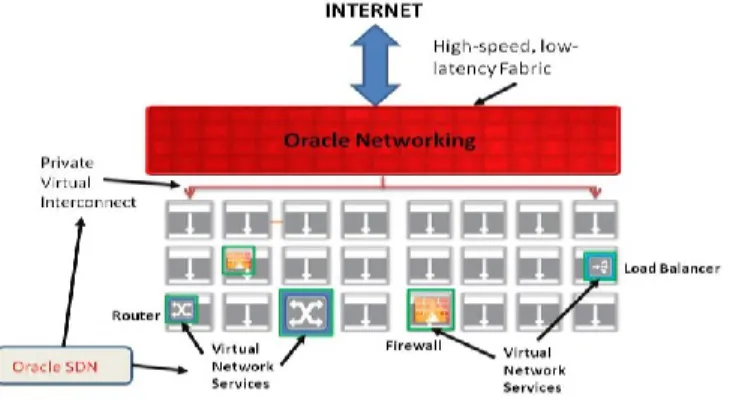
Virtual Network Services, a feature of Oracle SDN, now extends Oracle SDN
and allows for deployment of firewall, load balancer, routing, and other
network functions on-demand. It virtually eliminates the need to deploy
purpose-built network appliances that lack the flexibility and scalability
needed for cloud-enabled data centers. It allows for extending Oracle SDN
across both the InfiniBand and Ethernet fabrics, creating a unique network
fabric for an entire data center.
V I R T U A L I Z E D I N F R A S T R U C T U R E F O R A C L O U D D A T A C E N T E R
K E Y F E A T U R E S
• Connect any virtual machine dynamically to any resource, including networks and storage, virtual machines, and bare-metal servers
• Get up to 80 Gb/sec server-to-server bandwidth, for up to 30 times application performance
• Provide isolated L2 domains without having to configure VLANs or switch ports
• Connect as many as 1,000 physical
hosts
V I R T U A L N E T W O R K S E R V I C E S • Unify the InfiniBand and Ethernet
fabrics using Virtual Network Services
Achieving the Potential of Cloud Data Centers
Cloud data center architectures promise the agility you need in order to quickly deploy applications, maximize efficiency, and deliver a great user experience. But legacy network infrastructure can prevent you from reaching those goals. Outdated
technologies that rely on switches, ports, and fixed-function devices essentially tie down applications to specific servers and bottleneck security and routing devices. Complex mappings, configuration settings, and hardwired connections require days or weeks to modify, often demanding painstaking coordination among multiple teams. Performance bottlenecks may be difficult to identify and even harder to fix. And in multitenant environments, how do you ensure data isolation and meet service-level agreements (SLAs) with a shared infrastructure?
What’s needed is a virtualized connectivity model and dynamic deployment of security and network services ― that match the efficiency, simplicity, and hardware
independence of server virtualization itself.
Oracle SDN: Virtualizing the Data Center Infrastructure
Oracle SDN redefines server connectivity by employing the basic concepts of virtualization. Unlike legacy port- and switch-based networking, which defines
• Obtain network services such as firewall, load balancer, router, VPN, and NAT in a single virtual instance • Deploy Virtual Network Services
dynamically on a per-tenant basis to achieve agile and software-defined data centers
• Spend 50 percent less than for legacy infrastructure
connectivity via complex LAN configurations, Oracle SDN defines connectivity entirely in software using a supremely elegant resource: the private virtual interconnect. A private virtual interconnect is a software-defined link between two resources. It enables you to connect any virtual machine or server to any other resource anywhere in a data center. Connect in seconds without inflexible network configuration, and gain the flexibility and agility you need in order to take control of your cloud.
Private Virtual Interconnect for Isolated Connectivity
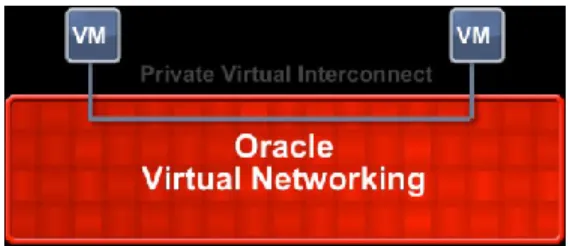
The private virtual interconnect is an isolated link that connects virtual machines to other data center resources. Being a software-defined network, it can be deployed in
seconds. You can use private virtual interconnects to join any number of virtual machines, virtual appliances, networks, storage devices, and bare-metal servers in isolated Layer 2 (L2) domains.
Legacy networking technologies, by contrast, require complex configuration of switches, switch ports, and virtual local area networks (VLANs) to route data among resources. Because these assets all reside in the network environment, they must be configured with careful consideration of the overall networking context.
With Oracle Virtual Networking, connections are configured within Oracle SDN. Private virtual interconnects do not rely on VLAN or port configurations and are not even visible to external networks unless specifically configured for this.
Figure 1. Private virtual interconnects enable you to flexibly connect from virtual machines to other resources. These connections exist within Oracle SDN, so there is no need to modify network configurations. They are also isolated and not visible to networks or other connections unless specifically configured for this.
Elimination of VLAN Exhaustion
The private virtual interconnect does not consume VLANs or Ethernet address space because it does not rely on traditional networking concepts to ensure isolation from other connections. As a result, VLAN exhaustion is no longer an issue.
Speed and High Scalability
With bandwidth of up to 80 Gb/sec per server connection, Oracle SDN provides exceptional performance. Each private virtual interconnect also has bandwidth of up to 80 Gb/sec to deliver the industry’s fastest, most scalable fabric. A single fabric can accommodate as many as 1,000 servers and as many as 16,000 private virtual interconnects. Fully auto-routing, the fabric self-configures for efficient data transport.
A single fabric link (or dual links for redundancy) carries both Ethernet and Fibre Channel traffic, resulting in maximum management simplicity and the lowest-possible physical complexity. Oracle Virtual Networking protects your existing network
investment by presenting standard Ethernet and Fibre Channel interfaces to your core networks. Within each host, the connectivity appears as conventional Ethernet network interface cards (NICs) and Fibre Channel host bus adapters (HBAs). Oracle Virtual Networking is proven interoperable with gear from major network providers, including Brocade, Cisco, and Juniper, with virtually all x86 servers, and with Oracle's SPARC T-Series and SPARC M5 servers.
Redundancy for High Availability
Three levels of redundancy ensure superior availability. First, in the event of a server connection failure, traffic is automatically failed over to a separate data path. Paths are isolated so that no path has the ability to degrade the other’s functionality. Second, in the event of a link failure within the fabric itself, traffic is rerouted over the remaining links with no interruption. Third, all forwarding tables are stored at multiple locations, ensuring fabric resilience.
Virtual Network Services
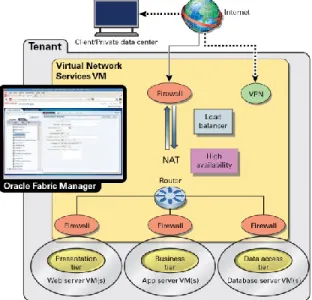
The Virtual Network Services feature of Oracle SDN provides the ability to deploy on-demand network services such as firewall, router, load balancer, virtual private network (VPN), and network address translation (NAT) services in a single virtual appliance. This virtually eliminates the need for proprietary fixed functions that create bottlenecks in a data center today.
When deployed on a per-tenant basis using Oracle Fabric Manager, Virtual Network Services provides secure multitenancy and network services on demand. Further, it allows cloud-enabled data centers to be agile and elastic.
The network services are daisy chained within the Virtual Network Services instance while providing the flexibility to configure either all the services or a subset per tenant. Furthermore, for high availability, two Virtual Network Services instances can be provisioned in an active/standby role with configuration synced to the standby instance. The high-availability feature of Virtual Network Services detects the failure of an active instance and enables the standby instance to converge as the new active.
Ability to Deploy Secure Multitenant Environments Rapidly
When multiple users share resources, it is often essential to segregate network and storage data paths to ensure isolation. The private virtual interconnect makes that easy. Because it operates as a standalone Layer 2 network, data is visible only to the resources connected to that private virtual interconnect. User applications and data can be fully isolated from other users’ assets, exactly as if they resided on physically separate infrastructures. Predictable application performance is ensured by granular quality-of-service controls for network and storage access. You can create fully isolated
virtual data centers within a shared environment, meet application SLAs, and then quickly reallocate resources when requirements change.
Virtual Network Services supports true multitenancy in a hybrid InfiniBand and Ethernet network fabric environment, which is a unique differentiator.
Integration of Virtual Network Services to Build Cloud-Enabled
Data Centers
Virtual appliances can save you time, money, power, and rack space by letting you replace purpose-built hardware appliances with software that runs on virtual machines. Virtual Network Services is available with functions such as firewalls, load balancing, routing, VPN, and NAT in a single virtual appliance ― providing key building blocks of the next-generation cloud-enabled data center.
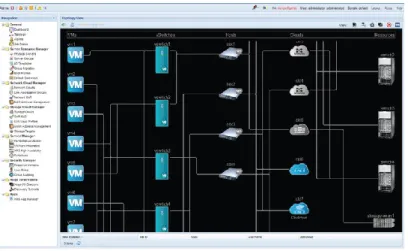
Virtual Network Services makes network and security services easy to deploy, configure, and manage. With Oracle SDN, you can quickly configure isolated connectivity — and deliver up to 80 Gb/sec bandwidth — with private virtual interconnects. Create fully functional data center topologies as easily as you would create a Visio diagram. End users can even create isolated connections themselves within virtual data centers, giving them complete independence to manage their resources without affecting other users.
Figure 2. Virtual Network Services. Create resource topologies as easily as you would draw a Visio diagram. Connect virtual machines and Virtual Network Services, and even create isolated private data centers. Private virtual interconnects ensure isolation and performance.
Intuitive Single-Screen Management
Manage all your data center connections as well as Virtual Network Services from a single screen. The Oracle Fabric Manager interface allows you to manage Oracle SDN, and it enables you to view private virtual interconnects, Virtual Network Services, virtual machines, virtual switches, physical hosts, and network and storage resources.
To create interconnects, simply drag and drop resources on the topology map. Data is then automatically routed over Oracle SDN without the need to configure any
intermediate assets. Use the Virtual Network Services plug-in that is available in Oracle Fabric Manager to provision network services and to monitor their performance. The dashboard displays real-time information about the packets processed and throughput of the virtual instance as well as the performance charts for the network services. You can create complex network topologies and deploy Virtual Network Services in seconds and interconnect all elements with isolated links. Templates enable you to provision connectivity on multiple servers simultaneously. You also can generate scripts within the command-line interface to automate repetitive configuration tasks.
Figure 3. Virtual Network Services. Deploy and provision network and security services per tenant .
Specifications
The Virtual Network Services software runs in a virtual machine and requires the following:
Server OS: Oracle Linux 6 (64 bits) Update 5 or Oracle Solaris 11 Update 2 Oracle Fabric Manager 4.3.0
CPU: x86 architecture (newer CPU) Memory: 4 GB minimum
vCPU: 2
The performance can be scaled by allocating more virtual CPU and memory to the Virtual Network Services virtual machine.
DETAILED FEATURE DESCRIPTION
Feature Description
Firewall
Session filtering using reflexive Access control lists ICMP filtering
L3 ACLs
Separate input and output rules Load Balancer Layer 3 and Layer 4 load balancing
Round-robin, 5-tuple hash algorithms Subsecond failover
Multiple health-check methods (ICMP, TCP, UDP) NAT and half-NAT topologies
Sticky sessions Connection draining
NAT NAT traversal
Port redirection
Translation of src and dest addresses Separate input and output rules
VPN IPSEC Site to site
Remote access VPN
Encryption: DES, 3DES, Blowfish, AES128, AES192, AES256 Authentication: MD5, SHA1, SHA256
IP Routing IPv4 static routing
Route lookup using Longest prefix match
High Availability Across two Virtual Network Services instances in active/standby roles using Virtual router redundancy protocol
Monitoring and Management
Real-time performance monitoring
Unified management with Oracle Fabric Manager Command-line interface
Ability to Start Small and Grow
Oracle SDN enables you to start with a small deployment and grow over time. It works with your existing 1 GE, 10 GE, and Fibre Channel switching infrastructure and is interoperable with virtually every x86 server, Oracle's SPARC T-Series and SPARC M5 servers, including rack- and blade-based systems. As you grow, simply add new Oracle Virtual Networking components and connect them to build a fabric. You can start with a small number of servers and grow to a thousand.
O R A C L E V I R T U A L N E T W O R K I N G Oracle Virtual Networking revolutionizes data center economics by creating an agile, highly efficient infrastructure built on your choice of hardware and software. This open architecture enables you to dynamically connect servers, networks, and storage. You create networks and connections entirely in software to enable secure, isolated services that support your business processes and priorities. With Oracle Virtual Networking, all traffic types, including Ethernet and Fibre Channel, traverse a converged
infrastructure, resulting in a simpler, more efficient, wire-once environment with flexible connectivity.
Products in the Oracle Virtual Networking family include
• Oracle Fabric Interconnect • Oracle Fabric Manager • Oracle Fabric Monitor • Oracle SDN
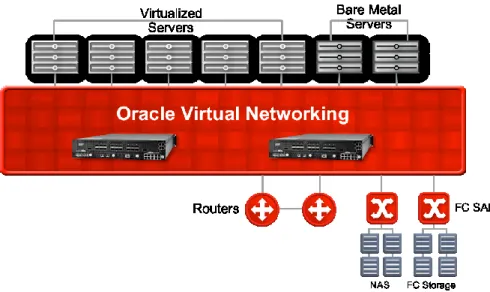
Figure 4. Oracle Virtual Networking replaces complex network configuration settings with simple, software-defined networks. With Oracle SDN, you can directly connect VMs to legacy networks, storage devices, bare-metal servers, and other VMs. With just two physical connections per host and a 70 percent simpler infrastructure, Oracle Virtual Networking reduces cost while giving you complete flexibility.
Figure 5. In this view of legacy networking, connections from virtual machines to networks and storage are defined by complex network settings on multiple networks and VLANs. The topology includes multiple layers of networking and numerous network and storage connections per server, all of which degrade performance and add cost and management complexity.
Figure 6. Oracle Fabric Manager’s interface enables you to view private virtual
interconnects, virtual machines, virtual switches, physical hosts, and network and storage resources. You can configure connectivity, monitor performance, and modify parameters from any location, all on live servers.
C O N T A C T U S
For more information about Oracle SDN, visit oracle.com/fabric or call +1.800.ORACLE1 to speak to an
Oracle representative.
C O N N E C T W I T H U S
blogs.oracle.com/oracle facebook.com/oracle twitter.com/oracle oracle.com
Copyright © 2015, Oracle and/or its affiliates. All rights reserved. This document is provided for information purposes only, and the contents hereof are subject to change without notice. This document is not warranted to be error-free, nor subject to any other warranties or conditions, whether expressed orally or implied in law, including implied warranties and conditions of merchantability or fitness for a particular purpose. We specifically disclaim any liability with respect to this document, and no contractual obligations are formed either directly or indirectly by this document. This document may not be reproduced or transmitted in any form or by any means, electronic or mechanical, for any purpose, without our prior written permission.