Adaptive Server
®
Enterprise
15.7
DOCUMENT ID: DC00968-01-1570-01 LAST REVISED: September 2011
Copyright © 2011 by Sybase, Inc. All rights reserved.
This publication pertains to Sybase software and to any subsequent release until otherwise indicated in new editions or technical notes. Information in this document is subject to change without notice. The software described herein is furnished under a license agreement, and it may be used or copied only in accordance with the terms of that agreement.
To order additional documents, U.S. and Canadian customers should call Customer Fulfillment at (800) 685-8225, fax (617) 229-9845. Customers in other countries with a U.S. license agreement may contact Customer Fulfillment via the above fax number. All other international customers should contact their Sybase subsidiary or local distributor. Upgrades are provided only at regularly scheduled software release dates. No part of this publication may be reproduced, transmitted, or translated in any form or by any means, electronic, mechanical, manual, optical, or otherwise, without the prior written permission of Sybase, Inc.
Sybase trademarks can be viewed at the Sybase trademarks page at http://www.sybase.com/detail?id=1011207. Sybase and the marks listed are trademarks of Sybase, Inc. ® indicates registration in the United States of America.
SAP and other SAP products and services mentioned herein as well as their respective logos are trademarks or registered trademarks of SAP AG in Germany and in several other countries all over the world.
Java and all Java-based marks are trademarks or registered trademarks of Sun Microsystems, Inc. in the U.S. and other countries. Unicode and the Unicode Logo are registered trademarks of Unicode, Inc.
IBM and Tivoli are registered trademarks of International Business Machines Corporation in the United States, other countries, or both. All other company and product names mentioned may be trademarks of the respective companies with which they are associated. Use, duplication, or disclosure by the government is subject to the restrictions set forth in subparagraph (c)(1)(ii) of DFARS 52.227-7013 for the DOD and as set forth in FAR 52.227-19(a)-(d) for civilian agencies.
CHAPTER 1 Overview of Encryption ... 1
CHAPTER 2 Creating and Managing Column Encryption Keys... 5
Protecting Data with Column Encryption Keys... 5
Creating column encryption keys ... 5
Key protection ... 11
Dropping encryption keys ... 12
Key encryption ... 13
Protecting column encryption keys with the master key... 14
Protecting column encryption keys with the system-encryption password ... 15
Protecting column encryption key with user-specified password . 16 Protecting column encryption keys with dual control... 17
CHAPTER 3 Using Database-Level Master and Dual Master Keys ... 19
Creating the master and dual master keys... 19
Creating master key copies ... 20
Setting passwords for the master and dual master keys... 22
Altering passwords and key encryption keys for master key copies 22 Regenerating master keys ... 24
Dropping master keys and key copies ... 25
Recovering the master key and dual master key ... 26
Starting Adaptive Server in unattended start-up mode ... 26
Configuring the unattended start-up mode ... 26
Master key start-up file ... 27
How Adaptive Server uses the master key start-up file... 28
CHAPTER 4 Securing External Passwords and Hidden Text... 29
Service keys ... 30
Contents
Using service keys with external passwords ... 34
Using service keys with hidden text during upgrade ... 36
Considerations for service keys encrypted with the master key .... 37
CHAPTER 5 Encrypting Data ... 39
Specifying encryption on new tables ... 40
Specifying encryption on select into ... 41
Encrypting data in existing tables... 42
Creating indexes and constraints on encrypted columns... 43
Creating domain and access rules on encrypted columns... 44
Decrypt permission ... 44
Revoking decryption permission ... 46
Restricting decrypt permission ... 46
Assigning privileges for restricted decrypt permissions... 47
Returning default values instead of decrypted data ... 47
Defining a decrypt default... 47
Permissions and decrypt default ... 49
Columns with decrypt default values... 50
Decrypt default columns and query qualifications ... 51
decrypt default and implicit grants... 52
decrypt default and insert, update, and delete statements... 53
Removing decrypt defaults... 54
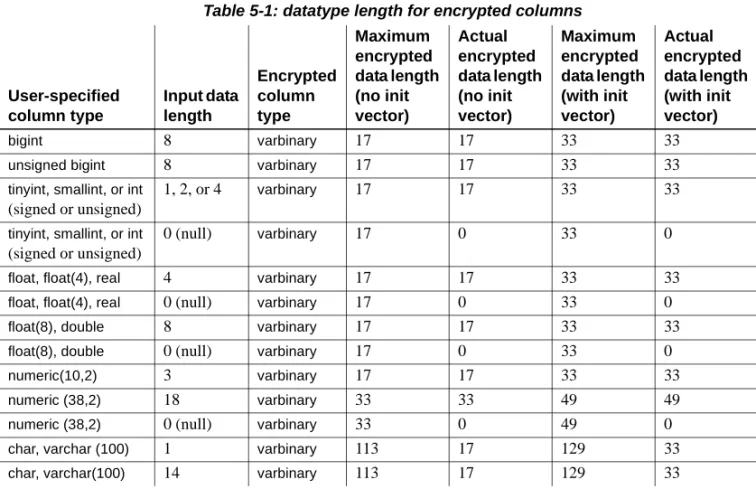
Length of encrypted columns ... 54
CHAPTER 6 Accessing Encrypted Data ... 59
Processing encrypted columns ... 59
Permissions for decryption ... 60
Dropping encryption ... 61
CHAPTER 7 Protecting Data Privacy from the Administrator ... 63
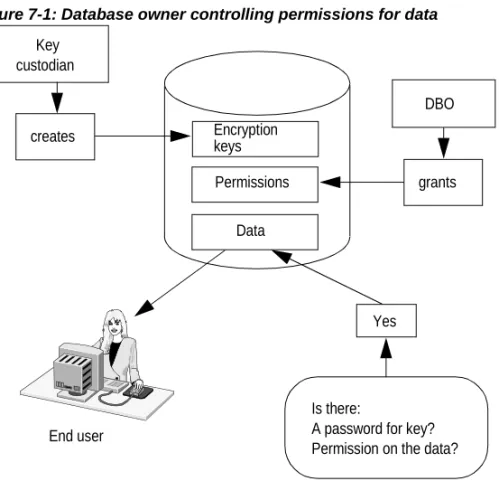
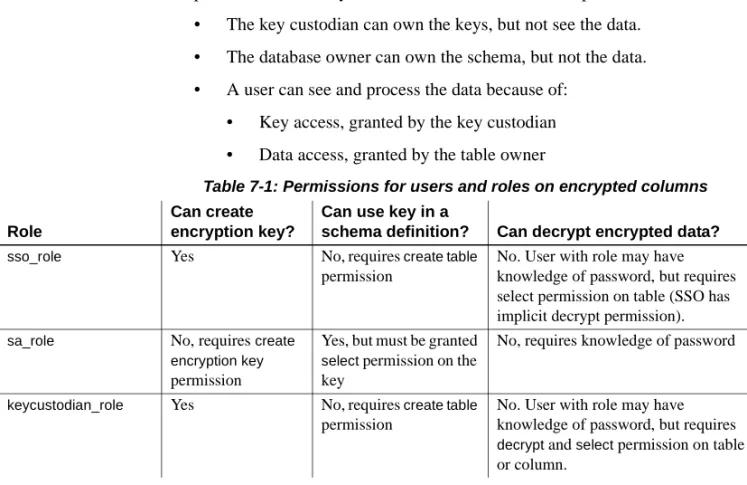
Role of the key custodian ... 63
Users, roles, and data access ... 65
Key protection using user-specified passwords ... 66
Changing a key’s protection method ... 67
Creating key copies... 70
Changing passwords on key copies... 72
Accessing encrypted data with user password ... 73
Application transparency using login passwords on key copies 75 Login password change and key copies ... 78
Dropping a key copy... 79
Loss of password on key copy ... 81
Loss of login password... 82
Loss of password on base key ... 82
Key recovery commands... 83
Changing ownership of encryption keys ... 85
CHAPTER 9 Auditing Encrypted Columns... 87
Auditing options... 87
Audit values... 87
Event names and numbers ... 87
Masking passwords in command text auditing... 88
Auditing actions of the key custodian... 88
CHAPTER 10 Performance Considerations ... 89
Indexes on encrypted columns ... 89
Sort orders and encrypted columns ... 90
Joins on encrypted columns... 91
Search arguments and encrypted columns... 92
Movement of encrypted data as cipher text ... 93
This guide describes the Adaptive Server® Enterprise encrypted columns feature, encryption of external passwords and the SQL text of stored procedures, views, and triggers.
Adaptive Server authentication and access control mechanisms ensure that only properly identified and authorized users can access data. Data encryption further protects sensitive data against theft and security breaches.
The Adaptive Server encrypted columns feature enables you to encrypt column-level data that is at rest, without changing your applications. This native support provides the following capabilities:
• Column-level granularity
• Use of a symmetric, National Institute of Standards and Techology (NIST)-approved algorithm: Advanced Encryption Standard (AES) • Performance optimization
• Enforced separation of duties
• Fully integrated and automatic key management
• Application transparency: no application changes are needed • Data privacy protection from the power of the system administrator Data encryption and decryption is automatic and transparent. If you have insert or update permission on a table, any data you insert or modify is automatically encrypted prior to storage. Daily tasks are not interrupted. Selecting decrypted data from an encrypted column requires decrypt permission in addition to select permission. Decrypt permission can be granted to specific database users, groups, or roles. Sybase® gives you more control by providing you with granular access capability to sensitive data. Sybase also automatically decrypts selected data for users with decrypt permission.
Encrypting columns in Adaptive Server is more straightforward than using encryption in the middle tier, or in the client application. You use SQL statements to create encryption keys and to specify columns for encryption, and existing applications continue to run without change.
Column encryption keys are stored in the database in encrypted form. You can encrypt a column encryption key using a key encryption key (KEK) derived from a
• System-level user-supplied password
• KEK derived from a user-supplied password (which can be the user’s login password)
• Separately created database-level KEK (master key or dual master key) The password you select reflects your ability to preserve data privacy, even from system administrators. You may choose to protect your column encryption key using dual-control mode to increase the security. See Chapter 2, “Creating and Managing Column Encryption Keys.”
When data is encrypted, it is stored in an encoded form called “cipher text.” Cipher text increases the length of the encrypted column from a few bytes to 32 extra bytes. See “Length of encrypted columns” on page 54. Unencrypted data is stored as plain text.
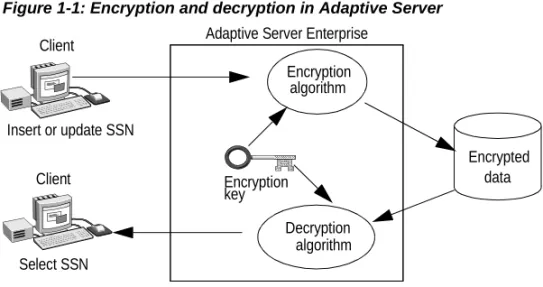
Figure 1-1 describes encryption and decryption processing in Adaptive Server. In this example, a client is updating and encrypting a Social Security Number (SSN).
Figure 1-1: Encryption and decryption in Adaptive Server
Column encryption uses a symmetric encryption algorithm, which means that the same key is used for encryption and decryption. Adaptive Server tracks the key that encrypts a given column.
When you insert or update data in an encrypted column, Adaptive Server transparently encrypts the data immediately before writing the row. When you select from an encrypted column, Adaptive Server decrypts the data after reading it from the row. Integer and floating point data are encrypted in the following form for all platforms:
• Most significant bit format for integer data
• Institute of Electrical and Electronics Engineers (IEEE) floating point standard with MSB format for floating point data
You can encrypt data on one platform and decrypt it on a different platform, provided that both platforms use the same character set.
Generally, using encrypted columns requires these steps:
1 Install the license option ASE_ENCRYPTION. See the Adaptive Server Enterprise Installation Guide.
2 The system security officer (SSO) enables encryption in Adaptive Server:
sp_configure 'enable encrypted columns', 1
3 Depending on the method you chose to protect column encryption keys, create a database-level master key or set the system encryption password. See “Creating the master and dual master keys” on page 19 for
Client
Insert or update SSN
Encryption algorithm
Encryption
Decryption algorithm
Encrypted data Client
key
Adaptive Server Enterprise
“Protecting column encryption keys with the system-encryption password” on page 15 describes how to set the system encryption password.
4 Create one or more named encryption keys. See Chapter 2, “Creating and Managing Column Encryption Keys.” Consider using passwords to protect data even from the database administrator. See Chapter 7, “Protecting Data Privacy from the Administrator.”.
5 Specify the columns for encryption. See “Specifying encryption on new tables” on page 40 and “Encrypting data in existing tables” on page 42. 6 Grant decrypt permission to users who must see the data. You may choose
to specify a default plain text value known as a “decrypt default.” The Adaptive Server returns this default, instead of the protected data, to users who do not have decrypt permission. See “Permissions for decryption” on page 60.
Once you perform these steps, you can run your existing applications against your existing tables and columns, but now the data in your database is securely protected against theft and misuse. Adaptive Server utilities and other Sybase products can process data in encrypted form, protecting your data throughout the enterprise. For example, you can:
• Use Sybase Control Center or Sybase Central Adaptive Server Plug-in to manage encrypted columns using a graphical interface. See the online help.
• Use the bulk copy utility (bcp) to securely copy encrypted data in and out of the server. See the Utility Guide.
• Use the Adaptive Server migration tool sybmigrate to securely migrate data from one server to another. See the Adaptive Server Enterprise System Administration Guide.
• Use Sybase Replication Server to securely distribute encryption keys and data across servers and platforms. See the Replication Server
Administration Guide for information on encryption when replicating. See Chapter 4, “Securing External Passwords and Hidden Text,” for information about strong encryption of external passwords and hidden SQL text.
Encryption Keys
Adaptive Server includes commands for creating column encryption keys, altering the properties of column encryption keys, and dropping unused column encryption keys. Key owners must grant permission to table owners to use a specific key or keys to configure encryption at the column level.
Protecting Data with Column Encryption Keys
Adaptive Server keeps keys encrypted when they are not in use. Users must have access to the column encryption key (CEK) before they can access encrypted data, but the CEK must be encrypted before you store it on disk or in memory. Adaptive Server encrypts the CEK using a key encryption key (KEK) and stores it in encrypted form in sysencryptkeys. The KEK is also used to decrypt the CEK, allowing you to access decrypted data. See “Key encryption” on page 13.
CEK management includes creating, dropping, and modifying column encryption keys, distributing passwords, creating key copies, and providing for key recovery in the event of a lost password.
Creating column encryption keys
A column encryption key must exist before a table owner can mark a column for encryption on a new or existing table. When you set up keys
Topic Page
Protecting Data with Column Encryption Keys 5
Protecting Data with Column Encryption Keys
• Key owner or custodian assignment – the system security officer (SSO) must grant create encryption key permission to create keys. By default, the sso_role and the keycustodian_role have create encryption key permission. See “Role of the key custodian” on page 63.
• Whether keys should be created in a separate key database – Sybase recommends that you use a separate database for keys, especially if keys are encrypted by the system encryption password.
• The number of keys needed – you can create a separate key for each encrypted column, or you can use the same key to encrypt columns across multiple tables. From a performance standpoint, encrypted columns that join with equivalent columns in other tables should share the same key. For security purposes, unrelated columns should use different keys.
Column encryption in Adaptive Server uses the Advanced Encryption Standard (AES) symmetric key encryption algorithm, with available key sizes of 128, 192, and 256 bits. Random-key generation and cryptographic functionality is provided by the FIPS 140-2 compliant modules.
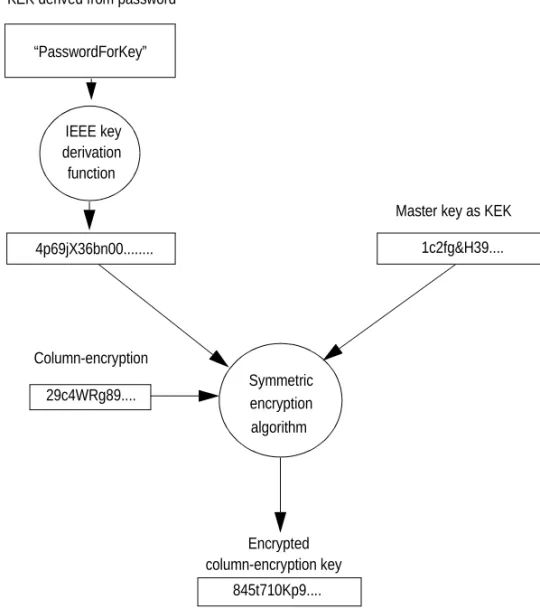
To securely protect key values, Adaptive Server uses a 256-bit key-encrypting key (KEK), which may be a master key, or an internal key derived from either the system encryption password or a user-specified password. See Chapter 3, “Using Database-Level Master and Dual Master Keys.” Adaptive Server encrypts the new key (the column encryption key) and stores the result in sysencryptkeys.
Figure 2-1: Encrypting column encryption keys using KEK
By default, Adaptive Server creates 256-bit key-encryption keys. For compatibility with versions earlier than 15.7, it uses a 128-bit key if the KEK is derived from the system encryption password.
Syntax for create
column encryption key The syntax for create column encryption key is:
create encryption key [[database.][owner].]keyname [as default] [for algorithm]
[with
{[key_length num_bits]
[{passwd 'passwd_phrase' | passwd system_encr_passwd | master key}]
IEEE key derivation function
4p69jX36bn00...
29c4WRg89.... Column-encryption
Symmetric encryption algorithm
Encrypted column-encryption key
845t710Kp9.... “PasswordForKey”
KEK derived from password
Master key as KEK
Protecting Data with Column Encryption Keys
[[no] dual_control] }]
where:
• keyname – must be unique in the user’s table, view, and procedure name
space in the current database. Specify the database name if the key is in another database, and specify the owner’s name if more than one key of that name exists in the database. The default value for owner is the current user, and the default value for database is the current database. Only the system security officer can create keys for other users.
Note You cannot create temporary key names that start with “#”. • as default – allows the system security officer or key custodian to create a
database default key for encryption. This enables the table creator to specify encryption without using a keyname on create table, alter table, and select into. Adaptive Server uses the default key from the same database. The default key may be changed.
• for algorithm – Advanced Encryption Standard (AES) is the only algorithm
supported. AES supports key sizes of 128, 192, and 256 bits, and a block size of 16 bytes. The block size is the number of bytes in an encryption unit. Large data is subdivided for encryption.
• keylength num_bits – the size, in bits, of the key to be created. For AES, valid key lengths are 128, 192, and 256 bits. The default keylength is 128 bits.
• passwd password_phrase – indicates to ASE to protect the CEK using the user password password_phrase, which can be a quoted alphanumeric string up to 255 bytes in length.
• passwd system_encr_passwd – indicates to ASE to protect the CEK using the system encryption password.
• master key – indicates to ASE to protect the CEK using the master key. By default, Adaptive Server uses the master key (if it exists) to protect column encryption keys. See “Key protection” on page 11.
• init_vector
• random – specifies use of an initialization vector during encryption. When an initialization vector is used by the encryption algorithm, the cipher text of two identical pieces of plain text are different, which prevents detection of data patterns. Using an initialization vector can add to the security of your data.
Use of an initialization vector implies using a cipher-block chaining (CBC) mode of encryption, where each block of data is combined with the previous block before encryption, with the first block being combined with the initialization vector.
However, initialization vectors have some performance implications. You can create indexes and optimize joins and searches only on columns where the encryption key does not specify an initialization vector. See Chapter 10, “Performance Considerations.”
• null – omits the use of an initialization vector when encrypting. This makes the column suitable for supporting an index.
The default is to use an initialization vector, that is, init_vector random. Setting init_vector null implies the electronic codebook (ECB) mode, where each block of data is encrypted independently.
To encrypt one column using an initialization vector and another column without using an initialization vector, create two separate keys—one that specifies use of an initialization vector and another that specifies no initialization vector.
• pad
• null – the default, omits random padding of data.
You cannot use padding if the column must support an index. • random – data is automatically padded with random bytes before
encryption. You can use padding instead of an initialization vector to randomize the cipher text. Padding is suitable only for columns whose plain text length is less than half the block length. For the AES algorithm the block length is 16 bytes.
• dual control – indicates whether the new key must be encrypted using dual control. By default, dual control is not configured. See Chapter 3, “Using Database-Level Master and Dual Master Keys.”
create encryption key
examples These examples use various encryption attributes when creating a column encryption key, and many assume you have already created the master key or set the system encryption password (see “Key protection” on page 11). • Example 1 – specifies a 256-bit key called “safe_key” as the database
default key. Because the key does not specify a password, Adaptive Server uses the database-level master key as the KEK for safe_key. If there is no master key, Adaptive Server uses the system encryption password:
Protecting Data with Column Encryption Keys
with keylength 256
Only the system security officer or a user with the keycustodian_role can create a default key.
• Example 2 – creates a 128-bit key called “salary_key” for encrypting columns using random padding:
create encryption key salary_key for AES with init_vector null pad random
• Example 3 – creates a 192-bit key named “mykey” for encrypting columns using an initialization vector:
create encryption key mykey for AES with keylength 192 init_vector random
• Example 4 – creates a key protected by a user-specified password:
create encryption key key1
with passwd 'Worlds1Biggest6Secret'
If a key is protected by a user-specified password, that password must be entered a column encrypted by the key can be accessed. See Chapter 7, “Protecting Data Privacy from the Administrator,” for information about using keys with explicit passwords.
• Example 5 – creates a key protected by dual-control:
create encryption key dualprotectedkey with passwd "Pass4Tomorrow"
dual_control
Key “dualprotectedkey” is protected by the master key and a user password (in dual control). To access the key, you must enter both the user password for the key and the password for the master key.
create encryption key
permissions The encryption keys. The system security officer or the key custodian uses this sso_role and keycustodian_role implicitly have permission to create syntax to grant create encryption key permissions to others:
grant create encryption key
to user_name | role_name | group_name For example:
grant create encryption key to key_admin_role
revoke create encryption key
{to | from} user_name | role_name | group_name
Note grant all does not grant create encryption key permission to the user. It must be explicitly granted by the system security officer.
Key protection
The key administrator must decide where keys are stored, when they should be renewed, and which table owners can use a given key to encrypt columns in their tables.
Granting access to keys
The key owner or a user with the sso_role must grant select permission on a key before another user can specify the key in the create table, alter table, and select into statements. The key owner can be the system security officer, the key custodian or, for non-default keys, any user with create encryption key permission. Key owners should grant select permission on keys as needed. The following example allows users with db_admin_role to use the encryption key named “safe_key” when specifying encryption on create table, alter table, and select into statements:
grant select on safe_key to db_admin_role
Note Users who process encrypted columns through insert, update, delete, and select do not need select permission on the encryption key.
Changing the key
Periodically change the keys used to encrypt columns. Create a new key using create encryption key, then use alter table...modify to encrypt the column with the new key
In the following example, assume that the “creditcard” column is already encrypted. The alter table command decrypts and reencrypts the credit card value for every row of customer using cc_key_new.
Protecting Data with Column Encryption Keys
alter table customer modify creditcard encrypt with cc_key_new
Separating keys from data
When you specify a column for encryption, you can use a named key from the same database or from a different database. If you do not specify a named key, the column is automatically encrypted with the default key from the same database.
Encrypting with a key from a different database provides a security advantage because, in the event of the theft of a database dump, it protects against access to both keys and encrypted data. Administrators can also protect each database dump with a different password, making unauthorized access even more difficult.
Encrypting with a key from a different database needs special care to avoid data and key integrity problems in distributed systems. Carefully coordinate database dumps and loads. If you use a named key from a different database, Sybase recommends that, when you dump a database that contains:
• Encrypted columns, you also dump the database where the key was created. You must do this if new keys have been added since the last dump. • An encryption key, dump all databases containing columns encrypted with
that key. This keeps encrypted data in sync with the available keys. The system security officer or the key custodian can use sp_encryption to identify the columns encrypted with a given key.
Dropping encryption keys
To drop an encryption key, use:
drop encryption key [[database.][owner].]keyname For example, this drops an encryption key named cc_key:
drop encryption key cust.dbo.cc_key
Key owners can drop their own keys. The system security officer can drop any key. A key can be dropped only if there are no encrypted columns in any database that use the key.
When executing drop encryption key, Adaptive Server does not check for encrypted columns in databases that are suspect, archived, offline, not recovered, or currently being loaded. In any of these cases, the command issues a warning message that names the unavailable database, but does not fail. When the database is brought online, any tables with columns that were encrypted with the dropped key are unusable. To restore the key, the system administrator must load a dump of the dropped key’s database that precedes when the key was dropped.
The system security officer can use sp_encryption to identify all the columns encrypted with a given key.
Key encryption
There are actually two keys between the user and the data: the column-encryption key (CEK) and the key-column-encryption key (KEK). The CEK encrypts data and users must have access to it before they can access encrypted data. It cannot be stored on disk in an unencrypted form. Instead, Adaptive Server uses a KEK, or 2 KEKs iin dual-control, to encrypt the CEK when you create or alter an encryption key. The KEK also decrypts the CEK before you can access decrypted data. CEKs are stored in encrypted form in sysencryptkeys. The KEK is a master key, created separately by the system security officer or key custodian, is an internally derived key from the system encryption password, a user-specified password, or a login password, depending on how you specify the key’s encryption with the create and alter encryption key statements. Both the system encryption password and the master key are stored in encrypted form.
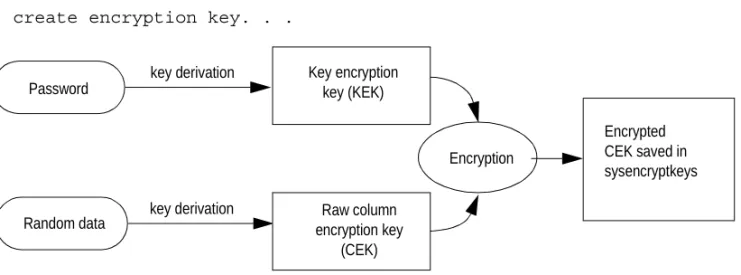
Figure 2-2 on page 14 describes creating and storing a column encryption key for a create encryption key statement. The KEK is derived from a password and the KEK and the raw CEK are fed into the encryption function to produce an encrypted CEK.
Key encryption
Figure 2-2: Steps to create an encryption key
Figure 2-3 describes how the KEK is used during a DML operation to decrypt the CEK. The raw CEK is then used to encrypt or decrypt data.
Figure 2-3: Accessing a CEK to encrypt or decrypt on DML statement
Protecting column encryption keys with the master key
The master key is a database-level key created by a user with the sso_role or keycustodian_role, and is used as a KEK for user-created encryption keys. Once created, the master key replaces the system encryption password as the default KEK for user-created keys. Although Adaptive Server supports the system encryption password for compatibility with versions earier than 15.7, Sybase recommends that you use the master key.
create encryption key. . .
Encrypted CEK saved in sysencryptkeys
Raw column encryption key
(CEK) Key encryption
key (KEK)
Random data
Encryption
key derivation Password
key derivation
Decrypted CEK used for DML Encrypted
CEK saved in sysencryptkeys
Key encryption key (KEK)
Decryption Password
You can use the master key with the dual master key to create a composite key that provides dual control and split knowledge for all user-created keys. You can also create a composite key by using the master key with a CEK’s explicit password.
Using a master key simplifies the administration of encrypted data because: • Managing passwords for keys is restricted to setting the password for the
master key.
• You need not specify passwords on create and alter encryption key statements.
• Allows for password distribution and recovery from lost column encryption key passwords.
• Access control over encrypted data is enforced through decrypt
permission on the column. See “Restricting decrypt permission” on page 46.
• You need not make any changes to the application. The syntax for creating a master key is:
create encryption key master
[for AES] with passwd char_literal See the Reference Manual: Commands.
Protecting column encryption keys with the system-encryption
password
The system encryption password is a database-specific password, and is the secondary default encryption method for the CEK. That is, you need not create a master key for the database. Adaptive Server uses the system encryption password to encrypt keys created in a specified database without an explicit password clause. Once the system security officer or key custodian has set a system encryption password, you need not specify this password to process encrypted columns. Adaptive Server internally accesses the system encryption password when it needs to encrypt or decrypt column encryption keys. The system security officer or key custodian usse sp_encryption to set the system encryption password. The system password is specific to the database using sp_encryption, and its encrypted value is stored in the sysattributes system table in that database.
Key encryption
password can be as many as 255 bytes in length.
Set a system encryption password only in the database where encryption keys are created.
The system encryption password protects your encryption keys. Choose long and complex system encryption passwords. Longer passwords are harder to guess or crack by brute force. Include uppercase and lowercase letters, numbers, and special characters in the system encryption password. Sybase recommends that the system encryption password be at least 16 bytes in length. Adaptive Server enforces compliance of the system encryption password with the minimum password length and check password for digit configuration parameters.
Change the system password by using sp_encryption and supplying the old password:
sp_encryption system_encr_passwd, password [ , old_password] Periodically change the system encryption password, especially when an administrator who knows the system encryption password leaves the company. When the system password is changed, Adaptive Server automatically reencrypts all keys in the database with the new password. Encrypted data is unaffected when the system password is changed, in other words, it is not decrypted and reencrypted.
You can u-set the system encryption password by supplying “null” as the argument for password and supplying the value for old_password. Unset the system password only if you have dropped all the encryption keys in that database that were encrypted by the system encryption password.
Protecting column encryption key with user-specified password
You can limit the power of the system administrator or database owner to access private data when you specify passwords on keys using create encryption key or alter encryption key. If keys have explicit passwords, users must have, before they can decrypt data:• decrypt permission on the column • The encryption key’s password
Users must also know the password to run DML commands that encrypt data. See “Key protection using user-specified passwords” on page 66.
Protecting column encryption keys with dual control
You can secure column encryption keys with dual control using the create encryption key command.
If you specify create encryption key with dual_control, but do not specify a user password, the column encryption key is protected by the master key and the dual master key.
If you specify with dual_control and include a user-specific password, the column encryption key is protected by the master key and the user password. • Example 1 – protects CEK “Reallysecret” with both the master and dual
master keys and fails, unless both keys exist in the database:
create encryption key Reallysecret
with init_vector random dual_control
• Example 2 – encrypts CEK “k3” with both the master key and user password “Whybother”:
create encryption key k3 with passwd 'Whybother' dual_control
See “Changing a key’s protection method” on page 67 to alter existing keys to use dual control.
Dual Master Keys
Adaptive Server allows users to create database-level encryption keys called the master key and the dual master key. These keys both act as key encryption keys, and are used to protect other keys, such as column encryption keys and service keys. Once created, master keys become the default protection method for column encryption keys. The dual master key is required only for dual control of column encryption keys. Only users with sso_role or keycustodian_role can create the master key and dual master key. There can only be one master and one dual master key for a database.
The master key and the dual master key must have different owners. You can provide passwords for the master keys using either isql, or through a server-private file that is accessible only by the Adaptive Server. The passwords to these keys are not stored in the database.
Creating the master and dual master keys
To create the master and dual master keys use: create encryption key [dual] master
Topic Page
Creating the master and dual master keys 19 Setting passwords for the master and dual master keys 22 Altering passwords and key encryption keys for master key copies 22
Regenerating master keys 24
Dropping master keys and key copies 25 Recovering the master key and dual master key 26 Starting Adaptive Server in unattended start-up mode 26
Creating the master and dual master keys
where:
• master and dual master refer to database-level keys used to encrypt other keys within the database in which they are defined. These keys are not used to encrypt data. The master key is named internally as
sybencrmasterkey in sysobjects, and the dual master key is named internally as sybencrdualmasterkey in sysobjects.
• with passwd must be followed by a character string password that adheres to sp_passwordpolicy.
See the Reference Manual: Commands.
• Example 1 – creates master key in database tdb1:
use database tdb1
create encryption key master with passwd 'unforgetablethatswhatyouare'
• Example 2 – creates a dual master key in database tdb1:
use database tb1
create encryption key dual master with passwd 'dualunforgettable'
• Example 3 – generates an error because you cannot use a master key as a column encryption key:
create table t2 (c1 int encrypt with master)
To change the password of a master key or dual master key, use: alter encryption key [dual] master
with passwd <char_literal> modify encryption
with passwd <char_literal>
Creating master key copies
Users or master key owners with sso_role or keycustodian_role can create copies for master keys, which you may need to:
• Provide access to the master key or dual master key for unattended start-up of the Adaptive Server. Such a key copy is referred to as the
automatic_startup copy.
• Support recovery of the master keys should their passwords be lost. Such a key copy is referred to as the recovery copy. See Chapter 8, “Recovering Keys from Lost Passwords.”
• Allow a user other than the base key owner to set up encryption passwords for the master or dual master key. This key copy is referred to as a regular copy.
To add master key copies in a database, use: alter encryption key [dual] master
with passwd char_string add encryption
{with passwd char_string for user user_name
[ for recovery ] | [ for automatic_startup ] } where:
• char_string – (first reference) specifies the password that currently
encrypts the base copy of the master or dual master key.
• char_string – (second reference) specifies the password for the regular or
recovery copy. It must not be used for automatic_startup copies.
• for user – indicates the user to whom the regular or recovery copy must be assigned. Do not use this parameter to enter a password for
automatic_startup copies.
• for recovery – indicates that the key copy is to be used to recover the master key in case the password is lost.
• for automatic_startup – indicates that the key copy is to be used to access the master or dual master key after the server is restarted with automatic master key access enabled.
• Example 1 – master key owner creates a key copy for Mary:
alter encryption key master
with passwd 'unforgettablethatswhatur' add encryption
with passwd 'just4now' for user mary
• Example 2 – dual master key owner Smith creates a key copy for automatic_startup with:
alter encryption key dual master with passwd 'Never4Getable' add encryption
Setting passwords for the master and dual master keys
Setting passwords for the master and dual master
keys
The base key owner, or a user who owns a regular key copy, can set the password for the master and dual master keys. Passwords must be set before master keys can be used. To set passwords for master keys, you can either use the:
• set encryption passwd command • Use the unattended start-up feature • (Master key only) the dataserver command The set encryption command is:
set encryption passwd char_literal for key [dual] master
where:
• char_literal – if the user is the key owner, this is the password that currently
encrypts the base copy of the master or dual master key. If the user is not the key owner, this is the password that currently encrypts the user’s copy of the key.
Example – sets the password “MasterSecret” for the master key in database tdb1:
use tdb1
set encryption passwd 'MasterSecret' for key master
Adaptive Server sets the password in the server memory for the database in which the master or dual master key is defined, and also records the identity of the user setting the password. Once set, the password is available for all access to the master key in the database.
Altering passwords and key encryption keys for
master key copies
Users who own master key copies can change the passwords for their key copies using:
alter encryption key [dual] master with passwd char_string
modify encryption
{with passwd char_string [for recovery] | for automatic_startup}
where:
• char_string – (first instance) If the user is the key owner, this is the
password that currently encrypts the base copy of the master or dual master key. If the user is not the key owner, this is the password that currently encrypts the user’s copy of the key.
• char_string – (second reference) specifies the new password for the regular
or recovery copy. Do not use this parameter to enter a password for automatic_startup copies.
• for automatic_startup – generate a new KEK and use it to create a new automatic_startup key copy.
If neither for recovery nor for automatic startup is specified, and the command is issued by the key owner, Adaptive Server alters the password of the base key copy. If the command is not issued by the key owner, Adaptive Server alters the password of the base key copy only if the current user has sso_role or keycustodian_role.
• Example 1 – master key owner “Jones” creates a key copy for “Mary” using:
alter encryption key master
with passwd 'unforgettablethatswhatyouare' add encryption
with passwd 'just4now' for user Mary
• Example 2 – “Mary” changes the password for her copy using:
alter encryption key master with passwd 'just4now' modify encryption
with passwd 'maryspasswd'
• Example 3 – master key owner “John” changes the password for the base key using:
alter encryption key master
with passwd 'unforgettablethatswhatyouare' modify encryption
Regenerating master keys
Users with sso_role or keycustodian_role can modify the automatic_startup key copies to change their key encryption keys. For example, such a user with knowledge of the master key password, can change the key encryption key of the automatic_startup key copy using:
alter encryption key master
with passwd 'unforgettablethatswhatyouare' modify encryption for automatic_startup
The Adaptive Server:
• Decrypts the base master key with a key encryption key derived from the password.
• Creates a new master key encryption key and replaces the old key in the master key start-up file with this new key.
• Creates a new automatic_startup key copy by encrypting the master key using the new master key encryption key, and replacing the old automatic_startup key copy in sysencryptkeys with this new copy.
Regenerating master keys
Periodically change the master and dual master keys. However, each time you change the master and dual master keys, you must also reencrypt all column encryption keys using the new master and dual master keys. To automate this process, Adaptive Server uses the regenerate key option which replaces the master or dual master key values with the new values, and reencrypts all the column encryption keys that are currently encrypted by the master or dual master keys being regenerated:
alter encryption key [dual] master with passwd char_string regenerate key
[with passwd char_string]
When regenerate key command is executed, Adaptive Server:
• Validates that the supplied password decrypts the base master or dual master key.
• Decrypts all column encryption keys that are encrypted either solely or partially by the master or dual master key. Adaptive Server reencrypts them using the new master or dual master key.
• Replaces the base master or dual master key with the new key encrypted by the second password. If the second password is not supplied, Adaptive Server uses the currently configured password to encrypt the new key. • Drops the regular key copies. The master key owner must re-create regular
key copies for designated users using alter encryption key.
• Drops the key recovery copy. The master key owner must add a new recovery key copy using alter encryption key, and inform the recovery key owners of the new password.
• Replaces the automatic_startup copy with a new key copy created by encrypting the new master key with a new randomly generated master key encryption key. Adaptive Server writes the new master key encryption key into the master key start-up file.
Dropping master keys and key copies
A user with sso_role or keycustodian_role can drop a master or dual master key provided that there are no other column encryption keys that are currently encrypted using that master or dual master key. Use:
drop encryption key [dual] master
When a master or dual master key is dropped, Adaptive Server:
• Drops the master or dual master key, and its key copies. All regular key copies, the automatic_startup key copy, and recovery key copies are deleted from the database.
• Deletes the master key encryption keys from the master keystart-upfile, if an automatic_startup key coply exists.
To delete only the regular key copy, use: alter encryption key [dual] master
drop encryption for user username To delete only the recovery key copy, use:
Recovering the master key and dual master key
To delete only the automatic_startup key copy, use: alter encryption key [dual] master
drop encryption for automatic_startup
Recovering the master key and dual master key
A user with sso_role or keycustodian_role can recover the master or dual master key using:
alter encryption key [dual] master with passwd char_string recover encryption with passwd char_string
where the first reference to passwd is the password to the recovery key copy and the second reference to passwd is the new password for the base key.
Starting Adaptive Server in unattended start-up mode
Use unattended start-up mode to allow access to the master keys when the password holders unavailable.
Generally, using unattended start-up mode requires that you: 1 Enable the automatic master key access configuration parameter. 2 (Optional) set the master key startup file path and name. Otherwise,
Adaptive Server uses the default file path and name.
3 Add automatic_startup copies for the master keys or dual master keys for databases for which you intend to have unattended start-up.
Configuring the unattended start-up mode
Users with sso_role can configure Adaptive Server to use unattended start-up mode by setting:
In this mode, Adaptive Server accesses master keys, even if their passwords are not present in server memory, by reading and decrypting the master key encryption keys from the master key start-up file. To use unattended start-up mode, you must also create automatic_startup key copies for the master key and dual master key in the database.
Master key start-up file
When you enable automatic master key access, Adaptive Server reads in the key encryption keys from the master key start-up file, if it exists. If it does not exist, Adaptive Server creates a master key start-up file, but does not write the key encryption key values to the file until automatic_startup key copies either of the master or dual master keys are created.
When you disable automatic master key access, Adaptive Server drops the key encryption keys for master and dual master keys from the server memory. Adaptive Server does not erase the key encryption key values from the master key start-up file.
Creating the master
key start-up file A user with the using: sso_role can specify the master key start-up file path and name sp_encryption mkey_startup_file
[, {new_path | default_location | null}] [, {sync_with_mem | sync_with_qrm}] where:
• new_path – specifies the location and name of the master key start-up file. new_path is not supported in standalone Adaptive Server Cluster Edition installations.
• default location – sets the master key start-up file to the default path and name: $SYBASE_ASE/security/ase_encrcols_mk_<servername>.dat. default location is not supported in standalone Adaptive Server Cluster Edition installations.
• null – displays the current master key start-up file path and name.
• sync_with_mem – writes the master key encryption keys existing in server memory to the master key start-up file, if configuration option automatic master key access is enabled. sync_with_mem is not supported in standalone Adaptive Server Cluster Edition installations.
Starting Adaptive Server in unattended start-up mode
• sync_with_qrm – (Available only with standalone Cluster Edition installations) updates the key copy in the local master key start-up file with the copy on the quorum device.
How Adaptive Server uses the master key start-up file
Adaptive Server reads the master and dual master key encryption keys from the master key start-up file into the server memory, if:
• The server is started with automatic master key access enabled, or • automatic master key access is enabled while the server is running. If:
• An automatic_startup key copy of the master or dual master key is created, Adaptive Server writes the master or dual master key encryption keys to the file.
• The key encryption key of the automatic_startup key copy of the master or dual master key is altered, Adaptive Server writes the new master or dual master key encryption keys to the file.
• An automatic_startup key copy is dropped, Adaptive Server deletes the corresponding record in the file.
• A database is dropped, Adaptive Server deletes all records belonging to the dropped database.
• A master or dual master key is dropped, Adaptive Server deletes the corresponding record.
• A new master key start-up file is specified using sp_encryption
mkey_startup_file, Adaptive Server synchronizes the server memory with the contents of the new file.
Once a master key encryption key is in memory, the master key can be accessed through the automatic_startup copy even if the master key password is not set.
and Hidden Text
Adaptive Server provides strong encryption for external login passwords and hidden text, using the AES-256 symmetric encryption algorithm. You may choose strong encryption for external passwords to:
• Replication Agents – replicated databases. • CIS – remote descriptors and logins. • Job Scheduler – Job Scheduler Agent. • RTMS – real time messaging.
• Secure Sockets Layer (SSL) and Lightweight Directory Access Protocol (LDAP) – SSL and LDAP access accounts. Passwords are administered using stored procedures sp_ldapadmin and sp_ssladmin can be secured.
Objects that have SQL text stored in syscomments, such as stored procedures, user-defined functions and computed columns can be optionally encrypted with strong encryption using sp_hidetext.
Note Encrypting external passwords and hidden text requires the ASE_ENCRYPTION license.
Topic Page
Service keys 30
Service keys
Service keys
Service keys are 256-bit, persistent encryption keys that are used to strongly encrypt external login passwords and hidden text, and are stored in
sysencryptkeys.
Encrypt service keys using either:
• A static key – is the default key encryption key for service keys, and can be used if no master key has been created in the current database. With this method, Adaptive Server can use service keys after an unattended startup. • The master key – provides stronger protection than a static key. Adaptive Server requires the password to decrypt the database-specific master key. The database objects that describe these service keys include:
• syb_extpasswdkey – identifies service key for encryption of external login passwords in sysattributes. Only one syb_extpasswdkey exists for any database. When the syb_extpasswdkey is changed, all data encrypted using the key is reencrypted using the new key.
Although external login passwords are generally stored in the master database, RepAgent stores this information in replicate databases. • syb_syscommkey_dddddd – identifies service key for encryption of hidden
text in syscomments, where “dddddd” is a global identifier generated by Adaptive Server to uniquely identify the key. The global identifier is included with the name to distinguish names when there are many syb_syscommkey keys associated with the same object. The global identifier distinguishes the key, on both the local database and in the replicate database.
Strong encryption of hidden text requires a service key in each database where sp_hidetext is executed to hide SQL text. When a new service key is created, any existing service key in the database persists until explicitly dropped, and any hidden text is not reencrypted until you reissue sp_hidetext.
Note The system encryption password does not encrypt service keys.
Creating service keys
create encryption key [syb_extpasswdkey | syb_syscommkey] [ with { static key | master key }]
By default, the static key encrypts the keys. To use the master key, use the with master key parameter.
The user who creates the service key becomes the owner of the key.
When a syb_extpasswdkey is created, all external passwords in sysattributes are reencrypted with the new key using strong encryption.
When a syb_syscommkey is created, any subsequent execution of sp_hidetext uses the new key with strong encryption. sp_hidetext must be executed on an existing database object for the object to be encrypted with the new key. Because reencrypting hidden text may involve very large amounts of data, database administrators should defer executing sp_hidetext to times when there is low system demand.
To create service keys:
• An ASE_ENCRYPTION license is required.
• The enable encrypted columns configuration parameter must be set. • The user creating the service key must have sso_role or keycustodian_role. • The master key must be created before the service key, if you are
protecting service keys with the master key.
Note You cannot use dual control with service keys.
Dropping service keys
drop encryption key ensures that there are no remaining references to the encryption key, and then deletes it. You cannot drop a nonexistent
syb_extpasswdkey or syb_syscommkey_dddddd. To ensure that you delete all hidden text keys, use sp_encryption to identify all existing keys.
Note If your ASE_ENCRYPTION license has expired, encrypted data is no longer available, and you cannot execute the drop encryption key command. Contact Sybase Technical Support to obtain a temporary license.
Service keys
drop encryption key syb_extpasswdkey with password encryption downgrade
When with password encryption downgrade is specified, Adaptive Server resets external login passwords with the algorithm used in versions earlier then 15.7. The Replication Agent password, and the CIS and RTMS external login passwords are reset to an invalid value. The administrator must manually reenter the passwords, after the key is dropped, to resume usage of the corresponding services.
A user with sso_role or keycustodian_role can delete an unused service key for hidden text by using:
• This command to indicate you are dropping a single key: drop encryption key syb_syscommkey_dddddd
Adaptive Server checks if there are any references to the specified key _dddddd, and drops the key if no references are found.
Because syb_syscommkey_dddddd indicates a single key, you cannot specify syb_syscommkey_dddddd with the with text encryption downgrade parameter.
• This command to indicate you are dropping multiple keys: drop encryption key syb_syscommkey with text encryption downgrade
• If you specify with text encryption downgrade, you cannot specify a single service key with syb_syscommkey_dddddd, only with syb_syscommkey.
• Without the “dddddd” suffix for the syb_syscommkey, Adaptive Server reencrypts all the hidden text in syscomments with the algorithm used in versions earlier than 15.7, and drops all syb_syscommkey_dddddd keys
Modifying service keys
You can regenerate syb_extpasswdkey or change its protection encryption from master key to static key, or vice versa. You cannot regenerate syb_syscommkey.
Changing the syb_extpasswdkey
alter encryption key syb_extpasswdkey [ with { static key | master key} ]
{ regenerate key [ with { static key | master key } ] | modify encryption [ with { static key | master key } ] } where:
• The first instance of with {static key | master key} is optional and represents how the syb_extpasswdkey is currently encrypted.
• The second instance of with {static key | master key} allows the
administrator to change the encryption on the regenerated key from static to dynamic, or vice versa. If you omit this parameter, the regenerated key remains encrypted as it was before issuing this command.
• The third instance of with {static key | master key} changes the protection on the existing key to use the static key or the master key as specified. If you omit this parameter, by default, the static key is used.
Regenerating syb_extpasswdkey is a single transaction that: 1 Creates a new service key for the external login passwords. 2 Reencrypts the passwords in sysattributes using the new key. 3 Drops the old key.
For example:
• Create a service key for external login passwords and encrypt all external login passwords with the service key protected by the static key:
create encryption key syb_extpasswdkey
• Regenerate the service key for external login passwords, leaving the new service key protected by the static key and reencrypting all external passwords encrypted by the old service key:
alter encryption key syb_extpasswdkey
regenerate key
• Change the protection of the service key to be encrypted by the master key. The service key does not change, and external login passwords are not reencrypted:
Service keys
modify encryption with master key
Note Before issuing this command, ensure that the master key password has already been entered by the master key owner.
Changing the syb_syscommkey
To change the syb_syscommkey, create a new key and use sp_hidetext to reencrypt with the new key.
For example:
• Example 1 – Create a new hidden text encryption key and encrypt all SQL text objects in the syscomments table with the newly created key:
create encryption key syb_syscommkey
go
sp_hidetext go
Note When a new syb_syscommkey is created, it becomes the default key used by sp_hidetext in that database.
• Example 2 – Create a new hidden text encryption key, encrypt the text of a specific stored procedure in syscomments with the newly created key, and protect the key with the master key:
create encryption key syb_syscommkey
with master_key go
sp_hidetext sp_mysproc
go
In this example, all other hidden text rows in syscomments remain encrypted with the previous encryption key.
Using service keys with external passwords
Service keys decrypt the private-key password for network listeners using SSL. The private key password initializes the SSL certificate.
SSL passwords
If the service keys are encrypted by the master key and the master key is unavailable:
• When only SSL listeners are specified in the interfaces file, no user can log in to enter the master key or dual master key password. The Adaptive Server shuts down because it cannot start any listeners.
• When both SSL and non-SSL listeners are specified in the interfaces file, the non-SSL listener can accept login requests. The SSL listeners are blocked until the master key password is entered manually by an authorized user after connecting to the Adaptive Server on a non-SSL listener port using:
use master go
set encryption passwd password for key master go
When the master key password is correctly entered, Adaptive Server wakes the SSL listener processes and they begin to accept incoming login requests.
LDAP passwords
Service keys are needed to decrypt the password for LDAP administration accounts when Adaptive Server authenticates users during the LDAP user authentication process. Until authentication is complete, users cannot log in using LDAP. An authorized user that can authenticate locally using Adaptive Server authentication can manually enter the master key password using:
use master go
set encryption passwd password for key master go
See the chapter on external authentication in the Security Administration Guide for details on configuring LDAP user authentication.
Replication Agent passwords
Service keys decrypt passwords that initiate connections by Replication Agents on user databases. Agents that are configured to start automatically are
Service keys
If a service key is in a user database that is replicated, the service key is also available on the replicate database because the sysencryptkeys table that stores the encryption keys is also replicated. The master key is also stored in the sysencryptkeys table that is replicated, and also available on the replicate database. Because they are encrypted, service keys remain protected during the replication process.
After the Adaptive Server has been started, an authorized user can connect and set the master key password for each database using:
use mydb
go
set encryption passwd password for key master go
A Replication Agent that is waiting for the master key password can be identified by the status value “passwd sleep”:
sp_who go
fid spid status loginame origname hostname blk_spid dbname tempdbname cmd block_xloid
--- ---- --- -- -- - --- ---- ---
---0 38 passwd sleep NULL NULL NULL 0 tdb4 tempdb REP AGENT 0
Using service keys with hidden text during upgrade
During an upgrade to version 15.7, procedural objects are recompiled from source. Connected users are restricted in what they can do until the master key password is entered for databases where strong encryption of hidden text is enabled, and service key is protected by master key. An authorized user must set the master key password on such databases using:
use mydb
go
set encryption passwd password for key master go
Considerations for service keys encrypted with the
master key
If your service keys are encrypted with the master key, the master key’s password must be entered into Adaptive Server, either automatically or manually, depending on how you specify the master key.
If you do not use automatic master key access, you typically enter the master key’s password with set encryption passwd. However, if a service key is required to decrypt the private key password for network listeners during startup, you can supply the master key at the command line, or through a command line prompt.
Use the dataserver . . . -- master_key_password parameter to prompt for a master key password during Adaptive Server startup. The user issuing the --master_key_passwd parameter must know the master key password for the master database and have physical access to the console and keyboard to enter the password.
If you do not include a password, -- master_key_password prompts for password at the command line. For example:
dataserver --master_key_passwd -dd_master -eerrorlog master_key_passwd:_
The password characters do not appear, and the password is not validated until later in the Adaptive Server start-up sequence.
If you include the password with the --master_key_passwd parameter:
dataserver --master_key_passwd=mysecret -dd_master -eerrorlog
The password, mysecret, is blanked out in memory after it is read and used.
However, the clear password is visible until the memory is blanked out. If you enter the incorrect password, attempts to use service keys fail, and Adaptive Server services that require the service keys remain unavailable. After the server has started, an authorized user can connect and set the master key password in the master database with:
use master go
set encryption passwd password for key master go
Considerations for service keys encrypted with the master key
Sybase recommends that you do not use passwords at the command line because the passwords are visible:
• In memory that can be seen with the UNIX ps command,
• In memory, on an unattended terminal screen, or on disk in command history buffers and files
• On the screen
Sybase encourages customer sites to prompt for passwords to avoid these vulnerabilities when using attended startup.
You can encrypt these datatypes: • int, smallint, tinyint
• unsigned int, unsigned smallint, unsigned tinyint • bigint, unsigned bigint
• decimal and numeric • float4 and float8 • money, smallmoney
• date, time, smalldatetime, datetime • char and varchar
• unichar, univarchar • binary and varbinary • bit
Topic Page
Specifying encryption on new tables 40 Encrypting data in existing tables 42 Creating indexes and constraints on encrypted columns 43 Creating domain and access rules on encrypted columns 44
Decrypt permission 44
Restricting decrypt permission 46 Returning default values instead of decrypted data 47 Length of encrypted columns 54
Specifying encryption on new tables
Specifying encryption on new tables
To encrypt columns in a new table, use the encrypt column qualifier on the create table statement.
The following partial syntax for create table includes only clauses that are specific to encryption. See the Reference Manual: Commands.
create table table_name (column_name
. . .
[constraint_specification]
[encrypt [with [database.[owner].]keyname]] [, next_column_specification . . .]
)
keyname – identifies a key created using create encryption key. The creator of the table must have select permission on keyname. If keyname is not supplied, Adaptive Server looks for a default key created using the as default clause on the create encryption key.
Note You cannot encrypt a computed column, and an encrypted column cannot appear in an expression that defines a computed column. You cannot specify an encrypted column in the partition_clause of a table.
The following example creates two keys: a database default key, and another key (cc_key) which you must name in the create table command. Both keys use default values for length and an initialization vector. The ssn column in the employee table is encrypted using the default key, and the creditcard column in the customer table is encrypted with cc_key:
create encryption key new_key as default for AES create encryption key cc_key
create table employee_table (ssn char(15) encrypt, ename char(50), ...))
create table customer (creditcard char(20) encrypt with cc_key, cc_name char(50), ...)
This example creates key k1, which uses nondefault values for the initialization vector and random pad. The employee esalary column is padded with random data before encryption:
create encryption key k1 init_vector null pad random
Specifying encryption on select into
By default, select into creates a target table without encryption even if the source table has one or more encrypted columns. To encrypt any column in the target table, you must qualify the target column with the encrypt clause, as shown:
select [all|distinct] column_list into table_name
[(colname encrypt [with [[database.][owner].]keyname] [, colname encrypt
[with[[database.][owner].]keyname]])] from table_name | view_name
You can encrypt a specific column in the target table even if the data was not encrypted in the source table. If the column in the source table is encrypted with the same key specified for the target column, Adaptive Server optimizes processing by bypassing the decryption step on the source table and the encryption step on the target table.
The rules for specifying encryption on a target table are the same as those for encryption specified on create table in regard to:
• Allowable datatypes on the columns to be encrypted
• The use of the database default key when the keyname is omitted
• The requirement for select permission on the key used to encrypt the target columns.
The following example selects the encrypted column creditcard from the daily_xacts table and stores it in encrypted form in the #bigspenders temporary table:
select creditcard, custid, sum(amount) into #bigspenders
(creditcard encrypt with cust.dbo.new_cc_key) from daily_xacts group by creditcard
having sum(amount) > $5000
Note select into requires column-level permissions, including decrypt, on the source table.