CHAPTER
2
An Overview of Java
The elements of Java do not exist in isolation. Rather, they work together to form the language as a whole.
Object-Oriented Programming
Object-oriented programming (OOP) is at the core of Java. In fact, all Java programs are to at least some extent object-oriented.
Two Paradigms
All computer programs consist of two elements: code and data.
a program can be conceptually organized around its code or around its data.
“what is happening” process-oriented model
This approach characterizes a program as a series of linear steps (that is, code). The process-oriented model can be thought of as code acting on data.
Procedural languages such as C
Problems with this approach appear as programs grow larger and more complex.
“who is being affected.”
object-oriented programming, was conceived. Object-oriented programming organizes a program around its data (that is, objects) and a set of well-defined interfaces to that data. An object-oriented program can
The Java Language
Abstraction
Humans manage complexity through abstraction.
For example, people do not think of a car as a set of tens of thousands of individual parts. They think of it as a well-defined object with its own unique behavior.
1.hierarchical classifications.
Hierarchical abstractions of complex systems can also be applied to computer programs.
objects as concrete entities that respond to messages telling them to do something. This is the essence of object-oriented programming.
Object-oriented concepts form the heart of Java just as they form the basis for human understanding.
well-defined objects and clean, reliable interfaces to those objects, you can gracefully decommission or replace parts of an older system without fear.
The Three OOP Principles
• Encapsulation
• inheritance
• polymorphism.
Encapsulation
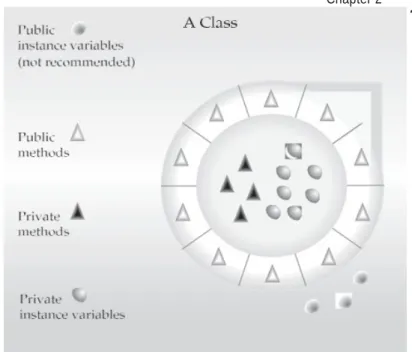
Encapsulation is the mechanism that binds together code and the data it manipulates, and
keeps both safe from outside interference and misuse.
protective wrapper that prevents the code and data
a well-defined interface.
the automatic transmission on an automobile. It
Chapter 2 An Overview of Java
19
Figure 2-1 Encapsulation: public methods can be used to protect private data.
Encapsulation is the class.
A class defines the structure and behavior (data and code) that will be shared by a set of objects. Each object of a given class contains the structure and behavior defined by the class, as if it were stamped out by a mold in the shape of the class.
objects are sometimes referred to as instances of a class.
Thus, a class is a logical construct; an object has physical reality.
Member Variables
The data defined by the class are referred to as Member Variables or instance variables.
Member Methods
The code that operates on that data.
Java method, C/C++ a function.
The behavior and interface of a class are defined by the methods that operate on its instance data.
Method or variable in a class may be marked private or public.
The public interface of a class represents everything that external users of the class need to know, or may know.
20
PART I The Java LanguageMammals, they would have more specific attributes, such as type
of teeth and mammary glands. This is known as a
subclass
of
animals, where animals are referred to as mammals’
superclass
.
Mammal
inherit
all of the attributes from animals.
class hierarchy
.
Inheritance interacts with encapsulation as well.
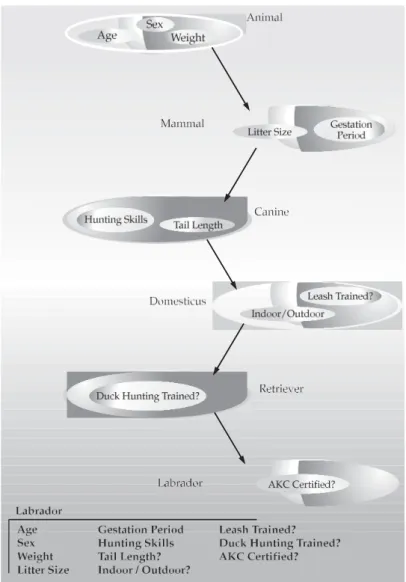
class encapsulates some attributes, subclass will have the same
attributes
plus
any that it adds as part of its specialization (see Figure
2-2).
Inheritance
Inheritance is the process by which one object acquires the properties of another object.
Hierarchical classification. ( top-down) classification dog, mammal class, animal.
Without the use of hierarchies, each object would need to define all of its characteristics
attributes, such as size, intelligence, and type of skeletal system.
Chapter 2
P
ar
t
I
Figure 2-2 Labrador inherits the encapsulation of all its superclasses.
Polymorphism
Polymorphism (from Greek, meaning “many forms”)
a feature that allows one interface to be used for a general class of actions.
action is determined by the exact nature of the situation.
three types of stacks.
1. integer values, 2. floating- point values,3. characters.
polymorphism,
22
PART I The Java Language“one interface, multiple methods.” general class of action.
Extending the dog analogy, a dog’s sense of smell is polymorphic. If the dog smells a cat, it will bark and run after it. If the dog smells its food, it will salivate and run to its bowl. The same sense of smell is at work in both situations. The difference is what is being smelled, that is, the type of data being operated upon by the dog’s nose!
Polymorphism, Encapsulation, and Inheritance Work Together
polymorphism, encapsulation, and inheritance combine to produce robust and scaleable programs
Encapsulation allows you to migrate your implementations over time without breaking the code that depends on the public interface of your classes.
Polymorphism allows you to create clean, sensible, readable, and resilient code.
Dogs are fun to think about from an inheritance standpoint, but cars are more like programs.
All drivers rely on inheritance to drive different types (subclasses) of vehicles.
People interface with encapsulated features on cars all the time. The brake and gas pedals hide an incredible array of complexity with an interface so simple you can operate them with your feet!
The final attribute, polymorphism, is clearly reflected in the ability of car manufacturers to offer a wide array of options on basically the same vehicle. For example, you can get an antilock braking system or traditional brakes, power or rack-and-pinion steering, and 4-, 6-, or 8-cylinder engines. Either way, you will still press the brake pedal to stop, turn the steering wheel to change direction, and press the accelerator when you want to move. The same interface can be used to control a number of different implementations.
As you can see, it is through the application of encapsulation, inheritance, and polymorphism that the individual parts are transformed into the object known as a car.
The same is also true of computer programs. By the application of object-oriented principles,
A First Simple
Program
/*This is a simple Java program. Call this file "Example.java".
*/
class Example {
// Your program begins with a call to main(). public static void
main(String args[]) {
System.out.println("This is a simple Java program.");
} }
NOTE The descriptions that follow use the standard Java SE 8 Development Kit (JDK 8), which is available from Oracle.
Entering the Program
Example.java.In Java, a source file is officially called a compilation unit.
The Java compiler requires that a source file use the .java filename extension.
The name of the class defined by the program is also Example.
Compiling the Program
C:\>javac Example.java
The Java Language
your program that contains instructions the Java Virtual Machine will execute. Thus, the output of javac is not code that can be directly executed.
To actually run the program, you must use the Java application launcher called java. To do so, pass the class name Example as a command-line argument, as shown here:
C:\>java Example
When the program is run, the following output is displayed:
This is a simple Java program.
When Java source code is compiled, each individual class is put into its own output file named after the class and using the .class extension. This is why it is a good idea to give your Java source files the same name as the class they contain—the name of the source file will match the name of the .class file. When you execute java as just shown, you are actually specifying the name of the class that you want to execute. It will automatically search for a file by that name that has the .class extension. If it finds the file, it will execute the code contained in the specified class.
A Closer Look at the First Sample Program
Although Example.java is quite short, it includes several key features that are common to all Java programs. Let’s closely examine each part of the program.
The program begins with the following lines: /*
This is a simple Java program. Call this file "Example.java".
*/
Java supports three styles of comments.
multiline comment. /* and end with */.
The next line of code in the program is shown here:
class Example {
The next line in the program is the single-line comment, shown here:
// Your program begins with a call to main().
The third type of comment, a documentation comment.
The next line of code is shown here:
public static void main(String args[ ]) {
main( ) method. the program will begin executing.
The public keyword is an access modifier.
main( ) must be declared as public, since it must be called by code outside of its class.
The keyword static allows main( ) to be called without having to instantiate a particular instance of the class.
The keyword void simply tells the compiler that main( ) does not return a value.
Diff. b/w main Main
Any information that you need to pass to a method is received by variables specified within the set of parentheses that follow the name of the method. These variables are called parameters.
If there are no parameters required for a given method, you still need to include the empty parentheses. In main( ), there is only one parameter, albeit a complicated one.
String args[ ] declares a parameter named args, which is an array of instances of the class String. (
The Java Language
One other point: main( ) is simply a starting place for your program. A complex program will have dozens of classes, only one of which will need to have a main( ) method to get things started.
Applet and Java embedded in web browsers don’t need main()
For example, when creating applets—Java programs that are embedded in web browsers—you won’t use main( ) since the web browser uses a different means of starting the execution of applets.
The next line of code is shown here. Notice that it occurs inside main( ).
System.out.println("This is a simple Java program.");
This Output is actually accomplished by the built-in println( ) method.
System is a predefined class that provides access to the system.
out is the output stream that is connected to the console.
println( ) statement ends with a semicolon.
A Second Short Program
A variable is a named memory location that may be assigned a value by your program.
Example2.java.
/*
Here is another short example. Call this file "Example2.java".
*/
class Example2 { public static void main(String args []) {
int num; // this declares a variable called num
num = 100; // this assigns num the value 100 System.out.println("This is num: " + num); num = num * 2;
System.out.println(num); }
}
output:
This is num: 100
The value of num * 2 is 200
int num; // this declares a variable called num
This line declares an integer variable called num.
type var-name;
In the program, the line
num = 100; // this assigns num the value 100
System.out.println("This is num: " + num);
num is first converted from an integer into its string equivalent and then concatenated with the string that precedes it.
Using the + operator, you can join together as many items as you want within a single println( ) statement.
Here are the next two lines in the program:
System.out.print ("The value of num * 2 is "); System.out.println (num);
Two Control Statements
The if Statement
if(condition) statement;
Here, condition is a Boolean expression. If condition is true, then the statement is executed. If condition is false, then the statement is bypassed. Here is an example:
if(num < 100) System.out.println("num is less than 100");
Operator Meaning
< Less than
> Greater than
== Equal to
Notice that the test for equality is the double equal sign. Here is a program that illustrates the if statement:
/*
Demonstrate the if.
Call this file "IfSample.java". */
class IfSample {
public static void main(String args[]) { int x, y;
x = 10; y = 20;
if(x < y) System.out.println("x is less than y");
x = x * 2;
x = x * 2;
if(x > y) System.out.println("x now greater than y");
// this won't display anything
if(x == y) System.out.println("you won't see this"); }
}
The output generated by this program is shown here:
x is less than y x now equal to y
x now greater than y
Notice one other thing in this program. The line
int x, y;
declares two variables, x and y, by use of a comma-separated list.
The for Loop
for(initialization; condition; iteration) statement; /* Demonstrate the for loop.
Call this file "ForTest.java". */
class ForTest {
public static void main(String args[]) { int x;
for(x = 0; x<10; x = x+1)
System.out.println("This is x: " + x);
} }
This program generates the following output:
30
PART I The Java LanguageThis is x: 4 This is x: 5 This is x: 6 This is x: 7 This is x: 8 This is x: 9
x = x + 1;
x++;
Thus, the for in the preceding program will usually be written like this:
for(x = 0; x<10; x++)
decrement operator, which is specified as – –.
Using Blocks of
Code
Java allows two or more statements to be grouped into blocks of code, also called code blocks.
if(x < y) { // begin a block x = y; y = 0;
Let’s look at another example. The following program uses a block of code as the target of a for loop.
/*
Demonstrate a block of code.
Call this file "BlockTest.java" */
class BlockTest {
public static void main(String args[]) { int x, y;
y = 20;
// the target of this loop is a block for(x = 0; x<10; x++) {
System.out.println("This is x: " + x); System.out.println("This is y: " + y); y = y - 2;
} } }
The output generated by this program is shown here:
This is x: 0 This is y: 20 This is x: 1 This is y: 18 This is x: 2 This is y: 16 This is x: 3 This is y: 14 This is x: 4 This is y: 12 This is x: 5 This is y: 10 This is x: 6 This is y: 8 This is x: 7 This is y: 6 This is x: 8 This is y: 4 This is x: 9 This is y: 2
In this case, the target of the for loop is a block of code and not just a single
Lexical Issues
Java programs are a collection of whitespace, identifiers, literals, comments, operators, separators, and keywords.
Whitespace
not need to follow any special indentation rules. In Java, whitespace is a space, tab, or newline.
Identifiers
An identifier may be any descriptive sequence of uppercase and lowercase letters, numbers, or the underscore and dollar-sign characters. They must not begin with a number, lest they be confused with a numeric literal. Again, Java is case-sensitive, so VALUE is a different identifier than Value. Some examples of valid identifiers are
AvgTemp count a4 $test this_is_ok
Invalid identifier names include these:
2count high-temp Not/ok
NOTE Beginning with JDK 8, the use of an underscore by itself as an identifier is not recommended.
Literals
A constant value in Java is created by using a literal representation of it. For example, here are some literals:
100 98.6 ‘X’ “This is a test”
Left to right, the first literal specifies an integer, the next is a floating-point value, the third is a character constant, and the last is a string. A literal can be used anywhere a value of its type is allowed.
Comments
Chapter 2 An Overview of Java
33
P
ar
t
I
documentation comment begins with a /** and ends with a */. Documentation comments are explained in the Appendix.
Separators
In Java, there are a few characters that are used as separators. semicolon.
As you have seen, it is used to terminate statements. Symbol Name Purpose
( ) Parentheses Used to contain lists of parameters in method definition and invocation. Also used for defining precedence in expressions, containing expressions in control statements, and
surrounding cast types.
{ } Braces Used to contain the values of automatically initialized arrays. Also used to define a block of code, for classes, methods, and local scopes.
[ ] Brackets Used to declare array types. Also used when dereferencing array values.
; Semicolon Terminates statements.
, Comma Separates consecutive identifiers in a variable declaration. Also used to chain statements together inside a for
statement.
. Period Used to separate package names from subpackages and classes. Also used to separate a variable or method from a reference variable.
:: Colons Used to create a method or constructor reference. (Added by JDK 8.)
The Java Keywords
There are 50 keywords currently defined in the Java language (see Table 2-1). These keywords, combined with the syntax of the operators and separators, form the foundation
Table 2-1 Java Keywords
abstract continue for new switch
assert default goto package synchronized
boolean do if private this
break double implements protected throw
byte else import public throws
case enum instanceof return transient
catch extends int short try
char final interface static void
class finally long strictfp volatile
34
PART I The Java LanguageThese keywords cannot be used as identifiers.
They cannot be used as names for a variable, class, or method.
The keywords const and goto are reserved but not used.
In addition to the keywords, Java reserves the following: true, false, and null.
The Java Class Libraries
println( ) and print( ).As mentioned, these methods are available through System.out.