BIAS Data Sharing Platform and
Data Storage Device
Indicator of Progress
IoP Number Action Number Deadline
48, 104, 129, 211(Milestone)
B15 2014-10-31 (104, 211)
Action Name Point of Contact
Data-Sharing Platform Peter Sigray
Indicator
• Final version of the BIAS data-sharing platform
This document is a draft of the final report to be published 31 May 2015 (129).
Relevant documents attached: DataSharingPlatform.docx
Data–sharing platform and data storage of acoustic data
Introduction
Underwater acoustic measurement generates relative large amount of data. A sensor that is continuously recording with a sample rate of 20 kHz will generate about 4TB of raw data per year. With several sensors and years going by this will generate a substantial amount of data to be stored. This unavoidable fact puts special requirements on the data storing compared to other types of environmental monitoring.
In most cases the raw data is processed by applying signal processing, which extracts relevant statistical measures. For example the second indicator of Marine Strategy Framework
Directive (MSFD), dictates that averages of the sound pressure should be deduced for two specific frequencies. Thus, the data storage has two main purposes, first to store raw data and secondly to give access to data for signal processing use. It should be stressed that raw
acoustic data has been classified by national defense in the Baltic Sea region and hence cannot be shared publicly. In the BIAS project it was agreed to make 20 second averages publically available. For this reason the data storage of raw data and the data sharing was split into two separate applications. The two applications are herein named the Data Storage Device (DSD) and the Data-Sharing Platform (DSP). The first is proposed to be used internally by the owner of the data and the latter for publishing data on Internet.
General requirements of Data Storing Device
The objective of the DSD is to store raw data. This implies that raw data from the
measurement are downloaded onto the DSD. Thus, the archiving structure should reflect the organization of the measurement as well as the requirements of the users.
There basic requirements for DSD are listed below:
The DSD should be easily accessible
The DSD should be protected from malicious intrusion
The DSD should offer a safe back-up facility
The archiving/folder structure should offer an easy to store User Interface (UI)
General requirements of Data-Sharing Platform
The data DSP should be easy to access and allow the user to upload and download data. Types of data that will be stored are for example, processed data, modelled data, Meta data, input layers to model and standards. The DSP should contain all data that are needed for a re-analysis of data. In summary, it should be a stand-alone data storing system.
The basic requirements for DSP are listed below:
The DPS platform should be protected from malicious intrusion
The DPS should offer a safe back-up facility
The DSP should offer storage for processed as well for miscellaneous data
The DPS shall offer flexibility to create new users and to configure set access rights for the users
Security aspects
Both the DSP and the DSD have to offer protection that prevents non-authorized persons to access the units. The DSD can only be reached by connecting to it via a cable. Thus, it is not reachable using Internet or wire-less. The connecting computer has to be equipped with updated virus protection software such as Symantec Endpoint Protection.
The idea with the DSP is to be connectable using Internet. To assure that only users are allowed to connect a self-signed certificate issued by the owner of the DSP is employed. The users can only login by using username and password.
Data storage Device of raw data
Network-Attached Storage (NAS) from Synology (Synology disk station ds1813+) were used as the basic building brick. Two separate NAS containing eight 4 TB hard disk drives each (WD SE 3.5" 4TB 7200RPM SATA/600 64MB) were used. Each disk gives after formatting about 3.6 TB. The NAS will require two extra disks for raid protection. Some of the storage space is lost due to formatting. In the end the eight 4 TB disks will give an effective storage capacity of about 10 TB. Both NAS are run in SHR2 mode, which corresponds to RAID-6 (allowing two Hard Disks to fail).
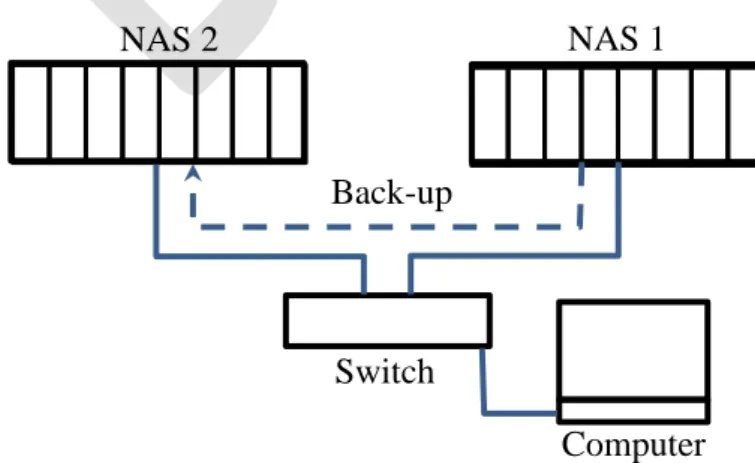
The two NASs are connected to a switch. This solution allows one of the NAS to be placed in a separate location and thereby protecting it from e.g. theft and fire. The structure of the complete DSD is shown in the Fig. 1. The computer is connected to the switch and all communication is done with NAS 1, where data is stored. The back-up to NAS 2 is
programmed to be executed during night. This offers the operator the possibility to correct up-loaded data during the day.
Figure 1. A sketch of the data storage device used in BIAS by FOI. NAS 1 NAS 2
Switch
Computer Back-up
The computer connected to the switch will recognize NAS 1 as an external hard drive and the data is up-loaded using for example explorer. The same scheme is used when data is
downloaded. The folders used in BIAS are shown in Figure 2.
The folder structure reflects the geographical locations of the measurements. The different positions in BIAS have a running number identifying the location as well as a name (e.g. Pos 07 Almagrundet). Both raw data from the autonomous loggers (manufacturer defined format e.g .DSG) and transformed format (wav-format) is uploaded. The data is stored under a sub-folder identifying the month (e.g. 3 Mar). If the sensor was changed during the month
separate folders are created to assure that data in one folder is from one individual sensor (e.g. 140301_140305). Additional folders are the QX Meta data. These folders contain information on deployment, sensors and data integrity (checksum). In the folder “Orginal protocol” are the scanned protocols stored that were used at the field trials.
Data-Sharing Platform
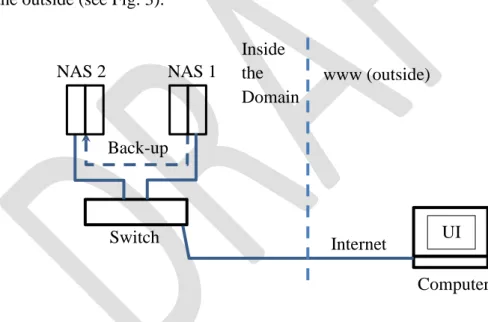
The DSP offers a simple web-user interface (UI) for users to upload and download files. To prevent data loss a two NAS-solution was chosen. This allows for placing the back-up NAS at separate geographical location. Since the users of the platform are known by the administrator of the system a self-signed SSL certificates issued by FOI were employed. This excludes random trespassers trying to access the platform. Only the first UI-equipped NAS is visible from the outside (see Fig. 3).
Figure 3. A sketch of the data sharing device used in BIAS by FOI.
This device is similar to the DSD but it includes more functionality such as the possibility to allocate read/write/delete access to the individual users. A major difference is that the DSP will house less data and thus does not need more than 4 TB data storage. The Data-Sharing platform consists of two NAS:s (Synology DiskStation DS713+), where one is used as data-portal (UI) and the other for back-up. The two NASs are both setup with two 1TB WD Red hard drives each. RAID 1 is used for both NAS. One of the disk stations has a service running on a specific port with a web user interface for managing files. The second NAS is running a backup service on port 873 only reachable by the first NAS. The first NAS is scheduled to back-up to the second NAS every day 03:00 am CET. The SSL certificate is a self-signed
Switch Computer Back-up NAS 1 NAS 2 Inside the Domain www (outside)
certificate issued by foi.se. All http connections are redirected to https. The first NAS with the web UI is running with an APC Back-UPS CS 350 for protection against power surges and about 10 minute battery time for short power failures. The backup server, second NAS, is running with an APC Essential Surge Arrest which will protect against power surges. There are two principle users of the system, i.e. administrator and users. The first has
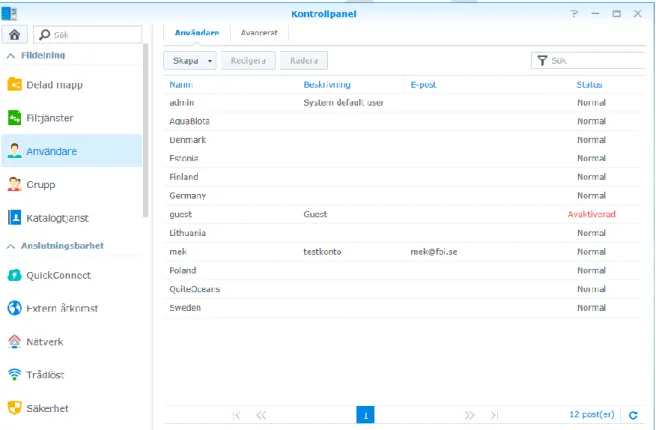
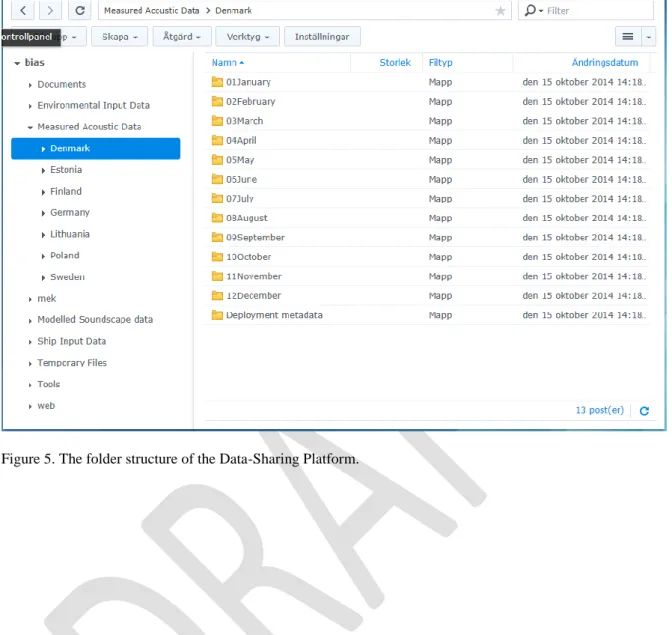
privilege to manage the system while the latter has the right to up-load and delete files in their own directory as well as down-loading data from other user directories. The DSM software (Synology) is used to administrate the NAS. It is a web-based UI that offers a number of tools for central management of the NAS. It also includes the web-based login interface for all users. There is a number of built-in features that facilitates management such as control panel and file station. The essence is that the manager has the possibility to create folders for the users and manage the users right to both create folders and access rights to files. In Fig. 4 and 5 are the user and the folders structures shown of the DSP.