How to Meet
the Growing
Demands on IT:
Four Steps Along the PathExecutive Summary 2
The Challenges 3
A New Model 4
Conclusions 10
About Rackspace 11
Notes 11
How to Meet the Growing
Demands on IT:
Four Steps Along the Path
Executive Summary
IT is always on a journey into the future But lately the journey has been difficult
It’s no longer enough for IT teams to simply “keep the lights on” and support the status quo IT managers face tough challenges moving forward: to support business growth, become more agile, promote good governance and do it all faster, better, and for less money than ever before
Many analysts and CIOs agree that IT teams can’t succeed using the old approach: doing it all themselves with on-premise hardware and software That’s just too slow and too costly
Instead, IT should evolve into a “broker” that selects the best third parties to deliver any required services, and the best places to run any workloads: either on-premise, outsourced through managed hosting, in a private cloud, or in a public cloud
That model is good for everyone: end users get faster service, your IT team does more strategic projects, and your management team sees a better picture of IT’s contribution
No matter where your IT stands today, you can move towards a service broker model using proven tools and reliable partners This white paper outlines four possible configurations for managing your IT infrastructure: 1 Virtualized on-premise data center
2 A flexible way to extend your data center 3 Adding an orchestration tool
4 A smooth path to the cloud
As you move from one stage to the next, your options open up From the first configuration to the last, your options increase from only one to eight different possibilities The more choices you have, the faster and more cost-effectively IT can meet the strategic needs of your enterprise And the smoother your journey into the future becomes
The Challenges Facing IT
IT managers face many tough challenges today Let’s consider each one in brief
To Help Grow the Business
For years, IT teams have been pushed to align their operations with the goals of the enterprise
For example, the latest Gartner survey of 2,053 CIOs said they picked “increasing enterprise growth” as their top priority, for the third year in a row 1 The top strategic projects for most enterprises are applications: both customer-facing, web-enabled apps, and those intended to streamline or empower internal operations
Yet most IT teams are forced to spend most of their budgets maintaining the status quo: supporting current software, manning help desks, and keeping data centers humming It’s widely acknowledged that the typical IT budget goes 70% toward routine busywork, and only 30% toward strategic innovations that can actually boost revenues or profits 2
To Meet User Requests Faster
In many organizations, as author/consultant Robert Bogue points out in a recent article on CIO com, IT backlogs are measured in years, not months or weeks 3
And data center capacity is often close to the wall When you’re running out of capacity, waiting to procure new hardware, or—even worse—building a new data center, you can’t always react quickly to demands for new applications or new computing resources
To Promote Good Governance
When IT can’t meet their demands, some users simply go around IT, signing up for cloud services and SaaS paid out of department budgets With no oversight, this “rogue IT” increases the risk of security holes, data breaches, and poor governance—exactly what IT is supposed to prevent
This isn’t just a small problem IT managers estimate “shadow IT” running at 20% of their budgets, but a recent study pegged it as closer to 40% 4 That’s a lot of spending without any knowledge or approval from IT
To Do All This Faster, Better, and Cheaper
IT could meet all these challenges if budgets were growing by leaps and bounds, but they’re not A recent survey of 500+ IT executives showed IT budgets look to rise less than 1 5% in 2014, while IT head count (FTE) grows
70
%
30
%
on the routine
busywork of running
the business
on strategic challenge
of growing the
business
How Enterprises Spend
On IT:
only 1 75% 5 A smaller survey showed CIOs expecting median budget increases of 3% in 2014 6 Such minor increases aren’t enough to propel IT to any new model of more responsive service
A New Model: It as a Service Broker Fortunately, IT has a promising alternative
A “broker” is anyone who serves as a go-between to link buyers and sellers, rather like a stock broker This concept can be applied to IT as well Instead of trying to do everything in-house, IT can evolve to a new role as a “service broker ” As a service broker, IT uses its expertise to select the vendors and services to meet the demands of the business quickly and cost-effectively By necessity, many of these vendors will be SaaS and cloud service providers This change is not optional, according to most analysts
“The next couple years will see IT becoming an agile service broker… or fade into insignificance,” reports a recent blog from the Wall Street Journal 7 In fact, this change is already happening A survey of CIOs by IDG Research in mid-2013 revealed that 26% of IT teams already operate as a service broker, while another 30% are actively considering this role Only a minority of 44% are not thinking about this 8
According to a recent white paper from VMware®, once IT becomes a broker of standardized services with well-defined SLAs, it can evolve “from routine maintenance of existing operations to higher-value activities that will improve efficiency and increase top-line revenue ”9
In other words, by becoming a service broker, IT can meet all the challenges set in front of it And wherever your IT stands today, you can take significant, measured steps toward this role
The rest of this white paper describes four possible configurations for managing your enterprise infrastructure, and how you can take steps from each point toward becoming a service broker:
1 Virtualized on-premise data center 2 A flexible way to extend your data center 3 Adding an orchestration tool
4 A smooth path to the cloud
The following sections explain each approach, along with a high-level diagram of the infrastructure involved
Instead
of trying
to do
everything
in-house,
IT can
evolve to a
new role as
a “service
broker.”
1: Virtualized On-Premise Data Center
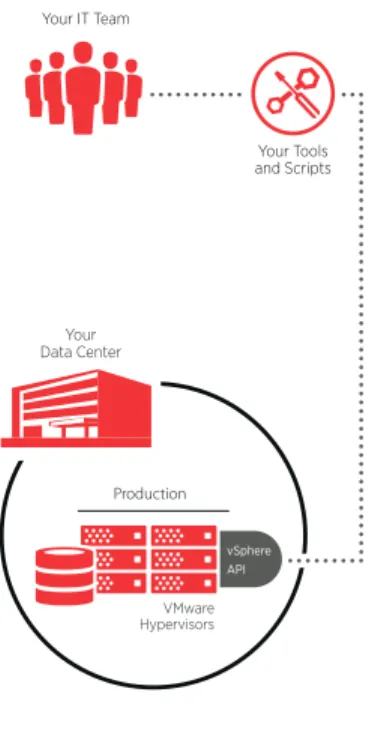
Most enterprises have adopted VMware to gain the cost and operational benefits of virtualization As shown in Figure 1, VMware vCenter Server™ is the platform often used to manage VMware vSphere® environments in customer data centers
This opens the door to using vSphere API-compatible management tools to help administer the virtualized infrastructure Many IT teams use these tools to monitor the company’s virtual machines (VMs) and make real-time adjustments to either spin up or shut down system resources as needed Customer management tools help IT teams automate certain processes and gain a real-time overview of the IT operation These tools can be scripts written in-house to automate certain processes, VMware tools like vSphere Web Client, or GUI-based third-party tools from vendors like CA® Technologies or Dell™ Software
But with this configuration, IT has only one choice: Using customer
management tools to manage on-premise servers That may not be enough to help grow the business
2: A Flexible Way to Extend Your Data Center
What happens if the data center is at capacity, so it can’t handle any more workloads? What if IT can’t respond to demands for processing or applications, so users are switching to rogue IT?
Wouldn’t it be great if you could quickly expand the capacity of your current data center with no CAPEX, no rip-and-replace, and no re-training your teams? And get much faster at provisioning VMs and rolling out applications, even while saving money?
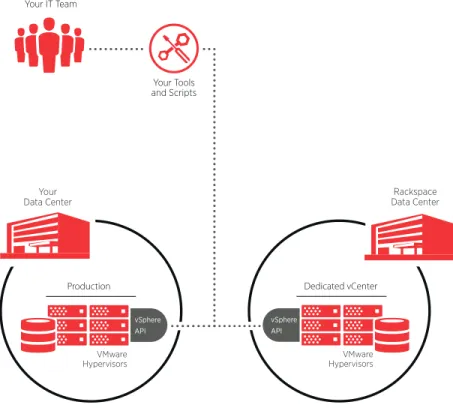
As shown in Figure 2, your enterprise now has a new option You can outsource workloads with the unique Dedicated VMware® vCenter Server™ offering from Rackspace This is the only service from a long-time hosting provider that directly exposes the vSphere API to your IT team
Notice the lines from the customer management tools to the VMware-powered environments in both data centers: on-premise and hosted by Rackspace That means your IT team can monitor and control the VMware environment in the Rackspace data center, just as if it was on-premise This provides a transparent extension of your existing infrastructure
Any vSphere API-compatible tools, and any scripts written to automate tasks like provisioning VMs, will work in this configuration—no matter where the VMs happen to be located This enables you to instantly spin up new capacity in the Rackspace data center, while shifting the costs for those workloads from CAPEX to OPEX You can use all the same management tools to gain agility, maintain control, and configure the hosted environment as an extension of your own data center
Figure 1: A Virtualized On-Premise Data Center Production VMware Hypervisors Your Data Center Your IT Team
Your Tools and Scripts
vSphere API
With this configuration, you have two options for locating workloads,
as shown in Table 1 The choice between on-premise or managed hosting helps IT deliver faster and more effectively, and gain free up time to focus on more strategic projects
3: Adding an Orchestration Tool
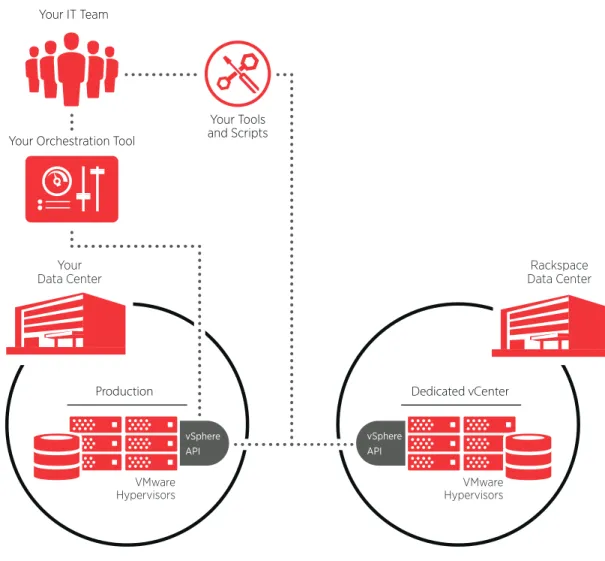
To gain even more power and flexibility, IT departments can add an
“orchestration tool” as shown at the top of Figure 3 These tools add another level of management that can reduce the cost, complexity, and time for delivering IT services
Dedicated vCenter
VMware Hypervisors
vSphere API
Rackspace Data Center
Production
VMware Hypervisors
vSphere API Your
Data Center
Your IT Team
Your Tools and Scripts
Figure 2: A Flexible Way to Extend Your Data Center
• Customer’s Management Tools • On-premise Virtualization • Hosted Virtualization Pick 1 option from column A + 1 option from column B (2 options total)
Management
Location
A
B
As shown by the dotted lines, orchestration tools such as the ServiceMesh Agility Platform™ are compatible with the vSphere API in on-premise data centers, and in any hosted data centers running Dedicated VMware vCenter Server from Rackspace
An orchestration tool can help IT to streamline many processes, while leveraging the existing investment in VMware For example, IT can provide a self-serve portal to save time for IT staff and certain authorized end users In keeping with the service broker role, an orchestration tool makes IT services more portable This gives IT more flexibility to move from directly delivering services to brokering services from third-party vendors—while maintaining all the control it needs
And with an orchestration tool, your IT team can continue using the same tools with the same workflow, with next-to-no retraining Your team can carry on, as though all the workloads in the managed data center were still inside your own walls
Dedicated vCenter
VMware Hypervisors Production
VMware Hypervisors Your
Data Center
Your IT Team
Your Tools and Scripts
Rackspace Data Center
Your Orchestration Tool
vSphere API vSphere
API
This configuration provides four options for managing and locating workloads, as shown in Table 2 This flexible choice helps IT to become even more effective as a service broker, and to save even more time and money
As well, this configuration helps IT step into a new, more strategic role Consider a few possibilities for how you can extend your service portfolio with this configuration:
• Show or chargeback costs to users with metering and reporting.
Most orchestration tools provide these features, along with clear dashboards and calculators for tracking usage of both on-premise and hosted
infrastructure and attaching costs to that usage Tracking the real-time costs of IT services shows end users the scope and costs of their requirements for processing and storage
• Provide authorized end users with their own self-service portal.
An orchestration tool enables end users to provision their own compute instances, either on-premise or in the Rackspace data center This can include spinning up new VMs and choosing the best environment for any new workload, based on criteria such as cost, technology platform, and SLAs And IT can use policies and permissions to control how resources are consumed by end users
• Reduce rogue IT and bring back governance.
With accurate chargebacks to departments, and quick and easy self-serve provisioning, much of the pressure for rogue IT will dissipate If managers can get what their teams need from IT, quickly and efficiently, most will come back to the fold
4: A Smooth Path to The Cloud
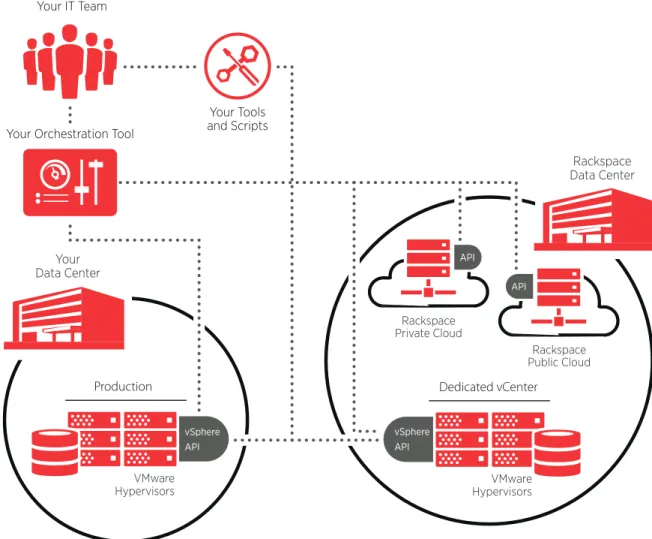
Over the longer term, every enterprise needs a realistic strategy for the cloud The architecture in Figure 4 provides a smooth road map to a flexible cloud strategy
• Customer’s Management Tools • Customer’s Orchestration Tool
• On-premise Virtualization • Hosted Virtualization Pick 1 option from column A + 1 option from column B (4 options total)
Management
Location
A
B
Notice the new dotted lines running from the orchestration tool to Rackspace Private and Public Clouds These clouds are powered by OpenStack® the open source software stack for the cloud, founded by Rackspace and now supported by more than 850 organizations including Cisco, Dell, EMC, HP, IBM, Intel, Oracle, RedHat, VMware, and Yahoo! 10
As shown in Table 3, this arrangement gives IT the choice to assign any new workload to the most effective environment, whether that may be located: • Within the traditional on-premise data center
• In a managed VMware-powered environment hosted by a reliable partner • In a private cloud, with effective security managed by a seasoned
service provider
• In the public cloud, with elastic capacity to accommodate any spikes in demand
Dedicated vCenter
VMware Hypervisors
Rackspace Data Center
Rackspace Private Cloud
API
Rackspace Public Cloud
API
Production
VMware Hypervisors Your
Data Center
Your IT Team
Your Tools and Scripts Your Orchestration Tool
vSphere API vSphere
API
For any of these workloads, IT continues to use the same orchestration tool to provision and control compute resources, and manage everything across heterogeneous clouds—and even multiple vendors—from a single pane of glass
The IT team maintains the same governance, giving IT the best of both worlds: all the control and agility you require, and a reliable infrastructure with all the expertise and support to help you through the transition
This roadmap to the cloud provides cost-effective pricing, quick provisioning, and a stable environment This truly “hybrid” approach to the cloud frees up IT to address revenue-generating projects, create or roll out new applications, and devote resources to more strategic projects
Table 3: Options for Managing and Workload Location
Conclusions
This white paper shows that IT managers face great pressure to contribute to top-line revenue But IT can’t achieve this by doing everything in-house using on-premise resources One compelling proof is that up to 40% of the official IT budget is now spent on “rogue IT ”
It’s better is become a service broker In this model, IT uses its expertise to select the best third-party vendors and service providers to meet enterprise requirements for IT resources, while maintaining proper control and
governance This isn’t a radical idea: according to a recent poll, more than half of all CIOs now follow—or are actively considering—this model
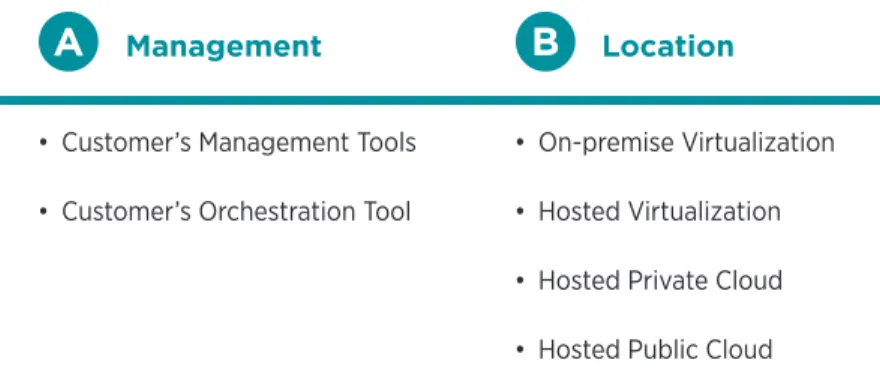
This white paper describes four configurations for managing IT, and how you can move from each one toward a service broker model Each configuration doubles the available options for managing and locating workloads, starting from only one and moving to a final range of eight
• Customer’s Management Tools • Customer’s Orchestration Tool
• On-premise Virtualization • Hosted Virtualization • Hosted Private Cloud • Hosted Public Cloud Pick 1 option from column A + 1 option from column B (8 options total)
Management
Location
For three out of four configurations—including a smooth roadmap to the cloud—Rackspace’s Dedicated vCenter offering helps IT become more strategic and more agile, meet new business demands and maintain high standards of governance and availability
As one of the largest VMware Service Provider Program (VSPP) partners, Rackspace has expert VMware Certified Professionals available and experience that comes with managing over 45,000 VMs To find out more about how Rackspace can help you overcome the growing pressures on IT by evolving to a service broker model, call 800-961-2888
About Rackspace
Rackspace® (NYSE: RAX) is the global leader in hybrid cloud and founder of OpenStack®, the open-source operating system for the cloud Hundreds of thousands of customers look to Rackspace to deliver the best-fit infrastructure for their IT needs, leveraging a product portfolio that allows workloads to run where they perform best—whether on the public cloud, private cloud, dedicated servers, or a combination of platforms The company’s award-winning Fanatical Support® helps customers successfully architect, deploy and run their most critical applications Headquartered in San Antonio, TX, Rackspace operates data centers on four continents Rackspace is featured on Fortune’s list of 100 Best Companies to Work For
For more information, visit www.rackspace.com Notes
1 : Marcus Blosch and Saul Brand, “Gartner’s 2013 CIO Survey Provides Keys to EA Success,” Gartner, 19 July 2013
2 : Jason Hiner, “IT’s new holy grail: Break out of the 70% maintenance loop,” Tech Sanity Check blog, TechRepublic com, 11 May 2010
3 : Robert Bogue, “How To Reduce Your Application Backlog with SharePoint,” CIO com, 3 August 2011
4 : Antony Savvas, “CIOs blind to 40 percent ‘shadow’ IT spending at their firms,” ComputerWorldUK, 28 November 2013
5 : “IT Budgets, Salaries, and Priorities: 2013 SIM IT Trends Study”, CIO com retrieved 3 April 2014 from http://www cio com/slideshow/detail/128158 6 : “Findings from the 2013–2014 IT Budget Benchmark,” CEB, 14 November
2013, page 12
7 : Tom Loftus, “Forrester’s View of the Very Near Future,” CIO Journal blog, The Wall Street Journal, 5 November 2013