SAS
®and Hadoop
Technology
Overview
SAS® and Hadoop Technology: Overview
Copyright © 2015, SAS Institute Inc., Cary, NC, USA ISBN 978-1-62959-983-0 (Hardcopy)
ISBN 978-1-62959-986-1 (Epub) ISBN 978-1-62959-987-8 (Mobi) ISBN 978-1-62959-984-7 (PDF)
All rights reserved. Produced in the United States of America.
For a hard-copy book: No part of this publication may be reproduced, stored in a retrieval system, or
transmitted, in any form or by any means, electronic, mechanical, photocopying, or otherwise, without the prior written permission of the publisher, SAS Institute Inc.
For a web download or e-book: Your use of this publication shall be governed by the terms established by
the vendor at the time you acquire this publication.
The scanning, uploading, and distribution of this book via the Internet or any other means without the permission of the publisher is illegal and punishable by law. Please purchase only authorized electronic editions and do not participate in or encourage electronic piracy of copyrighted materials. Your support of others' rights is appreciated.
U.S. Government License Rights; Restricted Rights: The Software and its documentation is commercial
computer software developed at private expense and is provided with RESTRICTED RIGHTS to the United States Government. Use, duplication or disclosure of the Software by the United States Government is subject to the license terms of this Agreement pursuant to, as applicable, FAR 12.212, DFAR 227.7202-1(a), DFAR 227.7202-3(a) and DFAR 227.7202-4 and, to the extent required under U.S. federal law, the minimum restricted rights as set out in FAR 52.227-19 (DEC 2007). If FAR 52.227-19 is applicable, this provision serves as notice under clause (c) thereof and no other notice is required to be affixed to the Software or documentation. The Government's rights in Software and documentation shall be only those set forth in this Agreement.
SAS Institute Inc., SAS Campus Drive, Cary, North Carolina 27513-2414. July 2015
SAS® and all other SAS Institute Inc. product or service names are registered trademarks or trademarks of SAS Institute Inc. in the USA and other countries. ® indicates USA registration.
Contents
Chapter 1 • Introduction to SAS and Hadoop Technology . . . 1
SAS and Hadoop—Natural Complements . . . 1
About This Document . . . 2
Chapter 2 • Why Hadoop? . . . 5
What Is Apache Hadoop? . . . 5
Benefits of Storing Data in Hadoop . . . 6
Hadoop Platform . . . 6
Hadoop Distributions . . . 9
Connecting to Hadoop . . . 10
Chapter 3 • How Do SAS and Hadoop Work Together? . . . 13
Understanding Data Movement . . . 13
SAS Technology That Minimizes Data Movement . . . 18
Deploying the SAS and Hadoop Environment . . . 20
Securing the SAS and Hadoop Environment . . . 21
Chapter 4 • What SAS Technology Interacts with Hadoop? . . . 23
Spanning the Data-to-Decision Life Cycle . . . 23
SAS Technology That Interacts with Hadoop . . . 24
Chapter 5 • Explore Data and Develop Models . . . 29
SAS Visual Analytics and SAS Visual Statistics . . . 30
SAS In-Memory Statistics . . . 32
SAS High-Performance Analytics Products . . . 34
SAS High-Performance Risk . . . 37
SAS In-Database Technology . . . 39
Chapter 6 • Execute Models . . . 43
SAS Scoring Accelerator for Hadoop . . . 43
Chapter 7 • Manage Data . . . 45
SAS Data Loader for Hadoop . . . 47
SAS In-Database Code Accelerator for Hadoop . . . 49
SAS/ACCESS Interface to Hadoop . . . 50
SAS/ACCESS Interface to HAWQ . . . 51
SAS/ACCESS Interface to Impala . . . 52
SAS/ACCESS SQOOP Procedure . . . 54
Base SAS FILENAME Statement with the
Hadoop Access Method . . . 55
Base SAS HADOOP Procedure . . . 56
SAS Scalable Performance Data (SPD) Engine . . . 58
SAS Data Integration Studio . . . 60
Chapter 8 • Additional Functionality . . . 63
SAS Event Stream Processing . . . 64
SAS Federation Server . . . 65
SAS Grid Manager for Hadoop . . . 66
SAS High-Performance Marketing Optimization . . . 67
SAS Scalable Performance Data (SPD) Server . . . 69
SAS Visual Scenario Designer . . . 70
Recommended Reading. . . 73
Glossary . . . 75
1
Introduction to SAS and Hadoop
Technology
SAS and Hadoop—Natural Complements . . . 1 About This Document . . . 2
SAS and Hadoop—Natural Complements
When you use SAS with Hadoop, you combine the power of analytics with the key strengths of Hadoop: large-scale data processing and commodity-based storage and compute
resources. Using SAS with Hadoop maximizes big data assets in the following ways:
n Hadoop data can be leveraged using SAS. Just as with other data sources, data stored in Hadoop can be transparently consumed by SAS. This means that tools already in place can be used with Hadoop. Not only can SAS access data from Hadoop, but SAS can also assist in managing your Hadoop data.
n The power of SAS analytics is extended to Hadoop. Long before the term big data was coined, SAS applied complex analytical processes to large volumes of data. SAS was designed from the beginning to scale and perform well in any environment and to take advantage of complementary technologies.
Currently, more than 20 SAS products, solutions, and technology packages interact with Hadoop. Each SAS technology provides different functionality—from accessing and
managing Hadoop data to executing analytical models in a Hadoop cluster. In addition to the variety of functionality, SAS processes Hadoop data using different methods so that a particular business problem can be resolved in an optimal way.
About This Document
This document provides an overview of SAS and Hadoop technology and explains how SAS and Hadoop work together. Use this document as a starting point to learn about the SAS technology that interacts with Hadoop. No matter how much you know about SAS or Hadoop, getting acquainted with the concepts enables you to understand and use the technology that best meets your specific needs.
The information in this document is useful for the following audience:
n IT administrators who are interested in what SAS can do with Hadoop
n SAS customers who are considering moving their data to Hadoop and who want to know how their SAS products interact with Hadoop
n prospective SAS customers who want to know whether SAS and Hadoop technology can resolve their business problems
The following information is provided:
n Chapter 2, “Why Hadoop?,” on page 5 introduces Hadoop concepts, such as what Hadoop is, benefits of storing data in Hadoop, Hadoop components, Hadoop distributions, and basic information about connecting SAS to Hadoop.
n Chapter 3, “How Do SAS and Hadoop Work Together?,” on page 13 provides concepts about how SAS processes Hadoop data by eliminating or reducing data movement. In addition, there is information about deploying and securing the SAS and Hadoop environment.
n Chapter 4, “What SAS Technology Interacts with Hadoop?,” on page 23 introduces SAS technology that interacts with Hadoop. Examples of what you can do with SAS and Hadoop are provided, and each SAS technology is listed by its function with a description.
n Chapter 5, “Explore Data and Develop Models,” on page 29 provides a summary of each SAS technology that explores and visualizes data and develops analytical models. These technologies include SAS Visual Analytics, SAS Visual Statistics, SAS In-Memory Statistics, SAS High-Performance Analytics products, SAS High-Performance Risk, and SAS In-Database Technology.
n Chapter 6, “Execute Models,” on page 43 provides a summary of the SAS Scoring Accelerator for Hadoop, which executes analytical models in a Hadoop cluster.
n Chapter 7, “Manage Data,” on page 45 provides a summary of each SAS technology that accesses and manages data. These technologies include SAS Data Loader for Hadoop, accelerators that enable SAS code to be executed in a Hadoop cluster, several SAS/ACCESS engines, Base SAS functionality, and SAS Data Integration Studio.
n Chapter 8, “Additional Functionality,” on page 63 provides a summary of additional SAS functionality such as SAS Event Stream Processing, SAS Federation Server, SAS Grid
Manager for Hadoop, SAS High-Performance Marketing Optimization, SAS Scalable Performance Data (SPD) Server, and SAS Visual Scenario Designer.
2
Why Hadoop?
What Is Apache Hadoop? . . . 5
Benefits of Storing Data in Hadoop . . . 6
Hadoop Platform . . . 6
Overview of Hadoop Platform . . . 6
Hadoop Components and Other Related Components . . . 7
HAWQ . . . 8
Impala . . . 8
Kerberos . . . 9
Sentry . . . 9
Hadoop Distributions . . . 9
Connecting to Hadoop . . . 10
Hadoop Cluster Configuration Files . . . 10
Hadoop Distribution JAR Files . . . 10
HttpFS . . . 10
WebHDFS . . . 11
What Is Apache Hadoop?
Apache Hadoop is an open-source software framework that provides massive data storage and distributed processing of large amounts of data. The Hadoop framework provides the tools needed to develop and run software applications.
Data is divided into blocks and stored across multiple connected nodes (computers) that work together. This setup is referred to as a cluster. A Hadoop cluster can span thousands of nodes. Computations are run in parallel across the cluster, which means that the work is divided among the nodes in the cluster.
Hadoop runs on a Linux operating system. Hadoop is available from either the Apache Software Foundation or from vendors that offer their own commercial Hadoop distributions such as Cloudera, Hortonworks, IBM InfoSphere BigInsights, MapR, and Pivotal.
For more information about Hadoop, see Welcome to Apache Hadoop (http:// hadoop.apache.org/).
Benefits of Storing Data in Hadoop
The benefits of storing data in Hadoop include the following:
n Hadoop accomplishes two tasks: massive data storage and distributed processing.
n Hadoop is a low-cost alternative for data storage over traditional data storage options. Hadoop uses commodity hardware to reliably store large quantities of data.
n Data and application processing are protected against hardware failure. If a node goes down, data is not lost because a minimum of three copies of the data exist in the Hadoop cluster. Furthermore, jobs are automatically redirected to working machines in the cluster.
n The distributed Hadoop model is designed to easily and economically scale up from single servers to thousands of nodes, each offering local computation and storage.
n Unlike traditional relational databases, you do not have to preprocess data before storing it in Hadoop. You can easily store unstructured data.
n You can use Hadoop to stage large amounts of raw data for subsequent loading into an enterprise data warehouse or to create an analytical store for high-value activities such as advanced analytics, querying, and reporting.
Hadoop Platform
Overview of Hadoop Platform
Hadoop consists of a family of related components that are referred to as the Hadoop ecosystem. Hadoop provides many components such as the core components HDFS (Hadoop Distributed File System) and MapReduce. In addition, Hadoop software and
services providers (such as Cloudera and Hortonworks) provide additional proprietary software.
Hadoop Components and Other Related
Components
Ambari
Ambari is an open-source, web-based tool for managing, configuring, and testing Hadoop services and components.
HBase
HBase is an open-source, non-relational, distributed database that runs on top of HDFS. HBase tables can serve as input for and output of MapReduce programs.
HDFS
HDFS provides distributed data storage and processing. HDFS is fault-tolerant, scalable, and simple to expand. HDFS manages files as blocks of equal size, which are replicated across the machines in a Hadoop cluster. HDFS stores all types of data without prior organization such as Microsoft Excel spreadsheets, Microsoft Word documents, videos, and so on. HDFS supports all types of data formats. MapReduce is used to read the different formats.
HDFS includes various shell-like commands for direct interaction. These commands support most of the normal file system operations like copying files and changing file permissions, as well as advanced operations such as setting file redundancy to a different replication number.
Hive and HiveServer2
Hive is a distributed data warehouse component that is built on top of HDFS. The original Hive was succeeded by HiveServer2. The terms “Hive” and “HiveServer2” have become interchangeable, but mostly refer to HiveServer2. Hive provides the SQL query language HiveQL for data queries, analysis, and summarization. HiveServer2 can be secured with the Lightweight Directory Access Protocol (LDAP), which is a directory service protocol that authenticates users to a computer system. Or, it can be secured with Kerberos, which is a network authentication protocol that enables nodes to verify their identities to one another using tickets.
HiveQL
HiveQL is the SQL query language for Hive and HiveServer2.
Oozie
Oozie is a workflow scheduler system that manages Hadoop jobs.
MapReduce
MapReduce is a parallel programming model that is built into Hadoop for distributed processing. MapReduce divides applications into smaller components and distributes them among numerous machines. The map phase performs operations such as filtering,
transforming, and sorting. The reduce phase takes the output and aggregates it. The second generation of MapReduce is referred to as YARN (Yet Another Resource Negotiator).
Pig
Pig is a platform for analyzing very large data sets that are stored in HDFS. Pig consists of a compiler for MapReduce programs and a high-level language called Pig Latin. Pig Latin provides a way to perform data extractions, transformations, loading, and basic analysis without having to write MapReduce programs.
Sqoop
Sqoop is open-source software that transfers data between a relational database and Hadoop.
YARN
YARN is a resource-management platform for scheduling and handling resource requests from a distributed application. YARN refers to the second generation of MapReduce.
ZooKeeper
ZooKeeper is open-source software that provides coordination services for distributed applications. It exposes common services (such as naming, configuration management, and synchronization) and group services.
HAWQ
HAWQ (Hadoop With Query) is an SQL engine that is provided by Pivotal. HAWQ provides an optimized Hadoop SQL query mechanism on top of Hadoop. HAWQ provides ANSI SQL support and enables SQL queries of HBase tables. HAWQ includes a set of catalog services and does not use the Hive metastore.
Impala
Impala is an open-source massively parallel processing query engine that is provided by Cloudera and MapR. You use Impala to issue HiveQL queries to data stored in HDFS and HBase without moving or transforming data.
Kerberos
Kerberos is an open-source computer network authentication protocol that enables nodes to verify their identities to one another using tickets. Kerberos was developed as part of the Athena Project at the Massachusetts Institute of Technology (MIT). The Kerberos protocol is implemented as a series of negotiations between a client, the authentication server, and the service server. Secure authentication of Hadoop clusters has been available using the Kerberos protocol since Hadoop 2.
Sentry
Sentry is an open-source authorization mechanism that provides fine-grained and role-based access control for Apache Hive and Cloudera Impala. Sentry is a fully integrated component of CDH, which is a Cloudera distribution of Hadoop and related projects.
Hadoop Distributions
Hadoop is available from the following sources:
n Apache Software Foundation
n Commercial Hadoop distributions
A commercial Hadoop distribution is the collection of Hadoop components (such as HDFS, Hive, and MapReduce) that is provided by a vendor. Many commercial Hadoop distributions include additional proprietary software. SAS supports commercial Hadoop distributions from Cloudera, Hortonworks, IBM InfoSphere BigInsights, MapR, and Pivotal.
TIP Each SAS technology does not support all commercial Hadoop distributions. For more information about supported commercial Hadoop distributions, see the website SAS 9.4 Support for Hadoop (http://support.sas.com/resources/
thirdpartysupport/v94/hadoop/).
n SAS High-Performance Deployment of Hadoop distribution
For some SAS technology, you can configure SAS High-Performance Deployment of Hadoop instead of configuring a commercial Hadoop distribution. The SAS High-Performance Deployment of Hadoop includes the basics from the Apache Software Foundation and adds services. However, the SAS High-Performance Deployment of Hadoop does not provide all of the features that are available in commercial Hadoop distributions.
Connecting to Hadoop
Hadoop Cluster Configuration Files
Hadoop cluster configuration files are key to communicating with the Hadoop cluster. The configuration files define how to connect to the Hadoop cluster and they provide other system information. The default Hadoop configuration consists of two types of configuration files: default files and site-specific files. The site-specific configuration files include multiple files, such as core-site.xml, hdfs-site.xml, hive-site.xml, mapred-site.xml, and yarn-site.xml.
TIP Some SAS technology requires that you perform steps to make the Hadoop cluster configuration files accessible to the SAS client machine. See the SAS technology summaries in this document to determine what is required.
Hadoop Distribution JAR Files
JAR files are compressed collections of Java class files. The Hadoop distribution JAR files contain the Java application code deployed to the SAS client machine to enable SAS to connect to Hadoop as a client. JAR files are similar to client tools for relational databases. The JAR files are specific to the version of the Hadoop distribution and the Hadoop components that you are using. That is, if you update your Hadoop environment, the JAR files need to be updated on the SAS client as well. In many cases, if SAS code is failing, it is because of a missing JAR file or a JAR file version mismatch between the SAS client and server.
TIP Some SAS technology requires that you perform steps to make the Hadoop distribution JAR files accessible to the SAS client machine. See the SAS technology summaries in this document to determine what is required. In addition, some SAS technology, such as the SAS Embedded Process, requires installation of JAR files that are provided by SAS.
HttpFS
TIP SAS technology that connects to HDFS using HttpFS requires that you perform specific steps to connect. See the SAS technology summaries in this document to determine what is required.
WebHDFS
WebHDFS is an HTTP REST API that supports the complete file system interface for HDFS.
TIP SAS technology that connects to HDFS using WebHDFS requires that you perform specific steps to connect. See the SAS technology summaries in this document to determine what is required.
3
How Do SAS and Hadoop Work
Together?
Understanding Data Movement . . . 13
Overview . . . 13
Processing in the Hadoop Cluster . . . 14
Processing in a SAS In-Memory Environment . . . 15
Traditional Processing . . . 17
SAS Technology That Minimizes Data Movement . . . 18
Overview . . . 18
SAS Embedded Process . . . 18
SAS High-Performance Analytics Environment . . . 19
SAS LASR Analytic Server . . . 19
Deploying the SAS and Hadoop Environment . . . 20
Securing the SAS and Hadoop Environment . . . 21
Kerberos . . . 21
Sentry . . . 21
Understanding Data Movement
Overview
For a computer program to change data into information, there are three basic steps:
1 Access the data (which is stored in a data source).
2 Process the data.
3 Use the results somewhere (such as, write a report).
Moving data to be processed can take a lot of time, especially big data. If you can limit data movement or improve getting data to and from processing, then you can provide results faster.
Traditional SAS processing involves extracting data from the data source and delivering it to the SAS server for processing. Today, in addition to traditional processing, SAS uses alternative methods to work with Hadoop so that data movement can be eliminated or reduced. As a result, a particular business problem can be resolved in an optimal way. To understand the SAS technology that interacts with Hadoop, it is helpful to understand how SAS works with Hadoop. The following topics describe the different methods that SAS uses, starting with processing directly in the Hadoop cluster, moving the processing closer to the data in a SAS in-memory environment, and performing traditional processing.
Processing in the Hadoop Cluster
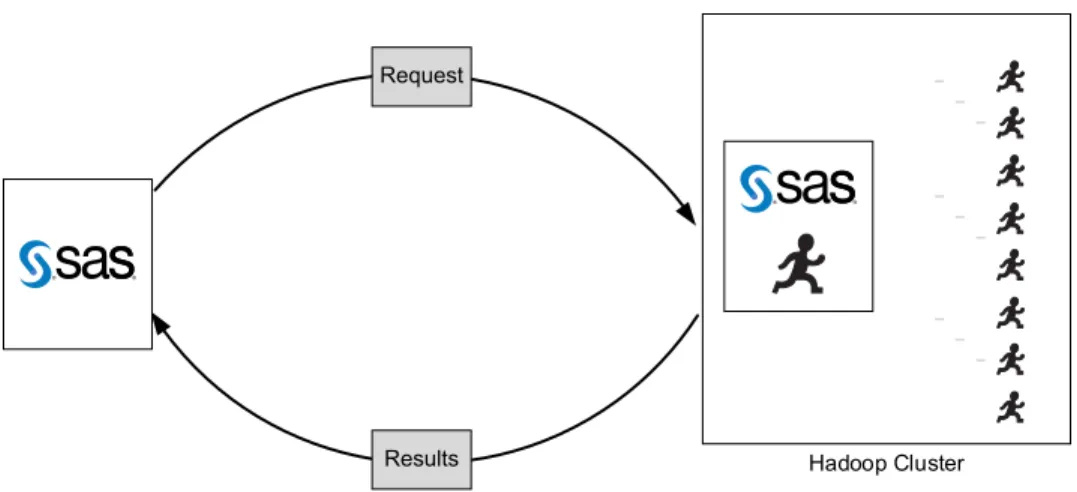
To eliminate data movement, SAS can process data directly in the Hadoop cluster. To do this, SAS pushes the SAS code directly to the nodes of the Hadoop cluster for processing. Rather than extracting the data from a data source and delivering it to a SAS server, SAS brings the analytics to where the data is stored to take advantage of the distributed processing
capabilities of Hadoop.
The SAS technology that processes data in the Hadoop cluster provides the following advantages:
n SAS computations are orchestrated via the distributed processing capabilities of Hadoop, which translates to shorter processing times and more value from Hadoop itself.
n Data movement is reduced and data security is improved.
n All of the data can be used in calculations versus a sample of the data, thus you gain accuracy in results.
n Processing directly in the Hadoop cluster is advantageous for mature Hadoop environments when data is so voluminous that moving it is prohibitive.
In the following illustration, the SAS server or SAS client connects to the Hadoop cluster, submits a request, processes the request in the Hadoop cluster, and sends only the results back to SAS.
Figure 3.1 Processing in the Hadoop Cluster
Hadoop Cluster Request
Results
TIP SAS Data Loader and SAS In-Database Technology can process data in the Hadoop cluster. In addition, SAS/ACCESS Interface to Hadoop can pass SQL code to the Hadoop cluster, the SAS Scalable Performance Data (SPD) Engine can submit data subsetting to the Hadoop cluster, and PROC HADOOP enables you to submit MapReduce programs and Pig Latin code for further processing by Hadoop.
Processing in a SAS In-Memory Environment
Some SAS technology works with Hadoop by processing data in a SAS in-memory environment. The in-memory environment exists on an analytics cluster, which is a set of connected machines with in-memory SAS software. The in-memory SAS software consists of the SAS High-Performance Analytics environment and the SAS LASR Analytic Server, which you will learn more about in “SAS Technology That Minimizes Data Movement” on page 18. To process the data in an in-memory environment, SAS loads the data from Hadoop into the in-memory environment. The in-memory environment performs the analysis, and only the results are returned to the SAS server or SAS client that submitted the request.
SAS technology that processes Hadoop data in an in-memory environment provides the following advantages:
n Data is loaded into the in-memory environment in parallel, which avoids the network bandwidth limitations of a single network connection.
n The in-memory data is distributed among multiple machines and treated as one large object, which provides fast results.
n SAS keeps the data and computations massively parallel.
n The in-memory environment brings the analytics closer to the data, which reduces time-consuming data movement.
n Data can be loaded from SAS data sets and from most data sources that SAS can access.
The in-memory environment can be configured in one of the following ways:
n on the Hadoop cluster that has the data to analyze, referred to as “co-located”
n on a set of machines that is remote from the Hadoop cluster and dedicated to SAS processing
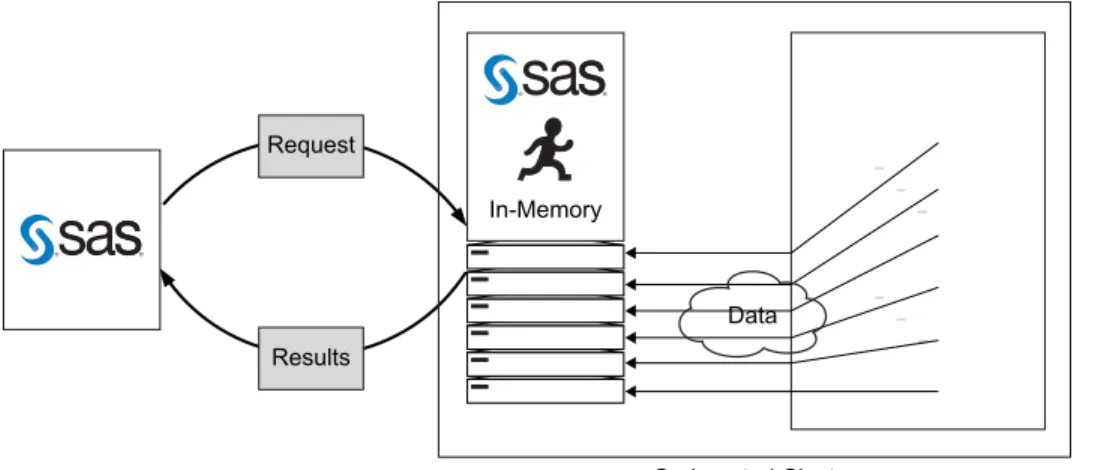
In the following illustration, the in-memory environment is co-located on the Hadoop cluster. The SAS server or SAS client connects to the Hadoop cluster, submits a request, loads the Hadoop data into the in-memory environment, processes the request, and sends only the results back to SAS.
Figure 3.2 Processing in an In-Memory Environment That Is Co-Located
Co-Located Cluster Data In-Memory
Request
Results
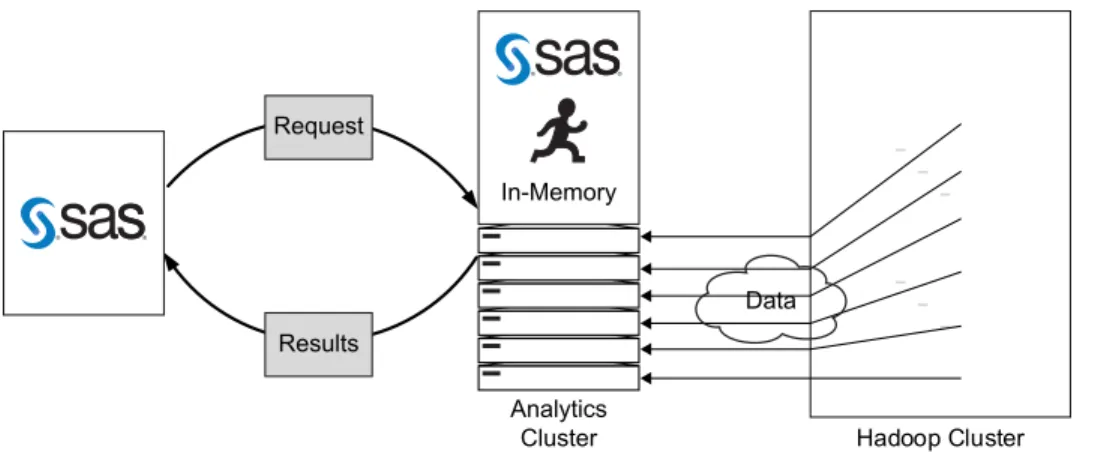
In the following illustration, the in-memory environment is on a separate set of machines from the Hadoop cluster. The SAS server or client connects to the analytics cluster that is remote from the Hadoop cluster, submits a request, loads the Hadoop data to the in-memory environment, processes the request, and then sends only the results back to SAS.
Figure 3.3 Processing in an In-Memory Environment That Is Remote from the Hadoop
Cluster
Hadoop Cluster Analytics
Cluster
Data In-Memory
Request
Results
TIP SAS Visual Analytics, SAS In-Memory Statistics, SAS High-Performance Analytics products (such as SAS Performance Data Mining, SAS Performance Econometrics, SAS Performance Optimization, SAS Performance Statistics, and SAS Performance Text Mining), SAS
High-Performance Risk, and SAS Visual Scenario Designer can process Hadoop data in an in-memory environment.
Traditional Processing
For traditional SAS environments, a SAS server runs on a single machine, reads data from files or network connections, and processes the data locally on the machine. Applying this traditional model to Hadoop, SAS provides a bridge to Hadoop to move data to and from Hadoop. SAS connects to the Hadoop cluster, extracts the data, and delivers it to the SAS server for processing.
SAS technology that accesses and extracts data from Hadoop provides the following advantages:
n To SAS, Hadoop is simply another data source like a SAS data set or a third-party database.
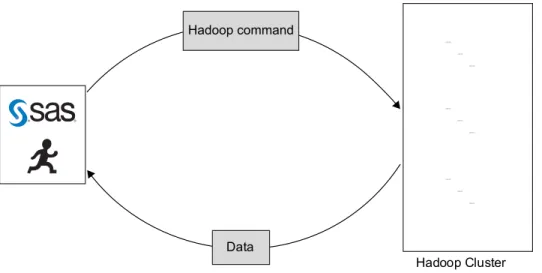
n You can manage and analyze Hadoop data with any of your favorite SAS tools. In the following illustration, the SAS server connects to the Hadoop cluster, submits a request, extracts the Hadoop data, delivers it to the SAS server, and then processes the request.
Figure 3.4 Accessing and Extracting Hadoop Data
Hadoop Cluster Hadoop command
Data
TIP SAS/ACCESS Interface to Hadoop, Base SAS FILENAME statement, Hadoop access method, and SPD Engine can access and extract data from Hadoop.
SAS Technology That Minimizes Data Movement
Overview
SAS uses several software components to interact with Hadoop to reduce or eliminate data movement. For some SAS technology, the SAS High-Performance Analytics environment and the SAS LASR Analytic Server provide in-memory environments. To push processing directly in the Hadoop cluster, some SAS technology uses the SAS Embedded Process and SAS accelerators.
SAS Embedded Process
The SAS Embedded Process is a software component that is installed and runs on the Hadoop cluster. The SAS Embedded Process is the core technology that supports the following functionality:
n To process a request in the Hadoop cluster, the SAS Embedded Process and
SAS/ACCESS Interface to Hadoop work with the SAS In-Database Code Accelerator for Hadoop, SAS Data Quality Accelerator for Hadoop, and SAS Scoring Accelerator for
Hadoop to push processing directly in the Hadoop cluster to read and write data in parallel.
n To process a request in an in-memory environment, the SAS Embedded Process provides a high-speed parallel connection that loads data from Hadoop to the SAS High-Performance Analytics environment and the SAS LASR Analytic Server.
Basically, the SAS Embedded Process is a subset of Base SAS software that is sufficient to support the multithreaded SAS DS2 language. The SAS Embedded Process runs in its own processing space in Hadoop. Each node of the Hadoop cluster runs one instance of the SAS Embedded Process. Each instance serves all of the threads of query parallelism executing on that node at a given time. On a Hadoop cluster, a special set of MapReduce classes associates the SAS Embedded Process with each task.
TIP SAS technology that processes Hadoop data directly in the Hadoop cluster or in an in-memory environment might require that the SAS Embedded Process be
installed on the Hadoop cluster. See the SAS technology summaries in this document to determine what is required.
SAS High-Performance Analytics
Environment
The SAS High-Performance Analytics environment consists of software that performs analytic tasks in a high-performance environment, which is characterized by massively parallel processing. The software is used by SAS products and solutions that typically analyze big data that resides in a distributed data storage appliance or Hadoop cluster. With the SAS High-Performance Analytics environment, operations are processed in a scalable, in-memory environment. In this environment, the data is loaded into memory, the analysis is performed, and then the in-memory resources are freed.
TIP The SAS Performance Analytics products (such as SAS Performance Data Mining, SAS Performance Econometrics, SAS Performance Optimization, SAS Performance Statistics, and SAS Performance Text Mining) and SAS Performance Risk use the SAS High-Performance Analytics environment.
SAS LASR Analytic Server
The SAS LASR Analytic Server is a scalable, analytic platform that provides a secure, multi-user environment for concurrent access to in-memory data. SAS LASR Analytic Server provides the ability to load Hadoop data into memory and perform distributed processing, exploratory analysis, analytic calculations, and more—all interactively.
Once data is loaded into memory, it remains in memory for simultaneous access by any number of users until the data is explicitly unloaded from memory. In-memory persistence avoids unnecessary and expensive multiple data loading steps. By reading the data into memory only once, it provides fast interactive ad hoc analysis and data management, resulting in greater productivity.
The SAS LASR Analytic Server supports HDFS as a co-located cluster deployment, which means that SAS and Hadoop are installed on the same set of machines. For this processing, SAS uses the memory resources of the set of machines as a computational space rather than as a database.
The SAS LASR Analytic Server provides the following components: LASR procedure
administers the SAS LASR Analytic Server and enables loading data in parallel from HDFS. When combined with SAS/ACCESS Interface to Hadoop and the SAS Embedded Process, the LASR procedure can load data in parallel in formats other than SASHDAT. SAS LASR Analytic Server engine (also called the SASIOLA engine)
loads data to memory serially. The engine loads data from a SAS data set or from any data source that SAS can access when the SAS data set is small or parallel loading is not possible.
SASHDAT engine (previously called SAS Data in HDFS engine)
adds and deletes SASHDAT files. A SASHDAT file is in a SAS proprietary file format that is designed for high performance to load and unload into memory very fast. The
SASHDAT engine enables SAS LASR Analytic Server and high-performance procedures to read CSV files.
TIP SAS Visual Analytics, SAS Visual Statistics, SAS In-Memory Statistics, SAS Data Loader, and SAS Visual Scenario Designer use the SAS LASR Analytic Server.
Deploying the SAS and Hadoop Environment
Because much of high-performance analytics is designed to run with a distributed processing system like Hadoop, SAS analytics require a hardware environment so that computations are run in parallel. The key is a set of multiple connected computers that work together, which is often a system of servers that is referred to as an “analytics cluster.” Computations are run in parallel across the analytics cluster, which means that the work is divided among the nodes in the cluster.
To deploy SAS and Hadoop, you can do one of the following:
n co-locate SAS software with Hadoop. That is, SAS and Hadoop exist on the same set of machines.
n have SAS software remote from the Hadoop cluster. That is, one set of machines is dedicated to SAS software, and the Hadoop cluster exists on a separate set of machines. Each SAS solution or product has documentation that helps you deploy the software and information that helps you configure SAS software with Hadoop. Because some SAS
deployments require multiple SAS solutions, products, and additional software, see SAS and
Hadoop Technology: Deployment Scenarios for deployment examples, tips for understanding
why software is required or recommended, and step-by-step guidance to help you understand what software is installed and where it is installed.
Securing the SAS and Hadoop Environment
Kerberos
The SAS technology that interacts with Hadoop supports the Kerberos authentication protocol.
To have a fully operational and secure Hadoop environment, it is critical to understand the requirements and preparation for and process around Kerberos enablement. There are four overall practices that help ensure that your SAS and Hadoop connection is secure and that SAS performs well within the environment.
1 Understand the fundamentals of Kerberos authentication and the best practices promoted by Hadoop providers.
2 Simplify Kerberos setup by installing SAS and Hadoop on the same set of machines.
3 Ensure that Kerberos prerequisites are met when installing and configuring SAS applications that interact with Hadoop.
4 When configuring SAS and Hadoop jointly in a high-performance environment, ensure that all SAS servers are recognized by Kerberos.
Secure data and secure user authentication are critical requirements for enterprise implementations of Hadoop. For more information about security planning, see SAS and
Hadoop Technology: Deployment Scenarios and the website SAS 9.4 Support for Hadoop
(http://support.sas.com/resources/thirdpartysupport/v94/hadoop).
Sentry
SAS supports the use of Sentry with SAS/ACCESS Interface to Hadoop and SAS/ACCESS Interface to Impala. However, SAS has not validated the use of Sentry with other SAS software.
SAS will work with users to support a SAS deployment that uses a supported Cloudera environment configured with Sentry. This support is limited to functionality that interfaces directly with Hive or Impala and where additional security configurations have been applied to HDFS file and directory permissions to align with policies defined in Sentry.
4
What SAS Technology Interacts
with Hadoop?
Spanning the Data-to-Decision Life Cycle . . . 23 SAS Technology That Interacts with Hadoop . . . 24
Spanning the Data-to-Decision Life Cycle
SAS offers technology that interacts with Hadoop to bring the power of SAS analytics to Hadoop and spans the entire data-to-decision life cycle. Using SAS technology that interacts with Hadoop, you can do the following:
n access and manage your Hadoop data
n explore data and develop models
n execute analytical models in Hadoop
Here are a few examples of what you can do with SAS technology that interacts with Hadoop:
n With SAS/ACCESS Interface to Hadoop, you can connect to a Hadoop cluster and read and write data to and from Hadoop. You can analyze Hadoop data with your favorite SAS procedures and the DATA step.
n Suppose you want to connect to Hadoop, read and write data, or execute a MapReduce program. Using Base SAS, you can simply use the FILENAME statement with the Hadoop access method to read data from HDFS and write data to HDFS. You can use the HADOOP procedure to submit HDFS commands, MapReduce programs, and Pig Latin code. For example, you could use PROC HADOOP to create a directory in HDFS, and then use the FILENAME statement to copy a SAS data set to the new HDFS directory.
n SAS/ACCESS Interface to Impala provides direct, transparent access to Cloudera Impala and MapR Impala from your SAS session.
n The SPD Engine enables you to interact with Hadoop through HDFS. You can write data, retrieve data for analysis, perform administrative functions, and even update data as an SPD Engine data set. The SPD Engine organizes data into a streamlined file format that has advantages for a distributed file system like HDFS.
n With SAS Data Loader for Hadoop, you can copy data to and from Hadoop. In addition, you can profile, cleanse, query, transform, and analyze data in Hadoop.
n With SAS Visual Analytics, you can explore and visualize large amounts of data stored in HDFS, and then create and modify predictive models using a visual interface and in-memory processing. In addition, you can publish reports to the web and mobile devices.
n SAS High-Performance Analytics products provide a highly scalable in-memory infrastructure that supports Hadoop. SAS provides high-performance procedures that enable you to manipulate, transform, explore, model, and score data all within Hadoop.
n Using SAS In-Database Technology, certain SAS procedures, DATA step programs, data quality operations, DS2 threaded programs, and scoring models can be submitted and executed in Hadoop. In-database processing uses the distributed processing capabilities of Hadoop to process the requests.
n Using SAS In-Memory Statistics, you can work with your Hadoop data to perform analytical data preparation, variable transformations, exploratory analysis, statistical modeling and machine-learning techniques, integrated modeling comparison, and model scoring.
SAS Technology That Interacts with Hadoop
The following table lists each SAS technology that interacts with Hadoop, its function, and its description. See each SAS technology for a summary that provides a description, features, what is required to execute the software, and references to the full product documentation.
Table 4.1 SAS Technology That Interacts with Hadoop
Function SAS Technology Description
Explore Data and Develop Models
“SAS Visual Analytics and SAS Visual Statistics” on page 30
Explores and visualizes huge volumes of data to identify patterns and trends and opportunities for further analysis.
Function SAS Technology Description
“SAS In-Memory Statistics” on page 32
Performs analytical data preparation, variable transformations, exploratory analysis, statistical modeling and machine-learning techniques, integrated modeling comparison, and model scoring.
“SAS High-Performance Analytics Products” on page 34
Provides tools that perform analytic tasks in a high-performance environment to provide data mining, text mining, econometrics, and optimization capabilities. “SAS High-Performance Risk”
on page 37
Provides a financial portfolio management solution that enables you to price very large portfolios for thousands of market states.
“SAS In-Database Technology” on page 39
Executes select SAS
processing in Hadoop, such as in-database SAS procedures, DATA step programs, DS2 threaded programs, and scoring models.
Execute Models “SAS Scoring Accelerator for Hadoop” on page 43
Executes analytical models in a Hadoop cluster.
Manage Data “SAS Data Loader for Hadoop” on page 47
Transforms, queries, profiles, and analyzes big data without moving the data.
“SAS Data Quality Accelerator for Hadoop” on page 48
Provides in-database data quality operations in a Hadoop cluster.
“SAS In-Database Code Accelerator for Hadoop” on page 49
Executes DS2 code in a Hadoop cluster.
Function SAS Technology Description
“SAS/ACCESS Interface to Hadoop” on page 50
Accesses Hadoop data through HiveServer2 and from HDFS. “SAS/ACCESS Interface to
HAWQ” on page 51
Accesses the Pivotal HAWQ SQL engine.
“SAS/ACCESS Interface to Impala” on page 52
Accesses Impala. “SAS/ACCESS SQOOP
Procedure” on page 54
Accesses Apache Sqoop to transfer data between a database and HDFS. “Base SAS FILENAME
Statement with the Hadoop Access Method” on page 55
Reads data from and writes data to HDFS using the SAS DATA step.
“Base SAS HADOOP Procedure” on page 56
Submits HDFS commands, MapReduce programs, and Pig Latin code from your SAS session.
“SAS Scalable Performance Data (SPD) Engine” on page 58
Interacts with Hadoop through HDFS to write data, retrieve data for analysis, perform administrative functions, and update data as an SPD data set.
“SAS Data Integration Studio” on page 60
Builds, implements, and manages data integration processes.
Additional Functionality “SAS Event Stream Processing” on page 64
Builds applications that can process and analyze volumes of continuously flowing event streams.
“SAS Federation Server” on page 65
Provides scalable, threaded, multi-user, and standards-based data access technology.
Function SAS Technology Description
“SAS Grid Manager for Hadoop” on page 66
Provides workload management, accelerated processing, and scheduling of SAS analytics on your Hadoop cluster.
“SAS High-Performance Marketing Optimization” on page 67
Provides more power and processing speed for SAS Marketing Optimization to determine the optimal set of customers to target.
“SAS Scalable Performance Data (SPD) Server” on page 69
Provides a multi-user, high-performance data delivery environment that enables you to interact with Hadoop through HDFS.
“SAS Visual Scenario Designer” on page 70
Identifies events or patterns that might be associated with fraud or non-compliance.
5
Explore Data and Develop
Models
SAS Visual Analytics and SAS Visual Statistics . . . 30 What Is SAS Visual Analytics? . . . 30 What Is SAS Visual Statistics? . . . 30 Why Use SAS Visual Analytics and SAS Visual Statistics? . . . 30 What Is Required? . . . 31 More Information . . . 32 SAS In-Memory Statistics . . . 32 What Is SAS In-Memory Statistics? . . . 32 Why Use SAS In-Memory Statistics? . . . 33 What Is Required? . . . 33 More Information . . . 34 SAS High-Performance Analytics Products . . . 34 What Are the SAS High-Performance Analytics Products? . . . 34 Why Use the SAS High-Performance Analytics Products? . . . 36 What Is Required? . . . 36 More Information . . . 37 SAS High-Performance Risk . . . 37 What Is SAS High-Performance Risk? . . . 37 Why Use SAS High-Performance Risk? . . . 38 What Is Required? . . . 38 More Information . . . 39 SAS In-Database Technology . . . 39 29
What Is SAS In-Database Technology? . . . 39 Why Use SAS In-Database Technology? . . . 39 What Is Required? . . . 40 More Information . . . 41
SAS Visual Analytics and SAS Visual Statistics
What Is SAS Visual Analytics?
SAS Visual Analytics is an easy-to-use, web-based product that enables organizations to explore huge volumes of data very quickly to identify patterns, trends, and opportunities for further analysis. Using SAS Visual Analytics, you gain insight from all of your data, no matter the size of your data and with no need to subset or sample the data.
SAS Visual Analytics empowers business users, business analysts, and IT administrators to accomplish tasks from an integrated suite of applications that are accessed from a home page. SAS Visual Analytics enables users to perform a wide variety of tasks such as preparing data sources, exploring data, designing reports, as well as analyzing and
interpreting data. Most important, reports can be displayed on a mobile device or in the SAS Visual Analytics Viewer (the viewer).
All reporting and exploring of data in SAS Visual Analytics is performed with data that is loaded into the SAS LASR Analytic Server. To load data into memory, you can do an interactive load, run a data query, import from a server, import a local file, or autoload. Data remains in memory until it is unloaded or the SAS LASR Analytic Server stops.
What Is SAS Visual Statistics?
SAS Visual Statistics is an add-on to SAS Visual Analytics that enables you to develop and test models using the in-memory capabilities of SAS LASR Analytic Server. SAS Visual Analytics Explorer (the explorer) enables you to explore, investigate, and visualize data sources to uncover relevant patterns. SAS Visual Statistics extends these capabilities by creating, testing, and comparing models based on the patterns discovered in the explorer. SAS Visual Statistics can export the score code, before or after performing model
comparison, for use with other SAS products and to put the model into production.
Why Use SAS Visual Analytics and SAS
Visual Statistics?
Using SAS Visual Analytics, you can explore new data sources, investigate them, and create visualizations to uncover relevant patterns. You can then easily share those visualizations in
reports. In traditional reporting, the resulting output is well-defined up-front. That is, you know what you are looking at and what you need to convey. However, data discovery requires that you understand the data, its characteristics, and its relationships. Then, when useful
visualizations are created, you can incorporate those visualizations into reports that are available on a mobile device or in the viewer.
SAS Visual Analytics provides the following benefits:
n enables users to apply the power of SAS analytics to massive amounts of data
n empowers users to visually explore data, based on any variety of measures, at amazingly fast speeds
n enables users to quickly create reports or dashboards using standard tables, graphs, and gauges
n enables users to share insights with anyone, anywhere, via the web or a mobile device SAS Visual Statistics provides the following benefits:
n enables users to rapidly create powerful predictive and descriptive models using all data and the latest algorithms in an easy-to-use, web-based interface
n enables users to compare the relative performance of two or more competing models using a variety of criteria to choose a champion model
n enables users to export score code for any model so that users can easily apply the model to new data and get timely results
What Is Required?
n You must license SAS Visual Analytics. The package includes a restricted version of Base SAS 9.4 and the SAS LASR Analytic Server.
n SAS Visual Statistics is integrated into the explorer user interface. SAS Visual Statistics is an add-on to SAS Visual Analytics.
n To load data into memory, you can use the LASR procedure to load data in parallel or the SAS LASR Analytic Server engine to load data serially. Or, if your Hadoop cluster has data in Hive or HiveServer2, you can use SAS/ACCESS Interface to Hadoop to load the data into memory.
n If the SAS LASR Analytic Server is co-located with the Hadoop cluster, SASHDAT and CSV files are automatically loaded in parallel. To load other data in parallel, the SAS Embedded Process must be installed on the Hadoop cluster.
n If the SAS LASR Analytic Server is installed remotely from the Hadoop cluster, to load any data in parallel, the SAS Embedded Process must be installed on the Hadoop cluster. In addition, you must license SAS/ACCESS Interface to Hadoop.
n SAS/ACCESS Interface to Hadoop resides on the SAS client machine that you use for submitting SAS programs.
n SAS Visual Analytics requires the SAS Intelligence Platform. The system administrator must install and configure the required SAS Intelligence Platform software. In addition, the system administrator must use SAS Management Console to maintain metadata for servers, users, and other global resources that are required by SAS Visual Analytics.
More Information
n For more information about how to use SAS Visual Analytics and SAS Visual Statistics, see SAS Visual Analytics: User's Guide.
n For administration of SAS Visual Analytics and SAS Visual Statistics, see SAS Visual
Analytics: Administration Guide.
n For more information about the SAS LASR Analytic Server, including the LASR procedure, SASIOLA engine, and SASHDAT engine, see SAS LASR Analytic Server:
Reference Guide.
n For SAS LASR Analytic Server deployment, installation, and configuration information, see SAS High-Performance Analytics Infrastructure: Installation and Configuration Guide.
n For information about installing the SAS Embedded Process, see SAS In-Database
Products: Administrator's Guide.
n For information about how to install, configure, and administer the SAS Intelligence Platform, see the documentation on the SAS Intelligence Platform (http://
support.sas.com/documentation/onlinedoc/intellplatform/) website.
SAS In-Memory Statistics
What Is SAS In-Memory Statistics?
SAS In-Memory Statistics provides the data scientist or analytical expert with interactive programming access to large data sets stored in Hadoop. With SAS In-Memory Statistics, you load data from Hadoop into a SAS in-memory environment, and then perform analytical data preparation, variable transformations, exploratory analysis, statistical modeling and machine-learning techniques, integrated modeling comparison, and model scoring. The SAS In-Memory Statistics package includes the following software components: SAS LASR Analytic Server
a scalable, analytic platform that provides a secure, multi-user environment for concurrent access to in-memory data.
SAS Studio
provides an interactive web-based development application that enables you to write and submit SAS programs.
IMSTAT procedure
manages the in-memory data and SAS LASR Analytic Server instances and performs complex analytics on the in-memory data.
RECOMMEND procedure
manages tasks for a recommender system, which rates items such as movies, music, books, and so on.
SAS/ACCESS Interface to Hadoop
a SAS/ACCESS engine that enables you to interact with Hadoop through HiveServer2 or through fixed-length record (binary) data, delimited text, or XML-encoded text that is stored in HDFS. See “SAS/ACCESS Interface to Hadoop” on page 50.
Why Use SAS In-Memory Statistics?
n All mathematical calculations are performed in memory. The in-memory environment eliminates costly data movement and persists data in memory for the entire analytic session. This significantly reduces data latency and provides rapid analysis. The data is read once and held in memory for multiple processes.
n SAS In-Memory Statistics enables interactive programming access so that multiple users can analyze Hadoop data at the same time and extremely quickly.
n You can use statistical algorithms and machine-learning techniques to uncover patterns and trends in the Hadoop data.
n You can analyze unstructured and structured data using a wide range of text analysis techniques.
n You can generate personalized, meaningful recommendations in real time with a high level of customization.
n SAS In-Memory Statistics supports parallel BY-group processing.
What Is Required?
n You must license SAS In-Memory Statistics. The package includes SAS LASR Analytic Server, SAS/ACCESS Interface to Hadoop, SAS Studio, IMSTAT procedure,
RECOMMEND procedure, SAS/GRAPH, SAS/STAT, and the current release of Base SAS 9.4.
n The SAS LASR Analytic Server must be co-located with the SAS High-Performance Deployment of Hadoop distribution or a commercial Hadoop distribution that has been configured with the services from the SAS High-Performance Deployment of Hadoop.
n The SAS LASR Analytic Server runs on a Linux x64 operating system only.
n To load data into memory, you can use the LASR procedure to load data in parallel or the SAS LASR Analytic Server engine to load data serially. Or, if your Hadoop cluster has
data in Hive or HiveServer2, you can use SAS/ACCESS Interface to Hadoop to load the data into memory.
n SASHDAT and CSV files are automatically loaded in parallel. To use SAS/ACCESS Interface to Hadoop to load data into memory in parallel and in formats other than SASHDAT and CSV, the SAS Embedded Process must be installed on the Hadoop cluster.
n SAS/ACCESS Interface to Hadoop resides on the SAS client machine that you use for submitting SAS programs.
n To use SAS Studio, your user ID must be configured for passwordless SSH to the Hadoop cluster machines. Make sure that you have passwordless SSH access from the machine that hosts SAS Studio to the machines in the Hadoop cluster.
More Information
n For information about the SAS LASR Analytic Server, including the LASR procedure, IMSTAT procedure, RECOMMEND procedure, SASIOLA engine, and SASHDAT engine, see SAS LASR Analytic Server: Reference Guide.
n For SAS LASR Analytic Server deployment, installation, and configuration information , see SAS High-Performance Analytics Infrastructure: Installation and Configuration Guide.
n For information about installing the SAS Embedded Process, see SAS In-Database
Products: Administrator's Guide.
n For instructions about how to configure SAS/ACCESS Interface to Hadoop, see SAS
Hadoop Configuration Guide for Base SAS and SAS/ACCESS.
n For an overview of SAS Studio and specific instructions about its use, see SAS Studio:
User's Guide.
SAS High-Performance Analytics Products
What Are the SAS High-Performance
Analytics Products?
The SAS High-Performance Analytics products enable you to execute high-performance procedures in a scalable, distributed, in-memory processing environment. The procedures include statistics, data mining, text mining, econometrics, and optimization capabilities. The SAS High-Performance Analytics products are engineered to run in a distributed mode using a cluster of machines. When high-performance procedures execute in distributed mode, several nodes in a distributed computing environment are used for calculations. Data is distributed across the machines in a cluster, and the massive computing power of the
cluster is used to solve a single large analytic task. Distributed mode enables analytical computations to be performed simultaneously on multiple machines in the cluster and across multiple, concurrently scheduled threads on each machine. In distributed computing
environments, these procedures exploit parallel access to data using all of the cores and huge amounts of memory that are available.
TIP High-performance procedures can also be run in single-machine mode. Single-machine mode means multithreading is done on the client Single-machine. The procedures use the number of cores on the client machine to determine the number of concurrent threads. To run the high-performance procedures in single-machine mode, you do not need to license the SAS High-Performance Analytics products or install and configure the SAS High-Performance Analytics environment.
SAS High-Performance Analytics products are the following: SAS High-Performance Data Mining
includes high-performance data mining procedures that enable you to analyze large volumes of diverse data by using a drag-and-drop interface and powerful descriptive, predictive, and machine-learning methods. A variety of modeling techniques, including random forests, support vector machines, neural networks, clustering, and so on, are combined with data preparation, data exploration, and scoring capabilities.
SAS High-Performance Econometrics
includes high-performance econometric procedures that provide econometric modeling tools. The econometric modeling methods include the regression model for count data, a model for the severity of losses or other events, and a regression model for qualitative and limited dependent variables.
SAS High-Performance Optimization
includes high-performance features of optimization procedures that are useful for certain classes of linear, mixed-integer linear, and nonlinear problems. Key tasks, including individual optimizations for algorithms such as multistart, decomposition, and option tuning, as well as global and local search optimization, are executed in parallel. SAS High-Performance Statistics
includes high-performance statistical procedures that provide predictive modeling methods. Predictive modeling methods include regression, logistic regression,
generalized linear models, linear mixed models, nonlinear models, and decision trees. The procedures provide model selection, dimension reduction, and identification of important variables whenever this is appropriate for the analysis.
SAS High-Performance Text Mining
includes high-performance text mining procedures that analyze large-scale textual data. You can gain quick insights from large unstructured data collections that involve millions of documents, emails, notes, report snippets, social media sources, and so on. Support is included for parsing, entity extraction, automatic stemming, synonym detection, topic discovery, and singular value decomposition (SVD).
Why Use the SAS High-Performance
Analytics Products?
n All available computing resources are used to perform faster statistical modeling and model selection. You get finer, more accurate results to drive new opportunities for your organization.
n All data (including unstructured) is used with advanced modeling techniques.
n The high-performance analytics products can evaluate many alternative scenarios, quickly detect changes in volatile markets, and make timely, optimal recommendations.
n Analytical professionals can take full advantage of the in-memory infrastructure to solve the most complex problems without architecture constraints.
n SAS High-Performance Analytics products provide in-memory capabilities so that you can develop superior analytical models using all data, not just a sample of the data. These products load data into memory in parallel and apply complex analytical algorithms to the distributed data in memory.
n Because each process is multithreaded, the high-performance procedures maximize speed by maximizing parallel processing. Each of the multiple nodes runs a multithreaded process, and all of the data is loaded and processed in memory.
n All high-performance procedures are multithreaded and can exploit all available cores, whether on a single machine or in a distributed computing environment.
n You can execute the high-performance procedures on the SAS LASR Analytic Server in an in-memory environment. The data is loaded into memory for distributed processing and remains in memory for simultaneous access until the analytic processing completes.
What Is Required?
n You must license the current release of Base SAS 9.4.
n You must license SAS/ACCESS Interface to Hadoop.
n For SAS High-Performance Data Mining, you must license the product and SAS Enterprise Miner.
n For SAS High-Performance Text Mining, you must license the product, SAS Enterprise Miner, and SAS Text Miner.
n For SAS High-Performance Statistics, you must license the product and SAS/STAT.
n For SAS High-Performance Econometrics, you must license the product and SAS/ETS.
n For SAS High-Performance Optimization, you must license the product and SAS/OR.
n If you are running the SAS High-Performance Deployment of Hadoop distribution instead of a commercial Hadoop distribution, the SAS High-Performance Deployment of Hadoop distribution must be installed on the Hadoop cluster.
n The SAS High-Performance Analytics environment must be installed and configured on the Hadoop cluster.
n The SAS Embedded Process must be installed and configured on the Hadoop cluster.
More Information
n For SAS High-Performance Data Mining, see SAS Enterprise Miner: High-Performance
Procedures.
n For SAS Performance Econometrics, see SAS/ETS User’s Guide:
High-Performance Procedures.
n For SAS High-Performance Statistics, see SAS/STAT User’s Guide: High-Performance
Procedures.
n For SAS High-Performance Text Mining, see SAS Text Miner: High-Performance
Procedures.
n For high-performance utility procedures, see Base SAS Procedures Guide:
High-Performance Procedures.
n To install and configure the SAS High-Performance Analytics environment, see SAS
High-Performance Analytics Infrastructure: Installation and Configuration Guide.
n To install and configure the SAS Embedded Process, see SAS In-Database Products:
Administrator's Guide.
n For information about the SAS LASR Analytic Server, see SAS LASR Analytic Server:
Reference Guide.
SAS High-Performance Risk
What Is SAS High-Performance Risk?
SAS High-Performance Risk is a financial portfolio management solution that enables you to price very large portfolios at the current market state and for thousands of simulated market states. The solution can aggregate values across market states and compute risk measures on demand based on the ad hoc hierarchy that you request. The solution can also be used for on-demand stress testing.
SAS High-Performance Risk includes the following software components:
n A user interface to explore project results and perform further analysis.
n HPEXPORT procedure to export SAS Risk Dimensions project specifications and static data to a format that can be used by the HPRISK procedure.
n HPRISK procedure to run the analysis projects on an analytics cluster or on a single computer system with multiple CPUs.
n An interface to SAS Event Stream Processing, which can feed high-speed data sources, including market and reference data feeds. See “SAS Event Stream Processing” on page 64.
Why Use SAS High-Performance Risk?
SAS High-Performance Risk provides the following features:
n distributed processing on an analytics cluster
n multithreading, which increases responsiveness and concurrency
n distributed in-memory analytics to reduce the I/O burden and computational run times
What Is Required?
n You must license SAS High-Performance Risk. The package includes a web browser, the current release of Base SAS 9.4, SAS/ACCESS Interface to Hadoop, SAS Management Console, and the SAS Risk Dimensions client.
n SAS High-Performance Risk requires the SAS Intelligence Platform. The system
administrator must install and configure the required SAS Intelligence Platform software. In addition, the system administrator must use SAS Management Console to maintain metadata for servers, users, and other global resources that are required by SAS High-Performance Risk.
n SAS Performance Risk must be installed on the same hardware with SAS High-Performance Deployment of Hadoop on the Hadoop cluster.
n For system requirements for distributed mode, see SAS High-Performance Risk (Distributed Mode) (http://support.sas.com/documentation/installcenter/en/ikhpriskofrsr/ 68130/HTML/default/index.html).
n For system requirements for non-distributed mode, see SAS High-Performance Risk (Non-distributed Mode) (http://support.sas.com/documentation/installcenter/en/ ikhpriskofrndmsr/68131/HTML/default/index.html).
n The SAS High-Performance Analytics environment must be installed and configured on the Hadoop cluster.
More Information
n For information about how to install, configure, and administer the SAS Intelligence Platform, see the documentation on the SAS Intelligence Platform (http://
support.sas.com/documentation/onlinedoc/intellplatform/) website.
n When SAS High-Performance Risk is integrated with SAS Visual Analytics, you can use the SAS High-Performance Computing Management Console to administer multiple machines in a distributed environment. For deployment instructions, see SAS
High-Performance Analytics Infrastructure: Installation and Configuration Guide.
n When SAS High-Performance Risk is integrated with SAS Visual Analytics, you can use the SAS High-Performance Deployment of Hadoop. For information about installing SAS High-Performance Deployment of Hadoop, see SAS High-Performance Analytics
Infrastructure: Installation and Configuration Guide.
n For information about how to use SAS Performance Risk, see SAS
High-Performance Risk: User's Guide.
n For information about how to use the HPEXPORT and HPRISK procedures, see the SAS
High-Performance Risk: Procedures Guide.
n For installation and configuration information, see SAS High-Performance Risk 3.5:
Administrator's Guide.
n To install and configure the SAS High-Performance Analytics environment, see SAS
High-Performance Analytics Infrastructure: Installation and Configuration Guide.
SAS In-Database Technology
What Is SAS In-Database Technology?
SAS In-Database Technology enables you to execute certain SAS processing in Hadoop. The in-database processing uses the distributed processing capabilities of MapReduce to process requests and eliminates costly data movement. In addition, in-database processing makes information more secure because the data never leaves the data source.
Why Use SAS In-Database Technology?
n You can submit the following SAS procedures to execute in Hadoop. The procedures are translated into HiveQL and processed using Hive or HiveServer2.
o FREQ procedure
o MEANS procedure
o REPORT procedure
o SUMMARY procedure
o TABULATE procedure
o TRANSPOSE procedure (Preproduction)
n You can submit certain SAS DATA step programs to process in Hadoop. SAS determines when the code is appropriate for MapReduce. If it is appropriate, the code is executed in parallel using the data in HDFS.
n You can submit DS2 threaded programs to process in Hadoop. DS2 is a SAS proprietary programming language for table manipulation that executes in parallel in HDFS.
Examples of DS2 threaded programs include large transpositions, computationally complex programs, scoring models, and BY-group processing.
n You can execute scoring models in Hadoop. The scoring models, developed by SAS Enterprise Miner, are translated into scoring files and stored in an HDFS directory. The scoring files are used by a MapReduce function to run the scoring models in parallel.
What Is Required?
n You must license the current release of Base SAS 9.4.
n You must license SAS/ACCESS Interface to Hadoop. All in-database processing code must include the SAS/ACCESS Interface to Hadoop LIBNAME statement to connect to the Hadoop cluster.
n The SAS Hadoop MapReduce JAR files must be installed on the Hadoop cluster.
n To submit PROC TRANSPOSE, DATA step programs, DS2 threaded programs, and scoring models to execute in Hadoop, the SAS Embedded Process must be installed on the Hadoop cluster.
n To submit SAS procedures, the SQLGENERATION= system option or LIBNAME statement option must be set to the value DBMS, which is the default. This value allows the SAS procedures to generate SQL for in-database processing of data through SAS/ACCESS Interface to Hadoop.
n To submit PROC TRANSPOSE, you must license the SAS Data Loader, which includes the SAS In-Database Code Accelerator for Hadoop.
n To execute the DATA step in Hadoop, you must set the DSACCEL= system option to ANY, use the same libref for the input and output files, and follow the DATA statement immediately by the SET statement.
n To submit DS2 threaded programs, you must license the SAS Data Loader, which includes the SAS In-Database Code Accelerator for Hadoop. To submit the DS2 program from your SAS session, use the DS2 procedure. In addition, either the PROC DS2 DS2ACCEL= option must be set to YES or the DS2ACCEL= system option must be set to ANY.
n To run scoring models, you must license SAS Enterprise Miner and the SAS Scoring Accelerator or you can license SAS Model Manager. Use the LIBNAME statement to specify the location of the data, metadata, and temporary data.
More Information
n For more information about using SAS In-Database Technology for submitting in-database procedures, the DATA step, DS2 threaded programs (SAS In-Database Code Accelerator), and scoring models (SAS Scoring Accelerator), see SAS In-Database
Products: User's Guide.
n For information about the in-database deployment package for Hadoop, see the chapter “Administrator’s Guide for Hadoop,” in SAS In-Database Products: Administrator's Guide.
n For information about PROC FREQ, see Base SAS Procedures Guide: Statistical
Procedures.
n For information about DS2, MEANS, REPORT, SUMMARY, TABULATE, and TRANSPOSE procedures, see Base SAS Procedures Guide.