User-Centric Energy-Efficient Scheduling
on Multi-Core Mobile Devices
Po-Hsien Tseng
1, Pi-Cheng Hsiu
2,3, Chin-Chiang Pan
1, and Tei-Wei Kuo
1,2,3,4 1Department of Computer Science and Information Engineering, National Taiwan University, Taiwan2 Research Center for Information Technology Innovation, Academia Sinica, Taiwan 3 Institute of Information Science, Academia Sinica, Taiwan
4Graduate Institute of Networking and Multimedia, National Taiwan University, Taiwan
[email protected], [email protected], [email protected], [email protected]
ABSTRACT
Mobile devices will provide improved computing resources to sustain progressively more complicated applications. However, the design concept of fair scheduling and governing borrowed from legacy operating systems cannot be applied seamlessly in mobile systems, thereby degrading user experience or reducing energy efficiency. In this paper, we posit that mobile applica-tions should be treated unfairly. To this end, we exploit the con-cept ofapplication sensitivityand devise a user-centric scheduler and governor that allocate computing resources to applications according to their sensitivity. Furthermore, we integrate our design into the Android operating system. The results of exten-sive experiments on a commercial smartphone with real-world mobile apps demonstrate that the proposed design can achieve significant energy efficiency gains while improving the quality of user experience.
Categories and Subject Descriptors
D.4.7 [Operating Systems]: Organization and Design— Real-Time Systems and Embedded Systems
General Terms
Algorithms, Design, Experimentation, Human Factors
Keywords
Unfair scheduling, DPM, DVFS, user experience, energy effi-ciency, multi-core mobile devices
1.
INTRODUCTION
The tremendous paradigm shift in personal computing has led to an explosive growth in the number of mobile apps on Google Play. To sustain more complicated mobile applications, mobile devices will increasingly improve their hardware performance. For example, some recent smartphones are equipped with a 1.4GHz quad-core CPU; and it is expected that the emerging genre of mobile devices will have more cores with even higher frequencies. However, the performance gain usually results in higher power consumption. Therefore, power management on next-generation mobile devices will be more crucial than on cur-rent devices.
Unfortunately, existing solutions that borrow legacy designs directly from conventional operating systems, e.g., Linux, are not suitable for mobile devices. The currentscheduler treats all applications equally, and it allocates the available cores and exe-cution cycles to running applications in afairmanner. When an
Permission to make digital or hard copies of all or part of this work for personal or classroom use is granted without fee provided that copies are not made or distributed for profit or commercial advantage and that copies bear this notice and the full citation on the first page. To copy otherwise, to republish, to post on servers or to redistribute to lists, requires prior specific permission and/or a fee.
DAC’14,June 01-05, 2014, San Francisco, CA, USA. Copyright 2014 ACM 978-1-4503-2730-5/14/06 ...$15.00.
application causes an abrupt increase in the CPU workload, if thegovernor blindly scales up the CPU frequency and/or turns on more cores to meet the application’s needs, energy efficiency may be degraded with no improvement in user experience. In contrast, if the governor does not react to the workload changes or even reduces the available CPU resources to save power, the response time of the application that dominates the user’s at-tention may be affected by the other applications and damage the user’s experience. This is because the governor treats appli-cationsfairly. Therefore, the scheduler and governor developed for mobile devices should be different from previous designs for personal computers and servers.
This paper introduces the concept of application sensitivity
into scheduler and governor designs for mobile systems, with the objective to improve user experience and energy efficiency simul-taneously. The rationale behind the concept is based on the fol-lowing observations. Mobile applications provide a large variety of functionalities, some of which are delay-sensitive while others are delay-tolerant. Delay-tolerant applications, like file zipping, can be delayed without affecting the user’s experience signifi-cantly. By contrast, delay-sensitive applications, such as video playing, are extremely sensitive to delay and thus require timely responses. In other words, different applications may have dif-ferent sensitivity with respect to user perception. Therefore, we argue that mobile applications should be treatedunfairlyby allocating CPU resources to them according to their sensitivity. Realizing this concept in mobile operating systems obviously raises several design challenges. First, determining the sensitiv-ity of each application is a major challenge. Our design, which is based on some observations about human attention and interac-tion [2, 13], classifies the sensitivity of applicainterac-tions into three lev-els: high, medium, and low. Based on these levels, we define the rules of sensitivity inheritance and transitions. Second, another challenge is how to exploit each application’s sensitivity during scheduling and governing. This is difficult because the gover-nor tends to limit the available CPU resources to reduce power consumption, so the scheduler only has limited CPU resources to maintain the quality of user experience. Our design, which considers user experience and energy efficiency simultaneously, manages and allocates CPU resources in certain proportions to applications with high, medium, and low sensitivity. Finally, to validate the concept and evaluate our design, we have integrated our user-centric scheduler and governor into the Android oper-ating system, as well as conducted extensive experiments on a commercial Samsung Galaxy S3 smartphone with some mobile apps found on Google Play. Compared to theCompletely Fair Scheduler [8] and the Ondemand governor [11], the proposed design can reduce the CPU’s energy consumption by about 25% while improving 31% response time of the application that dom-inates the user’s attention. The experiment results also provide some valuable insights into user-centric, energy-efficient schedul-ing on mobile devices.
The remainder of this paper is organized as follows. Section 2 provides an example to show the potential benefits. In Section 3, we discuss the design philosophy and details. The experiment
results are reported in Section 4; and Section 5 provides a review of related work. Section 6 contains some concluding remarks.
2.
MOTIVATION AND DESIGN CHALLENGES
2.1
Example of Benefits
A mobile system allows multiple applications to be executed simultaneously; however, only one can run in the foreground at a time, while the others run in the background1. The kernel contains two key components, namely, the scheduler and the
governor. The scheduler supervises thread execution, such as selecting the next thread to be executed, the duration of the ex-ecution, and the core to be used. Therefore, it has a significant influence on each thread’s performance. Meanwhile, the gover-nor manages the CPU’s resources by scaling its frequency up or down, and by turning the cores on or off according to changes in the workload. Although vendors may employ different im-plementations, a general principle is to allocate available CPU resourcesfairly to application threads and balance the utiliza-tion among cores in order to achieve ideal multitasking.
Consider a scenario where two applications run on a dual-core device simultaneously, as shown in Figure 1. Each dual-core operating at the highest frequency level can provide 1 mega computing cycles per scheduling period T. The zip compressor comprises 4 threads, each of which requires 8 mega computing cycles to complete its execution. The video player has 1 thread that requires a total of 5 mega computing cycles as well as 0.5 mega cycles per period to ensure smooth video playing. The zip compressor is started at timeT; then, the video player is started at time 2T, so the zip compressor is switched to the background. When the video is finished, the zip compressor is switched back to the foreground. Core 1 Core 2 Z2 0.5 Z1 0.5 Z2 0.5 Z1 0.5
...
Z2 0.5 Z1 0.5 x 15 0 T 2T 17T Z3 1 Zip starts Video starts Z4 0.5 Z3 0.5 Z4 0.33 V 0.33 Z3 0.33 Z4 0.33 V 0.33 Z3 0.33Z4 1 Video finishes Frequency Time 1M 1M Z3 0.5 Z4 0.5 19T Z3 1 Z4 1...
18T Zip finishes(a) Fair scheduling and governing
Z4 1 Core 1 Core 2 Z2 0.5 Z1 0.5 Z1 0.2
...
x 10 0 T 2T 12T Zip starts Video starts Z2 0.2 Z3 0.2 Z1 0.2 Z2 0.2 Z3 0.2 Z2 0.5 Z1 0.5 Z4 0.5 Z3 0.5 V 0.5 Z4 0.1 V 0.5 Z4 0.1 Z4 0.5 Z3 0.5 Video finishes Frequency 1M 1M Z2 0.5 Z1 0.5 Z4 0.5 Z3 0.5 x 11 24T Time...
...
...
23T Zip finishes(b) User-centric scheduling and governing
Figure 1: A motivating example
Figure 1(a) shows the result derived based on a conventional scheduler and governor. Initially, core 2 is in the off mode to save power. When the zip compressor starts at time T, both cores are turned on to handle the four zip threads, denoted by Z1,Z2,Z3, andZ4. Because all application threads are treated equally and allocated to cores evenly by the scheduler, each zip thread is allocated 0.5 mega cycles during the scheduling period. The video player starts running at time 2T. As both cores are occupied by two threads, the video thread, denoted by V, is allocated randomly to core 2. The video thread has to share the available computing cycles evenly with the two zip threads, so it is only allocated 0.33 cycles per period. To achieve a smooth frame rate, any governor would attempt to increase the CPU 1This is to faithfully reflect the current practice, but our design can easily be extended without the limitation.
frequency, but fails because the cores are already operating at the highest frequency level. As a result, the user experiences video stalling until the video thread finishes at time 17T. The threadsZ1 and Z2 also finish at that time, and the scheduler reallocates the CPU resources toZ3 and Z4. Finally, Z3 and Z4 run on the two cores individually until they finish at time 19.5T. Core 2 is then turned off to save power. Treating all threads fairly may, ironically, affect the user’s experience.
The foreground application usually dominates the user’s at-tention. In user-centric scheduling and governing, delay-sensitive and delay-tolerant threads are allocated different amounts of CPU resources to improve the user’s experience and save energy simultaneously. We use the example in Figure 1(b) to explain the potential benefits. Suppose the CPU resource allocated to the foreground application is five times that allocated to the background applications. When the zip compressor starts at timeT, the scheduler treats its four threads fairly as usual. At time 2T, the video player starts. To achieve a smooth frame rate, the scheduler movesZ3 to core 1 and then reallocates the computing cycles to the five threads based on their sensitivity. Because the video thread only needs 0.5 mega cycles per pe-riod, the governor scales down the CPU frequency to 0.6 mega cycles per period to save power. After the video finishes play-ing at time 12T, as the zip compressor is switched back to the foreground, the scheduler movesZ3 back to core 2 and reallo-cates the computing cycles. Finally, the zip compressor finishes at time 24T. Although the zipping finishes later than in Fig-ure 1(a), the user may not be aware of the delay, and may even feel satisfied due to smooth video playing. Note that the zip compressor can also stay in the background to save more en-ergy. In other words, user-centric scheduling and governing is designed to react to user behavior to improve user experience and save energy.
2.2
Design Challenges
Although the previous example demonstrates the benefits of user-centric scheduling and governing, several design challenges must be resolved in order to realize the concept in mobile oper-ating systems.
Thread Sensitivity Determination: The first challenge is
how to determine the sensitivity of each application to reflect the user’s perception of its delay. A straightforward way is to categorize mobile applications based on how they affect user ex-perience and assign them fixed sensitivity; however, such a way cannot react to individual user behavior. This is particularly difficult because an application could have different degrees of sensitivity for individual users depending on how they use it. Even for the same user, an application’s sensitivity might vary over time as the focus of the user’s attention changes.
Scheduling and Governing Based on Sensitivity:
An-other challenge is how to perform scheduling and governing based on thread sensitivity so that both user experience and en-ergy efficiency can be improved. Intuitively, the scheduler should allocate more CPU resources to threads with higher sensitivity than those with lower sensitivity. However, CPU resources are finite because the governor simultaneously attempts to limit the available resources to save power. Therefore, the scheduler and governor should cooperate to find a balance between user expe-rience and energy efficiency for threads with different levels of sensitivity.
3.
USER-CENTRIC SCHEDULING AND
GOV-ERNING
In this section, we explain how thread sensitivity is deter-mined (Section 3.1) and present the design details of our user-centric scheduler and governor (Section 3.2).
3.1
Determining Thread Sensitivity
First, we make two observations about human attention and interaction that provide useful insights into determining thread sensitivity.
Foreground Domination: Mobile applications with a large
number of creative functionalities induce various user habits and behavior patterns. However, a thread’s sensitivity is highly de-pendent on the application that the user is currently focusing on. Because the foreground application usually dominates the user’s attention [2], this observation suggests that threads be-longing to the foreground application should be differentiated from those belonging to background applications.
Highly Sensitive Interaction: Most mobile users
inter-act with their devices frequently and sometimes switch between mobile applications quickly. Studies of human computer inter-action indicate that people usually expect to receive feedback from their devices within a few hundred milliseconds after each touch interaction [3, 13]. To avoid an adverse impact on user experience, if the user is interacting with the foreground appli-cation, we should provide as many CPU resources as possible to ensure a timely response.
3.1.2
Sensitivity States and Transitions
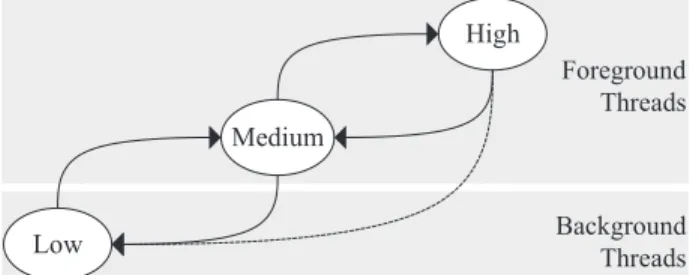
Based on the above observations, we classify thread sensitiv-ity into three levels: high, medium, and low. Although more sensitivity levels could yield better accuracy (e.g., another level for background applications that use the audio interface), the issue is beyond the scope of this work and deferred for future investigation. In the following, we discuss the three sensitiv-ity states, as well as possible transitions of threads between the states. Foreground Threads Background Threads High Medium Low
Figure 2: Sensitivity states and thread transitions
Sensitivity States: Figure 2 shows the transitions between
the high, medium, and low sensitivity states. Once an applica-tion thread is forked, it will remain in one of the three states until its termination. All threads belonging to an application should be in the same state because they may be interdepen-dent. Thus, all the threads belonging to the current foreground application are classified as medium or high sensitivity threads, depending on whether the user is interacting with the tion. In contrast, all threads belonging to background applica-tions are deemed low sensitivity because they attract less user attention. Moreover, in our design, any system threads that do not belong to user applications are categorized as medium sensitivity threads.
Sensitivity Inheritance and State Transitions: The
ini-tial sensitivity of application threads is derived from the root parent of all user applications. For example, the first thread of any application in Android is created by a system service calledZygote, whose sensitivity is set as medium. When an ap-plication is started in the foreground, the first thread inherits its sensitivity from Zygote, and subsequent threads inherit their parents’ sensitivity. Next, we describe the possible transitions of application threads.
Medium→ Low: This transition occurs when the foreground
application is switched to the background. When a switch takes place, all threads belonging to the foreground appli-cation will change from the medium to the low sensitivity state.
Low→Medium: This transition occurs when a background
application is switched to the foreground. Note that there is always a foreground application. In current practices, if the foreground application is terminated, or switched to the background, it will be replaced by the previous appli-cation or the home user interface. All the threads of the new foreground application will transit from the low to the medium state.
Medium→High: This transition occurs when a user
inter-acts with a mobile device. When the user touches the screen or any button, all application threads whose sensi-tivity is medium will transit to the high sensisensi-tivity state because only one application can run in the foreground.
High→Medium: This transition occurs when the user does
not interact with the mobile device for a few hundred mil-liseconds2 after an interaction. In other words, a thread will only remain in the high state for a short time after each touch because the response to the touch is supposed to be finished in a few hundred milliseconds. All the threads with high sensitivity will revert to the medium state.
Display Toggle: There is also a special case that is caused
by the display toggle. When the display is turned off, all threads are forced into the background and therefore change to low sen-sitivity. As soon as the display is turned on, all the threads revert to their original states.
3.2
Scheduler and Governor Designs
3.2.1
Design Principles
Before explaining how our design exploits the sensitivity states, we present some principles that our scheduler and governor fol-low to find a balance between the two conflicting objectives dis-cussed earlier.
User Experience Considerations: To improve user
expe-rience, more CPU resources should be allocated to threads with higher sensitivity than those with lower sensitivity. Thus, our scheduler allocates the CPU time per scheduling period accord-ing to whether the threads are in the high, medium, or low sensitivity state. It also tends to distribute high- and medium-sensitivity threads to active cores by balancing the total sensi-tivity of the threads on those cores.
Energy Efficiency Considerations: To reduce energy
con-sumption, the management of CPU resources should be based on the sensitivity of the running threads. To this end, our gov-ernor allocates as many resources as possible to high-sensitivity threads, sufficient resources to medium-sensitivity threads, and limited resources to low-sensitivity threads. Moreover, given the same number of threads and cores, it has been observed that imbalanced utilization will consume more energy than balanced utilization [14]. Thus, our scheduler attempts to balance not only the sensitivity but also the utilization among cores.
3.2.2
Scheduler Designs
Next, we explain how our scheduler exploits the sensitivity of applications to performthread prioritization,thread allocation, andthread migration.
Thread Prioritization: The scheduler allocates the CPU
time perscheduling period3 to running threads based on their sensitivity. For this operation, our implementation borrows the Androidpriority system, in which the priority of a thread de-pends on a value, called thenice value, in the range -20 to 19. A smaller value implies a higher priority. If the difference between the nice values of two threads isk, the CPU time allocated to the higher-priority thread is approximately 1.25k times that al-located to the lower-priority thread; thus, the larger the value 2Following the measurements reported in [13], our implementa-tion adopts 500 ms.
3In Samsung Galaxy S3, each scheduling period is 6.6 millisec-onds, which is not relevant to our design.
ofk, the more unfairly4 the threads are treated. After the run-ning threads are prioritized, our implementation relies on the
Completely Fair Scheduler (CFS) [8] to schedule them for exe-cution. In each scheduling period, every running thread will be executed exactly once, and the thread that has spent the least amount of time among the running threads will be executed first. Note that thread prioritization is performed whenever a thread’s sensitivity changes.
Thread Allocation: Each newly forked thread is allocated
by the scheduler to an active core based on its sensitivity. Once forked, the thread inherits its parent’s sensitivity. If the sensi-tivity is medium or high, the thread is allocated to the core with the minimumtotal sensitivity so that it can obtain more CPU resources. In contrast, if its sensitivity is low, it is allocated to the core with the minimumtotal workload so as to balance the utilization of the cores. The total sensitivity of a core is the sum of the sensitivity values5of the threads running on it. Sim-ilarly, the total workload is the sum of the computing cycles of the running threads, where the computing cycles of a thread are estimated based on the cycles it used in the previoussampling period.
Thread Migration: The scheduler attempts to balance the
cores’ sensitivity as well as their utilization. This is achieved by periodically triggering thread migration. In each sampling period6, the first step involves moving threads repeatedly from the core with the maximum total sensitivity to the core with the minimum total sensitivity, until immediately before the total sensitivity of the former becomes lower than that of the latter. Moreover, it is better to move threads with higher sensitivity (and break the tie randomly). This is because the sensitivity is balanced to allow higher sensitivity threads to run on a core with fewer threads, and the core with the minimum sensitivity usually has fewer threads. The next step moves threads repeat-edly from the core with the maximum total workload to the core with the minimum workload, until immediately before the total workload of the former becomes smaller than that of the latter. In this step, threads with lower sensitivity are preferred. They are moved in FIFO order so that the threads moved in the first step will not be moved back to the original core.
3.2.3
Governor Designs
We now explain how the governor considers the sensitivity when managing CPU resources with dynamic power manage-ment(DPM) anddynamic voltage and frequency scaling(DVFS).
DPM: For each sampling period, based on the total workload and the CPU power model, the governor periodically turns cores on or off to prevent unnecessary power usage. In a multi-core system, turning off as many cores as possible will not neces-sarily save power because the power consumed by a core is a convex increasing function of the operating frequency [10]. We use Samsung Galaxy S3 equipped with a quad-core CPU as an example. Based on our measurements, using two cores is more effective when using one core has to operate on a frequency over 400 MHz, provided that the total workload can be evenly dis-tributed between the two cores. Moreover, using three cores (resp. four cores) is more beneficial when using two cores (resp. three cores) has to operate on a frequency over 400 MHz (resp. 566 MHz). For each sampling period of 200 ms, one, two, and three cores operating on 400, 400, and 566 MHz can provide 4Our implementation maps high, medium, and low sensitivity states to the nice values of -20, -10, and 10, respectively. The settings, which are adjustable, are to demonstrate that the low-sensitivity threads can be treated extremely unfairly without affecting user experience significantly.
5Our implementation sets the sensitivity values of high-, medium-, and low-sensitivity threads at 3, 2, and 1 respectively. These settings are sufficient to distribute high- and medium-sensitivity threads to cores.
6In our implementation, the sampling period is set at 200 ms to allow a trade-off between the extra overheads and the reaction time to workload changes.
400×0.2=80, 400×0.2×2=160, and 566×0.2×3=340 mega com-puting cycles respectively. In other words, the number of cores to be turned on depends on whether the total workload in the preceding sampling period exceeds the three thresholds. How-ever, the total workload yielded in the preceding period highly depends on the sensitivity of the running threads (more details will be discussed later in the DVFS design). In addition, the number of active cores obviously should not be larger than the number of running threads. Note that if an active core is turned off, the threads running on the core must be moved to other ac-tive cores and treated as if they are newly forked threads, as mentioned previously in the discussion of thread allocation.
DVFS: After the number of active cores has been determined, the governor selects an appropriate operating frequency for this sampling period according to the workload in the preceding pe-riod and the sensitivity of the threads running on each core. Specifically, if any threads are in the high sensitivity state, the highest frequency level is selected directly so as to provide them with as many CPU resources as possible. For each interaction, because the threads only remain in that state for a very short time, energy will not be wasted unnecessarily and the user’s ex-perience will be improved significantly. Otherwise, if there are no high-sensitivity threads, the operating frequency is selected as follows. Let us consider any of the active cores. For medium-sensitivity threads on the core, the computing cycles they need will be completely satisfied. In contrast, the computing cycles of low-sensitivity threads may only be partially satisfied. Our implementation treats low-sensitivity threads as unfairly as pos-sible and only provides them with theleastCPU resources, given that all the medium-sensitivity threads’ needs are satisfied. Re-call that we adopt the Android priority system for thread pri-oritization. Let the number of computing cycles allocated to the medium-sensitivity threads beCmin this sampling period. Then, the number of cycles allocated to low-sensitivity threads on the same core can be calculated byC=Cm×N+1.25Nk×Nm, where N and Nm denote the respective numbers of low- and medium-sensitivity threads on the core; andk is the difference between their nice values. Therefore, the core should operate on a frequency of at least (C+Cm)/0.2 MHz if we want to satisfy the medium-sensitivity threads’ needs.
Commercial mobile devices allow operations on a number of frequency levels. For example, Samsung Galaxy S3 supports 13 levels in the range 200 to 1400 MHz. We could simply select the lowest available level that is just sufficient to satisfy the cy-cles calculated above. However, such a selection could not react promptly to sudden workload increases. Thus, a higher level should be selected if the workload is likely to be heavier than expected. The governor selects one level higher than the origi-nally selected level if the the original level could result in core utilization above a certain threshold7. Furthermore, if the work-load increases twice in a row, the governor selects the median between the current level and the highest level to deal with a potential bursty workload. The half-scaling policy could scale up to the required level quickly without wasting much energy because the CPU power model is an exponential function of the frequency level. Finally, the highest among the levels selected for the active cores is used if the CPU only supports synchronous scaling (i.e., all the active cores have to operate on the same frequency synchronously). Note that the frequency level will re-main the same during the sampling period unless some event, like the user touching the screen, changes the sensitivity of any threads to high.
4.
PERFORMANCE EVALUATION
4.1
Experiment Setup
We conducted extensive experiments on a Samsung Galaxy S3 smartphone, which is equipped with a 1.4GHz quad-core CPU 7Our implementation sets the threshold at 75%, which is the same as that used in Samsung Galaxy S3.
Table 1: Specifications of Samsung Galaxy S3
Hardware Processor Quad-Core ARM Cortex-A9
200 MHz∼1400 MHz (13 levels) Memory RAM: 1GB
Screen Super AMOLED 720×1280 pixels Network Wi-Fi: IEEE 802.11 a/b/g/n Storage SD 2.0 compatible, 8G Battery 2100 mAh
Software OS Android 4.1.2
Linux Kernel 3.0.31
and allows operations on 13 frequency levels. The four cores have to operate on the same frequency synchronously, but they can be turned on or off individually. The specifications of the related hardware and software are detailed in Table 1. If nec-essary, the smartphone can access the Internet via an ASUS RT-N10 access point dedicated for our experiments. We used the power monitor produced by Monsoon Solutions to measure the smartphone’s transient power and energy consumption. In addition, we instrumented the source code of the investigated apps (if needed) to measure their response and completion times. The results are the average values of 5 independent experiment measurements.
We studied three mobile apps with different characteristics, namely, OI File Manager, RockPlayer, and FtpCafe, all of which can be found on Google Play. OI File Manager provides a user interface to manage files and directories on a smartphone. It served as an interactive, foreground app, and was used to open and close a directory (which took 1s and 0.5s, respectively) 10 times to generate high-sensitivity threads. RockPlayer is a software-decoding video player for playing multimedia files. It was deemed a non-interactive, foreground app, and used to play a 60-second movie trailer with a resolution of 640×360 and a frame rate of 30 fps so as to create long-running threads with medium sensitivity. FtpCafe is an FTP client that enables file transfer from one host to another. It served as a background app, and was used to download a 65.9MB file from the Inter-net to create low-sensitivity threads. Note that, to reduce the potential influence of human intervention, we wrote scripts to launch the apps and trigger the corresponding actions in all the experiments.
We compared the proposed design (denoted as UCSG) with a conventional design (denoted as CFS+OD). Recall that we dis-cussed the implementation and tunable parameters of UCSG in Section 3. CFS+OD employs the CFS [8] to achieve fair schedul-ing and implements Ondemand [11] as the default policy for power management. To show the energy efficiency, the adopted metric was the total energy consumption of the CPU required for a scenario (i.e., launching and executing some combination of apps). Furthermore, for the performance comparison, differ-ent apps should have appropriate metrics. The metrics adopted for the file manager, video player, and FTP were the response time, frame rate, and completion time, respectively. To assess the extra overheads incurred by UCSG, we also considered the scenarios where the smartphone is idle with the screen switched on or off.
4.2
Computational Overheads
0 100 200 300 400 500 600 700Screen off Screen on
Power Consumption (mW)
CFS+OD UCSG
-4.3% 1.4%
Figure 3: Idle power required by CFS+OD and UCSG
Figure 3 shows the power consumption when the mobile device is idle. When the screen is turned off, the whole CPU is put into a low-power dormant mode; thus, the device consumes hardly any power. When the screen is turned on, one of the four cores is active and operates on the lowest frequency of 200 MHz, and the UCSG’s power consumption is slightly higher than that of CFS+OD. This is because, compared with traditional core-level monitoring, the thread-level monitoring in our design introduces extra computational overheads. Specifically, in every sampling period, UCSG has to update the sensitivity and estimate the computing cycles of each thread. These fine-grained actions introduce extra overheads, compared with traditional coarse-grained approaches that only consider the number of running threads and the utilization of each core. However, this scenario is relatively short in terms of mobile users’ daily usage patterns, as the screen usually switches off automatically (or is turned off by the user) to save energy when the device is idle.
4.3
Energy Consumption
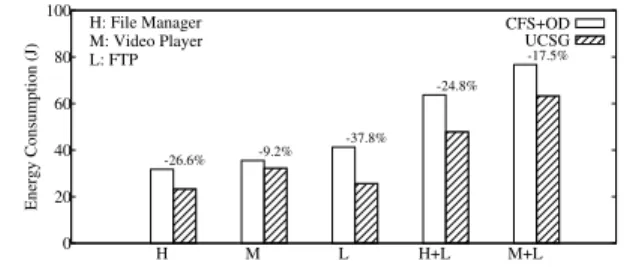
0 20 40 60 80 100 H M L H+L M+L Energy Consumption (J) H: File Manager M: Video Player L: FTP CFS+OD UCSG -26.6% -9.2% -37.8% -24.8% -17.5%Figure 4: Energy required by CFS+OD and UCSG
Figure 4 shows the energy required by CFS+OD and UCSG to execute various combinations of applications. In general, UCSG requires significantly less energy than CFS+OD. This result is as expected because UCSG only allocates limited resources to low-sensitivity threads. However, in the scenarios when no ap-plications run in the background, UCSG can still reduce the energy consumption of CFS+OD by 26.6% for the file manager and 9.2% for the video player, because of its half-scaling policy. The efficacy of UCSG becomes clearer when some application is running in the background. The results show that UCSG re-duces the energy consumption under CFS+OD by 24.8% and 17.5% when the file manager and the video player run in the foreground, respectively, while FTP runs in the background. The reduction is more obvious when the file manager runs than when the video player runs. This is because the former generates CPU workloads that are shorter and vary significantly, while the latter’s workloads are more stable and consistent. When bursty workloads occur, CFS+OD always scales up to the highest fre-quency directly. By contrast, the half-scaling policy of UCSG can scale up to the required frequency level quickly, without wasting much energy.
Interestingly, when FTP runs in the background only, UCSG achieves a substantial energy saving and reduces the energy con-sumed under CFS+OD by 37.8%. In the scenario, the fore-ground application is the home user interface, whose CPU work-load is light if there are no user interactions. Consequently, UCSG normally uses the lowest frequency of 200 MHz during the whole execution, unless the total workload increases twice in a row, which would trigger the half-scaling policy. Furthermore, FTP generates intermittent CPU workloads, and CFS+OD al-ways scales up to the highest frequency to react to any abrupt workload changes. By contrast, UCSG decides whether to scale up the CPU frequency based on the thread sensitivity. This explains the considerable reduction in energy consumption.
4.4
Application Performance
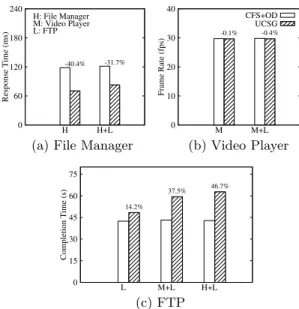
Figure 5(a) shows that UCSG greatly outperforms CFS+OD in terms of the file manager’s response time. The reason that UCSG reduces the response time required under CFS+OD by
0 60 120 180 240 H H+L Response Time (ms) H: File Manager M: Video Player L: FTP -40.4% -31.7%
(a) File Manager
0 10 20 30 40 M M+L Frame Rate (fps) CFS+OD UCSG -0.1% -0.4% (b) Video Player 0 15 30 45 60 75 L M+L H+L Completion Time (s) 14.2% 37.5% 46.7% (c) FTP
Figure 5:Performance achieved by CFS+OD and UCSG
40.4% is that UCSG scales the frequency to the highest level im-mediately when a thread changes to the high sensitivity state. CFS+OD, on the other hand, scales to the highest level in the next sampling period if it senses potential workload increases in the current period. As shown in Figure 5(b), the average frame rates achieved by both UCSG and CFS+OD are close to the frame rates required for video playing; that is, the video can be played smoothly. Figure 5(c) shows the completion times of FTP under CFS+OD and UCSG. The results show that UCSG increases the completion time required under CFS+OD by up to 46.7% when FTP is only provided with limited CPU resources in order to save energy. The significant increase is due to the extreme parameter settings used in our UCSG implementation, and can be reduced by changing the settings of nice values in thread prioritization. CFS+OD outperforms UCSG more signif-icantly when the file manager runs in the foreground than when the video player runs. This is because FTP is allocated an even smaller proportion of the CPU time per scheduling period when high-sensitivity threads exist.
5.
RELATED WORK
Yao et al. [15] designed a scheduling model that executes tasks on a single variable-speed CPU. The pioneer work has spawned extensive studies on DVFS and DMP, and many theoretical re-sults have been published forreal-time applications whose exe-cution behavior is highly predicable or known a priori [1, 7, 16]. The popularity of mobile devices equipped with DVFS-enabled CPUs has motivated another research direction formobile appli-cations. A number of approaches were designed for specific ap-plications, especially multimedia playing [6, 12] and 3D graphics games [4, 9], and achieve considerable energy savings by lever-aging the applications’ frame structures.
Recently, mobile applications have become more popular and diverse. AutoDVS [5] was developed as a general-purpose DVFS scheme that can distinguish between interactive and batch ses-sions, and then apply different scaling policies to each session type. Based on the observation that applications have different resource usage patterns, a resource-driven DVFS scheme was proposed in [2] to explore the interplay between the CPU and other resources to facilitate frequency scaling. TheOndemand
governor [11], introduced with Linux 2.6, is used by Android as the default DVFS scheme. The above schemes were all designed for single-core CPUs. For DPM, device vendors may have dif-ferent implementations. However, there has been comparatively little research on general-purpose DVFS and DPM (i.e., govern-ing), particularly in conjunction with thread scheduling.
6.
CONCLUDING REMARKS
We advocate that mobile operating systems should move to-ward user-centric scheduling and governing. To demonstrate the benefits, we devised a scheduler and governor that allocate CPU resources to mobile applications according to their sen-sitivity, and implemented our design in Android. In addition, we conducted a series of experiments on a Samsung Galaxy S3 smartphone with some mobile apps found on Google Play. The experiment results show that our user-centric design is more ap-propriate for mobile applications, compared with conventional fair scheduling and governing. The proposed design is partic-ularly suitable when some applications running in the back-ground generates bursty CPU workloads intermittently. This is because our design can identify abrupt workload changes caused by applications with different levels of sensitivity, and determine whether to increase the CPU resources for certain applications.
Acknowledgement
This work was supported in part by the National Science Council under Grants No. 101-2219-E-002-002, No. 102-2221-E-001-007-MY2, and No. 100-2221-E-002-120-MY3.
REFERENCES
[1] H. Aydin, V. Devadas, and D. Zhu. System-Level Energy Management for Periodic Real-Time Tasks. InProc. of IEEE RTSS, pages 313–322, 2006.
[2] Y.-M. Chang, P.-C. Hsiu, Y.-H. Chang, and C.-W. Chang. A Resource-Driven DVFS Scheme for Smart Handheld Devices. ACM Trans. on Embedded Computer Systems,
13(3):53:1–53:22, 2013.
[3] B. K. Donohoo, C. Ohlsen, and S. Pasricha. AURA: An Application and User Interaction Aware Middleware Framework for Energy Optimization in Mobile Devices. In Proc. of IEEE ICCD, pages 168–174, 2011.
[4] Y. Gu and S. Chakraborty. Control Theory-Based DVS for Interactive 3D Games. InProc. of IEEE/ACM DAC, pages 740–745, 2008.
[5] S. Gurun and C. Krintz. AutoDVS: An Automatic, General-Purpose, Dynamic Clock Scheduling System for Hand-Held Devices. InProc. of IEEE/ACM EMSOFT, pages 218–226, 2005.
[6] J. Hamers and L. Eeckhout. Exploiting Media Stream Similarity for Energy-Efficient Decoding and Resource Prediction.ACM Trans. on Embedded Computing Systems, 11(1):2:1–2:25, 2012. [7] C.-M. Hung, J.-J. Chen, and T.-W. Kuo. Energy-Efficient
Real-Time Task Scheduling for a DVS System with a Non-DVS Processing Element. InProc. of IEEE RTSS, pages 303–312, 2006.
[8] R. Love.Linux Kernel Development, pages 48–50, 355–357, 361. Addison-Wesley Professional, 3rd edition, 2010. [9] B. C. Mochocki, K. Lahiri, S. Cadambi, and X. S. Hu.
Signature-Based Workload Estimation for Mobile 3D Graphics. InProc. of IEEE/ACM DAC, pages 592–597, 2006.
[10] A. Mutapcic, S. Boyd, S. Murali, D. Atienza, G. De Micheli, and R. Gupta. Processor Speed Control With Thermal Constraints.IEEE Trans. on Circuits and Systems I: Regular Papers, 56(9):1994–2008, 2009.
[11] V. Pallipadi and A. Starikovskiy. The Ondemand Governor: Past, Present, and Future. InProc. of Linux Symposium, volume 2, pages 223–238, 2006.
[12] A. K. Singh, A. Das, and A. Kumar. Energy Optimization by Exploiting Execution Slacks in Streaming Applications on Multiprocessor Systems. InProc. of IEEE/ACM DAC, pages 1–7, 2013.
[13] N. Tolia, D. G. Andersen, and M. Satyanarayanan. Quantifying Interactive User Experience on Thin Clients.IEEE Trans. on Computer, 39(3):46–52, 2006.
[14] Y.-H. Wei, C.-Y. Yang, T.-W. Kuo, S.-H. Hung, and Y.-H. Chu. Energy-Efficient Eeal-Time Scheduling of Multimedia Tasks on Multicore Processors. InProc. of ACM SAC, pages 258–262, 2010.
[15] F. Yao, A. Demers, and S. Shenker. A Scheduling Model for Reduced CPU Energy. InProc. of IEEE FOCS, pages 374–382, 1995.
[16] Y. Zhang, X. S. Hu, and D. Z. Chen. Task Scheduling and Voltage Selection for Energy Minimization. InProc. of IEEE/ACM DAC, pages 183–188, 2002.