Technical Report
Clustered Data ONTAP
NFS Best Practice and Implementation Guide
Justin Parisi, Bikash Roy Choudhury, NetApp February 2014 | TR-4067
Executive Summary
This report serves as an NFSv3 and NFSv4 operational guide and an overview of the
clustered NetApp® Data ONTAP® 8.2 operating system with a focus on NFSv4. It details steps in the configuration of an NFS server, NFSv4 features, and the differences between clustered Data ONTAP and Data ONTAP operating in 7-Mode.
TABLE OF CONTENTS
1 Introduction ... 4
1.1 Scope ...4
1.2 Intended Audience and Assumptions ...4
2 Overview of Clustered Data ONTAP ... 4
2.1 Business Challenges with Traditional Storage ...4
2.2 Clustered Data ONTAP 8.2 ...5
3 Architecture ... 6
3.1 Important Components of Clustered Data ONTAP ...6
3.2 Cluster Namespace ...6
3.3 Steps to Bring Up a Clustered Data ONTAP NFS Server ...7
3.4 Translation of NFS Export Policy Rules from 7-Mode to Clustered Data ONTAP ...9
3.5 Creating Local Netgroups ... 17
4 NFSv4.x in Clustered Data ONTAP ... 17
4.1 NFSv4.0 ... 18
4.2 NFSv4.1 ... 38
4.3 NFS Auditing ... 41
4.4 NFS on Windows ... 43
4.5 NFS Using Apple OS ... 43
5 Multiprotocol User Mapping ... 44
5.1 User Name Mapping During Multiprotocol Access ... 46
5.2 Unified Security Style ... 53
6 NFS Performance Monitoring and Data Gathering ... 61
Appendix ... 70
NFSv3 Option Changes in Clustered Data ONTAP ... 70
NFSv4 Option Changes in Clustered Data ONTAP ... 71
NFSv3 Port Changes ... 73
NFSv4 User ID Mapping ... 73
References ... 74
LIST OF TABLES Table 1) Benefits of a cluster namespace. ...7
Table 2) Enabling numeric ID support for NFSv4 in clustered Data ONTAP. ... 18
Table 4) Enabling NFSv4 access control lists. ... 24
Table 5) NFS lease and grace periods. ... 34
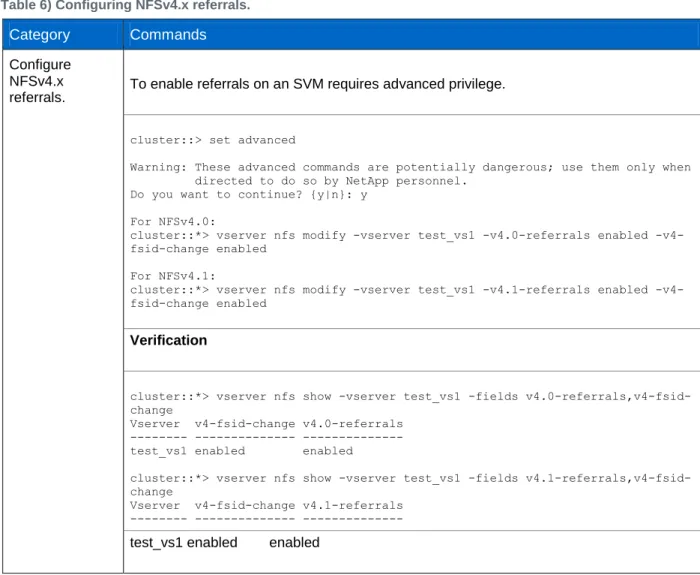
Table 6) Configuring NFSv4.x referrals. ... 37
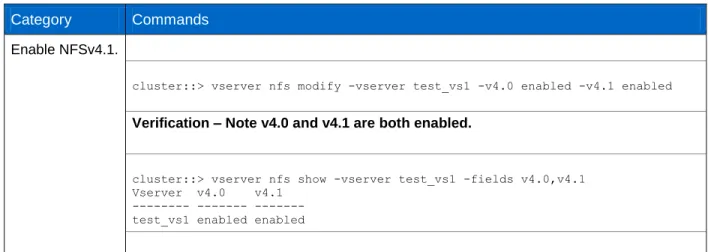
Table 7) Enabling NFSv4.1. ... 39
Table 8) NFSv4.1 delegation benefits. ... 40
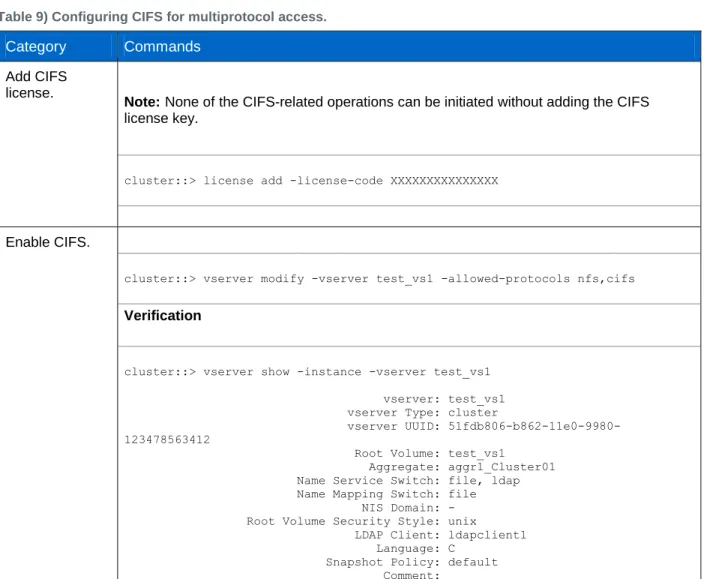
Table 9) Configuring CIFS for multiprotocol access. ... 47
Table 10) 7-Mode to clustered Data ONTAP mapping. ... 52
Table 111) Limitations of existing security styles. ... 53
LIST OF FIGURES Figure 1) Cluster namespace. ...7
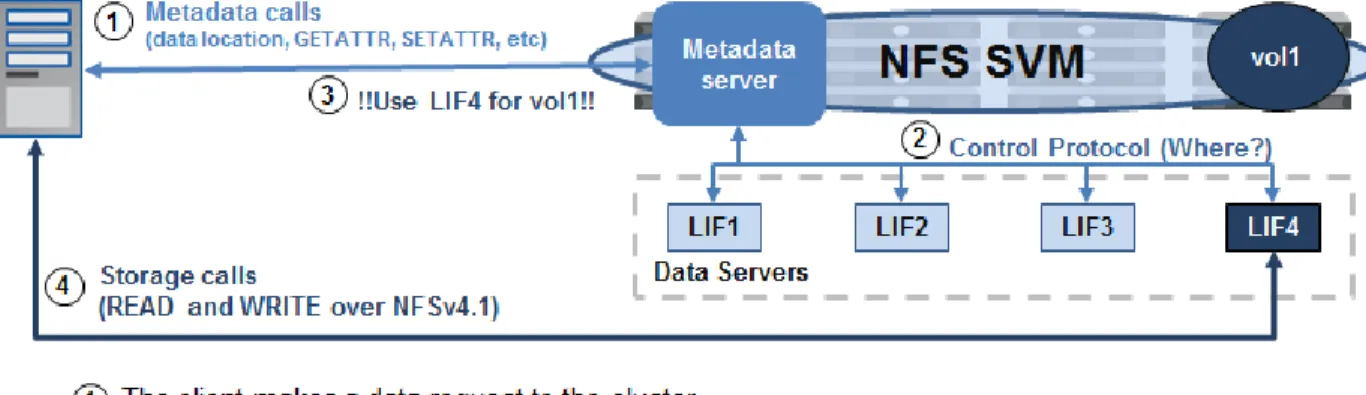
Figure 2) pNFS data workflow. ... 40
1 Introduction
As more and more data centers evolve from application-based silos to server virtualization and scale-out systems, storage systems have evolved to support this change. Clustered NetApp Data ONTAP 8.2 provides shared storage for enterprise and scale-out storage for various applications such as databases, server virtualization, and home directories. It provides a solution for emerging workload challenges in which data is growing in size and becoming more complex and unpredictable. Clustered Data ONTAP 8.2 is unified storage software that scales out to provide efficient performance and support of multi-tenancy and data mobility. This scale-out architecture provides large scalable containers to store petabytes of data. It also upgrades, rebalances, replaces, and redistributes load without disruption, which means that the data is perpetually alive and active.
1.1 Scope
This document covers the following topics:
Introduction to clustered Data ONTAP
Architecture of clustered Data ONTAP
Setting up an NFS server in clustered Data ONTAP
Configuring export policies and rules
7-Mode and clustered Data ONTAP differences and similarities for NFS access-cache implementation
Multiprotocol user mapping
Mapping of NFS options in 7-Mode to clustered Data ONTAP
Configuration of NFS v4 features in clustered Data ONTAP, such as user ID mapping, delegations, ACLs, and referrals
Note: This document is not intended to provide information on migration from 7-Mode to clustered Data ONTAP; it is specifically about NFSv3 and NFSv4 implementation in clustered Data ONTAP and the steps required to configure it.
1.2 Intended Audience and Assumptions
This technical report is for storage administrators, system administrators, and data center managers. It assumes basic familiarity with the following:
NetApp FAS systems and the Data ONTAP operating system
Network file sharing protocols (NFS in particular)
Note: This document contains advanced and diag-level commands. Exercise caution when using these commands. If there are questions or concerns using these commands, contact NetApp Support for assistance.
2 Overview of Clustered Data ONTAP
2.1 Business Challenges with Traditional Storage
Capacity scalingCapacity expansion in traditional storage systems might require downtime, either during physical installation or when redistributing existing data across the newly installed capacity.
Performance scaling
Standalone storage systems might lack the I/O throughput to meet the needs of large-scale enterprise applications.
Availability
Traditional storage systems often have single points of failure that can affect data availability.
Right-sized SLAs
Not all enterprise data requires the same level of service (performance, resiliency, and so on). Traditional storage systems support a single class of service, which often results in poor utilization or unnecessary expense.
Cost
With rapid data growth, storage is consuming a larger and larger portion of shrinking IT budgets.
Complicated management
Discrete storage systems and their subsystems must be managed independently. Existing resource virtualization does not extend far enough in scope.
2.2 Clustered Data ONTAP 8.2
Clustered NetApp Data ONTAP 8.2 helps to achieve results and get products to market faster by providing the throughput and scalability needed to meet the demanding requirements of high-performance computing and digital media content applications. It also facilitates high levels of performance, manageability, and reliability for large Linux®, UNIX®, or Microsoft® Windows® clusters. Features of clustered Data ONTAP include:
Scale-up, scale-out, and scale-down are possible with numerous nodes using a global namespace.
Storage virtualization with Storage Virtual Machines (SVMs) eliminates physical boundaries of a single controller (memory, CPU, ports, disks, and so on).
Nondisruptive operations (NDO) are available when you redistribute load or rebalance capacity combined with network load balancing options within the cluster for upgrading or expanding its nodes.
NetApp storage efficiency features like Snapshot™ copies, thin provisioning, space-efficient cloning, deduplication, data compression, and RAID-DP® technology are also available.
Solutions for the previously mentioned business challenges can be addressed by using the scale-out clustered Data ONTAP approach.
Scalable Capacity
Grow capacity incrementally, on demand, through the nondisruptive addition of storage shelves and growth of storage containers (pools, LUNs, file systems). Support nondisruptive redistribution of existing data to the newly provisioned capacity as needed via volume moves.
Scalable Performance—Pay as You Grow
Grow performance incrementally, on demand and nondisruptively, through the addition of storage controllers in small, economical (pay-as-you-grow) units.
High Availability
Leverage highly available pairs to provide continuous data availability in the face of individual component faults.
Flexible, Manageable Performance
Support different levels of service and provide the ability to dynamically modify the service
characteristics associated with stored data by nondisruptively migrating data to slower, less costly disks and/or by applying quality-of-service (QoS) criteria.
Scalable Storage Efficiency
Control costs through the use of scale-out architectures that employ commodity components. Grow capacity and performance on an as-needed (pay-as-you-go) basis. Increase utilization through thin provisioning and data deduplication.
Unified Management
Provide a single point of management across the cluster. Leverage policy-based management to streamline configuration, provisioning, replication, and backup. Provide a flexible monitoring and reporting structure implementing an exception-based management model. Virtualize resources
across numerous controllers so that volumes become simple-to-manage logical entities that span storage controllers for performance and dynamic redistribution of data.
3 Architecture
3.1 Important Components of Clustered Data ONTAP
Storage Virtual Machine (SVM)
An SVM is a logical file system namespace capable of spanning beyond the boundaries of physical nodes in a cluster.
Clients can access virtual servers from any node in the cluster, but only through the associated logical interfaces (LIFs).
Each SVM has a root volume under which additional volumes are mounted, extending the namespace.
It can span several physical nodes.
It is associated with one or more logical interfaces; clients access the data on the virtual server through the logical interfaces that can live on any node in the cluster.
Logical Interface (LIF)
A logical interface is essentially an IP address with associated characteristics, such as a home port, a list of ports for failover, a firewall policy, a routing group, and so on.
Client network data access is through logical interfaces dedicated to the SVM.
An SVM can have more than one LIF. You can have many clients mounting one LIF or one client mounting several LIFs.
This means that IP addresses are no longer tied to a single physical interface.
Aggregates
An aggregate is a RAID-level collection of disks; it can contain more than one RAID group.
Aggregates serve as resources for SVMs and are shared by all SVMs.
Flexible Volumes
A volume is a logical unit of storage. The disk space that a volume occupies is provided by an aggregate.
Each volume is associated with one individual aggregate and therefore with one physical node.
In clustered Data ONTAP, data volumes are owned by an SVM.
Volumes can be moved from aggregate to aggregate with the DataMotion™ for Volumes feature, without loss of access to the client. This provides more flexibility to move volumes within a single namespace to address issues such as capacity management and load balancing.
3.2 Cluster Namespace
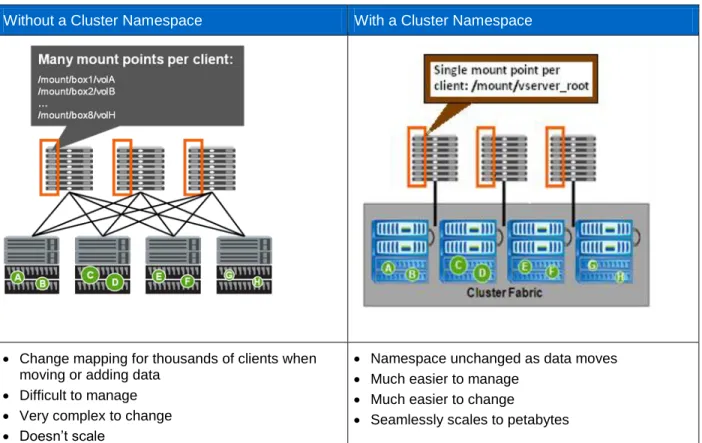
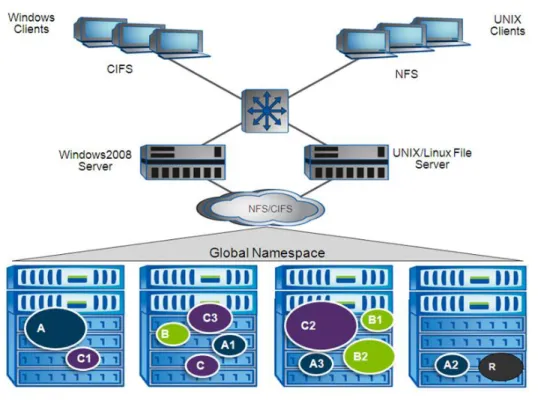
A cluster namespace is a collection of file systems hosted from different nodes in the cluster. Each SVM has a file namespace that consists of a single root volume. The SVM namespace consists of one or more volumes linked by means of junctions that connect from a named junction inode in one volume to the root directory of another volume. A cluster can have more than one SVM.
All the volumes belonging to the SVM are linked into the global namespace in that cluster. The cluster namespace is mounted at a single point in the cluster. The top directory of the cluster namespace within a
cluster is a synthetic directory containing entries for the root directory of each SVM namespace in the cluster.
Figure 1) Cluster namespace.
Table 1) Benefits of a cluster namespace.
Without a Cluster Namespace With a Cluster Namespace
Change mapping for thousands of clients when moving or adding data
Difficult to manage
Very complex to change
Doesn’t scale
Namespace unchanged as data moves
Much easier to manage
Much easier to change
Seamlessly scales to petabytes
3.3 Steps to Bring Up a Clustered Data ONTAP NFS Server
NetApp assumes that the following configuration steps have been completed before you proceed with setting up a clustered Data ONTAP NFS server.
Clustered Data ONTAP 8.2 installation and configuration
Aggregate creation
SVM creation
Volume creation
Valid NFS license applied
Note: NFS server creation and options are explained in detail in the “File Access and Protocols Management Guide” for the version of clustered Data ONTAP being used.
Export Policies in Clustered Data ONTAP
Instead of the flat export files found in 7-Mode, clustered Data ONTAP offers export policies as containers for export policy rules to control security. These policies are stored in the replicated database, thus making exports available across every node in the cluster, rather than isolated to a single node. A NetApp cluster can support 70k export policy rules per cluster for systems using less than 16GB of RAM and 140k export policy rules on systems using more than 16GB of RAM. Each HA pair can handle up to 10,240 export policy rules. There is no limit on export policies. Volumes that are created without specifying the policy will get assigned the default policy.
A newly created SVM contains an export policy called “default.” This export policy cannot be deleted, although it can be renamed or modified. Each volume created in the SVM inherits the “default” export policy and the rules assigned to it. Because export policy rules are inherited by default, NetApp
recommends opening all access to the root volume of the SVM (vsroot) when a rule is assigned. Setting any rules for the “default” export policy that restrict the vsroot denies access to the volumes created under that SVM because vsroot is “/” in the path to “/junction” and factors into the ability to mount and traverse. To control access to read/write to vsroot, use the volume unix-permissions and/or ACLs. NetApp
recommends restricting the ability for nonowners of the volume to write to vsroot (0755 permissions). In clustered Data ONTAP 8.2, 0755 is the default security set on volumes. The default owner is UID 0 and the default group is GID 1. To control data volume access, separate export policies and rules can be set for every volume under the vsroot.
Each volume has only one export policy, although numerous volumes can use the same export policy. An export policy can contain several rules to allow granularity in access control. With this flexibility, a user can choose to balance workload across numerous volumes, yet can assign the same export policy to all volumes. Remember, export policies are containers for export policy rules. If a policy is created with no rule, that effectively denies access to everyone. Always create a rule with a policy to allow access to a volume.
Export policy and export policy rule creation (including examples) is specified in detail in the “File Access and Protocols Management Guide” for the version of clustered Data ONTAP being used.
Use the vserver export-policy commands to set up export rules; this is equivalent to the /etc/exports file in 7-Mode.
All exports are persistent across system restarts, and this is why temporary exports cannot be defined.
There is a global namespace per virtual server; this maps to the actual=path syntax in 7-Mode. In clustered Data ONTAP, a volume can have a designated junction path that is different from the volume name. Therefore, the –actual parameter found in the
/etc/exports file is no longer applicable. This applies to both NFSv3 and NFSv4.
In clustered Data ONTAP, an export rule has the granularity to provide different levels of access to a volume for a specific client or clients, which has the same effect as fencing in the case of 7-Mode.
Export policy rules affect CIFS access in clustered Data ONTAP by default versions prior to 8.2. For more information on how export policies can be applied to volumes hosting CIFS shares, see the “File Access and Protocols Management Guide” for the version of clustered Data ONTAP being used.
3.4 Translation of NFS Export Policy Rules from 7-Mode to Clustered Data
ONTAP
Export Policy Sharing and Rule Indexing
Clustered Data ONTAP exports do not follow the 7-Mode model of file-based access definition, in which the file system path ID is described first and then the clients who want to access the file system path are specified. Clustered Data ONTAP export policies are sets of rules that describe access to a volume. Exports are applied at the volume level, rather than to explicit paths as in 7-Mode.
Policies can be associated with one or more volumes. For example, in 7-Mode exports could look like this:
/vol/test_vol -sec=sys,rw=172.17.44.42,root=172.17.44.42 /vol/datastore1_sata -sec=sys,rw,nosuid
In clustered Data ONTAP, export rules would look like this:
Policy Rule Access Client RO Vserver Name Index Protocol Match Rule
--- --- --- --- --- --- vs1_nfs3 nfs3_policy1 1 any 0.0.0.0/0 any
vs2_nfs4 nfs4_policy1 1 any 0.0.0.0/0 any
7-Mode supports subvolume or nested exports; Data ONTAP supports exporting /vol/volX and
/vol/volX/dir. Clustered Data ONTAP currently does not support subvolume or nested exports. The concept of subvolume exports does not exist because the export path applicable for a particular client’s access is specified at mount time based on the mount path.
Clustered Data ONTAP did not support qtree exports prior to 8.2.1. In previous releases, a qtree could not be a junction in the namespace independent of its containing volume because the "export
permissions" were not specified separately for each qtree. The export policy and rules of the qtree’s parent volume were used for all the qtrees contained within it. This is different from the 7-Mode qtree implementation, in which each qtree is a point in the namespace where export policies can be specified. In 8.2.1, qtree exports will be available for NFSv3 exports only. The export policy can be specified at the qtree level or inherited from the parent volume. Qtree export policies and rules work exactly how volume export policies and rules work.
UNIX Users and Groups
The UID and GID that a cluster will leverage depends on how the SVM has been configured with regard to name mapping and name switch. The name service switch (ns-switch) option for SVMs specifies the source or sources that are searched for network information and the order in which they are searched. Possible values include nis, file, and ldap. This parameter provides the functionality of the
/etc/nsswitch.conf file on UNIX systems.
The name mapping switch (nm-switch) option for SVMs specifies the sources that are searched for name mapping information and the order in which they are searched. Possible values include file and ldap. If NIS or LDAP are specified for name services and/or name mapping, then the cluster will contact the specified servers for UID and GID information. Connectivity to NIS and LDAP will attempt to use a data LIF in the SVM by default. Therefore, data LIFs must be routable to name service servers. Management LIFs will be used in the event a data LIF is not available to service a request. If data LIFs are not able to communicate with name service servers, then there might be some latency in authentication requests that will manifest as latency in data access.
If desired, name service and name mapping communication can be forced over the management network by default. This can be useful in environments in which an SVM does not have access to name service and name mapping servers.
To force all authentication requests over the management network: cluster::> set diag
cluster::> vserver modify -vserver vs0 -protocol-services-use-data-lifs false
NetApp recommends leaving this option as “true” since management networks are often more bandwidth-limited than data networks (1Gb versus 10Gb), which can result in authentication latency in some cases. If local files are used, then the cluster will leverage the unix-user and unix-group tables created for the specified SVM. Because no remote servers are being used, there will be little to no authentication latency. However, in large environments, managing large lists of unix-users and groups can be daunting and mistake prone.
NetApp recommends leveraging either NIS or LDAP for name services in larger environments. Unix-users and groups are not created by default when creating an SVM using the vserver create
command. However, using System Manager or the vserver setup command will create the default users of root (0), pcuser (65534), and nobody (65535) and default groups of daemon (1), root (0), pcuser (65534), and nobody (65535).
cluster::> unix-user show -vserver vs0 (vserver services unix-user show)
User User Group Full Vserver Name ID ID Name
--- --- --- --- --- vs0 nobody 65535 65535 -
vs0 pcuser 65534 65534 -
vs0 root 0 1 -
3 entries were displayed. cluster::> unix-group show -vserver vs0 (vserver services unix-group show) Vserver Name ID --- --- --- nfs daemon 1 nfs nobody 65535 nfs pcuser 65534 nfs root 0 4 entries were displayed.
NetApp recommends using System Manager or vserver setup to avoid configuration mistakes when creating new SVMs.
The Anon User
The “anon” user ID specifies a UNIX user ID or user name that is mapped to client requests that arrive without valid NFS credentials. This can include the root user. Clustered Data ONTAP determines a user’s file access permissions by checking the user’s effective UID against the SVM’s specified name-mapping and name-switch methods. Once the effective UID is determined, the export policy rule is leveraged to determine what access that UID has.
Note: The –anon option in export policy rules allows specification of a UNIX user ID or user name that is mapped to client requests that arrive without valid NFS credentials (including the root user). The default value of –anon, if not specified in export policy rule creation, is 65534. This UID is normally associated with the user name “nobody” or “nfsnobdy” in Linux environments. NetApp appliances use 65534 as the user “pcuser,” which is generally used for multiprotocol operations, Because of this difference, if using local files and NFSv4, the name string for users mapped to 65534 might not match, which might cause files to be written as the user specified in the
The Root User
The "root" user must be explicitly configured in clustered Data ONTAP to specify which machine has "root" access to a share, or else "anon=0” must be specified. Alternatively, the -superuser option can be used if more granular control over root access is desired. If these settings are not configured properly, "permission denied" might be encountered when accessing an NFS share as the "root" user (0). If the – anon option is not specified in export policy rule creation, the root user ID is mapped to the "nobody" user (65534). There are several ways to configure root access to an NFS share.
AUTH Types
When an NFS client authenticates, an AUTH type is sent. An AUTH type specifies how the client is attempting to authenticate to the server and completely depends on client-side configuration. Supported AUTH types include:
AUTH_NONE/AUTH_NULL
This AUTH type specifies that the request coming in has no identity (NONE or NULL) and will be mapped to the anon user. See http://www.ietf.org/rfc/rfc1050.txt and http://www.ietf.org/rfc/rfc2623.txt for details.
AUTH_SYS/AUTH_UNIX
This AUTH type specifies that the user is authenticated at the client (or system) and will come in as an identified user. See http://www.ietf.org/rfc/rfc1050.txt and http://www.ietf.org/rfc/rfc2623.txt for details.
AUTH_RPCGSS
This is kerberized NFS authentication.
Squashing Root
The following examples show how to squash root to anon in various configuration scenarios. Example 1: Root is squashed to the anon user via superuser for all NFS clients using AUTH_SYS/AUTH_UNIX; other AUTH types are denied access.
cluster::> vserver export-policy rule show –policyname root_squash -instance (vserver export-policy rule show)
Vserver: vs0
Policy Name: root_squash Rule Index: 1
Access Protocol: nfs only NFS is allowed (NFSv3 and v4) Client Match Hostname, IP Address, Netgroup, or Domain: 0.0.0.0/0 all clients
RO Access Rule: sys only AUTH_SYS is allowed RW Access Rule: sys only AUTH_SYS is allowed User ID To Which Anonymous Users Are Mapped: 65534 mapped to 65534
Superuser Security Types: none superuser (root) squashed to anon user Honor SetUID Bits in SETATTR: true
Allow Creation of Devices: true
cluster::> volume show -vserver vs0 -volume nfsvol -fields policy vserver volume policy
--- --- --- vs0 nfsvol root_squash
[root@centos6 /]# mount -o nfsvers=3 cluster:/nfsvol /mnt [root@centos6 /]# cd /mnt
[root@centos6 mnt]# touch root_squash [root@centos6 mnt]# ls -la
total 116
drwxrwxrwx. 3 root root 106496 Apr 24 2013 . dr-xr-xr-x. 26 root root 4096 Apr 24 11:24 .. drwxr-xr-x. 2 root daemon 4096 Apr 18 12:54 junction -rw-r--r--. 1 nobody nobody 0 Apr 24 11:33 root_squash
[root@centos6 mnt]# ls -lan drwxrwxrwx. 3 0 0 106496 Apr 24 2013 . dr-xr-xr-x. 26 0 0 4096 Apr 24 11:24 .. drwxrwxrwx. 12 0 0 4096 Apr 24 11:05 .snapshot drwxr-xr-x. 2 0 1 4096 Apr 18 12:54 junction -rw-r--r--. 1 65534 65534 0 Apr 24 2013 root_squash [root@centos6 /]# mount -o sec=krb5 cluster:/nfsvol /mnt
mount.nfs: access denied by server while mounting cluster:/nfsvol
Example 2: Root is squashed to the anon user via superuser for a specific client; AUTH_SYS and AUTH_NONE (null) are allowed.
cluster::> vserver export-policy rule show –policyname root_squash_client -instance (vserver export-policy rule show)
Vserver: vs0
Policy Name: root_squash_client Rule Index: 1
Access Protocol: nfs only NFS is allowed (NFSv3 and v4) Client Match Hostname, IP Address, Netgroup, or Domain: 10.10.100.25 just this client RO Access Rule: sys,none AUTH_SYS and AUTH_NONE are allowed RW Access Rule: sys,none AUTH_SYS and AUTH_NONE are allowed User ID To Which Anonymous Users Are Mapped: 65534 mapped to 65534
Superuser Security Types: none superuser (root) squashed to anon user Honor SetUID Bits in SETATTR: true
Allow Creation of Devices: true
cluster::> volume show -vserver vs0 -volume nfsvol -fields policy vserver volume policy
--- --- ---
vs0 nfsvol root_squash_client
[root@centos6 /]# mount -o nfsvers=3 cluster:/nfsvol /mnt [root@centos6 /]# cd /mnt
[root@centos6 mnt]# touch root_squash_client [root@centos6 mnt]# ls -la
drwxrwxrwx. 3 root root 106496 Apr 24 2013 . dr-xr-xr-x. 26 root root 4096 Apr 24 11:24 .. drwxr-xr-x. 2 root daemon 4096 Apr 18 12:54 junction
-rw-r--r--. 1 nfsnobody nfsnobody 0 Apr 24 2013 root_squash_client [root@centos6 mnt]# ls -lan drwxrwxrwx. 3 0 0 106496 Apr 24 2013 . dr-xr-xr-x. 26 0 0 4096 Apr 24 11:24 .. drwxrwxrwx. 12 0 0 4096 Apr 24 11:05 .snapshot drwxr-xr-x. 2 0 1 4096 Apr 18 12:54 junction -rw-r--r--. 1 65534 65534 0 Apr 24 2013 root_squash_client
Example 3: Root is squashed to the anon user via superuser for a specific set of clients using AUTH_RPCGSS (Kerberos) and only NFSv4 and CIFS are allowed.
cluster::> vserver export-policy rule show –policyname root_squash_krb5 -instance (vserver export-policy rule show)
Vserver: vs0
Policy Name: root_squash_krb5 Rule Index: 1
Access Protocol: nfs4,cifs only NFSv4 and CIFS are allowed Client Match Hostname, IP Address, Netgroup, or Domain: 10.10.100.0/24 just clients with an IP address of 10.10.100.X
RO Access Rule: krb5 only AUTH_RPCGSSD is allowed RW Access Rule: krb5 only AUTH_RPCGSSD is allowed User ID To Which Anonymous Users Are Mapped: 65534 mapped to 65534
Honor SetUID Bits in SETATTR: true Allow Creation of Devices: true
cluster::> volume show -vserver vs0 -volume nfsvol -fields policy vserver volume policy
--- --- --- vs0 nfsvol root_squash
[root@centos6 /]# mount -o nfsvers=3 cluster:/nfsvol /mnt
mount.nfs: access denied by server while mounting cluster:/nfsvol [root@centos6 /]# mount -t nfs4 cluster:/nfsvol /mnt
mount.nfs4: Operation not permitted
[root@centos6 /]# mount -t nfs4 -o sec=krb5 krbsn:/nfsvol /mnt [root@centos6 /]# cd /mnt
[root@centos6 mnt]# touch root_squash_krb5 [root@centos6 mnt]# ls -la
drwxrwxrwx. 3 root root 106496 Apr 24 2013 . dr-xr-xr-x. 26 root root 4096 Apr 24 11:24 .. drwxr-xr-x. 2 root daemon 4096 Apr 18 12:54 junction
-rw-r--r--. 1 nobody nobody 0 Apr 24 11:50 root_squash_krb5 [root@centos6 mnt]# ls -lan
drwxrwxrwx. 3 0 0 106496 Apr 24 2013 . dr-xr-xr-x. 26 0 0 4096 Apr 24 11:24 .. drwxr-xr-x. 2 0 1 4096 Apr 18 12:54 junction -rw-r--r--. 1 99 99 0 Apr 24 11:50 root_squash_krb5
NOTE: Note the UID of 99; this occurs in NFSv4 when the user name cannot map into the NFSv4 domain. /var/log/messages confirms this:
Apr 23 10:54:23 centos6 nfsidmap[1810]: nss_getpwnam: name 'pcuser' not found in domain nfsv4domain.netapp.com'
In the above examples, when the root user requests access to a mount, it will map to the anon UID. In this case, the UID is 65534. This prevents unwanted root access from specified clients to the NFS share. Because “sys” is specified as the rw and ro access rules in the first two examples, only clients using AUTH_SYS will gain access. The third example shows a possible configuration using Kerberized NFS authentication. Setting the access protocol to NFS allows only NFS access to the share (including NFSv3 and NFSv4). If multiprotocol access is desired, then the access protocol must be set to allow NFS and CIFS. NFS access can be limited to only NFSv3 or NFSv4 here as well.
Root Is Root
The following examples show how to enable the root user to come into an NFS share as the root user. Example 1: Root is allowed access as root via superuser for all clients only for AUTH_SYS; AUTH_NONE and AUTH_SYS are allowed rw and ro access; all other anon access is mapped to 65534.
cluster::> vserver export-policy rule show –policyname root_allow_anon_squash -instance (vserver export-policy rule show)
Vserver: vs0
Policy Name: root_allow_anon_squash Rule Index: 1
Access Protocol: nfs only NFS is allowed (NFSv3 and v4) Client Match Hostname, IP Address, Netgroup, or Domain: 0.0.0.0/0 all clients
RO Access Rule: sys,none AUTH_SYS and AUTH_NONE allowed RW Access Rule: sys,none AUTH_SYS and AUTH_NONE allowed User ID To Which Anonymous Users Are Mapped: 65534 mapped to 65534
Superuser Security Types: sys superuser for AUTH_SYS only Honor SetUID Bits in SETATTR: true
cluster::> volume show -vserver vs0 -volume nfsvol -fields policy vserver volume policy
--- --- ---
vs0 nfsvol root_allow_anon_squash
[root@centos6 /]# mount -o nfsvers=3 cluster:/nfsvol /mnt [root@centos6 /]# cd /mnt
[root@centos6 mnt]# touch root_allow_anon_squash_nfsv3 [root@centos6 mnt]# ls -la
drwxrwxrwx. 3 root root 106496 Apr 24 2013 . dr-xr-xr-x. 26 root root 4096 Apr 24 11:24 .. drwxrwxrwx. 12 root root 4096 Apr 24 11:05 .snapshot drwxr-xr-x. 2 root bin 4096 Apr 18 12:54 junction
-rw-r--r--. 1 root root 0 Apr 24 2013 root_allow_anon_squash_nfsv3 [root@centos6 mnt]# ls -lan
drwxrwxrwx. 3 0 0 106496 Apr 24 2013 . dr-xr-xr-x. 26 0 0 4096 Apr 24 11:24 .. drwxr-xr-x. 2 0 1 4096 Apr 18 12:54 junction
-rw-r--r--. 1 0 0 0 Apr 24 11:56 root_allow_anon_squash_nfsv3
Example 2: Root is allowed access as root via superuser for AUTH_RPCGSS (krb5) only; anon access is mapped to 65534; AUTH_SYS and AUTH_RPCGSS are allowed, but only via NFSv4.
cluster::> vserver export-policy rule show –policyname root_allow_krb5_only -instance (vserver export-policy rule show)
Vserver: vs0
Policy Name: root_allow_krb5_only Rule Index: 1
Access Protocol: nfs4 only NFSv4 is allowed Client Match Hostname, IP Address, Netgroup, or Domain: 0.0.0.0/0 all clients
RO Access Rule: sys,krb5 AUTH_SYS and AUTH_RPCGSS allowed RW Access Rule: sys,krb5 AUTH_SYS and AUTH_RPCGSS allowed User ID To Which Anonymous Users Are Mapped: 65534 mapped to 65534
Superuser Security Types: krb5 superuser via AUTH_RPCGSS only Honor SetUID Bits in SETATTR: true
cluster::> volume show -vserver vs0 -volume nfsvol -fields policy vserver volume policy
--- --- ---
vs0 nfsvol root_allow_krb5_only
[root@centos6 /]# mount -o nfsvers=3 cluster:/nfsvol /mnt
mount.nfs: access denied by server while mounting cluster:/nfsvol [root@centos6 /]# mount -t nfs4 cluster:/nfsvol /mnt
[root@centos6 /]# cd /mnt
[root@centos6 mnt]# touch root_allow_krb5_only_notkrb5 [root@centos6 mnt]# ls -la
drwxrwxrwx. 3 root root 106496 Apr 24 2013 . dr-xr-xr-x. 26 root root 4096 Apr 24 11:24 .. drwxr-xr-x. 2 root daemon 4096 Apr 18 12:54 junction
-rw-r--r--. 1 nobody nobody 0 Apr 24 2013 root_allow_krb5_only_notkrb5 [root@centos6 mnt]# ls -lan
drwxrwxrwx. 3 0 0 106496 Apr 24 2013 . dr-xr-xr-x. 26 0 0 4096 Apr 24 11:24 .. drwxr-xr-x. 2 0 1 4096 Apr 18 12:54 junction
-rw-r--r--. 1 99 99 0 Apr 24 2013 root_allow_krb5_only_notkrb5
NOTE: Again, the UID of an unmapped user in NFSv4 is 99. This is controlled via /etc/idmapd.conf in Linux and /etc/default/nfs in Solaris.
[root@centos6 /]# mount -t nfs4 -o sec=krb5 cluster:/nfsvol /mnt [root@centos6 /]# kinit
[root@centos6 /]# cd /mnt
[root@centos6 mnt]# touch root_allow_krb5_only_krb5mount [root@centos6 mnt]# ls -la
drwxrwxrwx. 3 root root 106496 Apr 24 2013 . dr-xr-xr-x. 26 root root 4096 Apr 24 11:24 .. drwxr-xr-x. 2 root daemon 4096 Apr 18 12:54 junction
-rw-r--r--. 1 root daemon 0 Apr 24 2013 root_allow_krb5_only_krb5mount [root@centos6 mnt]# ls -lan
drwxrwxrwx. 3 0 0 106496 Apr 24 2013 . dr-xr-xr-x. 26 0 0 4096 Apr 24 11:24 .. drwxr-xr-x. 2 0 1 4096 Apr 18 12:54 junction
-rw-r--r--. 1 0 1 0 Apr 24 2013 root_allow_krb5_only_krb5mount
Example 3: Root and all anonymous users are allowed access as root via anon=0, but only for AUTH_SYS and AUTH_RPCGSS over NFSv4.
cluster::> vserver export-policy rule show –policyname root_allow_anon0 -instance (vserver export-policy rule show)
Vserver: vs0
Policy Name: root_allow_anon0 Rule Index: 1
Access Protocol: nfs4 only NFSv4 is allowed Client Match Hostname, IP Address, Netgroup, or Domain: 0.0.0.0/0 all clients
RO Access Rule: krb5, sys AUTH_SYS and AUTH_RPCGSS allowed RW Access Rule: krb5, sys AUTH_SYS and AUTH_RPCGSS allowed User ID To Which Anonymous Users Are Mapped: 0 mapped to 0
Superuser Security Types: none superuser (root) squashed to anon user Honor SetUID Bits in SETATTR: true
Allow Creation of Devices: true
cluster::> volume show -vserver vs0 -volume nfsvol -fields policy vserver volume policy
--- --- --- vs0 nfsvol root_allow_anon0
[root@centos6 /]# mount -o nfsvers=3 cluster:/nfsvol /mnt
mount.nfs: access denied by server while mounting cluster:/nfsvol [root@centos6 /]# mount -t nfs4 cluster:/nfsvol /mnt
[root@centos6 /]# cd /mnt
[root@centos6 mnt]# touch root_allow_anon0 [root@centos6 mnt]# ls -la
drwxrwxrwx. 3 root root 106496 Apr 24 2013 . dr-xr-xr-x. 26 root root 4096 Apr 24 11:24 .. drwxr-xr-x. 2 root daemon 4096 Apr 18 12:54 junction
-rw-r--r--. 1 root daemon 0 Apr 24 2013 root_allow_anon0 [root@centos6 mnt]# ls -lan
drwxrwxrwx. 3 0 0 106496 Apr 24 2013 . dr-xr-xr-x. 26 0 0 4096 Apr 24 11:24 .. drwxr-xr-x. 2 0 1 4096 Apr 18 12:54 junction
-rw-r--r--. 1 0 1 0 Apr 24 2013 root_allow_anon0 [root@centos6 /]# mount -t nfs4 -o sec=krb5 cluster:/nfsvol /mnt [root@centos6 /]# cd /mnt
[root@centos6 mnt]# touch root_allow_anon0_krb5 [root@centos6 mnt]# ls -la
drwxrwxrwx. 3 root root 106496 Apr 24 2013 . dr-xr-xr-x. 26 root root 4096 Apr 24 11:24 .. drwxr-xr-x. 2 root daemon 4096 Apr 18 12:54 junction
-rw-r--r--. 1 root daemon 0 Apr 24 2013 root_allow_anon0_krb5 [root@centos6 mnt]# ls -lan drwxrwxrwx. 3 0 0 106496 Apr 24 2013 . dr-xr-xr-x. 26 0 0 4096 Apr 24 11:24 .. drwxr-xr-x. 2 0 1 4096 Apr 18 12:54 junction -rw-r--r--. 1 0 1 0 Apr 24 2013 root_allow_anon0_krb5
Showmount in Clustered Data ONTAP
Clustered Data ONTAP does not support the showmount command from NFS clients. The reasoning behind this is that, due to performance considerations, clusters can potentially have thousands of export rules, so a query for all exports can be process intensive. Additionally, exports are not in flat files and are applied to volumes as rules, so the export path and export rules would live in two different places. Example of showmount –e in 7-Mode:
[root@centos6 /]# showmount -e 10.61.84.240 Export list for 10.61.84.240:
/vol/unix (everyone) /vol/Test (everyone) /vol/vol0/home (everyone) /vol/vol0 (everyone) /vol/Test2 (everyone) /vol/mixed 10.61.179.164
Example of showmount –e in clustered Data ONTAP: [root@centos6 /]# showmount -e 10.61.92.34
Export list for 10.61.92.34: / (everyone)
When running a showmount in clustered Data ONTAP, the NFS server would be an SVM IP. The SVM has a vsroot volume mounted to /, which is the volume returned in the showmount. All other volumes are mounted below that mount point. In the above example, / is shown as allowing everyone. This is the export policy rule for / in the SVM being queried:
cluster::> vol show -vserver vs0 -volume vsroot -fields policy (volume show)
vserver volume policy --- --- --- vs0 vsroot default
cluster::> export-policy rule show -vserver vs0 -policyname default -instance (vserver export-policy rule show)
Vserver: vs0 Policy Name: default Rule Index: 1 Access Protocol: any
Client Match Hostname, IP Address, Netgroup, or Domain: 0.0.0.0/0 RO Access Rule: any
RW Access Rule: any User ID To Which Anonymous Users Are Mapped: 65534 Superuser Security Types: any Honor SetUID Bits in SETATTR: true Allow Creation of Devices: true
If the export policy rule is changed to allow just a host, the showmount –e output does not change: cluster::> export-policy rule modify -vserver vs0 -policyname default -ruleindex 1 -clientmatch 10.61.179.164
(vserver export-policy rule modify)
(vserver export-policy rule show)
Vserver: vs0 Policy Name: default Rule Index: 1 Access Protocol: any
Client Match Hostname, IP Address, Netgroup, or Domain: 10.61.179.164 RO Access Rule: any
RW Access Rule: any User ID To Which Anonymous Users Are Mapped: 65534 Superuser Security Types: any Honor SetUID Bits in SETATTR: true Allow Creation of Devices: true [root@centos6 /]# showmount -e 10.61.92.34 Export list for 10.61.92.34:
/ (everyone)
Thus, for clustered Data ONTAP, showmount isn’t really useful in most cases. To get similar functionality to showmount, leverage SSH or the Data ONTAP SDK to extract the desired information. The fields to extract would be:
Junction-path from the volume show command/ZAPI
Policy from the volume show command/ZAPI
Any desired fields from the export policy rule set in the policy assigned to the volume
Showmount Plug-in for Clustered Data ONTAP
The support tool chest now contains a showmount plug-in for clustered Data ONTAP. This plug-in has limited support and should be used only in situations where showmount is required.
3.5 Creating Local Netgroups
When creating export policies and rules, netgroup names can be specified instead of an IP address and mask bits to match clients to an export rule. A netgroup is a named collection of arbitrary IP addresses that is stored in an NIS map.
Export policies are not specific to any one virtual server; however, because each virtual server has an independent NIS domain and the set of IP addresses that a netgroup matches depends on NIS, each netgroup-based rule can match different clients on different virtual servers that have different NIS domains.
Netgroup creation is covered in the “File Access and Protocols Management Guide” for the version of clustered Data ONTAP being used.
4 NFSv4.x in Clustered Data ONTAP
NFSv4.0 and NFSv4.1 were introduced for the first time in clustered Data ONTAP starting with Data ONTAP 8.1.
Advantages of Using NFSv4.x
Firewall-friendly because NFSv4 uses only a single port (2049) for its operations
Advanced and aggressive cache management, like delegation in NFSv4.0 (does not apply in NFSv4.1)
Mandatory strong RPC security flavors that employ cryptography
Internationalization
Works only with TCP
Stateful protocol (not stateless like NFSv3)
Kerberos configuration for efficient authentication mechanisms (uses 3DES for encryption)
No replication support
Migration (for dNFS) using referrals
Support of access control that is compatible with UNIX and Windows
String-based user and group identifiers
Parallel access to data (does not apply for NFSv4.0)
4.1 NFSv4.0
Recently there has been a major increase in the adoption of NFSv4 for various business requirements. While customers prepare to migrate their existing setup and infrastructure from NFSv3 to NFSv4, some environmental changes must be made before moving to NFSv4. One of them is "id domain mapping," as mentioned later in this table.
Some production environments have the challenge to build new naming service infrastructures like NIS or LDAP for string-based name mapping to be functional in order to move to NFSv4. With the new
"numeric_id" option, setting name services does not become an absolute requirement. The "numeric_id" feature must be supported and enabled on the server as well as on the client. With this option enabled, the user and groups exchange UIDs/GIDs between the client and server just as with NFSv3. However, for this option to be enabled and functional, NetApp recommends having a supported version of the client and the server. Today the first available client that supports this feature is Fedora15 on kernel 3.0 and later.
In clustered Data ONTAP 8.1, a new option called v4-id-numerics was added. With this option enabled, even if the client does not have access to the name mappings, IDs can be sent in the user name and group name fields and the server accepts them and treats them as representing the same user as would be represented by a v2/v3 UID or GID having the corresponding numeric value.
Note: To access this command, you must be in diag mode. Commands related to diag mode should be used with caution, and NetApp recommends that you contact the NetApp Support team for further advice. Note: Note that -v4-id-numerics should be enabled only if the client supports it.
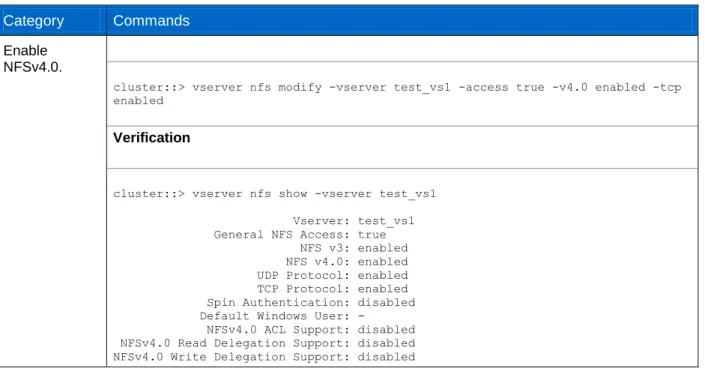
Table 2) Enabling numeric ID support for NFSv4 in clustered Data ONTAP. Category Commands
Enable NFSv4.0.
cluster::> vserver nfs modify -vserver test_vs1 -access true -v4.0 enabled -tcp enabled
Verification
cluster::> vserver nfs show -vserver test_vs1 Vserver: test_vs1 General NFS Access: true NFS v3: enabled NFS v4.0: enabled UDP Protocol: enabled TCP Protocol: enabled Spin Authentication: disabled Default Windows User: -
NFSv4.0 ACL Support: disabled NFSv4.0 Read Delegation Support: disabled NFSv4.0 Write Delegation Support: disabled
NFSv4 ID Mapping Domain: defaultv4iddomain.com NFSv4.1 Minor Version Support: disabled
Rquota Enable: disabled NFSv4.1 Parallel NFS Support: enabled NFSv4.1 ACL Support: disabled NFS vStorage Support: disabled
Set up NFSv4 user ID mapping.
Note:
On a clustered Data ONTAP system, the command to turn on the v4-id-numerics option follows.
cluster::> set diag
Warning: These diagnostic commands are for use by NetApp personnel only. Do you want to continue? {y|n}: y
cluster::> vserver nfs modify -vserver testvs1 -v4-numeric-ids enabled Verification
cluster::> vserver nfs show -vserver testvs1 -fields v4-numeric-ids Vserver v4-numeric-ids
--- --- testvs1 enabled
If the v4-id-numerics option is disabled, the server only accepts user name/group name of the form user@domain or group@domain.
The NFSv4 domain name is a pseudo-domain name that both the client and storage controller must agree upon before they can execute NFSv4 operations. The NFSv4 domain name might or might not be equal to the NIS or DNS domain name, but it must be a string that both the NFSv4 client and server understand.
This is a two-step process in which the Linux client and clustered Data ONTAP system are configured with the NFSv4 domain name.
On the clustered Data ONTAP system:
The default value of the NFS option -v4-id-domain is defaultv4iddomain.com. cluster::> vserver nfs modify -vserver test_vs1 -v4-id-domain nfsv4domain.netapp.com
Verification
Vserver v4-id-domain
--- --- test_vs1 nfsv4domain.netapp.com
This section describes how the domain name can be changed on the client.
Solaris. Edit the /etc/default/nfs file and change NFSMAPID_DOMAIN to that set for the server. Reboot the client for the change to take effect.
Linux. Make the necessary adjustments to /etc/idmapd.conf. Restart the idmapd process to have the change take effect. NOTE: Restarting idmapd varies per client. Rebooting the server is an option as well.
[root@linuxlinux /]# vi /etc/idmapd.conf [General] Verbosity = 0 Pipefs-Directory = /var/lib/nfs/rpc_pipefs Domain = nfsv4domain.netapp.com [mapping] Nobody-User = nobody Nobody-Group = nobody [Translation] Method = nsswitch Create a UNIX
group with GID 1 and assign it to the SVM.
Note: Whenever a volume is created, it is associated with UID 0 and GID 1 by default. NFSv3 ignores this, whereas NFSv4 is sensitive to the UID and GID mapping. If GID 1 was not previously created, follow these steps to create one.
cluster::> vserver services unix-group create -vserver test_vs1 -name daemon -id 1
Verification
cluster::> vserver services unix-group show -vserver test_vs1 Vserver Name ID
--- --- --- test_vs1 daemon 1
test_vs1 root 0 2 entries were displayed.
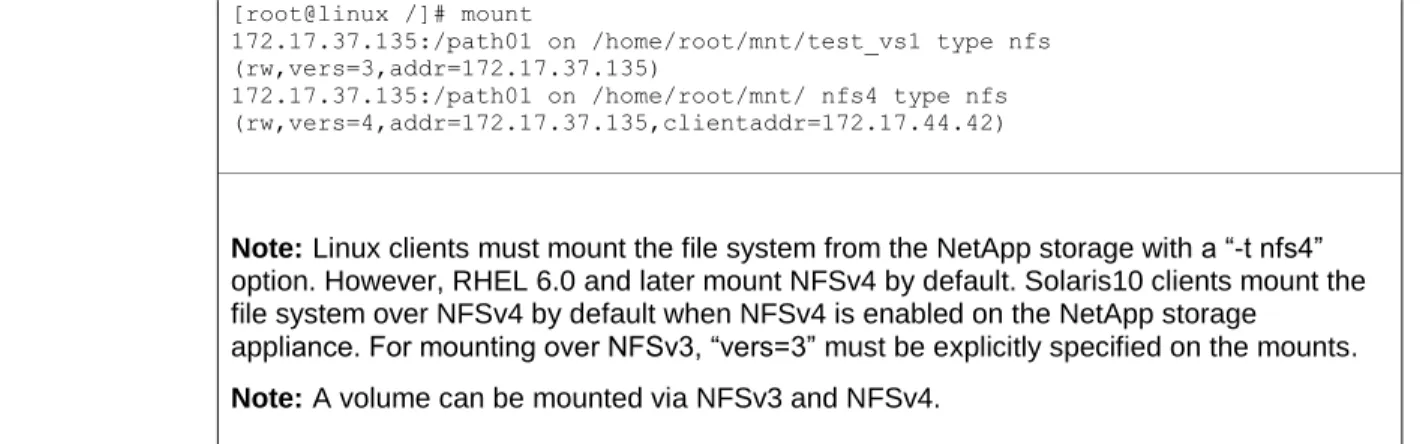
Mounting the client over NFSv4
On the client:
[root@linux /]# mkdir -p /home/root/mnt/nfs4/
[root@linux /]# mount 172.17.37.135:/path01 /home/root/mnt/nfs4/ Verification
[root@linux /]# mount
172.17.37.135:/path01 on /home/root/mnt/test_vs1 type nfs (rw,vers=3,addr=172.17.37.135)
172.17.37.135:/path01 on /home/root/mnt/ nfs4 type nfs (rw,vers=4,addr=172.17.37.135,clientaddr=172.17.44.42)
Note: Linux clients must mount the file system from the NetApp storage with a “-t nfs4” option. However, RHEL 6.0 and later mount NFSv4 by default. Solaris10 clients mount the file system over NFSv4 by default when NFSv4 is enabled on the NetApp storage
appliance. For mounting over NFSv3, “vers=3” must be explicitly specified on the mounts. Note: A volume can be mounted via NFSv3 and NFSv4.
Configure UID and GID Name Mappings
Use any of three ways of modifying file/nis/ldap. The order of mapping is specified using the commands shown in Table 3.
Table 3) Configuring UID and GID mapping. Category Commands
Configure name-mapping
methodologies. cluster::> vserver modify –vserver test_vs1 –ns-switch nis,ldap –nm-switch file
Configure LDAP.
Create an LDAP client.
cluster::> vserver services ldap client show This table is currently empty.
LDAP using Active Directory®:
cluster::> vserver services ldap client create -client-config AD_LDAP –servers 10.10.10.100 –ad-domain domain.netapp.com -bind-as-cifs-server true -schema AD-IDMU -port 389 -query-timeout 3 -min-bind-level sasl -base-dn
DC=domain,DC=netapp,DC=com -base-scope subtree -preferred-ad-servers 10.10.10.100
Non-Active Directory LDAP (such as OpenLDAP):
cluster::> vserver services ldap client create -client-config OPENLDAP -schema RFC-2307 –servers 10.10.10.101 -port 389 -query-timeout 3 -min-bind-level simple -base-dn DC=openldap,DC=netapp,DC=com -base-scope subtree
Verification
LDAP using Active Directory:
cluster::> vserver services ldap client show -instance Client Configuration Name: AD_LDAP
LDAP Server List: 10.10.10.100 Active Directory Domain: domain.netapp.com
Preferred Active Directory Servers: 10.10.10.100 Bind Using the Vserver's CIFS Credentials: true
Schema Template: AD-IDMU LDAP Server Port: 389 Query Timeout (sec): 3 Minimum Bind Authentication Level: sasl Bind DN (User): -
Base DN:DC=domain,DC=netapp, DC=com Base Search Scope: subtree
Non-Active Directory LDAP (such as OpenLDAP):
cluster::> vserver services ldap client show -instance Client Configuration Name: OPENLDAP
LDAP Server List: 10.10.10.101 Active Directory Domain: -
Preferred Active Directory Servers: -
Bind Using the Vserver's CIFS Credentials: truefalse Schema Template: RFC-2307 LDAP Server Port: 389 Query Timeout (sec): 3 Minimum Bind Authentication Level: sasl Bind DN (User): -
Base DN:DC=openldap,DC=netapp, DC=com Base Search Scope: subtree
Create an LDAP server.
cluster::> vserver services ldap show This table is currently empty.
cluster::> vserver services ldap create -vserver test_vs1 -client-config ldapclient1 -client-enabled true
Verification
cluster::> vserver services ldap show Client Client Vserver Configuration Enabled --- --- --- test_vs1 ldapclient1 true
Configure NIS.
cluster::> vserver services nis-domain create -vserver test_vs1 -domain nisdom.netapp.com -active true -servers 10.10.10.110
Verification
cluster::> vserver services nis-domain show NIS Vserver Domain Active Server
--- --- --- --- test_vs1 nisdom.netapp.com true 10.10.10.110
Viewing Active NFS Connections in the Cluster
In clustered Data ONTAP, it is possible to view active NFS connections across all SVMs and nodes in the cluster via the network connections active show command. This command allows filtering of IPs, services, and other features to provide more useful and granular information. This can be used in place of classic netstat commands found in 7-Mode.
Example:
cluster::> network connections active show
show show-clients show-lifs show-protocols show-services cluster::> network connections active show -node node1 -service nfs*
Vserver Interface Remote
CID Ctx Name Name:Local Port Host:Port Protocol/Service --- --- --- --- --- --- Node: node1
286571835 6 vs0 data:2049 10.61.179.164:763 TCP/nfs cluster::> network connections active show -node node2 -service nfs* There are no entries matching your query.
NFSv4 Access Control Lists (ACLs)
The NFSv4 protocol can provide access control in the form of NFSv4 Access Control Lists (ACLs), which are similar in concept to those found in CIFS. An NFSv4 ACL consists of individual Access Control Entries (ACEs), each of which provides an access control directive to the server. Clustered Data ONTAP 8.2 supports a maximum of 1,024 ACEs.
Benefits of Enabling NFSv4 ACLs
The benefits of enabling NFSv4 ACLs include the following:
Granular control of user access to files and directories
Better NFS security
Improved interoperability with CIFS
Removal of the NFS limitation of 16 groups per user with AUTH_SYS security
Compatibility Between NFSv4 ACLs and Windows (NTFS) ACLs
NFSv4 ACLs are different from Windows file-level ACLs (NTFS ACLs), but Data ONTAP can map NFSv4 ACLs to Windows ACLs for viewing on Windows platforms. Permissions displayed to NFS clients for files that have Windows ACLs are "display" permissions, and the permissions used for checking file access are those of the Windows ACL.
Note: Data ONTAP does not support POSIX ACLs.
How NFSv4 ACLs Work
When a client sets an NFSv4 ACL on a file during a SETATTR operation, the NetApp storage system sets that ACL on the object, replacing any existing ACL. If there is no ACL on a file, then the mode
permissions on the file are calculated from OWNER@, GROUP@, and EVERYONE@. If there are any existing SUID/SGID/STICKY bits on the file, they are not affected.
When a client gets an NFSv4 ACL on a file during the course of a GETATTR operation, the NetApp system reads the NFSV4 ACL associated with the object and constructs a list of ACEs and returns it to the client. If the file has an NT ACL or mode bits, then an ACL is constructed from mode bits and is returned to the client.
Access is denied if a DENY ACE is present in the ACL, and access is granted if an ALLOW ACE exists. However, access is also denied if neither of the ACEs is present in the ACL.
A security descriptor consists of a Security ACL (SACL) and a Discretionary ACL (DACL). When NFSv4 interoperates with CIFS, the DACL is one-to-one mapped with NFSv4 and CIFS. The DACL consists of the ALLOW and the DENY ACEs.
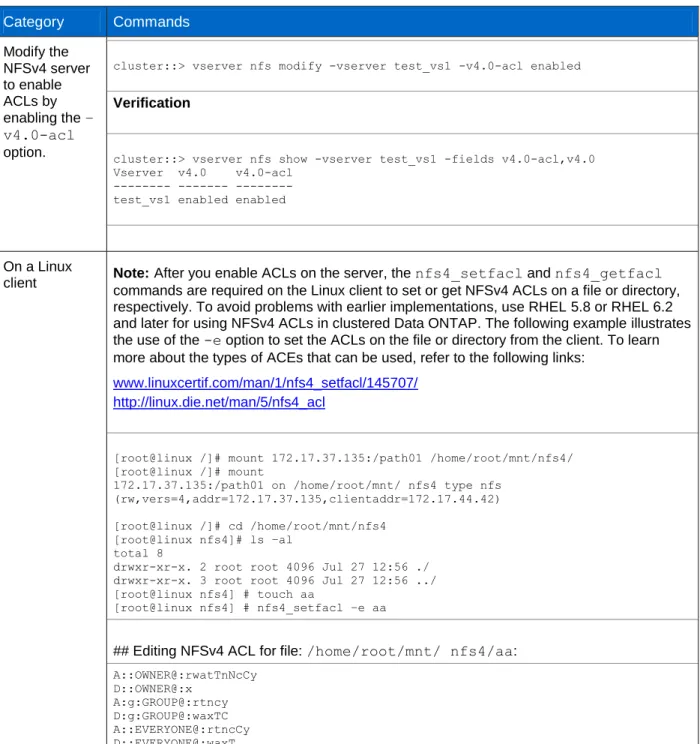
Table 4) Enabling NFSv4 access control lists. Category Commands Modify the NFSv4 server to enable ACLs by enabling the – v4.0-acl option.
cluster::> vserver nfs modify -vserver test_vs1 -v4.0-acl enabled Verification
cluster::> vserver nfs show -vserver test_vs1 -fields v4.0-acl,v4.0 Vserver v4.0 v4.0-acl
--- --- --- test_vs1 enabled enabled
On a Linux
client Note: After you enable ACLs on the server, the nfs4_setfacl and nfs4_getfacl commands are required on the Linux client to set or get NFSv4 ACLs on a file or directory, respectively. To avoid problems with earlier implementations, use RHEL 5.8 or RHEL 6.2 and later for using NFSv4 ACLs in clustered Data ONTAP. The following example illustrates the use of the -e option to set the ACLs on the file or directory from the client. To learn more about the types of ACEs that can be used, refer to the following links:
www.linuxcertif.com/man/1/nfs4_setfacl/145707/ http://linux.die.net/man/5/nfs4_acl
[root@linux /]# mount 172.17.37.135:/path01 /home/root/mnt/nfs4/ [root@linux /]# mount
172.17.37.135:/path01 on /home/root/mnt/ nfs4 type nfs (rw,vers=4,addr=172.17.37.135,clientaddr=172.17.44.42) [root@linux /]# cd /home/root/mnt/nfs4
[root@linux nfs4]# ls –al total 8
drwxr-xr-x. 2 root root 4096 Jul 27 12:56 ./ drwxr-xr-x. 3 root root 4096 Jul 27 12:56 ../ [root@linux nfs4] # touch aa
[root@linux nfs4] # nfs4_setfacl –e aa
## Editing NFSv4 ACL for file: /home/root/mnt/ nfs4/aa: A::OWNER@:rwatTnNcCy D::OWNER@:x A:g:GROUP@:rtncy D:g:GROUP@:waxTC A::EVERYONE@:rtncCy D::EVERYONE@:waxT
Category Commands Verification [root@linux nfs4] # nfs4_getfacl aa A::OWNER@:rwatTnNcCy D::OWNER@:x A:g:GROUP@:rtncy D:g:GROUP@:waxTC A::EVERYONE@:rtncCy D::EVERYONE@:waxT
A client using NFSv4 ACLs can set and view ACLs for files and directories on the system. When a new file or subdirectory is created in a directory that has an ACL, the new file or subdirectory inherits all ACEs in the ACL that have been tagged with the appropriate inheritance flags. For access checking, CIFS users are mapped to UNIX users. The mapped UNIX user and that user’s group membership are checked against the ACL.
If a file or directory has an ACL, that ACL is used to control access no matter which protocol—NFSv3, NFSv4, or CIFS—is used to access the file or directory and is used even if NFSv4 is no longer enabled on the system.
Files and directories inherit ACEs from NFSv4 ACLs on parent directories (possibly with appropriate modifications) as long as the ACEs have been tagged with the correct inheritance flags. Clustered Data ONTAP 8.2 supports up to 1,024 ACEs. This can be controlled via the following command:
cluster::> nfs server modify –vserver vs0 -v4-acl-max-aces [number up to 1024]
Prior to clustered Data ONTAP 8.2, the maximum ACE limit was 400. If reverting to a version of Data ONTAP prior to 8.2, files or directories with more than 400 ACEs will have their ACLs dropped and the security will revert to mode bit style.
When a file or directory is created as the result of an NFSv4 request, the ACL on the resulting file or directory depends on whether the file creation request includes an ACL or only standard UNIX file access permissions, and whether the parent directory has an ACL.
If the request includes an ACL, that ACL is used.
If the request includes only standard UNIX file access permissions but the parent directory has an ACL, the ACEs in the parent directory's ACL are inherited by the new file or directory as long as the ACEs have been tagged with the appropriate inheritance flags.
Note: A parent ACL is inherited even if -v4.0-acl is set to off.
If the request includes only standard UNIX file access permissions and the parent directory does not have an ACL, the client file mode is used to set standard UNIX file access permissions.
If the request includes only standard UNIX file access permissions and the parent directory has a non-inheritable ACL, a default ACL based on the mode bits passed into the request is set on the new object.
ACL Formatting
NFSv4.x ACLs have specific formatting. The following is an ACE set on a file:
A::[email protected]:rwatTnNcCy
type:flags:principal:permissions
A type of “A” means allow. The flags are not set in this case, because the principal is not a group and does not include inheritance. Also, because the ACE is not an AUDIT entry, there is no need to set the audit flags.
For more information on NFSv4.x ACLs, see http://linux.die.net/man/5/nfs4_acl.
ACL Interaction with Different Security Styles
The security semantics of a volume are determined by its security style and its ACL (NFSv4 or NTFS). For a volume with UNIX security style:
NFSv4 ACLs and mode bits are effective.
NTFS ACLs are not effective.
Windows clients cannot set attributes. For a volume with NTFS security style:
NFSv4 ACLs are not effective.
NTFS ACLs and mode bits are effective.
UNIX clients cannot set attributes. For a volume with mixed security style:
NFSv4 ACLs and mode bits are effective.
NTFS ACLs are effective.
Both Windows and UNIX clients can set attributes.
Mixed Security Style Considerations
Mixed qtree styles can cause issues with permissions if not set up properly. It can also be confusing to know what permissions are set on a file or folder when using mixed security style, since the NFS or CIFS clients might not display the ACLs properly. Mixed security style can get messy when clients are
modifying permissions, even with identity management in place. Best Practice
Choose either NTFS or UNIX style security unless there is a specific recommendation from an application vendor to use mixed mode.
For any NT user, the user's SID is mapped to a UNIX ID and the NFSv4 ACL is then checked for access for that UNIX ID. Regardless of which permissions are displayed, the actual permissions set on the file take effect and are returned to the client.
If a file has an NT ACL and a UNIX client does a chmod, chgrp, or chown, the NT ACL is dropped. In clustered Data ONTAP 8.1.x and prior versions, run the following command on the node that owns the volume:
cluster::> node run –node nodename “fsecurity show /vol/volname”
In clustered Data ONTAP 8.2 and later, use the following command:cluster::> vserver security file-directory show -vserver vs0 -path /junction-path
Explicit DENY
NFSv4 permissions may include explicit DENY attributes for OWNER, GROUP, and EVERYONE. That is because NFSv4 ACLs are “default-deny,” which means that if an ACL is not explicitly granted by an ACE, then it is denied. sh-4.1$ nfs4_getfacl /mixed A::[email protected]:ratTnNcCy A::OWNER@:rwaDxtTnNcCy D::OWNER@: A:g:GROUP@:rxtncy D:g:GROUP@:waDTC A::EVERYONE@:rxtncy D::EVERYONE@:waDTC
DENY ACEs should be avoided whenever possible, since they can be confusing and complicated. When DENY ACEs are set, users might be denied access when they expect to be granted access. This is because the ordering of NFSv4 ACLs affects how they are evaluated.
The above set of ACEs is the equivalent to 755 in mode bits. That means:
Owner has full rights
Groups have read only
Others have read only
However, even if permissions are adjusted to the 775 equivalent, access can be denied due to the explicit DENY set on EVERYONE.
For example, the user “ldapuser” belongs to the group “Domain Users.” sh-4.1$ id
uid=55(ldapuser) gid=513(Domain Users) groups=513(Domain Users),503(unixadmins) context=unconfined_u:unconfined_r:unconfined_t:s0-s0:c0.c1023
Permissions on the volume “mixed” are 775. The owner is root and the group is “Domain Users:” [root@centos6 /]# nfs4_getfacl /mixed
A::OWNER@:rwaDxtTnNcCy D::OWNER@: A:g:GROUP@:rwaDxtTnNcy D:g:GROUP@:C A::EVERYONE@:rxtncy D::EVERYONE@:waDTC
[root@centos6 /]# ls -la | grep mixed
drwxrwxr-x. 3 root Domain Users 4096 Apr 30 09:52 mixed
Since “ldapuser” is a member of Domain Users, it should have write access to the volume, and it does: [root@centos6 /]# su ldapuser
sh-4.1$ cd /mixed sh-4.1$ ls -la total 12
drwxrwxr-x. 3 root Domain Users 4096 Apr 30 09:52 . dr-xr-xr-x. 28 root root 4096 Apr 29 15:24 .. drwxrwxrwx. 6 root root 4096 Apr 30 08:00 .snapshot sh-4.1$ touch newfile
sh-4.1$ nfs4_getfacl /mixed sh-4.1$ ls -la
total 12
drwxrwxr-x. 3 root Domain Users 4096 Apr 30 09:56 . dr-xr-xr-x. 28 root root 4096 Apr 29 15:24 .. drwxrwxrwx. 6 root root 4096 Apr 30 08:00 .snapshot -rw-r--r--. 1 ldapuser Domain Users 0 Apr 30 09:56 newfile
However, if the ACLs are reordered and the explicit DENY for EVERYONE is placed ahead of group, then “ldapuser” is denied access to write to the same volume it just had access to write to:
[root@centos6 /]# nfs4_getfacl /mixed A::OWNER@:rwaDxtTnNcCy D::OWNER@: A::EVERYONE@:rxtncy D::EVERYONE@:waDTC A:g:GROUP@:rwaDxtTnNcy [root@centos6 /]# su ldapuser sh-4.1$ cd /mixed sh-4.1$ ls -la total 12
drwxrwxr-x. 3 root Domain Users 4096 Apr 30 09:56 . dr-xr-xr-x. 28 root root 4096 Apr 29 15:24 .. drwxrwxrwx. 6 root root 4096 Apr 30 08:00 .snapshot -rw-r--r--. 1 ldapuser Domain Users 0 Apr 30 09:56 newfile sh-4.1$ touch newfile2
touch: cannot touch `newfile2': Permission denied
If the explicit DENY rule is removed, the desired access is restored: [root@centos6 /]# nfs4_getfacl /mixed
A::OWNER@:rwaDxtTnNcCy D::OWNER@: A::EVERYONE@:rxtncy A:g:GROUP@:rwaDxtTnNcy [root@centos6 /]# su ldapuser sh-4.1$ cd /mixed sh-4.1$ ls -la total 12
drwxrwxr-x. 3 root Domain Users 4096 Apr 30 09:56 . dr-xr-xr-x. 28 root root 4096 Apr 29 15:24 .. drwxrwxrwx. 6 root root 4096 Apr 30 08:00 .snapshot -rw-r--r--. 1 ldapuser Domain Users 0 Apr 30 09:56 newfile sh-4.1$ touch newfile2
sh-4.1$ ls -la total 12
drwxrwxr-x. 3 root Domain Users 4096 Apr 30 10:06 . dr-xr-xr-x. 28 root root 4096 Apr 29 15:24 .. drwxrwxrwx. 6 root root 4096 Apr 30 08:00 .snapshot -rw-r--r--. 1 ldapuser Domain Users 0 Apr 30 09:56 newfile -rw-r--r--. 1 ldapuser Domain Users 0 Apr 30 10:06 newfile2
Best Practice
It is a best practice to set DENY ACEs only when absolutely necessary.
NFSv4 ACL Preservation
By default, NFSv4 ACLs can be affected by setting mode bits on a file or folder. If an NFSv4 ACE has been configured and a chmod is used, the ACE will be removed. This behavior can be avoided by setting the following on the NetApp storage system:
cluster::> set diag
cluster::*> nfs server modify -vserver vs0 -v4-acl-preserve enabled
ACL Preservation in Action
This is a newly created UNIX-style volume:
cluster::> volume show -vserver vs0 -volume unix -fields security-style, unix-permissions,user,group
vserver volume user group security-style unix-permissions --- --- ---- --- --- --- vs0 unix 0 1 unix ---rwxr-xr-x
cluster ::> vserver security file-directory show -vserver vs0 -path /unix Vserver: vs0
File Path: /unix Security Style: unix Effective Style: unix DOS Attributes: 10 DOS Attributes in Text: ----D--- Expanded Dos Attributes: -
Unix User Id: 0 Unix Group Id: 1 Unix Mode Bits: 755 Unix Mode Bits in Text: rwxr-xr-x ACLs: -
In the above example, the volume (/unix) has 755 permissions. That means the owner has ALL access, the owning group has READ/EXECUTE access, and everyone else has READ/EXECUTE access. Even though there are no NFSv4 ACLs in the fsecurity output, there are default values set that can be viewed from the client:
[root@centos6 /]# mount -t nfs4 krbsn:/unix /unix [root@centos6 /]# ls -la | grep unix
drwxr-xr-x. 2 root daemon 4096 Apr 30 11:24 unix [root@centos6 /]# nfs4_getfacl /unix
A::OWNER@:rwaDxtTnNcCy A:g:GROUP@:rxtncy A::EVERYONE@:rxtncy
The NFSv4 ACLs above show the same—the owner has ALL access, the owning group has
READ/EXECUTE access, and everyone else has READ/EXECUTE access. The default mode bits are tied to the NFSv4 ACLs.
When mode bits are changed, the NFSv4 ACLs are also changed: [root@centos6 /]# chmod 775 /unix
[root@centos6 /]# ls -la | grep unix
drwxrwxr-x. 2 root daemon 4096 Apr 30 11:24 unix [root@centos6 /]# nfs4_getfacl /unix
A::OWNER@:rwaDxtTnNcCy A:g:GROUP@:rwaDxtTnNcy A::EVERYONE@:rxtncy
When a user ACE is added to the ACL, the entry is reflected in the ACL on the appliance. In addition, the entire ACL is now populated. Note that the ACL is in SID format.
[root@centos6 /]# nfs4_setfacl -a A::[email protected]:ratTnNcCy /unix [root@centos6 /]# nfs4_getfacl /unix
A::[email protected]:ratTnNcCy A::OWNER@:rwaDxtTnNcCy
A:g:GROUP@:rwaDxtTnNcy A::EVERYONE@:rxtncy
cluster::> vserver security file-directory show -vserver vs0 -path /unix Vserver: vs0
File Path: /unix Security Style: unix
Effective Style: unix DOS Attributes: 10 DOS Attributes in Text: ----D--- Expanded Dos Attributes: -
Unix User Id: 0 Unix Group Id: 1 Unix Mode Bits: 775 Unix Mode Bits in Text: rwxrwxr-x
ACLs: NFSV4 Security Descriptor Control:0x8014 DACL - ACEs ALLOW-S-1-8-55-0x16019d ALLOW-S-1-520-0-0x1601ff ALLOW-S-1-520-1-0x1201ff-IG ALLOW-S-1-520-2-0x1200a9
To see the translated ACLs, use fsecurity from node shell on the node that owns the volume: cluster::> node run -node node2 fsecurity show /vol/unix
[/vol/unix - Directory (inum 64)] Security style: Unix
Effective style: Unix
DOS attributes: 0x0010 (----D---) Unix security: uid: 0 gid: 1 mode: 0775 (rwxrwxr-x) NFSv4 security descriptor: DACL: Allow - uid: 55 - 0x0016019d Allow - OWNER@ - 0x001601ff Allow - GROUP@ - 0x001201ff
Allow - EVERYONE@ - 0x001200a9 (Read and Execute) SACL:
No entries.
When a change is made to the mode bit when NFSv4 ACLs are present, the NFSv4 ACL that was just set will get wiped by default:
[root@centos6 /]# chmod 755 /unix [root@centos6 /]# ls -la | grep unix
drwxr-xr-x. 2 root daemon 4096 Apr 30 11:24 unix [root@centos6 /]# nfs4_getfacl /unix
A::OWNER@:rwaDxtTnNcCy A:g:GROUP@:rxtncy A::EVERYONE@:rxtncy
cluster::> node run -node node2 fsecurity show /vol/unix [/vol/unix - Directory (inum 64)]
Security style: Unix Effective style: Unix
DOS attributes: 0x0010 (----D---) Unix security:
uid: 0 gid: 1
mode: 0755 (rwxr-xr-x)
No security descriptor available.
cluster::> set diag
cluster::*> nfs server modify -vserver vs0 -v4-acl-preserve [enabled|disabled] Once the option is enabled, the ACL will stay intact when mode bits are set.
[root@centos6 /]# nfs4_setfacl -a A::[email protected]:ratTnNcCy /unix [root@centos6 /]# ls -la | grep unix
drwxr-xr-x. 2 root daemon 4096 Apr 30 11:24 unix [root@centos6 /]# nfs4_getfacl /unix
A::[email protected]:ratTnNcCy A::OWNER@:rwaDxtTnNcCy
A:g:GROUP@:rxtncy A::EVERYONE@:rxtncy
cluster::> vserver security file-directory show -vserver vs0 -path /unix Vserver: vs0
File Path: /unix Security Style: unix Effective Style: unix DOS Attributes: 10 DOS Attributes in Text: ----D--- Expanded Dos Attributes: -
Unix User Id: 0 Unix Group Id: 1 Unix Mode Bits: 755 Unix Mode Bits in Text: rwxr-xr-x
ACLs: NFSV4 Security Descriptor Control:0x8014 DACL - ACEs ALLOW-S-1-8-55-0x16019d ALLOW-S-1-520-0-0x1601ff ALLOW-S-1-520-1-0x1200a9-IG ALLOW-S-1-520-2-0x1200a9 cluster::> node run -node node2 fsecurity show /vol/unix [/vol/unix - Directory (inum 64)]
Security style: Unix Effective style: Unix
DOS attributes: 0x0010 (----D---) Unix security: uid: 0 gid: 1 mode: 0755 (rwxr-xr-x) NFSv4 security descriptor: DACL: Allow - uid: 55 - 0x0016019d Allow - OWNER@ - 0x001601ff
Allow - GROUP@ - 0x001200a9 (Read and Execute) Allow - EVERYONE@ - 0x001200a9 (Read and Execute) SACL:
No entries.
Note that the ACL is still intact after mode bits get set: [root@centos6 /]# chmod 777 /unix
[root@centos6 /]# ls -la | grep unix
drwxrwxrwx. 2 root daemon 4096 Apr 30 11:24 unix [root@centos6 /]# nfs4_getfacl /unix
A::[email protected]:ratTnNcCy A::OWNER@:rwaDxtTnNcCy
A:g:GROUP@:rwaDxtTnNcy A::EVERYONE@:rwaDxtTnNcy
Vserver: vs0 File Path: /unix Security Style: unix Effective Style: unix DOS Attributes: 10 DO