Online Storage Virtualization: The key to managing the data explosion
Charles Milligan
StorageTek
One StorageTek Drive
Louisville, CO 80028-2201
email: [email protected]
Sid Selkirk
StorageTek
One StorageTek Drive
Louisville, CO 80028-2129,
email: [email protected]
Abstract
High value software functionality (such as virtual volume mapping, floating data positioning, and SnapShot) are key to the success of online data storage systems today and in the future. The introduction of new storage technologies that introduce advances in metadata generation, interfaces, capacities, & bandwidth without requiring installation upheaval is required. Virtualization is the mechanism that allows the next generation online storage to be seamlessly integrated. It also allows cost sensitive installations to make use of alternative disk types, (such as commodity PC (ATA) drives instead of SCSI or Fibre Channel drives), to be used effectively without requiring complex installation management. The principles of virtualization are described and some vendor options that incorporate these principles are discussed.
1. Introduction
As the amount of data available to individuals trying to manage a business explodes, the value of data management software & firmware (such as virtual volume mapping, floating data positioning, and SnapShot) become critical in the race to keep up. Analysts for the computer storage industry estimate that the growth of storage used to sustain business processes is 75% to 100% per year. At the same time, the amount of budget money available to retain the needed skills for managing the installations and for improving the data processing techniques is increasing at less than 10% per year. When the budget increases are discounted for annual inflation, the growth in availability of skilled people for solving problems is in the 5% range. This means that the people who build and maintain and process the data in large warehousing environments must individually learn how to manage 50 to 100 times more data over the next seven years than they currently manage.
The primary business concern is to understand how the information content of the data has changed over time (for trends) and what it is at any moment of decision making. However, there are other concerns that are just as overwhelming to the operations staff such as simply managing the placement of data and the configuration of equipment. Another important concern is the area of recovery from failures. Failures come about for a number of reasons and some are hard to detect. The most catastrophic failures, such as an act of nature or an act of war, that render a particular site inoperable, are straightforward to detect. The process of business continuance in these cases is also well understood. One must have an alternative source of the data. That alternative source must be in a form that can be quickly brought into use. Other failures occur in operations that result in a device or piece of media containing some data becoming inoperable. A third failure mode is in the processes that derive the data or that analyze the data. When these processes fail, they often corrupt the database itself and render the information invalid or unavailable even when the data itself is still extant.
The possibility of failures of any type is exacerbated by the change in the business operating model. The 7 AM to 9 PM - 6-day week has given way to 7 X 24 X forever operations requirements, which has two effects. The first is that there is now no window for taking care of those housekeeping chores that allowed the 'failure' processes to get ready for recovery. The second effect is that there is no time to recover even if housekeeping has collected the necessary data.
The key to the success of online data storage systems today, and in the future, is to have in place systems and functions that significantly improve the capabilities of operations staff to cope with the explosive growth of the data to be managed, while these same systems and functions anticipate the various failure modes and provide automated means to detect and recover from those failures. Virtualization of the devices and the subsystem structures is the foundation for providing these systems and functions. The basic functions and characteristics of
storage virtualization need to be understood before the high value functionality can be explained. Once that has been explained, then the value to the users and system administrators can be described. The intent of this paper is to discuss the basics of virtualization in laymen's terms so that the use of virtualization can be made much less a mystery. We then discuss how virtualization can support decision-making based on the availability of more and more data (requiring more and more processing to get at information). The hope is that this will inspire further study of the subject, and suggestions for how to measure and test the assertions made here.
2. Definitions
The Robert Frances Group defines virtual as “…those architectures and products designed to emulate a physical device where the characteristics of the emulated device are mapped over another physical device.” Another way to express this is to say that virtualization separates the presentation of storage to the using system from the actual physical devices.
StorageTek Corporation white papers have explained that virtualization is accomplished by using a combination of code and hardware to overcome the limits of physical components such as disk or tape devices, and that virtual means that a given storage block should not be expected to correspond to a media address and further that the correspondence between virtual storage blocks and physical media addresses can change over time.
“Physical means that every storage block corresponds to a physical media address; the correspondence between a storage block and a media address is immutable." This comes from the Virtual Storage Architecture Guide (VSAG), from IEEE Mass Storage Conference, 1995, R. Baird, Hewlett-Packard Corporation, General Systems Solutions Laboratory, Cupertino, California, (Abstract).
Storage virtualization means dividing the available storage space into "virtual volumes" without regard to the physical layout or topology of the actual storage elements such as disk drives, RAID (redundant array of independent disks) subsystems and so on. From: “Users need virtualization to manage storage” ITworld.com 3/15/01 David Legard, IDG News Service.
These definitions from leaders in the industry focus on what virtualization does to the mapping of the data in devices, but do not address the customer perspective of the problem. The goal of storage virtualization should be to make using the system simpler and easier and faster. It should remove some of the burden of managing the storage from the administrator. It should automate the accessing and the administration tasks. A storage virtualization system gives the computing systems (hosts and servers) and people (users and administrators) accessing the storage an “illusion” of a separate, simple,
(single), large “address space” for each of the users, servers, or clusters, to apparently own (i.e., the virtual storage). It also takes on the burden of automating the management of the physical storage that underlies the virtual storage. A virtual system should allow the assignment of logical addresses to storage devices, and allow partitioning and concatenation of devices to form logically smaller or larger devices. It should provide an emulation of one device using a different model of device. However, if the responsibility of managing the address mapping, allocation, partitioning and concatenation still remains on a human administrator,
then that system has not reached the goal of storage virtualization. It has not removed the burden from the administrator. It has not automated the management tasks.
3. Basic Functions
3.1 Naming and Addressing
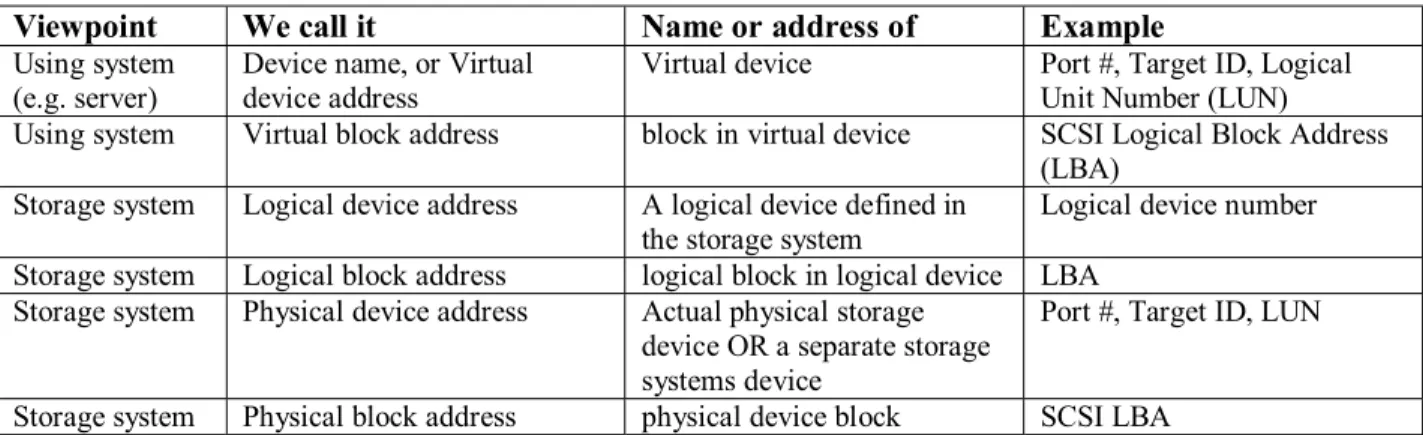
By “naming” is meant the assignment of a name (or address) to a storage device or object from the viewpoint of the using server, application or user. The name answers the question: How do I find the storage device logically from the host presentation point of view? It may also be called a virtual name or virtual address. The address is then carried into the storage subsystem, telling it how to find the storage device or data block from the viewpoint of the storage system.
3.2. Mapping
In a storage virtualization system there are several possible different levels of naming and addressing. There is the address of the virtual device and block within the device from the viewpoint of the using system. This virtual address and/or name is then mapped to a logical device, with an address from the viewpoint of the storage system. This address is then mapped to one or more addresses in the storage system. These may include additional logical devices and/or actual physical storage locations.
3.3. Mapping functions
A storage virtualization system must have a mapping function. This function f (address, map) transforms the operating system or file system generated virtual address (or name) into one or more actual physical location addresses of the block. For example, this might include how the block address issued by the file system or operating system is turned into the logical block address (LBA) issued to a disk drive. In the case of virtual tape storage, the function might need to include some
Table 1: Storage naming conventions
Viewpoint We call it Name or address of Example
Using system
(e.g. server) Device name, or Virtual device address Virtual device Port #, Target ID, Logical Unit Number (LUN) Using system Virtual block address block in virtual device SCSI Logical Block Address
(LBA) Storage system Logical device address A logical device defined in
the storage system Logical device number Storage system Logical block address logical block in logical device LBA
Storage system Physical device address Actual physical storage device OR a separate storage systems device
Port #, Target ID, LUN Storage system Physical block address physical device block SCSI LBA
positioning or sequence state, as the tape access command set does not always address blocks explicitly.
There are likely multiple mapping functions in a virtual system to handle the different parts of a virtual address. For example, there may be a table-based lookup to map the virtual device name or address to an internal logical device. Then there may be a separate and different scheme for mapping the virtual block address within the virtual device to a block address in the logical device. Then there may be a mapping function to translate the logical addresses into one or more physical addresses.
A linear mapping function provides for an offset to be added to the address issued by the file system. The physical storage can then be divided into multiple partitions, yet each using server can address its partition as if it was a separate storage area. This may occur at the device level, with logical device addresses. The mapping function may divide the address space within the physical devices, and an offset applied to the LBA also. In some systems today this is called partitioning.
The usefulness of partitioning may be extending by allowing several (possibly disjoint) segments of physical storage space to be concatenated into a larger address space, and then the larger space partitioned as needed to provide the virtual address spaces to the using file systems. The simplest form of concatenation joins contiguous segments of the physical address space. A more complex form adds the capability to concatenate non-contiguous segments. In the latter case, the mapping function becomes slightly more complex.
At the opposite extreme from the simple linear offset partitioning is a fully general mapping function. This type of mapping function allows complete independence of the virtual and physical address space. Contiguous blocks in the virtual space may be completely separated in the physical address space, and vice versa.
3.4. Allocation
Allocation of the storage system is done on both a virtual and a physical basis. Allocation includes both capacity allocation (e.g. how much of the virtual storage capacity of the system is allocated to a virtual device) and location allocation (e.g. which specific logical address ranges are assigned to a virtual device, or which physical addresses are used for storing a set of blocks.)
3.5. Areas of allocation
1. Allocation of virtual address space (or name space) from the using system / host /server point of view:
When a system administrator decides that a LUN is needed for a particular application or server, and that it needs 100 GB of capacity, and that it will have LUN address 7, … this is doing virtual address space allocation. Can this be automated? Yes. It should be automated. But in most systems today it is a manual process.
2. Allocation of the back end physical storage space to actually store data, or to reserve space to later store data: In completely non-virtualized systems, this is performed at the same time as the front-end address space allocation. (I.e. when deciding the LUN address and size, the system administrator also specifies somehow the physical disk locations to be used for the LUN). This should be (and often is) automated in a storage virtualization system. The storage system should be able to determine where to store the data for the virtual device without manual intervention. The allocation of back end space may be somewhat static, in that it happens infrequently (it seldom changes) OR, it may be quite dynamic, changing as the data is changed or as other operations occur in the storage system. A key benefit of storage virtualization is for this physical storage allocation to be automated.
A fully virtualized storage system should automate the naming allocation, the address allocation and the physical space allocation.
3.6. Capacity assignments (virtualization)
There is a great deal of variation in the way different vendors have chosen to assign capacity. The most effective schemes will only allocate back end capacity as it is really needed to store data modified by the using system. Other schemes are much less efficient but are simpler to implement. They generally pre-allocate some storage areas, and often allocate larger blocks of storage than requested or allocate an area of the physical space before it is needed.
3.8. Location
In addition to just handing out slices or chunks of storage from a pool of storage, there may also be allocation issues that have to do with other characteristics. These may include redundancy or performance requirements on the virtual devices, which map into requirements on the physical storage location of the data. For example, a logical device definition may include requirements for redundant storage of the data, or a remote copy, or a data bandwidth requirement. Such requirements heavily influence the allocation of logical and /or physical devices to store the data.
Once the set of physical devices or logical devices that a set of data blocks is to be stored upon is decided, then an allocation of where in that device or set of devices the blocks will be written. There are many allocation methods.For this physical storage space allocation a log structured file system is one method. It has a characteristic of “non-update in place,” i.e. not over-writing old data on the physical storage at the time of the write to the virtual block. (Old data is re-allocated later in a free space collection algorithm of some sort). Also, it has a “write index point,” having one (or a small number of) physical location where new data is written. The write index indicates where the next write will be stored. This write index normally moves sequentially across the storage blocks. Thus the data is stored on the media in the order it was written or updated. This tends to keep the most recently modified data together. The “non-update in place” characteristic makes it easier to implement a pointer based SnapShot copy mechanism.
Other allocation methods may have different characteristics. For example, one could use a “non-update in place, first fit” allocation method that stores new data in the first free space found when the media is searched for free space starting at some beginning point. This method would tend to cluster the data as close to the beginning point as possible.
Another allocation characteristics may be one of striping the data across multiple devices.
3.9 Homogeneous and heterogeneous substitution Another basic function of storage virtualization is substitution. The virtual system allows the substitution of one physical device for another or of one type or class of device for another. The substitution may be homogenous, where one device is substituted for another of a like kind. For example, a virtual system may substitute one Fibre Channel disk drive for another Fibre Channel disk drive. The substitution may also be heterogeneous, where one device is substituted for another of a different kind. For example, a virtual tape system may substitute an LTO tape drive for a DLT tape drive. A heterogeneous substitution may also involve different classes of devices. For example, a virtual system may substitute a disk drive for a tape drive and cartridge, or vice versa.
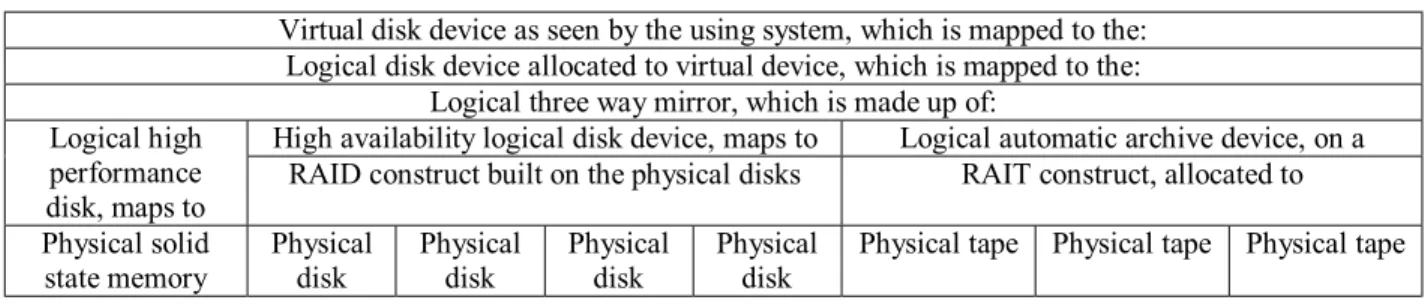
The virtual system may also substitute aggregations of partitions of devices for single devices. For example, a single virtual disk device may be logically replaced by an aggregation of partitions on several physical disk drives. A single virtual disk may be logically replaced by a mirrored combination of a RAID disk group and a RAIT tape group. The mirrored, aggregated disk and tape are substituted for the single disk drive. (See also the section on Layered Definitions, which follows).
The substitution of devices requires the capability in the storage system to emulate one device type while storing the data on another. This may require address mapping, command protocol translation, possibly maintenance of additional metadata and/or some emulated (virtual) device state.
The substitution of devices enables the integration of new storage technologies, and the presentation of virtual devices for which no physical equivalent exists.
3.10. Layered definitions
There are several possible layers of definitions of virtual storage. From the bottom up, there are physical storage devices, possibly of various types and models. Mapped onto these physical devices are basic storage constructs, such as basic logical storage volumes, logical devices, or simply chunks of storage space. Built on top of these basic constructs may be more complex logical storage constructs, such as RAID groups, mirrored logical devices, remote mirrors, and RAIT sets. There may be even more layers of logical device constructs built on top of these. Finally, some logical device construct is presented as a virtual device, addressable by the using system. An example of such a layered definition is shown in Table 2.
Table 2: Layered Definition to Provide Unique Device Characteristics
Virtual disk device as seen by the using system, which is mapped to the: Logical disk device allocated to virtual device, which is mapped to the:
Logical three way mirror, which is made up of:
High availability logical disk device, maps to Logical automatic archive device, on a Logical high
performance
disk, maps to RAID construct built on the physical disks RAIT construct, allocated to Physical solid
state memory Physical disk Physical disk Physical disk Physical disk Physical tape Physical tape Physical tape 3.11. Encryption
A storage system that is shared by multiple using systems, multiple applications, and/or multiple users needs to provide data security for those applications and users. One building block of good data security is encryption of the data. This encryption might be accomplished at one of several locations in the overall system. The best case, of course, is if the encryption occurs as close to the source of data as possible, and the decryption occurs just as the data is needed. Even if that is not reasonable or feasible given the applications and operating system in use, a storage virtualization system that provides encryption as the data enters, (along with good data access controls), can provide some protection against data being revealed to the wrong party. This does require a control interface to the authorized user or application to supply the encryption and/or decryption keys. This enables more secure sharing of the physical storage. It also enables more secure transmission of the data to remote storage locations and archives.
3.12. Compression
Data compression in the storage virtualization system has two possible benefits. One is the ability to store more data with less physical storage space (i.e. increased capacity). The other is the possibility of higher effective data transfer bandwidths. The advantage of a storage virtualization system that implements compression is that the using system(s) do not have to know the data is compressed, and don’t need to have or use compression and decompression software when accessing the data. Data compression in the storage system may be accomplished without virtualization. However, it does not provide significant capacity benefit unless the storage system has at least some form of dynamic allocation of physical space and the ability to handle variable size blocks.
3.13. Access Control
The storage virtualization system functions also need a form of access control. There are multiple aspects of access control.
3.13.1. Administrative access control. How does the system control who is allowed to perform administrative and / or configuration tasks?
3.13.2. Operational or commands access control. How does the system control who is allowed to request or command operations (other than basic read and write operations)?
3.13.3. Data access control: How does the system control who is allowed to access the data stored in the system?
The access controls in many systems have been associated with physical items, such as a physical I/O (input/output) port, (the access for specific devices is associated with a set of ports), or a physical device (the ability to read and/or write is controlled for a physical device). In other cases it was all or nothing. In today’s larger, shared systems, with storage networks and possibly many servers and applications attached to the same storage system, this is not adequate. In a storage virtualization system the access controls must be tied to non-physical entities, to virtual devices and virtual data paths.
Many of the access control questions are also issues for non-virtual storage systems. The additional functions and layers of a storage virtualization system can actually make the access control even more complicated. Therefore a good virtualization system should provide tools and automation to make the access controls as painless and effortless as possible, yet allow the administrator that needs the control to take mode detailed control. The more the administration and control of the storage allocation and other advanced functions are
automated, the fewer explicit access controls there will be to worry about. For example, if the ability to request an instant copy and access the instant copy is automatically restricted to applications or users that also have at least read access to the source data, then a separate access control for who can request an instant copy may not be needed. Another approach would be to have the instant copy inherit the same read / write access controls as the source data. This, especially if combined with encrypted data requiring a key to de-code, would reduce the need for separate controls on instant copy requests.
4. Virtualization Operations
A virtualization operation is a process that combines a set of the basic functions to accomplish a new task definition and provides for the application of the basic functions to customer problems.
4.1. Instant copy mechanisms e.g. SnapShot One of the primary tasks associated with the efforts to accommodate failures in systems and processes and even failures in the environment (acts of nature) is to copy data. The idea of instantly copying large amounts of data is attractive but generally impractical. However, one aspect of virtualization allows the appearance of instantly copying a database and thus allowing the database operations to proceed as if the copy operation were accomplished. Because virtualization requires provision for naming of data and for mapping of the data, there are pointers and tables available that describe the data. Making a copy of the mapping and giving that copy a new name gives the appearance of having copied the data. If the data is appropriately marked so that there is an awareness of the existence of both mapping tables (pointer sets), then the separation of the two instances of the data can proceed offline. While this is going on the enterprise users continue to access and update the original data and/or the virtual copy.
4.2. Abstraction of device definitions
One very attractive aspect of virtualization with the most potential for simplifying use and reducing the administration tasks is the ability to define abstract virtual device structures that accomplish the objectives of use or administration inherently. The most useful examples include the ability to define unique devices that meet specific complex business operations requirements with a single device image. The virtual device is given an installation specific name that is communicated to the using community. When the device name is invoked, the required functionality and quality of service (QOS) is set up automatically by the storage system. The
administration task is thereby simplified; it is not to oversee the management of the resources to accomplish the functionality, but rather simply to verify the end results. A real world example of a complex business function invoked by using a unique single image device is the best way to illustrate the principles described here.
4.3. A real example
A real example of a unique device definition for a lowest cost approach includes the following requirements. Automatic copies of the data at multiple sites including periodic ‘iron mountain’ archives, high performance (i.e., full fiber channel rate transfers), availability rated at 15-9’s (99.9999999999999% probability of successfully reading data), guarantee of 99% that the weekend archive job will run to completion, immediate short term recall (short term defined as 72 hours), and security to ensure that theft of the data does not compromise the information content.
This is a composite set of requirements identified by an actual international banking concern. The database is an extremely large compendium of data (10’s of terabytes growing at 70% per year). When the data is used, it is accessed in a serial fashion so an automated tape solution was employed. However, because of the cost to the business of interrupting the ability to conduct business on a 7 X 24 X forever basis, the data must always be available. The operations are set up at multiple sites with fail over from site to site. The systems administration processes are already set up to initiate alternate site execution whenever a system failure is noted. However in order to do this they must also make sure that multiple copies of the data are available at the various potential execution sites (multiple copies were to ensure the 15-9’s availability). They must also make sure that the data is placed on a fast recall media for a 72-hour period and then removed with the media being recycled. A complication placed on the systems administration is to reconfigure the system when new devices are added in order to reduce the overall operations costs.
The actual architecture designed to meet this set of customer requirements included a number of different aspects of virtualization in combinations. The first two addressed the requirement for the data to be automatically present at multiple sites. This required a combination of device allocation virtualization with mirroring. First the system is placed behind a virtualization engine so that the physical devices used to satisfy the user requests could be selected from a pool of available resources. The sites were physically located at distances greater than 25 kilometers so the connection between the sites required networked fiber communication. This required that the virtualization engine accommodated networked traffic. Second, the virtual device is defined as one with multiple
instantiations with one instantiation identified at each site. When the data is to be read, the most convenient copy is made available. When it is to be updated, the media is automatically made available at each site and writes are mirrored to each of the media affected.
The third aspect of virtualization addressed the requirement for high bandwidth operation. The virtual device was defined with a RAID 0 striping that was sufficient to drive the network at full rated speed. The striping was an aspect of each one of the mirror copies. The fourth aspect of virtualization addressed the 15-9’s availability requirement. The mirroring at multiple sites was only able to guarantee 10-9’s of availability. Therefore, each instance of the data at each site was also covered by a RAID 3 redundancy using a new patented multiple parity approach. The RAID 3 redundancy was applied to each of the individual mirror copies.
The occasional archive of the data to a secure site for storage is a task that required that one of the original copies of the data be in turn copied and the media shipped to the secure storage. This job currently takes 20 hours to copy the terabytes of the database. The probability of this job running to completion is about 50% using today’s technologies. This is because more than a hundred tapes are written and a device error check during the writing of one of these will cause the job to abort. The use of RAID 0 and 3 have several devices running in parallel and shorten the job from 20 hours to 5 hours but do not affect the probability that the job will run to completion. In fact it is exacerbated since the number devices required to complete the job has increased. The fifth aspect of virtualization employed however allows this 99% guarantee of job completion to be met. The fact that the data is being written to a virtual device means that the physical devices that are employed can be configured at will. The definition of the virtual device is initially mapped with one extra device in the configuration. The metadata that describes the data and how it is mapped on the media accounts for the extra device. The additional media is simply used to add an additional parity to the RAID 3. If a device fails during the operation, that device and its corresponding piece of media are simply mapped out and the metadata updated to reflect the new configuration. The job will run to completion with the required performance and availability still met. If a second device were to fail, the process would be repeated, this time mapping out a device used for customer data transfer. There is no effect on availability and the effect of performance is only about 5%. Now, the probability of the job running to completion is about 7-9’s which is well beyond the 99% required.
The sixth aspect of virtualization used to satisfy these requirements is the ability to do technology substitutions. The mirroring of the data so far has been to sets of tape cartridges that need to be mounted on tape drives to be
read or written. The inclusion in the definition of the virtual device of a mirror copy that is actually placed on a RAID 3 disk allows for the mount of the media for read to be only a few milliseconds. Disk drives are much more expensive than tape media however, and long term storage of many terabytes of data on disk is prohibitive. The metadata of the system that describes the virtual device includes timing information. The creation or update times of a collection of data such as a file or a data set are noted in the metadata. The inclusion of the disk mirror in the virtual volume is accompanied with a scratch and reuse process. When the file has aged to the 72 hour mark from its creation (or update) the mirror copy that is on disk is scratched from the virtual volume definition and the space recycled back to the pool of available space. The rest of the virtual volume definition remains in tact.
Finally, the seventh aspect of virtualization that is used satisfies the security concerns of the customer. Since the data must be transferred across a network that traverses 10’s of kilometers, the probability of the data being snooped on and possibly being copied is quite high. Even with all the precautions taken, there is a way to tap into a network and copy the traffic that streams by without being detected. Banking concerns are also notoriously paranoid about the privacy of their clientele so any compromise of their data is serious. The virtualization that allows for unique device structures to be defined also allows for processing routines to be inserted into the data path at any point beyond where the customer relinquishes the data to the storage system. These routines are used to create metadata about the information content of the data as it flows through the system and can be used to enhance the ability of the storage system to support searches and queries. Another use of these processing routines is to encrypt the data as it is flowing through the network and even to encrypt the data as it resides on the media. When the data is encrypted on the media, the enterprise is assured that the theft of physical media will not compromise their customer’s information.
4.4 The integration of new storage technologies The integration of new storage technologies that introduce advances in metadata generation, interfaces, capacities, & bandwidth without requiring installation upheaval is a promise of virtualization. The virtualization mechanisms that allow the next generation of online storage to be seamlessly integrated are the same as those that allowed the unique device descriptions to satisfy the customer requirements in the previous example. The fact that the characteristics of the new technology can be described to the virtualization system allows the system to automatically make use of the technology to satisfy QOS (Quality of Service) requests.
Virtualization allows cost sensitive installations to make use of alternative disk types (such as commodity PC (ATA) drives) effectively without requiring complex installation management. In the above example, the RAID disk first employed the SCSI over fiber channel products that are so prevalent. However, there are now a number of disk products using ATA drives that are an order of magnitude less expensive than the SCSI equivalents. The fact that the virtualization can map from one technology, like tape, to another, like disk, can be extended to include simple protocol mapping such as SCSI to ATA.
5. Value of virtualization
Customer benefits of the application of the virtualization features described above are broad and can mean the difference between simply competing and actually winning.
5.1. Manpower
The number of people needed to administer the storage system described above is significantly less than by traditional methods. The result is not that the customer necessarily reduces staffing, but the staff that is employed is an order of magnitude more effective in their work. A great deal of the mundane has been moved into the storage subsystem and is not a bother to the customer operations.
5.2. Stress reduction
When critical jobs can be guaranteed to complete on time, the operations environment is significantly enhanced. The worldwide availability of skilled personnel to manage these storage systems is limited. Having an environment that automates many of the complex tasks and that assumes many of the mundane tasks is very inviting to prospective employees.
5.3. Time reductions
The use of striping clearly enhances performance allowing an operation that took 20 hours to complete in 5. That is only the beginning of the timesaving. The fact that the work is done as a monolithic definition rather than scheduled as a set of interrelated tasks to be executed individually also saves a great deal of time.
5.4. Reduced system costs
The guarantee that a large job will run to completion and not abort midstream is a clear reduction in systems
operational costs. In addition, the intrinsic value of the data is enhanced when the jobs complete.
5.5 .Reduced operational cost
The ability to purchase and configure new technologies that save both time and operational expense is not easily calculated. The reduction in direct costs of having less expensive systems installed in a timely fashion is straight forward to understand. However, indirect savings of data availability improvements often are less obvious.
6. High value software functionality
The many uses of virtualization cannot be explained in detail because they in fact are only limited by the imagination of those using them. A few have been described above in the real world example. A few more ideas are briefly outlined in conclusion here.
6.1. “Instant” applications
An apparent instant copy of a data warehouse for backup or archive has been described in the real world example above.
Another example is to make a clone of a database or a subset of a data warehouse to be used for test or research trials
A third example is to make a clone of a set of data for immediate service in a personalized application. An example of this could be when one wants to make a new instance of a web server for a new customer. An instant copy of a basic web server with minimal personalization can be made in minutes.
6.2. Secure applications
Data anywhere without compromise can be accomplished with virtualization via security drivers inserted into the data path.
6.3. Device abstractions
Niche applications that do not justify development of special devices can be defined and accommodated for individual customers.
The next generation of performance and reliability can be provided using current products. These can be obviously useful devices or fanciful devices designed to answer ‘what if’ questions.
6.4 Pooling / device sharing
Reduced cost for installations, better operations responsiveness, and lower maintenance costs will all be provided by pooling and sharing which is accomplished via virtualization.
7. Conclusion
In conclusion, the primary and most important benefit that should result from storage virtualization is the reduced effort needed to manage the storage system. If the storage virtualization scheme / method / system being used does not reduce the administration effort, then the system has failed to achieve the primary objective.
7.1. Areas for further study
Methods for measuring the benefits of storage virtualization are needed. How does one measure the complexity of a storage management task? How does one measure the reduction in work required to manage a given set of data? Once such measures are understood, then more objective analysis of such methods is possible.