Layout Design
Some of these slides are courtesy of Professor Paul Griffin
2
3
Lenox Mall, Atlanta
5
Hospital floor plan
6
7
Furniture parts warehouse
9
Issues in facilities design
What equipment should be purchased? How facilities should be organized?
Finding the locations of departments within some specified boundary
Where facilities should be located? Why is this important?
8% of the U.S. gross national product has been spent on new facilities annually since 1955
20-50% of total operating expenses in manufacturing are attributed to material handling costs
10
Layout
Definition - How to best locate a facility’s resources with respect to each other in order to maximize the firm’s objectives.
11
Possible Objectives
Efficient flow of people/materials/goods Minimize costs
materials handling capital
maintenance
Improved utilization (people, equipment, space, energy)
Flexibility (process, volume, routing, product) Maximize throughput etc
Possible Constraints
Financial Space Legal/Regulations Safety Historical/Cultural13
Types of layouts
Fixed position layoutShips, aircraft, rockets, etc.
14
Types of layouts
Product layout Machines are organized to conform to the sequence of operations High volume, standardized/mass production
Trucks and Trains
(Loading)
Raw Materials
Pulp, Kraft, etc.
Paper Machines (Run Formation and Sequencing) Reels W inders (Trimming) Sheeters (Finishing) Customers Warehouses Ports Rolls Pallets
15
Types of layouts
Process layout Group similar machines, having similar functions
Common for small-to-medium volume manufacturers, e.g., job-shop Effective when there is a variation in the product mix
Types of layouts
Process layout Group similar machines, having similar functions
Common for small-to-medium volume manufacturers, e.g., job-shop Effective when there is a variation in the product mix
Wyman-Gordon job-shop layout
17
Types of layouts
Group technology layout
Machines are grouped into machine cells
Each cell corresponds to a “family” (or a small group of families) of parts
Appropriate for large firms producing a wide variety of parts in moderate to high volumes
18
19
Types of layouts
Group technology layout
Types of layouts
Group technology layout
Benefits
Reduced WIP Reduced setup times
Reduced material handling costs Better scheduling
Drawbacks
How to identify suitable part families? Possible duplication of some machines
Response to the change in product mix, design, and demand
21
Flow analysis
It is important for a layout designer to have an
understanding of the (required) flow within the facility
Horizontal flow
Vertical flow
22
From-To-Chart
Used to describe the flow between departments for an “existing” layout
Distances between departments
Number of material handling trips per day Total cost of material handling trips per day
A B C D E A B C D E from to X X X X X
23
Connectedness-Tile Adjacencies
4-adjacent 8-adjacent
Connectedness-Definitions
Departments are 4 -connected if a path exists between any two tiles in the department using 4 -adjacencies
Departments are 8 -connected if a path exists between any two tiles in the department using 8 -adjacencies
Note
: It is usually required for departments to be 4-connected25
Example
Suppose the departmental areas are:
Department Area (sq.ft.) Tiles
1 8,000 4 2 6,000 3 3 8,000 4 4 4,000 2 5 6,000 3 Assume • each tile is 2000 sq. ft. • facility is 4x4 tiles (32,000 sq.ft.) 26
Two possible 4-connected alternatives
5 5 5 4 2 1 1 4 1 1 2 3 3 3 2 3 5 5 5 1 4 4 2 2 3 3 2 3 1 1 1 3
27
Evaluation Techniques
In order to pick the “best” set of alternatives, we must have an evaluation strategy. Some popular methods are:
Centroid Method
Graph Method
Adjacency Method
Let SCORE denote the objective function value
Evaluation using the centroid
method
Objective: Minimize total travel (material handling) cost
We need to fill the from-to charts for
Distance
Number of trips per period
29
Calculating the Distance Between
Departments
5 5 5 1 4 4 2 2 3 3 2 3 1 1 1 3 1 2 3 4 1 2 3 4What is the distance between departments 1 and 2?
Idea: find the “center” or “centroid”, i.e., an (x,y) coordinate for each department.
30
Centroid
The centroid for department j is computed from:
where
xiis the number of tiles allocated to the department in horizontal
position i
yiis the number of tiles allocated to the department in vertical
position i
h is the horizontal width v is the vertical height
n is the number of tiles for the department
n
iy
C
n
ix
C
v i i Y j h i i X j
1 131
Centroid Example
5 5 5 1 4 4 2 2 3 3 2 3 1 1 1 3 1 2 3 4 1 2 3 4 For department 1: 25 . 1 4 ) 2 ( 1 ) 1 ( 3 2 4 ) 3 ( 1 ) 2 ( 2 ) 1 ( 1 1 1 Y X C C For department 2: 3 3 ) 4 ( 1 ) 3 ( 1 ) 2 ( 1 3 3 ) 3 ( 3 2 2 Y X C CDistance Metrics
Euclidean Rectilinear Tchebyshev Choice of metric depends on the application
2
2 j i j i ij x x y y D j i j i ij x x y y D
i j i j
ij x x y y D max , 33
Example: Distance between 1 and 2
Euclidean Rectilinear Tchebyshev
1 2
2 1 2
2 (2 3)2 (1.25 3)2 2.016 12 x x y y D 75 . 2 3 25 . 1 3 2 2 1 2 1 12 x x y y D
,
max
2 3,1.25 3
1.75 max 1 2 1 2 12 x x y y D 34 From-To-Chart: Number of trips per day (flow)1 2 3 4 5 1 2 3 4 5 from to X X X X X 10 15 30 20 - 2 10 20 - 10 10 10 20 10 -- -30 10 25
Using the distance between any pair of departments, and the flow, we can compute the total distance traveled per day
35
From-To-Chart: Cost of traveling one unit
of distance between the departments
1 2 3 4 5 1 2 3 4 5 from to X X X X X 5 4 4 5 - 1 5 4 - 5 5 5 5 5 -- -5 5 5
Using the total distance traveled per day and the cost of traveling one unit of distance, we can compute the daily total cost of traveling (material handling) between the departments
Activity relationship chart
The activity relationship chart is constructed/modified by considering qualitative information A - absolutely necessary (< 5%) E - especially important (< 10%) I - important (<15%) O - ordinary importance (<20%) U - unimportant (> 50%) X - not desirable (< 5%) 1 2 3 4 A I X E E O
37
Example
1 2 3 4 A I X E E O Dept. Space (sqft) 1 40,000 2 20,000 3 10,000 4 20,000Assume: facility is square, is 90,000 sq.ft., departments must be 4-connected, rectilinear metric, A=6, E=4, I=2, O=1, U=0, X=-10 (e.g., Rel(1,2)=6, Rel(2,4)=4)
1 2 3 4 6 2 -10 4 4 1 Relationships 38
Example continued
1 3 2 1 1 2 1 4 4 Potential layout39
Centroid Method
Compute the centroid for each department.
Compute distance between each pair of
departments (D(i,j)).
Compute SCORE as
SCORE = 0;
for i = 1 to # of departments do
for j = (i+1) to # of departments do SCORE = SCORE + D(i,j)*Rel(i,j);
In this case we want to minimize SCORE.
Example continued
1 3 2 1 1 2 1 4 4 Dept. CX CY 1 1.25 2 2 3 2.5 3 2 3 4 2.5 1 Centroids: Potential layout41
Centroid evaluation
1 2 3 4 6 2 -10 4 4 1 1 2 3 4 2.25 1.5 2.5 1.75 2 2.25 Relationships Rectilinear Distances SCORE = 6(2.25)+4(1.75)+1(2.25)+2(1.5)+4(2)-10(2.5) = 8.75 42Graph Method
Construct a graph where each node corresponds to a
department
Draw an edge between two nodes if they are adjacent in
the layout.
Weight each edge by the number of 4 (or 8) adjacencies
times the relationship for that edge.
SCORE = sum of the edge weights.
43
Graph evaluation
1 3 2 4 4(2) 6(1) 4(1) 1(2) 2(1) SCORE= 22 1 3 2 1 1 2 1 4 4 Potential layout 1 2 3 4 6 2 -10 4 4 1 Relationships45
Creating a Layout from Scratch
Determine importance levels Prepare activity relationship chart
Create a layout using ALDEP or CORELAP (or other approach)
Determine a score for the layout
Repeat several times to generate alternative layouts and pick the one with the highest score
46
Burger Queen - Activity
Relationship Chart
1.Cooking burgers 2.Cooking fries 3.Packing/storing 4.Drink dispensers 5. Counter service A -absolutely necessary (< 5%) 6 E - especially important (< 10%) 5 I - important (<15%) 4 O - ordinary importance (<20%) 3 U - unimportant (> 50%) 2 X - not desirable (< 5%) 1 X E I I O U U A U U Rel chart47
Creating a layout from scratch: ALDEP
(Automated layout design program)
Select a department at random and place it to the upper-left corner of the layout
Place a department with a high closeness rating next to the first department
Continue the process every time selecting a department with the highest closest rating to an already placed department
Compute the “score” for the layout using a numeric scale attached to the closeness ratings
Repeat the process several times and choose the layout with the highest score
Creating a layout from scratch:
CORELAP (Computerized relationship
layout program)
Similar to ALDEP, but does not select the initial placement at random
Compute the Total closeness rating (TCR) for each department (sum of the absolute values of the relations):
Cooking fries: X, I, U, U = 9
Packaging and storing: I, I, O, E = 16
Drink dispensers: U, U, O, E = 12
Counter service: A, E, U, U = 17
Select the department with the highest TCR in the center of the facility. In case of a tie, give priority to the
49
CORELAP (Cont.)
The second department is the one with an A
relationship with the first one. If a tie exists, choose the one with the greatest TCR value.
The third department picked should have the
highest combined relationships with the two already placed. Again use tie-breaking rule if needed.
Continue until all departments placed.
50
Procedure to Place Departments
Consider the figure on the right. Assume that a department is placed in the middle (position 0). Then, if another department is placed in position 1, 3, 5 or 7, it is “fully adjacent” with the first one. It is
placed in position 2, 4, 6 or 8, it is “partially adjacent”. 8 7 6
5 4 3 2
1 0
For each position, Weighted Placement (WP) is the sum of the numerical values for all pairs of adjacent departments.
The placement of departments is based on the following steps: 1. The first department selected is placed in the middle.
2. The placement of a department is determined by evaluating all possible locations around the current layout in counterclockwise order beginning at the “western edge”. 3. The new department is located based on the greatest WP value.
51
Example
1. Receiving 2. Shipping
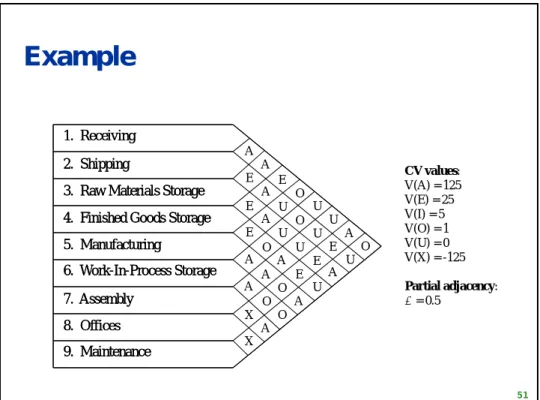
3. Raw Materials Storage 4. Finished Goods Storage 5. Manufacturing 6. Work-In-Process Storage 7. Assembly 8. Offices 9. Maintenance A A E O U U A O E E E A A X X A U U A O O A O A O U E A U E U E A U O A 1. Receiving 2. Shipping
3. Raw Materials Storage 4. Finished Goods Storage 5. Manufacturing 6. Work-In-Process Storage 7. Assembly 8. Offices 9. Maintenance CV values: V(A) = 125 V(E) = 25 V(I) = 5 V(O) = 1 V(U) = 0 V(X) = -125 Partial adjacency: = 0.5
Table of Total Closeness Rating
(TCR) Values
Dept. Department Summary TCR Order 1 2 3 4 5 6 7 8 9 A E I O U X 1 2 3 4 5 6 7 8 9 - A A E O U U A O A - E A U O U E A A E - E A U U E A E A E - E O A E U U O A E - A A O A U O U O A - A O O U U U A A A - X A A E E E O O X - X O U A U A O A X - 3 1 0 2 2 0 2 2 0 1 3 0 3 3 0 0 2 0 2 4 0 1 1 0 4 1 0 2 1 0 2 0 0 4 2 0 4 0 0 0 3 1 1 3 0 2 0 2 3 0 0 2 2 1 402 301 450 351 527 254 625 452 502 (5) (7) (4) (6) (2) (8) (1) (9) (3)53
Example (cont.)
7 125 125 125 125 62.5 62.5 62.5 62.5 7 125 62.5 62.5 62.5 187.5 5 125 62.5 187.5 187.5 187.5 7 0 62.5 0 5 187.5 187.5 9 187.5 62.5 125 62.5 0 62.5 125 7 0 125.5 0 5 1.5 9 126.5 0.5 1 0.5 0 1 63.5 3 125 62.5 62.5Relationship between 7 and 5 is A, and 5 is ranked (2)
Relationship between 9 and 5 is A, and 9 is ranked (3)
Relationship between 3 and 5 is A, and 3 is ranked (4) 54
Example (cont.)
7 125 5 137.5 9 25 0 100 3 37.5 37.5 12.5 1 12.5 12.5 62.5 62.5 137.5 37.5 7 125 5 9 125 12.5 3 87.5 137.5 12.5 1 62.5 125 62.5 0 0 25 4 125 62.5 7 5 9 1 125 3 1 0 1 1 1.5 125 188 4 1.5 0.5 2 1 0.5 0.5 63.5 62.5 62.555
Example (cont.)
7 5 9 75 -60.5 3 112.5 1 87.5 -62.5 -112 4 -37.5 12.5 2 25 12.5 12.5 -37.5 -61.5 25.5 6 12.5 0.5 1 0.5 0.5 7 5 9 3 1 4 2 6 857
Improving an Existing Layout
1. Evaluate the layout. 2. Generate a new layout
satisfying connectedness by 2-opting or 3-2-opting.
3. Evaluate the new layout based on from-to chart for total material handling cost. If the interchange results in an
improvement, keep the change. Otherwise don’t keep the
change.
4. Repeat steps 2 and 3 until no further improvement is possible.
58
Improving an existing layout by
pairwise interchange: 2-opt
2-opting involves the switching of two
departments. It is performed by:
If department i and j are the same size, then the tiles
in i and exchanged for the tiles in j.
If they are different sizes, then the departments must
be adjacent in the layout for the interchange (though the interchange is performed the same way).
Keep the change if it improves the objective function
In both cases, 4 (or 8) - connectedness must be
59
Example
2-way interchange of A and B 5 5 5 1 4 4 2 2 3 3 2 3 1 1 1 3 5 4 4 1 5 5 2 2 3 3 2 3 1 1 1 3
Note: This is discussed under CRAFT in your book
Improving an existing layout by 3-opt
3-opting involves the switching of three departments. It
is performed by:
For departments i, j and k: i is switched with j, j is switched
with k and k is switched with i.
Size and or adjacency must be maintained (as in the case of
2-opting)
Again, the departments must maintain 4 (or 8)
61
Example: 3-opt
A A A B C C C B B C D D D D D D D D D A C C C A A C D B B B B3-way interchange of A, B and D A B D A
B
62
Summary
Layout is complicated by multiple often competing objectives such as
minimize investment in equipment
minimize overall production time
provide for employee/customer convenience
maintain flexibility of arrangement/operation
minimize material handling cost
utilize existing space most efficiently