Design and Implementation of a plug-in for
video-to-audio mapping
Mailin Chen
Vrije Universiteit Amsterdam, the Netherlands
Abstract
As a fast-growing discipline, artificial intelligence has been applied to many fields, especially contributing to product de-sign. How to make artificial intelligence technology enhance human creativity is not only the trend of field development, but also the motivation of the SCORE! project. In this project, we designed and developed a plug-in for electronic music pro-duction embedding deep learning method for video-to-audio mapping. And study how this method can be integrated in a specific electronic music production application to assist music creation.
Through the survey questionnaire, we obtained the user requirements and preferences for the development of the au-dio plug-in. After the design and implementation of SCORE! plug-in, we conducted a user study with experts in field of electronic music production and collected feedback with a questionnaire. In the evaluation results, the user found the SCORE! plug-in is a creative support audio plug-in that provides an efficient workflow of video selection and pre-viewing, MIDI clips generation, MIDI clips importing for music production and synthesizer.
Keywords Audio programming, Development of audio plug-in, Deep Learning, Video-to-audio Mapping
1
Introduction
1.1 Background and Motivation
As we are in the digital age, the storage and application of multimedia archives in digital form has become a trend. As a result, more and more research is being carried out on the management and application of digital multimedia archives. In the aspect of management, the previous work on manage-ment and retrieval of digital information adopted techniques of meta-data to connect resources as a network[3], and an ontology-based approach adopted to the cultural heritage multimedia collection to integrate the use of different types of media contents[20]. Also, the STIK (Speech, Texts, and Images of Knowledge) platform created a pipeline for extract-ing meta-data automatically, thus enhancextract-ing the browsextract-ing and navigation of digital multimedia archive contents. [9]. In the aspect of the application, there is a tool named Car-rot that supports the reuse of digital archival audio-visual content to deepen the understanding of archival content [21]. This research provides a lot of theories and practical experience for management and application of multimedia
archives, however, there is a lack of research on the content of multimedia archives for creative-support and the content conversion among different multimedia types. Therefore, as part of the SCORE! project introduced in the next section, our study comes up with a concept of "video-to-audio map-ping for music production", aiming to create audio files from video archives with Deep Learning (DL) algorithms. And, design and implement a plug-in to narrow the gap between technique and artistic creation, making it a creative support tool for music production.
1.2 The SCORE! project
The Netherlands Institute for Sound and Vision (NISV)1aims to collect and develop media archives. There are more than a million hours of digital media material preserved by NISV, al-lowing the use of Dutch audiovisual heritage for educational and research purposes. Under the trend of reuse of digital multimedia archives, many collections of NISV are waiting to be reborn by various art forms. started by NISV, RE: VIVE2is an initiative which aims to connect artists to this material for new compositions. The sub-projects of RE:VIVE that have been carried out have recreated the historical video archives in different forms of performances which have enhanced the audience’s understanding of historical video archives. SCORE!3, a sub-project of the RE: VIVE initiative, aims to
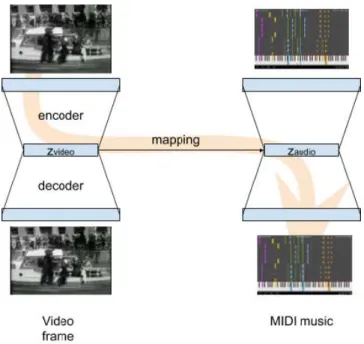
develop an innovative music creation tool allowing the video archives to generate audio through DL techniques. It can improve the end-users’ accessibility to produce music as well as lower the barriers between the audio and visual creative expression. The back-end algorithm of SCORE! plug-in is an unsupervised DL method for generating audio for a given video. There are two variational auto-encoders adopted in the algorithm; one is for providing the latent space of video through a trained classifier network, another is a pre-trained MIDI auto-encoder called Magenta MusicVAE4. Fig-ure 1shows the workflow of the back-end algorithm for video-to-audio mapping, and there is a mapping between the two latent representations. The latent space of the video file is encoded by the video auto-encoder, and then mapped to the latent space of the audio auto-encoder before being decoded to MIDI. The back-end algorithm defines the input
1https://www.beeldengeluid.nl/en 2http://revivethis.org/
3http://revivethis.org/Sessions/score/ 4https://magenta.tensorflow.org/music-vae
Figure 1.A schematic representation of SCORE! algorithm by Peter Bloem,Final Report of SCORE! project
and output of the tool as video files and audio files, respec-tively. And the video-to-audio script is now hosted in the SCORE! repository5.
The current version of the SCORE! project provides back-end algorithms, but to truly connect back-end-users to the video-to-audio mapping, a mediate tool should be designed and implemented. Hence, this project, which developed a Virtual Studio Technology(VST) plug-in that can be loaded to Digital Audio Workstations (DAWs) such as Ableton6and Cubase7, and study efficient ways to adopt Artificial Intelligence (AI) techniques to music production processing.
This project researches the following three aspects: Firstly, collect the musicians’ requirements for VST plug-in develop-ment, including requirements related to user interface design, user experience design and functions design. Then, design and implement a VST plug-in that can be run in DAWs based on the collected requirements to achieve video-to-audio map-ping. Thirdly, test and evaluate the performance of the VST plug-in music production scenes to see whether it is an ef-fective tool for combining video-to-audio mapping within the process of music production.
1.3 Contribution
At present, the research related to music production sys-tems and plug-ins are mainly carried out in two aspects: technology application and interactive interface design. Re-garding technology application, some projects use existing
5https://github.com/pbloem/score 6https://www.ableton.com/ 7https://new.steinberg.net/cubase/
AI models for music generation, while others design the mu-sic application to cope with the development of hardware. Regarding interface design, most of the studies propose cre-ative concepts to extend interactivity and accessibility of user interfaces. Through these case studies, understanding how these conceptual designs can be used in music produc-tion and live music performance will be revealed. There are some music-related projects researching music generation through multimedia files and cases where multimedia files are integrated into music production and live music perfor-mance. However, to date, there has been no music plug-in designed for DAWs to generate audio from video files with the support of DL models. Therefore, this project will extend the SCORE! algorithm for video-to-audio mapping to fill the gap in the field of applied research by developing a music production plug-in.
Former research has pointed out the challenges and re-search directions of music interactive interface design and implementation of plug-ins. The research on live music sys-tems suggests considering the stability of such a music appli-cation for large scale performances and increasing audience engagement while reducing latency [28]. The study of digital music instruments reveals the importance of mapping be-tween interface design and sound design [14]. Besides, in the process of music production and live music performances, it is more common to use several plug-ins at the same time, which also requires minimizing the CPU load of the plug-in [11]. Therefore, such a VST plug-in should not only focus on implementing the functionality of video-to-music gen-eration, but also the expressiveness as a human-computer interface and performance as a plug-in.
In short, the project will continue to expand the theory of music interactive interface design through the develop-ment of plug-ins. At the same time, providing exploration and practical experience in the practical application of the combination of artificial intelligence technology and music production.
1.4 Research Questions
The focus of this study is to answer the main research ques-tion and the two sub-quesques-tions. To solve the main research question, it is needed to handle the sub-questions one by one.
• Research Question: How can we implement an existing mapping between video and audio to an innovative audio plug-in for music production?
• SQ1: What are user requirements for such a plug-in?
• SQ2: What is an effective design for such a plug-in?
2
Related Work
2.1 Design and Evaluation of Plug-in for music production
With the popularity of digital music production, more and more virtual musical instruments are designed and widely used in the field of music production. The process of digital music production is computer-mediated, and music produc-ers set parametproduc-ers through the graphical interface of plug-ins and DAWs interacting with humans in the form of graphics-to-sound. Early research has discussed the aesthetics of the design of virtual instruments[10]. In their research, three important elements are mentioned: the match between fea-ture and sound, the practicality of the virtual instrument, and the friendliness of interaction. Moreover, the design of the plugin needs to follow the design principles from the previous research. In his conference article, Cook (2001) [8] put forward principles of designing computer music con-trollers in terms of artistry and technology, claiming that we should find a balance among interface, algorithms oper-ation and interactive design. In conclusion, he emphasized that the interface design of musical application proceeds as more art than science, and designers need to consider how to make a more positive impact on music creation with technology. Abras et al. [1] (2004) were among the first to come up with the concept of "User-Centered Design" which requires evaluation with potential users at all stages of the design cycle. By involving feedback and suggestions of users, the design is more likely to improve user satisfaction. In the work of Resnick et al. (2005) [19], a set of design principles were introduced for guiding the development of creativity-supported tools. They highlighted that an application that is designed for creation should meet the users’ requirements of exploration and creation. Moreover, the design of both functions and interface should balance the user’s require-ments with the simplest possible design. Based on the prior research on the relationship between music software and artistic creation, the SCORE! plug-in integrated the concept of "creative support" and followed the flow of "user-centered design".
From design principles to application, many researchers also carry out studies in different music scenes. Seago et al. (2004) [25] conducted an analysis on the interface of the synthesizer. By decomposing the modules of timbre produc-tion, they pointed out that the parameters of a conventional synthesizer need to be visually represented and need to be functionally partitioned for easier manipulation. In a major advance in 2016, Richard implemented an interface for an artificial-intelligence-powered drum machine. This interface combines the vertical-arranged audio track and the pad de-sign of the hardware drum machine, which is familiar to mu-sic producers [26]. Therefore, the evaluation results proved that the application adopted such an interface is more suit-able for use in the studio to participate in the music creation.
The previous research on music production application had successfully combined the AI technique with music creation. However, there was no attempt to merge the video-to-audio mapping into music production application. Therefore, the SCORE! plug-in is an innovative practice on AI technique assisting music production.
With respect to evaluation, previous works have revealed Assessment focuses. The System Usability Scale(SUS)[4] pro-vides a framework to evaluate the effectiveness, efficiency and satisfaction of a system. SUS measures the overall usabil-ity of a system with a calculated score, which helps to get quick feedback from potential users. Questionnaire for User Interface Satisfaction(QUIS)[6] shows a more detailed scale of evaluating human-computer interface. The questions in-cluded cover both user satisfaction and system performance, which can better reflect the strengths and weaknesses of the system. According to the evaluation criteria mentioned above, the SUS has adopted to the survey questionnaire by first evaluating the final score of SUS can objective reflect the user acceptance of the system.
2.2 Development of plug-in
Virtual music instruments and effects that are used for digital music production can run as a standalone applications for creating music clips, or serve as a plug-in for producing mu-sic in Digital Audio Workstations(DAWs). With the plug-in extensions, DAWs can hold complex music projects includ-ing a lot of audio tracks, audio files, and effects. Thus, DAWs also work as a host that integrates the utilization of plug-ins with various functions. Currently, the most common format of plug-in contains Virtual Studio Technology(VST)8, Avid
Audio extension(AAX)9and Real-Time Audio Suite(RTAS)10
which supports both Windows and Mac OS, as well as Au-dioUnits (AU)11which supports Mac OS only.
VST is the audio interface technology allowing develop-ment of music plug-ins in C++ that was released by Stein-berg in 1996, and is widely used as the format of plug-ins that runs in DAWs with three categories, VST instruments (VSTi), VST effects (VSTfx) and VST MIDI effects. Steinberg provides third-party developer VST3 SDK with more accu-rate audio signal processing. The JUCE Framework contains wrapper classes for building audio and browser plugins, sup-porting plug-in formats including VST. The development of audio plug-ins that can be loaded into the DAWs can be developed with C++ programming language with library extensions. The JUCE framework12is an open-source C++
application framework which is especially powerful in the graphical interface and for plug-in development. Currently, many research projects on audio plug-ins adopted the JUCE
8https://www.steinberg.net/en/company/developers.html 9http://apps.avid.com/aax-portal/ 10https://www.semanticscholar.org/topic/Real-Time-AudioSuite/989848 11https://developer.apple.com/documentation/audiounit 12https://juce.com/ 3
framework because of its rich feature integration. Owen et al(2016)[5] built a plug-in and tested it in DAWs to evalu-ate the framework of Adaptive Digital Effects Processing Tool(ADEPT). Another study developed an audio application under the JUCE framework to hold their EVERTims frame-work [18] to enhance 3-D sound effects in VR. In addition to the JUCE framework for developing plug-ins, other research for audio programming provides powerful support for sound design and audio signal processing. RtAudio[23] is a cross-platform C++ class for processing the input and output of the real-time audio, which improves the versatility of audio programming on different platforms. Based on the RtAudio application programming interface(API), Mick developed a C++ audio synthesis library which is named Maximilian[13] in 2010. This open-sourced library simplified the develop-ment burden on synthesizer modules, for it assembles both the digital audio processing(DSP) operation and classes for sound design. In short, the implementation technique of the SCORE! plug-in are based on the studies above.
2.3 Deep Learning for video-to-audio mapping
As a branch of artificial intelligence, deep learning is ap-plied in many fields to get more effective processing results with three common method of learning; supervised, semi-supervised or unsemi-supervised[24]. The widely used methods of deep generative modeling includes generative adversarial nets(GANs) and variational auto-encoders(VAEs). Compared to VAEs, GANs are more likely to generate less blurry re-sults in image generation[12], therefore, more researches conducted on GANs are in field of image processing. VAEs generate latent representation of learning by approach varia-tional bayesian methods[16] and show a more stable training performance. Previous studies on auto-encoders have shown that automatic encoders can effectively find semantic con-nections between words. This technique can be used in the classification, indexing, and sorting of literary work to fill in the gaps in statistical methods in semantic analysis[17]. Due to the ability of generating latent representation with se-mantic meaning, Magenta MusicVAE provides a pre-trained MIDI auto-encoder for long-term music structure.
As AI is very trendy, there are a lot studies on artistic creation driven by AI technique. In the study of automatic composition, Keunwoo et al.[7] adopted the word-RNNs and char-RNNs models, and the generated LSTM neural network can automatically compose scores according to the given text-represented chord progression. Another project called Deep Meditations[2], which makes use of the semantics of deep generative models to control the latent space of videos. The output artworks have the characteristics of creative expression and story telling with artistic value in both sound and vision. Currently, AI-driven drum machines have been put into music production, especially for electronic music. Richard et al.[27] study on rhythm pattern generation with the utilization of restricted Boltzmann machines, and the
drum machine proved to perform great in electronic dance music (EDM) production.
3
Design of SCORE! plug-in
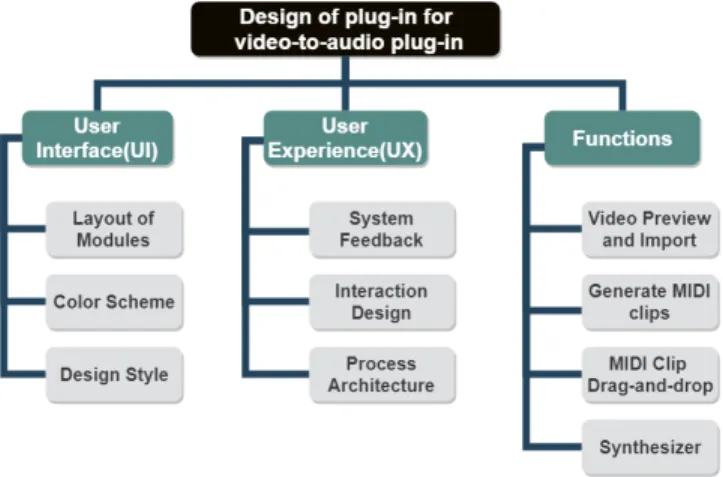
As motioned above, the plug-in products designed for music production are mainly divided into virtual instruments and effects. The interface design of the virtual instrument tends to simulate the color scheme and operation of instruments. The interface design of the effect plug-in focuses on match-ing graphic elements to parameter adjustments, and the user experience design is focused on simplifying the operation. Since the studies on plug-ins for music production consider the performance on sound design more, there is not much re-search on the innovative design of plug-in functions and the interface. Thus, limited theories and cases that can inspire the development of plug-ins for video-to-audio mapping. Therefore, a survey questionnaire is needed for collecting the requirements and preferences of the potential users (mu-sicians) and contribute to the design of user interface (UI), user experience (UX) and functions design. Before the design of survey questionnaire for collecting user requirements of the SCORE! plug-in, we need to come up with a decompo-sition of design tasks shown inFigure 2with three main aspects including UI design, UX design and functions design. And there will be corresponding sections that describe the details of the plug-in design in the following sections.
Figure 2.Hierarchy chart of design tasks
The UI design contains three sub-tasks: layout of modules, color scheme and design style. Layout of modules determines how to arrange each function module on the graphical in-terface of the plug-in in an appropriate way. And the per-mutation should also consider how to match the plug-in’s workflow. The color scheme and design style affects the vi-sual effect that the plug-in brings to the user. Presumably, the color scheme and design style of a plug-in is related to its timbre categories according to the observation and expe-rience. In order to verify this assumption and understand user’s UI preference.
UX design includes three aspects: system feedback, in-teraction design and process architecture. System feedback illustrates how this plug-in interacts with the user, such as prompt or error messages. The interaction design focuses on the details of module operation and how the system trans-mits information to the user in different form. The process architecture task aims to describe the whole workflow of a plug-in and the information interaction among the func-tional modules.
There are four functions of the plug-in including video selection and previewing, MIDI clip generation, import gen-erated MIDI clips to DAWs and synthesizer. To implement the video-to-audio mapping, letting the user preview and choose the input video is required before one can generate audio files. After the generation of the MIDI clip(s), the plug-in should help the user import MIDI clips plug-into the MIDI track of the DAWs in a convenient manner. Moreover, as a VST instrument, the plug-in also works as a synthesizer to make analog sound with the MIDI clips directly within the VST itself.
To get the user requirements and preferences of such a function-integrated tool, a survey questionnaire is required to collect the data, and contribute to the final design scheme of the plug-in. Therefore,section 3.1will describe how the survey questionnaire was designed and conducted and how the result of survey will affect the final design. And then determine the details of UI/UX design and function design insection 3.2tosection 3.4respectively.
3.1 Survey Questionnaire
This section includes a detailed description of the require-ments survey, which includes the following:
• the design of survey questionnaire
• the process of conducting survey
• the analysis of survey results
3.1.1 Design of Survey Questionnaire
The aim of survey questionnaire is to collect the user pref-erences and collect the requirements for the interface. As a user-centred system, there is a need to test whether the hypothetical design is acceptable. Hence, the details of ques-tionnaire contains the following items:
• User interface Design a. Layout of the module b. Color scheme c. Design style
• User Experience Design a. Interaction design
b. preferences and requirements
• Functions Design
a. workflow of SCORE! plug-in b. system performance
The survey questionnaire includes two parts. The first part focuses on the interface and interaction design of the plug-in while the second part emphasizes the user’s operation customs and preferences.
Before the respondent get to the survey questions, the questionnaire shows four interface examples for music pro-duction plug-ins. In each example, the layout, color scheme, color tone and design style of the plug-in is described by a short phase. For example, the types of interface layout is defined as two categories: brief and densely covered. The Color Scheme is defined as two values: contrasting colors and single color while color tones are divided in to bright and dark. The design style includes two values: modern and retro. The pre-definition of phrases to describe a plug-in interface can eliminate the user’s misunderstanding and ensure the clear description of questions. At the end of the first part, there is an open question collecting the most impressive op-erational experience the user has had with VSTs in the past. Comparing with the multiple choice questions, we hope to get more inspiration for interaction design. The questions in part two aim to understand users’ operational customs of plug-in. Therefore, multiple-choice questions were set for getting user preferences, and one sorting question is set to understand the user requirements for performance of a plug-in. Due to the original ideas of regarding the function-ality of SCORE! plug-in - importing videos to the plug-in generation MIDI clips, loading MIDI clips to the DAWs and synthesizer–there is also an open question for verifying.
3.1.2 Conducting survey and data collection
The design of the SCORE! plug-in is to provide musicians a means for digital music production, which requires the domain knowledge of music production. So, the respondents to the questionnaire must be experienced in music produc-tion working with plug-ins and have some insights into the advantages and disadvantages of different plug-ins. There-fore, we conducted a small-scale survey questionnaire at the end of Feb 2019. We invited the European musicians who are engaged in electronic music production or have previ-ously participated in projects of RE:VIVE and digital music producer from China who currently works in professional studio by e-mail. In the e-mail, we described the purpose of the questionnaire and attached the link of the questionnaire. At the same time, we gave respondents a necessary expla-nation to ensure each of the answers we acquired is precise and targeted to the survey key-points. Finally, we got fifteen answers, eight from the Europe and seven from China. And the complete survey questionnaire and analysis result is in Appendix 1.
3.1.3 Data Analysis and Survey Conclusion
Considering the analysis results contribute to the design of the SCORE! plug-in directly, all the questions are classified to three scenes: user interface, user experience, functions. In the
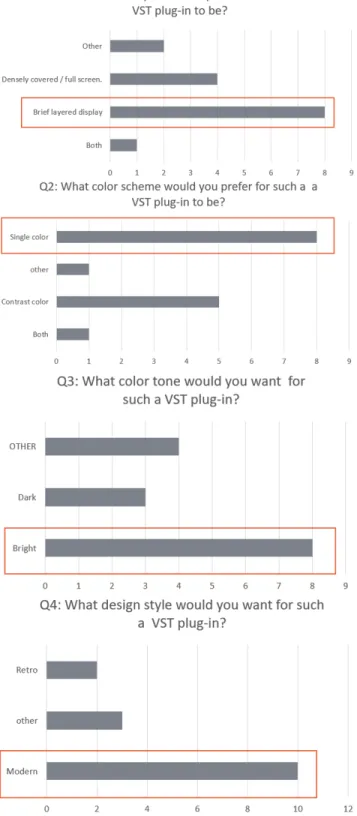
Figure 3.user requirements and preferences for interface design
section of user interface, there are four questions included for determining the interface for the SCORE! plug-in: lay-out, color scheme, color tone and design style. And for each
question, respondents are able to choose from four options, including two given answers, both and other.Figure 3shows the analysis results that reflect user preferences for interface design. The results illustrate the user’s preference for the SCORE! plug-in interface design which are summarized as follows:
• Layout: Brief layered display
• Color Scheme: Single color
• Color tone: Bright
• Design Style: Modern
Moreover, some respondents had opinions on the design of interface. They suggested the layout of the interface should consider the importance of each function and reflect the logical relationship between the functions. And their de-scription of the ideal features for the plugin interface can be summarized as: clean, simple and logical. In the section on user experience, the questions focus on three key points: impressive design of interaction, the importance of ordering performance and the attitude towards presets. As mentioned inSection 3.1.1, there is an open question for gathering the mores ideas for interaction design. The graphical represen-tation for assisting music production is the most popular. They think the windows to present a sound wave is good for synthesizer sound design. And the graphical buttons or other modules for adjusting parameters are also needed for presenting numbers with a graphical bar. In addition, using the block to represent MIDI notes is also mentioned with the X axis for pitch, Y axis for time line. At the same time, the design concept of simplifying complex processes was proposed, for example, adopt drag-and-drop function to sim-plify the importing process, or use the layered channel to manage different parameters of function.
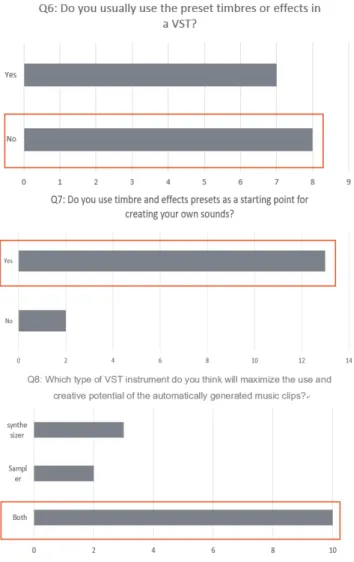
In the section on user experience, there are three questions for understanding the user preferences while producing mu-sic including timbre creation and type of virtual instrument. Also, another ordering question is presented to get input on the importance order of the plug-in’s performance. By analyzing the answers, the respondents’ preferences are as follows:
• Unwilling to use preset timbre in the music production directly
• Using the preset timbre as start point of sound design
• Prefer to use both Synthesizer and Sampler
It’s worth while to mention that, in the question on whether to directly use preset timbre for music production, although more respondents selected "No", the difference in preferences is not obvious. This was probably caused by the respondents’ different practical application scenarios for the plug-in. How-ever, most of the respondents considered the preset timbre is good for the beginning of the sound design. With regards to preference on virtual instruments, most of the respondent
Figure 4.user preferences of using preset timbre and virtual instruments
prefer to use both synthesizers and samplers in music pro-duction. This also depends on the specific genre of music that they produce.
As for preferences related to the plug-in’s performance. We list the four indexes of performance, including CPU load, Stability, RAM cost and responding time. The two most es-sential features are stability and RAM cost with six and five rating each with a 1, respectively. The high RAM cost and un-stable performance of a plug-in may crash the DAWs, which affects the musician’s producing process severely. However, the responding time and CPU load of the plug-in are less important for most of the musicians who thought that the extra calculating time of the plug-in is reasonable.
In the section of functions, since there are already ideas about the functional modules of the SCORE! plug-in, only one open question about workflow of the video-to-audio mapping was set in the questionnaire for verifying the feasi-bility of the idea. The most frequently mentioned workflow
is importing the video first and then generating the video to audio files or MIDI files with the plug-in before importing the generated files into the DAW in a probable way. Also, 3 of the 15 respondents wrote down their requirements for sound design, which shows that a functioning synthesizer or sampler is needed for sound design of the generated MIDI clips. However, some of the respondents also came up with ideas for functional modules which are out of scope for this project, including the additional options of generating MIDI clips, for example, controlling the notes of generated MIDI files within a mood or genre.
3.2 User Interface Design
Figure 5.Interface design of SCORE! plug-in By analyzing the result of the survey questionnaire, we got the user preference of interface design for SCORE! plug-in, which should be a modern style and brief arranged inter-face with single and bright color scheme. According to the description above, we determined the interface of SCORE! plug-in which shows inFigure 5. The interface is divided into four parts by functions including video module, generating button, file tree and synthesizer, which match the workflow recorded inSection 3.4. Obviously, the four modules and graphics components are arranged in order of top-to-bottom and left-to-right. The user can clearly see the parameters, op-erate the plugin and adjust the parameters by manipulating the graphics components such as button, knob and selection box.
The Video module consists two parts, one is the function buttons, another is the video window, with arrangement of up and down. The video window is also used to isolate the buttons of different modules to prevent confusion.At the same time, the function buttons are also sorted according to the workflow order, according to the buttons for sorting video selection and video playback options from left to right.
There are only two buttons for the second module of gen-erating MIDI clips because generation with one-click can hide the complicated calculating for video-to-audio so that narrow the gap between AI technique and music production. The third module is presented as a file tree which lists the generated MIDI clips that stored in specific local folder. By adopting the file tree, both the folders and the files can have a orderly arrangement. Also, users can simply drag and drop files into DAWs by selecting items from the file tree. As for the synthesizer module which is used for sound design, it contains two oscillators, each with a separate envelope. The user can choose the wave type of each oscillator from the drop down box at top right. Below those two selection boxes, there are a bar for controlling the mixing of the two sound. The oscillator is arranged up and down with its correspond-ing envelop. There are four parameters in envelop, includcorrespond-ing attack, decay, sustain and release which collectively known as ADSR. Each parameter is shows as graphical knob with its value below. The user can not only set the value of the parameter by knob, but also input the value in the value box precisely. At the bottom left of the synthesizer module, there is a filter with one drop off box and two knobs.Besides, a switch button is set for controlling the filter effect. At last, The master with three bars are setting at the bottom right of the synthesizer module for volume and pitch bend control-ling.
3.3 User Experience Design
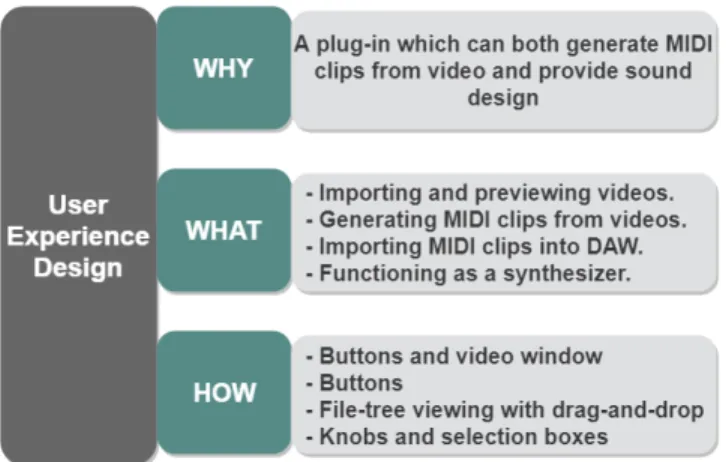
Figure 6.Three levels of SCORE! plug-in’s user experience design
In the research of the design of technology-mediated expe-rience [15], Hassenzahl put forward to the three-level model for analyzing the human-computer interaction of a software. According to the definition of the model,Whyclarifies the experience requirements while theWhatdetermines the spe-cific tasks of the experience, andHowanswers the way users act with the interface and trigger the task. Therefore, the
Figure 6was made to analyze the user experience of SCORE! plug-in.
In the user experience design, there are two main require-ments to be addressed: generate MIDI clips from selected video and sound design. Therefore, four tasks are included in the user experience design to satisfy needs of user, together with functionality actions. Firstly, the user should be able to select the video to be imported with button clicks, and preview the selected video with video window. Then, the user can click buttons to trigger events, thus adopted differ-ent DL models to generate MIDI file. After the MIDI clips was generated, a file tree providing the drag-and-drop func-tion should be adopted to help the user import MIDI clips into the project of music production. Besides, in order to support sound design, a synthesizer should be included with knobs and selection boxes to enhance the user experience of parameter adjustment.
According to the principles and criteria of user experience design, explaining how plug-in be a mediate between human operation and digital music production.
3.4 Functions Design
In order to let SCORE! plug-in handle the process of video-to-audio mapping, the input of it should be the video file from local file, the output should be both the generated MIDI clips and sound that were loaded in the DAWs. Therefore, there are four main functional processes of SCORE! plug-in: Importing video to SCORE! plug-in, Generating MIDI clips, Importing generated MIDI clips to DAWs with drag and drop, and Synthesizer. The user should be able to select the video from the local folders at the beginning, and preview the video after loading successfully. Therefore, there are buttons trigger events for satisfying the fundamental requirement of video preview including open the video selection pop-up, play the video, pause the video playing, stop playing the video and move forward or back 5 seconds. Also a video window is needed to play the video. Before generating the MIDI file, the user should also be allowed to select the model of video-to-audio mapping. Since the back-end algorithm for video-to-audio mapping supports generating MIDI file with one melody track and poly track consisting of drum, bass and melody, there should be two buttons available for the user to choose the generating type. As for importing generated MIDI clips to DAWs, a file tree for presenting MIDI files is needed, and each item should implement the drag-and-drop function. In order to provide the user a synthesizer for sound design, two oscillators are required together with their independent envelop, and an audio filter to process frequency ranges.
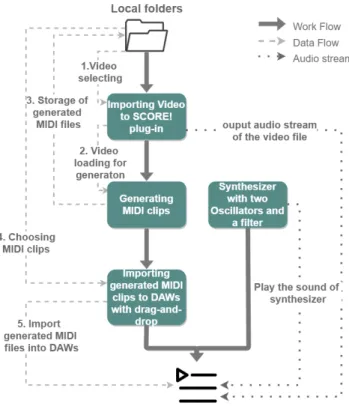
The whole workflow and the way SCORE! plug-in inter-acts with local files and DAWs are shown asFigure 7, with work flow, data flow and the flow of audio stream.
In the work flow, the user import the video file from the local folders to the SCORE! plug-in at first, and generate corresponding MIDI files before importing them into the
audio track of DAWs. At the same time, the synthesizer also determines the sound of the MIDI track of the DAWs.
In the data flow, there are five steps for the video-to-audio mapping and interaction among local folders, SCORE! plug-in and the DAWs. In the first step, the user choose the video file from the local folders and load it to SCORE! plug-in for previewing. In the second step, the selected video file will be used for running the back-end DL algorithm for video-to-audio mapping. Then, the generated MIDI file will be stored at specific local file at the third step. After the generating process is over, the SCORE! plug-in will update and show the generated MIDI clip with file tree which is the perspective of the specific local folder. In the last step, the file item in the file tree can be load to the DAWs.
As the plug-in for music production, it also should con-tains the flow of the audio stream which mainly shows the interaction between SCORE! plug-in with the DAWs. After the video file was load to SCORE! plug-in, the user can pre-view the video. And the audio track of the video will play in sync with the video screen through the audio output channel setting by the DAWs. Besides, when SCORE! Plug-in works as a synthesizer and is loaded to specific MIDI track in a project created in the DAWs, it determines the sound of the MIDI track. When the MIDI notes play, the synthesizer will be triggered and output its audio stream to the DAWs.
Figure 7.Work-flow of SCORE! plug-in
4
Implementation of SCORE!
Figure 8.The application scene of SCORE! plug-in in Able-ton 10 Live
According to the design scheme and literature research of plug-in development mentioned above, we finally imple-mented the development of the plug-in with the application scene of SCORE! plug-in in Ableton 10 Live shown in Fig-ure 8. The open-sourced repository is at:https://github.com/ Gineyc/Score-plug-in. And the screen-cast of SCORE! plug-in is available at:https://youtu.be/VvIqDpT2mGo.
The development of SCORE! plug-in uses two develop-ment tools: Projucer13and Visual Studio 201714. Projucer is
good for managing the project built with JUCE framework while Visual Studio provides well-integrated development environment of C++ programming language. In the inter-face shown inFigure 5, each component corresponds to a different function. Each button in the video module triggers different events for providing the corresponding functions, such as open file browser, play/pause/stop the video, as well as forward/backward five seconds. It’s worthy to mention that the back-end DL algorithm for video-to-audio mapping is implemented in Python, and providing the command lines to execute the process of video-to-audio mapping. Therefore, by clicking the generating button, SCORE! plug-in will ac-quire the path of selected video,and execute the command automatically to generate MIDI file for the video. As for the drag-and-drop importing of generated MIDI file, a file tree works as a drag-and-drop component. When the user start dragging, SCORE! plug-in will get the path name of the se-lected file before importing in the DAWs. The synthesizer developed with Maximillian library and JUCE framework. Maximillian provides the basic wave types of oscillator and envelope. Also, JUCE framework contains DSP modules for developing functions of audio filter and other effects. After
13https://juce.com/discover/projucer 14https://visualstudio.microsoft.com
compiling, the SCORE! plug-in will be generated in VST for-mat with the file extension.dllor the standalone application displaying with a.exefile.
5
Evaluation of SCORE!
To evaluate the effectiveness of SCORE! plug-in both in de-sign and performance, a qualitative user study should be conducted by interviewing experts in electronic music pro-duction using a questionnaire as guideline. Experts attended the study were asked to test SCORE! plug-in before filling out the survey questionnaire. By analyzing the answers of questionnaire, the feedback of experts is collected and re-flects to evaluation of SCORE! plug-in. Hence, the design of evaluating survey questionnaire is introduced inSection 5.1, as well as the evaluation conducting inSection 5.2.
5.1 Questionnaire design for evaluation
As the previous studies on system evaluation provide the design criteria for the questionnaire on acquiring system usability[4] and user satisfaction on interface[6], the ques-tionnaire designed for evaluating SCORE! plug-in followed the standards mentioned above and divided into three parts including: system usability of evaluation, user satisfaction and feedback session. In the first part, there are eleven ques-tions that describe the user experience of SCORE! plug-in adopting Likert scale valuing from 1 (Strongly disagree) to 5 (Strongly agree). And the user ratings can directly reflect the usability and effectiveness of SCORE! plug-in by calculat-ing SUS Score. In the second part, eleven questions scalcalculat-ing from 0 (negative) to 9 (positive) for presenting user inter-face satisfaction and a sorting question were included for acquiring details of experts’ feedback on SCORE! plug-in. Besides, there is an open question and three multiple choice questions aiming to collect experts’ suggestions on SCORE! plug-in in the third part. And the complete questionnaire and results is inAppendix 3.
5.2 Conduct Evaluation of SCORE!
As a project prototype for evaluation, the operation of SCORE! plug-in requires a lot of pre-configuration. In order to avoid the influence of experimental results caused by the technical factors, and we also tend to have a deeper evaluation dis-cussion with the music producers, we adopted face-to-face evaluation and remote collaboration by Teamviewer15with musicians. We posted on Facebook looking for musicians who are in Amsterdam and have experience in music produc-tion. And finally we found five musicians to conduct evalua-tion face-to-face, and evaluated with support of Teamviewer with another musician. Prior to the conducting of experi-ment, the experts involved in the evaluation were aware of the evaluation planning inAppendix 2. In the experimental process, experts were asked to use SCORE! plug-in for music
15https://www.teamviewer.com/en/
production in Ableton at first, and filled out questionnaire after the producing session.
During the music production session, experts are required to follow the rules below:
• using Ableton 10 live for music production
• loading SCORE! plug-in to at least one track
• generating MIDI clips for selected video by SCORE! plug-in
• producing electronic music project with the generated MIDI clips
After producing music with SCORE! plug-in, experts were asked to fill out the survey questionnaire independently, to-gether with an interview discussing deeper into the strengths and weaknesses of SCORE! plug-in. We finally got 6 evalua-tion results from experts, and the results of the evaluaevalua-tion will be analyzed and discussed in the next section.
6
Results and Discussion
According to the purpose of questionnaire survey, the analy-sis of the evaluation results mainly analyzed the six aspects of SUS score, UI satisfaction, UX satisfaction, functional satis-faction, willingness to use and creativity. In total, six experts participated in the evaluation process, and the gender dis-tribution is five male and one female. Three of them are between 18-25 years old, two are between 25-35 years old and one is over 35 years old. Except for one respondent who has only one to three years of experience in electronic music production, the other five have more than 5 years of experience in music production.
In the result analysis, the answer of Q1 to Q10 are used for SUS Score calculation, which reflect the usability, effec-tiveness of the SCORE! plug-in as software. As for the user satisfaction evaluation, Q17 and Q18 collect the user’s sat-isfaction with the user interface while Q12, Q16, and Q19 reflect the user experience satisfaction from the details to the whole. Besides, Q13 and Q14 directly contribute the user’s satisfaction with the plug-in’s functions design. In addition, Q21 to Q23 reflect the experts’ willing of use in the music production, as well as the application scenario analysis. In or-der to unor-derstand whether the AI-driven plug-in can provide music creation support to music production, Q11 and Q20 collect user feedback for the concept of AI-supported music creation and creative support application of SCORE! plug-in. In the measurement of the survey results, the Likert scale is used to indicate the attitude of experts on various indica-tors. The evaluation results are expressed in hundred mark system. For the SUS scores, the criteria of calculation and rating are in accordance with Sauro’s(2011) study [22]. For the rest of the indicators with 10 points Likert scale from 0 (negative) to 9 (positive), we calculate the average to present the experts’ satisfaction of SCORE! plug-in.
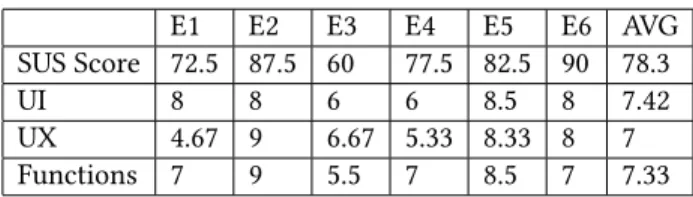
Table 1shows the SUS score and user satisfaction in UI, UX, and Functions. The average of SUS Score is 78.3, which
corresponds to a B+ rating. It reflects the features of SCORE! plug-in, that easy to use and learn. As the average user sat-isfaction scores are all above 77.8%, it illustrates that the SCORE! plug-in has a satisfying design on the user interface, user experience and functions. Experts show a high satis-faction in the interface layout (mean 7.6/9) considering the arrangement of each module is well-integrated. While the satisfaction of user experience design is well-graded (mean 7/9), experts complained about the long generating time of MIDI clips in the practical application. When asking experts to sort the preference of four main functions in the workflow, half of the experts who participated in the evaluation ranked the MIDI file generation function as the number one. They thought that the one-key generation of the MIDI clips was designed to clearly select the generated model while hiding the complex command line. The second preference function of the experts is Midi file import by drag and drop, for the file tree can visually display the file directory, and drag-and-drop can save time for file importing. Then, is the video selection and preview function which only meets the basic video selection needs. Therefore, compared to the previous two functions, it is not attractive. The function of the synthe-sizer is the least popular, and almost all experts marked it as "the least preferred." Experts said that other synthesizer plug-ins provide more powerful features, which reflect that the synthesizers integrated into SCORE! plug-in is replaceable. For the willingness to use SCORE! plug-in for music pro-duction, five experts gave high rating (mean 7.8/9), which shows great potential of SCORE! plug-in to be used in music production. However, one of the experts gave the rating of 3, claiming that the output MIDI file of SCORE! plug-in is too random, which is lack of practicality while producing music. For the specific application scenario, experts showed a high willing to use in studio (mean 7.3/9) rather than us-ing in Live (mean 3.5/9). Experts said that the generation of MIDI clips takes a long time, and the quality of the generated music is limited which needs to be edited again. Thus, it is more suitable for using in the studio. Experts believe the combination of AI technology and music production is an innovative concept (mean 7/9), which proves that SCORE! plug-in is a creative support software. However, experts have not shown optimism about the support of AI technology for music creation (mean 5.1/9), for there is lack of music theo-ries and rules in the generated audio file, and the generated music is However, experts did not show optimism about the support of AI technology for music creation, because the lack of music theory and rules in the generated music lead to the randomness and lack of musicality of the generated music.
Table 1.Evaluation result of SCORE! plug-in
E1 E2 E3 E4 E5 E6 AVG SUS Score 72.5 87.5 60 77.5 82.5 90 78.3 UI 8 8 6 6 8.5 8 7.42 UX 4.67 9 6.67 5.33 8.33 8 7 Functions 7 9 5.5 7 8.5 7 7.33
7
Conclusion
In this project, we designed and implemented a plug-in for video-to-audio mapping, and evaluated the design effective-ness of the plug-in in music production. We came up with a workflow of such a plug-in for music production at first, before conducting a survey questionnaire for acquiring re-quirements of musicians by questionnaire. By analyzing the answers of questionnaire, the feasibility of the workflow was verified, and we determined the design scheme of SCORE! plug-in’s user interface, user experience and functions. After the implementation of SCORE! plug-in, we evaluated it with six experts in music production and discussed aspects of system usability, user satisfaction as well as creative sup-port. And the evaluation results shows that the workflow of SCORE! plug-in is an efficient design. And the user interface, user experience and functions design of SCORE! plug-in is able to meet user’s operating habits and basic needs. At the same time, the “creative support” concept of SCORE! plug-in can be widely accepted by users, for the MIDI clips gener-ated by DP algorithm are a good starting point for music creation during the evaluation phase. As a computer system, SCORE! plug-in also shows the features of stability and easy of learning during the evaluation. At the same time, the B+ level SUS score also reflects the effectiveness and usability of this plug-in. Thus, the study has proved that SCORE! plug-in runs as a great mediate to apply AI technique to practical music production.
During the user study in evaluation phase, we collected the feedback of the expert users. Although they are quite satisfied with both the design and creative support concept of SCORE! plug-in, there are also suggestions for improvement as follows:
• Improve the efficiency of the back-end DL algorithm and speed up the generation of MIDI files.
• Improve the back-end DL algorithm and enrich the diversity of MIDI generation models, so that generate MIDI files with specific genre.
• Remove the synthesizer function or promote it to a powerful synthesizer
Hence, there are two aspects to the future prospects of the study: technology and application. In terms of technology, it is necessary to improve the model of the auto-encoder, especially the model for generating music. And the further research should go deep into the semantic meaning of latent
space, so that give meaning to video-to-audio mapping. The actual application scenario of SCORE! plug-in aims to use the online collection of video archives for music re-creation. And the execution of the back-end DL algorithm for video-to-audio mapping requires complex environment configuration and computation time configuration and inevitable calcula-tion time. Therefore, to make SCORE! plug-in simple and universal in music production, server support is required. Once the user loads SCORE! plug-ins in DAWs, the user is able to select and preview videos online before generating and downloading generated MIDI files, and import MIDI clips by drag-and-drop them. As the experts did not show an ideal preference for the synthesizer function integrated into the SCORE! plugin, the further study also needs to make a trade-off between removing this function and enrich it.
References
[1] Chadia Abras, Diane Maloney-Krichmar, Jenny Preece, et al. 2004. User-centered design.Bainbridge, W. Encyclopedia of Human-Computer Interaction. Thousand Oaks: Sage Publications37, 4 (2004), 445–456. [2] Memo Akten, Rebecca Fiebrink, and Mick Grierson. 2018. Deep
Medi-tations: Controlled navigation of latent space. (2018).
[3] Jeroen Bekaert, Dimitri Van De Ville, Boris Rogge, Iwan Strauven, Emiel De Kooning, and Rik Van de Walle. 2002. Metadata-based access to multimedia architectural and historical archive collections: a review. InAslib Proceedings, Vol. 54. MCB UP Ltd, 362–371.
[4] John Brooke et al. 1996. SUS-A quick and dirty usability scale.Usability evaluation in industry189, 194 (1996), 4–7.
[5] Owen Campbell, Curtis Roads, Andrés Cabrera, Matthew Wright, and Yon Visell. 2016. ADEPT: A framework for adaptive digital audio effects. In2nd AES Workshop on Intelligent Music Production (WIMP). [6] John P Chin, Virginia A Diehl, and Kent L Norman. 1988. Development
of an instrument measuring user satisfaction of the human-computer interface. InProceedings of the SIGCHI conference on Human factors in computing systems. ACM, 213–218.
[7] Keunwoo Choi, George Fazekas, and Mark Sandler. 2016. Text-based LSTM networks for automatic music composition. arXiv preprint arXiv:1604.05358(2016).
[8] Perry Cook. 2017. 2001: Principles for Designing Computer Music Controllers. InA NIME Reader. Springer, 1–13.
[9] Géraldine Damnati, Delphine Charlet, and Marc Denjean. 2016. Explor-ing Collections of Multimedia Archives Through Innovative Interfaces in the Context of Digital Humanities.. InINTERSPEECH. 786–787. [10] Christopher Dobrian. 2001. Aesthetic considerations in the use of
‘virtual’music instruments. InProceedings of the Workshop on Cur-rent Research Directions in Computer Music, Institut Universitari de l’Audiovisual, Universitat Pompeu Fabra, Barcelona, Spain, Vol. 20. [11] Jonas Ekeroot. 2003. Implementing a parametric EQ plug-in in C++
using the multi-platform VST specification. (2003).
[12] Aude Genevay, Gabriel Peyré, and Marco Cuturi. 2017. GAN and VAE from an optimal transport point of view. arXiv preprint arXiv:1706.01807(2017).
[13] Mick Grierson. 2010. Maximilian: A cross platform c++ audio syn-thesis library for artists learning to program. InProceedings of the International Computer Music Conference, New York.
[14] Jeffrey Wood Harriman Jr. 2016. The Development and Use of Scaf-folded Design Tools for Interactive Music. (2016).
[15] Marc Hassenzahl. 2013. User experience and experience design.The encyclopedia of human-computer interaction2 (2013).
[16] Diederik P Kingma and Max Welling. 2013. Auto-encoding variational bayes.arXiv preprint arXiv:1312.6114(2013).
[17] Cheng-Yuan Liou, Wei-Chen Cheng, Jiun-Wei Liou, and Daw-Ran Liou. 2014. Autoencoder for words.Neurocomputing139 (2014), 84–96. [18] David Poirier-Quinot, Markus Noisternig, and Brian FG Katz. 2017.
EVERTims: Open source framework for real-time auralization in VR. InProceedings of the 12th International Audio Mostly Conference on Augmented and Participatory Sound and Music Experiences. ACM, 34. [19] Mitchel Resnick, Brad Myers, Kumiyo Nakakoji, Ben Shneiderman,
Randy Pausch, Ted Selker, and Mike Eisenberg. 2005. Design principles for tools to support creative thinking. (2005).
[20] Albaar Rubhasy, AAG Yudhi Paramartha, Indra Budi, and Zainal A Hasibuan. 2014. Management and retrieval of cultural heritage multi-media collection using ontology. InInformation Technology, Computer and Electrical Engineering (ICITACEE), 2014 1st International Conference on. IEEE, 255–259.
[21] Willemien Sanders and Mariana Salgado. 2017. Re-using the archive in video posters: A win–win for users and archives.Interactions: Studies in Communication & Culture8, 1 (2017), 63–78.
[22] Jeff Sauro. 2011. Measuring usability with the system usability scale (SUS). (2011).
[23] Gary P Scavone. 2002. RtAudio: A Cross-Platform C++ Class for Realtime Audio Input/Output.. InICMC. Citeseer.
[24] Jürgen Schmidhuber. 2015. Deep learning in neural networks: An overview.Neural networks61 (2015), 85–117.
[25] Allan Seago, Simon Holland, and Paul Mulholland. 2004. A critical analysis of synthesizer user interfaces for timbre. (2004).
[26] Richard Vogl and Peter Knees. 2016. An intelligent musical rhythm variation interface. InCompanion Publication of the 21st International Conference on Intelligent User Interfaces. ACM, 88–91.
[27] Richard Vogl and Peter Knees. 2017. An intelligent drum machine for electronic dance music production and performance.. InNIME. 251–256.
[28] Leshao Zhang, Yongmeng Wu, Mathieu Barthet, et al. 2016. A web application for audience participation in live music performance: The Open Symphony use case. (2016).
A
Survey on requirements of VST Plug-in
development (with results analysis)
Survey on requirements of VST Plug-in development
In order to collect requirements for the development of a VST Plug-in for digital music production, this questionnaire is designed to gain information regarding the interface design and performance preference of musicians. This VST Plug-in is specifically designed to automatically generate MIDI clips based on video files usPlug-ing deep learnPlug-ing techniques. Think, generative "film score". These MIDI clips can be used as a starting point for electronic music production as well as audiovisual performances. The Deep Learning techniques being used analyze the content of the video and generates music which "corresponds" to the visuals. The input and output of this VST Plug-in are video files and MIDI files, individually. However, the two can always be re-synced. To make the video-to-music process much more clear, here is a video-to-audio mapping demonstration:
https://drive.google.com/file/d/1Iy8eNYFvHtUzbgkSGYwy7AQoclYtkkHx/view?usp=sharing
In the context of developing such a VST Plug-in for video-to-audio generating, we would appreciate if you patiently spend a few minutes filling to this form carefully. Your answers are very helpful to our research and will let us know how you think a VST with such capabilities should look and operate.
Part 1: Interface Design
Sample description of the interface design as follows:
Layout: Brief layered display. Color Scheme: Contrasting colors. Color Tone:
Dark. Design Style: Modern.
Layout: Densely covered. Color Scheme: Contrast color. Color Tone: Dark.
Design Style: Retro.
Layout: Densely covered. Color Scheme: Single color. Color Tone: Dark.
Design Style: Retro.
Layout: Brief layered display. Color Scheme: Single color. Color Tone: Bright.
Design Style: Modern.
Q1: What kind of layout would you want from such a VST plug-in to be?
*
A: Densely covered / full screen.
B: Brief layered display
Other: _________________
Q2: What color scheme would you prefer for such a a VST plug-in to be?
*
A: Single color
B: Contrast color
C: Both
Other: _________________
Q3: What color tone would you want for such a VST plug-in?
*
A: Bright
B: Dark
Other: _________________
Q4: What design style would you want for such a VST plug-in?
*
A: Modern
B: Retro
Other: _________________
Q5:How can the VST be more interactive and operational? In other words,
what kind of interactive elements of a VST's design impress you? (for example
more graphical windows for parameter adjustment)
*
Answers:
_________________
The ability to use your own sound sources, sample or live input. Also easy acces to automation of the parameters.
window with the soundwave Not too much visual fluff
multiple windows, flip interface ( to have a backside and frontside), and an in built equalizer, just the visualation of the spectrum you are producing with the synth
maybe waveform/spectrum analyser stuff. but i'd like a serious lay out for such a vst, i think :) Once it looks uncomplicated I'm happy!
Only if these features have some relation to performance. Pure functionality is the key over looks.
I found really helpful graphic representations of what the plug in is doing. In this case if we are talking about midi notes I think that having them represented as shapes in a time line could be very helpful.
Graphical adjustment of parameters drag and drop
easy of use easy of use
combine different functions like kontakt NO
channel bar, user can add plug-in filter briefly
The ability to use your own sound sources, sample or live input. Also easy acces to automation of the parameters.
window with the soundwave Not too much visual fluff
multiple windows, flip interface ( to have a backside and frontside), and an in built equalizer, just the visualation of the spectrum you are producing with the synth
maybe waveform/spectrum analyser stuff. but i'd like a serious lay out for such a vst, i think :) Once it looks uncomplicated I'm happy!
Only if these features have some relation to performance. Pure functionality is the key over looks.
I found really helpful graphic representations of what the plug in is doing. In this case if we are talking about midi notes I think that having them represented as shapes in a time line could be very helpful.
Graphical adjustment of parameters drag and drop
easy of use easy of use
combine different functions like kontakt NO
channel bar, user can add plug-in filter briefly
Part 2: Functionality and Performance
Q6: Do you usually use the preset timbres or effects in a VST?
*
A: Yes
B: No
Q7: Do you use timbre and effects presets as a starting point for creating your
own sounds?
*
A: Yes
B: No
Q8: Which type of VST instrument do you think will maximize the use and
creative potential of the automatically generated music clips?
*
A: Synthesizer
B: Sampler
C: Both
Other: _________________
Q8: Which type of VST instrument do you think will maximize the use and
creative potential of the automatically generated music clips?
Q9: Based on your experience in electronic music production, can you sort
the following performance measures of VST plug-in in the order of your
preference?
*
RAM cost
Stability
CPU Load
Response time
RAM cost
Stability
CPU Load
Response time
1
4
3
2
1
4
2
4
4
2
1
3
2
3
3
2
1
4
3
2
4
1
3
2
4
1
4
1
2
4
4
3
3
1
4
2
1
VA
VA
VA
3
2
4
1
201
VA
VA
VA
2
1
3
4
3
1
2
4
3
1
4
2
Q10: The technique of Deep Learning allows for the input of video files and
the output of corresponding MIDI files. How do you imagine such a VST
plug-in benefitplug-ing your own electronic music production? Can you describe the
ideal workflow in a few steps?
*
Answers: _________________
Especially timing wise it would be usefull, to match video and sound. Also when it comes to tempo. It might be nice to be able to include parameters such as mood, tempo, timing (so in which way should it sync, should it be rhymical to the vid or more floating over the vid)
So the ideal workflow would be:
1. Devide the video in sections, based on mood, tempo, timing, colour even? And translate it into midi 2. Per section select matching sound sources, and elements. So choose wether it鈥檚 percussion or synth etc or a combi. Etc
3. Something to combine these sections?
I would create the midi files from the video samples and then use with my own sounds. In short: sampling the created midi files
Auto-generate a large bank of soundscapes by using a sampler in conjunction with the music generated from the video. This could then be stored for later usage in various projects that require such sound scapes, or directly for the initial video, if that would be the given context.
You instantly work more conceptually, because the video you put in can or should have a conceptual idea, making music with the distillation of that can only strengthen the concept of the music or go totally against it. I.e. Making ambient with BBC earth videos or videos that make u experience ambient feelings that u want to express or evoke wit your music.
It would be a tool to generate a starting point for the creative process. Maybe i would just input random video to create fresh ideas for sounds and melodies. I like to be surprised so it seems like this vst would do that. :)
I imagine I would use it as an idea generator. To generate random MIDI files as starting points for new tracks / experiments.
I'm very interested in this project. Can I answer this question later after I have given it some more thought|? The majority of this questionnaire seemed to be based on appearance which is not at all important for me,
B
Plan for Evaluation
Plan for Evaluation
1. INTRODUCTION
Early in June, the SCORE! VST plug-in for video-to-audio mapping was already completed the development phase and officially entered the evaluation phase. In this phase, a series of experiments need to be conducted for collecting the data about expert’s feedback on both usability of system (plug-in) and user interface satisfaction. Hence. this document is to introduce the experimental planning and invite experts in the field of music production to attend the experiment.
2. PURPOSE OF THE EXPERIMENT
According to the research proposal, the experiment should be conducted mainly for:
- Evaluation of system usability.
- Evaluation of user interface satisfaction.
- Collecting experts’ feedback on the design of SCORE! (both functions and interface).
- To measure how effective the design of this plug-in.
- Whether it’s a good attempt to design such a plug-in with a combination of machine
learning techniques and music production.
3. EXPERIMENTAL ENVIRONMENT
Equipment Description
Laptop * 1 System: Windows 10
RAM: 16GB
CPU: i7-8750H 2.2GHz
Software: Ableton Live 10.0.3 Suite
(default configuration, only factory preset Library).
Soundcard * 1 MidiPlus Studio USB * 1
Headphone * 1 AKG K701
Converter * 1 3.5mm to 6.3mm
4. FOCUS GROUP
3 Focus group in total, each group have 5 musicians meet the following requirements:
- Be familiar with Ableton operation.
- Have experience in music production.
- Have the foundation of sound design.
5. FLOW OF THE EXPERIMENT:
No. Description Time Note
1 Introduction of the SCORE! 2min
2 Demonstration of SCORE! 4min Record screen, simple tutorial
3 Group Testing
(with screen recording and save the music clip)
20min (8min for generating the midi, 12min for simple production)
Produce a short music clip based on the generated midi file. (follow the pipeline)
4 Individual Questionnaire 5min Ideally, no discussion about
the answer among the experts that attend the experiment.
5 Feedback session 5min Invite all experts to the
discussion and show feedback.
SURVEY FOR MY Master thesis design~
Hey everyone, my thesis project is to study the practical application of AI technology in music production. The back-end AI algorithm can generate MIDI clips from video files, in order to put the AI algorithm into music production scenes conveniently, I designed and implemented a VST plug-in prototype.
For some technical reasons, I would prefer to be able to conduct a plug-in evaluation with you face to face and fill out a questionnaire.
TIME: 14th June - 18th June Location: Amsterdam
I am looking forward to your joining if you are: - Be familiar with Ableton operation.
- Have experience in music production. - Be passionate about innovative techniques.
C
Questionnaire for Evaluation of SCORE!
plug-in (with results analysis)
Questionnaire for Evaluation of SCORE! plug-in
According to the standards of SUS and QUIS 5.0, the following questionnaire is for measuring the User Interface Satisfaction of SCORE! VST plug-in. The results of the questionnaire will be used for academic research.
This Questionnaire is divided into three part: - System Usability Evaluation
- User Satisfaction - feedback session
If you have any questions about the survey, please email us: [email protected] We really appreciate your input!
Part 1: System Usability Evaluation
Q1: I think that I would like to use SCORE! for music production frequently.
*
Expert 1
Expert 2
Expert 3
Expert 4
Expert 5
Expert 6
4
4
4
3
4
4
Q2: I found SCORE! unnecessarily complex.
*
Expert 1
Expert 2
Expert 3
Expert 4
Expert 5
Expert 6
2
2
3
1
1
1
Expert 1
Expert 2
Expert 3
Expert 4
Expert 5
Expert 6
4
5
2
4
4
4
Q4: I think that I would need the support of a technical person to be able to use
this system.
*
Expert 1
Expert 2
Expert 3
Expert 4
Expert 5
Expert 6
2
2
2
1
2
1
Q5: I found the various functions in SCORE! were well integrated.
*
Expert 1
Expert 2
Expert 3
Expert 4
Expert 5
Expert 6
Q6: I thought there was too much inconsistency in this system.
*
Expert 1
Expert 2
Expert 3
Expert 4
Expert 5
Expert 6
2
2
2
1
1
1
Q7: I would imagine that most people would learn to use SCORE! very quickly.
*
Expert 1
Expert 2
Expert 3
Expert 4
Expert 5
Expert 6
4
5
4
4
3
5
Q8: I found SCORE! very cumbersome to use.
*
Expert 1
Expert 2
Expert 3
Expert 4
Expert 5
Expert 6
2
2
3
1
1
2
Expert 1
Expert 2
Expert 3
Expert 4
Expert 5
Expert 6
4
5
3
3
4
4
Q10: I needed to learn a lot of things before I could get going with SCORE!.
*
Expert 1
Expert 2
Expert 3
Expert 4
Expert 5
Expert 6
2
1
1
2
1
1
Q11: I think SCORE! will be a revolutionary concept on music production for it
combines AI techniques with Digital Music Production
*
Expert 1
Expert 2
Expert 3
Expert 4
Expert 5
Expert 6
3
5
4
2
3
4
Part 2:
User Satisfaction
This part of questions aims to understand how satisfied you are when you produce music with SCORE! plug-in. And to evaluate whether it's a convenient way to combine AI techniques with artistic creation.
Q12: How was your experience of producing music with SCORE!?
*
Expert 1
Expert 2
Expert 3
Expert 4
Expert 5
Expert 6
5
9
7
5
9
8
Q13: The functions of SCORE! are
*
functions including the whole working pipeline including: video selection and preview, midi file generation, import midi file into Ableton(drag-and-drop) and synthesizer.
Expert 1
Expert 2
Expert 3
Expert 4
Expert 5
Expert 6
6
9
5
7
8
7
Q14: Functions of SCORE! can be performed in a straight-forward manner
*
Expert 1
Expert 2
Expert 3
Expert 4
Expert 5
Expert 6
8
9
6
7
9
7
Video selection and preview
MIDI file generation
MIDI file import
by drag-and-drop Synthesizer
1
3
1
3
1
3
2
4
3
1
2
4
3
2
4
4
3
1
2
4
3
1
2
4
Q16: Parameters of the SCORE! are
Expert 1
Expert 2
Expert 3
Expert 4
Expert 5
Expert 6
8
9
5
6
7
8
Q17: The layout of SCORE! modules is
*
Expert 1
Expert 2
Expert 3
Expert 4
Expert 5
Expert 6
Q18: The color scheme of SCORE!
*
Expert 1
Expert 2
Expert 3
Expert 4
Expert 5
Expert 6
8
8
5
5
9
8
Q19: Responding speed of SCORE!
*
Expert 1
Expert 2
Expert 3
Expert 4
Expert 5
Expert 6
1
9
8
5
9
8
<