Jari Pohjanen
CROSS PLATFORM APPLICATION DEVELOPMENT WITH
HTML5 FOR IOS AND ANDROID OPERATING SYSTEMS
CROSS PLATFORM APPLICATION DEVELOPMENT WITH
HTML5 FOR IOS AND ANDROID OPERATING SYSTEMS
Jari Pohjanen Master’s thesis Autumn 2014
Degree Programme in Information Technology
3
ABSTRACT
Oulu University of Applied Sciences
Degree Programme in Information Technology Author: Jari Pohjanen
Title of thesis: Cross Platform Application Development with HTML5 for iOS and Android Operating Systems
Supervisor: Kari Laitinen
Term and year of completion: Autumn 2014 Pages: 41 The main aim of this thesis was to describe how a single UI code could be used in different operating systems. The objective in this thesis was to bring out the main key points how a hybrid HTML5 application can be implemented by using iOS’s NSWebView and Android’s WebView components as a container for a hybrid application. This thesis also describes how a data transfer is done between HTML, JavaScript and native code.
As a starting point, a hybrid application was implemented in both Android and iOS platforms. I wanted to implement an application, which would give value for the end users. I studied some time for open web APIs and found out that Finnkino Movie Company was providing a free XML API for their services and the application idea was found. I interviewed some of my friends about the functional needs for the application and also about how the UI should look like. The application itself was designed to use only one platform specific native WebView component. The User Interface was built with the HTML elements and JavaScript because the UI should look the same in both platforms. In my application the native code handles the XML data parsing from the Finnkino’s web API and sends the parsed data to the calling JavaScript function, which will then place the data into the HTML elements dynamically.
When the application was completed, all the differences between the platforms were studied and documented into this thesis.
As a result iOS’s NSWebView and Android’s WebView components provide a good support for a hybrid application development with some minor
differences. The main difference is the performance and how responsive the UI is in these platforms. From the development point of view, I see a great
opportunity to implement mobile applications with a web technology, as it is a fast evolving environment introducing new possibilities for the developers in a very fast phase. And from the business point of view, I can see a great
opportunity for smaller companies, or individual developers because with a single effort the application UI can be created for multiple platforms and this saves money and resources.
Keywords:
HTML5, Hybrid, mobile application, JavaScript, Objective-C, java, Android, iOS, cross platform, jQuery mobile UI
4
TERMS AND ABBREVIATIONS
JSON JavaScript Object Notation
HTML Hypertext Markup Language
CSS Cascading Style Sheets
iOS iPhone operating system
IDE Integrated Development Environment
Xcode Apple’s IDE
Eclipse Android’s IDE
XML Extensible Markup Language
ADT Android Development Tools
UI User Interface
URI Uniform Resource Identifier
5
TABLE OF CONTENTS
ABSTRACT 3
TERMS AND ABBREVIATIONS 4
1 INTRODUCTION 7
2 WHAT IS HTML5 9
2.1 What is new in HTML5 9
2.2 What is HTML5 good for 11
2.3 The most essential technologies used with HTML5 11
2.3.1 JavaScript 12
2.3.2 CSS 12
2.3.3 jQuery 13
3 COMPARISON OF MOBILE APPLICATIONS 15
3.1 Native application 15
3.2 HTML5 application 16
3.3 Hybrid application 17
4 THE DEMO APPLICATION FKINO 18
4.1 Making the design draft 18
4.2 End user’s needs and opinions about the design and functionality 20 4.3 Fine-tuning the design for the specification 20 4.4 fKino hybrid application data flow description 22
5 APPLICATION MAIN FRAME 23
6 PASSING DATA BETWEEN HTML AND NATIVE CODE 24
6.1 Communication layer for iOS 24
6.2 Communication layer for Android 25
6.3 Using xml data in iOS 26
6.4 Using xml data in Android 27
6.5 Injecting data from native code to webview component 28 6.6 Injecting data from WebView component to native code 28
7 FKINO APPLICATION UI STRUCTURE 30
8 DYNAMIC HTML UI 33
6
8.2 Debugging JavaScript 35
9 APPLICATION PERFORMANCE 36
7
1 INTRODUCTION
One of the biggest challenges in the mobile application development is how to maintain and get the same user experience between different operating
systems and handheld units with the minimum work of changing the source code. Nowadays as there are three major mobile operating systems in the markets – iOS, Android and Windows Phone – developers want to ensure that their applications are spread to as many mobile users as possible. If an
application developer wants to gain a maximum benefit from the application markets, he/she must select the technology carefully because it is vital from the development and maintenance point of view.
One approach for developing an application is to use native libraries and UI components of the target platform and then port the code to another platform. This approach requires a lot of manpower and resources because the UI and library component behaviour may differ quite a lot between different operating systems. Also testing and verifying the application against the specification and the wanted behaviour can be difficult. And usually the UI components do not give the same look and feel between the platforms and this may change the end user experience resulting into a situation where the application itself is not any more what it should be. If porting the application to other platform is not
required, then this is the best choice.
One approach for creating a multi-platform support is to implement a web application. This means that the whole application is hosted somewhere in the web and the end user a uses mobile web browser to access the application. Web applications can be implemented by using almost any programming
language and the web server shares the application services. Web applications can be implemented for example with the Microsoft C# programming language and the application itself is hosted in IIS (Internet Information Server) server and the application is accessible for example with Android or iOS devices. A web application can use all the resources that the web server has. It can use
databases and possible reporting services. A web application can be extended with the latest technologies like Node.js or HTML5 to get a fancy look and feel
8
and nice animations. Still the biggest problem with the web application is the cost of testing the application with different web browsers. It is not cheap to host a web server and the server hardware is not cheap either. Another problem with a web application is that it does not give a true native application look and feel. It can also be quite difficult for the web application to use mobile platform specific features like camera or radio.
Another way for creating a multi-platform support is to implement a platform specific native application and create the UI in a way that the same UI code can be used with multiple operating systems. And the answer for the UI is HTML. These combined native and HTML applications are called Hybrid Mobile Applications [1]. A Hybrid application is still a web application but the UI is
wrapped inside a container that provides an access to native platforms features. PhoneGap is at the moment the most popular container wrapper for creating Hybrid HTML5 Applications. PhoneGap provides components to create hybrid applications for iOS, Android, Windows Phone, Blackberry and webOS.
In this document I am going to describe how to create a native HTML5 Hybrid Mobile Application but I am not going to use any ready-made wrapper
containers like PhoneGap or Titanium. However I am going to dig deeper and show and describe how iOS’ NSWebView and Android’s WebView components are used to get a full access to the platform’s native functionality from a cross platform UI. I am going to show and describe how to implement a
communication layer between the platform’s native code and HTML elements and JavaScript. With Hybrid Application a software developer can create the UI, which will give the same end user experience in different platforms.
When I started to study this subject and implement the software I selected only iOS and Android platforms because Windows Phone’s (7.5) WebView Class was not mature enough for this kind of application development, a better
support for the Hybrid Application development came later with Windows Phone version 8.0. Even though the Windows Phone platform is not described in this document, the same principles will apply there.
9
2 WHAT IS HTML5
HTML5 is the latest version of HTML standard. HTML version 4.01 came out in 1999 and the way that the Internet is being used nowadays has changed significantly since then. HTML5 is going to replace HTML4, XHTML and the HTML DOM level 2 [2] (more information about DOM level 2 can be found at http://www.w3.org/TR/DOM-Level-2-Core/).
HTML5 was designed to deliver rich content like graphics and animations or music and movies without additional plugins. HTML5 also supports the cross-platform application development. It is designed to work whether the target platform is PC, tablet, smartphone or smart TV [2].
2.1 What is new in HTML5
As the Internet has changed significantly since 1999, when HTML4 became a standard, HTML5 has replaced several HTML 4.01 elements [4]. Those elements are removed or re-written in HTML5 as the old elements were never used or not used as they were intended [3]. Nowadays, the Internet is more and more rich of dynamic content like animations, videos and music. This is what HTML5 is designed to accomplish. HTML5 also includes several APIs like drag and drop, get a user geographical position, local data storage and more [3]. HTML5 introduced a lot of new elements and they can be found at:
http://www.w3schools.com/html/html5_new_elements.asp
The following are the most important new elements [2]
<article> Defines an article in the document <aside> Defines content aside from the page
content
10
document or a section
<nav> Defines navigation links in the
document
<section> Defines a section in the document <audio>, <video> Defines sound or music content or
video or movie
<embed> Defines containers for external applications (like plug-ins)
<canvas> Defines graphic drawing using
JavaScript
For example, showing a video on a web page can be done with the following sample piece of HTML5 code [5].
<!DOCTYPE html> <html>
<body>
<video width="320" height="240" controls> <source src="movie.mp4" type="video/mp4"> </video>
</body> </html>
New rich elements bring a great advantage for the developer. As the elements themselves support a rich content, the developer can concentrate on creating good looking and well working applications instead of implementing plug-ins and maintaining those plug-ins as the web browsers evolve.
11
2.2 What is HTML5 good for
HTML5 is designed to bring a rich content for the Internet. Web pages no longer need to look or act like static web pages. Web pages can be implemented to work as desktop or mobile applications where tools like Adobe Flash is no longer needed to bring a rich content for the user. Animations and media content can be easily added to the web pages by using the new HTML5 tags. All the major web browsers support HTML5 including mobile browsers. This is a big advantage because web pages designed for desktop browsers work in mobile browsers, too. HTML5 is well supported by the mobile devices. As the HTML5 is lightweight and fast and replacing e.g. Adobe Flash in animations and transitions, the same kind of user experience is now available for mobile
devices as there is in desktop browsers via HTML5 and a CSS3 style sheet and of course with improved JavaScript APIs.
As the new kinds of smart devices evolve and come to market, HTML5 and web technologies can give a great asset for the consumers. For example household appliances like refrigerator, freezer, dishwasher or washing machine can all be manufactured by a different brand but if these devices are built with a computer like a device including a screen and web browser, then all these devices could use one single application located e.g. in the Internet and create a service for that one device and its purpose.
2.3 The most essential technologies used with HTML5
HTML code itself is a plain static text that web browsers can render by using browser specific build-in styling for HTML elements. This means that HTML elements themselves can draw a graphical UI but that is not an application yet. To create a web application with HTML we need JavaScript for handling the UI events, data transfers and different UI manipulations. To create HTML UI to look and feel fresh and modern we need CSS (Cascading Style Sheets), which tells the web browser how specific elements in the HTML file should be styled and positioned in a web browser. But if we want to take the best advantage of styling the UI, handling the UI events and data transfers and UI manipulations then the jQuery libraries comes in. When all these technologies, JavaScript,
12
CSS and jQuery are included in a single HTML web application, then all the UI handling, animations, data transfers and styling are quite straightforward.
2.3.1 JavaScript
JavaScript is a dynamically typed object oriented scripting language, the syntax of which is derived from the C programming language. JavaScript is designed to work with HTML DOM (the Document Object Model). JavaScript can manipulate all the elements in an HTML file meaning that an element’s layout or context can change dynamically [10]. For example, if we want to change
<div id=”myDiv”>some text</div> text it is done it is done with JavaScript like this:
document.getElementById(“myDiv”).innerHTML = “some other text”;
JavaScript can also change the element styling dynamically. If the text is wanted to be displayed with a bigger font we can change the div element font size attribute like this:
document.getElementById(“myDiv”).style.fontSize = “30px”;
2.3.2 CSS
Giving the desired attributes and properties for the HTML elements does HTML styling. This means that using the style definition in a CSS file for the elements can change the visual impression throughout the application. Typically style definitions are placed in CSS files, which are then included in HTML file, so that the browser can render the elements correctly. External CSS files are
recommended because the same CSS file can be used in different HTML files. HTML file itself can include CSS definitions for example directly in div element’s style attribute:
13
Same thing done via CSS file is defined like this:
#myDiv{ fontSize: 30px; }
The # (hash) means that the selector points to the element’s ID. If the element has a class attribute, then the selector is done by using a dot notation
.myDiv{…}. And if there are no hash or dot at the beginning of the selector, then the selection belongs to a tag element. For example, if we have an input
element CSS definition, that element is written as input{…} [11]
CSS also allows you to combine selectors to pinpoint the wanted element. This can be done e.g. [11]
#myDiv.innerClass{}
Where the styling is done only for the innerClass div.
<div id=”myDiv” style=”fontSize:30px;”> <div class=”innerClass”></div> </div>
2.3.3 jQuery
jQuery is an open source JavaScript library freely available for everyone. jQuery enables an easy web page data handling, animations, a DOM element selection and Ajax (Asynchronous JavaScript And XML) application implementation. jQuery also provides a lot of different kinds of ready made components such as lists, data tables, dialogs, menus etc. [12]. jQuery’s syntax is also easy. The basic syntax is $(selector).action(), where $ sign tells to access or define a jQuery object and a selector to get (or find) HTML element. In the same way as in a CSS the selector, . (dot) is for class, # is for ids and if there are no front characters, then the selector is for a tag element, e.g. <p>. One of the most important features in jQuery library is the ability to create Ajax calls. This means that the client (web browser) JavaScript can send asynchronous function calls to a server. A call from JavaScript to server is done for example like this:
14
var dataSet = {name:"fKino",version:"1.0"}; //Array object $.ajax({
url : "url/to/server/controllerMethod", type: "POST",
data : dataSet,
success: function(data) { //data - response from server } });
When the Ajax starts its execution the options define what the Ajax call should do. An option url tells where the called function is located. A type option can be GET or POST. Option data includes the parameters that will be sending to the server. Success and error options are for handling the event after the server sends the response back to the client. When the send operation is taking place, the client UI does not freeze waiting for the response from the server.
Sometimes it can take quite a long time before the server gets its calculations or database operations finished and at the same time the UI is still responsive. The Ajax code example before could have a server side controller like this:
public ActionResult controllerMethod (dataSetDTO model) {
// where dataSetSTO class holds the same data model as set in JavaScript // side:
// public string name {get; set;} // public double version {get; set} // return Json(true);
}
So when the controller method is executed, the parameter model gets its values model.name = “fKino” and model.version = 1.0 for a further usage.
15
3 COMPARISON OF MOBILE APPLICATIONS
When creating mobile applications, the developer must consider different options and technologies that are available. The developer must decide if the application is going to be implemented on multiple platforms, and how the cross-platform support is going to be done. Or if there is a lot of heavy calculation needed for the application, then server implementation must be considered. Also the required device functionality, the importance of security, offline capability and interoperability must be taken into account.
The best way to achieve a cross-platform support in mobile applications is to use web technologies. In a normal web application development the application consists of two different parts, the server and client parts of the application. The server side holds the business logic and for example the database routines and all heavy calculations. The client part is also located in a server but it is loaded into the web browser, which holds the UI and logic for the UI behaviour. In this chapter I will describe some of the key points and differences between native and web applications.
3.1 Native application
Native applications are specific to a given mobile platform (iOS or Android) using the development tools and language that the respective platform supports (e.g., Xcode and Objective-C with iOS, Eclipse and Java with Android). Native apps look and perform the best. Some application features are only available in native applications. Native applications support multi touch, double taps, and other UI gestures. A native application also gives the fastest graphics APIs. Fast graphics are not a big deal when showing a static screen with only a few elements. But when using a lot of data and when a screen is requiring a fast refresh, then fast graphics APIs are needed. The fast graphics API gives the ability to have a fluid animation. This is especially important in gaming, highly interactive reporting, or intensely computational algorithms for transforming photos and sounds. Platform specific build-in components like camera, address
16
book, geolocation, and other features native to the device can be seamlessly integrated into mobile applications. Another important built-in component is an encrypted storage, which is not supported directly by the web technologies.
3.2 HTML5 application
HTML5 applications use standard web technologies—typically HTML5, JavaScript and CSS. This “write-once-run-anywhere” approach to a mobile development creates cross-platform mobile applications that work on multiple devices. While developers can create sophisticated applications with HTML5 and JavaScript alone, there are still some vital limitations. These limitations are session management, secure offline storage, and access to native device functionality (e.g. camera, calendar, geolocation) [6, p. 34, p. 48, p. 184]. An HTML5 mobile app is basically a web page, or a series of web pages, that are designed to work on a small screen. As such, HTML5 applications are device agnostic and can be opened with any modern mobile browser. And because the application content is on the web, it is searchable. This can be a huge benefit depending on the application (e.g. shopping).
An important part of the "write-once-run-anywhere" HTML5 methodology is that distribution and support is much easier than for native applications. If you need to fix a bug or add a new feature, deployment is done for all the users at the same time. For a native application, there are longer development and testing cycles, after which the consumer typically must log into a store and download a new version to get the latest fix.
17
3.3 Hybrid application
Hybrid applications make it possible to embed an HTML5 application inside a thin native container, combining the best elements of native and HTML5
applications [7]. In Hybrid development combines the best (or worst) of both the native and HTML5 worlds. An Hybrid application can be defined as a web application, primarily built using HTML5 and JavaScript that is then wrapped inside a thin native container which provides an access to native platform features. PhoneGap is an example of the most popular container for creating hybrid mobile apps.
A hybrid application can be implemented in two different ways:
Local - You can package HTML and JavaScript code inside the mobile
application binary, in a manner similar to the structure of a native application. In this scenario you use REST (Representational state transfer) APIs to move data back and forth between the device and the web service.
Server - Alternatively you can implement a full web application from the server (with an optional caching for better performance), simply using the container as a thin shell over the WebView component.
18
4 THE DEMO APPLICATION FKINO
Creating and developing a mobile application is always a fun and interesting thing to do. However it is sometimes quite hard to find the idea for your mobile application. One reason for this might be that there are so many mobile
applications already in the market that it is hard to come up with something new and original. One good starting point for creating an application could be to think about a solution that serves you and you only. If the idea is doable and serves you, it might serve somebody else, too. Another way to go is to start digging free APIs from different web services. These free APIs can lead you to find your idea for the application.
In my case I found out that the Finnish cinema company Finnkino was providing a free XML API about the currently showing films. The API provided me the exact information I was looking for and the idea was ready. I would create an application, which shows me what Finnkino movies are being shown in my town. And the nice thing was that the Finnkino application was missing from Apple’s App Store. This experimental application is called fKino.
4.1 Making the design draft
As the idea was forming in my mind I created the first sketch about the views and application behaviour using Apple’s Xcode IDE.
What I wanted to show in the application was today’s movies shown in the city that I had selected, an option to change the city or theatre and the list of
upcoming movies and of course detailed information about the movie. I wanted to have a clean-and-easy-to use approach for my application and this is the first sketch about the application. These prerequisites were used as user stories for my project.
As a user I want to see a list of now shown movies in my city or theatre.
As a user I want to change my preferred city or theatre.
19
As a user I want to see detailed information about the movie.
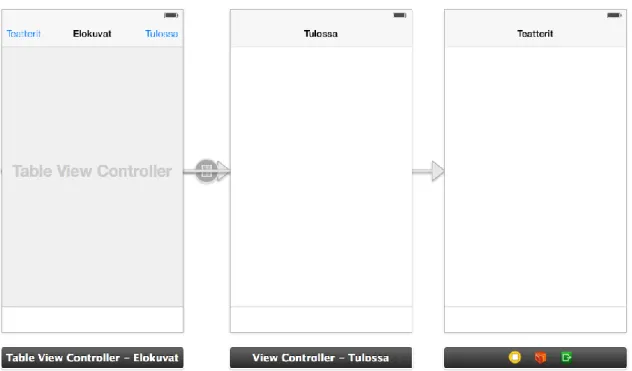
FIGURE 1. First demo application views
The first view is the main view where today’s movies are listed from the theatre I have selected. The second view is for the upcoming events and the last one is for selecting the theatre or city.
Because I used Xcode storyboards for sketching the draft the look and feel is for the Apple products. At this point I did not that to bother me because I knew that the design would change dramatically during the development process as the application was planned to be implemented on both iPhone and Android devices. The first version of the application was a pure Objective-C with no content at all including only the views shown in figure 1 and a small demo on how to navigate in views and the main idea for the application.
20
4.2 End user’s needs and opinions about the design and functionality
After demonstrating the concept to a couple of my friends, the design turned into the view shown in figure 2.
FIGURE 2. Main view with navigation buttons
After discussing the concept we decided to move buttons from up to down to give a better look and feel in different operating systems. Some of my friends are using Android and some iPhone mobile devices. In picture 2 the empty area above the buttons is the Apple’s NSWebView control, the container for the Hybrid application. That is the place where all the application content is going to be displayed.
4.3 Fine-tuning the design for the specification
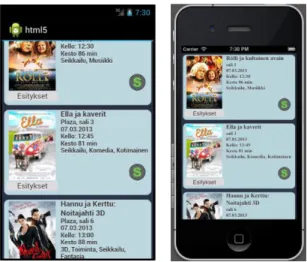
Because fKino was designed to be used in two different platforms I decided to remove the button row totally (Figure 2). I wanted to have the same user experience in both platforms and I did not want to have any native parts controlling the views. Figure 3 below shows the forming application in Android
21
and iOS simulators. The left-hand side is Android and on the right you can see the same code running on an iOS simulator.
FIGURE 3. Android and iOS simulators running the same HTML code
At this point the application did not have any buttons but instead the controls were hidden on the left side of the view. The controls came visible when the user swiped the screen to the right. My friends did not like that so I had to
change the UI once again. After discussing with my friends about the UI and the application functionality, I made the design to look fresh and modern according to my friends’ needs and specifications. I demonstrated a couple of my ideas to my friends and finally the layout and basic functionality were designed. I
decided to use jQuery Mobile UI styles and jQuery’s plugins to create the application frame. Figure 4 shows the main views of the fKino application.
22
4.4 fKino hybrid application data flow description
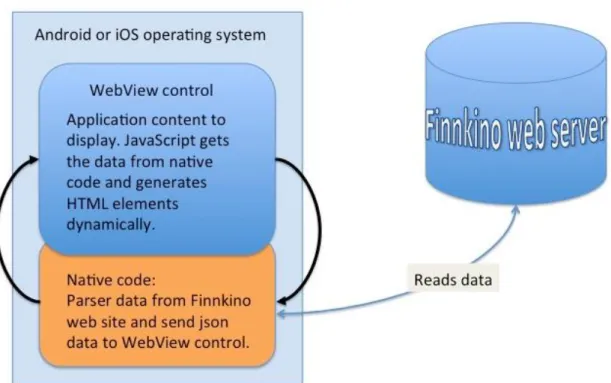
Figure 5 below describes how a hybrid application data flow works with the fKino application. On top of Android or iOS operating system there is a WebView control, which includes the HTML and JavaScript files. In a native code side the WebView control is initialized and loaded. When the HTML page is displayed, it calls a function in the native code side to fetch data from the Finnkino server. When the native method gets the data, it will be parsed. The parser will place the wanted data to json a object and send that object back to JavaScript. JavaScript reads the json object and places the strings and images to the HTML elements where they are needed. When this operation is done, theWebView control displays a dynamically generated web page for the application user.
23
5 APPLICATION MAIN FRAME
The basic need of an Hybrid HTML5 application is to have a container for the HTML UI code. In fKino’s case I created an empty application and filled it with a WebView control. The WebView is initialized from the native code side and filled with an HTML content. fKino uses a single page approach for the UI, which means that all the views are in one HTML file and the navigation is handled by the jQuery mobile libraries. As an example, the HTML code below is a part of the whole file and this part is holding the content displayed in Figure 4, the image on the left.
<div data-role="page" data-theme="a" id="main" class="ui-page"> <div data-role="header" data-position="fixed" data-tap-toggle="false" > <div>
<button type="submit" data-icon="gear" data-inline="true" data- theme="e" name="submit" value="Menu" id="showPanel" ></button>
<div id="playingNow" style="display:inline-block;position:absolute; "><h1 align="center">Ohjelmistossa nyt</h1></div>
</div> </div>
<div data-role="content" id="nowShowing" ></div>
The div id nowShowing is the placeholder for the movie list. All the content images and texts are generated dynamically from the JavaScript side. In this case when the document body element gets the onLoad event it will fire the following JavaScript function, which starts loading the content.
function initElements() { if (window.navigator.onLine){
$.mobile.showPageLoadingMsg("a", "Ladataan listaa", false); setTimeout(function(){
document.location = "iphone::fillMovieInfo"; },500);
} else {…
What this function does is that it will first check if the network is available and if it is, it will display a jQuery mobile wait indicator, and then it will demand the document to move to a new location. In this case “iphone::fillMovieInfo”.
iOS and Android platforms differ from each other when communicating between JavaScript and the native code, and this is the only part where my iOS and Android HTML and JavaScript files are not the same.
The next chapter will describe how the communication is done in these platforms.
24
6 PASSING DATA BETWEEN HTML AND NATIVE CODE
The fKino application was designed to use HTML for the UI and JavaScript to the control UI events and also filling the UI content. All the data for the UI comes from the native side of the application. In iOS the native code is Objective-C and in Android Java. In my study I wanted to learn how these platforms work and I wanted to understand the mechanism of passing data between native the code and HTML. The hardest part in this study was to find out the way that these platforms work when passing data between HTML and the native code. In some cases it is not necessary at all to pass data between the native code and HTML. But when heavy calculations are needed then the native code is faster than JavaScript. Also when the application is designed to store data inserted in the UI, then the native code is needed. JavaScript cannot access a phone’s file system, for example when the user wants to save some data into the device’s memory.
6.1 Communication layer for iOS
In iOS the communication layer is quite old and not so up to date for example compared e.g. to Android. In iOS there is no actual API for communication between native code and HTML or JavaScript. In the JavaScript side
commanding an NSWebView component to a new location will fire an event in the native code side. This event is “shouldStartLoadWithRequest”. This event is executed every time when the NSWebView document location (URL) is
changed. This event can also be used as a controller for passing data from the UI to the native code.
For example from JavaScript side we can make a call
document.location = "iphone::fillMovieInfo";
which will tricker the event shouldStartLoadWithRequest to be executed. In
shouldStartLoadWithRequest function I created a parser, which splits the paramenters by the separator ‘::’
25
NSString *requestString = [[request URL] absoluteString];
NSArray *components = [requestString componentsSeparatedByString:@"::"];
if ([components count] > 1 && [(NSString *)[components objectAtIndex:0] isEqualToString:@"iphone"]) { if([(NSString *)[components objectAtIndex:1] isEqualToString:@"fillMovieInfo"])
{
objectAtIndex:0 = “iphone” and objectAtIndex:1 = “fillMovieInfo” as called from JavaScript.
When this condition is true, the wanted iOS function can be called. In this case we start to parse Finnkino’s event list of shows for the UI.
6.2 Communication layer for Android
In Android the communication layer is more modern and more user friendly compared to iOS. Google has implemented an API for this. In an Android application we can add the JavaScript interface for the WebView instance:
webView = (WebView)findViewById(R.id.webView);
webView.getSettings().setJavaScriptEnabled(true);
webView.loadUrl("file:///android_asset/www/mainview.html");
webView.addJavaScriptInterface(new JavaScriptInterface(this),
"Android");
When the WebView is initialized with JavasriptInterface we need to implement the public class JavasriptInterface, which holds all the needed controller functions.
public class JavaScriptInterface { public void fillMovieInfo() {
And then this fillMovieInfo Interface function can be called from the JavaScript side by calling the introduced interface instance Android.fillMovieInfo(); and after that fillMovieInfo is executed.
26
6.3 Using xml data in iOS
Parsing xml data in iOS can be done with many different third party libraries. However I decided to use Apple’s own NSXMLParser class.
The basic functionality is that the parser reads the URI passed as a parameter for the parser. URI holds the point for the location and also the needed extra parameters for the WEB API, in my case Finnkino’s WEB API date, theatre location etc.
The parser reads the whole xml document and my task is to take the wanted information from that data by implementing the classes for different purposes. The parser implementation includes four parts, which are:
-(id)readXMLfromURL:(NSString * )urlString
This is the starting point for the parser. It includes the initialization for the NSXMLParser class
- (void) parser:(NSXMLParser *)parser didStartElement:…
When the parser reads the xml document, its event didStartElement is executed every time when a new xml element is found. In this case I want to read only the shows
if ([elementname isEqualToString:@"Show"]) {
event = [eventItem alloc]; }
A new event array item is allocated for the show.
When the xml element ends the didEndElement event is executed
- (void) parser:(NSXMLParser *)parser didEndElement:…
This function is the main part where the data is read. For example:
NSString *string = currentNode;
NSString *trimmed = [string stringByTrimmingCharactersInSet:[NSCharacterSet
hitespaceAndNewlineCharacterSet]];
if ([elementname isEqualToString:@"EventID"]) { event.ID = trimmed; }
27
Here I trim the xml node string so that whitespaces and linefeed characters are taken off and when the element is EventID I will save that data into the event class ID property.
- (void) parser:(NSXMLParser *)parser foundCharacters:(NSString *)string
While parser reads the xml nodes every time when it founds characters the foundCharacters event is executed. The current node is held here:
if(!currentNode) {
currentNode = [[NSMutableStringalloc] initWithCapacity:100]; }
else {
[currentNodeappendString:string]; }
6.4 Using xml data in Android
In Android parsing the xml its much more easier. Like in iOS the xml parsing can be done in many ways by using third party libraries. I decided to use a DOM xml parser. The parsing itself with the DOM parser [8] is quite straightforward.
DocumentBuilder db = dbf.newDocumentBuilder(); Dcument doc = db.parse(new
URL(stringURL).openStream());doc.getDocumentElement().normalize(); NodeList showNodeList = doc.getElementsByTagName("Show");
for (int s = 0; s < showNodeList.getLength(); s++) { MovieItem item = new MovieItem();
Node nodeInShowNodeList = showNodeList.item(s);
if (nodeInShowNodeList.getNodeType() == Node.ELEMENT_NODE) { Element elementInShow = (Element) nodeInShowNodeList; item.setID(getTagValue("EventID", elementInShow));
item.setTitle(getTagValue("Title", elementInShow));
item.setOriginalTitle(getTagValue("OriginalTitle", elementInShow)); item.setProductionYear(getTagValue("ProductionYear", elementInShow));
With the DOM parser the xml document elements are read through with a loop, and when the wanted element is found, for example “EventID”, its Tag value is saved into the item class ID property for later use.
28
6.5 Injecting data from native code to webview component
When the xml is parsed into an object, the object is converted to a JSON object so that the JavaScript can understand it. In Android I use the Gson library to do so and in iOS Apple’s own NSJSONSerialization class [9]. And when the object is converted to JSON it can be sent to the UI.
Here is an example how the JSON object is sent in Android to JavaScript: Gson gson = new Gson();
ParseMovieList parser = new ParseMovieList();
ArrayList<MovieItem> events = new ArrayList<MovieItem>();
events = parser.parseMovieList();String jsonStr = gson.toJson(events); webView.loadUrl("JavaScript:addListItem(" + jsonStr +");");
In iOS this is done in a similar way:
NSData *jsonData = [NSJSONSerialization dataWithJSONObject:events options:NSJSONWritingPrettyPrintederror:nil];
NSString *jsonString = [[NSString alloc] initWithData:jsonData encoding:NSUTF8StringEncoding]; [webViewstringByEvaluatingJavaScriptFromString:[NSString stringWithFormat:@"addListItem(%@)", jsonString]];
The JSON object is then sent to the UI by calling a WebView component with the wanted JavaScript function and passing the JSON object as a parameter to that function. In the JavaScript side the object is handled as a regular object where object properties are accessed by using a dot notation.
function addListItem(obj){
var jsonObj = $.parseJSON('[' + obj + ']'); var dttmShowStart = jsonObj[0].dttmShowStart;
All the parsed data is in object’s properties and can be used when filling the UI with a content. The property names are the same as they are introduced in the native code side.
6.6 Injecting data from WebView component to native code
In Android a JavaScript call to the native code is done by using the JavaScriptInterface API e.g. android.someFunction(param1, param2).
29
In iOS we need to use document.location(“key::param1::param2)
The parameter also can be a JSON object but in my case I did not need to use that. If you need to create an object with JavaScript, it is done like this:
var object = new Object(); object.value1 = “value1”; object.value2 = “value2”;
And send that object to the native code, e.g. android.JSONFunction(object) Then in the native code side this object is parsed as an JSON string
JSONObject jsonO = new JSONObject(jsonString);
Events events = new Events();
events.value1 = jsonO.getString("value1"); events.value2 = jsonO.getString("value2");
30
7 FKINO APPLICATION UI STRUCTURE
The fKino uses jQuery mobile UI JavaScript libraries as a basis for its user interface. jQuery mobile UI libraries offer many helper functions and methods for creating the UI and handling the UI events. One of these methods is the ability to create single-page applications where all the views are defined in one single HTML-file and the navigation between the views (pages) is done simply by giving a page data-role for a div element from which jQuery creates a single view. The HTML code:
<div data-role="page" data-theme="a" id="comingSoon">
<div data-role="header" data-position="fixed" data-tap-toggle="false"> <div>
<button type="submit" data-icon="arrow-l" value="Takaisin" data-inline="true" data-theme="e" name="submit" id="comingSoonButton"></button>
<div id="playingSoon" style="display:inline-block; position:absolute; "> <h1 align="center">Tulossa pian</h1></div>
</div> </div>
<div data-role="content" > <div id="soon" ></div> </div>
</div>
is a placeholder for the view, which looks like figure 5 when running the application. The Div element with ID = soon is a placeholder for the single coming soon item e.g. the movie Dark Skies. All the items are filled dynamically from the JavaScript side.
31
FIGURE 6. Coming soon view of the fKino application.
When the user presses the yellow back (“Takaisin”) button, the previous view is loaded by calling a jQuery’s goBack() function, which will load the page
previously stored in the WebView component’s history. When we want to load some specific page we will call
$.mobile.changePage($(#”ThePageIdWeWantToOpen”)).
The $(#”ThePageIdWeWantToOpen”) is the jQuery’s selector syntax when some specific HTML element is needed to be found. In the pure JavaScript this selection can be done by using document.getElementById("id").
the changePage function can be extended with animation properties, too. This means that when the page is changed we can add for example a flip, rotate or pop animation for the transition from one view to another. A transition animation is added to the changePage function by adding the needed options for the function:
$.mobile.changePage($(#”ThePageIdWeWantToOpen”), { transition: "flip", changeHash: false })
32
At the time when I was writing the fKino application, transition animations were not supported fully or they where immature. Only the transition flip worked wheras pop and rotate transitions crashed the application randomly. The goBack function was also immature at that point. When the changePage function was extended with transitions, goBack should have remembered that transition and when navigating back the transition should be done backwards. However, when navigating back, the application crashed or displayed the wrong transition animation.
33
8 DYNAMIC HTML UI
All the content displayed in the fKino application is generated dynamically. The content for different pages are loaded only when the page is shown. When the changePage function is called and the page is displayed the application starts to generate the content for the page. The sequence for this is:
$.mobile.changePage($(“#comingSoon”))
At this point the comingSoon page turns visible and all its elements are ready. The next step is to initialize the view by calling android.readComingSoonList(); This will execute a function in the native code side, which parses the xml
content from the Finnkino XML API into the json object, which is then sent back to JavaScript.
In JavaScript the json object’s properties are placed in an HTML styled string
var soonContent='<div id="soonContainer" class="soonContainer" >'
+'<div id="menu" >'
+'<div class="frame" style="height:140px;">'
+'<img id="itemImage" src="'+eventImage+'" >'
+'</div>'
+'</div>'
+'<div class="contentSoon" id="contentSoon" movieID="' +jsonObj[i].ID + '" date="' + dateStr +'" onclick="">'
+'<h1>' + jsonObj[i].title +'</h1>'
When the string with HTML elements is created it will be placed into the element inside a page. In this case we will want to append a comingSoon page’s soon div element with this content. The following code will do that:
var myDiv = document.getElementById('soon'); var newListItem = document.createElement('div'); newListItem.innerHTML = soonContent;
myDiv.appendChild(newListItem);
First we need to find the element with id = ‘soon’. After that an empty div
element is created and its innerHTML (the data inside the empty div) property is appended with the string soonContent. After this newListItem is appended to soon div and the content is now available in the UI.
34
8.1 HTML UI events
When the user interacts with the HTML, UI jQuery offers a nice and easy way to get different UI events. UI events are handled with jQuery selectors. This means that when an HTML element needs to react to user interactions we need to implement an event handler for it. For example, a button or div element gets the click event:
On the document level we can pin point the event like this:
$(document).on("click",'#movieDetailButton',function(event, ui){
meaning that in a document scope when the element with the id movieDetailButton is clicked, then this function is executed. Another way to do this is to select the element with the id first:
$('#showScheduleEvents').on('click', function(){
Both of these ways will execute a function when the click event is happened. When the event needs to be bound for waiting some event to occur, it is done on the document level:
$(document).on("swiperight", function(event, ui) {
This handler will wait on every page of the application and when the user swipes the UI right this event will trick.
Or when the user changes the orientation of the phone the handler will look like this:
$(window).bind( 'orientationchange', function(e){
And it is handling an orientational change on every page of the application. A selector event can also be added to elements without id. Then the jQuery selection is done like this:
$(document).on("click", 'div.soonContainer', function(event, ui) {
This means that when the div element with a class soonContainer is clicked, an event is tricked.
35
8.2 Debugging JavaScript
When the application includes a lot of JavaScript code it is vital to get debug information from it. Android and iOS environments differ quite a lot in this area. In iOS it is impossible to get console.log (standard browser log) messages, as the Xcode does not support that. However it is possible to use the native code for printing JavaScript debug information in the iOS environment. This is done in iOS by implementing a JavaScript function, which will call the native code with the message as a parameter.
function debug(message) {
document.location = "iphone::log::"+message; }
The message parameter can be a JSON object or one string or integer that needs to be investigated.
In Android debug information can be printed normally as in the web application development. The only thing you need is to call console.log(“message: ” + param); and Android Development Tools LogCat view displays the message. The most important console log that is needed in JavaScript is the json object’s content. To get the json object printed in a human readable form, the object content can be converted to a string with the jQuery method stringify:
console.log(“object: “ + JSON.stringify(object));
If the stringify method is extended with parameters null and 2, the printout will be even cleaner for the reader. JSON.Stringify(object) will put all the string content in on a single line. When the stringify is called with parameters
stringify(object, null, 2) the printout will be intended and the object’s properties are on different lines.
36
9 APPLICATION PERFORMANCE
Even though the iOS environment is more complex compared to Android, the application performance in iOS is much better and responsive compared to Android.
For example parsing and rendering the main view’s list in the iOS simulator takes only 0.6 seconds and on a real iOS device 0.5 (Figure 6).
Same operation on Android simulator takes 7.2 seconds and on hardware 3.4 seconds. Even though, all the hardware acceleration tweaks were turned on in the Android version of the application, the performance was poor. There was a lot of latency when clicking the UI elements and scrolling the different lists. This is the reason why I do not make the Android version of fKino public at this point. Adding two timers to the code did the measurements. One timer was placed at the beginning of the code where the list starts to generate and another timer was added to where the generation is completed. By subtracting the end time from the start time, I got the total time used when loading the list.
However, the iOS version is fast, it seems that Apple’s NSWebView component is more mature compared to its Android counterpart. The iOS version of the fKino has been available in public for some time already and it works on both iPhone and iPad.
FIGURE 7. Performance metering when rendering the main view of the fKino application.
37
CONCLUSIONS
Implementing the fKino application in both iOS and Android environments was delightful and gave me a lot of new information on how to implement a cross platform UI by using jQuery mobile JavaScript libraries. The biggest learning curve with this project was the Objective-C language because it was totally new to me. However, learning Objective-C has been one of my objectives for some time so this project gave me a perfect opportunity to learn it. As a professional web page developer, I am familiar with HTML and JavaScript languages and they did not cause any problems during the implementation process. The hardest part with JavaScript and the native codes was how to send data
between the UI and the native code, as the asynchronous jQuery Ajax calls are not available.
The main purpose of this thesis and project was to learn and understand how one single UI code could be used in multiple different platforms. The only difference between the target applications was the native code part, which I wanted to take with this thesis. I wanted to learn how to create PhoneGap, like a library application, which could be later extended with new native code
methods when communicating between the native code and HTML/JavaScript. I learned the mechanism how data is passed from the UI to the native code and from the native code to the UI. I also learned how to create a responsive and dynamic HTML with jQuery mobile JavaScript libraries. The only thing that is missing from the hybrid application’s communication and more dynamic UI is the ability to send asynchronous AJAX calls to the native code side. If
asynchronous communication would be available, the UI would be more responsive and faster. In fKino’s case all the communication is done via synchronous calls and this will slow down the UI and lock the UI for the time when the execution is running in the native code side.
In my project I wanted to create a real phone application with a real content that could also be useful and give value for the users. I interviewed some of my friends about the needs because I wanted to make this application for the users who use it and need this kind of service.
38
At the beginning of my project I created a sketch for my friends and demonstrated the basic functionality of the application. After a couple of interview rounds, the UI started to get its form and also the application
functionality started to get approved features from my friends and from me. At the very beginning the UI included both native and Hybrid application parts, where buttons were native and a WebView container holding the hybrid part of the application. However, I decided to get rid of the native buttons and make the whole UI with HTML and JavaScript. This decision turned out to be suitable for my friends too, as they are using both Android and iOS devices. This also gives a better feeling about the application, as the native parts look different in these platforms.
The biggest problem, when I started to write the application, was to understand how the native-UI-native communication worked in these platforms. Especially iOS was hard to understand as most of Apple’s development guides are behind the developer license. At first I did not buy the licence because I did not even have the iPhone device. Android however was clear to me all the way from the beginning. Maybe the reason for this easiness was my previous experience with Android development tools and web page development with the Java
programming language. Also, the documentation is available for everyone without any licences.
When the communication between the native and HTML/JavaScript was solved, the application itself was implemented quite fast. As the iOS and Xcode
environment was totally new to me, I wanted to take this opportunity and learn that development environment. So I decided to implement the whole application first with Xcode and after that take the UI code and integrate it into the Android version of the application. This way I also figured out all the differences and modifications needed between these platforms. And it turned out that the only difference is the communication from the UI to the native code if native code is not taken into account. In iOS the communication is done by commanding the document to a new location and handling the document navigation event in the native code side as in Android there is an API for this making the
39
communication much easier. The rest of the UI code did not need any modifications at all.
The biggest concern after implementing the fKino for iOS and starting with the Android version was the Android’s performance to render the UI. Also,
Android’s WebView component was lagging and the UI events were not responsive. I spent quite a long time solving what is the root cause for this. I also tried to turn on all the possible acceleration tweaks I could find but without success. Because I did not find out the cause for slowness, I decided not to make the fKino application public in Google Play. However the iOS version has been available in Apple’s App Store for some time now.
As a result of this project I see a lot of commercial potential by implementing hybrid applications. The only code you need to maintain is the native code and if the UI needs changes, the regression for the UI changes are minimal. I also find it interesting that the UI in different operating systems looks and behaves the same way. Of course this depends on the WebView component’s
performance too. Once the native library is mature enough, new applications can easily be implemented on top of that, meaning that when the native code base is extended with helper functions and support methods, during time the only needed element for the application is the HTML and JavaScript.
If the fKino application had been implemented by using only the native UI components, the application performance would have been better in both environments. Also debugging the application would have been easier.
However, the application’s UI would have been different because the native UI components look and behave differently in iOS and Android.
40
REFERENCES
[1] Korf, M., Oksman, E. 2014. Native, HTML5, or Hybrid: Understanding Your Mobile Application Development Options
Date of retrieval 18.06.2014
http://wiki.developerforce.com/page/Native,_HTML5,_or_Hybrid:_Understandin g_Your_Mobile_Application_Development_Options
[2] Satrom, B. 2014. Building Apps with HTML5: What You Need to Know Date of retrieval 20.06.2014
http://msdn.microsoft.com/en-us/magazine/hh335062.aspx [3] W3Schools Organization, 2014. HTML5 Introduction Date of retrieval 20.06.2014
http://www.w3schools.com/html/html5_intro.asp
[4] W3Schools Organization, 2014. New Elements in HTML5 Date of retrieval 15.07.2014
http://www.w3schools.com/html/html5_new_elements.asp [5] W3Schools Organization, 2014. HTML5 Video
Date of retrieval 16.07.2014
http://www.w3schools.com/html/html5_video.asp
[6] Crowther, R., Lennon, J., Blue, A., Wanish, G. 2014. HTML5 in Action [7] WebPlatform Organization, 2014. HTML5 hybrid applications
Date of retrieval 22.06.2014
http://docs.webplatform.org/wiki/concepts/Internet_and_Web/html5_hybrid_appl ications
[8] Tamada, R. 2014. Androidhive - Android XML Parsing Tutorial Date of retrieval 28.06.2014
http://www.androidhive.info/2011/11/android-xml-parsing-tutorial/ [9] Apple Inc. 2014. NSJSONSerialization Class Reference Date of retrieval 28.06.2014
https://developer.apple.com/library/iOS/documentation/foundation/reference/nsj sonserialization_class/Reference/Reference.html
[10] W3Schools Organization, 2014. JavaScript Tutorial Date of retrieval 17.06.2014
http://www.w3schools.com/js/
[11] W3Schools Organization, 2014. CSS Tutorial Date of retrieval 17.06.2014
41
[12] jQuery Foundation, 2014. jQuery components Date of retrieval 17.06.2014