SAS
®
9.4 Stored
Processes
Developer's Guide
Third Edition
SAS
®Documentation
Copyright © 2015, SAS Institute Inc., Cary, NC, USA All rights reserved. Produced in the United States of America.
For a hard-copy book: No part of this publication may be reproduced, stored in a retrieval system, or transmitted, in any form or by any
means, electronic, mechanical, photocopying, or otherwise, without the prior written permission of the publisher, SAS Institute Inc.
For a web download or e-book: Your use of this publication shall be governed by the terms established by the vendor at the time you
acquire this publication.
The scanning, uploading, and distribution of this book via the Internet or any other means without the permission of the publisher is illegal and punishable by law. Please purchase only authorized electronic editions and do not participate in or encourage electronic piracy of copyrighted materials. Your support of others' rights is appreciated.
U.S. Government License Rights; Restricted Rights: The Software and its documentation is commercial computer software developed at
private expense and is provided with RESTRICTED RIGHTS to the United States Government. Use, duplication or disclosure of the Software by the United States Government is subject to the license terms of this Agreement pursuant to, as applicable, FAR 12.212, DFAR
227.7202-1(a), DFAR 227.7202-3(a) and DFAR 227.7202-4 and, to the extent required under U.S. federal law, the minimum restricted rights as set out in FAR 52.227-19 (DEC 2007). If FAR 52.227-19 is applicable, this provision serves as notice under clause (c) thereof and no other notice is required to be affixed to the Software or documentation. The Government's rights in Software and documentation shall be only those set forth in this Agreement.
SAS Institute Inc., SAS Campus Drive, Cary, North Carolina 27513-2414. July 2015
SAS® and all other SAS Institute Inc. product or service names are registered trademarks or trademarks of SAS Institute Inc. in the USA and other countries. ® indicates USA registration.
Contents
What’s New in SAS 9.4 Stored Processes . . . v
Chapter 1 • Overview of SAS Stored Processes . . . 1
What Are SAS Stored Processes? . . . 1
Why Are SAS Stored Processes Important? . . . 1
Which Clients Can Use SAS Stored Processes? . . . 2
What Are SAS IOM Direct Interface Stored Processes? . . . 4
Chapter 2 • Writing a SAS Stored Process . . . 5
Overview of Writing a Stored Process . . . 5
Using Input Parameters . . . 8
Getting Data and Files into and Out of Stored Processes . . . 13
Setting Result Capabilities . . . 15
Using the %STPBEGIN and %STPEND Macros . . . 17
Using Output Parameters . . . 24
Using Reserved Macro Variables . . . 25
Using Sessions . . . 46
Chapter 3 • Stored Process Server Functions . . . 49
Using Stored Process Server Functions . . . 49
Dictionary . . . 49
Chapter 4 • Managing Stored Process Metadata . . . 57
Choosing or Defining a Server . . . 57
Using Source Code Repositories . . . 59
Registering the Stored Process Metadata . . . 59
Developing Stored Processes with Package Results . . . 61
Using Prompts . . . 67
Making Stored Processes Compatible with 9.2 and Upgrading Stored Processes . . . 68
Chapter 5 • Debugging Stored Processes . . . 71
Examining the SAS Log . . . 71
Using SAS Options . . . 72
Chapter 6 • Composing Stored Process Reports . . . 73
Overview of Stored Process Reports . . . 73
Creating and Managing Stored Process Reports . . . 74
Chapter 7 • Building a Web Application with SAS Stored Processes . . . 77
Overview . . . 78
Configuring the SAS Stored Process Web Application . . . 80
Specifying Web Application Input . . . 89
Uploading Files . . . 94
Authentication in the SAS Stored Process Web Application . . . 102
Using the SAS Stored Process Web Application Pages . . . 105
Using HTTP Headers . . . 115
Embedding Graphics . . . 119
Error Handling . . . 139
Debugging in the SAS Stored Process Web Application . . . 139
Chapter 8 • STP Procedure . . . 143
Overview: STP Procedure . . . 143
Concepts: STP Procedure . . . 144
Syntax: STP Procedure . . . 146
Example: Generating an ODS Document File . . . 167
Appendix 1 • Stored Process Software Requirements . . . 171
General Requirements . . . 171
Client-Specific Requirements . . . 171
Components . . . 172
Appendix 2 • Converting SAS/IntrNet Programs to SAS Stored Processes . . . 175
Overview . . . 175
Compatibility Features . . . 176
Conversion Considerations . . . 177
Overview of Conversion Steps . . . 180
Example . . . 180
Executing Catalog Entries . . . 195
Appendix 3 • Formatting Prompt Values and Generating Macro Variables from Prompts . . 197
Entering Prompt Values in the SAS Stored Process Web Application . . . 197
Macro Variables That Are Generated from Prompts . . . 205
What
ʼ
s New
What’s New in SAS 9.4 Stored
Processes
Overview
SAS 9.4 Stored Processes introduces new features for the STP procedure and the SAS Stored Process Web Application, as well as general enhancements.
STP Procedure Enhancements
The following enhancements have been added to PROC STP:
n Beginning with the third maintenance release for SAS 9.4, you can specify file locations as a fileref of an aggregate storage location and the name of a file or member, enclosed in parentheses, that resides in that location. This is valid for the INPUTFILE, LOG, and OUTPUTFILE statements.
n Beginning with the third maintenance release for SAS 9.4, if you specify a null value for the INPUTPARAM statement, then any default value that was specified for the parameter in metadata is ignored and the value is null. However, if the metadata specifies that the parameter requires a non-blank value, then you will receive an error.
n Beginning with the third maintenance release for SAS 9.4, you can specify multiple lines of text for the value of the input parameter in the INPUTPARAM statement.
n In the second maintenance release for SAS 9.4, the following two automatic macro variables have been added. These macro variables are generated by PROC STP, and are used to communicate status from the stored process. _STPCC
specifies the maximum exit code from the stored process environment. _STPRC
specifies the current return code from the stored process environment. n Beginning with the second maintenance release for SAS 9.4, the
INPUTPARAM statement for PROC STP supports selection groups and an alternate way to specify a range value for an input parameter.
The SERVER= option specifies whether a stored process executes locally or remotely. Remote execution is the default, starting with SAS 9.4.
n The REMOTE argument on the INPUTDATA, INPUTFILE, OUTPUTDATA,
and OUTPUTFILE statements specifies that a data set or file exists on the remote server.
n The MEMTYPE argument on the INPUTDATA and OUTPUTDATA
statements specifies whether the member type is a data set, data view, or catalog. Catalog support is new for PROC STP in SAS 9.4.
n User formats can be specified, and you can use the FMTSEARCH system option to search format catalogs.
For more information about PROC STP, see Chapter 8, “STP Procedure,” on page 143.
SAS Stored Process Web Application
Enhancements
The following enhancements have been added to the SAS Stored Process Web Application:
n In the third maintenance release for SAS 9.4, the App.AllowGuest initialization parameter has been added. This parameter causes a Guest option to be displayed on the SAS Logon Manager sign-in screen. When the AllowGuest parameter is set to true, App.AllowGuest must also be set to
true, or GuestUsername and GuestPassword must be set.
n You can create a NotFound.jsp page to display when the stored process cannot be located.
n The following initialization parameters have been added:
AllowBasicAuthentication enables the SAS Stored Process Web Application to bypass the Logon Manager and to handle user verification through the
http://yourserver.com:8080/ SASStoredProcess/do1 URL.
InternalURL specifies a URL for the SAS Stored Process
Web Application to use to retrieve resource files.
RTL.SupportedLocales specifies a comma-delimited list of locales that should be displayed right to left. For SAS 9.4, this is supported only by the SAS Stored Process Web Application prompt page.
For more information, see “Initialization Parameters”.
n Instructions for enabling logging and encoding characters have been added. For more information, see “Debugging in the SAS Stored Process Web Application ”.
n Instead of using a JSP file to create a custom input form, you can use HTML following the CARDS4 statement in a DATA step. For more information, see “Passing Data through the DATA Step”.
General Enhancements
The following general enhancements have been added to SAS Stored Processes:
n In the third maintenance release for SAS 9.4, the following reserved macro variables have been added:
_HTTP_TOKENAUTH enables token authentication to a SAS Content Server when _RESULT is set to
PACKAGE_TO_WEBDAV.
_TIMEZONE sets the TIMEZONE SAS system option.
n You can use the SYSPROCESSMODE automatic macro variable to find out which server type the stored process is using to execute. For more
information about using the automatic macro variable SYSPROCESSMODE, see “SYSPROCESSMODE Automatic Macro Variable” in SAS Macro
Language: Reference.
n The following reserved macro variables have been added:
_FILE_DESCRIPTION specifies the description that is to be used for all files that are added to a package.
_FMTSEARCH specifies which format catalogs need to be
appended to the FMTSEARCH option.
_REPORTID specifies the ID of the generation of a stored
process report.
_REQENCODING specifies the servlet input encoding.
_USERLOCALE contains the locale for the user that was set in the user preferences (for web clients).
The following values have been added for existing reserved macro variables:
_ACTION=RECALL can be combined with the PROPERTIES value
to retain prompt values throughout a session. _RESULT=PACKAGE specifies that a transient package is returned to
the client.
For more information, see “Using Reserved Macro Variables”.
1
Overview of SAS Stored Processes
What Are SAS Stored Processes? . . . 1
Why Are SAS Stored Processes Important? . . . 1
Which Clients Can Use SAS Stored Processes? . . . 2
What Are SAS IOM Direct Interface Stored Processes? . . . 4
What Are SAS Stored Processes?
A stored process is a SAS program that is stored on a server and defined in metadata, and which can be executed as requested by client applications. You can use stored processes for web reporting, analytics, building web applications, delivering packages to clients or to the middle tier, and publishing results to channels or repositories. Stored processes can also access any SAS data source or external file and create new data sets, files, or other data targets that are supported by SAS.
Why Are SAS Stored Processes Important?
The ability to store your SAS programs on the server provides an effective method for change control management. For example, instead of embedding the SAS code into client applications, you can centrally maintain and manage this code from the server. This gives you the ability to change your SAS programs and at the same time ensure that every client that invokes a stored process always gets the latest version available.
The stored process concept becomes even more powerful when you consider that these SAS programs can be invoked from multiple client contexts. For example, you might deploy Java applets and Windows applications that invoke your stored processes. If your strategy is to use a multi-tiered architecture, you can use Enterprise JavaBeans (EJB) technology, for example, to invoke the same stored processes from an application server.
Using stored processes also enhances security and application integrity because the programs that access your sensitive data are contained on the server instead of being widely distributed with the client applications.
Which Clients Can Use SAS Stored
Processes?
SAS Stored Processes can be used in many different client applications. The following list gives a brief overview of each application so that you can determine which client best meets your needs.
JMP
You can use JMP to run stored processes and view results. See Using JMP for more information.
SAS Add-In for Microsoft Office
The SAS Add-In for Microsoft Office is a Component Object Model (COM) add-in that extends Microsoft Office by enabling you to dynamically execute stored processes and embed the results in Microsoft Word documents, Microsoft Excel spreadsheets, and Microsoft PowerPoint presentations. Also, within Excel, you can use the SAS add-in to access and view SAS data sources or any data source that is available from your SAS server, and analyze SAS or Excel data by using analytic tasks. For more information about using stored processes with the SAS Add-In for Microsoft Office, see the SAS Add-In for Microsoft Office Online Help, which is located within the product.
SAS BI Dashboard
You can use SAS BI Dashboard to execute stored processes and to include stored processes or stored process results in a dashboard. When a
dashboard has an indicator that was configured with stored process indicator data, users can see output from that stored process if it belongs to the displayed dashboard. See SAS BI Dashboard: User's Guide for more information.
SAS BI Web Services
SAS BI Web Services provide a web service interface to SAS Stored Processes. Starting with SAS 9.3, all stored processes are available individually for execution using web services, without any action required from the user. For more information about using stored processes with SAS BI Web Services, see the SAS BI Web Services: Developer's Guide.
SAS Data Integration Studio
SAS Data Integration Studio enables its administrators to publish jobs as stored processes. SAS Data Integration Studio can generate code that converts a job into a stored process, which is saved to a file and can be executed later by the SAS Stored Process Server. Metadata about the stored process is saved in the current metadata repository. For more information about using stored processes with SAS Data Integration Studio, see the SAS Data Integration Studio product Help.
SAS Enterprise Guide
SAS Enterprise Guide provides an integrated solution for authoring, editing, and testing stored processes. You can create stored processes from existing or new SAS code and create stored processes automatically from SAS Enterprise Guide tasks. Metadata registration and source code management are handled from one interface. SAS Enterprise Guide also has the capability to execute stored processes, which enables you to modify and test your stored process without leaving the SAS Enterprise Guide environment. For
more information about using stored processes with SAS Enterprise Guide, see the SAS Enterprise Guide product Help.
SAS Information Delivery Portal
The SAS Information Delivery Portal provides integrated web access to SAS reports, stored processes, information maps, and channels. If you have installed the SAS Information Delivery Portal, you can make stored processes available to be executed from the portal without the need for additional programming. The SAS Information Delivery Portal includes the SAS Stored Process Web Application. For more information about using stored processes with the SAS Information Delivery Portal, see the SAS
Intelligence Platform: Web Application Administration Guide.
SAS Information Map Studio
Stored processes can be used to implement information map data sources. Stored processes can use the full power of SAS procedures and the DATA step to generate or update the data in an information map. For more
information about stored process information maps, see the SAS Information Map Studio product Help.
SAS Stored Process Web Application
The SAS Stored Process Web Application is a Java web application that can execute stored processes and return results to a web browser. The SAS Stored Process Web Application is similar to the SAS/IntrNet Application Broker and has the same general syntax and debugging options as the Application Broker. For examples of this component, see “Using the SAS Stored Process Web Application Pages” on page 105. The SAS Stored Process Web Application is included with the SAS Web Infrastructure Platform, which is a component of SAS Integration Technologies. SAS Web Report Studio
You can use SAS Web Report Studio to execute stored processes and to include stored processes or stored process results in a report. For more information about using stored processes with SAS Web Report Studio, see the SAS Web Report Studio: User’s Guide, the SAS Intelligence Platform:
Web Application Administration Guide, and the SAS Web Report Studio
product Help.
Stored Process Java API
The Stored Process Java API is a Java application programming interface (API) that enables you to execute stored processes from a Java program. This API is commonly used in JSP pages, but can also be used from servlets, custom tagsets and other Java applications. The Stored Process Java API is part of SAS Foundation Services; you must deploy SAS Foundation Services in order to use the Stored Process Java API. If you want to register new stored processes and modify metadata for existing stored processes programmatically, use the
com.sas.services.storedprocess.metadata API. See the API Javadoc at http://support.sas.com/rnd/javadoc/94 for more details.
Stored Process Windows API
The Stored Process Windows API is a Microsoft .NET application
programming interface (API) that enables you to execute stored processes from within the .NET framework (using C# or VB.NET, for example). This API is used by both SAS Enterprise Guide and SAS Add-In for Microsoft Office, and can be used to write ASP.NET or Windows applications. The Stored Process Windows API is part of SAS Integration Technologies; you must deploy SAS Integration Technologies in order to use the Stored Process Windows API.
What Are SAS IOM Direct Interface Stored
Processes?
There are two different types of stored processes. A limited form of stored processes, IOM Direct Interface Stored Processes, was introduced in SAS 8. This type of stored process operates on a SAS Workspace Server and produces packages only. IOM Direct Interface Stored Processes are still fully supported. However, the focus of this documentation is on SAS Stored Processes. SAS Stored Processes are new with SAS® 9, and they can be used with either a SAS Workspace Server or a SAS Stored Process Server.
2
Writing a SAS Stored Process
Overview of Writing a Stored Process . . . 5
Using Input Parameters . . . 8
Overview of Input Parameters . . . 8
Standard Header for Parameters . . . 9
Defining Input Parameters . . . 10
Special Character Quoting . . . 11
Input Parameters with Multiple Values . . . 12
Hiding Passwords and Other Sensitive Data . . . 13
Getting Data and Files into and Out of Stored Processes . . . 13
Input Files . . . 13
Input Data . . . 14
Output Files . . . 14
Output Data . . . 15
Setting Result Capabilities . . . 15
Using the %STPBEGIN and %STPEND Macros . . . 17
Overview of %STPBEGIN and %STPEND . . . 17
ODS Options . . . 18
Overriding Input Parameters . . . 18
Results . . . 19
Errors . . . 20
Advanced Package Publishing . . . 20
Using Output Parameters . . . 24
Using Reserved Macro Variables . . . 25
Using Sessions . . . 46
Overview of Sessions . . . 46
Creating a Session . . . 47
Using the Session . . . 47
Deleting the Session . . . 48
Limitations . . . 48
Overview of Writing a Stored Process
A stored process is a SAS program that is hosted on a server and described by metadata. Stored processes can be written by anyone who is familiar with the SAS programming language or with the aid of a SAS code generator such as
follows:
1 Write the stored process.
2 Choose or define a server. For more information, see “Choosing or Defining a Server” on page 57.
3 Register the stored process metadata. For more information, see “Registering the Stored Process Metadata” on page 59.
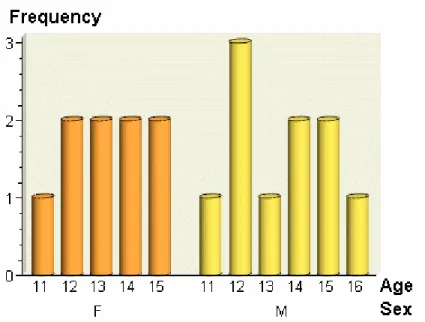
Almost any SAS program can be a stored process. A stored process can be written using the SAS program editor, SAS Enterprise Guide, or any text editor. The following program is a typical stored process:
%STPBEGIN;
title 'Age analysis by sex'; footnote;
proc sort data=sashelp.class out=class; by sex age; run; proc gchart data=class;
vbar3d age / group=sex discrete nozero shape=cylinder patternid=group; run; quit; title;
proc print data=class; by sex age;
id sex age;
var name height weight; run;
%STPEND;
The %STPBEGIN and %STPEND macros initialize the Output Delivery System (ODS) and deliver the output to the client. This stored process is capable of generating multiple output formats, including HTML, XML, PDF, CSV, and custom tagsets and then delivering the output through packages or streaming output. For more information, see “Setting Result Capabilities” on page 15.
Note: Because the %STPBEGIN and %STPEND macros initialize the Output Delivery System (ODS), you should use them only if your stored process creates ODS output. They are not necessary if the stored process is creating only a table and does not create a report. Another case where they should not be used is when your stored process writes directly to the _WEBOUT fileref, either using the DATA step or some other method. Writing to _WEBOUT is a common technique used in SAS/IntrNet programs.
Figure 2.1 Stored Process Results: Bar Chart
Using Input Parameters
Overview of Input Parameters
Most stored processes require information from the client to perform their intended function. This information can be in the form of presentation options for a report, selection criteria for data to be analyzed, names of data tables to be used or created, or an unlimited number of other possibilities. Input parameters
are the most common way to deliver information from a client to a stored process.
Input parameters are defined as name/value pairs. They appear in a stored process program as global macro variables. For example, if you have a stored process that analyzes monthly sales data, you might accept MONTH and YEAR as input parameters. The stored process program might be similar to the following code:
%stpbegin;
title "Product Sales for &MONTH, &YEAR"; proc print data=sales;
where Month eq "&MONTH" and Year eq &YEAR; var productid product sales salesgoal; run;
%stpend;
Because input parameters are simply macro variables, they can be accessed through normal macro substitution syntax (¶m-name) or through any other SAS functions that access macro variables (SYMGET, SYMGETC, or SYMGETN). Parameters follow the same rules as SAS macro variables. Names must start with an alphabetic character or underscore and can contain only alphanumeric characters or underscores. The name can be no more than 32 characters long and is not case sensitive. Values can contain any character except a null character and can be up to 65,534 characters in length. For stored processes that are compatible with 9.2 and that run on the workspace server, values are limited to approximately 5950 bytes in length and cannot contain nonprintable characters (including line feeds or carriage returns).
Each stored process client interface provides one or more methods to set input parameters. The Stored Process Java API provides a direct programming interface to set name/value pairs. The SAS Stored Process Web Application allows name/value pairs to be specified directly on a URL or indirectly through posting HTML form data. The SAS Add-In for Microsoft Office provides a property sheet interface to specify parameters.
There are many reserved parameters that are created by the server or the stored process client interface. For a list of these variables, see “Using Reserved Macro Variables” on page 25.
Standard Header for Parameters
For stored processes that are compatible with 9.2, parameters are not initialized in the same way for the stored process server and the workspace server. The stored process server sets parameter values before the stored process begins to execute. This means the first line of code in the stored process can access any input parameter macro variable. The workspace server does not set input parameters into macro variables until it reaches a *ProcessBody; comment line in the stored process:
*ProcessBody;
A stored process that does not contain this line never receives input parameters when executed on a workspace server. Also, without this comment, the stored process is not able to use reserved macro variables, such as _METAUSER.
types) with %GLOBAL declarations for all of your input parameters followed by the *ProcessBody; comment:
/****************************************************** * Standard header comment documenting your
* stored process and input parameters.
* ************************************************** */ %global parmone parmtwo parmthree;
%global parmfour; *ProcessBody;
... remainder of the stored process ...
The %GLOBAL declarations create an empty macro variable for each possible input parameter and enable you to reference the macro variable in the stored process even if it was not set by the stored process client. If you do not declare input parameters in a %GLOBAL statement, then any references to an unset input parameter will result in WARNING messages in the SAS log.
Note: Starting with 9.3, you do not need to include the *ProcessBody; comment.
Defining Input Parameters
Most stored process client interfaces allow a client to pass any input parameter. Input parameters are defined in SAS Management Console as prompts. Several types of macro variables are generated from prompts, depending on the type of prompt and what other information is included in the prompt definition. There is no requirement to define parameters before executing the stored process, but there are many advantages to describing parameters in stored process metadata. Here are some of the advantages:
n Parameter definitions can specify labels and descriptive text. This information can be used by client interfaces to present a more attractive and informative user interface. Other presentation options include grouping parameters. n Default values can be specified. However, if the parameter is not required
and the default value is cleared in the client, then the parameter value is empty when passed to the stored process.
Note: The STP procedure uses the default value if a value is not specified. n Default values can be flagged as read-only to allow a fixed parameter value
to always be passed in a stored process. This can be useful when using an existing program that accepts many input parameters. You can register a new, simpler stored process that has some fixed value parameters and fewer client-specified parameters. You can also register multiple stored processes for a single program. Each stored process definition can pass in unique fixed parameter values to the executing program to force a particular operation or otherwise affect the execution of the stored process.
n Parameters can be flagged as required. A stored process does not run unless the client specifies values for these parameters.
n Parameters can be limited to a specific type such as text or date. Defining a parameter type causes certain client user interfaces (such as SAS Add-In for Microsoft Office) to present more appropriate input controls. All interfaces
reject stored process requests with input parameters that do not match the specified type.
n Parameter values can be limited by specifying enumerated lists or ranges of valid values for a parameter.
n Dates and times, as well as date ranges and time ranges, can be specified as relative values.
n Input parameters can be shared between stored processes. Other applications or software features that support prompts can also take advantage of these prompts.
n Input parameters can be populated dynamically from a data source. n Dependencies can be specified between input parameters.
n Selection groups can be used.
Parameter metadata for a stored process can be added or modified using SAS Management Console. To define an input parameter for a stored process, click New Prompt in the New Stored Process wizard or on the Parameters tab in the Stored Process Properties dialog box. For an example of how to add an input parameter to a stored process definition, see “Adding a Parameter to the Stored Process Definition” on page 191.
For information about using prompt features, see “Using Prompts” on page 67. For more information about how to specify values for prompt, and macro variables that are generated by prompts, see Appendix 3, “Formatting Prompt Values and Generating Macro Variables from Prompts,” on page 197. For more information about prompt types and defining prompts, see the product Help.
Special Character Quoting
Input parameter values are specified by the stored process client at run time. The author of a stored process has little control over the values a client can specify. Setting the values directly into SAS macro variables enables clients to insert executable macro code into a stored process and can lead to unexpected behavior or unacceptable security risks. For example, if an input parameter named COMP was set to Jones&Comp. and passed directly into the macro variable, then any references to &COMP in the stored process program would lead to an invalid recursive macro reference. To avoid this problem, stored process parameters are masked with SAS macro quoting functions before being set into macro variables. In the Jones&Comp example, the COMP parameter has the following setting:
%let COMP=%nrstr(JonesComp.);
The stored process can then freely use &COMP without special handling for unusual input values. Special characters that are masked for input parameters are the ampersand (&), apostrophe ('), percent sign (%), quotation marks ("), and semicolon (;).
There might be special cases where you want to unmask some or all of the special characters in an input parameter. The STPSRV_UNQUOTE2 function unmasks only matched apostrophe (') or quotation mark (") characters. For more information, see “STPSRV_UNQUOTE2 Function” on page 54. This can be useful for passing in parameters that are used as SAS options. The
%UNQUOTE macro function unquotes all characters in an input parameter, but you should use this function only in very limited circumstances. You should carefully analyze the potential risk from unexpected client behavior before
from multiple clients. Some client interfaces perform little or no checking of input parameter values before they are passed in to the stored process.
Note: An input parameter to a stored process that is compatible with 9.2 and that is executing on a workspace server cannot contain both apostrophe (') and quotation mark (") characters. Attempting to set such an input parameter results in an error.
Input Parameters with Multiple Values
Parameters with multiple values (or alternatively, multiple input parameters with the same name) can be useful in some stored processes. For example, an HTML input form that is used to drive a stored process might contain a group of four check boxes, each named CBOX. The value associated with each box is optOne, optTwo, optThree, and optFour. The HTML for these check boxes might be
<input type="CHECKBOX" name="CBOX" value="optOne"> <input type="CHECKBOX" name="CBOX" value="optTwo"> <input type="CHECKBOX" name="CBOX" value="optThree"> <input type="CHECKBOX" name="CBOX" value="optFour">
If you select all four boxes and submit the form to the SAS Stored Process Web Application, then the query string looks like this:
&CBOX=optOne&CBOX=optTwo&CBOX=optThree&CBOX=optFour
Macro variables cannot hold more than one value. The two types of servers that execute stored processes handle this problem in different ways.
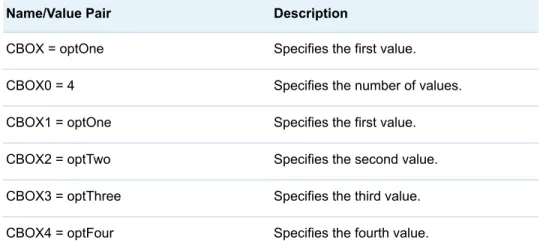
The stored process server uses a macro variable naming convention to pass multiple values to the stored process. A numeric suffix is added to the parameter name to distinguish between values. The number of values is set in
<param-name> 0, the first value is set in <param-<param-name>1, and so on. In the previous
example, the following macro variables are set as shown in the following table:
Table 2.1 Automatically Generated Variables
Name/Value Pair Description
CBOX = optOne Specifies the first value. CBOX0 = 4 Specifies the number of values. CBOX1 = optOne Specifies the first value. CBOX2 = optTwo Specifies the second value. CBOX3 = optThree Specifies the third value. CBOX4 = optFour Specifies the fourth value.
Note that the original parameter macro variable (CBOX) is always set to the first parameter value.
Any client application can generate multiple value parameters. The typical uses for multiple values are check box groups in HTML input forms and selection lists that allow multiple selection.
If the parameter name is the same as one of the generated variables, then the following error is returned:
Multiple definitions of a prompt name are not allowed. Certain prompt types expand to multiple prompt names.
Hiding Passwords and Other Sensitive Data
If you are creating a prompt for a password and want the text to be masked as the user is typing, use a text type prompt, and then select Masked single line (for password entry) as the text type. For more information, see the prompt help in SAS Management Console.
Even if you decide not to use a masked prompt, the SAS log exposes programs and input parameters, which could pose a security issue. There are some actions that you can take to hide passwords and other sensitive data from the SAS log. Password values are hidden from the SAS log for any input parameters with the _PASSWORD suffix anywhere in the parameter name (for example, ABC_PASSWORD, _PASSWORDABC). You can disable the SAS log with the DebugMask web application initialization parameter. For more information, see “Debugging in the SAS Stored Process Web Application ” on page 139. You can also use the prefix _NOLOG_ with macro variables to hide request variable values.
The _NOLOG_ prefix enables you to create special macro variables that can be sent to the stored process server without publishing the macro variable values in the SAS log. The special macro variables must start with the prefix _NOLOG_. The prefix is not case sensitive. Here is an example of an input parameter with the _NOLOG_ prefix:
http://yourserver/SASStoredProcess/do?
_program=/WebApps/Sales/Employee+Salary&_nolog_salary=secretpw
If _NOLOG_SALARY is displayed in the SAS logs, the log shows the following:
_NOLOG_SALARY=XXXXXXXX;
Note: The _NOLOG_ prefix and the _PASSWORD suffix are effective only if your stored process is running on a stored process server.
Getting Data and Files into and Out of
Stored Processes
Input Files
A stored process can accept input in the form of an input file. An input file is a SAS fileref that is set up before the stored process begins execution. The fileref can point to a local file on the server, a stream fed by the client, a temporary file written by the client, or any other valid fileref that is set up by a stored process client.
process metadata. The metadata can provide descriptive information or hints to guide clients in the use of input files. Input files can be optional or required. Input files are not assigned if the client does simply corresponding input.
Input Data
SAS programs frequently process input data sets. An input data set is defined by a macro variable that contains the data set name. Any setup required to access the data set (typically a libref assignment) is handled by the stored process framework.
The following code is an example of a stored process with an input data set named SALESDATA:
%stpbegin;
title "Sales for &MONTH, &YEAR"; proc print data=&SALESDATA
where Month eq "&MONTH" and Year eq &YEAR var productid product sales salesgoal; run;
%stpend;
Different stored process client APIs provide different mechanisms for supplying input data sets to a stored process, including:
Server data sets
specifies that the macro variable is set to the two-level data set name and, if necessary, the required libref is assigned.
Client data sets
specifies that the client data set is copied to the WORK library on the server system and the macro variable is set to the temporary data set name. XML data
specifies an XML file or data stream as input data to the stored process. The XML data is passed to the stored process via a temporary file and an XML engine libref is assigned to the temporary file. The client can specify an XML map to describe the format of the XML.
Client API access
specifies direct data access APIs that are appropriate for the technology (for example, a JDBC connection for a Java API.)
Output Files
A stored process can create output in the form of an output file. An output file is a SAS fileref that is set up before the stored process begins execution. The fileref can point to a local file to be created on the server, a stream consumed by the client, a temporary file that is read by the client after execution is complete, or any other valid fileref that is set up by a stored process client.
Output files are identified by a unique fileref name and are defined in the stored process metadata. The metadata can provide descriptive information or hints to guide clients in the use of output files. Output files can be optional or required. Optional output files are not assigned if the client does not request the output.
The _WEBOUT fileref is frequently used for streaming output from a stored process. The client API can assign the _WEBOUT fileref to a server local file, a temporary file, or any other valid fileref. In the streaming output use case, _WEBOUT is assigned to a stream using the CACHE access method. Then ODS is configured to write to _WEBOUT, and a handle to the _WEBOUT stream is returned to the client web application. The client web application can read output from the stream as it is written by the stored process.
Output Data
Stored processes support the generation of output data sets. An output data set is defined by a macro variable that contains the data set name. Any setup required to access the data set (typically a libref assignment) is handled by the stored process framework.
The following code is an example of a stored process that generates an output data set named SCORING:
%stpbegin; data &SCORING; set MYLIB.RAWDATA;
score = /* insert scoring algorithm based on input parameters here */; run;
%stpend;
Different stored process client APIs provide different mechanisms for accessing output data sets, including:
Server data sets
specifies that the macro variable is set to the two-level data set name and, if necessary, the required libref is assigned.
Client data sets
specifies that the macro variable is set to a temporary data set name in the WORK library on the server system. After execution is complete, the data set is copied to the client system.
XML data
assigns a temporary fileref and a corresponding XML engine libref. The macro variable is set to a table in the XML libref. After execution is complete, the resulting XML file is copied to the client system.
Client API access
specifies direct data access APIs that are appropriate for the technology (for example, a JDBC connection for a Java API.)
Setting Result Capabilities
A stored process is a SAS program that can produce any type of output that a valid SAS program can produce. Output could include data sets, external files, email messages, SAS catalogs, packages, and many other objects. In some cases, the output (or a result) is delivered to the client application that is
server.
When you register the stored process, you can specify what type of output the stored process can produce. You can specify Stream, Package, both output types, or neither output type.
When you run the stored process, the client application chooses the type of output that it prefers. For example, when SAS Web Report Studio runs a stored process, package output is produced. There are four types of client output: n The simplest type of output, or result type, is none. The client receives no
output from the stored process. The stored process is still able to create or update data sets, external files, or other objects, but this output remains on the server. This result type is indicated when the input parameter _RESULT is set to STATUS because only the program status is returned to the client. n Streaming output delivers a data stream, such as an HTML page or XML
document, to the client. This result type is indicated when _RESULT is set to STREAM. The data stream can be textual or binary data and is visible to the stored process program as the _WEBOUT fileref. Any data that is written to the _WEBOUT fileref is streamed back to the client application.
n Package output can be either transient, meaning that the output is returned only to the client and exists only in the current session, or permanent, meaning that the package is stored or published somewhere and can be accessed even after the session ends.
o Transient package output returns a temporary package to the client. The
package can contain multiple entries, including SAS data sets, HTML files, image files, or any other text or binary files. The package exists only as long as the client is connected to the server. This result type is a convenient way to deliver multiple output objects (such as an HTML page with associated GIF or PNG images) to a client application. Transient package output is indicated when _RESULT is set to
PACKAGE_TO_ARCHIVE and the input parameter _ARCHIVE_PATH is set to TEMPFILE.
o Permanent package output creates a package in a permanent location on
a WebDAV server or in the server file system. The package is immediately accessible to the stored process client, but is also permanently accessible to any client with access to WebDAV or the server file system. This result type is a convenient way to publish output for permanent access. Output to WebDAV is indicated when _RESULT is set to PACKAGE_TO_WEBDAV. The input parameter _COLLECTION_URL contains the target location. The input parameters _HTTP_USER and _HTTP_PASSWORD might be set if the WebDAV server is secured and credentials are available. The _HTTP_PROXY_URL parameter is set if an HTTP proxy server is required to access the WebDAV server. Output to the server file system is indicated when _RESULT is set to
PACKAGE_TO_ARCHIVE. The input parameters _ARCHIVE_PATH and _ARCHIVE_NAME contain the target repository and filename, respectively.
Permanent package output can also be published to a channel, an email recipient, or to SharePoint. For more information about the parameters that are used for publishing packages, see “Advanced Package Publishing” on page 20.
Note: Although the result type is chosen when you define a stored process, the result type can be changed by the client application through calls to the Stored Process Service API. Where possible, it is recommended that you write stored processes to support any appropriate client result type. This enables a client application to select the result type most appropriate for that application. The program can determine the desired client result type by examining the _RESULT input parameter. The %STPBEGIN and %STPEND macros include support for any of the four result types. For more information, see “Using the %STPBEGIN and %STPEND Macros” on page 17. The following stored process is capable of generating streaming, transient package, or permanent package output. (It can also be run with _RESULT set to STATUS, but this would produce no useful result.)
%stpbegin;
proc print data=SASHELP.CLASS noobs; var name age height;
run; %stpend;
The input parameters that were mentioned previously are set by the stored process client APIs and are reserved parameters. They cannot be overridden by passing in new values through the normal parameter interface. Special API methods are provided to set the result type and associated parameters for a stored process. For more information about specific input parameters, see “Using Reserved Macro Variables” on page 25. For more information about developing stored processes that product package results, see “Developing Stored Processes with Package Results ” on page 61.
Using the %STPBEGIN and %STPEND
Macros
Overview of %STPBEGIN and %STPEND
The %STPBEGIN and %STPEND macros provide standardized functionality for generating and delivering output from a stored process. This enables you to write stored processes that generate content in a variety of formats and styles with minimal programming effort. Here is a typical stored process that uses these macros:
/* ***************************************************** * Header comment documenting your
* stored process and input parameters.
* ************************************************** */ %global input parameters;
... any pre-processing of input parameters ... %stpbegin;
... stored process body ... %stpend;
%STPEND macro calls. The %STPBEGIN macro initializes the Output Delivery System (ODS) to generate output from the stored process. The %STPEND macro terminates ODS processing and completes delivery of the output to the client or other destinations. The macros must be used as a matched pair for proper operation. Streaming output and package output are supported. These macros rely on many reserved macro variables to control their actions. For a more detailed description of each macro variable mentioned in the following sections, see “Using Reserved Macro Variables” on page 25. Because the %STPBEGIN and %STPEND macros initialize the Output Delivery System (ODS), you should use them only if your stored process creates ODS output. For example, the macros are not necessary if the stored process is creating only a table. If you do use the macros, then you should set _ODSDEST to NONE to disable ODS initialization. In these cases, your stored process must explicitly create any output.
ODS Options
ODS options are specified by various global macro variables. These variables are normally set by input parameters, but can be modified by the stored process. The following variables affect ODS output:
n _ENCODING n _GOPT_DEVICE n _GOPT_HSIZE n _GOPT_VSIZE n _GOPT_XPIXELS n _GOPT_YPIXELS n _GOPTIONS n _ODSDEST n _ODSOPTIONS n _ODSSTYLE n _ODSSTYLESHEET
The _ODSDEST variable is important because changing this variable enables your stored process to generate HTML, PDF, PostScript, or a variety of other formats, including user-written tagset destinations. Many variables enable you to override ODS options. You must remember to verify whether any options that are specified by the stored process or its clients are compatible with the output destinations that you plan to support.
Some ODS options (for example, BASE) are set based on the result options. For more information, see “Results” on page 19. These options are generally transparent to the stored process author, but they can make it difficult to modify some ODS options in your stored process.
Overriding Input Parameters
Macro variables that are recognized by the %STPBEGIN macro can be set or modified by the stored process. This is usually done to deny or limit client
choices for that variable. For example, a stored process that requires the use of a particular style might begin with the following statements:
%global _ODSSTYLE; %let _ODSSTYLE=MyStyle; %stpbegin;
Any client-specified value for the _ODSSTYLE variable is ignored and the MyStyle style is always used. A more elaborate implementation might validate an input parameter against a list of supported values and log an error or choose a default value if the client input is not supported.
A stored process can modify the macro variables that are used by the %STPBEGIN macro at any time until %STPBEGIN is called. Modifying these reserved macro variables after %STPBEGIN has been called is not
recommended.
Results
The %STPBEGIN and %STPEND macros implement several options for delivering results. For an introduction to the standard options for stored process results, see “Setting Result Capabilities” on page 15. In most cases, a stored process that uses these macros can support all the standard result types with no special coding. The _RESULT variable defines the result type. The following values are supported:
STATUS
returns only a completion status. An ODS destination is not opened, but the ODS LISTING destination is closed.
STREAM
returns the body or file output from ODS as a stream. This is the default result type if _RESULT is not set.
There are several values for _RESULT that generate packages. Packages can be delivered directly to the client and published to a more permanent location on the server file system, a WebDAV server, or other destinations. Package
creation and delivery are controlled by many reserved macro variables. Here are the variables that are valid for all package destinations:
n _ABSTRACT n _DESCRIPTION n _EXPIRATION_DATETIME n _FILE_DESCRIPTION n _NAMESPACES n _NAMEVALUE
Here are additional variables that are recognized for specific _RESULT settings: PACKAGE_TO_ARCHIVE
creates an archive package on the server file system that contains the generated output. The _ARCHIVE_PATH and _ARCHIVE_NAME variables specify where the package is created. In addition, _ARCHIVE_FULLPATH is set by %STPEND to hold the full pathname of the created archive package.
returns a package to the stored process client. It can also simultaneously create an archive package on the server file system if _ARCHIVE_PATH and _ARCHIVE_NAME are set. This option is valid only on the workspace server, and only for stored processes that are compatible with 9.2.
PACKAGE_TO_WEBDAV
creates a package as a collection on a WebDAV-compliant server. The location of the package is defined by _COLLECTION_URL or
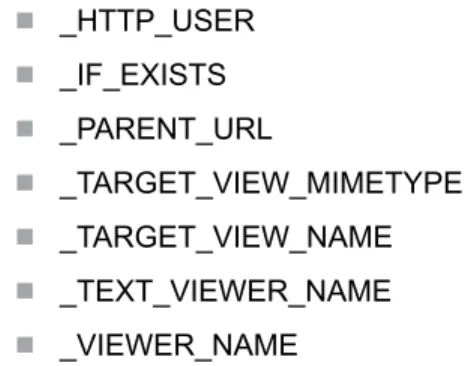
_PARENT_URL. Other relevant variables include _HTTP_PASSWORD, _HTTP_PROXY_URL, _HTTP_TOKENAUTH, _HTTP_USER, and _IF_EXISTS.
The %STPBEGIN macro configures ODS to create output files in a temporary working directory. The %STPEND macro then creates the package from all of the files in this temporary directory. The temporary directory is defined by the _STPWORK variable. This variable should not be changed by the stored process, but new entries can be added to the output package by creating files in this directory. For example, the XML LIBNAME engine might be used to create one or more XML files that would be included in the package along with any output that was created by ODS. The temporary directory and any files that are contained in it are automatically deleted when the stored process completes. No cleanup is required in the stored process program.
Note: If the environment variable STPWORK is not set when the server is started, then STPBEGIN determines a temporary directory based on the operating system, and places that value in the _STPWORK reserved macro variable. If the environment variable STPWORK is set when the server is
started, then STPBEGIN uses the directory specified as a starting point to create the temporary directory. For example, the STPWORK environment variable is set to /usrs/. STPBEGIN creates a temporary subdirectory under /usrs/ and places the full path to the temporary directory in the _STPWORK reserved macro variable.
Errors
Errors in the %STPBEGIN and %STPEND macros are reported in the
_STPERROR macro variable. A value of 0 indicates that the macro completed successfully. A nonzero value indicates that an error occurred.
Because these macros enable clients or stored processes to submit SAS language options (for example, the _ODSOPTIONS variable), it is possible for the macros to fail in unusual ways. Invalid input parameters can cause the stored process to go into syntaxcheck mode (when the SAS OBS option is set to
0) or to terminate immediately.
Advanced Package Publishing
The %STPBEGIN and %STPEND macros support some package publishing options that are not recognized by the stored process metadata framework. These options are generally accessed by registering a stored process with no output type. This causes the stored process to be executed with _RESULT set to STATUS. The stored process can then set _RESULT to one of the following values:
PACKAGE_TO_ARCHIVE
provides several new options when used in this way. Archive packages can be created on HTTP servers that support updates and FTP servers. Variables that control this option include the following:
n _ARCHIVE_NAME n _ARCHIVE_PATH n _FTP_PASSWORD n _FTP_USER n _GENERATED_NAME n _HTTP_PASSWORD n _HTTP_PROXY_URL n _HTTP_USER PACKAGE_TO_EMAIL
creates a package and mails it to one or more email addresses. An actual archive package can be mailed, or the package can be created in a public location and a reference URL can be mailed. Variables that control this option include the following:
n _ADDRESSLIST_DATASET_LIBNAME n _ADDRESSLIST_DATASET_MEMNAME n _ADDRESSLIST_VARIABLENAME n _APPLIED_TEXT_VIEWER_NAME n _APPLIED_VIEWER_NAME n _ARCHIVE_NAME n _ARCHIVE_PATH n _COLLECTION_URL n _DATASET_OPTIONS n _EMAIL_ADDRESS n _FTP_PASSWORD n _FTP_USER n _FROM n _HTTP_PASSWORD n _HTTP_PROXY_URL n _HTTP_USER n _IF_EXISTS n _PARENT_URL n _PROCESS_VIEWER n _REPLYTO n _SENDER n _SUBJECT n _TARGET_VIEW_MIMETYPE
n _TEXT_VIEWER_NAME
n _VIEWER_NAME
PACKAGE_TO_QUEUE
creates a package and sends it to one or more message queues. An actual archive package can be sent, or the package can be created in a public location and a reference URL can be sent. Variables that control this option include the following:
n _ARCHIVE_NAME n _ARCHIVE_PATH n _CORRELATIONID n _FTP_PASSWORD n _FTP_USER n _HTTP_PASSWORD n _HTTP_PROXY_URL n _HTTP_USER n _MESSAGE_QUEUE PACKAGE_TO_SHAREPOINT
creates a package and sends it to a Microsoft SharePoint server. Variables that control this option include the following:
n _ARCHIVE_NAME n _ARCHIVE_PATH n _APPLIED_VIEWER_NAME n _COLLECTION_FOLDER n _COLLECTION_URL n _DEBUG_FILE n _GENERATED_NAME n _HTTP_PASSWORD n _HTTP_USER n _IF_EXISTS n _INITIALIZE_SITE n _LIST_NAME n _PARENT_FOLDER n _PARENT_URL n _SITE_URL n _TARGET_VIEW_MIMETYPE n _TARGET_VIEW_NAME n _VIEWER_NAME
PACKAGE_TO_SUBSCRIBERS
creates a package and sends it to a subscriber channel. An actual archive package can be sent, or the package can be created in a public location and a reference URL can be sent. Variables that control this option include the following: n _APPLIED_TEXT_VIEWER_NAME n _APPLIED_VIEWER_NAME n _ARCHIVE_NAME n _ARCHIVE_PATH n _CHANNEL n _CHANNEL_STORE n _COLLECTION_URL n _CORRELATIONID n _FOLDER_PATH n _FROM n _FTP_PASSWORD n _FTP_USER n _HTTP_PASSWORD n _HTTP_PROXY_URL n _HTTP_USER n _IF_EXISTS n _PARENT_URL n _PROCESS_VIEWER n _REPLYTO n _SUBJECT n _TARGET_VIEW_MIMETYPE n _TARGET_VIEW_NAME n _TEXT_VIEWER_NAME n _VIEWER_NAME PACKAGE_TO_WEBDAV
creates a package and sends it to a WebDAV-compliant server. Variables that control this option include the following:
n _ARCHIVE_NAME n _ARCHIVE_PATH n _COLLECTION_URL n _GENERATED_NAME n _HTTP_PASSWORD n _HTTP_PROXY_URL n _HTTP_TOKENAUTH
n _IF_EXISTS n _PARENT_URL n _TARGET_VIEW_MIMETYPE n _TARGET_VIEW_NAME n _TEXT_VIEWER_NAME n _VIEWER_NAME
Almost all of these package option variables have directly equivalent properties in the package publishing API. For more information about these properties, see the PACKAGE_PUBLISH documentation in the SAS Publishing Framework:
Developer's Guide. The property names are the same as the variable names
with the underscore prefix removed.
Using Output Parameters
Output parameters enable stored processes to return SAS macro variables upon successful execution, and to pass one or more values back to the client. Output parameters are used mainly with SAS BI Web Services and with stored
processes that are called using the Stored Process Java API.
Output parameters are defined as part of the stored process metadata.
Metadata for output parameters includes the following information: name, type, label, and an optional description. The name of the output parameter is the name of the SAS macro variable that is associated with the output parameter. The label specifies the output parameter name that is displayed to the user. The output parameter can be any of the following types: Date, Double, Integer, Time, TimeStamp, or String.
Recommended formats for each output parameter type are as follows:
Table 2.2 Formats for Output Parameters
Output Parameter Type Format
Date DATEw.
Double Ew.
Integer 11.0
Note: Integer values can range from -2,147,483,648 to 2,147,483,647.
Time TIMEw.d
Timestamp DATETIMEw.d
For more information about any of these formats, see SAS Formats and
Informats: Reference.
You can use the PUTN function to specify which numeric format you want the output parameter to have. The following example shows how to set the format for a timestamp type output parameter:
* Input value from the prompt; %let timestamp1 = 17OCT1991:14:45:32; * Format SAS timestamp value;
%let TimestampOut1 = %sysfunc(putn("×tamp1"dt, DATETIME.)); %put TimestampOut1 parameter is &TimeStampOut1;
The following result is written to the SAS log:
TimestampOut1 parameter is 17OCT91:14:45:32
The following example shows how to set the format for a time type output parameter:
* Input value from the prompt; %let time1 = 19:35;
* Format SAS time value;
%let TimeOut1 = %sysfunc(putn("&time1"t, TIME8.)); %put TimeOut1 parameter is &TimeOut1;
The following result is written to the SAS log:
TimeOut1 parameter is 19:35:00
The following example shows how to set the format for a date type output parameter:
* Input value from the prompt; %let date1 = 5Dec07;
* Format SAS time value;
%let DateOut1 = %sysfunc(putn("&date1"d, DATE9.)); %put DateOut1 parameter is &DateOut1;
The following result is written to the SAS log:
DateOut1 parameter is 05DEC2007
Using Reserved Macro Variables
Many macro variables are reserved for special purposes in stored processes. Reserved names generally are prefixed with an underscore character. To avoid conflicts, do not use the underscore prefix for any application variables. Some reserved macro variables are created automatically for all stored processes that are running on a particular server. Some are created by specific stored process client or middle-tier interfaces and are not created or available when other clients call the stored process.
stored processes:
Table 2.3 Reserved Macro Variables
Variable Name Used By Description
_ABSTRACT %STPBEGIN
%STPEND
Is the text string that briefly describes a package that was created by %STPBEGIN and %STPEND.
Variable Name Used By Description
_ACTION Web Clients Specifies an action for the web application to take. Possible values for this variable are as follows:
BACKGROUND
executes the stored process in the background.
DATA
displays a summary of general stored process data. EXECUTE
executes the stored process. FORM
displays a custom input form if one exists. If FORM is the only value for _ACTION, and no form is found, then an error is generated. You can use the _FORM reserved macro variable in conjunction with _ACTION=FORM if you want to specify custom input forms.
INDEX
displays a tree of all stored processes. For
_ACTION=INDEX, three HTML frames are created with the top frame being the banner frame.
LOGOFF
causes the web application to terminate the active session and to display a logoff screen. NEWWINDOW
displays results in a new window.
NOALERT
suppresses generation of alerts.
NOBANNER
displays results without adding a banner. PROPERTIES
displays the prompt page, which enables you to set input parameters and execution options and to execute the stored process.
_ACTION (cont’d.) Web Clients RECALL
can be combined with the PROPERTIES value to retain prompt values throughout a session. After you execute the stored process, you can go back to the input form and it will be populated with the prompt values that you previously specified. SEARCH
displays a search page that enables you to search for a stored process or stored process report. You can combine this value with values for the _MATCH, _FIELD, _COLUMNS, _TYPE, or _PATH variables in order to specify search parameters.
STRIP
removes null parameters. This value can be used only in combination with the EXECUTE and BACKGROUND values. TREE
displays a tree of all stored processes. You can combine this value with values for the _MATCH, _FIELD,
_COLUMNS, _TYPE, or _PATH variables in order to specify display parameters for the tree view.
XML
can be combined with other _ACTION values to return XML data. You can use the following combinations: _ACTION=TREE,XML
returns a stored process and stored process report tree list in XML.
_ACTION=DATA,XML returns stored process data in XML.
_ACTION= PROPERTIES,XML
returns stored process prompts in XML. _ACTION=SEARCH,XML
returns search results in XML.
Variable Name Used By Description
_ACTION (cont’d.) Web Clients Values for _ACTION are case insensitive. Multiple values can be combined (except when using INDEX or DATA). Two common combinations are:
_ACTION=
FORM,PROPERTIES
displays a custom input form if one exists, otherwise displays the prompt page. _ACTION=FORM,EXECUTE
displays a custom input form if one exists, otherwise executes the stored process. _ADDRESSLIST_DATASET_LIBN AME _ADDRESSLIST_DATASET_MEM NAME _ADDRESSLIST_VARIABLENAM E _DATASET_OPTIONS %STPBEGIN %STPEND
Specifies a data set that contains email addresses when _RESULT is set to PACKAGE_TO_EMAIL. _APPLIED_TEXT_VIEWER_NAM E _APPLIED_VIEWER_NAME %STPBEGIN %STPEND
Specifies the name of the rendered package view when _RESULT is set to PACKAGE_TO_SUBSCRIBERS or PACKAGE_TO_EMAIL. _APSLIST Stored Process Server
Specifies the list of the names of all the parameters that were passed to the program. _ARCHIVE_FULLPATH %STPBEGIN
%STPEND
Specifies the full path and name of an archive package that was created by %STPEND when _RESULT is set to
PACKAGE_TO_ARCHIVE or
PACKAGE_TO_REQUESTER. This value is set by %STPEND and is an output value only. Setting it before setting %STPEND has no effect.
_ARCHIVE_NAME %STPBEGIN %STPEND
Specifies the name of the archive package to be created when _RESULT is set to
PACKAGE_TO_ARCHIVE. If this value is not specified or is blank and _RESULT is set to
PACKAGE_TO_ARCHIVE or
PACKAGE_TO_REQUESTER, then the package is created with a new, unique name in the directory that is specified by _ARCHIVE_PATH. This value is set through the Stored Process Service API and cannot be directly overridden by a client input parameter.
_ARCHIVE_PATH %STPBEGIN
%STPEND
Specifies the path of the archive package to be created when _RESULT is set to
PACKAGE_TO_ARCHIVE or
PACKAGE_TO_REQUESTER. This value is set through the Stored Process Java API and cannot be directly overridden by a client input parameter. The special value TEMPFILE causes the archive package to be created in a temporary directory that exists only until the stored process completes executing and the client disconnects from the server.
_AUTHTYP Web Clients Specifies the name of the authentication scheme that is used to identify a web client (for example, BASIC or SSL), or "null" (no authentication.) This variable is not set by default but can be enabled. For more information, see “Web
Application Properties” on page 85.
_BASEURL Web Clients Overrides the default value for _URL. This macro variable is used mainly with _REPLAY to return to the correct location.
_CHANNEL %STPBEGIN
%STPEND
Specifies a subscriber channel when _RESULT is set to
PACKAGE_TO_SUBSCRIBERS. For more information about channel names, see
PACKAGE_PUBLISH in the SAS
Publishing Framework: Developer's Guide.
Variable Name Used By Description
_CLIENT All Identifies the client and version number, as follows: _CLIENT=Client_Name; JVM java_version; operating_environment (operating_environment_architecture) operating_environment_version The Client_Name is
automatically obtained through the Stored Process Java API. If the API cannot obtain the value for Client_Name, then the default value is StoredProcessService 9.4 (for example, _CLIENT=StoredProcessService 9.4; JVM 1.6.0_25; Windows 7 (x86) 6.1). _COLLECTION_FOLDER %STPBEGIN %STPEND
Specifies both the parent folder and the collection folder
together. This variable is relative to the list name when _RESULT is set to
PACKAGE_TO_SHAREPOINT.
_COLLECTION_URL %STPBEGIN
%STPEND
Specifies the URL of the
WebDAV collection to be created when _RESULT is set to
PACKAGE_TO_WEBDAV. See also _IF_EXISTS. This value is set through the Stored Process Java API and cannot be directly overridden by a client input parameter.
_COLUMNS Web Clients Specifies which columns are to be displayed and the order in which they are presented. You can specify one or more of the following values:
description, keywords,
createDate (creation date), or
modDate (modified date). The creation date and modified date are displayed as
year-month-day. The default is the name
column only.
_DEBUG Web Clients Specifies the debugging flags. For information about setting the default value of _DEBUG, see “Setting the Default Value of _DEBUG” on page 141.
_DEBUG_FILE %STPBEGIN
%STPEND
Specifies the name of the file that contains debug wire trace output when _RESULT is set to
PACKAGE_TO_SHAREPOINT.
_DESCRIPTION %STPBEGIN %STPEND
Descriptive text that is embedded in a package that was created by %STPBEGIN and %STPEND.
_DOMAIN Web Clients Specifies the authentication domain for the SAS Stored Process Web Application.
_EMAIL_ADDRESS %STPBEGIN
%STPEND
Specifies destination email addresses when _RESULT is set to PACKAGE_TO_EMAIL. Multiple addresses can be specified using the multiple value convention for stored process parameters.
_ENCODING %STPBEGIN
%STPEND
Sets the encoding for all ODS output.
_EXPIRATION_DATETIME %STPBEGIN %STPEND
Specifies the expiration datetime that is embedded in a package that was created by
%STPBEGIN and %STPEND. Must be specified in a valid SAS datetime syntax.
_FIELD Web Clients Specifies which field to search for the match string. The possible fields are name,
description, or keywords. The keywords field only matches complete keywords. The default field is the name field.
_FILE_DESCRIPTION %STPBEGIN %STPEND
Specifies the description that is to be used for all files that are added to a package. You can add the following values to the description:
_FILENAME_
specifies the name of the file that is being added to the package.
_DATETIME_
specifies the date and time of package creation.
These values are case sensitive. For example, you can specify the following description:
%let _FILE_DESCRIPTION= Date, Time, and Filename: _DATETIME_ _FILENAME_; _FMTSEARCH PROC STP Specifies which format catalogs
need to be appended to the FMTSEARCH option in the stored process environment.
Variable Name Used By Description
_FOLDER_PATH %STPBEGIN
%STPEND
Specifies the folder path for the channel of interest when _RESULT is set to
PACKAGE_TO_SUBSCRIBERS. _FORM Web Clients Specifies the location of a
custom input form JSP file for a stored process. This value is used only if _ACTION=FORM is also present. If the value starts with a slash (/), then the JSP file is assumed to be located relative to the SAS Stored Process Web Application root. Otherwise, it is assumed to be a complete URL and a redirect is performed to that value.
_FROM %STPBEGIN
%STPEND
Specifies the name or email address of the sender when _RESULT is set to
PACKAGE_TO_EMAIL. This value is the name or email address that the email appears to be from.
_GENERATED_NAME %STPBEGIN
%STPEND
Returns the name of the package or the name of the folder that contains the package, whether this value was
generated by SAS or specified by another variable. This variable is returned when _RESULT is set to PACKAGE_TO_ARCHIVE, PACKAGE_TO_SHAREPOINT, or PACKAGE_TO_WEBDAV. _GOPT_DEVICE _GOPT_HSIZE _GOPT_VSIZE _GOPT_XPIXELS _GOPT_YPIXELS %STPBEGIN %STPEND
Sets the corresponding SAS/GRAPH option. For more information, see the DEVICE, HSIZE, VSIZE, XPIXELS, and YPIXELS options in "Graphics Options and Device Parameters Dictionary" in the SAS/GRAPH:
Reference in SAS Help and
Documentation.
_GOPTIONS %STPBEGIN
%STPEND
Sets any SAS/GRAPH option that is documented in "Graphics Options and Device Parameters Dictionary" in the SAS/GRAPH:
Reference in SAS Help and
Documentation. You must specify the option name and its value in the syntax that is used for the GOPTIONS state