____________________________________________________________________________________
Challenges with Test Automation
for Virtualization
Sharookh Daruwalla
[email protected]
Abstract
The scope of software validation is always expanding with the ever-increasing test matrix making automation a necessary tool to alleviate the unmanageable workload on validation teams. However, extending automation for Virtualization OSes (e.g. VMWare ESXi) come with unique challenges not seen with traditional OSes (e.g. Windows, Linux). Most test execution engines support only one specific traditional OS running on a single System under Test (SUT). Further, they are also designed for static resource management and usually support only the handful of scripting languages and communication protocols preferred by the supported OS. This paradigm does not work for virtualization, where a SUT is only a host or manager of virtual machines (VM) running different Guest OSes. In addition, virtualization test times are also longer due to the additional steps required to setup VMs. This paper presents a detailed look into the challenges faced when automating test validation for Virtualization OSes and the design choices used to overcome them.
The proposed ITE-Berta test automation framework implements dynamic resource management within its libraries to support VMs created within tests, adds communication protocol support for multiple OSes, and uses cross-script execution to extend support for languages not natively supported in the test execution engine. To reduce virtualization test times, we implement a Test Continuation Mechanism that maintains setups and performs selective clean-up between similar tests. Finally, we analyze our proposed solution and how it may be applicable to different Virtualization OSes and test frameworks.
Biography
Sharookh Daruwalla is a network software engineer at Intel Corporation, currently working at the Jones Farms Campus in Hillsboro, Oregon. He has been with Intel for 3 years and, for the past 2 years, been working on automation architectures and extending their test automation framework for virtualization. Sharookh has a wide range of experience from driver development and network storage at Intel to research in hardware-software simulation methodologies at Portland State University. Sharookh has two M.S. degrees, in Computer Science and Electrical & Computer Engineering, both from Portland State University. Copyright Sharookh Daruwalla, April 24, 2013
____________________________________________________________________________________
1. Introduction
Software validation is the process of confirming that a software product meets its design specifications and that it performs as intended. Software is normally validated against its test matrix, which can be defined as all hardware, operating systems (OS) and configurations as dictated by its use-case. As more hardware, OSes and configurations gets added, the test matrix increases and validation workloads can easily get out of control. Intel, for example, has more than a dozen Converged Network Adapters (CNA) that are validated on various OS distributions. With more than 800 test-cases and over a dozen supported configurations, the validation teams are tasked with assuring software quality across hundreds of thousands of unique setups. Further complicating matters are the relatively lengthy setup and breakdown times associated with storage network technologies. Future products will only increase the test matrix and the associated validation workload. In this scenario, test automation becomes a necessary tool to alleviate the unmanageable workload on validation teams.
1.1 Traditional versus Virtualization OS
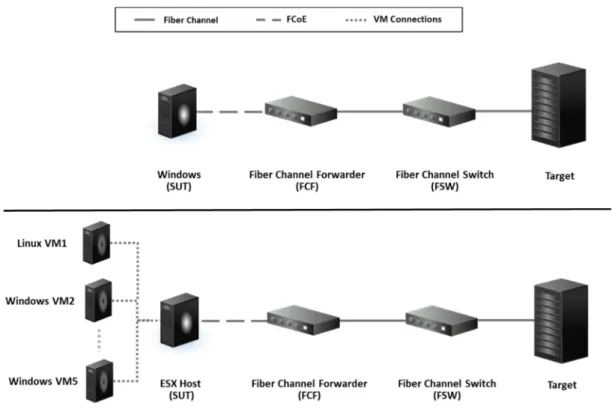
While test automation is essential, its design and implementation need to be very different across different OSes. Today, operating systems can be categorized into two types - traditional and virtualization. The main difference between a traditional OS (e.g. Windows, Linux) and a virtualization OS (VMWare ESXi) is that traditional OSes [Figure 1 (Left)] have direct and dedicated control of their system’s hardware resources, while virtualization OS [Figure 1 (Right)] share their hardware resources between multiple Virtual Machines (VM), where a VM acts as an independent system running its own traditional OS. The biggest advantage of the virtualization setup is that it enables maximum utilization of hardware resources. Understandably, this also means virtualization should support most, if not all, traditional OS distributions. This requirement makes test automation for virtualization more complicated than for traditional OS.
Figure 1: Traditional OS vs. Virtualization OS
1.2 Test Automation Frameworks
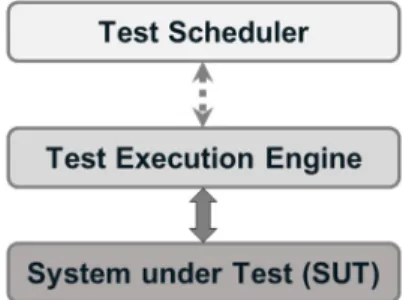
A typical test automation design involves three major components – a test scheduler, a test execution engine and a System under Test (SUT), as shown in Figure 2. The test scheduler’s main responsibility is triggering tests on the SUT via the test execution engine. It also acts as a database of test automation resources including the various SUTs available, operating systems, configurations, test-cases, etc. The test execution engine holds all the test scripts and is responsible for executing them on the SUT.
____________________________________________________________________________________ When moving test automation from traditional OS to virtualization OS, one of the biggest paradigm shifts is the expected ratio of SUT to OS. Traditional OS have a 1:1 ratio i.e. one OS running on one physical system. In contrast, Virtualization OSes create multiple VMs (N) that share the SUT’s physical resources but run their own traditional OS. Therefore, Virtualization OSes have a 1:N SUT to OS ratio. This new paradigm is unknown to typical test execution engines. They handle system resources statically i.e. the details of a SUT and its OS are known before a test is executed. But this does not work for virtualization because the VMs are SUTs that are not created till after the test execution begins. Therefore, for virtualization, resource management needs to be handled dynamically.
Other than the need for dynamic resource management, virtualization automation efforts have to deal with other complexities such as supporting all traditional OS including various communication protocols, programming languages, etc., setup and teardown overheads to create-remove VMs per test, lack of support for ghosting various OS flavors and lack of support for advanced virtualization techniques (e.g. clustering, migration, etc.). Without these features, test automation framework for virtualization would be incomplete and have limited use. In this paper, we present a working solution that overcomes most of the challenges faced with virtualization automation. The solution has been successfully implemented to extend our Windows test automation framework for VMware ESXi. Further, the solution can also be used to extend automation for other Virtualization OS such as Hyper-V and KVM.
1.3 FCoE Storage Networking
Storage Area Networks (SAN) are dedicated networks built to provide fast and reliable access to consolidated data storage systems. The main purpose of SANs are to provide a centralized data storage location easily accessible to servers such that the data appears as if it were locally present on the server. In SANs, servers initiating the data requests are known as initiators while data storage devices that service these data requests are known as targets. Each target maintains a large number of storage hard drives that are identified by their Logical Unit Number (LUN). The initiator can access data from targets using a number of protocols including Fiber Channel (FC), SCSI over TCP/IP (iSCSI), and Fiber Channel over Ethernet (FCoE). For this paper, we take a look at a test automation framework used to validate the FCoE protocol. Datacenters typically use Ethernet for LAN networks and Fiber Channel (FC) for SAN networks. Integrating storage-popular FC networking with the more widely adopted Ethernet medium is very desirable since it allows FC networks to take advantage of faster 10 gigabit or 40 gigabit Ethernet networks. Fiber Channel over Ethernet (FCoE) is the networking technology used to enable FC network over Ethernet by encapsulating Fiber Channel (FC) frames within Ethernet packets. Figure 3 shows the typical FCoE setup from an initiator to a storage target. The initiator is typically connected to one or more Fiber Channel Forwarder (FCF) switches that are responsible for transporting FCoE frames over the Ethernet network. Further, FC frame are extracted from the FCoE frames by a Fiber Channel switch (FSW) to access a target within the SAN network.
Figure 3: Fiber Channel over Ethernet (FCoE) Setup
The remainder of the paper is divided into following sections: Section 2 overviews the ITE-Berta test automation framework. Section 3 takes a detailed look at the challenges with automating virtualization while Section 4 presents our solution in ITE-Berta. Section 5 present and analyze our results, and we conclude in Section 6.
____________________________________________________________________________________
2. ITE-Berta Test Automation Framework
The ITE-Berta test automation framework was originally developed with Windows storage validation in mind. It was extended to support virtualization storage validation at a later stage. The main goals of the ITE-Berta automation efforts were:
1. ExtensibleDesign with Shared Libraries – Libraries should be OS-agnostic and easy to extend by other teams. The central repository for these shared libraries will be maintained by one owner, while each team will also have an owner to maintain the team repositories with the central repository. 2. Maximize Resources – Maximize software re-use by leveraging existing solutions wherever possible.
Also, share the same infrastructure with manual testing and use virtualization to maximize available resources.
3. No-Touch Automation – Should be capable of performing complete no-touch testing, on new component and project builds, from Basic Acceptance Tests (BAT) to Product Tests.
4. Extend Validation – Should enhance overall software quality, not replace manual validation. This is achieved by categorizing test-cases as either automatable or not-automatable. Not-automatable indicates either unavoidable manual intervention or that the effort required to automate is too large. 5. Adding Value – Not only use the software tools available but also contribute in their development. 6. Consistency – To maintain consistency within testing, automated test will be mirror-images of their
manual counterparts.
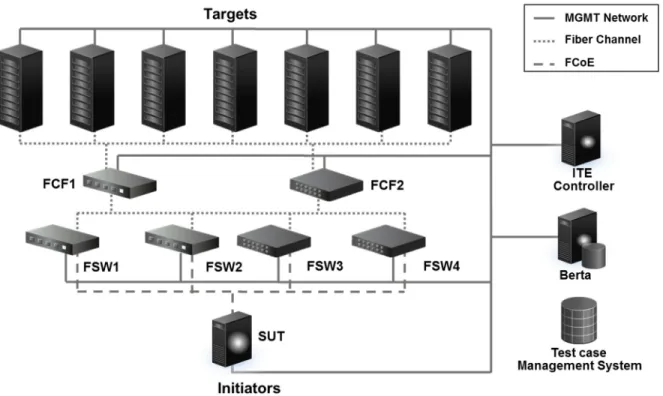
Figure 4: Test Automation Setup for FCoE Validation
The ITE-Berta test automation framework consists of two in-house software tools – the Integrated Test Environment (ITE) and Berta Test Scheduler. ITE is the Test Execution Engine responsible for maintaining and executing all test scripts with their associated libraries. ITE was originally developed for Windows and has native Windows support. It supports VB Script and Java Script and has a built-in communication
____________________________________________________________________________________ protocol, within the ITE Agent, to communicate with the Windows test OS. Berta is a test scheduling solution that is used to automatically trigger tests. Berta also maintains a database to store various SUTs, adapters, OS flavors, and other test configurations. It uses a web-based interface to schedule tests and is not only capable of managing multiple ITE test controllers but can also intelligently select SUTs for testing. It is capable of providing test metrics, archive results and send email notifications at the completion of a test. Using Berta in conjunction with ITE allows us to build a complete no-touch test automation solution. Figure 4 shows the storage team’s test automation setup including different FCoE Targets and switches. In order to best utilize our resources, we went through our test-cases and identified the test-cases to automate. Based on the non-automatable criteria described above, we identified that approximately 70% of the storage test-cases were automatable.
3. Virtualization Automation Challenges
Virtualization is based on the idea that a system’s hardware resources can be shared across multiple virtual machines (VM) where each virtual machine runs its own traditional OS. Virtualization OSes run directly on the hardware and are commonly known as either a host or virtual machine manager. The host’s main responsibility is managing the VMs as well as acting as a bridge between them and external environment. Therefore, when adding support for Virtualization OSes within a test automation framework, we need to add support for not just the host but also VMs. The major challenges with virtualization automating include static resource management and single OS support within the test execution engines. Other challenges include long setup and teardown times associated with setting up virtual machines, lack of support to test advanced features like migration and clustering.
Figure 5: Typical FCoE Setup for Windows versus ESXi
To better explain the complexities brought in by virtualization, let’s take a look at a trivial storage FCoE test comparing Windows versus VMWare ESXi. Table 1 compares the various steps required for Windows versus ESXi while Figure 5 shows the final setup for both OSes. As shown in the figure, the Windows OS will run directly on the SUT (top), while ESXi will host the VMs (bottom). We can also see that the SUTs in virtualization are multiple OSes, unlike that for Windows. Initially, the test OS will be the Host. However, once the VMs are setup, the OS running on the VMs become the test OS. Further, since there are multiple
____________________________________________________________________________________ VMs and each is to be considered as an independent machine, we need to dynamically connect to each VM to execute its required operations. Effectively, for virtualization, the test validates one physical system running the ESXi Host along with 5 virtual machines, each with its own OS.
Traditional OS (Windows) Virtualization OS (ESXi)
1 Establish connection from SUT to a Target (via FCF - FSW)
2 Add 1 LUN of required size Add 5 LUNs of required size
3 Not applicable Create a DataStore on the LUNs, if required 4 Not applicable Create 5 VMs with Windows Guest OS 5 Not applicable Attach 1 LUN to each of the VMs as VM disk 6 Run FCoE traffic between SUT and Target Run FCoE traffic between VMs and Target
Table 1: Comparison of Test Procedures for Traditional vs. Virtualization OS
3.1 Dynamic Resource Management
ITE manages its hardware resources such as SUTs, Peers statically. This means that all SUTs and Peers for a test need to be defined, configured, and selected before the test run. While this model works well for traditional OS validation, it is not practical for Virtualization OSes. In the example discussed in Figure 5, the Windows OS is running on the SUT and all required information (e.g. MAC Address, IP Address, Hard drive, etc.) is static and known from the very beginning. In comparison, for ESXi, we have the required host information but not the VMs that are yet to be created in Step 4 (Table 1). Each of the five VMs, when created, will be given MAC addresses, static/dynamic IP addresses, hard disk names and numbers, etc. This information is not likely to be known prior to running the test because the VMs do not exist then since creating VMs is part of the test itself. Also, once the VMs have been setup, we need to control them dynamically as well. Because of these complications, we need to find a way to dynamically manage and control resources while running a test so that we can create new systems as needed as well as select which system from all the systems is the current system under test.
3.2 Multiple OS Support
Most test execution engines are developed with a particular OS in mind. Since Windows and Linux differ substantially, from their choice of communication protocols to preferred development languages, focusing on one OS makes sense too. ITE was originally developed for Windows automation and all its features are Windows focused. It, therefore, supports only VB and Java scripting languages and offers built- in support for .NET libraries as DLLs. It also has its own proprietary agent to communicate with the Windows test OS. However, there is not sufficient support for virtualization where both Windows and Linux need to be tested. If ITE only supports Windows, then we are really only testing the Virtualization OS for half its capability. Extending ITE support for Linux while absolutely necessary comes with its own complexities. First, since Python is the preferred scripting language in Linux, either Python needs to be supported within ITE or Linux libraries using VB or Java scripts need to be developed. The former approach requires adding a Python compiler within ITE but comes with the advantage of being able to leverage existing python scripts. The latter approach is faster and easier but requires building everything from scratch. This gets further complicated when we try to extend ITE to support ESXi which is PowerCLI based, where PowerCLI is a Windows PowerShell module. Here, too, we face a similar problem – either support PowerCLI and use ITE or discard ITE and lose all the libraries that can have been built for Windows. Since VMWare does not support any other language, using PowerCLI within ITE would mean invoking PowerCLI scripts from VB Script or C#. This workaround would not only make script execution slower but has the potential to make debugging PowerCLI within VB Scripts tedious and difficult.
____________________________________________________________________________________
3.3 Complex Setup, Teardown
Virtualization OSes requires a more extensive setup than traditional OSes since they need to setup multiple VMs, with their own OS, along with all associated configurations. The total time it takes to complete its setup is dependent on the number of VMs. The percentage of the total test time consumed by virtualization setup in an automated process is quite high. To add to it, we must also allocate time to teardown the setup at the end of a test so that the SUT is ready for its next test. This teardown time is usually the reverse of the setup adding to the total test time for virtualization.
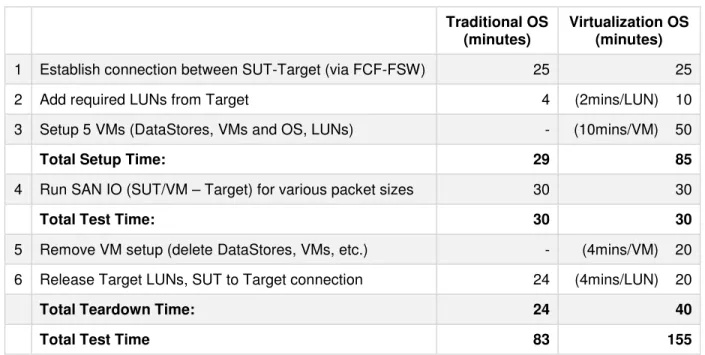
Table 2 compares step-by-step the average time required for both traditional and virtualization OS to complete the test-case in Table 1. Notice that not only do Virtualization OS setups have more steps to complete but also that these steps need to be multiplied with the number of VMs we want to setup. In the reverse, teardown too is dependent on the number of VMs to remove. The actual test time is the only step that both traditional and virtualization take similar time for. As expected, Virtualization OSes take close to 2x test time when compared to traditional OS. Further, this difference will increase with the number of VMs. Therefore, there is an urgent need to find a way to reduce these test times else much more hardware will be needed to run similar number of tests as traditional OS validation.
Traditional OS (minutes)
Virtualization OS (minutes)
1 Establish connection between SUT-Target (via FCF-FSW) 25 25
2 Add required LUNs from Target 4 (2mins/LUN) 10
3 Setup 5 VMs (DataStores, VMs and OS, LUNs) - (10mins/VM) 50
Total Setup Time: 29 85
4 Run SAN IO (SUT/VM – Target) for various packet sizes 30 30
Total Test Time: 30 30
5 Remove VM setup (delete DataStores, VMs, etc.) - (4mins/VM) 20 6 Release Target LUNs, SUT to Target connection 24 (4mins/LUN) 20
Total Teardown Time: 24 40 Total Test Time 83 155
Table 2: Comparison of required testing time for Traditional vs. Virtualization OS
In order to successfully implement virtualization automation, these three challenges need to be addressed and resolved. Without addressing them effectively, virtualization automation will be stuck in a semi-automated state requiring constant manual supervision and intervention. In the next section, we present a working solution for Virtualization OSes.
4. Test Automation with Virtualization
When implementing Test Automation for Virtualization OSes, we evaluated three feasible design options: 1. PowerCLI Only:
Create a new framework with scripts written in the preferred language for each OSes, instead of the existing ITE-Berta framework. This approach gives the freedom to develop a framework from scratch with preferred languages per OS i.e. PowerShell for Windows and ESXi, and Python for Linux. This
____________________________________________________________________________________ would not only allow the use of existing scripts but also simplify scaling across other teams. However, its biggest disadvantage is having to re-write all the ITE-Berta libraries (VB Script, C#).
2. C# Wrapper:
This approach would encapsulate all relevant ESXi and Linux scripts and operations into the C# libraries. It would allow us to use the existing ITE-Berta framework and its libraries. However, it also means double-wrapping ESXi and Linux scripts inside C# libraries. This could potentially increase execution and debugging time, create various library maintenance problems, leading to lower framework adoption across teams.
3. Hybrid:
The third option is a hybrid solution. In this approach PowerCLI libraries would be used for ESXi but would be executed within ITE via VB Script. Also, Linux OS support would be extended within the VB Script, C# libraries, thereby maintaining consistent libraries for both traditional OSes. The biggest disadvantages are maintaining Linux in VB and invoking PowerCLI from within VB scripts but has the advantage of using PowerCLI for ESXi within the stable ITE-Berta environment.
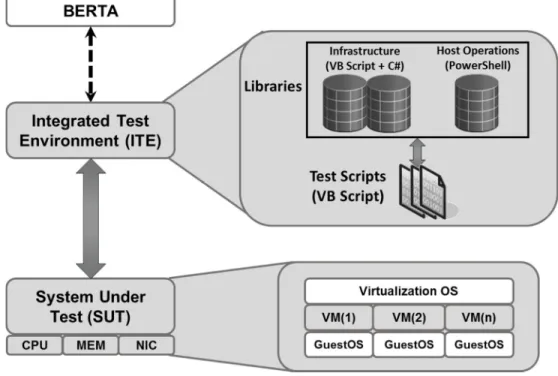
Ultimately, we decided to go Hybrid because it gave us the best trade-off between either creating a new framework to implementing complicated double-wrapped libraries. Figure 6 below shows the solution used to extend the ITE-Berta framework for Virtualization OSes. Once the ITE-Berta framework was decided to be extended for Virtualization OSes, we addressed the three major challenges discussed i.e. dynamic resource allocation, multiple OS support, and reducing virtualization test times.
Figure 6: Virtualization Test Automation using the Hybrid Solution
4.1 Dynamic Resource Management
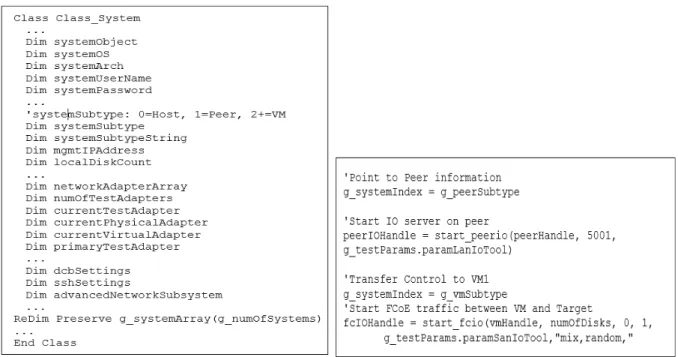
Since ITE only supports static management of test resources, dynamic resource management was implemented within the libraries itself. Integrating resource management within the libraries required major refactoring of all libraries and was implemented in two parts – 1. Record the new resource and 2. Assign control to correct resource. To do this, the libraries were modified the system class to support 3 types of test systems - SUT, Peer, and VM. For virtualization, the initial SUT would be the host followed by the VMs. In networking, peers are traffic partners added to the testing environment. Each of these 3 types have data
____________________________________________________________________________________ structures that hold all relevant information based on the type of system. Figure 7 (Left) shows the Class_System defined in the libraries and the relevant OS and network information it holds.
Each time a new dynamic system is created, a corresponding new entry is added into the systems array. Once all systems (physical and virtual) have been setup and recorded, a global pointer (g_systemIndex) is used to toggle control between the various systems. Figure 7 (Right) shows sample code used to first assign control to a peer in order to start LAN traffic between it and the SUT after which control is handed to VM1 to start SAN traffic between it and target. Therefore, use of the global pointer g_systemIndex allows a form of dynamic resource management to be implemented on top of ITE’s static resource management structure.
Figure 7: Dynamic Resource Management
4.2 Multiple OS support
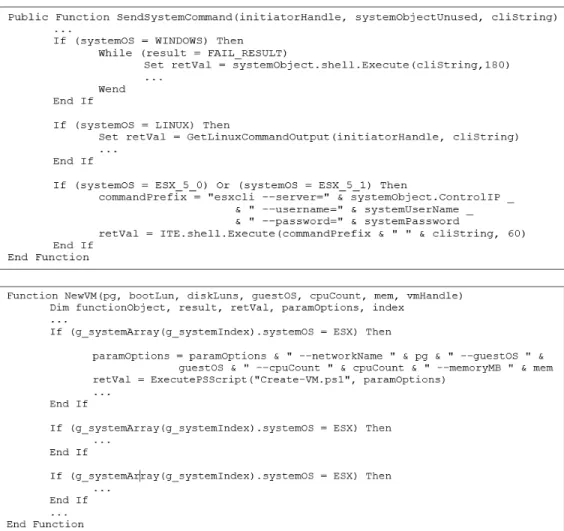
The ITE libraries were originally designed for Windows automation but could also be extended for other traditional OS. However, for virtualization we had to categorize the libraries into two types: common and virtualization. The common libraries were extended for features common to all OSes including virtualization while the virtualization libraries held only virtualization specific features. Further, the virtualization libraries were designed to extend to other virtualization solutions such Hyper-V, KVM in mind.
Figure 8 shows sample code for both types of libraries. The SendSystemCommand (top) encapsulates communication methods for all OSes. Windows is directly supports by ITE while Linux and ESXi are use the Secure Shell (SSH) protocol. The major difference between Windows and Linux is that output or error parsing is handled by ITE for Windows while the libraries handle them for Linux and ESXi. The NewVM (lower) is a virtualization specific function responsible for setting up new virtual machines on a virtualization host. As can be seen, the ESXi calls have a mix of both VB Script and PowerShell. PowerShell scripts are executed wherever ESXi host operations need to be performed while all other operations are worked out in the VB libraries.
4.3 Test Continuation Mechanism
As discussed in the section 3.3, total test times for virtualization OSes can be 2x or longer than those for traditional OS and are usually directly dependent on the number of VMs required by the test. Further, we
____________________________________________________________________________________ also demonstrated in Table 2 that while the actual test for ESXi only required 30 minutes, its setup time needed 85 minutes (3x) and its corresponding teardown time took 40 minutes (2x). Since creating VMs is part of the testing itself, it’s unlikely that we would be able to reduce the setup-teardown times for the individual test. However, there is a potential to reduce them when placed in groups.
Validation teams rarely completely teardown setups per test. They only clean-up enough of the setup to be able to run the next test without any bias from a previous test setup. For example, there is little need to remove VMs after Test 1 if Test 2 is going to require similar number of VMs. The quickest clean-up would ensure the VMs are cleared off of any setup related to Test 1. This type of selective clean-up can save valuable time and trouble associated with VM setup. We have, therefore, implemented a similar mechanism called Test Continuation Mechanism to use a similar procedure with similar-setup test groups.
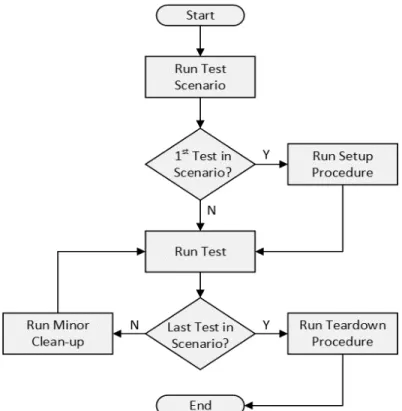
Berta allows us to create test scenarios, essentially a group of tests that are run sequentially in a given order. We performed a detailed test-case classification of all available virtualization test-cases and found that there were four major differentiation points within them: number of VMs, number of LUNs, SAN/LAN IO packet sizes, and IO run times. We decided to group together test-cases that used very similar setups into the same test scenario so that they would be executed in single test run. Since these tests would be run together and required the same setups, we then added logic within the framework to only run the entire setup for the first test, while performing minor required clean-up in between the rest of the tests. Finally, the setup would be torn down at the end of the final test. Figure 9 shows the flowchart for the Test Continuation Mechanism.
____________________________________________________________________________________
Figure 9: Test Continuation Mechanism
5. Results & Analysis
We have completed implementing dynamic resource management within the ITE-Berta libraries, as well as adding support for Linux and VMWare into the libraries. While the library implementation works well, there are some compatibility issues for Windows Hyper-V. We are, therefore, moving dynamic resource management into ITE’s source code itself. We have also completed our test-case classification and have begun implementing the Test Continuation Mechanism into the test scripts. Currently, we have automated more than 50% of the ESXi test-cases. We have also setup the framework for no-touch automation for both product as well as component testing and plan to add developer-level smoke testing. Our next step is to start extending our framework for Hyper-V and KVM support.
Extending automation for virtualization has had its advantages and disadvantages. One of the biggest advantage has been the reuse of the existing ITE-Berta framework itself. It also creates a feasible common automation framework that can be used for both traditional and Virtualization OSes. Further, the PowerCLI scripts have had a dual purpose – they are used within the automation framework as well as to ease manual testing by automating parts of the test. In contrast, a big disadvantage is related to PowerCLI scripts execution from within VB. While the execution has not seen a high performance drop, debugging PowerCLI scripts in this scenario has been particularly painful. Also, the current arrangement makes scaling more tedious for other teams as they need to be familiar with the VB based ITE libraries.
6. Conclusion
In this paper, we took a detailed look into the challenges with test automation for virtualization and design choices that can be used to overcome them. We showed that with dynamic resource allocation, multiple OS support and test continuation mechanism, it is possible to extend current traditional OS test automation frameworks for virtualization testing. Finally, we discussed results from our ITE-Berta framework implementation, and analyzed our solution’s strengths and pain-points.