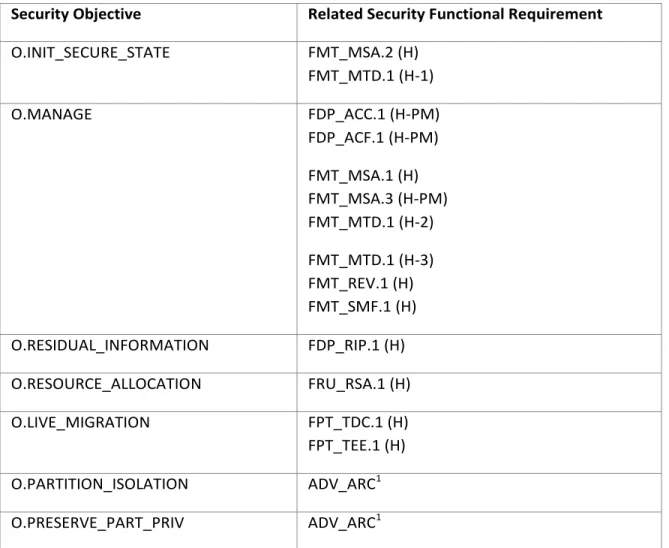
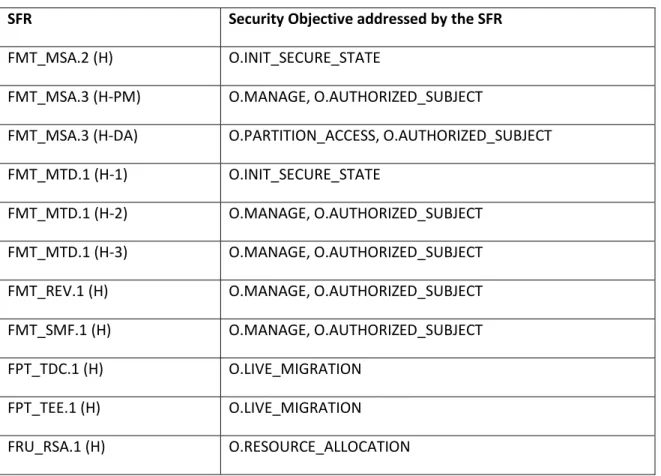
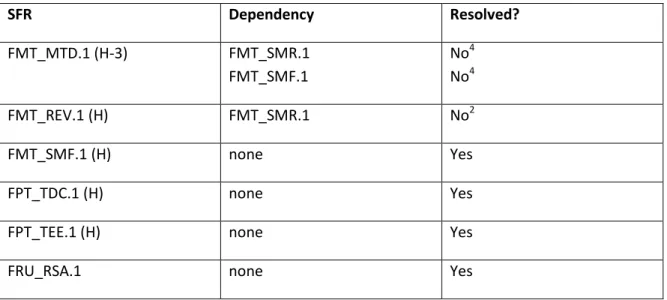
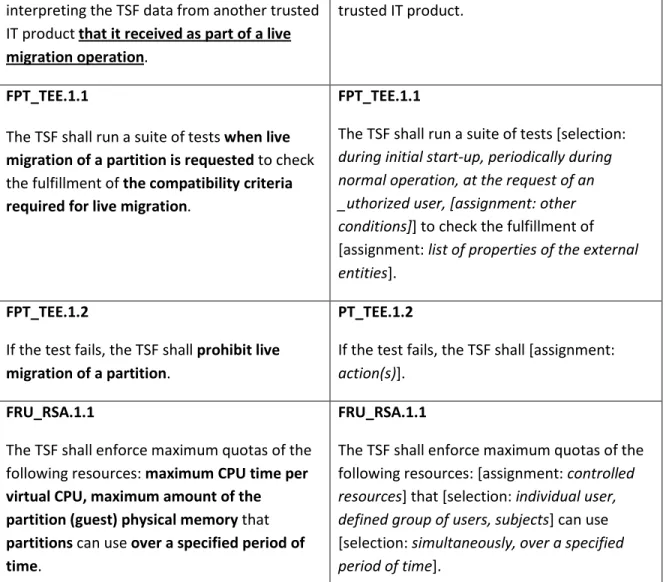
Microsoft Corporation Page 1 of 82
Microsoft Windows
Common Criteria Evaluation
Microsoft Windows Server 2008 R2 Hyper-V
Security Target
Document Information
Version Number 2.6
Microsoft Corporation Page 2 of 82
This is a preliminary document and may be changed substantially prior to final commercial release of the software described herein.
The information contained in this document represents the current view of Microsoft Corporation on the issues discussed as of the date of publication. Because Microsoft must respond to changing market conditions, it should not be interpreted to be a commitment on the part of Microsoft, and Microsoft cannot guarantee the accuracy of any information presented after the date of publication.
This document is for informational purposes only. MICROSOFT MAKES NO WARRANTIES, EXPRESS OR IMPLIED, AS TO THE INFORMATION IN THIS DOCUMENT.
Complying with all applicable copyright laws is the responsibility of the user.This work is licensed under the Creative Commons Attribution-NoDerivs-NonCommercial License (which allows redistribution of the work). To view a copy of this license, visit
send a letter to Creative Commons, 559 Nathan Abbott Way, Stanford, California 94305, USA. Microsoft may have patents, patent applications, trademarks, copyrights, or other intellectual property rights covering subject matter in this document. Except as expressly provided in any written license agreement from Microsoft, the furnishing of this document does not give you any license to these patents, trademarks, copyrights, or other intellectual property.
The example companies, organizations, products, people and events depicted herein are fictitious. No association with any real company, organization, product, person or event is intended or should be inferred.
© 2012 Microsoft Corporation. All rights reserved.
Microsoft, Active Directory, Visual Basic, Visual Studio, Windows, the Windows logo, Windows NT, and Windows Serverare either registered trademarks or trademarks of Microsoft Corporation in the United States and/or other countries.
The names of actual companies and products mentioned herein may be the trademarks of their respective owners.
Microsoft Corporation Page 3 of 82 TABLE OF CONTENTS
1 ST INTRODUCTION ...6
1.1 SECURITY TARGET (ST) REFERENCE ...6
1.2 TOEREFERENCE ...6
1.3 TOEOVERVIEW ...6
1.3.1 SUMMARY OF THE TOE SECURITY FUNCTIONS ... 6
1.3.2 TOE USAGE ... 7
1.3.3 DEFINITIONS ... 7
1.4 TOE DESCRIPTION ...9
1.4.1 INTENDED METHOD OF USE ... 12
1.4.2 SUMMARY OF SECURITY FUNCTIONALITY ... 12
1.5 HARDWARE REQUIREMENTS AND SUPPORTED GUEST OPERATING SYSTEMS ... 13
1.5.1 MEMORY ... 14
1.5.2 PROCESSORS ... 14
1.5.3 NETWORKING ... 14
1.5.4 STORAGE ... 15
1.5.5 OTHER HARDWARE COMPONENTS ... 16
1.5.6 SUPPORTED GUEST OPERATING SYSTEMS ... 16
1.5.7 INTEGRATION SERVICES (ENLIGHTENMENTS) ... 18
1.6 TOEGUIDANCE ... 20
1.7 REFERENCES ... 20
2 CONFORMANCE CLAIM ... 21
3 SECURITY PROBLEM DEFINITION ... 22
3.1 INTRODUCTION ... 22
3.2 THREATS ... 22
3.3 SECURITY POLICIES ... 23
3.4 ASSUMPTIONS ... 24
4 SECURITY OBJECTIVES ... 27
4.1 SECURITY OBJECTIVES FOR THE TOE ... 27
4.2 SECURITY OBJECTIVES FOR THE TOE ENVIRONMENT ... 28
4.3 SECURITY OBJECTIVES RATIONALE ... 31
Microsoft Corporation Page 4 of 82
5 EXTENDED COMPONENTS DEFINITION ... 38
6 SECURITY REQUIREMENTS... 40
6.1 SECURITY FUNCTIONAL REQUIREMENTS ... 40
6.1.1 SECURITY FUNCTIONAL REQUIREMENTS IMPLEMENTED BY HYPER-VR2 ... 43
6.1.1.1 Security Audit (Class FAU) ... 43
6.1.1.2 User Data Protection (Class FDP)... 44
6.1.1.3 Identification and Authentication (Class FIA) ... 46
6.1.1.4 Security Management (Class FMT) ... 47
6.1.1.5 Protection of the TSF (Class FPT) ... 49
6.1.1.6 Resource Utilisation (Class FRU) ... 49
6.2 SECURITY ASSURANCE REQUIREMENTS ... 50
6.3 SECURITY REQUIREMENTS RATIONALE ... 51
6.3.1 INTERNAL CONSISTENCY OF REQUIREMENTS ... 51
6.3.2 COMPLETE COVERAGE: SECURITY OBJECTIVES ... 52
6.3.3 SECURITY REQUIREMENTS COVERAGE ... 54
6.3.4 SECURITY REQUIREMENTS DEPENDENCY ANALYSIS ... 55
6.3.5 OPERATIONS PERFORMED ON THE SFRS ... 57
6.4 TOESUMMARY SPECIFICATION RATIONALE ... 65
6.4.1 SECURITY FUNCTIONS JUSTIFICATION ... 65
6.4.2 ASSURANCE MEASURES JUSTIFICATION ... 65
7 TOE SUMMARY SPECIFICATION ... 66
7.1 ARCHITECTURE OF THE TOE ... 66
7.1.1 WINDOWS HYPERVISOR ... 68
7.1.2 VMBUS ... 72
7.1.3 OPERATING SYSTEM ENLIGHTENMENTS (OUTSIDE OF THE TSF) ... 72
7.1.4 VIRTUAL SERVICE CLIENTS (OUTSIDE OF THE TSF) ... 73
7.1.5 VIRTUALIZATION SERVICE PROVIDER ... 73
7.1.6 VMWORKER PROCESSES ... 74
7.1.7 WMIPROVIDER ... 74
7.1.8 AZMAN AS THE FRAMEWORK FOR ACCESS CONTROL TO MANAGEMENT OPERATIONS OF HYPER-VR2 ... 77
7.2 SECURITY FUNCTIONALITY PROVIDED BY HYPER-VR2... 77
7.2.1 AUDIT FUNCTIONALITY ... 78
7.2.2 USER AND TSF DATA PROTECTION FUNCTIONALITY ... 78
7.2.3 IDENTIFICATION FUNCTIONALITY ... 79
7.2.4 SECURITY MANAGEMENT FUNCTIONALITY ... 79
7.2.5 TSFPROTECTION FUNCTIONALITY ... 81
Microsoft Corporation Page 5 of 82
Microsoft Corporation Page 6 of 82
1
ST Introduction
This is version 2.6 of the Security Target for Microsoft Windows Server 2008 R2 Hyper-V RTM (called “Hyper-V” in this document). This document is based on the Security Target used for the previous evaluation of Microsoft Windows Server 2008 Hyper-V RTM and has been modified to represent the changes and enhancements made for Release 2.
1.1
Security Target (ST) reference
Title: Microsoft Windows Server Core 2008 R2: Hyper-V Server Role, Hyper-V Security Target Version: 2.6
Keywords: Virtualization, hypervisor
This document is the Security Target for the Common Criteria evaluation of the Microsoft Server 2008 R2 Hyper-V RTM virtualization product. It is conformant to the Common Criteria for Information Technology Security Evaluation Version 3.1 Release 3[CC].
1.2
TOE Reference
The TOE is the Microsoft Server 2008 R2 Hyper-V (referenced as Hyper-V R2 in this document). This product is a hypervisor or virtual machine monitor for Intel processors with Intel’s VT-x support and for AMD processors with AMD VT support.
1.3
TOE Overview
The Target of Evaluation (TOE) is the Microsoft Hyper-V R2 virtualization part of the Server 2008 R2 product. Hyper-V R2 allows the definition of partitions that have separate address spaces where they can load an operating system and applications operating on top of this operating system. The TOE consists of the Hyper-V specific components of Microsoft Server 2008 R2 Server Core executing in the root partition with the Hyper-V R2 hypervisor running in a hypervisor configuration.
An operating system within such a partition has access to virtualized peripheral devices where access to those devices is controlled by Hyper-V R2. An operating system may either access devices using the same I/O related instructions as on a real system or it may use a specific interface offered by Hyper-V R2 (called the VMBus) to communicate with Hyper-V R2 for access to peripheral devices. In the first case the operating system can only access the devices virtualized by Hyper-V R2. When using the VMBus defined interface, an operating system in a guest partition needs to install “enlightenments” that set up the VMBus communication and use the “synthetic” devices accessible via VMBus. Note that the
“enlightenments” within a guest operating system is part of the TOE, but not part of the TSF.
1.3.1 Summary of the TOE security functions
The TOE offers separation of partitions, controls access of partitions to resources like virtual hard disks or virtual network adapter, controls the management of the TOE and enforces a privilege-based
management policy, allows auditing of security critical events, controls access of administrative users in the root partition to TOE management functions, and enforces quota for CPU time for partitions. The TOE also offers live migration of partitions from one instance of the TOE to another instance, provided
Microsoft Corporation Page 7 of 82
the underlying platforms of both instances of the TOE satisfy the compatibility criteria required for live migration. Live migration will neither allow a partition to increase its privileges nor undermine the security of any of the two instances of the TOE involved in the migration.
1.3.2 TOE usage
The TOE can be used to consolidate several physical servers based on Intel’s x86 architecture onto one machine. The TOE allows the definition of so called partitions. Each instantiation of the TOE has one dedicated partition, called the root partition, and a variable number of so called “guest partitions”. Resources accesses by guest partitions are virtualized by the TOE, i. e. the TOE performs a “translation” of the virtual resource accesses by a guest partition onto the real resources available to the TOE. Such resources include virtual CPUs, main memory, virtual hard disks, virtual network adapters, virtual
CD/DVD drives or floppy disk drives as well as virtual video adapter and virtual mouse and keyboard. The root partition is used for support of the resource virtualization and for TOE management activities. Each guest partition can take over the tasks of one physical server. Each guest will have its own operating system installed and is restricted by the TOE to the use of the resources that are assigned to the partition. The assignment of resources to partitions is performed by administrative roles defined in the root partition. The TOE allows separating each guest partition from others with a comparable degree as if they were executing on separate physical servers.
See the TOE description section in this chapter for more detailed information about the TOE structure and the security functionality implemented by the TOE.
1.3.3 Definitions
This section defines some of the TOE specific terms used throughout this document. Hypervisor and Partitions
A hypervisor is a layer of software that sits just above the hardware and beneath one or more operating systems. Its primary job is to provide isolated execution environments called partitions. Each partition is provided with its own set of (physical or virtual) hardware resources (memory, devices, CPU cycles). The hypervisor is responsible for controlling and arbitrating access to the underlying hardware where necessary.
Guests
Software running within a non-root partition is referred to as a guest. A guest might consist of a full-featured operating system like Windows Vista or a small, special-purpose kernel. The hypervisor is “guest-agnostic”.
Microsoft Corporation Page 8 of 82 Specialized Partitions
In most respects, all partitions are equal. However, some partitions may be granted special privileges or assigned specialized functions.
In the evaluated version of Hyper-V R2 there is only partition that has special privileges, which is called the root partition. The root partition acts as the default owner of all hardware resources. It is also typically in charge of power management, plug and play, and hardware failure events. The root partition is also responsible for creating and managing other partitions and assigning hardware resources. In some respects, it acts like the service processor on a machine with hardware partitioning facilities. To start Hyper-V R2 first the Server 2008 R2 instance that is supposed to run in the root partition is started. In the evaluated configuration, this is the Server 2008 R2 Server Core system. This then starts the Hypervisor, which creates the root partition and “moves” the running instance of Server 2008 R2 into the root partition and assigns all devices to this partition.
Virtualization and Emulation
The hypervisor provides support for hardware virtualization. Virtualization provides multiple logical instances of CPUs and other hardware resources. These logical instances are mapped onto physical hardware resources using a variety of techniques. One such technique is emulation, the simulation of a processor or device using software. While the hypervisor facilitates processor and device emulation, the architecture attempts to provide or facilitate alternatives to emulation for performance reasons. Legacy Guests, Worker Processes and Enlightenment
The hypervisor provides support for legacy guests. A legacy guest is an operating system that has no knowledge of the fact that it is running within a virtualized environment. Legacy guests require substantial infrastructure including a system BIOS and a wide variety of emulated devices. This infrastructure is not provided directly by the hypervisor. A separate piece of code called a worker process provides this infrastructure to legacy guests. Worker processes are part of the root partition and receive specific intercepts (i.e. notifications that specific events have occurred within a guest). This support for guest-mode intercept handlers provides added flexibility and reduced complexity within the hypervisor. Note that a worker process exists for each guest partition.
Device emulation provides broad compatibility, but it results in poor performance. Other operational assumptions made by legacy guests also add to virtualization overhead. This virtualization performance overhead can be mitigated by enlightening a legacy operating system. An enlightened guest has
knowledge of the fact that it is running within a virtualized environment and changes its behavior accordingly. Various degrees of enlightenment are possible. For example, a guest might use a specialized block device driver to talk to an idealized virtual disk using a fast communication channel between itself and the root partition. More extensive enlightenment involves modifying or extending a guest hardware abstraction layer (HAL) so it talks to an idealized “synthetic” interrupt controller or access model specific register (MSR) that do not exist in real hardware.
Microsoft Corporation Page 9 of 82 Snapshots
A snapshot is a collection of data about a partition and its current state that allows restarting the partition in this state. A Hyper-V R2 snapshot therefore includes all of the information and data that is required to roll back the status of a partition to the state when the snapshot was taken. Information that is collected when taken a snapshot include:
• Partition configuration settings (the contents of the .vmc file)
• Virtual network settings
• The current state of all virtual hard disks (VHDs) that are attached to the partition
• State information for the partition Live Migration
The live migration function allows moving a running partition from one instance of the TOE (the “source” to another instance of the TOE (the “destination”). The TOE will verify that both instances of the TOE satisfy defined compatibility criteria which ensure that software executed in the partition see the same operational environment from the underlying platform, which consists of the hardware visible to the partition and the Hyper-V R2 interfaces and functions. Live migration requires all virtual hard disks used by the partition to be migrated to reside on cluster shared volumes. Live migration is not possible for partitions that use virtual hard disks on media local to the “source” instance of the TOE.
Live migration ensures that the security properties of a partition are maintained throughout the migration process and on the destination system regardless of the software executed in the partition being migrated.
1.4
TOE description
Hyper-V R2 consists of a small hypervisor layer that uses the virtualization support functions of the Intel (Intel-VT) and AMD (AMD-V) to define and separate guest partitions, the Server 2008 R2 Server Core installation in the root partition and the “enlightenments” that can be used in guest partitions to use the virtualization functions more efficiently. For more information about the hardware support for
virtualization provided by Intel and AMD, please read [INTEL-VT] and [AMD-V]. Note that the “enlightenments” are not part of the TSF portion of the TOE. The TOE also includes the guidance documentation required to securely install, configure and operate Hyper-V R2 with the Server 2008 R2 core in the root partition.
A partition is defined by assigning a memory region (called “guest physical memory” GPA), a number of virtual processors and a set of virtualized devices and resources. Hyper-V R2 differentiates between the single “root” partition and multiple “guest” partitions. The root partition is part of the trusted
components of the TOE since it is responsible for the management of the partitions as well as the virtualization of devices and resources other than physical memory pages and virtual processors. All real devices except memory pages and processors are allocated to the root partition and all the mapping
Microsoft Corporation Page 10 of 82
between the virtualized devices accessible by a guest partition and the real device that backs the virtual device is done by the root partition. The root partition runs the Server Core configuration of Server 2008 R2 with the configuration defined in [Hyper-V R2_ECG].
When the administrator starts a partition, first the worker process for that partition is started. This worker process reads the configuration data of the partition and based on this data it defines the events within the partition that it wants to intercept. Additional events to be intercepted are defined by the root partition when the hypervisor layer is instructed by the root partition to start the new partition. The hypervisor itself defines additional events it wants to intercept and handle. Whenever such an event happens, a trap into the hypervisor is generated by the processor hardware and the hypervisor either handles the event itself or passes it on to the root partition to be handled there. For events where the hypervisor needs the support of the root partition, the hypervisor generates a message to the root partition, which then performs the required actions like mapping the access to a virtualized device to the real device that backs the virtual device. When this has been done, the root partition sends a message back to the hypervisor defining how to respond to the partition. The hypervisor then reflects this response back to the partition.
The hypervisor also provides a set of functions to the partitions they can use. One of those functions can be used by a partition to determine it is running on Hyper-V R2 and to determine the version of Hyper-V R2 that is installed. The software within the partition (usually a server operating system) can then install software that makes use of specific hypervisor functions that are not available if the operating system would execute directly on the system’s hardware. This software, called “enlightenments” can then optimize the performance of the operating system and use the flexibility provided by the hypervisor. Beside the hypervisor calls that allow the use of specific functions of the hypervisor layer, this also includes a direct and fast communication mechanism between individual guest partitions and the root partition. This communication mechanism, called VMBus, allows a guest partition to “shortcut” requests for access to a virtualized device allocated to the partition and sends this request directly to the root partition without involving the hypervsisor layer and without undergoing the burden of virtualizing every hardware interface of this device. Using VMBus the root partition can also return any response to the request directly to the partition. The software within a partition that implements the “shortcuts” for accessing virtualized devices within a guest partition is called “Virtualization Service Client” or VSC. The corresponding software component within the root partition that handles the requests transferred via VMBus is called a “Virtualization Service Provider” or VSP.
Hyper-V R2 ensures that the physical memory allocated to guest partitions do not overlap with memory allocated to another guest partition, providing each guest partition with its own, isolated guest physical address space. Real processors within a system are assigned by the hypervisor to guest partitions on a time-slice basis. There is no guarantee that the same virtual processor is always backed by the same real processor and real processors are not bound to a specific guest partition.
Microsoft Corporation Page 11 of 82
Hyper-V R2 just ensures that when a real processor is assigned to a virtual processor, which then is executing on behalf of code within a guest partition, no information is passed via the processor’s state or register from its previous assignment to a virtual processor of another guest partition.
Hyper-V R2 therefore enforces the separation of guest partitions as well as an access control policy between partition and virtualized devices. In addition Hyper-V R2 allows assigning maximum quota for CPU time and memory for guest partitions to avoid that a single partition is able to use all of those resources.
The management of Hyper-V R2 and its configuration is performed within the root partition. The Server 2008 R2 components within the root partition provide the generic Server 2008 R2 functionality for user authentication, auditing and audit management, file access control and process isolation and
management. In the evaluated configuration the root partition is solely used for the management of Hyper-V R2, the virtualization of devices and passing remote users through to guest partitions using the RDP protocol. No untrusted program is allowed to be installed on the Server 2008 R2 instance within the root partition. An organization that wants to have generic applications operating on Server 2008 R2 needs to install Server 2008 R2 in one of the guest partitions and install those programs on this instantiation of Server 2008 R2. The generic security functionality of Windows Server 2008 R2
mentioned above has been evaluated separately in the evaluation of Windows Server 2008 R2. Readers interested in the security functionality and security properties provided by Windows Server 2008 R2 are referred to the Windows Server 2008 R2 Security Target.
Hyper-V R2 is distributed as part of the Windows Server software editions (Windows Server 2008 R2 Datacenter, Windows Server 2008 R2 Enterprise, and Windows Server 2008 R2 Standard). Those include the Hyper-V R2 role, with the x64 version of the remote management tools, and integration services for the supported versions of the Windows operating system. Integration services for the supported
versions of Linux distributions are distributed through the Microsoft Connect Web site and are identified as Linux Integration Components for Microsoft Hyper-V R2.
The Hyper-V R2 management tools are available separately to allow remote management of a server running Hyper-V R2. Packages are available to install the tools Windows Server 2008 R2.
The guidance documentation provided for Hyper-V R2 consists of the interface descriptions for the Hypervisor Calls, the description of the management interfaces (WMI interfaces for virtualization) and the description of the AzMan interfaces. In addition there is guidance for the secure installation, configuration and start-up of the TOE. Specific guidance for non-administrative users is not required, since the only non-administrative ‘users’ are the child partitions and remote users that are passed through to a guest partition they are allowed to access. Neither of those does require specific guidance other than the description of the programming interfaces that a partition can use resp. the list of VMs they may attempt to connect to.
Administrative users or users that are allowed to connect to a partition are identified and authenticated by the TOE environment (the Server 2008 R2 instance in the root partition) using either locally defined and managed credentials or through the use of an Active Directory service. The protection and correct
Microsoft Corporation Page 12 of 82
administration of the server operating the Active Directory service as well as the protection of the communication link to this server has to be ensured by the TOE environment.
1.4.1 Intended method of use
Hyper-V R2 is used in conjunction with Windows Server 2008 R2 (as the operating system in the root partition) to provide a computing environment that allows creating partitions within a single computer system where each partition can load and operate an operating system and its applications very much like the operating system and its application would execute directly on real hardware. Each guest partition gets virtualized hardware resources (memory, processors, storage, network devices, interrupt controller etc.) assigned where the virtualization of those resources is performed by the TOE. This allows the operator of a real server system to have multiple virtual servers installed on one server hardware system and assign each virtual server the resources it needs. The management functions of Hyper-V R2 allow an authorized administrator to modify this allocation of resources to virtualized servers in order to optimize the use of resources and react to the different needs for resources by the virtualized servers. Virtualized servers in the partitions are separated from each other such that they can only communicate using virtualized network functions or shared storage devices. This is the same way they would also communicate with each other if they were installed on separate hardware systems and the intention of the virtualization provided by Hyper-V R2 is to provide a comparable degree of separation between virtual servers as there is between real servers on different hardware while being able to optimize the use of resources and ease the management of multiple servers.
For security reasons the evaluated configuration does not allow the installation of untrusted software in the root partition.
1.4.2 Summary of security functionality
Hyper-V R2 provides the following primary security functionality:
• Access control between partitions and virtualized resources
• Auditing of security critical events detected by Hyper-V R2 (where the audit records are then
submitted to the Windows Server 2008 R2 audit subsystem in the root partition and stored together with audit record created by this instance of Windows Server 2008 R2)
• Object reuse for all resources managed by Hyper-V R2
• Management of the Hyper-V R2 configuration including the configuration of the partitions
• Maximum quota for defined resources assigned to partitions (CPU time, memory, disk storage)
• Live migration of partitions from one instance of the TOE to another instance of the TOE ensuring the integrity and consistency of the partition being migrated
In addition Hyper-V R2 provides the following architectural properties:
Microsoft Corporation Page 13 of 82
• Separation between the guest partitions
• Reference mediation for access of guest partitions to protected resources (including virtualized devices)
• Non-bypassability of the reference mediation
• Maintaining the separation mechanism provided by the underlying hardware when virtualizing resources and devices or responding to hypervisor calls for a guest partition.
The Windows Server 2008 R2 instance in the root partition provides the following security functionality which is used by Hyper-V:
• Identification and authentication of administrative users and users that request to be passed through to a guest partition
• Management and protection of the audit trail
• Access control of administrative users to Windows Server 2008 R2 management objects
• Access control to files and devices used
• Management of users and access rights (to Windows Server 2008 R2 objects)
Those security functions of Server 2008 R2 have been evaluated in a separate evaluation of this product. Therefore in the evaluation of Hyper-V R2 those security functions provided by Server 2008 R2 are handled as security functions provided by another trusted IT product.
1.5
Hardware Requirements and supported guest operating systems
Note: the requirements defined in this section apply for the version of Hyper-V R2 subject to this evaluation. Future versions of Hyper-V R2 may have different hardware requirements and may support other guest operating systems.
To install and use the Hyper-V R2 role, the following is required:
• A x64-based processor. Hyper-V R2 is available in 64-bit editions of Windows Server 2008 R2 — specifically, the 64-bit editions of Windows Server 2008 R2 Standard, Windows Server 2008 R2 Enterprise, and Windows Server 2008 R2 Datacenter.
Hyper-V R2 is not available for 32-bit (x86) editions or Windows Server 2008 R2 for Itanium-Based Systems. However, the Hyper-V R2 management tools are available for 32-bit editions.
• Hardware-assisted virtualization. This is available in processors that include a virtualization option— specifically processors with Intel Virtualization Technology (Intel VT) or AMD Virtualization (AMD-V) technology.
Microsoft Corporation Page 14 of 82
• Hardware-enforced Data Execution Prevention (DEP) must be available and enabled. Specifically, you must enable Intel XD bit (execute disable bit) or AMD NX bit (no execute bit).
Hardware support for second-level address translation is not required, but will be used if the underlying platform provides such support.
1.5.1 Memory
The maximum amount of memory that can be used is determined by the operating system, as follows:
• For Windows Server 2008 R2 Enterprise and Windows Server 2008 R2 Datacenter, the physical computer can be configured with up to 1 TB of physical memory, and partitions that run either of those editions can be configured with up to 1 TB of memory per partition.
• For Windows Server 2008 R2 Standard, the physical computer can be configured with up to 32 GB of physical memory, and partitions that run either of those editions can be configured with up to 31 GB of memory per partition.
1.5.2 Processors
Hyper-V R2 is supported on physical computers with up to 64 logical processors. A logical processor can be a core processor or a processor using hyper-threading technology. One can configure up to 4 virtual processors on a partition. However, the number of processors supported by a guest operating system might be lower.
The following are some examples of supported systems and the number of logical processors they provide:
• A single-processor/dual-core system provides 2 logical processors.
• A single-processor/quad-core system provides 4 logical processors.
• A dual-processor/dual-core system provides 4 logical processors.
• A dual-processor/quad-core system provides 8 logical processors.
• A quad-processor/dual-core system provides 8 logical processors.
• A quad-processor/dual-core, hyper-threaded system provides 16 logical processors.
• A quad-processor/quad-core system provides 16 logical processors.
1.5.3 Networking
Hyper-V R2 provides the following networking support:
• Each partition can be configured with up to 12 virtual network adapters — 8 can be the “network adapter” type and 4 can be the “legacy network adapter” type. The network adapter type provides better performance and requires a dedicated driver that is included in the integration services packages.
Microsoft Corporation Page 15 of 82
• Each virtual network adapter can be configured with either a static or dynamic MAC address.
• Each virtual network adapter offers integrated virtual local area network (VLAN) support and can be assigned a unique VLAN channel.
• Hyper-V R2 supports an unlimited number of virtual networks with an unlimited number of partitions per virtual network.
Note: Hyper-V R2 cannot connect a virtual network to a wireless network adapter. As a result, wireless networking capabilities can not be provided to partitions.
1.5.4 Storage
Hyper-V R2 supports a variety of physical storage options (using the device drivers of the Windows Server 2008 R2 instance in the root partition):
• Direct-attached storage: Serial Advanced Technology Attachment (SATA), external Serial Advanced Technology Attachment (eSATA), Parallel Advanced Technology Attachment (PATA), Serial Attached SCSI (SAS), SCSI, USB, and Firewire.
• Storage area networks (SANs): Internet SCSI (iSCSI), Fibre Channel, and SAS technologies can be used.
• Network-attached storage
• Storage in cluster-shared volumes (which is required for all storage used by partitions that are subject to live migration)
Hyper-V R2 supports configuring a partition to use the following types of virtual storage.
• Virtual hard disks of up to 2040 GB. Hyper-V R2 can use fixed virtual hard disks, dynamically expanding virtual hard disks, and differencing disks.
• Virtual IDE devices. Each partition supports up to 4 IDE devices. The startup disk (sometimes referred to as the boot disk) must be attached to one of the IDE devices. The startup disk can be either a virtual hard disk or a physical disk.
• Virtual SCSI devices. Each partition supports up to 4 virtual SCSI controllers, and each controller supports up to 64 disks. This means that each partition can be configured with as many as 256 virtual SCSI disks.
• Physical disks. Physical disks attached directly to a partition (sometimes referred to as pass-through disks) have no size limitation other than what is supported by the guest operating system.
• Partition storage capacity. Using virtual hard disks, each partition supports up to 512 TB of storage. Using physical disks, this number is even greater depending on what is supported by the guest operating system.
Microsoft Corporation Page 16 of 82
• Partition snapshots. Hyper-V R2 supports up to 50 snapshots per partition.
1.5.5 Other hardware components
The following is information about the other types of virtual hardware components that can be used with Hyper-V R2.
Virtual DVD drive A partition has 1 virtual DVD drive by default when you create the partition. Partitions can be configured with up to 3 DVD drives, connected to an IDE controller. (Partitions support up to 4 IDE devices, but one device must be the startup disk.)
A virtual DVD drive can access CDs and DVDs, either .iso files or physical media. However, only one partition can be configured to access a physical CD/DVD drive at a time.
Virtual COM port Each partition is configured with 2 virtual serial (COM) ports that can be attached to a named pipe to communicate with a local or remote physical computer.
Note: No access to a physical COM port is available from a partition.
Virtual floppy drive Each partition is configured with 1 virtual floppy drive, which can access virtual floppy disk (.vfd) files.
Note: No access to a physical floppy drive is available from a partition.
1.5.6 Supported guest operating systems
The following operating systems are supported for use in a partition as a guest operating system. 32-bit and 64-bit guest operating systems can be executed at the same time on one server running Hyper-V R2. Note that the TSF does not make any security-related assumptions based on the type of guest operating system used – see Section 1.3.1. Therefore, other operating systems not explicitly listed bellow, such as future versions of the listed ones, may also be used as guests.
• The following editions of Windows Server 2008 (32-bit and 64-bit) and Server 2008 R2 (64 bit) can be used as a supported guest operating system in a partition configured with 1, 2, or 4 virtual processors:
• Windows Server 2008 R2 Standard (without Hyper-V R2)
• Windows Server 2008 R2 Enterprise (without Hyper-V R2)
• Windows Server 2008 R2 Datacenter (without Hyper-V R2)
Microsoft Corporation Page 17 of 82
• Windows Server 2008 Enterprise without Hyper-V
• Windows Server 2008 Datacenter without Hyper-V
• Windows Web Server 2008
• Windows Server 2008 HPC Edition
• The following editions of Windows Server 2003 can be used as a supported guest operating system in a partition configured with 1 or 2 virtual processors:
• Windows Server 2003 R2 Standard Edition with Service Pack 2
• Windows Server 2003 R2 Enterprise Edition with Service Pack 2
• Windows Server 2003 R2 Datacenter Edition with Service Pack 2
• Windows Server 2003 Standard Edition with Service Pack 2
• Windows Server 2003 Enterprise Edition with Service Pack 2
• Windows Server 2003 Datacenter Edition with Service Pack 2
• Windows Server 2003 Web Edition with Service Pack 2
• Windows Server 2003 R2 Standard x64 Edition with Service Pack 2
• Windows Server 2003 R2 Enterprise x64 Edition with Service Pack 2
• Windows Server 2003 R2 Datacenter x64 Edition with Service Pack 2
• Windows Server 2003 Standard x64 Edition with Service Pack 2
• Windows Server 2003 Enterprise x64 Edition with Service Pack 2
• Windows Server 2003 Datacenter x64 Edition with Service Pack 2
• The following versions of Windows 2000 can be executed in a partition configured with 1 virtual processor:
• Windows 2000 Server with Service Pack 4
• Windows 2000 Advanced Server with Service Pack 4
• The following Linux distributions can be executed in a partition configured with 1 virtual processor:
• Suse Linux Enterprise Server 10 with Service Pack 2 (x86 edition)
Microsoft Corporation Page 18 of 82
• Suse Linux Enterprise Server 10 with Service Pack 1 (x86 edition)
• Suse Linux Enterprise Server 10 with Service Pack 1 (x64 edition)
• The following 32-bit and 64-bit versions of Windows 7 and Windows Vista can be executed in a partition:
• Windows 7 x86 (configured with 1, 2 or 4 virtual processors)
• Windows 7 x64 (configured with 1, 2 or 4 virtual processors)
• Windows Vista Business with Service Pack 1 (configured with 1 or 2 virtual processors)
• Windows Vista Enterprise with Service Pack 1 (configured with 1 or 2 virtual processors)
• Windows Vista Ultimate with Service Pack 1 (configured with 1 or 2 virtual processors)
• The following versions of Windows XP can be executed in a partition:
• Windows XP Professional with Service Pack 3 (configured with 1 or 2 virtual processors)
• Windows XP Professional with Service Pack 2 (configured with 1 virtual processor)
• Windows XP Professional x64 Edition with Service Pack 2 (configured with 1 or 2 virtual processors)
It is worth to note that Windows Server 2008 R2 has been evaluated as executing in a guest partition of Hyper-V as one the platforms.
1.5.7 Integration services (Enlightenments)
Integration services are available for supported guest operating systems as described in the following table. While those integration services are part of the Hyper-V TOE, they are not part of the Hyper-V TSF since they operate as part of a guest partition and can therefore not be protected by Hyper-V from tampering and bypassing. The evaluation of Hyper-V ensures that the Hyper-V security functions are enforced even when the integration services within a guest partition have been tampered with or are bypassed.
Guest operating system Device and service support
Windows Server 2008 R2 Drivers: IDE, SCSI, networking, video, and mouse
Services: operating system shutdown, time synchronization, data exchange, heartbeat, and online backup
Windows Server 2008 (64-bit editions)
Drivers: IDE, SCSI, networking, video, and mouse
Microsoft Corporation Page 19 of 82 Guest operating system Device and service support
data exchange, heartbeat, and online backup Windows Server 2008 (x86
editions)
Drivers: IDE, SCSI, networking, video, and mouse
Services: operating system shutdown, time synchronization, data exchange, heartbeat, and online backup
Windows Server 2003 (x64 editions) with Service Pack 2
Drivers: IDE, SCSI, networking, video, and mouse
Services: operating system shutdown, time synchronization, data exchange, heartbeat, and online backup
Windows Server 2003 (x86 editions) with Service Pack 2
Drivers: IDE, SCSI, networking, video, and mouse
Services: operating system shutdown, time synchronization, data exchange, heartbeat, and online backup
Windows 2000 Server with Service Pack 4
Drivers: IDE, networking, video, and mouse
Services: operating system shutdown, time synchronization, data exchange, and heartbeat
Windows 2000 Advanced Server with Service Pack 4
Drivers: IDE, networking, video, and mouse
Services: operating system shutdown, time synchronization, data exchange, and heartbeat
Suse Linux Enterprise Server 10 (x64 edition) with Service Pack 1 or 2
Drivers only: IDE, SCSI, networking, and mouse
Suse Linux Enterprise Server 10 (x86 edition) with Service Pack 1 or 2
Drivers only: IDE, SCSI, networking, and mouse
Windows Vista (64-bit editions) with Service Pack 1
Drivers: IDE, SCSI, networking, video, and mouse
Services: operating system shutdown, time synchronization, data exchange, heartbeat, and online backup
Windows Vista (x86 editions) with Service Pack 1
Drivers: IDE, networking, video, and mouse
Services: operating system shutdown, time synchronization, data exchange, heartbeat, and online backup
Microsoft Corporation Page 20 of 82 Guest operating system Device and service support
Windows XP Professional (x86 editions) with Service Pack 2 or 3
Drivers: IDE, SCSI, networking, video, and mouse
Services: operating system shutdown, time synchronization, data exchange, and heartbeat
Windows XP Professional x64 Edition with Service Pack 2
Drivers: IDE, SCSI, networking, video, and mouse
Services: operating system shutdown, time synchronization, data exchange, and heartbeat
1.6
TOE Guidance
The following guidance documentation exists for the startup and configuration as well as the operation of the TOE:
• Windows Server Core 2008 R2: Hyper-V Server Role, Hyper-V R2 Evaluated Configuration Guide [Hyper-V R2_ECG]
This document contains the entry point for installing, configuring and operating the TOE in its evaluated configuration. This document contains pointers to other documents that are also considered guidance, where [Hyper-V R2_ECG] has precedence whenever those documents contradict [Hyper-V R2_ECG].
1.7
References
[AMD-V] AMD64 Technology AMD64 Architecture Programmer’s Manual Volume 2: System Programming, Revision 3.17, June 2010
[CC] Common Criteria for Information Technology Security Evaluation, Version 3.1 Revision 3, July 2009, Part 1 to 3, 07-001 to CCMB-2009-07-003
[CEM] Common Methodology for Information Technology Security Evaluation, Version 3.1 Revision 3, July 2009, CCMB-2008-07-004
[INTEL-VT] Intel® 64 and IA-32 Architectures Software Developer’s Manual, Volume 3B: System Programming Guide, Part 2, Order Number: 253669-037US, January 2011
Hyper-V R2_ECG Microsoft Server Core 2008 R2: Hyper-V Server Role, Hyper-V R2 Evaluated Configuration Guide, Version 2.0, tbd
Microsoft Corporation Page 21 of 82
2
Conformance Claim
This Security Target is conformant to the Common Criteria for Information Technology Security Evaluation Version 3.1 Revision 3 [CC]. It is CC Part 2 extended and Part 3 conformant, with a claimed Evaluation Assurance Level of EAL4, augmented by ALC_FLR.3.
Microsoft Corporation Page 22 of 82
3
Security Problem Definition
3.1
Introduction
The intended purpose of the TOE is to allow the operation of different guest partitions on a single hardware server where each guest partition will operate like its own (virtualized) server system. Like in a data center that hosts a number of server systems used for different purposes and operate potentially even for different organizations, the separation of the guest partitions within the TOE is the main task to be achieved by the TSF. In addition, a guest partition should not be able to access TSF controlled
resources other than those the TSF has assigned to the guest partition.
The configuration of the partitions is assumed to be performed by trusted administrator that are well trained and perform their duties in accordance with the policies defined by the organization that operates the TOE.
3.2
Threats
The threat agents in such a system are therefore the following:
• Subjects within a guest partition that attempt to interfere with the configuration or operation of other guest partitions, that attempt to escalate their privileges within the TOE, attempt to access or use resources not assigned to the partition, or attempt to escalate their privileges within a partition using a way that they would not have when the software in the partition would execute on a real server system.
• External entities that attempt to attack the TOE via an external interface in order to tamper with the TSF or the TSF data.
• Administrators that may misconfigure the TOE such that it does not protect assets in accordance with an organizations policy.
The first two threat agents are assumed to have a basic attack potential (compatible with the target assurance level). Administrators are assumed to be trustworthy and not assumed to actively attack the security functionality of the TOE. Especially they are not assumed to deliberately attempt to extend their privileges. As a result the administrator is only seen as a threat agent to the respect that the guidance documentation may be misleading in a way that the administrator configures the TOE to an insecure state where the guidance does not provide sufficient information that this state is insecure.
The assets that need to be protected are the resources assigned to a partition, the virtualized and synthetic devices managed by the root partition and the TSF data, which includes the configuration data of the partitions and the audit data generated by the TOE.
Microsoft Corporation Page 23 of 82
The TOE is designed to counter the following threats:
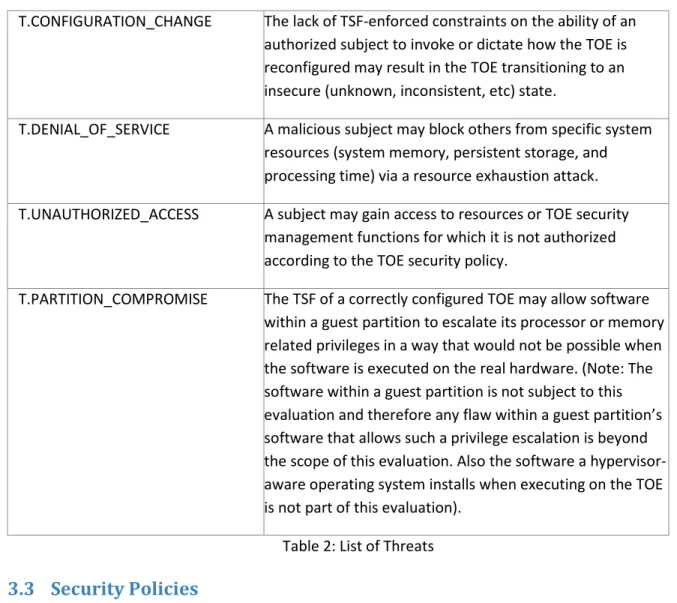
T.CONFIGURATION_CHANGE The lack of TSF-enforced constraints on the ability of an authorized subject to invoke or dictate how the TOE is reconfigured may result in the TOE transitioning to an insecure (unknown, inconsistent, etc) state.
T.DENIAL_OF_SERVICE A malicious subject may block others from specific system resources (system memory, persistent storage, and processing time) via a resource exhaustion attack. T.UNAUTHORIZED_ACCESS A subject may gain access to resources or TOE security
management functions for which it is not authorized according to the TOE security policy.
T.PARTITION_COMPROMISE The TSF of a correctly configured TOE may allow software within a guest partition to escalate its processor or memory related privileges in a way that would not be possible when the software is executed on the real hardware. (Note: The software within a guest partition is not subject to this evaluation and therefore any flaw within a guest partition’s software that allows such a privilege escalation is beyond the scope of this evaluation. Also the software a hypervisor-aware operating system installs when executing on the TOE is not part of this evaluation).
Table 2: List of Threats
3.3
Security Policies
An organizational security policy is a set of rules or procedures imposed by an organization upon its operations to protect its sensitive data. The following operational security policies are supported by the TOE:
P.ACCOUNTABILITY The TOE shall provide the capability to make available information regarding the occurrence of security-relevant events.
P.CONFIGURATION The TOE shall provide functions that allow authorized administrators to perform the setup and initialization of the TOE in accordance with the security policies for configuration and administration issued by the organization responsible for the operation of the TOE. Table 3: List of Organisational Security Policies
Microsoft Corporation Page 24 of 82
3.4
Assumptions
This section describes the security aspects of the environment in which the TOE is intended to be used. It includes information about the physical, personnel, procedural, and connectivity aspects of the environment.
The TOE is assured to provide effective security measures in a cooperative non-hostile environment only if it is installed, managed, and used correctly. The operational environment must be managed in
accordance with user/administrator guidance documentation. The following specific conditions are assumed to exist in an environment where the TOE is employed:
A.ADMIN Authorized administrators of the TOE are assumed to be
knowledgeable and trustworthy to follow the guidance and not misuse their privileges. This applies also to domain administrators that manage the AD-DS used by the TOE.
A.PHYSICAL It is assumed that the non-IT environment provides the
TOE with appropriate physical security commensurate with the value of the IT assets protected by the TOE. A. SUBJECT_ALLOCATION It is assumed that properly trained trusted
administrators will create and manage the configuration data of partitions.
A.USER_SUBJECT_BINDING It is assumed that users are authenticated and bound to subjects in the root partition with the correct security attributes assigned to the subjects, allowing the TOE to base access decisions upon such security attributes. A.DEFINED_INSTALL It is assumed that the administrator installs and
configures the TOE in accordance with the guidance provided for the installation and configuration of the TOE.
A.REMOTE_ADMIN It is assumed that remote administration is performed only using properly protected communication links. A.REMOTE_IT_PRODUCTS It is assumed that any other IT product that may be used
to support the authentication of administrators, used to protect communication links, or used to assist
administrators in their administrative tasks is trusted to perform its security related functions correctly and does not include side effects that may allow unauthorized persons to perform administrative functions on the TOE
Microsoft Corporation Page 25 of 82
or perform administrative functions other than those explicitly initiated by the trusted administrator. Any communication to such a trusted IT product is assumed to be protected against unauthorized interception or modification of the network traffic. This applies especially to the communication with the Active Directory Service (AD-DS) used by the TOE environment (Server 2008 R2 in the root partition).
Note: The Windows Server 2008 R2 in the root partition can operate either in a stand-alone or in domain member configuration as covered by the evaluation of Windows Server 2008 R2. Operating the Windows Server 2008 R2 instance in the root partition as a domain controller would contradict the assumption A.CLEAN_ROOT below and is not covered by this evaluation.
A.CLEAN_ROOT It is assumed that no additional software than the one
specified in the configuration guidance is installed in the root partition.
A.CORRECT_HARDWARE It is assumed that the underlying hardware of the TOE operates correctly as described in the hardware manuals and does not expose undocumented critical side effects A.PARTITION_CONNECT It is assumed that users that are allowed to connect to a
particular guest partition via the Remote Desktop Protocol (RDP) have all the same right to access information within this partition.
A.MEMORY_MANAGEMENT The Windows Server 2008 R2 instance that is running in the root partition provides memory management services to other components running in the server instance or the root partition with kernel-mode privileges. It exposes a dedicated and functionally-complete kernel memory management API to these components.
A.LIVE_MIGRATION The communication link used in the communication for live migration of partitions is assumed to be protected by the operational environment from unauthorized access and undetected modification of the data
Microsoft Corporation Page 26 of 82
transferred as part of the live migration process. Table 4: List of Assumptions
Microsoft Corporation Page 27 of 82
4
Security Objectives
This section defines the security objectives of the TSF and its supporting environment. Security objectives, categorized as either IT security objectives or non-IT security objectives, reflect the stated intent to counter identified threats, comply with any organizational security policies identified, or both. All of the identified threats and organizational policies are addressed under one of the following categories.
4.1
Security Objectives for the TOE
O.PARTITION_ACCESS The TOE will ensure that subjects within a partition gain only authorized access to exported resources assigned to the partition.
O.AUDIT_GENERATION The TOE will provide the capability to generate
audit records for security relevant auditable events.
O.AUTHORIZED_SUBJECT The TOE will ensure that only authorized subjects are allowed to access TSF data. Note: this applies for access to TSF data where the access control is performed by the TOE. Access fully controlled by the TOE environment is covered by the evaluation of the access control functions in the IT
environment of the TOE.
O.INIT_SECURE_STATE The TOE will provide functions that allow
administrators to setup and configure the TOE such that it is started in a secure state where all the other security objectives are enforced.
O.MANAGE The TOE will provide all the functions necessary to
support the administrative users and authorized subjects in their management of the TOE security functions and configuration data, and restrict these functions from use by unauthorized subjects.
O.RESIDUAL_INFORMATION The TOE will ensure that any information
contained in a protected resource is not released to subjects when the resource is reallocated. O.RESOURCE_ALLOCATION The TOE will provide mechanisms that enforce
Microsoft Corporation Page 28 of 82
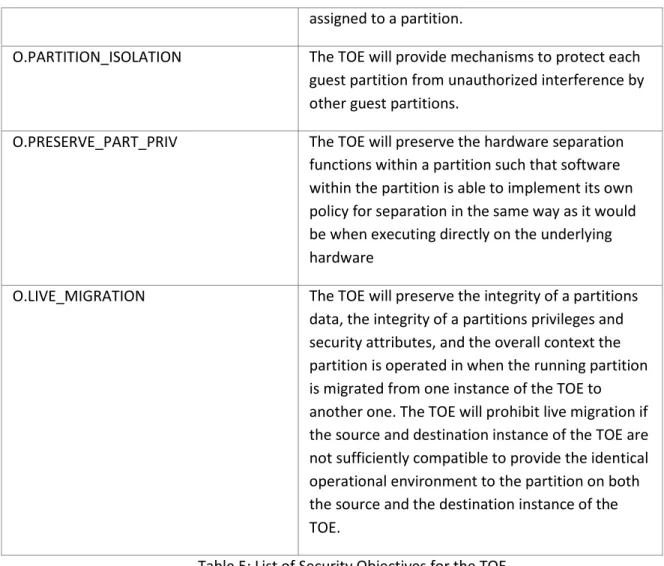
assigned to a partition.
O.PARTITION_ISOLATION The TOE will provide mechanisms to protect each guest partition from unauthorized interference by other guest partitions.
O.PRESERVE_PART_PRIV The TOE will preserve the hardware separation
functions within a partition such that software within the partition is able to implement its own policy for separation in the same way as it would be when executing directly on the underlying hardware
O.LIVE_MIGRATION The TOE will preserve the integrity of a partitions
data, the integrity of a partitions privileges and security attributes, and the overall context the partition is operated in when the running partition is migrated from one instance of the TOE to another one. The TOE will prohibit live migration if the source and destination instance of the TOE are not sufficiently compatible to provide the identical operational environment to the partition on both the source and the destination instance of the TOE.
Table 5: List of Security Objectives for the TOE
4.2
Security Objectives for the TOE environment
The TOE is assumed to be complete and self-contained and, as such, not dependent upon any other products to perform properly. However, certain objectives with respect to the general operating environment must be met. The following are the non-IT security objectives:
OE.PHYSICAL Physical security will be provided for the TOE by
the non-IT environment commensurate with the value of the IT assets protected by the TOE.
OE.HW_MECHANISMS The underlying processor implements the
privileges, ring separation, memory protection, and virtualization support as described in the hardware manuals. The underlying hardware implements interrupt handling, bus configuration, device controller configuration, timers and time, and other I/O related aspects as described in the
Microsoft Corporation Page 29 of 82
related hardware manuals.
OE.HW_SIDE_EFFECTS The underlying hardware has no undocumented
side effects that may interfere with the security functions implemented by the TOE.
OE.USER_SUBJECT_BINDING The TOE environment (in this case the Windows Server 2008 R2 instance in the root partition) will ensure that users are correctly authenticated and processes acting on behalf of such users are bound to the user indicating correctly the security
attributes the process has. The authentication methods and the management of user accounts allowed in the evaluation of Windows Server 2008 R2 for a stand-alone or domain connected
configuration can be used.
OE.SUBJECT_ALLOCATION A properly trained trusted individual will create configuration vectors such that, for those partitions to which subjects are allocated, each partition is allocated one or more subjects (i.e., subjects with homogeneous access requirements, or subjects with heterogeneous access
requirements) that are appropriate for the policy abstraction supported by the TOE.
OE.TRUSTED_INDIVIDUAL Any individual allowed to perform procedures upon which the security of the TOE may depend must be trusted with assurance commensurate with the value of the IT assets. This applies also for individuals managing functions within the TOE environment that the TOE depends on.
OE.REMOTE_ADMIN Any communication link used for remote
administration or communication with another trusted IT product must be protected from unauthorized access or interference by unauthorized persons or systems.
Note: The Security Target for Server 2008 R2 included security functionality allowing the protection of communication links. It is up to the persons responsible for the setup and
Microsoft Corporation Page 30 of 82
configuration of a system using the TOE to decide if the functionality of Server 2008 R2 is used for the protection of communication links or if they want to use other functions or mechanisms. OE.REMOTE_IT_PRODUCT Any remote IT product used to assist in the
authentication of administrative users, in the administration activities or in the storage of TSF data must protect all security related data against unauthorized access and must ensure that it performs the function the TOE expects from this product correctly and without any side effects that could undermine the security of the TOE.
Note: It is common to use a Domain Controller to centrally manage services and accounts. This aspect of management has been addressed in the security evaluation of Server 2008 R2 and this Security Target bases this objective for the TOE environment on the assessment performed in the Server 2008 R2 evaluation as far as Active
Directory is concerned.
OE.NETWORK The physical networks the TOE is connected to,
have controls that protect against attacks on the physical layer (e. g. high voltage) and against attacks on the data link layer (layer 2).
OE.TRUSTED_ROOT The root partition is installed as defined for the
evaluated configuration and has no software applications installed that are not required for the virtualization support or the management of Hyper-V R2. Especially there is no untrusted application installed in the root partition.
OE.PARTITION_USER Procedures in the TOE environment exist to ensure
that users that are allowed to connect to a specific partition have the right to access all information processed by this partition.
OE.LIVE_MIGRATION Measures within the TOE environment will ensure
the confidentiality and integrity of the data transferred as part of the migration of a running
Microsoft Corporation Page 31 of 82
partition between two instances of the TOE. Table 6: List of Security Objectives for the TOE environment
4.3
Security objectives rationale
This section provides a rationale for the existence of each threat, policy statement, security objective, and component that comprise the security target.
4.3.1 Complete coverage: threats and organizational security policies
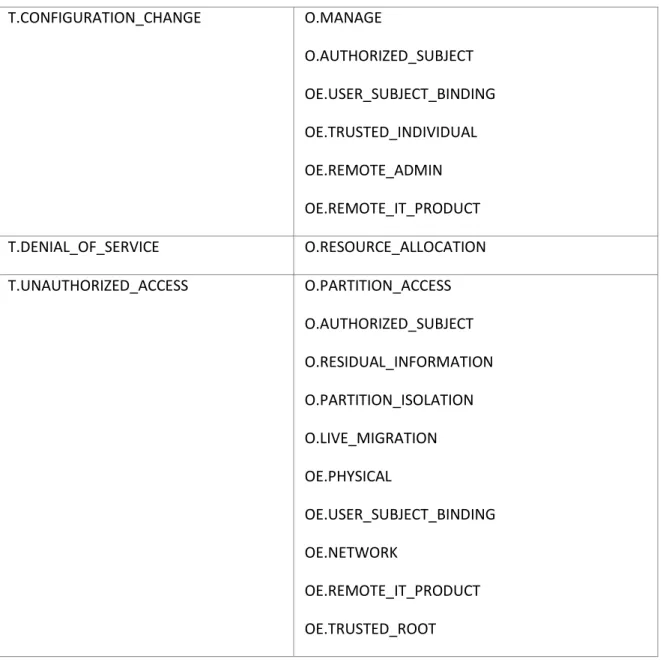
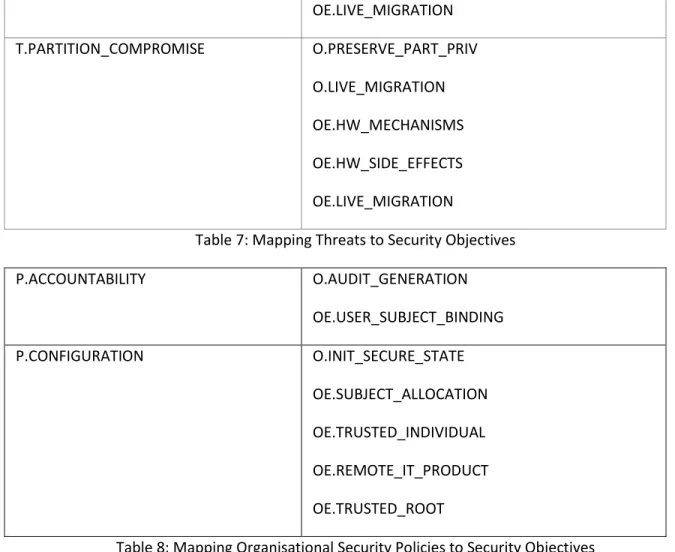
This section provides evidence demonstrating coverage of the threats and Organizational Security Policies (OSPs) by both the IT and non-IT security objectives. The following table shows this objective to threat and policy mapping, and the table is followed by a discussion of the coverage for each threat and OSP. T.CONFIGURATION_CHANGE O.MANAGE O.AUTHORIZED_SUBJECT OE.USER_SUBJECT_BINDING OE.TRUSTED_INDIVIDUAL OE.REMOTE_ADMIN OE.REMOTE_IT_PRODUCT T.DENIAL_OF_SERVICE O.RESOURCE_ALLOCATION T.UNAUTHORIZED_ACCESS O.PARTITION_ACCESS O.AUTHORIZED_SUBJECT O.RESIDUAL_INFORMATION O.PARTITION_ISOLATION O.LIVE_MIGRATION OE.PHYSICAL OE.USER_SUBJECT_BINDING OE.NETWORK OE.REMOTE_IT_PRODUCT OE.TRUSTED_ROOT
Microsoft Corporation Page 32 of 82 OE.LIVE_MIGRATION T.PARTITION_COMPROMISE O.PRESERVE_PART_PRIV O.LIVE_MIGRATION OE.HW_MECHANISMS OE.HW_SIDE_EFFECTS OE.LIVE_MIGRATION
Table 7: Mapping Threats to Security Objectives
P.ACCOUNTABILITY O.AUDIT_GENERATION OE.USER_SUBJECT_BINDING P.CONFIGURATION O.INIT_SECURE_STATE OE.SUBJECT_ALLOCATION OE.TRUSTED_INDIVIDUAL OE.REMOTE_IT_PRODUCT OE.TRUSTED_ROOT
Table 8: Mapping Organisational Security Policies to Security Objectives Threats
T.CONFIGURATION_CHANGE
The lack of TSF-enforced constraints on the ability of an authorized subject to invoke or dictate how the TOE is reconfigured may result in the TOE transitioning to an insecure (unknown, inconsistent, etc) state.
This threat is addressed by the security objective O.MANAGE that requires the existence of appropriate management functions together with the security objective O.AUTHORIZED_SUBJECT, which requires that only authorized administrators can perform those management functions which in combination with OE.USER_SUBJECT_BINDING ensures that configuration changes performed by the TOE can only be performed by user authorized for such operations. OE.TRUSTED_INDIVIDUALS supports countering this threat by requiring that those administrators are trusted to perform their job correctly and not misuse their privileges. OE.REMOTE_ADMIN also supports countering this threat by requiring that remote administration facilities are protected against unauthorized subjects attempting to access the
Microsoft Corporation Page 33 of 82
management of the TOE configuration may be used by an attacker or an unauthorized person to impersonate as an authorized administrator and modify the configuration of the TOE.
T.DENIAL_OF_SERVICE
A malicious subject may block others from system resources (e.g., system memory, persistent storage, and processing time) via a resource exhaustion attack.
This threat is countered by security objective O.RESOURCE_ALLOCATION requesting that constraints exist on the allocation of resources to partitions, which in turn prohibits a denial of service attack caused by resource exhaustion.
T.UNAUTHORIZED_ACCESS
A subject may gain access to resources or TOE security management functions for which it is not authorized according to the TOE security policy.
This threat is countered by the security objective O.PARTITION_ACCESS, which requests an access control mechanism for resources exported to partitions. Concerning access to partition configuration data and other TSF data, this threat is addressed by the security objective O.AUTHORIZED_SUBJECT, which requires restricting access to this data to authorized administrators (the authentication of
administrative users is performed by Server 2008 R2 in the root partition). The aspect of subjects getting access to information by residuals left in resources assigned to the subject is addressed by
O.RESIDUAL_INFORMATION. The aspect of a guest partition getting access to data from other partitions by sharing data with another guest partition is addressed by the security objective
O.PARTITION_ISOLATION. The aspect of a subject gaining unauthorized access during or after being migrated to a different instance of the TOE is addressed by O.LIVE_MIGRATION.
OE.PHYSICAL supports countering the threat by prohibiting unauthorized persons to access TOE resources by physically manipulating the TOE hardware.
OE.USER_SUBJECT_BINDING supports countering the threat by assuring that subjects that request access have correctly been bound to a user and that this user has been successfully authenticated. OE.NETWORK supports countering the threat by prohibiting attempts to use irregular network signals to attack the TOE and potentially damage the network adapter in way that may cause changes in the TOE configuration.
OE.REMOTE_IT_PRODUCT supports countering the threat by prohibiting unauthorized access to the TOE using a remote product for accessing the TOE that can not be trusted to perform its functions correctly.
Microsoft Corporation Page 34 of 82
OE.TRUSTED_ROOT supports countering the threat by prohibiting that any untrusted application is installed in the root partition. This prohibits that any untrusted program may attempt to use the Server 2008 R2 system call interface in order to explore a way to bypass the access control policies enforced. Only the defined applications required for virtualization support and management are installed and those are part of the TSF.
OE.LIVE_MIGRATION supports countering the threat by prohibiting an external entity manipulating data transferred during live migration in a way that would give the migrated subject different access to resources than what the subject had on the system it was migrated from.
T.PARTITION_COMPROMISE
The TSF of a correctly configured TOE may allow software within a guest partition to escalate its processor or memory related privileges in a way that would not be possible when the software is executed on the real hardware. (Note: The software within a guest partition is not subject to this evaluation and therefore any flaw within a guest partition’s software that allows such a privilege escalation is beyond the scope of this evaluation. Also the software a hypervisor aware operating system installs when executing on the TOE is not part of this evaluation).
The threat of software within a partition escalating its hardware privileges within the partition by using functions provided by the TSF is addressed by security objective O.PRESERVE_PART_PRIV, which requires that this is not possible. The security objective O.LIVE_MIGRATION addresses this threat by ensuring that a partitions privileges as well as the partitions view of the underlying platform are maintained.
OE.HW_MECHANISMS supports countering the threat by requiring the hardware to work correctly in accordance with its specification. The TOE relies on the documented functions of the underlying hardware to correctly enforce the same separation and privilege policy that is enforced when the software runs on a real system.
OE.HW_SIDE_EFFECTS supports countering the threat by requiring the hardware to not expose undocumented side effects which, although not contradicting the specification, may undermine the separation within a partition.
OE.LIVE_MIGRATION supports countering the threat by requiring integrity protection for the data transferred as part of a live migration operation.
Microsoft Corporation Page 35 of 82 Organisational Security Policies
P.ACCOUNTABILITY
The TOE shall provide the capability to make available information regarding the occurrence of security relevant events.
This organizational security policy is addressed by the security objective O.AUDIT_GENERATION, which requires the TOE to provide an audit function for security relevant events that allows making subjects responsible for their actions.
This policy is supported by OE.USER_SUBECT_BINDING, which ensures that subjects are correctly bound to users allowing the ensured identification of the user responsible for an action.
P.CONFIGURATION
The TOE shall provide functions that allow authorized administrators to perform the setup and initialization of the TOE in accordance with the security policies for configuration and
administration issued by the organization responsible for the operation of the TOE.
This security policy is addressed by the security objective O.INIT_SECURE_STATE which requires the TOE to provide the administrative functions that allow an authorized administrator to setup and initialize the TOE such that it starts in a secure state.
OE.SUBJECT_ALLOCATION supports this organisational security policy such that authorized administrators do not define configurations that contradict the separation policy an organization wants to enforce.
OE.TRUSTED_INDIVIDUAL supports this organisational security policy by requiring authorized administrators to not misuse his privileges.
OE.REMOTE_IT_PRODUCT supports this organisational security policy by requiring that remote IT products used for managing or accessing the TOE are trusted to correctly pass their user’s actions to the TOE and not to send requests to the TOE that have not been initiated by the user of the product. OE.TRUSTED_ROOT supports this organisational security policy by requiring that no untrusted application is installed in the root partition that may attempt to tamper with the configuration as defined by the trusted administrator.