The Coordination between Faculty and Technical
Support Staff in Updating Computer Technology
Courses – A Case Example
Azad Ali and Raj Murthy
Indiana University of Pennsylvania, Indiana, PA, USA
Abstract
Faculty teaching computer courses go through repeated updates of their classes in order to keep their programs current. The updates may include more than changing textbooks or adding a new volume. Instead, the changes may require the installation of new software, hardware, trouble-shooting and solving complicated technology related problems. The faculty requesting these changes may need the expertise of technical staff in updating these technology courses and in solving emerging problems. In such cases, coordination and collaboration between the faculty and technical staff will be necessary in order to assure course updates.
This paper reports on the collaboration between a faculty and technical staff at Eberly College of Business and Information Technology (ECOBIT) – Indiana University of Pennsylvania (IUP). Both faculty and technical staff have been working cooperatively at different levels to address course and programmatic changes for their computer curriculum. The details of this cooperation between the faculty and the technical staff are explained in this paper.
Keywords: Technical Support, Updating Technology Courses, Technical Courses Updates, Fac-ulty and Technical Staff
Introduction
Faculty teaching computer and technology related courses go through continuous updates of their courses in order to accommodate recent technology changes. These changes may be routine up-dates that involve changing textbooks or installing a newer version of the software that the faculty can deploy without assistance. However, most new technological developments may require the consultation and cooperation of faculty with technical staff. The recent technological updates are more frequent (Arteaga & Lucas, 2005), they often affect other existing technologies (Ali & Murthy, 2009) the range of technological options is increasing (Bardzell, 2006). Thus some com-puter faculty and departments often seek the help of their technical support staff when adding or
changing technologies in their courses. Due to these frequent changes, certain coordination and cooperation may be deemed necessary between the faculty and the technical staff in order to assure the successful integration of new tech-nologies. This paper is intended to illus-trate the cooperation of a faculty and technical staff in implementing new technologies into the classroom. A fac-ulty member at Eberly College of
Busi-Material published as part of this publication, either on-line or in print, is copyrighted by the Informing Science Institute. Permission to make digital or paper copy of part or all of these works for personal or classroom use is granted without fee provided that the copies are not made or distributed for profit or commercial advantage AND that copies 1) bear this notice in full and 2) give the full citation on the first page. It is per-missible to abstract these works so long as credit is given. To copy in all other cases or to republish or to post on a server or to redistribute to lists requires specific permission and payment of a fee. Contact [email protected] to re-quest redistribution permission.
ness and Information Technology (ECOBIT) has been coordinating with the technical staff to select and implement the required new technology for the classes being taught. This kind of co-operation leads to more selection, better implementations and fewer emerging problems from such inclusion of technology; thus the experience of this faculty and the coordination with the technical staff is illustrated in this paper.
The remainder of this paper is divided into the following section: First, an overview of the paper is given and the “Triangulation” of the groups involved in the updating of technology is illus-trated. Second, the role of faculty in updating technology courses is discussed. Third, an overview of technical support along with their role in updating technology courses is further illustrated. This last section also describes the coordination between the faculty and the technical staff is fur-ther emphasized. A summary and suggestion for future studies is included at the end.
The Triangulation of Technology Course Update
Updating technology courses often go through a number of steps in order to achieve the final de-sired outcome from their inclusion. These steps may include going through a number layers and procedures and may cross different department and administrative levels. The same steps may require the approval of the different faculty who teach the course, the department that the faculty member belongs to and in some instances it may require some coordination with the other fac-ulty/departments that use the computer labs that are being updated.
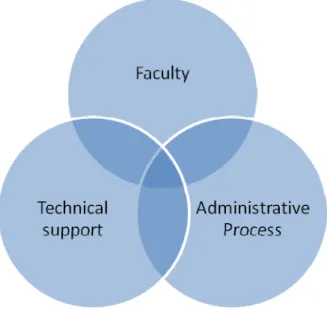
The main people that are involved in this technology update process can be divided into three categories, first, the faculty who is teaching the courses, second, the technical staff that imple-ments the technology and third, the administrative staff that completes the administrative proce-dures for purchasing and assuring adherence to proceproce-dures.
Although these three sides are listed for their roles in updating technology courses, however these roles are not separately identified from each other. Instead, some of these roles overlap and cross-over from one side to another (hence the cross-overlap in Figure 1). Thus, the role of each side in the triangulate listed above may need to be explained further. The following two sections explain the faculty and the technical staff roles in updating technology courses. The sections do not delve much into the role of the administrative staff as this will be beyond the scope of this paper. Figure 1 below shows a graph of the three sides involved in this course update process.
The Faculty Role
The role of faculty in updating technology courses is essential to the success of the implementing of such updates. After all, the faculty member is the one who will be teaching the course, thus he/she needs to have sufficient knowledge of the new technology and the issues that may emerge from using them. In addition, the faculty needs to observe recent technology changes so he/she may be able to integrate them into the classroom. This section elaborates on the role of faculty from two perspectives: first from the perspective of selecting software. Second, the section covers this role from the perspective of selecting hardware.
Figure 1 – Sides Involved in Technology Course Update
Software Selection and Updates
Software updates and the purchase of new software are considered to be a routine task among faculty teaching computer courses. The development of new versions of software, release of patches and the expansion of existing application are just a few reasons that lead faculty to con-tinually update the software they teach.
In acquiring the new software, faculty have two options to include new software into their courses. First, by purchasing propriety or commercial software; second, by downloading or in-stalling free or open source software.
Commercial or propriety software often come with help manuals and the companies that produce them normally offer online help lines where faculty can call for answers when facing problems during installation or their use. Thus emerging problems from these types of software can be dealt with directly with experts from the companies that produce them.
Open source or free software, on the other hand are newer brands of software that many are using at increasing rates as they often provide similar functionality to propriety software. Asiri (2003) outlines the difference between propriety and open source software:
Open source refers to all software in which the source code is freely available for any person to view, amend, or adapt. This is distinguished from propriety soft-ware applications where the source code is secret, not made public or standard-ized, and closely protected through patents and intellectual property applications. (p. 1)
Since the introduction of Open Source Software (or OSS), new terms and definitions have been introduced to describe this brand of software. Ye and Kishida (2003) provided the following defi-nition for OSS:
Systems that give users free access to and the right to modify source code. OSS grants not only developers but all users, who are potential developers, the right to read and change its source code. Developers, users and user-turned developers from a community of practice. A community of practice is a group of people who
are informally bounded by their common interest and practice in a specific do-main. (p. 419)
The list of open source software has been increasing at a steady rate over the past years. Lately, this list of open source software have increased so much that it is outnumbering current list of propriety software. Damicon (2007) provides a comparison list of commercial software categories and the open-source equivalents. This list includes more than sixty commercial software catego-ries and hundreds of open-source equivalents.
With this kind of increasing use of open source and free software, and in light of shrinking budg-ets at most institutions, some faculty find this as a viable option for integrating Open Source software into their courses. However, there is a price for such inclusion of open source and free software: Troubleshooting and maintenance are not easily achievable. Due to the nature of the open source movement, this kind of software does not have help lines or readily available manu-als. Instead, for any faculty who face problems with open source software, they have to work their way through chat sessions, blogs and visit various sites in order to obtain solutions for their problems.
When troubleshooting software problems, Ali and Murthy (2009) noted that the technical group is often equipped with staff that can handle these issues effectively. This staff often deals with a lot of similar troubleshooting procedures that make it easier for them to find solutions to these prob-lems. For faculty who want to integrate this kind of open source and free software into their courses, it could be helpful to coordinate such troubleshooting of problems with their technical staff (Pierce, 2003). This kind of coordination increases the chance of successful integration of this viable option in Open Source and Free software despite the shortcoming of unavailability of ready help for troubleshooting software issues (Windley, 2002).
Hardware Selection and Updates
Hardware selection is common at different technology programs. Purchasing new hardware is often routinely accomplished after the elapse of certain time or after the development of new technology (Arteaga & Lucas, 2005). In these cases, departments or colleges may purchase a large number of computers in order to include them into their program. These kinds of mass up-dates are often handled by the technical staff and are not expected to experience major problems. The installations of hardware that are integrated into older or existing hardware may cause prob-lems due to incompatibility with older hardware and the lack of availability of drivers to install. As the number of affected hardware increase, so do the number of problems that surface. As a result of this kind of installation of hardware and integrating them into existing hardware, the ex-perience of the technical staff will be helpful. The technical staff usually has the knowledge of the existing hardware and may also know the market for the selection of new hardware. Thus for fac-ulty who want to add new hardware to their computers or labs, it will be helpful to coordinate with the technical staff to have a better chance of successful integration.
Technical Support Staff and Tasks
The terms “technical support” and “technical staff” are repeated in this paper in general terms to refer to some kind of expertise by a department at a university or college. However, the exact de-tail of this department or group was not covered. It is helpful to explain more about this technical staff in terms of their expertise, employees, and the services they provide in order to better under-stand their role in updating technology courses. This section explains the meaning of technical support. It introduces the terms that are synonymously used to describe “Technical Support” and discusses the employment of technical support personnel and the services they provide. The
sec-tion begins by covering technical support in organizasec-tions in general and then narrows it down to academic institutions in particular.
Numerous terms have been introduced to describe the tasks included within technical support functions. Included in these terms desktop support technician (Stewart, 2005), Information Tech-nology Support (Arteaga & Lucas, 2005) Technical Support Groups (Pierce, 2003), Help Desk Consultants (Benatan & McGarrity, 2001) or simply technologist (Arteaga & Lucas, 2005). How-ever, all of the terms refer to the following attributes in some reference or another:
- Technical expertise acquired by individuals, groups or organizations.
- The technical expertise is provided in forms of services to individuals, departments or or-ganizations.
Employment in Technical Support
The term “technical support” has been widely used to describe individuals within different con-texts. For example, an individual who answers a question from a neighbor regarding a computer problem may be providing a technical support service (Rubens, 2005). A student who solves a computer glitch for his/her classmates may also be providing technical support service. Simple issues like these may be solved on a temporary basis that hold limited scope. However, technical support in organizations takes a different meaning. In these organizations, technology support services take different forms and place more importance than simply fixing other’s glitches. A loss of data during the work of an individual in these organizations or a malfunctioning of their hardware or software may cause the organization much in terms of resources. Thus, some compa-nies resort to having a group of personnel that has the expertise to provide technical support ser-vices to solve these problems. This group is often grouped into one department that is frequently named “Technology Support Department” or “Technical Support Department”.
The requirement for staff that work in technical support departments varies, but different studies indicate that this staff is required to be available to respond to calls from employees for some kind of technical support or another. Windley (2002) used the word “High Availability” to de-scribe the work of the technical staff and noted the following three characteristics about the ser-vices they provide:
• Reliability—Reliable services; perform their functions consistently. Overall system per-formance is one component of reliability.
• Availability—Service availability can be defined in terms of the percentage of time that the service is ready for use.
• Serviceability—Applies to services that are easy to maintain, troubleshoot, and upgrade.
Technical Support – Services
Providing technical support services vary widely depending on the situation, the organization and the type of expertise they provide. Rubens (2005) noted that technical support service can be as little as fixing the neighbor’s computer or answering questions regarding the kind of computer to buy. However, in organizations where technology use is abundant and the range of software and hardware is increasing and changing rapidly, the uses of technical support expertise is different and include a wider range of services.
Shaw, DeLone, & Niederman (2002) explained about the technical support services that are pro-vided by technical staff and the type of challenges they face in the work environment:
Support personnel are normally expected to provide assistance to end-users across a vari-ety of different packages and configurations, to deliver this support within a varivari-ety of work domains, and to provide this support in a cost and time-effective manner.
Addition-ally, these services are delivered to a heterogeneous end-user population that represents multiple levels of technical, business, and organizational proficiency. (p. 42)
The categories of services as well as the range of support that are provided are reminiscent of the challenges that technical support staff face in their work environment. At colleges and universi-ties, some of the same issues are repeated but other challenges unique to universities are also faced by the technical staff. Thus further detail about the technical support staff may be needed to illustrate the full picture.
Technical Support in Academia
A study completed by Arteaga and Lucas (2005) assesses the shortage of staff in technical sup-port departments. The title of this article best represents this dilemma of abundance of services provided by technology support staff at academic institutions. The title of this study is “So Many Labs, So Little Time” and the study noted the following regarding the services they provide:
Information Technology (IT) support groups are aware that in order to meet the needs of faculty and students who use the university’s computer labs, it is imperative to provide up-to-date equipment and software. As the number of supported computer labs and mul-timedia rooms grow, the quality of the support may suffer due to the lack of staff needed to properly maintain the equipment. Needed patches, updates and virus definitions can be neglected due to lack of time and resources. Printer, scanner and projector maintenance can also suffer. (p. 192)
Another study conducted to categorize the ethnographic background of technical support workers at a particular university (Cunningham, Knowles, & Reeves, 2001) listed the following sample of services that are provided by the technical support staff at the same institution:
- Deal with immediate, low-level problems such as fixing a stopped printer queue;
- Interact with novice users to answer questions about standard software packages;
- Set up new facilities (ranging from complete installation of a 50+ computer lab, down to setting up a single new laptop for an academic);
- Proactively investigate potential software and/or hardware problems, and locate solutions to these problems that haven’t occurred—yet;
- Keep an eye on long term developments in areas of hardware/software expertise, so that informed advice to decision-makers in the School can be provided
- Update information sources used by the technical staff and their ‘customers’ in the School; etc.
The support of technical staff is not limited to certain computers. They have to maintain the func-tions listed above in the computer labs, classrooms as well as offices of faculty, administrators and staff. Additionally, network functions may need to be maintained. This includes network security and other related functions.
In the same study that was conducted by Arteaga and Lucas (2005) wrote about the positive im-pact of technical support on their teaching. The study noted that technical support staff helped them cut down the time to troubleshoot problems and also learn about new hardware and software issues that they were not aware of. The authors of the same study noted further that the most im-portant attributes of school technologists are:
- A thorough knowledge of the technology
- Empathy for teachers who are trying to learn complicated software
- A strong desire to help others
- Patience
- Respect for the faculty.
As the use of diverse computing technology becomes more common in the classroom; the need for trained support professionals clearly becomes a high priority. Having a well trained and com-petent Tech department available to assist faculty and staff is of the utmost importance, along with the rapidly changing circumstances of providing students with the most current software and hardware developments. This requires coordination between the faculty teaching in the classroom and the technical staff that provides implements the diverse of the technology.
Coordination between Faculty and Technical Staff
This section illustrates the coordination between a faculty who is teaching web design courses at Eberly College of Business and Information Technology (ECOBIT) and the technical support staff at the same college. It demonstrates this coordination by giving two examples: one for new software installation and the second for hardware installation.
In order to further explain the coordination between the faculty and the technical support staff, an overview of the technical support at ECOBIT is warranted. Thus, this section begins first by giv-ing an overview of the technical support staff at ECOBIT and then proceeds into givgiv-ing the two examples of software and hardware installations that were mentioned earlier.
Technical Support at ECOBIT - Overview
The technical support staff at ECOBIT reports directly to the dean of the college of business. It is headed by the assistant dean for technology. The name of this department is “Research and De-velopment”. There are six academic departments within the college Accounting, Finance, Mar-keting, Management, Management Information Systems and Technology Support and Training. In addition to the academic departments, ECOBIT has a department for workforce development and training. This department provides training to the different organizations in the area. The technical support staff at ECOBIT provides technical services to the following groups of people:
1- Faculty 2- Staff
3- Administrators 4- Students
The range of services includes anything that deals with technologies. This may include any of the following services:
- Installing hardware - Installing software
- Maintaining Hardware, (fixing and repairing) - Troubleshooting software problems
- Monitoring software updates to install patches and fixes - Provide technical support to students
- Managing different computer labs
- Research and provide hardware/software prices
The staffing of the tech support at ECOBIT consists of director, assistant director and a number of different individuals who work as technical consultants. In most cases, the technical staff
in-cludes a majority of student workers. These students attend ECOBIT to complete their study but at the same time work for the technical support department. This policy has proven to provide a lot of benefits to the students. In most cases, the students acquire good experience working with the various technical issues they encounter. At the same time, a director of this department faces the challenge of staffing and training new consultants every year, as the old consultants graduate and move into the workforce.
Example of Installing Open Source and Free Software
Purchasing new software for ECOBIT follows certain procedures that require administrative au-thorization and issuing purchase requisition. In other words, some planning needs to take place before this kind of purchase is executed. However, free and open source software is widely avail-able and installing these types of nonproprietary software does not need to go through the same administrative procedures. Instead, coordination can be made with the Tech staff to download and install any free or open source software. The only limitations are the system requirements of the software in question, and the time table in which the Tech staff have to complete the requested installation.
This faculty teaches a course (BTST680 Technical Update) that includes programming as part of the course. The faculty wanted to teach Alice programming language – free software developed by Carnegie Mellon University. There are a few reasons for selecting Alice, among them is that Alice is suitable as a beginner programming language and it makes learning to program easier and more interesting (Kelleher & Pausch, 2005). Besides, most of the students enrolled in the course are education majors and potentially teach computers to high school students (Ali, 2009). It is noticed that a good number of high schools teach Alice for their first programming course (Dann, Cooper, & Pausch, 2006). Thus, it is more logical to teach something that will benefit the students in their future teaching jobs and selecting Alice as the programming language.
The tech support staff installed the software in the labs requested and the public lab as well. However, in order to give the students a better outlook on using this software, the faculty sought to install the web interface for Alice so that programs written in Alice can be displayed on web pages as well.
The interface between Alice programming language and the web requires downloading and in-stalling a number of Java fixes and applets. In order for this to work for the BTST680 students named above, some updates needed to be installed in the same computer labs where Alice was installed. All the fixes and updates were downloaded and installed on the machines in the lab and the faculty continued to teach the course with Alice software. Student satisfaction was noticeably high regarding the selection and the use of Alice as a language to learn programming.
Example of Installing New Hardware
Purchasing new hardware at ECOBIT is handled through the technical support staff. In other words, the faculty submits requests for purchasing hardware to the department chair, which is then forwarded to the dean. The dean in turn consults with the technical staff regarding prices and options. Acquisition of bulk hardware goes through purchasing once every year, when the college updates their computers. At rare occasions, some faculty members request the addition of some hardware that is added or inserted into other existing hardware, as the case here in this ex-ample.
This faculty teaches a course in Network Support (BTST413 Enterprise Technology Support). This course is often taught in a room that allows the attachment for more than one hard drive to the same computer. The room is equipped with 25 computers that each has a CD drive. Each
computer has multiple hard drives so that a different faculty can use a different hard drive for their course without distributing the work of the other faculty.
In prior years, this course used to teach Windows Server 2003 software. This software comes on a CD. However, with the new release of Microsoft Windows 2008, the faculty thought that it best serves the interest of the students if we acquire this software and install them on the course hard drives. However, the software comes on a DVD and there is no DVD drive on the computers in the room where it is taught – only CD drives are available.
The faculty contacted the tech support regarding this issue. Different options were discussed re-garding having the software, amongst placing the installation software on a network drive or copying the installation DVD to multiple CDs. However, these solutions were discounted and a decision was made to request the purchasing of 25 new DVD drives so that they can be installed and used to deploy the software.
In this example the need for the installation of the new DVD drives became evident shortly before the start of the Fall 2009 semester. With only a few weeks before classes resumed, all parties in-volved had to act quickly to resolve this new issue. The options were weighed by the Technology Support Department. Speed and dependability, as well as price; were just a few of the factors that had to be taken into consideration.
The faculty issued a request for purchasing and installing 25 DVD drives, as well as all needed cables and connectors. The same faculty had to wait until the request was approved, the order was issued, and the hardware is received and installed. The tech support staff provided interim solu-tion to the faculty by temporarily installing two DVD drives so that he could work with them to prepare for the class. Later on, the 25 DVD drives arrived, the tech support staff installed them on the machines and the faculty started teaching Microsoft Windows 2008 for this class.
Summary and Suggestions for Future Research
This paper explained about the coordination between faculty and technical support staff in updat-ing computer technology courses. The paper began by givupdat-ing the triangulate of the sides involved in updating technology courses. It then discussed the faculty role in introducing new technology into the classroom and followed it by more explanation of the role of technical support staff in the same technology course updates. Lastly, the paper illustrated the cooperation between a faculty and the technical support staff at Eberly College of Business and Information Technology (ECO-BIT) in selecting, installing and troubleshooting new technology.
At the beginning of this paper, we introduced a triangulate to show the three sides that are in-volved in updating technology courses: Faculty, technical staff and administration. We intention-ally omitted discussing the role of the administration in this paper as it is beyond the scope of this paper. We intend on completing the discussion of the triangulate by explaining the role of ad-ministration in this process. We also intending on covering the variables that are included on each side of the triangulate the variables that stand alone for each side and in the overlapping area. Thus, we intend to have our future research to cover the role of each side of the triangulate and also the common role of each side that overlaps with the other two sides.
While conducting this research, the authors realized that their submission does not provide a figu-rative illustration on the range of software, hardware and the extent to which further evidence of cooperation between the faculty and technical staff is demonstrated. Thus, the authors of this pa-per intend to gather data to show comparison figures and charts about the type of services vided by the technical staff at ECOBIT. Thus more detailed coverage of the type of services pro-vided by the technical staff at ECOBIT is planned for a future research paper.
References
Ali, A. (2009). Successful efforts in recruiting women into technology courses. Issues in Information Sys-tems, X (1), 225-231.
Ali, A., & Murthy, R. (2009). The role of technical support in updating web design courses - A case exam-ple. Proceedings of the Information Systems Education Conference: Phoenix, AZ 2008 retrieved
De-cember 11, 2009 from.
Arteaga, C., & Lucas, T. (2005). So many labs, so little time. Proceedings of the 33rd annual ACM SIGUCCS conference on User services. 192-196. Retrieved April 20, 2009 from ACM Digital Library
Asiri, S. (2003). Open source software. Retrieved October 26, 2006 from ACM Digital Library
Bardzell, J. (2006). Macromedia Dreamweaver 8 with ASP, ColdFusion, and PHP. Training from the source. Berkley, CA: Macromedia Press.
Benatan, E., & McGarrity, J. (2001). Developing student help desk consultants: A skill-based modular ap-proach. Proceedings of the 29th annual ACM SIGUCCS conference on User services, pp. 223-226.
Retrieved April 16, 2009 from ACM Digital Library
Cunningham ,S. J., Knowles, C., & Reeves, N. (2001). An ethnographic study of technical support work-ers: Why we didn't build a tech support. Proceedings of the First ACM/IEEE-CS Joint Conference on Digital Libraries (JCDL'01), 189-198. Retrieved April 16, 2009 from IEEE Computer Society Digital Library.
Damicon. (2007). List of open-source software links. Retrieved June 30, 2007 from
.
Dann, W., Copper, S., & Pausch, R. (2006). Learning to program with Alice. Upper Saddle River, NJ: Prentice Hall.
Kelleher, C., & Pausch, R. (2005). Lowering the barriers to programming: A taxonomy of programming environment and languages for novice programmers. ACM Computing Surveys, 37(2) 83-137.
Retrieved March 28, 2008 from ACM Digital Library
Pierce, P. (2003). Optimizing your documentation with the help of technical support. Proceedings of the 21st Annual International Conference on Documentation, p. 6-11.
Rubens, P. (2005, March 28). Technical support for the neighbors. BBC News. Retrieved April 16, 2009
from
Shaw, N., DeLone, W., & Niederman, F. (2002). Sources of dissatisfaction in end-user support: An empiri-cal study. ACM SIGMIS Database, 33(2), 41-56. Retrieved April 23, 2009 from ACM digital library
Stewart, J. (2005). MCDST guide to supporting users and troubleshooting a Microsoft Windows XP operat-ing system. New York, NY: Course Technology.
Windley, P. J. (2002). Delivering high availability services using a multi-tiered support model. Windley’s
Technometria. Retrieved April 16, 2009 from
Ye, Y., & Kishida, K. (2003). Toward and understanding of the motivation of open source software
Biographies
Azad Ali, D.Sc., Associate Professor of Technology Support and Training at Eberly College of Business – Indiana University of Penn-sylvania has 28 years of combined experience in areas of financial and information systems. He holds a bachelor degree in Business Admini-stration from the University of Baghdad, an M.B. A. from Indiana University of Pennsylvania, an M.P.A. from the University of Pitts-burgh, and a Doctorate of Science in Communications and Information Systems from Robert Morris University. Dr. Ali’s research interests include service learning projects, web design tools, dealing with isola-tion in doctoral programs, curriculum design and others.
Raj Murthy, MBA., Assistant Dean for Systems and Information Technology at the Eberly College of Business and Information Tech-nology – Indiana University of Pennsylvania. He has 25 years of ex-perience in managing academic and commercial Information Technol-ogy systems. He holds a bachelor degree in Business Administration from the University of Pune, India. M.B.A., from the Indiana Univer-sity of Pennsylvania, USA. He is currently completing his PhD in Communications Media and Instructional Technology.