Batch Queueing in the W
INNER
Resource Management System
Olaf Arndt
1, Bernd Freisleben
1, Thilo Kielmann
2, Frank Thilo
1 1Dept. of Electrical Engineering and Computer Science, University of Siegen, Germany
farndt|freisleb|[email protected]2
Dept. of Computer Science, Vrije Universiteit, Amsterdam, The Netherlands
[email protected]Abstract Resource management systems (RMS) for networks of workstations exploit unused computing ca-pacities by automatically assigning jobs to idle worksta-tions. Until now, the WINNER RMS developed by our group only provides support for interactive jobs. In this paper, an approach to seamlessly integrate a queueing system for batch jobs is presented. The basic design de-cisions, the queueing system’s functionality, and the ben-efits of its use within our workstation environment are described.
Keywords: networks of workstations, resource man-agement, batch queueing system
1
Introduction
Networks of workstations (NOWs) are by now ubiquitous general purpose computing platforms. Since console users of workstations hardly utilize the processing capabilities of their machines (e.g. while editing text, reading mail, browsing the web, or being physically absent), the idle time of work-stations is often as high as 95% [10]. Simultane-ously, there is high demand for computing power driven by applications from fields like simulation and optimization [11, 17].
Software packages that assign such compute in-tensive applications to idle workstations are known as resource management systems (RMS) [4]. Such systems have to cope with two conflicting ob-jectives. First, interactive tasks demand minimal
completion time to satisfy human users waiting in
front of a workstation. Second, non-interactive background tasks (sequential as well as parallel batch jobs) demand maximal throughput to
com-plete as many jobs as possible within given time constraints.
While interactive tasks have to be scheduled im-mediately on the currently best suited machine ca-pable to service a given request, execution of batch jobs may be delayed to better meet these objectives. Whenever the set of pending batch jobs exceeds the available computational resources, jobs have to be executed in a coordinated manner to avoid perfor-mance penalties caused by interferences between multiple concurrent jobs. Coordinated execution of batch jobs is called scheduling. With schedul-ing systems, jobs, once submitted, are waitschedul-ing in queues, while the scheduler selects jobs for execu-tion as resources become available.
Existing RMS can be divided into two groups: First, there are batch processing systems with lit-tle or no support for interactive applications like the
BATCH system [15], the Generic Network Queu-ing System (GNQS) [9], Distributed QueuQueu-ing Sys-tem (DQS) [8], Condor [11], and CODINE [5].
Second, some projects do provide support for both batch and interactive jobs. For example,GNU
Queue [16] essentially replaces the rsh command
by allowing both batch and interactive jobs to be started automatically on a particular set of ma-chines. LSF [18] and GLUnix [7] both support in-teractive jobs as well as batch jobs, but treat them in a totally different manner.
Until now, the WINNERRMS as described in [1, 2] has concentrated on the transparent execution of interactive jobs. In this paper, the process of ex-tending WINNERby a batch queueing system is
de-scribed. The design decisions leading to a seamless integration of the concept of queues into the
sys-tem are presented. Special emphasis is put on WIN
-NER’s extensibility to further kinds of jobs and plat-forms.
The paper is organized as follows. Section 2 out-lines WINNER’s overall design. In Section 3, the usefulness of a batch queueing system is motivated, before its integration into WINNER is presented.
First experiences gained during the use of the sys-tem are described in Section 4. Section 5 concludes the paper and outlines areas of future research.
2
W
INNERSystem Design
WINNERhas been designed for typical Unix NOW environments, consisting of a central server and several workstations. For a WINNER NOW, the
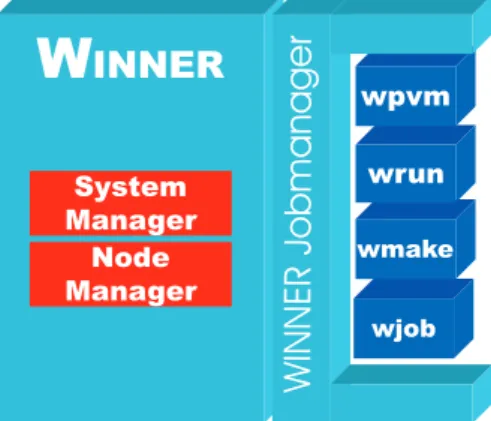
server is required to provide shared file systems and user accounts for all connected workstations. The various tasks of the WINNER system are per-formed by three kinds of manager processes: sys-tem managers, node managers, and job managers (see Fig. 1). Additionally, there are several user– interface tools, e.g. for status reports and for con-trolling access to each workstation.
Figure 1: Manager processes in a WINNERcluster.
The system manager is the central server process of a WINNERnetwork. Its duties include (a) col-lecting the load information of all respective work-stations, (b) managing the currently active jobs, and (c) assigning hosts to job requests. This assignment is based on the estimated processing performance that each workstation can provide to a newly started
process. This estimation is computed from each workstation’s load-free speed, its current workload, and the number of processors. Furthermore, the presence of the workstation owner or additional re-source constraints can reduce the set of hosts which are suitable for a given job.
On every host participating in a WINNER net-work, a node manager performs the tasks related to its machine. First of all, it periodically mea-sures the host’s utilization and reports it to the sys-tem manager. Furthermore, node managers are re-sponsible for starting and controlling WINNER pro-cesses on their nodes, like e.g. reducing process pri-orities to protect console users [1].
System and node managers run as daemon pro-cesses. In contrast, job managers are invoked by users to execute sequential and parallel jobs. Thus, job managers are part of WINNER’s user interface. Their duties are (a) acquiring resources from the system manager, (b) starting processes on the ac-quired nodes via the respective node managers, and (c) controlling and possibly redirecting input and output of the started processes.
WINNER’s simplest job manager is called
wrun
.It allows the execution of a sequential (possibly in-teractive) job. It works almost like the standard Unix command
rsh
, except that the job is auto-matically started on the currently best suited work-station in a network. wjob allows non-interactive execution of sequential tasks. It provides support for process checkpointing and migration using the user-level checkpointing librarylibckpt
[14]. Par-allel PVM applications [6] are supported by wpvm. This job manager registers several processes into the PVM infrastructure to avoid changes to the PVM system or application programs. It automat-ically selects a number of appropriate hosts for the PVM virtual machine (usually a tedious task when performed manually), starts the user’s paral-lel application, and improves PVM’s scheduling by utilizing WINNER’s load distribution mechanism. Furthermore, with wmake a parallel and distributed variant ofGNUmake
has been implemented which can significantly reduce the time needed for com-piling and linking large software projects. For an in-depth description of these different job man-agers, see [2].that is easily extensible and adaptable to further workstation platforms or kinds of jobs. Its manager processes and user–interface tools are implemented in C++. They communicate with each other by a reliable message–exchange layer on top of UDP sockets. Currently, WINNERruns on Digital Unix, Linux, FreeBSD, and Solaris.
3
Batch Queueing in W
INNER Until now, WINNERprovides support for the auto-matic distribution of possibly interactive processes on the fastest available nodes in a NOW. Although this is very useful for daily work, this scheme is unsatisfactory for users having to start hundreds or thousands of batch jobs, because each submitted job is either started immediately (as long as compu-tational resources are available) or will be rejected. This leads to a situation where jobs are either not executed at all or many jobs compete for the re-sources offered by each of the workstations, signif-icantly degrading the overall performance. Obvi-ously, some kind of of queueing mechanism is nec-essary.The basic idea of introducing queues to WIN
-NER is to provide a simple mechanism for submit-ing bulks of jobs without havsubmit-ing the users explicitly coordinate their execution. To minimize the com-petition between queued jobs, WINNERguarantees that at most one queue job per processor of each workstation is executing at the same time. When all nodes are busy executing queue jobs, any fur-ther batch jobs will remain in a waiting state until one of the active queue jobs completes.
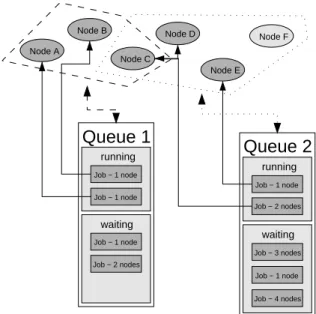
This situation is shown in Fig. 2. In this exam-ple, there are two queues, both containing currently running jobs as well as jobs waiting to be sched-uled as soon as suitable nodes become available. Each queue can be restricted to a particular subset of nodes. In the example shown in Fig. 2, queue 1 can assign jobs to nodes A, B, and C, while queue 2 can assign jobs to nodes C, D, E, and F, thus shar-ing host C between both queues. All nodes except node F are executing queue jobs. Node F is idle be-cause (assuming a FIFO scheduling algorithm) the next job of queue 2 that is to be scheduled requires three nodes to run. A variety of scheduling policies
Queue 2 running waiting Job − 1 node Job − 2 nodes Job − 3 nodes Job − 4 nodes Job − 1 node Queue 1 running waiting Job − 1 node Job − 2 nodes Job − 1 node Job − 1 node Node D Node A Node C Node E Node B Node F
Figure 2: WINNERqueues.
have been implemented in WINNER, a detailed de-scription of which can be found in [3].
Another important advantage of a queueing mechanism is fault tolerance. In WINNER, we dis-tinguish between two situations: jobs that do sup-port checkpointing and those that do not. Since in the most general case jobs do not support check-pointing, we focus on this case first. All informa-tion on pending or active queue jobs is stored per-sistently on the system manager’s disk. Thus, a failure of the system manager does not lead to any loss of jobs besides the information which job is running on which nodes. Since the node managers cannot work properly without the system manager, those jobs will be stopped anyway. After a restart of the system manager, the batch jobs will be restarted as well.
Since each node manager regularly sends infor-mation about the node’s load situation to the system manager, a node failure can be assumed, when load messages have not been received within a particu-lar time period by the system manager. Once such a failure is detected, the system manager restarts all queue jobs running on this node; in the worst case, the computation is done twice.
Those jobs that do provide checkpointing reg-ularly create checkpoint files. When the system
manager or a participating node manager fails, those jobs will be restarted from the most recent checkpoint file. This can significantly reduce the amount of lost computation time. The major weak-ness of WINNER’s checkpointing mechanism is that it supports only sequential programs so far; ex-tending it to parallel jobs is a subject of future work.
3.1
System Integration
WINNERhas been designed for extensibilty to fu-ture kinds of systems and job types. As outlined in Section 2, this has been achieved by identify-ing three kinds of manager processes that commu-nicate with each other by exchanging messages. Of course, a batch queueing facility has to fit into this structure to maintain WINNER’s extensibilty. WINNER’s batch queueing facility consists of two major parts: the job scheduler itself and a user interface via which jobs can be submitted. The job scheduler needs information about the available workstations and their current utilization. Hence, it is a natural choice to integrate the scheduler into the system manager process.
Each job manager is responsible for starting a certain class of jobs. It implements the pro-cess startup of its sequential or parallel application. Therefore, job managers have to be started by the job scheduler once their job is selected for execu-tion. To make scheduling decisions, the resources required by each batch job have to be known a pri-ori, namely at the time at which jobs are submit-ted. Because only the job manager knows which resources it will request for executing a given job, the job manager has to provide this information. Therefore, WINNER provides a “meta job ager” wqueue that invokes the respective job man-ager in a probing mode. We will now discuss this in detail.
User Interface
To illustrate the usage of wqueue, consider a sam-ple applicationappwhich is parametrized by a con-figuration file conf. Since it needs some space for temporary files, a resource requirement of at least 10MB of free temp space is specified by us-ing wjob’s option-rt 10:
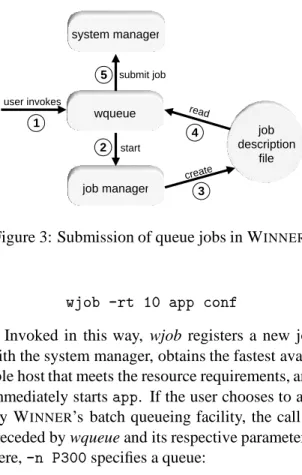
system manager job manager wqueue job description file submit job start create read 2 3 4 5 user invokes 1
Figure 3: Submission of queue jobs in WINNER.
wjob -rt 10 app conf
Invoked in this way, wjob registers a new job with the system manager, obtains the fastest avail-able host that meets the resource requirements, and immediately startsapp. If the user chooses to ap-ply WINNER’s batch queueing facility, the call is preceded by wqueue and its respective parameters. Here,-n P300specifies a queue:
wqueue -n P300 wjob -rt 10 app conf Now, the job will first be enqueued by the system manager. It will be started as soon as a free work-station with at least 10MB of free temp space be-comes available.
Job Submission
Figure 3 outlines the process of submitting a queue job. First, a user invokes wqueue (1). For re-trieving the job’s resource requirements, wqueue invokes the job manager in probing mode (2). The job manager will then write a job description file (3) containing all of the job’s resource require-ments as well as the current environment (includ-ing the work(includ-ing directory, environment variables etc.). wqueue reads this file (4), submits the job along with all required information to the system manager (5), and terminates.
Job Execution
The start of a queue job is shown in Figure 4. The batch job scheduler (which is part of the system
queue system manager job manager node manager node manager node manager start and assign nodes node manager select nodes 1 2 3 4 select job to schedule
start and control processes
Figure 4: Start of a WINNERqueue job.
manager) regularly inspects the queues for waiting jobs the resource requirements of which can be met. If there is any such job, it is selected to be started (1). Next, the nodes which are to be assigned to the job are chosen (2). The environment which was stored together with the job is restored, and the job manager is started (3) using the parameters that were originally specified by the user upon invoking
wqueue. Then, the job manager requests and
ob-tains the preselected set of nodes from the system manager. Finally, the job manager performs its du-ties like starting and controlling the job’s processes as if it was directly invoked by the user.
3.2
Queue Management
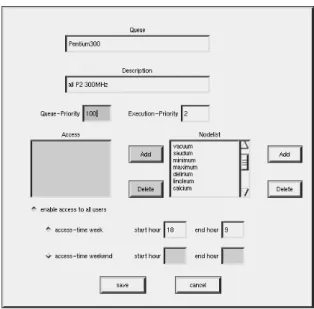
In WINNER, queues can be configured in a
conve-nient way using a graphical tool (cf. Fig. 5). Ad-ministrators can specify several queue attributes. These include the queue name, a plain-text descrip-tion, the set of workstations on which jobs will be executed, the set of users having access to this queue, and the priority at which each job of the queue will be executed. This priority corresponds to the scheduling priority of the operating system and affects the percentage of processor time as-signed to a job in the presence of competing pro-cesses. WINNER provides an additional priority, the queue priority, that affects the order in which
jobs of different queues will be scheduled. Finally, it is possible to limit the start of jobs to specific time frames, optionally distinguishing between working days and weekends.
Figure 5: WINNERqueue configuration tool.
For the users, wqueue provides some additional functionality. In addition to enabling the submis-sion of jobs to a queue, wqueue can be used to dis-play the current status of all queues, print a listing of active and waiting jobs, and delete pending jobs.
3.3
Exclusive Execution
Interactive workstation users can be protected from disturbance by batch jobs via queue priorities and time frames. Additionally, batch jobs may need ex-clusive access to a workstation, e.g. when their pre-cise runtimes have to be measured. Therefore, the job manager wjob has been extended to provide two additional process control mechanisms.
(1) In the default configuration, WINNER does not start jobs on workstations with active console users. To further minimize the probability of other jobs interfering with measurements, jobs may also be delayed until the workstation’s load falls below a given threshold (usually close to zero).
(2) The above mechanism is quite useful, but cannot help when a user logs into a machine once a job had already been started. In this case, the job
can be suspended whenever a user logs in. It will be resumed as soon as the user logs out again. This mechanism assures that the job has exclusive ac-cess to the CPU. While the proac-cess is suspended, it does not consume any CPU time. Thus, measure-ments which are based on the amount of consumed CPU time will yield correct results.
4
A Use Case Study
To evaluate the basic functionality and possible benefits of our queueing system, a series of ex-periments has been performed. As test jobs, sev-eral genetic algorithms [12, 13] have been chosen. To compare the quality of these algorithms, each of them was run to approximate the solution of a given NP-hard combinatorial optimization prob-lem within a pre-determined amount of time.
A full set of runs consists of a number of inde-pendent jobs: First, one job is created for each al-gorithm. Since genetic algorithms are randomized optimization heuristics, each run has to be repeated for a number of times to get meaningful average results. Furthermore, each algorithm must solve a number of different problem instances. The result-ing number of jobs is the product of the number of algorithms, the number of problem instances, and the number of times each job is repeated. Given that a single job takes 5 minutes to 2 hours to com-plete (depending on which parameters are used), a complete batch run needs a huge amount of CPU time due to the vast number of jobs involved.
Obviously, a single workstation can not provide sufficient computational power for such a problem setting. Parallel execution on several machines is a must. To achieve meaningful results, the job exe-cution has to be coordinated such that the individ-ual jobs interfere neither with each other nor with processes started by other users. Using a batch scheduling system with the features described so far, turns out to be the only feasible way of perform-ing such a set of computations in a NOW environ-ment.
WINNER’s queueing system significantly sim-plifies such a task. The user submits each single job to WINNERwithout having to worry about ma-chine failures, time slots, competing users or which
Table 1: Sets of example batch jobs. avg. time time utili-Jobs per job seq. ws queue zation 3960 600 s 660 h 13 52.9 h 96% 3960 300 s 330 h 12 35.0 h 79% 100 7200 s 200 h 14 16.0 h 89% 1020 600 s 170 h 14 13.0 h 94% 1800 600 s 300 h 15 32.5 h 62% 512 1200 s 171 h 13 13.3 h 99%
workstations to use. When many similar or identi-cal jobs are needed, a simple shell script that repeat-edly calls wqueue is sufficient.
We have run several sets of example batch jobs, each executing genetic optimization algorithms. For all runs, the queue was configured to contain a maximum of 15 identical Pentium II 300MHz Linux workstations. Table 1 lists statistics of these runs. Each line describes a test set containing the number of individual jobs, the average comple-tion time per job, the accumulated sequential com-pletion time, the number of workstations available when the test was performed, the completion time using the queueing system, and the achieved CPU utilization of the workstations. The table clearly shows that the WINNER batch queueing system achieves high degrees of utilization. Of course, CPU utilization varies over time because WINNER
gives priority to interactive jobs. Batch jobs only consume otherwise unused CPU time. But still, as Table 1 shows, batch jobs can exploit large frac-tions of the total CPU capacity.
5
Conclusion
In this paper we presented an approach to seam-lessly integrate a batch queueing system into the WINNER resource management system for
net-works of net-workstations. The general design deci-sions, the functionality of the queueing system, and first results of its use in our workstation environ-ment were described.
The core features of WINNERhave been used on a daily basis by both the regular staff and students for well over a year in an environment consisting of about 80 networked workstations. The system
proved to be useful because it is easy to use and de-creases the average response time of many applica-tions like computationally intensive compiler runs, TEX text formatting or other kinds of jobs. This is achieved without burdening users with the task of locating a most suitable workstation for a given task.
In contrast, utilization of WINNER queues for batch jobs has begun only recently. However, WINNERqueueing facilities have already been ex-ploited by various projects within our research group. The implementation has proven to be ro-bust; user feedback has been quite positive.
The concept of a general queue submission tool that supports all kinds of jobs by making use of the corresponding job manager allows us to support both sequential jobs and parallel PVM jobs with minimal effort. In the near future, we plan to sup-port additional job types such as parallel applica-tions based on the MPI standard. Furthermore, we are investigating the effects of the batch queueing system on the interactive users of our workstation pool in a more elaborate manner.
References
[1] O. Arndt, B. Freisleben, T. Kielmann, and F. Thilo. Dynamic Load Distribution with the Winner
Sys-tem. In Proc. Workshop Anwendungsbezogene
Lastverteilung (ALV’98), pages 77 – 88, Munich,
Germany, 1998.
[2] O. Arndt, B. Freisleben, T. Kielmann, and F. Thilo.
Scheduling Parallel Applications in
Networks of Mixed Uniprocessor/Multiprocessor Workstations. Proc. ISCA PDCS-98, Chicago, IL, 1998, pp. 190-197.
[3] O. Arndt, B. Freisleben, T. Kielmann, and F. Thilo.
A Comparative Study of Online Scheduling Algo-rithms for Networks of Workstations. Submitted
for publication, 1998.
[4] M. A. Baker, G. C. Fox, and H. W. Yau. A Review of Commercial and Research Cluster Management
Software. Technical ReportNPAC TR SCCS-748,
NPAC, Syracuse University, NY, 1995.
[5] CODINE4.1.1, Computing in Networked
Envi-ronments. Technical Overview,GENIASSoftware
GmbH, 1996.
[6] A. Geist, A. Beguelin, J. Dongarra, W. Jiang,
R. Manchek, and V. Sunderam. PVM: Parallel
Virtual Machine – A Users Guide and Tutorial for Network Parallel Computing. MIT Press, 1994.
[7] D. P. Ghormley et al. GLUnix: A Global Layer
Unix for a Network of Workstations.
http://now.cs.berkeley.edu/Papers2/recent.html. [8] T. P. Green. DQS 3.0.2 Readme/Installation
Man-ual. Supercomputer Computations Research
In-stitute, Florida State University, Tallahassee, FL,
1995.
[9] S. Herbert. Generic NQS - Free Batch Processing for UNIX. Academic Computing Services,
Uni-versity of Sheffield, UK. http://
www.shef.ac.uk/uni/projects/nqs/Generic-NQS/.
[10] P. Krueger and R. Chawla. The Stealth
Dis-tributed Scheduler. Proc. IEEE 11th Int.
Confer-ence on Distributed Computing Systems, pp.
336-343, 1991.
[11] M. Livny and R. Raman. High-Throughput
Re-source Management. In: The GRID: Blueprint
for a New Computing Infrastructure pp. 311–337,
Morgan Kaufmann, 1998.
[12] P. Merz and B. Freisleben. Fitness Landscapes, Memetic Algorithms and Greedy Operators for Graph Bi-Partitioning. To appear in Evolutionary
Computation, MIT Press, 1999.
[13] P. Merz and B. Freisleben. A
Compari-son of Memetic Algorithms, Tabu Search and Ant Colonies for the Quadratic Assignment Prob-lem. To appear in Proc. Congress on Evolutionary
Computation, IEEE Press, 1999.
[14] J. S. Plank, M. Beck, G. Kingsley, and K. Li. Libckpt: Transparent Checkpointing under Unix.
Proc. Usenix Winter 1995 Technical Conference,
1995.
[15] S. R. Presnell. The Batch Reference Guide. 3rd Ed., Batch Version 4.0, University of California, March 1994.
[16] GNU Queue. Free Software Foundation.
http://www.gnu.org/software/queue/queue.html [17] M. S. Warren, D. J. Becker, M. P. Goda, J. K.
Salmon, and T. Sterling. Parallel Supercomputing with Commodity Components. Proc. PDPTA’97, pp. 1372–1381, 1997.
[18] S. Zhou. LSF: Load Sharing in Large-Scale
Het-erogenous Distributed Systems. University of