SHYCA DATABASE MANUAL
Content
1. Introduction 2. Structure
3. Working with the SHYCA database 3.1. Installation and starting the database 3.2. Main form
3.3. SHYCA Consortium contacts form 3.4. SHYCA Seminars
3.5. Best practice form
3.6. Database of key-actors of Small Hydro Sector in Armenia, Azerbaijan, Georgia and Ukraine
3.6.1. General form
3.6.2. Country - driven selection procedure of key - actors database 3.6.3. SHP Sector - driven selection procedure of key - actors database 4. Remarks
Introduction
Creation of SHYCA Database is a part of project INCO-NIS-SSA-4-515943-SHYCA. Promotion of Small Hydro Power Retrofitting and Implementation in the Caucasus and Carpathians Region. This task is foreseen in the Work package 3 “Database of key - actors of Small Hydro Sector in Armenia, Georgia, Azerbaijan and Ukraine” of the project.
Database contains information about stakeholders from Armenia, Azerbaijan, Georgia and Ukraine, as well as information provided by European Small Hydro Association. Also, the tool includes information about best practice in the retrofitting of small hydro power plant in the target regions of the project and about participation in the seminars, which were organized in the framework of the SHYCA project.
Informational contents were sent from target countries and makes up more than 250 entries.
So, presented product “Database of key - actors of Small Hydro Sector in Armenia, Georgia, Azerbaijan and Ukraine” can be estimated as a powerful informational tool fro small hydro development not only in target countries, but also on territory of former Soviet Union and Europe.
Database was programming using Microsoft Access 2003 and will be provided for free as a open source code.
Requirements: pre-installed Microsoft Access (later 2000) for a proper operation. This manual contains description of user-interface and possibilities of this tool.
2. Structure of database
Access Database contains
• Tables (main containers of the data)
• SQL – queries (database operation)
• Forms (user interface)
• Reports
• Visual – Basic code (advanced possibilities of Access database) List of forms
• Main form
• SHYCA Consortium form
• SHYCA Seminar
• SHYCA Best portraits
• SHP Stakeholders Data. Country driven selection
• SHP Stakeholders Data. SHP sector driven selection
• SHP Stakeholders Data. General form List of reports
• Report on consortium coordinates
• Report on stakeholders (grouped by Countries)
• Report on stakeholders (grouped by SHP expertise)
• Report on best practice examples
3. Working with the SHYCA database
3.1 Installation and starting the databasePlease, copy all contents of directory “WP3_Key_Actor” to the specified path.
Open file “<…>\WP3_Key_Actor\Database_Access\SHYCA_stakeholders.mdb” by Microsoft Access or double-click on SHYCA_stakeholders.mdb in Explorer. During the launch of application you can be asked about possible insecure codes or macros within code. This is a standard warning in Microsoft Access, so follow the dialog to open the database.
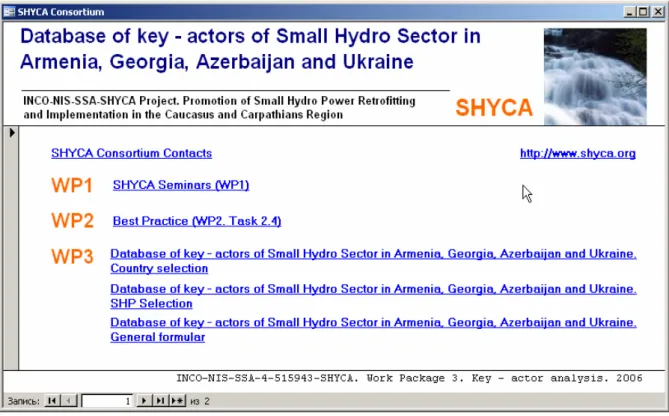
After launch of database you can see the Main form with list of all presented topics. By pressing on specified hyperlink you can open another form.
3.2 Main form
After starting the database you will see the “Main form”, which contains a links to all main topics of database (Figure 1). To browse the chosen form, please, click on hyperlink.
Figure 1. Start form of database
3.3 SHYCA Consortium contacts form
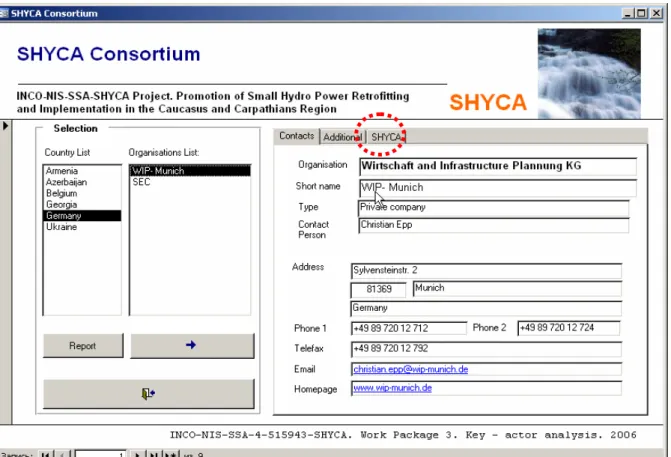
“SHYCA Consortium” form provides a contact and projecting information on the organisations, which are creating the SHYCA consortium (Figure 2).
The form allows selecting organisations grouped by countries of the project.
After selecting the country ore countries from “Country List” you will be automatically provided with the list of organisations in list box “Organisations List”. After Double – click on selected organisation or pressing the button you will be provided with organisation’s contact information and short information on Work Packages. Last property can be found under SHYCA bookmark marked with on Figure 2 with red circle. By pressing “Report” button you can get the information on participants of seminars, selected in “Country List”.
Data provided in this form:
• Contacts
o Organisation (Short name) o Organisation (Full name) o Contact person
o Contact person position o Responsible person
o Responsible person position o Street
o Country o City o Telephone o Telefax o Email o Homepage • Additional o Organisation type o Responsible person
o Responsible person position o General remarks
• SHYCA
o Comments on WP1, WP2, WP3, WP4, WP5, WP6
Figure 2. SHYCA Consortium form
3.4 SHYCA Seminars form
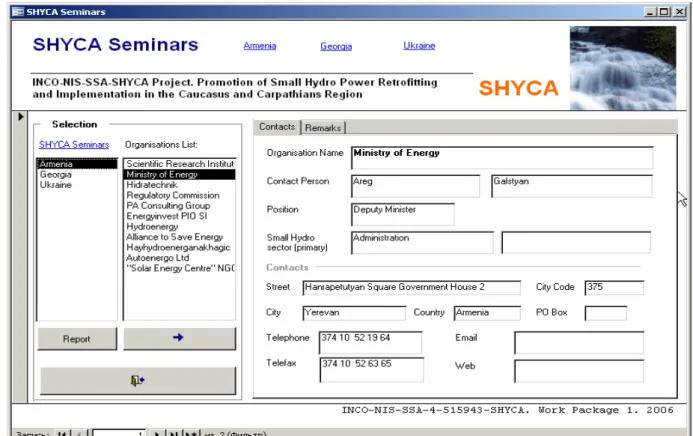
“SHYCA Seminars” form allows selecting and choosing from the list of seminars, which took place in the framework of Work Package 1, organisations and consequently provide the information on selected organisation (Figure 3).
Firstly, you have to choose the seminar “Armenia, Georgia, Ukraine”. After selecting one or several seminars you will see list of organisation, which participated in the
selected seminars. To see the contact information for selected organisation double – click on selected item or press button.
By pressing the “Report” button, you will be able to get a report, containing list of contacts of organisations grouped by host countries of seminars.
Data provided by SHYCA Seminars form:
• Contacts
o Organisation (Short name) o Organisation (Full name) o Contact person
o Contact person position o Responsible person
o Responsible person position o Street o City code o Country o City o Telephone o Telefax o Email o Homepage o Organisation type • Remarks o Remarks
3.5 Best practice examples form
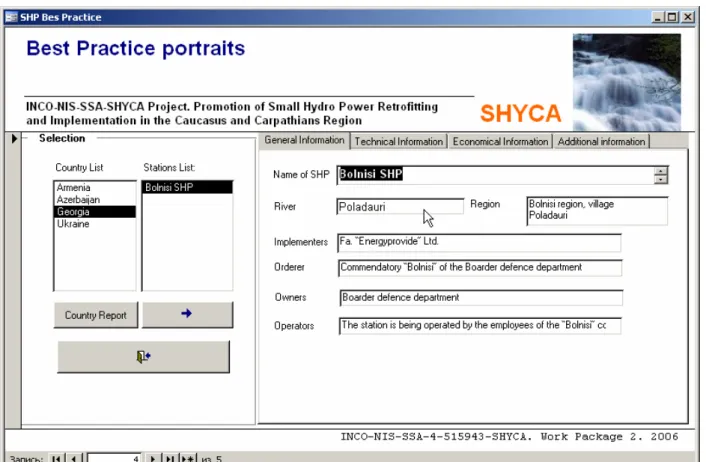
“Best practice examples” form contains information delivered by all partners of the project (Figure 4). To see the information on items you have to select country in “Country List” and select by double-clicking in “Station List” or pressing button.
“Country report” provides report on this station based on selected items. Data provided by “Best practice” form:
• General information
o Name of the Small Hydro plant o Country o River o Region o Implementers o Orders o Actual owner o Operator • Technical information o Max electrical capacity o Annual electricity production o Water pressure
o Construction date o Used water flow (m3/s) o On grid / Off grid
o Technology used o Technology produces • Economical information o Total investment o Private funding o Public funding o Equity o Commercial loan o Exploitation period o Payback time o Electricity purchaser o Price of electricity sold o Annual maintenance costs
• Additional information o History of project o Benefits
o Remarks
Figure 4. Best practice form
3.6 Database of key - actors of Small Hydro Sector in Armenia, Georgia, Azerbaijan and Ukraine
This part is a main task of Work package 3 and core of the database. Information on key – actors in Small hydro sector are presented in three forms:
• SHP Stakeholders Data. General form
• SHP Stakeholders Data. Country driven selection
• SHP Stakeholders Data. SHP sector driven selection The main informational data field are:
• Organisation name
• Contact function
• Contact person name
• Contact family name
• Street • City code • PO Box • Country • Telephone • Telefax • Email • Homepage
• Small hydro sector expertise
• Member of SHYCA Consortium
• Participation in the seminars
• Remarks 3.6.1 General form
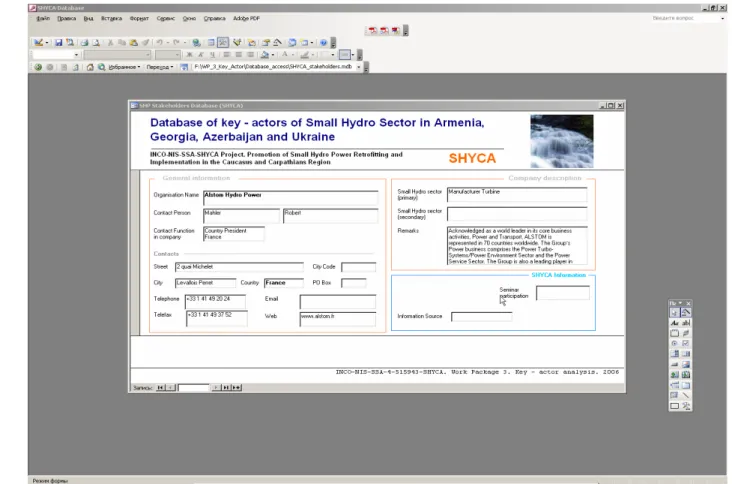
General form as well as other following below forms of this chapter can be used to get, correct and ad new information to the database (Figure 5).
To add a new entry you have to press key
*
that located at the bottom border of the form and fill empty control boxes. To see the previous or next database record you can use buttons.To search and select procedures you can use the in-built properties of Microsoft ACCESS like a “Form based filter”. It appears by right-mouse button clicking on free space of the form. Now, you can choose the data container and type or select from the combo-box needed entries. After, press right mouse button once more time on the free form’s space and select “Filter / Sort apply”. Now, you will have number of data sets linked with your query.
Please, take into consideration by searching, that some organisation have are presented within “ ” brackets.
3.6.2 Country - driven selection procedure of key - actors database
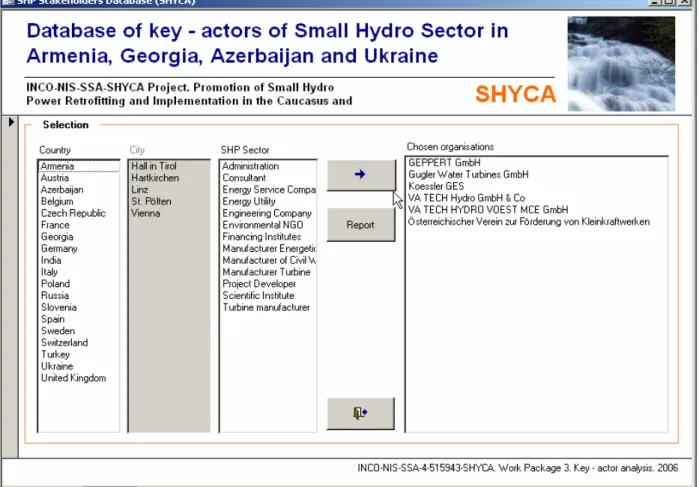
“Country selection” form allows applying selection procedure driven by selection of country, city and small hydro plant sector expertise (Figure 6).
At first you have to select a country / countries in “Country list” list box and then you will see list of the cities of this countries. After selection the city from “City List”, select the desired SHP sector / sectors and press button to be provided with a selected by your criteria organisations (List Box “Chosen organisations”). To see details of organisations, please, double-click on selected organisation from “Chosen organisation” list box.
Report grouped by Countries is available after complete selection and pressing button. To see report please push the “Report” button.
Figure 6. Form for country – driven selection procedure of key – actors database.
3.6.3 SHP Sector – driven selection procedure of key – actors database
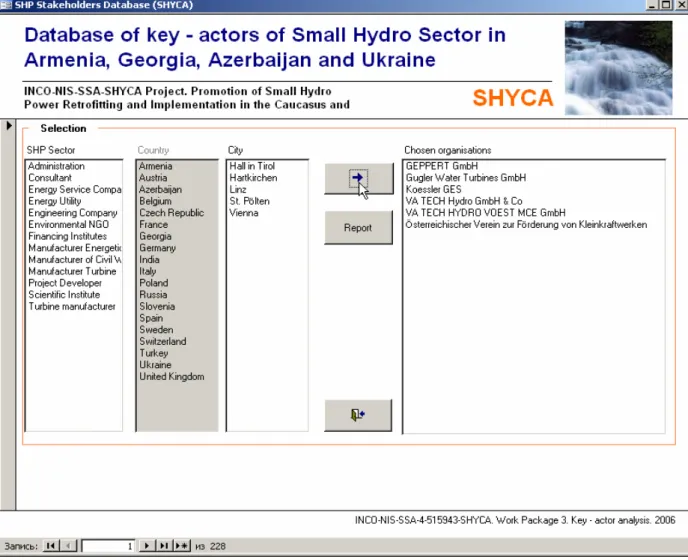
From “Small hydro sector expertise” provide you a possibility to select data from query based on small hydro sector expertise. Select at first Small Hydro Power Plant Sector from the “SHP Sector” list box. Now, you can choose consequently countries and cities from corresponding list boxes (Figure 7).
By pressing of button you will be provided with a selected by your criteria organisations (List Box “Chosen organisations”). To see details of organisations, please, double-click on selected organisation from “Chosen organisation” list box. Report grouped by SHP is available after complete selection and pressing button. To see report please push the “Report” button.
Figure 7. Form for SHP Sector - driven selection procedure of key - actors database.
4. Remarks
All selection forms are in left-to-right driven forms. Please, select first left query and then next options at the right.
The button or double – clicking is in fact executing control of the forms. All forms contain Exit button with exit picture.