A Comparison of Wired Technology &
Wireless Technology for effective
Communication
S.Saranya1
Part Time Lecturer, Dept. of Computer Science, MSU Constituent Model College, Nagalapuram, Tuticorin,
Tamilnadu, India1
ABSTRACT: In early Days the wired network has been used globally, but now a day for the latest communication all
of them use only wireless communication with latest modern device like mobile, lab-top, notepad, etc... Wireless Technology, how it take place in most of the area. This is an effective communication platform than the wired technology. There are so many types in Wireless Technology. The aim of the paper is to compare the Wired and Wireless technology on the basis of various parameters such as Reliability, Mobility, Speed, Security etc.
KEYWORDS: Cost, Reliability, Mobility, Speed, Security etc.
I.INTRODUCTION
Wired network is used to carry different forms of electrical signals from one end to the other. Mostly in wired network one internet connection is being taken using T1 line, cable modem or using any other means. This connection is shared among multiple devices using wired network concept. The details depend on the computers and devices on your network, but broadly speaking, plugging an Ethernet cable into a laptop or printer is enough for it to recognize the network and get connected. There's no playing around with scanning for available networks, inputting security keys or trying to locate an area with a strong Wi-Fi signal. Ultimately how convenient this wired networking method is for your company depends on how well equipped your office is and the extent of the existing network cabling. The fastest 802.11n Wi-Fi speed currently in widespread use can achieve a maximum range of 250 feet in the most ideal conditions, although substandard hardware, interference from other devices and physical obstacles such as walls and floors can substantially reduce this distance. Ethernet cabling, in contrast, can stretch up to 330 feet without any loss of quality. If you have a lot of floor space to cover, then a wired solution enables you to stretch your network further than a wireless one.
II.COMPARISONS OF WIRED AND WIRELESS COMMUNICATION
Wired Network: As we know "wired" is the term refers to any physical medium consisting of cables. The cables can be copper wire, twisted pair or fiber optic. Wired network is used to carry different forms of electrical signals from one end to the other. Mostly in wired network one internet connection is being taken using T1 line, cable modem or using any other means. This connection is shared among multiple devices using wired network concept.
EXAMPLE: LAN (Local Area Network): This network consists of ethernet cards housed in PCs or laptops. These cards are connected using Ethernet cables. The data flows between these cards. For small wired network router is used
to connect few number of desktop or laptop computers. In order to increase the network coverage for more number of systems multiple switches and routers are used.
Wireless Network: As we know "Wireless" is the term refers to medium made of electromagnetic waves (i.e. EM Waves) or infrared waves. All the wireless devices will have antenna or sensors. Typical wireless devices include cellular mobile, wireless sensors, TV remote, satellite disc receiver, laptops with WLAN card etc. Wireless network does not use wires for data or voice communication; it uses radio frequency waves as mentioned above. The other examples are fiber optic communication link and broadband ADSL etc.
EXAMPLES: 1. Outdoor cellular technologies such as GSM, CDMA, WiMAX, LTE, Satellite etc. 2. Indoor wireless technologies such as Wireless LAN(or WiFi), Bluetooth, IrDA, Zigbee, Zwave etc.
Sr.No. Characteristics Wired Networks Wireless Networks 1. User
connectivity Connectivity is possible only to or from those physical locations where the network cabling extends.
Connectivity is possible beyond the bounds of
physical network cabling. 2. Mobility Limited (because it operates only on a
connected computers linked with the network)
Outstanding (enable wireless user to connect to network and communicate with other users anytime, anywhere)
3. Reliability High (Ethernet cables, switches are reliable because manufactures have improving technology over several decades)
Reasonably high( because if the major section like router break down the whole network will be affected)
4. Speed and
Bandwidth High Up to 100 mbps Low Up to 54 mbps( depends upon standards 802.11g)
5. Cables Ethernet, copper and optical fibers Works on radio waves and microwaves
6. Security Good (by using some software like free wall
software etc.)
Weak (because wireless comm unication signals
travel through the air and can easily be intercepted but it can improve by encryption technique)
III.EFFICIENT COMMUNICATION
Wireless Data Radios: The top industrially hardened class of proprietary protocol wireless radios systems are easy to
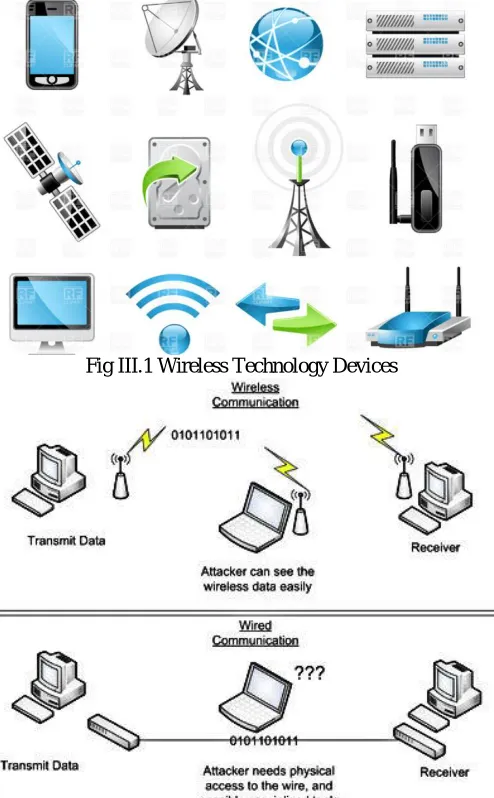
install and require minimal labor; they don't require trenching or expensive equipment. In addition, users can quickly obtain real-time data, be operational and don't have to wait until a network typology is complete. Once a remote radio and master radio are installed, users can immediately monitor these points.Fig III.1 Wireless Technology Devices
Fig III.2 Wired and Wireless Communication Technology
• ZigBee: A standards-based wireless solution, Zigbee offers a self-healing mesh network. These products, however, also have a direct sequence protocol that is susceptible to interference, especially when compared with proprietary protocol systems. The range is extremely short compared to others, and, as users add repeaters to lengthen the range, the throughput quickly degrades. At 230 kilobits per second (Kbps), the throughput without repeaters is acceptable in many applications. To achieve the self-healing networks, however, repeaters are required as repeaters are added-decreasing throughput and increasing cost.
Replacing old technology with new technology can be costly. In addition, consumer applications take priority in such networks because that is the main application. What are the advantages? Sometimes these systems can reach extreme or remote locations where it isn't feasible to lay fiber or deploy a full wireless communication network. This is especially true with satellite systems. Satellite systems add significant delays in data transmission and, therefore, are not a good fit for many applications.
• Hybrid Communications: None of the systems previously described solve all problems in all situations. Hybrid networks-a blend of different technologies-often are important to consider. Hybrid networks also might include a mix of fiber, data radios, satellite or cell phone-based technologies. A hybrid system can be a more cost-effective solution for remote networks through lower hardware unit costs, fewer points requiring monthly fee-based satellite or cell connection modems, and lower power-consuming technologies.
IV.SECURITY Wired Technology:
1. Perform auditing and mapping
If you haven’t recently, you should do some auditing and mapping of your network. Always have a clear understanding of the entire network’s infrastructure, for instance the vendor/model, location, and basic configuration of firewalls, routers, switches, Ethernet cabling and ports, and wireless access points. Plus know exactly what servers, computers, printers, and any other devices are connected, where they are connected, and their connectivity path throughout the network.During your auditing and mapping you might find specific security vulnerabilities or ways in which you could increase security, performance and reliability. Maybe you’ll run across an incorrectly configured firewall or maybe physical security threats.If you’re working with a small network with just a few network components and a dozen or less workstations you might just manually perform the audit and create a visual map on a sheet of a paper. For larger networks you might find auditing and mapping programs useful. They can scan the network and start to produce a network map or diagram.
2. Keep the network up-to-date
Once you have a basic network audit and map complete, consider diving deeper. Check for firmware or software updates on all network infrastructure components. Login to the components to ensure default passwords have been changed, review the settings for any insecure configuration, and look into any other security features or functionality you currently aren’t using.
3. Physically secure the network
Although often overlooked or minimized, the physical security of the network can be just as crucial as say your Internet facing firewall. Just as you need to protect against hackers, bots and viruses, you need to protect against local threats, too.Without strong physical security of your building and network, a nearby hacker or even an employee could take advantage of it. For instance, maybe they plug a wireless router into an open Ethernet port, giving them and anyone else nearby wireless access to your network. But if that Ethernet port wasn’t visible or at least disconnected, then that wouldn’t have happened.Ensure you have a good building security plan in place to try and prevent outsiders from entering. Then ensure all wiring closets and/or other places where the network infrastructure components are placed have been physically secured from both the public and employees. Use door and cabinet locks. Verify that Ethernet cabling is run out of sight and isn’t easily accessible; the same with wireless access points. Disconnect unused Ethernet ports, physically or via switch/router configuration, especially those in the public areas of the building.
4. Consider MAC address filtering
5. Encrypt the entire network
You can also encrypt an entire network. One option is IPsec. A Windows Server can serve as the IPsec server and the client capability is natively supported by Windows as well. However, the encryption process can be quite an overhead burden on the network; effective throughput rates can drop dramatically. There are also proprietary network encryption solutions out there from networking vendors, many of which use a Layer 2 approach instead of Layer 3 like IPsec to help with reducing latency and overhead.
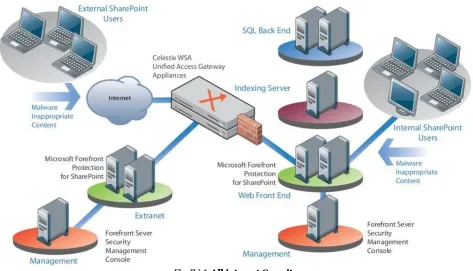
Fig IV.1 All internet Security
Wireless Technology:
Wireless security is the prevention of unauthorized access or damage to computers using wireless networks. The most common types of wireless security are Wired Equivalent Privacy (WEP) and Wi-Fi Protected Access (WPA). WEP is a notoriously weak security standard. The password it uses can often be cracked in a few minutes with a basic laptop computer and widely available software tools. WEP is an old IEEE 802.11 standard from 1999, which was outdated in 2003 by WPA, or Wi-Fi Protected Access. WPA was a quick alternative to improve security over WEP. The current standard is WPA2; some hardware cannot support WPA2 without firmware upgrade or replacement. WPA2 uses an encryption device that encrypts the network with a 256-bit key; the longer key length improves security over WEP. Many laptop computers have wireless cards pre-installed. The ability to enter a network while mobile has great benefits. However, wireless networking is prone to some security issues. Hackers have found wireless networks relatively easy to break into, and even use wireless technology to hack into wired networks.[1] As a result, it is very important that enterprises define effective wireless security policies that guard against unauthorized access to important resources.[2] Wireless Intrusion Prevention Systems (WIPS) or Wireless Intrusion Detection Systems (WIDS) are commonly used to enforce wireless security policies.
wireless access. Hacking has also become much easier and more accessible with easy-to-use Windows- or Linux-based tools being made available on the web at no charge.
Some organizations that have no wireless access points installed do not feel that they need to address wireless security concerns. In-Stat MDR and META Group have estimated that 95% of all corporate laptop computers that were planned to be purchased in 2005 were equipped with wireless cards. Issues can arise in a supposedly non-wireless organization when a wireless laptop is plugged into the corporate network. A hacker could sit out in the parking lot and gather information from it through laptops and/or other devices, or even break in through this wireless card–equipped laptop and gain access to the wired network.
V.CONCLUSION
The wired technology is not used mostly today world. People are tend to have their internet connection in their hand itself, so now a day people especially youngster they need to use the brand band wires technology. Wireless technology is mostly used today world. The real conclusion is not for the comparison of wired and wireless technology. Technology is growing up every day according to that, comparison work may be able to so many factors. This papers may be give solution for comparing some other factors only.
REFERENCES
[1] http://www.rfwireless-world.com/Terminology/wired-network-vs-wireless-network.html [2] http://searchmobilecomputing.techtarget.com/definition/wireless
[3] https://www.lifewire.com/what-is-wireless-2377432
[4] http://smallbusiness.chron.com/advantages-wired-networking-71168.html
[5] http://www.utilityproducts.com/articles/print/volume-16/issue-04/product-focus/transmission-distribution/wired-vs-wireless-technologies-for-communication-networks-in-utility-markets.html
[6] http://www.networkworld.com/article/2175048/wireless/8-ways-to-improve-wired-network-security.html [7] https://en.wikipedia.org/wiki/Wireless_security