A comparison and evaluation of communication tools of
open source learning management systems
Sheetal Uplenchwar
#1& Dr. Manimala Puri#21
Research Scholar- Assistant Professor, Allana Institute of Management Sciences, Pune,
2
Ph.D. Guide - Director, Jayawant Shikshan Prasarak Mandal, Group of Institutes
1
[email protected]; 2 [email protected]
Abstract
Online Learning is becoming an important tool to allow the flexibility and quality requested by learning process. In the recent past, a great number of open sources learning management system (OSLMS) have been introduced in the market showing different characteristics and services. All these OSLMS reduces cost acquired by proprietary LMS. Market is occupied with large number of OSLMS. So before selecting any OSLMS it is necessary to consider series of features, function and usability of the overall learning system.
The main purpose of this study is to analyze and explore the right decision when choosing a
suitable OSLMS platform to meet the
requirements of education system.
A different criterion needs to be considered while evaluating OSLMS. These criteria includes communication tool, productivity tool, student involvement tool, administration tool, course delivery tool, curriculum design, course delivery tool, software and hardware requirement, pricing and licensing issues.
This study focuses on evaluation of
communication tool of seven OSLMS which includes Moodle, Atutor, Sakai, Ilias, Claroline, Olat and Dokeos.
Keywords: Learning management systems (LMS); Open-source learning management systems (OSLMS); Group;
Discussion Forum; Blog; Chat; Email; File Exchange; Video Services
1. Introduction
In the last decade the usage of Internet has been increased gradually and new technologies have improved students education. Based on the new technologies, learning environments are able to provide a wide range of educational alternatives. Distance learning is one of these alternatives where student and instructor are remotely located and are flexible with respect to time and place constraint [22].
LMS have significant role in distance learning, which is also known as virtual learning environment (VLE). Halls defines LMS as, ―Software that automates administration of training events‖ [13].
In distance learning process OSLMS are widely used. OSS represents a social dimension of learning through a Persistent, Unified, Multi-User, and Self-Organizing environment extending beyond the traditional classroom where learners build knowledge and understanding through collaborative exchanges both within and across subject area boundaries.
OSLMS are Moodle, Atutor, Olat, Sakai, Ilias, Claroline, and Dokeos.
The comparison has different perspective which includes administrative, faculty and student perspectives. A LMS must address the needs of the ultimate end user: the learner. Each LMS has key features that allow students to be actively involved in their courses.
This paper is organized as follows. Section 1 represents brief introduction of paper. In Section 2, literature review has been carried out. Section 3 shows base for the selection of LMS, need of comparison for selected LMS and general information about selected LMS. A comparative study of selected OSLMS is presented in Sections 4. Section 5 displays results of the study. Section 6 represents conclusion of the study.
2. Literature Review
Jamil Ahmad Itmazi and Miguel Gea (2005) [16] have carried out paper surveys of 58 studies of comparison and evaluation of OSLMS and proprietary system by comparing functionality. They have recommended the most widely used OSLMS. Result of the study shows that WebCT is the mostly used proprietary LMS and Moodle is the mostly used OSLMS.
Matjaz Kljun, Jernej Vicic, and Branko Kavsek (2007) [18] have reviewed 31 LMS comparison and evaluation (written between 1998 and 2006) papers. Comparison methods includes Feature comparison , Learning paths support, SCORM specs, OSS compliance, Student centered, Learning tools based, Technical specs, Conversational Framework, Questionnaire based, Features usability, and Use-case and feedback .The study reveals that present LMS development tries to catch up with standards, although the SCORM standard is unfortunately not as widely supported.
PeterLengyel Miklos Herdon and Robert Szilagyil (2006)[23] have done the comparison amongst Atutor, Moodle and OLAT by considering various parameters like support and compatibility to standards, content development and content authoring / editing tools, modularity, backup tools, user authentication, video conferencing, group facility, chat facility, XML support, system requirements. The study shows that Moodle is at higher position supporting 13 features out of 14. Atutor and OLAT support 9 features.
Guzin Tirkes (2010) has [12] done the comparison amongst Atutor, Moodle and OLAT and Dokeos by considering support and compatibility, content development and editing tool,modularity, backup,user authentication, video conferencing, online examination question, group, chat, email etc. Result of their study is shows that Moodle is possessing all 17 features, Atutor and OLAT supports 12 features, whereas Dokeos support 15 features.
Barbar A.Lewis and Virginia M. MacEntee (2005)[3] have evaluated WebCT, v.4.1; BlackBoard, v. 6.1; Jones E-education; Educator; Angel; .LRN; McGraw Hill Pageout; Moodle; and e-College AU. They considered various comparison features like content development, discussion area, group participation, calendar, chat, student study tool, audio, video, student progress and email. Study shows that amongst the proprietary LMS WebcCT is at topmost position. Amongst OLSMS, DotLRN is at topmost position and Moodle is at second position.
scale. Study shows that Atutor is having highest scale of 42. Ilias is having 41 scales. Moodle is having 37 scales and LON-Capa is having 37 scales.
Sabine Graf & Beate List (2005) [25] have evaluated 9 OSLMS. The main focus is on adaptation issue. Qualitative Weight and Sum Approach is used for this purpose. Comparison includes Atutor, Dokeos, DotLRN, ILIAS,Lon-Capa,Moodle, OpnUSS, Sakai, Spaghettilearning. The adaptation issues include communication tools, learning objects, user data management, usability, adaptation ha, technical aspects, administration, and course management. Rank was given to each platform. Moodle s achieved the best evaluation values. Ilias has second rank and Dokeos has third rank. ATutor, LON-CAPA, Spaghettilearning, and Open-USS are ranked equally at the fourth position, whereas Sakai and dotLRN are ranked last.
Jing Liu, Men and Jun Han (2009) [17] have compared and evaluated 5 OSLMS namely Atutor, Moodle, Sakai, Calroline and Dokeos. They have not ranked the LMS. The study shows that Moodle is better for process assessment. Sakai can be used for better summary assessment. For community purpose Sakai is perfect. If the teacher is novice user in teaching Claroline can be used. For functioning of videos Dokeos is best.
Cansu Cigdem and Guzin Tirkes (2010) [4] have compared Moodle, Atutor, Dokeos, Olat. Result of the comparison shows that Moodle has achieved best result with many pedagogical features. Other OSLMS have all basic functionalities the future of global learning education engineering.
Thair M. Hamtini and Hussam Nawwaf Fakhouri [29] have evaluated 9 OSLMS namely Dokeos, Claroline, IWT,
ILIAS, Moodle, Atutor, LON-CAPA, OpenUSS, ADA. The minimum criteria include Social Networking Tools, Productivity Tools & Software Installation, Administration Tools & Security, Presentation Tools and Material Distribution, and Management Features. Based on the functionality of these platforms Qualitative Weight and Sum (QWS) and the Analytic Hierarchy Process (AHP) approach was used for the evaluation process of these OSLMS. Intelligent Web teacher is at first position. Claroline is at second position and Moodle is at third position. The most frequently used open source system in Jordan universities is Moodle.
3. Selection of OSLMS
From the above literature review it is clearly observed that most of the studies include comparison and evaluation of Moodle, Atutor, Olat, Dokeos, Sakai, Claroline, Ilias,LON-CAPA, OpenUSS, ADA, Spaghettilearning, DotLRN and Olat. Selection of OSLMS is based on rating given by this study. Again evaluated research papers are backdated. Current comparison and evaluation in today’s scenario is not available. So it is necessary to carry out latest evaluation of all these OSLMS to know its current capabilities.
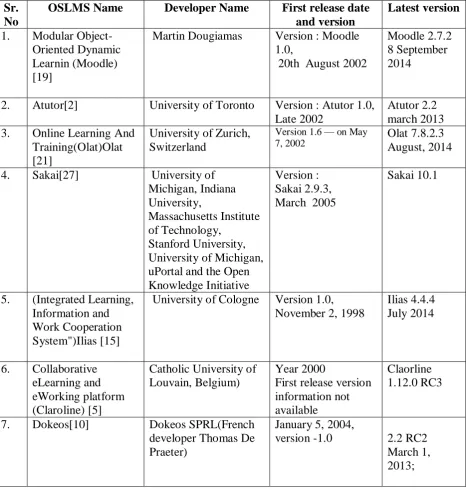
With the help of result of past studies, the selected OSLMS are Moodle, Atutor, Olat, Sakai, Ilias, Claroline, and Dokeos. The table below displays general information of these OSLMS which include developer name, first release date and its version, latest version. [Refer Table1 - Appendix A]
4. Comparative study of OSLMS features
has different types of subcategories. Learner tool includes communication tool, productivity tool and student involvement tool. Support tool includes subcategory as administration tool, course delivery tool, and curriculum design tool. Technical specification tool includes H/W and S/W requirement, pricing and licensing.
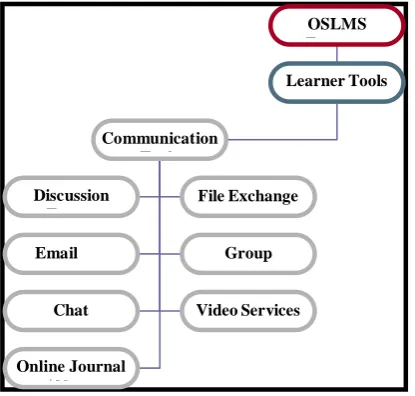
Each of them has different features. Following figure shows architectural design view of communication tool.
Figure 1: Architectural design view of communication tool.
Above figure shows that communication tool have features like group, chat, email, blog, discussion forum, file exchange and video services. Each of these features and its evaluation result with respect to Moodle, Atutor, Olat, Dokeos, Sakai Ilias and claroline are discussed below.
4.1 Group
A group is also called as a community, e-group or club. It provides services to users like create post, comment to and read from their own interest and subject
specific forums. Members of the groups also invite other users to join the group. So members of the group may be from outside the group also. [11]
Generally in LMS there are different types of users like administrator, teacher and student. Group facilitates teacher to filter activities according to classes and grade book, if teacher is teaching to multiple classes. It is also possible for teacher and student to share course with other teachers and with students. Security can be assign to shared activity.
The table below displays different group features of Moodle, Atutor, Olat, Dokeos, Ilias, Sakai, and Claroline. [1,2,5,7,9,10,14,15,19,20,21,26,27].Y indicates presence of feature and N indicates absence of feature. [Refer Table 2: Appendix A]
From the table it can be observed that 19 features are compared for all OSLMS. Moodle is having highest number of group features that is 17. Ilias is at second position having 14 features. Atutor and Olat are at 3rd rank, having 13 features.
In Atutor sharing of resources to other group members is achieved with the help of file storage facility. In Ilias Export registered group is done using Sharable Content Object Reference Model (SCROM)[ [1,2,5,7,9,10,14,15,19,20,21,26,27]
4.2 Discussion Forum
The discussion forum is an activity where students and teachers can exchange ideas by posting comments. [8] Forum posts can be graded by the teacher or other students. A forum can contribute significantly to successful communication and community building in an online environment. Forum can OSLMS
Features LearnerTools
Communication Tools Discussion
Forum
FileExchange
Email Group
Chat VideoServices
be used for many innovative purposes in educational settings.
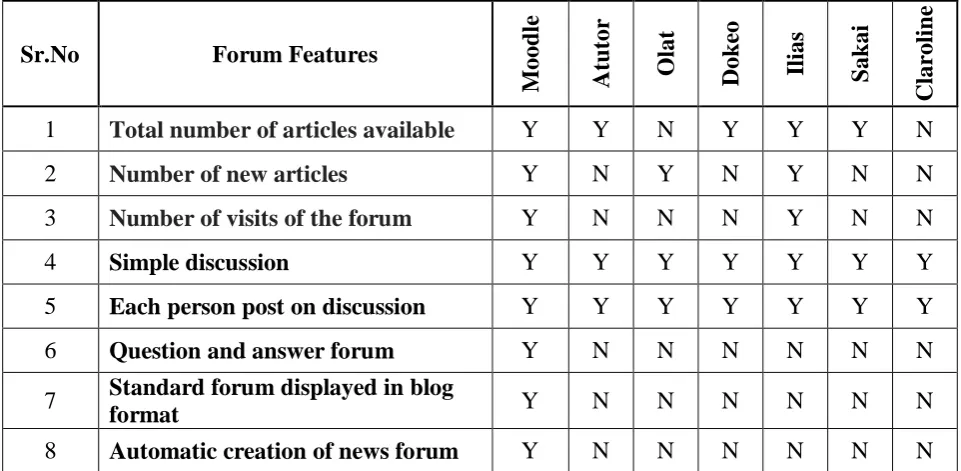
The table below displays discussion forum features of Moodle, Atutor, Olat, Ilias, Sakai, and Claroline. [1,2,5,7,9,10,14,15,19,20,21,26,27]
[Refer Table 3: Appendix A]
From the table it can be observed that 38 discussion forum features are compared for all OSLMS. Moodle is having all 38 features and is at 1st rank. Sakai is at second position having 21 features. Ilias is at 3rd rank, having 19 features. Claroline possess least number of features i.e. 7 only.
In Atutor file attachment for forum discussion is not available within forum tab. It is done through file storage option. And maximum attachment for file is 10 MB by default. In Dokeos create thread option can be used to attach file for forum. In Moodle notification for new forum post is achieved by choosing subscription mode. All postings in Moodle get approved by moderator by installing additional plugin called as moderator approval plugin.
4.3
Chat
Chat is a form of interactive online communication. It enables users to have real-time conversations with other people who are also online. Chatting on the Internet can take place in areas known as chat rooms, via instant messaging, or on Internet Relay chat (IRC) channels.
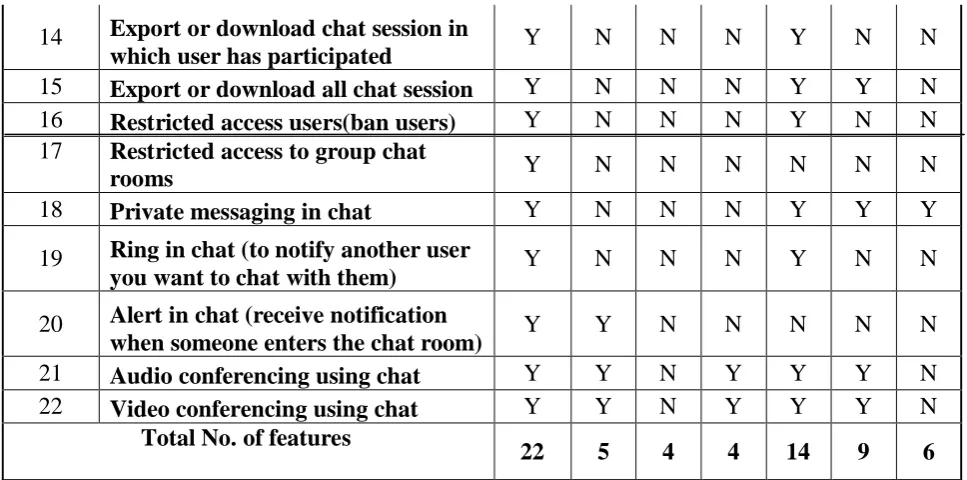
The table below displays chat features of Moodle, Atutor, Olat, Dokeos, Ilias, Sakai, and Claroline. [1,2,5,7,9,10,14,15,19,20,21,26,27] [Refer Table 4: Appendix A]
From the table it can be observed that 22 chat features are compared for all OSLMS. Moodle is at top most position and
having all 22 features. Ilias is at second position, having 14 features. Sakai is at third position having 9 features. Olat and Dokeos possess least number of features i.e. 4 only.
In Moodle chat past sessions gets saved for selected number of days. Facility of retrieving of new messages after predefined interval rate is not available in Moodle. But this can be achieved with the help of cron setting. It is a UNIX program and gets executed after a predefined interval. Notification to other user for chatting is send by configuring notification
method of chat. A restricted access user (ban
users) is not available in moodle. But we can restrict access to activity for certain users.
Table below shows list of plugins are used for audio and video conferencing chat. [1,2,5,7,9,10,14,15,19,20,21,26,27]
TABLE 5: AUDIO AND VIDEO CONFERENCING PLUGIN
S r. N o
OSLM S
Audio chat plugin
Video chat plugin
1. Moodle Dimdim, Bigblubutton ,Openmeetin gs
Bigbluebutto n
2. Atutor Bigblubutton ,
Userplane
Bigblubutton ,
Userplane 3. Ilias Bigblubutton Bigblubutton 4. Sakai WebRTC WebRTC
4.4 Blog
A blog is a discussion published on the World Wide Web (WWW). It consists of posts related to various subjects. The most recent post appears first. [29]
Now a days "multi-author blogs" (MABs) have developed includes contribution by large numbers of authors.
The table below displays blog features of Moodle, Atutor, Olat, Dokeos, Ilias, Sakai, and Claroline [1,2,5,7,9,10,14,15,19,20,21,26,27] [Refer Appendix A – Table 6]
19 Blog features are compared for all OSLMS. Olat is at top most position and having l8 features. Moodle is at second position, having 16 features. Ilias is at third position, having 15 features. Atutor,Dokeos and Sakai have least number of features that is 7.
In Moodle copy blog option is not available. But sharing cart plugin allows copying of other activities including blog. In blog creation, publishing and editing of episode is done with the help of podcast.
4.4
Electronic mail, most commonly referred to as email or e-mail. It is a method of exchanging digital messages from an author to one or more recipients.. Email servers accept, forward, deliver, and store messages.
The table below displays emails features of Moodle, Atutor, Olat, Dokeos, Ilias, Sakai, and Claroline [1,2,5,7,9,10,14,15,19,20,21,26,27] [ Refer Table 7 : Appendix A]
From the table it can be observed that 14 email features are compared for all OSLMS. Moodle is at top most position and having all l4 features. Ilias is at second position, having 8 features. Dokeo and Sakai have 6 features ranked at 3rd position. Atutor and Claroline have least number of features that is 3. Atutor is having only course email facility.
4.5
File Exchange
The File Exchange function allows users to exchange files with their fellow Group members. The File Exchange page displays the current files available for use by the Group members and the option to add files.
The table below displays files sharing features of Moodle, Atutor, Olat, Dokeos, Ilias, Sakai, and Claroline. [1,2,5,7,9,10,14,15,19,20,21,26,27][Refer Table 8 – Appendix A]
From the table it can be observed that 5 file exchange features are compared for all OSLMS. And all of them are having all these features.
4.6
Video Services
Video is a very powerful tool to use in any LMS. It allows students to catch up on lectures if they missed. Student can learn from a "how to" screen cast, or improve their language skills by watching native speakers interact.
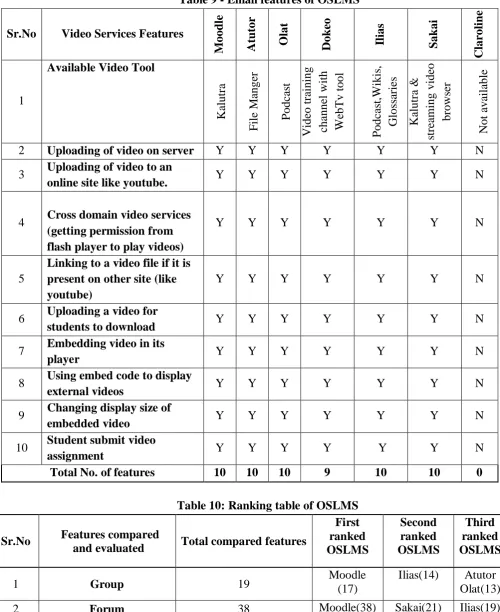
The table below displays video service features of Moodle, Atutor, Olat, Dokeos, Ilias, Sakai,
and Claroline.
[1,2,5,7,9,10,14,15,19,20,21,26,27] [ Refer Table 9 : Appendix A]
From the table it can be observed that 10 video service features are compared for all OSLMS. From the table it can be observed Moodle, Atutor, Olat, Ilias and Sakai are having all 10 features. Dokeos is having 9 features whereas claroline does not support video service.
5.
Result
communication tool. [Refer Table 10: Appendix A]
Conclusion
Above summarized table shows that total 127 features are compared related to communication tools. From the above table we can conclude that Moodle is at 1st rank having 122 features. Ilias is at 2nd rank having 85 features. Sakai is at 3rd rank having 51 features.
References
[1] Atutor demo portal, ―www.atutor.ca/atutor/demo.php‖, last accessed on 18th December 2014. [2] Atutor documentation,‖
www.atutor.ca/atutor/docs/‖, last accessed on 18th December 2014.
[3] Barbara A. Lewis, Virginia M. MacEntee, ―Learning Management Systems Comparison‖, Proceedings of the 2005 Informing Science and IT Education Joint Conference Flagstaff, Arizona, USA – June 16-19
[4] Cansu Cigdem and Guzin Tirkes, ―Open source learning management systems in e-learning and Moodle‖, IEEE, EDUCON,education engineering 2010-The future of global learning engineering education, 978-1-4244-6571-2/10/2010-IEEE, April 14-16, 2010, Madrid, Spain.
[5] Claroline documentation, ―http://www.siteground.com/tutorials/clarolin e/‖, last accessed on 20th
December 2014.
[6] Common wealth of learning, ― COL LMS Open Source Repor‖, t July 2003 (Rev. 16 October 2003), Page 1 of 22
[7] Comparison of Moodle and Atutor, ―http://skillspark.ca/info/ATutor_vs_Moodle. pdf‖, last accessed on 20th
December 2014.
[8] Difference between forum and blog,
―http://www.web-strategist.com/blog/2008/01/28/understandin g-the-difference-between-forums-blogs-and-social-networks/‖, last accessed on 20th December 2014.
[9] Dokeos demo portal, ―https://www.softaculous.com/demos/Dokeo s‖, last accessed on 18th December 2014. [10] Dokeos documentation,‖
www.dokeos.com/documentation/‖, last accessed on 19th December 2014.
[11] Group, ―en.wikipedia.org/wiki/Group‖, last accessed on 20th December 2014.
[12] Guzin Tirkes, ―Open Source Learning Management System in E-learning and Moodle‖, IEEE Educon Education Engineering Apr 2010, pages- 14-16, ISBN 978-1 4244- 6571-2.
[13] Hall B, ―New technology definitions‖, http://bandonhall.com/public/glossary/index. html, last accessed on 5th July 2014.
[14] Ilias demo portal, ―www.demo.ilias.de/‖,
[15] Ilias documentation, ―http://www.ilias.de/docu/‖, last accessed on 17th December 2014.
[16] Jamil Ahmad Itmazi and Miguel Gea, ―Survey: Comparison and evaluation studies of Learning Content Management Systems‖, IADIS International Conference on Applied Computing 2005, ISBN: 972-99353-6-X.
[17] Jing Liu, Hailong Men, Jun Han, ―Comparative Study of Open-source
E-learning Management Platform‖, 978-1-4244-4507-3/09/, 2009 IEEE
[18] MatjazKljun, JernejVicic, and BrankoKavsek, ―Evaluating Comparisons and Evaluations of Learning Management Systems‖, Proceedings of the ITI 2007 29th Int. Conf. on Information Technology Interfaces, June, 2007, ISBN: 953-7138-10-0, pages 25-28.
[19] Moodle documentation,‖ http://docs.moodle.org‖, last accessed on 20th
December 2014.
[20] Olat demo portal, http://demo.olat.org/olat/auth‖, last accessed on 25thDecember 2014.
[21] Olat documentation,‖ http://www.olat.org/OLATDOCS/‖, last accessed on 25th December 2014.
[22] Ozkul, ―E-learning and education‖, May 2003, paper presented at first national symposium on electric, electronic and computer engineering education, Turkey.
[23] PeterLengyelMiklosHerdon and RobertSzilagyi, ―Comparison of Moodle and ATutor LMS’s‖, summer university on Information Technology in agriculture and rural development – August 2006, pages-21-28, ISBN-963-87366-0-7.
[24] Podcast,―http://en.wikipedia.org/wiki/Pod cast, last accessed on 20th December 2014.
[25] Sabine Graf & Beate List, ―An Evaluation of Open Source E-Learning Platforms Stressing Adaptation Issues‖, Proceedings of the Fifth IEEE International Conference on Advanced Learning Technologies (ICALT’05) I0-7695-2338-2/05 , 2005 IEEE
[26] Sakai demo portal,‖ www.testdrivesakai.com/‖, last accessed on 25th December 2014.
[27] Sakai documentation, ―http://sakaitutorials.unc.edu/‖, last accessed on 19th December 2014.
[28] Sakai documentation,‖ https://sakai.rutgers.edu/helpdocs/blogger.ht ml‖, last accessed on 19th December 2014.
[29] Thair M. Hamtini and Hussam Nawwaf Fakhouri, ―Evaluation of open-source E-Learning platforms based on the Qualitative Weight and Sum approach and Analytic Hierarchy Process‖,
Table 1: General information about the selected OSLMS Sr.
No
OSLMS Name Developer Name First release date and version
Latest version
1. Modular Object-Oriented Dynamic Learnin (Moodle) [19]
Martin Dougiamas Version : Moodle 1.0,
20th August 2002
Moodle 2.7.2 8 September 2014
2. Atutor[2] University of Toronto Version : Atutor 1.0, Late 2002
Atutor 2.2 march 2013 3. Online Learning And
Training(Olat)Olat [21]
University of Zurich, Switzerland
Version 1.6 — on May
7, 2002 Olat 7.8.2.3 August, 2014
4. Sakai[27] University of Michigan, Indiana University,
Massachusetts Institute of Technology,
Stanford University, University of Michigan, uPortal and the Open Knowledge Initiative
Version : Sakai 2.9.3, March 2005
Sakai 10.1
5. (Integrated Learning, Information and Work Cooperation System")Ilias [15]
University of Cologne Version 1.0, November 2, 1998
Ilias 4.4.4 July 2014
6. Collaborative eLearning and eWorking platform (Claroline) [5]
Catholic University of Louvain, Belgium)
Year 2000
First release version information not available
Claorline 1.12.0 RC3
7. Dokeos[10] Dokeos SPRL(French developer Thomas De Praeter)
January 5, 2004,
version -1.0 2.2 RC2 March 1, 2013;
Table 2: group features of OSLMS Sr.No
Group Features
M
ood
le
At
u
tor
Ol
at
Dokeo Ili
as
S
ak
ai
Clar
oli
n
e
1. Add/edit of group Y Y Y Y Y Y Y
3. Creation of group at activity level Y Y Y Y N N Y
4. Group Mode : No group Y N N N N N N
5. Group Mode :Invisible group Y Y N Y Y Y Y
6.
7. Group Mode :Visible groups Y Y Y Y Y Y Y
8. Automatic creation of multiple
groups Y Y N N N N N
9. Assign users to join group
automatically Y Y Y Y Y Y Y
10. Assign users to join group manually Y Y Y Y Y Y Y
11. Assign tools to group Y Y Y Y Y Y Y
12. Allocate members to groups
randomly Y Y Y Y Y Y Y
13. Users can email to members of
other group Y Y Y Y Y Y Y
14. Sharing of resources to other group
members Y Y Y Y Y Y N
15. Export registered groups Y N N N Y N N
16. Import group Y N Y N Y Y N
17. Copy group Y N Y N Y N N
18. Maximum number of members in
group Y Y Y N Y N Y
19. Total No. of features 17 13 13 11 14 11 11
Table 3 - forum features of OSLMS
Sr.No Forum Features
M
ood
le
At
u
tor
Ol
at
Dokeo Ili
as
S
ak
ai
Clar
oli
n
e
1 Total number of articles available Y Y N Y Y Y N
2 Number of new articles Y N Y N Y N N
3 Number of visits of the forum Y N N N Y N N
4 Simple discussion Y Y Y Y Y Y Y
5 Each person post on discussion Y Y Y Y Y Y Y
6 Question and answer forum Y N N N N N N
7 Standard forum displayed in blog
format Y N N N N N N
for each course
9 Add attachment for forum
discussion Y N Y Y Y Y N
10 Maximum attachment size for forum post
100 MB N
50 MB
20 GB
400 MB
50 MB N 11 Receive notification after new post Y Y Y Y Y Y Y 12 1.1 Flat (displays the posts
chronologically) Y N Y Y Y N N
13 1.2 Threaded (shows only one post
at a time) Y N Y Y N N N
14 1.3 Nested (nests posts related to a
topic) Y N N Y N N N
15
Optional subscription - Participants can choose whether to be
subscribed
Y Y N N N N N
16 Forced subscription - Everyone is
subscribed and cannot unsubscribe Y N N N N N N
17
Auto subscription - Everyone is subscribed initially but can choose to unsubscribe at any time
Y N N N N N N
18 Subscription disabled -
Subscriptions are not allowed. Y N N N N N N
19 Read tracker for forum(shows list
of read and unread forums) Y N N N Y Y N
20 email notification when forum is
added Y N N Y N Y Y
21 Post threshold for blocking (Users
cant post after this threshold value) Y N N N N N N
22 Grading to forum Y N N N N Y N
23 Adding discussion topic to specific
group members Y Y N Y N Y N
24 Adding discussion topic to other
group members Y Y N Y N N N
25 Role of forum moderator to student Y N N N N Y N
26 Closing of forum Y N N Y Y Y N
27 Lock/unlock forum Y N N Y N Y N
28 Enabling time post(i.e. start & end
date for forum) Y N N Y N Y N
29 Editing of forum Y Y Y Y Y Y Y
30 Maximum time to edit post Y Y N N N N N
forums
32 Mark post read after 'X' days Y N N N N N N
33 Move forum(thread) Y Y N Y Y Y Y
34 Delete forum(thread) Y Y Y Y Y Y Y
35 Keep the posted forum at the top of
the forum list Y Y N N Y N N
36 Export forum Y N Y N Y Y N
37 Import forum Y N Y N Y Y N
38 All postings need to be approved by
a moderator. Y N N N Y Y N
Total No. of features 38 12 12 18 19 21 7
Table 4 - chat features of OSLMS
Sr.No Chat Features
M
ood
le
At
u
tor
Ol
at
Dokeo Ili
as
S
ak
ai
Clar
oli
n
e
1 Don’t publish any chat time(student
can chat at any time) Y Y Y Y Y Y Y
2 Publish the specified time for chat Y N N N N N N
3 Chat at the same time every day Y N N N N N N
4 Chat at the same time every week Y N N N N N N
5 Save past chat session Y N Y N Y Y Y
6 Allow Private Rooms(Only invited
users have access to this rooms) Y N Y N Y Y Y
7 Set the interval rate at which new messages are retrieved from the
server.
Y N N N N N N
8 Not allow everyone to view past chat
sessions. Y N N N Y N N
9 Delete chat logs Y N N N Y Y Y
10 Display of user list in chat room Y Y Y Y Y Y Y
11 Refresh room/user list Y N N N N N N
12 Disconnect timeout(Detect users
who have disconnected) Y N N N N N N
13 send notification to other user for
14 Export or download chat session in
which user has participated Y N N N Y N N
15 Export or download all chat session Y N N N Y Y N 16 Restricted access users(ban users) Y N N N Y N N 17 Restricted access to group chat
rooms Y N N N N N N
18 Private messaging in chat Y N N N Y Y Y
19 Ring in chat (to notify another user
you want to chat with them) Y N N N Y N N
20 Alert in chat (receive notification
when someone enters the chat room) Y Y N N N N N
21 Audio conferencing using chat Y Y N Y Y Y N
22 Video conferencing using chat Y Y N Y Y Y N
Total No. of features
22 5 4 4 14 9 6
Table 6 - Blog features of OSLMS
Sr.No Blog Features
M
ood
le
At
u
tor
Ol
at
Dokeo Ili
as
S
ak
ai
Clar
oli
n
e
1 External link to the blog Y Y Y Y Y Y Y
2 All site users can see all blog entries Y Y Y Y Y Y Y
3 User can only see their own blog Y Y Y Y Y Y Y
4 Disable blog system completely Y N N N N N N
5 Associate blog entries with courses Y Y Y Y Y Y Y
6 Associate blog entries with activity
modules Y N Y N N N N
7 Add comment to specific blog Y Y Y Y Y Y Y
8 Can be copied Y N Y N Y N N
9 Can be downloaded N N Y N N N N
10 Access to registered users Y Y Y Y Y Y Y
11 Importing blog N N Y N Y Y N
12 Time and date of publication of blog N N Y N Y Y N
13 edit / delete entry Y Y Y Y Y Y Y
14 include an external blog which is
already existing Y N Y N N N N
15 podcast(used to store audio and
video files) Y N Y N Y Y N
16 create new episode Y N Y N Y Y N
18 edit episode Y N Y N Y Y N
19 publish episode Y N Y N Y Y N
Total No. of features 16 7 18 7 15 14 7
TABLE 7: EMAIL FEATURES OF OSLMS
Sr.No Messaging Features
M
ood
le
At
u
tor
Ol
at
Dokeo Ili
as
S
ak
ai
Clar
oli
n
e
1 Popup notification Y N N N Y N N
2 Email notification Y N N Y Y Y N
3 Mobile notification Y N N N N N N
4 Disallowed - the message of chosen type will
never be delivered Y N N N N N N
5 Permitted - the message of chosen type is
allowed Y N N N N N N
6 Forced - the message of chosen type will be
delivered Y N N N N N N
7 Ordering of messaging settings according to
activity / Folder Y N N N Y N N
8 Always send email from the no-reply address Y N N N N N N
9 Secure connection SSL / TSL Y Y Y Y Y Y Y
10 Send a message to many people Y N N Y Y Y N
11 Read all messages on site Y Y Y Y Y Y Y
12 Send messages to any user Y Y Y Y Y Y Y
13 Sending attachment for email Y N Y Y Y Y N
14 Prevent non-contacts from messaging me Y N N N N N N
Total No. of features 14 3 4 6 8 6 3
Table 8: File exchange features of OSLMS
Sr.No File Exchange Features
M
ood
le
At
u
tor
Ol
at
Dokeo Ili
as
S
ak
ai
Clar
oli
n
e
1 Data Exchange with tutors and
students Y Y Y Y Y Y Y
2 Uploading and downloading of file Y Y Y Y Y Y Y
3 Modification of file Y Y Y Y Y Y Y
4 Deletion of file Y Y Y Y Y Y Y
5 Data Exchange through zip folder Y Y Y Y Y Y Y
Table 9 - Email features of OSLMS Sr.No Video Services Features
M ood le At u tor Ol at Dokeo Ili as S ak ai Clar oli n e 1
Available Video Tool
Ka lut ra F il e M ange r P odc as t Vide o tr aini ng cha nne l with W ebT v tool P odc as t, W iki s, Glos sa ries Ka lut ra & str ea mi ng video br ows er Not ava il able
2 Uploading of video on server Y Y Y Y Y Y N
3 Uploading of video to an
online site like youtube. Y Y Y Y Y Y N
4 Cross domain video services
(getting permission from flash player to play videos)
Y Y Y Y Y Y N
5
Linking to a video file if it is present on other site (like youtube)
Y Y Y Y Y Y N
6 Uploading a video for
students to download Y Y Y Y Y Y N
7 Embedding video in its
player Y Y Y Y Y Y N
8 Using embed code to display
external videos Y Y Y Y Y Y N
9 Changing display size of
embedded video Y Y Y Y Y Y N
10 Student submit video
assignment Y Y Y Y Y Y N
Total No. of features 10 10 10 9 10 10 0
Table 10: Ranking table of OSLMS Sr.No Features compared
and evaluated Total compared features
First ranked OSLMS Second ranked OSLMS Third ranked OSLMS
1 Group 19 Moodle (17) Ilias(14) Olat(13) Atutor
2 Forum 38 Moodle(38) Sakai(21) Ilias(19)
3 Chat 22 Moodle(22) Ilias(14) Sakai(9)
5 Email 14 Moodle(14) Ilias(8) Dokeos Sakai(6)
6 File Exchange 5 All compared OSLMS have 5
features.
7 Video Services 10
All compared OSLMS have 10 features except Dokeos and Claroline.
Dokeos have 9 features and Claroline don’t support video services.
(Note: Figures in bracket indicates total number of features available for that OSLMS)
Biography
Over 10 years of teaching experience. Currently working as a professor at Allana Institute of Management Sciences, affiliated to Pune University. Educational qualification: Completed M.Phil in IT, MCA, MCM,
Pursuing Ph.D in Computer Management from Savitribai Phule Pune University in the research area, titled as, ―Open Source Learning Management System in educational institutions of Pune region‖, under the guidance of Dr.Manimala Puri, Director Jaywant Shikshan Prasarak Mandal, Pune.
Sheetal R.Uplenchwar
Over 20 years of experience in Strategic Planning, Academic Operations, Corporate Communication, Teaching and Tutoring and General Administration with reputed organizations in the education sector. Proficient in managing successful business operations with proven ability of achieving Service Delivery/Business Targets. Extensive experience of facilitating /coaching students. Distinction of being deputed at All India Council for Technical Education- An apex body in field of technical education under Ministry of Human Resources and Development, India. A keen planner and strategist with proven abilities in corporate communication image and brand building. Adept at handling day to day activities in co-ordination with internal/external departments for smooth business operations. A skilled communicator with exceptional presentation skills and abilities.