Available Online atwww.ijcsmc.com
International Journal of Computer Science and Mobile Computing
A Monthly Journal of Computer Science and Information Technology
ISSN 2320–088X
IJCSMC, Vol. 4, Issue. 3, March 2015, pg.720 – 724
RESEARCH ARTICLE
Voice User Interface Using Hidden
Markov Model for Word Formation
Pranali Joshi, Prof. Ravi Patki
Department of Computer Engineering, Pune Department of Computer Engineering, PuneAbstract— Voice can be a powerful tool for use in human computer interaction because it is the fundamental means of human communication. With the rapid growth of hand free computer interface, the need for voice recognition techniques has increased greatly. Voice applications based on voice interfaces, voice recognition, and voice dialogue management can help users to be focused on their current work without extra effort for hands or eyes, and without extra learning time. Audio I/O devices such as a microphone and speaker, which are already quite small and inexpensive.
Objective of this system is to achieve hands-free interface using voice recognition and speech synthesis. The idea is to provide an interface which accepts voice as commands and respective action will takes place these may be opening, closing of any application, traversing different drives and folders on the computer, typing of word in editor etc. And each time user gives some command, an audio acknowledgement will be there telling user what action has performed or providing help to the user if command is not recognized. Interface will be user friendly where user will be able to define his own commands and action he want after pronouncing the command.
These voice applications can provide intrinsically comfortable, easy-to-use, and efficient way for users to interact with computer. And as user can use commands in his mother tongue so it is asking your friend computer to do something for you. As a technology for expression, voice works for a much wider range of people than typing, drawing, or gesture because it is a natural part of human existence. Without a great deal of training, normal human beings can express themselves in a wide variety of domains using voice applications, and thus this breadth of application will be a powerful tool in a ubiquitous environment.
Keywords— Voice Recognition, Speech Synthesis, Digitization, Acoustic Model, Speech Engine
I. INTRODUCTION
Ubiquitous computing (ubicomp) refers to a new generation of computing in which the computer completely permeates the life of the user. In ubiquitous computing, computers become a helpful but invisible force, assisting the user in meeting his or her needs without getting in the way. Ubiquitous computing is a post-desktop model of human-computer interaction in which information processing has been thoroughly integrated into everyday objects and activities. In the course of ordinary activities, someone”using” ubiquitous computing engages many computational devices and systems simultaneously, and may not necessarily even be aware that they are doing so. This model is usually considered advancement from the desktop paradigm. More formally, ubiquitous computing is defined as ”machines that the human environment instead of forcing humans to enter theirs. Similarly in this fashion Voice User Interface tries to fit into the human world by making computer interaction in a more friendly manner. Thus, enabling user to give input in his format rather than following computers.
These voice applications can provide intrinsically comfortable, easy-to-use, and efficient to users. As a technology for expression, voice works for a much wider range of people than typing, drawing, or gesture because it is a natural part of human existence. Without a great deal of training, normal human beings can express themselves in a wide variety of domains using voice applications, and thus this breadth of application will be a powerful tool in a ubiquitous environment.
An easy way to comply with the conference paper formatting requirements is to use this document as a template and simply type your text into it.
II. EXISTING SYSTEM
In the traditional system, people use mouse as pointing device and keyboard as input device. But for latest there started using touch as another input. But apart from this no alternative Input output devices are considered. Voice as an input has been for long but no significant development has been made in it so that it can be used as regular device. The one given by Microsoft in windows 7 is in initial stage. All the user can do is using a few predefined commands to browse through the computer. The commands are not friendly and even lead to faulty performance. The command set is not well defined thus the system cannot be utilized to its fullest extent.
Dragon Naturally Speaking is a speech recognition software package developed and sold by Nuance Communications for Windows personal computers. Naturally Speaking utilizes a minimal user interface. As an example, dictated words appear in a floating tooltip as they are spoken (though there is an option to set this feature so it is not displayed to increase speed), and when the speaker pauses, the program transcribes the words into the active window at the location of the cursor (Dragon does not support dictating to background windows). The software has three primary areas of functionality: dictation, text-to-speech and command input. The user is able to dictate and have speech transcribed as written text, have a document synthesized as an audio stream, or issue commands that are recognized as such by the program. In addition, voice profiles can be accessed through different computers in a networked environment, although the audio hardware and configuration must be identical on both machines. The Professional version allows creation of custom commands to control programs or functions not built into Naturally Speaking.
Observations about existing systems are:
• Legacy Devices such as mouse and keyboard used for input to computer.
• It requires lot of physical movement to control these devices.
• Stress on hand and wrist leads to many muscular problems.
• Handicap people cannot use the system easily.
• The usage of computer as help assistant has been taken as an entertainment centre.
• In some situations using mouse or keyboard is not feasible (Operation Theatres in Hospital)
• No Voice security for individual user.
III. PROPOSED SYSTEM METHODOLOGY
A. Proposed System
The entire document should be in Times New Roman or Times font. Type 3 fonts must not be used. Other font types may be used if needed for special purposes.
Recommended font sizes are shown in Table 1. VOICE USER INTERFACE will be an answer to the problems stated above. The proposed system is about to have hand free computer usage using voice recognition and speech synthesis i.e. traversing of computer by voice. Different audio commands will be used to traverse through the computer, to select the objects displayed on the screen, such as folder or different types of files.
The user can switch easily between voice control to manual mouse and keyboard control or even user all the three together for faster results.
The system will provide the ultimate 3rd input pattern parallel to mouse and keyboard. This will give a completely new dimension to the computer user interface. It will provide faster means to give multiple inputs at the same time. With respect to user each system will be customizable. Each user can generate his own set of commands and use them for different purpose. This will give virtually all control of the computer system to the voice of the user. The VUI in spite of being software with its own interface will be work as a tool for voice conversion.
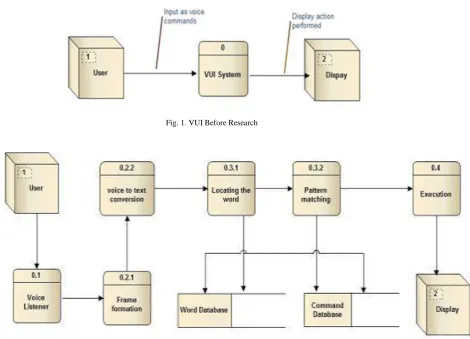
The project work is divided into a number of modules for ease of development. These modules are made by dividing the core activities that are to be performed by the application. Initially at start the idea was as simple as Take Audio input from User and Convert it to text and perform Operation on Computer.
Fig. 1. VUI Before Research
Fig. 2. System Architecture
B. Pros of Proposed System
Implementing voice user interface at work place or home can have some real advantages. Following are some of the benefits offered by this system.
• Increased safety -: Input from keyboard can be duplicated but voice duplication is far more difficult. The voice of user itself will work as password access and use the system.
• Less Stress on hands muscles -: Normal usage of computer by a person is about 4-5 hrs. This leads to various musculoskeletal problems .If VUI is used this load on hands can be reduced by many times.
• Behaviour Monitor -: The activities done by a user through VUI will be logged, just to make sure that the activities are legitimate and thus individuals are less likely to behave inappropriately if they know they are being monitored.
C. Cons of Proposed System
If care is not taken in how users implement the VOICE USER INTERFACE in the workplace, user’s good intention could cause more harm than good. Following is a list of potential disadvantages and adverse side effects of an improperly implemented video rental system.
• Voice Clarity -: The only pillar of VUI is voice of a user. If the voice of the user changes due to some medical condition then the security collapses. The user in any context must have a clear and sound voice to operate efficiently.
• Ambient Noise-: Voice User Interface is more effective in an environment where the only sound present is the one to be given as input to the system. If other external noise is present then it may lead to faulty working of the software.
IV. UTILITY
Voice user interfaces (VUI) have their greatest potential in the following cases:
1) Users with various disabilities, who cannot use a mouse and a keyboard or who cannot see pictures on the screen.
2) Users who are in an eyes-busy, hands-busy situation. Whether or not they have disabilities, the keyboard, mouse, and monitor combination fails users in these situations, such as when they are driving cars or repairing complex equipment.
3) Users who do not have access to keyboard and monitor. 4) Following are some features of proposed system:
Extra Customization
User Oriented Commands
User Friendly Interface
Increased System Performance
All the changes can be undone
Database Encryption Security
V. CONCLUSIONS
The proposed system describes the work of speech recognition started with a brief introduction of the technology and its applications in different sectors. This technology currently is in development phase. But Microsoft has provided it as an internal part of operating systems such as Windows Vista, Windows 7 and even Windows 8 Developers Preview. The working of the technology in the given system is at its initial stage and much more development is needed to make it working. Currently we can use voice commands to traverse through the File Directory and can type in WordPad and notepad. The audio commands are very different than the ones used via command prompt or GUI, making it difficult to use.
R
EFERENCES[1] Vicente P. Minotto, Claudio R. Jung : Simultaneous-Speaker Voice Activity Detection and Localization Using Mid-Fusion of SVM and HMMs.
[2] Robert Keefer, Yan Liu, and Nikolaos Bourbakis: The Development and Evaluation of an Eyes-Free Interaction Model for Mobile Reading Devices.
[3] Xueliang Huo, Hangue Park: A Dual-Mode Human Computer Interface Combining Speech and Tongue
Motion for People with Severe Disabilities.
[4] Vicente P. Minotto, Carlos B. O. Lopes : Audiovisual Voice Activity Detection Based on Microphone Arrays and Color Information.
[5] Kwang-Ho Kim, Donghyun Lee : Self -Improvement of Voice Interface with User-input Spoken Query at
Early Stage of Commercialization.
[6] James R.Evan, Wayne A.Tjoland : Achieving a hand free computer Interface using voice recognition and
speech synthesis.
[7] Achieving a hand free computer Interface using voice recognition and speech synthesis. (C No: 10.1109/62.821658)
[8] The Design and development of User Interface for voice application.
[9] POCKETSPHINX: A free real time continuous speech recognition system for handheld devices.
[11] Synthetic speech detection using temporal modulation feature.
[12] MmdagentA fully open-source toolkit for voice interaction systems.
[13] Text dependent speaker recognition using shifted MFCC.
[14] Building the next generation of personal digital Assistants. [15] The self-taught vocal interface.
[16] Poster: Say it to see it: A speech based immersive model retrieval system.
[17] http://www.google.co.in