W
HITE
P
APER
Be Prepared:
How to Ensure Business Continuity
with Enterprise-wide
Server-Based Computing (SBC)
Ericom Software Ltd. November 2006
Table of Contents
Executive Summary... 3
Introduction ... 4
Disaster Strikes—Now What?... 4
Planning Continuous Access to IT Resources ... 5
Enterprise-wide Server-Based Computing... 6
Built-in BCP Capabilities... 6
What’s the Catch?... 7
What to Look for in an Enterprise-wide SBC Solution... 7
The Solution of Choice: PowerTerm® WebConnect ... 8
Business Continuity Benefits ... 8
Additional Benefits... 9
Innovative Technology... 11
Enterprise-wide SBC Averts Disaster and Enables Business Continuity... 11
Summary... 13
2
Executive Summary
Organizations must ensure that local and remote users have reliable and
continuous access to business-critical applications and data residing on enterprise systems. Disruptions to this access can paralyze business operations, so it is critical to make advance preparations for coping with emergencies. Once fire engines are screeching to a halt in front of your office building, it’s too late to start formulating an IT disaster recovery plan.
Enterprise-wide Server-Based Computing (SBC)—a Web-based application access solution that is secure, centrally managed, and available remotely 24/7 —
constitutes a valuable component of a comprehensive business continuity plan. It mitigates a significant number of IT vulnerabilities and thus enhances an
organization’s resilience to a wide variety of disruptions (e.g. hurricanes, terror attacks, computer virus, and power outages). Just as an organization would not consider operating without an insurance policy, so too implementing a plan for business continuity and disaster recovery is of vital importance.
While averting or containing disaster—and thus maintaining business continuity— is a major advantage of implementing Enterprise-wide SBC, it is by no means its sole benefit for organizations. Inherent in Enterprise-wide SBC are capabilities that enable organizations to optimize the IT infrastructure for mobile/remote users, reduce the cost of managing desktops, protect the privacy of information, and extend the life of corporate IT assets. Thus, in contrast to an insurance policy, which benefits the organization only in case of emergency, planning for business continuity confers daily benefits.
This paper describes how Enterprise-wide SBC fills a crucial role in an overall business continuity plan. Drawbacks of some SBC solutions will also be discussed followed by solutions for overcoming these limitations.
3
Introduction
IT resources constitute the backbone of today’s organizations. Consequently organizations rely on high availability of their IT resources for conducting the flow of business. Disruptions in access to these business-critical resources are
increasingly likely in the wired world of the 21st century, whether due to natural causes, malicious intent, human error, or simply commonplace malfunctions stemming from software and hardware failures.
Business disasters result not only from high-profile catastrophes such as hurricanes, bird flu, or terror attacks. Even a “minor” disruption—such as the inability of workers to travel to their office, a burst water pipe that damages office premises, or a denial of service attack that brings down the network—can have disastrous business implications: each hour that an organization suspends business may translate into lost revenues, including from leads that have meanwhile made their way to competitors. If hours turn into days, weeks, or months, business losses (associated with productivity, billing, overtime, contractual or regulatory penalties, damage to reputation, and more) may become irreversible. A study found over 40% of businesses that suffered a disaster never even reopened, and within two years of the crisis an additional 29% failed.1
There exists general agreement that instituting a business continuity plan (BCP) is vital for organizations, yet intentions for reaching this goal are often not translated into action. Highlighting this lack of preparedness, the Ernst & Young Global Information Security 2005 Survey reports that participating organizations scored only 8.2–9.9 on a 20-point scale measuring business continuity management.2
Still, disruption need not inevitably equal disaster. Implementing a proactive BCP*
can prevent or reduce the impact of such disruptions, to the point where they do not constitute “disaster” from a business perspective or result in lost revenues.
Disaster Strikes—Now What?
Two related issues frequently engender resistance within an organization to the entire concept of planning for business continuity and/or disaster recovery: cost
and scope.
Cost: With corporate budgets and timetables often already stretched too thin, there is great temptation to side-step plans to cope with a disaster that, it is hoped, will never materialize.
Scope: A BCP that covers every possible contingency is extremely difficult, if not impossible, to conceptualize and formulate. When it becomes apparent that there exists no ultimate, totally failsafe solution—capable of addressing everything from a server malfunction to a nuclear holocaust—efforts to devise any sort of plan at all are often abandoned.
1 Cerullo, Virginia and Michael J. Cerullo. 2004. “Business continuity planning: a
comprehensive approach,” ISM Journal, 21(3):70-78.
2 Ernst & Young. Global Information Security Survey 2005, p. 23.
* For the purposes of this paper, the term Disaster Recovery Planning (DRP) may be used
interchangeably with the broader Business Continuity Plan concept.
4
While it can be tempting to rationalize away the likelihood of disaster befalling your organization, such denial can come with a very high price tag, as the following scenario illustrates:
The cause was mundane: Late one Tuesday afternoon, an overloaded electric outlet caused fire to break out at A-1 HealthCare, a staff model medical facility with over 100 employees including physicians,
technicians, administrative staff, etc. The front office and the adjacent room, which housed the organization’s three file and database servers and IBM iSeries midrange system, were reduced to charred wood and lumps of melted plastic. After firefighters departed, it became clear water had destroyed whatever the fire had spared, including dozens of PCs in other rooms, and the building was declared unusable for an extended period. The IT losses incurred from this fire, officially considered relatively minor and quickly contained, were devastating:
With the loss of local hardware—PCs, file and database servers and the host system—all enterprise data was unavailable: patient records, billing information, employee records, the computerized appointment calendar, etc. Although data had been backed up to the secondary datacenter, the physical connection to it was also destroyed. So although the data existed, it could not be accessed. All business procedures ground to a halt.
Once the connections to the backup datacenter were restored, all applications, data, and configurations had to be slowly and laboriously reinstalled on dozens of PCs. For weeks there was little coordination among the various operational systems that the clinic relied on; data was incomplete and difficult to access. Invoices could not be sent out on time, salaries were not paid, and inaccessible or incomplete patient records severely impeded effective medical care. Many patients opted to move, permanently, to other healthcare providers.
Later in this paper we will revisit the A-1 HealthCare scenario and outline what steps they should have taken in advance of emergency in order to maintain optimal business continuity.
Planning Continuous Access to IT Resources
Most of the disastrous business consequences in the A-1 HealthCare scenario could have been prevented, had the clinic planned even the most basic aspects of managing disruptions of any magnitude.
Chief among the issues to address in promoting business continuity are:
Formulating, and regularly testing, a comprehensive BCP that suits the needs of the individual organization; this includes ensuring physical redundancy for all data and applications via a secondary datacenter.
Optimizing worker productivity by enabling reliable user access—even remotely— to both the primary datacenter and, as needed, to its backup. Ideally, this should also enable administrators to centrally manage deployments, configurations, user support, etc. Centralized management and administration is crucial both for keeping the secondary datacenter up-to-date and for ease and speed of connecting users to it when the primary datacenter fails.
5
Ensuring that time-sensitive operations (e.g. payroll, customer service, shipments and billing) can be conducted remotely, even if workers are unable to get to the head or branch offices.
Protecting privacy: corporate data, as well as sensitive personal information of clients/customers, etc., must be kept secure even when operating during times of emergency.
The first point, formulating an overall contingency plan and providing the physical means of IT redundancy, lies outside the scope of this paper. But the other
points—enabling secure, local and remote, centrally managed application access— lie squarely within the domain of Enterprise-wide SBC. And these points are crucial to maintaining business continuity in the face of disruption.
Enterprise-wide Server-Based Computing
When it comes to planning for reliable IT continuity throughout a wide range of potential disasters—particularly those disasters that have the highest likelihood of actually occurring—Enterprise-wide SBC goes a long way to overcoming
reservations regarding cost and complexity.
The term Enterprise-wide Server-Based Computing (SBC) applies to an IT architecture in which applications and data are stored on Windows Terminal Servers, legacy host systems such as mainframes, or—in cross-platform enterprise environments—on a combination of both. Within this paradigm, corporate
applications, data, and user access (remote as well as local) are centrally managed and administered.
Built-in BCP Capabilities
Coupled with appropriate physical redundancy measures, Enterprise-wide SBC constitutes an integral part of a comprehensive business continuity plan. It is both highly cost-efficient and capable, out-of-the-box, of coping with a wide variety of potential—and probable—disasters. This solution maintains seamless on-demand remote access to company resources, even under highly adverse conditions.
If employees are unable to travel to their offices, they can work remotely, accessing their usual applications in the customary manner.
Should anything disrupt service from the primary datacenter, the failover capabilities inherent in Enterprise-wide SBC (e.g. failover servers) reroute connections to the backup datacenter. This process is transparent to users, who continue to access their applications as usual.
If PCs are lost or destroyed, their data is still safe on the servers.
If a branch office suffers a disaster, an alternative office can be quickly and easily set up in its place.
Central management enables configurations to be quickly reinstated for new or alternative PC devices, so users maintain optimal productivity.
The multiple benefits of Enterprise-wide SBC range from lessening the impact of IT vulnerabilities and optimizing IT operations to enhancing user experience and lowering the costs of remote desktop management, thus enhancing an
organization’s resilience. Enterprise-wide SBC is not an expensive product that stands idle, awaiting calamity. Rather, it is a solution that enables organizations to enhance daily productivity, so it “earns its keep”; its inherent disaster recovery
6
capabilities, sufficient for a wide range of possible disruptions, are a significant bonus.
What’s the Catch?
Server-Based Computing maintains high availability of IT resources in the face of disasters, and thus is an ideal means for helping maintain business continuity. Why, then, is it still not routinely applied as an enterprise-wide access solution, but rather reserved only as a point solution for particularly critical sectors of an
organization?
Two primary constraints, reflected in many of the SBC solutions currently on the market, are cost and complexity.
Cost (purchase price and Total Cost of Ownership) is often a limiting factor. The combination of license costs, maintenance costs, hardware costs, consulting costs, integration costs, training costs and help-desk costs can appear intimidating, even overwhelming. Some SBC providers attempt to counter this situation by providing multiple versions of their packages, e.g. a low-end package with limited features, and a high-end package that incorporates every possible bell and whistle.
Unfortunately this approach often exacerbates the situation: the low-end solution lacks essential capabilities, while the high-end solution is often overkill: providing features that are extraneous at a cost that is exorbitant. Moreover, the customer often finds that upgrading from the low-end solution requires purchasing new licenses and retraining staff. What is required is a single solution that is both powerful and easy to use, providing the core functionality organizations need but foregoing extraneous “gold plating”.
The cost barrier is even more significant for organizations that utilize multiple types of back-end systems, such as both Terminal Servers and legacy hosts. These organizations face extra costs of installing and integrating multiple access
solutions from disparate vendors. The preferred solution is a single product from a single vendor that can provide direct access to all the required systems.
Complexity of SBC is perceived as being greater than that of locally installed applications. This is, in fact, a significant misconception. SBC actually reduces complexity thanks to its ability to perform centralized management of
applications, manage access permissions, and ensure data integrity. The perceived complexity of SBC stems from the actual complexity of many available SBC solutions, rather than from the concept itself. The preferred approach is the use of an SBC solution that reduces complexity by making optimal usage of existing hardware, automatically installing client updates, constantly providing an up-to-date view of available services without requiring manual refreshes, enabling remote administration and support, and delivering a true seamless experience to end-users.
What to Look for in an Enterprise-wide SBC Solution
An application access solution should not only serve as a component in an overall BCP/DRP; it should “earn its keep” by simultaneously enhancing daily business operations. Moreover, it must scale in accordance with organizational growth and development.
In order to overcome the limitations previously discussed, the solution must meet the following criteria:
7
Suitability for the overall IT environment, enterprise-wide Ease of implementation
Scalability Affordability Performance High availability
The Solution of Choice: PowerTerm
®WebConnect
Business Continuity Benefits
As part of an overall Business Continuity Plan, Ericom® Software’s PowerTerm
WebConnect meets or exceeds the business continuity requirements described in this paper:
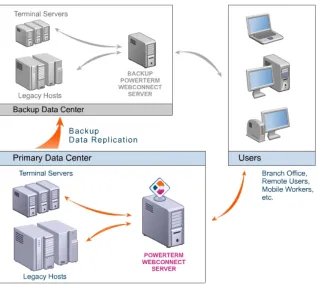
Secure, centrally managed access to both primary and backup datacenters ensures reliable access to applications residing on Windows Terminal Server, UNIX and Linux servers, and/or legacy host systems from Windows and Linux desktops, and thin clients.
Figure 1: Enterprise-wide access to primary and backup datacenters
By deploying PowerTerm WebConnect throughout the enterprise, customers obtain a centrally managed, secure application access environment that satisfies core business continuity needs such as mobility, 24/7 application access, security, reliability, usability, performance, supportability, and
cost-8
effectiveness. This breadth of access and functionality give PowerTerm WebConnect a substantial advantage over competing SBC solutions. Whatever the disruption, PowerTerm WebConnect enables enterprises to securely maintain or quickly reinstate vital connectivity to the organization’s data center, ensuring high availability of business-critical applications for optimal user uptime and productivity. For disaster recovery implementation, PowerTerm WebConnect enables users to access business-critical
applications, regardless of their location or type of device.
Branch offices can be serverless, simply tapping into the central, remotely located, datacenter. This is particularly valuable for offices located in areas known to be vulnerable (e.g. to natural disasters such as hurricanes, and/or to the multiple dangers inherent in developing countries). If a branch suffers a disaster, an alternative office location can be quickly and easily set up, requiring only a few inexpensive PCs or thin clients, electricity, and an Internet connection.
Figure 2: Business continuity for branch offices
Additional Benefits
Aligning IT with business objectives, Ericom PowerTerm WebConnect further empowers enterprises by:
Optimizing the application access infrastructure
Enhances mobility by eliminating the complexities of providing application access to local and remote users, whether at the office, home, customer site, or on the road.
Application access is device-independent; users can connect interchangeably from Windows and Linux desktops and laptops as well as thin clients. Users can securely access their office servers and workstations from remote locations.
9
Highly scalable system and application load-balancing allocates connections and applications to the optimal server, ensuring optimal use of server resources and a smooth, reliable user experience.
Auto-refreshing icons, a feature unique to PowerTerm WebConnect, ensures that all users remain in-sync, using the most current version of published applications. Any server-side changes—updates, changing the path to the server on which applications reside, etc.—are instantly, automatically, and transparently reflected on user desktops. Users do not need to wait for deployments or updates, or to perform a manual refresh; this prevents operational and organizational discrepancies.
For ease of use, end-users can launch remote applications in any way they choose—from the Start menu, desktop icons, the built-in Portal (Web
interface) or the PowerTerm WebConnect Application Zone—for faster, more intuitive interaction.
Users can launch both remote and local applications from the same interface. Content is automatically redirected to the appropriate location.
Reducing the cost of managing desktops
Corporate applications are installed, managed and updated on a limited set of secured servers instead of a multitude of workstations dispersed throughout the organization.
Centralized management and control eliminates the need to define any settings at the user’s desktop. In addition, the user interface can be published as an install-on-demand downloadable client, increasing staff efficiency. The built-in Remote Desktop Support tool enables IT staff to provide fast, real-time user support and trouble-shooting, enhancing productivity.
PowerTerm WebConnect supports thin client computing. Thin client devices are less expensive to purchase and have a much longer life span than the average PC. Moreover, all on-going maintenance and administration is performed entirely at the server level, with no need to service or upgrade individual user devices.
Easily deploying across the organization
Provides access to a wide range of enterprise systems: Windows Terminal Server (including 64-bit servers), IBM Mainframe (zSeries), IBM Midrange AS/400 (iSeries), UNIX, Linux, OpenVMS, and more. Supports over 35 terminal emulation types.
PowerTerm WebConnect’s affordability makes it possible to apply this access solution throughout the organization, rather than reserving it as a point-solution only for select sectors.
Ensuring application access security
For hacker protection, a single port relay enables information to be published securely beyond the firewall without the need to make public the applications, ports, or IP addresses.
Enterprise-level security includes support for SSL Gateway, Single Sign-on, Kerberos, and integration with leading VPNs. Connections can be encrypted from clients to Terminal Servers, even across public networks.
10
PowerTerm WebConnect enables organizations to comply with major global regulatory standards (e.g. SOX, JSOX, HIPAA) with features such as detailed logging and auditing and real-time monitoring of user sessions.
Innovative Technology
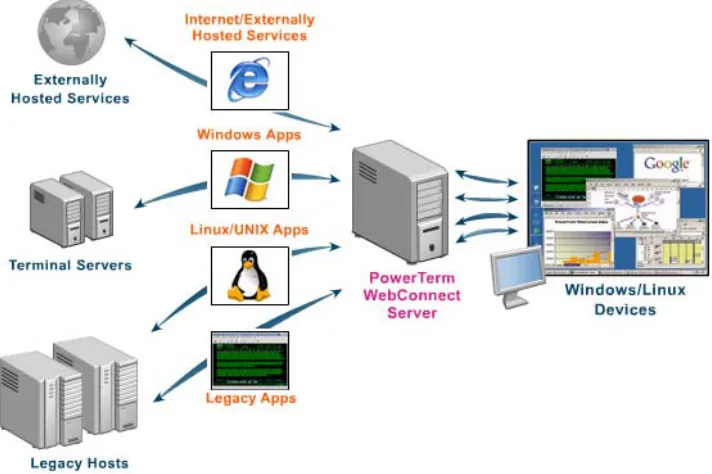
PowerTerm WebConnect’s innovative technology, including support for 64-bit servers, accommodates hundreds of users per server. This capability, along with advanced central administration and support tools and on-demand installation software, significantly lowers TCO of the Terminal Server environment.
Figure 3: Enterprise-wide Application Access
For organizations that need to support diverse locations of remote users, PowerTerm WebConnect’s enhanced security, Web portal interface, and
management tools ensure always-on access for a truly agile business. Moreover, centrally managed terminal emulation functionality, supporting 35+ terminal emulation types, is built into the product. As part of a comprehensive BCP, servers can be located in multiple datacenters, even in different countries.
Enterprise-wide SBC Averts Disaster and Enables
Business Continuity
To illustrate how deploying an enterprise-wide SBC solution such as Ericom PowerTerm WebConnect can help enterprises overcome challenges related to the combined cost, installation, maintenance and IT complexities of SBC solutions, let’s revisit the A-1 HealthCare clinic—but this time we’ll see what should have been done in advance of the fire.
In early January, the A-1 HealthCare board decided that with the increasing need for remote access, the current distributed PC computing model was too complex and expensive to support, as well as too vulnerable to security breaches.
11
Enterprise-wide SBC was considered as a means for providing centrally managed, local and remote access to applications that would maintain high availability to IT resources while also making sensitive information more secure. It would also enable workers to maintain productivity even if they are unable to physically reach their offices.
Preparing a formal BCP was not on the agenda, but a board member noted that Enterprise-wide SBC would simplify failover to backup systems and provide flexible and relatively transparent re-connection between users and their
applications. It was decided to limit prospective solutions to those complying with health insurance regulations stipulating standards for security and privacy. A chain-of-command was specified for action in case of emergency.
An IT taskforce evaluated various SBC solutions for their ability to provide the following:
Native support for the organization’s hybrid IT environment of Windows applications and legacy host system, in order to provide enterprise-wide application access to all users
An affordable price for implementation and maintenance
An architecture that would ensure simple and rapid installation, configuration, deployment and administration
Reliable security and privacy for all corporate and patient data
Support for future growth in terms of both number of users and branch locations
Additional features that constituted a “wish list” included: Built-in secure access to an office PC from remote locations Built-in remote technical support and training
Device and platform independence, enabling users to connect from, and switch among, Windows and Linux desktops and laptops as well as thin clients Various SBC offerings were evaluated and the solution that met all of the above requirements, Ericom Software PowerTerm WebConnect, was purchased and deployed. The organization’s file and data servers were upgraded to three
Windows Terminal Servers, so in addition to providing centralized storage of data, the IT admin could also publish individual applications to specific users with no need to install or maintain applications on individual workstations. And because PowerTerm WebConnect also provides seamless connectivity to legacy host systems, users continued to interact in the usual manner with the IBM iSeries midrange system, for true Enterprise-wide Server-Based Computing.
The following week, fire broke out in the A-1 HealthCare office. But instead of being confronted with IT losses that threatened the organization’s ability to survive, high availability of business-critical information and remote accessibility of the office’s applications allowed business to continue nearly unimpeded:
Tuesday, 9:30 p.m.:
The secondary datacenter with replicated data, located in a different county, kicked-in as soon as the primary datacenter failed. The PowerTerm WebConnect server itself was also located offsite, and its failover feature seamlessly rerouted all network traffic to the secondary datacenter.
12
Tuesday, 10:30 p.m. – Wednesday, 4:00 a.m.:
The authorities notified A-1 HealthCare’s designated emergency contact—the IT manager, Charles—of the fire. Charles had a busy night:
He arranged temporary shared office space to accommodate the most urgent cases. Charles also contacted the clinic’s system administrator, who, from her home, configured access to the datacenter for a group of physicians who would temporarily help with the patient load. She then sent each physician an e-mail message with a URL link. Simply by clicking this link, the doctors would be able to access from a Web interface complete records for their patients.
Charles’ home PC was being repaired. But since PowerTerm WebConnect provides access that is device-independent, from a spare thin-client device he was able to compile a list of the appointments scheduled for the next few days and to e-mail patients to notify them of the change of venue. Also, having access to employee records enabled Charles to send similar messages about where to report for work the following morning.
Over the next days and weeks:
Temporary physicians that were called to help were unfamiliar with the patient management software. PowerTerm WebConnect’s built-in desktop support tool enabled IT staff to provide real-time troubleshooting and training by remotely assuming control of a physician’s desktop and demonstrating how to work with the various applications.
Long before the office premises were restored, A-1 HealthCare continued to function nearly normally. Even with many office employees working from home, all business procedures—appointments, billing, maintenance of patient records, prescriptions, etc.—were conducted using the customary applications and with access to the same databases.
Summary
As threats to business continuity proliferate in the 21st century, the steps a company takes to prepare for an emergency can determine whether it will survive and thrive, or simply collapse in the face of adversity. The ability to maintain operational efficiency throughout a crisis is greatly increased by proactively adopting tested and proven methods to provide IT resilience. Enterprise-wide SBC using Ericom’s PowerTerm WebConnect not only has immediate benefits for conducting daily business processes, it also serves as an integral component of a comprehensive BCP, securely maintaining centrally-managed remote connectivity to business-critical applications and data—anytime, anywhere.
Ericom is very interested in receiving your feedback to this paper, and knowing what other white paper topics would be useful to you. Please write to
13
14
http://www.ericom.com
About Ericom
Ericom® Software is a leading provider of Enterprise-Wide Application Access Solutions. Since 1993,Ericom has been helping users access enterprise business-critical applications, enabling access to applications running on a broad range of Microsoft® Windows® Terminal Servers, legacy hosts and other systems, and
providing concrete business value by helping organizations realize the benefits of their IT investments. With offices in the United States, United Kingdom, EMEA, India and China, Ericom also has an extensive network of distributors and partners throughout North America, Europe, Asia and the Far East. Our expanding
customer base is more than 30 thousand strong, with over 6 million installations.
Visit
http://www.ericom.com
for instant downloads of free product demos and compelling
case studies.
North America UK & Western Europe International
Ericom Software Inc. Ericom Software (UK) Ltd. Ericom Software Ltd. 231 Herbert Avenue, Bldg. #4 11a Victoria Square 8 Hamarpeh Street
Closter, NJ 07624 USA Droitwich, Worcestershire Har Hotzvim Technology Park Tel +1 (201) 767 2210 WR9 8DE United Kingdom Jerusalem 91450 Israel Fax +1 (201) 767 2205 Tel +44 (0) 870 2000 176 Tel +972 (2) 591 1700 Toll-free 1 (888) 769 7876 Fax +44 (0) 870 2000 179 Fax +972 (2) 571 4737 Email [email protected] Email [email protected] Email [email protected]