
Performance Brief
42
0
0
Full text
(2) Advantages of Compaq NIC Teaming with Citrix MetaFrame XP Performance Brief. 2. Notice This publication does not constitute an endorsement of the product or products that were tested. The configuration or configurations tested or described may or may not be the only available solution. This test is not a determination of product quality or correctness, nor does it ensure compliance with any federal, state or local requirements. Compaq, the Compaq logo, ActiveAnswers, and ProLiant are trademarks of Compaq Information Technologies Group, L.P. in the U.S. and/or other countries. Microsoft, Windows, and Windows NT are trademarks of Microsoft Corporation in the U.S. and/or other countries. Intel, Pentium, Intel Inside, and Celeron are trademarks of Intel Corporation in the U.S. and/or other countries. All other product names mentioned herein may be trademarks of their respective companies. Compaq shall not be liable for technical or editorial errors or omissions contained herein. The information is provided “as is” without warranty of any kind and is subject to change without notice. The warranties for Compaq products are set forth in the express limited warranty statements accompanying such products. Nothing herein should be construed as constituting an additional warranty. ©2002 Compaq Information Technologies Group, L.P. Advantages of Compaq NIC Teaming with Citrix MetaFrame XP Performance Brief prepared by ISSG eInfrastructure Business Unit First Edition (March 2002) Document Number 16H2-0302A-WWEN. 16H2-0302A-WWEN.
(3) Advantages of Compaq NIC Teaming with Citrix MetaFrame XP Performance Brief. 3. Introduction The price/performance ratio of server hardware continues to improve dramatically but there have been few corresponding improvements for network equipment. A customer with a network bottleneck may consider investing in Asynchronous Transfer Mode (ATM) broadband switching and transmission technology, Gigabit Ethernet and/or fiber to improve performance and user satisfaction. However, by teaming standard Fast Ethernet Network Interface Cards (NICs) on a switched network, the customer can improve system performance for a nominal cost. By deploying one or more additional NICs with Compaq NIC teaming software, the customer can improve network performance and fault tolerance. Additional NICs join the existing NIC to create a team that operates as a virtual network adapter with a single MAC address and a single IP address; the virtual network adapter is transparent to other network devices. This technique is variously known as NIC teaming, network adapter teaming, NIC aggregation, port trunking or port bonding. For the purposes of this Performance Brief, the term “NIC teaming” is generally used. Compaq NIC teaming software available at no charge. Hardware requirements can include additional Compaq NICs, network cables, and switch ports that support the same speed as the NIC team. All Compaq ProLiant servers ship with at least one NIC. In some servers, a NIC is integrated with the system board; in others, the NIC is a discrete device installed in the PCI bus. The customer can install one or more additional Compaq NICs to create a team. Note: Some ProLiant servers feature a dual NIC that can be used to create a team. Compaq Fast Ethernet or Gigabit NICs offer the following benefits with Microsoft Windows NT 4.0, Microsoft Windows 2000 or Novell NetWare 4.1x or newer: •. Fault tolerance A NIC team automatically provides redundancy. If a NIC fails, a team member is immediately available to preserve network connectivity.. •. Load balancing The load balancing option provides redundancy while allowing a NIC team to share network traffic and increase throughput.. Implementing Compaq NIC teaming on servers running Citrix MetaFrame can improve the network throughput of a server farm; if a NIC failover should occur, no ICA client sessions are lost.. 16H2-0302A-WWEN.
(4) Advantages of Compaq NIC Teaming with Citrix MetaFrame XP Performance Brief. This Performance Brief This Performance Brief provides information on the following topics: •. •. •. •. •. •. NIC teaming overview –. Provides an overview of Compaq NIC teaming. –. Lists the software components required to implement Compaq NIC teaming. Network addressing Explains network addressing in an environment that includes NIC teams; includes information on the following: –. OSI model. –. Layer-3 and layer-2 addressing. –. Using ARP to resolve an IP address. –. Configuring a NIC team for layer-3 or layer-2 addressing. –. MAC addressing in a failover event. NIC teaming modes –. Network Fault Tolerance (NFT) mode Provides an overview of NFT mode; offers recommendations for configuring and setting up an NFT team. –. Transmit Load Balancing (TLB) mode Provides an overview of TLB mode; details TLB transmit algorithms; offers recommendations for configuring and setting up a TLB team. –. Switch-assisted Load Balancing (SLB) mode Explains Compaq SLB technology; details SLB load balancing algorithms; offers recommendations for configuring an SLB team. NIC teaming mode comparisons –. Compares the capabilities of NFT, TLB and SLB modes. –. Compares the addressing schemes used to transmit frames. Compaq NIC teaming with Cisco switches –. Provides a brief overview of Cisco FEC technology. –. Details of source-based, destination-based and XOR-based algorithms. –. Discusses FEC environments. Using the CPQTEAM GUI Explains how to use the GUI for the following activities: –. Installing the GUI. –. Configuring a NIC team. –. Using the Virtual Miniport Interface. –. Setting up a NIC team. 16H2-0302A-WWEN. 4.
(5) Advantages of Compaq NIC Teaming with Citrix MetaFrame XP Performance Brief. •. •. NIC team performance in a MetaFrame environment –. Describes test scenarios. –. Presents the results of application server and data store testing. –. Offers conclusions and recommendations. Improving network performance –. Offers recommendations for optimizing performance in a MetaFrame server farm (manually configuring the auto-sense feature; removing unused network protocols; ordering network bindings; modifying the operation of the TCP/IP stack; minimizing network traffic). •. Summary. •. Appendix A –. •. Presents an overview of Citrix MetaFrame XP. Appendix B –. •. 5. Discusses network address types (unicast, broadcast and multicast). Appendix C –. Discusses switch port groups. NIC Teaming Overview The design goal of Compaq NIC teaming is to provide fault tolerance and, if desired, load balancing through a team of two to eight NICs deployed in a single server. There can be up to eight teams in a server. A NIC team works together as a single network adapter (commonly referred to as a virtual network adapter). The network views the virtual network adapter as the sole mechanism for server communication, regardless of the number of physical NICs in the team. A Compaq NIC team can be configured in the following modes: •. Fault Tolerant mode In Fault Tolerant mode, the NIC team members can be configured as either primary or secondary devices. In this mode, a secondary NIC is a hot spare for the primary (active) NIC. If the primary NIC fails, a secondary NIC immediately takes over network communications with no loss of connectivity. If a secondary NIC fails, a visual indicator is displayed in the Teaming NIC GUI. .. •. Load Balancing mode In Load Balancing mode, a NIC team can be configured to increase throughput by loadbalancing and aggregating server network traffic. The team can be configured to accomplish either transmit load balancing or transmit/receive load balancing. This is generally the preferred configuration.. Teams can be created from the following Compaq NICs: •. A mix of Compaq NCxxxx Fast Ethernet (10 – 100Mbps) and Gigabit (1000Mbps) NICs, or. •. A mix of Compaq Netelligent and NetFlex-3 NICs. 16H2-0302A-WWEN.
(6) Advantages of Compaq NIC Teaming with Citrix MetaFrame XP Performance Brief. 6. Note: NIC team members must support a common speed. NCxxxx NICs cannot be teamed with Netelligent or NetFlex-3 NICs, which are now out-of-production. More information on Compaq NIC teaming technology is available on the Compaq website.. NIC Teaming Software Within the Microsoft Windows 2000 operating system, four hierarchical layers work together to allow one system to communicate with another. Each layer performs a separate function; each can pass information to the layer above or below it. Table 1 describes the four layers, which are important in a discussion of NIC teaming software. Table 1. Windows 2000 Communications Layers Layer. Function. Miniport. The miniport layer consists of the NIC driver, which is typically written by the NIC vendor.. Intermediate. An intermediate layer does not directly control a hardware device, but links the miniport layer with the NDIS layer (see below). The Compaq Network Teaming and Configuration Driver is an intermediate driver that seamlessly links multiple miniport drivers to form a single virtual network adapter that can communicate with the NDIS layer.. Microsoft Network Driver Interface Specification (NDIS). The NDIS layer manages communications between the protocol layer (see below) and either the miniport or intermediate layer.. Protocol. The protocol layer allows network protocols (such as IP, IPX or AppleTalk) to communicate with the NDIS layer.. Software Components Table 2 describes the software components required to implement Compaq NIC teaming. Table 2. NIC Teaming Software Software Component. Intermediate driver. cpqteam.sys. Graphical user interface cpqteam.exe (GUI). Comments. This intermediate driver manages all Compaq NIC teaming functions. This GUI can manage up to eight NIC teams.. Note: When upgrading either of these components to the latest level, Compaq recommends upgrading the other component at the same time.. 16H2-0302A-WWEN.
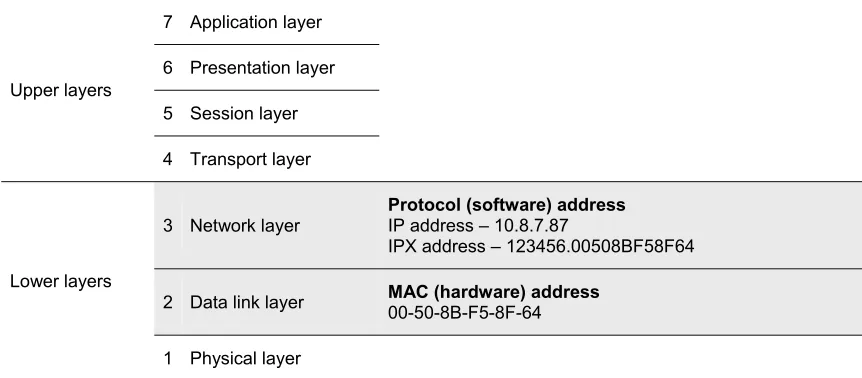
(7) Advantages of Compaq NIC Teaming with Citrix MetaFrame XP Performance Brief. 7. Network Addressing To understand how a Compaq NIC team interacts with other network devices, the reader must understand basic network addressing concepts. While this Performance Brief assumes that the reader has some familiarity with these concepts, this section provides a review of the following topics: •. The OSI model. •. Layer-3 and layer-2 functionality. •. Configuring layer-3 or layer-2 addressing. •. MAC addressing in a failover event. OSI Model The OSI model (shown in Figure 1) is a standard reference model for data transmission in a communications network. This seven-layer model is implemented in each network host, allowing messages to be sent over the network from one host to another. 7 Application layer 6 Presentation layer Upper layers 5 Session layer 4 Transport layer. 3 Network layer. Protocol (software) address IP address – 10.8.7.87 IPX address – 123456.00508BF58F64. 2 Data link layer. MAC (hardware) address 00-50-8B-F5-8F-64. Lower layers. 1 Physical layer Figure 1: The OSI model with representations of layer-2 and layer-3 addresses. 16H2-0302A-WWEN.
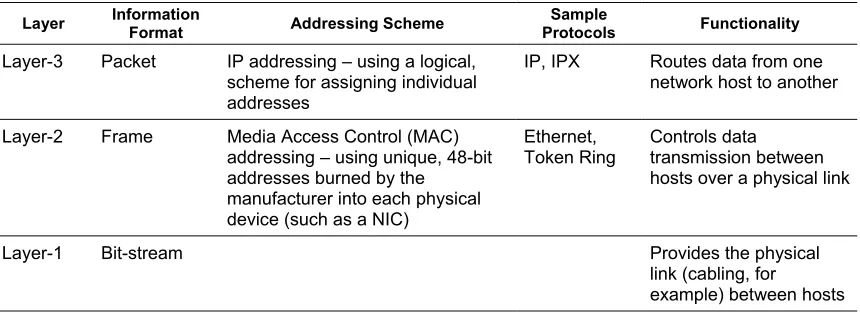
(8) Advantages of Compaq NIC Teaming with Citrix MetaFrame XP Performance Brief. 8. Layer-3 or Layer-2 Addressing Table 3 provides an overview of the functionality offered by the lower layers of the OSI model. Table 3. Functionality of the Lower Layers of the OSI Model Layer. Information Format. Addressing Scheme. Sample Protocols. Functionality. Layer-3. Packet. IP addressing – using a logical, scheme for assigning individual addresses. IP, IPX. Routes data from one network host to another. Layer-2. Frame. Media Access Control (MAC) addressing – using unique, 48-bit addresses burned by the manufacturer into each physical device (such as a NIC). Ethernet, Token Ring. Controls data transmission between hosts over a physical link. Layer-1. Bit-stream. Provides the physical link (cabling, for example) between hosts. In order for a NIC team to appear as a virtual network adapter, network devices must be able to address the team using a single layer-3 or layer-2 address. Compaq and Citrix recommend using the more basic identifier – the layer-2 (MAC) address – when teaming NICs on servers used in a MetaFrame server farm. However, MAC addressing is used for all Ethernet communications (whether layer-3 or layer-2 addressing is implemented). To communicate with a NIC team using layer-3 addressing, the layer-3 address must first be resolved to a MAC address. The following methods can be used: •. IP address An IP address can be resolved to a MAC address using Address Resolution Protocol (ARP) or by manually configuring the switch.. •. IPX address The last portion of an IPX address is the same as the MAC address, so no resolution is required.. The following section provides more information on using ARP to resolve an IP address.. Using ARP to Resolve an IP Address With layer-3 addressing, a network device wishing to send a message to a Compaq NIC team must first use an ARP broadcast1 to map the IP address to the MAC address of the virtual NIC. The device stores this MAC address in its ARP cache for future use. Note: ARP responses from the members of a particular NIC team return the same MAC address, which does not change unless the team is manually reconfigured and the host rebooted. The host’s ARP cache contains a single entry for the NIC team. When communicating over IP, the server has only a single MAC entry (for the virtual network adapter) in its ARP cache even though there are multiple physical NICs in the team.. 1. For more information on unicast, broadcast and multicast addressing, as well as heartbeat frames, refer to Appendix B.. 16H2-0302A-WWEN.
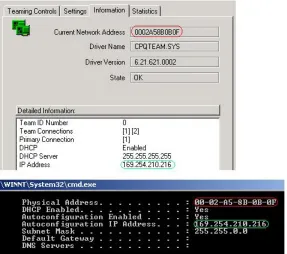
(9) Advantages of Compaq NIC Teaming with Citrix MetaFrame XP Performance Brief. 9. Figure 2 compares a CPQTEAM properties page with the corresponding Windows 2000 ipconfig screen, showing the relationship between IP and MAC addresses.. Figure 2: Comparing an ipconfig screen with a Teaming NIC properties Page. The properties page and the ipconfig screen both show the same addresses: •. The NIC team’s layer-2 (MAC or physical) address is 0002A58B0B0F. •. The NIC team’s layer-3 (IP or protocol) address is 169.254.210.216. 16H2-0302A-WWEN.
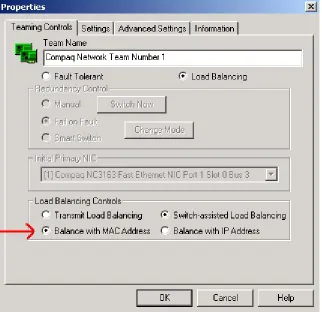
(10) Advantages of Compaq NIC Teaming with Citrix MetaFrame XP Performance Brief. Configuring Layer-3 or Layer-2 Addressing The CPQTEAM GUI allows the administrator to select either layer-3 or layer-2 (recommended by Compaq and Citrix for MetaFrame servers) addressing. Figure 3 shows the appropriate Properties screen.. Figure 3: Selecting level-2 (MAC) addressing. 16H2-0302A-WWEN. 10.
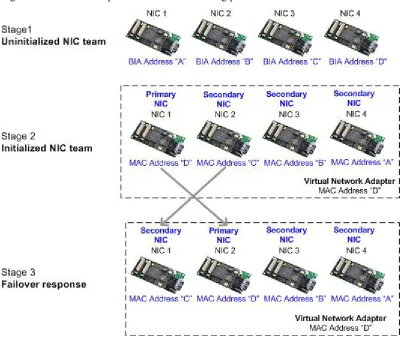
(11) Advantages of Compaq NIC Teaming with Citrix MetaFrame XP Performance Brief. 11. MAC Addressing in a Failover Event If a failover event occurs, the intermediate driver swaps the MAC address of the failed primary NIC with that of a secondary NIC, which becomes the new primary NIC. The failed primary NIC becomes a secondary NIC. The MAC address of the virtual adapter is unchanged; no protocol address swapping is required. Figure 4 shows an example of the MAC addressing process for a NIC team.. Figure 4: An example of the MAC addressing process. 16H2-0302A-WWEN.
(12) Advantages of Compaq NIC Teaming with Citrix MetaFrame XP Performance Brief. 12. NIC Teaming Modes Compaq NIC teaming supports three teaming modes: •. Network Fault Tolerance. •. Transmit Load Balancing. •. Switch-assisted Load Balancing. Note: To optimize performance in any of these modes, each NIC should be manually configured for the desired speed and full-duplex operation. This is accomplished via the CPQ Team GUI. The following sections provide more information on each of these NIC teaming modes.. Network Fault Tolerance Mode Network Fault Tolerance (NFT) is the most basic Compaq NIC teaming mode, providing redundancy in the event of a NIC or network failure. NFT provides no throughput enhancement and is suitable for environments where the throughput supported by a single NIC is satisfactory. Between two to eight NICs can be teamed to create a single virtual network adapter. Figure 5 shows an NFT team with four NICs.. Figure 5: A NIC team with four NICs, configured in NFT mode. Note: A typical NFT team consists of the primary NIC and one secondary NIC. In a NIC team configured for NFT, the active NIC is referred to as the primary NIC, and is responsible for all frames transmitted or received by the server. The remaining team members are referred to as secondary NICs. Until network communications with the primary NIC fails, secondary NICs are unused – except for the transmission of heartbeat frames, if this feature is enabled. In NFT mode, a secondary NIC is immediately available to take over if a primary NIC fails or some other network failure occurs; there is virtually no disruption in network service (as detailed later in this Performance Brief in Teaming NIC Performance in a MetaFrame Environment).. 16H2-0302A-WWEN.
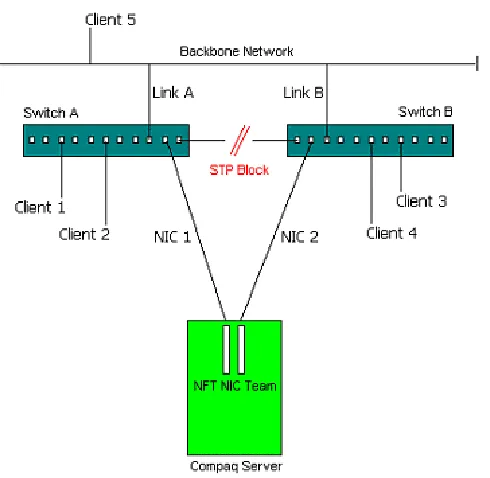
(13) Advantages of Compaq NIC Teaming with Citrix MetaFrame XP Performance Brief. 13. Configuring an NFT Team on the Network In NFT mode, redundancy at the NIC-level is automatic; multiple switches are required to eliminate a single point-of-failure. Smaller, less robust switches require all members of the NIC team to be connected to the same switch, as shown in Figure 5. However, some switches (such as the Cisco 6500 series) support segregated teaming, which allows NIC team members to be connected across different switches to achieve redundancy, as shown in Figure 6. Note: Switches listed in the Switch-assisted Load Balancing Mode section of this Performance Brief support segregated teaming. For information on other switches, refer to the appropriate vendor literature. Compaq recommends testing any switched configuration prior to deployment in a production environment.. Figure 6: Recommended configuration for deploying a redundant switch. The NFT configuration shown in Figure 6 includes a second switch with redundant connections (trunk links A and B) to the backbone network. One port on Switch A is connected to a port on Switch B, providing an intelligent link between the switches; spanning tree protocol is enabled on these two ports. Note: Spanning tree protocol allows the switches to exchange information so that only one switch is responsible for a given message, preventing the condition known as bridge loop. Compaq recommends disabling2 spanning tree protocol on the ports to which the NIC team is attached. A full discussion of spanning tree protocol is beyond the scope of this Performance Brief.. 2 Cisco switches have a feature called Portfast that is used to configure spanning tree protocol on a port-by-port basis. Portfast is typically used when the switch port is connected to a server rather than another switch port.. 16H2-0302A-WWEN.
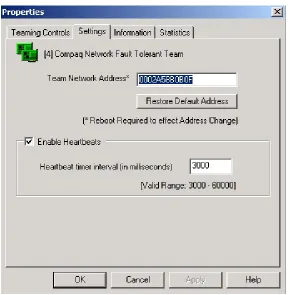
(14) Advantages of Compaq NIC Teaming with Citrix MetaFrame XP Performance Brief. 14. In this configuration, the link between the switches is normally in standby mode (STP Block). If Link A or Link B fails, the link between the switches becomes active so that the NIC team can still communicate with all clients.. NFT Team Settings Note: For information on configuring a particular NIC teaming mode, see Using the CPQTEAM GUI later in this Performance Brief. Compaq recommends retaining the following default settings, which can be accessed through the Settings tab of the CPQTEAM Properties dialog box (as shown in Figure 7): •. Enable Heartbeats should be checked.. •. Team Network Address should be the default value – the virtual adapter address assigned by the intermediate NIC driver.. IMPORTANT: If the administrator overrides the default virtual adapter address by setting a Locally Administered Address (LAA), NIC teaming may not function correctly.. Figure 7: Viewing the default settings for NFT mode. 16H2-0302A-WWEN.
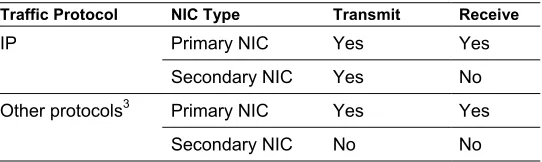
(15) Advantages of Compaq NIC Teaming with Citrix MetaFrame XP Performance Brief. 15. Transmit Load Balancing Mode Note: Transmit Load Balancing (TLB) was formerly known as Adaptive Load Balancing (ALB). When configured in TLB mode, two to eight NICs can be teamed together to create a single virtual network adapter. As in NFT mode, there are two types of team members in TLB mode – primary and secondary NICs. Unlike NFT mode, IP network traffic transmitted by the server is load balanced across all NICs in the team, increasing throughput; however, incoming traffic is received by the primary NIC only. TLB is recommended only if the switch does not support Switch-assisted Load Balancing, which is discussed later in this Performance Brief. Table 4 summarizes NIC teaming capabilities in TLB mode. Table 4. NIC Teaming Capabilities in TLB Mode Traffic Protocol. NIC Type. Transmit. Receive. IP. Primary NIC. Yes. Yes. Secondary NIC. Yes. No. Primary NIC. Yes. Yes. Secondary NIC. No. No. 3. Other protocols. Figure 8 shows a typical TLB configuration, illustrating the aggregate bandwidth.. Figure 8: A NIC team with four NICs, configured in TLB mode. 3. IPX, AppleTalk, and more. 16H2-0302A-WWEN.
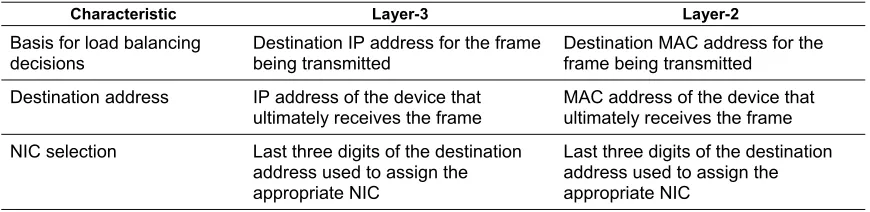
(16) Advantages of Compaq NIC Teaming with Citrix MetaFrame XP Performance Brief. 16. TLB Transmit Algorithms The transmit algorithms used by TLB mode attempt to load-balance transmitted information across the entire NIC team. Note: The transmit load may not be distributed equally across all NIC team members. The algorithms do not load balance on a frame-by-frame basis across all NICs; rather, load balancing is achieved on a conversation-by-conversation basis. The transmit algorithm assigns each conversation to a particular NIC so that frames are not transmitted out-of-order. Transmit algorithms achieve load balancing at either the layer-3 (IP address) or the layer-2 (MAC address) level. Note: Compaq and Citrix recommend load balancing by MAC address. Table 5 compares the two transmit algorithms. Table 5. Comparison of Layer-2 and Layer-3 Transmit Algorithms Characteristic. Layer-3. Layer-2. Basis for load balancing decisions. Destination IP address for the frame being transmitted. Destination MAC address for the frame being transmitted. Destination address. IP address of the device that ultimately receives the frame. MAC address of the device that ultimately receives the frame. NIC selection. Last three digits of the destination address used to assign the appropriate NIC. Last three digits of the destination address used to assign the appropriate NIC. Note: Compaq recommends layer-2 transmit load balancing unless the network traffic traverses a router. More information on TLB is available on the Compaq website.. Configuring a TLB Team on the Network As in NFT mode, redundancy at the NIC-level is automatic in a TLB team; multiple switches are required to eliminate a single point-of-failure. Smaller, less robust switches require all members of the NIC team to be connected to the same switch, as shown in Figure 8. However, some switches (such as the Cisco 6500 series) support segregated teaming, which allows NIC team members to be connected across different switches to achieve redundancy, as shown in Figure 9. Note: Switches listed in the Switch-assisted Load Balancing Mode section of this Performance Brief support segregated teaming. For information on other switches, refer to the appropriate vendor literature. Compaq recommends testing any switched configuration prior to deployment in a production environment.. 16H2-0302A-WWEN.
(17) Advantages of Compaq NIC Teaming with Citrix MetaFrame XP Performance Brief. 17. Figure 9: Recommended configuration for deploying a redundant switch. The TLB configuration shown in Figure 9 includes a second switch with redundant connections (trunk links A and B) to the backbone network. One port on Switch A is connected to a port on Switch B, providing an intelligent link between the switches; spanning tree protocol is enabled on these two ports. Note: Spanning tree protocol allows the switches to exchange information so that only one switch is responsible for a given message, preventing the condition known as bridge loop. Compaq recommends disabling4 spanning tree protocol on the ports to which the NIC team is attached. A full discussion of spanning tree protocol is beyond the scope of this Performance Brief. In this configuration, the link between the switches is normally in standby mode (STP Block). If Link A or Link B fails, the link between the switches becomes active so that the NIC team can still communicate with all clients.. TLB Team Settings Note: For information on configuring a particular NIC teaming mode, see Using the CPQTEAM GUI. Compaq recommends configuring the following default settings, which can be accessed through the Settings tab of the CPQTEAM Properties dialog box (as shown in Figure 10): •. Enable Heartbeats should be checked.. •. Team Network Address should be the default value – the virtual adapter address assigned by the intermediate NIC driver.. 4 Cisco switches have a feature called Portfast that is used to configure spanning tree protocol on a port-by-port basis. Portfast is typically used when the switch port is connected to a server rather than another switch port.. 16H2-0302A-WWEN.
(18) Advantages of Compaq NIC Teaming with Citrix MetaFrame XP Performance Brief. 18. IMPORTANT: If the administrator overrides the default virtual adapter address by setting a Locally Administered Address (LAA), NIC teaming may not function correctly.. Figure 10: Checking the NIC teaming settings for NLB mode. Switch-Assisted Load Balancing Mode Note: In earlier Compaq documentation, Switch-assisted Load Balancing (SLB) was known as Cisco Fast EtherChannel (FEC). However, SLB supports NIC teaming on switches from Cisco and other vendors. SLB combines the features of NFT and TLB – NIC fault tolerance and load balancing of transmitted traffic – with load balancing of traffic received by the server. SLB balances all traffic, received or transmitted, regardless of the network protocol.. 16H2-0302A-WWEN.
(19) Advantages of Compaq NIC Teaming with Citrix MetaFrame XP Performance Brief. 19. Compaq SLB Technology SLB is a Compaq term that applies to the non-proprietary technology for grouping multiple NICs into one virtual network adapter and multiple switch ports into one virtual switch port. Compaq has chosen to use the term “Switch-assisted Load Balancing” instead of adopting a particular vendor’s terminology since Compaq SLB technology works with products from multiple vendors. Compatible technologies include: •. Cisco Fast EtherChannel (FEC). •. Cisco Gigabit EtherChannel (static mode only). •. IEEE 802.3ad Link Aggregation (static mode only). •. Nortel/Bay Networks MultiLink Trunking. •. Extreme Networks load sharing. Figure 11 shows a typical SLB configuration, illustrating aggregate bandwidth.. Figure 11: A NIC team with four NICs, configured in SLB mode. 16H2-0302A-WWEN.
(20) Advantages of Compaq NIC Teaming with Citrix MetaFrame XP Performance Brief. 20. Table 6 summarizes the characteristics of a Compaq SLB implementation. Table 6. Characteristics of a Compaq SLB Implementation Characteristic. Description. Load balancing. An SLB team load balances transmit and receive traffic. Load balancing is accomplished at the switch-level (as opposed to TLB, where load balancing is accomplished at the server).. Fault tolerance. An SLB team automatically offers redundancy at the NIC- level. If desired, the customer can add a switch to provide redundancy at the switch-level. Unlike NFT and TLB, an SLB team does not require primary or secondary NICs; all NICs are equal and perform identical functions. The failure of any NIC in a team has the same implications as the failure of any other. If a NIC fails, the miniport driver advises the user through an icon in the system tray.. Addressing. All team members use the same MAC address.. Number of team members. Compaq SLB supports 2 – 8 team members. NOTE: Some switch manufacturers (such as Cisco) only support teams of two, four or eight NICs.. Transmit/receive speeds. All team members transmit and receive at the same speed.. Switch configuration. An SLB implementation requires a switch that can aggregate multiple switch ports into a single switch port. If redundancy is required at the switch-level, switches must support segregated teaming, which allows NIC team members to be connected across multiple switches.. IMPORTANT: The success of an SLB configuration is highly dependent on the individual switch vendor’s implementation of port-bonding, aggregation and/or teaming. In addition, the flexibility of Compaq SLB technology may allow the customer to configure an SLB team that does not work correctly with all vendors’ switches. Compaq advises customers to study vendor configuration guidelines and strongly recommends testing an SLB configuration prior to deployment in a production environment.. SLB Load Balancing Algorithms The algorithms used by SLB for transmit load balancing are identical to the algorithms used by TLB. These algorithms attempt to load balance transmitted information across the whole team; load balancing occurs on a conversation-by-conversation basis as opposed to a frame-by-frame basis. The switch has total responsibility for receive load balancing. The switch vendor provides an appropriate algorithm; the Compaq SLB team has no control over which NIC receives the incoming traffic. Note: Refer to the switch vendor’s documentation for more information on the particular receive algorithm.. 16H2-0302A-WWEN.
(21) Advantages of Compaq NIC Teaming with Citrix MetaFrame XP Performance Brief. 21. NIC Teaming Mode Comparison This section provides the following information: •. A comparison of the capabilities of each mode. •. A comparison of the addresses used to transmit frames in each mode. Capability Comparison Table 7 compares the capabilities of each NIC teaming mode. Table 7. Comparison of the Capabilities of NFT, TLB and SLB NIC Teams NFT. NIC Configuration TLB. SLB. Number of NICs supported per team. 2-8. 2-8. 2-85. Offers NIC fault tolerance. Yes. Yes. Yes. Offers switch fault tolerance6. Yes. Yes. Switch dependent. Yes. Yes. Capability. Supports transmit load balancing Supports receive load balancing. Yes. Requires a compatible switch. Yes. Uses heartbeats to check network integrity. Yes. Supports NICs that do not provide for a common speed. Yes. Supports NICs that operate at different speeds7. Yes. Yes. Yes. Supports NIC teams of different media. Yes. Yes. Yes. Maximum theoretical transmit/receive throughput (in Mbps) achieved with the maximum number of 100Mbps NICs. 100/100. 800/100. 800/800. Maximum theoretical transmit/receive throughput (in Mbps) achieved with the maximum number of 1000Mbps NICs. 1000/1000. 8000/1000. 8000/8000. Yes. Yes. Load balances TCP/IP. Yes. Load balances other network protocols, such as IPX/SPX, SNA, and Apple Talk. Yes. Supports load balancing by destination IP address. Yes. Offers the same MAC network address for all NIC team members Offers the same IP network address for all NIC team members. 5 6. Yes Yes. Yes. Yes. Yes. Some switch vendors (such as Cisco) only support the aggregation of only 2, 4 or 8 NICs. The NIC team can be connected to multiple switches in the same broadcast domain to offer fault tolerance.. 7 If the NICs feature a common speed. See Setting up the Advanced Properties of a NIC Team later in this Performance Brief.. 16H2-0302A-WWEN.
(22) Advantages of Compaq NIC Teaming with Citrix MetaFrame XP Performance Brief. 22. Addressing Comparison Table 8 compares the addresses used to transmit frames in each NIC teaming mode. Table 8. Addresses used to Transmit Frames OSI Layer. Primary NIC. NFT and TLB Modes Secondary NIC. SLB Mode. Layer-2. Virtual adapter’s MAC address. Assigned MAC address8. Virtual adapter’s MAC address. Layer-3. Virtual adapter’s protocol address. Virtual adapter’s protocol address. Virtual adapter’s protocol address. A server communicating with a Compaq NIC team may receive frames from multiple team members. However, by the time the operating system receives a frame from the OSI stack, all MAC headers have been stripped off.. Compaq NIC Teaming with Cisco Switches If a Cisco switch is deployed, Compaq NIC teaming in SLB mode uses Cisco Fast EtherChannel (FEC). FEC teams two, four or eight NICs and is based on layer-2 (MAC) addressing. The following load balancing algorithms are used: •. Source-based The source-based algorithm uses the last one or two bits (depending on the number of members in the NIC team) of the source hardware address in the layer-2 packet. For example, for a team with two NICs, if the last bit of the MAC address is 0, the first NIC is used; if the last bit is 1, the second NIC is used.. •. Destination-based The destination-based algorithm uses the last one or two bits (depending on the number of members in the NIC team) of the destination hardware address in the layer-2 packet. For example, for a team with two NICs, if the last bit of the MAC address is 0, the first NIC is used; if the last bit is 1, the second NIC is used.. •. Exclusive OR-based The exclusive OR (XOR)-based algorithm performs an XOR operation on the last one or two bits (depending on the number of members in the NIC team) of both the source and destination hardware addresses in the layer-2 packet. For example, for a team with two NICs, if the result of the XOR is 0, the first NIC is used; if the result is 1, the second NIC is used.. Note: Depending upon the specific load-balancing algorithm used, FEC may not load balance network traffic efficiently.. 8. To achieve IEEE standards compliance, this address is unique to the particular NIC.. 16H2-0302A-WWEN.
(23) Advantages of Compaq NIC Teaming with Citrix MetaFrame XP Performance Brief. 23. Switch-to-Switch and Switch-to-Node Environments FEC technology can be used in both switch-to-node (as illustrated in this Performance Brief) and switch-to-switch environments. Implementing the destination-based algorithm in a switch-to-node environment fails to balance incoming traffic evenly across the team. In this scenario, the destination address (the node’s) is always the same, so the switch always sends traffic to the same NIC.. Using the CPQTEAM GUI The Compaq Network Teaming and Configuration GUI (CPQTEAM)9 is used to configure and monitor Compaq NICs running under Microsoft Windows 2000. CPQTEAM for Compaq ProLiant servers is available from the following sources: •. Compaq Support Tools. •. The Compaq Support Paq for Windows 2000, which is on the Compaq SmartStart CD-ROM or can be downloaded from Compaq Support Tools. Installing CPQTEAM adds an icon to the system tray on the desktop; clicking the icon launches the utility. Figure 12 shows a sample GUI screen; all NICs installed in the server are listed.. Figure 12: A sample graphical interface screen listing each NIC in the server. 9. cpqteam.exe. 16H2-0302A-WWEN.
(24) Advantages of Compaq NIC Teaming with Citrix MetaFrame XP Performance Brief. Perform the following steps to configure a NIC team: 1. To create the NIC team, click the desired NICs. 2. Click Team to display the Properties dialog box (shown in Figure 13).. Figure 13: Using the Teaming Controls tab to specify the NIC teaming mode and options. 3. Select the Teaming Controls tab. 4. Select either Fault Tolerant mode or Load Balancing mode.. 16H2-0302A-WWEN. 24.
(25) Advantages of Compaq NIC Teaming with Citrix MetaFrame XP Performance Brief. 25. 5. Select the desired option from Table 9. Table 9. Options for the Selected NIC Teaming Mode Mode. Fault Tolerant. Option. Description. Manual. The Manual option disables automatic failover – usually for troubleshooting purposes. Failover must be accomplished manually.. Fail on Fault (default). The Fail on Fault option automatically initiates a failover if a fault is detected on the primary NIC. A secondary NIC becomes the new primary NIC. When the faulty NIC is replaced, the replacement becomes a secondary NIC.. Smart Switch. The Smart Switch option allows you to select a primary Smart Switch NIC. This is always the primary NIC while operational. As with a normal primary NIC, the primary Smart Switch NIC fails over in the event of a failure. However, when the faulty NIC is replaced, the replacement becomes the new primary NIC. The Primary Smart Switch NIC drop-down list allows you to specify the desired primary Smart Switch NIC.. Load Balancing. Transmit Load Balancing. Adaptive Load Balancing is now known as Transmit Load Balancing.. Switch-assisted Load Balancing. Cisco Fast EtherChannel is now known as Switchassisted Load Balancing.. 6. After selecting the desired mode and option, click OK. 7. A series of pop-up messages indicate that a digital signature has not been found. Click Yes on each message to continue. 8. A final message asks that you Please be sure that Protocols and Services are properly configured for the newly created Team(s) by properly configuring their corresponding Network Teaming Virtual Miniport(s). Click OK. 9. When prompted, reboot the server to invoke the Virtual Miniport Interface.. 16H2-0302A-WWEN.
(26) Advantages of Compaq NIC Teaming with Citrix MetaFrame XP Performance Brief. 26. Virtual Miniport Interface Following the reboot, an additional icon appears in the system tray. Clicking the new icon invokes the Compaq NIC Teaming Virtual Miniport interface – a graphical representation of the virtual network adapter(s). The administrator uses the Virtual Miniport interface to configure virtual network adapters and individual NICs. Figure 14 shows a sample Virtual Miniport screen.. Figure 14: A sample Virtual Miniport dialog box. Setting Up a NIC Team Compaq NIC teaming requires that all team members support the same features. To achieve this, the intermediate driver disables any feature that is not enabled in each NIC in the team. Note: The driver turns off a supported feature for the entire team if that feature is disabled in one team member.. 16H2-0302A-WWEN.
(27) Advantages of Compaq NIC Teaming with Citrix MetaFrame XP Performance Brief. 27. Table 10 lists the advanced TCP/IP settings that may be supported by an individual physical NIC NIC. Table 10. Supported TCP/IP Settings Parameter. Adaptive Performance Tuning. Default. 1536. Number of Coalesce Buffers (NumCoalesce). Description. Sets the number of frames the NIC receives before triggering an interrupt. Under normal operation, the NIC generates an interrupt every time a frame is received. Setting the Adaptive Performance Tuning value low leads to a high rate of receive interrupts, increasing bandwidth but reducing processor efficiency.. 8. The number of buffers before an interrupt occurs. Number of Receive Descriptors (NumRfd). 48. The number of posted receive buffers on the NIC. Transmit Control Blocks (NumTcb). 32. The number of transmit control blocks allocated for NIC use. IMPORTANT: Changing a TCP/IP setting on one NIC impacts the same setting on all other NICs in the team.. Configuring Speed/Duplex Setting Compaq and Citrix strongly recommend manually configuring the Speed/Duplex Setting for each physical NIC. The default for this setting is auto-sense, which can adversely affect performance in a MetaFrame environment. Manual configuration settings are found in Properties\Settings of each physical NIC via the CPQ Team GUI. Figure 15 illustrates a manually configured setting.. 16H2-0302A-WWEN.
(28) Advantages of Compaq NIC Teaming with Citrix MetaFrame XP Performance Brief. Figure 15: A sample Speed/Duplex Setting Configuration Screen. Teaming NIC Performance in a MetaFrame Environment The testing described in this Performance Brief assessed the impact of NIC teaming on application servers and the data store in a Citrix MetaFrame server farm. Compaq and Citrix carried out failover and performance tests. This section includes information on the following topics: •. Application server Describes the test scenarios; presents test results; offers recommendations based on those results. •. Data store server Presents test results; offers recommendations based on those results. 16H2-0302A-WWEN. 28.
(29) Advantages of Compaq NIC Teaming with Citrix MetaFrame XP Performance Brief. 29. Application Server Testing This section describes performance tests carried out on application servers in a MetaFrame environment.. Test Scenarios Test scenarios varied the following: •. Citrix MetaFrame releases. •. Compaq NIC teaming modes. •. The order in which the test components were installed (as detailed in Table 11). •. The types of switch port groups (source-based or destination-based). Note: For more information on switch port groups, refer to Appendix C. Table 11 summarizes the order in which components were installed in the various test scenarios. Table 11. Test Component Installation Order Citrix Software. MetaFrame 1.8. NIC Teaming Mode. NFT. MetaFrame XP with Feature Release 1 (FR1). NFT. MetaFrame 1.8. TLB. MetaFrame XP FR1. MetaFrame XP FR1. TLB (non-Cisco switch). SLB (Cisco switch). Installation Order. •. 1) MetaFrame 1.8 2) NFT. •. 1) NFT 2) MetaFrame 1.8. •. 1) MetaFrame XP FR1 2) NFT. •. 1) NFT 2) MetaFrame XP FR1. •. 1) MetaFrame XP 2) NFT 3) FR1. •. 1) MetaFrame 1.8 2) TLB. •. 1) MetaFrame 1.8 2) TLB – destination. •. 1) MetaFrame XP FR1 2) TLB – source. •. 1) MetaFrame XP FR1 2) TLB – destination. •. 1) MetaFrame XP 2) TLB – source 3) FR1. •. 1) MetaFrame XP 2) TLB – destination 3) FR1. •. 1) MetaFrame XP FR1 2) TLB – source. •. 1) MetaFrame XP FR1 2) TLB – destination. •. 1) MetaFrame XP 2) TLB – source 3) FR1. •. 1) MetaFrame XP 2) TLB – destination 3) FR1. Note: MetaFrame 1.8 included Service Pack 3 and Feature Release 1.. 16H2-0302A-WWEN.
(30) Advantages of Compaq NIC Teaming with Citrix MetaFrame XP Performance Brief. Test Results This section presents the results of NIC failover and performance testing carried out on a MetaFrame application server running 45 concurrent sessions.. Test Results – NFT Mode To simulate a failure in NFT mode, the network cable to the application server’s primary NIC was disconnected, forcing a failover to a secondary NIC. Figure 15 shows the results of the failover.. Figure 16: Application server test results – NIC failover in NFT mode. As shown in Figure 15, the Bytes Received/sec value (in white) indicates that the data rate slowed momentarily, but quickly returned to normal Although the data rate temporarily slowed, the testing team verified that no ICA sessions were dropped.. 16H2-0302A-WWEN. 30.
(31) Advantages of Compaq NIC Teaming with Citrix MetaFrame XP Performance Brief. 31. Test Results – TLB Mode To simulate a failure in TLB mode, the network cable to the application server’s primary NIC was disconnected, forcing a failover to a secondary NIC. Figure 16 shows the results of the failover.. Figure 17: Application server test results – NIC failover in TLB mode. As shown in Figure 16, the Bytes Received/sec value (in white) indicates that the data rate slowed momentarily, but quickly returned to normal. Although the data rate temporarily slowed, the testing team verified that no ICA sessions were dropped. .. Test Results – SLB Mode As indicated earlier in this Performance Brief, an SLB team does not require primary or secondary NICs; all NICs are considered equal and perform identical functions. The failure of one NIC in an SLB team has the same implications as the failure of any other NIC in the team.. 16H2-0302A-WWEN.
(32) Advantages of Compaq NIC Teaming with Citrix MetaFrame XP Performance Brief. 32. To simulate a failure in SLB mode, the network cable to one NIC in the application server was disconnected, forcing a failover to another NIC. Figure 17 shows the test results.. Figure 18: Application server failover – with NIC team in SLB mode. Figure 17 shows that there was no delay due to failover activity. The testing team verified that no ICA sessions were dropped.. Conclusions and Recommendations Using native Windows 2000 Network Monitor and System Monitor tools for test observation, Compaq and Citrix arrived at the following conclusions: •. All MetaFrame releases responded in a similar matter, irrespective of installation order.. •. Whichever NIC teaming mode was implemented, no MetaFrame client sessions were lost during a NIC failover.. •. There were short delays (of less than one second) during failover in NFT and TLB modes.. Based on these test results and other observations, Compaq and Citrix make the following recommendations: •. To improve performance and provide redundancy, the customer should deploy a loadbalancing NIC team on each application server.. •. If possible, the customer should configure each NIC team in SLB mode, which offers both receive and transmit load balancing. In addition, there is no drop in data rate during a failover.. 16H2-0302A-WWEN.
(33) Advantages of Compaq NIC Teaming with Citrix MetaFrame XP Performance Brief. •. 33. If a switch that supports SLB is not available, test results (documented in an earlier Performance Brief) indicate that significant performance gains can be achieved by implementing TLB mode.. Data Store Testing (MetaFrame XP) This section presents the results of NIC failover and performance testing carried out on a data store. The test scenario featured 100 application servers concurrently running a test script that recreated the MetaFrame Local Host Cache (LHC) on each server. To recreate the LHC, each server contacted the data store, downloading information such as published applications. Note: This scenario created a stress test environment. In a production environment, there is far less data store traffic; application servers only query the data store for changes. Compaq tested the data store server with and without NIC teaming.. Test Results – Without NIC Teaming Figure 18 shows the results of stress testing carried out with no NIC teaming on the data store server.. Figure 19: Data store test results – with no NIC Teaming. Figure 18 shows that network traffic averaged 2388 packets per second with no NIC teaming on the data store server.. 16H2-0302A-WWEN.
(34) Advantages of Compaq NIC Teaming with Citrix MetaFrame XP Performance Brief. 34. Test Results – With NIC Teaming Figure 19 shows the results of stress testing with a NIC team in SLB mode on the data store server.. Figure 20: Data store test results – with NIC Teaming. Figure 19 shows that network traffic averaged 4006 packets per second with a NIC team in SLB mode on the data store server.. Summary of Test Results Data store test results can be summarized as follows: •. NFT mode There was no impact to the data store during NIC failovers. No frames were lost, indicating that no ICA sessions were dropped.. •. SLB mode –. There was no impact to the data store during NIC failovers.. –. The SLB team increased bandwidth, leading to significant performance improvements.. 16H2-0302A-WWEN.
(35) Advantages of Compaq NIC Teaming with Citrix MetaFrame XP Performance Brief. 35. Recommendations Compaq and Citrix recommend deploying a NIC team in SLB mode on the data store server. SLB mode offers both receive and transmit load balancing; in addition, there is no drop in data rate during a failover. While the test results presented in this Performance Brief were achieved using a 100-member server farm, Compaq and Citrix have observed additional performance gains with larger server farms. These gains are due to the architecture of Citrix MetaFrame. By default, IMA Service contacts the data store as each application server boots up and then at 10-minute intervals. With no changes to the data store (such as new published applications or additional MetaFrame servers), network traffic is generally minimal. However, as more MetaFrame servers are added to the server farm, the number of data store queries increases. Without NIC teaming, the data store may become congested, impacting the performance of the entire server farm.. Improving Network Performance While this Performance Brief focuses primarily on implementing NIC teams to improve network performance, Compaq and Citrix have developed additional recommendations for optimizing performance in a MetaFrame server farm. These recommendations are in the following areas: •. Tuning NIC configurations. •. Minimizing network traffic. •. Configuring Cisco FEC. Tuning NIC Configurations This section offers the following recommendations for tuning the NIC configuration to improve network performance: •. Manually configuring speed and duplex. •. Removing unused network protocols. •. Order of network bindings if multiple protocols are required. •. Modifying the operation of the TCP/IP stack. Manually Configuring Auto-sense The default auto-sense setting on Compaq Fast Ethernet NICs is to automatically sense the speed of the switch – but this setting can introduce some latency.. 16H2-0302A-WWEN.
(36) Advantages of Compaq NIC Teaming with Citrix MetaFrame XP Performance Brief. 36. Auto-sensing identifies the highest layer-1 technology that can be used, in the following order: 1. 100BaseTX full-duplex 2. 100BaseT4 half-duplex 3. 100BaseT full-duplex 4. 10BaseT half-duplex However, manually configuring the NIC guarantees that the network subsystem can operate at a suitable speed with minimal latency. Compaq and Citrix make the following recommendations: •. Use 100Mbps NICs.. •. If possible, connect application servers and the data store to switches, as shown in Compaq SLB Technology. •. Make the following NIC configuration changes to eliminate packet collisions: –. If the environment includes a switch, configure the NIC for 100Mbps, full-duplex. –. If the environment includes a hub (not recommended), configure the NIC for 100Mbps, half-duplex. IMPORTANT: Upgrading a NIC driver can overwrite manually configured settings, restoring the auto-sense feature. After an upgrade, make sure that the manual setting is still in effect and that auto-sense has not been re-enabled.. Removing Unused Network Protocols Binding is a technique used by Windows 2000 to establish a communications channel between a network protocol and the NIC. Windows 2000 maintains a bindings list that contains one or more network protocols. When the server receives a network call, Windows 2000 routes the call to the protocol at the top of the list. If there is no response, the call is routed to the next protocol in the list, and so on. Compaq and Citrix recommend binding NICs only to protocols that the network actually uses (such as TCP/IP). Removing the overhead associated with unused protocols reduces network traffic and minimizes the time taken by Windows 2000 to identify the required protocol.. Ordering Network Bindings Compaq and Citrix recommend manual configuration of the order of the bindings list, placing the most used protocol at the top of the list, and so on. This simple tuning measure can improve performance significantly. To locate the appropriate Windows 2000 configuration screen, select StartÆSettingsÆNetwork and Dial ConnectionsÆLocal Area Network ConnectionÆTCP/IP PropertiesÆAdvanced.. 16H2-0302A-WWEN.
(37) Advantages of Compaq NIC Teaming with Citrix MetaFrame XP Performance Brief. Modifying the Operation of the TCP/IP Stack In some environments, ICA clients can time out when connecting to a session, then, on reconnection, receive a new session rather than the original session. The original session is lost because high TCP/IP network latency can make the host server unaware that the session was dropped or because the timeout settings on the MetaFrame server are too low. Modifying the operation of the Windows 2000 TCP/IP stack can improve TCP-based ICA sessions. Refer to the Microsoft Knowledge Base for more information on configurable TCP/IP parameters. To ensure that a host server is quickly made aware of dropped sessions, the administrator can update the KeepAliveTime and KeepAliveInterval registry settings with the following moderately aggressive settings: HKEY_LOCAL_MACHINE\SYSTEM\CurrentControlSet\Services\Tcpip\Parameters Value: KeepAliveTime (REG_DWORD): 1 to 0xffffffff milliseconds Value: KeepAliveInterval (REG_DWORD): 1 to 0xffffffff milliseconds. IMPORTANT: Overly aggressive registry settings can cause TCP/IP communications to time out prematurely. Tune and test these settings to eliminate time-outs. For more information on configuring TCP and ICA keepalive values, refer to the appropriate Citrix Knowledge Base article, CTX708444.. Minimizing Network Traffic The administrator can reduce network traffic by updating the following settings: •. Audio Turn off audio.. •. Mappings Turn off unnecessary client drive and printer mappings.. •. Router hops and bandwidth Provide sufficient bandwidth between MetaFrame application servers and the file servers, database servers, profile and home directories; minimize the number of router hops.. 16H2-0302A-WWEN. 37.
(38) Advantages of Compaq NIC Teaming with Citrix MetaFrame XP Performance Brief. •. 38. Broadcast traffic Minimize broadcast traffic using one of the following techniques for creating smaller broadcast domains10: –. Subnetting Subnet the network on which the MetaFrame server farm is located to minimize network broadcasts and network traffic. Depending on the switch configuration, this may entail dedicating a virtual LAN (VLAN) for this purpose. A detailed explanation of subnetting and VLAN techniques is beyond the scope of this paper.. –. WINS/DNS Ensuring the availability of both WINS and DNS enables efficient name resolution and minimizes ARP traffic broadcast traffic.. Configuring Cisco EtherChannel Inappropriate configuration of Cisco FEC teaming technology (required in SLB mode) can cause network issues. Compaq and Citrix offer the following recommendations: •. Set the same speed and duplex settings on the switch port and the corresponding NIC. •. Use Cisco IOS version 12 or higher.. •. To support FEC, manually configure switch ports to the “on” mode as opposed to “auto” or “desirable.”. Note: For more information on NIC teaming with Compaq NICs and Cisco switches in a MetaFrame environment, refer to the appropriate Citrix Knowledge Base article, CTX434260.. Summary This Performance Brief demonstrates that Compaq NIC teaming can improve the performance of a Citrix MetaFrame server farm. NIC teaming can also provide redundancy at the NIC- and switch-levels. Performance tests demonstrated that no MetaFrame client sessions were lost during a NIC failover; short delays (of less than one second) were experienced during NIC failovers in two of three NIC teaming modes. NIC teaming can be deployed either at no charge or for the cost of an additional NIC, cable and switch port. If the MetaFrame administrator is constrained from implementing NIC teaming on all servers within the MetaFrame environment, doing so on the more critical servers, i.e., MetaFrame data store and zone data collector, will provide some benefits. In addition to the performance gains inherent in two NIC teaming modes, the customer can benefit from other recommendations offered in this Performance Brief for improving the performance of a MetaFrame server farm.. 10 A broadcast domain is a set of devices that receives layer-2 broadcast frames originating from any device within the set. Broadcast domains are often bounded by routers, which typically do not forward layer-2 broadcast frames.. 16H2-0302A-WWEN.
(39) Advantages of Compaq NIC Teaming with Citrix MetaFrame XP Performance Brief. 39. Appendix A—Citrix MetaFrame Overview Citrix MetaFrame is the application server component of Citrix’s Thin Client Server Computing (TCSC) solutions. MetaFrame uses Citrix’s ICA protocol to separate an application’s logic from its user interface. Only keystrokes, mouse clicks, and screen updates are sent across the network to local and remote users. TCSC is a logical, efficient solution for today’s networking environments, allowing businesses to simplify application deployment and administration. MetaFrame deployed on Compaq ProLiant servers provides superior performance, scalability and manageability for large enterprise TCSC environments. With the server farm capacity improvements provided by MetaFrame XP, larger TCSC implementations can be accomplished, greatly decreasing Total Cost of Ownership (TCO). The Compaq ProLiant Density Line (DL) line of servers, featuring state-of-the-art engineering and processing power, provides the ideal hardware platform for TCSC deployments. Current DL servers achieve near-linear Symmetric Multi-Processing (SMP) capability running TCSC applications11. Figure 21 illustrates a typical MetaFrame XP network architecture.. 11. More information on the performance of ProLiant DL servers in a TCSC environment is available on Compaq ActiveAnswers.. 16H2-0302A-WWEN.
(40) Advantages of Compaq NIC Teaming with Citrix MetaFrame XP Performance Brief. Figure 21: A typical MetaFrame XP network architecture. 16H2-0302A-WWEN. 40.
(41) Advantages of Compaq NIC Teaming with Citrix MetaFrame XP Performance Brief. 41. Appendix B – Address Types There are three types of network addresses: •. Unicast address A unicast address identifies a single network device; it may be either a MAC or IP address. A host transmitting to a unicast address intends only the device with that address to receive the frame.. •. Broadcast address A network device transmitting to a broadcast MAC or IP address intends all devices on the network to receive the frame.. •. Multicast address A network device transmitting to a multicast MAC or IP address intends a predefined group of network devices to receive the frame. In Compaq NIC teaming, a multicast is used to transmit and receive heartbeat frames.. Note: A heartbeat frame can validate network connections between members of a NIC team. Heartbeat frames contain only layer-2 addresses, so they are not routable.. 16H2-0302A-WWEN.
(42) Advantages of Compaq NIC Teaming with Citrix MetaFrame XP Performance Brief. 42. Appendix C – Switch Port Groups Many vendors’ switches support the creation of port groups or channel groups that aggregate multiple Fast or Gigabit Ethernet ports into a single logical transmission path between the switch and a host, another switch, or a router. Port groups can forward or receive packets. The switch distributes frames across the ports based on source and destination MAC addresses. For example, a source-based forwarding port group distributes frames based on the source address of the incoming frames; a destination-based forwarding port group distributes frames based on the destination address of the incoming frames.. 16H2-0302A-WWEN.
(43)
Figure
+7

Related documents