u
5000/20,
u
5000/30,
u
5000/35,
u
5000/40,
U 5000/50, and
U 5000/55 Systems
U 5000 Series
Operating System
Customer
Setup
Guide
July 1988
•
UNISYS
u
5000/20,
u
5000/30,
u
5000/35,
u
5000/40,
U 5000/50, and
U 5000/55 Systems
U 5000 Series
Operating System
Customer
Setup
Guide
Copyright© 1988 Unisys Corporation. All rights reserved.
Unisys is a trademark of Unisys Corporation.
July 1988
Printed in U S America
The names, places, and/or events used in this publication are not intended to correspond to any individual, group, or association existing, living, or otherwise. Any similarity or likeness of the names, places and/or events with the names of any individual IMng or otherwise,. or that of any group or association is purely coincidental and unintentional.
NO WARRANTIES OF ANY NATURE ARE EXTENDED BY THE DOCUMENT. Any product and related material disclosed herein are only furnished pursuant and subject to the terms and conditions .of a duly executed Program Pr-Oduct license or Agreement to purchase or lease equipment. The only warranties made by Unisys, if any, with respect to the products described in this document are set forth in such Ucense or Agreement. Unisys cannot accept any financial or other responsibility that ·may be the result of your use of the information in
this document or software material, including direct, indirect, special or consequential damages.
You should be very careful to ensure that the use of this information and/or software material complies with the laws, rules, and regulations of the jurisdictions with respect to which it is used.
The information contained herein is subject to change without notice. Revisions may be issued to advise of such changes and/or additions.
Centronics is a trademark of Centronics Corporation. MS-DOS is a registered· trademark of Microsoft Corporation.
Contents
Getting Started
Plan Your Site ... 1
Verify Arrival of All Components ... 1
Plan Your Setup Procedure ... 2
Unpack Your Equipment ... 3
Inventory Shipping Container Contents . . . .. . .. . . 4
Install and Verify Your Equipment... 14
Locating and Correcting Problems in the System ... 14
Figure
1 Unisys Shipping Label ... 2Getting Started
This guide explains how to prepare for unpacking, install-ing, and verifying your U 5000/20, U 5000/30, U 5000/35, U 5000/40, U 5000/50, or U 5000/55 system. Specifically, it outlines the sequence of procedures you should follow to set up your system, and lists the documents you need to consult in the process.
Plan Your Site
Installation of your system requires that you consider and plan for the electrical, environmental, and space require-ments of the main unit and any peripheral equipment you intend to use. The information you need for this step is in the U 5000120, U 5000130, U 5000135, U 5000140, U
5000150, and U 5000155 Systems; U 5000 Series Operat-ing System; PlannOperat-ing Guide. This document is shipped with your equipment.
Verify Arrival of All Components
As soon as your equipment arrives, inspect each shipping container for physical damage. If any containers are damaged, note it on the bill of lading from the carrier and notify your Unisys representative.
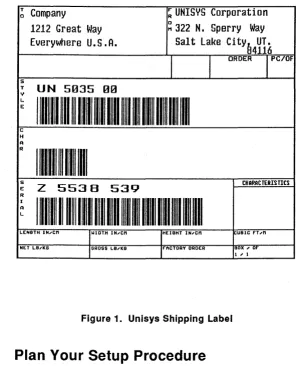
Ensure that the number of containers you receive agrees with the total shown on the bill of lading. A shipping label is attached to each container indicating the style number and quantity. Verify this against your bill of lading. Figure 1 is an example of a typical shipping label.
Getting Started
~
Campany
~UNISYSCorporation
1212 Great Way
~322 N. Sperry Way
Everywhere U.S.A.
Salt Lake
City~UT.
4116
l
l
ORDERl
PC/OFs
T UN 5035 00 y
L
111111111
~111111111111111~11
m
II~ I~ 111~1~
Im
Ec
H A R
I
lllllllHlll 1111
s
z
5538 CHARACTERISTICSE 539
R I
I
Hll~ 1111111111111111111~1
H
11111111111111111
A L
LENGTH I N .... cn l.IIDTH IN .... cn HEIGHT IN,cn jl:UBIC f"T ,n NET LBl'lC6 GROSS us .... KG FACTORY ORDER BOX, or
l , 1
Figure 1. Unisys Shipping Label
Plan Your Setup Procedure
It is recommended that you proceed in the following order: unpack, inventory and verify the contents of each container. Use this order as you go through the se-quence in the list following this paragraph. Refer to the following sections for unpacking, inventory, and installa-tion informainstalla-tion.
Customer Setup
• Locate the box in the delivery that is stamped "Open Me First." It contains the "Open Me First" envelope. The document package in this envelope is designed to aid customer setup. Do not forget to inventory this box using the list provided at the end of the
section called "Inventory Shipping Container
Contents."
• Designate a console terminal. You may choose any
one of your Unisys terminals to serve this function. This terminal is used to install the operating system and is connected to the console port on the main unit.
• Unpack, inventory, and place the console terminal in
position, preferably next to your system cabinet.
• Unpack, inventory, and roll the main unit into
position.
• If you ordered an expansion cabinet, unpack,
inventory, and roll it into position. Contact a cus-tomer engineer to install your expansion cabinet. Do not install it yourself.
• Unpack, inventory, and ptace in position any
remain-ing peripherals you may have ordered.
• Perform peripheral installation procedures by
following the installation guide or chapter provided with each piece of equipment.
Unpack Your Equipment
Any unpacking information you need is supplied with your
hardware. The U 5000/20, U 5000/30, U 5000/35, U
Getting Started
5000/40, U 5000/50, or U 5000/55 system, the expansion cabinets, and the Standalone 1/2-lnch Tape Drive Cabinet have an unpacking guide (located in your "Open Me First" envelope). Unpacking instructions for peripheral equipment you may have ordered are located on the shipping container or in the unpacking, installation, or user guides provided with that equipment.
Inventory Shipping Container
Contents
Inventory the items in each container as you unpack and use the lists following this section to verify container contents. A shipping container normally holds a primary piece of equipment, optional features directly associated with the primary piece, and related components. In some cases due to size or weight considerations, components are packaged separately.
If you find a damaged unit during the unpacking proce-dures, contact your Unisys representative for an assess-ment of the damage and instructions. Do not attempt to install damaged units.
In the main system delivery there is a box containing an "Open Me First" envelope which includes several docu-ments. Inventory the contents of this box using the following lists. Request any missing documents from your Unisys representative.
Customer Setup
"Open Me First" Envelope
UP-11785 Rev. 4 U 5000120, U 5000130, U 5000135, U 5000140, U 5000150, and U 5000155 Systems; U 5000 Series Operating System; Unpacking Guide
U P-11770 Rev. 4 U 5000120, U 5000130, U 5000135, U 5000140, U 5000150, and U 5000155 Systems; U 5000 Series Operating System; Customer Setup Guide
UP-11772 Rev. 5 Customer Information Letter
UP-12643 Rev. 3 U 5000130, U 5000135, U 5000150, and U 5000155 Systems; U 5000 Series Operating System;
Release Description
UP-14103 Expansion Cabinet Unpacking Letter
Hardware and Administration Documentation
UP-11768 Rev. 3 U 5000120, U 5000130, U 5000135,
Update A U 5000140, U 5000150, and U 5000155 Systems; U 5000 Series Operating System; Planning Guide*
UP-12693 Rev. 1 U 5000120, U 5000130, U 5000135, U 5000140, U 5000150, and U 5000155 Systems; U 5000 Series Operating System; Installation Guide*
*Document contains installation, verification, or troubleshooting information.
Getting Started
UP-12694 Rev. 1 Update A
u
5000120,u
5000130,u
5000135, U 5000140, U 5000150, and U 5000155 Systems; U 5000 Series Operating System; Installation and Implementa-tion Guide*UP-11765 Rev. 1 U 5000120, U 5000130, U 5000135, U 5000140, U 5000150, and U 5000155 Systems; U 5000 Series Operating System; Administration Guide
UP-11766 Rev. 2 U 5000120, U 5000130, U 5000135,
UP-13746
U 5000140, U 5000150, and U 5000155 Systems; U 5000 Series Operating System; Operations Guide*
U 5000135 and U 5000155 Capabilities Overview
UP-11354 Rev. 8 Customer Support Letter
System V Operating System Documentation
UP-11763 Rev. 3 U 5000 and U 7000 Series Operating Systems; Menu System Operating Guide
UP-12644 Rev. 1 U 5000130, U 5000135, U 5000150, and
Update A U 5000155 Systems; U 5000 Series Operating System; Diagnostics Refer-ence Manual
•0ocument contains installation, verification, or troubleshooting information.
Customer Setup
UP-11760 Rev. 3 U 5000 and U 7000 Series Operating
Update A Systems; User Reference Manual Volume 1
UP-11760 Rev. 2 U 5000 and U 7000 Series Operating
Update B Systems; User Reference Manual Volume 2
UP-12230 Rev. 1 Update A
UP-12218 Update B
u
5000120,u
5000130,u
5000135, U 5000140, U 5000150, and U 5000155 Systems; U 5000 Series Operating System; Device Driver Programming and Implementation Reference ManualU 5000 Series Operating System Errror Message Manual ·
UP-11762 Rev. 2 U 5000 and U 7000 Series Operating
Update B Systems; Programming Reference Manual, Volume 1
UP-11762 Rev. 2 U 5000 and U 7000 Series Operating
Update B Systems; Programming Reference Manual, Volume 2
UP-14117
UP-14118
U 5000130, U 5000135, U 5000150, and U 5000155; Crypt Utilities; Software Release Announcement
U 5000130, U 5000135, U 5000150, and U 5000155 Operating System; Crypt Utilities; Release Description
UP-11761 Rev. 3 U 5000 and U 7000 Series Operating
Update A Systems; Administration Reference Manual
Getting Started
UP-12715 Rev. 1 U 5000120, U 5000130, U 5000135,
Update A U 5000140 U 5000150, and U 5000155
Systems; U 5000 Series Operating System; Tuning Guide
Now that you have inventoried the main system
documen-tation, use the following information to inventory system and peripheral hardware. Please note that most of your peripherals have software documentation included in the shipment. The following documentation is not included in the inventory lists due to the number of possible varia-tions.
u
5000/20,u
5000/30,u
5000/35,u
5000/40, U 5000/50, and U 5000/55 Main Unit• main unit
• cables package
• document package (consult previous
documen-tation list in the section called "Inventory Shipping Container Contents")
Personal Computers (PC) PC/HT PC/IT, PC/micro IT, and Personal Workstation2
Series 300, 500, and 800
• monitor
• monitor controller board (may already be
installed in the system unit)
• processor (system unit)
• keyboard
• cables (keyboard, monitor, and power cord)
• diskette(s) (MS-DOS, diagnostic/STARTUP, and
Customer Setup
any optional software) • documentation package
System Installation Guide and Installation Overview
SVT·1210, SVT-1220, and UVT·1224
• terminal • keyboard
• cables (keyboard, power cord, and interconnect)
• documentation package
Video Terminal SVT-1210 User Guide UP-11191,.
or
Video Terminal SVT-1220 User Guide, UP-11205•
or
Video Terminal UVT-1224, Operating and Programming Guide, UP-12956
Video Terminal UVT-1224, Installation Guide, UP-1295r
Model 25C Printer
• printer • ribbon • power cord • acoustic pad • fuse
• paper guide • forms tractor
• documentation package
Getting Started
Model 25C Printer Unpacking Guide, UP-12380
Model 25C Printer Installation Guide, UP-12378"'
Model 25C Printer User Guide, UP-12379*
Model 31 Printer
• printer • print wheel • power cord • platen knob
• documentation package
Model 31 Printer RS-232-C and Centronics Compatible Interfaces User Guide, UP-11189*
Model 35 Printer
• printer • acoustic pad • sound shield • paper guide • power cord
• documentation package
Model 35 Printer RS-232-C and Centronics Compatible Interfaces User Guide, UP-11188*
*Document contains installation, verification, or troubleshooting information.
Customer Setup
Model 37 Printer
• printer
• paper cassette • drum cartridge • toner kit • power cable
• documentation package
Model 37 Laser Printer Installation Guide,
UP-12138*
Model 37 Laser Printer Operations Guide,
UP-12137*
Model 47 Printer
• printer • power cord
• upper and lower paper cassette • font cartridge
• toner • fuser oil
• photoconductive drum • documentation package
Model 47 Laser Printer User Guide,
UP-10802*
Model 789 Printer
• printer • print band • power cord
• documentation package
"DoaJment contains installation, verification, or troubleshooting information.
Getting Started
789 Printer RS-232-C and Centronics Compatible Interfaces User's Guide, UP-11190"
Model AP1307 Printer
• printer • ribbon • print wheel • power cord
• documentation package
AP1307 Installation Planning Guide, Form number 1205440
P1307 Site Preparation Data Sheet, Form number 1205457
AP1307 Installation and Operations, Form number 120541 O
Model AP1327/1329
• printer • power cord • paper guide • ribbon cartridge • emulation card • interface card
• documentation package
AP1327/1329 Installation Guide, UP-12612"
AP1327/1329 Implementation and Opera-tion Guide, UP-12613"
*Document contains installation, verification, or troubleshooting information.
Customer Setup
Model AP9215·1 Printer
• printer
• two paper trays • power cord • emulation card
• toner cartridge (two pieces) • paper (250 sheets)
• organic photoconductor cartridge (OPC) • documentation package
AP9215-1 Installation Planning Guide, Form number 1216967
AP9215-1 Site Preparation Data Sheet, Form number 1216975
AP9215-1 Printer Installation and Opera-tions Guide, Form number 1205796*
Model 89246-7
• printer • power cord • print band • spool ribbon
• documentation package
89246-7 Operations Guide, Form number 1205606
89246-7 Operations Quick Reference Guide, Form number 1205614
89246-7 Installation Planning Guide, Form number 1205929
89246-7 Installation Planning Template, Form number 1205945
"Document contains installation, verification, or troubleshooting information.
Getting Started
Install and Verify Your Equipment
Refer to the installation guides packed with your
equip-ment for installation procedures. Additional cabling
information may be found in the U 5000120, U 5000130, U
5000135, U 5000140, U 5000150, and U 5000155 Systems;
U 5000 Series Operating System; Planning Guide,
UP-11768 Rev. 3, Update A.
Locating and Correcting Problems in
the System
If the expected conditions do not occur following
installa-tion and verificainstalla-tion of your U 5000 system, ref er to the documents marked with an asterisk in the list in the section called "Inventory Shipping Container Contents."
These documents explain which errors you can correct yourself and which require the assistance of your Unisys service representative.