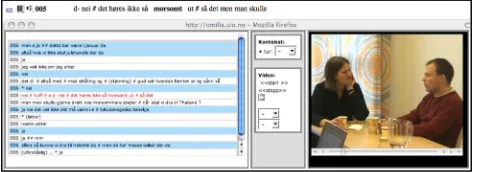
and video options: the UPUS corpus of multicultural Norwegian, the NoTa corpus of modern Oslo dialect, and the Taus corpus of Oslo dialects from 1970s (for the latter two, see Johannessen et al. 2006, 2007 and Johannessen and Hagen, 2007).
These corpora can be accessed via the Text Laboratory’s website (see references). However, it should be noted that while access to most of them will be granted on request, several of them require special permission from their owners.
2.1 Queries
The corpus user can specify any given token by attributes, such as:
• word • lemma
• affix or part of word • part of speech
• morphological features • syntactic functions • sentence position
Notice that these search attributes are independent of each other. Importantly, it is possible to search for part of speech without specifying a search string. All searches are done using checkboxes, pull-down menus, or writing simple letters to make words or other strings. Querying for more than one word is simply done by adding an additional query box. No regular expressions are needed to perform queries.
As an example, consider how a query for a word beginning with the sequence “jump”, specified to be a noun and plural, would look like with a regular expression:
(word="jump.*"%c&(number="pl")&(pos="n")) Figure 1. A regular expression in the language defined
by CWB, for a plural noun starting with the letter sequence jump.
With the Glossa system, the user instead writes the word
jump into a box, and chooses any appropriate additional constraints by pulling down menus, removing the need to memorize complex tag-sets. Attributes can be negated and arbitrarily combined. Two or more tokens can be combined to form a phrasal search, where the number of unspecified positions between the tokens can be specified.
Figure 2. Query for a specific word (jump) limited to the noun occurrences of this word.
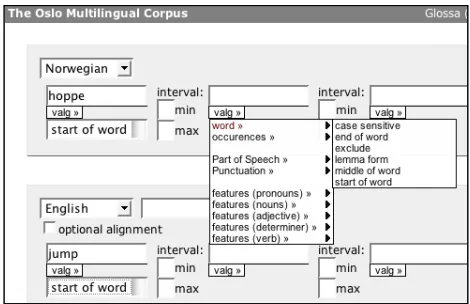
In multilingual corpora, one or more search phrases can be created for the aligned corpus. The graphical interface makes it easy to create queries. See figure 3.
Figure 3: A simple query for a bilingual search.
2.2 Results
The results of queries in the Glossa system are presented as traditional KWIC lists. If available, the results can also be presented as audio/video, aligned text and annotation of tokens.
Figure 4: Part of the results window. Notice the action option on top and the clickable bibliographical
information link on the left of each result.
The attributes associated with the hit, but not displayed in the results, can be viewed by passing the mouse over the words, as seen in figure 5.
A transparent, modular set-up has been created to allow integration of further post-processing and browsing options (collocation analysis etc.). The results can be post-processed in a number of ways, including:
• sorting on matching phrases, bibliographic
information or arbitrary points in the context
• counting matched phrases
• downloading result set in various formats, e.g.
tab separated values and Excel spreadsheets
• collocation analysis • co-occurrence analysis • user-defined annotation
• singling out individual hits or whole results file
for saving or deletion
• viewing with regards to metadata distribution
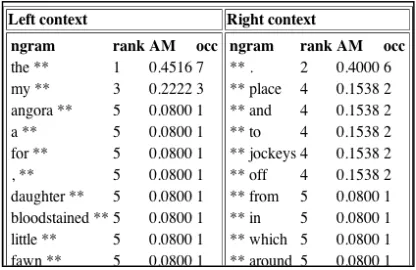
Figure 6 shows a collocation table selected in the action menu on the results page. The collocations option comes with several sub-options, as provided by the Ngram Statistics Package (Pedersen 2008). The user can choose between bigrams and trigrams, and between measures such as Dice Coefficient and Log Likelihood-ration.
Figure 6: Collocations of nouns beginning with jump-. Collocation is one of the choices in the action menu on
top of the results page (figure 3).
Bilingual query results are shown in figure 7. They are presented in the same way and have the same options as monolingual results.
Figure 7: Results from a bilingual query.
Figure 8 shows how the results page is enriched with a checkbox for each result, after the user has chosen the delete option in the action menu. This enables the user to remove individual hits. The results can be saved for further processing and refinement.
Figure 8. Results enriched with a box for ticking off hits that should be deleted.
In addition to the option of deleting unwanted results, Glossa also offers the option of annotating results. These results can likewise be saved and further processed at a later stage. This can be seen in figure 9.
Figure 9: Annotated results.
Finally, results can be counted in a number of ways. Our final examples illustrate results from the query "all occurrences of the Norwegian lemma bil 'car'" in the corpus. The action Count was then chosen for the resulting hits, giving as a result the number of occurrences of each inflected form of the word. (For nouns there are four inflections: singular indefinite, singular definite, plural indefinite and plural definite –
bil, bilen, biler, bilene.) The results are shown as two charts in figure 10 and 11.
Figure 10: Count results shown as histogram.
Corpora for Research on Emotions and Affect. LREC-2006.. Pisa and Genova: Istituto di Linguistica Computazionale del Consiglio Nazionale delle Ricerche (ILC-CNR). s. 80-84 Stig Johansson (1994). Towards an English-Norwegian