© 2018 IJSRCSEIT | Volume 3 | Issue 5 | ISSN : 2456-3307
Android based Mobile Application Development by Kotlin
Language
E. Susmitha , M. HimabinduM.Tech Academic Assistant, IIIT Rk Valley, Rgukt, Andhra Pradesh, India
ABSTRACT
Mobile phone is considered an important role that has changed the human life in several aspects. Android has emerged as the most widely used operating system in Smart Phones because operating system is open source and freely accessible to everyone. On Android operating system, many applications (apps) are available for learning as well as entertainment. The present paper discusses the design and development of an Android based app that can help everyone. This paper also highlights various challenges faced by developers in Android App Development.
Keywords: Android SDK, ADT Plug-in, Android studio, JDK SE 7, Android Apps Development.
I.
INTRODUCTION
Android:
Android is a platform it consists of Linux based operating system, middleware and its key components, designed especially for touch screen mobile devices and smart phones and tablet computers .This project is Initially developed by Android, Inc., which Google backed financially later .
Figure 1. Android architecture
(SDK) is an application frame work and key applications. Android is an open source. Most parts of
the Android application code are released by the Google under apache license. This open source code and permissive license make users allow modifying the software and is distributed by the device manufactures, and also allows building new versions of android. One of those modified versions called Cyanogens mod. The first commercially available phone to run android was HTC dream.
The process of developing an application is step1: install android studio 3.0
step2: make design for an application using xml (UI) user interface.
Step3: write code for user interface by using kotlin language.
Step4: connect the database by using SQLite database Step5: finally deploy the app in Google play store.
Software requirements: Android SDK
Software development kit, For a new developer, downloading the ADT Bundle.
• Android SDK Tools • Android Platform-tools • The latest Android platform
• The latest Android system image for the emulator
The entire application written on Android may not consists of the native code (programming code that is configured to run on a specific processor). Most parts of the Android API can be accessed through only java code. We need java skeleton for invoking the native functions .These functions can be invoked only through JNI(Java native interface) .JNI allows you to load shared C/ C++ libraries into Java applications at run time .In the application body you have to specify the signature of the methods without their body. The method has to be marked with a native keyword if it is not implemented in java, but in native code.
Android uses the Dalvik virtual machine with just-in-time compilation to run Dalvik byte code, which is usually translated from Java byte code (JVM). Dalvik virtual machine with the extension of .dex Advantages:
It’s an open source
Application framework provides infrastructure (Wi-Fi manager, Location Manager)
DVM is optimized for mobile devices.
SQLite database is used to maintain structured data.
II.
BACKGROUND STUDY
Android components
Application components are the essential building blocks of an android application .These components are loosely coupled by the application manifest file androidmanifest.xml that describes each component of the application and how they interact.
They are mainly four components in android
Activities: They dictate the UI and handle the user interaction to the Smartphone screen
Services: They handle background processing associated with an application.
Broadcast receivers: They handle communication between android os and applications
Content provider: They handle data and database management issues.
Android XML layout
XML is termed as Extensible Mark-up language. Every xml have a root element
Every xml element must be properly nested. Shouldn’t start a number, and not contain
any spaces between the tags.
Parameters in android 1. Match parent
Fill the full screen upto the width and height
Figure 2
xmlns:tools="http://schemas.android.com/tools" android: layout_width="match_parent" android:layout_height="match_parent"
android:layout_height="match_parent" android:layout_alignParentLeft="true" android:layout_alignParentTop="true" android:layout_marginLeft="11dp"
android: background="#FFFFEE" android: orientation="vertical" > </linearlayout
2. Fill_parent:
This is same as match parent; So if you are using API level 8 or above you must avoid using fill_parent. 3. Wrap_content
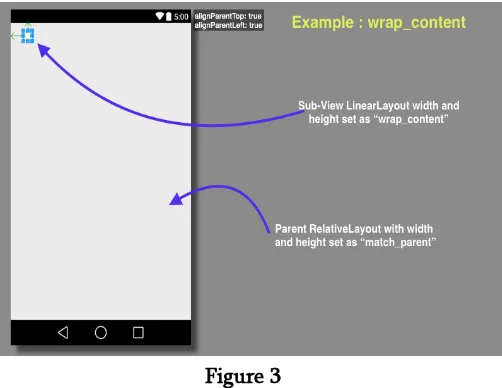
upto the content is called the wrap content. Lets create a new activity.xml file, with Relative Layout parent View, now let’s add a Linear Layout and set, android: layout_width="wrap_content" android: layout height="wrap_content"
Figure 3
Fill_parent and match parent are the same, used when we want the height or width of a view to be as big as its parent view, fill_parent being deprecated.
1. Kotlin
Kotlin (Android_and_Kotlin) is a statically-typed programming language that runs on the Java Virtual Machine and also can be compiled to JavaScript source code. Its primary development is from a team of Jet Brains programmers based in Saint Petersburg, Russia (the name comes from Kotlin Island, near St. Petersburg).
While Java is one of the world's most widely used programming languages and the official language of Android development, there are many reasons why Java might not always be the best option for your Android projects. Java was one of the most usable languages, back in its heyday. But today, and the Java I use on Android doesn't even have support for lambdas, method references, streams, try-with-resources (min SDK ≥ 19). I still have to use the java time APIs from the old Java 6/7 worlds. One of the biggest flaws in Java is the way it handles “null,” leading to the dreaded NullPointerException (NPE), popularly known as The Billion Dollar Mistake). Developers love clean, concise code. Less code takes less time to write, less time to read, and is less susceptible to bugs. But with Java, you must write a lot of code to get even the simplest things done. You've probably already experienced this if you're an Android developer but Kotlin is exactly opposite to java. Advantages of Kotlin
1.
Interchange ability With JavaYou can do java and Kotlin code existing side by side in the same project. Compiler support both cord to compile. User will able to know which part of your project is written in java and which parts are written in kotlin.
If you have project in java which is already working on you can trial kotlin in a small part of the project without affecting the rest of your code base. If one you decide to continue with kotlin, you can either migrate the hold project existing java code to kotlin on file at a time.
2.
No NULL Pointer ExceptionsIt's a most common reason for crashes in our application.
It’s most time consuming process to fix all of the NullPointerException. It’ can also boring task. In the kotlin you don't need to worry about null Pointer Exceptions because Null Safely is baked into kotlin type system.
3.
Easy to LearningIf you want to create a new class in kotlin is very similar to java.
How to Install Kotlin in Android Studio Step 1: Create Project
Step 2: Go To File Menu -> Select New Project Option. Following Screen is Appear.
Step 3: Click on Next Button after Give the Application Name and Project Location. Select the form
Factors your app will run on
Step 4: Click on Next Button. Select Activity Form The List.
Step 5: Click on Next Button. Give the Activity Name. Step 6: Click on Finish Button. Your Project is Create Successfully.
In Android Studio 3.0, you can choose to create the activity in Kotlin right away, so you can skip the "Converting Java code to Kotlin" step. Earlier versions will create an activity in Java, and you can use the automated converter tool to convert it. Converting Java code to Kotlin
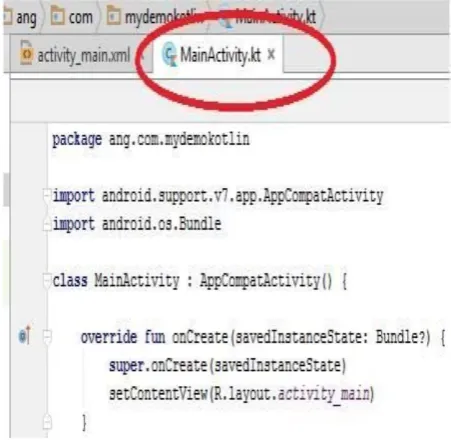
Open MainActivity.java file. Then invoke action Convert Java File to Kotlin File. There is multiple way but one is easiest way is Find Action (Ctrl + Shift + A). The pop-up window that opens, shows the suggestion list of matching names.
Start typing the desired action name. As you type, the suggestion list displays the matching names of actions. The actions that are not valid in the current context are displayed gray.
You can also Press Ctrl + Alt + Shift + K option in state of Find Action. Before converting java to kotlin file extension of main activity is MainActivity.Java.
Now we can convert Java code to Kotlin using Ctrl + Alt + Shift + K option.
Android Lifecycle
onCreate: Called when activity is first created.
onStart: Called when activity is becoming visible to the
user.
onResume:Called when activity will start interacting with
the user.
onPause: Called when activity is not visible to the user.
onStop: Called when activity is no longer visible to the
user.
onRestart: Called after your activity is stopped, prior to
start.
onDestroy: Called before the activity is destroyed.
Figure 4. Android Lifecycle
File: MainActivity.java
1. package com.example.activitylifecycle; 2. import android.os.Bundle;
3. import android.app.Activity; 4. import android.util.Log; 5. import android.view.Menu;
6. public class MainActivity extends Activity { 7. @Override
8. protected void onCreate(Bundle savedInsta nceState) {
9. super.onCreate(savedInstanceState); 10. setContentView(R.layout.activity_main)
;
11. Log.d("lifecycle","onCreate invoked"); 12. }
13. @Override
14. protected void onStart() { 15. super.onStart();
16. Log.d("lifecycle","onStart invoked"); 17. }
18. @Override
19. protected void onResume() { 20. super.onResume();
21. Log.d("lifecycle","onResume invoked");
22. }
23. @Override
24. protected void onPause() { 25. super.onPause();
26. Log.d("lifecycle","onPause invoked"); 27. }
28. @Override
29. protected void onStop() { 30. super.onStop();
31. Log.d("lifecycle","onStop invoked"); 32. }
33. @Override
34. protected void onRestart() { 35. super.onRestart();
36. Log.d("lifecycle","onRestart invoked"); 37. }
40. super.onDestroy();
41. Log.d("lifecycle","onDestroy invoked"); 42. }
43. }
1) onCreate() in kotlin
lateinit var textView: TextView
// some transient state for the activity instance var gameState: String? = null
override fun onCreate(savedInstanceState: Bundle?) { // call the super class onCreate to complete the creation of activity like
// the view hierarchy
super.onCreate(savedInstanceState)
ONRESUME()
class CameraComponent : LifecycleObserver {
@OnLifecycleEvent(Lifecycle.Event.ON_RESUME )
fun initializeCamera() { if (camera == null) { getCamera() }
}
... }
III.
ANDROID MARKET ANALYSIS
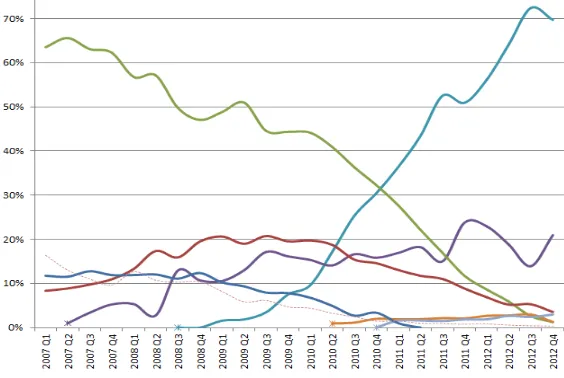
The Android Market, an online software store, is developed by Google for Android devices. It was made available to users on October 22, 2008. Most of the Android devices come with preinstalled “Market” application which allows users to browse, buy, download, and rate different available applications and other content for mobile phones equipped with the open-source operating system.
Figure 5. World-Wide Smartphone Sales (%)
IV.
CONCLUSION
Smart Phones has changed the life of everyone. Along with other features, an App in Smart Phones allows to do almost everything, from playing games to do business. The development of app described in present paper has given a strong understanding of various challenges associated with design and development of apps. Development of mobile web application will be emphasized on following aspects:
1) More and more sensors will be added to mobile phones, so new APIs to use those capabilities will bring brand new applications to users.
2) Multimedia capabilities will be enhanced and engine will support more types of multimedia such as flash and svg .
3) The dedicated Integrated Development Environment (IDE) will be improved to accelerate the applications’ development. 4) Visualization programming and JavaScript
debugging will be the most important functions of the IDE.
are that Android is superior compare to its competitive operating systems. It acts as an Emerging Software Platform for Mobile Devices. Android is Open source mobile platform. It is key feature of Android that will make it a leader in mobile Platform.
V.
REFERENCES
[1]. Smartphone OS Market Share, Q4 2014,
available at
http://www.idc.com/prodserv/smartphone-os-market-share.jsp
[2]. Number of available applications in the Google Play Store from December 2009 to February [4]. Android_and_Kotlin. (i.e.).
Kotlin-android.html. Retrieved 8 7, 2017, from
[6]. Android Developer site,
http://developer.android.com/index.html [7]. Deepa V. Jose*, Lakshmi Priya C, G.
Priyadarshini and Monisha Singh,"Challenges and Issues in Android App Development- An Overview", International Journal of Advanced Research in Computer Science and Software Engineering,Volume 5, Issue 1, January 2015. [8]. Komwit Surachat, Supasit Kajkamhaeng,
Kasikrit Damkliang,Watanyoo Tiprat, and Taninnuch Wacharanimit,"First Aid Application on Mobile Device", World Academy of Science, Engineering and
Technology, International Science Index Vol.7 , No.5, 2013.
[9]. Mona Erfani Joorabchi, Ali Mesbah and Philippe Kruchten,"Real Challenges in Mobile App Development", Empirical Software Engineering and Measurement, 2013, ACM / IEEE International Symposium, pp. 15-24.
[10]. Josh Dehlinger and Jeremy Dixon,"Mobile
Application Software Engineering: Challenges and Research Directions", 2011, Online]. Available:
http://www.mobileseworkshop.org/papers/7_D ehlinger_Dixon.pdf.
AUTHORS PROFILE:
E.SUSMITHA, received M.Tech degree in Computer Science and Engineering (Software Engineering) from junta anantapur University, Anantapur, A.P, India, during 2014 to 2016. Her area of interests is Android. Currently working as an Academic Assistant in Iiitrgukt, rkvalley from 2016-2018.