Available Online atwww.ijcsmc.com
International Journal of Computer Science and Mobile Computing
A Monthly Journal of Computer Science and Information Technology
ISSN 2320–088X
IMPACT FACTOR: 5.258
IJCSMC, Vol. 5, Issue. 3, March 2016, pg.506 – 511
Implementation of Invisible Watermarking
and Random Codes for Authentication
Ankita Tryambake
1, Apurva Tupkar
2, Bhumala Maske
3, Prof. Punam Marbate
41,2,3,4
Department of Computer Science & Engineering, Rajiv Gandhi College of Engineering & Research, Nagpur, Maharashtra, India
1
[email protected]; 2 [email protected]; 3 [email protected]; 4 [email protected]
Abstract— Alphanumeric password is most common approach for authentication. Most internet application still build up user authentication with traditional text based passwords. Text based passwords can be string of characters which may include numbers, alphanumeric, special characters. Simple text based passwords are easy for attackers guess or hack. Complex and lengthy passwords are difficult for users to remember. Research and experience have demonstrated that the human mind is better at perceiving and reviewing pictures than text.
In this paper, a new graphical user authentication scheme for accessing web account is proposed. Here user has to register first and then selects number of images as a password from given matrix of images. The selected image will be watermarked with some secret codes, these codes will be stored into database. While login user needs to enter the random code produced underneath every image which has been set as a password. Here the security of framework is high and each time user need to enter different set of code for authentication. This system provides stronger security against Dictionary attacks, Brute Force, Shoulder surfing attack and other password cracking attacks.
Keywords— Graphical Passwords, Authentication, Security, Attacks, Graphical User Authentication, Watermarking.
I. INTRODUCTION
The graphical password authentication techniques can be classified into two categories: 1) Recognition based graphical techniques
2) Recall based graphical techniques
In recognition based, a set of images is presented to user and the user proves authentication by recognizing and identifying the images that are selected by him or her during the registration.
Using recall based, user is asked to reproduce something that he or she created or selected during the registration phase [4].
II. BACKGROUND
A. Attacks on password :
Lots of researches has been done to study several numbers of attacks on passwords. As graphical passwords are still not popularly used in real world applications, there is no report on real cases of breaking graphical passwords. Here are some of the possible techniques for breaking graphical passwords [3].
.
1) Brute force attack: It is an exhaustive-search attack used to obtain information such as password or personal identification number. This attack uses an algorithm that produces every possible combination of words to crack the password. It is always proven successful against text based password.
2) Dictionary attack: A dictionary attack attempts to defeat an authentication mechanism by
systematically entering each word as a password. Usually we use weak passwords, easier for attackers to guess the password. Text passwords are vulnerable to this.
3) Spyware attack: Spyware attack uses a small application installed (accidently or secretly) on a user’s computer. The spyware application records sensitive data during mouse movement or key press. This form of malware secretly store such information and then reports back to the attackers system.
4) Shoulder surfing attack: Shoulder surfing refers to a direct observation. Passwords can be identified by looking over a person’s shoulder. This type of attack is more common in crowded areas. Both text based and graphical passwords are vulnerable to shoulder surfing.
5) Social Engineering attack: In this, a non-authorized personal manages to manipulate authorized person and access confidential information. The attacker interacts with unsuspecting person and gathers as much information they can to gain access to the protected data [3].
B. Watermarking:
The digital watermarking are also referred to as simply watermarking in which bits pattern inserted into a multimedia file that confirms the file's copyright information (author, rights, etc.), it's digital watermark. Digital image watermarking usually inserts visible or invisible digital watermark in the main document, without affecting the appearance and integrity of original document. Originally, a watermark is a transparent (more or less) image or text that has been applied to a paper or another image to either protect the image which is original. In case of visible watermarking, the information to be embedded is visible in the picture or video. In invisible watermarking, an invisible watermark is added into the data in such a way that the changes made to the pixel values are perceptually not noticed. Invisible Watermarks are useful as a means of identifying the owner or authorized consumer of a document or image [5].
III. SYSTEMDESIGN
In our system model, there are three basic modules: (1) Registration
(2) Login (3) Recovery
A. Registration
B. Login
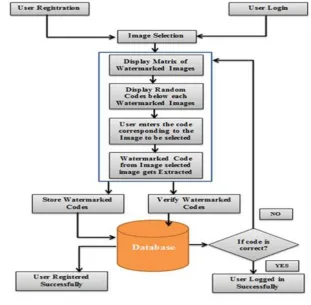
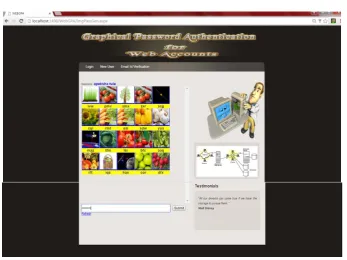
In login section, there is need to enter the user name and password. The image matrix will be displayed with random images which will contain same images as we had in the registration form but the position of the images will be different. Again each image will have some random characters below it. The user should find his password images and then enter the characters below of his password image in the password text box. If the Code entered belongs to correct password images, User gets login access. After the successful user authentication, user will directly get login into their web accounts without entering authentication Credentials manually.
C. Recovery
In case of invalid login attempt for 3 times, the system gets locked-out. If the account is locked out or if the user forgot his password, then he needs to recover his account.
Fig. 1 System Diagram
IV. IMPLEMENTATION
Registration phase:
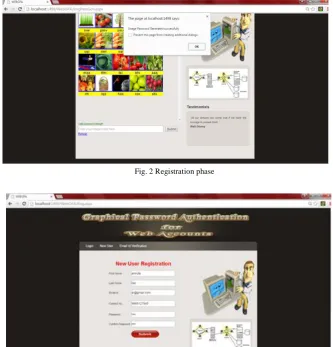
Following is the workflow of registration phase: Step1: User clicks on New User button.
Step2: In registration page, the user has to enter User name and Select the password.
Step3: User selects the password image by entering the corresponding random code generated below the image. Step4: then it will check for the match of codes entered by that user and its corresponding password image. Step5: Watermarked code from the image is extracted.
The figures below illustrates the registration phase of the system:
Fig. 2 Registration phase
Fig. 3 Registration phase (cont...)
Login phase:
The stages of Login phase are as below: Step 1: User clicks on Login button.
Step 2: In Login page, the user has to enter User name and the password.
The figures below illustrates the login phase of the system:
Fig. 4 Login phase
V. CONCLUSION
In this paper, we proposed a graphical user authentication system that provides strong authentication to users. The security of this system is very high as every time user need to enter different set of characters for authentication. This graphical authentication system is a good alternative to text-based authentication. Graphical passwords are easy to remember as user can remember pictures better than text. This is a new graphical user authentication system that uses watermarking techniques and set of random characters to provide stronger security against password hacking attacks. User just need to keep in mind his set of images. Thus Dictionary attacks, Brute force attacks and other attacks are infeasible. Hence, we evaluated our system and its working for securely accessing the web accounts.
REFERENCES
[1] Arash Habibi Lashkari, Abdullah Gani, Leila Ghasemi Sabet and Samaneh Farmand,‖ A new algorithm on Graphical User Authentication (GUA) based on multi-line grids‖, Scientific Research and Essays Vol. 5 (24), pp. 3865-3875, 18 December, 2010. [2] Susan Wiedenbeck, Jim Waters, Jean-Camille B., Alex Brodskiy, Nasir Memon,‖Authentication Using Graphical Passwords: Basic
Results‖, Pittsburgh, PA, USA.
[3] S.B. Dandin, Manwinder kaur, Akansha Tiwari,―Security Analysis of Graphical Passwords Over the Textual Passwords for Authentication‖, International Journal of Engineering Research & Technology,Vol. 3 Issue 10, October- 2014, ISSN: 2278-0181. [4] Vinit Khetani, Jennifer Nicholas, Anuja Bongirwar, Abhay Yeole,‖ Securing Web Accounts Using Graphical Password
Authentication through Watermarking‖, International Journal of Computer Trends and Technology (IJCTT) – volume 9 number 6– Mar 2014.
[5] G. Agarwal, S. Singh and R.S. Shukla,‖ Security Analysis of Graphical Passwords over the Alphanumeric Passwords‖, International Journal of Pure and Applied Sciences and Technology,1(2) (2010), pp. 60-66, ISSN 2229 – 6107.
[6] Rashel Sarkar, Hemavathy R., Dr. Shobha G.,‖ An Invisible Watermarking Technique for Image Verification‖, International Journal of Emerging Technology and Advanced Engineering, Volume 2, Issue 3, March 2012, ISSN 2250-2459.
[7] Bin B. Zhu, Jeff Yan, Guanbo Bao, Maowei Yang, and Ning Xu, ‖Captcha as Graphical Passwords—A New Security Primitive Based on Hard AI Problems‖, IEEE Transactions On Information Forensics And Security, Vol. 9, No. 6, June 2014.