AT&T
MERLIN LEGEND™
Communications System
Notice
Every effort was made to ensure that the information in this book was complete and accurate at the time of printing. However, information is subject to change.
Federal Communications Commission (FCC) Information
For important FCC interference, registration, and repair information, see ‘Customer Support Information” in this book.
Trademarks
Accunet is a registered trademark of AT&T. AUDIX is a registered trademark of AT&T. Magic on Hold is a registered trademark of AT&T. Megacom is a registered trademark of AT&T. MERLIN is a registered trademark of AT&T. MERLIN LEGEND is a trademark of AT&T. MERLIN MAIL is a trademark of AT&T,
MLX-10, MLX-1OD, MLX-20L, and MLX-28D are trademarks of AT&T. MultiQuest is a registered trademark of AT&T.
MS-DOS is a registered trademark of Microsoft Corporation.
PagePac is a registered trademark of DRACON, a Division of Harris Corporation. UNIX is a registered trademark of UNIX System Laboratories, Inc.
ZoneMate is a trademark of DRACON, a Division of Harris Corporation.
Support Telephone Number
ERRATA
MERLIN LEGEND™ Communications System
Key System Planning
555 - 610 - 112
Ignore all references to the small processor module.
The MERLIN LEGEND™ Communications
System offers only one processor module. This processor module is referred to as a large processor
module in this document.
Page 1-6
Table 1-2, Control Unit Space Requirements: Ignore the reference to a small system. The backboard
dimensions shown for a “small” system are the dimensions needed for a system with a basic carrier or a
system with basic carrier and one expansion carrier.
Page 2-1
Under the “Processor Module” bullet: Ignore the reference to the "small" processor module.
Page 2-4
Under “Planning Form Instructions” for Key System Form 1, System Planning: Under the section “Size
of Processor Module”, always check the box labeled "large.”
Appendix A - Forms
Key System Form 1, System Planning: Under the section “Size of Processor Module,” always check the
Customer Support Information
■
Support Telephone Number
■
FCC/DOC Information
■
Security
■
Warranty
vii
vii
xi
xi
About This Book
xiii
■
Related Documentation
xiv
■
How to Order Books
xiv
■
Additional Ordering Information
xv
■
Product Safety Labels
xv
■
How to Comment on This Book
xv
1
Preparation
1-1
■
System Components
1-1
■
Location of Control Unit
1-5
■
Telephone User Survey
1-7
■
Floor Plan
1-11
2
Control Unit
2-1
■
Modules
2-1
■
System Operating Conditions
2-8
Contents
4
Features
4-1
■
Telephone Features
4-1
■
Operator Features
4-5
■
Group Assigned Features
4-8
■
System Features
4-20
5
Modiflcations
5-1
■
Preparation
5-1
■
Adding to the System
5-2
A
Forms
A-1
IN
Index
IN-I
1
Preparation
1-1
System Components
1-2
1-2
Employee Communication Survey Form
1-8
1-3
Floor Plan
1-12
2
Control Unit
2-1
Line and Station Modules
2-2
2-2
Sample Control Unit Diagram
2-7
2-3
Two-Digit Numbering Plan
2-19
2-4
Three-Digit Numbering Plan
2-21
2-5
Set Up Space Numbering Plan
2-23
3
Lines
3-1
Partially Completed Form 2c, System Numbering — Line Jacks
3-5
3-2
Sample Network Planning Map
3-28
3-3
Factory-Set Assignment, Digital/lSDN (MIX) Telephones
3-38
3-4
Factory-Set Assignment, Analog Multiline Telephones
3-39
3-5
Digital/lSDN (MLX) DLC
3-42
Tables
1
Preparation
1-1
Environmental Requirements
1-5
1-2
Control Unit Space Requirements
1-6
1-3
Employee Communication Survey — Sample Analysis
1-10
2
Control Unit
2-1
Module Capacities
2-4
2-2
Station Jack Types
2-12
2-3
Maximum Number of Operator Positions
2-14
3
Lines
3-1
Line Jack Types
3-2
3-2
Coding Line Type
3-3
3-3
Services on the DS1 Facility
3-14
3-4
Line Compensation Settings
3-18
3-5
Timers and Counters
3-24
3-6
Guide to DS1 Facilities Ordering
3-32
5
Modifications
5-1
Required Line and/or Station Modules
5-3
5-2
Adding New Lines
5-4
5-3
Adding Auxiliary Equipment
5-5
5-4
Adding New Stations
5-5
A
Forms
A-1
Key System Forms
A-1
IMPORTANT SAFETY INSTRUCTIONS
When installing telephone equipment, basic safety precautions should always be followed to reduce the
risk of fire, electric shock, and injury to persons, including:
Read and understand all instructions.
Follow all warnings and instructions marked on or packed with the product.
Never install telephone wiring during a lightning storm.
Never install telephone jacks in a wet location unless the jack is specifically designed for wet
locations.
Never touch uninsulated telephone wires or terminals unless the telephone wiring has been
disconnected at the network interface.
Use caution when installing or modifying telephone lines.
Use only AT&T-manufactured MERLIN LEGEND™ circuit modules, carrier assemblies, and power units
in the MERLIN LEGEND (511A) control unit.
Use only AT&T - recommended/approved MERLIN LEGEND accessories.
If equipment connected to the analog station modules (008/408/408 GS/LS) or to the MLX telephone
module (008 MLX) is to be used for in-range out-of-building (lROB) applications, lROB protectors are
required.
Do not install this product near water, for example, in a wet basement location.
Do not overload wall outlets as this can result in the risk of fire or electric shock.
The MERLIN LEGEND is equipped with a three-wire grounding-type plug, a plug having a third
(grounding) pin. This plug will fit only into a grounding-type power outlet. This is a safety feature. If
you are unable to insert the plug into the outlet, contact an electrician to replace the obsolete outlet.
Do not defeat the safety purpose of the grounding plug.
The MERLIN LEGEND system requires a supplementary ground.
Do not attach the power supply cord to building surfaces. Do not allow anything to rest on the power
cord. Do not locate this product where the cord will be abused by persons walking on it.
Slots and openings in the module housings are provided for ventilation. To protect this equipment from
overheating, do not block these openings.
Never push objects of any kind into this product through module openings or expansion slots, as they
may touch dangerous voltage points or short-out parts, which could result in a risk of fire or electric
shock. Never spill liquid of any kind on this product.
Support Telephone Number
AT&T provides a toll-free customer Helpline (1-800-628-2888)24 hours a day (U.S.A. only). Call the Helpline, or your authorized dealer, if you need assistance when installing, programming, or using your system.
Federal Communications Commission (FCC)
Electromagnetic Interference Information
This equipment has been tested and found to comply with the limits for a Class A digital device, pursuant to Part 15 of the FCC Rules. These limits are designed to provide reasonable protection against harmful interference when the equipment is operated in a commercial environment. This equipment generates, uses, and can radiate radio frequency energy and, if not installed and used in accordance with the instruction manual, may cause harmful interference to radio communications. Operation of this equipment in a residential area is likely to cause harmful interference, in which case the user will be required to correct the interference at his own expense.
Canadian Department of Communications (DOC)
Interference Information
This digital apparatus does not exceed the Class A limits for radio noise emissions set out in the radio interference regulations of the Canadian Department of Communications.
Le présent appareil numérique n'émet pas de bruits radioélectriques dépassant Ies Iimites applicables aux appareils numériques de la classe A prescribes clans Ie Réglement sur Ie brouillage radioélectrique édicté par Ie ministére des Communications du Canada.
FCC Notification and Repair Information
This equipment is registered with the FCC in accordance with Part 68 of its rules, In compliance with those rules, you are a d v i s e d o f t h e f o l l o w i n g :
Customer Support Information
■ For connection to off-premises stations, report the FIC OL13C and SOC 9. OF.
■ If this equipment is to be connected to digital service (1.544 Mbs), the FIC is 04DU9-B for D4 framing format or 04DU9-C for extended framing format, and SOC 6.0P.
■ If this equipment is to be connected to DID facilities, the FIC is 02 RV2-T, and the SOC is 9.0F.
■ The quantities and USOC numbers of the jacks required.
■ For each jack, provide the sequence in which lines are to be connected: the type lines, the FIC, and REN by position when applicable.
You must also notify your local telephone company if and when this equipment is permanently disconnected from the line(s). The REN is used to determine the quantity of devices which maybe connected to the telephone line. Excessive RENs on the telephone line may result in the devices not ringing in response to an incoming call. In most, but not all, areas the sum of the RENs should not exceed five (5.0). To be certain of the number of devices that may be connected to the line, as determined by the total RENs, contact the telephone company to determine the maximum REN for the calling area.
Installation and Operational Procedures
The manuals for your system contain information about installation and operational procedures.
■
■
■
■
Repair Instructions. If you experience trouble because your equipment is malfunctioning, the FCC requires that the equipment not be used and that it be disconnected from the network until the problem has been corrected. Repairs to this equipment can be made only by the manufacturers, their authorized agents, or by others who may be authorized by the FCC. In the event repairs are needed on this equipment, please contact the National Service Assistance Center (NSAC) at 1-800-628-2888, or your authorized AT&T dealer.
Rights of the Local Telephone Company. If this equipment causes harm to the telephone network, the local telephone company may discontinue your service temporarily, If possible, they will notify you in advance. But if advance notice is not practical, you will be notified as soon as possible. You will also be informed of your right to file a complaint with the FCC. Your local telephone company may make changes in its facilities, equipment, operations, or procedures that affect the proper functioning of this equipment. If they do, you will be notified in advance to give you an opportunity to maintain uninterrupted telephone service.
Hearing Aid Compatibility. The custom telephone sets for this system are compatible with inductively coupled hearing aids as prescribed by the FCC.
Automatic Dialers. WHEN PROGRAMMING EMERGENCY NUMBERS AND/OR MAKING TEST CALLS TO EMERGENCY NUMBERS:
■ Remain on the line and briefly explain to the dispatcher the reason for the call.
■ Perform such activities in the off-peak hours, such as early morning or late evening.
DOC Notification and Repair Information
NOTICE: The Canadian Department of Communications (DOC) label identifies certified equipment. This certification means that the equipment meets certain telecommunications network protective, operational, and safety requirements. The DOC does not guarantee the equipment will operate to the user’s satisfaction.
Before installing this equipment, users should ensure that it is permissible to connect it to the facilities of the local
telecommunications company, The equipment must also be installed using an acceptable method of connection. In some cases, the company’s inside wiring for single-line individual service may be extended by means of a certified connector assembly (telephone extension cord), The customer should be aware that compliance with the above conditions may not prevent degradation of service in some situations.
Repairs to certified equipment should be made by an authorized Canadian maintenance facility designated by the supplier. Any repairs or alterations made by the user to this equipment, or any equipment malfunctions, may give the telecommunications company cause to request the user to disconnect the equipment.
Users should ensure for their own protection that the electrical ground connections of the power utility, telephone lines, and internal metallic water pipe system, if present, are connected. This precaution may be particularly important in rural areas.
CAUTION: Users should not attempt to make such connections themselves, but should contact the appropriate electric inspection authority or electrician, as appropriate.
To prevent overloading, the Load Number (LN) assigned to each terminal device denotes the percentage of the total load to be connected to a telephone loop used by the device. The termination on a loop may consist of any combination of devices subject only to the requirement that the total of the Load Numbers of all the devices does not exceed 100.
DOC Certification No. 230 4095A CSA Certification No. LR 56260 Load No. 6
Renseignements sur la notification du ministère des Communications du Canada et la réparation
AVIS: L'étiquette du ministère des Communications du Canada identifie le matériel homologué. Cette étiquette certifie que Ie matériel est conforme à certaines normes de protection, d’exploitation et de sécurité des réseaux de télécommunications. Le ministère n’assure toutefois pas que Ie matériel fonctionnera à la satisfaction de I’utilisateur.
Avant d’installer ce matériel, I’utilisateur doit s’assurer qu’il est permis de Ie raccorder aux installations de I’entreprise locale de télécommunication. Le matériel doit également être installé en suivant une méthode acceptée de raccordement. Dans certains cas, Ies fils intérieurs de I’enterprise utilisés pour un service individual à Iigne unique peuvent être prolongés au moyen d’un dispositif homologué de raccordement (cordon prolongateur téléphonique interne). L’abonné ne doit pas oublier qu’il est possible que la conformité aux conditions énoncées ci-dessus n’empêchent pas la dégradation du service clans certaines situations. Actuellement, Ies entreprises de télécommunication ne permettent pas que I’on raccorde Ieur matériel à des jacks d’abonné, sauf dans Ies cas précis prévus par Ies tarifs particuliers de ces entreprises.
Les réparations de matériel homologué doivent ètre effectuées par un centre d’entretien canadien autorisé désigné par Ie fournisseur. La compagnie de télécommunications peut demander à I’utilisateur de débrancher un appareil à la suite de reparations ou de modifications effectuées par I’utilisateur ou à cause de mauvais fonctionnement.
Pour sa propre protection, I’utiiisateur doit s’assurer que tous Ies fils de mise à la terre de la source d’énergie électrique, des Iignes téléphoniques et des canalisations d’eau métalliques, s’il y en a, sent raccordés ensemble, Cette précaution est particulièrement importance dans Ies régions rurales.
AVERTISSEMENT: L’utilisateur ne doit pas tenter de faire ces raccordements lui-même; il doit avoir recours à un service d’inspection des installations électriques, ou à un électricien, selon Ie cas.
L’indice de charge (IC) assigné à chaque dispositif terminal indique, pour éviter toute surchage, Ie pourcentage de la charge totale qui peut ètre raccordée à un circuit télephonique bouclé utilisé par ce dispositif. La terminaison du circuit bouclé peut être constituée de n’importe quelle combinaison de dispositifs, pourvu que la somme des indices de charge de I’ensemble des dispositifs ne dépasse pas 100.
C u s t o m e r S u p p o r t I n f o r m a t i o n
Security of Your System—Preventing Toll Fraud
As a customer of a new telephone system, you should be aware that there exists an increasing problem of telephone toll fraud. Telephone toll fraud can occur in many forms, despite the numerous efforts of telephone companies and telephone equipment manufacturers to control it. Some individuals use electronic devices to prevent or falsify records of these calls. Others charge calls to someone else’s number by illegally using lost or stolen calling cards, billing innocent parties, clipping on to someone else’s line, and breaking into someone else’s telephone equipment physically or electronically. In certain instances, unauthorized individuals make connections to the telephone network through the use of remote access features.
The Remote Access feature of your system, if you choose to utilize it, permits off-premises callers to access the system from a remote telephone by using an 800 number or a 7- or 10- digit telephone number. The system returns an acknowledgement signaling the user to key in his or her authorization code, which is selected and administered by the system manager. After the authorization code is accepted, the system returns dial tone to the user. If you do not program specific egress restrictions, the user will be able to place any call normally dialed from a telephone associated with the system. Such an off-premises network call is originated at, and will be billed from, the system location.
The Remote Access feature, as designed, helps the customer, through proper administration, to minimize the ability of unauthorized persons to gain access to the network. Most commonly, phone numbers and codes are compromised when overheard in a public location, through theft of a wallet or purse containing access information, or through carelessness (writing codes on a piece of paper and improperly discarding it). Additionally, hackers may use a computer to ‘dial” an access code and then publish the information to other hackers. Enormous charges can be run up quickly. His the customer’s responsibility to take the appropriate steps to properly implement the features, evaluate and administer the various restriction levels, protect access codes, and distribute access codes only to individuals who have been fully advised of the sensitive nature of the access information.
Common carriers are required by law to collect their tariffed charges. While these charges are fraudulent charges made by persons with criminal intent, applicable tariffs state that the customer of record is responsible for payment of all long-distance or other network charges. AT&T cannot be responsible for such charges and will not make any allowance or give any credit for charges that result from unauthorized access.
To minimize the risk of unauthorized access to your communications system:
■ ■ ■ ■ ■ ■ ■ ■ ■
Use a nonpublished Remote Access number.
Assign authorization codes randomly to users on a “need-to-have” basis, keeping a log of ALL authorized users and assigning one code to one person.
Use random sequence authorization codes, which are less likely to be easily broken. Deactivate all unassigned codes promptly.
Ensure that Remote Access users are aware of their responsibility to keep the telephone number and any authorization codes secure.
When possible, restrict the off-network capability of off-premises callers, via use of Call Restrictions and Disallowed List capabilities.
When possible, block out-of-hours calling.
Customer Support Information
If you purchased your system directly from AT&T, AT&T will perform warranty repair in accordance with the terms and conditions of the specific type of AT&T maintenance coverage you selected. A written explanation of AT&T’s types of maintenance
coverage may be obtained from AT&T by calling 1-800-247-7000. If you purchased your system from an AT&T authorized reseller, contact your reseller for the details of the maintenance plan applicable to your system.
This AT&T limited warranty covers damage to the system caused by power surges; including power surges due to lightning.
The following will not be deemed to impair the good working order of the system, and AT&T will not be responsible under this limited warranty for damages resulting from
■ failure to follow AT&T’s installation, operation, or maintenance instructions
■ unauthorized system modification, movement, or alteration
■ unauthorized use of common carrier communication services accessed through the system
■ abuse, misuse, or negligent acts or omissions of the customer and persons under the customer’s control
■ acts of third parties and acts of God
AT&T’S OBLIGATION TO REPAIR, REPLACE, OR REFUND AS SET FORTH ABOVE IS YOUR EXCLUSIVE REMEDY.
EXCEPT AS SPECIFICALLY SET FORTH ABOVE, AT&T, ITS AFFILIATES, SUPPLIERS, AND AUTHORIZED RESELLERS MAKE NO WARRANTIES, EXPRESS OR IMPLIED, AND SPECIFICALLY DISCLAIM ANY WARRANTIES OF MERCHANTABILITY OR FITNESS FOR A PARTICULAR PURPOSE.
LIMITATION OF LIABILITY
EXCEPT FOR PERSONAL INJURY, DIRECT DAMAGES TO TANGIBLE PERSONAL PROPERTY PROXIMATELY CAUSED BY AT&T, AND LIABILllY OTHERWISE EXPRESSLY ASSUMED IN A WRITTEN AGREEMENT SIGNED BY AT&T, THE LIABILlTY OF AT&T, ITS AFFILIATES, SUPPLIERS AND AUTHORIZED RESELLERS FOR ANY CLAIMS, LOSSES, DAMAGES OR EXPENSES FROM ANY CAUSE WHATSOEVER (INCLUDING ACTS OR OMISSIONS OF THIRD PARTIES) REGARDLESS OF THE FORM OF ACTION, WHETHER IN CONTRACT, TORT OR OTHERWISE, SHALL NOT EXCEED AN AMOUNT EQUAL TO THE LESSER OF THE DIRECT DAMAGES PROVEN OR THE PURCHASE PRICE OF THE SYSTEM. IN NO EVENT SHALL AT&T OR ITS
AFFILIATES, SUPPLIERS OR AUTHORIZED RESELLERS BE LIABLE FOR INCIDENTAL, RELIANCE, CONSEQUENTLY, OR ANY OTHER INDIRECT LOSS OR DAMAGE (INCLUDING LOST PROFITS OR REVENUES) INCURRED IN CONNECTION WITH THE SYSTEM. THIS LIMITATION OF LIABILITY SHALL SURVIVE FAILURE OF THE EXCLUSIVE REMEDY SET FORTH IN THE LIMITED WARRANTY ABOVE.
This book tells you how to plan a Key or Behind Switch communications system. It is intended for persons who plan, implement, coordinate, and manage the system (called "system managers”).
In addition to this book, you will need
■ copies of the Key System Planning Forms You will use these forms to
■ outline the decisions you make about how the system should be assembled and programmed—for example, what trunks will be connected to the control unit and in what order.
■ program the system following the form information. These forms are formatted to reflect the order, or sequence, of programming and include the category and entry titles found on the programming screens.
■ create an external record of your system’s configuration-its equipment, options, and features.
■ the AT&T list of equipment ordered for the system
■ the local telephone company’s and long-distance vendor’s line information lists
■ copies of the Employee Communication Survey form
About This Book
Related Documentation
The following types of books are available to help you set up, use, and maintain the communications system:
■ reference
■ setup and modification
■ telephone user support
■ operator guides
■ miscellaneous
How to Order Books
The books needed for operating the communications system were supplied with the system. You can order additional copies of these and other books listed below from the AT&T Customer Information Center:
■ Within the continental United States, call 1-800-432-6600.
■ In Canada, call 1-800-255-1242.
MERLIN LEGEND Book Title Order Number
System Setup and Modification
Key System Planning 555-610-112
Key System Planning Forms only 555-610-116
Data Guide 555-610-114
Data Planning Forms only 555-610-118
PBX System Planning 555-610-113
PBX System Planning Forms only 555-610-117
System Programming 555-610-111
System Reference
System Reference 555-610-110
Telephone User Support
Analog Multiline Telephones User’s Guide 555-610-120
MLX-10D,™ MLX-28D,™ and MLX-20L™ Digital Display
Telephones User’s Guide 555-610-122
MLX-10™ Digital Non-Display Telephone User’s Guide 555-610-123
MLX-10™ and MLX-10D™ User Cards 555-610-124
MLX-28D™ and MLX-20L™ User Cards 555-610-125
Single-Line Telephones User’s Guide 555-610-121
MERLIN LEGEND Book Title Order Number
Operator Guides
Analog Direct-Line Consoles Operator’s Guide 555-610-131
Digital/lSDN Direct-Line Consoles Operator’s Guide 555-610-132
Digital/ISDN Queued Call Console Operator’s Guide 555-610-133
Miscellaneous
Calling Group Supervisor’s Guide 555-610-130
Additional Ordering Information
For information on ordering replacement parts, accessories, and other equipment that is compatible with the system, see Appendix A in System
Reference.
Product Safety Labels
Throughout this book, hazardous situations are indicated by an exclamation point inside a triangle, along with the word caution or warning:
WARNING
Warning indicates the presence of a hazard that could cause death or severe personal injury if the hazard is not avoided.
CAUTION
Caution indicates the presence of a hazard that will or can cause minor personal injury or property damage if the hazard is not avoided.
How to Comment on This Book
Preparation
Several actions must be completed before the system is installed:
■ Review the system’s hardware, features, and operation.
■ Arrange for the location of the control unit.
■ Survey telephone users on their needs.
■ Find or create a floor plan.
System Components
To tailor the system for your company, you must know the number and types of telephones, outside lines, and adjuncts that were ordered. Review the AT&T Equipment List provided by your AT&T representative or authorized dealer.
If you did not participate in ordering, talk with your management about how the equipment ordered will be used—for example, which employees will get what telephones, which consoles operators will be using, and where adjuncts will be located.
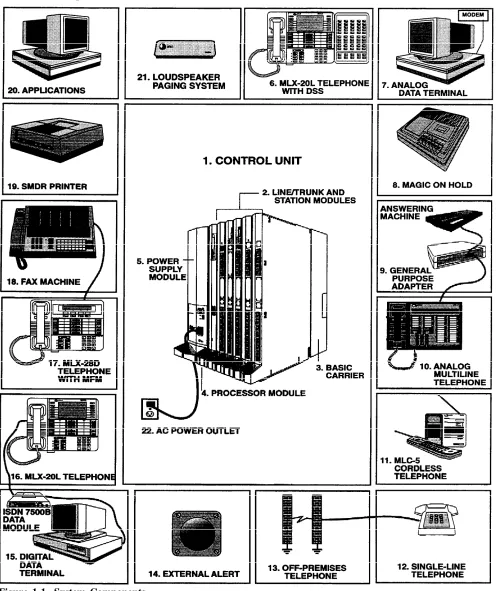
Figure 1-1 shows the components of a typical system. Your system may not have all the components pictured, or it may have additional or different components. The numbered items in the figure correspond to the descriptions that follow.
Preparation
1. Control Unit The backbone of the system, consisting of the basic and expansion carriers, power supply module, processor module, and line and station modules. The control unit connects telephone company lines with stations such as telephones and adjuncts.
2. Line/Trunk and Station Modules. The components that connect telephone company lines and terminal equipment such as telephones, external alerts, and fax machines via jacks to the control unit.
3. Basic Carrier. The component attached to the backboard used to hold the modules needed for system operation. The basic carrier houses the processor module, power supply module, and up to five line and station modules. Each expansion carrier houses its own power supply module and up to six additional line and/or station modules. One or two expansion carriers can be added.
4. Processor Module. A miniature computer that controls most of the system’s features and supplies the system’s diagnostics, The processor module provides two jacks, one for Station Message Detail Recording (SMDR) and the other for system programming and maintenance via a personal computer (PC).
5. Power Supply Module. The component that supplies DC power for the modules and telephones (one power supply unit is needed per carrier). If the system’s power requirements exceed the capacity of the power supply module, an auxiliary power supply unit can be added.
6. MLX-20L Telephone with Direct Station Selector (DSS). A console that adds 50 buttons for one-touch extension dialing to the MLX-20L™ or MLX-28D™ telephone and speeds call handling.
7. Analog Data Terminal. A data terminal such as a PC, printer, or optical reader that connects via a modem (for transmitting and receiving analog signals) to a 012 basic telephone module or a 008 OPT module. A data terminal can also be connected to an MIX telephone using a Multi-Function Module (MFM) or to an analog multiline telephone using a General Purpose Adapter (GPA.)
8. Magic on Hold®. Optional equipment that connects to the system through a GS/LS jack programmed for Music-on-Hold. (A customer-provided music source can be connected instead of Magic on Hold.)
9. General Purpose Adapter (GPA). An adapter used to connect a variety of tip/ring (T/R) adjuncts to an analog multiline telephone (shown here with an answering machine).
10. Analog Multiline Telephone. A 34-button telephone with built-in
speakerphone that connects to the system via an analog station jack. Other analog multiline telephones compatible with the system include the 22- and 34-button with built-in speakerphone and a one-line, 16-character display and the 10- and 22-button with built-in speakerphone, without display.
11. MLC-5 Cordless Telephone. A cordless multiline telephone that connects to the control unit via an analog station jack.
12. Single-Line Telephone. A touch-tone or rotary industry-standard telephone connected to the system via a 012 basic telephone module or a 008 OPT module.
13. 14. 15. 16. 17. 18. 19. 20.
Off-Premises Telephone (OPT). A single-line, touch-tone or rotary, industry-standard telephone located in a different building from the control unit.
External Alert. An alerting device such as bells, chimes, and strobe lights that connect to a jack on a012 basic telephone module or a 008 OPT module, or to an MFM or Supplemental Alert Adapter (SAA).
Digital Data Terminal. A data terminal such as a PC, printer, or optical reader that connects via an ISDN 7500B Data Module to a 008 MLX module and that can also include an MDX telephone.
MLX-20L™ Telephone. A digital/lSDN (MLX) telephone with 20 line buttons and a display with seven lines of 24 characters each. The MLX-20L
telephone can also be used as a system programming console. Other MLX telephones include:
■ MLX-10™/MLX-10D™ Telephone. A 10-button MLX telephone with or without a two-line, 24-character display,
■ MIX-28D™ Telephone. An MLX telephone with 28 line buttons and a two-line, 24-character display.
MLX-28D Telephone with Multi-Function Module (MFM). A circuit board mounted inside an MLX telephone that provides a jack to connect equipment such as answering machines, fax machines, external alerts, and modems to the telephone.
Fax Machine. Industry-standard fax machines connected to the control unit via a jack on a 012 basic telephone module or a 008 OPT module, an MFM, or a GPA.
SMDR Printer. A printer for Station Message Detail Recording (SMDR) call records, connected via an RS-232 jack on the processor module.
Applications. Software and hardware for MERLIN LEGEND™ Communica-tions System that can connect to the control unit to provide more funcCommunica-tions:
■ ■ ■ ■ ■ ■ ■ ■
Call Accounting System (CAS) Call Accounting Terminal (CAT) Call Management System (CMS)
MERLIN MAIL™ Voice Messaging System MERLIN® Attendant
Integrated Solution II (IS II)
Preparation
Location of the Control Unit
Before installation, choose a room, closet, or other area where the system control unit can be mounted on the wall. The area must meet the environmental requirements in Table 1-1.
Table 1-1 Environmental Requirements
Distances ■ Within 25 feet of the network interface (cannot be installed outdoors)
■ Within 1000 feet of telephones
■ Within 5 feet of a dedicated AC power outlet (1 plug per carrier)
Heat ■ Fully loaded basic carrier: 500 Btu/hr Dissipation
■ Fully loaded 2-carrier: 1000 Btu/hr
■ Fully loaded 3-carrier: 1500 Btu/hr
Power ■ Basic carrier: 117 VAC 60 Hz ± 1% 160 W 3 amps Requirements
■ 2-carrier: 117 VAC 60 Hz ± 1% 320 W 6 amps
■ 3-carrier: 117 VAC60HZ ± 1% 480 W 9 amps
■ 1 properly grounded plug needed per carrier
■ Additional outlets if installing printers and PCs
Temperature 40°-I04°F; 4°-40°C (optimum temperature 60°F, 16°C)
Humidity 20% - 80% relative humidity
Ventilation ■ Allow at least 1 inch of space on the right and left sides of the control unit and 12 inches above and below the control unit to prevent overheating.
Continued
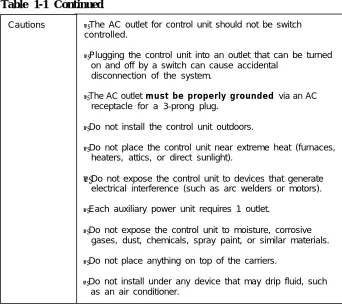
Table 1-1 Continued
Cautions ■ The AC outlet for control unit should not be switch
controlled.
■ Plugging the control unit into an outlet that can be turned
on and off by a switch can cause accidental disconnection of the system.
■ The AC outlet must be properly grounded via an AC
receptacle for a 3-prong plug.
■ Do not install the control unit outdoors.
■ Do not place the control unit near extreme heat (furnaces,
heaters, attics, or direct sunlight).
■ Do not expose the control unit to devices that generate electrical interference (such as arc welders or motors).
■ Each auxiliary power unit requires 1 outlet.
■ Do not expose the control unit to moisture, corrosive
gases, dust, chemicals, spray paint, or similar materials.
■ Do not place anything on top of the carriers.
■ Do not install under any device that may drip fluid, such
as an air conditioner.
In addition, a 3/4-inch plywood backboard is needed to mount the system on the wall. The dimensions depend on the number of carriers, as shown in Table 1-2. In some areas, fire or electrical codes require a flame retardant backboard. Check with the appropriate authorities to ensure that the proper material is provided.
Table 1-2 Control Unit Space Requirements
Carrier
Basic carrier
Basic carrier + 1 expansion carrier Basic carrier + 2 expansion carriers
Dimensions
Preparation
Telephone User Survey
The features and calling privileges you assign to each employee’s telephone ensure that employees get the most benefit from the system.
If you were not involved in the planning and decision-making for the system, find out from your management and your AT&T representative or authorized dealer what telecommunications needs were identified.
To determine calling privileges, get answers to the following questions:
Does management want to allow both local and toll calls to be made from every telephone?
If any telephones are restricted, are there any numbers the users should be allowed to call?
Are there any specific numbers (such as 900) that you want to restrict users from calling?
Who, if anyone, will be given personal lines?
Will access to central office lines be restricted to certain employees?
Do any departments receive frequent special calls (such as sales and. service) so that calls should come to them directly, bypassing a system operator?
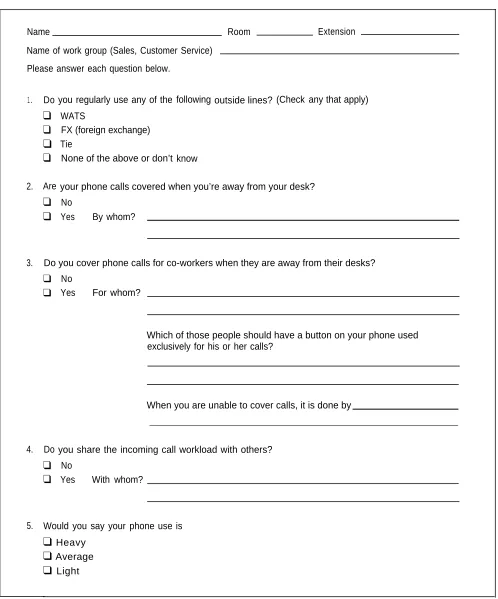
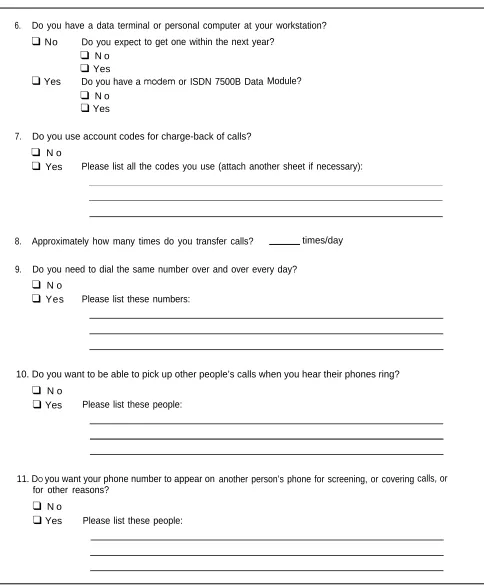
Use the Employee Communication Survey form (see Figure 1-2) to determine each employee’s telecommunications needs. If it is not feasible to have each employee fill out a form, get the information you need from a knowledgeable person in each department, section, or work group. This person should have sufficient information and authority to make decisions about calling features and coverage assignments for others in the department.
Make the appropriate number of copies of the Employee Communication Survey form.
Name Room Extension
Name of work group (Sales, Customer Service)
Please answer each question below.
1.
2.
3.
outside lines?
4. Do
❑
❑
❑
❑
Are
❑
❑
you regularly use any of the
WATS
FX (foreign exchange) Tie
None of the above or don’t
following
know
(Check any that apply)
your phone calls covered when you’re away from your desk?
No
Yes By whom?
Do you cover phone calls for co-workers when they are away from their desks?
❑
❑
Do
❑
No
Yes For whom?
Which of those people should have a button on your phone used exclusively for his or her calls?
When you are unable to cover calls, it is done by
Preparation
6.
7.
8.
9.
Do you have a data terminal or personal computer at your workstation?
❑
No Do you expect❑
N o❑
Yes❑ Yes
Do you have a❑
N o❑ Yes
to get one within the next year?
or ISDN 7500B Data Module?
Do you use account codes for charge-back of calls?
❑
N o❑
Yes Please list all the codes you use (attach another sheet if necessary):Approximately how many times do you transfer calls? times/day
Do you need to dial the same number over and over every day?
❑
N o❑
Yes Please list these numbers:10. Do you want to be able to pick up other people’s calls when you hear their phones ring?
❑
N o❑ Yes
Please list these people:11. DO you want your phone number to appear on
for other reasons?
❑
N o❑ Yes
Please list these people:another person’s phone for screening, or covering calls, or
Figure 1-2 Continued
Use the information in Table 1-3 to interpret and analyze the results of the Employee Communication Survey.
Table 1-3 Employee Communication Survey — Sample Analysis
1. Types of lines used Indicates toll calling habits. In most cases, assigning a button for each line is not necessary.
2. Calls covered by someone Suggests that this employee should be assigned as a sender in either else (sender) Individual or Group Coverage arrangement, particularly if calls are covered
by someone other than the operator.
3. Cover someone else’s calls Suggests assignment as a receiver in either Individual or Group Coverage
(receiver) arrangements.
4. Share incoming calls Identifies calling group needs.
5. Frequency of use Identifies heavy and light telephone users. Heavy users may benefit from additional line buttons.
6. Data needs Identifies existing and potential data terminal and personal computer users. See the Data Guide.
7. Use of account codes Identifies current account codes used for charge-back of calls.
8. Frequency of transfers Suggests the need for one-touch transfer.
9. Frequently dialed numbers Identifies useful numbers for the System Speed Dial list.
10. Picking up calls Identifies need for a pickup group.
Preparation
Floor Plan
Use a floor plan to make planning more manageable and to ensure that the correct telephone equipment is assigned to each employee.
If your organization is moving to a new location, a floor plan may already be prepared and you may be able to get a copy of it from your management.
Create a floor plan in two phases:
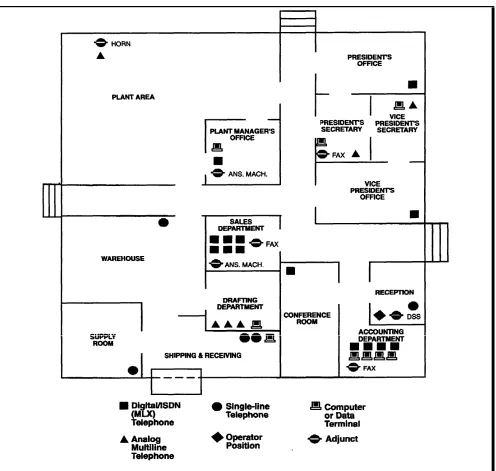
1. Indicate the location and type of telephones, adjuncts (fax, answering machines, etc.), and data terminals.
2. When you assign extension numbers, indicate the assigned numbers on the floor plan.
Note: In this book, telephones and associated adjuncts, such as answering machines or data terminals, or adjuncts connected directly to the control unit, are called ‘stations.”
Planning Instructions:
1. Use a large sheet of paper and sketch your office layout. The location of office walls and other partitions is important when features are assigned to telephones that must be within hearing range of each other. For example pickup group members must be able to hear each others' telephones ringing.
2. Indicate the location of each employee's telephone, other locations where there will be a telephone (such as in a conference room), and the loc-ations of data terminals, PCs, and host computers. Use the symbols shown in figure 1-3.
3. Indicate the type of telephone at each location, using an abbreviation that includes the number of programmable buttons. For example, write "MLX-10" at 10 button MLX telephones, "MLX-20L" at 20 button MLX display telephones, "BIS-34" at 34 button Analog multiline telephones, and so forth.
4. Indicate the type of adjunct at each location. Write "fax", ans. mach." (answering machine), "headset", or other type of adjunct benethe the symbol.
Control Unit
Planning the control unit consists of deciding how to place the modules, setting the system operating conditions, and numbering the system.
Modules
Certain modules are required for every system:
■ Processor module contains the memory that controls the system software and features. It also contains the software and firmware that support built-in system diagnostics and the built-in data modem used for remote
maintenance and system programming. The processor module is offered in two sizes:
■ The small processor module supports a maximum of 24 lines and/or 56
stations.
■ The large processor module supports a maximum of 80 lines and/or 144
stations.
■ Power supply module provides power to the processor module and line and station modules, and to each telephone and adjunct. Each carrier in the control unit has one power supply module.
■ Line and station modules contain the jacks for connecting stations and outside lines to the control unit. The type of jack on a module determines the type of line or station that can be connected to it.
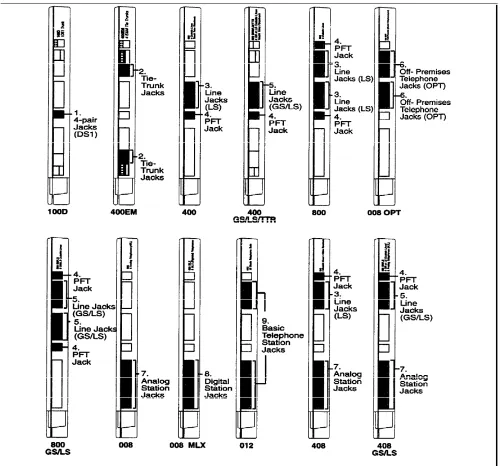
The line and station modules and the type(s) of jacks on each are shown in Figure 2-1.
Control Unit
The lines and stations that can be connected to the jack types shown in Figure 2-1 are described below:
1. A DS1 line jack connects a Digital Signal 1 (DS1) facility provided by the telephone company. The DS1 facility can be set for either T1 or Integrated Services Digital Network Primary Rate Interface (ISDN-PRI) operation.
The DS1 facility programmed for T1 operation supplies 24-channel emulation of any combination of ground-start (GS), loop-start (LS), and tie trunks. When programmed for ISDN-PRI operation, the channels are used to connect ISDN services such as Megacom® WATS.
2. Tie-trunk jacks connect private lines from other communications systems.
3. Line jacks (LS) connect loop-start lines from the telephone company.
4. Power failure transfer (PFT) jacks connect single-line telephones that work during power failures. Analog multiline telephones and digital/lSDN (MLX) telephones cannot be used as power failure telephones.
5. Line jacks (GS/LS) connect loop-start or ground-start lines from the telephone company.
6. Off-premises telephone (OPT) jacks connect off-premises tip/ring equipment such as single-line telephones, fax machines, or answering machines. Tip/ring equipment connects directly to an outside line and works on a single pair of wires.
7. Analog station jacks connect analog multiline telephones and adjuncts.
See the Data Guide for more information 8. Digital station jacks connect MLX telephones or data devices such as the
on data stations. ISDN 7500B Data Module.
9. Basic telephone station jacks connect tip/ring equipment such as single-line telephones, fax machines, or answering machines. Basic telephone station jacks also connect optional applications such as MERLIN Attendant or MERLIN MAIL Voice Messaging System for the MERLIN LEGEND Communications System.
Table 2-1 shows the capacities of each module.
Table 2-1 Modules Capacities
Modules
Line Jacks
Station Jacks
100D 1 DS1 facility (ISDN-PRI or T1)
400EM 4 4-wire E&M tie trunks
400 4 LS linrs with 4 TTR* 1 PFT jack
400 GS/LS/TTR 4 GS/LS lines with 4 TTR* 1 PFT jack
800 8 LS lines 2 PFT jacks
008 OPT 2 TTR* 8 OPT jacks
800 GS/LS 8 GS/LS lines 2 PFT jacks
008 8 analog jacks
008 MLX 8 digital jacks
012 2 TTR* 12 basik jacks
408 4 LS lines 8 analog jacks, 1 PFT jack
408 GS/LS 4 GS/LS lines 8 analog jacks, 1 PFT jack
* TTR = Touch-tone receivers required for tip/ring equipment and Remote Access. TTRs are not used to connect lines.
Line and Station Capacity
The numbers of jacks in Table 2-1 are the physical jacks on each module. In most cases, the number of physical jacks indicates capacity (the number of lines and/or stations that can be connected to the module). The exception is the 100D module with one physical jack which, because of the system’s software capabilities, supports 24 lines.
Use the AT&T Equipment List (supplied with your communications system) to complete page 1 of Key System Form 1, System Planning.
Planning Form Instructions:
Control Unit
Station capacity is the number of stations that can be connected to the control unit, and it equals the number of physical jacks on the line and station modules.
See “System Numbering” in this chapter One extension number is automatically assigned to each station jack, whether or for detailed information. not equipment is connected to it, except for the 008 MLX and 008 OPT modules:
■ 008 MLX module has two extension numbers assigned to each physical jack, the first for a digital/lSDN (MLX) telephone and the second for any equipment connected to the telephone through an MFM.
■ 008 OPT module has eight physical jacks, which the system reads as 12 jacks and assigns an extension number to each.
Planning Form Instructions
Under the heading "Stations":
1. Fill in the numbers of each type of station module on the appropriate l i n e s .
2. Add the "Number of Modules" column and record the result by the system t o t a l s .
3. Multiply the number of each type of module by the number of physical jacks on it and record the results.
4. Add the "Physical Jacks by Module Type" column and fill in the "System Totals" line to show station capacity.
5. To determine the number of extensions assigned, multiply the number of physical jacks by module type, by the number of station extensions the system assigns to each module's jack type.
Note: Since the system assigns an additional four extensions to each 008 OPT module, you must multiply the number of 008 OPT modules by four and add this subtotal to the result shown in the "Physical Jacks by Module Type" column.
6. Write the results in the "Total Station Extensions Assigned" column.
7. Add the "Total Station Extensions Assigned" column and fill in the "System Totals" line.
Module Placement
Use the “Control Unit Diagram” on Key System Form 1 and the following guidelines to plan where the modules an placed in the control unit:
■
■
■
Put the power supply module in the far left slot of each carrier.
Put the processor module in slot 00 of the basic carrier.
Put line and station modules in any order in slots 01 through 17, with the following conditions:
■ Put the modules in each carrier from left to right with no empty slots
between modules. (The system does not recognize modules in slots after an empty slot; slots to the right of the last module can be left empty.)
■ Group all 100D and 400EM modules together according to type,
whenever possible, to save time in system programming.
Each physical jack on the control unit is numbered sequentially from left to right and bottom to top:
■ Station jacks are numbered from 1 to 144.
■ Line jacks are numbered from 1 to 80.
This sequence of numbers is called the "logical ID." It is the basis for how you connect components to the control unit, as well as how the system assigns station extension numbers and line numbers.
Notes:
■ Each 100D module is assigned 24 logical IDs even though the module has only one physical line jack.
■ The 008 OPT module is assigned 12 logical IDs even though the module has only eight physical station jacks.
■ Power failure transfer (PFT) jacks are not assigned logical IDs.
Planning Form Instructions
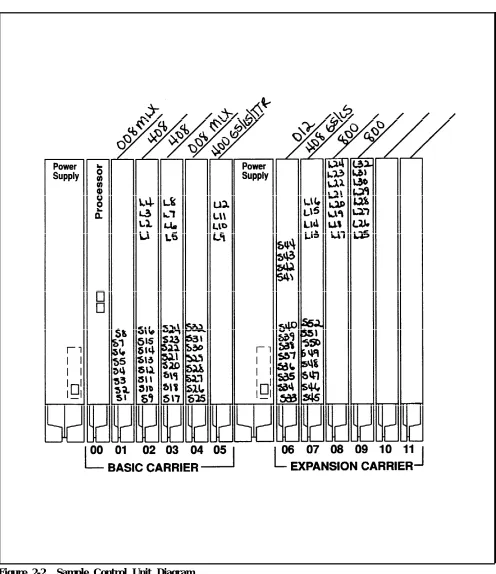
Mark the module placement on the "Control Unit Diagram" on the back of Form 1.
1. Write the type of module to be installed at the top of each slot. Use the lables listed in Table 2-1 (008 MLX, 408, etc.)
2. Write the type of jack (S= Station, L = Line) and the associated logical ID for each line and station jack on each module.
Notes:
■ The "Unit Load" and "Auxiliary Power" blocks above the diagram are reserved for occasions when equipment changes or maintenance require the installation technician to manually compute the values. See System
Reference for details on computing unit loads.
■ Logical ID labels for each line and ststion jack are provided with the system. When the control unit is assembled, the labels are attached to the m o d u l e s .
Control Unit
Figure 2-2 Sample Control Unit Diagram
System Operating Conditions
Use the “Control Unit Diagram” on Key System Form 1 as a reference and mark the “System Operating Condtions” section of that form.
Record the following system operating conditions:
■ programming equipment that will be used and its station jack assignment
■ mode of operation
■ whether Automatic Maintenance Busy is enabled
■ a reminder to set the system time and date
Programming Equipment and Station Jack Assignment
Two types of equipment can be used for system programming:
■ an MIX-20L telephone acting as a system programming console. The telephone is the first (lowest) station jack on the first MLX module and is factory set for system programming.
■ a personal computer (PC) with MERLIN LEGEND System Programming and Maintenance (SPM) software. (Both DOS and UNIX based SPM are available.) The PC is connected to the lower jack on the processor module.
Use these instructions only if using a system programming console.
Planning Form Instrructions
Under the heading "System Programming Console" on Form 1:
1. Do one of the following:
■ Check "NO" if you are using a PC with SPM to program the system. Go to
the "Mode of Operation" instructions.
■ Enter the Logical ID and Extension Number if you are using a system programming console.
2. To change the factory-set system programmin jack, write in the new logical ID (using information from the "Control Unit Diagram").
Control Unit
Mode of Operation
See System Reference for more Your system is registered with the FCC to operate as a Key system. However, information on modes. you can program the system to operate in any of three modes:
■ Hybrid/PBX
■ Key (the factory setting)
■ Behind Switch
The mode of operation determines
■ how outside lines are provided to users
■ the types of operator consoles allowed
■ the features available and how they work.
Note: This book applies only to systems in the Key and Behind Switch modes. To plan a system in the Hybrid/PBX mode, use PBX System P/arming.
Key Mode
In the Key mode, every line appears on a separate button on each multiline telephone. The line buttons allow users to see activity on other telephones, join conversations, place calls, or receive calls. Separate intercom buttons are used to make and receive internal calls.
A Key system automatically assigns the first eight outside lines to all telephones. You can customize this arrangement through system programming by assigning lines or groups of lines to selected groups of telephones or to individual
telephones.
Behind Switch Mode
The Behind Switch mode is used when the system is connected to another telephone system or Centrex. This other system (called the "host") provides the interface to outside lines and some features.
A Behind Switch system assigns only one line (called a "prime line”) to each telephone. You must assign outside lines to telephones or groups of telephones through programming.
In the Behind Switch mode, people can use the special features of both this system and the host system. Compare the host systems feature list and your system to determine which features the two systems have in common.
Once you have determined common features, decide whether you want people to use the features following your system’s instructions or following the host system’s instructions. (If you decide that the host instructions are to be used, they must be distributed to telephone users.) In the Behind Switch mode, when users press the Conference, Drop or Transfer buttons, a signal is sent to the host system. Get the host system dial code for each of these buttons so that users can take advantage of these features using the host system.
In the Behind Switch mode single-line telephones can be programmed to select only the prime line (the user cannot make inside calls or use system features) or to select the intercom button followed by the prime line or outside line (the user can place and receive inside calls and use system features).
Planning Form Instructions
Under the "Set System Mode" heading on Form 1:
1. Check "Key" if you want your system to operate in the Key mode.
2. Check "Behind Switch" if your system is connected behind a larger system. Write the host's dial code for the Conference. Drop, and Transfer features.
Automatic Maintenance Busy
Automatic Maintenance Busy puts a malfunctioning line in a ‘maintenance busy” state, preventing outgoing calls on that line. Incoming calls are never blocked. A line in maintenance busy is tested by the internal maintenance software to try to put it back into service.
The factory setting for Automatic Maintenance Busy is ‘disabled,” which means that faulty lines are not automatically put in a maintenance busy state. The factory setting, disabled, is satisfactory for most Key and Behind Switch Systems.
Planning Form Instructions
Under the "Automatic Maintenance Busy" heading on Form 1:
1. Do one of the following:
■ Check "Disable" to keep the factory setting.
■ Check the second box to enable Automatic Maintenance Busy.
System Date and Time
See “System Features” in Chapter 4 for The system date and time is the month, day, year, and time shown on display information on SMDR. telephones and Station Message Detail Recording (SMDR) reports. The system
Control Unit
System Numbering
System numbering is the process of assigning extension numbers to stations (telephones and adjuncts), calling groups, paging groups, Park zones, and Remote Access.
The instructions is this chapter deal only with assigning extension numbers to stations.
Number the stations in two stages:
Stage One. Decide in what order to connect the telephones and other equipment to the control unit. To do this, identify station jack types and match individual components with the jacks that support them.
When the system is turned on, it identifies the type of module installed in each control unit slot and automatically assigns extension numbers to the components in exactly the same order in which they are connected to the control unit. As you plan connections, therefore, you should be aware of the relationship between the jack’s logical ID and the extension number the system assigns.
The stations are assigned 2-digit extension numbers starting with extension 10 at the station jack with the logical ID of 1. If a user needs a specific extension number, it is simpler (in terms of programming) to connect that user’s telephone to the station jack that is automatically assigned the requested extension number.
Stage Two. Decide if the system-assigned extension numbers are appropriate or if you should renumber all, or some, of the extensions assigned to the stations.
The system offers three predetermined numbering plans. In addition, you have the option of creating your own unique numbering plan with extensions of one to four digits.
Locate and review your Floor Plan and AT&T Equipment List to verify the equipment you have and how many of each kind of connection are needed.
Record equipment connections and extension numbers on Key System Form 2a, System Numbering — Station Jacks.
Note: Form 2a is a multipage list that accommodates entries for up to 144 stations. It shows the logical IDs for each station, as well as the three predetermined numbering plans available.
You also need Key System Form 1, System Planning, for both reference and to make additional entries.
Station Jack Connections
Station Jack Types
Planning station jack connections consists of identifying the jack types and matching the telephones and other equipment to the jacks that support them. Determine the station jack types in the control unit and plan connections in the following order:
primary operator position
additional operator positions
Voice Announce to Busy and/or Simultaneous Voice and Data
digital/lSDN (MLX) telephones
analog multiline telephones
tip/ring equipment
applications
Station jack type is determined by the module type. The station jack types and the equipment that can be connected to these jacks are listed in Table 2-2.
Use the completed “Control Unit Diagram” (Form 1) and Table 2-2 for reference and mark the station jack types on Form 2a.
Table 2-2 Station Jack Types
Station Jack Type
Module
T y p e Used to Connect
Analog 008
408
Analog multiline teletphones Call Management System (CMS) 408 GS/LS
Digital 008 MLX Digital/ISDN (MLX) teltphones
Digital data devices, such as ISDN 7500B Data Modules
Basic 012 Tip/ring equipment:
Telephone Single-line telephones
Control Unit
Planning Form Instructions
In the "Jack Type" column of Form 2a, indicate the type of each station jack next to its logical ID.
1 . Check "A" if the jack is Analog, "D" if Digital, or "B" if Basic telephone.
2 . The system reserves 12 logical IDs for the 008 OPT module even though only 8 are used. Cross off the last 4 logical IDs (they cannot be used).
Jacks for Primary Operator
Position
Planning Form Instructions
Mark jack assignments on Form 2a.
If the system does not include a system programming console, go to step 4.
1 . See the "System Operating Conditions" on the back of Form 1 for the logical ID of the station jack for the system programming console.
2 . Mark the "Logical ID" column of Form 2a by writing "SPC" beside the preprinted logical ID for the system programming console station jack.
3 . Write the name of the person who will be programming or the location of the system programming console in the "Person, Location, or Function" c o l u m n .
4 . Locate the first station jack showing a "D" (digital or "A" (analog) type and write "DLC" beside the preprinted logical ID to indicate the primary DLC operator position.
5 . Write the name or location of the primary DLC operator in the "Person, Location, or Function" column.
Jacks for Additional
Operator Positions
The factory setting for the primary operator position is the lowest station jack on the first 008 MLX module. If the system doesn’t have an MLX module, it’s the lowest station jack on the first module with analog station jacks. The factory setting for the primary operator position cannot be changed.
On the primary operator position direct-line console (DLC), lines are assigned on individual buttons. The console can have several calls ringing at the same time.
DLCs can be assigned to either a digital or analog station jack.
Use these instructions only if the system has more than one operator position.
The maximum numbers of operator positions are shown in Table 2-3.
Planning Form Instructions
Use the "Control Unit Diagram" on Form 1, to determine which station jacks can be used as operator positions.
1 . Circle the first and fifth station jacks on each digital or analog module on the "Control Unit Diagram" until you have reached themaximum eight p o s i t i o n s .
2 . Mark the station jacks to be used as additional operator positions in the shaded boxes on Form 2a.
3 . Write "DLC" beside the preprinted logical ID of each position. Be sure to assign DLCs to only the first and fifth station jacks on each digital or analog module.
4 . Write the name or location of each additional DLC operator in the "Person, Location, or Function" column.
5 . If the systemincludes the Call Management System(s), write "CMS" in the "Person, Location, or Function: column next to the logical ID for the two
Table 2-3 Maximum Number of Operator Positions
Telephone Processor Maximum
Type Module Size Positions
MLX-20L Small 6
MLX-28D
MLX-20L Large 8
MLX-28D
Analog multiline telephones Small or Large 8
Assign DLCs to only the first and fifth station jacks on a digital or analog module. This includes DLC positions used for calling group supervisors and for the optional Call Management System (CMS).
Control Unit
■ Simultaneous Voice and Data. A user whose telephone has this feature can use the telephone and a data terminal at the same time. (MLX telephones have this feature without requiring a second station jack.)
An analog multiline telephone with either one of these features requires two consecutive analog station jacks on the control unit. The jacks are an odd-numbered analog station jack and the next higher (even-odd-numbered) analog station jack.
The system assigns individual extension numbers to each of the jacks for either the Voice Announce to Busy or the Simultaneous Voice and Data feature. The extension number associated with the first (odd-numbered) station jack in the pair is the telephone’s extension number. Calls cannot be placed to the extension number associated with the even-numbered station jack.
You can assign either of these features to any of the analog multiline telephones in the system, but you cannot assign both to the same telephone.
Planning Form Instructions
On Form 2a, mark the pairs of jacks for analog multiline telephones that have the Voice Announce to Busy or Simultaneous Voice and Data feature.
1 . In the "Logical ID" column, draw a box around the pair of ststion jack numbers that you plan to assign to each analog multiline station with eather feature.
2 . In the "Person, Location, or Function" column, next to the first (odd) number of each boxed pair, identify the station by person or location.
3 . In the "Person, Location, or Function" column, next to the second (even) number of each boxed pair, write "Voice/Voice" for Voice Announce to Busy feature or "Voice/Data" for the Simultaneous Voice and Data feature.
Jacks for Digital/ISDN
Use these instructions only if the system has non-operator MLX telephones(MLX) Telephones
to assign to digital station jacks on 008 MLX modules.Although only one logical ID is assigned to each digital station jack, the system assigns two extension numbers. The extension number on Form 2a is the extension number automatically assigned to an MLX telephone connected to the
Use the instructions in the Data Guide digital station jack. The second extension number is reserved for an adjunct to plan connections for digital data such as an answering machine that may be connected to the MLX telephone via
equipment. a Multi-Function Module (MFM) or for an ISDN 7500B Data Module used to
connect a data terminal.
The system automatically assigns both extension numbers whether or not the station includes an MFM or data module. Calls can be placed to both extension numbers independently.
The MFM can operate as either a Supplemental Alert Adapter (SAA) or as a tip/ring interface. The adapter is used when the MFM connects an external alert such as a bell or horn. The tip/ring interface, is used when the MFM connects a tip/ring device such as an answering machine or modem.
Planning Form Instructions
Use the Floor Plan and AT&T Equipment List to verify that you have l o c a t e d a l l r e m a i n i n g M L X t e l e p h o n e s a n d a d j u n c t s t o t h e m .
On Form 2a, mark the station jack assignments for the remaining MLX telephones:
1 . In the "Jack Type" column, make sure there is a "D" checked next to the logical ID for each digital station jack.
2 . In the "Person, Location, or Function" column, identify each MLX telephone by person, location, or function.
Use the information from Form 2a as you mark the adjuncts on Key System Form 2b, System Numbering — Digital/ISDN Station Adjuncts.
3 . In the "Logical ID" column, write the logical ID of each digital station jack (D jack type).
Note: You will fill in the "Factory - Set Extension No." column later.
Complete the "MFM" and "7500B" columns:
4 . If the jack does not have an adjunct, write "NONE" across the columns.
5 . If an adjunct is connected to the MLX telephone:
■ Check the "7500B" column if the station includes the data module.
■ Check "SAA" or "T/R" in the "MFM" column to show how the MFM connects the adjunct.
6. Complete the last column.
7. Identify each adjunct or data module by type and by person, location, or function.
Jacks for Analog Multiline
Telephones
Use these instructions only if the system includes the 408, 408 GS/LS, or 008 modules.
Assign analog station jacks for all remaining non-operator analog multiline telephones in the system.
Planning Form Instructions
Control Unit
Jacks for Tip/Ring
Equipment and
Applications
See System Reference for more information on applications.
Use these instructions only if the system includes 012 or 008 OPT modules.
Assign the basic telephone jacks on the 012 or 008 OPT modules to any tip/ring equipment such as single-line telephones, fax machines, or answering
machines. Tip/ring equipment connects directly to an outside line and works on a single pair of wires. When connected to a 008 OPT module, the tip/ring equipment can be located off-premises.
Several optional applications, if used with the system, require a basic jack on a 012 module: MERLIN MAIL Voice Messaging System, MERLIN Attendant, AUDIX Voice Power — lS II, and Integrated Voice Power Automated Attendant — IS Il.
Up to four applications can be connected to the system using the same 012 module. If there are four applications, the module must be used exclusively for this equipment If you have fewer than four applications connected to an 012 module, some tip/ring devices also can be connected. If possible, the module should be used only for the application equipment.
Note: The applications discussed here do not work properly with 012 module manufactured for older MERLIN® II systems. These applications must be connected to 012 modules with the code 517C13 or 517D13 on the label on the top of the module. Modules with the code 517A13 or 517B13 can be used only to connect single-line telephones and do not provide the disconnect signal required by answering machines and applications.
Planning Form Instructions
On Form 2a, mark the station jack assignments on the 012 and 008 OPT m o d u l e s .
1. In the "Jack Type" column, make sure there is a "B" checked next to the logical ID for each basic telephone jack.
2 . In the "Person, Location, or Function" column, identify each tip/ring device by person or location, and by type, such as single - line telephone, fax, or answering machine.
3. If the system includes optional applications indicate the type of application in the "Person, Location, or Function" column:
■ Write "Mail" to indicate MERLIN MAIL Voice Messaging System.
■ Write "MERLIN A" to indiccate MERLIN LEGEND Attendant.
■ Write "AVP" to indicate AUDIX Voice Power — IS II.
■ Write "IVP - AA" to indicate Integrated Voice Power Automated
Attendant — IS II.
System Renumbering
Use these instructions to decide whether to keep the factory-set extension numbers or to change them to numbers taylored to your company — for example, extension numbers that match room numbers.
The system offers three numbering plans, as shown on Form 2a, System Numbering — Station Jacks. Each plan allows you to renumber all