ROAMER
AN
OPEN APPLICATION INTERFACE (OAI)
INSTALLATION GUIDE
NEC America, Inc.
LIABILITY DISCLAIMER
NEC America reserves the right to change the specifications, functions, or features in this document at any time without notice. NEC America has prepared this document for use by its employees and customers. The information contained herein is the property of NEC America and shall not be reproduced without prior written approval from NEC America.
Copyright 1996
NDA-30016 Revision 3.0 Page i
Roamer Installation Guide CONTENTS
TABLE OF CONTENTS
Page
Chapter 1 - Introduction . . . 1
Chapter 2 - Application Configuration . . . 5
Step 1: Application Characteristics . . . 5
Step 2: Primary Configuration Parameters . . . 6
Step 3: OAI Facilities . . . 7
Step 4: Secondary OAI Configuration Parameters . . . 8
Step 5: User-Defined Parameters . . . 9
Chapter 3 - Database Requirements . . . 11
Instructions . . . 12
Field Definitions . . . 13
Chapter 4 - MAT Assignments . . . 15
Assignment of MSF Function Key. . . 15
AOKC Command: (Assignment of OAI Key Codes) . . . 16
AKY1 Command: (Assignment of Dterm Function Key) . . . 16
Assignment of Free Location Feature. . . 17
ASYD Command: (Assignment of System Data) . . . 17
Assignment of Numbering Plan to Support Free Location Feature . . . 18
ANPD Command: (Assignment of Numbering Plan Data) . . . 18
ASPA Command: (Assignment of Special Access Code) . . . 18
Page ii NDA-30016 Revision 3.0
CONTENTS Roamer Installation Guide
NDA-30016 Revision 3.0 Page iii
Roamer Installation Guide FIGURES
LIST OF FIGURES
Figure Title Page
Page iv NDA-30016 Revision 3.0
FIGURES Roamer Installation Guide
NDA-30016 Revision 3.0 Page 1
Roamer Installation Guide Introduction
Chapter 1
Introduction
This guide provides specific field entries that need to be made in the process of installing and configuring Roamer. In addition to this guide, use the following manuals for this installation:
• Applications Manager (APM) Installation Manual – Contains step-by-step instructions for installing the software from the release media.
• Applications Manager (APM) Operations Manual – Explains how applications like Roamer are configured in the APM environment, using the entries and values provided in this guide.
• NEAX2400 System Manuals – Give very detailed explanations about the assignments that need to be made through the Maintenance Administration Terminal (MAT) commands on the NEAX2400.
The installation and set up of Roamer involves the following processes. Each of these topics is covered in more detail in the remaining chapters of this book:
• Software Installation – Roamer software must first be loaded from the release
media. Log in to the APM Platform Management Menu, select the Installation of Applications/Packages option, and follow the instructions provided in the APM Installation Manual to complete this part of the installation.
• Application Configuration – Roamer is internally supported by the APM and
must be configured in the APM environment. Chapter 2 of this guide provides
the information that must be entered into this APM configuration file. Use the instructions provided in the APM Operations Manual to make the entries provided in this section.
• Database Requirements – Roamer requires two application databases, one of
which is constructed and maintained through the APM Database Administration option. The process begins with the creation of a master definition file and its related master database. An application definition file is constructed which enables the processing of the master files into an application
database. Chapter 3 of this guide defines the information which must be
included in these definition and database files. Use the instructions provided in the APM Operations Manual to make the entries contained in this section.
• Mat Assignments – Several data settings must be assigned at the NEAX
Page 2 NDA-30016 Revision 3.0
Introduction Roamer Installation Guide
A Note About the Logical and Physical Numbers Used By Roamer:
Roamer uses logical and physical numbers to move users from one phone to another. A physical number (e.g., 4502) is the actual extension associated to a
Dterm or station through the NEAX2400 MAT. A logical number (e.g., 202) is an
arbitrary number that is associated to a telephone user and that is controlled by the Open Application Interface (OAI). Physical numbers are not moved. Logical numbers move with the user. Thus, when a user indicates a move, Roamer finds the user’s logical number and reassigns it to the physical number of the new telephone.
During installation, a logical number and a home physical number are assigned to each user in the Roamer database. Assignments are made at the NEAX2400 MAT
which associates those physical numbers to specific Dterms.
These two sets of numbers can be the same or different. If they are different and OAI processing is interrupted, Roamer may lose access to the physical numbers since OAI relocates users by their logical numbers. If the two numbering systems are the same and OAI processing is interrupted, all users can be restored to their physical home phone numbers by disabling the Free Location Feature through the NEAX2400 MAT.
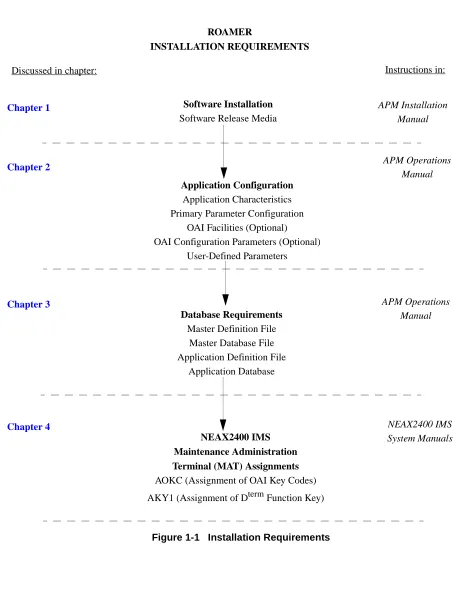
The installation process, including its presentation in this manual and reference to
other manuals that you need to complete installation, is illustrated in Figure 1-1 on
NDA-30016 Revision 3.0 Page 3
Roamer Installation Guide Introduction
Figure 1-1 Installation Requirements
Software Installation
Software Release Media
Application Configuration
Application Characteristics Primary Parameter Configuration
OAI Facilities (Optional) OAI Configuration Parameters (Optional)
User-Defined Parameters
NEAX2400 IMS Maintenance Administration Terminal (MAT) Assignments
AOKC (Assignment of OAI Key Codes)
AKY1 (Assignment of Dterm Function Key)
ROAMER
INSTALLATION REQUIREMENTS
Chapter 1
Chapter 4 Chapter 2
Discussed in chapter: Instructions in:
APM Installation Manual
NEAX2400 IMS System Manuals APM Operations
Manual
Database Requirements
Master Definition File Master Database File Application Definition File
Application Database
Chapter 3 APM Operations
Introduction Roamer Installation Guide
Page 4 NDA-30016 Revision 3.0
NDA-30016 Revision 3.0 Page 5 Roamer Installation Guide Application Configuration
Chapter 2
Application Configuration
Roamer is configured into the APM system using the Add function of the Application Configuration option on the APM System Administration menu:
1. Enter the APM option from the APM Platform Management Menu.
2. Enter the System Administrator password at the APM password screen.
3. Enter the Application Configuration option from the System Administration menu.
This section contains the information that should be entered to the configuration file for Roamer. For specific instructions on what these parameters mean and how to make these entries, use the APM Operations Manual.
Step 1: Application Characteristics
In adding Roamer to the APM Application Configuration file, define it as an OAI application that does not need a CRT or a communication queue, as shown below.
Note: Entries for parameters that are marked with an asterisk (*) should be made ex-actly as they are shown. All other entries in this guide serve only as examples.
Parameter Entry Description
OAI Application (Y,N) Y Y(es). Roamer is an OAI
application because it communicates with the NEAX2400 using OAI processes.
CRT Application (Y,N) N (No). Roamer does not require a
terminal screen that is of the same type as the one used by the APM.
Communication Queue (Y/N) N (No). Roamer does not need an
Page 6 NDA-30016 Revision 3.0 Application Configuration Roamer Installation Guide
Step 2: Primary Configuration Parameters
On the APM Configuration Entry screen, make the entries shown below to the parameters indicated.
Note: Entries for parameters that are marked with an asterisk (*) should be made ex-actly as they are shown. All other entries in this guide serve only as examples.
Parameter Entry Description
Application Name Roamer The name to be displayed in the
APM menus. This name is displayed as it is entered here (i.e., capital letters, lower case, etc.).
Executable Filename* /oai/app/freeloc The path name of the executable
file.
Group* (no entry) (Roamer is not a member of a
group of applications.)
Response Mode I This is a default value since
Roamer does not belong to a group.
Initialization Batch N Roamer is not to be initialized
automatically when the OAI system is initialized.
Termination Mode* M Roamer is to receive a termination
message rather than a kill or termination signal from the APM, when it is to terminate.
Standard Output* /dev/null Roamer’s output is sent to this
file.
Number of Restarts 0 Roamer may not be restarted by
NDA-30016 Revision 3.0 Page 7 Roamer Installation Guide Application Configuration
Step 3: OAI Facilities
According to instructions in the APM Operations Manual, designate the following NEAX2400 facilities for Roamer using the Facilities command on the
Configuration Entry screen:
FLF Free Location MRFR Mode Release (R)
MRFI Mode Release (I) MSF OAI Mode Set
NTF Number Transfer TCFD Terminal Control (D)
TCFI Terminal Control (I)
Page 8 NDA-30016 Revision 3.0 Application Configuration Roamer Installation Guide
Step 4: Secondary OAI Configuration Parameters
Using the OAI-Conf command on the APM Configuration Entry screen, make the entry shown for each of the following parameters required by Roamer. Use the instructions provided for this option in the APM Operations Manual:
Parameter Entry Description
Database Name #1* /oai/db/cur/
roamerdb
The path name of the database containing user information. The database filename roamerdb, shown here with its path, should be used as the name of the corresponding Application Definition File. For more
information see Chapter 3,
“Database Requirements” on page 11.
Timeout Value #1 60 The number of seconds Roamer
waits for user numeric input before it releases the Dterm.
Timeout Value #2 20 The number of seconds Roamer
waits for input of processing symbols such as # before it releases the Dterm.
Tenant Number 1 This configuration applies to
tenant No. 1.
Source Link Name OAI1X25 The port on the source side of the
communication link. Entry should correspond to a Link Name in the APM System Configuration file.
Destination Link Name PBX1X25 The port on the destination side of
the communication link.
Association Recovery 10 The number of seconds Roamer
NDA-30016 Revision 3.0 Page 9 Roamer Installation Guide Application Configuration
Step 5: User-Defined Parameters
Make the following additional parameter entries through the UserDefined command on the APM Configuration Entry screen:
Parameter Entry Description
User Defined #1 3 The number of the Roamer Dterm
function key LED. This number must correspond to the function key assigned to Roamer at the NEAX MAT. For more
information, see Chapter 4, “MAT
Assignments” on page 15.
User Defined #2 0 The default Route Restriction
Class value.
User Defined #3 Y Y(es), implement the Name
Display feature; N (o), do not implement the Name Display feature and only display phone numbers.
User Defined #4 R The way the privilege level is
determined when there is more
than one user assigned to a Dterm,
using the following characters:
• H = Highest Priority level
among assigned users.
• L = Lowest priority level
among assigned users.
• R = Most recently added user
privilege level.
User Defined #5 Y Y(es). Roamer is to reset all
logical numbers to their home numbers at the designated Reset Time
N(o). Roamer is not to reset the
logical numbers daily. (See User
Defined #6.)
User Defined #6 3:00 The Reset Time on a 24-hour
Page 10 NDA-30016 Revision 3.0 Application Configuration Roamer Installation Guide
This completes the configuration of Roamer in the APM. Now go to Chapter 3,
“Database Requirements” on page 11 to create its database support.
User Defined #7 0 The number of 30-minute
intervals that the backup file will remain valid after a power failure. The largest allowable value is 48 (24 hours). A longer delay must be indicated with the value 0 (always valid).
User Defined #8* /oai/app/data/
roamerbu
The name of the backup file that reflects the current status of assignments. This file preserves the current status of the Roamer system in the event of a power failure. If no backup is desired, leave this field blank.
User Defined #9 16 The length of the User Name field
in the Roamer database.
NDA-30016 Revision 3.0 Page 11 Roamer Installation Guide Database Requirements
Chapter 3
Database Requirements
Roamer uses the following two databases, only the first of which is created through the APM:
• The Roamer Database
This database contains default assignment information. Each user ID is associated to telephone numbers and privileges, a tenant, and a reset option. This database is created through the APM and is configured as /oai/db/cur/ roamerdb.
• The Backup Database
This database reflects the current status of Roamer activity and is created and maintained by Roamer. It is configured in the APM as /oai/app/data/roamerbu. The Roamer database is created through the Database Administration option on the APM System Administration Menu and involves the following four-step process:
1. Create a Master Definition File: This step involves creating the master defini-tion file that defines the fields in the master database file.
2. Build a Master Database File: This step involves entering data that was de-fined in the master definition file, in Step 1, into the master database fields.
3. Create an Application Definition File: In this step, a definition file is created for the Roamer database. This file defines the formats by which data from the corresponding master file is to be converted to meet the needs of Roamer.
4. Process the Application Database: In this step, the Process and Install Appli-cation Databases options on the APM Database Administration menu create the file that will be used by Roamer. When the Process option is activated, data is drawn from the master database and converted to the formats specified in the corresponding application definition file. The Install option is then activated to enable Roamer to copy its database into a working file.
Step 1 - Create
Master Definition File
Step 2 - Build
Master Database File
Step 3 - Create
Application Definition File
Step 4 - Process
Page 12 NDA-30016 Revision 3.0 Database Requirements Roamer Installation Guide
Instructions
The information required in all four steps is provided in table below. Using this information with the procedural instructions provided in the APM Operations Manual, enter the Database Administration option on the APM System
Administration Menu, and build the Roamer database. Any messages displayed during these steps are discussed in the Process and Error Messages chapter of the APM Operations Manual.
The Roamer definition and database files must contain the information in the table
below. Name the master definition file roamer_m and the application definition
file roamerdb.
Field Description
Master Definition File Application Definition File
Master Database
Type Size Min. Value
Max. Value
Data Type Typical Entry
User ID N 10 0 99999
9999
ASCII 598241297
User Name A 16 ASCII Thompson
Logical Number N 5 0 99999 Long Integer 201
Exempt from Reset? A 2 ASCII n
RSC N 2 0 15 Short Integer 1
SFC N 2 0 15 Short Integer 2
Physical Number N 5 0 99999 Long Integer 3200
Tenant Number N 3 0 255 Short Integer 1
NDA-30016 Revision 3.0 Page 13 Roamer Installation Guide Database Requirements
Field Definitions
User ID A unique 10-digit number that describes each user (e.g. social security number). The database is sorted by this field.User Name The 16-character user name that is displayed on the
Dterm.
Logical Number The station number associated with the user name
under Roamer control.
Exempt from Reset? Whether or not (Yes or No) this user is to be reset to a
home phone when all system phones are reset. (See
User-Defined Parameters #5 and #6 on page 9.)
RSC The Route Restriction Class assignment of the user.
SFC The Service Feature Class assignment of the user.
Physical Number The station number associated with the phone under
NEAX control.
Tenant Number The number of the tenant to which this physical
number is assigned. (See Tenant Number on page 8.)
Phone Type The equipment type of this phone. To indicate a Dterm
V, this field must be set to 10.
Note 1: To enter an unassigned physical number into the database, list it under a User ID that is not associated with a user name and leave the Logical Number, Exempt from Reset?, RSC, and SFC fields blank. A user can be entered to the database without a phone assignment by leaving the Physical Number, Tenant Number, and Phone Type fields blank (e.g., security staff who are mobile and not assigned to a home phone).
Database Requirements Roamer Installation Guide
Page 14 NDA-30016 Revision 3.0
NDA-30016 Revision 3.0 Page 15
Roamer Installation Guide MAT Assignments
Chapter 4
MAT Assignments
This guide assumes that data settings that affect the operation of all OAI software on a system-wide basis have already been assigned on the NEAX Maintenance Administration Terminal (MAT). Such settings include system index values and assignment of Interface I/O Port Data in the Interface Processor (IP). For more information about these system data settings and the MAT commands described below, refer to the OAI Module Installation Manual for the NEAX2400 IMS, the NEAX2400 IMS Command Manual, the NEAX2400 IMS Job Specification Manual, and the NEAX2400 IMS Programming Manual.
Assignment of MSF Function Key
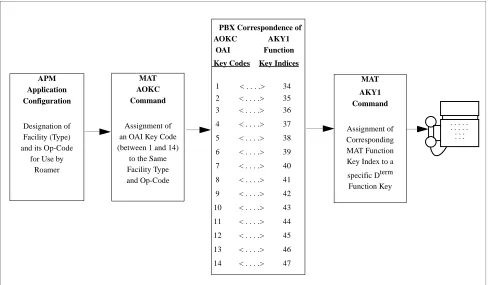
Roamer requires MAT assignment of the Mode Set Facility (MSF) to an
OAI-assigned function key on all Dterms affected by application. This process involves
assigning the MSF and its Operation Code (Op-Code), configured for Roamer in the APM Application Configuration option, to one of the 14 OAI Key Codes. (The MSF Op-Codes range from 128 to 191. These are available for on-screen viewing through the Providers command in the APM Application Configuration option.) Each of the OAI Key Codes corresponds to an AKY1 Function Key Index (FKI)
value which is then assigned to the specific Dterm function key. This process is
illustrated below:
Figure 4-1 OAI Function Key Assignment
A knowledge of the Dterm stations in the NEAX system and which ones will have
access to Roamer is necessary to making the following assignments:
APM Application Configuration
Designation of Facility (Type) and its Op-Code
for Use by Roamer
MAT AOKC Command
Assignment of an OAI Key Code (between 1 and 14)
to the Same Facility Type and Op-Code MAT AKY1 Command Assignment of Corresponding MAT Function Key Index to a
specific Dterm Function Key
. . . . . . . . . . . . . . . . PBX Correspondence of
AOKC AKY1 OAI Function Key Codes Key Indices
1 < . . . .> 34 2 < . . . .> 35 3 < . . . .> 36
4 < . . . .> 37
5 < . . . .> 38
6 < . . . .> 39
7 < . . . .> 40
8 < . . . .> 41
9 < . . . .> 42
10 < . . . .> 43
11 < . . . .> 44
12 < . . . .> 45
13 < . . . .> 46
Page 16 NDA-30016 Revision 3.0
MAT Assignments Roamer Installation Guide
AOKC Command: (Assignment of OAI Key Codes)
This command is used to associate the MSF facility and its operation code that was configured in the APM for Roamer to one of the 14 OAI Key Codes in the MAT.
1. Select an unused OAI Key Code from 1 to 14. To determine what Key Codes are available for assignment, use the LOKC command to list the AOKC Key Codes that are already assigned.
2. Enter MSF as the facility to be assigned to the selected Key Code, using the val-ues on the screen.
3. Enter the same Op-Code that was configured for Roamer in the APM. If neces-sary, retrieve it using the Providers command on the APM Configuration Entry screen.
AKY1 Command: (Assignment of D
termFunction Key)
This command is used to assign key data on the Dterms that are to have access to
Roamer.
MAT Function Key Indexes #34 to #47 have been designated for use in the OAI system and correspond to the 14 OAI Key Codes as illustrated on the previous
page. The AKY1 command is used to assign a Dterm function key to the specific
MAT Function Key Index that, in turn, corresponds to the previously assigned OAI
Key Code. This command must be used to assign the function key on each Dterm
that is to be set up with access to Roamer.
1. Enter the same tenant number that is configured for Roamer in the APM
Appli-cation Configuration option (i.e., Tenant Number on page 8).
2. Enter the station number of the Dterm on which the function key is being
as-signed.
3. Enter to the Dterm function key field the MAT Function Key Index that
NDA-30016 Revision 3.0 Page 17
Roamer Installation Guide MAT Assignments
Figure 4-2 OAI Function Key Assignment Example
In the example illustrated in Figure 4-2 above, MSF #129 is configured for Roamer
and is assigned through the AOKC command to OAI Key Code 10. OAI Key Code
10 corresponds in the PBX to MAT Function Key Index 43. Each Dterm in the
system that is to access Roamer has function key 3 assigned to MAT Function Key Index 43 via the AKYI command. Now, for the duration of Roamer’s lifetime,
whenever a phone user presses function key 3 on any assigned Dterm, MSF 129
initiates communication with Roamer.
Assignment of Free Location Feature
ASYD Command:
(Assignment of
System Data)
Make the following setting: Sys 1 Index 4 bit 4 – Enter 1 (Yes) to enable the Free Location Feature.
Note: If OAI goes down and the logical and physical number sets are the same, dis-abling this Free Location Feature disables all relocated logical numbers and only physical number assignments are accessible.
APM Application Configuration Roamer configured for MSF #129 MAT AOKC Command OAI Key code #10 given MSF facility type
and Op-Code #129 MAT AKY1 Command Function Key Index #43 assigned to
Dterm Function Key #3
. . . . . . . . . . . . . . . . PBX Correspondence of
AOKC AKY1 OAI Function Key Codes Key Indices
1 < . . . .> 34 2 < . . . .> 35 3 < . . . .> 36
4 < . . . .> 37
5 < . . . .> 38
6 < . . . .> 39
7 < . . . .> 40
8 < . . . .> 41
9 < . . . .> 42
10 < . . . .> 43
11 < . . . .> 44
12 < . . . .> 45
13 < . . . .> 46
14 < . . . .> 47
Page 18 NDA-30016 Revision 3.0
MAT Assignments Roamer Installation Guide
Assignment of Numbering Plan to Support Free Location Feature
ANPD Command:
(Assignment of
Numbering Plan
Data)
This command is used to assign the actual first digit and the total number of digits for the set of physical numbers and again for the logical numbers. For instance, if the physical numbers are to be four digits long and lie in the range between 3000 to 3999, the first digit is 3 and the total number of digits is 4. The logical numbers can be the same first digit and total number of digits. Remember, use the same tenant number that was configured for Roamer.
ASPA Command:
(Assignment of
Special Access
Code)
This command is then used to associate the first digit, assigned through ANPD, with a kind of service. In ASPA, assign the logical and physical number(s) from ANPD to STN – Station Number Level. Use the tenant number configured for Roamer and the same connection status index that was used in ANPD.
ASDT Command:
(Assignment of
Station Data)
Finally, this command is used to associate each physical (station) number from
ANPD to the actual Dterm,or station, Line Equipment Number (LENS) and
telephone class. Again, use the same tenant number.
Note: Now that MAT assignments for logical and physical numbers are complete and correspond to the Roamer database, when a telephone user enters a logical num-ber, the NEAX performs the following processes:
a. It reads the first digit and the total number of digits according to the ANPD assignment.
b. It finds that the first digit is assigned to station service through the ASPA. c. It checks to see if the Free Location Feature (FLF) is enabled.
d. If FLF is enabled, from its database Roamer provides the physical number associated to that logical number.
e. Then the NEAX reads the ASDT to find out what actual Dterm is associated to that physical number and makes the change in assignment.