
(Tip1/Ring1) Primary or Call Stacker Line 1 Input
6
0
0
Full text
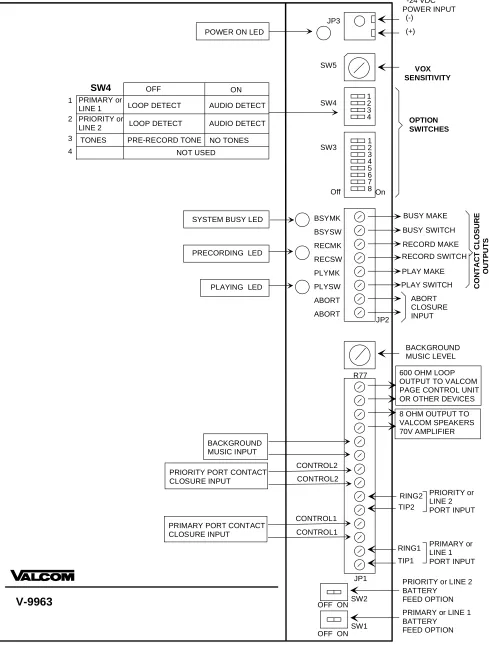
(2) Control 2 Input (for Priority Port or Line 2). INSTALLATION/CONNECTIONS Cabling It is recommended that Category 3 or 5 twisted telephone wire be used in all Valcom speaker installations. A screw type connector strip is provided to allow connection of all wiring to the V9963.. Use External Dry Contact Closure to activate “Begin Recording” sequence.. Mounting. Line Out. The V-9963 is wall mountable using ½” screws.. 8 ohm output connects to Self-Amplified Valcom Speakers, Amplifier Inputs or other audio devices.. BGM Input External low-level music source (Ex: V-2952).. Terminal Connection Access Loop Out. NOTE: Remove the small side panel to access all controls and terminations. To remove panel, loosen the two screws holding the panel in place and lift panel away from the board.. 600 ohm output connects to T/R input of Valcom Multi-Zone Page Controllers or other audio devices.. R77 Adjustment Pot. Audio Treatment. Adjusts Background Music Level output.. NOTE: If the input signal to the V-9963 exceeds the nominal levels specified, attenuate the signal with a V-1092. This situation would apply when the zone output of a Valcom Talkback Page Control is used as a One-Way Page input to the V-9963.. Abort To abort a message during play, use the External Contact Closure input to manually stop message broadcasting.. (Tip1/Ring1) Primary or Call Stacker Line 1 Input. NOTE: To abort a message during “Record Sequence,” press any number on the dial pad of the telephone.. The primary input is the path normally used to access the unit for recording and playback of a page. Access Method Switch Settings Loop Start Trunk Port Key System C.O.Line Key Stand Alone Telephone Set Page Port w/Contact Closure Page Port w/o Cont. Closure Valcom Page Cntrl. Output V-9940 (600 ohm Output) V-9970 Output using C.C.. SW1 ON SW1 ON SW1 ON SW1 OFF SW1 OFF SW1 OFF SW1 ON SW1-OFF. Contact Closure Outputs. SW4-1 OFF SW4-1 OFF SW4-1 OFF SW4-1 OFF SW4-1 ON SW4-1 ON SW4-1 OFF SW4-1 OFF. (PLAY) PLYSW and PLYMK Normally Open Contact Closure output that is closed while message plays. (RECORD) RECSW and RECMK Normally Open Contact Closure output that is closed while message records.. (Tip2/Ring2) Priority or Call Stacker Line 2 Input. (BUSY) PRISW and PRIMK Normally Open Contact Closure output that is closed when unit cannot accept any more pages.. Priority access will override primary input activity. Access Method Switch Settings. Setting Program Dip Switches. Loop Start Trunk Port Key System C.O.Line Key Stand Alone Telephone Set Page Port w/Contact Closure Page Port w/o Cont. Closure Valcom Page Ctrl. Output V-9940 (600 ohm Output) V-9970 Output using C.C.. SW2 ON SW2 ON SW2 ON SW2 OFF SW2 OFF SW2 OFF SW2 ON SW2 OFF. SW4-2 OFF SW4-2 OFF SW4-2 OFF SW4-2 OFF SW4-2 ON SW4-2 ON SW4-2 OFF SW4-2 OFF. There are several controls and switches on the board for programming the options of the V-9963. Refer to Figure 1 (page 4) for location of switches and controls. All Dip Switches (OFF – Left) (ON – Right) SW1: Primary Port or Line 1 Battery Feed No battery feed supplied to primary port OFF Battery feed supplied to primary port ON. Control 1 Input (for Primary Port or Line 1) Use External Dry Contact Closure to activate “Begin Recording” sequence. (Also see Note for switch 4-3). 2. 947008.
(3) SW2: Priority Port or Line 2 Battery Feed No battery feed supplied to primary port OFF Battery feed supplied to primary port ON. SW3. NOTE: This option is effective only when the inputs are set at Loop Detect (SW 4-1 OFF). SW4-4: Normal or Call Stacker Mode 2 Inputs – Primary and Priority OFF 2 Inputs will function as Call Stacker ON. The 8-position dipswitch provides:. SW3-1: DTMF Signaling Options No DTMF signal (single zone) DTMF signal accepted (multi-zone). Other Switches and Controls OFF ON. SW5:. SW3-2, SW3-3: Number of digits to receive before recording announcement. 1 digit SW3-2 OFF SW3-3 OFF 2 digits SW3-2 ON SW3-3 OFF 3 digits SW3-2 OFF SW3-3 ON 4 digits SW3-2 ON SW3-3 ON SW3-4: Priority Port Mode Records primary and priority pages, Priority page broadcasts first Priority page broadcasts in real time. Primary page in progress is recorded and is broadcast after priority page.. SW5 0 1 2 3 4 5 6 7. OFF. SW5 8 9 A B C D E F. Level -28dBm -29dBm -30dBm -31dBm -32dBm -33dBm -34dBm -35dBm. LED Indicators PLAY: Illuminates when announcement is playing. RECORD: Illuminates during recording of the announcement. BUSY: Illuminates if, for any reason the unit cannot accept any more pages. POWER: Illuminates when –24 Vdc and GND is applied to the unit.. Pre-Page Alert Tones SW3-6 OFF SW3-7 OFF SW3-6 ON SW3-7 OFF SW3-6 OFF SW3-7 ON SW3-6 ON SW3-7 ON. TECHNICAL ASSISTANCE When trouble is reported, verify the unit is turned on and there are no broken connections leading to the unit.. SW3-8: Inter-Page Timing 1 second between pages OFF 3 seconds between pages ON SW4. Level -20dBm -21dBm -22dBm -23dBm -24dBm -25dBm -26dBm -27dBm. ON. SW3-5: Message Playback Control Play message once OFF Play message twice ON SW3-6, SW3-7: No Tone Single Tone Dual Tone Quad Tone. VOX Sensitivity - sets threshold for detection of audio on the primary and priority ports.. Assistance in troubleshooting is available from the factory. When calling, you should have a VOM and a telephone test set available and be calling from the job site. Call (540) 427-3900 and ask for Technical Support, or (540) 427-6000 for Valcom 24-hour Automated Support or visit our website at http://www.valcom.com.. The 4-position dip switch provides:. SW4-1: Primary or Line 1 Page Access Loop Detect OFF Audio Detect (VOX) ON. VALCOM equipment is not field repairable. VALCOM maintains service facilities in Roanoke, VA. Should repairs be necessary, attach a tag to the unit clearly stating your company name, address, phone number, contact person, and the nature of the problem. Send the unit to: Valcom, Inc. Repair and Return Dept. 5614 Hollins Road Roanoke, VA 24019-5056. SW4-2: Priority or Line 2 Page Access Loop Detect OFF Audio Detect (VOX) ON SW4-3: Pre “Record” Tone (Enable/Disable) Normal (3 sec. delay of “Ready to Record” OFF tone and “Recording Sequence”) Enable No tones are issued when “Recording ON Sequence” is activated. Allows immediate Disable “Record Activation” with a contact closure.. 3. 947008.
(4) -24 VDC POWER INPUT (-). JP3. (+). POWER ON LED. SW5. SW4. 1 2 3 4 1 2 3 4 5 6 7 8 On. SW3. Off. SYSTEM BUSY LED. PRECORDING LED. PLAYING LED. OPTION SWITCHES. BSYMK. BUSY MAKE. BSYSW. BUSY SWITCH. RECMK. RECORD MAKE. RECSW. RECORD SWITCH. PLYMK. PLAY MAKE. PLYSW. PLAY SWITCH. ABORT ABORT. JP2. CONTACT CLOSURE OUTPUTS. SW4 OFF ON 1 PRIMARY or LOOP DETECT AUDIO DETECT LINE 1 2 PRIORITY or LOOP DETECT AUDIO DETECT LINE 2 3 TONES PRE-RECORD TONE NO TONES 4 NOT USED. VOX SENSITIVITY. ABORT CLOSURE INPUT. BACKGROUND MUSIC LEVEL R77. 600 OHM LOOP OUTPUT TO VALCOM PAGE CONTROL UNIT OR OTHER DEVICES 8 OHM OUTPUT TO VALCOM SPEAKERS 70V AMPLIFIER. BACKGROUND MUSIC INPUT PRIORITY PORT CONTACT CLOSURE INPUT. CONTROL2 CONTROL2 RING2 PRIORITY or LINE 2 TIP2 PORT INPUT CONTROL1. PRIMARY PORT CONTACT CLOSURE INPUT. CONTROL1 RING1 TIP1 JP1. V-9963. OFF ON. SW2. SW1 OFF ON. PRIMARY or LINE 1 PORT INPUT. PRIORITY or LINE 2 BATTERY FEED OPTION PRIMARY or LINE 1 BATTERY FEED OPTION. FIGURE 1: CONNECTIONS AND CONTROLS (ACCESSIBLE WITH SIDE PANEL REMOVED). 4. 947008.
(5) P A G E P O R T A C C E S S V -9 9 6 3. A u d io T E L E P H O N E S Y S T E M. T IP 1 R IN G 1. C o n ta c t C lo s u r e ( o p tio n a l). L IN E O U T L IN E O U T. C O N T R O L 1 C O N T R O L 1. S IN G L E Z O N E A U D IO T ip T E L E P H O N E S Y S T E M. U p to 1 5 0 V a lc o m A m p lifie d S p e a k e r s. T. R in g R. V -9 9 6 3. Z o n e O u tp u t. V A L C O M M u lti- Z o n e C o n tro l U n it. O U T P U T. T IP 1 R IN G 1. U p to 1 5 0 V a lc o m A m p lifie d S p e a k e r s. L IN E O U T L IN E O U T. S T A T IO N L E V E L A C C E S S V -9 9 4 0 C . O . L IN E , C E N T R E X O R P A B X S T A T IO N L E V E L A C C E S S. T ip T. R in g. R. V -9 9 6 3 T IP 1 R IN G 1. 6 0 0 O h m O u tp u t. - O R. V -9 9 6 3. V -9 9 7 0 C . O . L IN E , C E N T R E X O R P A B X S T A T IO N L E V E L A C C E S S. U p V a A m S p. L O O P S E T T IN G. T ip T. R in g. R. 8 O h m. to 1 5 0 lc o m p lifie d e a k e rs. T IP 1 R IN G 1. O u tp u t. C O N T R O L 1 C O N T R O L 1. C .C .O u tp u t. 7 0 V A M P L IF IE R V -9 9 6 3 T IP 1 R IN G 1. T E L E P H O N E S Y S T E M. A M P L IF IE R A U D IO IN P U T. L IN E O U T L IN E O U T. O U T P U T M U T E C O N T A C T. P L Y S W P L Y M K. 2 5 o r 7 0 V S p e a k e rs. M U L T I-Z O N E P A G E C O N T R O L V -9 9 6 3 L O O P S T A R T T R U N K P O R T O R S T A N D A R D T E L E P H O N E S E T. T IP 1 R IN G 1. T IP R IN G. 6 0 0 O H M O U T P U T. M U L T I-Z O N E 1 -W A Y P A G E C O N T R O L. U p to 1 5 0 V a lc o m A m p lifie d S p e a k e r s. L O O P S T A R T A C C E S S V -9 9 6 3 L O O T R U S T A T E L. P. S T A N K P O N D A R E P H O. D. R T R T O R. N E. T IP 1 R IN G 1. U p to 1 5 0 V a lc o m A m p lifie d S p e a k e r s. L IN E O U T. S E T. F IG U R E 2 - S IM P L IF IE D. B L O C K. D IA G R A M. O F T Y P IC A L C O N F IG U R A T IO N S. ( P o w e r c o n n e c tio n s n o t s h o w n ). 5. 947008.
(6) VALCOM LIMITED WARRANTY Valcom, Inc. warrants its products to be free from defects in materials and workmanship under conditions of normal use and service for a period of one year from the date of shipment. The obligation under this warranty shall be limited to the replacement, repair or refund of any such defective device within the warranty period, provided that: 1. 2. 3. 4. 5.. inspection by Valcom, Inc. indicates the validity of the claim, the defect is not the result of damage, misuse, or negligence after the original shipment, the product has not been altered in any way or repaired by others and that factory sealed units are unopened (A service charge plus parts and labor will be applied to units defaced or physically damaged), freight charges for the return of products are prepaid, all units 'out of warranty' are subject to a service charge. The service charge will cover minor repairs (Major repairs will be subject to additional charges for parts and labor).. This warranty is in lieu of and excludes all other warranties, expressed or implied, and in no event shall Valcom, Inc. be liable for any anticipated profits, consequential damages, loss of time or other losses incurred by the buyer In connection with the purchase, operation or use of the product. This warranty specifically excludes damage incurred in shipment. In the event a product is received in damaged condition, the carrier should be notified immediately. Claims for such damage should be filed with the carrier involved in accordance with the F. O. B. point. In Canada: Headquarters: CMX Corporation Valcom, Inc. 35 Van Kirk Drive #11 and 12 1111 Industry Avenue Brampton, Ontario L7A1A5 Roanoke, VA 24013 Phone: (905) 456-1072 Phone: (540) 427-3900 FAX: (905) 456-2269 FAX: (540) 427-3517. 6. 947008.
(7)
Figure
Related documents
