P
ROGRAMMERS
,
T
HIRD
E
DITION
JOHN
C. BYRNE
Australia, Brazil, Japan, Korea, Mexico, Singapore, Spain, United Kingdom, United States Charles River Media
herein may be reproduced, transmitted, stored, or used in any form or by any means graphic, electronic, or mechanical, including but not limited to photocopying, recording, scanning, digitizing, taping, Web distribution, information networks, or information storage and retrieval systems, except as permitted under Section 107 or 108 of the 1976 United States Copyright Act, without the prior written permission of the publisher.
Sun, Sun Microsystems, the Sun logo, Java, JavaBeans, and all trademarks and logos that contain Sun, Solaris, or Java, are trademarks or registered trademarks of Sun Microsystems, Inc. or its subsidiaries in the United States and other countries. Microsoft, Windows, and Internet Explorer are either registered trademarks or trademarks of Microsoft Corporation in the United States and/or other countries. Apache Tomcat and Tomcat are trademarks of the Apache Software Foundation. Eclipse, Built on Eclipse, and Eclipse Ready are trademarks of Eclipse Foundation, Inc. LegacyJ is the property of LegacyJ Corp.
SoftwareMining is a trademark of SoftwareMining, UK.
All other trademarks are the property of their respective owners.
Library of Congress Control Number: 2008931028
ISBN-13: 978-1-59863-565-5
ISBN-10: 1-58450-565-6
Course Technology
25 Thomson Place Boston, MA 02210 USA
Cengage Learning is a leading provider of customized learning solutions with office locations around the globe, including Singapore, the United Kingdom, Australia, Mexico, Brazil, and Japan. Locate your local office at: international. cengage.com/region
Cengage Learning products are represented in Canada by Nelson Education, Ltd.
For your lifelong learning solutions, visit courseptr.com
Visit our corporate website at cengage.com
John C. Byrne
Publisher and General Manager, Course Technology PTR: Stacy L. Hiquet
Associate Director of Marketing: Sarah Panella
Content Project Manager: Jessica McNavich
Marketing Manager: Mark Hughes
Acquisitions Editor: Mitzi Koontz
Development Editor and
Technical Reviewer: Arron Ferguson
Project Editor and Copy Editor: Kim Benbow
CRM Editorial Services Coordinator: Jen Blaney
Interior Layout: Jill Flores
Cover Designer: Mike Tanamachi
CD-ROM Producer: Brandon Penticuff
Indexer: Jerilyn Sproston
Proofreader: Ruth Saavedra
Printed in the United States of America 1 2 3 4 5 6 7 11 10 09
For product information and technology assistance, contact us at
Cengage Learning Customer & Sales Support, 1-800-354-9706
For permission to use material from this text or product, submit all requests online at cengage.com/permissions
Further permissions questions can be emailed to
Introduction xvi
Part I Introducing Java 1
1 Objects and Classes 3
The COBOL Subroutine 4
Calling a Subroutine 4
MYSUB COBOL 5
CALLER COBOL 6
CALLER COBOL: CONTROL 7
Terms to Review: Subroutines 9
Objects and Java 10
ErrorMsg Class 11
Caller Class 12
Terms to Review: Objects 13
2 Introducing the Java Development Environment 17
Runtime Interpretation and Java Byte Codes 17
Getting Started with Java’s SDK 21
Applets with SDK 24
Classes and Filenames 26
CLASSPATH 27
CODEBASE 28
Packages 28
Inside a Package 29
Name Collisions 31
Packages and Filenames 32
Compressed Packages 33
Applications vs. Applets 34
Reviewing the Samples 34
3 Messages and Methods 37
MYSUB COBOL 38
CALLER COBOL 39
Messages in Java 40
ErrorMsg Class 40
Caller Class 41
Multiple Messages 41
Class ErrorMsg 41
Method Overloading 43
Caller Class 43
Method Overloading in COBOL 44
MYSUB COBOL 44
CALLER COBOL 46
Terms to Review 48
Exercises: Classes, Objects, and Methods 48
Reviewing the Samples 57
HelloWorld: The Application 61
HelloWorld: The Applet 62
4 Class Members 65
MYSUB COBOL 66
MYSUB COBOL: ACTION-SWITCH 68
Java Variables 68
ErrorMsg Class 69
Classes, Objects, and Members Review 71
Objects and COBOL 72
Using Objects in Java 76
Java Data Members 77
ErrorMsg Class 78
Caller Class 78
Local Variables 79
Primitive Data Types 80
Arrays 83
Arrays as Parameters 87
Method Members 87
ErrorMsg Class: Static Variable 88
ErrorMsg Class: Static Initializer 88
Constructors 89
Exercises: Class Members 91
Reviewing the Samples 99
5 Inheritance, Interfaces, and Polymorphism 101
Inheritance and Object-Oriented Design 101
Inheritance and Objects 103
Inheriting Methods 103
Caller Class 104
Redefining a Method 105
ErrorMsg Class 105
Extending a Method 106
ErrorMsg Class 106
Caller Class 108
Why Inheritance? 108
Inheritance, Objects, and COBOL 109
NEWSUB COBOL 109
NEWSUB COBOL: MYSUB 110
More COBOL Object-Oriented Design Patterns 112
CALLER COBOL 114
MYSUB COBOL 116
Inheritance and Java 119
ErrorMsg Class 120
PopupErrorMsg Class 120
PrintfileErrorMsg Class 120
TextMessage Class 121
ErrorMsg Class 121
PopupErrorMsg Class 122
PrintfileErrorMsg Class 122
Consumer Class 122
TextMessage Class 123
ErrorMsg Class 123
ErrorMsg Class: Override 124
PopupErrorMsg Class 124
PrintfileErrorMsg Class 124
Consumer Class 124
PrintfileErrorMsg Class 125
Sharing Variables and Methods 126
Hiding Variables and Methods 126
The this Variable 127
Java Interfaces 128
PrintfileErrorMsg Class 129
Caller Class 130
Using Interfaces 130
Hiding Methods and Members 131
Polymorphism 132
Exercises 133
Reviewing the Samples 144
Part II Java’s Syntax 147
6 Java Syntax 149
COBOL vs. Java Syntax 149
Java Statements 150
Java Comments 152
Java Operators 153
Binary Arithmetic Operations 154
Understanding Reference Variables with COBOL 159
Exercises: Java’s Syntax 160
Reviewing the Exercises 165
7 Flow Control 167
Code Block 168
The if Statement 168
The while Statement 172
The do...while Statement 174
The for Statement 175
The switch Statement 176
The break, continue Statements 177
Exercises: Flow Control 181
8 Strings, StringBuffers, StringBuilders, Numbers, and BigNumbers 189
Strings 189
Comparing Strings 191
Working with Strings 193
Numeric Wrapper Classes 196
StringBuffers 200
BigNumbers 202
Exercises: Strings, StringBuffers, Numbers, and BigNumbers 208
Reviewing the Exercises 216
9 Exceptions, Threads, and Garbage Collectors 219
Exception Class Hierarchy 221
Creating Exceptions 221
Using Exceptions 223
Exception-Processing Suggestions 228
Exception-Processing Summary 229
Threads 229
Inheriting from Thread 230
Implementing Runnable 232
Synchronization 233
Benefits and Cautions 235
Garbage Collection 236
Exercises: Java’s Exceptions and Threads 237
Reviewing the Exercises 240
10 I/O in Java 243
Streams vs. Record-Based I/O 244
The File Class 246
InputStream and OutputStream 249
Readers and Writers 254
RandomAccessFile 256
Exercises 258
Reviewing the Exercises 262
11 Java Collections 263
Collections Background 264
Ordered Collections: Vectors and ArrayLists 266
Keyed Collections: Hashtable and HashMap 270
Other Collections 271
Iterators 272
Ordering and Comparison Functions 273
Exercises: Java Collections 275
Reviewing the Exercises 278
12 Other Java Topics 279
Graphical User Interface Development 279
Properties Files 281
Java Utilities 282
Jar Utility 282
Javadoc Utility 284
Exercises 287
Reviewing the Exercises 289
Part III Introducing Enterprise Java 291
13 Java Database Connectivity 293
How JDBC Works 294
Connecting to the Database 296
Inserting, Updating, and Deleting 300
Configuring the JDBC-ODBC Bridge 301
Exercises 302
Reviewing the Exercises 304
14 Servlets and Java Server Pages 305
Browsers and Web Servers 306
The Servlet as Transaction Processor 308
Servlet Protocol 310
Java Server Pages 313
Getting Started with Servlets and JSPs 316
Exercises 317
Reviewing the Exercises 320
15 Introduction to Enterprise JavaBeans 321
Distributed Computing 322
The Different Kinds of EJBs 323
Container Services 324
The Interfaces and the Implementation Class 325
Accessing the Bean from the Client 327
Exercises 327
Reviewing the Exercises 328
16 Introduction to XML 329
The Basics 330
XML vs. HTML 330
Document Type Definitions (DTDs) 332
DTD Components 333
Elements 334
Attributes 335
XML Declaration 337
A Complete XML Document 338
XML Schemas 339
Authoring XML Documents 339
XML and Java 339
XML and HTML 340
Where to Use XML 341
Electronic Data Interchange (EDI) 342
Online XML or Web Services 343
XML and OAG 344
Other Opportunities 351
Exercises 352
Reviewing the Exercises 354
17 Introducing Eclipse 355
Installing Eclipse 356
Start Using Eclipse 356
Make a New Eclipse Project 358
Run with Eclipse 362
Debug with Eclipse 362
Refactoring with Eclipse 363
Part IV Appendixes 369
Appendix A: About the CD-ROM 371
Exercises 371
Java SDK 371
LegacyJ 372
Eclipse 372
SoftwareMining 373
Case Studies 373
Appendix B: Java Information Available Elsewhere 375
Java Resources 375
Java Magazines 375
Java Tools 376
COBOL Information 376
Appendix C: Buzzwords 377
Active Server Pages (ASP) 377
AWT 378
Client/Server 378
Common Object Request Broker Architecture (CORBA) 379
Components 380
Component Object Model (COM) 380
Distributed Component Object Model (DCOM) 381
Enterprise JavaBeans (EJBs) 381
File Transfer Protocol (FTP) 382
Firewall 382
Hypertext Transfer Protocol (HTTP) 383
Integrated Development Environment (IDE) 383
Interface Definition Language (IDL) 383
Internet Inter-ORB Protocol (IIOP) 384
JavaBeans 384
Java Native Interface (JNI) 384
JavaScript 385
Java Server Pages (JSP) 385
JDBC 385
Microsoft Foundation Classes (MFC) 386
Remote Method Invocation (RMI) 386
Remote Procedure Call (RPC) 387
Secure Sockets Layer (SSL) 387
Swing 388
TCP/IP 388
Unified Modeling Language (UML) 389
Uniform Resource Locator (URL) 389
VBScript 390
Web Services 390
Appendix D: Sun Microsystems, Inc.
Binary Code License Agreement 391
It has been more than 10 years since Sun first announced the Java programming language. It is safe to say that few technologies have generated similar excitement, interest, and allegiance. The promise of this new, cross-platform, object-oriented language with its simplified syntax has garnered the support of large numbers of de-velopers, tool vendors, industry experts, and, of course, the occasional consultant.
To its credit, Java has more than lived up to its potential. Today, Java is used to build all types of products and systems, from enterprise class accounting systems to handheld phones and personal computers and everything in between.
While all this excitement is going on, the day-to-day responsibilities of an MIS shop continue. Applications need to be rolled out, existing systems supported, and an occasional enhancement delivered. Many of these systems use legacy tools, such as COBOL, and are fundamental to the operation of the business. The people who support these systems are valuable repositories of business process information, and they know how computer systems are used to meet those business process re-quirements.
Scores of organizations have decided to replace these legacy systems, including their core business systems, with more modern ones written in Java. Most could probably use a rewrite in any case, and the allure of using new technology, includ-ing a new language, will likely overwhelm more than one VP of MIS. Who better to build these new systems than the people who understand how the business works? Does it make sense to assign these essential projects to the person who is writing his or her first business system?
Some of Java’s development efficiencies are available in any language, includ-ing COBOL. For example, codinclud-ing styles that make use of subroutines implement important OO design principles. Many large, well-designed COBOL application development environments necessarily define and support good OO design tech-niques in the form of subroutines, copy members, and coding standards.
run-time tools aware of good, efficient coding techniques that have been in use for some time in traditional languages.
A natural language is the tool people use to communicate ideas to each other. Languages have a syntax and a vocabulary of terms that provide structure and or-ganization to ideas. If one person adheres to the rules and provides a linguistic shape and organization to his or her ideas, it is possible to communicate with an-other person.
Computer languages perform very much the same role. Computer languages define a vocabulary and syntax structure that is suitable for a computer to under-stand. Programmers learn these rules and convert ideas into code. A programmer’s effectiveness is largely determined by how well he or she can communicate with the computer. (Of course, there is the testing, training, documentation, and support parts of the job, but programmers would be better off reading Dr. Spock rather than Dr. Chomsky to gain insights here!)
When people learn a new natural language, they often compare the new terms and syntax with what is already familiar to them. Language learning materials often have glossaries or translations of terms. The new syntax is defined, in part, by com-paring it to the student’s “native” syntax. In fact, most people who learn a new lan-guage think in their native lanlan-guage and mentally translate into the other. Only when they are very comfortable with the new language will they finally think in the new language.
Instead of describing the Java object concepts and syntax in the abstract, or based on references using C or C++ programming languages, Java for COBOL Pro-grammers, Third Editionpresents various object-oriented concepts first in a COBOL context, and then in the Java syntax that supports this concept. Then, after you are familiar with the underlying concepts, additional Java language rules are defined.
For programmers trying to use Java in a real-world environment, this third edi-tion has been updated to reflect the latest developments in the Java language and programming standards. Advances in the language, such as the new Generics fea-ture, are covered. New alternatives for stream-based input and output processing methods are introduced, along with the latest XML processing options in Java.
Also new in this edition is a chapter on the Eclipse graphical integrated devel-opment environment. This product is presented using a guided, step-by-step pro-gression. You can use the chapter exercises to explore helpful Eclipse features, such as smart editing, debugging, and refactoring.
need to understand the user’s needs, and specifications and documentation are still required. You may even be able to adjust end-user requirements based on technical issues, since it is expected that existing components will be reused. In theory, most development projects in an OO environment consist of collecting and shaping end-user requirements and then “assembling” solutions, using as many existing building blocks as possible.
3
Objects and Classes
1
Java’s popularity is due to a number of factors. One of the biggest reasons is that it is a popular object-oriented language.
This sounds impressive, but what exactly is an object-oriented language? In fact, what is an object?
Simply put, an objectis a collection of code organized to perform a function or simply to retain some information on behalf of another program. Objects are cre-ated and then used by programs to perform these functions on behalf of the other programs.
Object-oriented (OO) languages, and the object-oriented design approach, contain many ideas already familiar to you. Chapters 1 through 5 will start by de-scribing these concepts, based on the COBOL language. I will then compare Java’s definition of objects, and the syntax that supports it, to these concepts. This should help you acquire a good understanding of the basic object-oriented concepts.
In This Chapter
The COBOL Subroutine Calling a Subroutine
Terms to Review: Subroutines Objects and Java
T
HECOBOL S
UBROUTINEI’ll start with the COBOL subroutine. A COBOL subroutine is a source file that contains COBOL code and implements a logical function. It is organized so that other programs can prepare the appropriate information, call the subroutine, and perform the function. Subroutine parameters are described in the LINKAGE SEC-TION of the subroutine. The subroutine is able to evaluate or modify passed para-meters as part of its algorithm.
The calling program uses a subroutine when it defines and prepares the para-meter items for the subroutine, and then calls it. The parapara-meters are passed to the subroutine, using the CALL SUBROUTINE USING statement. After the subrou-tine completes its function, the calling program can examine the parameter items to see the information returned by the subroutine.
C
ALLING AS
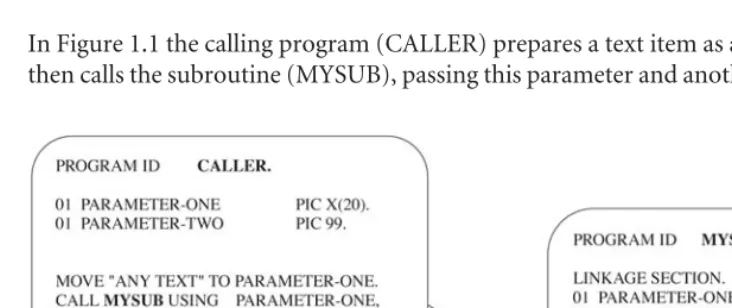
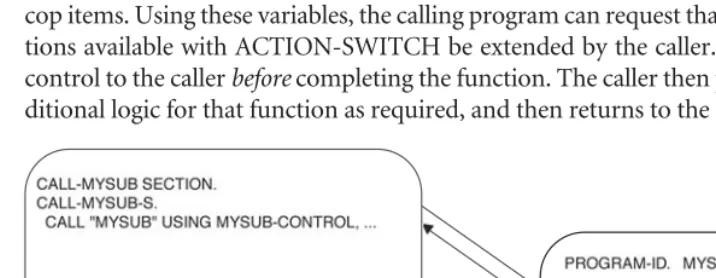
UBROUTINEIn Figure 1.1 the calling program (CALLER) prepares a text item as a parameter. It then calls the subroutine (MYSUB), passing this parameter and another parameter.
[image:23.556.72.438.333.487.2]The subroutine accepts both of these parameters. Its algorithm is roughly de-fined as follows: Evaluate the first parameter and set the second, based on some pre-defined criteria. The details of the evaluation function (that is, the heart of the subroutine’s algorithm) are embedded in the subroutine.
FIGURE 1.1
The calling program can now evaluate the return parameter, in effect using the evaluation logic of the subroutine. The calling program only needs to know how to call the subroutine and how to evaluate the result of that call. It does not need to know any other details of the subroutine’s internal logic.
Objects behave in much the same manner. An object is a collection of code that accepts parameters, implements a function, and returns information to the calling program. Objects, however, differ from a standard COBOL subroutine in a num-ber of ways. One important difference is that objects are created dynamically (at runtime) by a program. They are always associated with, or “tied to,” the program that created them. Furthermore, a program can create many objects of the same type, or class.
An object can be understood as a subroutine called with a particular set of linkage items.
MYSUB COBOL
Suppose you’ve defined a subroutine as follows:
IDENTIFICATION DIVISION. PROGRAM-ID. MYSUB.
*********************************************************************** *
* This routine accepts a text item as a parameter and evaluates the *
* text. If the text is all spaces, MSG-SIZE will be set to 0. Else, *
* MSG-SIZE will be set to 1. *
* The text item will also be stored in the passed control structure in *
* MSG-TEXT. *
*********************************************************************** *
DATA DIVISION.
WORKING-STORAGE SECTION.
* These are the subroutine parameter definitions. LINKAGE SECTION.
01 MYSUB-CONTROL.
01 TEXT-STRING PIC X(20).
* This is the interface definition for the subroutine. PROCEDURE DIVISION USING MYSUB-CONTROL, TEXT-STRING. MYSUB-INITIAL SECTION.
MYSUB-INITIAL-S.
* Perform the subroutine’s function. Test the passed string for spaces * and set MSG-SIZE accordingly.
IF TEXT-STRING = SPACES MOVE 0 TO MSG-SIZE ELSE
MOVE 1 TO MSG-SIZE. MOVE TEXT-STRING TO MSG-TEXT. EXIT-PROGRAM.
EXIT PROGRAM.
CALLER COBOL
Now, suppose you’ve written a calling program that uses this subroutine:
IDENTIFICATION DIVISION. PROGRAM-ID. CALLER. DATA DIVISION.
WORKING-STORAGE SECTION.
* Create the parameter definitions. 01 MYSUB-CONTROL.
03 MSG-TEXT PIC X(20). 03 MSG-SIZE PIC 9(8). 01 TEXT-STRING PIC X(20). PROCEDURE DIVISION.
START-PROGRAM SECTION. START-PROGRAM-S.
* Prepare the parameters.
MOVE "ANYTEXT" TO TEXT-STRING. * Call the subroutine.
CALL "MYSUB" USING MYSUB-CONTROL, TEXT-STRING. * Evaluate the result.
DISPLAY "MSG SIZE equals," MSG-SIZE. EXIT-PROGRAM.
EXIT PROGRAM. STOP RUN.
Let’s examine these two programs from an object-oriented perspective, using the terminology of the object-oriented design methodology.
You can consider the subroutine MYSUB a class. That is, every time MYSUB is called—even if it is called from different programs—it will behave the same way. Any features, or logic, that MYSUB has will be available to all calling programs. At the same time, some parts of MYSUB are not available to the outside world. For ex-ample, any variables in MYSUB’s WORKING-STORAGE are private to MYSUB. And the details of MYSUB’s logic are not known to any calling programs; only its interface (or LINKAGE SECTION) is published.
You can consider any instance of the parameter item MYSUB-CONTROL in a calling program as an object after MYSUB has been called. That is, after MYSUB has performed its logic (at the request of a calling program), the result of that logic is available in MYSUB-CONTROL.
A calling program can examine or modify the contents of items in MYSUB-CON-TROL (MSG-TEXT or MSG-SIZE) and perform some logic based on those contents. These items are called class data members, or propertiesin OO terminology.
Another program in the COBOL run unit can call MYSUB, with its own MYSUB-CONTROL (parameter), and evaluate the result. In this case, CALLER #1’s copy of MYSUB-CONTROL will, of course, not be affected by CALLER #2. Each in-stance of a MYSUB-CONTROL area will now contain unique information. In this case, the unique MYSUB-CONTROL areas are objects. In fact, a single program can manage two separate MYSUB-CONTROL(s) as long as they have unique names.
CALLER COBOL: CONTROL
Suppose you’ve defined CONTROL areas for two subroutines as follows:
IDENTIFICATION DIVISION. PROGRAM-ID. CALLER. DATA DIVISION.
WORKING-STORAGE SECTION.
* Create one set of parameter definitions. 01 MYSUB1-CONTROL.
03 MSG-TEXT PIC X(20). 03 MSG-SIZE PIC 9(8).
01 MYSUB2-CONTROL.
03 MSG-TEXT PIC X(20). 03 MSG-SIZE PIC 9(8). 01 DISPLAY-MESSAGE PIC X(20). 01 TEXT-STRING PIC X(20). PROCEDURE DIVISION.
PROGRAM-START SECTION. PROGRAM-START-S.
* Prepare the first set of parameters, and call MYSUB. MOVE "ANYTEXT" TO TEXT-STRING.
CALL "MYSUB" USING MYSUB1-CONTROL, TEXT-STRING. * Prepare the second set and call MYSUB.
MOVE SPACES TO TEXT-STRING.
CALL "MYSUB" USING MYSUB2-CONTROL, TEXT-STRING.
* Evaluate the data associated with the first set and then the second * set.
IF MSG-SIZE OF MYSUB1-CONTROL > 0
MOVE MSG-TEXT OF MYSUB1-CONTROL TO DISPLAY-MESSAGE ELSE IF MSG-SIZE OF MYSUB2-CONTROL > 0
MOVE MSG-TEXT OF MYSUB2-CONTROL TO DISPLAY-MESSAGE. DISPLAY "DISPLAY-MESSAGE: ", DISPLAY-MESSAGE.
EXIT-PROGRAM. EXIT PROGRAM. STOP RUN.
You can consider all instances of MYSUB-CONTROL (after MYSUB has been called) to be class instances, or objects. In the example, MYSUB1-CONTROL is one object, and MYSUB2-CONTROL is a second. It is up to the calling program (the consumer of MYSUB) to manage these objects (i.e., the two instances of MY-SUBx-CONTROL) as part of the application logic.
* Prepare the database message parameters, and call MYSUB. MOVE "Unable to connect to the DataBase." TO TEXT-STRING. CALL "MYSUB" USING MYSUB1-CONTROL, TEXT-STRING.
* Prepare the communications message parameters, and call MYSUB. MOVE "Invalid connection request." TO TEXT-STRING.
CALL "MYSUB" USING MYSUB2-CONTROL, TEXT-STRING. * Prepare the generic message parameters, and call MYSUB.
MOVE "An unknown error has occurred." TO TEXT-STRING. CALL "MYSUB" USING MYSUB3-CONTROL, TEXT-STRING. ...
Later on in this program:
* An error has occurred. The type of error has been recorded in * DISPLAY-MSG-TYPE-SW.
* Evaluate which type of error occurred, and display the correct error
* message text item.
IF DISPLAY-MSG-TYPE-SW = "D"
MOVE MSG-TEXT OF MYSUB1-CONTROL TO DISPLAY-MESSAGE ELSE IF DISPLAY-MSG-TYPE-SW = "C"
MOVE MSG-TEXT OF MYSUB2-CONTROL TO DISPLAY-MESSAGE ELSE
MOVE MSG-TEXT OF MYSUB3-CONTROL TO DISPLAY-MESSAGE. PERFORM DISPLAY-ERROR-MESSAGE.
The previous code fragments are examples of how a COBOL program might use three objects. Each of these objects is based on the class MYSUB.
T
ERMS TOR
EVIEW: S
UBROUTINESHere are some of the concepts that have been discussed and how to understand them from a COBOL perspective.
Class:A subroutine is similar to a class. It can perform certain functions when called. The subroutine developer defines these functions. Many calling pro-grams can use this subroutine in order to perform those functions.
Object:An instance of a class, similar to an instance of the COBOL subrou-tine’s CONTROL area, after the subroutine has been called. You can think of an object as the result of initializing the subroutine or calling it for the first time. This result is stored in the subroutine’s CONTROL area.
Class data members:The data items that are associated with the subroutine (or class). Class data members include both the data elements in the subroutine’s LINKAGE SECTION and the data elements in the subroutine’s WORKING-STORAGE. Class data members are also called propertiesof the class.
Private:Any data elements (or properties) that belong to the class but are not available outside the class. In COBOL, the items in a subroutine’s WORKING-STORAGE area are private. (This COBOL allegory is not precise; I will clarify it as I go.)
Public:Any data elements (or properties) that belong to the class but are avail-able outside the class. They are similar to items in a COBOL subroutine’s LINKAGE SECTION.
The elementary items in MYSUB-CONTROL (e.g., TEXT and MSG-SIZE) can be considered data members of the class for the following reasons:
They are data elements that belong to the class definition. This means that they are only useful as part of the parameter definition for MYSUB. The items in MYSUB-CONTROL will behave correctly (i.e., MSG-SIZE will be set to 0 or 1) only after MYSUB is called.
They are unique to each instance of the class. More than one instance of MYSUB-CONTROL can be defined and passed as a parameter to MYSUB. The items in any instance of MYSUB-CONTROL will contain information based on the last time MYSUB was called with that instance of MYSUB-CONTROL. They can be evaluated and/or set by both the calling program and the subrou-tine. The data items in the MYSUB-CONTROL define the interface to MYSUB. This means that a calling program can communicate with MYSUB by using the data items defined in MYSUB-CONTROL.
O
BJECTS ANDJ
AVAERRORMSGCLASS
This is the outline of a Java class definition:
public class ErrorMsg { public String msgText; public int msgSize;
... // Some logic
... }
The first line defines the class.
These next two lines declare the class instance data members, or properties. These are associated with each instance of this class and can be of any valid type. In many ways, they are analogous to the data items in MYSUB-CONTROL.
These two statements define the public data members for the class ErrorMsg.
The statements could be read this way: “The first data member is a publicdata
member, its type is String, and its name is msgText.” “The second data member is
a publicdata member, its type is int, and its name is msgSize.”
In order to use (or to call) this class, the consumer of this class (i.e., the caller) creates a new instance of the class with the newoperation. This is very similar in
CALLERCLASS
This statement could be read as follows: “Create a newobject of class ErrorMsg,
and give it the name myErrorMsg.”
This statement allocates memory for the new object, calls its constructor (more on this later), and returns a reference variable (a kind of pointer) to this new object. In the example, the pointer to the new class is stored in the object reference variable
myErrorMsg. This reference variable is managed by the calling program in a manner
very similar to the way MYSUBx-CONTROL areas are managed in the COBOL pro-gram. Note that the class name and the constructor name are the same and that the constructor is called with an empty parameter list, indicating the default constructor. Later, the program that contains this statement can use the reference variable name myErrorMsgto refer to any class data members that belong to this object. The
period (.) operator is used to access members of an object. The member name is used to specify which member is being accessed.
For example, statement 1 will assign a string containing "Some Text" to the
member variable msgText. The object that is modified is “pointed to” by the
Statement 2 is another example of how myErrorMsg.msgTextcan be used:
Statement 1 assigns the string "Some Text"to the data member msgText. The
ob-ject whose data member is being set is, of course, myErrorMsg. This object is an
ob-ject of type ErrorMsg. That is, it is an instance of the class ErrorMsg. Statement 2
assigns the current string in the data member msgTextto a local string variable
called localText.
T
ERMS TOR
EVIEW: O
BJECTSHere are some object-oriented concepts and how to understand them from a Java perspective.
Class:A Java class is a logical grouping of data and methods (methods are con-ceptually similar to functions) that use the data. In concept, a Java class is sim-ilar to a COBOL subroutine: It contains some data elements, it can perform functions when requested, and the subroutine developer defines these func-tions. Many calling programs can use this class to perform available functions and can manage the data that belong to the class.
Object:An instance of a class. This is similar to an instance of a COBOL sub-routine and a unique set of LINKAGE AREA items. You can think of an object as the result of initializing the class or calling it for the first time. However, un-like a COBOL subroutine, many instances of a class can be easily created and managed by the same calling program.
Reference variable:A variable that contains a pointer to an object. After an ob-ject is created, the reference variable points to it. A reference variable is used by the calling program to access the data members and functions (that is, the methods) that belong to the object. This is similar to an instance of CALLER’s MYSUBx-CONTROL area after the subroutine has been called.
Constructor:Constructors are invoked when an object is first created. Con-structors are similar to methods, but are not considered real methods in Java. For example, constructors cannot be invoked directly.
Data members of the class:The data items or properties that are associated with the class. They include all of the data elements that are defined in the class. These variables are created at the same time each instance of a class is cre-ated. They normally belong to each instance of a class and are not shared by unique class instances.
Private:Any data elements (or properties) that belong to the class but are not available outside the class. Private data elements are identified with the key-word private. They are similar in this respect to items in a COBOL
subrou-tine’s WORKING-STORAGE area, since a calling program cannot directly access these items.
Public: Any data elements (or properties) that belong to the class but are avail-able outside the class. Public data elements are identified with the access key-word public. They are similar in this respect to items in a COBOL subroutine’s
LINKAGE SECTION.
Now let’s explore another object-oriented design principle and how it relates to some COBOL concepts.
A calling program contains its objects.
The items passed in the USING clause are the parameters to the subroutine. The subroutine can access any of the items that have been passed to it and can ac-cess items in its own WORKING-STORAGE area. The MYSUBx-CONTROL areas contain the results of the most recent call to MYSUB.
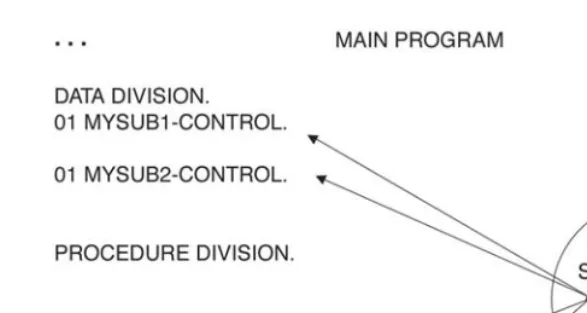
Note that while the main program can access items in the passed parameters, it cannot access any items in the subroutine’s WORKING-STORAGE area. Further, Figure 1.2 shows two separate instances of MYSUBx-CONTROL data items but only one instance of the MYSUB subroutine. This means that all of the items in MYSUB’s WORKING-STORAGE area will be shared, regardless of whether MYSUB1-CONTROL or MYSUB2-CONTROL is passed. Because of this limita-tion, the COBOL program does not behave exactly like an object.
In much the same way, a Java program contains any instances of the classes that it creates. The major difference between a COBOL subroutine and a Java class is that a Java program can contain many instances of its classes. These are called objects
[image:34.565.105.399.74.230.2](see Figure 1.3).
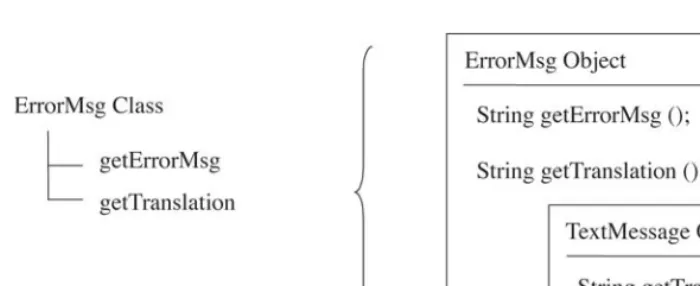
The newoperation creates a completely new instance of the class in memory,
in-cluding any private data members (WORKING-STORAGE items) and then loads the class code into memory, if it has not been loaded already. All of the data mem-bers defined for that class are created. A reference variable is returned from the new
operation, and this reference variable, or handle, points to the new class instance. These class instances are called objects.
Like items in a COBOL routine’s LINKAGE SECTION, public data members defined by the class can be accessed by either the main (calling) program or by the object itself. Unlike the COBOL subroutine’s WORKING-STORAGE area, internal data members are not shared between instances of these two classes.
An object reference variable (for example, myErrorMsg) points to each unique
instance of the class. The Java main program uses the reference variable to refer to the data members of a particular class instance in much the same way that COBOL’s OF operator works (for example, MSG-TEXT OF MYSUB1-CON-TROL). Therefore, the statement
myErrorMsg.msgText = "Some Text";
could be compared to the COBOL statement
MOVE "Some Text" TO MSG-TEXT OF MY-ERROR-MSG.
It’s time to interrupt this object-oriented presentation and write some code. Before you write your first program, however, let’s take a moment to examine how Java programs are compiled and executed.
17
Introducing the Java
Development Environment
2
This chapter will introduce Java and the Java virtual machine (JVM or Java VM), the environment in which your Java programs will run.
R
UNTIMEI
NTERPRETATION ANDJ
AVAB
YTEC
ODESJava’s designers had a number of primary design objectives. As you have seen, ob-ject orientation is one of them. Another is the premise that a program can be com-piled on any machine and the output of the compiler simply moved to another machine, where it will execute without changes. This concept is captured in the Java mantra, “Write once, run anywhere.”
In This Chapter
Runtime Interpretation and Java Byte Codes Getting Started with Java’s SDK
Applets with SDK Classes and Filenames CLASSPATH
In an Internet environment, the movement to the execution machine (an end user’s PC, for example) is automatically performed by the browser without any spe-cial commands by the user. The net result is simplified administration of the appli-cations and immediate access to any Java application for the end user.
To accomplish this, the Java compiler does not create executablecode—meaning a program that runs natively on a given system. Instead, the Java compiler creates an
intermediate representation of your program. This representation is somewhere between source code and native machine code. It is called Java byte codes. These byte codes are the content that is moved to a computer system at runtime to be executed on that system.
Since the byte codes are not in a format that is native to any system, they can’t be executed directly on any system. Instead, a native program interprets the byte codes and performs the application functions expressed in the byte codes. This in-terpreter is called a Java virtual machine, because it creates a virtual system envi-ronment in which Java byte codes can execute.
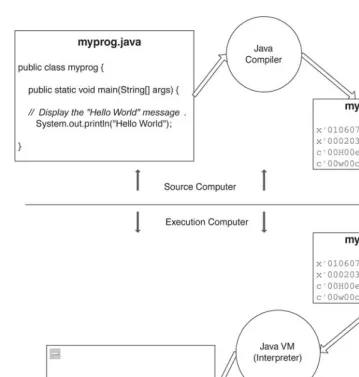
This concept is not new. Interpreted languages such as LISP and SmallTalk have worked this way for years. Some cross-platform COBOL compilers (notably from MicroFocus and AcuCorp) also provide this same type of “instantaneous portability” feature, using a byte code or intermediate version of compiled COBOL programs. Also, Ruby on Rails, ASP.NET (where multiple languages can be used for the output of byte codes), PHP, PERL, Python, and so on provide some form of vir-tual machine environment. Figure 2.1 shows the compile and execution procedure for a simple Java application.
In theory, the only prerequisite for running a Java program on a system is that an appropriate Java virtual machine be available on that system. As you might sus-pect, the reality is somewhat different.
Operating system functions and some details of the way an application inter-acts with the operating system are not exactly the same across all operating systems. Java does a credible job of defining standards that shield most applications from these differences, but it does not cover allcases. As a result, some low-level appli-cation functions are not defined by Java, or they are left to the individual VM im-plementation to deliver.
A good example of these issues is the curious fact that Java doesn’t define a universal (or “pure Java”) notion of a standard output display device. The
System.out.println statement in Figure 2.1 is not technically 100% pure Java,
To really complicate matters further, Java VMs are often executed as part of a browser application (such as Firefox or Microsoft’s Internet Explorer). Java appli-cations that are embedded in an Internet document (called Java applets) execute as part of the browser interface. The browser actually controls some of the details of how the application looks (such as the default font to use).
[image:38.565.72.432.74.451.2]Java applets, in particular, are most subject to portability problems due to the dif-ferences in browsers and the various versions of the Java VMs used by the browsers. The implication is that a software provider should test a product on several different combinations of operating systems/browsers/Java VMs, to make sure the application
FIGURE 2.1
works correctly in all of the target execution environments. This has certainly been the case with many interactive Java applications. More importantly, Java applets are restricted to a very stern security model that limits their functionality.
Client-side Java applications running outside of the browser, on the other hand, are surprisingly portable. There are a number of class libraries available that define powerful mechanisms to build graphical user interfaces (GUIs). Sun provides the original Abstract Window Toolkit (AWT) libraries and the newer Java Foundation Classes (JFC)/Swing class graphical libraries, which run on all platforms. Any of these class libraries provide excellent mechanisms to build first-rate GUIs.
Another point to consider is that server-based Java applications are likely to be less susceptible to these variations, and most business logic is server-based. The ma-jority of the differences between Java runtime environments arise from user inter-face issues. Since server applications don’t have their own user interinter-face, they are, by and large, unaffected by most of the runtime environment differences. Server applications will experience some variations in runtime environments, but these variations are fairly technical in nature (such as the mechanism to use for access to the native system), and normally they are easy to isolate.
Enough with the concepts. It’s time to write some code. It’s a good idea to mix reading about concepts with working on those concepts.
In order to write programs in Java, you will need a few tools. At a minimum, you will need a Java compiler, a JVM to interpret and execute your code, and a text editor. The text editor can be one of your choice, from Notepad on Windows sys-tems to vi in a UNIX environment. The only requirement is that it create vanilla text files without any special formatting characters (such as a word processor might put into a file).
If you are lucky (and smart), you will use an integrated development environ-ment (IDE) from a Java tool vendor. IDEs combine compilers, JVMs, a nice editor, and some type of project management tool into an integrated system. Sun and BEA sell excellent graphical Java development environments. Eclipse, the open source IDE project started by IBM, is used by most Java developers (www.sdtimes.com/ content/article.aspx?ArticleID=30020). I will discuss Eclipse in Chapter 17.
The IDE tools take full advantage of a graphical operating system, such as Win-dows, Linux, and Solaris. These products take most of the grunt work out of the development experience, and they allow you to focus more time on your program-ming problem and less on tedious chores like managing files.
Sun also makes a robust graphical development environment for Java called Java Studio. Sun makes several versions of this tool and distributes the NetBeans edi-tion of the product for free. Finally, the CD contains the Eclipse open source IDE.
Learning how to use a new development environment can be a difficult step in moving from COBOL to Java. These initial exercises are geared more toward help-ing you become familiar with a new environment than reviewhelp-ing the concepts al-ready discussed. After you’ve mastered (or at least come to terms with) the development environment, you’ll use these exercises to review the concepts pre-sented. Therefore, you’ll begin by concentrating on learning the development en-vironment instead of understanding the code samples. (The code samples are explained and reviewed later.) To help you get started, step-by-step introductions to the SDK for the Java 1.6 platform are presented.
Commands that you are expected to execute (either with a mouse or by typing the command) are identified with the arrowhead marker at the beginning of the command.
G
ETTINGS
TARTED WITHJ
AVA’
SSDK
Sun’s product has good introductory documentation available for it. An excellent one is on Sun’s Java Web site. The following steps will guide you through the process of creating your first Sun-flavored Java application and applet.
First, install the SDK development environment. You can download it from the CD-ROM included with this book or from Sun’s Web site. Follow the instructions on the installation Web page to install the software properly.
After it has been installed on your PC, the SDK utilities can be used from an MS-DOS command window. You can start up an MS-DOS window by using this menu path, beginning with the Windows task bar: Start > Run, then type in CMD.
In the command window, you can execute the Java compiler (javac.exe), the Java runtime (java.exe), and the applet viewer (appletviewer.exe). All these pro-grams take parameters, such as the name of the Java file to be compiled. If you are using a Windows version before XP, you should also install the DosKey program (type doskeyin the command window). This program remembers your DOS
com-mands, which you can recall and edit using the cursor keys.
In Windows 98, you can use the sysedit function (menu path Start > Run > Sysedit) to edit the AUTOEXEC.BAT file. Assuming you have installed the SDK to the default directory (C:\Program Files\Java\jdk1.6.0_03), add a line to the end of the AUTOEXEC.BAT file that reads as follows: SET PATH=%PATH%; C:\Progra~1\ Java\jdk1.6.0_03\bin. Changing the AUTOEXEC.BAT file requires that you
re-boot your PC.
On Windows ME, XP, Vista, 2000, and 2003, use the System icon on the Control Panel to modify the environment variable directly. Add the SDK path (C:\Program Files\Java\jdk1.6.0_03\bin) to the end of this variable. The source
can be modified with any text editor, including WordPad. Java source files are stan-dard text files, including line-ending sequences (CR, LF on PCs). WordPad is very popular for this task because you can save and compile the Java source without closing down WordPad. Just make sure you save the WordPad files as text files, rather than as document files. Document files contain additional text formatting information that is not appropriate for Java. Freeware and shareware text editors are available on the Web.
Now, it’s time to get started.
1. Make a directory to contain your Java files. From the DOS window, you can create a directory on the C: drive by typing the following:
➔ cd C:\
➔ mkdir java4cobol
2. Change the current directory in your command window to the directory you just created:
➔ cd c:\java4cobol
3. Using a text file editor, enter this Java source:
public class HelloWorld {
public static void main(String[] args) { System.out.println ("Hello World!"); }
}
5. Compile your Java source with the SDK compiler (java.exe) in the DOS command window:
➔ javac HelloWorld.java
6. Your HelloWorld Java program should compile successfully. If it doesn’t, there are three (or more) possible problems:
Cannot find the javac program:Check your PATH environment vari-able by using the set command in the DOS window. It should contain the directory where the program javac.exe is (on Windows, normally C:\Program Files\Java\jdk1.6.0_03\bin).
Cannot find HelloWorld.java:Check the spelling, and make sure you used the correct case. Are you in the directory where the source file was saved (C:\java4cobol)?
The compile reported some errors:Check your source file. It should be exactly as presented here.
Check the Sun Web site for additional suggestions.
7. Now run your program, using the Java runtime that comes with the SDK:
➔ java HelloWorld
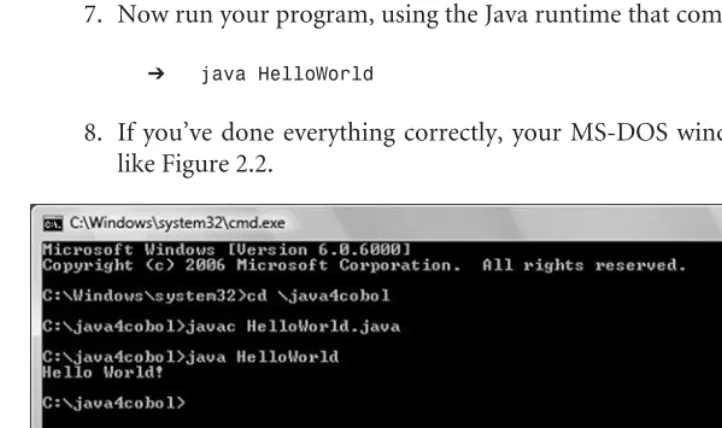
[image:42.565.72.433.369.583.2]8. If you’ve done everything correctly, your MS-DOS window should look like Figure 2.2.
FIGURE 2.2
Congratulations! You should be proud of your first Java program. It is full of potential.
Experiment with the program a little bit in this environment. You can make the changes in the text editor you have chosen. Compile it by typing javac Hello-World.javain the command window. After your program is compiled, you can
exe-cute it from the MS-DOS command window by typing java HelloWorld.
Change the message from “Hello World!” to “Watson come here!”
What happens if you add a second System.out.println statement to your
program?
A
PPLETS WITHSDK
Now you’ll write your first Java applet in this environment and run it in the Applet viewer.
1. Using either Windows Explorer or a DOS command, create a new direc-tory (or folder, in Explorer terminology) called “applet” in the java4cobol directory. Your applet files will be stored in this directory.
2. Using a text editor, create a Java source file named HelloWorld.java in this directory. The source file should contain these statements:
import java.applet.Applet; import java.awt.Graphics;
public class HelloWorld extends Applet { public void paint(Graphics g) {
g.drawString("Hello Applet World!", 5, 25); }
}
3. In the DOS command window, change the current directory to your applet directory:
➔ cd c:\java4cobol\applet
4. Compile your applet using the javac compiler:
Again, your applet should compile successfully at this point. If it doesn’t, review the previous suggestions.
Applets are meant to be executed in a hosting environment, often a Web browser. Web browsers display information in HTML documents and are instructed to execute applets by special commands in the HTML docu-ment. The HTML command to execute an applet is the <applet>tag. This
tag instructs the browser to run the applet specified in the applet tag. You do not need to be an HTML expert for this step, but you will need to create a simple HTML document.
5. Using a text editor, create an HTML document named HelloWorld.html in your applet directory. The file should contain these statements:
<html> <head>
<title>HelloWorld</title> </head>
<body> <hr>
<applet
code=HelloWorld width=200 height=200> </applet> <hr>
</body> </html>
Remember to save this file under the name HelloWorld.html, and to save it as a text file, not as a document.
6. In the DOS command window, execute the APPLETVIEWER program to display your applet. Make sure you are in the applet directory.
➔ appletviewer HelloWorld.html
Experiment with this applet as well. You can make the changes in the text edi-tor, then recompile and execute the program in the DOS command window. You will need to exit the applet viewer every time you run your program by clicking the X widget at the top right of the applet viewer window. Or, you can use the Reload function in the applet menu.
Change the message from “Hello World!” to “Watson come here!”
What happens if you add a second g.drawStringstatement to your program?
Why do you think only one message showed up? (Hint: drawStringis a
graph-ically oriented function, whereas printlnis a line-oriented function.)
What do you think the numbers 5, 25 control on the page? What happens if you change the 5 to a 6?
What happens if you change the 25 to a 35?
Now that you’ve had some success with your first Java program, let’s take a minute to discuss some of the rules of the road that a Java program must observe.
C
LASSES ANDF
ILENAMESJava source filenames and public Java class names must all have the same name. The compiler automatically creates a class file with the same name as the source file. Consider the first example class, HelloWorld(refer to Figure 2.1).
FIGURE 2.3
The name of this class (HelloWorld), its source filename (HelloWorld.java),
and its output file (HelloWorld.class) all have the same name. Because of this, the runtime system can easily find the class file for HelloWorld when it is first needed by looking for a file named HelloWorld.class. Notice that the Java compiler needs the .java extension, but the runtime system assumes the .class extension.
CLASSPATH
But where does the runtime system look for the HelloWorld.class?
In most cases, this is controlled with the CLASSPATH setting. The CLASSPATH setting details a list of directories (or class archives, which can be jar or zip files) on the host operating system that contain classes. The Java runtime searches these di-rectories (in the order they are listed) for your class files as they are required. This is similar to the way the PATH variable is used in Windows to find executable program files. The CLASSPATH variable can be set either as an environment variable (that is, a variable defined to the operating system) or as an optional argument to the run-time instance. The optional argument at runrun-time is the preferred approach because it doesn’t mess up other programs’ class paths.
For example, the standalone SDK runtime interpreter searches the c:\java4cobol directory for your classes, given this runtime option:
➔ java -cp c:\java4cobol HelloWorld
The -cpcommand argument tells the runtime to search in the c:\java4cobol
di-rectory for classes. The CLASSPATH argument can be a list of directories as well.
➔ java -cp c:\windows\java;c:\java4cobol HelloWorld
The CLASSPATH can also include zip or jar files (archive files built by the jar utility) that contain packages bundled by zip or jar utilities. I will say more about this later.
Normally, you will not need to include the standard runtime classes; Java provides a mechanism to find these automatically.
since this variable applies to all Java runtimes on the system. As a result, coordi-nating the search requirements of multiple Java applications (especially if they are from various vendors) can be difficult.
Most development environments provide a way to assign a CLASSPATH vari-able to a project. You will need to consult the documentation for the development environment you are using to learn how to do this.
CODEBASE
Instead of the CLASSPATH setting, applets use the CODEBASE reference. This pa-rameter specifies the directory that contains the initial applet, along with any sup-porting classes it requires. This is the syntax:
<applet
CODEBASE = codebaseURL code=HelloWorld
width=200 height=200> </applet>
As you might suspect, CODEBASEs are defined in terms of a uniform resource locator (URL) on the Web server. For security reasons, Java applet CODEBASE ref-erences must be on the same Web server (that is, must have the same domain name) as the HTML page that started the applet.
P
ACKAGESA package is a way for the Java developer to group classes that are in some way re-lated. For example, a GeneralLedgerpackage would likely contain an Account class
and a Ledgerclass. These classes might implement the business logic necessary to
manage account information or to record a transaction in the Ledger.
These classes can define package variables and methods that would be available only to other classes in this package. In addition, public members are automatically made available to classes in the same package. Consequently, classes in a package do not need to import other classes in the same package.
To do this, you might define a java4cobolpackage. Simply include the package
statement as the first uncommented line in your Java source file:
package java4cobol;
public class ErrorMsg { public String msgText; public int msgSize;
... // Some logic
... }
Now the ErrorMsgclass is part of the java4cobolpackage. The fully qualified
name (FQN) of this class now becomes java4cobol.ErrorMsg.
Packages can have many parts to their names. For example, you could define a
java4cobol.messagepackage, and place all of your message-related classes into this
package:
package java4cobol.message; public class ErrorMsg {
public String msgText; public int msgSize;
... // Some logic
... }
In this case, the complete name of your ErrorMsg class would be java4cobol.message.ErrorMsg. Notice that java4cobolandjava4cobol.messageare
different packages. Also, package names should be all lowercase to ensure they will work properly on all operating systems.
I
NSIDE AP
ACKAGEAnother advantage is simpler naming of class names in your code. If a class is part of a package, other classes in the package can refer to it using only its short name instead of its fully qualified name. For example, any class in the
java4cobol.message package can refer to ErrorMsgas simply ErrorMsginstead of the
more precise java4cobol.message.ErrorMsg.
A class from one package can still refer to classes in another package by using the fully qualified name. To continue the example, an Accountclass in the general_ledgerpackage could refer to the ErrorMsgclass by its package.class-name: java4cobol.message.ErrorMsg.
package general_ledger; public class Accounts {
public String accountID;
public BigDecimal accountBalance; ...
// Create a new ErrorMsg object. Use the complete package name and class // name.
java4cobol.message.ErrorMsg accountNotFound = new java4cobol.message.ErrorMsg (); ...
}
However, this is more typing than the average programmer is willing to do. So, Java has defined a way for you to announce which classes your class will use, called theimportstatement, which must follow any packagestatements in your program. It tells the compiler that your class might refer to the classes identified in the import statement. The full class name is described only once in the import statement; af-terward, the compiler knows to use the full name whenever it sees the short name.
package general_ledger;
import java4cobol.message.ErrorMsg; public class Accounts {
public String accountID;
public BigDecimal accountBalance; ...
// Create a new ErrorMsg object. No need to use the full class name or FQN. ErrorMsg accountNotFound = new ErrorMsg ();
This type of import statement is officially named a single-type-import declara-tion statement.
For brevity’s sake, a class can identify all of the classes in a package by using the asterisk (*) wild card instead of listing each class name. This statement instructs the compiler to import all the classes in java4cobol.messageas they are needed,
in-cludingErrorMsg:
package general_ledger; import java4cobol.message.*;
This type of import statement is officially named a type-import-on-demand de-claration statement.
Although the import statement behaves in a manner similar to the COBOL COPY statement, it is really quite different. No code is actually imported, just the public class definitions. Significantly, the import statement tells the compiler to im-port the class file (the compiler output) and not the Java file (the source file). It is more of an aid to the compiler than it is a technique to copy code from another class. Now that the Accountsclass contains this import statement, it can refer to any
class in the java4cobol.message package using only the class name. You do not
need to use the full package.classnamesyntax.
N
AMEC
OLLISIONSWhen using the wild card import statement, it is possible for a class to have the same name in two separate packages, or for your program to create a name that col-lides with a name in an imported package. In this case, the package name can be used to uniquely identify a class in a package:
package general_ledger; import java4cobol.messages.*;
public class Accounts {
// Create a String object with the same name as the class ErrorMsg. String ErrorMsg;
public String accountID;
// Create a new ErrorMsg object. Specify the full package name. java4cobol.messages.ErrorMsg accountNotFound =
new java4cobol.messages.ErrorMsg (); ...
// Copy the msgText from the ErrorMsg class to the local ErrorMsg String // variable.
ErrorMsg = java4cobol.messages.ErrorMsg.getErrorMsg(); }
P
ACKAGES ANDF
ILENAMESJava packages and the directories on your computer’s file system are closely related. As a rule, any package name must have a corresponding directory name on the host operating system, and it is case sensitive. This applies to both the development en-vironment and the runtime (deployment) enen-vironment.
The name of a package maps to its filename location. In this example, you would expect to find a directory named ..\java4cobol\messages and ..\general_ledger (on UNIX systems, the slashes go the other way: .. /java4cobol/messages and .. /general_ledger). Notice that the introductory periods (..) in the package names (java4cobol.message) are replaced with the correct directory separator character
(java4cobol\message or java4cobol/message).
The package name does not normally start at the root directory of the host file system. Instead, Java uses the CLASSPATH variable to point to a list of initial di-rectory names, which are then searched for specific package didi-rectory names as well as class names.
In the example, if you set CLASSPATH to c:\windows\java; c:, the compiler will
look in both the C:\windows\java directory and the root directory of the C: drive for a directory named java4cobol\messages. In this directory, it will look for a file named ErrorMsg.class.
It is likely that you will use packages from other vendors, or perhaps you will cre-ate packages that some other development or deployment environment will use. Since it is not realistic to coordinate class names or package names in advance, a con-vention is often used to group packages based on the origin of the package. Many package names are prefixed with the Internet address (domain name) of the provider, but in reverse order. Sometimes the .com portion of the domain name is left out.
For example, if an organization’s domain name is mycompany.com, the
java4cobol.messagepackages delivered by this company will likely be in a directory
Your source files should use the same conventions, but with a different initial directory so that source files and class files are kept separate. In this way, you can ship your class files and not your source files. As applied to the example, the class files would be in classes\mycompany\java4cobol\messages, and the source files (with the .java extension) in source\mycompany\java4cobol\messages.
C
OMPRESSEDP
ACKAGESFinally, the Java compiler and the Java runtime system can read compressed (or zipped) files that might contain many classes. Think of these compressed files as the contents of a directory (including perhaps several subdirectories) packaged into a single file. Microsoft’s standard for packaging compressed classes is their cab tech-nology; other vendors use the jar file technology for this purpose. This discussion focuses on the jar file convention, although many of the benefits and techniques would apply equally to cab files.
You can add a jar file to your CLASSPATH like this:
➔ java -cp c:\java4cobol.jar HelloWorld
In this, the Java runtime program would look in the jar file to find the class
HelloWorld. Jar files provide several benefits, including these:
Related classes can be organized and managed in a single archive. This simpli-fies the administration of the classes.
A single request (for the jar file) can copy many classes from one system to an-other. This is especially important in an Internet browser, where a single HTTP request for the jar file will replace several individual HTTP requests (one for each class in the package). The browser issues HTTP requests to copy files from the Web server to the browser. Combining several requests into a single request is a significant performance benefit.
A
PPLICATIONS VS. A
PPLETSJava programs run in one of three contexts: as an applet, as an application, or as servlets. I discuss server-side Java programs in more detail toward the end of this book in Part III, “Introducing Enterprise Java.”
As the name suggests, an appletis an application fragment. It is not a complete application but rather an extension of another application. Most often, the appli-cation extended is a browser, such as Firefox or Microsoft’s Internet Explorer. In fact, any application can be extended with Java applets. The only requirement is that the application to be extended must provide a Java runtime environment.
Conversely, a Java applicationis a complete application. It can run as a stand-alone application and independent of any other application. A Java application still needs a runtime interpreter, but this interpreter is a standalone program whose only responsibility is to execute and support Java applications.
A standalone interpreter is often a native program, suitable for executing on the host platform. For example, Sun’s standalone interpreter is named java.exe in Win-dows, and java in every other environment, and it is executed like any other appli-cation. Sun provides a version of the Java program for Windows, Linux, and the Solaris operating systems. The only job of the standalone interpreter is to execute the Java byte codes and to perform the functions requested by the application.
R
EVIEWING THES
AMPLESI kind of rushed through some of the code and the changes made to it in an effort to explain the development environment issues, so let’s take a minute to review, starting with the first application.
Your first program was a standalone application. That is, it only needed a run-time interpreter to execute, which was java.exe.
The main program (the class that gets the ball rolling) in a Java application must have a specific interface. It must have a public method with this method definition:
public static void main(String[] args)
This method accepts a single parameter (named args in the example). This
parameter must be defined as an array of Strings (String[]). The String
The class that contains this method (HelloWorld, in the example), does not
need to be any particular name, but it may need to be public, depending on the requirements of the runtime environment. It also must be a staticclass, mean-ing only one instance of the class can exist at a time.
The internal name of the class (in the source program HelloWorld.java) and the external name of the class (the HelloWorld.class file built by the compiler) must be the same.
A Java application run in this manner does not expect to have a GUI environ-ment available to it, but it can. It does expect to be able to write to a logical file, known as standard out, and to read from standard in. These files are more or less the equivalent of the ACCEPT and DISPLAY verbs that interact with the CRT in COBOL programs.
For most Windows-based Java interpreters, standard out and standard in are directed toward an MS-DOS command window. Java applications run this way are not graphical applications.
The statement System.out.println ("Hello World!");writes to the console, or
standard out. It performs the println() method in a built-in object named System.out. This method accepts a Stringinput parameter and writes it to
standard out. Think of it as analogous to this COBOL statement:
DISPLAY "Hello World!".
Subsequent calls to printlnwrite a new line of text to standard out.
The next program you wrote was a Java applet.
An applet expects to be supported by some type of graphical hosting environment. Most often, the graphical hosting environment is a browser.
Some standalone Java runtime environments also provide a built-in graphical hosting environment, or applet viewer. For the SDK, this was APPLET-VIEWER.EXE. The applet viewer is an excellent tool for testing your applets. The main program (the program that gets the ball rolling) with a Java applet is the hosting environment (the browser or the applet viewer). It calls the paint()
function in your class so that you can display information to the screen. The
paint()function must have a specific interface. It must have a publicmethod
with this method definition:
public void paint(Graphics g)
This method accepts a single parameter. It is a Graphicsobject (named gin the
The class that contains this method (HelloWorld, in this example) does not
need to be any particular name, but it does need to be public. This class must be of the sort that extends, or inherits, from a class named Applet.
The statement import java.applet.Applet;at the beginning of the class tells
the Java compiler where to find the Appletclass.
The internal name of the class (in the source program) and the external name of the class (the HelloWorld.class file built by the compiler) must be the same. A Java program run in this manner expects to have a GUI environment avail-able to it. It also expects to be avail-able to write to a logical file known as standard out and to read from standard in.
Standard out and standard in are not well defined for these types of programs. The statement g.drawString("Hello World!", 5, 25);writes to the graphical
environment. It performs the drawStringmethod in the Graphicsclass. This
method accepts a Stringinput parameter and writes it to the graphical
envi-ronment. There are additional controls to this method. In the example, I’ve specified the starting position in the graphical window to place the String.
Think of it as analogous to this type of COBOL statement, extended with the ability to position the text anywhere on the screen:
DISPLAY "Hello World!" AT COLUMN 5 LINE 25
The statement import java.awt.Graphics;at the beginning of the class tells the
Java compiler where to find the Graphicsclass.
Subsequent calls to drawStringwrite text to the specified place in the graphical
window.
37
Messages and Methods
3
Let’s return to the object-oriented concept discussion. You can extend the COBOL example to explore some other Java concepts.
A subroutine call can be viewed as a message, passed from one object to another.
When you called MYSUB from CALLER, you prepared some information (in TEXT-STRING) and asked MYSUB to evaluate it. In object-oriented (OO) terms, this is sometimes referred to as message passing. That is, CALLER passed a particu-lar type of message to MYSUB.
In Java, objects can send messages to other objects. In almost all respects, this is similar t