Video communication for the elderly: a user
requirements study on an integrated, television
-based
video
-
calling application
Bachelor Thesis
Jye Liang Hiah
University of Twente
Supervisors
PDEng. Hester Bruikman Philips Consumer Lifestyle B.V.
Dr. Martin Schmettow University of Twente
Department of Cognitive Psychology and Ergonomics
Ing. Gerard van Loon
Dutch National Foundation for the Elderly Dr. Matthijs Noordzij University of Twente
Department of Cognitive Psychology and Ergonomics
The elderly represent an increasingly large portion of the population in many industrialized countries. When developing products that make use of new technologies, it is important to take
a user-centered approach in designing usable systems for this specific target group, addressing both accessibility and usability. This study reports findings from a user requirements analysis concerning a television-based video-calling application targeted specifically at elderly users. Two focus group sessions were held with participants between the age of 69 and 80. Using a workbook with questions, participants were prepared for the topics discussed during the focus
Acknowledgments
This report is part of an ongoing project in which I will continue participating during the next phase of research. Although I will continue working on the project with mostly the same people, I have learned a lot during the last couple of months, meeting and working with an amazing group of people whom I would all like to give my thanks to.
First of all, I would like to show my gratitude to Hester Bruikman who recruited me to work on the HOMEdotOLD project and together with my professor Martin Schmettow guided me through the different stages of my project. Coming from a very quantitatively focused psychology background, your advice and supervision was very much appreciated in this area of qualitative research which is very new to me. I would also like to thank Matthijs Noordzij for supporting my decision to participate in this project, giving me the opportunity to finish my bachelor thesis at Philips.
Special thanks to Gerard van Loon for giving me practical advice, motivation for research from the Foundation for the Elderly, and arranging my stay at Philips. Your help during the meeting sessions and moderating the focus groups was invaluable.
Table of contents
List of tables
4
1. Introduction and motivation
5
HOMEdotOLD and designing for the elderly 5
Video-calling platform (Skype) 6
User and system requirements 6
2. Focus group design and setup
7
Problem definition, formulation of study goals / research questions 9
Identification of sampling frame 9
Identification of moderator 9
Preparation materials and interview guide 10
Recruiting the sample 12
Conducting the focus group session 13
Analysis and interpretation of data 14
Writing the report 14
Decision making and action 14
3. Results and discussion
14
Must-have or nice-to-have user requirements 14
Notebook answers 15
Requirements analysis results 17
Simple and easy-to-use 27
Implications for design 27
Methodological remarks 28
Differences between the two focus groups 29
Focus groups with the elderly 30
4. Conclusions
31
Skype as the most plausible candidate 32
Consequences for implementation 32
Recommendations for focus groups with older participants 33
Future directions 34
5. References
35
6. Appendices
A: Transcript, focus group A (in Dutch) B: Transcript, focus group B (in Dutch)
C: Requirements with quotes / transcript references D: Interview guide and focus group preparation (in Dutch) E: Demo set-up and materials
List of tables
Table 1 Examples of corresponding user and system requirements 7 Table 2 The advantages and disadvantages of group, pair or individual sessions 8
Table 3 Interview guide 11
1.
Introduction and motivation
HOMEdotOLD and designing for the elderly
In most industrialized countries the demographical, structural and social trends are moving towards an increase in the elderly population and single households. The growth of this group has dramatic effects on health care, emergency medical services and the individuals themselves (Kleinberger, Becker, Ras, Holzinger & Muller, 2007). It is this segment of the population that suffers most from social isolation, loneliness, and a lack of adequate support. This exacts a significant toll on their psychological well-being and physical health (Cohen, 2000; Sorkin, Rook, & Lu, 2002). Projections indicate that the number of people who have reached the age of 65 in Europe will increase from 17.1% of the entire population in 2008, to 23.5% in 2030 (Eurostat, 2010). A likewise growth for the United States is expected during the same period of time, going from 13% in 2010 to 19% in 2030 (U.S. Census Bureau, 2010). In the Netherlands, this number is expected to rise from the current 15% in 2009 to 23.7% in 2030 (Centraal Bureau voor de Statistiek, 2010). Along with this trend rises the importance of research and development areas focusing on new technologies and the elderly, where accessibility, usability and learning play a major role (Emiliani & Stephanidis, 2005). The design and development of information technology (IT) products must support user needs and emerging requirements. Regardless of the circumstances and the degree of acceptance by a user of innovative technology, a clear benefit must be offered, whether in physical, medical or emotional respect (Holzinger, Searle, Kleinberger, Seffah & Javahery, 2008). The user in this case being the growing group of elderly people. A focus on developing applications based specifically on the user needs and requirements of the elderly is a good first step in bridging the widening digital divide that has grown between the technical experts and the increasingly older generation, who were adults before the electronic revolution (Holzinger, Searle & Nischelwitzer, 2007).
The HOMEdotOLD (HOME services aDvancing the sOcial inTeractiOn of eLDerly people) project aims to improve the social interaction and connectivity support in IT products for the elderly through a TV-based platform:
“The HOMEdotOLD project aims to provide a TV-based platform with cost-effective services that will be delivered in a highly personalized and intuitive way and will advance the social interaction of elderly people, aiming at improving the quality and joy of their home life, bridging distances and reinforcing social voluntariness and activation, thus preventing isolation and loneliness.”
The HOMEdotOLD project is but one of several EU projects aimed at improving older people’s well being and quality of life. The importance of addressing social isolation and loneliness that elderly people have to cope with is increasingly recognized in international policy and national health strategies (Cattan, White, Bond & Learmouth, 2005).
that address the learning needs of this specific age group must be established (Holzinger et al., 2007). For definition’s sake, the group of elderly people this study focuses on is aged 65 or older: the participants’ age ranging from 69 to 80.
This paper describes a user requirements study for video-calling applications on the television. It is one of the first steps of the design process, aiming to make the application as user-friendly as possible for the target group of elderly people that this project focuses on. After all, the goal is not just to create a technically functioning product. The goal is to present them an application which they are able and willing to work with.
Video-calling platform (Skype)
For the purpose of the HOMEdotOLD project, Philips Consumer Lifestyle is exploring possibilities to facilitate a videoconferencing application on a Philips TV. One of the platforms that are being considered at the time of writing is Skype. Skype is a software application that allows users to communicate through the Internet. Users log on to the network using a Skype account and then have the possibility to make voice or video calls to other users who are currently available on the network. As will be discussed later in this paper, Skype seems a very plausible candidate for the purpose of the HOMEdotOLD project as it supports nearly all resulting requirements that were found in the current study and the Skype network already has a large user base with many different application platforms.
User and system requirements
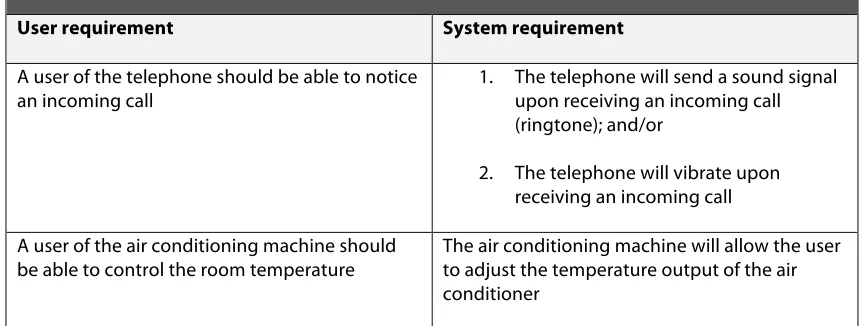
Table 1. User and system requirements
User requirement System requirement
A user of the telephone should be able to notice
an incoming call 1. The telephone will send a sound signal upon receiving an incoming call (ringtone); and/or
2. The telephone will vibrate upon receiving an incoming call A user of the air conditioning machine should
be able to control the room temperature The air conditioning machine will allow the user to adjust the temperature output of the air conditioner
Table 1. Examples of corresponding user and system requirements.
It is important to recognize the difference between these two types of requirements because their uses are different from one another. Designers have to come up with creative solutions, inventing designs that satisfy the user requirements. Doing so, they translate the user requirements into system requirements, which describes software behavior. Often, these system requirements are not explicit enough for engineers and are then elaborated into system specifications that describe how the software is to be developed: which features have to be implemented and how they should function. By definition, user requirements do not specify the system’s properties; that is the content of system requirements and specifications. The reason why we do not just skip the user requirements and go directly to the system requirements is because the latter have a much narrower scope and can be a cause for missing alternative solutions (Maiden, 2008).
2.
Focus group design and setup
Table 2. Comparing interview sessions
Advantages Disadvantages
Group sessions • Participants can react to each other’s experiences;
• A global view of the context and various user experiences will be created;
• A large amount of diverse information is generated in one session.
• Without professional moderation, one dominant participant can influence the group;
• It is difficult, although possible, to obtain individual responses.
Pair sessions • Participants feel comfortable because they are with a friend, spouse, parent, etc.;
• Participants may reveal things about each other;
• The session can take place at the participant’s home or workplace.
• Less diversity in the total range of participants since members of the pair are related or acquainted.
Individual sessions • A lot of attention and time can be devoted to a participant and this can bring out detailed
information;
• The session can take place at the participant’s home or workplace.
• A participant can feel inhibited, because it may feel as if a psychologist is testing him/her about feelings, experiences and needs; • It is more time-consuming
[image:8.595.87.513.90.395.2]than groups.
Table 2. The advantages and disadvantages of group, pair or individual sessions. Taken from Sleeswijk Visser et al. (2005).
There are several advantages that a focus group approach has compared to individual interviews. During a focus group session, respondents are able to react and build on the responses of other group members and due to the open response format; the focus group provides the investigator large and rich amounts of data (Stewart et al., 2007). Table 2 gives a concise overview of the advantages and disadvantages of focus groups compared to paired or individual interviews (Sleeswijk Visser, Stappers, van der Lugt & Sanders, 2005). Stewart et al. (2007) outline the following nine steps in the design and use of focus groups:
1. Problem definition, formulation of study goals / research questions 2. Identification of sampling frame
3. Identification of moderator
4. Generating and pre-testing of interview guide 5. Recruiting the sample
6. Conducting the focus group session 7. Analysis and interpretation of data 8. Writing the report
9. Decision making and action
Stewart et al. (2007) emphasize the importance of the first step in any focus group design: the formulation of the study goal. A clear understanding of this research goal leads to the specific questions that should be raised by the moderator and it identifies the population of interest. The goal of the current study is to get a clear overview of the user requirements of elderly people concerning a video communication application on a Philips TV.
Step 1 (study goal): Identification of user requirements of elderly people who have reached the age of 65 concerning a video communication application on an integrated television platform.
The identification of our sampling frame then follows from this study goal as the group of elderly people who are aged 65 or older.
Step 2 (sampling frame): Population of elderly people who have reached the age of 65.
Both the moderator and the contents of the interview guide should be compatible with the group to be interviewed (Sharp et al., 2007). Barrett and Kirk (2000) give an overview of the difficulties encountered when conducting focus group interviews with elderly people, finding that the use of a moderator of similar age to be effective in putting participants at ease.
As mentioned, the sample had already been recruited and introductory meetings with the first group of participants to schedule a date for the focus group session were held. Because our contact person from the NFE appeared to manage the conversations with the participants very well, the decision was made to go for a focus group setup with two moderators: one for moderating the conversations, with the researcher asking questions and both moderators probing for more information when necessary. Thus the discussion was co-moderated by a discussion leader, ensuring that the conversations kept going and that all participants were allowed adequate time to voice their opinions. The researcher took the role of a stakeholder, asking questions and keeping the conversations focused on the topics of the sessions as much as possible without restricting discussion.
Step 3 (moderators): co-moderated focus group session, with a NFE contact person acting as the discussion leader and the researcher asking questions.
Before commencing the focus group session, an interview guide was created and the moderators discussed the contents of this guide with stakeholders from Philips and the NFE. A summary of practical issues and methodological aspects of the focus group session such as bias, group dynamics and tactics for asking questions or handling the conversation (Stewart et al., 2007) was sent to the moderators and observers, and was then discussed during a preparational meeting with the researcher, moderator and observers (this “focus group preparation” document can be found in appendix D).
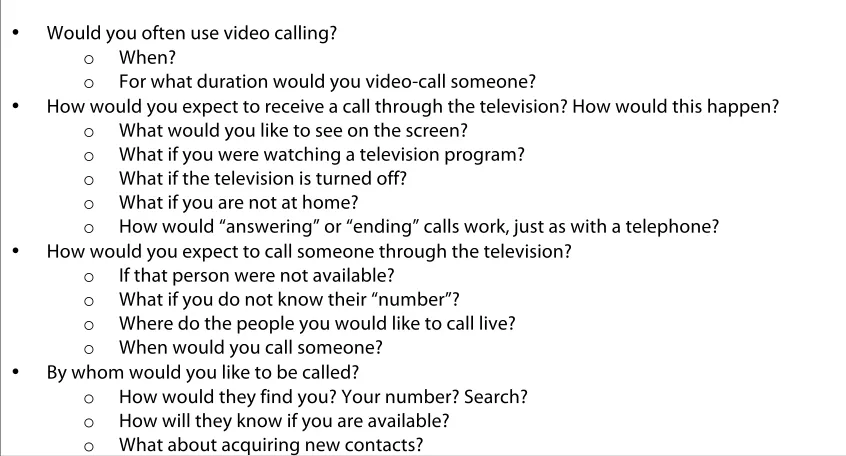
Table 3 shows the questions for the interview guide. The questions were designed to be short, simple, and using words that the participants would understand. Attention was also paid to the way the questions were organized and introduced, to keep participants focused and on topic (Barrett & Kirk, 2000). For the full interview guide that was used, see appendix D.
should help elderly participants to process the subsequent questions (Barrett & Kirk, 2000; Krueger, 1994; Morgan, 1997). Barrett and Kirk (2000) experienced problems where participants, even with questions divided into small groups and giving introductions before every group of questions still seemed to have difficulty understanding some questions. They advise that more information, possibly before every question, may be necessary. However, it may be even more helpful to pre-sensitize the participants to the discussion several days before the actual focus group session. The idea of sensitizing subjects comes from context mapping and cultural probes (Sleeswijk Visser et al., 2005; Gaver, Dunne, & Pacenti, 1999) and involves triggering, encouraging and motivating the participants to think, reflect, and explore aspects of their personal context in their own time and environment.
To incorporate this into our study, the participants received, alongside an introduction letter containing some general information about the focus group session and confirmation of date and location, a notebook in which they were invited to write down their experiences regarding calling or receiving calls with a telephone. Several pages featured a question that the participants were asked to write down an answer for. The notebook is a mixture of the workbook and the diary methods Sleeswijk Visser et al. (2005) discussed in their paper on context mapping (appendix F features a full documentation of the materials used for the notebook, including the list of questions). The goal of this notebook was to engage participants to think about their everyday usage of the telephone, and give them a context for the focus group topic of videoconferencing / video-calling. This allows participants to rely on recognition (of this sensitizing task) when introduced to the topics during the focus group session. It also encourages participants to focus their attention to all aspects of using a phone, which may otherwise go by unnoticed due to familiarity and automaticity in using telephones. Some post-its were sent along with the notebooks, asking participants to write down important notes so they could take them out during the focus group session and present their comments.
Step 4a (introduction letter): An introduction letter was sent to the participants a week in advance of the focus group session, confirming the date, location, and time of the focus group, introducing the subjects to the goal of the study and giving them a general idea of how the focus group will progress. The letter included instructions on how to use the notebook.
Step 4b (sensitizing material): The introduction letter was accompanied by an A5 size blank notebook. Several questions were printed on paper and then, using adhesive, placed inside the notebook. Participants were asked to work through the questions in their own time and note down any comments or ideas regarding regular phone calls in the notebook. The materials also included post-its to write down important notes, allowing them to take those out during the focus group session.
A researcher, who has interviewed the elderly participants in an earlier study, reviewed the interview guide. It was then further discussed with the focus group moderator who is working for the NFE and considered an expert in working with people from this age group.
Table 3. Step 4c, the interview guide Introduction (5 minutes)
Once all the attendants are sat down, name-cards will be placed in front of every focus-group participant, including the moderators, and the researcher will explain the intention of the group session.
• Introducing the moderators • Introducing the research goal
• Mention audio-recordings, used for analyses
• Explain why this group of participants is interesting for this study
• Explain the script of the focus group session (general overview of what is to come) • Explain the way the moderators will work together during the interview
• Offer coffee, tea, cookies
• Ask participants to go through their notes/answers that they have written in the notebooks, asking them to keep those comments in mind during the following discussions
Introductory group questions (5 minutes)
Preparing the group for further discussion, a couple of general introductory questions are asked:
• What do you think of the notebooks we sent with the introduction letter, have you had time to go through all the questions?
• Do you use a regular phone at home or do you mostly use a mobile phone?
Discussion Part 1 (45 minutes)
Goal: investigating user requirements for video calling on a television. Ideas, expectations, requirements that participants based on their experiences with products they are familiar with (telephone).
• Would you often use video calling? o When?
o For what duration would you video-call someone?
• How would you expect to receive a call through the television? How would this happen? o What would you like to see on the screen?
o What if you were watching a television program? o What if the television is turned off?
o What if you are not at home?
o How would “answering” or “ending” calls work, just as with a telephone? • How would you expect to call someone through the television?
o If that person were not available? o What if you do not know their “number”? o Where do the people you would like to call live? o When would you call someone?
• By whom would you like to be called?
o How would they find you? Your number? Search? o How will they know if you are available?
Break (5 minutes)
Participants are told there is a 5-minute break, offered coffee, tea, and cookies. Demo (5 minutes)
Participants will be given a demo, in the same room, of a Skype application on a television. A call will be made to a Skype user off-site to demonstrate how this particular Skype application works. The researcher stresses that this is just an example application and that we need the participants’ input for a “new” and “yet-to-be-made” application for the Philips Net-TV.
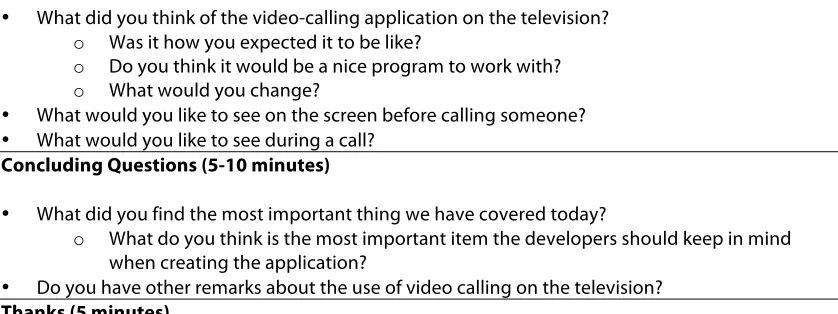
Discussion Part 2 (30 minutes)
Goal: investigating user requirements for video-calling on a television, based on participants’ experiences and what they have just seen during the demo.
• What did you think of the video-calling application on the television? o Was it how you expected it to be like?
o Do you think it would be a nice program to work with? o What would you change?
• What would you like to see on the screen before calling someone? • What would you like to see during a call?
Concluding Questions (5-10 minutes)
• What did you find the most important thing we have covered today?
o What do you think is the most important item the developers should keep in mind when creating the application?
• Do you have other remarks about the use of video calling on the television? Thanks (5 minutes)
[image:12.595.90.509.228.385.2]Thank the subjects for participating in the focus group and offer them small gifts (courtesy of the NFE) as a reward.
Table 3. Interview guide. See Appendix D for the full interview guide (in Dutch) that was used for the focus groups.
10 participants were recruited by the NFE. Unfortunately, one of them gave notice of no longer having interest in participating in the HOMEdotOLD project a week before the focus group sessions; a replacement could not be recruited in time. The participants were divided into two groups. The first group consisted of 5 participants, aged 69-74. These participants had 3 months of experience with the Philips Net TV at the time of the focus group session. Four participants live in independent housing; three of them still live together with their spouses. One participant was partially disabled, coping with impaired movement. This participant lives in an apartment complex where caregivers are readily available. The second group had 4 participants, aged 70-80. This group did not have any prior experience with the Philips Net TV or equivalent system. Three participants from this second group live in independent housing, two of them living together with their partners. One participant lives in the same building as one of the participants from the first focus group session: in a service apartment where residents get assistance from caregivers in their daily life.
Subjects had agreed to participate in studies being held for the HOMEdotOLD project during an intake interview. Consent forms were filled in and signed by every participant. Step 5 (Sample recruitment): Two groups were recruited for the focus group sessions.
the age of 70 and 80, with no prior Philips Net TV or equivalent product experience.
A meeting was scheduled with every participant individually by the NFE in the first week of December. The researcher attended these meetings to introduce the participants to the requirements study and schedule the focus group sessions. The location for the focus group sessions was decided to be “De Roos”, a service center for the elderly that all participants were familiar with. Both focus groups were held in the same room, where several tables were standing in a square formation, allowing participants, moderators and one observer (a Philips employee associated with the HOMEdotOLD project) to be seated in a circle-like arrangement.
During the focus group session, a smartphone and a laptop were used to make voice recordings. A flip-over with markers was utilized to sum up discussion points at the end of the sessions, allowing participants to indicate what topics they found important. Coffee, tea and cookies were available throughout the whole focus group meeting.
The Skype demo was shown on an LCD screen television using a small compact set-top box computer running the Windows version of Skype and a webcam attached on top of the television. Devices that were used for the Skype product demo were put in a corner of the room with only the television and webcam visible (for a more detailed description of the materials and demo procedure, see Appendix E). After the break, a short (under five minutes) demonstration was given of a video-call using Skype. Participants were shown the contact list and video-calling functionality on the television by making a call to the demo setup from a laptop that the researcher was using outside of the meeting room. After the focus group session ended, participants were given presents from the NFE as thanks for participating in this study.
Step 6 (Conducting the focus group session): The focus group sessions were scheduled December 15th and 16th, 2010. Both sessions took place at “De Roos”, a service center and meeting place for the Elderly. Transport was arranged for the participant who is partially disabled. Other participants arrived by their own means (either by bike or by car).
Analyses of focus group evidence most commonly involve a transcript of the discussion and a summary of the conclusions that can be drawn (Stewart et al., 2007). Once the focus group discussions have been transcribed, analysis of this data can begin. However, one should keep in mind that analysis has actually already begun during the focus group session where the moderator continuously asks participants for clarification and more details concerning the topic of discussion (Stewart et al, 2007).
For the goal of the current study, acquiring a list of user requirements, the scissor-and-sort (or cut-and-paste) analysis method (Stewart et al, 2007) was deemed most appropriate: it does not take as much time and effort as a full content analysis with the use of multiple judges and calculations of inter-rater reliability scores, but it is thorough enough to draw conclusions about the needs and requirements of the user group.
detail is specified for categories, the opposite happens and our list of requirements will become very long and specific (Sharp et al., 2007). The initial results of this study leaned towards the latter option: a large and very detailed list, including sections of the analyzed transcript which were less relevant and ideas for requirements that were mentioned but discarded by members of the focus group. By looking at the data from the focus group sessions, this list of requirements was then divided into must-have, nice-to-have, and rejected categories according to participants’ motivation and reasoning for specific requirements. This division of the results was discussed in a group setting with employees and volunteers of the NFE, who are project stakeholders and are regarded as target group experts. The discussion led to minor changes and some comments to the list of user requirements.
Step 7 (Analysis and interpretation of data): The recorded audio-data was transcribed and requirements were concluded from the data by using the scissor-and-sort analysis method. This list was then discussed with the NFE, dividing the requirements into must-have and nice-to-have categories.
The resulting list of requirements was then compared to functionalities already existing in Skype. A group discussion with Philips and the NFE followed, during which a product test-setting solution was chosen based on the requirements listed from this study.
Step 8 (Writing the report): After the two focus group sessions with the Elderly participants, a first report on user requirements was written, on which the group discussion with the NFE that followed was based. A final list of must-have and nice-to-must-have requirements was then reported to Philips.
Step 9 (Decision making and action): The final, prioritized requirements were discussed with Philips and the NFE. The resulting requirements from this study were taken into account when choosing a product testing solution.
3.
Results and discussion
Must-have or nice-to-have user requirements
The results of the user requirements analysis are presented in table 4 on page 15. Analyzing the transcripts of the two focus group sessions resulted in a list of accepted and rejected requirements (see appendices A and B for the full transcripts of the focus group sessions). The requirements were then divided into categories and further specified as must-have or nice-to-have requirements. A first categorization was based on the content of the focus group sessions, analyzed by the researcher. The classification of user requirements into must-have or nice-to-have categories is not based on the amount of support that participants showed for certain features, but instead, the researcher looked at the arguments given why certain features were welcomed and others discarded (see appendix C for an overview of the requirements with quotes and references to the transcripts).
application, this classification of must-have or nice-to-have requirements should also be looked at from the user’s perspective. As the results will show (discussed more thoroughly after table 4), the participants were very concerned about the complexity of the application. They were very aware of the fact that too many features would make the application too complex for them to be able to keep overview. Thus, the classification of the user requirements into must-have and nice-to-have categories is not only a prioritization of the requirements for implementation cost reasons; the results that fall into the nice-to-have category should be read as user requirements that are “uncertain.” Analysis shows that the nice-to-have requirements would be appreciated by participants, although implementing all of them might be conflicting with the most important one: user requirement (URq) 1: simple and easy-to-use.
For example, URq 21 (answering machine) was categorized as a nice-to-have requirement, even though one participant revealed that such a feature would be missed. The motivation for this categorization was because the participant indicated he is using voicemail to identify missed calls, revealing that the true requirement is for the user to be able to notice missed calls. Other participants at first indicated they would not be using such a feature, as they were not using it on their current phones either. However, after some discussion, they were unsure about its possible uses for this new system and therefore URq 21 was not completely discarded, but categorized as a nice-to-have requirement.
At the end of each focus group session, the participants were asked what they found to be important topics. Like Barrett and Kirk (2000), our participants had trouble answering this without further assistance. Thus, a list of discussed topics was written on a flip-over, and the participants were then asked to vote on each of these items. Each item was explained before every vote. However, this method was unprepared and after analyzing this particular part of the transcript it was obvious that there were several flaws: the researcher missed including some well-discussed topics on the flip-over during the first focus group meeting and during the voting itself, it became apparent that peer-pressure resulted in voting bias on certain items. The results did indicate however, four topics that were found important by all participants across both focus groups and thus, those requirements derived from these four topics were automatically made as prime candidates for the must-have requirements list.
The list of requirements, divided into must-have or nice-to-have categories, was then discussed with the NFE in a group meeting. Few changes were made to the list and the updated version with minor remarks was further discussed with Philips. The latter version is shown in table 4. The requirements are numbered for identification purposes and do not reflect further ranking by priority, although URq 1 (simple and easy-to-use) does reflect one of the most important findings from the current study. User motivation for each requirement is listed, and a comparison with existing Skype functionality is drawn.
The table is further divided into themes: general, contacts, camera, calls, and rejected. Two requirements that were added after the meeting with the NFE were separated into the category added outside of the user focus group sessions. Rejected requirements are those that were discussed during the focus group sessions but got rejected after discussions.
Notebook answers
answers would be discussed during the focus group session. However, the other 7 participants did complete all the questions in the notebook.
Participants returned the notebooks during the focus group meeting and their answers have been documented (see Appendix F). As the notebooks were meant as a way to prepare participants for the discussions and the contents of the notebook itself were of no real value to the current study, the notebook answers were not further analyzed.
Legend to table 4
Must-have requirements Nice-to-have requirements
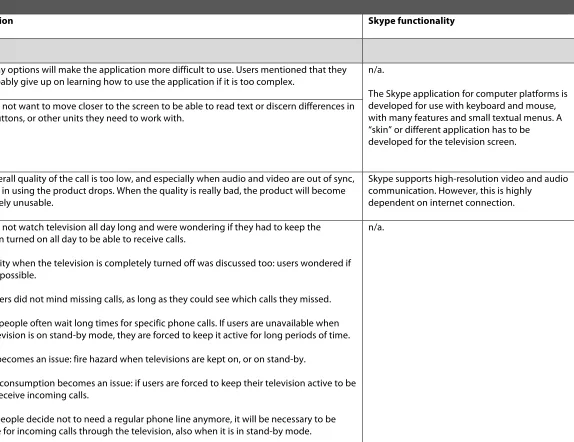
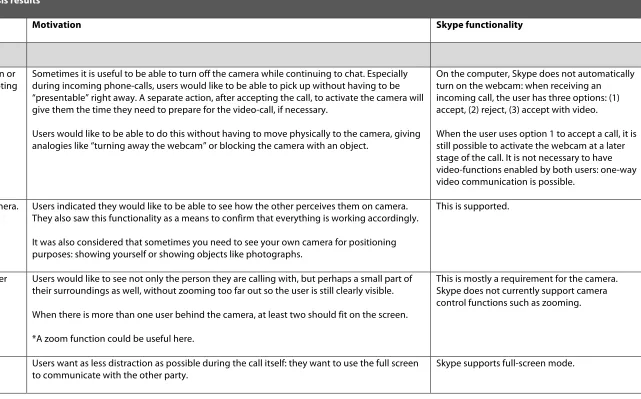
Table 4. Requirements analysis results
User requirement Motivation Skype functionality
General
01 Simple and easy-to-use. Too many options will make the application more difficult to use. Users mentioned that they
will probably give up on learning how to use the application if it is too complex. n/a.
The Skype application for computer platforms is developed for use with keyboard and mouse, with many features and small textual menus. A “skin” or different application has to be developed for the television screen. 02 Screen object visibility: text
and icons should be readable by elderly people who are sitting approximately 3 meters from the television.
Users do not want to move closer to the screen to be able to read text or discern differences in icons, buttons, or other units they need to work with.
03 Acceptable audio and video quality (performance requirement).
If the overall quality of the call is too low, and especially when audio and video are out of sync, pleasure in using the product drops. When the quality is really bad, the product will become completely unusable.
Skype supports high-resolution video and audio communication. However, this is highly
dependent on internet connection.
04 Able to receive calls when the
television is on stand-by. Users do not watch television all day long and were wondering if they had to keep the television turned on all day to be able to receive calls.
Availability when the television is completely turned off was discussed too: users wondered if this was possible.
Some users did not mind missing calls, as long as they could see which calls they missed.
*Elderly people often wait long times for specific phone calls. If users are unavailable when their television is on stand-by mode, they are forced to keep it active for long periods of time.
*Safety becomes an issue: fire hazard when televisions are kept on, or on stand-by.
*Energy consumption becomes an issue: if users are forced to keep their television active to be able to receive incoming calls.
*When people decide not to need a regular phone line anymore, it will be necessary to be available for incoming calls through the television, also when it is in stand-by mode.
Table 4. Requirements analysis results
User requirement Motivation Skype functionality
05 Remote controllable. All aspects of the application should be controllable through a remote, including the camera. One user in particular disliked any notion of having to move towards the television because of movement difficulties. Others agreed this is a concern for those who are coping with
disabilities.
There is no dedicated Skype remote control.
06 Easy-to-use remote control. Large buttons are a must: it is difficult for some users to work with the smaller buttons, indicating that they have trouble pressing the correct one when they are spaced close to one another and sometimes pressing two at the same time.
The remote control itself is allowed to be a lot bigger, with one user indicating the size of an A5 notebook, to improve usability: large buttons and a clear indication of the button’s function.
Some users said to find a full alphanumeric keyboard useful. Others disagreed, saying they would not use it very often and that this size would be too large.
Table 4. Requirements analysis results
User requirement Motivation Skype functionality
07 All-in-one remote control for the television and the video-calling application.
One user would prefer not to have an additional remote to use with the video calling application, saying “one simple and easy-to-use remote” would be the best solution. Others did not mind if it would be necessary to have another dedicated video-calling remote, if that is what it takes to make it easier to use.
Two users insisted on having a separate remote for video-calling, indicating that this would help them keep overview and ensuring the remote’s ease of use. They assumed other devices already have many options and needed many buttons, thus disliking the notion of having to add even more functionality and buttons due to the addition of a video-calling application. One user suggested using color codes for buttons.
*It might be the case that users would prefer an all-in-one remote, if it were possible that such a product would be easy-to-use and understandable for them.
*When there are a multitude of remote controls for different devices, the problem is probably that it is difficult to figure out which remote is used for which corresponding device. If something were to be done to ease the task of recognizing the correct remote for its corresponding device, users might find the use of multiple remotes less of a hassle.
There is no dedicated Skype remote control.
Contacts
08 Only receive calls from authorized users. This implies that users can only make calls to one another when both parties have given their permissions to do so.
Users do not wish to be contacted by contacts for commercial reasons or by strangers they do not know: the video-calling application will be used for social contact with friends and family. Others can contact them by phone.
Users worry that they will be contacted by strangers if their “number” is listed in a directory. Thus they would like to have their contacts as a “closed circle” where other users need permission to call them.
*Option to automatically block incoming authorization requests to prevent accidentally accepting “spammers”.
Skype has settings to set accessibility for calls, chats, and showing full contact details for two different groups: “everyone” or “people on my contact list.”
Table 4. Requirements analysis results
User requirement Motivation Skype functionality
09 Searchable listings directory, giving users the ability to look up contact information.
Analogies were made with the telephone-listings (“De Telefoongids”) directories where users can look up phone numbers. Some indicated this would be useful for video-calling as well.
Users mentioned this would be a good way to make new contacts, other users however, said you would not randomly call people who you find in a telephone-listings directory now either.
Some would prefer not to be listed in a global directory, indicating that they will only use the video-calling application for social contact with close friends and relatives who will get their video-calling contact details through other communication channels, not requiring to be listed in a directory.
It was agreed upon that users want to have the choice of being listed in a searchable directory or not.
Skype has a global listing of all its users. This database can be searched to find a specific contact. The information published is
completely controlled by the user (whether you fill in forms such as your real name, country of residence, etc.)
It is not possible to be removed from this list, at least, not through options in the application itself.
10 Make calls using a contact list Removing the necessity of having to input “telephone numbers” each time you have to call someone. Names in the list would suffice, so the user knows whom to call.
Some users indicated they have trouble remembering long strings of numbers, and that a contact list would be very helpful indeed.
An analogy was made with keeping a personal address book with contact information next to their home telephone.
Users indicated they would like the application to make full use of the whole screen when making a call, to ensure every letter would be readable and they had no distractions when trying to make a call. Using the whole screen to show the contact list would be preferable to them.
Table 4. Requirements analysis results
User requirement Motivation Skype functionality
Camera
11 Able to turn the camera on or off (separately from accepting calls).
Sometimes it is useful to be able to turn off the camera while continuing to chat. Especially during incoming phone-calls, users would like to be able to pick up without having to be “presentable” right away. A separate action, after accepting the call, to activate the camera will give them the time they need to prepare for the video-call, if necessary.
Users would like to be able to do this without having to move physically to the camera, giving analogies like “turning away the webcam” or blocking the camera with an object.
On the computer, Skype does not automatically turn on the webcam: when receiving an incoming call, the user has three options: (1) accept, (2) reject, (3) accept with video.
When the user uses option 1 to accept a call, it is still possible to activate the webcam at a later stage of the call. It is not necessary to have video-functions enabled by both users: one-way video communication is possible.
12 Able to see one’s own camera. Users indicated they would like to be able to see how the other perceives them on camera. They also saw this functionality as a means to confirm that everything is working accordingly.
It was also considered that sometimes you need to see your own camera for positioning purposes: showing yourself or showing objects like photographs.
This is supported.
13 The user and part of his/her surroundings should be visible.
Users would like to see not only the person they are calling with, but perhaps a small part of their surroundings as well, without zooming too far out so the user is still clearly visible.
When there is more than one user behind the camera, at least two should fit on the screen.
*A zoom function could be useful here.
This is mostly a requirement for the camera. Skype does not currently support camera control functions such as zooming.
14 Full-screen mode. Users want as less distraction as possible during the call itself: they want to use the full screen
Table 4. Requirements analysis results
User requirement Motivation Skype functionality
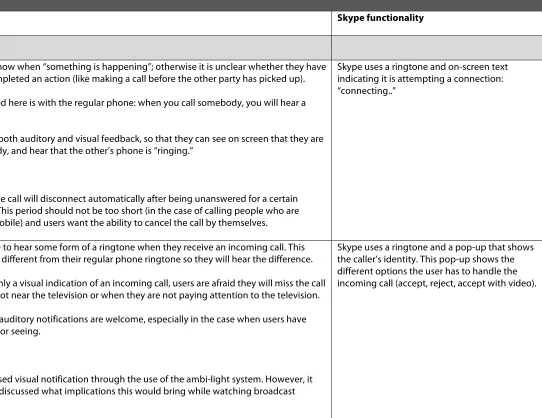
Calls
15 Visual and auditory feedback when a connection is being attempted.
Users want to know when “something is happening”; otherwise it is unclear whether they have successfully completed an action (like making a call before the other party has picked up).
The analogy used here is with the regular phone: when you call somebody, you will hear a tone.
Users asked for both auditory and visual feedback, so that they can see on screen that they are calling somebody, and hear that the other’s phone is “ringing.”
Remark:
Users assume the call will disconnect automatically after being unanswered for a certain period of time. This period should not be too short (in the case of calling people who are slower or less mobile) and users want the ability to cancel the call by themselves.
Skype uses a ringtone and on-screen text indicating it is attempting a connection: “connecting..”
16 Visual and auditory notification of an incoming call.
Users would like to hear some form of a ringtone when they receive an incoming call. This sound has to be different from their regular phone ringtone so they will hear the difference.
When there is only a visual indication of an incoming call, users are afraid they will miss the call when they are not near the television or when they are not paying attention to the television.
Both visual and auditory notifications are welcome, especially in the case when users have trouble hearing or seeing.
Remark:
One user proposed visual notification through the use of the ambi-light system. However, it was not further discussed what implications this would bring while watching broadcast television.
Table 4. Requirements analysis results
User requirement Motivation Skype functionality
17 Caller identification. Users would like to see who is calling them, so they can decide whether or not they want to accept the call.
This information should be available directly upon receiving an incoming call, so that users do not have to navigate away from whatever activity they are doing on the television just to find out who is calling.
A comparison was made with caller-ID on the (mobile) phone.
Skype uses a ringtone and a pop-up that shows the caller’s identity. This pop-up shows the different options the user has to handle the incoming call (accept, reject, accept with video).
18 Ability to reject a call, while at the same time letting the caller know they will be contacted later. A “call-you-right-back” function.
To prevent missing crucial moments on television, such as when watching a soccer match or a favorite television program.
Users would like to have this function so they can continue what they were doing, while at the same time letting the caller know that they will call them right back after a moment.
This feature also allows users to stop the “ringing” without insulting the other party.
Users definitely want to have the ability to reject incoming phone calls so they can stop the disturbance when they are busy. However, it was indicated they would also like to have a function that notifies the caller that they will call back later when declining a call.
There is no such feature in Skype at this moment.
19 Calling log: able to see which calls were missed during absence.
With this information, users could then call back those who have attempted to communicate with them.
Analogy used: a list of missed calls on the (mobile) phone.
Users do not mind missing calls when they are away, as long as they have the ability to know which calls they’ve missed.
Skype keeps a log of all activity, including missed calls and chats.
20 Notification of missed calls. Different from a calling log: this notification lets the user know that there are, in fact, missed calls, without having to navigate to the missed-calls “list” feature.
Analogy used: flashing indicator light on the telephone when there are missed calls.
Table 4. Requirements analysis results
User requirement Motivation Skype functionality
21 Answering machine. One user mentioned he would not want to lose the option of having an answering machine, though the reason he gave was that “at least when somebody leaves a message you know who called, and if they did not leave a message, it is assumed an unimportant call”.
Most users indicate they do not use answering machines or voicemail on their regular phones, but that they might want to use it for video-calling because they assume only close friends and relatives will keep in touch through the video-calling application: thus, the use of an answering machine-like functionality is associated with who can leave messages.
Users concluded that it would suffice when they would know which calls they have missed, because even if the caller leaves a message, they would most probably like to call back once they are able to do so.
*A concern of this feature is that it might make the application in general, less easy-to-use.
This is a paid feature. Skype supports Voicemail for € 5.00 for three months, or € 15.00 for a year.
22 Calling and watching
television simultaneously. One user suggested being able to accept a call, while continuing watching television. Voice communication would suffice for such a feature.
The option to go to a “full” video-call has to remain available.
Others were afraid the system would then become too complex, as you would have to also mute other sounds from the television if you want to be able to communicate with the caller.
*This feature would explore the full potential of this new way of communication where people, especially those who have trouble moving about, can watch certain programs (such as soccer matches) “together”.
*It would be nicer to have a small window in a corner so you do have video-communication.
*Should be more than just a nice-to-have feature because the possibilities of social contact that this feature gives are highly appreciated.
Table 4. Requirements analysis results
User requirement Motivation Skype functionality
Rejected
23 Connected phone number (accessible to callers who do not use a video-calling application).
Users were wondering how they had to call someone with video calling: just as the regular telephone where a caller has to press in the phone number or with account names, and if they can connect their regular phone numbers with the television.
They do wish, however, not to be called by strangers if this were the case. The topic was not further explored as there were not many users who saw a need for such a feature, but merely wondering how the video-calling application would work.
This is a paid feature. Skype supports having a real telephone number connected to the user’s account. Costs depend on the country of residence and usage of numbers is subject to local laws and regulation.
24 Call forwarding. One user indicated to welcome a call-forwarding functionality that he now regularly uses with his home-phone and mobile phone, so that they can always be reached. This function would not necessarily require a video option, as long as communication is possible.
Other users found it not very useful as they see the video-calling application as a social activity that they will make time for: important calls can be done through regular telephone
communication.
This is a paid feature. Turning it on is free, but the user has to pay per minute while a call is forwarded.
25 Ability to “lock” the
application from being used. To avoid misuse of the video-calling functionality concerning children.
However, users discussed that they do not deem this a necessary function, especially since they (the target group) do not have young children at home anymore.
Unsupported.
26 Turn off the application Users, saying “when you’re not there, you’re not there”, did not consider this necessary. It is the same as with the regular telephone: users do not turn off the home phone when they are away.
Leaving “away-messages” were unwanted, due to privacy and security reasons.
Temporarily turning off the video-calling application so you do not get disturbed while watching television was discussed, but deemed unnecessary.
*What about turning it off because users do not want to be disturbed while watching television.
Table 4. Requirements analysis results
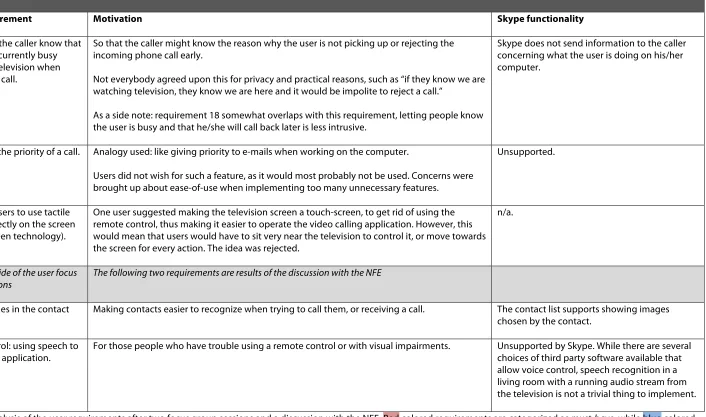
User requirement Motivation Skype functionality
27 Able to let the caller know that the user is currently busy watching television when receiving a call.
So that the caller might know the reason why the user is not picking up or rejecting the incoming phone call early.
Not everybody agreed upon this for privacy and practical reasons, such as “if they know we are watching television, they know we are here and it would be impolite to reject a call.”
As a side note: requirement 18 somewhat overlaps with this requirement, letting people know the user is busy and that he/she will call back later is less intrusive.
Skype does not send information to the caller concerning what the user is doing on his/her computer.
28 Indicating the priority of a call. Analogy used: like giving priority to e-mails when working on the computer.
Users did not wish for such a feature, as it would most probably not be used. Concerns were brought up about ease-of-use when implementing too many unnecessary features.
Unsupported.
29 Allowing users to use tactile control directly on the screen (touch-screen technology).
One user suggested making the television screen a touch-screen, to get rid of using the remote control, thus making it easier to operate the video calling application. However, this would mean that users would have to sit very near the television to control it, or move towards the screen for every action. The idea was rejected.
n/a.
Added outside of the user focus
group sessions The following two requirements are results of the discussion with the NFE
30 Using images in the contact
list. Making contacts easier to recognize when trying to call them, or receiving a call. The contact list supports showing images chosen by the contact.
31 Voice control: using speech to
[image:26.842.97.803.77.494.2]control the application. For those people who have trouble using a remote control or with visual impairments. Unsupported by Skype. While there are several choices of third party software available that allow voice control, speech recognition in a living room with a running audio stream from the television is not a trivial thing to implement.
Simple and easy-to-use
A recurring theme from the focus group sessions with the end users was that they seemed to be worried about the product’s complexity and were afraid it would be hard for them to learn to use it. On several occasions, ideas were turned down because they were afraid it would make the application more difficult to use, or require them to do additional actions which they preferred not to: an example being the status indicator that is currently used by Skype where users can show they are “available”, “away” or “do not disturb” amongst others. The focus group participants did not want to be bothered with having to change their status. It is important to recognize participants’ concern regarding ease-of-use in the rejection of functionality. Several participants were constantly worried about being unable to understand how to use the product if it would have too many options. URq 1: “simple and easy-to-use” might be a very general statement that spans across every functionality and behavior of the video calling application; it is a very important one. Admittedly, it is also a very subjective requirement, making it necessary to perform thorough prototype evaluations with the target audience before we can conclude that this requirement has been met.
Implications for design
Looking at the literature, there is quite a lot of research done on the elderly and possible disabilities that arise with age: numerous texts give guidelines on designing for the elderly and the disabled (Vanderheiden, 2006; Rice & Alm, 2008; Young, 2006; Emiliani & Stephanidis, 2005). Carmichael (1999) has set up a style guide specifically for designing interactive television services for the elderly. Though he considers guidelines as “not likely to be particularly helpful and may even prove to be misleading” (p. 94), he does list issues that designers should consider when creating interactive systems for the elderly.
Issues with hearing and visual perception that are mentioned by Carmichael (1999) were also discussed in the focus group sessions of the current study. The elderly participants were aware of the diminished functioning of their eyes and ears, resulting in the requirement for improved screen object visibility (URq 2). Other requirements that indicate a necessity for both visual and auditory feedback (URq 15 and 16) were introduced by participants for redundancy reasons, saying they might miss the notification if only one type of feedback would be available. An important thing to keep in mind during evaluation of the application is the quality of the audio and video streams. One of our user requirements states that it has to be of acceptable quality (URq 3). With age, hearing problems arise naturally, however, there is an indication that especially speech can become more difficult to understand when sound output quality is low. Since we are trying to develop a communications application, we have to ensure that our end users will be able to properly see and hear one another. Otherwise, as one participant put it, “it would not be fun to use at all.”
take a look at the literature and give designers some guidance in how to satisfy these user requirements.
Carmichael (1999) notes that older people can experience difficulties switching attention between different things. Switching visual attention seems to be especially difficult for them. We might consider a user interface with as few screens as possible, and to have as few different structures on those screens as possible. However, this has to be evaluated in a following iteration of user research before we can conclude that our application is in fact simple, and easy to use.
When information provided by the system is ambiguous, users will rely on expectations and experience to interpret it. Especially in novel situations, older people tend to be slower with information processing than younger people (Carmichael, 1999). Rice and Alm (2008) conducted a design study focused specifically for the elderly end user: the research was concerned with developing usable interfaces on digital interactive television for elderly people. From their findings we can conclude that our end users would profit a lot from a simplified remote control. The participants in our focus groups were aware of this and asked for an easy to use remote control (URq 6). In one of the sessions, participants were so concerned with the usability of the remote, that several of them showed distrust in designers being able to create a universal remote (to control several electronic appliances) and asked specifically for two separate controlling devices: one for the TV and one for the video calling application. Some ways to simplify the use of our application for the elderly is to make clear a button’s functionality on the remote control by making the physical buttons similar to on-screen visual elements, or vice versa. We should keep navigational structures in the application straightforward and as minimal as possible (Rice & Alm, 2008).
It is clear from the focus group results that our users just want to be able to make video calls to friends and relatives without difficulty. They do not care much for additional features and functionality. Normally, this would lead to users ignoring such unnecessary functions. However, this might be different for our end user group. The participants were actively rejecting features and functionality because they wanted to keep it simple and understandable. This is something designers should take seriously: elderly users might not just ignore extra features; they will most probably dislike them, making them less satisfied with the product or even complain about the amount of features.
Methodological remarks
As mentioned in the methods section of this paper, a source of bias in our results could be the participants. The elderly participants in this study were a diverse group. Their technical proficiency ranged from very little experience to one participant who gives computer lessons to other elderly people. However, it must be noted that all of them have used computers before, though sometimes with help from relatives. There was no one participating in our focus groups who had no experience with computers.
added to the conversation by a moderator. The ideas that were suggested by the moderator were thoroughly discussed during the focus group session. Moderators have a large influence in discussions through their role in a focus group and we should be careful with steering discussions too much. However, in the current study, this interference by the moderators did not seem to lead to different conclusions. While the moderators did introduce their own ideas in the conversation, they did not do so persuasively. The ideas mentioned in the example above were rejected by the focus groups after some discussion.
At one point, however, one of the observers elaborated about her own experiences with an office application using status indicators (busy, away, available, etc.). She tried to convince the participants of the usefulness of such a feature in a video-calling application by giving examples of how she used such status indicators at work. The participants seemed very resilient to the observer’s persuasive efforts. After some discussion, they decided it would be too much of a hassle and thought they would probably not spend the time and effort to use such a feature. They did not want the application have too many features as the participants were constantly talking about losing overview of functionality and the application becoming too complex. Because of these reasons, the idea was rejected.
We can conclude that although the moderators and observers could have been sources of bias, the participants seemed very resilient to topics introduced by the non-participants and even to persuasive efforts of one observer. The setting of a focus group could be a possible reason for this, as participants are constantly thinking and discussing ideas and functionalities of the application critically. The participants in our two focus groups did not keep quiet when they disagreed with what was being discussed, whether it was something another participant, a moderator, or an observer said.
Differences between the two focus groups
The resulting requirements derived from both focus groups did not vary much from one another. Both groups made likewise conclusions. While some topics were discussed more deeply during one session than the other, such as time zones and a way to remind users of the differences, one group agreed such a feature was not necessary while the other group shortly touched on the topic of time zones without any suggestions of needing further assisting features. The most significant difference was that during the second focus group session, the remote control was discussed thoroughly, while this device was rarely mentioned in the first group.
Two participants from the first focus group session were well versed in computer technology and trends, one of them giving computer lessons to other elderly people. Although this influenced topic discussions, such as the introduction of technical terms that other participants did not always fully comprehend, it did not influence conclusions. The moderators carefully rephrased or elaborated on technical terms, after which the less technically adept participants joined in on the conversation. Overall, it was not as much surprising to find that all participants from both groups had heard of Skype before, but that all of them were using computers at home. These factors could bias some of the conclusions of the focus groups with regard to elderly people in the general population who have less or no experience with computers.
Focus groups with the elderly
Great care was taken in preparing the focus group sessions in this current study. Findings and recommendations in the literature concerning focus groups with the elderly were reviewed and applied to our methodology. Quite possibly due to this preparation, no real practical difficulties arose during the focus group sessions.
Lines and Hone (2004) reported having difficulty keeping the discussions focused. The elderly participants were inclined to wander from the topic of discussion, providing unrelated anecdotes and chatting amongst themselves. The findings of this current study were different. Only on a few occasions did participants linger from the topic or chat among each other. Suggestions of keeping the focus group more structured and inviting a smaller number of participants might have been a reason for this difference, as Lines and Hone’s (2004) study had 12 participants in one focus group session while the group size of our sessions consisted of a maximum of five elderly participants.
Despite trying to follow recommendations to keep the duration of focus group sessions with elderly participants under 1.5 hours (Barrett & Kirk, 2000), the sessions conducted for this study lasted up to 2 hours. However, the researcher experienced no difficulties with participants’ attention or loss of interest. A longer mid-session refreshment break might have compensated for the two hour long focus group session. Although originally a small break of 5 minutes was scheduled, in practice the break lasted for approximately 15 minutes due to preparations that had to be done for the Skype demonstration. Refreshments in the form of coffee, tea and cookies were offered again during the break, but were also generally available throughout the whole focus group session. According to the interview guide, the original idea was to reward participants with a gift at the end of the session, thanking them for their help in the user requirements study. Instead of giving the presents to the participants at the end of the focus group sessions, they were given during the mid-session break. This might have served as a reminder for participants of having agreed to contribute and dedicate their time to helping the researcher with this study.