Traditional Database
Implementations in HyperCard
An Evaluation
Contents
Introduction ... 5
Chapter 1: Traditional Databases 1.1 Introduction ... 6
1.2 Data Management Tools ... , ... 6
1.3 Fields ... 6
1.4 Records ... 7
1.5 Files ... 7
1.6 Relationships ... 7
1.7 Summary ... 8
Chapter 2: HyperCard 2.1 Introduction ... 9
2.2 The Birth of an Idea ... 9
2.3 The Concept ... : ... 9
2.4 HyperCard: An Overview ... 10
2.5 HyperCard: The Details ... 10
2.5.1 The HyperCard Programming Environment ... 10
2.5.2 Buttons ... 11
2.5.3 Fields ... 12
2.5.4 Cards ... 13
2.5.5 Backgrounds ... 13
2.5.6 Stacks ... 14
2.5. 7 The Message-Passing Hierarchy and the HyperTalk Language ... 15
2.6 How It All Works ... 17
2.7 The Philosophy ... 17
2.8 Relevant Features ... 17
Chapter 3: A Database of English Idioms 3.1 Introduction ... 18
3.2 The Origin of the Project ... 18
3.3 The Purpose of the Database ... 18
3.4 The Nature of Idioms ... 18
3.5 Applications of a Database of English Idioms ... 19
3.5.1 Linguistic Research ... 19
3.5.2 Language Teaching ... 19
3.5.3 Automatic Translation ... 20
3.6 Requirements of a Database of English Idioms ... 20
3.6.1 The Idiom Text ... 20
3.6.2 The Syntax Structure ... 20
3.6.3 Alternate Forms ... 21
3.6.4 Usage Notes ... 21
3. 7 Functionality ... 21
Traditional Database Implementations in HyperCard 4
Chapter 4: Preliminary Activities
4.1 Introduction ... 22
4.2 The Home Stack ... 22
4.3 A Personal Calendar ... 23
4.4 An LZB Decoder ... 23
4.5 Record and Cassette Catalogues ... 23
4.6 Similarities Of and Differences Between HyperCard and Traditional Databases ... 24
4.6.1 Interface ... 24
4.6.2 Speed ... 25
4.6.3 Power ... 25
4. 7 Summary ... 26
Chapter 5: Implementation 5.1 Introduction ... 27
5.2 Analysis ... 27
5.3 Design ... 29
5.4 Implementation ... 30
5.4.1 The Data Background ... .' ... 30
5.4.2 The Selection Control System ... 31
5.4.3 The Import and Export Facilities ... 31
5.4.4 Data File Formats ... 32
5.4.5 Individual Field Formats ... 32
5.4.6 The Help System ... .' ... 32
Chapter 6: Conclusions 6.1 Introduction ... 33
6.2 HyperCard as a User-Friendly Environment ... 33
6,3 HyperCard as a Data Collection Device ... 33
6.4 HyperCard as a General Database Tool ... :· ... 33
6.5 Summary ... 34 References
Appendix A
A Minigrammar for the Study ofidiom Syntax AppendixB
A Home Stack Appendix C
A Personal Calendar Stack AppendixD
An LZB Decoder AppendixE
Record and Cassette Catalogue Stacks AppendixF
Introduction
In the rapidly-changing field of modern computing, new programs appear every day. Not so frequent, however, is the appearance of a radically new tool which forces the users of current technology to re-examine their use of computers in the light of its methods and capabilities. Many would say that the Macintosh computer, with its innovative techniques, graphical interface, and user-friendly style was one such tool. If this is true, then the latest innovation must certainly be the Macintosh's new information management supertool, HyperCard.
Like the Macintosh itself, HyperCard seems at first encounter to be a lightweight amongst serious computing tools. However, as any frequent user of a Mac will understand, this frivolity is deceptive, and masks an extremely powerful tool. Just as the users of older, more 'respectable' computers have been forced to re-evaluate their computing activities in the light of the capabilities of the Macintosh, they will soon be compelled to look closely at the tasks they perform with their current software tools, and ask themselves whether these tasks might benefit from a translation into the environment ofHyperCard and its inevitable imitators and successors.
This project attempts to evaluate the viability of performing one particular computer application in the HyperCard environment. It examines in a non-empirical fashion the benefits and advantages of using HyperCard for the storage, manipulation, and retrieval oflarge numbers of identically-structured items of data. In short, it looks at the Implementation of Traditional Databases in HyperCard.
To aid in the analyses involved, an example implementation has been undertaken. This involves the construction ofa database of English idioms, for use in linguistic applications. The database developed will provide an indication of the form a simple database would probably take if implemented in HyperCard.
HyperCard is a brand new product, one of the first to implement revolutionary techniques in the field of information management, and hence it has not yet been subjected to the rigorous analyses and evaluations that have been applied to other systems. From the very beginning of the project, it was foreseen that the functionality of the example database would be affected by the learning process. It was hoped that this process, and the effect it had on the development of the database, would reveal the capabilities and limitations of HyperCard with regard to the type of application being evaluated.
To provide some background (as well as some balance), the first chapter of this report is devoted to a description of traditional databases. It is followed by a brief introduction to and overview of the HyperCard application. Chapter 3 describes the nature and purpose of the example implementation undertaken. In Chapter 4 some preliminary HyperCard projects are described, and some early thoughts are given on the viability of database implementations in HyperCard. Chapter 5 describes in detail the design and implementation of the example database. Finally, some conclusions are drawn in Chapter 6, and a summary is given on the outcome of the evaluation process.
Traditional Database Implementations in HyperCard 6
Chapter 1: Databases
1.1 Introduction
From the very first years of their development, computers have been widely used for the storage and manipulation of information, and this activity has always been the most common use for the hardware of the day. From keeping simple accounts to managing census data for a whole country, computers are the record-keepers of our age. This chapter describes some of the common features of today's information management tools, and provides a loose definition of the term 'traditional database' as it has been used in this project.
1.2 Data Management Tools
The file, as a unit ofinforrnation storage, is almost as old as the computer itself. File management tools comprised the earliest information systems, and still play a background role in the sophisticated database tools used today. In recent times, however, the relational database has become the tool ofchoice for the management oflarge amounts ofinforrnation. Conceived first in theory, and put into practice only when the theories had been fully explored, the relational system provides power and flexibility in the handling of data. Its virtues have made other forms of data management almost obsolete, and with its rapid acceptance by the computing community, it is fast becoming the 'traditional' tool for information management. Because of this, the relational database system has been chosen to represent all traditional forms of data management for the purposes of the comparisons made in this project. The use of the term 'traditional' is not intended to imply that the use ofrelational systems is a long-established custom, but rather that such systems are becoming the default choice for database implementation.
Although the advantages of relational databases, as well as their characteristic features, are discussed elsewhere [DATE86], it is perhaps useful to summarise some main points here. The following sections briefly describe the characteristics of relational databases which illustrate the most obvious similarities of and differences between these systems and the HyperCard application.
1,3 Fields
l.4 Records
In any non-trivial data management application, it is likely that the logical unit of data will not be of a single type. In a census application, for example, tlata must be stored defining a citizen's name, address, occupation, salary, and many other varied items of information. If these items were stored in a single field, that field could not be considered atomic. Hence it is necessary to have some way of representing the data in a number of separate fields, while still associating those fields with a single individual.
This is done by the grouping of fields into structures called records. A record (an instance of which is called a 'tuple' in a relational system), consists of any number of fields, which may be of widely varying type and size. In the same way that fields are generally of a fixed length, records have a fixed structure, consisting of the number and type of the fields which make up the record, which is defined by the database designer at the time of implementation. All data stored in the fields of a record relates to a single entity, while other records of the same structure contain similar information about separate entities. In the example of a census database, a record would ideally contain text fields for the storage of name and address data, numeric fields for salary information, and so on.
More than any other distinguishable object in a database system, records provide the basic unit of information storage. As a familiar conceptual method of grouping information, they provide a simple but powerful design for data management, as well as a logical and practical method of implementation.
J.5
Files
In relational systems, records are grouped together in objects known as relations. A relation holds all the records describing a pm·ticular group of similar entities, such as all the census records for a city. The border between relations and the next larger object in a relational system, the database itself, is often blurred. Although 'true' relational database systems allow a database to contain any number of relations, many systems, particularly those available for microcomputers, do not differentiate between the two objects. Hence a database will often contain only a single relation.
Whether multiple relations are permitted in a database or not, by far the commonest method of database system implementation is to store the data in each individual relation in a single physical file. The three-level field-record-file hierarchy is the most common system of data structuring used in traditional databases.
1.6
Relationships
In early database systems, relationships between individual records were maintained with the use of explicit pointers between the objects. These systems led to complex networks of pointers, highly susceptible to corruption. In relational database systems, relationships are not explicitly defined, but are implied by the associations the user of the system chooses to make. These associations are in turn based on the user's understanding of the design and structure of the system being used.
Traditional Database Implementations in HyperCard 8
Information is extracted from a relational database by performing a query on the system, usually written in a high-level query language. The query is phrased in such a way that the database management system (DBMS) is prompted to compare different attribute values, and extract data based on the success or failure of these comparisons. In a census database, for example, the following query might extract the addresses of all people called "Jones" from a relation containing records on all the citizens of a city:
RETRIEVE (citizen.address) WHERE citizen.name= "Jones"
In the simplest of systems, the DBMS would compare the value "Jones" to the name field in each record of a relation called "citizens". Where a match was found, the address field from that record would be returned as part of the result of that query. In this way, relationships are defined by the user making the query, who presumably knows something of the structure of the database.
1.7 Summary
Chapter 2: HyperCard
2.1 Introduction
Late in 1985 one of Apple Computer's top programmers took some pictures drawn with MacPaint and linked them together with simple text files. From these humble beginnings grew HyperCard, one of the most powerful information management tools in the field ofmicrocomputing. This chapter gives a brief overview of HyperCard, outlining its abilities and the way in which it works.
2.2 The Birth of an Idea
The programmer in question was Bill Atkinson, the creative force behind the pioneering MacPaint application, and the QuickDraw graphics routines that form the core of the Macintosh microcomputer's human interface. Carrying over ideas from the cancelled "Magic Slate" project, Atkinson spent almost three years developing HyperCard. He considered it so important a product that he came to an arrangement with Apple requiring them to.give HyperCard away with every Macintosh sold. In the event that Apple chooses to stop 'bundling HyperCard, the rights will revert to Atkinson, who will then give the product away himself.
2,3 The Conceut
HyperCard is a product which defies definition. In an interview with Danny Goodman [GOOD87], Bill Atkinson describes his creation as: "an authoring tool and an information organiser". He has also described it as "a sort of cassette player for information", "a software erector set", and "a kind of personal organiser". Even its creator has trouble in pinning a label on HyperCard.
In the early days of HyperCard's existence, much use was made of words like "Hypermedia" to describe what it was and what it did. Hypermedia is a concept that has been around for some time, but only as an idea, and not an implementation.
The basic thrust of Hypermedia is the cross-referencing of information in a way that resembles the way people think, as opposed to the more traditional computerised information-handling methods, such as file managers and databases. For many years the speed, power, and storage capacity necessary to implement Hypermedia-style systems was simply not available, certainly not to the average user of microcomputers. The Magic Slate project was an early attempt at such a user-oriented system which floundered due to a lack of hardware capability at the time. Since then, however, microcomputers have become significantly cheaper and faster, while hard disk technology has evolved to a point where Hypermedia systems are now within the reach of the average user of a microcomputer.
Traditional Database Implementations in HyperCard 10
There is no doubt that the Hypermedia concept can be developed into powerful tools for information management. Owl International's 'Guide' application [GUID86] provides simple hierarchical organisa-tion and cross-referencing of textual informaorganisa-tion in a format that is easy to learn and use. However, HyperCard provides much more than this. With its intuitive graphical interface features, and its simple yet powerful programming language, HyperCard provides the ability to manage most types of informa-tion in almost any way imaginable.
2,4 HyperCard:
An
Overview
HyperCard is almost as difficult to describe as it is to define. The basic unit of the HyperCard environment is the 'card'. A card is the size of the original Macintosh built-in screen, and does not seem destined to grow or turn into a resizeable window in future versions of HyperCard, despite the larger screen of the Macintosh II. Cards are grouped together into collections known as 'stacks'. In some ways stacks are analogous to programs in a conventional environment, but they are not completely isolated units (although it is usually convenient for the user to think of them as such). In the Macintosh filing system, they exist as separate files, with an icon repre'senting a stack of cards.
These two units (the card and the stack) provide a basic handle for the first-time user ofHyperCard. They correspond to a physical metaphor that is familiar to all, and enable a potentially large and confusing system to provide a friendly, almost comforting interface to the user. Although it might be claimed that the adoption of a card/stack paradigm could lead to restrictions as the both the application and the user grow in power and capability, the familiarity of the approach provides great benefits in terms of fast learning and acceptance of the system. Most pioneering producers of'stackware' have seen the sense of conforming to the card/stack concept, and do not seem to have made any great sacrifices in the process. In the past, other systems have been developed with programming/interface paradigms which have at first seemed rather limited (Smalltalk [SMALSO] is the obvious example), and do not seem to have suffered from their rigidity. In particular, the easily-used graphics facilities that are an integral part of HyperCard make it a simple matter to customise the user's view of the system, presenting virtually endless possibilities in terms of interface design.
2.5 HyperCard: The Details
The HyperCard system can be seen as a hierarchy of five basic objects: buttons, fields, cards, backgrounds, and stacks. All programming in HyperCard is done by processing'messages'.which are sent between the objects in the system. The following subsections cover the programming environment, the five basic objects, and the HyperTalk programming language with its message-passing system.
2.5.1 The HyperCard Programming Environment
on doThis
answer "Here I am doing this" with "So You Are" end doThis
on doThat
answer "Now I'm doing that" with "I see"
put "This is the message box" into message box end doThat
Each statement in a handler is in fact another message, which (assuming it is valid) will be recognised and responded to by some object in the HyperCard hierarchy. The highest object in the hierarchy is the HyperCard application itself, which is responsible for responding to the large number of built-in messages which make up the HyperTalk programming language. The hierarchy of message passing is further explained in section 2.5.7, after the five basic objects have been introduced.
2.5.2 Buttons
Buttons are one of the two lowest objects in the HyperCard object hierarchy. As buttons play an important role in the Macintosh userinterface, they are familiar to all but the newest ofMacintosh users, and are a natural concept even for first-time users. In HyperCard applications, buttons are generally used to initiate some action, when the user clicks the mouse with the screen pointer over the button ('pressing' the button).
Generally, HyperCard programmers will write buttons with only one message handler. It will handle the "mouseUp"message, which is received by the button when it is pressed. Within the mouse Up handler, the programmer will place HyperTalk statements designed to perform the action associated with the button.
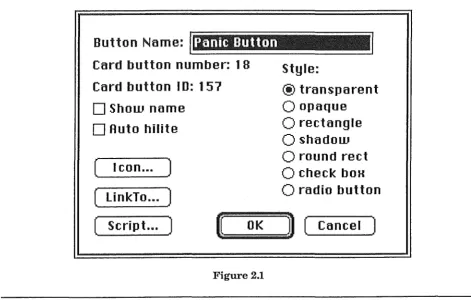
Button Name:
Danie
Button
Card button number: 18
Card button ID: 157
D
Show name
D
Auto hilite
(
I con ...
)
(
LinkTo .•.
)
(
Script .•.
)
[image:10.597.54.526.456.756.2]n
OK
Figure 2.1
Style:
@
transparent
O
opaque
O
rectangle
O
shadow
O
round rect
O
check boH
O
radio button
Traditional Database Implementations in HyperCard 12
Buttons have a number of attributes that allow the HyperCard developer a degree of flexibility in interface design, without departing too far from the Macintosh design standards [IMAC85]. Figure 2.1 shows the "Button Info ... " dialog box, used to change the attributes of a button. It provides the ability to alter the name and appearance of a button, as well as providing a path to the script editor, which is used to write the script for the button. The script editor provides automatic indenting of code, which not only keeps the program tidy, but also helps the programmer to quickly find mistakes in his scripts (if there is a mistake, the indentation mechanism simply places all the following statements in a straight line, hence indicating where the mistake occurs).
2.5,3 Fields
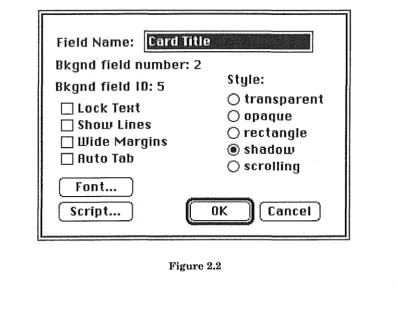
Fields lie at the same level as buttons in the object hierarchy of HyperCard: the bottom. Fields are probably the most important feature of HyperCard as far as database implementation is concerned, as they are used to hold data in the system. Each field holds a variable amount of text (up to 30 kilobytes), and like a button has a number of options governing its appearance. Figure 2.2 shows the "Field Info" dialog box.
Fields are generally used solely as data collection devices, and as such their scripts do not normally contain any handlers. They are fully capable, however ofrespondingto any message for which their script contains a handler.
Field
Name:
Bkgnd field number: 2
Bkgnd field ID: 5
D
Lock TeHt
D
Show Lines
D
Wide Margins
D
Auto Tab
Style:
O
transparent
O
opaque
O
rectangle
@ shadow
O
scrolling
( Font... )
[image:11.597.98.495.408.743.2]( Script... )
U~(
iiiiiiiiiiiiOiiiiiiiiiiiiKiiiiiiiiiiiiii'Il (Cancel )
2.5.4 Cards
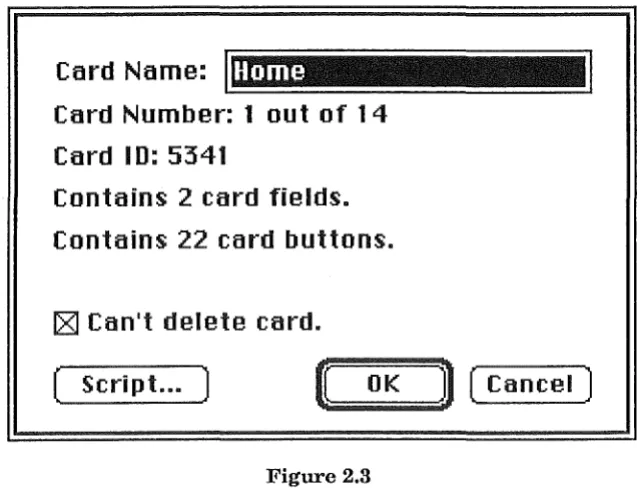
Cards, as mentioned before, appear to the user as the basic unit of information in the HyperCard system, A card is the next step up in the hierarchy from buttons and fields. Each button or field in the system must belong to a specified card (or background, as described in the next subsection), and will therefore appear only when that card is being displayed on the screen. As well as buttons and fields, cards may contain graphics over their whole area, which are created with an extensive set of MacPaint-like tools and facilities. Figure 2.3 shows the "Card Info ... " dialog box, which includes information about the number of buttons and fields belonging to the card in question.
Card Name:
Home
Card Number: 1 out
of
14
Card ID: 5341
Contains
2
card fields.
Contains:
22
card buttons:.
rzJ
Can't delete card.
[image:12.597.136.455.271.519.2]( Script... )
~~(
;;;;;;;;;;O;;;;;;;;;;K~n (
Cancel )
Figure 2.3
2.5.5 Backgrounds
Backgrounds are very similar to cards, and provide the next step up in the hierarchy. Every background owns at least one card, and each card belongs to one and only one background. A background contains graphics, buttons and fields in the same way that a card does, except that these things appear on every card which belongs to that background. Hence a button belonging to a particular background will be present whenever any card with that background is displayed on the screen. Background fields will also appear on every card, but the information contained in each will differ from card to card (it is the field which is part of the background, not the information in it). Figure 2.4 shows the "Background Info ... " dialog box, containing much the same information as the dialog box for a card.
Traditional Database Implementations in HyperCard
Background Name:
Home
m
Rre'Eersences
2.5.6
Stacks
Background ID:2282
Background shared by 2 cards.
Contains 3 background fields.
Contains O background buttons.
[image:13.597.108.474.94.353.2][Z] Can't delete background.
( Script... )
tt
OK
Figure 2.4
n (
Cancel )
14
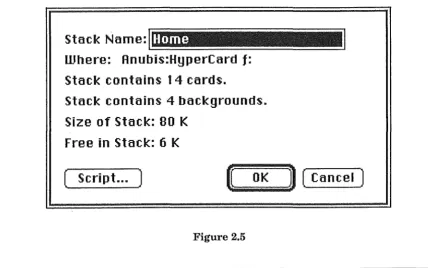
Stacks are the basic transportable unit in the HyperCard system. They are implemented as individual data files under the Macintosh filing system, containing highly-compressed (over 20 different compres-sion schemes used) representations of the objects which they contain. Stacks consist of a number of backgrounds (each with its associated cards), and are the highest basic object in the HyperCard hierarchy. Figure 2.5 shows the "Stack Info ... " dialog box.
Stack Name:
1-._;::;:::::::::----~~~~~__:.::=======
Home
Where: Anubis:HyperCarct
f:
Stack contains 14 cards.
Stack contains 4 backgrounds.
Size of Stack: 80 K
Free in Stack: 6 K
( Script ... )
tt
OK
n (
Cancel )
I
I.
[image:13.597.76.505.485.753.2]2.5.7 The Message-Passing Hierarchy and the HyperTalk Language
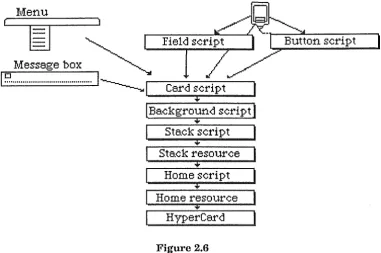
Although there are only five basic objects in the HyperCard system with programmable scripts capable of containing handlers, they are not the only objects capable ofresponding to messages. Figure 2.6 shows the hierarchy diagram from the HyperCard Help Stack, a stack which provides on-line help to HyperCard users.
Menu
lfil
I·
Me,-:--age b o x ~
I!::! ... I~._!
_c_ar_d_s,_c_f'i __ p_t _ ...+
[ Background script
+
Stack script
Stack :resource
Home script
Home resource
Hype:rCard
Figure 2.6
[image:14.597.111.492.193.445.2]As can be seen, buttons and fields (although shown here at the top of the picture) lie at the bottom of the hierarchy. When the user clicks the mouse over a button, the mouse Up message will be sent to that button. If it does not contain a handler for the mouse Up message, the message will continue on up the hierarchy to the card that holds the button which was pressed. If that card's script does not contain a handler for the mouse Up message, it will continue on up to the background, and so on. In this way, any message which is not 'caught' within the hierarchy eventually reaches the HyperCard application itself, where it is signalled as an error if it is not recognised. When a message is caught by a handler, it ceases its passage up the hierarchy unless explicitly passed on its way by the 'pass' message.
After nny message passes the stack script of the cunent stack, the resource fork of the stack file is checked for 'XCMD' and 'XFCN' resources. These resources are basically standard Macintosh code resources which have been written to interface with the HyperCard system. If an XCMD or XFCN is found with the same name as the message being passed, it is executed in the place of a handler.
If a message has still not been caught within the hierarchy, it next passes to the stack script of the Horne Stack. This stack provides a base of operations for the HyperCard user. When the HyperCard application is started up without a particular stack being specified, the user is placed in the Horne Stack. Because of its place in the message passing hierarchy, it is possible to write handlers which apply to any and all stacks used by the user who owns that particular Home Stack. Any stack may be called the Home Stack, but it is normal to use the standard HyperCard Home Stack, or a modified version thereof.
Traditional Database Implementations in HyperCard 16
Finally, the resource fork of the Home Stack is checked for XCMD and XFCN resources, and failing the message being caught by these, it is passed up to HyperCard itself, which either accepts it as a known message, or rejects it as an error.
User input is not the only source of messages in the HyperCard system. Selecting an item from the menu generates a 'doMenu' message, which is passed first to the currently-displayed card. The user can send messages explicitly by typing them into the 'message box', a miniature window which can be called up at any time. Handlers may also be written for user-defined messages, and these messages perform much the same function as procedure calls in a more conventional languages.
The destination of a message can also be specified so that, for example, it is possible for a handler in a stack script to send a message to a button. Message passing, like the behaviour of the system in general, is not limited in its scope to a single stack. It is possible to send messages to objects in other stacks, simply by specifying the stack as part of the destination for the message.
As mentioned before, all HyperTalk statements are basically messages destined ultimately to be executed by the HyperCard application. It is possible, however, to intercept any message, including HyperTalk statements, from 'doMenu' right down to basic arithmetic commands, as the following rather irritating scripts would demonstrate if placed, for instance, in a user's Home Stack script:
on doMenu anitem
if anitem is not "Quit .HyperCard" then pass doMenu
else answer "No! I don't want to go!" end doMenu
on add
answer "I'm not a number cruncher!" end add
In some ways, HyperCard provides an object-oriented programming environment. The objects, however are limited to those defined by the system: buttons, fields, cards, backgrounds, and stacks. Only the messages are completely user-definable and re-definable.
As a computer language, HyperTalk has a very 'natural' feel. Many ofits statements are plain English ("add 1 to sum"), and scripts as a whole are highly readable. In fact, HyperCard supports the ability to write scripts in any one of a number of other natural languages (e.g. French), provided the correct interpreter is used. As an example of the readability ofHyperTalk, there exists in the system a pseudo-variable called "it". Whenever the destination for the result of an operation is not specified, the result is placed in this 'container' (a collective term for variables and fields in HyperCard). It can then be referred to by name, as in the following handler:
on calcAnswer
get card field "data" add 15 to it
multiply it by 3
Many other features of the language contribute to its programmer-friendliness, making it both a pleasant and productive language in which to develop applications.
2,6 How It All Works
The details of the inner workings ofHyperCard are, of course, proprietary information. However, it is clear that much use is made of compression as opposed to uncompressed storage, and pointers as opposed to relational methods of data structuring. All the objects in a stack are stored in the data fork of the stack file, although it seems that a system analogous to the Macintosh 'resource' structure is used within the data fork. The application itself requires 750 kb of free memory in which to run, much of this being devoted to graphics buffers. Cards and their associated information are cached where possible, helping to cut down on input/output time.
2,7 The Philosophy
The philosophy ofHyperCard can probably best be summed up by yet another label: "an information sharing tool". Although it is possible to protect HyperCard stacks so that the scripts cannot be examined by users, this is only very rarely done. One of the greatest factors in the growth ofHyperCard has been, and will continue to be, the underlying assumption that it is perfectly acceptable to examine other people's code, to learn from it, and to modify it to suit your own needs. Even the ability to restrict the user's level of access to a stack (from 'just looking' to complete programming control) is generally only used for safety purposes.
The essential portability of stacks also aids in the sharing of information and applications. Large bases of public domain stackware have already been built up in the United States, demonstrating the wide appeal and rapid acceptance of HyperCard within the Macintosh user community.
2.8 Relevant Features
Not all of the multitude offeatures in the HyperCard system are strictly relevant to or useful in the implementation of traditional database applications. Probably the most important feature of all is the humble field. Fields can be represented on a card as scrolling windows onto their contents, so that only a small amount of space on the screen need be allocated for a potentially large amount of information. In HyperCard, unlike fields in many traditional database systems, fields are of variable length (with an upper limit of 30 kb). This simple fact will have a major impact on the nature of database applications in HyperCard.
The Hypermedia approach to information storage, where related pieces of information are linked directly together, is not applicable when implementing a traditional database. A database is de-signed to hold large amounts of variable data, not specific facts that are known at the time of crea-tion. Therefore it must be able to cope with any number of pieces of information, and make any necessary associations based on the values placed in the database by its users at the time they come to use it. Hence much of the power of HyperCard in this area will go unused, and it remains to be seen whether what remains can provide a suitable environment for traditional database applica-tions. Later chapters of this report will concentrate on the features and capabilities of HyperCard that are relevant to such applications.
Traditional Database Implementations in HyperCard 18
Chapter 3: A Database of English Idioms
3.1 Introduction
The implementation chosen as an example of the type of application to which a traditional database tool might be applied was a database of idioms from the English language. Sections 3.2 and 3.3 discuss the origins and purpose of this project. Idioms are an important feature of any natural language, and are described further in Section 3.4. Once the idea of a database ofidioms had been proposed, it became clear that such a system would have a wide range of applications within the language community. Section 3.5 looks briefly at three possible applications of the finished system, while Sections 3.6 and 3.7 detail the requirements in terms of the data to be stored in the database, and its functionality, that would make it a suitable tool for the applications envisaged.
3.2 The
Origin
of the Project
The original idea for this particular project came from Dr. Kon Kuiper, a senior lecturer in the English department at the University of Canterbury. Dr. Kuiper has a particular interest in the field of idioms in the English language, and has developed theories about the way in which users of a language remember and use idiomatic expressions [KUIP88]. In order to test these theories, he required a means of storing and manipulating a large body ofidioms. Being interested in computers, and in particular the Apple Macintosh, Dr Kuiper realised that this aid to his research could probably be constructed with some form of database system.
3.3
The Purpose of the Database.
One of Dr. Kuiper's theories involves the behaviour of the syntax of idioms in natural language, and in particular the occurrence of repeating groups of lexical elements within the syntax of particular idioms. His primary requirement of any system developed was that it would enable him to automatically examine the syntax oflarge numbers ofidioms, looking for particular features (such as repeating groups) within the syntax structure.
3,4 The Nature of Idioms
Idioms often owe their non-compositionality to their colloquial or euphemistic nature. They are often restricted in their usage to a particular field of reference, for example the particular language of cattle auctioneers, where many of the phrases used would only be meaningful in the con text of a cattle auction.
3.5 Au:ulications of a Database of English Idioms
Three main uses may be discerned for the finished database system. Described below, they are linguistic research, language teaching, and automatic translation.
3,5.1 Linguistic Research
The idea of a database of English idioms was first put forward as an aid to research into the nature and usage of idioms. Hopefully, the final product will not be limited in application to Dr. Kuiper's area of interest, but will also be usable by other linguistic researchers interested in idioms. To this end, the database has been designed to hold more information than just the syntax structure, which is all that would be necessary for Dr. Kuiper's research.
3.5.2 Language Teaching
Students learning a second language face many hurdles. Perhaps the greatest challenge is to acquire the ability to speak fluently in the chosen tongue, so that a native speaker of the language might not be aware that he or she is speaking to a person with a different linguistic background. Quite apart from questions of accent and fluidity of speech (which are only a problem in spoken language, as opposed to written), there is the problem of choosing appropriate combinations of words with which to express the ideas to be communicated. To overcome this problem it is necessary for the student to master vast numbers of 'collocations' in the language being learned.
A collocation can be thought of as the particular combination of words which is commonly used to express a specific idea or concept in a given language. For example, the phrase "shed tears" is the collocation that is normally used in English to describe the action of crying. It is compositional, because the meaning can be derived from an examination of the separate words making up the phrase. Another phrase, such as "dropped tears" could be used to express the same idea, but it is not one that is used in common English. Anyone using the phrase "dropped tears" could immediately be identified as a foreign speaker, because he or she had not used the appropriate collocation. Idioms, as a subset of collocations, are particularly susceptible to misuse. Their non-compositional nature can render them not only inappropriate, but quite incomprehensible if not used eorrectly.
It is perhaps an impossible task for a student to master a second language so completely that he or she is never at a loss for the appropriate collocation or idiom. However, it is always worthwhile to attempt to acquire greater skil1 in their usage. To this end, a dictionary ofidioms is a useful companion for serious language students. Electronic dictionaries for computerised spe11ing checking have been common for some years now, and on-line thesauruses have also recently begun to appear. A computerised database of idioms should therefore have some value, particularly if presented in an interactive, user-friendly fashion.
Traditional Database Implementations in HyperCard
3.5.3 Automatic Translation
A third possible application for a database of idioms might lie in the field of automatic translation of natural languages [ARN087], [SCHE86]. Due to their non-compositionality, direct translation of idiomatic expressions can lead to disastrous results in the translated output. It is therefore necessary for an automatic translator, like its human counterpart, to be able to recognise idioms when they occur in a document to be translated, and be capable of substituting a suitable expression in the target language, preferably an expression that is also idiomatic in nature.
This, of course, may be an impossible task. Presented with the example "kick the bucket", how would a translation machine convert this phrase into, for instance, Swahili? A literal translation may lose the meaning of the original, or even have no meaning at all in a language where there may simply be no word for "bucket".
Although it was not intended to design the datab&.se in a way that would make it useful for the automatic recognition of idiomatic expressions, it is hoped that such an application, and many others, might benefit from the data collection facilities provided by the system.
3,6 Reguirements of a Database of English Idioms
As mentioned above, the design of the database took into consideration the possibility that its final applications might require more information than was necessary for Dr. Kuiper's research. After consideration and discussion, the following elements were settled on as the data items to be stored for each idiom in the database.
3.6.1 The Idiom Text
The first and most obvious requirement was for the text of the idiom itself to be stored in the database. Although this could conceivably have been integrated with the storage of the idiom's syntax structure in the sort of complex structure that would be possible with a relational database tool, early thoughts on the eventual structure of the HyperCard implementation indicated that it would be more appropriate to store the text separately.
The text of the idiom would simply consist of the words that make up that idiom when it is used in written or spoken language. Where a variable part is an important part of an idiom, such as "something'' in "make an example of something'', that variable part would be indicated with a dash ("make an example of-").
3.6.2
The Syntax Structure
3,6,3 Alternate Forms
Idioms in English are relatively inflexible objects. Although they may undergo some linguistic transformations while still retaining the same meaning, their non-compositionality makes this fairly rare. Hence an idiom like "kicked the bucket" loses its meaning when passivated: "the bucket was kicked". Sometimes the structure of an idiom may be deliberately twisted for humorous effect, but this is not the general case.
Although such transformations are not common, they do nevertheless occur with reasonable frequency, and are important enough to be considered for inclusion in a database such as the one under
design. An automatic translator, for instance, would need to know about all likely variations on the
i:
idioms it understood. For this reason, it was decided to allocate space in the database for the inclusionof alternate forms of the text of each idiom (but not the syntax).
3.6,4 Usage Notes
There are many aspects to the usage of idioms which it is desirable to know. For example, the level of formality of an idiomatic expression is very important in the appropriate usage of that idiom. It would be most unfortunate, for instance, if a non-native speaker of English was to use a very colloquial idiom at a formal occasion. Associated with this is the register of the idiom. An expression that was uniquely associated with cattle auctions, for example, would be inappropriate, and probably incomprehensible in other contexts.
Such information is not easily represented in a fixed or formal fashion. Some idioms may require detailed information on their register, while some may be general in applicability, and may require no information on their context at all. Some idioms may require copious amounts of information on their usage, some very little. In a traditional database, it would be difficult to allocate space for this information. As will be seen later, it is not so difficult in the HyperCard environment.
3,7 Functionality:
From the outset of this project, it was clear that the functionality of the database would be affected by the capabilities of the HyperCard application. The purpose of the project was, in fact, to determine what these effects were. Some basic functional requirements, however, could be determined immedi-ately. The system would have to provide facilities for the input and output of the data it contained. It would also need to provide some user control over the viewing and maintenance of that data. Further than this, the possibilities were to be explored as experience with the system grew. The next chapter describes what was gained from this experience, while Chapter 5 describes its impact on the final implementation of the database in the HyperCard environment.
Traditional Databas!iJ Implementations in HyperCard
Chapter 4: Preliminary Activities
4.1
Introduction
In order to come to grips with the capabilities of HyperCard, it was necessary to gain extensive experience with the product. This was done through the implementation of a number of projects over the period of approximately 10 months, including both database-style applications, and less formal information management tools.
Four of these projects are worthy of mention for their different approaches and applications. They are described below, followed by summaries of the observed similarities of and differences between HyperCard and traditional database systems. Finally, some generalisations are made about these similarities and differences, and a preliminary comment is made on the viability of implementing traditional databases in the HyperCard environment.
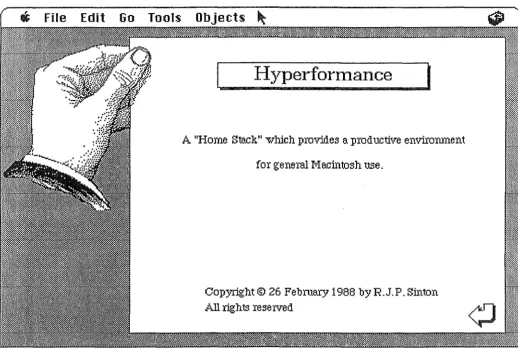
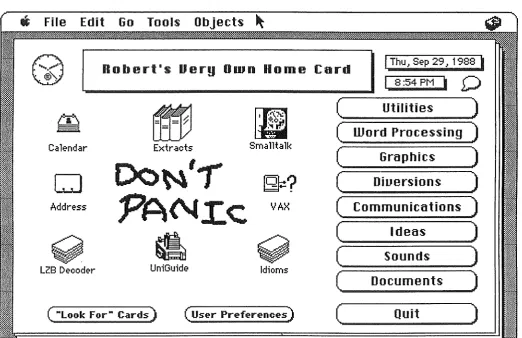
4.2 The Home Stack
As the Home Stack is the new user's first encounter with HyperCard, it was deemed a suitable starting place for experimentation with the system. Many of the early public domain software produced in HyperCard was concerned with the possibility of using HyperCard as a 'home base' for Macintosh operations. Two variations of the HyperTalk "open" message allow HyperCard to launch applications, either on their own or with an associated document. Some of the firstXCMD and XCFN resources written were designed to allow simple file operations, such as support for a standard "GetFile" dialog, enabling a user to select a file in the standard Macintosh style.
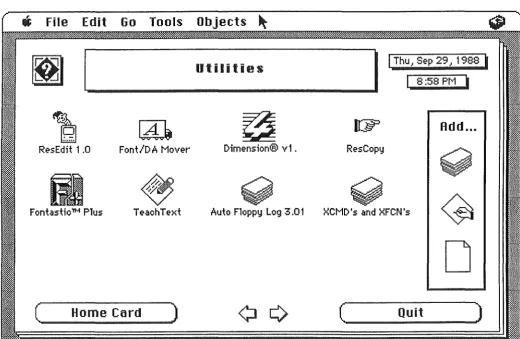
In the true HyperCard spirit, some of these XCMD's and XFCN's were cannibalised from other programmers' efforts to aid in the construction of a customised Home Stack. The user of this stack is able to automatically create buttons for often-used applications and documents, with scripts which will launch the appropriate applications when the buttons are pressed. Functionality was provided to allow buttons with a common theme to be grouped together on separate 'subject' cards, all linked to the main card in the stack. The functionality of the standard Home Stack was preserved, allowing control over user level and file location.
Since this stack reached stability, it has provided an excellent base for everyday use of the Macintosh. The Finder need only be used for large-scale file manipulation, with simple filing tasks being performed by the "DeskTop" desk accessory. All applications are launched from the Home Stack, to which control returns when the application is terminated. With the addition of a 20Mb hard disk and 2.5Mb of RAM memory, it has been possible to use MultiFinder, allowing the concurrent use of many different applications (in a simple context-switching environment) as well as HyperCard itself. This style of use has greatly increased the power of an already highly productive microcomputer environment.
4.3 A Personal Calendar
The second project, and the one which provided the most experience in the use of HyperCard and programming in the HyperTalk language, was a personal calendar and appointments book. This calendar contains three levels of date-keeping, implemented by backgrounds for years, weeks, and days. Appendix C contains the cards and backgrounds used in this stack.
The implementation of the calendar progressed through many stages, from slight variations on the datebook stack supplied with the HyperCard system, through to its present form. Along the way, numerous problems were encountered and overcome, leading to a greatly increased understanding of the system's operation and capabilities. As an information management tool, the calendar is an ideal illustration of the way in which HyperCard applications can depart from the rigid structures inherent in traditional tools such as relational databases, and instead achieve the diversity and complexity offull-scale dedicated application programs, without the high cost involved in their development and implementation.
Since the calendar reached a stable state, it has been selected for inclusion in the "Uni Guide" system currently under development by the University of Canterbury Macintosh Users' Group, where it will hopefully prove to be a useful tool for personal organisation.
4.4 An LZB Decoder
As an example of the application ofHyperCard to a problem normally solved by writing a stand-alone program, HyperCard was used for the development of a decoder for the Bell variant of the Ziv-Lempel compression scheme. This scheme is discussed in a forthcoming publication on the general subject of text compression [BELL88].
The decoder stack itself was developed in less than 8 hours, complete with graphical user interface, input and output facilities, and the collection of basic statistics on the decoding process. The fact that it decoded at a rate of slightly less than 1 character per second was unfortunate, but as the purpose of its development was to provide a better understanding of the LZB compression scheme, this was not a cause for great disappointment. The development of the stack did provide a better understanding of the scheme, along with a basic grasp of the approaches and algorithms required in a decompression program. To this end it both achieved the original goal, and provided experience that would have been invaluable in a full implementation of a fast decoder.
This project provided an excellent example of two features of the HyperCard system: the very short development and prototyping time that can be achieved in the HyperCard environment, and the problem of speed of execution. These and other features will be elaborated on in the next two chapters. Appendix D contains illustrations of the three cards used in the decoder stack.
4.5 Record and Cassette Catalogues
The final example to be presented here is the development of two cataloguing applications for record and cassette collections. These applications, although certainly the simplest of those described here, are the most 1·elevant in the overall context of the project, as they illustrate the important issues involved in implementing what are essentially traditional databases. The experience gained in the construction of these two stacks, although of little extra benefit to the grasp ofHyperCard itself, was the most useful for the purposes of the project.
Traditional Database Implementations in HyperCard
Appendix E contains illustrations of the cards which are used to hold the data in the two applications. These 'data cards' are really all that is needed for the implementation of a simple database, as will be
discussed in the next chapter.
4.6 Similarities Of and Differences Between HyperCard and Traditional Databases
The HyperCard application and more traditional database systems are both basically tools for information management. Traditional databases, however are concerned with the management of identically-structured items of data in a uniform and systematic manner. HyperCard provides a base for the management of data of widely varying type and form. Users of traditional database tools are generally locked into the field-record-file frame of reference, along with its limitations of fixed size and structure. HyperCard frees the user from these restrictions, allowing data to be represented in whatever way is most appropriate, and linked in ways which are oriented more towards human beings than computers.
While this may seem a wonderful ideal, there are prices to be paid. Giving up the rigid structure of a traditional database also means the risk oflosing control of the complexity of the information being represented. Itis very easy for a large HyperCard stack to become confusing to the user. In the early days of HyperCard, much was made of the application of Hypermedia concepts to educational uses. It was suggested that the ability to 'browse' through stacks on topics under study would be of advantage to the student. Large bodies of information coulq. be assembled in HyperCard stacks, and the student would be free to follow his or her own lines of interest, choosing only to view those topics with which he or she was concerned.
However, such a system could easily backfire. With the complexity available to represent different topics in a multitude of formats, it would be very easy for the user to get 'lost' in a jungle of information. As an example, educational stacks tend to make wide use of 'transparent' buttons. A card in an educational stack might contain a large picture made up of many components, each overlaid with a transparent button. The user who wished to learn more about a particular component of that picture would be encouraged to 'click' on that part of the screen. The invisible button would then be activated, and would take whatever action was necessary to 'zoom in' on that area of information. It is an excellent indication of the danger of this method that the user quickly learns the keyboard shortcut that will indicate the locations of all transparent buttons. He or she knows almost instinctively that this is the only way to avoid missing important pieces of information, as well as often being necessary to actually ascertain what functionality is present in the stack.
Traditional database systems, on the other hand, do not suffer from these problems. It is necessary for the user to have some previous knowledge of the structure of the system in order to use it effectively, and hence there is little possibility of overlooking important facets of the system.
In terms of practical differences in the two systems, three aspects come to the fore: interface, speed, and power. These are examined separately in the following subsections.
4.6.1 Interface
Relational databases are generally used in one of two ways: through applications programs that interface with the database internally, separating the user from the database altogether, or through some form of query interface. As an example, the relational database system INGRES [HELD75], running under the UNIX operating system, has its own query language, QUEL. Applications programs written in a high-level language such as C may interface with an INGRES database through EQUEL, a form of QUEL which can be embedded in program code. Alternately, individual users may interface directly with the database through a 'monitor' program, which allows the entry of queries phrased in QUEL, and returns the results of those queries to the terminal. These capabilities may be considered as reasonably typical of traditional database systems.
HyperCard has only one user interface: that which is provided by the HyperCard application itself. This interface involves the user interacting with the system in much the same way as he or she interacts with other standard Macintosh applications. The HyperTalk programming language provides simple but extensive control over the interface, allowing the stack designer to customise the user's interaction with the system so that it seems as natural and intuitive as possible. The user's involvement generally consists of pressing buttons and choosing menu items with the mouse, and entering data into fields via the keyboard. The graphics facilities are extremely easy to use, and the creation ofobjects such as buttons and fields is also simple and intuitive. In short, the process of interface design and creation is a very pleasant experience.
4.6.2
Speed
Lack of speed is a significant disadvantage when using HyperCard. Existing as it does on the leading edge of software design, the system stretches hardware capabilities close to their limits. The large amounts of data involved in the extensive graphics used in the system cause problems in terms of storage space. In order to go some way towards alleviating these problems, much use is made of compression schemes, which introduce their own problems in the area of speed of access due to the time taken in compressing and decompressing the information.
HyperTalk, the programming language behind HyperCard, is a very natural and high-level inter-preted language. This means, of course, that a considerable amount of time is spent in the translation of messages into commands that the computer itself can understand. HyperCard as a whole was designed to be more than just a database, and certainly more than a mere number-cruncher. Because of this, it simply does not have the speed of traditional database systems.
4.6.3 Power
Traditional databases are concerned only with the task of storage and re.trieval of information in records of fixed size and identical structure. Because of this, their functionality centres on a very small core of abilities, and hence they can achieve greater power in their area of speciality, as well as greater speed than systems like HyperCard. The query languages of relational database systems contain only those statements necessary to perform the basic create, update, retrieve, and delete operations (CRUD). HyperTalk, on the other hand, is a general purpose programming language, with the ability to control arithmetic operations, input and output, and so on.
Traditional Database Implementations in HyperCard
One example of the difference in power between the two systems is the ability to generate reports. While there is a reporting facility in HyperCard, it is basically a fop to users who are used to traditional database systems. The lack of a sophisticated report generation scheme is usually the first complaint heard from such users when they attempt to utilise the HyperCard system. From the beginning, it has been emphasised by its creators that HyperCard is "not just another database", and it is altogether possible that the facility to generate reports has been left under-developed specifically to reinforce this point.
To contrast this example, it is only necessary to look at the superb interface facilities of HyperCard. Only the very recent database products for the Macintosh, such as the "Fourth Dimension" database application, come even close to providing comparable facilities, and these are without exception considerably more difficult to design and use.
4.7 Summary
The experience gained from the projects described in this chapter, and considerable reflection on the nature of the systems being compared, leads to some generalisations:
HyperCard is an extremely useful tool for the management of information of a diverse and varied nature. It possesses superior interface facilities, and provides an environment in which it is easy and enjoyable to prototype and implement many different types of information management applications. It encourages creativity in design and flexibility in operation.
Traditional databases are basically tools for the management of data in a predetermined and fixed format. They bring both speed and power to this rather specialised task, and are the systems of preference where these features are important.
Chapter 5: Implementation
5,1 Introduction
This chapter describes in detail the design and construction of the database of English idioms undertaken as part of the project. Appendix F contains pictures of the backgrounds and cards that form the database. The three main stages of development are covered in the following sections: analysis, design, and implementation.
5.2 Analysis
As in any software project, the first task was to determine what was required of the system. Because the database was being constructed with a tool for which there exists no large background of experience, this phase of development also involved the consideration of which of the requirements of the system (if any) could realistically be satisfied in HyperCard. The projects described in the previous chapter provided an awareness of the limitations 'of the HyperCard environment, and generally supplied an excellent base of experience to apply to the task in hand.
The basic requirement, as far as the research planned by Dr. Kuiper was concerned, was an ability to manage large numbers of idioms, and perform simple searching operations on them in order to test hypotheses about their syntax structure. The data requirements for this and other potential applications of the system have already been described in Chapter 3. What was now required was a system which could maintain and manipulate this data.
The first consideration was the structure in which the data would be stored. The nature of the HyperCard hierarchy of objects leads logically to the use of the card as a parallel for the record in traditional database systems. However, the time involved in moving between and obtaining data from different cards means that some practical limitations are imposed on systems which use the card in this
NP
~
ARTP
the
N
pp
A
p
NP
I
N
I
crack
of
dawn
Figure 5.1
way. The experience gained from the record and cassette catalogues in particular showed that the best approach was to store all the data concerning a particular idiom on a single card, as opposed to the more complex structures that would probably be chosen for an implementation in a traditional database system. Features such as repeating groups of data items within a single record (e.g. alternate forms of idioms) could be handled admirably by scrolling fields, so that no real difficulties were envisaged with this approach.
The next important consideration was the storage of the syntax structures of the idioms. Ideally, the syntax of each idiom would be shown as a tree structure, with a grammatical label at each node, and the words themselves at the leaves of the tree. Figure 5.1 illustrates this approach, showing the structure of the idiom "the crack of dawn".
Traditional Database Implementations in HyperCard
Although such a representation could be made ideally in HyperCard, with its powerful graphics facilities, this would have left the information in an inflexible format, and would certainly have been unsuitable for the sort of searching that was a requirement of the research to be undertaken. As a compromise, a bracketed notation was devised using the minigrammar described in Appendix A, where each word and sub-expression would be surrounded by brackets, with a grammatical label preceding each left bracket. Thus the syntactic structure of the idiom shown figure 5.1 could be represented in the database by the bracketed form "NP[ARTP[the] N[crack] PP[P[ofJ NP[N[dawn]J]]". This notation would mean that pattern matching could be performed with simple wildcarding techniques in order to extract the information required.
However, the searching facilities in HyperCard, like the reporting facilities already mentioned, are rather unsophisticated. Although they have been expanded in the most recent version of HyperCard [V2NT88], they are still limited to finding a single occurrence of a contiguous piece of text. There is no wildcarding built into the system, nor is there the ability for a search operation to collect multiple matches, as in a relational database system.
Wildcard searching could, of course, have been implemented by programming the facility in the HyperTalk language. However, the low speed that this facility would have exhibited, due to such factors as the interpreted execution of the HyperTalk language, would have been very limiting. Another alternative did exist which might have provided tolerably fast execution for searching operations. This was to write external commands or functi~ns (XCMD's or XFCN's) to perform the searching required. However, the likelihood of success in such a venture could not be determined beforehand, and there would have been major obstacles to overcome. Programming of these external functions must be done in a traditional programming language such as Pascal or C, which require considerable effort and experience to use effectively in the Macintosh environment. As well as the extensive knowledge of the internal workings of the Macintosh that would be required, it would have been necessary to come to grips with the XCMD and XFCN interface ('glue') to HyperCard itself. This information would have had to have been obtained from a source such as the Apple Programmers and Developers Association (APDA), and would probably have taken some time to arrive. The decision was finally made not to rely on this solution, which in any case would only be available as an aid to database implementation to the select group of people capable of overcoming the obstacles mentioned above, and not to the wider class of users for which HyperCard should be a valuable tool.
It was obvious from an early stage that ifHyperCard could not be used to accomplish the processing tasks required, it would be necessary to use the speed and power of a traditional database tool for the satisfaction of these requirements. It was decided to use the recently-released Macintosh database application "Fourth Dimension" to fulfil the processing needs for the database of idioms, although no concessions would be made to any characteristics of this particular product. The major implications that this decision and the factors which led to it held for the project as a whole are better left to the following chapter, where they are discussed in the context of their general relevance to the viability of database implementations in HyperCard.
To enable other systems (such as the one chosen) to use the data from the database of idioms, it was necessary to design and implement a set of sophisticated input and output facilities. These would need to be extremely flexible to cope with the wide variety of file formats used by different systems. Their design is discussed further in the following section.
5.3 Design
The first major design task was the design of the 'Data Background'. The card defined by this background would be the basic unit of information storage in the database, corresponding to a single record in traditional database systems. It would need to include space for all the data items that had been chosen for inclusion in the system, as well as features which would enable user interaction with the system. Appendix F contains illustrations of all the background and card designs used in the system, the first of which depicts the final version of the Data Background itself.
In keeping with the decisions that were made concerning the necessity of input and output facilities, these features were the main thrust of the design effort. Flexibility was the prime requirement, in order to enable the transfer of data to and from the widest possible range of different systems. To this end, facilities were provided for the restriction of input and output to a user-selected subset of all the idioms in the database, for the specification of exactly which items of data were to be transferred, and for the definition of the format of these items.
When first considering the typical uses to which the system might eventually be applied, it was foreseen that a user would not always wish to work with the whole database at once. A possible scenario might involve the user choosing a range of idioms and exporting these for more detailed analysis. A user with an interest in idioms of a a particular type or background might wish to select these idioms out of a larger and more general collection, and limit his or her attention to these idioms alone. Wit~ the simple selection mechanism that was designed for this implementation, the user has the poweri\select any number of idioms, and (if so desired) limit any future inputJoutput operations to this selected set. (Coincidentally, it was later found that "Fourth Dimension", the database tool used for the syntax analysis, used a selection system identical in intention to that described here.)
When it came to the design of the data transfer facilities themselves, the first requirement was that the user be able to choose, in terms of fields, which items of data would be transferred. As well as making this choice, the user had to be able to vary the format in which these items were transmitted. To achieve this, facilities were provided to specify the length of fields for input and output, along with rules for padding short fields, or alternatively to specify separators to indicate the boundaries between fields of variable length. These choices were made on a field-by-field basis, to provide the maximum of flexibility.
Finally, the capability was included to save and restore both selection sets and file f~rmats. In the case of selection sets, a user can create a file which contains a record of which idioms in~database are currently selected. It is therefore possible to maintain any number of selection sets for a single database, without requiring multiple copies of the data.
The ability to save file formats allows the user to keep copies of the formats that he or she commonly uses, and restore them quickly, and without a great deal of mental effort. It is also useful for the provision of pre-defined formats for users unfamiliar with the concepts involved in data transfer. Included with the final system are file formats for exporting data to two common database applications: Fourth Dimension (the Macintosh relational database application used for the research processing), and University INGRES, a relational database system for the UNIX operating system[HELD75l. The Fourth Dimension format, which allows fields of variable length, uses field separators, while the INGRES format demonstrates the use of fixed field lengths. Both f.ormats have been tested with the export ofidiom data to the systems concerned.
The full extent of the functionality involved in the inputloutput system can best be grasped by examining the cards involved with the process of defining the parameters outlined above. Illustrations are given in Appendix G, but as is usually the case with the Macintosh, and with HyperCard in particular, there is no substitute for hands-on experience. Appendix F contains the help texts available to the user through the built-in help system.
Traditional Database Implementations in HyperCard 3)
5.4 Implementation:
The final phase in the construction of the system involved the actual implementation of the different features that were to be included in the database. HyperCard, with its interpreted programming language and powerful graphics facilities, enables an intuitively-interfaced, user-friendly system to be constructed with ease and quickly modified. Minor modifications and general 'tuning' of the system can be performed virtually at the click of a button, and the environment is in general extremely productive, as well as pleasant to use. In short, HyperCard provides an ideal environment for system prototyping and interactive development. Hence much of the design work overlapped with the actual implementation effort. The following subsections describe the implementation of various features that comprise the finished database of English idioms.
5.4.1 The Data Background
The Data background in effect provides a template for the storage of idiom data. The details of a background naturally need only be stored once in a stack, with the individual items of data being stored separately, and placed into the 'template' for viewing purposes. As well as providing a structure for the storage of the data, the Data background contains buttons which enable the user to perform movement through the individual data cards, buttons to initiate more complex actions, such as input and output, and buttons which perform the system-wide tasks of viewing general stack information, obtaining context sensitive on-line help, and returning the user to his or her home stack.
. .
These last three tasks are performed by the three buttons in the top right-hand section of each card card in the system. The design and implementation of these three buttons followed common HyperCard conventions. Because of the global importance of their functions, the three buttons in this area are repeated on every card and background in the stack, always in the same place, so as to remain accessible to the user at all times.
The "Home" button, which ret