Load Balancing Evaluation Tools for a Private
Cloud: A Comparative Study
Sahand Kh. Saeid and Tara Ali Yahiya
Department of Computer Science and Engineering, School of Sciences and Engineering, University of Kurdistan Hewler, 30 Meter Avenue, Erbil, Kurdistan Region - F.R. Iraq
Abstract - Cloud computing turns out to be an emerging technology that revolutionized the world of IT infrastructure. However, since the number of users is increasing daily, the demand for cloud services is increasing too. Thus, congestion occurs on the servers that provide services in the cloud. To avoid congestion, we used load balancer tools such as HAProxy and Nginx to intercept the requests of users and distribute them evenly to the servers. Jmeter is used to measure the performance metrics of least connection algorithm in terms of CPU utilization, response time, and concurrency level. Results showed high performance of HAProxy compared to Nginx in terms of response time and treating requests. Furthermore, we examined the characteristic of availability of the load balancer through deploying redundant load balancers, and we studied the effect of the failure of the load balancer on the quality of service of the end users. Keepalived is used to ensure a smooth transition between the two load balancers. According to the concurrency level, results proved that the number of unsuccessful requests during the failure of the master load balancer is proportionally minuscule compared to the total number of requests sent in a normal situation.
Index Terms— Cloud computing, Least connection algorithm, Load balancing.
I. IntroductIon
Recently, cloud computing became one of the hottest topics in
the technology field. It has a powerful impact on the industry
and its business. The difference between cloud computing and traditional computing is that cloud computing reduces expenses by eliminating hardware, consuming less power, and minimizing the space of utilization (Kashyap and Viradiya, 2014). One of the major problems of cloud computing is the loss of control where users do not know where and how their data are stored and processed, for a normal user this may not be a big problem, but for an organization, it is very critical and can have a huge impact on it if the data are not in the right
hands. This problem will definitely not occur in a private cloud
environment, which is one of the models of cloud computing
where a specific user can work in a virtual environment,
bearing in mind that a private cloud is used for internal use just like the case of a small company or an enterprise (Luís, 2016). In the past few years, more than 60% of the IT industries have implemented a private cloud as their own paradigm for storage and computation (Luís, 2016). Private cloud provides computing resources such as servers, storage, and applications as services in a virtualized environment from a pool of computing resources. When the number of users who accesses these resources increases, congestion may occur, this would cause the servers to be overloaded, and then in the worst case, this can cause a failure of the servers. The load here can be represented by the number of connections, though the need of balancing loads among the nodes of cloud computing is emerging. That is why in many organizations they use a load balancer in their environment to distribute the requests among the servers so they will not be overloaded and the resources
will be used efficiently (Gupta and Beri, 2016). The aim of this article is to first implement a private cloud environment using
Linux based operating system (OS) and other open source tools that are used in every organization without much cost. Within the private cloud, two types of load balancing tools are
installed to distribute the traffic among three servers, in our
case; we selected the case of web servers. The performance of these tools was tested and evaluated by some load tester tools. The performance parameters that are used to evaluate and compare both load balancers tools are CPU utilization, number of requests, response time, and number of failed requests. Furthermore, high availability of two load balancers is also tested and investigated through the article.
This article is organized as follows: Section 2 presents the state of the art of load balancing tools and their implementation, section 3 presents the implementation environment and the numerical results obtained from the load balancer tools and performance metrics, and section 4 concludes the article.
II. Stateofthe art
Load balancer is one of the main components of cloud computing, and it is responsible for keeping the system stable
and working efficiently when the load is increasing along
with providing high available service in ubiquitous way.
ARO-The Scientific Journal of Koya University Volume VI, No 2(2018), Article ID: ARO.10438, 7 pages DOI: 10.14500/aro.10438
Received 22 July 2018; Accepted 22 September 2018 Regular research paper: Published 05 October 2018 Corresponding author’s, e-mail: [email protected]
14 http://dx.doi.org/10.14500/aro.10438 To implement a load balancer in the cloud, it is essential
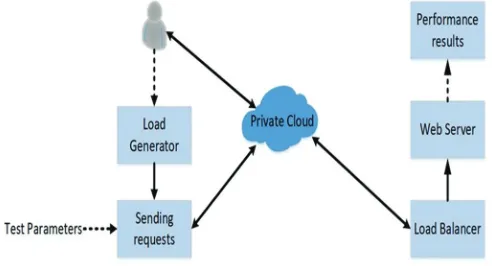
to install tools that act as a load balancer, and it may provide some options for algorithms of load balancing. In general, in such kind of context, there is almost only one method to test the performance of a load balancer algorithm (as depicted in Fig. 1). The method starts with generating loads in terms of requests to some servers in the cloud, that is, web server and database server. The load generation can be done through a tool for generating requests. Then, the requests will travel through the internet to the cloud (Qasmi, et al. 2018). These requests will be intercepted by the load balancer (after for sure some security control) where all the algorithms are implemented. According to the design of the algorithm, the requests will be forwarded to the proper servers (Madani
and Jamali, 2018). The main problem is how to test the
performance of a load balancer through some tools to decide whether or not the load balancer is meeting the requirements of stability and high availability.
Faizal, 2017, used an algorithm called least time
first-byte algorithm (LFB) and combined it with multi-agent system in distributed load balancing, the agent is responsible for collecting information about resources on the backend servers, this information is then combined with the LFB algorithm, they called it LFB with multi-agent system (LFB-MAS). The results showed that this load balancing algorithm provides better performance for all the servers. The LFB-MAS received 100% of the 1,800 requests, where other algorithms like weighted least connection are only capable of receiving 74,50% from the 1,800 requests and LFB without agent could only receive 75,61% of the 1,800 requests. They could prove that this algorithm is reliable and can handle a high number of requests.
Pi´orkowski, 2010, reviewed some of the load balancing algorithms such as Round Robin (RR), weighted RR, least connection, request counting, and many others. They used some load balancing tools such as Apache web server, Nginx, HAProxy, Inlab, and Lighttpd. Once results are obtained, it was proven that the use of load balancers increase the system throughput effectively. The best results for load balancing tools are Inlab and Lighttpd with the Shortest Queue First algorithm and Apache web server with Pending Request Counting algorithm. As for the other tools such as HAProxy and Nginx with RR, the throughput was slightly lower; the worst results were achieved by load balancers with Source Hashing and Destination Hashing algorithms. Authors proved that the combination between the tool and the algorithm play an important role to reach the highest performance level of web server clustering.
In Kovari, 2012, the authors compared two virtualization
platforms, the first one is OpenNode which is an open source
CentOS based server virtualization and management solution, and the other one is Proxmox VE that is a tweaked Debian distribution with a custom optimized kernel. According to their results, Proxmox proved to be better than OpenNode ten times regarding the speed of treating the requests. As well, some technical aspect of both platform were investigated. For example, Proxmox uses unique virtualization API, but on the other hand, OpenNode is based on libvirt which supports
several types of virtualization solutions. Proxmox can use a web interface to manage the virtual machines (VMs) as a cluster, but it has also some drawbacks such as outdated or non-existing templates. If in the future OpenNode gets important features such as PXE, high availability clustering, and network management support then it would be a good choice over Proxmox, but for now, Proxmox is a better option.
Sharma and Iyer, 2016, focused on comparing four load
testing tools, WebLOAD, Apache Jmeter, HP Load Runner, and the Grinder. The primary objective of their paper is to
study these load testing tools and select the best tool among them. They used some parameters to evaluate the tools such as unlimited load generation, server monitoring, ease of use, and cost. It is concluded that Load Runner has many great and strong features, but to use this features, the license should be purchased with a high cost. As for grinder, and according to the test performed by the author, it showed that it cannot deal with the large request and it is vulnerable to failure. While in WebLOAD, the users can simulate many different systems and connection configurations to create a single test script with many IP protocols, and it supports
JavaScript. In Jmeter less technical skills are required, and it
has availability of startup scripts and availability in the user interface, but in the UI it has limited feedback, and it also has
some memory problems when downloading files that have a
very large size. At the end of their comparison, the authors
selected Jmeter as the better tool among the other tools since
it is free has good load generation and its UI is easy to use. Widianto, 2016, implemented a system with HAProxy load balancer and used heartbeat as a tool to ensure high availability of the HAProxy load balancers. They installed three web servers and two HAProxy servers for testing the failover. Httperf tool is used for load testing, two scenarios with and without load balancer were created and tested. Through the implementation, it is observed that it took around 10 ms to activate the backup load balancer during the failure of the main load balancer, and during that time a number of requests will fail, and this number varies among different algorithms. For example, the least connection algorithm outperformed the RR and source algorithm in terms of response time, throughput, connection rate, and failed connections.
In our work, we implement first the environment of a
private cloud with its two parts, the physical and the virtual
one. The main difference between our work and the other literature work is that the architecture used to evaluate the load balancer is a real one used for a medium size company. As well, according to the conclusion of the other work, we used HAProxy and compared it with Ngnix to investigate the performance of both of them within the physical architecture. The main objective of this paper is to prove that we can build a private cloud with an open source system including the OS, the virtualized platform, and the software tools used to simulate the load balancer algorithms with less cost, more
efficiency, and more stable system.
III. ImplementatIon envIronmentand reSultS
A. The physical part of the private cloud
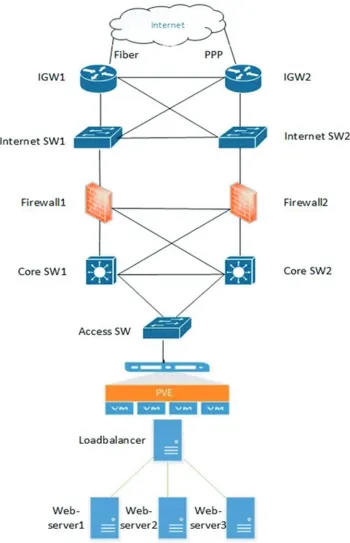
The architecture that we have implemented for cloud
computing is composed of Internet Gateway to connect
the network of the company to the exterior world; they are connected to two Internet Switches which are connected
in their turn to the firewalls in which all security rules
16 http://dx.doi.org/10.14500/aro.10438
are implemented. The firewalls are connected to the Core
Switches to create the core network of the company. Note that all the devices are redundant to ensure the connectivity and availability of the whole architecture.
B. The virtual part of the private cloud
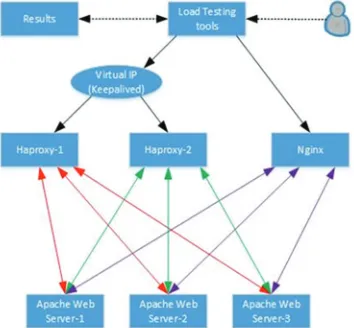
Our private cloud consists of one physical server where Proxmox is installed, Proxmox is a platform of virtualization that can simulate a private cloud with less physical resources (Proxmox, 2018). 6 VMs are created in this platform each VM is dedicated to a different purpose as shown in Table 1.
The first three VMs have Apache installed onto work as web servers, they have the same hardware specifications,
but the only difference is that two of them have the Ubuntu desktop OS and the third one has Ubuntu server OS. The purpose of having different OSs is to study the performance comparison between the desktop and the server version of
Ubuntu (Apache, 2018). The fourth and fifth VMs in the
table have HAProxy installed on, each acts as a separate load balancer but the reason of having two HAProxy servers is because Keepalived (Keepalived is a routing software that can be used for high availability by assigning a virtual IP to two or more servers and monitoring the servers, when one server fails it will automatically change to the other active server) (Keepalived, 2018) is installed between them, hence they have high availability in case of a failure of one of them. The virtual IP that Keepalived assigned to them is 192.168.100.50, this will be further discussed in the coming sections of the scenarios. The sixth and the last VM has Nginx installed on; it is the second load balancer; thus, we can have a comparison between Nginx and HAProxy in one of the following scenarios. Fig. 3 shows the scheme of the whole work.
Performance metrics
In load testing, performance metrics are a significant
measure of the degree to which a process, system, or component obtains a given attribute. In other words, metrics can help to estimate the progress and health of a system. Each resource that can be monitored for availability, performance, reliability or any other attribute has many metrics which data can be collected from. The data of the following metrics are collected in our environment (Mustafa, 2017):
• Number of completed requests: It is the number of requests
that are sent and received without failure in a given amount of time.
• Requests per second: It is the number of requests sent and
received during a second, the higher the handled number of
requests the better the performance of the server, that is, the server is faster than a server with a lower number of requests per second.
• Response time (ms): It is also known by latency, it is the total
amount of time it takes a request to travel across a network path from the sender to the receiver, it is the sum of waiting time and the replying time.
• Time per request: Is the amount of time each request is served, for a very efficient server the time per request should
be very short, most of the time it should be less than seconds.
• CPU usage: It is the amount of load handled by the CPU,
the CPU usage differs from the types of the tasks that are
taBle I vm’SInthe prIvate cloud
No. Name IP address OS RAM CPU in Core Hard drive Type of server
1 Proxmox pve 192.168.100.100 Proxmox ISO 24GB 8 8.7TB Physical
2 Apache-webserver-1 192.168.100.31 Ubuntu desktop 2-4GB 8 50GB Virtual
3 Apache-webserver-2 192.168.100.34 Ubuntu desktop 2-4GB 8 50GB Virtual
4 Apache-webserver-3 192.168.100.35 Ubuntu server 2-4GB 8 50GB Virtual
5 HAProxy-1 192.168.100.33 Ubuntu desktop 16GB 8 100GB Virtual
6 HAProxy-2 192.168.100.32 Ubuntu desktop 16GB 8 100GB Virtual
7 Nginx 192.168.100.40 Ubuntu desktop 16GB 8 100GB Virtual
Fig. 3. Working scheme.
performed by the processor, most of the time the usage is very low as most of the applications do not use much of the CPU, however, for a web server which many users have access to it, the load can increase and the CPU usage will increase to a very high amount.
• Number of failed requests: It is the number of requests that
failed to reach the destination or failed to get back to the sender due to various reasons, for example, the destination server was down, so the request was lost.
• Concurrency level: It is the number of concurrent users
involved in the test (Apache, 2018).
Performance analysis for the studied scenarios
In this section, three scenarios will be discussed which were tested in the environment.
• The first scenario where the Apache web servers without
any load balancers is implemented.
• The second scenario includes load balancers deploying least connection algorithm within the load balancer, both first and
second scenario is compared.
• The third scenario is about testing the high availability
of HAProxy to see how it performs and its effects on the environment during a failure of the master node.
No load balancer scenario
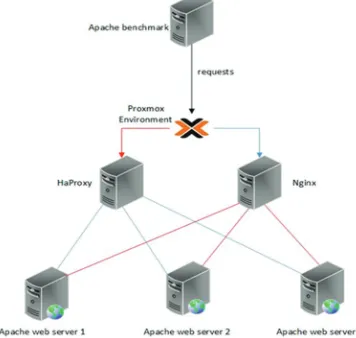
In this scenario, there are no load balancers installed there are only three separated Apache web servers with the
same specifications except the OS type. The diagram of this scenario is shown in Fig. 4.
The tests are done with Apache Benchmark with 100,000 requests and a concurrency of 300 and 700 the results are shown in Table 2.
The two Apache web servers that are installed on Ubuntu
desktop VMs have almost the same output, they finished
almost at the same time, and the server requests per second is almost the same, however, the Apache web server that is installed on Ubuntu Server VM performs almost half of the other two as it can be seen from the results. The CPU usage of all three servers is very high especially the third one, but this is normal because without a load balancer there is a high number of requests on each server and that puts a lot of pressure on them that is why having a load balancer is recommended.
Comparative scenarios
In this scenario two separated load balancers are installed,
the first one is HAProxy and the second one is Nginx
as shown in Fig. 5, on both of them the least connection algorithm is used because, it is a semi-static algorithm, besides there are a lot of work done on the other algorithms such as RR and source that is why least connection is selected in this article. We will generate load on each of them with Apache benchmark through six different tests to get the most
accurate data from both. The first three tests will be based
on the concurrency level which will start with 100, 300, and 500 with a request number of 10,000 for each. The past three
tests will be based on a specific time starting from 60 to 120
and 200 s to see how many requests the load balancers can handle in a given time and how much the response time will be.
Low load scenario
The first test starts with a request number of 10,000 with a
concurrency level of 100. The output of the test is shown for HAProxy in Fig. 6 and Nginx in Fig. 7.
As it can be seen from the results that HAProxy finished
the test in 3.124 s which is slightly faster than Nginx, the reason behind that for each request it took HAProxy 31.240 ms compared to the 32.973 ms of Nginx and in each second HAProxy served 3201 requests where Nginx only served 3032 requests in a second. However, the CPU utilization of Nginx is around 20% which is much lower than the CPU utilization of HAProxy where it is around 50%, but the CPU utilization for the Apache web servers is almost the same in both load balancers. The same test was done again, but this time the concurrency is increased to 300, and again HAProxy was
faster in serving the requests and finishing the test, and Nginx
CPU utilization is 40% that is lower than HAProxy which
Fig. 6. HAProxy results.
18 http://dx.doi.org/10.14500/aro.10438 used 82%. In the third test, the concurrency was increased
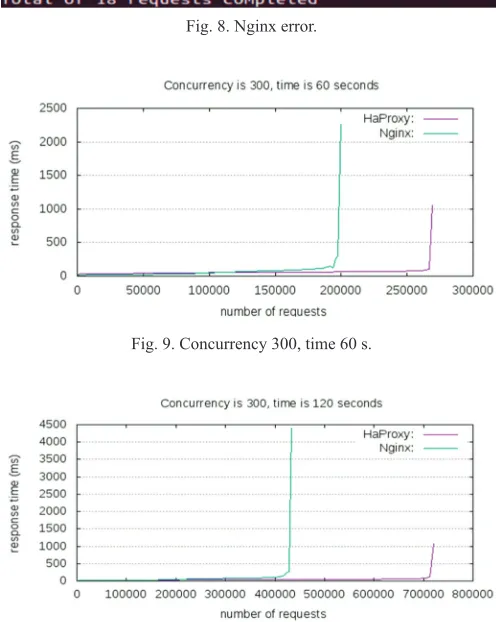
to 500, but this time Nginx could not even handle this high number of requests see the error message received in Fig. 8.
The reason is due to that Nginx has limited capacity in
handling a high number of requests; however, it can be
fine-tuned to make it possible to handle this number of requests or Nginx plus can be used which is another version of Nginx that has much more features, but it is not free and needs to be purchased.
High load scenario
The first test takes 60 s as it can be shown in Fig. 9. HAProxy serves more requests and the response time is less than Nginx, from the beginning the response time on
both load balancer is almost the same but during the final
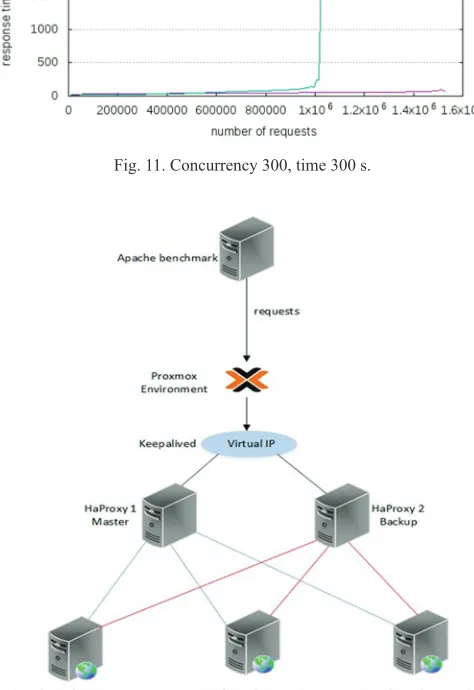
seconds of the test, the response time in Nginx is increasing to a high number. The same can be seen in the next two tests; the only difference is that the longer the test it takes the gap between the served requests becomes larger as shown in Figs. 10 and 11.
High availability scenario
In this scenario, two HAProxy load balancers are installed for high availability through the Keepalived tool which assigned a virtual IP to them and assigned master role to
the first load balancer and backup role to the second load
balancer as can be shown in Fig. 12.
There are three tests done with Jmeter tool in each of them
the number of samples is increased to see whether there will be a loss of packets or not and if there are a loss how many packets will be lost and how long it takes until the backup
server becomes the master. The first test is done using
1,000 samples, the second is done with 10,000 samples, and the last one is done with 100,000 samples. Whereas Fig. 13 depicts in each test a number of samples failed during the time, the master server was down until the backup took its
place (Jmeter, 2018).
In the first test from 1,000 samples, 300 samples failed
that is 30% from all the samples, it took only 2 s until the second server becomes the master. In the second test from 10,000 samples, 4,000 samples failed which is equivalent to 40%, and it also took around 2 s. In the last test 11,000 samples failed in 2 s from the 100,000 samples that are a percentage of 11%. As the results show a high number of samples fail in each test, of course, this is a high risk for organizations to loss this amount of requests if one of their load balancers is down, but during all the three tests, it took
only around 2 s until the backup server took over and in real life this amount of time is not much and won’t affect the users experience as they almost won’t notice it.
concluSIon
This work investigates the performance of some load balancing tools in the environment of cloud computing where the congestion is one of its main problems. The implemented algorithm by these tools was the least connection algorithm. This algorithm was tested through the use of HAProxy and Ngnix tools to examine its behavior and to study the feasibility of both tools to provide a stable system even when it receives a high number of requests.
We tested the environment through implementing two scenarios; with and without load balancer to show the effect of the absence of load balancing in a system that changes the status from low load to high load in terms of the number of requests. This article proved that installing a load balancer is mandatory so that the servers in the private cloud will not be overloaded and the resources will
be used very efficiently. Furthermore, it is concluded during
the implementation and the test that HAProxy is faster than Nginx in serving the requests, but on the other hand, Nginx has less CPU utilization. It is also observed that during a failure of the master server, the load balancer loses some requests but the time during which the backup server becomes the master one is too short in a way that it can
taBle II teSt reSultS
1-100,000 requests with a concurrency of 300 Apache servers OS installed Requests per
second Time taken CPU usage %
Webserver-1 Ubuntu desktop 7270.82 13.754 94
Webserver-2 Ubuntu desktop 7710.43 12.965 93
Webserver-3 Ubuntu server 4298.58 23.285 233
2-100,000 requests with a concurrency of 700
Webserver-1 Ubuntu desktop 7025.11 14.235 96
Webserver-2 Ubuntu desktop 7198.24 13.516 96
Webserver-3 Ubuntu server 3296.34 31.216 250
Fig. 8. Nginx error.
balancing algorithm to study its performance compared to the static one indifference system conditions.
referenceS
Afriansyah, M.F., Somantri, M. and Riyadi, M.A., 2017. Sistem Load Balancing Menggunakan Least Time First Byte dan Multi Agent System. Available from:
http://www.ejnteti.jteti.ugm.ac.id/index.php/JNTETI/article/view/331. [Last
accessed on 2018 May 03].
Luís, B.A., 2016. Implementation of a Private Cloud. Faculdade Ciencias Tecnologia Universidade Nova Lisboa, Master thesis. Avaiable from: https:// www.run.unl.pt/bitstream/10362/20248/1/Alves_2016.pdf.
Apache., 2018. The Apache HTTP Server Project. Available from: https://www.
httpd.apache.org/download.cgi. [Last accessed on 2018 Mar 03].
Gupta, K. and Beri, R., 2016. Cloud Computing: A Survey on Cloud Simulation Tools. Available from: http://www.ijirst.org/articles/IJIRSTV2I11180.pdf. [Last
accessed on 2018 May 09].
Jmeter., 2018. Apache Jmeter. Available from: https://www.jmeter.apache.org. [Last accessed on 2018 Mar 10].
Kashyap, D. and Viradiya, J., 2014. A Survey of Various Load Balancing
Algorithms in Cloud Computing. Available from: https://www.pdfs.
semanticscholar.org/370a/4ee7ea3e85cac3565ef44485393d27c63075.pdf. [Last
accessed on 2018 May 04].
Keepalived., 2018. Keepalived for Linux. Available from: http://www.keepalived.
org/index.html. [Last accessed on 2018 Mar 5].
Kovari, A., 2012. KVM and OpenVZ Virtualization based IaaS Open Source Cloud Virtualization Platforms: Open Node, Proxmox VE. Available from: https://www.
researchgate.net/profile/Eko_Didik_Widianto/publication/315861457_Performance_
comparisons_of_web_server_load_balancing_algorithms_on_HAProxy_and_Heartbeat/
links/59d5b88ba6fdcc8746969fe9/Performance-comparisons-of-web-server-load-balancing-algorithms-on-HAProxy-and-Heartbeat.pdf?origin=publication_detail. [Last
accessed on 2018 May 04].
Madani, S. and Jamali, S., 2018. A comparative study of fault tolerance
techniques in cloud computing. International Journal of Research in Computer Applications and Robotics, 6(3), pp.7-15. Available from: https://www.ijrcar.
com/Volume_6_Issue_3/v6i302.pdf. [Last accessed on 2018 Sep 10].
Mustafa, M.E., 2017. Load Balancing Algorithms Round Robin (RR), Least
Connection, and Least Loaded Efficiency. Available from: http://www.gesj.internet-academy.org.ge/download.php?id=2886.pdf&t=1. [Last accessed on 2018 May 05]. Pi´orkowski, A., Kempny, A., Hajduk, A. and Strzelczyk, J., 2010. Load Balancing
for Heterogeneous Web Servers. Available from: https://www.link.springer.com/
chapter/10.1007/978-3-642-13861-4_19. [Last accessed on 2018 May 04].
Proxmox., 2018. Download and Documentation Files-Important Downloads. Available
from: https://www.proxmox.com/en/downloads. [Last accessed on 2018 Mar 02].
Qasmi, W., Siddiqui, T. and Shehzad, M., 2018. A Comparative Study of Failover Schemes for Iaas Recovery. International Conference on Information Networking (ICOIN), Thailand.
Sharma, M., and Iyer, V.S., 2016. Sugandhi Subramanian and Abhinandhan Shetty A Comparative Study on Load Testing Tools. Available from: http://www.academia.
edu/download/46336846/201_A_Comparative.pdf. [Last accessed on 2018 May 05].
Widianto, E.D., 2016. Performance Comparisons of Web Server Load Balancing Algorithms on HAProxy and Heartbeat. Available from: https://
www.researchgate.net/profile/Eko_Didik_Widianto/publication/315861457_
Performance_comparisons_of_web_server_load_balancing_algorithms_on_ HAProxy_and_Heartbeat/links/59d5b88ba6fdcc8746969fe9/Performance-
comparisons-of-web-server-load-balancing-algorithms-on-HAProxy-and-Heartbeat.pdf?origin=publication_detail. [Last accessed on 2018 May 04].
Fig. 11. Concurrency 300, time 300 s.
Fig. 13. Number of failed samples. Fig. 12. HAProxy high availability scenario.
be considered as transparent for the users who are making requests, as they do not feel it especially that non real-time application is considered in such scenario. As a conclusion, the disruption time is not violating the QoS requirements of the users involved in the test.