DEPARTMENT OF INFORMATION ENGINEERING AND COMPUTER SCIENCE
ICT International Doctoral School
Context
in learning, organizing and sharing information
Hyeon Kyeong Hwang
Advisor
Prof. Marco Ronchetti
Universit`a degli Studi di Trento
Abstract
In the digital era, users face a new challenge to study, organize and find
information they need in a time-efficient and effective manner. Recent
studies have shown that success in doing such tasks depends more on human
memory than semantically filtering and re-organizing digital information.
As demonstrated by commercial and prototypical Web tools, context seems
to play an important role in helping users memorize cues in various user
scenarios. While these results are encouraging, there is not yet sufficient
understanding of which type of context is useful for which situations. In this
thesis, we explore the impact and the role context plays under three different
perspectives. First, we examine how allowing users to add their impressions
and interpretations of digital learning materials via multimedia annotations
influences their learning. Secondly, we collect and analyze the types of
context users add and use to organize and retrieve their personal bookmarks.
Then lastly, we investigate how a customized set of user contextual tags can
aid a targeted set of users to help search and find information easier and
faster in a community.
Keywords
Multi-modal learning, Personalized learning, Contextual metadata,
Per-sonal information management, Collaborative tagging, Community search,
Contents
1 Introduction 1
1.1 The Context . . . 1
1.2 The Problem . . . 3
1.3 The Solution . . . 4
1.4 Innovative Aspects . . . 5
1.5 Structure of the Thesis . . . 5
2 State of the Art 7 2.1 Human memory and its link to context . . . 7
2.1.1 Memory creation for learning . . . 8
2.1.2 Memory retention for information search and retrieval 9 2.2 Definition of Context . . . 11
2.3 Context in learning digital contents . . . 13
2.3.1 Annotations and their role in learning . . . 14
2.3.2 Electronic annotations . . . 15
2.4 Context in organizing and re-finding web contents . . . 19
2.4.1 Web re-visitation and re-finding techniques . . . 19
2.4.2 Role of context in re-finding . . . 23
2.4.3 Types of context . . . 25
2.4.4 Application of context in PIM and Web tools . . . 29
2.5 Context as metadata tags for information search . . . 34
2.5.2 Folksonomy vs Ontology tags . . . 36
2.5.3 Tags as search metadata . . . 39
3 The Problem 44 4 Q-Book: context in learning digital contents 47 4.1 Intro and detailed problem description . . . 47
4.2 Q-book architecture and implementation . . . 50
4.2.1 Q-book Interface . . . 51
4.2.2 Q-book: Supported e-book format . . . 52
4.2.3 Q-book: Implementation . . . 53
4.3 Q book experiment and its results . . . 54
4.3.1 Methodology . . . 54
4.3.2 Results Analysis . . . 58
4.4 Related work . . . 65
5 MemoryLane: context in organizing and retrieving book-marks 69 5.1 Intro and detailed problem definition . . . 69
5.2 MemoryLane - tool description . . . 70
5.2.1 User interfaces . . . 71
5.2.2 Architecture and implementation . . . 75
5.3 Memorylane experiment and its results . . . 77
5.3.1 Methodology . . . 77
5.3.2 Results analysis . . . 79
5.4 Related work . . . 94
6 Learnweb: context in searching shared materials 104 6.1 Intro and detailed problem definition . . . 104
6.2.1 Teachers’ search pattern and decision-making strategy106
6.2.2 Categorization of resources to facilitate search . . . 107
6.2.3 Comparison to Learning Object Metadata (LOM) . 108 6.3 Prototype: redesigning and implement the new interface to facilitate search . . . 111
6.3.1 Interface: Eliciting desired types of metadata . . . 112
6.3.2 Interface: Visualization of contextual metadata for search . . . 113
6.3.3 Implementation . . . 116
6.4 Learnweb experiment and its results . . . 117
6.4.1 Methodology . . . 118
6.4.2 Datasets . . . 120
6.4.3 Result analysis . . . 121
6.5 Related work . . . 130
7 Conclusion 132
List of Tables
2.1 Definitions of Context and its Scope . . . 13
2.2 Different Categorization Schemes of Tags by Various Re-searchers . . . 34
2.3 Context-based Tools . . . 43
4.1 Student group composition . . . 57
4.2 Questionnaire Results per Dimension . . . 60
4.3 T-test results of test group and control group (The max test score is 10. Students who score below 6 are considered having failed) . . . 61
4.4 Test scores and number of annotations of test group . . . 63
4.5 Pearson Correlation Coefficient per Annotation Type . . . 65
5.1 MemoryLane: Elements of Bookmark Dialog . . . 100
5.2 Mapping of Tag Classification by Bischoff et al. to that of MemoryLane [63] & Data Extraction and Selection . . . . 101
5.3 MemoryLane: Implementation Details . . . 101
5.4 Stage I: Online Survey Questions . . . 102
5.5 Stage II: Premeditated Questions Given to 6 Participants 102 5.6 Online Survey: Perception of Importance per Type of Infor-mation for Recall . . . 102
5.8 Retrieval Success Rate per Quality of Semantic Information
Recalled . . . 103
5.9 Comparison of MemoryLane and Chrome Bookmarking Tool in Retrieval Time and Success Rate . . . 103
5.10 Comparative ranks of metadata types by perception, by ac-tual usage (including results from [17]) and as retrieval cue 103 6.1 Categorization of resource suggested by teachers from YELL/TELL community on Learnweb . . . 108
6.2 Comparison of LOM and Categorization of resource sug-gested by teachers from YELL/TELL community . . . 110
6.3 Metadata support on old interface Vs. new interface . . . 112
6.4 Instructions for Task 1: Search and tag resources from the Web . . . 120
6.5 Instructions for Task 2: Search and tag resources shared by others . . . 120
6.6 Instructions for Task 3: Search and tag your own resources 121 6.7 Instructions for Task 4: Tagging resources provided in a test group . . . 121
6.8 User action logs of new interfaces . . . 122
6.9 User action logs collected during and after pilot . . . 122
6.10 User action logs collected for tags and comments . . . 123
6.11 User metadata added for new and existing resources . . . 123
6.12 Post-pilot User Log Profile . . . 124
6.13 Ranks of metadata added by users Vs. those used for search 127 6.14 Tags and comment logs collected post-pilot . . . 129
List of Figures
2.1 Moon reader pro - Interface . . . 17
4.1 Brain-study Interface [94] . . . 47
4.2 Apple iBook Interface with rotating 3D image . . . 48
4.3 Q-book: Main interface . . . 52
4.4 Q-book: Video annotation of selected text . . . 53
4.5 Test scores of Test Group (with the tool) . . . 60
4.6 Test scores of Control Group . . . 61
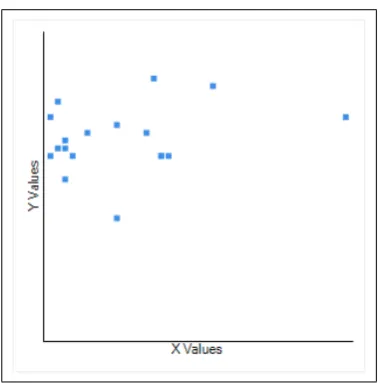
4.7 Scattered graph of # of annotations (X axis) and test scores(Y axis) . . . 62
4.8 Percentage of annotations per type . . . 64
4.9 Annotation Studio Interface . . . 67
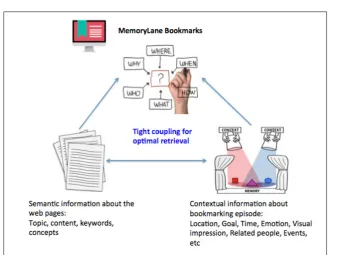
5.1 MemoryLane: Concept . . . 71
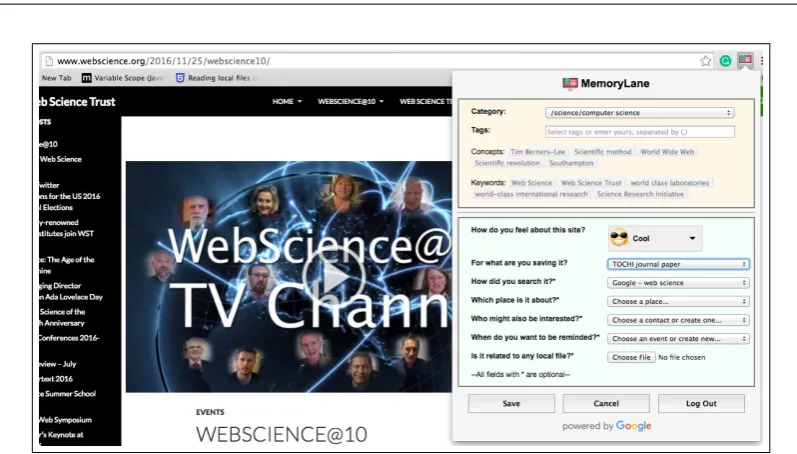
5.2 MemoryLane: User Interface of Bookmark Dialog . . . 72
5.3 MemoryLane: User Interface of Keyword Search . . . 72
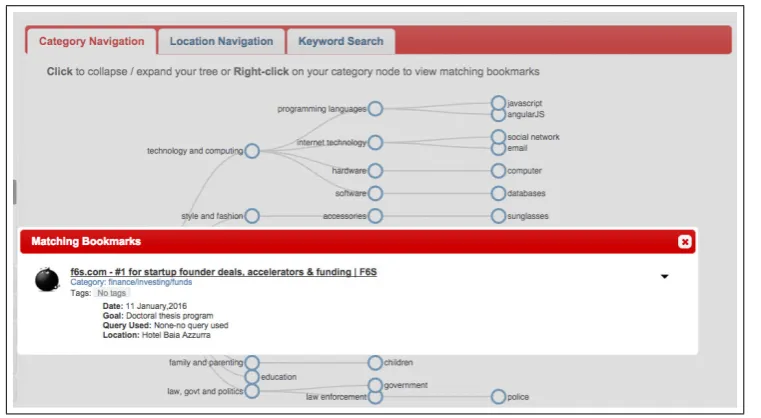
5.4 MemoryLane: User Interface of Category Navigation . . . 73
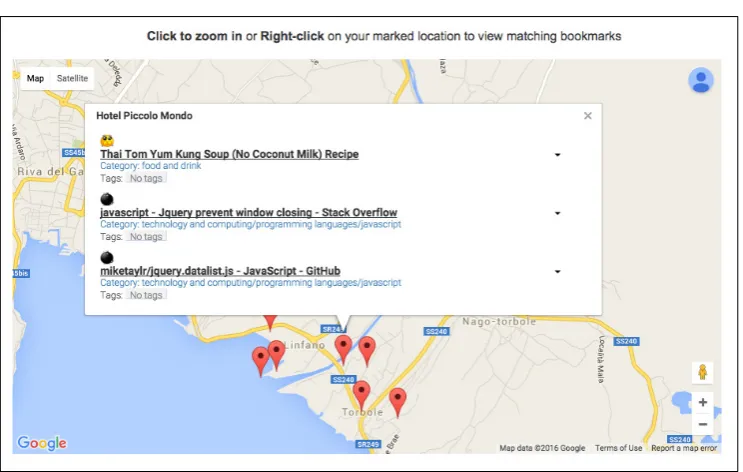
5.5 MemoryLane: User Interface of Location Navigation . . . . 74
5.6 MemoryLane: User Interface of Image Navigation . . . 74
5.7 MemoryLane: Architecture . . . 76
5.8 Bookmark Collection: Number of Bookmarks per Metadata Type . . . 81
5.10 Numer of Bookmarks with Emotion per Category . . . 83
5.11 Numer of Bookmarks with Location per Category . . . 84
5.12 MemoryLane: Usage of Semantic and Contextual Cues Used for Retrieval . . . 88
5.13 Usage of Contextual Cues Used for Retrieval per Gender . 90 5.14 Performance in Time for Successful Retrievals . . . 92
6.1 The search and decision process of selecting teaching materials107 6.2 The base schema of Learning Object Metadata . . . 109
6.3 Percentage of usage of different LOM data elements in GLOBE [105] . . . 111
6.4 The comparison of the old and new interface for adding metadata (tags) to a new resource . . . 113
6.5 Adding metadata to existing resources shared by others . . 114
6.6 Old interface of search result . . . 115
6.7 New interface of search result . . . 116
6.8 Metadata filters on new search interface . . . 117
6.9 Category navigation interface . . . 118
6.10 Metadata Ratio per Resource . . . 125
6.11 Contextual metadata type (in %) Post-pilot Vs. Pilot . . . 126
Chapter 1
Introduction
The personal computers, the Web and the Internet have transformed our
lives in the most drastic ways in a blink of an eye. Even within a single
generation, we are constantly asked to streamline our daily lives with the
latest “technologies” both at work and home: there are digital books one
can view anywhere on multiple devices, search engines that can find
any-thing from anywhere in the world and social platforms that allow us to
connect with anybody from all the walks from our lives or even find new
people who share the similar interests. While such technologies have offered
us a number of benefits (i.e. portability, accessibility, connectivity, etc),
one may ponder how well these technologies support users in performing
their key activities once carried out with print materials such as learning,
organizing and searching information. The best way to answer the
ques-tion would be to turn the attenques-tion first to ourselves and understand how
we process information in our natural computers - a.k.a our brains.
1.1
The Context
According to various prominent researchers in the cognitive science [108,
27], our brains create and retain information in multi-dimensional ways:
1.1. THE CONTEXT CHAPTER 1. INTRODUCTION
in which such acquisition takes place and this context is indexed in such
a way that the main information acquired can be effectively retrieved by
contextual cues at a later time. Some studies [25, 131] have hinted that the
success of retrieving information may hinge on our memory, rather than
the semantic filtering or organizing that most tools offer. Context has
been shown to play an important role in helping users to retrieve memory
in various scenarios and thus in fact has been applied to varying degrees
in many tools of today.
In learning, context can be expressed through text annotations users
scribble on the margins of print materials. Such act of making annotations
is a method by which users build personal connections with the given
in-formation, which in return results in active learning and longer memory
retention as claimed in [76, 23]. A great number of annotation tools exist
for digital materials. Users are allowed to highlight or add notes to Web
pages or electronic books and these annotations can be shared with others
and be accessed through multiple devices any time or at any place. Recent
technologies also make it possible to add multimedia contents to digital
materials that can render learning experiences richer.
The impact of context extends to information retrieval. One of the most
challenging aspects of “keeping up with the Web” is to manage the
infor-mation we have found useful in order to refind them with minimal efforts
when needed. Users have been repeatedly observed to revisit information
seen before on the Web [128, 131, 73] and apply various refinding techniques
such as using history, bookmarking, url auto-completion or even searching
again [103, 65, 10]. While bookmarking is still the most common way of
preserving information found on the Web, the actual usage of bookmarks
as the re-finding method has remained low [103, 65, 10]. Refinding requires
finding a specific piece of information in a large pile of ever-expanding
1.2. THE PROBLEM CHAPTER 1. INTRODUCTION
more difficult as users tend to forget crucial hints that can lead them back
to where they were [131, 39, 104]. To remedy this problem, context has
been offered as the additional retrieval cue in numerous information search
and retrieval systems in the recent years [42, 6, 45, 36, 129, 142, 68, 55, 30].
The context is not always exclusively personal as one might assume. A
group of users who share the same interests or professional goals can have
a collective context that can have impact on their information needs. The
emergence of the “Social” Web has made it trivial for people to share their
digital resources with others. Thanks to this phenomenon, the problem of
indexing and organization online resources became even greater in scale.
“Social tagging” became the go-to solution by which users could add any
number of keywords to their resources as they would like, making it possible
to search shared information via multiple paths. Though free-form tagging
gives users unlimited freedom and flexibility, using such tags for search
has been somewhat proven challenging since they come with no structure
or relations to use them as index. There have been efforts to organize
these tags in semantically meaningful way to use them for search though
ontology [22, 21, 52]. However, some recent studies interestingly showed
that some of these tags were contextual in nature (i.e. not directly related
to the content of the resources) that can be used for search and hence need
to be encouraged [17, 47, 119].
1.2
The Problem
As we discussed so far, context plays an important role in cementing or
retrieving memory and thus has been applied in various forms and depth
to improve key activities we perform with digital resources. There are
tools that can support users in making annotations across devices, those
or-1.3. THE SOLUTION CHAPTER 1. INTRODUCTION
ganize their personal digital resources, and lastly those that allow users
to index their resources using their own words (tags), which in return are
used for the good of community to improve collective search experiences.
Nevertheless, there seems to be lack of empirical evidence on what types
of context should be used, how they are perceived by the users, how they
should be supported or to what extent or under which circumstances using
such context is actually useful. Specifically, we are interested in finding
out how context influences - positively or negatively - learning for
aca-demic purposes, searching and refinding information both for personal and
community-based interests.
1.3
The Solution
To investigate the role and impact context plays in three different
scenar-ios - learning, refinding and searching information with digital materials,
we have developed three different prototypical tools. Each of the tool was
designed and developed based on the research on the relevant areas to
ad-dress the questions posed in the problem. The first prototype, Q-Book,
was developed to investigate the impact of contextual multimedia
anno-tations have on learning outcomes when users are given the free choice to
build the personal connections with the text. User experiment with 36
high school students, divided into test and control group for comparison,
was carried out. The second prototype, MemoryLane, addresses the
prob-lem of using context as retrieval cues for personal bookmarks. The tool
allowed users to add various types of context such as location, goal (task),
people as well as emotion when they are bookmarking. Furthermore, the
tool indexed the bookmarks by these contextual metadata so that users
could search or filter bookmarks based on what they remember in the long
1.4. INNOVATIVE ASPECTS CHAPTER 1. INTRODUCTION
people were carried out. We collected 160 bookmarks and analyze data to
provide insights into the types context users used to organize and retrieve
their bookmarks. Lastly, we re-designed online resource-sharing platform,
LearnWeb, to provide re-vamped user interfaces to allow users to add
con-textual metadata to shared resources. The requirements were empirically
gathered through user interviews and observations and we implemented
such findings as new functions. An experiment with 40 users were carried
out as pilot and we analyzed the data to find out the types of contextual
metadata most appreciated and actually used by the community users in
search.
1.4
Innovative Aspects
Although there have been diverse studies on the impact of context in
var-ious areas in computing, our work is unique in having provided a
com-prehensive study on the role and impact of context in dealing with digital
contents under various scenarios. To our best knowledge, this is the first
study that developed prototypical tools to investigate the role and impact
of different types of context have on the performance of key activities users
carry out. Our experiment results, albeit preliminary, could be used as a
design guide for improving existing online learning tools and information
search in both personal and community-wide scope.
1.5
Structure of the Thesis
This thesis is organized as follows: Chapter 2 provides the literature review
with the focus on the role of context in human memory and how it has
been applied to support learning, refinding and searching information. In
1.5. STRUCTURE OF THE THESIS CHAPTER 1. INTRODUCTION
chapters discuss each experiment that was carried out. Chapter 4 provides
the details of user experiment undertaken with Q-book and its result
analy-sis. The experimentation with MemoryLane bookmarking tool is explained
in Chapter 5. The new interfaces to support contextual metadata search in
teachers’ community and the experiment results are discussed in Chapter
6. Lastly, we revisit the key findings from our experiments and provide
Chapter 2
State of the Art
Since the advent of the affordable personal computers, a great part of
our daily lives has transitioned to performing daily activities with digital
materials. The subsequent arrival of Internet saw the explosion of user
services offered on the Web, turning every aspect of our lives into that of
digital. Nowadays, it is virtually inconceivable to imagine a life without
doing stuff online, be that social, academic, or work activities.
All the services on the Web are essentially created to enable us to
per-form daily tasks in a more efficient and effective way, attempting to emulate
the work our brains are doing behind the scene. Especially, the need to
provide appropriate support for key activities we carry out in the digital
era - learning, searching and re-finding information - is paramount. In this
section, we provide the literature review on how our brains learn, retain and
search information with the focus on the role of context and then further
investigate how the context has been applied to online learning, searching
and re-finding information in personal and community-based scenarios.
2.1
Human memory and its link to context
One could argue that computer systems are designed to mimic the functions
2.1. HUMAN MEMORY AND ITS LINK TO CONTEXTCHAPTER 2. STATE OF THE ART
ranging from physiological functions such as motor control to abstract ones
like perception and thought. We rely heavily on the intricate workings of
our brains, especially on its information-processing capabilities that allow
us to learn new things and retain them as memories for search and retrieval
at a later time. According to [5], the human brain still supersedes computer
systems thanks to its memory capacity because our brains do not work by
doing a string of complex calculations to solve a problem - as we understand
what computers do - but rather map the problem to the reservoir of existing
ones in memory to find solution. This brings up an intriguing problem of
better understanding how new memories are created and how to retain
them better for future use and applying it in digital information era in
which we thrive in.
2.1.1 Memory creation for learning
Learning is essentially creating new experiences (memories) via information
passed through synapses to neurons in our brains. The number of synapses
that are linked to the particular neuron(s) where the new experience is
stored determines how easily it can be retrieved for re-use. The effective
learning does not happen just by seeing, hearing or touching but more a
combination of all sensory inputs plus the person’s pre-existing experiences
that can be linked to the new experience [28].
This multi-modal process of learning is not a new revelation. Even as
early as back in 1971, Allan Paivio argued that human brain represents
information in more than one way, that is in verbal and visual form [108].
This theory was coined as “Dual Coding Theory”, which has set the tone
for multi-modal learning. Subsequently he published a research paper on
the impact of Dual coding theory on education where he postulated that
the associative processes of verbal and imagery play a crucial role in
2.1. HUMAN MEMORY AND ITS LINK TO CONTEXTCHAPTER 2. STATE OF THE ART
In other words, we learn better if we have more synapses that connect
to the new concepts we are learning: we not only learn by verbal cues
(e.g. words) but also by other cues received from our sensory organs such
as seeing or feeling that are present concurrently. The positive results of
multi-modal learning are not eye-opening if we consider the multi-sensory
environment we are constantly exposed to.
Notwithstanding the promising effects of modal learning,
multi-sensory stimuli do not always produce the desired effect. If learners fail
to make association of the new concept to the existing ones (e.g. failure
to connect the given image to the word), it brings adverse results in
re-calling [115]. All the previous experiences of each person may vary and
therefore learning outcomes could be different when people are given the
same information to be learned. This set of unique personal experiences
constitute the personal “context” by which each person can create his or
her mental representation of the new knowledge that comes linked to the
previous one(s).
In digital era, the effective memory creation for learning new knowledge
may depend on how well users are supported in establishing this personal
“relationship” with the digital contents. Probably the best way to do this
is to allow users to choose their own relevant information and have its
context mapped to the new information presented for learning.
2.1.2 Memory retention for information search and retrieval
In the previous section, we provided insight into the creation of the memory
and its relation to learning: the more synapses are created to the memory
cell, the more effective learning occurs. However, using the brain space
to create a new memory block and not to be able to retrieve it would be
pointless. Effective learning is tightly related to the ability to retrieve it
2.1. HUMAN MEMORY AND ITS LINK TO CONTEXTCHAPTER 2. STATE OF THE ART
cell are to be used for subsequent retrievals. Recent studies surprisingly
pointed out practicing retrievals enhance learning better than other
encod-ing techniques [67].
Then how do we retrieve memory? In order to understand how
mem-ories are retrieved, we first need to examine the types of memmem-ories and
how they are triggered. Tulving postulated that memories are made up
of two different but not disparate types: the first is the semantic memory
while the other is episodic memory [135]. Semantic memory is the memory
“necessary for the use of language” [135]. In other words, semantic
mem-ory deals with the mental representations of the knowledge perceived and
thought. Suppose we meet a new person, the person’s name and the topics
of conversation would belong to this category. On the other hand, episodic
memory deals with the autobiographical events and temporal-spatial
rela-tions among the events [135]. Going back to the analogy above, the purpose
of the meeting, the person’s clothes, the smell of his or her perfume, the
weather and place where the meeting happened will be stored alongside
the semantic information.
Episodic memory at a glance may not seem as important or relevant to
the semantic knowledge being acquired. However, it has been shown to play
a significant role as an effective retrieval cue. Encoding specificity principle
[136] states that memory retrieval is improved when the same information
is available at encoding is also available at the point of retrieval. In other
words, these two seemingly disparate types of memory - semantic and
episodic - are intertwined at the point of encoding thus making it possible
to retrieve semantic information if episodic information is available. This
point of view is reflected in a paradigm called Context-dependent memory,
which argues that context - temporal, spatial or meaningful in nature - is
stored along with target information and hence be used as effective retrieval
2.2. DEFINITION OF CONTEXT CHAPTER 2. STATE OF THE ART
2.2
Definition of Context
We have laid the ground argument that context is paramount to creating
and retaining memory but, before we go into the details of how context
may influence positively some of key activities we perform, it is necessary
to first provide the various definitions of context and which definitions
have been applied to this research work. Context is multidisciplinary in
nature and can be generally thought to mean the surrounding situations in
which a person gains new experience or carries out an activity. However,
it is far from that simple. During past decades, prolific definitions and
categorization schemes of context have been offered by various scholars
[3, 35, 46, 89, 117]. It is not in the scope of this research to cover them all.
Instead, we will focus on a few relevant ones in the context of information
and computing systems to set the stage for the research work discussed in
this thesis. At the very first workshop on Mobile Computing Systems and
Applications in 1994, Schilit et al [117] defined the context as “where you
are, who you are with, and what resources are nearby”. This definition
describes context as an collection of external factors regardless of who the
actor (you) is. Context, on the other hand, may mean different things
depending on the main involved entity or actor. For example, [46] divides
context into four distinct categories based on who the actor/entity is.
• User context - contexts describing a user’s situation
• Document context - contexts describing a document’s situation
• Software context - contexts describing a software’s situation
• Network context - contexts describing a network’s situation
In this research work, we would be focusing on the user interaction with
the digital contents; therefore the definition of context would remain within
2.2. DEFINITION OF CONTEXT CHAPTER 2. STATE OF THE ART
to the interaction between computer systems and users, these two types of
contexts are often intertwined depending on the purpose of the interaction,
albeit different weights given to one another. For instance, when a user
needs to retrieve information seen previously over a prolonged time period,
he or she may not recall the context describing the web page (e.g.
key-words) but remember the surrounding internal and external factors of the
given episode such as “why” or “where”, giving more significance to the
user context defined above. However, when a user is dealing with a new
digital material to study or to share it with others, the document context
may take precedence to describe the document at hand via subjective or
objective annotations.
As context can be of numerous types, each type of context can
con-tain several categories. Probably the most commonly applied is the one
proposed by Abowd et al. [3]. In their work, they divided context into
components of an episode (what, where, when, who and why) and defined
that any information out of these categories that can used to
character-ize the situation is the context of the given system. This categorization
scheme has been adopted for the organizing and refinding scenario because
the schema considers context inherently episodic that meets the our needs.
The second categorization scheme by [89] offers an interesting aspect of
context. They claim the human cognition of the context should be
con-sidered and become a part of context categories. Each individual or a
community may maintain a unique view of the objects which affects the
objective contexts defined previously. For learning and searching scenarios
of this research, we highlight the role of context in augmenting the
meta-data of the given contents through personalization / customization per the
needs of a community. The second categorization offers the extension of
context for our first and last experiments.
2.3. CONTEXT IN LEARNING DIGITAL CONTENTSCHAPTER 2. STATE OF THE ART
render relevant information or services based on its relevancy to the user’s
task [35]. Staying true to this definition, we have designed three
prototyp-ical tools starting from the user’s task to choose the right type of context
that deemed most relevant instead of choosing the context first then try
to apply it to the tools. Since three experiments presented in this research
work serve their own distinctive purposes, the context used in each scenario
includes different features of context-awareness.
Table 2.1 describes the scope of context used for each scenario and how
they were presented in the prototypical tools.
Table 2.1: Definitions of Context and its Scope
Scenario Context Type
Context Category
Purpose Tool service
Learning digital contents Document context Cognitive [89] Personalization, Creativ-ity, Richer experience to enhance memory Multimedia annotations Organizing and refinding User con-text
Episodic [3] Personalized metadata to encapsulate episodes
Contextual metadata tags
Searching and sharing Document context Cognitive [89]
Tailored metadata for communal interests
Cognitive-driven meta-data for teaching materi-als
2.3
Context in learning digital contents
As mentioned in section 2.1.1, learning is not a straightforward process of
simply memorizing the given piece of new information but a complicated
one that involves one’s past experiences and contextual input from the
surroundings. Most typically learning entails studying written information
on a piece of paper in an academic setting like in a school but the transition
from paper-based to digital contents allowed us to access the materials
anytime and anywhere thanks to the Internet and the Web. In this section,
we discuss how this transition has affected our way of learning from written
materials and how new tools have been developed to support users in the
2.3. CONTEXT IN LEARNING DIGITAL CONTENTSCHAPTER 2. STATE OF THE ART
a way of building personal (contextual) relationships with the given content
and the current state of the available annotation tools.
2.3.1 Annotations and their role in learning
All of us have, at one point or another in the course of our lives,
scrib-bled in the margins of books or highlighted text that was meaningful or
important. Formally this set of activities is called “text annotation” which
dates as far back as around 1000AD when it became a prominent activity
in Talmudic commentaries and Arabic rhetoric treaties [140]. Unarguably
text annotation has a number of significant benefits. Harvard Library
rec-ommends annotations as one of the six reading habits to develop during
the first year because they are the essential mechanism by which one can
learn to read critically [76]. Studies have shown that annotations have a
big impact on learning personally or in groups at large. Brown and Smiley
have demonstrated that students who make annotations study text better
[23]. The benefits of annotations also extends to collaborative learning
when shared with others [84].
Unlike how most people perceive, annotation is not limited to
highlight-ing and addhighlight-ing notes. A more broader range of pre-readhighlight-ing, while-readhighlight-ing
and post-reading activities are involved in annotating text. Annotating
text brings readers to have an active conversation with the text:
annota-tion requires readers to build personal relaannota-tionship with the given
infor-mation and thus helps to reach a deeper level engagement. According to
Porter-O’Donnell, the annotations are the “viable record of the thoughts
that emerge while making sense of the reading” [111]. In a sense, the
effec-tiveness of annotations stems from the fact that these are highly subjected
to the interpretations and views of the person who is interacting with the
text. Simply considering annotations as a way of writing down the
2.3. CONTEXT IN LEARNING DIGITAL CONTENTSCHAPTER 2. STATE OF THE ART
of annotations in creating strong contextual connections to readers or in
storing the new knowledge in memory.
2.3.2 Electronic annotations
We have so far discussed how annotations make profound positive impact
on learning. The advent and growth of digitalized contents and books are
bringing changes to the way these text annotations are made. Numerous
tools have been proposed and made available both as standalone and
web-based applications, which allow users to highlight text, append notes and
comments and sharing their annotations with others.
The quest for meeting the need for annotation tools on digital contents
started as early as in 1998. Schilit introduced a prototypical tool called
XLibris, a tablet-like device where users can scribble, highlight, circle words
on digital documents, using a pen [118]. He focused on providing a tool
for users to perform active reading on the computational device which was
as close as possible to reading a paper-based document. What was very
ahead of time was that the tool automatically extracted annotations and
created a “notebook” for users to easily view and search documents based
on their annotations.
Schilit’s innovative idea may not have seen its heyday at his time but
nowadays the most of contents we read and consume are in digital format,
thanks to the Web technologies and the availability and affordability of
the Internet. Numerous text annotation tools are available commercially
to support readers online including portable devices such as tablets and
smartphones. The supported content format are also diverse. Pdf, HTML
Web pages, e-books are some of most common examples. Adobe reader first
introduced annotation tool for its PDF reader where users could highlight
or append post-it like notes to the text. More elaborate tools have been
2.3. CONTEXT IN LEARNING DIGITAL CONTENTSCHAPTER 2. STATE OF THE ART
the source of information for study and work.
Diigo 1 is a web annotation / sharing tool which has gained wide
pop-ularity among the researchers and schools alike. Initially developed as an
online bookmarking tool, diigo has gone through several revamping on its
functions to emerge as a powerful annotation tool. Installation is also made
easy as users can simply add it onto their favorite web browsers such as
Chrome, Microsoft Internet Explorer, firefox and Safari. Once installed,
users can bookmark, highlight, add notes to, crop and capture screenshots
of any parts of the web pages, which are subsequently archived for later
retrieval. Annotations can be shared with other users for collaboration as
well. Web page is not the only type of content that can be annotated and
shared online. Tools such as A.nnotate2 allows users to upload documents
in pdf or word format and share it with multiple others who can
collabo-ratively annotate the text. A.nnotate offers the common highlighting and
adding notes as key features but it also makes annotation possible on
im-ages found on documents. There are also annotation tools developed for
e-books. E-books have garnered much attention and popularity because
of their being more economical, flexible and accessible. Moon Reader 3
is one of such examples. It is rated as the best e-reader on Android and
offers multicolor highlighting and adding notes. All saved annotations are
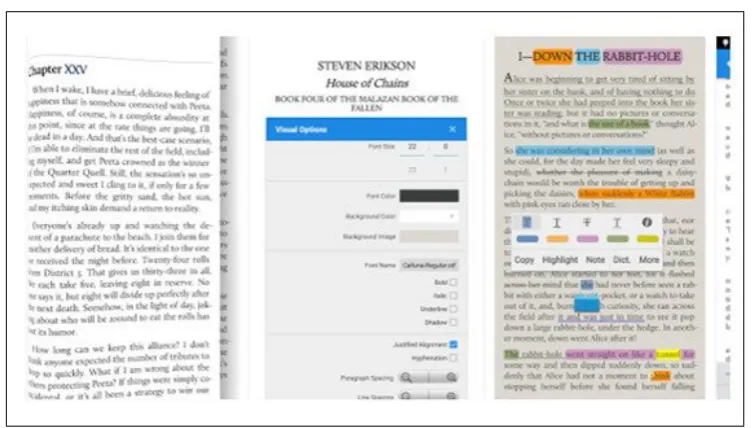
retrievable, searchable and sharable with other users. Figure 2.1 shows the
snapshot of its interface with annotation functions.
E-books are not only for pleasure reading. Back in 2012, Digital Book
World published an article called “Ten Bold Predictions for E-books and
Digital publishing”. In the article, it claimed that education administrators
and governments who oversee education and the educational publishers are
in great favor for e-textbooks even though students were still hesitant to
1www.diigo.com 2http://a.nnotate.com
2.3. CONTEXT IN LEARNING DIGITAL CONTENTSCHAPTER 2. STATE OF THE ART
Figure 2.1: Moon reader pro - Interface
using them [51]. In fact, nowadays, most publishing companies offer
e-textbooks and some higher education institutions have taken it up as part
of their educational method. For example, at Indiana University, more
than half of the students at its seven campuses have started their semester
with at least one e-textbook loaded in their educational management
sys-tem’s account [100]. They conducted a two-year study of students using
e-textbooks and found that students reacted favorably to using e-textbooks
compared to paper-based textbooks [32]. Even though in the past years,
other studies have claimed that students still prefer paperback textbooks
[32, 143, 88], the most recent extensive 4-year study of e-textbooks
spear-headed by Educause 4 shows that the use of textbooks has increased,
par-ticularly among the young students and that the major barriers to using
e-textbooks such as student preference for print and unfamiliarity with
e-textbooks show signs of being alleviated [34].
They conducted a large-scale pilot with over 5000 students in 393
under-4Educause: a non-profit U.S. organization whose mission is to promote intelligent use of information
2.3. CONTEXT IN LEARNING DIGITAL CONTENTSCHAPTER 2. STATE OF THE ART
graduate and graduate programs in 2012. Digital materials were provided
by McGraw-Hill publishing company and Courseload provided e-textbook
platform for the pilot. One of the main finding from the pilot was that less
than one third of the students found e-textbooks more effective than
paper-based books even though almost all students (96%) used anotation tools
such as highlights and notes while using their e-textbooks [50]. Despite the
rather negative perception of e-textbooks as an effective studying medium,
the annotation tools seem to affect positively the academic performance.
In [33], students who made annotations outperformed those using paper
textbooks even though they considered e-textbooks less useful. This result
demonstrates that, in order for e-textbooks to be effective, users should be
provided with tools well equipped with functions to support studying with
digital contents.
As highlighted previously, annotation acts like a bridge between the
reader and the text and thus instrumental to effective learning. So far,
the annotation tools provided for e-books, including those intended for
students, are simply highlighters or support adding notes (e.g. e-textbook
platforms by Barnes & Noble, McGrow-Hill, and Pearson publishing houses)
even though there are a wide range of annotation activities one can perform
as indicated in [111]. Furthermore, annotations do not exclusively need to
be restrained to “textual” ones. One of the most obvious advantages of
contents in digital format is that the page can contain any format of
me-dia, be that an image, video or hyperlinks to other texts, which was not
possible with traditional print books. To go beyond being concerned with
how to render e-book identical or similar to paper-based books, there is a
need for looking into ways to harness the benefits only digitalized contents
can provide to students. As briefly touched on in previous section 2.1.1,
multi-sensory input can help improve learning. Considering such fact,
2.4. CONTEXT IN ORGANIZING AND RE-FINDING WEB CONTENTSCHAPTER 2. STATE OF THE ART
add multimedia annotations as a way to enrich personal and contextual
relationship with the text they are studying.
2.4
Context in organizing and re-finding web
con-tents
The Web has evolved from being a central, static repository of
informa-tion to being a dynamic all-purpose toolkit that meets the demands of all
sorts of tasks, ranging from finding information to buying products and
services or staying updated with news of our interests. While most people
consider the Web a vital and credible source, owing to its ”easy
accessibil-ity, currency, interactivaccessibil-ity, and the broad repertoire of information” [10],
the sheer size and the complexity of the Web can render organizing and
re-finding - retrieving web resources already seen before - challenging. In
this section, we present literature review on users’ re-visitation behavior
and re-finding techniques and how context may be used to alleviate the
difficulty of re-finding information on the Web.
2.4.1 Web re-visitation and re-finding techniques
One of the most commonly observed user behavior on the Web is that
users often revisit information already seen before at various time intervals.
Revisiting a website requires re-finding efforts from users’ side, which can
turn out to be a rather frustrating experience. Thanks to the advance in
technology and browser tools, users have espoused techniques to maneuver
skillfully in the labyrinth of the Web to their destination. The earliest study
was done by Tauscher and Greenburg in 1995, for which they gathered
Web usage data from 23 users over the period of 6 weeks. Through the
analysis, they discovered that 58% of web pages visited by the participants
2.4. CONTEXT IN ORGANIZING AND RE-FINDING WEB CONTENTSCHAPTER 2. STATE OF THE ART
revisits involve pages visited just before, with hyperlinks and the back
button as the most popular mechanisms for revisitation [128].
However, a more recent study conducted in 2007 [103] reported a
de-clining use of the back button: according to their analysis, only 14.3%
of revisits were carried out by pressing the back button, due to “major
changes in browsing strategies” such the use of multiple windows as well
as multiple tabs within a single window [103]. The study also provides a
classification of revisits based on time and user action: short-term,
mid-term and long-mid-term. 72.6% of all revisits were short-mid-term (within an hour),
with the back button being the most preferred method, while URL-entry
and bookmark selection were the choices for mid-term revisits (within a
day). For long-term revisits (after a week or longer), users mainly applied
two different strategies: they search the target information again using
search engines or they try to find their way back, “re-tracing”, from known
paths such as search result pages [103].
Similarly, Adar et al. investigated Web revisitation patterns, but on a
much larger scale. Not only they observed how people revisit Web pages,
but also the types of Web pages they revisit. They analyzed the logs
col-lected from 612,000 users over 5 weeks and identified four different groups
of revisitation patterns based on factors like “usage, content, structure,
and intent” [7]. According to their analysis, the rapid (short term) revisits
exhibit the hub-and-spoke style navigation as in shopping and references
sites. The medium group (mid-term) pages were visited hourly or daily
and consisted of search engines, popular homepages or those that act as
communication portals whereas the slow group (long-term) included pages
pertaining to personal interests and sporadic needs for information seen
before [7].
Further studies conducted by Kumar et al. showed that regular visits
2.4. CONTEXT IN ORGANIZING AND RE-FINDING WEB CONTENTSCHAPTER 2. STATE OF THE ART
of revisiting the portals that act as the “entry point” to various types of
information. They also postulated that sites delivering content – such as
news, multimedia and portals – amounted to 52%, communication 35.5%
and search 9% [73].
Based on the results from these studies, we can conclude that re-visitation
is a vital part of users’ Web activity. Re-visitation does not seem to involve
only routine behavior or repetitions of the same tasks, but rather is
diversi-fied according to the types of information content and temporal frequency
of the need for revisit. The World Wide Web has become a toolkit for users
to search, find, book and purchase a multitude of products and services
such as hotel rooms, flight itineraries and Christmas presents. However,
in contrast to a real-life toolkit, which is of a manageable size, the Web is
evolving at a pace users cannot easily cope with and this renders re-finding
the same information a challenging, if not outright frustrating, task.
Users interestingly have come up with different types of coping
mecha-nisms for re-finding tasks on the Web. Jones et al. observed how people
approached the problem of retrieving the target information and discovered
that two methods directly supported by the browser tools (bookmarking
and history functions) were least used by the participants [65]. Obendorf
et al. arrived at the same conclusion as just 16% of long-term revisits were
done via history or bookmarking tools [103]. This is quite in contrast to
the fact that most users do create bookmarks when they discover
informa-tion they find useful or interesting [137]. Surveys done in 1996 and in 2005
both showed that a very high percentage (over 80% [110] and 92.4% [10])
of the respondents kept a list of bookmarks in their primary browser.
The main reason for not using bookmarks stems from the difficulty in
locating the information once the collection of bookmarks becomes large
and complex. [4] discovered that there is a linear relationship between
2.4. CONTEXT IN ORGANIZING AND RE-FINDING WEB CONTENTSCHAPTER 2. STATE OF THE ART
bookmark collection increased over time. In fact, according to a recent
survey among 236 experienced web users, 79.2% of respondents had more
than 50 bookmarks, with an average of 220 bookmarks and 29.7 folders per
user [10]. Bookmarks are typically organized in hierarchical structure but
the inherent obscurity, web pages being hidden from the naked eyes, can
hamper retrieval efforts. This is caused by folder names that not
neces-sarily fully reflect the content they include, as they assume a one-to-many
relationship (i.e. one folder can have many web pages). Using tags may
alleviate this problem by allowing multiple keywords to be associated with
single web page. Nevertheless, users still seem to experience frustration
when revisiting information using tags, as revealed in a study carried out
by [26]. They discovered that folders and tags yielded similar retrieval
per-formance and that some users claimed using multiple categorizations like
tags “could cause confusion, redundancy, and inefficiency”[26].
Given the results of these studies, it is of no surprise that users tend
not to use bookmarks when they need to re-find information seen before.
In fact, many users would prefer initiating a new search to re-find their
target information to looking for it within their bookmark collection [121]:
strikingly, the usage of search engines to re-find the information increased
in accordance with the amount of time elapsed since the discovery of
in-formation [7]. Indeed, Teevan et al. analyzed 13,060 Yahoo query logs of
114 users over a course of a year and found that 33% of them were repeat
queries [131].
Searching for information seen before is not an easy task, however.
Search engines are optimized for discovery of new information by shuffling
search results frequently, which in return thwarts re-finding old
informa-tion [103]. A study by Teevan, conducted in 2008, consolidates this finding:
through an in-depth study on how people recall, recognize and reuse search
2.4. CONTEXT IN ORGANIZING AND RE-FINDING WEB CONTENTSCHAPTER 2. STATE OF THE ART
and showed low satisfaction with the quality of the results, while spending
more time searching [130]. Page revisits are rarely achieved with just one
query [73] and the accuracy of queries diminishes over time [131], which
hampers search efforts even further. Putting this in perspective,
re-searchers in Finland concluded: “It can be almost impossible to remember
the exact query that was used when a specific piece of information was
found” [10].
More recently, Pu and Jiang compared the performance of
informa-tion finding and informainforma-tion refinding in an experiment with nine users.
The results indicated that users performed more trial searches and
modi-fied search terms more often while refinding than they did while searching
for new information [113]. Additionally, the performance of refinding was
found lower than that of finding when the search topics were work-related
or not familiar to users [113].
This calls for Web tools to refocus on difficulties faced during
long-term refinding tasks. Though it constitutes a small part of page revisits,
these long-term revisits are considered “very important” and the failure of
refinding them poses as “severe problem” to users [103]. Currently available
tools such as Re:Search [129] are helpful as they exploit previously visited
Web pages, search queries or user activities as contextual cues to lighten the
cognitive burden of refinding. However, they are more suitable for short to
medium-term refinding, given that all Web history or search queries would
need to be cached, unless there would be an ‘oracle’ that could reliably
predict whether a page would be revisited or not [109].
2.4.2 Role of context in re-finding
Thanks to the advances in search engines such as Google, finding
informa-tion on the Web has become rather trivial through query-based interface
2.4. CONTEXT IN ORGANIZING AND RE-FINDING WEB CONTENTSCHAPTER 2. STATE OF THE ART
before has remained a challenge as it demands both “recognition” and
“re-call” in our brains [25], turning a “re-finding” problem into a “memory”
problem. In fact search engines produce results based on how detailed and
accurate search queries are, which makes it difficult for users to re-find
information when they no longer remember sufficient details to construct
effective re-finding queries. A study done in Japan revealed that re-finding
success diminished rapidly after a fortnight due to memory loss [104].
However, not all details are forgotten equally. In our human brains,
semantic information is encoded along with surrounding contextual
infor-mation, which actively participates in the retrieval process. This
contex-tual information forms what’s called the “episodic memory”, a term coined
by the prominent psychologist, Endel Tulving, back in 1972. He claimed
that episodic memory is the memory of autobiographical events, which
captures the “story” of each slice of the personal time-line, whereas the
“semantic memory” is directed at the pieces of knowledge perceived and
thought [135]. In other words, human memory works in dual processes,
whereby episodic and semantic memory are combined and stored. A year
later, in 1973, Tulving and Thomson postulated that what is stored can
most effectively be retrieved by how it is encoded: what is stored is not
just about what we perceive, but also what we see, hear, think and feel,
thus forming an “episode” of personal experience not separate from the
semantic knowledge [136]. For example, we may have forgotten the name
of a person (semantic memory), but we can surely remember other things
about this person, like the style of clothing, what the weather was when
you met, activities that you have done together and things you have spoken
about (episodic memory). As a matter of fact, several studies have shown
that the same applies to searching and retrieving digital information.
According to [70], combining “content” (i.e. keywords) and “context”
2.4. CONTEXT IN ORGANIZING AND RE-FINDING WEB CONTENTSCHAPTER 2. STATE OF THE ART
after 6 months when users were asked to retrieve some items from their own
digital archives. The experiment results also emphasized the importance
of context as retrieval cue over time as recalled content cues tended to
degrade in accuracy as time went by. Furthermore, simply asking users
questions about context cues such as events or emotions seem to enhance
the recall of content cues to retrieve the target information [104].
The positive impact of context in information retrieval, as demonstrated
in the studies mentioned above, is not a new discovery. Context has been
used as an integral tool in information search and retrieval as well as other
various fields including linguistics, mobile and pervasive computing and
automatic image analysis [98]. As context plays a crucial role in
retriev-ing memory in human brains, it also helps to provide expedient delivery
of content relevant to the information needs [46] in information retrieval
systems. Despite its apparently significant role in aiding users to re-find
information [104, 70], the dynamics of context in such scenario has not
been extensively studied: in fact, context comes in various forms and the
difference these different types of context make in terms of re-finding is yet
to be understood.
2.4.3 Types of context
Context is a very multifaceted term and its meaning can vary to a large
degree. In this chapter, we focus solely on the aspect of context in terms
of its role in episodic memory of information seen by users on their electronic devices as discussed in 2.2. Still even in this narrow point of
view, context covers a wide spectrum of experiences. Putting the users
in the center, context could be divided into external and internal context
[112, 54], or into physical and logical context [60].
When applied to information systems, both types of context are often,
2.4. CONTEXT IN ORGANIZING AND RE-FINDING WEB CONTENTSCHAPTER 2. STATE OF THE ART
timestamp for time, ip address for geographical location) or explicitly
pro-vided information (e.g. email subjects that specify a user’s current task or
a reference to the weather/temperature).
External (Physical) Context
External context denotes the environmental factors that are present when users perform their activities. Location, time, light, sound, movement,
touch, temperature and air-pressure are some of the examples from this category [54].
• Location: the geographical location is by far the most used context, to the extent that it is not easy to find information search services that do not exploit user’s lo-cation in the era of pervasive computing. When we apply the concept of lolo-cation to web resources, however, it could refer to two different things: the current location of the user or the location context addressed by the web content. In our user exper-iment, we observed that users alternate between these two types of interpretations, depending on the nature of the content and their intention. This will be thoroughly discussed in the subsequent sections. Typically, location is automatically extracted from the IP addresses or the GPS signal, depending on its availability. In addition, users are often encouraged to “verify” the accuracy of such data.
• Time: the second type of external content mostly used is the temporal context. Temporal context can be expressed in two ways: a date-time or “categorical scales” [107]. The latter term refers to ways of specifying blocks of time intervals, such as working hours, personal events, and so on. In terms of episodic memory, we tend to remember better the temporal context in series of personal events, rather than the exact date or time. As an example, consider the case of Sarah. She attends a seminar on a Wednesday, the 11th of November and is given several websites that are of interest. She hurriedly copies the urls into her browser or writes them down on a notepad. After 3 weeks, she recalls that she found some interesting websites at the seminar but cannot recall enough to find them again by searching and she has misplaced her notepad. Sarah may have forgotten all about the content of those websites, the day of the week, or the exact date of the seminar, but she probably still remembers that she found those websites during that seminar (a meaningful block of time) after a long time-elapse. Even though it is trivial to get the timestamp to indicate a specific time and date, it is difficult to automatically discern the time blocks that are meaningful to each user without explicit user-input, such as events in calendar.
2.4. CONTEXT IN ORGANIZING AND RE-FINDING WEB CONTENTSCHAPTER 2. STATE OF THE ART
light, audio and motion, are also gaining attention by information system scien-tists. For instance, [106] designed an ambient-intelligent nurse call system, which uses various devices to evaluate patients’ needs based on such context information. Temperature sensors notified nurses if there is a spike in patients’ fever and light sensors dim the light if it is considered too bright for the patient. A dedicated badge keeps track of patients and nurses’ motion and current locations [106]. With the advent of smart sensors, much of such context can be collected without user’s ex-plicit involvement. Nevertheless, it is still to be seen how and if this type of context can be useful for information retrieval on PIM (Personal Information Management) systems or Web tools.
Internal (Logical) Context
The internal context is comprised of factors that are at work inside the user’s mind. Accordingly to Oppermann, users’ goals, tasks, work context,
business processes, communication, and emotional state are some of such factors [107]. In other words, the internal context forms the “logical” con-text and is usually specified by the user or induced from users’ interactions with the information system. Unlike external context, internal context has been recognized as substantial and implemented only in recent years.
A pioneer project that makes use of internal context was the Watson Project [24]. The Watson project proactively extracts contextual informa-tion about a user’s current task by analyzing the document that the user is working on and uses that information to filter relevant content for users’ search. Using internal context is, of late, a hot topic among the researchers in the field of context-aware systems. As recently argued by [41], such sys-tems need to move away from harvesting the “easy” contextual information – such as “who”, “when” and “where” – and focus on the types of internal context that are difficult to capture (e.g. users’ intentions) and that are expected to deliver truly personal and meaningful information.
2.4. CONTEXT IN ORGANIZING AND RE-FINDING WEB CONTENTSCHAPTER 2. STATE OF THE ART
in queries like “best vacation places in Europe”. The system will likely assume that Tom is looking for a holiday destination for himself, rather than that he is trying to write his term paper. Suggesting tour companies, airplane companies or hotel sites in this case would be of little help.
• Goals: each of the user’s actions is triggered by an underlying “purpose” that is internal to him or her. This purpose, or the “why”, can be called the goal of his or her action. It is not a trivial job to “guess” a user’s goals accurately, as various inter-actions with the system may not be unambiguously mapped to a specific underlying goal. Nevertheless, the goal constitutes an important and valuable context for infor-mation retrieval, as revealed in several studies on user recall [49, 39]. Understanding users’ goals is esteemed to be essential in Web search, in order to satisfy the user’s information needs. [116] from Yahoo postulated in 2004 that goal-sensitivity would be “one of the crucial factors in future search user interfaces”. In the domain of Web search, user goals are often divided into three categories: navigational, infor-mational and resource goals. Users have a navigational goal when they use queries to arrive at a single website that they already know. An informational goal, on the other hand, is assumed when users are looking for more information regarding a certain topic, without having any specific source in mind. Finally, when users are not looking for information but for resources such as songs, images or documents, they are said to have a resource goal [116].
• Tasks: unlike goals, tasks are more directly tied to user interactions with the sys-tems, usually called “activities”. Typing in words on a word processor can be considered a task and, similarly, listening to music is also a task. In a nutshell, tasks represent “what users are currently doing”, whereas goals represent “why are users doing what they are doing”. Tasks are rarely used for Web refinding in current tools. YouPivot marks user activities (tasks) on the Web and uses them as cues to look for resources that were accessed while those activities were taking place (i.e. a user was watching a YouTube video when he or she saw the Web page about new vegetarian recipes) [55]. Refinder [30] is another example of a tool that uses user activities as retrieval cues. However, Refinder explicitly asks users to provide the activities, which was found to be cumbersome by the participants.
2.4. CONTEXT IN ORGANIZING AND RE-FINDING WEB CONTENTSCHAPTER 2. STATE OF THE ART
recall of the details nor is effective uniformly for all aspects of experiences. Close observation on the memory benefits of emotions showed that negative emotions seemed to enhance memory more than positive ones [71]. Emotions are largely neglected in the field of information retrieval, but they are widely expressed in social media and communication applications in the form of emoticons. As revealed in a study with 92 participants, people cited as the major reasons for the use of emoticons that they “aid for personal expression” and “reduce ambiguity” [69]. The benefits of emoticons are overall positive, because they make the content more enjoyable and interactive as well as increase the perceived richness and usefulness of the content [61].
• Others: internal context such as work context, business processes and communica-tion are scenario-specific and thus not seen to be useful for general-purpose systems, although they could potentially be exploited for business or work-specific applica-tions. For instance, IBM developed a bookmarking tool, called Dogear, designed for internal employees to store and share Web pages. To fit into the “work context”, the tool offered some customized features like navigating the bookmark collections of colleagues who share similar tags and collaboratively adding comments to book-marks [92].
2.4.4 Application of context in PIM and Web tools
So far, we have reviewed the types of context and how each type is being applied in information systems. Equally, context plays an important role in the field of PIM systems, as revealed in several studies on what people remember about their personal information after time-elapse. [49] asked people to tell stories about their electronic documents to understand what what aspects people actively remember and recall. They collected 60 of such stories and the findings showed that time, storage location and pur-pose of the documents were commonly recalled, in particular the purpur-pose being the most relevant and easily remembered both for recent and old documents.
2.4. CONTEXT IN ORGANIZING AND RE-FINDING WEB CONTENTSCHAPTER 2. STATE OF THE ART
target document.
More recently, [70] directed a pilot study to examine the types of con-text recalled by users and how useful they are for retrieval. Their study considered a more diverse range of context types compared to previous studies [49, 18]: they recorded all the events during a 6-week period and segmented context into time of events (date-time, season, the day of the week), geographical location of the user, file type, file source and weather. The retrieval test results showed that much of the narrative or textual content failed to be recalled but context information such as geographical location and file types were recalled after 6 months [70]. Moreover, neither textual nor contextual information by itself was useful in retrieval, but the combination of both resulted in the best performance [70].
The proof of context being useful for retrieval is not limited to personal electronic documents. [39] performed a study of 150 emails, in which they scrutinized how people refind target information. According to their study, people remembered most frequently the general topic of email, the purpose of the email, the sender of the email and temporal information. However, time elapse seemed to have an adverse impact on the recall of certain types of context as people tended to forget the sender of the email. The most enduring type of context that was remembered was the purpose of the email – this is in line with the finding by [49] on electronic documents.
Predictably, users exhibit similar tendencies in recalling the information they see on the Web. A recent study conducted in Japan demonstrated that users are prone to forget accurate keywords over time, but this can be significantly improved by asking context-related questions such as at-tributes of characters or events that appear in the content and emotions that were evoked by the content [104].
Summarizing the input from the aforementioned studies, it can be safely concluded that it is imperative to take a critical look at how current tools support users to ease the cognitive burden of remembering exactly what they are looking for. Certainly over the past decade, several innovative tools have been proposed that purportedly can help users to retrieve infor-mation using context.
2.4. CONTEXT IN ORGANIZING AND RE-FINDING WEB CONTENTSCHAPTER 2. STATE OF THE ART
digital document by remembering roughly when they created, found, or stored it. This temporal context has persistently been applied as an im-portant re-finding cue in various PIM tools to this day, offering not only date-time but also more meaningful time-blocks such as events. Users’ interactions were also significant as a means to implicitly discern users’ current tasks or goals.
Context was initially exploited in PIM systems, but the sophistication and size of information available on the Web has brought up the need to focus on context exclusively for refinding information in very large infor-mation spaces, such as the Web, as well. These efforts so far have been mainly exerted in improving the Web history tools or the search results in order to facilitate the refinding the same exact information. In this section, we review some well-known context-based tools in chronological order and discuss the types of context employed and the evolution of such tools over time.
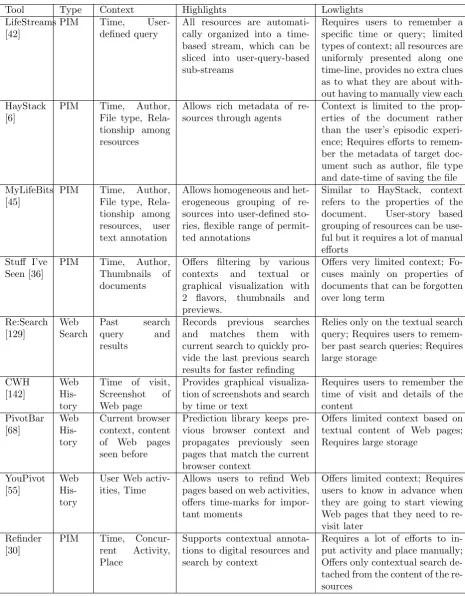
LifeStreams (1996) was probably the first alternative to the traditional semantic-centric hierarchical organization of resources. Freeman and Gel-ernter envisioned a system in which personal digital resources were orga-nized in user-centric events rather than in directories. LifeStreams auto-matically collects all types of digital resources into a time-based stream and is capable of slicing it into “substreams” based on user-specific queries (e.g. “All emails I have not responded to”). Web pages also become a part of the lifestream as a form of URL documents and Lifestream keeps track of all bookmarks silently [42].
Three years later, Adar and Karger proposed HayStack (1999), a PIM system that captures users’ interaction with digital resources as metadata. While LifeStreams focused heavily on the temporal aspect of user inter-action, Haystack offered more rooms for other aspects such as author, file type and relationship among resources through agents [6].
2.4. CONTEXT IN ORGANIZING AND RE-FINDING WEB CONTENTSCHAPTER 2. STATE OF THE ART
offers a graphical timeline view by which users can browse to a specific time or time-range to find what they are looking for. In contrast to HayStack, MyLifeBits is more flexible in terms of the range of permitted annota-tions and visualizaannota-tions, as it does not follow a predetermined ontological structure [45].
Dumais et al. put forward a system called Stuff I’ve Seen (SIS, 2003) that uses rich contextual cues to facilitate information re-use [36]. SIS offered time, author, thumbnails and previews as contextual filters that users could exploit to narrow down further to their target information. According to the results of their evaluation with 234 people over 6-week period, time and people turned out to be most important retrieval cues and that people used fewer of the other available search tools after using SIS [36].
The unprecedented boom of Web and Internet technology starting from the early 2000s also brought changes in how we search for information. More and more resources were made available to the public and Web browsers became more sophisticated to support such changes. This in-fluenced the direction of research in improving refinding as well: as more people were relying on the Web to discover information, context-based re-se