http://www.sciencepublishinggroup.com/j/ajnc doi: 10.11648/j.ajnc.20180703.12
ISSN: 2326-893X (Print); ISSN: 2326-8964 (Online)
Factors Affecting the Efficiency of Transferring Remote
Sensed Data
Qing Zhang
Institute of Remote Sensing and Digital Earth, Chinese Academy of Sciences, Beijing, China
Email address:
To cite this article:
Qing Zhang. Factors Affecting the Efficiency of Transferring Remote Sensed Data. American Journal of Networks and Communications. Vol. 7, No. 3, 2018, pp. 22-26. doi: 10.11648/j.ajnc.20180703.12
Received: October 9, 2018; Accepted: November 16, 2018; Published: December 18, 2018
Abstract:
The main two factors affecting the efficiency of transferring satellite remote sensed data via fiber network are the data set number and the program thread number. This paper sets up a test plan for transferring satellite remote sensed data by applying the method of control variables. Through changing variables and exploring many tests, it obtains the mean transferring time. By analyzing the efficiency of transferring on the condition of three different combinations of variables, it reaches a result that using multi-thread for single data set is the best way for remote sensed transmission. Then, at an experimental scenario with 50ms network time delay, it shows that 3 or 4 threads for one data set transferring can get the shortest consuming time, which proves that the number of thread in transferring remote sensed data will be determined by specific networks.Keywords:
Satellite Remote Sensed Data, Data Set Number, Thread Number, Transferring Time, Transferring Efficiency1. Introduction
Remote sensing satellites can provide a large amount of remote sensed global data with high accuracy, which has much value for the applications such as scientific research and navigation. As the development of remote sensing techniques in higher space resolution and higher time resolution, it needs higher efficiency in both satellite-ground link and ground-ground link data transfer [1]. Due to the long distance between remote sensing satellite ground stations and data center, remote sensed data usually needs to be accumulated to data center via WAN after it has been acquired.
At present, as far as hardware is concerned, net accelerators are usually exploited at the both ends of the fiber link in data transferring. In fact, it takes the advantage of data compress function of net accelerators to compress the data before it is transferred, which can speed up transferring rate to a certain extent. But it can not meet the growing needs of satellite remote sensed data transfer. Different accelerators have different effects to different data,which depends on compression algorithms of the accelerators and the invested cost [2]. From software point of view, researches in this field focus mainly on TCP (Transmission Control Protocol) optimization,RTT
(Round-Trip Time)selections [3], and net flow controls. Few researches involve the transferring performance of large data
volume or the selection of transferring methods such as the number of transferring program threads and data sets. This paper mainly focuses on the transferring methods. It will analyze them in detail, and it will give the research conclusion.
2. Purpose
Although TCP has a good performance on traditional Ethernet [4] and it can reach a better result through some optimizations, it needs to be further optimized in other ways to get higher performances [5]. There are two factors effecting network operation. One is that there is a long distance between receiving stations and data centers, for instance, in China the distance is usually over 3000 kilometers long, which results in a long RTT (Round-Trip Time) in network communication (50 ms) [6] and high renting cost for fiber links [7], small bandwidths are used (the bigger the bandwidth, the more money the cost). On the other hand, TCP itself is a mature network protocol, it is hardly to get big performance improvement through network optimizations [8].
through the analysis and comparison of experimental data.
3. Method
This paper sets up three scenarios for the transfer research, they are:
a) Single data file and single thread transfer; b) Single data file and multi-thread transfer; c) Multiple data files and multi-thread transfer.
Single thread transfer means there is one and only one transferring program thread being processed in system during the experiment. Multi-thread transfer means there are several transferring program threads being processed for one or several files during the experiment.
In the experiment, ground network data transfer simulation programs are used and a WAN in which TCP without any optimization [10] is employed. Some time delay of network communication is deployed and two workstations are involved as a server and a client.
In order to obtain reliable results, some prerequisites are needed: (1)In the three scenarios, all the data files have the same volume, that is, each file has equivalent file size, and then the consumption of transferring time is compared. The total data volume of the third scenario in which several files have been transferred is equal to the volume of the two other scenario, respectively.
(2)There is no other thread or process being processed in the system during the experiment.
(3)The I/O throughput of the workstation is greater than the maximum transfer rate of the network.
(4)For the single data file and multi-thread transfer, two threads will be used for transferring one file. For the multi-data and multi-thread transfer, two files will be transferred simultaneously and each file will be processed by one thread.
(5)The data file size is 2 GB.
(6)Each scenario will be processed several times to obtain average consuming time, and then the best transfer method will be determined by analysis and comparison of the results.
4. Factors Affecting the Efficiency of
Data Transfer
4.1. Experimental Environment
In order to obtain the real efficiency of data transfer, the test will be processed in a real WAN. Data files will be transferred from the southern ground station of China to Beijing receiving center. During the whole experiment time,there is no other applications consuming the network bandwidth. For a matter of convenience, some explanation is listed below:
Workstation: there are two workstations which labeled A and B deployed for the transfer test. Each of the workstations has a gigabit network interface and is connected through a gigabit switch. The OS is Red Head Enterprise 5.5.
SeverSS: an executable program served as a server
deployed on workstation A. It uses single thread to send one file at a time.
ClientSS: an executable program served as a client deployed on workstation B. It uses single thread to receive one file at a time.
SeverSM: an executable program served as a server deployed on workstation A. It uses multi-thread to send one file at a time, each thread sends part of the file.
ClientSM: an executable program served as a client deployed on workstation B. It uses multi-thread to receive one file at a time, each thread receives part of the file.
ServerMM: an executable program served as a server deployed on workstation A. It uses multi-thread to send several files, simultaneously.
ClientMM: an executable program served as a client deployed on workstation B. It uses multi-thread to receive several files, simultaneously.
2GFile: data file, size 2GBytes, deployed on workstation A. 1GFile1 / 1GFile2: data file, size 1GBytes, deployed on workstation A.
4.2. Experimental Procedure
Specified number of files are sent from the workstation A by the test program. The total sizes of the data files are the same for each test. Each test result is recorded and the average of the test time is calculated, thus, the method by which the shortest time is reached can be found. The test procedure for each method is the same. All the tests are exactly executed by the procedure, and there are only some differences in choosing the executable programs and data files. The test procedures are as followed:
a Start the sending program on the workstation A and put in the data file names at the prompt. There is a space between file names if multi-file names are needed. b Start the receiving program on the workstation B. Set up
the connection between the two workstations and then start to receive data automatically.
c As soon as the data-sending finishes, the transfer time is displayed on workstation A. Record the transfer time. d Repeat each test for 15 times, and then calculate the
average time.
e Find the method by which the shortest transfer time is reached.
4.3. Experimental Plan
A large number of tests are carried out by the variable control method. Three different variable compositions are used in the test. The optimal variable composition is found through the comparison of test results. Each experimental plan is expounded as below.
4.3.1. Single Data File and Single Thread
Table 1. Time and Efficiency of Single File and Single Thread.
No. File Size Time (s) Efficiency
1 2GB 29.04 55.10%
2 2GB 27.80 57.55%
3 2GB 26.01 61.51%
4 2GB 26.77 59.77%
5 2GB 26.57 60.22%
6 2GB 27.50 58.18%
7 2GB 28.41 56.32%
8 2GB 28.39 56.36%
9 2GB 28.91 55.34%
10 2GB 26.70 59.93%
11 2GB 26.09 61.33%
12 2GB 28.40 56.34%
13 2GB 27.85 57.45%
14 2GB 27.38 58.44%
15 2GB 27.55 58.07%
Average 2GB 27.56 59.45%
4.3.2. Single Data File and Multi-thread
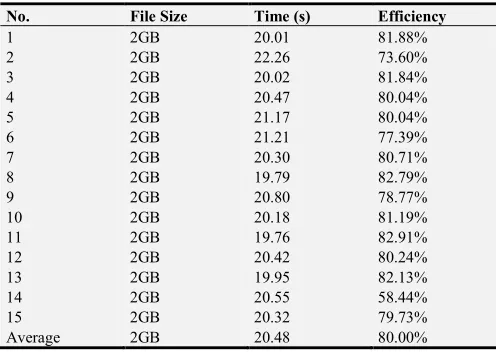
The plan of single data file and multi-thread means only one data file is transferred by several threads simultaneously. The size of data file is 2G bytes. Each thread reads and sends a part of the file. The sending program sends the file from workstation A to B. The transferring time is recorded on workstation A after the transfer finishes and the bandwidth efficiency is calculated. The results are listed in Table 2.
Table 2. Time and Efficiency of Single File and Multi-Thread.
No. File Size Time (s) Efficiency
1 2GB 20.01 81.88%
2 2GB 22.26 73.60%
3 2GB 20.02 81.84%
4 2GB 20.47 80.04%
5 2GB 21.17 80.04%
6 2GB 21.21 77.39%
7 2GB 20.30 80.71%
8 2GB 19.79 82.79%
9 2GB 20.80 78.77%
10 2GB 20.18 81.19%
11 2GB 19.76 82.91%
12 2GB 20.42 80.24%
13 2GB 19.95 82.13%
14 2GB 20.55 58.44%
15 2GB 20.32 79.73%
Average 2GB 20.48 80.00%
4.3.3. Multiple Data files and Multi-thread
The plan of multiple data files and multi-thread means several data files are transferred by several thread simultaneously. In this case, two files are transferred by two threads, one file is sent by one thread. The size of each data file is 1G Bytes, and 2G bytes in total. The sending program sends the file from workstation A to B. The transferring time is recorded on workstation A after the transfer finishes and the bandwidth efficiency is calculated. The results are listed in Table 3.
Table 3. Time and Efficiency of Multiple Files and Multi-Thread.
No. File Size Time (s) Efficiency
1 2GB 23.51 69.69%
2 2GB 23.47 69.81%
3 2GB 22.48 72.88%
4 2GB 23.39 70.05%
5 2GB 23.34 70.20%
6 2GB 23.43 69.93%
7 2GB 23.51 69.69%
8 2GB 23.14 70.80%
9 2GB 23.37 70.11%
10 2GB 24.17 67.79%
11 2GB 23.39 70.05%
12 2GB 23.08 70.99%
13 2GB 22.89 71.58%
14 2GB 23.71 69.10%
15 2GB 22.73 72.08%
Average 2GB 23.31 70.29%
4.4. Results Analysis
The results from the above three plans are analyzed. Under the condition of the same size of total files, the three consuming time values are compared.
Figure 1 shows the average transfer time values of three different test plans. It is obvious that the plan of single file and multiple threads can reach the shortest transfer time, that is, the highest efficiency. The reason why the plan of multiple files and multiple threads reaches a longer time is that the strategies of reading single file and reading multiple files are different by the computer OS, thus, lead to the difference in
efficiency of data transfer. From the test results, it can be calculated that the bandwidth utilization of single file and multiple threads can reach 80%, which can show that the method can have a higher efficiency compared with the ones of normal data transfer.
Figure 1. Comparison of Transfer Time.
4.5. Selection of Threads
Although the method of single data file and multiple threads can reduce the transfer time and promote efficiency, it needs further research to find the optimal number of threads that can reach the best performance. For this purpose, more transfers are tested though which more threads are added in the processes. There are totally 9 test plans in which the number of
thread is increased from 2 to 10, respectively. The size of data file is 2G bytes in each test. The network communication time delay is 50 ms between workstation A and B, which is the real network environment between receiving ground stations and the data center in China.
In order to get a reliable result, each test is repeated 15 times. Each result is recorded after the test finishes and the average time value is calculated. The results are listed as followed.
Table 4. Test of Single file and multiple threads.
Threads 2 3 4 5 6 7 8 9 10 sequence Time (s) Time (s) Time (s) Time (s) Time (s) Time (s) Time (s) Time (s) Time (s)
1 33.04 29.48 28.18 28.33 32.17 35.18 34.54 38.35 31.01
2 33.23 30.96 28.73 32.90 33.06 39.80 37.20 28.91 42.49
3 42.72 30.77 31.22 33.67 28.75 37.29 31.09 31.04 29.12
4 39.88 26.29 27.98 27.36 31.62 35.05 31.59 43.43 35.57
5 38.93 31.20 31.57 27.01 31.24 35.17 32.22 37.62 34.51
6 32.73 31.01 29.80 29.44 37.11 32.64 51.20 35.72 39.52
7 29.21 29.35 27.29 30.59 28.91 39.77 44.88 32.18 40.67
8 33.55 32.52 37.22 33.61 32.39 38.48 32.5 40.73 53.68
9 36.30 29.22 28.72 33.73 30.48 31.79 37.86 34.27 40.68
10 35.15 28.10 29.87 27.80 36.47 35.65 33.49 400 48.05
11 31.09 30.33 26.81 34.81 41.74 38.31 32.29 36.81 34.48
12 30.76 29.98 29.83 31.72 28.46 32.15 33.25 40.83 49.30
13 37.06 29.19 32.46 36.89 32.56 33.06 34.97 38.64 43.59
14 33.03 29.50 29.05 28.07 35.02 39.11 33.06 37.14 33.17
15 30.25 29.55 27.83 30.29 31.58 33.21 42.12 36.53 29.37
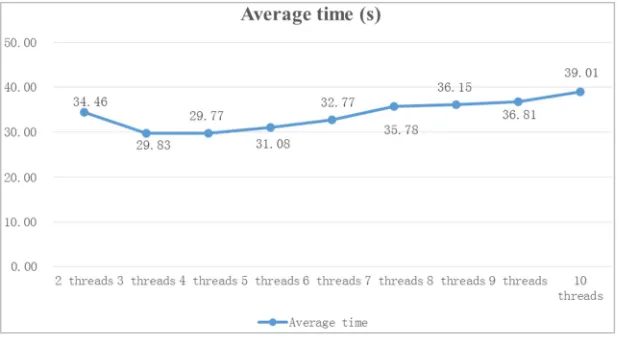
Average 34.46 29.83 29.77 31.08 32.77 35.78 36.15 36.81 39.01
The average transfer time values of the 15 test plans is showed in Figure 2:
Figure 2 shows that the methods that use 3 and 4 threads reach shorter transfer time values which are all no more than 30 seconds. As the number of threads increase, the time needed to transfer the same size of files increases, which means the transfer efficiency decreases. It is concluded that under a certain network environment, it does not necessarily mean that more threads will reach shorter transfer time. There should be an optimal number of threads for a certain network. This thread number should be decided through some empirical tests.
5. Conclusions
This paper explores a lot of network data transfer tests by controlling the number of files and program threads, and it makes the comparison of the test results. Then it shows that the method of single file and multiple threads can reach a shorter transfer time compared with other methods. Further more, it analyzes the efficiency of the number of threads for transferring a single file by applying 2 to 10 threads, respectively. It concludes that under a certain network environment a lot of empirical tests are needed for deciding the optimal number of threads for data file transfer.
References
[1] Lu Zhenlong, Zhang Jing. Improvement of Entropy Reduction for LZW Compression Algorithm Based on Big Dictionary, Computer Application and Software, 2016, 5: 287-290.
[2] Zhang Jing. Research on QoS Routing Security Algorithm Based on QAODV Protocol, TMES 2013/International Conference on Technology Management and Engineering Science, No.36, 2013: 144-148.
[3] Research and Application on Multiple Threads Communication Under LINUX, Computer Application and Software, 2004, 40(16).
[4] Wenqi Lv, Jing Zhang. Research of TCP Optimization Technology for Long-Distance and High Bandwidth-Delay Private Network [J]. American Journal of Engineering and Technology Research, Vol.11, No.12, 2011: 2857-2590.
[5] Wu Peixian. Analysis of Socket Programming Based on TCP Under LINUX environment, Modern Electronic Technology, 2005, 28(16): 53-55.
[6] Zhang Bin, Sun Yufang. Paralleling of Multiple Threads Progamming for File Severs Based on Micro-kernel, Computer Journal, 1997, 20(8): 737-743.
[7] Sun Yu, General Concept on Telecom Network, Posts and Telecommunications Press, 2007.
[8] Feng Hao, Su Lei. The System of Multiple Threads File Transfer Based on TCP, Introduction of Software, 2008, 7(8): 93-94.
[9] Wang Yuanyang, Zhou Yuanping, Guo Huanli. Realization of Paralleling Communications Based on Linux Socket Multiple Threading, Information of Micro-computer, 2009, 25(5-3): 106-109.