Abstract-- To help in facing the two top challenges in developing mechatronic systems, while maintaining desired accuracy and to optimize system level performance to meet the design requirements, this paper proposes an accurate mathematical and simulink models for accurate mechatronics design and verification of both system and control of motions throughout Mechatronics systems design and development process, including proper selection, analysis, integration and verification of the overall system and sub-systems performance in terms of output speed, angle, torque, current, acceleration and signals, resulting in simplifying and accelerating Mechatronics systems design process. The proposed models intended to be used for research purposes in mechatronics motion systems design, motion control applications, as well as, for the application in educational process. The proposed model can be modified to include any control strategy and/or any actuator. The model was created and verified using MATLAB simulink software
Index Term— Mechatronics system, Motion control,
Mathematical and simulink function block models.
I. INTRODUCTION
Mechatronics system design is Modern interdisciplinary design procedure; it is a concurrent selection, integration and optimization of the system and all its components as a whole and concurrently, all the design disciplines work in parallel and collaboratively throughout the design and development process to produce an overall optimal design. Mechatronics design approach tends to develop products with synergy and integration toward constrains like higher performance, speed, precision, efficiency, lower costs and functionality. The two top challenges faced in developing mechatronic systems are the early identifying system level problems and ensuring that all design requirements are met, in order to evaluate concepts generated during the design process, without building and testing each one, mechatronics engineer, must be skilled in modeling, simulation, analysis, and control of dynamic systems
and understand the key issues in hardware implementation [1-6].
Motion control is a sub-field of control engineering, in which the position or velocity of a given machine are contro lled using some type of actuating device. Most used actuating devices in mechatronics applications are electric actuating machines, which are used in many, if not most, modern machines (e.g. electric cars, locomotives, fans, turbines, and drills), robotics (e.g. Mobile robot and robot arm), industrial and manufacturing (e.g. conveyer belts, rolling, cutting, welding, saws and bending machines as well as to spin gears and food and medical industry mixers), also, many kitchen appliances use DC motors. Two main motion control applications are of concern; mobile robots and robot arms.
Accurate control of motion is a fundamental concern in mechatronics applications, where placing an object in the exact desired location with the exact possible amount of force and torque at the correct exact time, while consuming minimum power, at minim cost, is essential for efficient system operation, while maintaining accuracy, to simplify and accelerate Mechatronics systems design process, and considering the two top challenges faced in developing mechatronic systems, including proper selection, analysis, integration and verification of the overall system and sub-systems performance throughout the development process, and optimize system level performance to meet the design requirements, this paper proposes an accurate general mathematical and simulink models of system, motions and control in mechatronics applications, in terms of output speed , angle, torque, current, acceleration and signals , in terms of best selection and integration of system's mechanical parts, controller and components, as an application example the proposed model will be tested in mechatronics design of two systems a mobile robotic platform and robotic arm systems, where an electric motor, a motion control system and corresponding components are selected, designed and integrated to move a given mechanical system to/with a desired output (speed and/or position), corresponding to applied input voltage ,Vin, achieving and maintaining all design requirements.
Mechatronics Design of Motion Systems;
Modeling, Control and Verification.
Farhan A. Salem
1,2 1Mechatronics program,. Dept. of Mechanical Engineering, Faculty of Engineering, Taif University, 888, Taif, Saudi Arabia. 2 Alpha Center for Engineering Studies and Technology Researches, Amman, Jordan.
Mobile robot is a platform with a large mobility within its environment (air, land, underwater) it is not fixed to one physical location. Mobile robots have potential application in industrial and domestic applications. Accurate designing and control of mobile robot is not a simple task in that operation of a mobile robot is essentially time-variant, where the operation parameters of mobile robot, environment and the road conditions are always varying, therefore, the mobile robot as whole as well as the controller should be designed to make the system robust and adaptive, improving the system on both dynamic and steady state performances [1].Single joint robot arm system consists of three main parts; arm, connected to actuator through gear train.
The following nominal values for the various parameters of two different eclectic motor can be used and tested: First motor:
Vin=12 Volts; Jm=0.02 k g·m²; bm =0.03;Kt =0.023 N-m/A; Kb
=0.023 V-s/rad; Ra =1 Ohm; La=0.23Henry; TLoad, gear ratio,
for simplicity ,n=1. Second motor: Vin=12 Volts; Motor torque
constant, Kt = 1.1882 Nm/A; Armature Resistance, Ra =
0.1557 Ohms (Ω) ; Armature Inductance, La = 0.82 MH
;Geared-Motor Inertia: Jm = 0.271 kg.m2, Geared-Motor Viscous damping bm = 0.271 Nms; Motor back EMF constant, Kb = 1.185 rad/s/V, gear ratio, for simplicity , n=1, 10.
The robot arm system to be designed, has the following
nominal values; arm mass, M= 8 Kg, arm length, L=0.4 m, and viscous damping constant, b = 0.09 N.sec/m. so that a voltage range of 0 to 12 volts corresponds linearly of an Robot arm output angle range of 0 to 180, that is to move the robot arm to the desired output angular position, θL , corresponding to the
applied input voltage ,Vin . The mobile robot system to be
designed, has the following nominal values wheel radius r
=0.075 m, wheelchair height,h= 0.920 m, wheelchair width ,b =
0.580 m, the distance between wheels centers = 0.4 m, The most suitable linear output speed of used, domestic, mobile robot is to move with 0.5 meter per second, (that is ω=V/r =
0.5/ 0.075 = 6.6667 rad/s,). Tachometerconstant, Ktac = 12 /
6.6667=1.8 (rad/sec)
II. SYSTEM MODELING
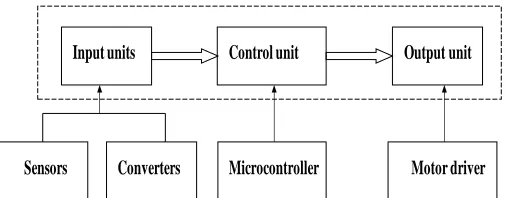
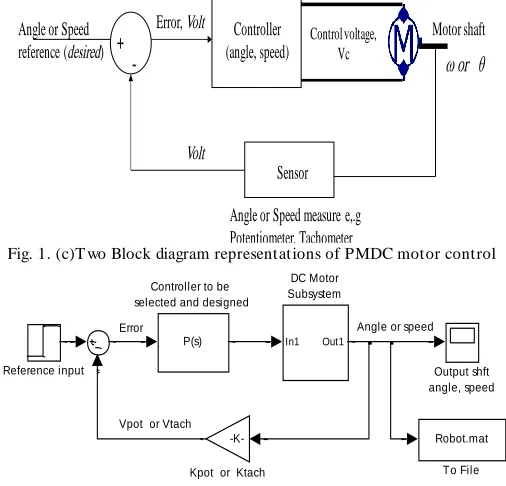
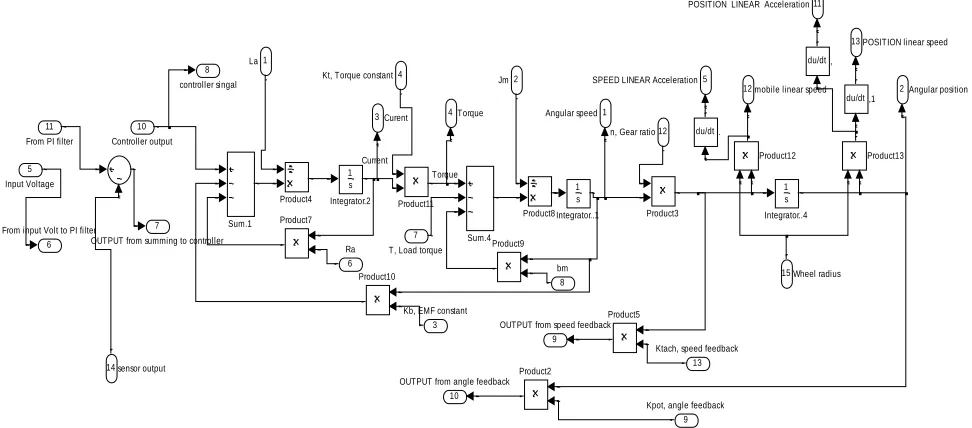
We are to model overall systems and sub-systems including mechanical system, actuator, system dynamics, control systems and sensors. The control of mechatronics system's motion is simplified to electric machines motion control that may or not include gear sys tem . Motion control system and components, A negative closed loop feedback control system with forward controller and corresponding simulink model shown in Fig.1 are to be used. Electric machine is powered and desired output movements will rely on how the electric motor is commanded, by using a simple controller of e.g. PIC microcontroller, and corresponding feedback element, interfaces and electric machine, the output movements (the rotation to a fixed speed or angle) can be controlled easily. Different researches on this theme, can be found, most of it study separate systems and control design. In [14] modeling, simulation and analysis of the basic open loop DC motor
system using different approaches; different simplified and accurate models are derived for different application. In [15] analysis of how to choose DC motor to be balance with their applications for a given mobile robot, also, specification of DC Motor that can be used with desire mobile robot is determined using MATLAB Simulink model. In [16] an accurate general purpose mobile robotic platform for system and controller, selection, design, modeling, testing and validation. In [17] a model and control of mobile robots are presented. [18] Addresses mechatronics design, modeling, controller selection, design, simulation and analysis issues of a simple robot arm considering all the forces applied upon the system. In [18] a proposed mechatronics design including modeling and control selection are introduced.
Meanwhile Mobile system dynamics depends on dynamics between the surface, wheels and mobile platform, robot arm dynamics depends on arm's mass, length and shape. The geometry of the mechanical part determines the moment of inertia, for simplicity, the mobile platform can be considered to be of the cuboide or cubic shape. Also, arm is considered as a rod of mass m, length ℓ, (so that m = ρ*ℓ*s), this rod is rotating around the axis which passes through its center and is perpendicular to the rod .The total equivalent inertia, Jequiv and
total equivalent damping, bequivat the armature of the motor
with gears attaches, can be calculated from known formulae.
Input units Control unit Output unit
Sensors Converters Microcontroller Motor driver
Fig. 1. (a) Motion control system and components
Controller (angle, speed)
Control voltage, Vc
Angle or Speed measure e,.g Potentiometer, Tachometer
Sensor
+
-Error, Volt Angle or Speed
reference (desired)
Volt
Motor shaft
ω or θ
Fig. 1. (c)T wo Block diagram representations of PMDC motor control
Error Angle or speed
Vpot or Vtach
Robot.mat To File
Reference input Output shft
angle, speed
-K-Kpot or Ktach
In1 Out1
DC Motor Subsystem
P(s) Controller to be selected and designed
Fig. 1. (d) Preliminary simulink model for negative feedback with forward compensation
II.I ELECTRIC MOTOR MODELING
The actuators most used in mechatronics motion control systems, are DC machines (motors). Because their torque-speed characteristics are achievable with different electrical configurations and their speeds can be smoothly controlled and in most cases are reversible, also, DC Motor and its features can be analyzed both by Control System design calculation and by MATLAB software .There are many DC motors that may be more or less appropriate to a specific type of application each has its advantages, limitations and disadvantages. The designer must select the best one fo r specific application. In [11] different types of DC machines, are introduced with their mathematical models, current and torque characteristics, it was shown that allmostly, all DC machines has identical models, therefore any DC machine can be used to build the proposed motion model, to be accurate for each particular case, it is required, only, to modify the used actuator model. DC motors are an example of electromechanical systems with electrical and mechanical components, it turns electrical energy into mechanical energy and produces the torque required to move the load to the desired output position, θL, or rotate with the desired output angular speed, ωL. The produced torque is exerted to accelerate the rotor and
ultimately this mechanical power will be transmitted through a gear set to mechanical system part. The fundamental system of electromagnetic equations for any electric motor is given by [14-15]:
( )
k s
s s s s
k R
s R R b m R
s s s R
R R R S
d
u R i j
dt d
u R i j P
dt
L i L i
L i L i
(1)
Where:k the angular speed of rotating coordinate system (reference frame), Depending on motor construction (AC or DC), the method of the supply and the coordinate system (stationary or rotating with the rotor or stator flux) the above mentioned model becomes transformed to the desirable form [16]. To write the equivalent electric actuator model, for output speed control, model of a symmetric half of the mobile robot platform is constructed, the same model is used for output angle control, as well as for current, torque and acceleration. The PMDC motor open loop transfer function s without any load attached relating the input voltage, Vin(s), to the motor
shaft output angle, θm(s), and speed ωm(s), are given by:
3 2
2
( )
( ) ( ) ( )
( )
( ) ( ) ( )
t
in a m a m m a a m t b
t
in a m a m m a a m t b
K s
V s L J s R J b L s R b K K s
K s
V s L J s R J b L s R b K K
2
The transfer function of PMDC, equivalent to robot arm transfer function, in terms of input volt and output angular position, is given by:
3 2
( ) *
( ) ( ( )
arm t
in a equiv a equiv equiv a a equiv t b
s K n
V s L J s R J b L s R b K K s
3
The transfer function of PMDC, equivalent to mobile robot platform transfer function, in terms of input volt and output angular speed is given by:
2
( ) /
( ) ( ) ( ) ( )
mobile t
in a equiv a equiv equiv a a equiv t b
s K n
V s L J s R J b L s R b K K
4
Major mechanical and electrical nonlinearities, (e.g. coulomb friction), can be included, in this model, which is considered as disturbance torque, and is given by:
Te – Tα – Tω - TEMF - Tf = 0
At steady is given by:
Tf = Te - b*ω
In the following calculation the disturbance torque, T, is all torques including coulomb friction, and given by T=Tload+Tf , and correspondingly, the open-loop transfer function of the PMDC, is given by:
2
( )
( )
t open
a a equiv equiv a a b t
K
G s
L s R J s b s L s R T K K
5
The geometry of the part determines the moment of inertia (e.g. cuboide, Cylindrical, rod, disc, sphere etc), equations for the total equivalent inertia, Jequiv and total equivalent damping, bequivat the armature of the motor with gears attaches are given
considered to be of the cuboid or cubic shape and calculated by Eq.(6), also the total inertia can be calculated from the energy conservation principle.
2
2 2
1 1
2 2
3
2 2
2 2
1
12 12
0.5 * * 0.5 * *
*
equiv m Load equiv m Load
mobile arm
total load
total load
N N
b b b J J J
N N
bh
J J ml
m J
m J
6
Considering that linear velocity of platform, depends on motor's angular speed, wheels radius, r, and gear ratio, n, substituting, gives:
2 2 2
2 2 2
* ,
* * *
* shaft
total total
load
n r
n
r n
m r m r
J
n n
Form robot arm application: The moment of inertia of the
robot arm can be found by computing the following integral:
2
/ 2 3 3
/ 2 2
/ 2 / 2
/ 8 1 2
3 3 12
l
l l l
x m l
x sdx s s ml
sl
Calculating and substituting values in (6) gives: JLoad= (8*(0.4) ^2)/12 = 0.106666666666667 kg.m2 Substituting, we obtain, Jequiv ,to be :
Jequiv = Jm + Jload *(1/1)
Jequiv =0.02+0.107= 0.1267 kg·m² Obtaining the total damping, b total , gives: b equiv = bm + bload(1/1)
bequiv_arm = 0.03 + 0.09 = 0.12 N.sec/m
Form mobile robot application: The total equivalent inertia,
Jequiv and total equivalent damping, bequivat the mobile robot
armature of the motor are ,Jequiv =0.2752 kg.m2 , bequiv = 0.3922 N.m.s. Neglecting the DC motor’s inductance, by assuming L ≈0, we have, transfer function relating input voltage and output speed:
/ ( )
( ) 1
t a equiv
t b equiv
equiv a
K R J
s
V s K K
s b
J R
Transfer function relating input
V
in(s)
and output current:1
( )
( ) 1
equiv
a equiv
t b equiv
equiv a
b s
R J
I s
V s K K
s b
J R
The transfer function relating the input voltage, Vin (s), to the
output armature current, Ia(s), directly follows:
2
1
( )
( )
a
a m
a
in a equiv a equiv b t
a equiv a m a equiv
L s
L J
I s
V s R b R b K K
s s
L J L J L J
Equation relating the torque developed by the motor and the motor shaft angle is given by:
2
( ) 1
( )
m
m equiv equiv
s
T s J s b s
II.II SYSTEM DYNAMICS MODELING
When deriving an accurate mathematical model for motion system it is important to study and analyze dynamics between system and surroundings, and considering all the forces applied upon the system. The suggested model will tested for mechatronics motion control design applications of two systems mobile robot and robot arm. For other systems the proposed model will include a separate block for load torques of particular application form and dimensions , such that the model can be applied to any motion control system.
For robotic arm; Torque, T is defined as a turning or twisting force and is calculated as given next: T F*L, Where: F The force acts at a length, L, from a pivot point. The torque required to hold a mass, m, at a given distance from a pivot is therefore:
( * ) *
T m g L
To calculate the extra torque required to move (i.e. create an angular acceleration), we calculate the moment of inertia of the part from the end to the pivot. For mobile robotic platform; In [4,13,17] an accurate derivation of all forces acting on mobile platform system, when it is running are introduced. For mobile robot, considering dimensions, and the following most acting forces and corresponding torques, can be considered:
Rolling resistance force,
_ r r
FR Fnormal forceC MgC cos( ) 7 In terms of the vehicle linear speed Eq.(7) becomes:
r0 r1
F
R
M * g * C -C *
*
sign
( )
The rolling resistance torque is given by:
R r
T M* * C * cos( ) *g
rw 8 The hill-climbing resistance force is given by:climb
F M *g*sin( )
9 The hill-climbing resistance, slope, torque, is given by: 10
T
climb
T
slope=
M
* *sin( ) *
g
r
wheelThe total inertia force of the mobile platform,
slope
Finertia F =M d
dt
The inertia torque is given by:
2 slope
Finertia F =r M d
dt
Aerodynamic Drag force, given by:
2
aerod d
F 0.5 AC vehicl
The aerodynamics torque is given by:
2
aerod d
1
T AC
2
vehicle rw
2
acc _ angle 2
F
wheel G J
r
11
The angular acceleration torque is given by:
12 2 2
acc _ angle w 2
w w
G G
T r J J
r r
III. CONTROLLER SELECTION AND DESIGN
The goal for a control system is to achieve a fast response to a step command with minimal overshoot, and minimum error or follow a given reference input signal [17]. The modern advances in electric motors and controllers improve motors speed, acceleration, controllability, and reliability; also allow designers a wider choice of power and torque. The term control system design refers to the process of selecting feedback gains that meet design specifications in a closed -loop control system. Most design methods are iterative, combining parameter selection with analysis, simulation, and insight into the dynamics of the plant [18].There are many motor motion control strategies that may be more or less appropriate to a specific type of application each has its advantages and disadvantages. The designer must select the best one for specific application, in [11] most suitable control strategies for DC motor motion control, are suggested, were different control strategies were selected, designed, applied and their action were compared to select the most suitable control of a given DC motor in terms of output speed and angle, Most of these suggested control strategies will be applied in suggested system model, mainly PID, PI, PD as separate blocks to be applied with and without deadbeat response, also lead and lag compensators, the designer must select the b est controller for specific application.
Systems design with prefilter: Prefilter is defined as a transfer
function Gp(s) that filters the input signal R(s) prior to
calculating the error signal. Adding a control system to plant, will result in the addition of poles and/or zeros, that will effect the response, mainly the added zero, will significantly inversely effect the response and should be cancelled by prefilter, therefore the required prefilter transfer function to cancel the zero is given by (13). In general. The prefilter is added for systems with lead networks or PI compensators. A prefilter for a system with a lag network, mainly, is not, since we expect the effect of the zero to be insignificant.
Prefilter( ) O/ O
G s Z s Z 13
PID controller design: PID controllers are most used to
regulate and direct many different types of dynamic plants the time-domain, The PID gains are to be designed and tuned to obtain the desired overall desired response. The PID controller transfer function is given by:
2
I D P I
PID P D
K K s K s K
G K K
s s
14
Proportional Integral - PI controller is widely used in variable
speed applications and current regulation of electric motors,
because of its simplicity and ease of design. PI controller transfer function is given by:
( )
( )
P I
I
PI P
I P
P o
P PI
K s K
K
G s K
s s
K
K s
K s Z
K
G s
s s
15
Where, Zo: Zero of the PI-controller, KP: The proportional gain. The PI zero, Zo=- KI/ KP, will significantly and inversely effect
the response and should be cancelled by prefilter given by (13).
Proportional -Derivative - PD controller: The transfer
function of PD-controller is given by Eq.(15) :
( ) ( P) ( )
PD P D D D PD
D K
G s K K s K s K s Z
K
16
The PD-controller is equivalent to the addition of a simple zero at: ZPD KP/KD
The required prefilter transfer function to cancel the PI- zero at ZPI=KI/ KP is given by:
_ Pr
( )
/
PI efilter PI PI
G
s
Z
s
Z
(17)For systems with PD compensators, a prefilter is used to eliminate any undesired effects of the term s + z introduced in the closed-loop transfer function, the required prefilter transfer function is given by:
_ Pr ( )
PD PI efilter
PD
Z
G s
s Z
Lead compensator: Lead compensator is a soft approximation
of PD-controller, the following approximated controller transfer function of PD controller, and called lead compensator is given by:
( ) o Where :
C o o
o
s Z
G s K Z P
s P
18
If Z < P this controller is called a lead controller (or lead compensator). If Z > P : this controller is called a lag controller (or lag compensator) .
Lag compensator; The Lag compensator is a soft
approximation of PI controller, The Lag compensator transfer function is given by.
19 ( )
( )
o
lag c
o
s Z
G s K
s P
Where: Zo > Po, and Zo small numbers near zero and Zo =KI/KP
, the lag compensator zero. Po: small number ,The smaller we make Po, the better this controller approximates the PI controller.
Lead integral compensator controller transfer function is given
by:
_
( ) ( )
1 ( )
( ) ( )
o o
Lead Integral C C
o o
s Z s Z
G s K K
s s P s s P
Eliminating the steady state error, but disturb transient response settling time, and overshoot.
III.I POSITION AND VELOCITY FEEDBACK SENSORS MODELING; POTENTIOMETER AND TACHOMETER
To calculate the error, we need to convert the actual output (position, speed, torque, current) into voltage, V, then compare this voltage with the input voltage Vin, the difference is the error signal in volts.
Potentiometer is a sensor used to measure the actual output
robot position, θL ,convert into corresponding volt, Vp and then feeding back this value to controller, the Potentiometer output is proportional to the actual position, θL, this can be accomplished as follows: The output voltage of potentiometer is given by:
Vp = θL * Kpot
Where: θL :The actual position. Kpot the potentiometer
constant; It is equal to the ratio of the voltage change to the corresponding angle change, and given
by:Kpot (Voltage change) / (Degree change). Depending on
maximum desired output arm angle, the potentiometer can be chosen. for our case, input volt range Vin= 0:12, and input
angle range θ= 0:180 degrees, substituting, we have:
12 0 / 180
0
0.0667 V / degree potK
Potentiometer constant Kpot = 0.0667 V/degree. This value
(0.0667), means that each one input volt corresponds to 180/12= 15 output angle in radians , to obtain a desired output angular position of 180 , we need to apply 12 volts, to obtain an angular position of 90 we need to apply ( 90*0.0667= 6.0030 Volts).
Tachometer is a sensor used to measure the actual output
mobile robot angular speed, ωL .. Dynamics of tachometer can
be represented using the following equation:
*
/
*out tac out tac
V t K d t dt V t K
The transfer function of the tachometer is given by:
Vout(s) / ω(s) =Ktac
A suitable linear output speed of domestic mobile robot is to move with 0.5 m/s, that is:
V/r 0.5/0.075 6.6667 rad / s,
Tachometerconstant, Ktac = 12 / 6.6667=1.8
III.II THE CONTROL OF OUTPUT POSITION (ROBOT ARM) WITH POSITION AND VELOCITY FEEDBACK.
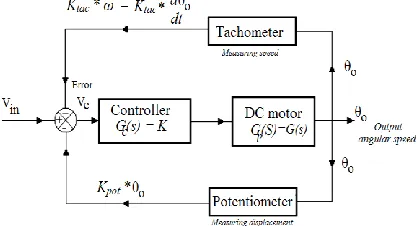
For the feedback system shown in Fig.2, a velocity feedback is used to stabilize systems that tend to oscillate, for this system the output is the angular displacement, θL, the rate of change of
angular position , dθL(s) /dt, is actual output angular speed,
and the error signal , Ve ,is given by:
*
/
e in pot o tac o
V
V
K
K
d
dt
Taking Laplace transform, and separating we have:
Ve(s) = Vin(s) - θL(s) *(Kpot - Ktac*s)
θL(s) = Ve (s)* Kcon *Garm(s)
Substituting, Ve, we have:
θL(s) = Ve (s)*Kcont* Garm(s)= K*G(s)[ Vin (s) - θL(s) *( Kpot -
Ktac *s)]
θL(s) = Kcont * Garm(s)*[ Vin (s) - θL(s) *( Kpot + Ktac *s)] θL(s) = Kcont * Garm(s)* Vin (s) - Kcont * Garm(s)* θL(s) *( Kpot +
Ktac *s)
θL(s) + Kcont * Garm(s)* θL(s) *( Kpot + Ktac*s ) = Kcont *
Garm(s)* Vin (s)
θL(s) [ 1 + Kcont * Garm(s)*( Kpot + Ktac *s )] = Kcont * Garm(s)* Vin (s)
The overall transfer function in terms of input voltage and output angular position
con arm arm
K * G ( )
( )
( ) 1 * G ( ) *
L
in cont pot tac
s s
TF
V s K s K K s
For this transfer function, if given the DC motor transfer functions and parameters, controller transfer function and sensors gains Kpot, Ktac, we can evaluate the behavior of our
system
Fig. 2. T he control of output position with position and velocity feedback.
IV. SYSTEM SIM ULATIONS
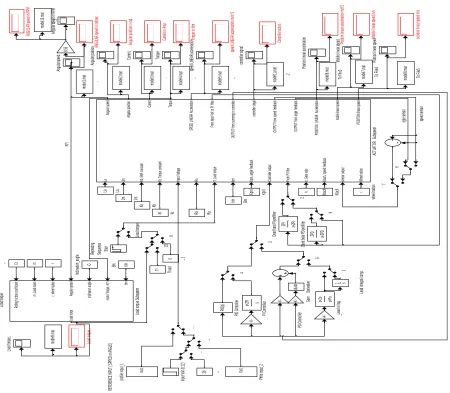
any mechatronics motion control application the use PM motor as prime mover. The model allows designer, using manual switches, to select each of the following; system to be deigned and tested, (e.g. mobile robot, robot arm, conveyer ), select control strategy ( PID, PI, PD, PI, with or without dead beat response, lead or lag as well as lead integral compensator), also, select input and disturbances type. The model, also, allows visual readings of output speed, angle, as well as torque, current, acceleration and controller action. It is important to consider that this model can be modified to include any control strategy, as well as, any DC machine, depending on particular application, it is required, just to modify, the used actuator model. The presented model allows the use of MATLAB PID block, to be used as PI, PD and PID controller with tuning capabilities, also a separate PD, PI controllers models are included, as well as prefilter. Also, the presented is support with MATLAB m.file to define and select all system's parameters, dimensions and coefficients; that is PMDC, mobile robot, robot arm, sensor, system dynamics and controllers gains, poles and zeros, also this m.file can be used separately to design, analyze derive and plot system's open loop and closed loop transfer function in terms of output speed and/or angle, as well as torque, current and acceleration.
r^2*m*g/2
1 Load torqe
sin(u) cos(u) SinCos Product4
Product2 Product13
Product1 du/dt Derivative1
g 0.5
5 Inclination angle
4 Angular speed
3 r, wheel radius 2
m ,Load mass
1 Rolling friction coefficient
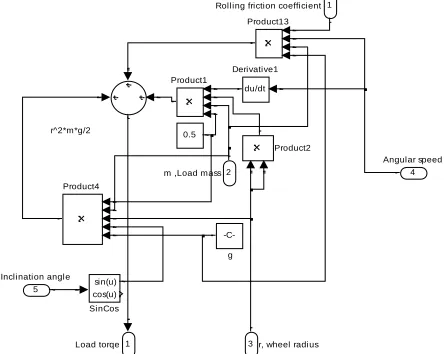
Fig. 3. (a) Load torque simulation, considering and not considering coulomb friction
r^2*m*g/2 Coloumb friction
1 Load torqe
sin(u) cos(u) SinCos Product4
Product3
Product2 Product13
Product1 du/dt Derivative1
g 0.5
7 bm
6 motor Torque, Kt*i
5 Inclination angle
4 Angular speed
3 r, wheel radius 2
m ,Load mass
1 Rolling friction coefficient
Fig. 3. (b) Load torque simulation, considering and not considering coulomb friction
Rolling f riction coef f icient
m ,Load mass
r, wheel radius
Angular speed
Inclination angle Load torqe
Load Subsystem
Fig. 3. (c) Load torque function block model
1 Out1 Switch1 Switch
Ramp slope=2 Ramp
slope=1 12
Constant 7.999
Clock
Current
Torque
13 POSITION linear speed
12 mobile linear speed 11 POSITION LINEAR Acceleration
10 OUTPUT from angle feedback
9 OUTPUT from speed feedback 8
controller singal
7 OUTPUT from summing to controller 6
From input Volt to PI filter
5 SPEED LINEAR Acceleration
4 Torque 3 Curent
2 Angular position
1 Angular speed
Sum.4 Sum.1
Product9 Product8 Product7
Product5 Product4
Product3
Product2
Product13 Product12
Product11
Product10 1 s
Integrator.2
1 s Integrator..4 1
s Integrator..1
du/dt .
du/dt ,1 du/dt ,
15 Wheel radius
14 sensor output 13
Ktach, speed feedback 12
n, Gear ratio 11
From PI filter
10 Controller output
9 Kpot, angle feedback 8
bm 7
T, Load torque 6
Ra 5
Input Voltage
4 Kt, Torque constant
3 Kb, EMF constant
2 Jm 1
La
Fig. 4. (a) Motor subsystem model.
IV.I MATLAB M.FILE
V.I.I SUPPORTING MATLAB PROGRAM
The model is support with, written below, MATLAB m.file to define and select all system's parameters, dimensions and coefficients, controller selection (PID, PI with deadbeat, PD with deadbeat) analyze, derive and to plot system's response output results in terms of speed and/or angle, as well as torque, current and acceleration. Also this m.file can be used separately to design, motion system and controller selection (PID, PI with deadbeat, and PD with deadbeat) analyze, derive and plot system's open loop and closed loop transfer function and corresponding plots of response curves:
clc, close all, clear all
format short
% First DC motor (used)parameters
% Vin=12 ; Kt= 1.1882 ; Ra = 0.1557; La = 0.82; Jm = 0.271; bm=0.271; Kb = 1.185; Jm =0.271 ;n=1;
%Second DC motor (used) parameters
Vin=12 ;V=12; Kt= 0.023 ; Ra = 1; La = 0.23 ; Jm = 0.271; bm=0.03; Kb = 0.023; n=1;Jm =0.02 ;n=1;
r=0.075;% m wheel radius
g=9.79379 ;% m/s^2, grav. acc.
mobile_robot_wedth=0.580 ;% m
mobile_robot_height=0.920 ;% m
desired_linear_speed=0.5;% m/s
desired_angular_speed= (desired_linear_speed)/r;
m=100;% mobile total mass
b_mobile=0.09;rolling_f=0.01;Kp_PI=2;Kd_ PD=2;Zo=0.1;
Po=0.11;Kp_compensator=2;Tl=10;
Cr= 0.014; % Rolling Resistance
Coefficient
inclination_angle=45;
M= 8 ; Length=0.4 ; b_arm = 0.09 ; angle_max=90;V_max =12;
Ktach =Vin/ desired_angular_speed; Kpot=V_max /angle_max;
Kp_PI=2;Kd_PD=2;Zo=0.1;Po=0.2;
Kp_compensator=2;Tl=10;inclination_angle =45;
Cr= 0.014; % Rolling Resistance Coe.
% Jm = input(' Enter Motor armature moment of inertia (Jm) :');
% bm = input(' Enter damping constant of the the motor system (bm):');
% Kb = input(' Enter ElectroMotive Force constant (Kb):');
% Kt = input(' Enter Torque constant (Kt):');
% Ra = input(' Enter electric
resistance of the motor armature (ohms), (Ra):');
% La =input(' Enter electric inductance of the motor armature ,Henry,(La) :');
% inclination_angle=input(' Enter inclination angle :');
disp(' ')
disp( ' ==============================')
num1 = [1]; den1= [La ,Ra]; num2 = [1]; den2= [Jm ,bm];
TF1 =tf(Kt*n, A);
%obtaining open loop transfer functions of DC motor system and step response
disp('DC motor OPEN loop transfer
function, Speed/Volt: ') Gv= feedback(TF1,Kt)
disp( ' ==============================')
disp(' DC motor OPEN loop transfer
function, Angle/Volt: ') Ga=tf(1,[1,0] )*Gv
subplot(2,1,1),step (V*Ga);title('
Position step response , open loop DC motor system')
subplot(2,1,2),step (V*Gv);title(' Speed
step response , open loop DC motor system')
disp( ' ==============================')
disp( ' DC motor response curves are
ploted')
disp( ' ==============================')
disp(' click any key to continue
');pause,home, disp(' ')
x=1;
while 1==1; home
disp( ' ==============================')
disp(' It is required to design a
robot ARM or MOBILE robot? ')
disp( ' ==============================')
AA= input(' Enter (1) for Robot arm
design and enter (2) for Mobile robot design: ','s');
disp( ' ==============================')
if strcmp(AA,'2')==1;
home, disp( ' ')
disp(' YOUR
choice is Mobile robot design ')
disp(' Please enter
robot dimensions and parameters :')
disp( ' ==============================')
disp(' click any key to continue
'); pause, home
% wheel_radius= input( ' Enter mobile robot wheel radius : ' ); % mobile_robot_height= input( ' Enter mobile robot height : ' );
% mobile_robot_wedth= input(
' Enter mobile robot wedth : ' );
% Dist_wheels= input( '
Enter Disttance between wheels : ' );
% desired_linear_speed=
input( ' Enter mobile robot desired output linear speed : ' );
% m= input( ' Enter mobile
robot total mass : ' );
% friction= input( ' Enter
rolling friction coefficient between the wheel and road surface : ');
% V = input(' Enter
applied input voltage Vin :');
J_mobile =(mobile_robot_wedth* (mobile_robot_height)^3)/12;
Jequiv_mobile = Jm+ J_mobile/(n)^2;
bequiv_mobile = bm + b_mobile/(n)^2;
desired_angular_speed= (desired_linear_speed)/r; Ktach =Vin/
desired_angular_speed ;%tachometer
constant
num_mobile=[ Kt*n];
den_mobile=[La*Jequiv_mobile ,(Ra*Jequiv_mobile+bequiv_mobile*La),(Ra * bequiv_mobile+Kt*Kb)];
disp( ' ==============================')
disp( ' mobile robot open loop transfer
function and step response')
disp( ' mobile robot open loop
transfer function, Omega/Volt')
G_robot_angular_speed_open=tf(num_mobile , den_mobile)
disp( ' ==============================')
disp( ' mobile robot open loop
transfer function, linear speed/Volt')
G_robot_linear_speed_open=tf(num_mobile, den_mobile)*r
disp( ' ==============================')
disp( ' mobile robot open loop
transfer function, Vin/Current')
G_robot_volt_current1=tf((1/Ra)*[1, bequiv_mobile/Jequiv_mobile ],
[1,(1/Jequiv_mobile)*(bequiv_mobile+(Kt* Kb)/Ra) ])
disp( ' ==============================')
disp( ' mobile robot open loop transfer
function, Vin/Current')
G_robot_volt_current2=tf((1/La)*[1, La/Jequiv_mobile ],
[1,(Ra/La)+(bequiv_mobile/Jequiv_mobile) , (Ra*bequiv_mobile/La*Jequiv_mobile+ Kt*Kb/La*Jequiv_mobile) ])
disp( ' mobile robot open loop transfer function, Torque/Angle')
G_robot_torque_angle=tf([1 ],
[(Jequiv_mobile)^2, bequiv_mobile,0 ])
disp( ' ==============================')
disp( ' mobile robot CLOSED loop
transfer function, Linear speed/Vin') G_robot_linear_speed_closed=feedback(G_r obot_linear_speed_open, Ktach)
disp( ' ==============================')
disp( ' mobile robot CLOSED loop
transfer function, Vin/Vtach')
G_robot_linear_Vin_V_tach=tf([2*Kt*Ktach ],[r^2*m+2*bequiv_mobile,(Ra*(r^2*m+2*be quiv_mobile))+La*(rolling_f
+2*Jequiv_mobile),Ra*(rolling_f +2*Jequiv_mobile)+2*Kb*Kt ])
disp( ' ==============================')
disp( ' mobile robot CLOSED loop
transfer function, Linear speed/Vin') G_robot_linear_speed_closed=feedback(G_r obot_linear_Vin_V_tach,Ktach)
fig., subplot(3,2,1),
step(G_robot_angular_speed_open),ylabel(
'Mobile Angular speed, \omega Rad/s
'),xlabel(' Time '), title('Open loop
Mobile Angular speed Rad/s, '), grid, subplot(3,2,2),step(G_robot_linear_speed
_open),ylabel('Mobile linear speed, \nu
Rad/s '),xlabel(' Time '), title('Open loopMobile linear speed m/s, '), grid, subplot(3,2,3),step(G_robot_linear_speed
_closed),ylabel('Mobile linear speed,
\nu Rad/s '),xlabel(' Time '),
title('Closed loop Mobile linear speed
m/s, '), grid,
subplot(3,2,4),step(G_robot_volt_current
1),ylabel('Mobile current Amp
'),xlabel(' Time '), title('simplified
Input volt vs current, '), grid
subplot(3,2,5),step(G_robot_volt_current
2),ylabel('Mobile current Amp
'),xlabel(' Time '), title(' Input volt
vs current, '), grid
subplot(3,2,6),step(G_robot_torque_angle
),ylabel('Mobile torque '),xlabel(' Time
'), title(' Input torque vs angle, '),
grid, fig.
subplot(2,1,1),step(G_robot_linear_Vin_V
_tach),ylabel('Mobile Vin vs Vtach
'),xlabel(' Time '), title(' Input volt
vs tacho output volt, '), grid
subplot(2,1,2),step(G_robot_linear_speed
_closed),ylabel('Mobile speed
'),xlabel(' Time '), title(' Input volt
vs output speed, '), grid
pause(2); home
disp( ' ==============================')
disp( ' select controller; PID or PI
with dead beat response? ')
WW= input( ' Enter (1) for PID, enter
(2) for PI with deadbeat response: ','s');
disp( ' ==============================')
if strcmp(WW,'1')==1;
home, disp( ' '); disp( '
==============================')
disp(' YOUR choice is PID controller
for mobile robot control ')
disp(' Enter PID gains : ')
disp(' you can run simulink model and
use gain from PID block : ')
disp( ' ==============================')
Kp= input( ' Enter Proportional gain, Kp
= ');Kd= input( ' Enter Derivative
gain, Kd = ');Ki= input( ' Enter
Integral gain, Ki = ');PID_num=[ Kd Kp Ki];PID_den=[ 1 0];
disp( ' ==============================')
disp( ' PID transfer function')
G_PID=tf(PID_num,PID_den) G_forward_PID=
series(G_PID,G_robot_linear_Vin_V_tach);
disp( ' ==============================')
disp( ' mobile robot closed loop with
PID transfer function, /linear speed/Vin')
G_mobile_PID_closed=
feedback(G_forward_PID, Ktach);fig.
step(G_mobile_PID_closed),ylabel('Mobile
Vin vs Vtach '),xlabel(' Time '),
title(' Input volt vs tacho output volt,
'), grid;
step(G_robot_linear_speed_closed),ylabel ('Mobile speed '),xlabel(' Time '),
title(' Input volt vs output speed, '),
grid
else strcmp(WW,'2')=1;
home; disp( ' ')
disp( ' ==============================')
disp(' YOUR choice is PI controller with
deadbeat response for mobile robot control ')
disp( ' ==============================')
alpha=1.9;bita=2.2;Ts=1.2;omega_n=4.04/T s;
Kp=((bita*(omega_n^2)*n*La*Jequiv_mobile
)-((n*Ra*bequiv_mobile)+(n*Kt*Kb)))/(Kt*Kt ach); Kp_PI=Kp;
Ki=omega_n^3*n*La*Jequiv_mobile/(Ktach*K
t); ZPI= Ki/Kp; Home, disp(' ')
disp( ' PI controller & Deadbeat prefilter gains and zero are :')
fprintf(' Kp_PI =%g , Ki=%g
,ZPI=%g \n',Kp,Ki,ZPI);
num_deadbeat=[Ki*Kt/(n*La*Jequiv_mobile) ]; den_deadbeat=[1 , (Ra*Jequiv_mobile +bequiv_mobile*La)/(La*Jequiv_mobile) , ((n*Ra*bequiv_mobile)+(n*Kt*Kb)+(Ktach*K p*Kt))/(n*La*Jequiv_mobile) ,
(Ktach*Ki*Kt)/(n*La*Jequiv_mobile)];
disp( ' ==============================')
disp('Closed loop transfer function with
PI deadbeat respnse & prefilter ') T_mobile_deadbeat
=tf(num_deadbeat,den_deadbeat)
;fig., step(12*r*T_mobile_deadbeat);
ylabel('Mobile linear speed \nu
'),xlabel(' Time '), title('Mobile
linear, PI with Dead beat response, '), grid,
end
else strcmp(AA,'1')==1;home
disp( ' ')
disp( ' ==============================')
disp(' YOUR choice is
Robot arm design ')
disp(' Please enter Arm
dimensions and parameters :')
disp( ' ==============================')
% M= input(' Enter robot
arm mass , M=');
% Length = input(' Enter
robot arm Length, L=');
% b_arm= input(' Enter damping factor of robot arm, b_arm =');
% n= input( 'Enter gear
ratio n = ');
% V = input(' Enter
applied input voltage Vin :');
% V_max = input(' Enter
maximum allowed voltage , V max :'); % Angle_max = input( ' Enter maximum allowed angle for robot arm : ');
Kpot=V_max /angle_max; % pot
constsnt
Jequiv=((M* Length^2)/12)+Jm; bequiv= bm + b_arm;
num_arm_open = [Kt*n*(180/pi)]; den_arm_open=[La*Jequiv
(Ra*Jequiv+La*bequiv) (Ra*bequiv+Kt*Kb) 0];
disp(' ');
disp(' click any key to continue ');
pause; home; disp( '
==============================')
disp('Arm OPEN loop transfer function :
')
Ga_arm_open=tf(num_arm_open,den_arm_open )
disp( ' ==============================')
disp('Arm CLOSED loop transfer function
: ');
G_close_arm=feedback(Ga_arm_open,(Kpot/n
)); disp( ' Response plots are plotted
'); fig.; subplot(2,1,1),
step(V*Ga_arm_open);ylabel('Arm
position, \theta Rad '),xlabel(' Time
'), title('OPEN loop Arm Angular
position Rad/s, '), grid;
subplot(2,1,2),step(V*G_close_arm);ylabe
l('Arm position, \theta Rad
'),xlabel(' Time '), title('CLOSED loop
Arm Angular position Rad/s, '), grid,
home; disp( '
==============================')
disp( ' select controller; PID, PD with
dead beat response? ')
WWW= input( ' Enter (1) for PID, enter
(2) for PD with deadbeat response: ','s');
disp( ' ==============================')
if strcmp(WWW,'1')
home, disp( ' ')
disp( ' ==============================')
disp(' YOUR choice is PID
controller for robot arm ')
disp(' Enter PID gains : ')
disp(' you can run simulink
model and use gain from PID block : ')
disp( ' ==============================')
Kp= input( ' Enter Proportional gain,
Kp = ');
Kd= input( ' Enter Derivative gain, Kd =
');
Ki= input( ' Enter Integral gain, Ki =
');
PID_num=[ Kd Kp Ki];PID_den=[ 1 0];
Home, disp( ' ')
disp( ' ==============================')
disp( ' PID transfer function')
G_PID=tf(PID_num,PID_den)
disp( ' ==============================')
disp( ' Closed loop Robot arm transfer
function with PID') G_forward_PID=
series(G_PID,Ga_arm_open); G_arm_PID_closed=
feedback(G_forward_PID, Kpot) fig.
step(V*G_arm_PID_closed),ylabel('Arm
title(' Input volt vs output Armangle,PID '), grid
else strcmp(WWW,'2')==1;
home, disp( ' ')
disp( ' ==============================')
disp(' YOUR choice is robot arm design
; PD controller with dead bead controller response ')
disp( ' ==============================')
omega_n=2.4;alpha=1.82 ;
disp( ' PD transfer function = Kds + Kp
is given by :')
Kp=(omega_n*Ra*Jm)/(Kt*Jequiv);
Kp_PD=Kp;Kd=(((alpha*omega_n)-(bm/Jm)-((Kt*Kb)/(Jequiv*Ra)))*Ra*Jequiv)/Kt*Kpo t;ZPD=Kp/Kd;ZPI=ZPD;G_PD=Kd*[ 1 ZPD]; num_arm_PD =G_PD* [Kt*n];
den_arm_PD=[La*Jequiv (Ra*Jequiv+La*bequiv) (Ra*bequiv+Kt*Kb) 0];
G_mobile_PD_tf= tf(num_arm_PD,
den_arm_PD);G_mobile_PD_dead_closed= feedback(G_mobile_PD_tf, Kpot);
disp(' ')
disp( ' ==============================')
disp( ' PD controller & Deadbeat
prefilter gains and zero are :')
fprintf(' Kp_PI =%g , Kd=%g ,ZPd=%g
\n',Kp,Kd,ZPd);
disp( ' ==============================')
disp( ' Prefilter transfer function :');
prefilter_num=[ZPD];prefilter_den=[1 ZPD];G_prefilter=tf(prefilter_num,prefil ter_den)
disp( ' ==============================')
disp( ' Robot arm overall closed loop
transfer function :')
G_mobile_PD_dead_overall=series(G_prefil ter,G_mobile_PD_dead_closed)
Fig.,
step(V*G_mobile_PD_dead_overall),ylabel(
'Mobile speed \nu'),xlabel(' Time '),
title(' Arm PD with deadbeat response,
'), grid
disp(' click any key to continue ');
pause, end, end, end, x=x+1; end
IV.I.II MATLAB CODE FOR PLOTTING ALL
SIMULATION RESPONSE CURVES
By defining blocks in simulink model, running simulation, all data will de defined in MATLAB workspace , To plot all response curves, run simulation then the next code, can be used:
load model1.mat ,load model2 ,load
model3 ,load model4 ,load model5,load
model6,load model7,load model8,load
model9,load model10,load model11;fig., subplot(2,2,1);plot(model_angular_positi
on), ylabel('\Theta , Rad'),xlabel('
'), title('Angular position Rad '), grid
subplot(2,2,2);plot(model_angular_speed)
, ylabel('Angular speed, \omega Rad/s
'),xlabel(' '), title('Angular speed
Rad/Time, '), grid; subplot(2,2,4); plot(model_angular_speed_RPM),
ylabel('Angular speed, RPM
'),xlabel('Time(sec)'), title('Angular
speed RPM, '), grid;
subplot(2,2,3);plot(model_current),
ylabel('Current, Amp
'),xlabel('Time(sec)'), title('Current
Amp/s, '), grid; fig., subplot(2,2,1);
plot(model_Torque), ylabel('Motor
Torque, Nm'),xlabel(' '), title('Motor Torque Nm/Time '), grid; subplot(2,2,2);
plot(load_torque), ylabel('Load Torque,
Nm'),xlabel(' '), title('Load Torque
Nm/Time '), grid
subplot(2,2,3);plot(model_linear_acceler
ation), ylabel('Linear speed Accel.,
M/s^2'),xlabel('Time(sec)'),
title('Acceleration of Linear speed
M/Time '), grid; subplot(2,2,4); plot(model_position_linear_acceleration)
, ylabel(' Position Accel.,
M/s^2'),xlabel('Time(sec)'),
title('Acceleration of Position /Time
'), grid, fig., subplot(2,2,1);
plot(model_linear_speed), ylabel('
Mobile linear speed.,
M/s'),xlabel('Time(sec)'), title('mobile
linear speed M/s '),
grid;subplot(2,2,2);plot(model_angel_lin
ear_speed), ylabel(' Angle linear
speed., M/s'),xlabel(' Time(sec) '),
title('Angle linear speed M/s '), grid
subplot(2,2,3); plot(controller_action),
ylabel(' controller_action'),
xlabel('Time(sec)'), title('controller
signal (mA)'), grid
V. TESTING AND ANALYSIS
VI.I Mechatronics motion control design in terms of output
linear speed of Mobilerobot; plant, components, controller
selection, design and evaluation of output speed, current,
torque and acceleration and angle.
platform dimensions, to move with linear speed of 0.5 m/s, (that is with angular speed of ω=V/r = 0.5/ 0.075 = 6.6667
Rad./s,), , here notice that, when defining system
parameters, using m.file, designer can chose and define tachometer constant Ktach, corresponding to desired output linear speed.
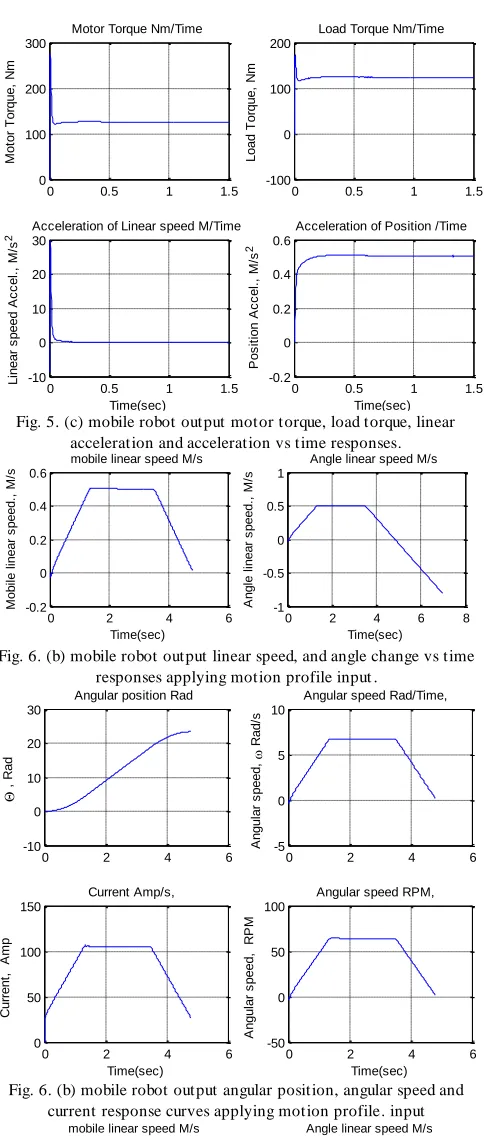
Now, switching the proposed model to output speed control (mobile robot, conveyer belts, rolling) ,by switching sensor to read output speed, selecting input signal to be step input of 12 volts, selecting PID controller, running supporting m.file to define system parameters, dimensions and constrains, and finally running simulation, will result in output speed, current, torque, acceleration and angle response curves shown in Fig. 5, also direct visual readings of all final outputs values can be taken, directly, from the general model, the simulation results shows that the mobile robot system, with selected parameters, dimensions and applying PID controller with suitable gains, reaches, the desired output linear speed of 0.5 m/s, in 0.35s, and zero steady state error, constant current consumption, the PID gains are KP=303.417042667051, KI= 414.72923375291,
KD=18.789820346901 . Now, to test designed system
robustness, Keeping the same parameters, but switching the input to profile input signal and applying stair changing disturbance, will result in response curves shown in Fig. 6, the response curve show that system, while achieving design criteria, maintain design criteria under disturbance effect.
Now, to test and analyze the effect of applying Lead integral compensator, we replace the PID controller, with Lead integral compensator with Zo=.1; Kp =0.4; Po=0.091; Ruining the model, will result in response curves shown in Fig. 7, the gain , pole and zero can be adjusted for better response.
Now, to test and analyze the effect of applying PI controller with deadbeat response, we replace the PID controller with, PI with deadbeat response, by switching the system to PI controller and switching-on the prefilter, the PI zero, Zo= KI/ KP, can be defined from either supporting m.file calculations
results or using modified PID block to simulate PI and tuning. Ruining the model, will result in response curves shown in Fig. 8.
Using the resulted response curves and/or visual readings from model, we can evaluate and/or validate our selection and design and correspondingly we can or adjust or select most suitable controller or change system parameters to meet design criteria. In conclusion the design, modeling, simulation and evaluation processes of motion control are minimized in time, and also simplified.
VI.II Mechatronics motion control design in terms of output
angular displacement of a robotarm: plant and controller
selection, design and evaluation of output angle, current,
torque and acceleration and speed.
It is required to select, design and integrate a single joint robot arm system, with suitable selection of it's mechanical part, actuator, sensor parameters and dimensions , so that an
input voltage in the range of 0 to 12 volts corresponds linearly of Robot arm output angle range of 0 to 180, that is to move the robot arm to the desired output angular position, θL , corresponding to the applied input voltage ,Vin , Kpot =(12/180=0.0667), Switching the proposed general model to output angle control (robot arm), by switching sensor to read output angular displacement, s witching load torque ,selecting input signal to step input of 12 volts, selecting PID controller, running supporting m.file to define system parameters, constrains and parameters, and finally running simulation, will result in output angular displacement, current, torque, acceleration and angle response curves shown in Fig. 9 . Now, changing the desired output angle output range to 0 to 45. ( for θ = 45,
Kpot =12/45=0.2667), Ruining the model, will result in
response curves shown in Fig. 10. Using the resulted response curves and/or visual readings from model, we can evaluate or validate our selection, design and correspondingly we can or adjust or replace controller or change system parameters to meet design criteria.
The proposed general model can be used to test, evaluate and validate any given mechatronics motion control system design e.g. electric cars, locomotives, turbines, robotics, conveyer belts, rolling, cutting, welding, saws and bending machines.
0 0.5 1 1.5
-0.2 0 0.2 0.4 0.6
Time(sec)
M
o
b
ile
l
in
e
a
r
s
p
e
e
d
.,
M
/s
mobile linear speed M/s
0 0.5 1 1.5
-0.2 0 0.2 0.4 0.6
Time(sec)
A
n
g
le
l
in
e
a
r
s
p
e
e
d
.,
M
/s
Angle linear speed M/s
Fig. 5. (a) mobile robot output linear speed, and angle change vs time responses
0 0.5 1 1.5
-5 0 5 10
,
R
a
d
Angular position Rad
0 0.5 1 1.5
-5 0 5 10
A
n
g
u
la
r
s
p
e
e
d
,
R
a
d
/s
Angular speed Rad/Time,
0 0.5 1 1.5
-50 0 50 100
Time(sec)
A
n
g
u
la
r
s
p
e
e
d
,
R
P
M
Angular speed RPM,
0 0.5 1 1.5
0 100 200 300
Time(sec)
C
u
rr
e
n
t,
A
m
p
Current Amp/s,
131402-6565-IJMME-IJENS © April 2013 IJENS
I J E N S
0 0.5 1 1.5
0 100 200 300 M o to r T o rq u e , N m
Motor Torque Nm/Time
0 0.5 1 1.5
-100 0 100 200 L o a d T o rq u e , N m
Load Torque Nm/Time
0 0.5 1 1.5
-10 0 10 20 30 Time(sec) L in e a r s p e e d A c c e l. , M /s
2 Acceleration of Linear speed M/Time
0 0.5 1 1.5
-0.2 0 0.2 0.4 0.6 Time(sec) P o s it io n A c c e l. , M /s 2
Acceleration of Position /Time
Fig. 5. (c) mobile robot output motor torque, load torque, linear acceleration and acceleration vs time responses.
0 2 4 6
-0.2 0 0.2 0.4 0.6 Time(sec) M o b il e l in e a r s p e e d ., M /s
mobile linear speed M/s
0 2 4 6 8
-1 -0.5 0 0.5 1 Time(sec) A n g le l in e a r s p e e d ., M /s
Angle linear speed M/s
Fig. 6. (b) mobile robot output linear speed, and angle change vs time responses applying motion profile input .
0 2 4 6
-10 0 10 20 30 , R a d
Angular position Rad
0 2 4 6
-5 0 5 10 A n g u la r s p e e d , R a d /s
Angular speed Rad/Time,
0 2 4 6
-50 0 50 100 Time(sec) A n g u la r s p e e d , R P M
Angular speed RPM,
0 2 4 6
0 50 100 150 Time(sec) C u rr e n t, A m p Current Amp/s,
Fig. 6. (b) mobile robot output angular position, angular speed and current response curves applying motion profile. input
0 5 10 15 20
-0.2 0 0.2 0.4 0.6 Time(sec) M o b ile l in e a r s p e e d ., M /s
mobile linear speed M/s
0 5 10 15 20
-0.2 0 0.2 0.4 0.6 Time(sec) A n g le l in e a r s p e e d ., M /s
Angle linear speed M/s
5 10 15 c o n tr o lle ra c ti o n
controller signal (mA)
Fig. 7. Mobile robot; linear speed vs time response applying Lead integral compensator
0 2 4 6
-0.2 0 0.2 0.4 0.6 Time(sec) M o b ile l in e a r s p e e d ., M /s
mobile linear speed M/s
0 2 4 6
-0.2 0 0.2 0.4 0.6 Time(sec) A n g le l in e a r s p e e d ., M /s
Angle linear speed M/s
0 2 4 6
-500 0 500 1000 Time(sec) c o n tr o lle ra c ti o n
controller signal (mA)
Fig. 8. Mobile robot output linear speed vs time response of applying PI with deadbeat response.
0 5 10
0 50 100 150 200 , R a d
Angular position Rad
0 5 10
-50 0 50 100 Time(sec) A n g u la r s p e e d , R a d /s
Angular speed Rad/Time,
0 5 10
-1 0 1 2 3 Time(sec) M o to r T o rq u e , N m
Motor Torque Nm/Time
0 5 10
-5 0 5 10 Time(sec) A n g le l in e a r s p e e d ., M /s
Angle linear speed M/s
Fig. 9. (a) Robot arm response; output position, torque, speed vs time response curves
0 5 10
-2 0 2 4 6 Time(sec) P o s it io n A c c e l. , M /s 2
Acceleration of Position /Time
0 5 10
-50 0 50 100 Time(sec) C u rr e n t, A m p Current Amp/s,
0 5 10
-5 0 5 10 15x 10
4 Time(sec) c o n tr o lle ra c ti o n
controller signal (mA)
0 5 10
-500 0 500 1000 Time(sec) A n g u la r s p e e d , R P M
Angular speed RPM,
Fig. 9. (b) Robot arm response ; acceleration, current and speed vs time response curves
0 1 2 3 4
-20 0 20 40 60 Time (seconds) A n g le Output Angle
0 1 2 3 4
-50 0 50 100 150 Time (seconds) o m e g a Output speed 0 1000 2000 A m p lit u d e Torque 0 50 100 150 A m p lit u d e Current
Fig. 10. Robot arm output position and Speed vs time response curves
PI C on tro lle r Le ad in teg ral co mp . PD -C on tro lle r sp ee d s en so r Lo ad to rqu e RE FE RE NC E IN PU T ( S PP ED or A NG LE ) ag le se ns or Kt *i r wh ee l ra diu s sp ee d L IN EA R acce ler ati on m /m ^2 sp ee d L IN EA R acce ler ati on r r Out 1 pro file in pu t_1 po sit ion lin ea r s pe ed m /s n n -C -incl ina tio n_ an gle co ntr oll er sig na l -K - _ To rqu e i n N /m To rqu e mo de l8. ma t To Fi le5 mo de l7. ma t To Fi le4 mo de l6. ma t To Fi le3
Tl Tload
Re pe ati ng Se qu en ce St air Ra Ra Out 1 Pr file in pu t_2 Po sit ion lin ea r s pe ed Po sit ion lin ea r a cce ler ati on m /s^ 2 Po sit ion lin ea r a cce ler ati on PI D( s) PI D Co ntr oll er Mo bil e l ine ar sp ee d m /s Mo bil e l ine ar sp ee d Lo ad to rqu e., Lo ad to rqu e,. Rolling fric tion coef fic ient m ,Load mas s r, wheel radius Angular speed Inc linat ion angle mot or Torque, Kt *i bm Load
torqe Load
to rqu e S ub sys tem Lo ad to rqu e s+
Zo s+Po
Le ad or la g
La La Ktach Ktach
Kt Kt Kp ot Kp ot Kb Kb Jm Jm Inp ut Vo lt ( 0:1 2) 9.5 5 -K
- Gain
du /dt De riva tive ZP I s+ ZP I De ad be at PI -pr efi lte r ZP D s+ ZP D De ad be at PD -pr efi lte r Cu rre nt. Cu rre nt in Am p Co ntr oll er act ion bm Bm . bm Bm An gu lar sp ee d. An gu lar sp ee d i n R PM An gu lar po sit ion
. Angu
lar po sit ion in ra d AN GU LA R sp ee d i n r ad /se c AN GU LA R sp ee d i n R PM
La Jm Kb, EM
F cons tant Kt , T orque cons tant Input Volt age
Ra T, Load
torque
bm Kpot, angle
feedbac k Cont roller out put From PI filt er n, Gear rat io Kt ac h, speed feedbac k sens or out put W heel radius Angular speed Angular pos
ition Curent Torque
SPEED LI NEAR Ac celerat ion From input Volt to PI filt er OU TPU T f rom sum ming to cont roller cont roller singal OU TPU T f rom speed feedbac k OU TPU T f rom angle feedbac k POSI TION LI NEAR Ac celerat ion mobile linear speed POSI TION linear speed AC TU AT OR S ub sys tem mo de l11 .m at .2 mo de l10 .m at .1 ... .., -K - .. Cr .-.,. -K - ., mo de l1. ma t . s+ ZP I s -mo de l4. ma t ,. 0 ,,.1 36 ,,. mo de l5. ma t ,, m ,
1 s `
9 8 7 6 5 4 3 2 10 1 mo de l3. ma t . mo de l9. ma t mo de l2. ma t
Fig. 4. T he general purpose model, for mechatronics motion control applications in terms of output speed and/or angle, as well as torque, current and acceleration
VI. SCOPE AND LIM ITATIONS
The proposed model with load torque models is limited to motion control systems design, and tested particularly, for mobile robotic platforms speed and single joint robotic arms position using electric actuators as prime mover, but can , also, be used for system and motions control design and verification of any given system, considering system's load torque and inertia. The proposed model can be modified to include any control strategy and/or any actuator model
CONCLUSION
To help in facing the two top challenges faced in developing mechatronic systems , while maintaining desired accuracy and to optimize system level performance to meet the design requirements, an accurate mathematical and simulink models are proposed for accurate mechatronics design and