Available online at: www.ijcncs.org ISSN 2308-9830
Evaluation of security function of Flipora plug-in on browsers
Mohammad Javad Khazali1, Maryam Karimi2, Ehsan Sargolzaei3 and Hassan Ghanbari4
1, 2
Department of Electrical and Computer Engineering, Shahid Beheshti University, Tehran, Iran 3
Computer Engineering Department faculty of Engineering Zabol University, Zabol, Iran 4
Valayat University of Iranshahr, Iranshahr, Iran
E-mail: [email protected], [email protected], [email protected], 4
ABSTRACT
In this research, Flipora plug-in was installed on different browsers. Security evaluation and analysis were performed on the function performance of this plug-in in upon. User traffics that were sent from the browser when during visiting and opening various web pages were evaluated and analyzed. In our simulation, we show that what confidential information will be sent to the intended destination by Flipora plug-in that which was installed on Firefox browser. This information includes the content of visited web pages, the user's session, titles and addresses of these websites. Outgoing traffics were on port 80 and http protocol was selected. In the Software security Lab, we show that in addition to the title and URL of visited websites, all contents of the visited pages, along with the user's session are sent to the address of the Flipora server. Next furthermore, other plug-ins were studied partially and security suggestions were provided in using the plug-ins installed on the browsers.
Keywords:Browsers, Flipora, Plug-in, Data Privacy, Plug-in Security.
1 INTRODUCTION
It is clear that, many Internet users, for convenience in doing online affairs, use browsers, and using the browsers is an integral part of the Internet. Naturally skilled and somewhat professional users use plug-ins that are installed in the browser for convenience and speeding up their operation. It is therefore important to investigate the popular plug-ins that are installed in the browser and check their security [5].
The purpose of this paper is to check the security of Flipora plug-in in different browsers. In this paper we investigate the function of Flipora plug-in and its benefits for users of browsers and then check the plug-in security.
We show that, if this plug-in on Firefox has any suspicious operation or not? And show that if this plug-in sends any suspicious traffic from the client to a special server or not? In other words, we perform security checks on traffics sent on browser which has Flipora plug-in.
Flipora does not essentially introduce itself as a plug-in, but rather it’s like a database of user interests and activities that operates on social networks and search engines. Flipora acquires a database of the user's interests by tracking the user's browser history, User activity in social networks and user search in social networks, and Shows you similar results in subsequent searches.
In other words, after signing up in Flipora all your activities in social networks as well as search engines like Google is saved in Flipora database. After the first entry to Flipora a browser plug-in is installed that through which all user activities in the future will be sent to a server. By checking the traffic we found that this is an unauthorized plug-in which sends the user’s activity to a database.
information is contrary to compliance with security matters and violates the privacy 100%.
In the next section of this article we review the related works and describe the types of security plug-ins, In Section 3 we review the outgoing traffic security of Flipora plug-in. In Section 4, we describe the results of this research and finally, in section 5 we refer to the objections to this research and mention weaknesses of this article.
2 RELATED WORK
Today, most Internet users use multiple important browsers of virtual world including, Firefox, Chrome and Internet Explorer. Due to the widespread use of these browsers, naturally other needs for facilitating routine affairs arise in connection with these browsers that causes affiliated and other independent companies try to meet these needs [3, 4, 11, and 12].
Installed browser plug-in are amongst the most useful small applications, they are dependent on browsers and increase the efficiency of browser and facilitate user’s activities. In the world of internet there are hundreds of plug-ins for popular browsers but it’s not possible to name and describe them on this article.
Plug-in usually provide some facilities for their users that the browser cannot do those activities alone. By installing this Plug-ins, specific user tasks can be done more easily, In other words, they provide additional features for browsers. Also easy installation of plug-ins is a very useful point that leads users to install this type of software or Plug-in. Despite all the benefits mentioned for the browser plug-ins, Cyber attackers use the plug-ins that are installed on the browser in their cyber-attacks, In other words, attackers and malicious people by designing unauthorized plug-ins and promoting them widely and then its use by different users in different parts of the world, reach their targets and can collect a very extensive online databases of personal information [7].
It can be said that, this malware plug-ins In addition to increasing the efficiency of the browser for user, collect user's confidential information without notifying him. These plug-ins may be exploited by attackers and be used against user privacy [12].
designed plug-in with low security and lack of security approval in the popular browsers like Chrome, Firefox or Internet Explorer may be used by attackers as a security hole and in addition to sending confidential data, endanger the whole system as well [3, 4].
In not too distant past, we have seen many times that many plug-INS in Firefox browser were too vulnerable and had security hole [2, 4]. According to the last census on the average usage of browsers, three browsers of Chrome, Firefox and Internet Explorer have been the most used browsers. Table 1 shows the utilization rate of Internet users [1].
Information theft is a huge problem in many applications which is always tried to prevent their malicious activity. Many malicious programs foist themselves on standard and moral programs and after installation they begin to steal sensitive information [13].
In a more general investigation it’s possible that the libraries installed on Software Development Tools be malicious and expose all produced software by the problem of theft of confidential information [13]. JAVASCRIPT programming language has been used in security check of plug-ins plug-installed in Firefox [14].
Table 1: Browser Statistics [1].
2014 Chrome IE Firefox Safari Opera November 60.1% 9.8% 23.4% 3.7% 1.6% October 60.4% 9.5% 23.4% 3.9% 1.6% September 59.6 % 9.9% 24.0% 3.6% 1.6% August 60.1 % 9.3% 24.7% 3.7% 1.8%
July 59.8 % 9.5% 24.9% 3.5% 1.7%
June 59.3 % 9.8% 25.1% 3.7% 1.8%
May 59.2 % 9.9% 24.9% 3.8% 1.8%
Only in Firefox about 15 million users use the plug-ins with high popularity (top add-on) now if only 1% of the plug-ins offered by various companies are malware, this means that thousands of users could use this malware plug-in [6]. Popular browsers using static analysis of plug-ins and also checking model of their behavior in the past can help us to discover their vulnerability [7, 8, 9, and 10].
In this paper, we examine and evaluate the security of Flipora plug-in. prior to this topic we describe the works done in the security check of some of installed plug-ins in Firefox. In [2] developed and investigated the application of on open source intelligent fuzzy-based classification system for e-banking fishing website detection.
3 TESTING AND ANALYSIS
In this section we discuss the function and performance of Flipora plug-in, in the next section we present the results of experiments conducted on maintaining data privacy and sufficient reasons about insecurity of this plug-in.
in social networks and the user's browser history, and depending on the interest of users provides users with search results [3]. For example, to install the Flipora plug-in in Firefox browser we do the following steps:
1. We log into Flipora Using a Facebook Account.
2. If we logged in with Firefox browser, we click on “Get Flipora Now” Option, as shown in Figure 1. In the next step as shown in Figure 2, we click on the Firefox prompts to install the plug-in and installation starts.
3. After the installation process, by Restarting Firefox, installed plug-in can be found in the list of Firefox plug-ins.
As you see in Figure 3. In an initial study this plug-in is not approved by Firefox engine and has been detected as malicious software.
Fig. 1. Get Flipora to start install
Fig. 2. Permission to install Flipora plug-in
Fig. 3. Malware detection by Firefox
Now, this plug-in that is considered malware is installed in Firefox browser. This search engine starts sending browser traffic to the intended destination even when you are not logged into the Flipora account. Below we examine this traffic. The next phase of this research we review and analysis the outgoing traffic through the Firefox browser. In the following we show that this plug in addition to sending the title of visited websites to its server sends all contents of visited pages as well. Note the following example:
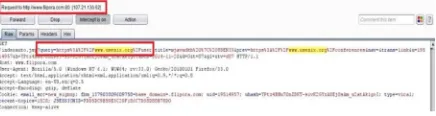
In the first study, after visiting https://www.usenix.org/[15] which is an Advance Computing System Association site (Conference Site), we considered the outgoing traffic by the browser. We came to the conclusion and according to initial information we could already predict that the traffic will be sent to the Flipora server.
In this section, there was just the address of visited website. The address along with the title was sent to Flipora server. Figure 4 shows the traffic.
Fig. 4.1. Traffic sent through the browser
Fig. 4.2. Clearer figure of traffic sent through the browser
This is an image of the main traffic which is sent to the Flipora server when opening https://www.usenix.org/[15] address. As it’s evident in Fig, “Request to http://flipora.com” section shows the destination of the traffic.
figure, in “Request to” section it is clear that the address of the destination is Flipora server with this address “http://feedshare.flipora.com” which is marked with a red line.
If you look carefully at the example, you will observe that the information on the visited website and its address is sent using the GET method but in this instance, given that all content should be transferred to the Flipora server the POST method has been used
.
In Figure 5.1 and 5.2, a part of the traffic was displayed and given that the content is in Persian it needs to be decoded.Fig.5.1. sent all content of traffic to destination server
Fig.5.2. Clearer figure of fig 5.1
4 CONCLUSION
In this article we introduced some security plug-ins and applications which can be plug-installed on different browsers, then we studied Flipora Plug-in and it became clear that in general, the plug-in was detected as malicious software by Firefox. Here we used Firefox browser as an example and showed that this plug-in that based on user interest has known as search engine, sends all content of visited web sites to the target server. For having a database of user’s interest only the title and URL of the visited page will be sent to the Flipora server. But we have shown that in addition to the title and the address of the visited page it sends all the contents of the page, and whatever the user does confidentiality. These results were confirmed by a
study of traffic sent through the browser and are shown in Fig4, 5. The result of this experimental study is that this plug-in is a Spy Software that stores confidential information of users in its databases. This conclusion is based on checking the traffics and the lack of approval of this plug-in by Firefox browser that considers this plug-in to be malware.
5 REFERENCES
[1] http://www.w3schools.com/browsers/browsers _stats.asp.
[2] M Aburrous, A Khalifi, “Phishing Detection Plug-In Toolbar Using Intelligent Fuzzy-Classification Mining Techniques”, The International Journal of Soft Computing and Software Engineering [JSCSE], San Francisco State University, CA, U.S.A., March 2013, 54-61.
[3] http://www.thehindu.com/todays-paper/tp-features/tp-metroplus/article1427822.ece. [4] Barth, A., Felt, A.P., Saxena, P., Boodman,
“Protecting Browsers. In: Proceedings of the Network and Distributed Systems Security Symposium (2010)
[5] Ajin Abraham. Abusing, Exploiting and Pawning with Firefox Add-ons. 2013, URL: http://keralacyberforce.in/abusing-
exploitingand-pwning-with-Firefox-add-ons/. [6] How many Firefox users use add-ons?
Accessed: 2013 - 06 - 01. URL: http: / / blog. Mozilla.org / add-ons / 2009 / 08 / 11 / how - many -Firefox-users-use-add-ons/.
[7] C HEN, H., AND WAGNER, D. Mops: an infrastructure for examining security properties of software. In Proceedings of the 9th ACM CCS (2002).
[8] F ELMETSGER, V., C AVEDON, L., K RUEGEL, C., AND VIGNA, G. Toward automated detection of logic vulnerabilities in web applications. In Proceedings of the 19th USENIX Security Symposium (2010).
[9] J OVANOVIC, N., K RUEGEL, C., AND KIRDA, E. Pixy: A static analysis tool for detecting web application vulnerabilities (short paper). In Proceedings of the IEEE S&P’06 (2006).
[10]L IVSHITS, V. B., AND LAM, M. S. Finding security vulnerabilities in java applications with static analysis. In Proceedings of the 14th USENIX Security Symposium (2005).
[12]Web Browsers (Global Market share). Accessed: 2013 - 05 - 01. url: http://clicky.com/marketshare/global/web-browsers/.
[13]Liu, L., Zhang, X., Yan, G., Chen, and S.: Chrome Extensions: Threat Analysis and Countermeasures. In: Network and Distributed System Security Symposium, NDSS (2012)
[14]BANDHAKAVI, S., KING, S, T.,
MADHUSUDAN, P., AND WINSLETT, and M. Vex: Vetting browser extensions for security vulnerabilities, In Proceeding of the 19th USENIX security Symposium (2010). [15]https://www.usenix.org/