Cloud Native Applications
Selected by Michael Wittig
and Andreas Wittig
Manning Author Picks
Copyright 2016 Manning Publications
www.manning.com. The publisher offers discounts on these books when ordered in quantity.
For more information, please contact
Special Sales Department Manning Publications Co. 20 Baldwin Road
PO Box 761
Shelter Island, NY 11964 Email: [email protected]
©2016 by Manning Publications Co. All rights reserved.
No part of this publication may be reproduced, stored in a retrieval system, or transmitted, in any form or by means electronic, mechanical, photocopying, or otherwise, without prior written permission of the publisher.
Many of the designations used by manufacturers and sellers to distinguish their products are claimed as trademarks. Where those designations appear in the book, and Manning
Publications was aware of a trademark claim, the designations have been printed in initial caps or all caps.
Recognizing the importance of preserving what has been written, it is Manning’s policy to have the books we publish printed on acid-free paper, and we exert our best efforts to that end. Recognizing also our responsibility to conserve the resources of our planet, Manning books are printed on paper that is at least 15 percent recycled and processed without the use of elemental chlorine.
Manning Publications Co. 20 Baldwin Road Technical PO Box 761
Shelter Island, NY 11964
Cover designer: Leslie Haimes
ISBN 9781617294310
iii
contents
introduction ivA
MAZON
W
EB
S
ERVICES
IN
A
CTION
1
What is Amazon Web Services?
Chapter 1 from
Amazon Web Services in Action
2
D
OCKER
IN
P
RACTICE
34
Discovering Docker
Chapter 1 from
Docker in Practice
35
M
ESOS
IN
A
CTION
52
Introducing Mesos
Chapter 1 from
Mesos in Action
53
R
ABBIT
MQ
IN
D
EPTH
68
Foundational RabbitMQ
Chapter 1 from
RabbitMQ in Depth
69
N
ETTY
IN
A
CTION
84
Case studies, part 1
Chapter 14 from
Netty in Action
85
iv
introduction
As engineers, we always aim to improve the feedback loop between us and our custom-ers. This is one reason why we started to use Amazon Web Services four years ago. Being able to automate every step from making changes in our source code to deploy-ing the infrastructure needed to operate our applications was mind blowdeploy-ing. As cloud consultants, we observe that being able to automate and constantly adjust infrastruc-ture is one important reason to use cloud computing for our clients. Another reason why we are focusing on cloud native applications entirely: developing and operating systems that are able to recover from failure automatically was never easier. High Avail-ability is becoming the new normal.So what has changed? Cloud providers are offering the needed infrastructure for a very reasonable price. AWS, for example, is providing multiple data centers per region that you can use in parallel. Technologies like messaging systems and load balancers allow you to decouple different parts of your system and plan for failure.
W
hat is the biggest advantage of using Amazon Web Services (AWS)? For us it’s being able to automate every part of your cloud infrastructure. AWS offers an API and lots of tools to launch, configure, modify, and delete computing, storage and networking infrastructure. Our book, Amazon Web Services in Action, provides a deep introduction into the most important services and architecture principles. Chapter 1 answers the question: What is Amazon Web Services? You’ll learn about the concepts behind AWS and gain a brief overview of what you can do with AWS.2
Michael Wittig and Andreas Wittig.
What is
Amazon Web Services?
Amazon Web Services (AWS) is a platform of web services offering solutions for computing, storing, and networking, at different layers of abstraction. You can use these services to host web sites, run enterprise applications, and mine tremendous amounts of data. The term web service means services can be controlled via a web interface. The web interface can be used by machines or by humans via a graphical user interface. The most prominent services are EC2, which offers virtual servers, and S3, which offers storage capacity. Services on AWS work well together; you can
This chapter covers
Overview of Amazon Web Services Benefits of using Amazon Web Services
Examples of what you can do with Amazon Web Services
3
What is cloud computing?
use them to replicate your existing on-premises setup or design a new setup from scratch. Services are charged for on a pay-per-use pricing model.
As an AWS customer, you can choose among different data centers. AWS data cen-ters are distributed in the United States, Europe, Asia, and South America. For exam-ple, you can start a virtual server in Japan in the same way you can start a virtual server in Ireland. This enables you to serve customers worldwide with a global infrastructure.
The map in figure 1.1 shows the data centers available to all customers.
Which hardware powers AWS?
AWS keeps secret the hardware used in its data centers. The scale at which AWS operates computing, networking, and storage hardware is tremendous. It probably uses commodity components to save money compared to hardware that charges extra for a brand name. Handling of hardware failure is built into real-world processes and software.1
AWS also uses hardware especially developed for its use cases. A good example is the Xeon E5-2666 v3 CPU from Intel. This CPU is optimized to power virtual servers from the c4 family.
In more general terms, AWS is known as a cloud computing platform.1
Germany Ireland
Japan
Brazil Australia
Singapore U.S. East
U.S. West 1
U.S. West 2
Figure 1.1 AWS data center locations
1.1
What is cloud computing?
Almost every IT solution is labeled with the term cloud computing or just cloud nowa-days. A buzzword may help to sell, but it’s hard to work with in a book.
Cloud computing, or the cloud, is a metaphor for supply and consumption of IT resources. The IT resources in the cloud aren’t directly visible to the user; there are layers of abstraction in between. The level of abstraction offered by the cloud may vary
from virtual hardware to complex distributed systems. Resources are available on demand in enormous quantities and paid for per use.
Here's a more official definition from the National Institute of Standards and Technology:
Cloud computing is a model for enabling ubiquitous, convenient, on-demand network access to a shared pool of configurable computing resources (e.g., networks, servers, storage, applications, and services) that can be rapidly provisioned and released with minimal management effort or service provider interaction.
—The NIST Definition of Cloud Computing, National Institute of Standards and Technology
Clouds are often divided into the following types:
Public —A cloud managed by an organization and open to use by the general public
Private —A cloud that virtualizes and shares the IT infrastructure within a single organization
Hybrid —A mixture of a public and a private cloud
AWS is a public cloud. Cloud computing services also have several classifications: Infrastructure as a service (IaaS) —Offers fundamental resources like computing, storage, and networking capabilities, using virtual servers such as Amazon EC2, Google Compute Engine, and Microsoft Azure virtual machines
Platform as a service (PaaS) —Provides platforms to deploy custom applications to the cloud, such as AWS Elastic Beanstalk, Google App Engine, and Heroku Software as a service (SaaS) —Combines infrastructure and software running in the cloud, including office applications like Amazon WorkSpaces, Google Apps for Work, and Microsoft Office 365
The AWS product portfolio contains IaaS, PaaS, and SaaS. Let’s take a more concrete look at what you can do with AWS.
1.2
What can you do with AWS?
You can run any application on AWS by using one or a combination of services. The examples in this section will give you an idea of what you can do with AWS.
1.2.1 Hosting a web shop
Database Web server
Maintenance free On-premises server
Database Web
server
Managed by you with updates, monitoring, and so on
Internet User
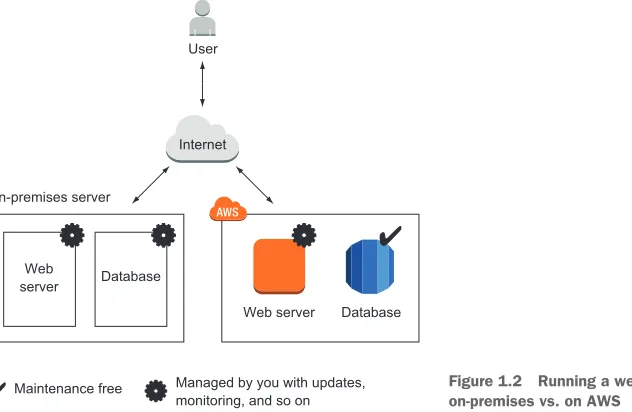
Figure 1.2 Running a web shop on-premises vs. on AWS
5
What can you do with AWS?
John realized that other options are available to improve his setup on AWS with addi-tional services:
The web shop consists of dynamic content (such as products and their prices) and static content (such as the company logo). By splitting dynamic and static content, John reduced the load for his web servers and improved performance by delivering the static content over a content delivery network (CDN).
John uses maintenance-free services including a database, an object store, and a DNS system on AWS. This frees him from managing these parts of the system, decreases operational costs, and improves quality.
The application running the web shop can be installed on virtual servers. John split the capacity of the old on-premises server into multiple smaller virtual serv-ers at no extra cost. If one of these virtual servserv-ers fails, the load balancer will send customer requests to the other virtual servers. This setup improves the web shop’s reliability.
Figure 1.3 shows how John enhanced the web shop setup with AWS.
John started a proof-of-concept project and found that his web application can be transferred to AWS and that services are available to help improve his setup.
1.2.2 Running a Java EE application in your private network
Database
Internet User
Load balancer DNS CDN
Object store Dynamic
Web server
Static
Maintenance free Managed by you with updates, monitoring, and so on
Improve
reliability Improveperformance
Decrease maintenance costs
Figure 1.3 Running a web shop on AWS with CDN for better performance, a load balancer for high availability, and a managed database to decrease maintenance costs
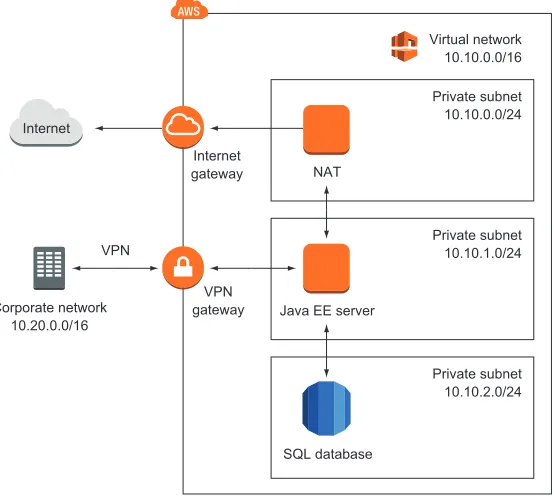
To do so, she defines a virtual network in the cloud and connects it to the corpo-rate network through a virtual private network (VPN) connection. The company can control access and protect mission-critical data by using subnets and control traffic between them with access-control lists. Maureen controls traffic to the internet using Network Address Translation (NAT) and firewalls. She installs application servers on virtual machines (VMs) to run the Java EE application. Mau-reen is also thinking about storing data in a SQL database service (such as Oracle Database Enterprise Edition or Microsoft SQL Server EE). Figure 1.4 illustrates Mau-reen’s architecture.
Maureen has managed to connect the on-premises data center with a private net-work on AWS. Her team has already started to move the first enterprise application to the cloud.
1.2.3 Meeting legal and business data archival requirements
SQL database
Private subnet 10.10.2.0/24 Internet
Private subnet 10.10.1.0/24 Private subnet 10.10.0.0/24 Virtual network 10.10.0.0/16
Java EE server NAT Internet
gateway
VPN gateway Corporate network
10.20.0.0/16 VPN
Figure 1.4 Running a Java EE application with enterprise networking on AWS
7
What can you do with AWS?
offer the possibility of sharing documents within the office. Storing all the data is a challenge for him:
He needs to back up all files to prevent the loss of critical data. To do so, Greg copies the data from the file server to another network-attached storage, so he had to buy the hardware for the file server twice. The file server and the backup server are located close together, so he is failing to meet disaster-recovery requirements to recover from a fire or a break-in.
To meet legal and business data archival requirements, Greg needs to store data for a long time. Storing data for 10 years or longer is tricky. Greg uses an expen-sive archive solution to do so.
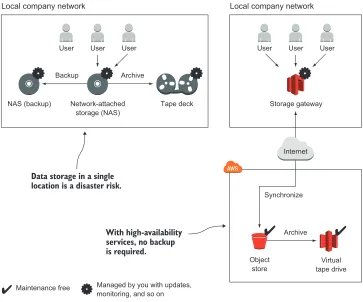
To save money and increase data security, Greg decided to use AWS. He transferred data to a highly available object store. A storage gateway makes it unnecessary to buy and operate network-attached storage and a backup on-premises. A virtual tape deck takes over the task of archiving data for the required length of time. Figure 1.5 shows how Greg implemented this use case on AWS and compares it to the on-premises solution.
User User User
Network-attached
storage (NAS) Tape deck
Backup Archive
Archive Synchronize
Local company network
Virtual tape drive Object
store NAS (backup)
Data storage in a single location is a disaster risk.
With high-availability services, no backup is required.
User User User
Storage gateway
Local company network
Internet
Maintenance free Managed by you with updates, monitoring, and so on
Figure 1.5 Backing up and archiving data on-premises and on AWS
1.2.4 Implementing a fault-tolerant system architecture
Alexa is a software engineer working for a fast-growing startup. She knows that Mur-phy’s Law applies to IT infrastructure: anything that can go wrong, will go wrong. Alexa is working hard to build a fault-tolerant system to prevent outages from ruining the business. She knows that there are two type of services on AWS: fault-tolerant services and services that can be used in a fault-tolerant way. Alexa builds a system like the one shown in figure 1.6 with a fault-tolerant architecture. The database service is offered with replication and failover handling. Alexa uses virtual servers acting as web servers. These virtual servers aren’t fault tolerant by default. But Alexa uses a load balancer and can launch multiple servers in different data centers to achieve fault tolerance.
So far, Alexa has protected the startup from major outages. Nevertheless, she and her team are always planning for failure.
Data center A
Web server
Database (master)
Load balancer Internet
User Data center B
Web server
Database (standby)
Fault tolerant by default Highly available Fault tolerant usage possible
Figure 1.6 Building a fault-tolerant system on AWS
9
How you can benefit from using AWS
1.3
How you can benefit from using AWS
What’s the most important advantage of using AWS? Cost savings, you might say. But saving money isn’t the only advantage. Let’s look at other ways you can benefit from using AWS.
1.3.1 Innovative and fast-growing platform
In 2014, AWS announced more than 500 new services and features during its yearly conference, re:Invent at Las Vegas. On top of that, new features and improvements are released every week. You can transform these new services and features into inno-vative solutions for your customers and thus achieve a competitive advantage.
The number of attendees to the re:Invent conference grew from 9,000 in 2013 to 13,500 in 2014.1AWS counts more than 1 million businesses and government agen-cies among its customers, and in its Q1 2014 results discussion, the company said it will continue to hire more talent to grow even further.2 You can expect even more new features and services in the coming years.
1 Greg Bensinger, “Amazon Conference Showcases Another Side of the Retailer’s Business,” Digits, Nov. 12, 2014, http://mng.bz/hTBo.
1.3.2 Services solve common problems
As you’ve learned, AWS is a platform of services. Common problems such as load bal-ancing, queuing, sending email, and storing files are solved for you by services. You don’t need to reinvent the wheel. It’s your job to pick the right services to build complex sys-tems. Then you can let AWS manage those services while you focus on your customers.
1.3.3 Enabling automation
Because AWS has an API, you can automate everything: you can write code to create networks, start virtual server clusters, or deploy a relational database. Automation increases reliability and improves efficiency.
The more dependencies your system has, the more complex it gets. A human can quickly lose perspective, whereas a computer can cope with graphs of any size. You should concentrate on tasks a human is good at—describing a system—while the com-puter figures out how to resolve all those dependencies to create the system. Setting up an environment in the cloud based on your blueprints can be automated with the help of infrastructure as code, covered in chapter 4.
1.3.4 Flexible capacity (scalability)
Flexible capacity frees you from planning. You can scale from one server to thousands of servers. Your storage can grow from gigabytes to petabytes. You no longer need to predict your future capacity needs for the coming months and years.
If you run a web shop, you have seasonal traffic patterns, as shown in figure 1.7. Think about day versus night, and weekday versus weekend or holiday. Wouldn’t it be nice if you could add capacity when traffic grows and remove capacity when traffic shrinks? That’s exactly what flexible capacity is about. You can start new servers within minutes and throw them away a few hours after that.
12am 6pm 6am
System load System load
Thursday Sunday Monday
System load
December January
Figure 1.7 Seasonal traffic patterns for a web shop
11
How you can benefit from using AWS
Flexible capacity also means you can shut down unused systems. In one of our last proj-ects, the test environment only ran from 7:00 a.m. to 8:00 p.m. on weekdays, allowing us to save 60%.
1.3.5 Built for failure (reliability)
Most AWS services are fault-tolerant or highly available. If you use those services, you get reliability for free. AWS supports you as you build systems in a reliable way. It pro-vides everything you need to create your own fault-tolerant systems.
1.3.6 Reducing time to market
In AWS, you request a new virtual server, and a few minutes later that virtual server is booted and ready to use. The same is true with any other AWS service available. You can use them all on demand. This allows you to adapt your infrastructure to new requirements very quickly.
Your development process will be faster because of the shorter feedback loops. You can eliminate constraints such as the number of test environments available; if you need one more test environment, you can create it for a few hours.
1.3.7 Benefiting from economies of scale
At the time of writing, the charges for using AWS have been reduced 42 times since 2008: In December 2014, charges for outbound data transfer were lowered by up to 43%. In November 2014, charges for using the search service were lowered by 50%. In March 2014, charges for using a virtual server were lowered by up to 40%. As of December 2014, AWS operated 1.4 million servers. All processes related to oper-ations must be optimized to operate at that scale. The bigger AWS gets, the lower the prices will be.
1.3.8 Worldwide
You can deploy your applications as close to your customers as possible. AWS has data centers in the following locations:
United States (northern Virginia, northern California, Oregon) Europe (Germany, Ireland)
Asia (Japan, Singapore) Australia
South America (Brazil)
With AWS, you can run your business all over the world.
1.3.9 Professional partner
AWS is compliant with the following:
FedRAMP & DoD CSM—Ensures secure cloud computing for the U.S. Federal Government and the U.S. Department of Defense
PCIDSS Level 1 —A data security standard (DSS) for the payment card industry (PCI ) to protect cardholders data
ISO 9001 —A standardized quality management approach used worldwide and certified by an independent and accredited certification body
If you’re still not convinced that AWS is a professional partner, you should know that Airbnb, Amazon, Intuit, NASA, Nasdaq, Netflix, SoundCloud, and many more are run-ning serious workloads on AWS.
The cost benefit is elaborated in more detail in the next section.
1.4
How much does it cost?
A bill from AWS is similar to an electric bill. Services are billed based on usage. You pay for the hours a virtual server was running, the used storage from the object store (in gigabytes), or the number of running load balancers. Services are invoiced on a monthly basis. The pricing for each service is publicly available; if you want to calcu-late the monthly cost of a planned setup, you can use the AWS Simple Monthly Calcu-lator (http://aws.amazon.com/calculator).
1.4.1 Free Tier
You can use some AWS services for free during the first 12 months after you sign up. The idea behind the Free Tier is to enable you to experiment with AWS and get some experience. Here is what’s included in the Free Tier:
750 hours (roughly a month) of a small virtual server running Linux or Win-dows. This means you can run one virtual server the whole month or you can run 750 virtual servers for one hour.
750 hours (or roughly a month) of a load balancer. Object store with 5 GB of storage.
Small database with 20 GB of storage, including backup.
If you exceed the limits of the Free Tier, you start paying for the resources you con-sume without further notice. You’ll receive a bill at the end of the month. We’ll show you how to monitor your costs before you begin using AWS. If your Free Tier ends after one year, you pay for all resources you use.
You get some additional benefits, as detailed at http://aws.amazon.com/free. This book will use the Free Tier as much as possible and will clearly state when additional resources are required that aren’t covered by the Free Tier.
1.4.2 Billing example
As mentioned earlier, you can be billed in several ways:
13
How much does it cost?
Based on traffic —Traffic can be measured in gigabytes or in number of requests. Based on storage usage —Usage can be either provisioned capacity (for example, 50 GB volume no matter how much you use) or real usage (such as 2.3 GB used).
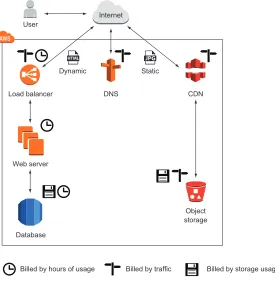
Remember the web shop example from section 1.2? Figure 1.8 shows the web shop and adds information about how each part is billed.
Database
Internet User
Load balancer DNS CDN
Object storage Web server
Billed by storage usage Billed by hours of usage Billed by traffic
Dynamic Static
Figure 1.8 Web shop billing example
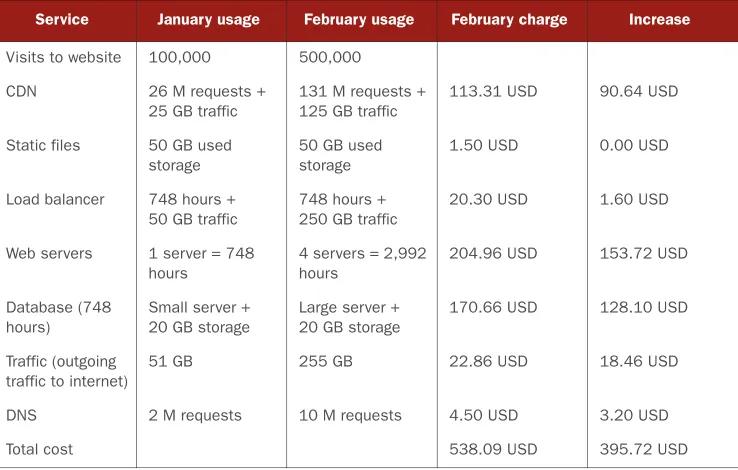
Let’s assume your web shop started successfully in January, and you decided to run a marketing campaign to increase sales for the next month. Lucky you: you were able to increase the number of visitors of your web shop fivefold in February. As you already know, you have to pay for AWS based on usage. Table 1.1 shows your bills for January and February. The number of visitors increased from 100,000 to 500,000, and your monthly bill increased from 142.37 USD to 538.09 USD, which is a 3.7-fold increase. Because your web shop had to handle more traffic, you had to pay more for services, such as the CDN, the web servers, and the database. Other services, like the storage of static files, didn’t experience more usage, so the price stayed the same.
1.4.3 Pay-per-use opportunities
The AWS pay-per-use pricing model creates new opportunities. You no longer need to make upfront investments in infrastructure. You can start servers on demand and only pay per hour of usage; and you can stop using those servers whenever you like and no longer have to pay for them. You don’t need to make an upfront commitment regard-ing how much storage you’ll use.
A big server costs exactly as much as two smaller ones with the same capacity. Thus you can divide your systems into smaller parts, because the cost is the same. This makes fault tolerance affordable not only for big companies but also for smaller budgets.
1.5
Comparing alternatives
AWS isn’t the only cloud computing provider. Microsoft and Google have cloud offer-ings as well.
OpenStack is different because it’s open source and developed by more than 200 companies including IBM, HP, and Rackspace. Each of these companies uses Open-Stack to operate its own cloud offerings, sometimes with closed source add-ons. You could run your own cloud based on OpenStack, but you would lose most of the bene-fits outlined in section 1.3.
Comparing cloud providers isn’t easy, because open standards are mostly missing. Functionality like virtual networks and message queuing are realized differently. If you know what features you need, you can compare the details and make your decision. Table 1.1 How an AWS bill changes if the number of web shop visitors increases
Service January usage February usage February charge Increase
Visits to website 100,000 500,000 CDN 26 M requests +
25 GB traffic
131 M requests + 125 GB traffic
113.31 USD 90.64 USD
Static files 50 GB used storage
50 GB used storage
1.50 USD 0.00 USD
Load balancer 748 hours + 50 GB traffic
748 hours + 250 GB traffic
20.30 USD 1.60 USD
Web servers 1 server = 748 hours
4 servers = 2,992 hours
204.96 USD 153.72 USD
Database (748 hours)
Small server + 20 GB storage
Large server + 20 GB storage
170.66 USD 128.10 USD
Traffic (outgoing traffic to internet)
51 GB 255 GB 22.86 USD 18.46 USD
15
Comparing alternatives
Otherwise, AWS is your best bet because the chances are highest that you’ll find a solu-tion for your problem.
Following are some common features of cloud providers: Virtual servers (Linux and Windows)
Object store Load balancer Message queuing Graphical user interface Command-line interface
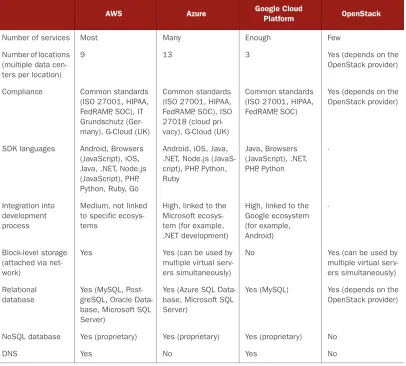
The more interesting question is, how do cloud providers differ? Table 1.2 compares AWS, Azure, Google Cloud Platform, and OpenStack.
Table 1.2 Differences between AWS, Microsoft Azure, Google Cloud Platform, and OpenStack
AWS Azure Google Cloud Platform OpenStack
Number of services Most Many Enough Few Number of locations
(multiple data cen-ters per location)
9 13 3 Yes (depends on the OpenStack provider)
Compliance Common standards (ISO 27001, HIPAA, FedRAMP, SOC), IT Grundschutz (Ger-many), G-Cloud (UK)
Common standards (ISO 27001, HIPAA, FedRAMP, SOC), ISO 27018 (cloud pri-vacy), G-Cloud (UK)
Common standards (ISO 27001, HIPAA, FedRAMP, SOC)
Yes (depends on the OpenStack provider)
SDK languages Android, Browsers (JavaScript), iOS, Java, .NET, Node.js (JavaScript), PHP, Python, Ruby, Go
Android, iOS, Java, .NET, Node.js (JavaS-cript), PHP, Python, Ruby Java, Browsers (JavaScript), .NET, PHP, Python -Integration into development process
Medium, not linked to specific ecosys-tems
High, linked to the Microsoft ecosys-tem (for example, .NET development)
High, linked to the Google ecosystem (for example, Android)
-Block-level storage (attached via net-work)
Yes Yes (can be used by multiple virtual serv-ers simultaneously)
No Yes (can be used by multiple virtual serv-ers simultaneously) Relational
database
Yes (MySQL, Post-greSQL, Oracle Data-base, Microsoft SQL Server)
Yes (Azure SQL Data-base, Microsoft SQL Server)
Yes (MySQL) Yes (depends on the OpenStack provider)
NoSQL database Yes (proprietary) Yes (proprietary) Yes (proprietary) No
In our opinion, AWS is the most mature cloud platform available at the moment.
1.6
Exploring AWS services
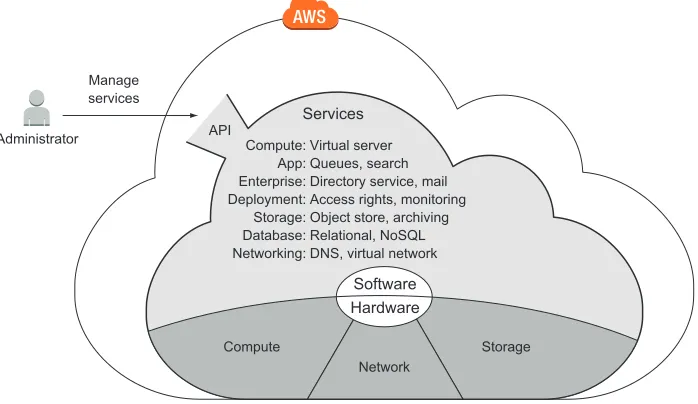
Hardware for computing, storing, and networking is the foundation of the AWS cloud. AWS runs software services on top of the hardware to provide the cloud, as shown in figure 1.9. A web interface, the API, acts as an interface between AWS services and your applications.
Administrator Manage services
Compute: App: Enterprise: Deployment: Storage: Database: Networking:
Virtual server Queues, search Directory service, mail Access rights, monitoring Object store, archiving Relational, NoSQL DNS, virtual network
Services
Compute
Software Hardware
Storage Network
API
Figure 1.9 The AWS cloud is composed of hardware and software services accessible via an API. You can manage services by sending requests to the API manually via a GUI or pro-grammatically via a SDK. To do so, you can use a tool like the Management Console, a web-based user interface, or a command-line tool. Virtual servers have a peculiarity: you can connect to virtual servers through SSH, for example, and gain administrator
Virtual network Yes Yes No Yes Pub/sub
messag-ing
Yes (proprietary, JMS library available)
Yes (proprietary) Yes (proprietary) No
Machine-learning tools
Yes Yes Yes No
Deployment tools Yes Yes Yes No On-premises
data-center integration
Yes Yes Yes No
Table 1.2 Differences between AWS, Microsoft Azure, Google Cloud Platform, and OpenStack (continued)
17
Exploring AWS services
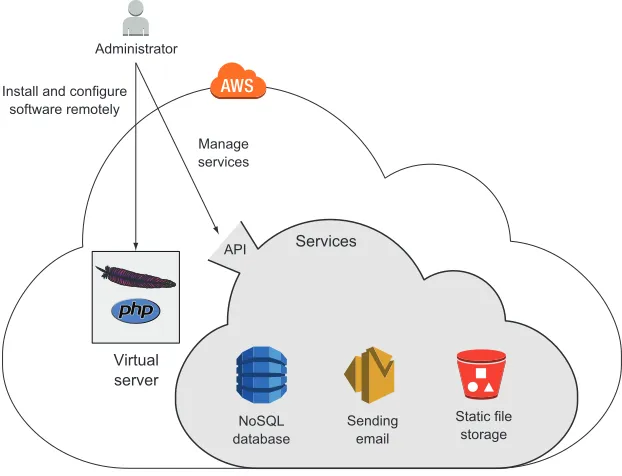
access. This means you can install any software you like on a virtual server. Other ser-vices, like the NoSQL database service, offer their features through an API and hide everything that’s going on behind the scenes. Figure 1.10 shows an administrator installing a custom PHP web application on a virtual server and managing dependent services such as a NoSQL database used by the PHP web application.
Administrator
Manage services Install and configure
software remotely
API Services
Static file storage NoSQL
database Sendingemail
Virtual server
Figure 1.10 Managing a custom application running on a virtual server and dependent services
Users send HTTP requests to a virtual server. A web server is installed on this virtual server along with a custom PHP web application. The web application needs to talk to AWS services in order to answer HTTP requests from users. For example, the web application needs to query data from a NoSQL database, store static files, and send email. Communication between the web application and AWS services is handled by the API, as figure 1.11 shows.
The number of different services available can be scary at the outset. The following categorization of AWS services will help you to find your way through the jungle:
Compute services offer computing power and memory. You can start virtual serv-ers and use them to run your applications.
Users
HTTP request
Virtual server
API Services
Static file storage NoSQL
database Sendingemail
Figure 1.11 Handling an HTTP request with a custom web application using additional AWS services
Enterprise services offer independent solutions such as mail servers and directory services.
Deployment and administration services work on top of the services mentioned so far. They help you grant and revoke access to cloud resources, monitor your vir-tual servers, and deploy applications.
Storage is needed to collect, persist, and archive data. AWS offers different stor-age options: an object store or a network-attached storstor-age solution for use with virtual servers.
Database storage has some advantages over simple storage solutions when you need to manage structured data. AWS offers solutions for relational and NoSQL databases.
Networking services are an elementary part of AWS. You can define private net-works and use a well-integrated DNS.
Be aware that we cover only the most important categories and services here. Other services are available, and you can also run your own applications on AWS.
19
Interacting with AWS
1.7
Interacting with AWS
When you interact with AWS to configure or use services, you make calls to the API. The API is the entry point to AWS, as figure 1.12 demonstrates.
API Manual
Automation
Services
Web-based management
Console
Blueprints SDKs for Java, Python, JavaScript,...
Command-line interface
Figure 1.12 Tools to interact with the AWS API
Next, we’ll give you an overview of the tools available to make calls to the AWSAPI. You can compare the ability of these tools to automate your daily tasks.
1.7.1 Management Console
You can use the web-based Management Console to interact with AWS. You can manu-ally control AWS with this convenient GUI, which runs in every modern web browser (Chrome, Firefox, Safari 5, IE 9); see figure 1.13.
If you’re experimenting with AWS, the Management Console is the best place to start. It helps you to gain an overview of the different services and achieve success quickly. The Management Console is also a good way to set up a cloud infrastructure for development and testing.
1.7.2 Command-line interface
Figure 1.13 Management Console
21
Interacting with AWS
The CLI is typically used to automate tasks on AWS. If you want to automate parts of your infrastructure with the help of a continuous integration server like Jenkins, the CLI is the right tool for the job. The CLI offers a convenient way to access the API and combine multiple calls into a script.
You can even begin to automate your infrastructure with scripts by chaining multi-ple CLI calls together. The CLI is available for Windows, Mac, and Linux, and there’s also a PowerShell version available.
1.7.3 SDKs
Sometimes you need to call AWS from within your application. With SDKs, you can use your favorite programming language to integrate AWS into your application logic. AWS provides SDKs for the following:
Android Node.js (JavaScript) Browsers (JavaScript) PHP
iOS Python
Java Ruby
.NET Go
SDKs are typically used to integrate AWS services into applications. If you’re doing soft-ware development and want to integrate an AWS service like a NoSQL database or a push-notification service, an SDK is the right choice for the job. Some services, such as queues and topics, must be used with an SDK in your application.
1.7.4 Blueprints
A blueprint is a description of your system containing all services and dependencies. The blueprint doesn’t say anything about the necessary steps or the order to achieve the described system. Figure 1.15 shows how a blueprint is transferred into a running system.
Database Load balancer
Tool
CDN
Static files
Web servers DNS
{
infrastructure: { loadbalancer: { server: { ... } },
cdn: { ... }, database: { ... }, dns: { ... }, static: { ... } }
}
Consider using blueprints if you have to control many or complex environments. Blueprints will help you to automate the configuration of your infrastructure in the cloud. You can use blueprints to set up virtual networks and launch different servers into that network, for example.
A blueprint removes much of the burden from you because you no longer need to worry about dependencies during system creation—the blueprint automates the entire process. You’ll learn more about automating your infrastructure in chapter 4.
It’s time to get started creating your AWS account and exploring AWS practice after all that theory.
1.8
Creating an AWS account
Before you can start using AWS, you need to create an account. An AWS account is a basket for all the resources you own. You can attach multiple users to an account if multiple humans need access to the account; by default, your account will have one root user. To create an account, you need the following:
A telephone number to validate your identity A credit card to pay your bills
1.8.1 Signing up
The sign-up process consists of five steps:
1 Provide your login credentials.
2 Provide your contact information.
3 Provide your payment details.
4 Verify your identity.
5 Choose your support plan.
Point your favorite modern web browser to https://aws.amazon.com, and click the Create a Free Account / Create an AWS Account button.
1. PROVIDINGYOURLOGINCREDENTIALS
The Sign Up page, shown in figure 1.16, gives you two choices. You can either create an account using your Amazon.com account or create an account from scratch. If you create the account from scratch, follow along. Otherwise, skip to step 5.
Fill in your email address, and select I Am a New User. Go on to the next step to cre-ate your login credentials. We advise you to choose a strong password to prevent misuse
Using an old account?
You can use your existing AWS account while working on the examples in this book. In this case, your usage may not be covered by the Free Tier, and you may have to pay for your usage.
23
Creating an AWS account
of your account. We suggest a password with 16 characters, numbers, and symbols. If someone gets access to your account, they can destroy your systems or steal your data.
Figure 1.16 Creating an AWS account: Sign Up page
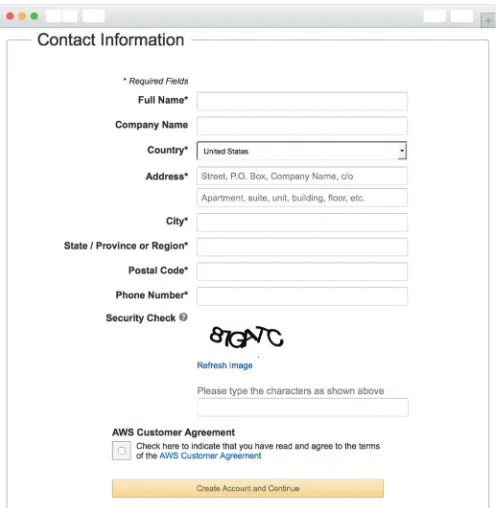
2. PROVIDINGYOURCONTACTINFORMATION
The next step, as shown in figure 1.17, is to provide your contact information. Fill in all the required fields, and continue.
3. PROVIDEYOURPAYMENTDETAILS
Now the screen shown in figure 1.18 asks for your payment information. AWS supports MasterCard and Visa. You can set your preferred payment currency later, if you don’t want to pay your bills in USD; supported currencies are EUR, GBP, CHF, AUD, and some others.
Figure 1.18 Creating an AWS account: providing your payment details
4. VERIFYINGYOURIDENTITY
Figure 1.19 Creating an AWS account: verifying your identity (1 of 2)
25
Creating an AWS account
After you complete the first part, you’ll receive a call from AWS. A robot voice will ask you for your PIN, which will be like the one shown in figure 1.20. Your identity will be verified, and you can continue with the last step.
5. CHOOSINGYOURSUPPORTPLAN
The last step is to choose a support plan; see figure 1.21. In this case, select the Basic plan, which is free. If you later create an AWS account for your business, we recom-mend the Business support plan. You can even switch support plans later.
High five! You’re done. Now you can log in to your account with the AWS Manage-ment Console.
Figure 1.21 Creating an AWS account: choosing your support plan
1.8.2 Signing In
27
Creating an AWS account
uses the AWSAPI to make most of the functionality available to you. Figure 1.22 shows the Sign In page.
Figure 1.22 Sign in to the Management Console.
Enter your login credentials and click Sign In Using Our Secure Server to see the Management Console, shown in figure 1.23.
The most important part is the navigation bar at the top; see figure 1.24. It consists of six sections:
AWS—Gives you a fast overview of all resources in your account. Services —Provides access to all AWS services.
Custom section (Edit) —Click Edit and drag-and-drop important services here to personalize the navigation bar.
Your name —Lets you access billing information and your account, and also lets you sign out.
Your region —Lets you choose your region. You’ll learn about regions in section 3.5. You don’t need to change anything here now.
Support —Gives you access to forums, documentation, and a ticket system.
Next, you’ll create a key pair so you can connect to your virtual servers.
1.8.3 Creating a key pair
To access a virtual server in AWS, you need a key pair consisting of a private key and a public key. The public key will be uploaded to AWS and inserted into the virtual server. The private key is yours; it’s like your password, but much more secure. Protect your private key as if it’s a password. It’s your secret, so don’t lose it—you can’t retrieve it.
To access a Linux server, you use the SSH protocol; you’ll authenticate with the help of your key pair instead of a password during login. You access a Windows server via Remote Desktop Protocol (RDP); you’ll need your key pair to decrypt the adminis-trator password before you can log in.
The following steps will guide you to the dashboard of the EC2 service, which offers virtual servers, and where you can obtain a key pair:
1 Open the AWS Management Console at https://console.aws.amazon.com. 2 Click Services in the navigation bar, find the EC2 service, and click it. 3 Your browser shows the EC2 Management Console.
The EC2 Management Console, shown in figure 1.25, is split into three columns. The first column is the EC2 navigation bar; because EC2 is one of the oldest services, it has many
Resource overview
Jump to a service
Quick access to services (customizable)
Account and billing
Region
selector Helpsection
29
Creating an AWS account
features that you can access via the navigation bar. The second column gives you a brief overview of all your EC2 resources. The third column provides additional information. Figure 1.25 EC2 Management Console
Follow these steps to create a new key pair:
1 Click Key Pairs in the navigation bar under Network & Security.
2 Click the Create Key Pair button on the page shown in figure 1.26.
3 Name the Key Pair mykey. If you choose another name, you must replace the
name in all the following examples!
During key-pair creation, you downloaded a file called mykey.pem. You must now pre-pare that key for future use. Depending on your operating system, you may need to do things differently, so please read the section that fits your OS.
Using your own key pair
It’s also possible to upload the public key part from an existing key pair to AWS. Doing so has two advantages:
You can reuse an existing key pair.
You can be sure that only you know the private key part of the key pair. If you use the Create Key Pair button, AWS knows (at least briefly) your private key.
LINUXAND MAC OS X
The only thing you need to do is change the access rights of mykey.pem so that only you can read the file. To do so, run chmod 400 mykey.pem in the terminal. You’ll learn about how to use your key when you need to log in to a virtual server for the first time in this book.
WINDOWS
Windows doesn’t ship a SSH client, so you need to download the PuTTY installer for Windows from http://mng.bz/A1bY and install PuTTY. PuTTY comes with a tool called PuTTYgen that can convert the mykey.pem file into a mykey.ppk file, which you’ll need:
1 Run the application PuTTYgen. The screen shown in figure 1.27 opens.
2 Select SSH-2 RSA under Type of Key to Generate.
3 Click Load.
4 Because PuTTYgen displays only *.pkk files, you need to switch the file exten-sion of the File Name field to All Files.
5 Select the mykey.pem file, and click Open.
6 Confirm the dialog box.
7 Change Key Comment to mykey.
8 Click Save Private Key. Ignore the warning about saving the key without a
passphrase.
31
Summary
1.8.4 Creating a billing alarm
Before you use your AWS account in the next chapter, we advise you to create a billing alarm. If you exceed the Free Tier, an email is sent to you. The book warns you when-ever an example isn’t covered by the Free Tier. Please make sure that you carefully fol-low the cleanup steps after each example. To make sure you haven’t missed something during cleanup, please create a billing alarm as advised by AWS: http://mng.bz/M7Sj.
1.9
Summary
Amazon Web Services (AWS) is a platform of web services offering solutions for computing, storing, and networking that work well together.
Cost savings aren’t the only benefit of using AWS. You’ll also profit from an innovative and fast-growing platform with flexible capacity, fault-tolerant ser-vices, and a worldwide infrastructure.
Any use case can be implemented on AWS, whether it’s a widely used web appli-cation or a specialized enterprise appliappli-cation with an advanced networking setup.
You can interact with AWS in many different ways. You can control the different ser-vices by using the web-based GUI; use code to manage AWS programmatically from the command line or SDKs; or use blueprints to set up, modify, or delete your infra-structure on AWS.
Pay-per-use is the pricing model for AWS services. Computing power, storage, and networking services are billed similarly to electricity.
33
Summary
Physical data centers require lots of equipment and take time and resources to manage. If you need a data center, but don’t want to build your own, Amazon Web Services may be your solution. Whether you’re analyz-ing real-time data, buildanalyz-ing software as a service, or running an e-commerce site, AWS offers you a reliable cloud-based platform with services that scale.
Amazon Web Services in Action introduces you to computing, storing, and networking in the AWS cloud. The book will teach you about the most important ser-vices on AWS. You will also learn about best practices regarding security, high availability and scalability. You'll start with a broad overview of cloud computing and AWS and learn how to spin-up servers manually and from the command line. You'll learn how to automate your infrastructure by programmatically calling the AWS API to control every part of AWS. You will be introduced to the concept of Infrastructure as Code with the help of AWS CloudFormation. You will learn about different approaches to deploy applications on AWS. You'll also learn how to secure your infrastructure by isolating networks, control-ling traffic and managing access to AWS resources. Next, you'll learn options and tech-niques for storing your data. You will experience how to integrate AWS services into your own applications by the use of SDKs. Finally, this book teaches you how to design for high availability, fault tolerance, and scalability.
What's inside
Overview of AWS cloud concepts and best practices Manage servers on EC2 for cost-effectiveness
Infrastructure automation with Infrastructure as Code (AWS CloudFormation) Deploy applications on AWS
Store data on AWS: SQL, NoSQL, object storage and block storage Integrate Amazon's pre-built services
Architect highly available and fault tolerant systems
A
docker was a labourer who was responsible for load goods of all sizes and shapes to a ship. Docker is also the name of a tool, helping you to deliver your applications to all kinds of machines. By using standardization, Docker allows you to automate packaging and deploying your applications. A nice side-effect is that this automation works on your local development machine as well as on cloud infrastructure. Docker in Practice helps you to get started with Docker. The first chapter, “Discovering Docker,” explains the key concepts behind Docker.35
Chapter 1 from
Docker in Practice
by Ian Miell
and Aidan Hobson Sayers.
Discovering Docker
Docker is a platform that allows you to “build, ship, and run any app, anywhere.” It has come a long way in an incredibly short time and is now considered a standard way of solving one of the costliest aspects of software: deployment.
Before Docker came along, the development pipeline typically consisted of combinations of various technologies for managing the movement of software, such as virtual machines, configuration management tools, different package man-agement systems, and complex webs of library dependencies. All these tools
This chapter covers
What Docker isThe uses of Docker and how it can save you time and money
The differences between containers and images Docker’s layering feature
needed to be managed and maintained by specialist engineers, and most had their own unique ways of being configured.
Docker has changed all of this, allowing different engineers involved in this pro-cess to effectively speak one language, making working together a breeze. Everything goes through a common pipeline to a single output that can be used on any target— there’s no need to continue maintaining a bewildering array of tool configurations, as shown in figure 1.1.
Configuration
Life before Docker
Code Configuration
Life with Docker
Code
Vagrant Jenkins Chef Docker build
Development Test Live Development Release
to live Testing
Inputs to the system requiring manual maintenance—fewer inputs here mean less of a maintenance burden.
Stages of software development requiring an environment to run in
Tools that use the inputs to create environments for software development
Figure 1.1 How Docker has eased the tool maintenance burden
At the same time, there’s no need to throw away your existing software stack if it works for you—you can package it up in a Docker container as-is for others to con-sume. As a bonus, you can see how these containers were built, so if you need to dig into the details, you can.
This book is aimed at intermediate developers with some knowledge of Docker. If you’re OK with the basics, feel free to skip to the later chapters. The goal of this book is to expose the real-world challenges that Docker brings and show how they can be overcome. But first we’re going to provide a quick refresher on Docker itself. If you want a more thorough treatment of Docker’s basics, take a look at Docker in Action by Jeff Nickoloff (Manning Publications, 2016).
37
The what and why of Docker
1.1
The what and why of Docker
Before we get our hands dirty, we’re going to discuss Docker a little so that you under-stand its context, where the name “Docker” came from, and why we’re using it at all!
1.1.1 What is Docker?
To understand what Docker is, it’s easier to start with a metaphor than a technical expla-nation, and the Docker metaphor is a powerful one. A docker was a labourer who moved commercial goods into and out of ships when they docked at ports. There were boxes and items of differing sizes and shapes, and experienced dockers were prized for their ability to fit goods into ships by hand in cost-effective ways (see figure 1.2). Hiring people to move stuff around wasn’t cheap, but there was no alternative.
Ship on which the items were loaded
Teams of dockers required to load differently shaped items onto ship
Ship can be designed to carry, load, and unload predictably shaped items more efficiently.
Single container with different items in it. It doesn't matter to the carrier what's inside the container. The carrier can be loaded up elsewhere, reducing the bottleneck of loading at port. Only one docker needed to
operate machines designed to move containers
This should sound familiar to anyone working in software. Much time and intellectual energy is spent getting metaphorically odd-shaped software into different sized meta-phorical ships full of other odd-shaped software, so they can be sold to users or busi-nesses elsewhere.
Figure 1.3 shows how time and money can be saved with the Docker concept.
Three times the effort to manage deployment
A single effort to manage deployment
Dev laptop Test server Live server
Life before Docker
Install, configure, and maintain complex
application
Install, configure, and maintain complex
application
Install, configure, and maintain complex
application
Docker image
Dev laptop
Test server
Live server
Life with Docker
Install, configure, and maintain complex
application
docker run
docker run
docker run
Figure 1.3 Software delivery before and after Docker
Before Docker, deploying software to different environments required significant effort. Even if you weren’t hand-running scripts to provision software on different machines (and plenty of people still do exactly that), you’d still have to wrestle with con-figuration management tools that manage state on what are increasingly fast-moving environments starved of resources. Even when these efforts were encapsulated in VMs, a lot of time was spent managing the deployment of these VMs, waiting for them to boot, and managing the overhead of resource use they created.
With Docker, the configuration effort is separated from the resource management, and the deployment effort is trivial: run docker run, and the environment’s image is pulled down and ready to run, consuming fewer resources and contained so that it doesn’t interfere with other environments.
39
The what and why of Docker
1.1.2 What is Docker good for?
Some crucial practical questions arise: why would you use Docker, and for what? The short answer to the “why” is that for a modicum of effort, Docker can save your business a lot of money quickly. Some of these ways (and by no means all) are discussed in the following subsections. We’ve seen all of these benefits first-hand in real working contexts.
REPLACESVIRTUALMACHINES (VMS)
Docker can be used to replace VMs in many situations. If you only care about the application, not the operating system, Docker can replace the VM, and you can leave worrying about the OS to someone else. Not only is Docker quicker than a VM to spin up, it’s more lightweight to move around, and due to its layered filesystem, it’s much easier and quicker to share changes with others. It’s also firmly rooted in the com-mand line and is eminently scriptable.
PROTOTYPINGSOFTWARE
If you want to quickly experiment with software without either disrupting your exist-ing setup or goexist-ing through the hassle of provisionexist-ing a VM, Docker can give you a sandbox environment in milliseconds. The liberating effect of this is difficult to grasp until you experience it for yourself.
PACKAGINGSOFTWARE
Because a Docker image has effectively no dependencies for a Linux user, it’s a great way to package software. You can build your image and be sure that it can run on any modern Linux machine—think Java, without the need for a JVM.
ENABLINGAMICROSERVICESARCHITECTURE
Docker facilitates the decomposition of a complex system to a series of composable parts, which allows you to reason about your services in a more discrete way. This can allow you to restructure your software to make its parts more manageable and plugga-ble without affecting the whole.
MODELLINGNETWORKS
Because you can spin up hundreds (even thousands) of isolated containers on one machine, modelling a network is a breeze. This can be great for testing real-world sce-narios without breaking the bank.
ENABLINGFULL-STACKPRODUCTIVITYWHENOFFLINE
Because you can bundle all the parts of your system into Docker containers, you can orchestrate these to run on your laptop and work on the move, even when offline.
REDUCINGDEBUGGINGOVERHEAD
DOCUMENTINGSOFTWAREDEPENDENCIESANDTOUCHPOINTS
By building your images in a structured way, ready to be moved to different environ-ments, Docker forces you to document your software dependencies explicitly from a base starting point. Even if you decide not to use Docker everywhere, this need to doc-ument can help you install your software in other places.
ENABLINGCONTINUOUSDELIVERY
Continuous delivery (CD) is a paradigm for software delivery based on a pipeline that rebuilds the system on every change and then delivers to production (or “live”) through an automated (or partly automated) process.
Because you can control the build environment’s state more exactly, Docker builds are more reproducible and replicable than traditional software building methods. This makes implementing CD much easier. Standard CD techniques such as Blue/Green deployment (where “live” and “last” deployments are maintained on live) and Phoenix Deployment (where whole systems are rebuilt on each release) are made trivial by implementing a reproducible Docker-centric build process.
Now you know a bit about how Docker can help you. Before we dive into a real example, let’s go over a couple of core concepts.
1.1.3 Key concepts
In this section we’re going to cover some key Docker concepts, which are illustrated in figure 1.4.
Layers: A layer is a collection of changes to files. The differences between v1 and v2 of MyApplication are stored in this layer. Images: An image is a collection of filesystem layers and some metadata. Taken together, they can be spun up as Docker containers.
Containers: A container is a running instance of an image. You can have multiple containers running from the same image.
Docker host machine
Debian layer: /bin /boot … /tmp /var MyApplication code layer MyApplication v2 layer MyApplication container (v1) 1 Stored
on disk processesRunning
MyApplication container (v1) 2
MyApplication container (v1) 3
MyApplication container (v2) 1
41
The what and why of Docker
It’s most useful to get the concepts of images, containers, and layers clear in your mind before you start running Docker commands. In short, containers are running sys-tems defined by images. These images are made up of one or more layers (or sets of diffs) plus some metadata for Docker.
Let’s look at some of the core Docker commands. We’ll turn images into contain-ers, change them, and add layers to new images that we’ll commit. Don’t worry if all of this sounds confusing. By the end of the chapter it will all be much clearer!
KEY DOCKERCOMMANDS
Docker’s central function is to build, ship, and run software in any location that has Docker.
To the end user, Docker is a command-line program that you run. Like git (or any source control tool), this program has subcommands that perform different operations.
The principal Docker subcommands you’ll use on your host are listed in table 1.1.
IMAGESANDCONTAINERS
If you’re unfamiliar with Docker, this may be the first time you’ve come across the words “container” and “image” in this context. They’re probably the most important concepts in Docker, so it’s worth spending a bit of time to make sure the difference is clear.
In figure 1.5 you’ll see an illustration of these concepts, with three containers started up from one base image.
One way to look at images and containers is to see them as analogous to programs and processes. In the same way a process can be seen as an application being exe-cuted, a Docker container can be viewed as a Docker image in execution.
If you’re familiar with object-oriented principles, another way to look at images and containers is to view images as classes and containers as objects. In the same way that objects are concrete instantiations of classes, containers are instantiations of images. You can create multiple containers from a single image, and they are all iso-lated from one another in the same way objects are. Whatever you change in the object, it won’t affect the class definition—they’re fundamentally different things. Table 1.1 Docker subcommands
Command Purpose
dockerbuild Build a Docker image.
dockerrun Run a Docker image as a container.
dockercommit Commit a Docker container as an image.
Containers run one process on startup. When this process completes, the container stops. This startup process can spawn others.
Containers are created from images, inherit their filesystems, and use their metadata to determine their startup configuration. Containers are separate but can be configured to communicate with each other.
Changes to files are stored within the container in a copy-on-write mechanism. The base image cannot be affected by a container.
A Docker image consists of files and metadata. This is the base image for the containers below.
Docker image: Ubuntu
Files: /bin/bash /bin/bunzip2 /bin/bzcat […] /var/spool/rsyslog /var/tmp Metadata: Port mappings Environment variables
Ubuntu container 1
Process: nodejs
Diffs from Ubuntu image: MODIFIED: /opt/app/nodejs.log
Ubuntu container 2
Process: mysql
Diffs from Ubuntu image: DELETE: /etc/nologin
Ubuntu container 3
Process: apache
Diffs from Ubuntu image:
ADDED: //var/log/apache/apache.log
Image files take up most of the space. Because of the isolation each container provides, they must have their own copy of any required tools, including language environments or libraries.
The metadata has information on environment variables, port mappings, volumes, and other details we'll discuss later.
Figure 1.5 Docker images and containers
1.2
Building a Docker application
We’re going to get our hands dirty now by building a simple “to-do” application (todo-app) image with Docker. In the process, you’ll see some key Docker features like Dockerfiles, image re-use, port exposure, and build automation. Here’s what you’ll learn in the next 10 minutes:
How to create a Docker image using a Dockerfile How to tag a Docker image for easy reference How to run your new Docker image
43
Building a Docker application
Figure 1.6 shows what we’ll achieve by doing this. ToDoApp
Docker image
ToDoApp Dockerfile
Build My server
ToDoApp Docker image
Build Your server Git
repository
Figure 1.6 Building a Docker application
The details of the application are unimportant. We’re going to demonstrate that from the single short Dockerfile we’re about to give you, you can reliably build, run, stop, and start an application in the same way on both your host and ours without needing to worry about application installations or dependencies. This is a key part of what Docker gives us—reliably reproduced and easily managed and shared develop-ment environdevelop-ments. This means no more complex or ambiguous installation instruc-tions to follow and potentially get lost in.
THE TO-DO APPLICATION This to-do application will be used a few times through-out the book, and it’s quite a useful one to play with and demonstrate, so it’s worth familiarizing yourself with it.
1.2.1 Ways to create a new Docker image
There are four standard ways to create Docker images. Table 1.2 itemizes these methods.
Table 1.2 Options for creating Docker images
Method Description See technique
Docker commands / “By hand”
Fire up a container with dockerrun and input the commands to create your image on the command line. Create a new image with dockercommit.
See technique 14.
Dockerfile Build from a known base image, and specify build with a limited set of simple commands.
The first “by hand” option is fine if you’re doing proofs of concept to see whether your installation process works. At the same time, you should be keeping notes about the steps you’re taking so that you can return to the same point if you need to.
At some point you’re going to want to define the steps for creating your image. This is the second option (and the one we’ll use here).
For more complex builds, you may want to go for the third option, particularly when the Dockerfile features aren’t sophisticated enough for your image’s needs.
The final option builds from a null image by overlaying the set of files required to run the image. This is useful if you want to import a set of self-contained files created elsewhere, but it’s rarely seen in mainstream use.
We’ll look at the Dockerfile method now; the other methods will be covered later in the book.
1.2.2 Writing a Dockerfile
A Dockerfile is a text file with a series of commands in it. Here’s the Dockerfile we’re going to use for this example:
FROM node
Define the base image.
B
MAINTAINER [email protected]
Declare the maintainer.
C
RUN git clone -q https://github.com/docker-in-practice/todo.git
Clone the todoapp code.
D
WORKDIR todo
Move to the new cloned
directory.
E
RUN npm install > /dev/null Run the node package
manager’s install command (npm).
F
EXPOSE 8000
Specify that containers from the built image should listen on this port.
G
CMD ["npm","start"]
Specify which command will be run on startup.
H
You begin the Dockerfile by defining the base image with the FROM command
B
. This example uses a Node.js image so you have access to the Node.js binaries. The official Node.js image is called node.Next, you declare the maintainer with the MAINTAINER command
C
. In this case, we’re using one of our email addresses, but you can replace this with your ownDockerfile and configuration management (CM) tool
Same as Dockerfile, but hand over control of the build to a more sophisticated CM tool.
See technique 47.
Scratch image and import a set of files
From an empty image, import a TAR file with the required files.
See technique 10.
Table 1.2 Options for creating Docker images (continued)