Using Code Generation Approach in Developing
Kiosk Applications
Žarko Živanov1, Predrag Rakić1 and Miroslav Hajduković1
1 Faculty of Technical Sciences, Trg D. Obradovića 6,
21000 Novi Sad, Serbia {zzarko,pec,hajduk}@uns.ns.ac.yu
Abstract. Today, kiosk automata (kiosks, for short) are used for variety of services: from all sort of kiosks for providing informations, to kiosks for paying tickets and ATM's. Kiosks are usually programmed either using high level programming languages, like C++, or using HTML in conjunction with web browser. In this paper, we analyzed a vast range of kiosk automata and derived common characteristics. We present approach for programming kiosk applications based on Domain Specific Language (DSL), designed specifically to meet the needs of developing kiosk applications that are usually programmed using high level programming languages and are deployed on kiosks with touch-screen monitors. Our goal is to make development of such kiosk applications more rapid, while minimizing number of programming errors.
Keywords: domain specific language; rapid application development; code generation; kiosks.
1. Introduction
Kiosk automata (kiosks, for short) are stand-alone machines used for variety of services: from all sort of kiosks for providing informations, to kiosks for paying tickets and ATM's. Most of them have similar user interface, hardware and software. Kiosk applications development seems to be a subject that is not very well covered, mainly because every kiosk application is specific to its domain.
portion of our kiosk development and maintenance. The approach that was accepted included use of a Domain Specific Language, initially developed for our second kiosk. During language development, we tried to generalize it to suit a wider range of kiosks.
In this paper, we summarized common characteristics of one class of kiosks and we presented a solution that can make development of kiosk applications for that class easier and less error prone.
Chapter 2 of the paper presents related work. Chapter 3 introduces kiosks and their software and hardware characteristics. Chapter 4 gives brief introduction to Domain Specific Languages. Chapter 5 introduces Kiosk Application generator. Chapter 6 shows a kiosk specification example. Chapter 7 contains conclusion.
2. Related
work
Most of the papers, available to us, dealing with kiosks cover design of user interface and evaluation of kiosk usage during a period of time. Quite a few papers are dealing with kiosk development and programming.
Classic user interfaces, using screen sensitive areas, the same that we accepted, were discussed in [1], [2] (kiosks with mouse navigation), [3] (kiosk with touch-screen), [4] (design rules for screen layout using web browser).
Screen layout evaluation was discussed in [5] (several layouts for information kiosks), [6] (using video presentation as help for kiosk usage).
Special input methods were discussed in [7] (user face recognition and virtual host), [8] (Japanese sign language recognition using special glove), [9](kiosk with user tracking and virtual host), [10] (user tracking and robotic head), [11] (speech recognition and virtual host).
Showcases of developed kiosks were discussed in [12] (information kiosk made by using web browser and Java), [13] (using kiosks for surveys), [14] (student information system using keyboard with integrated pointing device), [15] (kiosk with user tracking and virtual host), [16] (kiosk with speech recognition and virtual host), [17] (using smartphone to interact with kiosk), [18] (kiosk for educating young children using touch-screen-like interface), [19] (delivering data to kiosks in rural areas using cars and buses).
Quite a few papers are dealing with kiosk development and programming: [20] (script language for programming responses of virtual host), [21](customizing KDE configuration files and scripts to restrict user actions). Literature available to us mostly don't cover kiosk application programming. In this paper we presented application generator approach for programming touch-screen kiosks.
language for describing attribute grammars and generation of compilers, interpreters and other language processing tools.
3. Kiosks
Kiosks are autonomous machines designed to provide all sort of services in public places, without human intervention. They are usually built around a IBM-PC compatible personal computer, which allows using already existing operating systems and development tools.
Common types of kiosks, based on their purpose, are: − ATM type kiosks;
− kiosks for buying all sorts of tickets;
− kiosks for making photographs from digital media;
− kiosks for providing all sorts of information (street map, tourist informations, etc.);
− Internet kiosks; − advertising kiosks; − video kiosks;
− kiosk for buying digital media (music, movies, mobile ring tones, etc.); − online gaming kiosks;
− other kiosks.
Kiosks differ from standard personal computers that we use in two aspects: hardware and software.
3.1. Hardware characteristics
3.2. Software characteristics
From the software point of view, there is also a difference in user interface between kiosks and ordinary PC machines. This is caused by different hardware input devices, but also by target user group. The kiosk user is guided step by step in the process of using kiosk, using simple user interface. User interface is organized around mostly static interconnected screens, where each screen displays only a currently needed informations.
After successfully completing task(s) on one screen, user is guided to the next. Screens are displayed in full screen format, hiding everything of underlying operating system. This is necessary because users must not interact with operating system directly, because it may lead to kiosk malfunction.
In most cases, screen elements are limited to buttons, labels, pictures and input fields. There are no scroll-bars or any kind of scrolling (list-boxes, combo-boxes, etc.), because:
− there is usually no mouse-like input device;
− user interface needs to be as simple as possible in order to be used by users with little or no technical knowledge;
− application displays only the necessary data for completing current step of the process;
− the simpler user interface provides less errors made by users.
Fig. 1. Kiosks with embedded keyboard and buttons (a), and touch-screen monitor (b). Kiosks organized around special embedded keyboards and/or buttons usually have a few buttons around monitor for choosing options, and keys for entering (alpha)numerical data (Fig. 1a). Kiosks organized around touch-screen monitors have their options displayed as on-touch-screen buttons (Fig. 1b), and a virtual (screen) keyboard, displayed when needed.
First (initial) screen displays owner's logo or animation. Interaction with kiosk may start by touching the screen, touching some of the buttons, or by inserting credit card. Interaction with kiosk may be ended by successfully completing all the tasks, by user canceling the process, by some error or if
Option 1
Option 2
Option 3
Option 4
Option 1
Option 2
Option 3
Option 4
there is no interaction for some predefined period of time (user walks away in the middle of the process).
Kiosk application, a program which users see and use, may be represented as a state machine, where each screen represents one or more states in the program. Conditions for transferring from state to state may be different:
− user selects one of available options; − user enters correct data;
− user inserts his/hers credit card; − money transfer begun or completed; − process of using kiosk is completed;
− no interaction with kiosk for specified interval of time;
− detected error in kiosk application, error during communication, hardware faults, etc.;
− other conditions.
The next state advance conditions must be defined for every state. During kiosk application execution, those conditions must be checked in order to allow user to go to the next screen.
All screens usually share a few common options or buttons, like help, canceling the process, going one screen back and going one screen forward.
Taking care of its user is just one aspect of kiosk application. The application must constantly check its own state, control all the hardware, periodically report status to its owner, immediately report all critical errors and conditions, etc.
4.
Domain Specific Languages
Domain specific languages (DSLs, for short) are as old as programming languages. DSL is a programming language specialized for solving problems from a limited domain [24], [25], [26], [27]. They usually cannot be used as a general programming languages, at least in their early versions. Common characteristic of a DSL development is adding more features to the language, which eventually leads to general programming language. Some of today's general high level programing languages, like Cobol, Fortran or Lisp, started as DSLs. Cobol was used for business data processing, Fortran for numerical calculations, and Lisp for symbolic expressions processing. As soon as computers entered some new field of use, usually there was a need for simplifying application development specific to that field. Even today's HTML can be considered as DSL, specialized for web page description [28].
There are several approaches for solving domain specific problems [29]: − subroutine libraries – they are used in some general programming
language, where programmer writes the main application which uses those libraries;
− domain specific languages – solution for a problem is written in specialized language, which allows programmer to be focused on problem solving, not on implementation details.
The main advantage of DSLs is that problem solution is written in highly descriptive language, which allows the experts from that domain to easily understand, change and optimize the solution, even if they are not programmers.
Solution for a specific problem can be entered in several ways, depending of used approach:
− by choosing options or by answering questions presented by user interface;
− by drawing diagrams in graphical editor; − by supplying textual description.
Apart from developing a DSL specification, one must also develop a program for translating problem solution written in DSL into a working application. There are three main approaches for that:
− DSL compiler, which translates DSL program directly to machine code or byte code for virtual machine;
− DSL program interpreter;
− code (or application) generator, which translates DSL program into a general programming language.
In the latter approach, there is no need for developing a complete compiler or interpreter. This can also improve DSL portability, as most major general programming languages exists on many operating systems.
Development of a DSL includes development of a language itself, and development of a DSL compiler or interpreter. Both cases require cooperation between a compiler/interpreter programmers and domain experts. Experts must provide solutions for elementary domain problems, and programmers must implement those elementary solutions. This leads to relatively long DSL development.
Main advantages of DSLs are:
− increased productivity and less programming errors by DSL users, because they are focused on problem solving, not on implementation details;
− easily human-readable problem solution;
− DSLs can be used by people with limited programming knowledge; − ease of evaluating different solutions for the same problem; − specification-level optimization and error-correction.
Main disadvantages of DSLs are:
− DSL compiler/interpreter can be used only for that specific domain; − adding new features includes changes in DSL specification, changes in
DSL compiler and developing solutions for those features;
5.
DSL Solution for Kiosk Applications
Main target of this work are kiosk applications written in high level programming languages for kiosks with touch-screen monitors. Kiosk applications made with HTML aren't covered (kiosks for providing informations are often made this way), although they can be generated, if appropriate template files are given.
As we discussed in 3.2, kiosk applications are different in many ways from usual applications on personal computers. Since characteristics of a narrower group of kiosks can be generalized, their programming can be automatized to the certain level.
Because screen layout, screen-to-screen transitions and transition conditions for our kiosks suppose to be developed by people not very skilled with programming, we adopted a DSL-based solution. Language was developed intuitively, while developing our second kiosk. It was tailored to our current needs, but with more general usage in mind. For our compiler, we adopted a code generator approach, with configurable target programming language. Main reasons for this were shorter development time and possibility to migrate our solution to other platforms (e.g. GNU/Linux).
5.1. Design of User Interface
Over a period of two years, we were a part of the group working on two kiosks, one made for selling traveling health insurance policies [30], [31], and one made for general bill payment. During that time, we encountered a number of challenges related to
− designing an easy to use user interface; − programming kiosk applications.
Hardware specifications for both kiosks were very similar. We used standard PC machine equipped with touch-screen monitor, credit card reader, two printers, uninterruptible power supply, video camera and dual Internet connection (wireless and dial-up). Using a touch-screen monitor was crucial for user interface design.
Analysis of physical characteristics of possible kiosk users showed that we need big screen elements that can easily be touched by people with large hands, and that, for the same reason, gap between these elements must be large enough to make impossible for anyone to touch more than one screen element with the touch of a finger.
The need for large screen elements limits the number of elements displayed on the screen, especially when on-screen keyboard is shown.
[32]. Screen positions of these buttons are fixed, because it's easier for users when these common acions are always on the same place in each screen.
Analysis of technical background of possible kiosk users showed that we need user interface which is as simple as possible. This means that we need to split the process of using kiosk into a number of small steps, and that in each step we need to display a minimum of informations needed (including help for each step).
All this lead us to adopting a screen oriented user interface, consisting only of buttons, labels, input fields and pictures.
5.2. Kiosk Specification Language for Touch-Screen Kiosks
Based on analysis of most common needs that one kiosk application must meet, Kiosk Specification Language (KSL for short) is proposed. The main goal of this language is to hide all the unnecessary details of writing kiosk application, thus enabling the programmer to focus on kiosk functionality. Kiosk specifications are written in plain text file which is analyzed by Kiosk Application Generator.
Kiosk application is defined using a number of statements, each describing a part of the application. There are two main types of statements:
− line-type statements – used for describing simpler elements;
− block-type statements – used for describing more complex elements; they must end with a keyword “end” and may contain other statements; The whole kiosk application is defined by “Kiosk” block statement. Kiosk block consists of kiosk name (this will be the name of the final application), optional global variables, and definitions of screens. Global variables are directly visible in all screens, while local variables of other screens mut be preceded by screen name.
KSL currently allows only three types of variables: strings, integer numbers and float numbers. Each variable is defined by its type, name and initial value. Other types, supported by target programming language, are allowed only inside custom-written functions and screens.
Screen layout may be defined by using one or more “Row” line statements, each describing layout of one row of the screen (number of columns and their relative widths). If no layout is given, it is assumed that each row has one column.
There are a number of built-in actions, represented by line statements. Each action may be performed as a reaction to user input or as a reaction to some event. These actions provide: going to specific screen (“JumpToScreen”), displaying messages to user (“Message”), changing captions of screen items (“SetCaption”), showing/hiding screen items (“SetVisible”), and manipulating variables. For other tasks, programmer may define a custom actions which may be used equally as built-in actions (preceded with “CustomFunction” keyword). Like custom screens, custom actions are defined in separate files and are included in final application.
Screen can optionally contain actions to be carried out before its displaying (“OnShow” block statement), or before its substitution with other screen (“OnHide” block statement).
Screen items consist of default buttons, buttons, labels and input fields. Default buttons are the buttons visible (or not) on all the screens in the reserved part of the screen (usually bottom of the screen). There are four default buttons and their default actions: “Previous” (going to previous screen), “Help” (displaying help for current screen), “Cancel” (canceling the process of using kiosk) and “Next” (going to next screen). Programmer may specify which of default buttons will be visible on each screen, using “DefaultButtons” line statement, but their locations on screen are fixed for the whole application.
Screen items are placed inside screen matrix, defined by screen layout. Each screen item is placed inside one cell in the screen matrix, using all or part of that space, and can be aligned left, right or centered inside that space. Screen item position is defined by “Position” line statement.
Buttons are defined using “Button” block statement. Button consists of its name, caption, position and a list of actions which are performed if the button is activated.
Labels are defined using “Label” block statement. Label consists of its name, caption and position.
Input fields are defined using “Edit” block statement. Input filed consists of its name, caption, position and optional type. If type is not specified, any text can be entered in the input filed. If specified type is integer or real number, min and max values can be defined. If the specified type is string, min and max length can be defined. Also, custom input field control may be specified, if the programmer has provided appropriate function. Min and max values are defined with Check statements (e.g. CheckString). Before leaving the current screen, all input fields are checked. If any of them has incorrect data, kiosk user will stay on that screen and will be informed by appropriate message.
he/she entered is valid. Other checks for screen transition can be defined inside custom actions.
5.3. Kiosk Application Generator
Kiosk Application Generator (KAG, for short) is made by using standard tools for Domain Specific Language compiler creation (lex and yacc), and by using template kiosk application. Its output is source code for desired target platform. Current target platform is Borland Delphi, because template kiosk application is currently made with that tool, and is based on two kiosk projects made earlier. Currently, there is an effort to port template kiosk application to one of open-source cross-platform solutions, and also to reduce the need for custom written code.
KAG is written to be portable application. Its own source code is made using tools available on all major OS platforms. Its output is completely defined by template kiosk application and by configuration file describing some details of output generation. This means that it can be used to generate output for any platform from the same kiosk specification, if files describing that platform exists. KAG covers application layout and general logic programming, while more complex logic (e.g. database access, complex screen transition rules, etc.) must be separately programmed either as custom actions, or as custom screen.
The generated application takes care of:
− initializing all variables when new user starts to use the kiosk; − going from one screen to another;
− checking the user input; − checking various timeouts;
− displaying help when user asks for it; − remembering history of displayed screens; − numerous “little” things
thus allowing programmer not to bother with details of implementation, except when needed.
KAG is written as a console application and consists of three main parts: − template kiosk application parser;
− kiosk specification parser; − code generator.
optional. For example, for each button on some screen, several lines must be added to appropriate pas and dfm files:
Button code in pas file:
type
TFrameSecondScreen = class(TMainFrame) ButtonDoc01: TdsFancyButton;
...
procedure ButtonDoc01Click(Sender: Tobject); ...
end; ...
procedure TFrameSecondScreen.ButtonDoc01Click(Sender: Tobject);
begin
inherited; ...
end;
Button code in dfm file:
object ButtonDoc01: TcustomButton Left = 55
Top = 110 ...
OnClick = ButtonDoc01Click end
In order to achieve this, all code describing one button is marked with tags describing code start point, code end point and where to insert data describing each button:
Button description in template pas file:
type
TFrame$$ScreenName$$ = class(TMainFrame)
$$EveryButton$$ Button$$ItemName$$: TCustomButton; $$EveryButtonEnd$$
...
$$EveryButton$$ procedure
Button$$ItemName$$Click(Sender: Tobject); $$EveryButtonEnd$$
... end;
$$EveryButton$$procedure
Tobject); begin
inherited;$$EveryAction$$ $$Action$$;$$EveryActionEnd$$ end;
$$EveryButtonEnd$$
Button description in template dfm file:
$$EveryButton$$ object Button$$ItemName$$: TcustomButton
Left = $$ItemX$$ Top = $$ItemY$$ ...
end
$$EveryButtonEnd$$
Kiosk specification parser and code generator are practically coupled together in the task of reading kiosk specification and generating application code. For each statement in kiosk specification, changes are made in structures representing template files. After all statements are parsed, source code is generated and can be compiled into executable kiosk application (unless errors were encountered during parsing files; in that case, appropriate error message is displayed).
6. Kiosk
specification
example
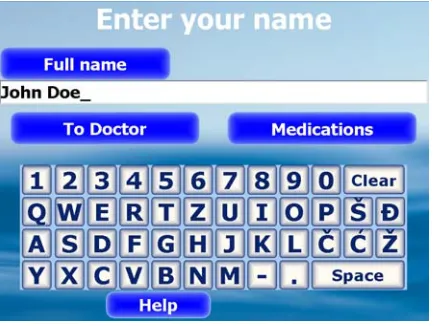
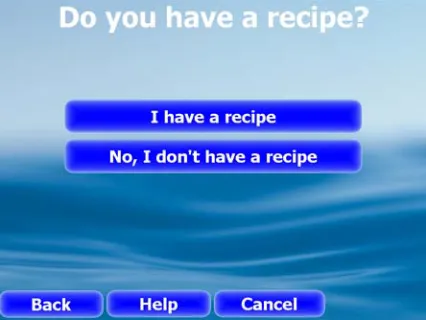
As an example of simple kiosk application, let's consider the situation in a doctor's office where patients have to check-in, giving their name and choosing what kind of treatment do they need. Application screens are shown on figures 2 and 3:
First screen requires user to enter his/hers name. Advancing to the next screen is possible only if something is entered in input field. Also, because this screen contains input field, on-screen keyboard is displayed automatically (Fig. 2). User can advance to the screen for choosing doctor, or to the screen for medications receiving. This screen contain only the “Help” default button (there is no previous screen, so going back is impossible, and for the next screen, user must to choose one of two).
Fig. 2. First screen of the kiosk application.
Fig. 3. Second screen of the kiosk application.
Third screen asks user if he/she has a recipe. If the answer is “Yes”, then user should be instructed what to do next (to keep this example simple, we just go to the first screen). If the answer is “No”, the user is instructed to first visit a doctor.
Fig. 4. Third screen of the kiosk application. Program 1: Example of a kiosk specification
Kiosk Example DefInt Doc 0
Screen FirstScreen
Caption "Enter your name" Row 100
Row 50 50
DefaultButtons HelpButton Edit Name
Caption "Full name"
Position 1 1 40 AlignVertical CheckString 1 30
End
Button Doctor
Caption "To Doctor"
Position 1 2 90 AlignCenter JumpToScreen SecondScreen End
Button Medications
Caption "Medications" Position 2 2 90 AlignCenter JumpToScreen ThirdScreen End
End
Screen SecondScreen Caption "Choose doctor" Row 100
Row 50 50 Row 50 50 Row 100
Button Doc01
Caption "General Practitioner" Position 1 1 90 AlignCenter Doc = 1
JumpToScreen FirstScreen End
Button Doc02
Caption "Paediatrician" Position 1 2 90 AlignCenter Doc = 2
JumpToScreen FirstScreen End
Button Doc03
Caption "Dermatologist" Position 2 2 90 AlignCenter Doc = 3
JumpToScreen FirstScreen End
Button Doc04
Caption "Ophthalmologist" Position 1 3 90 AlignCenter Doc = 4
JumpToScreen FirstScreen End
Button Doc05
Caption "Orthodontist" Position 2 3 90 AlignCenter Doc = 5
JumpToScreen FirstScreen End
Button Doc06
Caption "Surgeon"
Position 1 4 90 AlignCenter Doc = 6
JumpToScreen FirstScreen End
End
Screen ThirdScreen
Caption "Do you have a recipe?" Row 100
Row 100 Row 10 80 10 Row 10 80 10
DefaultButtons HelpButton, CancelButton, PreviousButton
Button YesRecipes
Caption "I have a recipe" Position 2 3 90 AlignCenter JumpToScreen FirstScreen End
Button NoRecipes
Caption "No, I don''t have a recipe" Position 2 4 90 AlignCenter
End End End
7. Conclusion
In spite of carefully searching available literature we have not found counterpart for DSL usage in kiosk application programming. After several successful applications, we are convinced that our approach has practical value and usefulness.
Introduction of DSL in kiosk development significantly reduced number of errors previously related to correct framework usage and thus has solved our main problem. For example, we usually had numerous small corrections in code with each new screen, because some calls to framework were forgotten or some values were not properly initialized. Because framework is now hidden behind KSL, these errors are practically non-existent. Rapid prototyping of new applications is now possible, and maintenance and rearranging of existing is much faster. KAG is written to be relatively easy extended, by introducing new actions and new events in language specification. If one can provide code in target language for specific task or for handling specific hardware, that code can be included in generic application template and used in KSL programs, assuming that necessary extensions to KSL are made. Major drawbacks of our approach are need to write additional custom code in separate files, and (for now) limited conditions complexity.
By automating the task of kiosk programming, Kiosk Application Generator gives the kiosk programmer the opportunity to focus on kiosk functionality, and leave most of technical details to the compiler.
Future work to be carried includes expanding kiosk specification language and making template files for more platforms (preferably cross-platform open source toolkits). An integrated development environment based on Kiosk Application Generator is also considered.
8. References
1. Gitta B. Salomon: Designing casual-user hypertext: the CHI'89 InfoBooth. CHI '90: Proceedings of the SIGCHI conference on Human factors in computing systems, ACM Press, New York, NY, USA, 451-458. (1990)
2. Steve Burdick: Creating information kiosks for the new distributed computing environment. SIGUCCS '94: Proceedings of the 22nd annual ACM SIGUCCS conference on User services, ACM Press, New York, NY, USA, 1-3. (1994) 3. Martin Hitz and Hannes Werthner: Development and analysis of a wide area
4. Jan Borchers and Oliver Deussen and Clemens Knorzer: Getting it across: layout issues for kiosk systems. SIGCHI Bull. Vol. 27 No. 4, ACM Press, New York, NY, USA, 68-74. (1995)
5. K. Lim and M. Usma: Usability Evaluation in the Field: Lessons from a Case-Study Involving Public Information Kiosks. APCHI (Asia Pacific Conference on Computer Human Interaction) journal, IEEE Computer Society, Los Alamitos, CA, USA, 70. (1998)
6. Sam Racine and Rachel Nilsson: Use of video in user interfaces that require non-linguistic cues. CHI '05: CHI '05 extended abstracts on Human factors in computing systems, ACM Press, New York, NY, USA, 1022-1036. (2005)
7. J.M. Rehg and M. Loughlin and K. Waters: Vision for a smart kiosk. CVPR (Conference on Computer Vision and Pattern Recognition) journal, IEEE Computer Society, Los Alamitos, CA, USA, 690. (1997)
8. Hirohiko Sagawa and Masaru Takeuchi: Development of an information kiosk with a sign language recognition system. CUU '00: Proceedings on the 2000 conference on Universal Usability, ACM Press, New York, NY, USA, 149-150. (2000)
9 Erno Makinen and Saija Patomaki and Roope Raisamo: Experiences on a multimodal information kiosk with an interactive agent. NordiCHI '02: Proceedings of the second Nordic conference on Human-computer interaction, ACM Press, New York, NY, USA, 275-278. (2002)
10. Paul Robertson and Robert Laddaga and Max Van Kleek: Virtual mouse vision based interface. IUI '04: Proceedings of the 9th international conference on Intelligent user interfaces, ACM Press, New York, NY, USA, 177-183. (2004) 11. Curry Guinn and Rob Hubal: An evaluation of virtual human technology in
informational kiosks. ICMI '04: Proceedings of the 6th international conference on Multimodal interfaces, ACM Press, New York, NY, USA, 297-302. (2004)
12. Francois Grize and Mehdi Aminian: Cybcérone: a kiosk information system based on WWW and Java. Interactions journal Vol. 4 No. 6, ACM Press, New York, NY, USA, 62-69. (1997)
13. Jean Scholtz: Kiosk-based user testing of online books. SIGDOC '98: Proceedings of the 16th annual international conference on Computer documentation, ACM Press, New York, NY, USA, 80-86. (1998)
14. Jeffrey Raymond: Electronic kiosk project: distributed access to e-mail and web browsing. SIGUCCS '00: Proceedings of the 28th annual ACM SIGUCCS conference on User services, ACM Press, New York, NY, USA, 266-269. (2000) 15. Andrew D. Christian and Brian L. Avery: Speak out and annoy someone:
experience with intelligent kiosks. CHI '00: Proceedings of the SIGCHI conference on Human factors in computing systems, ACM Press, New York, NY, USA, 313-320. (2000)
16. Michael Johnston and Srinivas Bangalore: MATCHKiosk: a multimodal interactive city guide. Proceedings of the ACL 2004 on Interactive poster and demonstration sessions, Association for Computational Linguistics, Morristown, NJ, USA, 33. (2004)
17. Albert Huang and Kari Pulli and Larry Rudolph: Kimono: kiosk-mobile phone knowledge sharing system. MUM '05: Proceedings of the 4th international conference on Mobile and ubiquitous multimedia, ACM Press, New York, NY, USA, 142-149. (2005)
couuntries, South African Institute for Computer Scientists and Information Technologists, , Republic of South Africa, 107-116. (2006)
19. A. Seth and D. Kroeker and M. Zaharia and S. Guo and S. Keshav: Low-cost communication for rural internet kiosks using mechanical backhaul. MobiCom '06: Proceedings of the 12th annual international conference on Mobile computing and networking, ACM Press, New York, NY, USA, 334-345. (2006)
20. Andrew D. Christian and Brian L. Avery: Digital smart kiosk project. CHI '98: Proceedings of the SIGCHI conference on Human factors in computing systems, ACM Press/Addison-Wesley Publishing Co., New York, NY, USA, 155-162. (1998) 21. Caleb Tennis: KDE kiosk mode. Linux Journal No. 130, Specialized Systems
Consultants, Inc., Seattle, WA, USA, 5. (2005)
22. Robert A. van Engelen: ATMOL: A Domain-Specific Language for Atmospheric Modeling. Special issue on domain-specific languages, Part I. Journal of Computing and Information Technology, CIT, Vol. 9, No. 4, 2001, 289-303. (2001) 23. Joseph (Yossi) Gil and Yuri Tsoglin: JAMOOS - A Domain-Specific Language for
Language Processing. Special issue on domain-specific languages, Part I. Journal of Computing and Information Technology, CIT, Vol. 9, No. 4, 2001, 305-321. (2001)
24. Cleaveland, J.C.: Building Application Generators. IEEE Software Vol 5 Is 4, 25-33. (1988)
25. Yannis Smaragdakis and Shan Shan Huang and David Zook: Program generators and the tools to make them. Proceedings of the 2004 ACM SIGPLAN symposium on Partial evaluation and semantics-based program manipulation, ACM Press, New York, NY, USA, 92-100. (2004)
26. Qian Wang and Gopal Gupta: Rapidly prototyping implementation infrastructure of domain specific languages: a semantics-based approach. Proceedings of the 2005 ACM symposium on Applied computing, ACM Press, New York, NY, USA, 1419-1426. (2005)
27. Ryan Paul: Designing and implementing a domain-specific language. Linux Journal archive Vol 2005 Issue 135. (2005)
28. Marjan Mernik, Jan Heering, Anthony M. Sloane: When and how to develop domain-specific languages. ACM Computing Surveys, Vol 37 No 4, ACM Press, New York, NY, USA, 316-344 (2005)
29. Arie van Deursen and Paul Klint and Joost Visser: Domain-specific languages: an annotated bibliography. SIGPLAN Not., ACM Press, New York, NY, USA, 26-36. (2000)
30. Žarko Živanov: Generator for kiosk applications (Masters thesis). Author's reprint, Library of Faculty of Technical Sciences, Novi Sad, Serbia. (2006)
31. Stevan Stankovski and Bogdan Kuzmanovic and Miroslav Hajdukovic and Žarko Živanov and Marija Rakic-Skokovic and Dragana Škrinjar: Automat Za Prodaju Polisa Putnicko Zdravstvenog Osiguranja – Polisomat. INFOTEH-JAHORINA, Vol. 5, Ref. E-I-12,328-333. (2006)
32. Gerald Bieber and Emad Abd Al Rahman and Bodo Urban: Screen Coverage: A Pen-Interaction Problem for PDA's and Touch Screen Computers. icwmc journal, IEEE Computer Society, Los Alamitos, CA, USA, 87. (2007)
University in Great Britain. He is currently a Professor of Computer Science at the Faculty of Technical Sciences, Computing and Control Department, University of Novi Sad.
Žarko Živanov has graduated at the Faculty of Technical Sciences, University of Novi Sad, in 2000. He got Master Degree in 2006, at the Faculty of Technical Sciences, University of Novi Sad. He is currently assistant at Chair for Applied Computer Science at the Faculty of Technical Sciences, Computing and Control Department, University of Novi Sad.
Predrag Rakić has graduated at the Faculty of Technical Sciences, University of Novi Sad, in 2001. He got Master Degree in 2006, at the Faculty of Technical Sciences, University of Novi Sad. He is currently assistant at Chair for Applied Computer Science at the Faculty of Technical Sciences, Computing and Control Department, University of Novi Sad.