An Algorithm For Gaze Region Estimation On
Web Pages
John K. Njue, Simon G. Maina, Ronald Waweru Mwangi, Michael Kimwele
Abstract: Accurate gaze region estimation on the web is important for the purpose of placing marketing advertisements in web pages and monitoring authenticity of user’s response in web forms. To identify gaze region on the web, we need cheap, less technical and non-laboratory setup that minimize user interruptions. This study uses the mouse and keyboard as input devices to collect web usage data. The data collected is categorized into mouse activities, keyboard activities and scroll activities. A regression model is then used to estimate gaze region from the categorized data. The results indicate that although mouse cursor data is generated throughout the user session, the use of data from keyboard presses and scroll from both keyboard and mouse improves the accuracy of identified gaze regions in web usage data.
Index Terms: Gaze tracking, gaze region, linear regression model, mouse activities, keyboard activities, scroll activities, web page. ————————————————————
1
I
NTRODUCTIONEye gaze tracking records eye movements whilst a participant examines a visual stimulus [1]. Tracking user’s eye gaze and eye movements are some of the main ways of studying attention on web pages as they provide rich details on user attention by sampling eye gaze position at different time intervals. During eye tracking, one acquires and analyzes the eye movements of the user. This is then used to determine where the user’s attention is focused and determine the gaze direction of a person at a given time as well as the sequence in which the eyes moves[2] . [3] identified that by capturing and analyzing detailed eye movements of a user reading a web page; it is possible to reveal about the ways in which interaction with the web page occurs for example direction of movement, fixation and saccades. By monitoring people as they use web pages for specific tasks, it is easy to identify their interests, e.g. reading, by tracking eye gaze concentration areas and movements. Recent studies have considered users’ mouse activity as a source of approximate eye gaze position with some degree of accuracy in a more liberalized way and at the least cost since the users do not have to be in a lab setup. In the studies, mouse data is collected by tracking mouse cursor position. [3] observed that cursor behaviors include inactive examining, reading and action. This work concluded that cursor data can be used as an alternative to traditional eye trackers.
2
L
ITERATURER
EVIEWA significant feature of web applications is possibility for non-sequential navigation to access items on web documents. There is no definite order of determining the sequence in which the text is read in web documents [4]. [5] contend that Web 2.0 applications are more intuitive and user-friendly compared to desktop applications. Today, many companies and institutions are migrating their applications to the web so as to leverage the benefits therein.
2.1 Gaze Region
[6] define gaze as the orientation of the eyes when viewing a particular point and is an important visual cue in communication. Gazing occurs during human scene perception when high quality visual information is acquired only from a limited spatial region surrounding the center of gaze/the fovea [7]. These researchers further note that eyes are moved about three times each second via rapid eye movements (saccades) to reorient the fovea through the scene. Gaze pattern information is only acquired during periods of relative gaze stability (fixations) owing to saccadic suppression during the saccades themselves [8] Since gaze indicates a person’s current line of sight at point of fixation, it can be used to interpret the user’s intention for non-command interactions. The gaze may also provide several functions in communication, such as giving cues of people’s interest and attention, facilitation during conversations, giving reference cues by looking at an object or person, and indicating interpersonal cues such as friendliness or defensiveness [9]. Gaze perception plays an important role in everyday lives because it conveys one desires and intentions. In addition, user's behavior can be predicted by perceiving their gaze, because gaze direction signals the upcoming target or goal. Therefore, gaze perception is a significant cognitive function that facilitates interactions [10]. [8] identified that gaze perception requires focused attention. This means that gaze direction cannot be perceived outside the focus of attention. According to [11] eye gaze is a reliable indicator of what a person is thinking when the direction of gaze carries information about the focus of the user’s attention. Additionally, gaze focus can be measured using fixation intensity, which is an important feature for predicting users’ attention. In this regard, examining how eye gaze contributes to identification of attention of user during human-machine conversation is important. [12] further note that in web interfaces, attention shifts from one interesting region to another when location saliency within a particular region decreases and is replaced ____________________________
John K.Njue is currently pursuing masters degree program in Soft Engineering in Jomo Kenyatta University of Technology and Agriculture (JKUAT), Kenya. E-mail:
Simon G. Maina is currently pursuing masters degree program in Soft Engineering in JKUAT, Kenya. E-mail:
R. W. Mwangi is a Professor at the School of Computer Science and Information Technology in JKUAT, Kenya. E-mail: [email protected]
254 by the next salient location. An important aspect of gaze
tracking is eye/gaze fixation. Human eye movements are characterized by a series of quick jumps or high velocity movements, known as saccades. This is followed by fixations-periods of time in which the eye is stabilized and remains relatively still. Although eye-gaze fixation is a positive signal of interest when the user pays more attention to a position, prolonged cursor fixation may be difficult to maintain since the user’s attention is probably elsewhere [3].
2.2 Gaze on Web Pages
Millions of people navigate the Web in search of information by looking, finding, and reading, pointing and clicking. This prompted website site designers and usability professionals to attempt to optimize the web users’ experience by analyzing parts of the pages that capture visitor’s attention, and the information people read on pages [3]. During web search and navigation, viewers’ eye movement change over time and the change in direction and magnitude are influenced by the type of web sites being viewed. The individual characteristics of the viewer and the stimuli contribute to viewers’ eye movement behavior. By understanding how web users view different web pages, interaction page order and site type, one can deduce users’ online ocular behavior and the effect on web viewing behavior [13]. By silently observing behavior of user interacting within an information space one can gather information such as contexts of an activity, speed and time of an activity, mouse and/or keyboard activity, page navigation information, bookmark selection information and other user activities on a page using a model [14]. Detailed user activities can be captured by tracking all interfaces with the displayed browser page, such as moving the mouse pointer around or scrolling the page. During a web page session, interaction should be tracked at the widget level - mouse coordinates should be mapped to Document Object Model (DOM) elements like button sand links. This should be combined with information about the layout of the HTML pages to allow complete tracking of all user [13]. Tracking of users’ online behavior and activities is possible because the browser can easily reveal information related to mouse and document movements. Tracking the behavior and preferences of an online user is done with a view to building detailed profiles of the user for the purposes of serving marketing information or advertisements to him/her [15]. [16] contend that it is also possible to learn user behavior and interests unobtrusively by observing their normal behavior and measuring activities like the number of hyperlinks clicked on a page or the amount of scrolling performed. In web documents user activities can also be identified by tracking the eye gazes of users as they navigate a website using eye gaze tracking equipment in a laboratory setup. Results in this respect have indicated that one can determine what people are reading by identifying their [16]. The information gained from user activity is of great interest to various parties including advertisement industry, law enforcement and intelligence agencies, usability tests of web applications and web analytics [17].
2.3 Mouse Activities and Gaze Tracking
Studies have considered user's mouse activity as a source of approximate eye gaze position while the user looks at a web page with some degree of accuracy. Mouse data is collected by tracking mouse cursor position [3]. Typical mouse tracking mechanism utilizes JavaScript to capture the click or form-submit event. The event is suspended as a request is made to a logging server to record the user’s action before the action is taken [18]. Accordingly, these researchers present that this kind of tracking is achieved through the following mechanisms: (a) Fixed-time: Given a parameter t in milliseconds, web beacon requests are initiated in parallel, and the browser spins for t milliseconds before continuing to the destination independent of whether the tracking requests came back. (b) Out-of-band: Given a parameter t in milliseconds, the beacon requests are initiated in parallel, and the browser waits for all of them to come back (maximum time for all beacons) or until time t elapsed (timeout) and (c) Mousedown: This involves tracking mouse down events then logging the clicks and form submits. When users view web pages, their respective behaviors are driven by the gender of subjects, the order of web pages being viewed, and the interaction between site types and the order of the pages being viewed [19]. There are general mouse cursor behavior patterns such as reading, hesitating, scrolling and clicking that can occur as users performs a task on the web, and each pattern has a different meaning. More specific behaviors include users moving their cursor over text as they read, moving the cursor slowly when thinking and tossing aside the cursor to reveal content that the cursor or tooltips are obscuring. These behaviors change the context in which they are interacting with the page [3]. Other identifiable mouse patterns include neglecting the cursor while reading, using the cursor as a reading aid to follow text (either horizontally or vertically), using the cursor to mark interesting results, reading by tracing text, hesitating and reading with the cursor, hesitating before clicking, resting the cursor on white space, ignoring the cursor, examining the page using the cursor, following the text with the cursor and using it to interact with the page or browser [20]. In web based systems, JavaScript tracking code can be used to collect data about mouse clicks and movements and keyboard input. Visualizing collected data, mouse trails shown below can be identified. Other than mouse data, JavaScript can be used inside the browser to collect data about keyboard and browser window if input data such as key presses and browser window size is available [13].
Figure 1: Heat maps of recorded cursor positions ([22])
[22], in their work, found out that when using cursor based eye-tracking, cursor and gaze position are positively correlated. Their work concentrated on mouse clicks and cursor movements where they captured click positions and cursor movements. They generated click and cursor movement heat maps illustrated below. In the Figure, heat maps of all click positions (left) and cursor positions (right) are shown. Heavy interaction occurs in red/orange/yellow areas, moderate interaction in green areas, while light interaction happens in the blue areas. They concluded that although cursor movements, scrolling, and other user-side interactions are easy to collect at large scale, claiming that the cursor approximates the gaze is misguided because it is often not the case depending on time and behavior. Instead, the study identified that it is important to predict the real location of the attention when an eye-tracker is unavailable. The correlation of eye-gaze and mouse cursor positions have led to the determination that cursor interactions can be useful in determining user intent and relevant parts of Web pages [22]. Gaze and cursor in web pages may relate when the distance between gaze and cursor is markedly small in regions where users visit and when the cursor is in motion and in sessions comprising a higher proportion of motion. In search tasks, there is a strong alignment between cursor and gaze positions when the cursor is placed over the search results [22]. However, when a user uses a mouse during search task, the mouse cursor interactions are not all the same because different types of cursor behavior patterns exist, such as reading, hesitating, scrolling and clicking, each of which has a different meaning. This is because various factors may affect search task on the gaze-cursor alignment including time, behavior patterns and the user. The gaze and cursor positions are better aligned when current gaze position is compared to a future cursor position [22]. Interactions with the mouse cursor can be recorded with minimal intrusion using JavaScript, which is built into all modern Web browsers. Small snippets of JavaScript can be injected on the search page to record cursor interactions and send the data back to the search system using a GET request or HTML5 Web Sockets. This technique can be deployed on a large scale without disrupting the searcher, or requiring any software installation. Thus, tracking cursor interactions can be instrumented cheaply in commercial search engines or in large-scale user studies on the Web. Cursor movements can be recorded using
JavaScript at fine levels of detail; the exact resolution depends on the Web browser and operating system. Cursor data can then be used to diagnose usability issues at an individual level when the session is replayed. Moreover, the data can be analyzed in aggregate to generate heat maps. Other cursor activity such as scrolling, highlighting text, or non-navigational clicks may be explored [20].
2.5 Keyboard Activities and Gaze Tracking
256 outside of the zoomed region and release the hotkey, or
special keys like the Esc key on the keyboard can be used terminate an action by the user. The hotkey-based triggering mechanism makes it simple for able-bodied users to keep their hands on the keyboard to perform most pointing and selection operations [25]. A number of studies have shown a relationship between the keyboard and gaze region. Firstly, in gaming, the keyboard together with mouse and an eye tracker give the orders for target action through the keyboard. The gamer selects a target with the mouse. In 2-D scenes, keyboard keys can be used for navigation where users scroll with the cursor keys on the keyboard while in most modern computing devices, on-screen keyboards are provided for text entry is necessary [26]. Further, the EyePoint technique for pointing and selection uses a combination of eye gaze and keyboard triggers for progressive refinement of target using look-press-look-release actions. In the process, the user first looks at the desired target then by pressing and holding down a hotkey, the user brings up a magnified view of the region the user was looking at. The user then looks again at the target in the magnified view and releases the hotkey to perform the mouse action [25].
2.6 Scrolling Activities and Gaze Tracking
Scrolling involves acquisition of targets well beyond the edges of the screen. Users manually scroll through long documents to find and view content of interest in the window. Therefore, scrolling provides a simple means for navigating through long documents that are too large to be displayed within a single view in a convenient manner. Scrolling can be achieved using input devices such as scroll wheels, which are provided for on most pointing devices. It is influenced by two main factors; scrolling distance and the tolerance of the scrolling [27]. In another study by [16], the amount of scrolling performed by the user is determined by the number of command-state changes on the page. A command-state change is an internal event in the IE event model that occurs when the user re-sizes the IE window, utilizes the Edit menu, or scrolls. The vast majority of the command-state changes are the result of user scrolling, and thus command-state changes serve as a reliable surrogate for the amount of user-scrolling activity. The main tool used during scrolling is the mouse cursor and a scroll bar. If a user is working on a document and the point of interest moves to outside of the viewing window, he/she is forced to scroll the document to sections hidden from main view window. Scrolling a document can be achieved using three main methods: i) Use of scroll bar, where scrolling is achieved by acquiring the scroll bar handle and drag it; ii) Use of the mouse cursor to press the arrow buttons at the ends of the scrolling bar, causing the document to scroll; and iii) clicking on the rest of the space on the scroll bar, causing the document to "jump scroll" [28]. In addition to the scrollbar, scrolling can also be achieved using a mouse scroll wheels. Most scrolling devices are linear in nature, which makes scrolling achievable only over a linear distance either vertically or horizontally. There are two main activities that can be performed on documents when scrolling with a pointing device: short range movement scroll where devices are best used only for short range movement. Long-range movement scroll is experienced when users scroll long documents [3]. Scrolling together with cursor movement and hovers has been used to accurately infer search intent and interest in search results [29]. [30] used scrolling to infer user interest and
compared it to gaze tracking feedback. [31] found out that when mouse acquires the scroll bar, successive clicks on the bar occur as the eyes remain in the reading area without any additional visual control. [16] discovered that the amount of user scrolling together with the number of hyperlinks clicked and the amount of mouse activity can be used to gauge the importance of a web page to the user. Thus, scrolling may affect user eye gaze region on the screen. Scrolling behavior and information on the browser’s viewport can be used effectively as gaze tracking feedback in search scenarios. Scrolling may cause the cursor to move down relative to the page, making it a good estimate of vertical attention [3]. When users read through lengthy web documents scrolling becomes a necessity because long documents cannot be displayed within a single view conveniently [28].
2.5 Gaze Prediction using Cursor Data
When predicting cursor position, it is important to extract four types of features from the interaction data that seem to influence the gaze tracking users in Web Interfaces. These are: (i) cursor alignment, (ii) cursor position at time t represented by a tuple (x, y), (iii) cursor behavior (inactive, examining, reading, action) which has a strong effect on gaze-cursor alignment - active gaze-cursors are better aligned with gaze than inactive cursors and (iv) the length of time since page reload. Time influences the gaze-cursor alignment (T=current(t)-pageload(t)), future cursor position and the current gaze position. Future cursor positions are only used if the last movement was within 10 seconds of the target future time, time spent on the page and browsing habits [3]. Tracking mouse activity and use of the scroll bar can be used as input for interest evaluation metrics. As users move the mouse around the page, certain mouse behaviors are common and this can be used for accurate prediction of user interest. To collect mouse activity data, an embedded script to track mouse movement (position and associated time stamps) can be used and to send the logged data to a server for later analysis. In [3], the work concluded that adequate cursor data can be used more effectively as an alternative to traditional eye trackers. Other studies have concluded that eye gaze follows mouse cursor position to some degree and reasonable correlations between the eye and mouse have been identified. This has led to the conclusion that the mouse can be used as an alternative eye tracker but the accuracy of gaze region at a particular time is not guaranteed.
2.7 Research Gaps
interactions are easy to collect at scale, which many Web analytics services offer to do. These interactions are through the other input devices, that is keyboard activities and scroll activities. The fixations from these interactions can be reliably interpreted as attention.
3
M
ETHODOLOGYThis research involved conducting an empirical study using quasi-experiments where a large number of cases representing the population of interest were used with a minimum of fifty users. The experiments were carried out using a website whose target users were adults of age 20-26 years. Data collected included: mouse cursor positions on clicking or dragging the mouse, document position after scrolling, key presses and document loading point on keyboard navigation and the amount of scroll performed.
3.1 Research Design
In this research, the mouse activities, keyboard activities and document scroll information were monitored and recorded, and a possible gaze location of individuals was predicted using a regression model. Only individuals using computers with little or no difficulty were considered. A stratified sampling technique was used to sample select groups. In this study the following were considered as distinct input sources: Mouse click, Mouse drag, Text selection, Context menu, Copy activity, Cut activity, Paste activity, Keyboard activity, Keyboard scroll, Document scroll stop and the Element scroll stop which is recorded when a user stopped scrolling overflowed element within a page. During analysis, the data was placed into three categories. These are: mouse, keyboard and scroll activities. Subsequently, the following events were treated as mouse activity: click, context menu, copy, cut, paste, drag, select and double click. The following were treated as scroll activities: mouse scroll, keyboard scroll and document scroll. The keyboard activities were all key presses that are not navigation key presses which are assumed to be scroll.
3.2 Determining Gaze Position
3.2.1 Mouse Activities
Considering mouse data, users can perform two main actions using a mouse-clicking and moving. Mouse clicks occur when a person holds down a mouse button to perform an action. Clicks can be classified as left (default), right or middle clicks. Other buttons may exist. Since users click links or items of interest, a click can therefore be used to indicate a gaze fixation position as shown in the diagram below. Mouse click at position X1, Y1 considers X1, Y1 as current gaze position at time t.
Figure 2: Mouse click at position X1, Y1 at time t.
Users also move mouse to areas of interest within a page either as a reading guide or to perform clicks on links or other items on a document. Thus, when mouse moves from one point to another, the last position after movement can be
considered as the immediate gaze fixation position.
3.2.2 Keyboard Activities
If a user clicks navigation controls to view dynamically loading content, the gaze position is expected to switch between the navigation controls and the center of loaded content. Using mouse cursor to load and view dynamic content will result to gaze position switching between X1, Y1 and X2, Y2.
Figure 3: Using mouse cursor to load and view dynamic content
If a user makes use of keyboard navigation keys to load and view dynamically loading content, the center of dynamically loading content will be considered as gaze region. Using keyboard navigation keys to load and view content at location X1, Y1 as the current gaze position.
Figure 4: Using keyboard navigation keys to load and view content
The above interactions can be visualized using the model which shows the relationship between web navigation behaviors, user gaze position and the influence on gaze region.
3.2.3 Document Scroll Activities
Sometimes a user may scroll a document while a cursor is stationary especially when keyboard arrow navigational keys are used. In such cases, the document view point changes whilst the cursor is stationary. Sometimes the cursor may become invisible from the view point. This renders the cursor irrelevant as an indicator of gaze fixation position. Possible vertical cursor position can then be calculated by using scroll information. The number of document scrolls and the last mouse cursor position is used to determine possible gaze location. Document scrolling vertically from position Y1 to Y2 will use scroll amount from Y1 to Y2 to compute possible mouse position at Y2 in reference to mouse position at document position Y1.
Figure 5: Document scrolling vertically from position Y1 to Y2
258 considered to be the current cursor insertion point. Cursor
insertion point moving from X1, Y1 to X2, Y2 will consider X2, Y2 as the current gaze position.
Figure 6: Cursor insertion point moving from X1, Y1 to X2, Y2
3.3 Study Participants and Research Instrument
The study involved development web form page that users could fill and answer questions as they navigate. The questions were test-based for B.Sc. IT 3rd year students in JKUAT and thus every user who visited the page had to perform a task. The page had open-ended and closed questions that allowed users to have a typical interaction with a web form. The page had the JavaScript embedded on it so as to monitor the activities during participation. See Figure 11. One hundred and seventy (170) students participated and their session data was captured and concurrently saved in a SQL database. Each participant had a unique session and the data was aggregated as per the sessions. It is from these sessions that a random entry was picked for analysis.
3.4 Regression Model
( ) ( ) ( ) ( ) ( )
Where: td : dwell time
tm: time since movement
cx: x-coordinate of cursor position gx: x-coordinate of gaze position
fx: most likely coordinate of the gaze based on future cursor position.
The subject’s/user’s gaze can be determined through a linear model of interaction characteristic as shown above to determine whether the predicted position is nearer to the ground truth than the simple cursor position. The ground truth is the gaze point measured by the eye-tracking system during lab study [20]. The regression equation for the y-coordinate was similar, but substituting x for y in regression model.
3.5 Proposed Gaze Estimation Algorithm
This algorithm considers data from the input sources discussed previously and uses it to predict the gaze region. See algorithm pseudo code below:
Input sessionkey
Select useractivitydata for sessionkey from database ordered by trackingtime Ascending
Initialize gazeXY List to new Instance of ArrayList While useractivitydata is not null
Initialize mouseposition to current useractivitydata mouseposition
Initialize event to current useractivitydata event Set Gaze X position to mouse X position Set Gaze Y position to mouse Y position Set Gaze Y position to mouse Y position If event captured is a keyboard event Then
If event is keyboard_scroll then
If document scroll top is greater than zero then (Means that the user is scrolling using keyboard)
Set Gaze Y position=document scroll top (Gaze X position does not change)
End If
Else If activity data is keyboard_activity then
If HTML element left position is greater than zero then (Means that the user is probably typing in some text)
Set Gaze X position=HTML element left position+HTML element Mouse X position (Which is equal to Mouse X position)
End If End If End If
Else If event captured is a Mouse event Then If event is mouse_scroll then
If document scroll top is greater than zero then (Means that the user is scrolling using keyboard)
Set Gaze Y position=mouse Y position+document scroll top (Gaze X position does not change)
End If
Else If ―element scroll top‖ > zero then (Means that the user is scrolling using keyboard)
Set Gaze Y position=mouse Y position + element scroll top (Gaze X position does not change)
End If
Else If activity data is mouse_activity then
(Ignore, We have already captured Gaze position from mouse x and mouse y above)
End If End If
Else If event captured is a click event or double click event Then
(Ignore, We have already captured Gaze position from mouse x and mouse y above. Clicks are activated using mouse)
End If
Else If event is copy or event is cut or event is paste Then If HTML element left position is greater than zero then (Means that the user is probably typing in some text)
Set Gaze X position=HTML element left position+HTML element Mouse X position (Which is equal to Mouse X position)
End If
If HTML element top position is greater than zero then
Set Gaze Y position=HTML element top position+HTML element Mouse Y position (Which is equal to Mouse X position)
End If End If
Else If event is contextmenu or event is drag Then (contextmenu is Activated Using Mouse while drag is Activated Using Mouse or keyboard on HTML element)
If HTML element left position is greater than zero then (Means that the user is probably typing in some text)
(Which is equal to Mouse X position. Users move mouse to desired position before activation a context menu)
End If
If HTML element top position is greater than zero then
Set Gaze Y position=HTML element top position+HTML element Mouse Y position (Which is equal to Mouse X position. Users move mouse to desired position before activation a context menu)
End If End If
Else If event is drag Then
If HTML element left position is greater than zero then (Means that the user is probably typing in some text)
Set Gaze X position=HTML element left position+HTML element Mouse X position (Which is equal to Mouse X position)
End If
If HTML element top position is greater than zero then
Set Gaze Y position=HTML element top position+HTML element Mouse Y position (Which is equal to Mouse X position)
End If End If
If event captured is a document_scroll_stop event Then (Stopped Scrolling on document)
Set Gaze Y position to document scroll top End If
If event is elem scroll stop Then (Stopped Scrolling on element)
(We will consider element mouse position if available because users will only be able to scroll on an element if mouse is above that element. Otherwise we consider element scroll stop)
If HTML element Mouse X position is greater than zero then
Set Gaze X position = element Mouse X position
Set Gaze Y position = element Mouse Y position
Else
Set Gaze Y position to element scroll top End If
End If
If event document scroll Then
(We will ignore document scroll. We recorded scroll stop above which is more useful.)
End If
3.7 Data Analysis
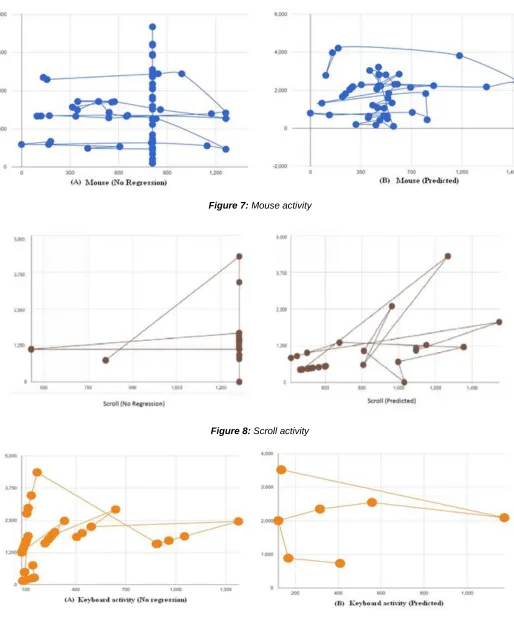
The captured data was exported and analyzed using graphing tools for visualization. Two robust platforms were used namely; Google Charts and CanvasJS Charts. Using the data, a plane of XY coordinates depicting the web page in pixels is populated to show the positions of different input sources. Firstly, we produce only the typical mouse cursor movement chart which is commonly used to estimate gaze regions. Further, the charts of the enhanced algorithm are generated to show comparison and gaze prediction with discussions carried out henceforth. Random user sessions’ data have been used to visualize the charts for gaze prediction purposes.
4.
R
ESULTS ANDD
ISCUSSION4.1 Gaze prediction
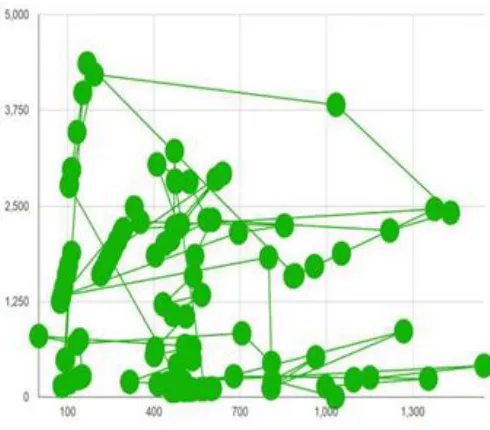
We predict using the coordinates depicting the computer screen region. The line is the mouse cursor movement path as the user interacts with the page. This is assumed in most studies to be the gaze region since it is only the mouse cursor data that is used to predict the gaze region. The developed algorithm introduced considers data from the other input, keyboard activities and scroll activities. During the entire session, the various input sources are used and their data is collected for gaze prediction. We use the regression model ( ) ( ) ( ) ( ) ( Error! Reference source not found. to compute the weights (coefficients) for each of the three distinct features for x and y coordinates. The model normalizes coordinates to less and distinct positions depicting lengthy periods of saliency and extrapolates to possible coordinates depicting instances of saccades. [3] used similar approach difference being that only mouse data was used. The study used single sessions of user activity during an online interaction with a web form. Each participant’s data is recorded and subjected to the prediction algorithm, first without the regression model and after with the regression model. The following charts illustrate the two scenarios for a random session. In the Figures Figure 7Error! Reference source not found., Figure 8Error! Reference source not found. and
260 Figure 7: Mouse activity
Figure 8: Scroll activity
Figure 10: Enhanced prediction
5
R
ESEARCHS
UMMARY ANDC
ONCLUSIONThis research was conducted to determine if user activities other than mouse cursor affect gaze region prediction. In previous studies, user gaze region was established to be aligned to mouse cursor. In the study, a web platform, lime survey was used to provide brainy question to a group of students. The students were required to answer the questions by typing in answers, checking radio buttons and check boxes as well as selecting options from drop down boxes. A JavaScript code was embedded to collect usage data as students attempted the questions provided. Data collected included mouse activities such as clicks and moves, keyboard presses and scrolls in the document. The data was then pushed to a remote server via RESTful url for storage in SQL database. An algorithm that takes into consideration the captured user activities was developed to estimate a probable gaze region in the form of (x,y) coordinates from the data captured. The estimated gaze region was then visualized against mouse position in the form of (x,y) coordinates. The results show that user gaze does not follow the cursor all the time because document scrolls and keyboard activities also influence the gaze region. Gaze Tracking Systems have mainly depended on head-mounted cameras, which make them cumbersome. This limitation restricts them to laboratory set up. Attempts to use mouse cursor data for gaze tracking in recent studies have produced inaccurate results because other factors that influence eye-gaze region have not been considered. Recent studies of identifying gaze and cursor alignment have shown a correlation but more study is needed to determine gaze fixations, especially when cursor fixations cannot be reliably interpreted as gaze regions. This is due to the fact that many operations performed by mouse can also be performed using the keyboard. Most people use the keyboard when they are not using the mouse but concurrent use of both input devices is rare. In light of this, keyboard strokes monitoring is critical in tracking user activities especially on web pages containing forms. From this study mouse clicks and drags, document scrolls, key presses and cursor movements which are the main actions may influence the gaze region over time depending on user actions when
interacting with web pages and other documents. The gaze region of a person can be computed by identifying gaze positions when an action is performed using these input devices.
5.1 Future Research
It is important that further research be conducted with camera-based tracking devices to verify the accuracy of the gaze estimated region. The main aim of this work was to estimate gaze region in web pages in non-laboratory based setup where users do not need to wear head mounted cameras. Since people involved in this work were using either laptop or desktop computers, further work should be done to determine how gaze region can be estimated in hand held devices such as mobile phones and tablets.
R
EFERENCES[1]. J. K. Mansour and H. D. Flowe, ―Eye tracking and eyewitness memory,‖ Forensic Updat., vol. 101, 2010.
[2]. R. Anacan, J. G. Alcayde, R. Antegra, and L. Luna, ―Eye-GUIDE (eye-gaze user interface design) messaging for physically-impaired people,‖ Int. J. Distrib. Parallel Syst., vol. 4, no. 1, 2013.
[3]. J. Huang, R. White, and G. Buscher, ―User see, user point: gaze and cursor alignment in web search,‖ in Proceedings of the SIGCHI Conference on Human Factors in Computing Systems, 2012, pp. 1341–1350.
[4]. P. Dolog, Engineering Adaptive Web Applications: A Domain Engineering Framework. Germany: VDM Verlag, 2008.
[5]. F. Schneider, S. Agarwal, T. Alpcan, and A. Feldmann, ―The new web: characterizing AJAX traffic,‖ in International Conference on Passive and Active Network Measurement, 2008, pp. 31–40.
[6]. L. Fridman, P. Langhans, J. Lee, and B. Reimer, ―Driver Gaze Region Estimation without Use of Eye Movement,‖ IEEE Intell. Syst., vol. 31, no. 3, pp. 49– 56, 2016.
[7]. Y. Zhang, A. Bulling, and H. Gellersen, ―SideWays: A Gaze Interface for Spontaneous Interaction with Situated Displays,‖ in Proceedings of the SIGCHI Conference on Human Factors in Computing Systems, 2013, pp. 851–860.
[8]. A. M. Burton, M. Bindemann, S. R. H. Langton, S. R. Schweinberger, and R. Jenkins, ―Gaze perception requires focused attention: Evidence from an interference task,‖ J. Exp. Psychol. Hum. Percept. Perform., vol. 35, no. 1, p. 108, 2009.
[9]. J. Zhu and J. Yang, ―Subpixel eye gaze tracking,‖ in Proceedings of Fifth IEEE International Conference on Automatic Face Gesture Recognition, 2002, pp. 131–136.
262 attention,‖ Sci. Rep., vol. 4, p. 3858, 2014.
[11]. Z. Prasov, J. Y. Chai, and H. Jeong, ―Eye Gaze for Attention Prediction in Multimodal Human-Machine Conversation,‖ in AAAI Spring Symposium: Interaction Challenges for Intelligent Assistants, 2007, pp. 102–110.
[12]. S. Li and Q. Zhang, ―A Computational model of visual attention based on space and object,‖ Res. J. Appl. Sci. Eng. Technol., vol. 7, no. 1, pp. 42–48, 2014.
[13]. R. Atterer, M. Wnuk, and A. Schmidt, ―Knowing the User’s Every Move: User Activity Tracking for Website Usability Evaluation and Implicit Interaction,‖ in Proceedings of the 15th International Conference on World Wide Web, 2006, pp. 203–212.
[14]. R. Villa and M. Chalmers, ―A Framework for Implicitly Tracking Data,‖ in Proceedings Of The Second DELOS Network Of Excellence Workshop On Personalization And Recommender Systems In Digital Libraries, 2001, pp. 18–20.
[15]. P. Commissioner, ―Online Behavioral Tracking.‖ Hong Kong, 2014.
[16]. J. Goecks and J. Shavlik, ―Learning users’ interests by unobtrusively observing their normal behavior,‖ in Proceedings of the 5th international conference on Intelligent user interfaces, 2000, pp. 129–132.
[17]. N. Schmücker, ―Web tracking,‖ in SNET2 Seminar Paper-Summer Term, 2011.
[18]. R. Kohavi et al., ―Tracking Users’ Clicks and Submits: Tradeoffs between User Experience and Data Loss,‖ Redmond sn, 2010.
[19]. B. Pan, H. A. Hembrooke, G. K. Gay, L. A. Granka, M. K. Feusner, and J. K. Newman, ―The determinants of web page viewing behavior: an eye-tracking study,‖ in Proceedings of the 2004 symposium on Eye tracking research & applications, 2004, pp. 147–154.
[20]. J. Huang, ―Modeling User Behavior and Attention in Search,‖ University of Washington, 2013.
[21]. M. C. Chen, J. R. Anderson, and M. H. Sohn, ―What can a mouse cursor tell us more?: correlation of eye/mouse movements on web browsing,‖ in Proceedings of the Conference on Human factors in computing systems, (CHI’01), 2001, pp. 281–282.
[22]. J. Huang, ―On the value of page-level interactions in web search,‖ Proc. HCIR, 2011.
[23]. M. Claypool, D. Brown, P. Le, and M. Waseda, ―Inferring user interest,‖ IEEE Internet Comput., vol. 5, no. 6, pp. 32–39, 2001.
[24]. D. Balzarotti, M. Cova, and G. Vigna, ―Clearshot: Eavesdropping on keyboard input from video,‖ in
Proceedings of the 2008 IEEE Symposium on Security and Privacy,(SP’ 08), 2008, pp. 170–183.
[25]. M. Kumar, A. Paepcke, and T. Winograd, ―EyePoint: practical pointing and selection using gaze and keyboard,‖ in Proceedings of the SIGCHI conference on Human factors in computing systems, 2007, pp. 421–430.
[26]. P. Isokoski, M. Joos, O. Spakov, and B. Martin, ―Gaze controlled games,‖ Univers. Access Inf. Soc., vol. 8, no. 4, pp. 323–337, 2009.
[27]. K. Hinckley, E. Cutrell, S. Bathiche, and T. Muss, ―Quantitative analysis of scrolling techniques,‖ in Proceedings of the SIGCHI conference on Human factors in computing systems, 2002, pp. 65–72.
[28]. S. Zhai, B. A. Smith, and T. Selker, ―Improving Browsing Performance: A study of four input devices for scrolling and pointing tasks,‖ in Human-Computer Interaction INTERACT ’97: IFIP TC13 International Conference on Human-Computer Interaction, 14th--18th July 1997, Sydney, Australia, S. Howard, J. Hammond, and G. Lindgaard, Eds. Boston, MA: Springer US, 1997, pp. 286–293.
[29]. Q. Guo and E. Agichtein, ―Ready to buy or just browsing? Detecting web searcher goals from interaction data,‖ in Proceedings of the 33rd international ACM SIGIR conference on Research and development in information retrieval, 2010, pp. 130–137.
[30]. G. Buscher, L. van Elst, and A. Dengel, ―Segment-level display time as implicit feedback: a comparison to eye tracking,‖ in Proceedings of the 32nd international ACM SIGIR conference on Research and development in information retrieval, 2009, pp. 67–74.
![Figure 1: Heat maps of recorded cursor positions ([22])](https://thumb-us.123doks.com/thumbv2/123dok_us/8985994.1436689/3.612.51.553.59.238/figure-heat-maps-recorded-cursor-positions.webp)