Exchange Server 2007 Planning
Microsoft Corporation Published: May 2007
Author: Microsoft Exchange Documentation Team
Abstract
This document provides guidance on planning for the supported Microsoft Exchange Server 2007 organization models (Simple, Standard, Large, and Complex). In addition, information is provided to help plan for the use of Active Directory directory service and Exchange 2007 server roles (Client Access, Edge Transport, Hub Transport, Mailbox, and Unified
Messaging). A planning checklist is included. Important:
This document is a planning-specific compilation of several Exchange 2007 Help topics and is provided as a convenience for customers who want to view the topics in print format. To read the most up-to-date planning topics, visit t
Information in this document, including URL and other Internet Web site references, is subject to change without notice. Unless otherwise noted, the companies, organizations, products, domain names, e-mail addresses, logos, people, places, and events depicted in examples herein are fictitious. No association with any real company, organization, product, domain name, e-mail address, logo, person, place, or event is intended or should be inferred. Complying with all applicable copyright laws is the responsibility of the user. Without limiting the rights under copyright, no part of this document may be reproduced, stored in or
introduced into a retrieval system, or transmitted in any form or by any means (electronic, mechanical, photocopying, recording, or otherwise), or for any purpose, without the express written permission of Microsoft Corporation.
Microsoft may have patents, patent applications, trademarks, copyrights, or other intellectual property rights covering subject matter in this document. Except as expressly provided in any written license agreement from Microsoft, the furnishing of this document does not give you any license to these patents, trademarks, copyrights, or other intellectual property.
© 2007 Microsoft Corporation. All rights reserved.
Microsoft, MS-DOS, Windows, Windows Media, Windows Mobile, Windows NT, Windows PowerShell, Windows Server, Windows Vista, Active Directory, ActiveSync, Excel, Forefront, Internet Explorer, Outlook, SharePoint, SmartScreen, and Visual Basic are either registered trademarks or trademarks of Microsoft Corporation in the United States and/or other
countries.
Contents
Exchange Server 2007 Planning ... 9
Planning Your Deployment ... 10
Overview of Message System Planning ... 10
Microsoft Operations Framework ... 12
Best Practices for Deployment ... 12
Choosing an Installation Path ... 12
Planning Checklist ... 13
Active Directory Planning ... 13
Network and Name Resolution Planning ... 15
Existing Exchange Organization Planning... 15
Mailbox Server Role Planning ... 16
Client Access Server Planning ... 17
Unified Messaging Server Planning ... 17
Hub Transport Server Planning ... 18
Edge Transport Server Planning ... 19
Exchange Client Planning ... 19
Planning Processor and Memory Configurations ... 21
Selecting the Appropriate Processor ... 21
Selecting the Appropriate Memory Configuration ... 22
Recommended Processor Configurations ... 23
Recommended Memory Configurations ... 27
Planning Disk Storage ... 36
Planning Disk Capacity ... 37
Transactional I/O ... 42
Non-Transactional I/O ... 47
Storage Technology ... 50
RAID Selection ... 51
LUNs and Physical Disks ... 53
Storage Considerations for Server Roles ... 59
Impact of Continuous Replication on Storage Design ... 77
Storage Validation ... 79
Storage Monitoring ... 82
Planning a Deployment Path ... 83
Recommended Deployment Process ... 84
Best Practices for Transitioning an Exchange Organization ... 86
Planning a Transition Path ... 86
Recommended Transition Process ... 90
Best Practices for Migrating from Lotus Notes to an Exchange Organization ... 92
Planning for a Simple Exchange Organization ... 94
Simple Exchange Organizations with a Single Server ... 94
Simple Exchange Organizations with Multiple Servers ... 95
Planning Considerations for Simple Exchange Organizations ... 96
Planning for a Standard Exchange Organization ... 97
Using Dedicated Active Directory Sites for Exchange ... 98
Examples of Standard Exchange Organizations ... 99
Planning Considerations for Standard Exchange Topologies ... 100
Planning for a Large Exchange Organization ... 101
Single and Multiple Active Directory Domains ... 102
Dedicated Active Directory Sites ... 103
Examples of Large Exchange Organizations ... 103
Planning Considerations for Large Exchange Organizations ... 105
Planning for a Complex Exchange Organization ... 106
Examples of Complex Exchange Organizations ... 106
Exchange Cross-Forest Topology ... 109
Planning Considerations for Complex Exchange Organizations ... 110
Planning for Coexistence ... 110
Understanding Coexistence ... 111
Administration Differences ... 111
Routing Differences ... 112
Edge Transport Server Coexistence ... 117
Mailbox Server Coexistence ... 118
Client Access Server Coexistence ... 118
Unified Messaging Server Interoperability ... 120
Interoperating with Lotus Notes ... 121
Planning Active Directory ... 121
What Will You Learn from These Topics? ... 122
Planning to Use Active Directory Sites for Routing Mail ... 122
How Exchange 2007 Uses Site Membership ... 122
Overview of IP Site Links ... 125
Exchange 2007 Placement in Active Directory Sites ... 126
Planning for Access to Active Directory ... 128
Exchange Information Stored in Active Directory ... 128
Understanding the Active Directory Driver ... 132
Permission Considerations ... 132
Understanding the Exchange and Active Directory Split Permissions Model ... 132
Changes to the Security and Permission Model ... 133
Summary of Administrator Roles and Permissions ... 137
Address Book Attributes ... 138
Planning and Implementing a Split Permissions Model ... 141
Access Control ... 142
Planning for Client Access Servers ... 149
Overview of the Client Access Server Role Features ... 149
Understanding the Differences Between a Front End Server and a Client Access Server151 Planning Considerations for Exchange ActiveSync ... 151
Planning Considerations for Outlook Web Access ... 153
Planning Considerations for Outlook Anywhere ... 154
Planning Considerations for POP3 and IMAP4 ... 154
Planning Considerations for Exchange 2007 Web Services ... 155
Security Planning for Client Access Servers ... 155
Sizing Client Access Servers ... 156
General Sizing Recommendations ... 156
Reference Architecture Analysis ... 157
Recommended Performance Counters ... 165
Planning for Edge Transport Servers ... 167
Planning for Edge Transport Server Deployment ... 167
Planning for Edge Transport Server Features ... 170
Transport Features on the Edge Transport Server ... 170
Planning for Address Rewriting ... 171
Why Use Address Rewriting? ... 171
Address Rewriting Scenarios ... 172
SMTP Message Headers... 173
What Address Rewriting Agents Will Not Rewrite ... 174
Considerations for Use of Outbound-Only Address Rewriting ... 175
Considerations for Bidirectional Address Rewriting ... 175
Digitally Signed, Encrypted, and Rights-Protected Messages ... 176
Planning for Anti-Spam and Antivirus Features ... 177
Using an Edge Subscription to Populate ADAM with Active Directory Data ... 178
The Edge Subscription Process ... 178
Planning for Hub Transport Servers ... 181
Planning for Hub Transport Server Deployment ... 181
Planning for Hub Transport Features ... 182
Transport Features on the Hub Transport Server ... 182
Planning for Compliance ... 183
Why Compliance Is Important? ... 184
Discussing Compliance in Your Organization ... 184
Overview of Compliance Features ... 185
Messaging Records Management ... 185
Transport Rules ... 186
Journaling ... 186
Enterprise Licensing vs. Standard Licensing ... 187
Using Exchange Hosted Services ... 188
Planning for Transport Policy and Compliance ... 189
Overview of Transport Agents ... 189
Transport Agents and SMTP Events ... 190
Prioritization of Transport Agents ... 193
Built-In Transport Agents ... 194
Troubleshooting Transport Agents ... 196
Overview of Journaling ... 196
Why Journal? ... 197
Journaling Agent ... 198
Journaling Mailboxes ... 200
Journal Rule Replication - Premium Journaling Only ... 201
Journal Reports ... 202
Interoperability with Microsoft Exchange Server 2003 ... 202
Using Exchange Hosted Services ... 203
Understanding Journal Reports ... 203
What is a Journal Report? ... 203
Journal Report Fields ... 204
Examples of Journal Reports ... 209
Protecting Journal Reports Sent Inside an Exchange 2007 Organization ... 212
Protecting Journal Reports Sent to Third-Party Solution Providers ... 212
Understanding How to Manage Journal Reports ... 213
Journaling Mailbox Size ... 214
Alternate Journaling Mailbox ... 214
Overview of Message Classifications ... 216
Regionalization and Localization ... 219
Precedence and Retention of the Message Classification ... 219
Managing and Deploying Message Classifications ... 220
Overview of Transport Rules ... 221
Transport Rules Agent ... 221
Edge Rules Agent ... 222
Managing the Transport Rule Agent and Edge Rules Agent ... 222
Transport Rules ... 223
Using Exchange Hosted Services ... 224
Overview of Disclaimers ... 224
Targeting Disclaimers ... 225
Customizing Disclaimers ... 225
Using Exchange Hosted Services ... 227
Planning for Domain Security ... 228
Validation of TLS Certificates ... 229
Using Exchange Hosted Services ... 229
Deployment Options for Hub Transport Servers ... 230
Supported Topologies ... 230
Planning for Mailbox Servers ... 231
Sizing Databases ... 232
Planning for Public Folders ... 232
Cohosting with Other Server Roles ... 233
Planning for Clustered Mailbox Servers ... 234
Planning for Unified Messaging Servers ... 234
Planning Unified Messaging ... 235
Supported IP/VoIP Gateways ... 236
Supported IP/VoIP Gateways ... 236
IP/PBX and PBX Support ... 237
IP-PBX Support ... 237
PBX Support ... 239
Exchange Server 2007 Planning
This document provides provide guidance on planning for the supported Microsoft Exchange Server 2007 organization models and information to help you design the ideal Exchange solution to meet your business needs.
Information technology and telephony professionals who are responsible for planning and designing Exchange messaging systems for their companies should read these topics. Such professionals may be in the following roles:
• System architects
•
Responsible for designing the overall server infrastructure, developing server deployment strategies and policies, and contributing to networking connectivity design.
Information technology managers
•
Technical decision makers, who also manage the Information Technology staff responsible for the infrastructure, the desktop and server deployment, and server administration and operations across sites.
Systems administrators
•
Responsible for planning and deploying technology across Microsoft Windows servers and evaluating and recommending new technology solutions. Messaging administrators
•
Responsible for implementing and managing organizational messaging.
Telephony administrators and consultants
Before you deploy Microsoft Exchange Server 2007, we recommend that you review the following sections, which provide guidance on planning for the supported Exchange organization models (Simple, Standard, Large, and Complex):
Responsible for implementing and managing an organization’s telephony infrastructure.
• Planning Checklist
• Planning Processor and Memory Configurations
• Planning Disk Storage
• Planning for a Simple Exchange Organization
• Planning for a Standard Exchange Organization
• Planning for a Large Exchange Organization
• Planning for a Complex Exchange Organization
• Planning for Coexistence
In addition to the content listed above, you can use the following content to design the ideal Exchange solution to meet your business needs. You can also use this information to plan for the use of specific features, such as compliance, address rewriting, anti-spam antivirus features, and more. For more details, see the following sections:
• Planning Your Deployment
• Planning for Compliance
• Planning Active Directory
• Planning to Use Active Directory Sites for Routing Mail
• Planning for Anti-Spam and Antivirus Features
• Planning for Domain Security
• Permission Considerations
• Planning for Address Rewriting
• Best Practices for Deploying a New Exchange Organization
• Best Practices for Transitioning an Exchange Organization
• Best Practices for Migrating from Lotus Notes to an Exchange Organization
Planning Your Deployment
The most appropriate path for deploying Exchange Server 2007 depends on an
organization's current e-mail infrastructure. For example, upgrading to Exchange 2007 from an existing Exchange Server 2003 organization is a relatively simple process. By contrast, migrating from an Exchange Server version 5.5 organization to Exchange 2007 involves some additional planning because of the need to migrate directory information to the Active Directory directory service and messaging system data to Exchange 2007.
Overview of Message System Planning
Organizations consider messaging and collaboration as mission-critical IT services that enable communication among employees, partners, and customers. A common goal of these organizations is to provide high-performance electronic messaging services that are
consistently available, secure, scalable, manageable, and supportable. The planning process for an enterprise messaging system is frequently separated into the following distinct phases:
• Collect In this phase, you assess business requirements and the current computing environment. Interviews with key business stakeholders can provide you with the business requirements. To assess the computing environment, the infrastructure team should collect IT documents that describe the present computing environment. With that
information, the team can produce an analysis document that typically includes information about the IT architecture, the hardware and software being deployed, the existing operations procedures, and the logical and physical maps of the environment. The collection phase is especially important when transitioning an existing Exchange organization to Exchange 2007.
• Analyze
•
In this phase, you develop service design options. When you develop design options, consider the following areas:
Logical topology What kind of Active Directory directory service forest topology will be implemented? Does your organization have or need more than one
Active Directory forest? For more information about the logical topologies supported by Exchange 2007, s
• Physical topology How many servers running Exchange will be used? Does your organization have or need more than one Active Directory site, or more than one physical location? For more information about the physical topologies supported by Exchange 2007, s
• Organization topology What Exchange organization topology best fits your organization's size and needs? Does your organization have a single Exchange server or multiple Exchange servers? Do you have multiple Active Directory sites or forests? For more information about the organization topologies supported by Exchange 2007, s
• Administrative model What are your organization's administration model needs? Does your organization have or need a centralized administration model or a distributed administration model? For more information about Exchange roles and administration models, see Permission Considerations
•
. Formalize
•
In this phase, you analyze and select service design options for implementation. For each design option, evaluate and document the trade-offs
associated with the implementation. Based on these documented trade-offs, choose the design options that seem most appropriate, considering their interactions with, and dependencies on, the other design options. Then, in most organizations, it is typical to submit these options to decision makers and stakeholders for approval.
Approve
To design a successful messaging system based on Exchange 2007, you must understand the capabilities and limitations of the software and hardware upon which the messaging system is built. Whether you are developing a new Exchange 2007 messaging system, upgrading from a previous Exchange implementation, or migrating from an existing messaging system, you must balance the limitations of your directory service and network
In this phase, decision makers and stakeholders validate the messaging service design in a lab environment before approving deployment in a production environment. When the Approve phase is complete, planning of the production deployment path starts.
infrastructure with the capabilities of your messaging system, operating system, and user software.
Microsoft Operations Framework
In addition to following the guidance and recommendations in the Exchange 2007 product documentation, we also recommend that you review and consider following the additional guidance provided through the Microsoft Operations Framework (MOF), including the MOF Service Management Functions (SMFs). MOF provides operational guidance that enables organizations to achieve mission-critical system reliability, availability, supportability, and manageability of Microsoft products and technologies.
With MOF guidance, you'll be able to assess your current IT service management maturity, prioritize your processes of greatest concern, and apply proven principles and best practices to optimize your management of Microsoft Windows Server and Windows Server-based applications, such as Exchange 2007. SMFs provide operational guidance for
Microsoft technologies. SMFs are a core part of MOF, which provides guidance through courses, services, guides, and other materials and media related to reliability, availability, supportability, and manageability of IT solutions. For more information about MOF and SMFs, see
Best Practices for Deployment
A variety of deployment paths are available for organizations that are planning on deploying Exchange 2007. Although they all achieve the same end result—a successful deployment of Exchange 2007—each path is slightly different because each customer's needs and starting points are different. Generally, though, there are common starting points and paths that cover all supported deployment scenarios, which includes new installs, transitions, and migrations. We recommend that you review the best practices and necessary requirements for deploying Exchange 2007 in each scenario:
• Best Practices for Deploying a New Exchange Organization
• Best Practices for Transitioning an Exchange Organization
• Best Practices for Migrating from Lotus Notes to an Exchange Organization
Choosing an Installation Path
Every Exchange organization is different, but most should match one of the scenarios shown in the following table. Each scenario has different considerations for you as you plan your deployment. Select the scenario that best describes your Exchange organization, and then click the corresponding topic link to learn more about the deployment considerations and options for your scenario.
Scenarios for deploying Exchange Server 2007
Scenario Topic
You have no e-mail servers. New Installation You have servers that are running only
Exchange Server 2003 or running only Exchange 2000 Server.
How to Upgrade from Exchange Server 2003 or Exchange 2000 Server
Organizations You will be deploying Exchange in multiple
forests.
Connecting Forest Topologies
Planning Checklist
Before deploying Microsoft Exchange Server 2007, your existing infrastructure must meet certain prerequisites. You can use the following planning checklist to verify that your organization is ready for Exchange 2007.
Before proceeding with your deployment, we recommend that you also review the Exchange 2007 System Requirements
Active Directory Planning
Requirements Check
The domain controller that is the schema master has Microsoft Windows Server 2003 Service Pack 1
(SP1), Windows Server 2003 R2, or
Windows Server 2003 Service Pack 2 (SP2) installed. For more information about SP1, including links for downloading and ordering SP1, see about SP2, including links for downloading and ordering SP2, see Windows Server 2003 R2, see t which domain controller is the current schema operations master, s
[ ]
At least one domain controller in each Active Directory directory service site that contains Exchange 2007 must be running Windows Server 2003 SP1 or later. In addition, at least one global catalog server in each Active Directory site that contains Exchange 2007 must be running Windows Server 2003 SP1 or later.
[ ]
The Active Directory domain functional level must be Windows 2000 Server-native or higher for all domains in the Active Directory forest where you will install Exchange 2007. For more information about raising the Active Directory domain functional level, see
Requirements Check
If you have a resource forest, or multiple forests that share an Exchange 2007 organization, then a trust relationship is required. If your topology includes multiple forests that contain Exchange 2007, or if your implementation requires a forest-to-forest trust between forests containing
Exchange 2007, the minimum
Active Directory forest functional level for each forest must be Windows Server 2003. For more information about raising the Active Directory forest functional level, see
[ ]
Network and Name Resolution Planning
Requirements Check
Domain Name System (DNS) is configured correctly in your Active Directory forest, using a single, unified namespace. For more information about configuring DNS for use with Exchange 2007 s
[ ]
Connection points between Exchange servers in distributed Exchange sites have at least 64 kilobits per second (Kbps) of
bandwidth available.
[ ]
Requirements Check
Exchange Server version 5.5 is not present in the Exchange organization. If computers running Exchange Server version 5.5 are present in your organization, they will need to be removed before you can convert the organization to native mode. For detailed steps to remove Exchange Server version 5.5 from the organization, s
[ ]
The Exchange organization has been converted to native mode. For detailed steps to convert an Exchange organization to native mode, s
[ ]
Mailbox Server Role Planning
Requirements Check
Hardware meets minimum requirements. For information about the minimum requirements for Exchange 2007, see Planning Processor and Memory Configurations
[ ]
. Partitions containing the following files are formatted using NTFS: system partition, and any partition that stores Exchange binaries; storage group files, including the transaction log files and database files; and other Exchange files. For information about formatting or converting partitions to NTFS, s
[ ]
Server is running Windows Server 2003 with SP1 or later, Standard Edition, Enterprise Edition or Windows Server 2003 R2.
Client Access Server Planning
Requirements Check
Hardware meets minimum requirements. For information about the minimum requirements for Exchange 2007, see Planning Processor and Memory Configurations
[ ]
. Partitions containing the following files are formatted using NTFS: system partition, and any partition that stores Exchange binaries; storage group files, including the transaction log files and database files; and other Exchange files. For information about formatting or converting partitions to NTFS, s
[ ]
Server is running Windows Server 2003 with SP1 or later, Standard Edition, Enterprise Edition or Windows Server 2003 R2.
[ ]
Unified Messaging Server Planning
Requirements Check
Hardware meets minimum requirements. For information about the minimum requirements for Exchange 2007, see Planning Processor and Memory Configurations
[ ]
Requirements Check
Partitions containing the following files are formatted using NTFS: system partition, and any partition that stores Exchange binaries; storage group files, including the transaction log files and database files; and other Exchange files. For information about formatting or converting partitions to NTFS, s
[ ]
Server is running Windows Server 2003 with SP1 or later, Standard Edition, Enterprise Edition or Windows Server 2003 R2.
[ ]
At least one supported IP PBX or voice over IP (VoIP) gateway is installed and configured correctly in your organization. For information about supported IP PBX and VoIP gateways, see Supported IP/VoIP Gateways and IP/PBX and PBX Support
[ ]
.
Hub Transport Server Planning
Requirements Check
Hardware meets minimum requirements. For information about the minimum requirements for Exchange 2007, see Planning Processor and Memory Configurations
[ ]
. Partitions containing the following files are formatted using NTFS: system partition, and any partition that stores Exchange binaries; storage group files, including the transaction log files and database files; and other Exchange files. For information about formatting or converting partitions to NTFS, s
Requirements Check
Server is running Windows Server 2003 with SP1 or later, Standard Edition, Enterprise Edition or Windows Server 2003 R2.
[ ]
Edge Transport Server Planning
Requirements Check
Hardware meets minimum requirements. For information about the minimum requirements for Exchange 2007, see Planning Processor and Memory Configurations
[ ]
. Partitions containing the following files are formatted using NTFS: system partition, and any partition that stores Exchange binaries; storage group files, including the transaction log files and database files; and other Exchange files. For information about formatting or converting partitions to NTFS, s
[ ]
Server is running Windows Server 2003 with SP1 or later, Standard Edition, Enterprise Edition or Windows Server 2003 R2.
[ ]
Server must not be a member of your internal Active Directory forest. It must be deployed in a perimeter network as either a stand-alone server in workgroup mode, or a member of a separate Active Directory forest in the perimeter network.
[ ]
Requirements Check
All MAPI clients are running a supported version of Outlook, including
Microsoft Outlook 2007, Outlook 2003, or Outlook 2002.
[ ]
All Outlook Web Access clients are running a supported Web browser, including
Microsoft Internet Explorer. Users running Microsoft Internet Explorer 6 and
later versions can choose either Outlook Web Access Premium or Outlook Web Access Light (formerly Outlook Web Access Basic). Users running earlier versions of Internet Explorer, and users running third-party Web browsers automatically use Outlook Web Access Basic. Outlook Web Access Basic has been tested against several Web browsers, including Internet Explorer versions 7, 6, 5.5, and 5.01,
Note:
The third-party Web site information in this topic is provided to help you find the technical information you need. The URLs are subject to change without notice.
Outlook Web Access Basic has also been tested with Microsoft Windows Vista, Microsoft Windows XP, Microsoft Windows 2000, Microsoft Windows Millennium Edition, and Microsoft Windows 98.
[ ]
All mobile devices are running a supported operating system, including Windows Mobile 2003 Second Edition, Windows Mobile 5.0, Windows Mobile 5.0 with the Messaging and Security Feature Pack, Windows Mobile 6.0, or mobile phones running a non-Windows operating system that is compatible with Exchange ActiveSync.
Note:
The third-party Web site information in this topic is provided to help you find the technical information you need. The URLs are subject to change without notice.
Planning Processor and Memory
Configurations
There are many factors to consider when selecting hardware for use by
Microsoft Exchange Server 2007. Three of the most critical factors to consider are choice of processor, amount of memory, and selection of storage. This topic provides guidelines for processor and memory configurations that provide good performance and a strong platform for Exchange Server. For detailed guidance and recommended configurations for storage solutions, see Planning Disk Storage
The primary hardware difference between previous versions of Exchange Server and Exchange 2007 is the move from a 32-bit platform to a 64-bit platform. Although both 32-bit and 64-bit versions of Exchange 2007 will be available, only the 64-bit version of
Exchange 2007 running on the x64-based version of Microsoft Windows Server 2003 is supported in production environments. The 32-bit version is being made available for lab, demo, and training environments. The change from a 32-bit platform to a 64-bit platform requires a new approach to choosing server hardware for Exchange 2007, especially with respect to processor and memory.
.
Selecting the Appropriate Processor
For production environments, you must choose a processor that will work with the x64-based version of Windows Server 2003. These include Intel processors that support Intel Extended Memory 64 Technology or AMD processors that support AMD64. For more information, see t Web site.
Note:
The third-party Web site information in this topic is provided to help you find the technical information you need. The URLs are subject to change without notice. Intel Itanium processors cannot be used with x64-based versions of Windows Server 2003. Therefore, Itanium processors cannot be used with Exchange 2007. Exchange 2007 is designed to run only on x64-capable processors such as those listed previously, and it will not run on Itanium-based systems.
Exchange 2007 is only supported in production environments when the x64 version of Exchange 2007 is installed on a computer with x64-compatible processors that is running an x64 edition of Windows Server 2003.
Regardless of which processor you choose, the server product must have the Designed for Windows logo to be supported. For more information, s testing is in progress.
Multi-Core Processors
Extensive testing on dual-core processors has shown that Exchange Server benefits significantly when using multi-core processor technology. The performance benefit for Exchange Server from dual-core technology depends upon the specific processor used. The findings from Exchange Server 2003 dual-core testing are summarized in Microsoft
Knowledge Base article 827281,
implementations can be seen by comparing the MAPI Messaging Benchmark 3 (MMB3) results of a four-processor, single-core-based server to a two-processor, dual-core-based server. These results are published at th
Exchange 2007, and Exchange 2007 benchmarks will be published when they are available. Today, multi-core processors are an attractive option for Exchange 2007 based on price and performance. We recommend that you ask your hardware vendor about dual-core benefits for Exchange Server for your specific hardware platform.
Selecting the Appropriate Memory
Configuration
As a result of moving to a 64-bit architecture, Exchange 2007 enables much better memory utilization than previous versions of Exchange Server. For example, because of the virtual address space limitations of a 32-bit platform, Exchange Server 2003 is limited to using 4 gigabytes (GB) or less of physical memory. In contrast, Exchange 2007 can use 32 GB of memory and more.
Note:
32 GB is not a physical limitation, but rather it is currently the most cost-efficient maximum memory configuration. Depending upon the number of memory slots in a server, the most cost-efficient maximum memory configuration might be less than 32 GB (for example, 16 GB). This needs to be considered when choosing server hardware.
When selecting hardware for Exchange 2007, we recommend that you consider the server maximum memory configuration. Different server architectures have different memory limits. We recommend that you check the following technical specifications of the server to
determine the most cost-efficient maximum memory configuration for your servers:
• Memory speed
•
Some server architectures require slower memory to scale the memory to dozens of gigabytes in a specific server. (For example, maximum server memory is limited to 16 GB with PC3200 or 32 GB using PC2700.) You should check with the manufacturer to ensure that the memory configuration target for Exchange 2007 is compatible in terms of speed.
Memory module size
•
Consider the largest memory module size that the server will support. Generally, the larger the memory module, the more expensive. For example, two 1 GB DDR SDRAM memory modules generally cost much less than one 2 GB DDR SDRAM memory module. Make sure the maximum memory module size allows you to meet your target memory requirements for Exchange 2007. It may make sense to spend more money and purchase denser memory modules to make sure that the memory requirements for Exchange 2007 can be met.
Total number of memory slots
One caveat with this planning method is that some servers experience a performance improvement when more memory slots are filled, while others experience a reduction in performance. Check with your hardware vendor to understand this effect for your server architecture.
Consider how many memory modules that a specific server will support. The total number of slots multiplied by the maximum memory module size provides the maximum memory configuration for the server. Keep in mind that memory modules must sometimes be installed in pairs.
Recommended Processor Configurations
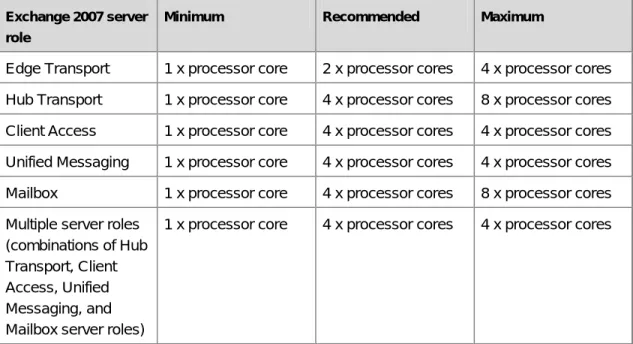
You can use Table 1 to assist you in purchasing server hardware for Exchange 2007. The table provides viable processor configurations for Exchange 2007. This table provides minimum requirements, recommended requirements, and recommended maximum configurations.
Note:
The following guidance assumes an average concurrency profile. Concurrency is defined as the percentage of the total number of users on a server that are
connected and using the server at a specific peak period of time. For a fully utilized server, concurrency is generally in the 75 to 80 percent range.
The following describes the minimum requirements, recommended requirements, and recommended maximum configurations:
• Minimum
•
This is the minimum processor and memory configuration suitable for specific server roles. The minimum hardware requirements must be met to receive support from Microsoft Support Services.
Recommended
•
This is the recommended processor and memory configuration for specific server roles. Recommended is defined as the best configuration based on price and performance. The recommended configuration also provides a balance between processor and memory capacity. The goal is to match the memory configuration to the processor configuration so the system will effectively use the processors without becoming bottlenecked on memory and vice versa.
Maximum
Table 1 Processor configurations for Exchange 2007 server roles
This is the maximum recommended processor and memory configuration for specific server roles. Maximum is defined as "the upper bound of viable processor and memory configurations based on price and performance." The recommended maximum configuration is a guideline; it is not a support criterion, and it does not take into account the resource requirements of third-party applications that might access or be installed on the server. The recommended maximum configuration may change over time based on price changes and technology advancements.
Exchange 2007 server role
Minimum Recommended Maximum
Edge Transport 1 x processor core 2 x processor cores 4 x processor cores Hub Transport 1 x processor core 4 x processor cores 8 x processor cores Client Access 1 x processor core 4 x processor cores 4 x processor cores Unified Messaging 1 x processor core 4 x processor cores 4 x processor cores Mailbox 1 x processor core 4 x processor cores 8 x processor cores Multiple server roles
(combinations of Hub Transport, Client Access, Unified Messaging, and Mailbox server roles)
1 x processor core 4 x processor cores 4 x processor cores
Note:
Ratings available at
processors/server configurations. The third-party Web site information in this topic is provided to help you find the technical information you need. The URLs are subject to change without notice.
Edge Transport Server Role
The Edge Transport server role is extremely efficient in design and thus requires moderate processing power. In addition, organizations requiring fault tolerance will deploy multiple Edge Transport servers to provide redundancy. The recommended configuration of 2 x processor cores assumes a fault-tolerant deployment. Large organizations, with a substantial volume of inbound and outbound messages, will be able to use servers with 4 x processor cores to reduce the aggregate Edge Transport server count. Processor utilization is based on several factors such as: message rate, average message size, number of enabled transport agents, antivirus configuration, and third-party applications.
Hub Transport Server Role
The recommended configuration for the Hub Transport server role is 4 x processor cores in organizations where Hub Transport servers are deployed with several Mailbox servers and thousands of mailboxes. 8 x processor core servers can be efficiently used when the Hub Transport server is configured to use antivirus and anti-spam. Either 1 x or 2 x processor core configurations can be considered for organizations where there are not enough mailboxes or insufficient message traffic to warrant using a 4 x processor core configuration. Processor utilization is based on several factors such as message rate, average message size, number of enabled transport agents, antivirus configuration, and third-party applications.
Client Access Server Role
Exchange 2007 architecture has moved most of the client-specific functions from the Mailbox server to the Client Access server. In Exchange 2007, messages are converted on the Client Access server when they are accessed by a non-MAPI client (for example, POP3 and IMAP4 clients). In addition, rendering for Microsoft Outlook Web Access is performed on the Client Access server, as opposed to the Microsoft Exchange Information Store in previous versions of Exchange Server. These architectural changes allow the Client Access server to offload significant processing from the Mailbox server and enable the Client Access server to effectively utilize 4 x processor cores. Servers with either 1 x or 2 x processor cores can be utilized for Client Access servers in organizations where there are not enough mailboxes or insufficient non-MAPI client traffic to warrant using 4 x processor core servers.
Unified Messaging Server Role
The recommended configuration for the Unified Messaging server role is 4 x processor cores. Multiple cores are used on the Unified Messaging server for several architectural functions such as .wav to Microsoft Windows Media® Audio (WMA) conversions for voice mail
messages. Servers with either 1 x or 2 x processor cores can be used for Unified Messaging servers in organizations where there are not enough mailboxes or insufficient Unified
Mailbox Server Role
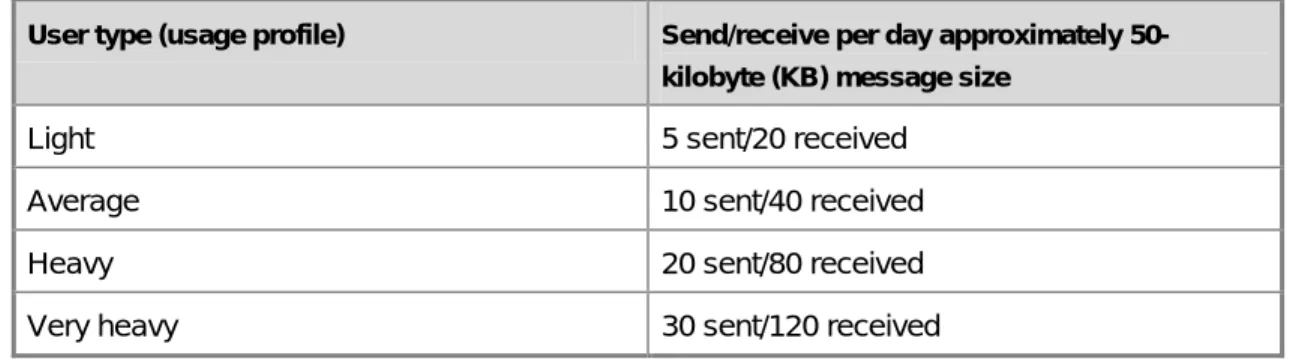
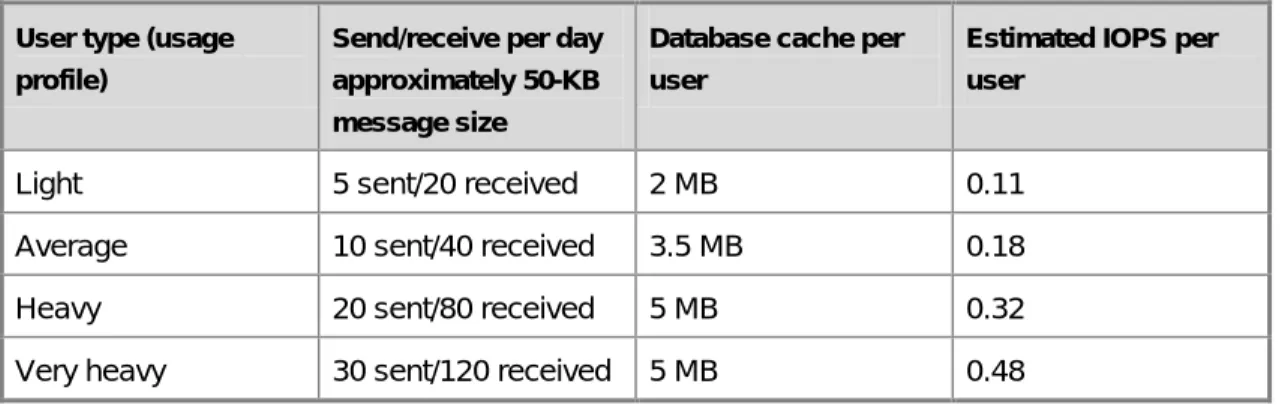
The recommended configuration for the Mailbox server role is based predominantly on mailbox count and user profile. A 4 x processor core server provides a good balance between price and performance, and should be able to host several thousand mailboxes. Sizing for the Mailbox server requires an understanding of the average client user profile. This profile can be collected using the Microsoft Exchange Server Profile Analyzer or by using third-party tools. For more information, see t Table 2 lists generic and common knowledge worker profiles for Microsoft Outlook clients. Table 2 Knowledge worker profiles for Outlook users
User type (usage profile) Send/receive per day approximately 50-kilobyte (KB) message size
Light 5 sent/20 received
Average 10 sent/40 received
Heavy 20 sent/80 received
Very heavy 30 sent/120 received
There are several factors to consider when sizing Mailbox servers other than the user
types listed earlier. These include Mailbox servers that use Exchange 2007 features
such as local continuous replication (LCR), and Mailbox servers that are accessed by
Microsoft Forefront Security for Exchange Server, third-party applications, mobile
devices, and online (versus Cached Exchange Mode) Outlook clients. Sizing used
primarily for budgeting purposes can be accomplished by assuming that 1,000
average mailboxes will require a 1 x processor core. (For example, a 4,000-mailbox
server with an average usage profile requires 4 x processor cores). A heavy usage
profile requires more processor cycles than an average profile. Therefore, for
planning purposes, use 750 active heavy profile mailboxes per processor core. For
example, a 6,000-mailbox server with a heavy profile requires an 8 x processor core
server. The maximum number of processor cores efficiently used by the Mailbox
server role is eight. Deploying mailboxes on servers with more than eight cores will
not provide significant scalability improvements.
Processor Recommendations for Local Continuous
Replication
In a local continuous replication (LCR) environment, both the active copy and passive copy of LCR-enabled storage group are on the same server. In this environment, there is additional processing overhead generated from the Replication service copying and replaying in logs to the passive copy of the database. This additional processing overhead is approximately 20 percent and should be factored in when sizing Mailbox servers that have one or more storage groups enabled for LCR.
Multiple Server Roles
The multiple server role configuration has guidance similar to the Mailbox server role. To accommodate the Client Access and Hub Transport server roles on the same server as the Mailbox server role, reduce the 1,000 mailboxes per core calculation based on the average client profile by 20 percent (800 mailboxes per core) when performing sizing. The maximum recommended processor core configuration is listed at 4 x processor cores for the multiple server role configuration to indirectly provide guidance on the maximum number of users that should be hosted on a multiple role server. Neither cluster continuous replication (CCR) nor single copy clusters (SCC) support hosting the Hub Transport or Client Access server roles in a failover cluster, so the multiple role server is non-clustered. It is a good idea to cluster Mailbox servers that host thousands of mailboxes to make sure that server maintenance or failures do not have a significant impact on uptime or availability. For this reason, the recommended maximum processor core configuration for the multiple role server is listed at four. Although this configuration can use up to eight processor cores, we do not recommend this configuration due to availability concerns.
Recommended Memory Configurations
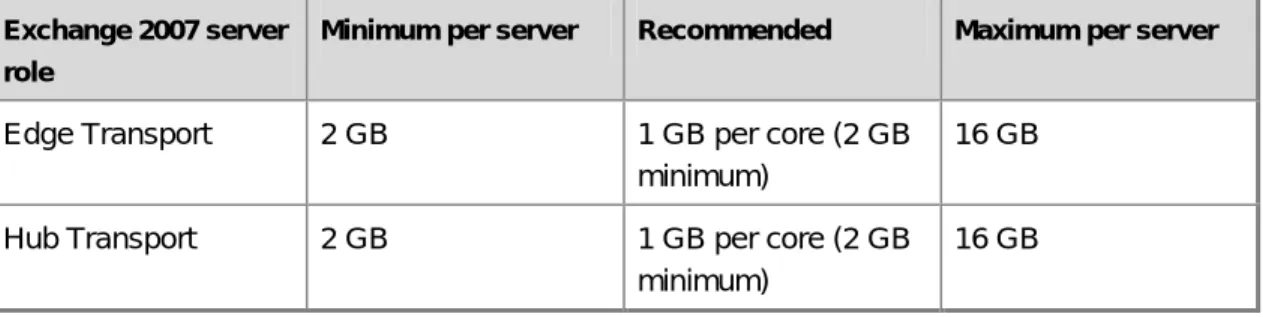
After the number of processor cores estimated to be required per server role is understood, baseline memory recommendations can be applied. Table 3 illustrates the Minimum, Recommended, and Maximum memory configurations for Exchange 2007 server roles. Table 3 Memory configurations for Exchange 2007 servers based on installed server roles
Exchange 2007 server role
Minimum per server Recommended Maximum per server
Edge Transport 2 GB 1 GB per core (2 GB
minimum)
16 GB
Hub Transport 2 GB 1 GB per core (2 GB
minimum)
Exchange 2007 server role
Minimum per server Recommended Maximum per server
Client Access 2 GB 2 GB per core (2 GB
minimum)
16 GB
Unified Messaging 2 GB 1 GB per core
(2 GB minimum)
4 GB
Mailbox 2 GB; also depends
on number of storage groups (see below)
2 GB plus from 2 MB through 5 MB per mailbox. This is variable based on user profile. For more details, see "Table 5 Mailbox memory recommendations" later in this topic.
32 GB Multiple roles (combinations of Hub Transport, Client Access, Unified Messaging, and Mailbox server roles)
2 GB; also depends on number of storage groups (see below)
4 GB plus from 2 MB through 5 MB per mailbox. This is variable based on user profile. For more details, see "Table 5 Mailbox memory recommendations" later in this topic.
8 GB
Edge Transport and Hub Transport Server Roles
The Edge Transport and Hub Transport server roles do not require substantial quantities of memory to perform well in optimal conditions. Generally, 1 GB of RAM per processor core (2 GB minimum total) is sufficient to handle all but the most demanding loads. The
recommended maximum memory configuration of 16 GB is based on the Edge Transport and Hub Transport servers handling one million messages with an average number of recipients each. Most deployments will be optimally configured with the recommended memory configuration of 1 GB per processor core (2 GB minimum total).
Two significant memory factors that should be taken into account for large deployments are large queue scenarios, and Edgesync memory requirements.
Exchange 2007 Edge Transport and Hub Transport servers are designed to handle scenarios where extremely large queues build up (for example, 1 million messages in a single server queue). These servers hold the queued message recipient information in memory to optimize sending and retry operations. Use Table 4 when sizing Edge Transport or Hub Transport servers for large queue scenarios.
Table 4 Memory overhead for large queue scenarios
Memory factors per queued message Memory consumed
Per message overhead 3 KB
Per recipient overhead 1 KB
EdgeSync is a process that synchronizes directory information between Edge Transport servers and Hub Transport servers that are in the same Active Directory site. All Hub Transport servers keep EdgeSync directory information in memory to facilitate pushing this information to the Edge Transport servers. The amount of memory used is determined by the number of mail-enabled objects in the directory (for example, recipients and distribution lists). Each mail-enabled object causes approximately 4 KB of memory to be consumed by the EdgeSync process.
EdgeSync Memory Requirements
The “Recommended” memory configuration for Hub Transport servers is targeted at non-enterprise deployments. Organizations with tens of thousands of mail-enabled objects should understand the EdgeSync memory overhead and size their Hub Transport servers
appropriately.
Client Access Server Role
In general, memory utilization on Client Access servers has a linear relationship with the number of client connections and the transaction rate. Based on the current
recommendations for processor and memory configurations, a Client Access server will be balanced in terms of memory/processor utilization, and it will become processor-bound at roughly the same time it becomes memory-bound. For the majority of deployments, 8 GB (2 GB per processor core) is sufficient and recommended for Client Access server operations. Large scale deployments, especially those with Outlook Anywhere as the primary client access method, should consider using 2 GB per processor core.
The recommended maximum amount of memory per server for Client Access servers is 16 GB. This recommendation is made because the Client Access server only proxies Outlook client requests to the Mailbox server, and the memory footprint per client connection is much more of a factor than the processor utilization per connection.
Mailbox Server Role
The memory configuration process for the Mailbox server role is more complex than the other roles because the optimal memory configuration depends upon the mailbox count and the client profile (similar to estimating processor core requirements). Memory sizing for the Mailbox server role is critical to reducing disk I/O on the server. The more memory you add to the Mailbox server, the less disk I/O that will be generated by Exchange. There is, however, a point of diminishing returns at which adding memory to the server may not be justifiable based on price and performance. The memory recommendations outlined in this section consider this point of diminishing returns, and are based on current memory prices and performance metrics.
Defining the memory configuration of a Mailbox server is required prior to defining the storage requirements and configuration for that server. You can use Table 5 to estimate the memory requirements of a specific Mailbox server with a specific number of hosted mailboxes and with a specific profile type.
Table 5 Mailbox memory recommendations
User type Mailbox memory recommendation
Light 2 GB plus 2 MB per mailbox
Average 2 GB plus 3.5 MB per mailbox
Heavy 2 GB plus 5 MB per mailbox
Recent x64-based servers have the ability to scale their memory configuration to 64 GB and beyond. There are several reasons why we do not recommend maximum memory
configurations beyond 32 GB for Mailbox servers, including cost, the impact of non-transactional disk I/O, and cold state operations:
Recommended Maximum Memory Configuration for Mailbox Servers
• Cost
•
Based on current memory prices, specifically the current average price of 4-GB dual in-line memory modules (DIMMs), it is cost-prohibitive to install more than 32 GB on a single Mailbox server. Generally, the cost of physical RAM is linear up to 32 GB. Beyond 32 GB, the cost trend is exponential, and for many configurations, it is less expensive to add disk drives instead of memory.
Non-transactional disk I/O The Mailbox server utilizes additional physical RAM by caching more data, which reduces the database disk I/O footprint for transactional disk I/O (I/O that is generated by client activity). There are several sources of
non-transactional disk I/O on the Mailbox server. These include online maintenance (for example, online database defragmentation); offline maintenance (for example, offline database defragmentation, or database repair operations); backup, restore, or recovery operations; and mailbox management operations. All of these operations require disk I/O to properly maintain the server. Although Exchange 2007 has reduced transactional I/O
significantly, adequate storage performance is still required for proper maintenance of the Mailbox server. For this reason, there is a point of diminishing returns when adding memory to the server. In general, the purpose of adding memory to the Mailbox server is to reduce the disk I/O requirements, which in turn reduces the overall cost of the storage solution. Due to non-transactional I/O requirements, the storage requirements of the server may not be significantly reduced by adding more than 32 GB of memory.
• Cold state operation
Although the Mailbox server role will utilize memory greater than 32 GB, for the reasons outlined earlier, 32 GB is the maximum recommended memory configuration and is considered the point of diminishing returns in terms of both cost and performance.
Cold state is defined as the state of the Mailbox server
immediately following a server restart or a restart of the Microsoft Exchange Information Service. The database cache, which is used to cache read/write operations, is small in size (cold) during this period, so it has a significantly diminished ability to reduce read I/O operations. As the Mailbox server processes messages, the database cache size grows, increasing the effectiveness of the cache and subsequently reducing disk I/O on the server. The more physical memory in the server, the longer it takes the database cache to reach its optimal size. If the storage solution is designed and sized for a server with a large amount of physical RAM (greater than 32 GB), and the disk I/O profile of the users assumes an optimal database cache state (for example, a large, warm cache), the client experience may be compromised due to insufficient disk performance during the cold state periods. Similar to the issue of non-transactional I/O, the storage requirements may be the same for a server with 32 GB of memory as a server with more than 32 GB of RAM.
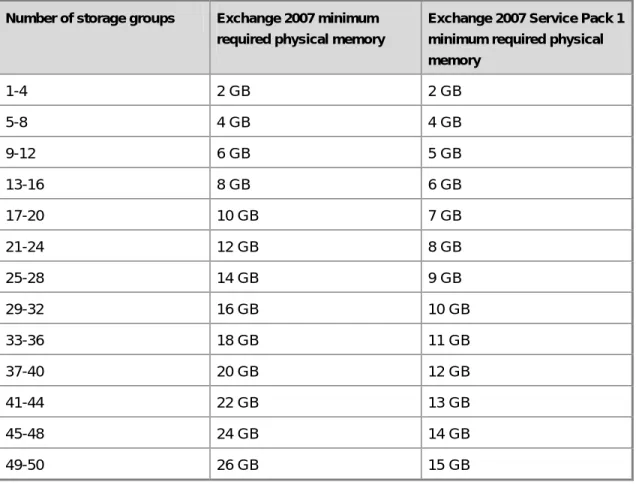
In Exchange 2007, the maximum number of storage groups per server has been increased to 50 (up from 4 in Exchange Server 2003). This increase provides much greater flexibility in server and storage architecture, but this increase also has a significant effect on the memory utilization of the Mailbox server. Increasing the number of storage groups primarily affects the utilization of the database cache. The database cache is used for both read and write activity. Due to the way checkpointing works, adding a storage group increases the amount of the database cache used for write activity. This has a positive impact of reducing database write I/O, but if too many storage groups are configured on a server with insufficient physical memory, the effectiveness of the database read cache may be reduced. This can have an overall negative effect on the performance of the server. For this reason, it is important to maintain a ratio between the number of storage groups and the amount of physical memory in the server. Table 6 identifies the specific minimum memory requirements per server, based on the number of storage groups on the server.
Recommended Minimum Memory Configuration for Mailbox Servers based on Number of Storage Groups
Table 6 Minimum memory required based on number of storage groups
Number of storage groups Exchange 2007 minimum required physical memory
Exchange 2007 Service Pack 1 minimum required physical memory 1-4 2 GB 2 GB 5-8 4 GB 4 GB 9-12 6 GB 5 GB 13-16 8 GB 6 GB 17-20 10 GB 7 GB 21-24 12 GB 8 GB 25-28 14 GB 9 GB 29-32 16 GB 10 GB 33-36 18 GB 11 GB 37-40 20 GB 12 GB 41-44 22 GB 13 GB 45-48 24 GB 14 GB 49-50 26 GB 15 GB
Table 6 augments the basic 2 GB minimum memory requirements for Exchange 2007. Mailbox and multiple role server configurations must meet the requirements listed in Table 6 to receive support from Microsoft.
The minimum physical memory requirements based on storage group listed in Table 6 count closely match our recommendations on memory sizing based on mailbox count and profile. To understand how these memory recommendations should be used, consider the following examples:
• Example 1: A 4000-user Mailbox server with a heavy user profile would calculate out to 22 GB of RAM (2048 MB + (4000*5 MB)). Based on the above support requirements, the server could support up to 44 storage groups. Additional RAM would be required to support more than 44 storage groups.
• Example 2: A 1000-user Mailbox server with a light user profile would calculate out to 4 GB of RAM (2048 MB + (1000*2 MB)). Based on the above support requirements, the server could support up to 8 storage groups. Additional RAM would be required to support more than 8 storage groups.
Memory Recommendations for Local Continuous Replication
In a local continuous replication (LCR) environment, both the active copy and passive copy of LCR-enabled storage group are on the same server. The Microsoft Exchange Replication Service will work well on server that has LCR enabled for one or more storage groups based on the provided memory guidance. However, to ensure that the ESE database cache maintains optimal efficiency in an LCR environment, we recommend that you install an additional 1 GB of RAM to Mailbox and multiple role servers (above and beyond the memory guidance listed above).Multiple Server Roles
Guidance and limitations similar to the Mailbox server role apply to multiple server role configurations. To accommodate the Client Access and Hub Transport server roles on the same server as the Mailbox server role, the recommended base memory configuration is 4 GB. Memory guidance based on mailbox count and profile is the same as the Mailbox server role. The recommended maximum amount of memory is 8 GB.
Neither CCR nor SCC supports hosting the Hub Transport or Client Access server roles in a failover cluster; thus, a multiple role server is non-clustered by definition. It is a good idea to cluster Mailbox servers that host thousands of mailboxes to ensure that server maintenance or failures do not have a significant impact on uptime or availability. For this reason, the recommended maximum memory configuration for a multiple role server is 8 GB. Although more memory is supported in this configuration, it is not recommended due to availability concerns.
The minimum memory requirements based on the number of storage groups listed in Table 6 apply to multiple role server configurations, including configurations that contain the Mailbox server role.
Server Role Ratios Recommendations
After you have determined your optimal processor and memory configurations, you should determine how many server roles of each type are required for your deployment. Every environment is different, so consider these recommendations as starting points that can be tailored to your environment.
These recommendations are based on the internal deployment of Exchange 2007
at Microsoft. Table 7 details the characteristics of the Microsoft messaging environment. For more information about the Microsoft messaging environment, se
Table 7 Characteristics of the Microsoft messaging environment
User profile Heavy to very heavy
Primary client (Weekday working hours) Outlook 2003/2007 Cached Exchange Mode (MAPI/RPC)
Primary after hours/weekend clients Outlook 2003/2007 Cached Exchange Mode (RPC/HTTPS) and Outlook Web Access Percentage of user base using
Exchange ActiveSync
25%
Table 8 shows recommended server role ratios that are based on the processor core guidance in this topic because it is common for roles to have vastly different processor core counts. Also, the Mailbox server role is the basis for the processor core ratios. Hub Transport and Client Access roles relate to the Mailbox role with regard to the recommendation.
Note:
Ratings available at
processors/server configurations. The third-party Web site information in this topic is provided to help you find the technical information you need. The URLs are subject to change without notice.
Table 8 Recommended server role ratios based on processor core
Role ratio Recommended processor core ratio
Mailbox:Hub 7:1 (no antivirus scanning on Hub)
5:1 (with antivirus scanning on Hub)
Mailbox:Client Access 4:1
When considering these recommendations, be aware of the following:
• The above ratios are “rule of thumb,” and they may not be valid for every topology. Rule of thumb means that the ratios are not a requirement for support or a hard and fast rule.
• Ratios can change dramatically based on user profiles. A user that creates a larger than expected load against the Mailbox role than the Hub role will increase the Mailbox:Hub ratio; and vice versa.
• These recommendations are derived from the internal deployment of Mailbox servers at Microsoft, which is based on approximately 500 heavy users per processor core.
• These ratios assume that Mailbox servers are at greater than 60 percent processor utilization during peak periods, with corresponding processor utilization on Hub Transport or Client Access servers.
• For these recommendations, the processors used on Mailbox, Hub Transport, and Client Access roles were the same type and speed.
• A minimum of two Hub Transport and two Client Access servers should be deployed for redundancy and to ensure uninterrupted service in case of planned or unplanned server downtime.
• You can use the Exchange 2007 Management Pack for Microsoft Operations Manager 2005 SP1 and the Performance Troubleshooter in the Toolbox node of
the Exchange Management Console to determine if and when a given deployment requires additional server roles based on performance. These tools can also be used to fine-tune server role ratios for a specific deployment. For more information about the Exchange 2007 Management Pack, see Troubleshooter, s
• The Hub Transport ratio that includes antivirus scanning was obtained using Forefront Security for Microsoft Exchange with five active scanning engines.
• The Client Access ratio includes using SSL for all access protocols.
It is not possible to provide a ratio for the Unified Messaging server role because its utilization is not directly tied to the Mailbox server role. For more information about Unified Messaging server capacity planning, s
Edge Server Count
To determine how many Edge Transport servers are required, you must measure or estimate the following metrics during peak periods:
• Connections/sec
• Messages/sec
• Avg. Message Size
Sizing is based on the number of connections and messages processed, with average message size being a secondary factor. Because every SMTP connection does not translate into an SMTP message, and because every accepted message will not survive antivirus and anti-spam scanning, it is very difficult to provide a simple sizing methodology based on message rate. Edge Transport server utilization depends on several factors that are unique to each organization.
Note:
A minimum of two Edge Transport servers should be deployed for redundancy and to ensure uninterrupted service in case of planned or unplanned server downtime.
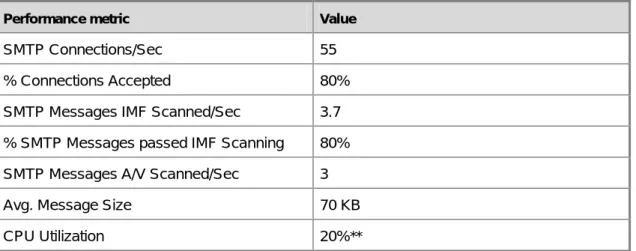
Table 9 provides performance data values for key metrics from internal deployment at Microsoft. You can use the metrics and their values to further your understanding of the performance characteristics of an Edge Transport server.
Table 9 Performance metrics from internal deployment of Edge Transport servers at Microsoft
Performance metric Value
SMTP Connections/Sec 55
% Connections Accepted 80%
SMTP Messages IMF Scanned/Sec 3.7 % SMTP Messages passed IMF Scanning 80% SMTP Messages A/V Scanned/Sec 3
Avg. Message Size 70 KB
CPU Utilization 20%**
** System included a 2-socket, dual-core AMD Opteron 275 2.2 Ghz processor
A significant percentage of the server processing can be associated with the overhead of analyzing connections and scanning accepted messages. For this reason, it is not possible to provide a sizing metric based solely on the number of messages sent and received per second because antivirus and anti-spam are significant processor utilization functions of the Edge Transport server role.
Planning Disk Storage
As with all server applications, computers running Microsoft Exchange Server 2007 need to be deployed correctly with sufficient storage capacity and performance. Three of the most critical factors to consider are choice of processor, amount of memory, and selection of storage. This topic provides guidelines for selecting a storage configuration that provides good performance and a strong platform for Exchange 2007. For detailed guidance and recommended configurations for processor and memory, see Planning Processor and Memory Configurations
Capacity and performance are often at odds with each other when it comes to selecting a storage solution, and both must be considered before making a purchase. Generally, the decision involves the following factors:
• Making sure there will be enough space to store all of the data. Determining your
capacity needs is a relatively straightforward process. For more information about how to determine your capacity needs, see "Planning Disk Capacity" later in this topic.
• Making sure the solution provides acceptable disk latency and a responsive user
experience. This is determined by measuring or predicting transactional input/output (I/O) delivered by the solution.
• Making sure that non-transactional I/O has both enough time to complete and enough disk throughput to meet your service level agreements (SLAs).
The goal is to find a balance of these factors so that you can design the actual hardware solution for your servers.
Planning Disk Capacity
Having sufficient capacity is critical. When a database disk runs out of space, the database goes offline. When a transaction log disk runs out of space, it causes all of the databases in that storage group to go offline. Provisioning additional space is often difficult to do quickly, and performing offline compaction to reclaim space can take a long time. In most cases, running out of disk space results in an interruption of availability of one or more databases for a period of time that typically exceeds most recovery time objectives (RTO).
Database LUN Capacity
There are several data points that you will use to determine how to size a database logical unit number (LUN). In addition, there are other factors to consider. After all factors have been considered and calculated, we recommend that you include an additional overhead factor for the database LUN of 20 percent. This value will account for the other data that resides in the database that is not necessarily seen when calculating mailbox sizes and white space; for example, the data structure (tables, views, and internal indices,) within the database adds to the overall size of the database. For example, if after reading the following subsections, you determine that you need 120 GB, we recommend that you provision 144 GB, representing a 20 percent safety overhead for that storage group's database LUN.
Mailbox Quota
The first metric to understand is mailbox size. Knowing the amount of data that an end user is allowed to store in his or her mailbox allows you to determine how many users can be
housed on the server. Although final mailbox sizes and quotas change, having a goal is the first step in determining your needed capacity. For example, if you have 5,000 users on a server with a 250 MB mailbox quota, you need at least 1.25 terabytes of disk space. If a hard limit is not set on mailbox quotas, it will be difficult to estimate how much capacity you will need.
Database White Space
The database size on the physical disk is not just the number of users multiplied by the user quota. When the majority of users are not near their mailbox quota, the databases will consume less space, and white space is not a capacity concern. The database itself will always have free pages, or white space, spread throughout. During online maintenance, items marked for removal from the database are removed, which frees these pages. The percentage of white space is constantly changing with the highest percentage immediately after online maintenance and the lowest percentage immediately before online maintenance. The size of white space in the database can be approximated by the amount of mail sent and received by the users with mailboxes in the database. For example, if you have 100 2-GB mailboxes (total of 200 GB) in a database where users send and receive an average of 10 MB of mail per day, the white space is approximately 1 GB (100 mailboxes × 10 MB per mailbox).
White space can grow beyond this approximation if online maintenance is not able to complete a full pass. It is important that your operational activities include enough time for online maintenance to run each night, so that a full pass can complete within one week or less.
Database Dumpster
Each database has a dumpster that stores hard-deleted items. By default, items are stored for 14 days in Exchange 2007. These include items that have been removed from the Deleted Items
After the retention period has passed, these items will be removed from the database during an online maintenance cycle. Eventually, a steady state will be reached where your dumpster size will be equivalent to two weeks worth of incoming mail, as a percentage of your
database size. The exact percentage depends on the amount of mail deleted and on individual mailbox sizes.
folder. By default, compared with Exchange Server 2003, Exchange 2007 increases the overhead consumed by the database dumpster because deleted items are now stored for twice as long. The actual amount in the dumpster will depend on the size of each item and your organization's specific retention settings.
The dumpster adds a percentage of overhead to the database dependent upon the mailbox size and the message delivery rate for that mailbox. For example, with a constant message delivery rate of 52 MB per week, a 250-MB mailbox would store approximately 104 MB in the dumpster, which adds 41 percent overhead. A 1-GB mailbox storing the same 104 MB in the dumpster adds 10 percent overhead.
Actual Mailbox Size
Over time, user mailboxes will reach the mailbox quota, so an amount of mail equivalent to the incoming mail will need to be deleted to remain under the mailbox quota. This means that