Martina P. Gargard. Comment Analysis using a Faceted Search Interface. A Master’s Paper for the M.S. in I.S degree. April, 2013. 33 pages. Advisor: Bradley Hemminger
This paper discusses using a hierarchical multi-faceted search interface for simple comment analysis utilizing the Interactive Comments in Schema (ICIS) tool. ICIS was developed at the University of North Carolina at Chapel Hill (UNC-CH) School of Information and Library Science (SILS) for viewing, exploring and sharing feedback comments from some UNC Libraries. It integrates a hierarchical faceted schema, search function and faceted filters for manipulating the retrieved dataset.
A research study was designed to evaluate ICIS's usability in exploring the comments, answering questions about the library services and assess if a faceted search interface is adequate for simple comment analysis. The study also compared the tool to a baseline search interface to evaluate the effects of its design over a simple search system. The findings show that all participants preferred ICIS and liked its flexibility of options in finding and viewing information. Overall performance was slightly better using ICIS.
Headings:
Interactive Comments in Schema (ICIS)
Faceted Search
by
Martina P. Gargard
A Master’s paper submitted to the faculty of the School of Information and Library Science of the University of North Carolina at Chapel Hill
in partial fulfillment of the requirements for the degree of Master of Science in
Information Science.
Chapel Hill, North Carolina
April 2013
Approved by
_______________________________________
Table of Content
Introduction ... 3
Related Research ... 6
Faceted Search ... 6
Comment Analysis ... 8
Background ... 9
Method ... 14
Study Setup ... 14
Study Tasks ... 15
Results ... 16
Analysis ... 16
Average Time per Task ... 16
Average Accuracy per Task ... 17
Average Time per Participant ... 18
Average Accuracy per Participant ... 19
Average Task Difficulty... 19
Facet Usage ... 20
System Usability Scale (SUS)... 22
System Preference and Comparison ... 22
Limitations ... 28
Conclusion ... 29
Introduction
The information age has overwhelmed us with a wealth of information in various
forms and applications. There has been a shift towards more electronic information
systems as they have made it convenient to share, view, find and analyze information.
These systems are created to support data from endless sources including user surveys,
clinical research, student information, library systems and commercial inventory. We
have advanced from mere desktop computer access to such systems, and now have to
support various mobile devices and their specific browsers, resolutions and underlying
technologies. The proliferation of these electronic applications and users' needs have
created the necessity to improve user interface presentation beyond standard navigation
and the simple search box.
Similarly, this need for a flexible presentation of information and access by
various users led to the development of the Interactive Comments in Schema (ICIS) tool,
as a means of sharing survey comments of patrons’ perceptions of some UNC libraries
and their services. This visual online tool was developed with a hierarchical faceted
schema based on the coding/classification of the feedback comments, and faceted
classification of the various library services and comment types. ICIS would enable
librarians to easily evaluate the feedback about their libraries. Ultimately, it gives a
picture of how the libraries are performing, indicating issues and concerns that patrons
the libraries (Pulley, 2007). A user study was designed to determine if ICIS did meet
these expectations and if such faceted interfaces can be used for simple comment
analysis.
Faceted classification is a means of organizing information as it "decomposes
compound subjects into foci in component facets, offering expressive power and
flexibility through the independence of the facets" (Tunkelang, 2009). This classification
is based on attributes, categories, functions or other aspects that are essential to the
underlying data and its presentation (La Barre, 2007). The developed facets are isolated
groupings of the same data and should serve the purpose for which it was created
(Hjorland, 2013). Faceted categories are used to guide users as they navigate a data
domain, aiding them in data discovery and reducing query reformulation (Kules, 2009).
This classification can be hierarchical, nesting data points into levels of categories under
broader concepts based on similarities like function, purpose and composition.
Faceted search interfaces use facet categories to group and present information,
allowing users to “evaluate and manipulate the result set”, making it easier for them to
explore the data (White, 2009). In cases where a faceted search interface integrates
hierarchical categories, search function and result filters, users have more options to
search and retrieve information from the collection. When using keyword search in such
a system, a user can further narrow his/her results using the faceted organization; this
eliminates dead ends and empty result sets, allowing the user to find only relevant
information (Tunkelang, 2009). As users navigate a hierarchical facet, the system "builds
up a complex query over subcategories" (White, 2009), saving time and effort as users
The combination of a hierarchical schema, faceted filters and search feature
provides users with many paths to the underlying data, and renders ICIS as what is often
called a "hierarchical multi-faceted search interface" (Hearst, 2006). Generally, facets
have been a good enhancement to search interfaces, giving an overview of the dataset and
presenting clear and concise categories to the users. Its implementation in ICIS adds the
benefits of faceted classification to the system and takes faceted search a step further than
shopping and finding materials in a library catalog.
Findings from this study prove that ICIS is appropriate for comment analysis, and
faceted search interfaces can be used in more instances than library catalogs or
ecommerce systems. The tool was preferred over a plain text file containing the same
comments, and offered users different methods to filter and manipulate the retrieved
comments. Overall, users performed better in ICIS but there was not a huge difference in
Related Research
Faceted Search
Previous research studies on faceted search interfaces have shown that facets can
"improve the search experience, encourage browsing, is flexible, preferred by users in
most cases, easy to use and can increase task accuracy" (Fagan, 2010). It creates an
awareness of the collection (Yee, 2003) and aids users in narrowing their searches and
focusing on a specific category that is useful for a given task (Olson, 2007). The two
main methods used in studies of faceted search interfaces are large-scale log analysis and
comparative user studies; with log analysis utilizing logs of users' search sessions of
specific tasks to determine which elements were used, and comparative user studies
comparing interfaces using various measures like time on task and user satisfaction
(Kules, 2009).
Results from these studies have shown the benefits and challenges of faceted
interfaces. When a facet is used for both browsing and refining of a search result, its
usage improves as compared to an implementation that only refines the result set of a
keyword search (Nui, 2010). Hence there is more value to a faceted classification that
allows browsing without the need for keyword search and modifies the result set after a
text search. Users also preferred the faceted interface since it was easier to use and
the faceted interface for studies that compared such interfaces to baseline, cluster or
ranking tools (Fagan, 2010).
The literature indicates that time-on-task can be less for a faceted interface as
compared to that of a baseline search system. Uddin and Janacek compared faceted and
traditional search retrieval interfaces, finding that participants spent less time and found
more relevant results using the faceted interface (Fagan, 2010). More significantly, task
accuracy is higher for faceted interfaces as compared to standard search systems. Results
from Marchionini and Zhang’s usability study of a faceted search system (Relation
Browser) against a baseline search interface showed that users performed better in the
Relation Browser and the baseline system had significantly higher error rate (Zhang,
2005).
Regardless of users’ general preference for faceted systems, there have been
instances where users have found the faceted interfaces overwhelming (Yee, 2003).
When there are a lot of categories in a flat facet classification, or hierarchy with several
nodes and levels, users are likely to get lost and miss some information. User interaction
with facets also increases if the facets adequately describe the data and has multiple
functions (Nui, 2010). Generally, users like the simplicity and flexibility of faceted
systems, as they are easily adaptable in guiding the user and subsequently increasing task
Comment Analysis
Empirical studies of comment analysis are not common, but this process is
often done using different mechanisms depending on the users and institution. With many
of today's companies, institutions and governments having online representations, we
have seen an increased need for user feedback on how these entities are performing.
There are online surveys, contact us forms and other methods to solicit feedback on
organizational performance and user satisfaction. Data collected from these sources as
open-ended responses have to be presented in a form that makes it easy to view and
analyze. Often times, such data is coded in order to classify and analyze it. Examples of
such cases are the classification of the comments used in ICIS (Pulley, 2007), and the
coding of comments from the perception survey evaluating the UK government online
tax submission site (Barnes, 2005). Although coding enables the organization to
understand users perception, it needs a user interface geared to0wards presenting that
information in a way that makes it easy to view, explore and analyze. With no standard
guidelines for comment analysis interfaces, we are left with commercial systems like
Public Comment Analysis Toolkit (PCAT) and Wordstat with different coding and
Background
During the spring of 2005, a user satisfaction survey evaluating the UNC Biology,
Chemistry, Health Sciences and Math and Physics libraries was conducted, soliciting
feedback from academic scientists who were patrons of these libraries. Survey questions
included 25 closed-ended questions and 3 open-ended questions. The closed-ended
questions were aimed at understanding how these academic scientists used the libraries to
find information (Hemminger, 2007). The open-ended questions asked for the positive
aspects of the libraries, the negatives or shortcomings of the library services, and
wish/improvements that users wanted for the future. The goal of these questions was to
allow the scientists to evaluate the library services and help the libraries to determine if
they were meeting the needs of their patrons (Pulley, 2007). Hence, the open-ended
results would reveal areas of the libraries that were successful, problems that patrons had
encountered, aspects that needed improvements and help in overall planning and
decision-making.
A total of 1365 open-ended comments were received from the survey. Of these,
648 were positive or successes of the libraries, 574 were negative or shortcoming of the
libraries and 544 were wish requests for the libraries (Pulley, 2007). These comments
were analyzed, coded and classified based on related aspects of the library services.
Considering the volume of responses, it was inefficient to evaluate, analyze or share the
comments by simply printing them out. The ICIS tool was created using the coded
and libraries (Biology, Chemistry, Health Sciences, Math & Physics), and a search
function as a novel means of displaying and exploring the survey results.
ICIS combines the hierarchical coded schema for browsing with search
functionality and facets for filtering the retrieved data. It allows users to drill down a
category or view all comments retrieved for the selected settings or search criteria. The
comment count is displayed for and within each level of the schema, so a user knows
how many have been returned. These functions make it more efficient for quick comment
analysis, as a librarian using the system can look at comments related to a specific
library, a subset of a library service, or search for comments with a particular keyword.
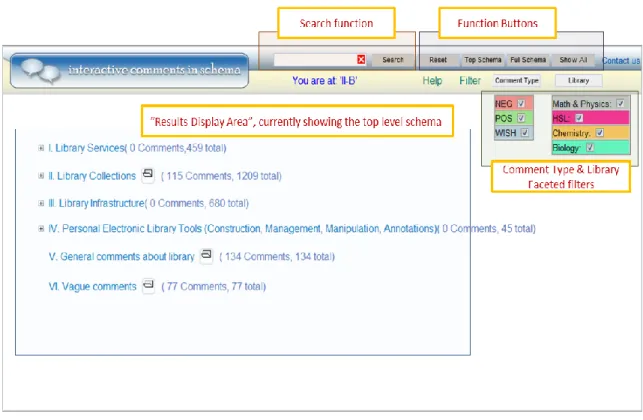
The default ICIS interface is shown below.
Figure 1: ICIS Default View
The default ICIS interface shows the hierarchical faceted schema and the faceted
node (## Comments) and within each category (## total). Users can drill down the
schema and view comments at the various levels. They can also filter the comments in
the schema using the Comment Type filter, Library filter and/or a keyword search. This
study focused on the first four categories of the schema as these were specifically related
to the library services and thus coded accordingly. The function buttons allow the user to
do the following:
Reset: resets to the default interface, clearing selected filters and search terms.
Top Schema: displays the collapsed schema with its default comments, but maintains user filters.
Full Schema: expands all categories of the hierarchical schema.
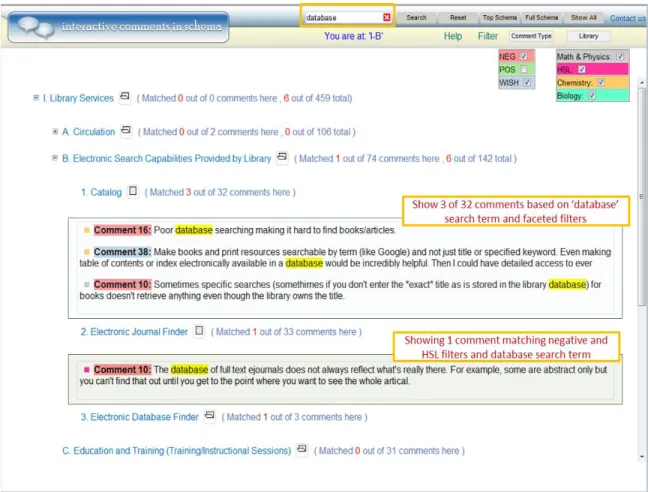
Figure 2: ICIS showing comments in the schema based on selected facets and search term
The above view shows comments in the Library Services -> Electronic Search
Capabilities Provided by Library -> Catalog subcategory, and Library Services ->
Electronic Search Capabilities Provided by Library -> Electronic Journal Finder
subcategory based on the selected faceted filters and search term. The comment count is
updated to show how many were found at each node and within each category of the
schema. The search term is highlighted in the results for easy recognition and the
comments are color coded to match the Comment Type and Library filters. This
expanded view shows that users will have to scroll for comments in other categories and
subcategories of the schema. The ICIS tool is publicly available, and can be accessed at
The comments received from the survey were also put in a PDF file as a baseline
search interface to compare with ICIS. The PDF format was chosen because of it is a
commonly available operating system independent format that supports high quality
display of the document and easy to use search functions (via ^F). This file is referred to
as the Plain Text Comments in this paper. The comments were divided into positive,
negative and wish sections with bookmarks pointing to the beginning of each section.
There was no other organization to the file and analyzing comments in this system meant
users could search or scroll beginning with a given section. The Plain Text document had
a total of 105 pages of comments.
In order to test the usability of ICIS and determine if it is efficient and can be used
for comment analysis, the two systems were used in this study where users performed
various tasks exploring the coded data with the aim of understanding:
Can a faceted search interface be used for simple comment analysis?
Method
The study comparing ICIS to a baseline search interface had users perform
comparable tasks in both systems using the same underlying feedback comments. This
was a between-subject and within-subject study of 12 participants performing search and
exploratory tasks in both systems. This setup enabled us to evaluate the usability of ICIS
and compare it to a system that can be used for simple comment analysis.
Study Setup
This study included 13 graduate students from the UNC School of Information
and Library Science including Information and Library Science majors. The final study
data excludes data from one participant; hence the data analysis is based on what was
collected from 12 of the participants. These participants were given general training on
both systems, and system specific training before beginning the tasks for a given system.
They were asked to perform 6 comparable tasks in each system. The time on task,
responses, faceted schema/faceted filter/search function usage and task difficulty were
recorded for each task scenario. Participants also completed a System Usability Scale
(SUS) questionnaire for each system and a brief survey asking which system they
preferred and a comparison of the two systems. The time-on-task was recorded for each
Study Tasks
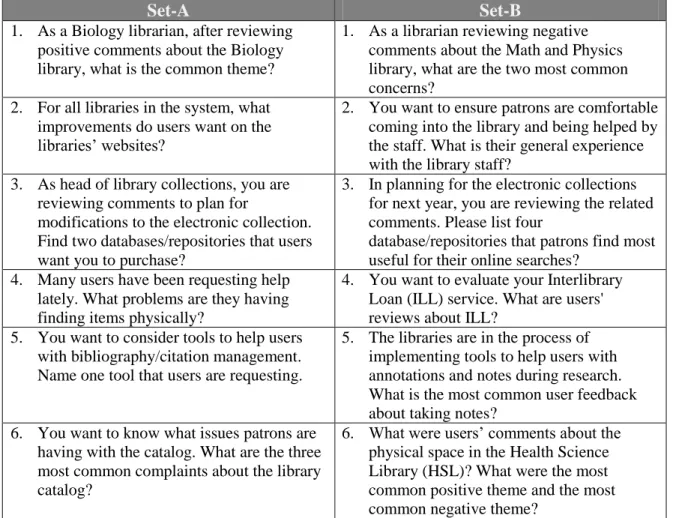
Two sets of six comparable tasks were created for the study. Participants
performed 6 tasks in ICIS and 6 tasks in a plain text document. The study design had two
counterbalanced groups of 6 participants each; however, when implementing the study an
error resulted in 8 participants performing Set-A on ICIS and Set-B on Plain Text, while
the other 4 did set A on Plain Text and set B on ICIS. These tasks were based on likely
questions that a librarian would ask when reviewing comments from patrons of a library.
Some tasks were exploratory while others could be answered with a simple search. Below
is a list of all tasks from Set-A and Set-B.
Set-A Set-B
1. As a Biology librarian, after reviewing positive comments about the Biology library, what is the common theme?
1. As a librarian reviewing negative comments about the Math and Physics library, what are the two most common concerns?
2. For all libraries in the system, what improvements do users want on the libraries’ websites?
2. You want to ensure patrons are comfortable coming into the library and being helped by the staff. What is their general experience with the library staff?
3. As head of library collections, you are reviewing comments to plan for
modifications to the electronic collection. Find two databases/repositories that users want you to purchase?
3. In planning for the electronic collections for next year, you are reviewing the related comments. Please list four
database/repositories that patrons find most useful for their online searches?
4. Many users have been requesting help lately. What problems are they having finding items physically?
4. You want to evaluate your Interlibrary Loan (ILL) service. What are users' reviews about ILL?
5. You want to consider tools to help users with bibliography/citation management. Name one tool that users are requesting.
5. The libraries are in the process of implementing tools to help users with annotations and notes during research. What is the most common user feedback about taking notes?
6. You want to know what issues patrons are having with the catalog. What are the three most common complaints about the library catalog?
6. What were users’ comments about the physical space in the Health Science Library (HSL)? What were the most common positive theme and the most common negative theme?
Results
This section covers the data analysis and findings of the study results. The time on
task was recorded from the time a user clicked to begin a task, to the time the user
indicated that he/she was finished. The task accuracy was coded on a scale of 0 - 1. A
task was rated 1 if it was completed in full, fractions of 1 (0.25, 0.5, 0.75) for partial
accuracy and 0 if the answer was wrong or the participant gave up on the task without
giving the right answer. After each task, participants rated the task difficulty on a scale of
1 - 5 with 1 being very difficult and 5 being very easy. The usability questionnaires were
evaluated on a likert scale of 1 – 5. The System preference survey used a yes/no response
for user preference, and asked users for the pros and cons and improvements for each
system. The Facet Usage shows which methods (default facet, facet modification, search,
drill and show all) participants utilized in performing the given tasks in ICIS.
Analysis
Average Time per Task
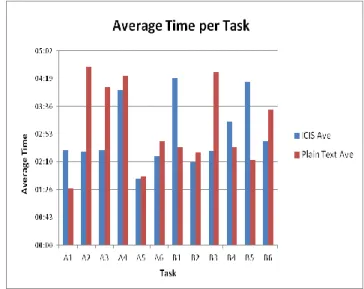
The average time per task for participants using the ICIS interface ranged from
1:44 to 4:20 which was very similar to the time per task for the Plain Text file, which was
from 01:29 to 4:29. Figure 3 shows a graph of the average time for each task in ICIS and
minutes, a few for ICIS and more for Plain Text stand out as asking 3 to more than 4
minutes. Except for A4, there is no indication or a clear conclusion that a task taking
up a long time in one system had
the same result in the other. The
overall average for ICIS was 2:53
per task and Plain Text at 3:04,
showing Plaint text taking a little
longer (0:11 seconds) per task. A
1-tailed T-test of unknown variance
for statistical significance on the
overall average time per task for
ICIS and Plain Text yielded a value of 0.32. This means there is not a statistical
difference between ICIC and PTS using a 95% confidence interval (0.05).
Average Accuracy per Task
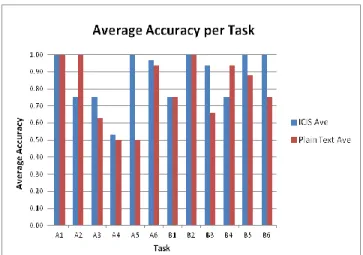
Figure 4 shows the average accuracy per task across all participants in both
systems. With task accuracy calculated on a range of 0 - 1, the graph displays a range of
0.5 to 1 for the given tasks. This indicates that users were able to find some or all of the
answers. Of the 12 tasks, the average accuracy was the same for three of them; in two
instances the Plain Text Comments had a higher accuracy than ICIS and for seven of the
tasks, ICIS had a higher accuracy than Plain Text. This distribution reveals that ICIS had
average of 0.80. A T-Test on the
average accuracy per task for both
systems yielded a P-value of 0.31,
indicating no statistical significance
difference in the average accuracy of
the two systems.
Average Time per Participant
The average time spent
on all tasks for each participant
in ICIS and Plain Text is
presented in Figure 5. Six
particpants spent more time on
ICIS while the other six spent
more on Plain Text.
Nevertheless, it is obvious that
most participants completed their tasks withing 3.5 minutes or less, with a few
participants taking more than 4 minutes especially in the Plain Text file. The range across
participants for ICIS was 3: 02 minutes and that of Plain Text was 5:23, with an overall
average of 2:47 for ICIS and an 3.01 for Plain Text. A T-Test for statistical significance
comparing the average time per participant in both applications had a p-value of 0.35. Figure 4: Average Accuracy per Task
Using a 95% confidence interval (0.05), the P-value illustrates that the average time per
participant in ICIS compared to Plain Text does not have statistical difference.
Average Accuracy per Participant
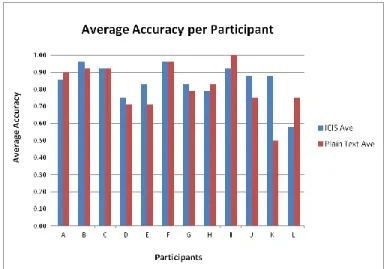
Evaluating the average accuracy for each participant across both systems shows
that participants found a lot of the answers with most having an average accuracy score
of 7 and above. For a breakdown, the graph in Figure 6 shows that two participants had
the same score for both systems,
four scored higher on the Plain
Text file and six did better on
ICIS. In spite of this distribution
there was not a wide range in the
average score between the two
systems for most participants.
The ICIS overall average for
participants was 0.85 and Plain Text was 0.81. A T-test shows no statistical difference
between the two systems at a P-value of 0.25 using a 95% confidence interval (0.05).
Average Task Difficulty
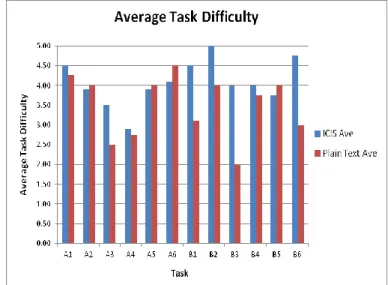
Analysis of the average task difficulty for each task in ICIS and Plain Text
of 1 point and above in ICIS as compared to Plain Text, but the other 7 tasks show
minimal differences in their ratings. Figure 7 shows the average task difficulty for both
systems with ICIS scores
between 2.9 and 5 and Plain
Text between 2 and 4.5. The
overall average task difficulty
for ICIS was 4.07 and Plain Text
was 3.49. A T-test for statistical
significance had a P- value of
0.03, meaning that there was a
statistical difference between
ICIC and PTS for task difficulty using a 95% confidence interval (0.05).
Facet Usage
In the Plain Text file, users were limited to search and scrolling, but ICIS's
faceted schema, facet filters and search functions afforded users more options in
performing the given tasks. These functions translated to 8 retrieval options available to
the users. They could drill the faceted schema in combination with the other methods or
just view all comments for the selected filters. These options and their definitions and
functions are:
Default facet: refers to the Comment Type and Library facet filters. By default, these are all selected.
Show All: this function button displays all comments that are retrieved based on the selected facet filters and search term. It prevents users from drilling the nodes of the
schema.
Search: comments were retrieved using a search term.
Drill: user is navigating the hierarchical schema.
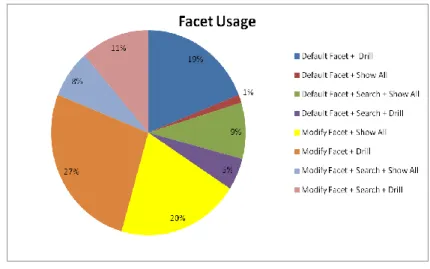
To answer questions, participants in most cases utilized a combination of the
individual actions
described above. These
combination sequences and
their frequency of use are
shown in Figure 7. Three of
the eight combination
sequences were used more
than the others: Modify
Facet+Drill (27%), Modify Facet + Show All (20%), Default Facet+Drill (19%). In
Modify Facet + Drill, users changed the default facet filters and navigated the schema for
results. Using Modify Facet + Show All, they changed the faceted filters and displayed
all comments to browse the result set. With Default Facet + Drill, participants did not
change the facet filters, but used only the schema to navigate to the results. Most
participants employed one method for a given task, while a combination of these methods
was used in a few instances. In only one instance was all of the comments in the system
displayed using the Default Facet + Show All.
System Usability Scale (SUS)
Results from the system usability scale showed that ICIS received higher usability
rating from participants for the study tasks compared to the Plain Text document. The
overall score was 72.08 for ICIS and 42.92 for the Plain Text file. The Plain Text score
reflects that the file was difficult to use and is not the best system for comment analysis.
Users had only the search and scroll functions, and although the comments were divided
into comment type (negative, positive, wish), search was not limited within a section and
some comments were out of context. As for the ICIS score, it shows that the system
worked well for many of the tasks, but also had some drawbacks. Some users thought the
schema was overwhelming since they had no experience with it. And without an easy
understanding of the schema, it was difficult to drill down several levels in the hierarchy.
Participants also said the system had a lot of white space and they sometimes didn’t know
where they were in the schema.
System Preference and Comparison
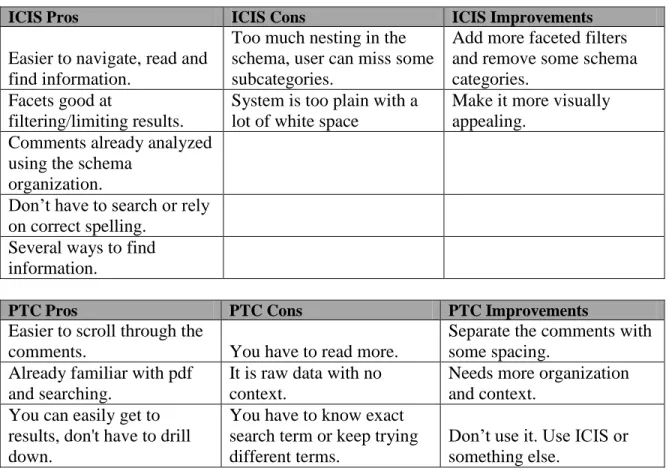
All 12 participants preferred ICIS to the plain text file. One possible reason was
that participants felt they achieved more accurate answers with the ICIS interface.
However, even participants that performed better in accuracy in the Plain Text system
still preferred ICIS. Participants stated that the facet and schema made it easier to
evaluate comments in ICIS, but the Plain Text file lacked the tools that would make it
appropriate for comment analysis. They indicated that there were more ways to view the
data using the schema and the facets, they could narrow their searches or look in specific
systems. They obviously liked ICIS and its many functions that made the comment
analysis tasks easier and faster.
ICIS Pros ICIS Cons ICIS Improvements
Easier to navigate, read and find information.
Too much nesting in the schema, user can miss some subcategories.
Add more faceted filters and remove some schema categories.
Facets good at
filtering/limiting results.
System is too plain with a lot of white space
Make it more visually appealing.
Comments already analyzed using the schema
organization.
Don’t have to search or rely on correct spelling.
Several ways to find information.
PTC Pros PTC Cons PTC Improvements
Easier to scroll through the
comments. You have to read more.
Separate the comments with some spacing.
Already familiar with pdf and searching.
It is raw data with no context.
Needs more organization and context.
You can easily get to results, don't have to drill down.
You have to know exact search term or keep trying different terms.
Don’t use it. Use ICIS or something else.
Discussion
This study was aimed at investigating if ICIS and such faceted interfaces can be
used for simple comment analysis, and how effective this interface would be over a
standard search interface. The major finding from this study is that faceted search
interface can be appropriate for simple comment analysis. Users were able to explore the
system, and answer questions for the given tasks. In comparison to a simple search
interface, ICIS was a little more effective for comment analysis. Although it provided
users with several means of finding information from the collection, ICIS overall average
time per task was merely 11 seconds less than PTC and the average accuracy was 0.07
more than PTC. There were not statistically significant differences between the two
systems when averaged across participants for average time to answer, and average
accuracy. There was a difference in usability, where the ICIS tool did score more (72.08)
than PTC (42.92). Users also indicated that the tasks were more difficult in Plain Text
than ICIS, and a T-test illustrated that there was statistical difference (0.03) in the
perceived difficulty of tasks between the two systems.
Descriptive analysis indicate that overall, participants spent a little less time on
ICIS than the Plain Text file, showing that the organization and facets helped them in
performing their tasks in a timely manner. The task accuracy was also higher for ICIS
with participants finding more correct information than the Plain Text file afforded.
Perceived task difficulty was higher for ICIS and it had an overall average 0.58 points
as they often felt they did not find all of the answers in the plain text file regardless of the
length of time spent on a task.
Analysis of the facet usage for ICIS shows participants used various methods
combining the facet filters with search and drilling the schema or showing/browsing all
comments. Users found it easier to use ICIS given that they could select or modify their
method for finding the desired information. The system was designed with faceted
browsing and refining, giving the user the option to find information without formulating
a query. They also liked the organization and grouping of comments in the schema as it
enabled them to focus on a given category. Although all of the methods were used, the
results show that users favored a combination of two functions like Default Facet + Drill
instead of the combination of three like Modify Facet + Search + Drill. The use of facets
in this system supports findings from previous studies which have found that users can
filter their search results, find relevant information and explore the information space.
Using the facet did not require a lot of training and users employed it whenever they
wanted to. They also employed different search strategies like using the comment count
or the related facet colors on the comments.
Although participants liked the organization of the schema, a few thought it was
overwhelming considering it is three levels deep with a total of 4 main categories and 50
subcategories at the second and third levels. In some cases users did not find the answers
because they were in the wrong category or unaware of the category that would have
their desired results. This issue meant the expanded schema sometimes caused the users
to be lost while navigating the system. Probably one of the ideal ways to utilize the tool
However, many participants did not use this combination of search and browse. When
using search, the results were in various subcategories with the comment counts
indicating where the results were. Some found this feature helpful as they knew where to
drill for the comments, however a few were confused by the number of comments and the
total comments for a given category or subcategory.
The lack of smart search feature like similar word search made it difficult for
users to find answers in the Plain Text file. They had to think of various versions of a
term that would be appropriate for keyword search. This was also an issue in ICIS as the
system supports only exact match keyword search. In this case participants had to rely on
terms used in the comments and if their search terms were not stated, they could not find
the right answers. There was no concept representation and some comments were out of
context in the Plain Text file, so it was difficult to know what they really meant or were
referring to. A comment like "great location and staff" would make sense in ICIS since it
is in the 'Library Infrastructure -> Building Space -> Access -> Convenience of location'
subcategory. It is also a positive comment for the Health Sciences Library, meaning a
participant can use the facets and filter the results to easily find this comment. In Plain
Text however, this comment might be in the Positive Comments section, but there is no
indication as to which library it is related to or how useful it is. This shows that a simple
search can be useful when aided by other features that provide contextual information as
a user might not always have the right keyword to lookup some information.
Overall, participants liked ICIS better as it allowed them to filter and view a
subset of the comments. They were able to learn the system and discover answers to other
where the answers were located in the schema. Exploring the dataset give them an idea of
the content in that they did not have to read every comment but could infer the general
Limitations
The limitation of this study is that it was not designed to compare two equal
interfaces for comment analysis. The ICIS system was designed to work with comments
that had been coded to a specific organizational system. The Plain Text System did not
have this and as a result direct comparison is like apples/oranges comparison. It is more
important to listen to the qualitative comments provided by participants. Comparing ICIS
to the plain text system did suffice for one of the aims of this research, which was to
evaluate the effectiveness of the ICIS interface, in order to determine where it would be
worthwhile to have available at UNC. The plain text system without any organizational
structure was inherently limited, and all participants found it lacking and incomparable to
ICIS. They in turn gave ICIS a 12 out of 12 ranking for preference as compared to a 0 out
of 12 for the plain text file. Moreover, we also see that the usability rating is higher for
ICIS since it has more functionality and features. A study design to evaluate how two
faceted interfaces support comment analysis will have more comparable results based on
the features and how those functions support comment analysis. In any case, a static
Conclusion
This paper reports on a research study intended to show that open comments can
be coded and a faceted interactive interface designed to handle them can be used
successfully for simple comment analysis. We encounter facets in library catalogs and
online shopping sites, allowing us to limit our search and retrieve only a desired subset of
the results. They show us an overview of the types of information in the underlying
system. Whether it is a link based facet used to navigate to a given dataset, or the
checkbox version allowing users to filter retrieved categories, we have become familiar
with facets and understand how they work. The Interactive Comments in Schema tool
combines facets with comment analysis, allowing users to easily evaluate the comments
in the system.
The results show that overall users were able to complete the comment analysis
tasks using both systems with ICIS performing better on average time, accuracy and task
difficulty. Users liked ICIS because of its flexibility and features that made it easier to
review the comments. The facet filters were especially helpful in narrowing comments
based on library and comment type while the faceted schema helped users in focusing on
a given category. The system was appropriate for simple comment analysis, and if used
by librarians in reviewing user feedback, they it will answer their questions about patrons'
References
Birger, Hjørland (2013) Facet analysis: The logical approach to knowledge organization.
In: Information Processing and Management. Vol 49. March 2013, S. 545-557.
Fagan J. C. (2010). Usability studies of faceted browsing: a literature review. Information
Technology & Libraries, 29 (2), 58-66.
Hearst, M. (2006). Design recommendations for hierarchical faceted search interfaces.
ACM SIGIR Workshop on Faceted Search.
Hemminger, B.M., Lu, D., Vaughan, K.T.L., & Adams, S. J. (2007). Information seeking
Behavior of Academic Scientists. Journal of the American Society for Information
Science & Technology, 58(14), 2205-2225.
Kules, B., Capra, R., Banta, M., and Sierra, T. (2009). What Do Exploratory Searchers
Look at in a Faceted Search Interface? In Proceedings of the 9th ACM/IEEE-CS
Joint Conference on Digital Libraries (JCDL '09), Austin, TX, June 15 - 19,
2009.
La Barre K. (2007). Faceted Navigation and Browsing Features in New OPACS: Robust
Support for Scholarly Information Seeking? Knowledge Organization, 34(2), 82.
Olson, T. A. (2007). Utility of a faceted catalog for scholarly research. Library Hi Tech
25. No. 4. 550-561.
Pulley, M. L. (2007). Analysis of Open-ended Question Responses Reporting User
Satisfaction with University Library Services Using an Interactive Visualization
Library Science of the University of North Carolina at Chapel Hill.
Tunkelang, D. (2009). Faceted Search. Synthesis Lectures on Information Concepts, Retrieval,
and Services. Morgan & Claypool.
White, R., and Roth, R. (2009). Exploratory Search: Beyond the Query-Response Paradigm.
Synthesis Lectures on Information Concepts, Retrieval, and Services. Morgan &
Claypool.
Yee, K.-, Swearingen, K., Li, K., & Hearst, M. (2003). Faceted metadata for image
search and browsing. Proceedings of the SIGCHI Conference on Human Factors
in Computing Systems.
Zhang, J. and Marchionini, G. (2005). Evaluation and Evolution of a Browse and Search
Interface: Relation Browser. In Proceedings of the 2005 National Conference on
Digital Government Research (Atlanta, Georgia, May 15-18, 2005). ACM
International Conference Proceeding Series, vol 89. Digital Government Research