AUSTRALIAN JOURNAL OF BASIC AND
APPLIED SCIENCES
ISSN:1991-8178 EISSN: 2309-8414 Journal home page: www.ajbasweb.com
Open Access Journal
Published BY AENSI Publication
© 2017 AENSI Publisher All rights reserved
This work is licensed under the Creative Commons Attribution International License (CC BY). http://creativecommons.org/licenses/by/4.0/
To Cite This Article: R. Idris, C.T. Hing, N.Harun, M.R. Othman., Development of Equation Oriented Modelling of Advanced Distillation Process Using MOSAIC: Dividing Wall Column Case study. Aust. J. Basic & Appl. Sci., 11(3): 30-42, 2017
Development of Equation Oriented Modelling of Advanced Distillation
Process Using MOSAIC: Dividing Wall Column Case study
R. Idris, C.T. Hing, N.Harun, M.R. Othman
Process Systems Engineering Research Group, Faculty of Chemical & Natural Resources Engineering, FKKSA, Universiti Malaysia Pahang, 26300 Gambang, Pahang, Malaysia
Address For Correspondence:
R. Idris, Process System Engineering Group, Faculty of Chemical & Natural Resources Engineering, FKSSA, Universiti Malaysia Pahang, 26300 Gambang, Pahang, Malaysia.
E-mail: [email protected]
A R T I C L E I N F O A B S T R A C T Article history:
Received 18 September 2016 Accepted 21 January 2017
Available online 26 January 2017
Keywords:
Equation oriented modeling; dividing wall column; fatty acid separation; MOSAIC
This paper presents the development of an equation oriented models of chemical processes using MOSAIC. MOSAIC is a web-based modelling software developed by Dynamic and Operation of Technical Plants of TU Berlin. It provides a new platform which can be used as an alternative to the current approach of modeling using programing languages. MOSAIC is particularly useful in developing custom models of process unit operation that is not readily available in sequential modular based process simulators. MOSAIC allow users to develop models, generate the models' code and translate the model into different environments i.e. gPROMS, Aspen custom Modeler (ACM), Matlab etc. To shows its efficiency, a dividing wall column (DWC) for oleochemical fatty acid (FA) fractionation were modelled. A step by step approach to the modelling using MOSAIC is shown. The results are in agreement with data from steady state simulation in Aspen Plus and indicate that MOSAIC is a good modelling environment tool. Furthermore, the modelling effort is made possible even without the knowledge of programming languages. In addition, a comparison with another modelling environment (gProms, ACM, C++, Fortran) is highlighted which is useful in aiding researchers to choose MOSAIC for any modelling works.
INTRODUCTION
In process system engineering (PSE), the necessity to develop and to solve the customized models found an excellent response and there are numbers of mathematical software modelling tools that support the programming of equation-based models. Yet, the study of the workflow of models development and implementation shows massive obstacle like reduction of modelling errors and programming efforts, the avoidance of errors and effort in documentation (Kuntsche et al., 2011). Modeling of chemical processes is usually done either using sequential modelling approach (SMA) or equation oriented (EO) programming. The former solves model block in the sequence given inlet streams. It is effective for large flow sheet, easy to use and user friendly. It is robust which ensure rigorous convergence and facilitate initialization step. Some examples are Aspen Plus, HYSYS, and Pro-II. Although the simulation can be done easily, it lacks in the transparency of equations systems involved and additional programming software such as Aspen Custom modeler (ACM) is needed to build customized equation oriented model (Stutzman et al., 1982).
a time-consuming process since it takes a long time to write the programming language and debug the model. A limited of supported language makes the model is only applicable in an environment that comprehend the programming language of the model, for other environments, the model cannot be reusable and hence need to be re-programmed from scratch which requires a lot of programming effort. A further cause of error when programming the model associated with the visual distinction within mathematical expression in documentation and the calculation expression in the program code (Kuntsche, 2011). Hence, a new modelling environment called MOSAIC is applied in this study to develop customized model.
MOSAIC (www.mosaic-modelling.de) is a web-based equation oriented modelling environment for modelling of chemical processes. It is designed for minimization of modelling errors and programming effort, avoid programming errors, enhance file documentation and encouragement of cooperative data storage and sharing. As explained in Kuntsche et al. (2011), one of the important features of MOSAIC is modelling at the documentation level. The model equations in the documents i.e. books, journals etc. can be written easily in MOSAIC using TeX code. TeX is widely common and could be used by most of all researchers and generated a graphical good readable output of equations. Using TeX, the documented equations in MOSAIC have the same readability as the documentation itself. Therefore, modelling of equations can be done even without knowledge of any programming language.
As an example, we prefer to read a symbolic two-dimensional form,
𝛼 ∙ 𝑏 = 3 ∙ ( 𝑐 + 𝑑)𝛽
Rather than one dimensional form of a programming language, Alpha*b = 3*pow (c + d, beta);
The uniqueness of MOSAIC compared with other software tools like Maple and MapleSim, which also allow collaborating with two-dimensional symbolic expression in this case is that, the variable names (refer figure 1) can contain a number of symbols that could be superscripted and subscripted (including several valued indices that may take a value or a range of value) (Kuntsche et al., 2011a).
In MOSAIC, modelling is done by creating objects separately. These objects include notation objects, equation objects, function objects, equation system objects, evaluation objects, and parameter objects. Notations are the fundamental modelling element in MOSAIC. Each variable contains in equations is provided with a notation that describes the meaning of the variable. Each object must be referring to a complete notation of all variables contained. Each object created in MOSAIC can be reused in another model since MOSAIC provide a good re-use facilities. This helps the user, for instance, to develop the notation suitable for the present project and apply it to all related models. Similarly with equations and equation systems. Thus, it will reduce the effort of modelling and allow reuse of model elements effectively. The other important feature of MOSAIC is code generation to other modelling environments i.e. Matlab, gPROMS, AMPL, ACM, GAMS, Modelica, etc. This is particularly useful especially for solving complex mathematical equations. MOSAIC itself can be a code generator and solver. In addition, MOSAIC also has the feature of centralized cooperation on the internet. It allows users to share their models easily in any computer and workstation. The shared model can be read or written on by another user on the internet.
𝑃𝑜,𝑖=1𝐿𝑉
Fig. 1: Variable name in MOSAIC
The development and implementation of new models are hard and expensive task. This is because of the complexity and low reusability of process models (Mangold et al., 2002). Although with existence advanced modeling in the market, model formulation and configuration is still time consuming process in process modeling (Lam et al., 2007). To overcome some of the above mention EO modelling limitations, MOSAIC could provide a good alternative. Hence, the objective of this paper is twofold. First is to explore the modelling of DWC for fatty acid fractionation using MOSAIC. Second is to compare the features of MOSAIC with another modelling environment (gProms, ACM, GAMS, Matlab, C++, and Fortran). This could help in deciding to use MOSAIC for any modelling work.
Steady State Mathematical Modeling Of Dwc:
Previously, the modelling of DWC has been done by several researchers for dynamic and controllability purpose. However, all of them use a modelling environment tool based on the programming language such as Fortran (A. Woinaroschy, 2008), Matlab (Dohare et al., 2015), GAMS (Edna et al., 2016), and C++ (Kader, 2009). In this study, a new equation oriented approach (MOSAIC) is applied in modeling of DWC where the equations entered will be viewed in the form of symbolic mathematic expression.
Separation of the ternary and multicomponent system is applicable for dividing wall column (DWC). DWC is a single shell, fully thermal coupled distillation column which capable of separating mixtures of three and
Base name
Superscript
more components into high purity products. DWC has been known as an intensified alternative to conventional distillation separation of multicomponent mixtures, with reduced energy and capital cost. Basically, the column consists of four sections namely rectifying, pre-fractionator, middle, and stripping section as shown in Figure 2.
The first step of modeling begins by the formulation of equation models to describe the phenomenon occurring inside the distillation column. These formulated equations namely material balance equations, phase equilibrium equations, summation equations and heat balance equations or known as MESH equations will be required to formulate the model.
Fig. 2: DWC configuration for fatty acid fractionation (Illner and Othman, 2014)
MESH equations:
The principle of designing DWC models is based on a typical distillation column (DC). There are several models in modelling DC among others include steady-state equilibrium (EQ) stage model, dynamic EQ stage model, steady-state EQ stage model with stage efficiencies and dynamic EQ stage model with stage efficiencies (Baur, 2000). In this study, modelling of this model will be based on steady state EQ model. In EQ stage model, the vapor and liquid phases are assumed to be in thermodynamic equilibrium. The MESH equations used in this work are depicted from Dohare et al. (2015) and represented as below:-
Overall material balance (rectifying, pre-fractionation, middle and stripping section):
0 = 𝑉𝑗+1 𝐿𝑗−1− 𝑉𝑗− 𝐿𝑗+ 𝐹𝑗− 𝑆𝑗 (1)
Component material balance for component i at stage j (refer figure 3):
0 = 𝑉𝑗+1,𝑦𝑗+1,𝐿𝑗−1𝑥𝑗−1,𝑖− 𝑉𝑗𝑦𝑗,𝑖− 𝐿𝑗𝑥𝑗,𝑖+ 𝐹𝑗𝑧𝑗,𝑖− 𝑆𝑗𝑥𝑗,𝑖 (2)
Since the model is assumed as steady state, and thus the derivative of material balance will be equal zero. Both j and i are subscripts to represent the stages numbers and components respectively. F represents feed flow rate, S represent side stream flow rate, L represents liquid flow rate, and V will represent vapor flow rate. x and y are the mole fraction of liquid and vapor respectively. While z represent the feed composition. The total liquid holdup on each stage is assumed unity (neglect flow dynamics).
Phase equilibrium equations:
Phase equilibrium relation equation describes the relationship between liquid mole fraction and vapor mole fraction of chemical components when vapor and liquid at equilibrium state. For the ideal condition, the value of activity coefficient, γ will be equal to 1. Saturated vapor pressure, Po can be calculated using Antoine equation and P is the pressure of the column.
𝑦𝑗,𝑖= 𝐾𝑗,𝑖𝑥𝑗,𝑖 where 𝐾𝑗,𝑖 = 𝛾𝑗,𝑖 𝑃𝑗,𝑖𝑜
𝑃𝑗 (3)
Summation equations:
The summation equation states that sum of mole fraction of each component in the liquid phase and vapor phase of each stage which is equal to 1.
∑𝑁𝑖=1𝑥𝑗,𝑖 = 1 ∑𝑁𝑖=1𝑦𝑗,𝑖= 1 (4)
Energy balance equations:
The energy balance of each stage of DWC can be described by the following equation:
0 = 𝑉𝑗+1𝐻𝑗+1𝑉 + 𝐿𝑗−1𝐻𝑗−1𝐿 − 𝑉𝑗𝐻𝑗𝑉− 𝐿𝑗𝐻𝑗𝐿+ 𝐹𝑗𝐻𝑗𝐹− 𝑆𝑗𝐻𝑗𝐿 (5)
In energy balance, 𝐻𝑗𝐿 and 𝐻𝑗𝑉 represent the liquid and vapor enthalpy on the j th stage, respectively. Again,
for the steady state, the derivative of energy balance will be equal to zero.
Internal flow in DWC:
The challenge in DWC modelling is to accommodate the internal flow between the partition walls. Based on figure 1, the partition wall in the middle of the column (section 3) separates the pre-fractionator (section 2) and the middle section. A feed stream is introduced into the pre-fractionator section while the side stream removes the intermediate component from the middle section. Liquid from rectifying section (section 1) will be split into two parts, some portion enters the pre-fractionator section and the rest, to the middle section. The liquid splitting can be described by an equation as follow:
𝑟(2)= 𝛼𝐿 𝑛1 (1)
where α is liquid split factor (6)
𝑟(3)= (1 − 𝛼)𝐿 𝑛1 (1)
(7) On the other hand, vapor from stripping column (section 4) is also split into both pre-fractionator and middle section according to the following equations:
𝑉𝑛2(2)= 𝛽𝑉1(4) where 𝛽 is vapour split factor (8)
𝑉𝑛3(3)= (1 − 𝛽)𝑉1(4) (9)
At the intersection of rectifying section with pre-fractionator section and middle section, the vapor is mixed according to the following equations:
𝑉𝑛1(1)= 𝑉1(2)+ 𝑉1(3) (10)
𝑉𝑛1(1)𝑦𝑛1,𝑖(1) = 𝑉1(2)𝑦1,𝑖(2)+ 𝑉1(3)𝑦1,𝑖(3) (11) Whereas, at the intersection of the pre-fractionator section and a middle section with stripping section 4, the liquid mixing can be described as follows:
𝑟(4)= 𝑟 𝑛2
(2)
+ 𝑟𝑛3 (3)
(12)
𝑟(4)𝑥 𝑟 (4)
= 𝑟𝑛2 (2)
𝑥𝑛2 (2)
+ 𝑟𝑛3 (3)
𝑥𝑛3 (3)
(13)
DWC process description:
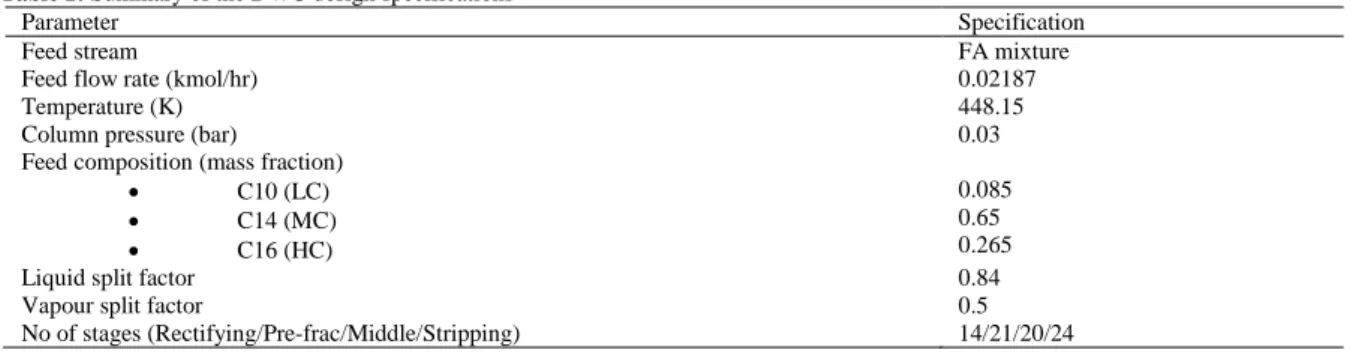
Table 1: Summary of the DWC design specifications
Parameter Specification
Feed stream FA mixture
Feed flow rate (kmol/hr) 0.02187
Temperature (K) 448.15
Column pressure (bar) 0.03
Feed composition (mass fraction)
• C10 (LC)
• C14 (MC)
• C16 (HC)
0.085 0.65 0.265
Liquid split factor 0.84
Vapour split factor 0.5
No of stages (Rectifying/Pre-frac/Middle/Stripping) 14/21/20/24
Steps For Modeling In Mosaic:
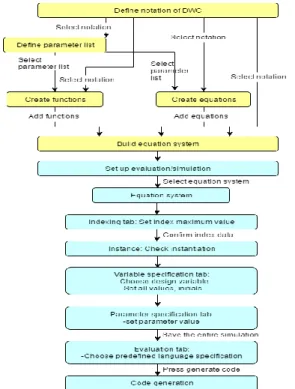
The steps of modelling using MOSAIC is summarized in Figure 7. Overall there are seven steps.
Step 1: Creation of a notation:
In this first step, symbols with descriptions are created in the Notation page to represent all variables involve in the equations as shown in Figure 4. Each variable is represented by a unique base name or can be attached together with subscripts and/or superscripts. By introducing subscripts/superscripts, two or more variables are allowed to have a similar base name. Additionally, indices involved in the equations can also be added. Note that, all notations should have a unique description such as its full abbreviation or engineering units.
Fig. 4: Notation declaration screenshot from the MOSAIC GUI
Step 2: Creation of equation objects:
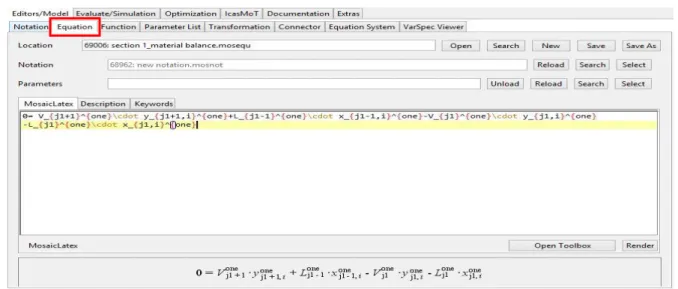
The next step is to create the equations. The equations formulation can be written using a TeX-style mathematical language as shown in Figure 5. TeX is a documentary language which allows equations to be expressed in mathematical terms. When creating the equation, it might also have a parameter list to emphasize variables that should be treated as global parameters. However, for this case, all equations does not involve a parameter (refer step 3 for creating parameter list). Note that when using subscripts or superscripts, curly brackets are compulsory. All operators, have to be expressed clearly and any missing operators could cause an error. For instance, to express ‘V times y is equal to 0’, the expression is supposed to be V . y=0, not Vy=0 as the second expression could be easily be misunderstood as ‘variable Vy is equal to 0’.
c
Fig. 5: Mathematical equations creation
Step 3: Creation of function objects:
Step 3 is almost the same as the creation of equation objects. However, the method of creating functions is not as straightforward as creating equations which may require the creation of parameter list objects. Functions usually consist of one output value and several input values. A function is required whenever it is possible to compute the value of an output variable that is dependent on a finite number of input variables in the equation system. Besides, the notation of a function is independent and unrelated from the notation used in the equation system. An example in this case study to create saturated pressure function using Antoine equation is as follows (please refer Figure 6):-
i) The parameter for Antoine equation is first created by loading the ‘notation of parameter.mosnot’ in notation file.
ii) Next, create and save the parameter list (A, B, and C) as ‘antoine equation’. Note that, the list of parameters does not have any index. They are considered as a special form of design variable and are kept in a separate list in the degree of freedom calculation.
iii) Then, create the function by loading the ‘antoine equation.mospar’ in the parameters file, and ‘function notation.mosnot’ in the notation file as well.
iv) Click and insert the output variable (Po) and input variable (T) in output/input tab.
v) After that, activate the ‘param set index’ tab to specify which index of the parameter list’s notation is used if the function is applied with an index. In this case, “k” is used which indicate the component index (k = 3).
Fig. 6: Parameter list and function creation.
Step 4: Creation of equation systems:
After all equations and functions have been defined, it needs to be connected by equation systems. Adding equations and functions to equation systems can be done easily. First of all, the notation must be loaded before creating the equation system. Then, in the connected elements tab, all equations and equation systems that have created will be added by clicking ‘add’ button as shown in Figure 8(a). Next is to add the function. It is required to set the input variables and its corresponding output variable. Noted that in Figure 8(b) the ‘Input Naming’ and ‘Output Naming’ in the function itself are called ‘Generic Naming’, while the corresponding variables in the equation system are termed ‘Applied Naming’. For this case, Po and T will be applied as 𝑃
𝑗1,𝑖 𝑜,𝑜𝑛𝑒
(saturated pressure of the i th component at the j th stage in section 1) of DWC and 𝑇𝑗1𝑜𝑛𝑒 (temperature at the j th stage in
section 1) respectively. A preview of all equations and functions in an equation system can be generated as shown in Figure 8(a).
(a) (b)
Fig. 8: Equation system editor of (a) connected elements/equations and (b) functions
Step 5: Creation of evaluation objects:
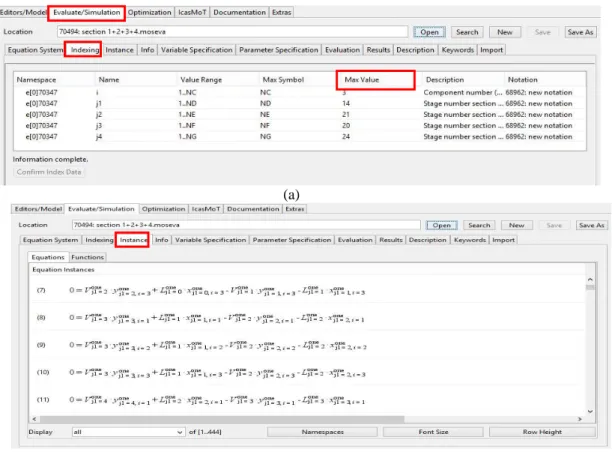
Once equation systems have been created, an evaluation object is then created. The purpose of evaluation object is to provide all necessary information to specify a problem to be solved based on the equation system. This includes specification of the maximum index value, classification of design and iteration variables, and giving values to the design and parameter variables as well as providing initial values for the iteration variables. In order to create the evaluation objects, the equation system first has to be loaded. Once it is loaded, indexing can be made by specifying the max value of each index shown in figure 9(a). Once specified, all equations and functions involved in the model are generated and shown in the ‘Instance’ as in Figure 9(b).
(a)
(b)
Step 6: Specification of initial values and design values:
The next step is to define iteration variables and design variables. Generally, fixed value variables are design variables whereas calculated variables are iteration variables. The degree of freedom (DOF) will be automatically calculated until it becomes zero which giving the DOF for the actual selection of design variables and does consider linear independency (refer figure 10). The value of each design variable must be specified. For the iteration variables, good initial values are important in solving the models since the modelling would work well when all variables are near the solution(Pantelides et al., 2015; Aspen Technology, 2009). Thus, in this case study, all initialization values were based on the results of Aspen Plus steady state simulation data for good convergence. In this case study, the temperature and liquid composition of eah stage in every section ( 𝑇𝑗1𝑜𝑛𝑒, 𝑇
𝑗2𝑡𝑤𝑜, 𝑇𝑗3𝑡ℎ𝑟𝑒𝑒, 𝑇𝑗4 𝑓𝑜𝑢𝑟
, 𝑥𝑗1𝑜𝑛𝑒, 𝑥
𝑗2𝑡𝑤𝑜, 𝑥𝑗3𝑡ℎ𝑟𝑒𝑒, 𝑥𝑗4 𝑓𝑜𝑢𝑟
) will be assigned as an iteration variables. In addition, the parameters specification values that contain in the equation system need to be specified as well. The entire simulation (equation system, indexing, variable and parameter speification) need to be save prior to evaluation.
Fig. 10: Variable specifications of equation system
Step 7: Code generation and evaluation:
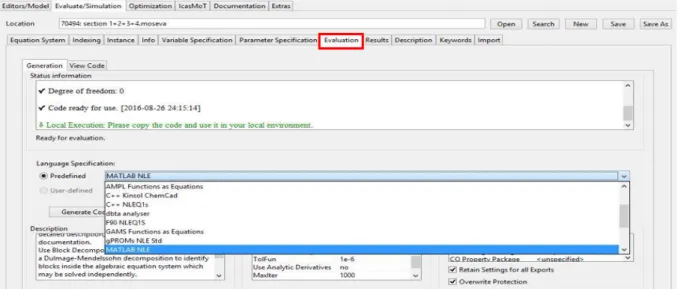
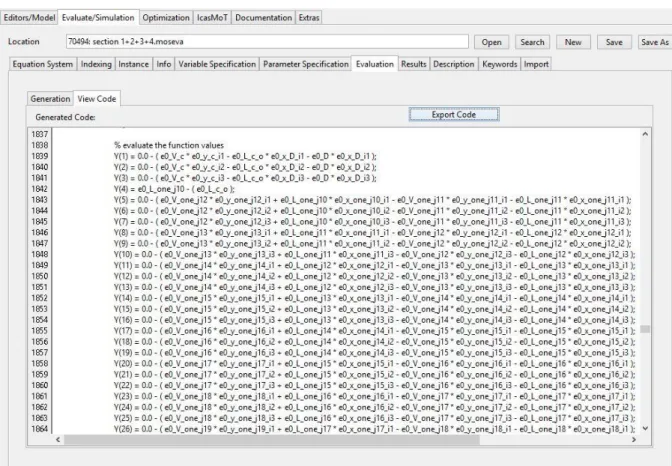
The concept of MOSAIC is to provide code generation for many languages. In this work, the selection for code generation is MATLAB NLE (Nonlinear Equation System) (refer figure 11). On the tab generation, status information which contains a checklist of the steps to be accomplished right before code generation. In case the information is not complete, hints (text saying either information missing or ready for evaluation) are shown. The generated codes can be run at their own corresponding environment for the solving of the model. Figure 12 shows a portion of the whole codes. The code is then compiled in Matlab.
Fig. 12: Generated code in MOSAIC
Model Comparison With Aspen Plus:
Upon running in MATLAB and converged, the temperature profile of the DWC model is shown in Figure 13. In the rectifying section, it can be seen that temperature is maintained at 440 K and starts to increase slowly to 494 K and 484 K in the pre-fractionation and middle section respectively. The temperature difference between these two sections is 10 K. Column temperature continues to increase until it achieves the temperature of 503 K at the stripping section. For composition profile, the results are shown in Figure 14. The system reached nearly 99% purity of C10 (LC) on distillate product, 94% of C14 (MC) on side product, and 99% of C16 (HC) on the bottom product. Upon comparing with results of Aspen Plus, as in Table 2, it can be seen that the expected results of code generated (temperature and product composition) by MOSAIC are in agreement with the data taken from simulation results. This proves that MOSAIC is indeed a great modelling environment tool due to good functionality in code generator to another different language. Besides, this indicates that the equations of the DWC model formulated in MOSAIC are precise and reliable. In addition, the extended work in dynamic behavior and control structure of DWC can be develop using the steady-state results of MOSAIC.
Fig. 13: Temperature versus stage number in each section 420
440 460 480 500 520
0 5 10 15 20 25 30 35 40 45 50 55 60 65
Te
m
p
era
tu
re
,
K
stage number
Temperature Profile
Pre-fractionation (j2=21 stages)
Middle/main (j3=20 stages)
Stripping (j4=24 stages) Rectification
Fig. 14: Liquid composition convergence results in Matlab (for every section)
Table 2: Comparison of the converged results in Matlab with Aspen Plus steady state simulation Aspen Plus Matlab
Quantity Units Top Middle Bottom Top Middle Bottom
xC10 1 0.00200 0 0.99308 0.00232 0.00303
xC14 0 0.94702 0 0.00289 0.93997 0.00304
xC16 0 0.05098 1 0.00288 0.05488 0.99412
Temp(K) 441 481 502 440 484 503
Software Comparison:
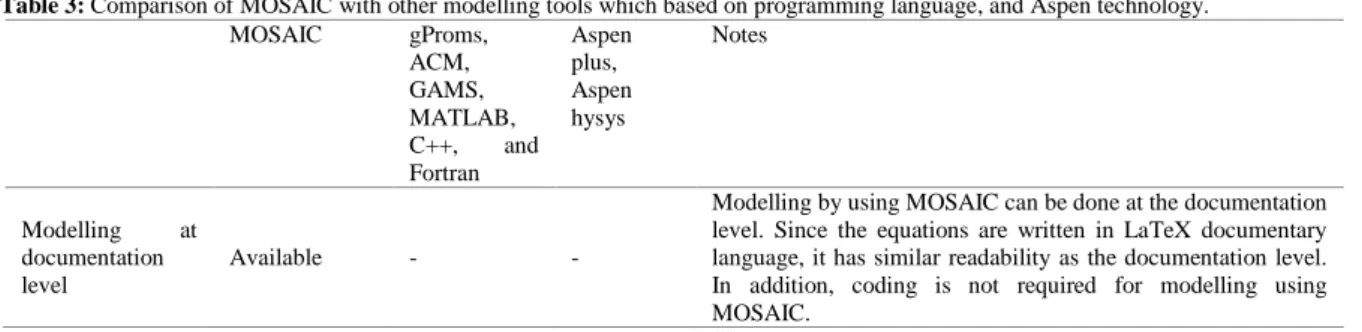
Generally, modelling tools for modelling of chemical processes can be categorized into two groups. The first group consists of readily made models with preprogramed equation systems and appropriate numerical solution algorithms. Also known as the sequential modelling approach such as Aspen Plus, Aspen HYSYS, and CHEMCAD, are some examples of software belonging to this group. Using this softwares for modelling of chemical processes can be done easily, however, it lacks in the transparency of equations involved(Stutzman et al., 1982). Another software may be needed to build the equations model before embedding it into those software environments. One such example is Aspen custom modeler (ACM). The second group or the equation oriented modelling provides a modelling environment based on their own programming language. The users are free to define their own equation systems by writing their own code using a specifically defined programming language. Moreover, these tools are suitable for the creation of customized models. Some examples of these tools are gProms, Aspen Custom Modeler (ACM), GAMS and MATLAB (Kuntsche et al., 2011b). Table 3 shows the comparison between MOSAIC, modelling tools based on the programming language (gProms, ACM, GAMS, MATLAB, C++, and Fortran), and sequential modelling approach (Aspen plus and Aspen HYSYS). Table 3 can be used as a guideline for choosing MOSAIC for any modelling and simulation work.
Table 3: Comparison of MOSAIC with other modelling tools which based on programming language, and Aspen technology.
MOSAIC gProms,
ACM, GAMS, MATLAB, C++, and Fortran
Aspen plus, Aspen hysys
Notes
Modelling at documentation level
Available - -
Reuse of model
elements Available
Partially available -
The reuse of model elements by MOSAIC is more systematic and organized. The users can either reuse the notation, equations, functions, and variables settings easily.
Code generation Available Not
complete -
Code generation by MOSAIC is a lot more complete. MOSAIC allows users to generate the code and run their models in many different environments.
Centralized internet database capability
Available - -
MOSAIC allows users to share their work over the internet more easily. The shared work can be viewed or written by the person that users shared to.
Degree of
freedom analysis Available - -
The degree of freedom analysis can be done automatically by MOSAIC. In order to generate code for evaluations, the degree of freedom must be zero. Hence, it is necessary for the model to have correct equations in an equation system and all errors must be corrected.
Error
identification Excellent Difficult -
Since models in MOSAIC are written in LaTeX documentary language, it has high readability. Hence, users can identify errors more easily if they are making mistakes while keying in modelling equations. In addition, coding is not required by MOSAIC, hence it results in fewer errors and less effort.
Language Documentary Programing -
MOSAIC is using LaTeX documentary language in writing of modelling equations. LaTeX has high readability, unlike programming language, it is difficult to read and understand the coding.
Readability Excellent Poor -
LaTeX documentary language has much higher readability than programming languages since MOSAIC use two-dimensional symbolic language.
Difficulty Medium Hard Easy
Although without knowledge of coding in modelling, MOSAIC still allows users to do modelling without a doubt. The stages of modelling using MOSAIC are creating of notation, creating of equations, creating of functions, creating of equation system, creating of parameter object and creating of evaluation object. The most difficult part will be creating of functions, however, it can overcome easily once users know how it works.
Transparency of
model Excellent Excellent Poor
All equations involved in modelling are known for MOSAIC. Besides that, given values of variables can also be determined. Building of
customized model Capable Capable
Not capable
MOSAIC is similar to software like Matlab which is designed to build the customized model.
Conclusion:
This work presents an equation oriented modelling of DWC using MOSAIC. In order to obtain a good convergence and reliable results in modeling, it is important to have good guess initial values of iteration variables. Hence, based on the case study, the developed model simulation in MOSAIC agrees with data taken for the same process in Aspen Plus as an initial iteration values in MOSAIC. The results show that MOSAIC provide a good functionality in code generator that can translate the specified models into program code for Matlab. Using MOSAIC, the modelling approach does not require any written code as such it is much easier to learn and less prone to a programming error. In addition, the model formulation has the same readability as the documentation level. Besides that, reuse of model elements can be done effectively thus reduce the efforts of modelling. This work also compares the features between modelling in MOSAIC and programming language, as well as simulation work. Such comparison could help researchers to decide in using MOSAIC for any modelling work.
ACKNOWLEDGEMENT
This work is supported by Malaysia Ministry of Education under grant no. RDU130601 and RDU140105.
REFERENCES
Woinaroschy, A., R.I., 2008. DWC: Dynamic Modeling and Control. In: 18th European Symposium on Computer Aided Process Engineering – ESCAPE 18: 313-318.
Illner, M. and M.R.O thman, 2014. Modelling and Simulation of a Dividing Wall Column for Separation of Fatty Acid in Oleochemical Industries. X(2013): 1-9.
Kader, M.A., 2009. 1-Octene Dividing Wall Distillation Column (Doctoral dissertation). Kuntsche, S,. 2011. MOSAIC User Guide., pp: 1-64.
Kuntsche, S., T. Barz, R. Kraus, H. Arellano-Garcia and G. Wozny, 2011b. MOSAIC a web-based modeling environment for code generation. Computers and Chemical Engineering, 35(11): 2257-2273.
Lam, C.P., H. Li and D. Xu, 2007. A model-centric approach for the management of model evolution in chemical process modelling., 31: 1633-1662.
Mangold, M., S. Motz and E.D. Gilles, 2002. A network theory for the structured modelling of chemical processes., 57: 4099-4116.
Pantelides, C.C., M. Nauta, M. Matzopoulos and H. Grove, 2015. Equation-Oriented Process Modelling Technology : Recent Advances & Current Perspectives.
Stutzman, L.F., S. Modular, D.O. Modular, E. Generation and A. Appendix, 1982. Review Equation Oriented Approach To Process. Engineering, 6(1).