NENA Information Document for
Synchronizing Geographic Information
System Databases with MSAG & ALI
NENA Information Document for Synchronizing Geographic Information System databases with MSAG & ALI, NENA 71-501, Version 1.1, September 8, 2009
Prepared by:
National Emergency Number Association (NENA) Joint Data Technical/PSAP Operations & Next Generation Integration Committees, Next Generation Data Development Working Group
Published by NENA Printed in USA
Version 1.1, September 8, 2009 Page 2 of 37
NENA
INFORMATION DOCUMENT NOTICE
This NENA Information Document is published by the National Emergency Number Association (NENA) as an information source for the voluntary use of communication centers and other interested parties and is provided as an example only. It is not intended to be a complete directive. NENA reserves the right to revise this for any reason including, but not limited to, conformity with criteria or standards promulgated by various regulatory agencies, utilization of advances in the state of operations techniques or services described herein.
It is possible that certain federal, state or local regulations may restrict or require modification of the recommendations contained in this document. Therefore, this document should not be the only source of information used. NENA members are advised to contact their legal counsel to ensure compatibility with local requirements.
By using this document, the user agrees that NENA will have no liability for any consequential, incidental, special, or punitive damages arising from use of the document.
NENA’s Joint Data Technical/PSAP Operations & Next Generation Integration Committees have developed this document. Recommendations for changes to this document may be submitted via email to [email protected] via mail to:
National Emergency Number Association 4350 North Fairfax Drive
Suite 750
Arlington, VA 22203-1695 800-332-3911
Version 1.1, September 8, 2009 Page 3 of 37
Acknowledgments:
This document has been developed by the National Emergency Number Association (NENA) Joint Data Technical/PSAP Operations & Next Generation Integration Committees, Next Generation Data Development Working Group.
The following individuals are recognized for their contributions in development of this document.
Members: Company/Agency
Marc Berryman, ENP – PONGI Vice-Chair Greater Harris County 9-1-1 Erica Aubut, ENP – DTC Vice-Chair State of Vermont 9-1-1
Anthony Haddad Contact One, Inc.
Bob Long, GISP Bexar Metro 9-1-1 District
Brett Schneider, ENP Bexar Metro 9-1-1 District
Carlton B Walls III, ENP Lancaster County-Wide Communications
Chiu-Wen Ray Montgomery County 9-1-1 District
Gordon Chinander, GISP Metropolitan Emergency Services Board
Ilyanna Kadich CAPCOG
Ira Pyles, ENP Hillsborough County 911
Jan Funderburgh Smith County 9-1-1 District
Jeanne Frey Montgomery County 9-1-1
Jim Kringle Lubbock Emergency Communication
District
Kathy Liljequist, GISP GeoComm, Inc
Matt Francis North Central Texas Council of
Governments
Monica Watt Texas CSEC
Phillip Rohrbough Tarrant County 9-1-1 District
Rachel Kilby Guilford Metro 911
Rebecca Stoneman Houston Galveston Area Council of
Governments
Tommy Keesee Nortex Regional Planning Commission
Vonda Gafford Midland Emergency Communication
District
Vonda Payne Texas CSEC
Version 1.1, September 8, 2009 Page 4 of 37
OF CONTENTS
1 EXECUTIVE OVERVIEW ...5
2 INTRODUCTION...5
2.1 PURPOSE AND SCOPE OF DOCUMENT...5
2.2 REASON TO IMPLEMENT...5
2.3 DOCUMENT TERMINOLOGY...6
2.4 REASON FOR REISSUE...6
2.5 RECOMMENDATION FOR STANDARDS DEVELOPMENT WORK...6
2.6 COST FACTORS...6
2.7 ACRONYMS/ABBREVIATIONS/DEFINITIONS...6
3 SYNCHRONIZATION OF GIS, MSAG, AND ALI DATA ...7
3.1 DATA PREPARATION...8
3.1.1 MSAG Standardization and Quality Control...8
3.1.2 GIS Data Standardization and Quality Control ...13
3.2 SYNCHRONIZATION PROCESS OVERVIEW...18
3.2.1 Synchronization of GIS Street Centerline data to the MSAG ...22
3.2.2 ALI database to GIS Street Centerline Data ...31
3.2.3 Site / Structure Location and ALI records Comparison ...32
3.2.4 Discrepancy Correction ...35
4 CONCLUSIONS ...36
Version 1.1, September 8, 2009 Page 5 of 37
1
Executive Overview
This document is the NENA information document for the synchronization of certain Geographic Information Systems (GIS) database layers with the Master Street Address Guide, the Automatic Location Information data, and optionally the site / structure locations. This document is meant to provide PSAP management, vendors, and other interested parties necessary guidelines for
synchronizing GIS data with existing 9-1-1 databases. The synchronization process of the GIS data is most reliably accomplished by qualified, trained individuals or vendors that have received formal GIS training and instruction.
2
Introduction
2.1 Purpose and Scope of Document
This document is provided as a guide to synchronizing both the Master Street Address Guide (MSAG) and optionally the Automatic Location Information (ALI) databases to a Geographic Information System (GIS) geospatial database of road centerlines, site / structure locations, and related spatial databases. One must have a basic understanding of GIS concepts and MSAG data, or the resources available, in order to understand this document. The preferred method for performing the synchronization is using various database techniques. Emergency Service Zones, MSAG and Postal Community Names, and optionally the ALI data and address point data will all be used in the synchronization process. The synchronization of these databases will improve the accuracy of the GIS data, the MSAG, and optionally the ALI data, aid in meeting the requirements for Next
Generation 9-1-1 (NG9-1-1) and improve the accuracy of the GIS data for Public Safety Answering Point (PSAP) map display for all types of calls. Once the corrections are made, the GIS road
centerline file can then be used to validate addressing and to generate an up-to-date MSAG file for scrubbing service provider addresses.
2.2 Reason to Implement
Accurate and current data is of paramount importance to 9-1-1 entities. Having MSAG, ALI, and GIS datasets in agreement is crucial to providing telecommunicators the information they need to correctly verify the location of a caller and provide proper emergency response. Developing common datasets that follow a single standard will provide critical information to the PSAP and emergency responders and facilitate local, regional, and nationwide exchanging of data and
information. As today’s technology transitions to meet tomorrow’s needs, the need for following a single set of standards is essential.
Comparing the MSAG and GIS databases will identify inconsistent naming conventions, inaccurate address information, improper ESN assignments to MSAG records, improper community
assignments, improper exchange designations, and other discrepancies. The comparison process will also reveal fictitious data, incomplete information, and data that exist in only one database. It is important to note that errors or missing information can exist in both databases and other sources should be consulted as well to improve the overall accuracy and completeness of the data.
Version 1.1, September 8, 2009 Page 6 of 37
2.3 Document Terminology
The terms "shall", "must" and "required" are used throughout this document to indicate required parameters and to differentiate from those parameters that are recommendations. Recommendations are identified by the words "desirable" or "preferably".
2.4 Reason for Reissue
NENA reserves the right to modify this document. Upon revision, the reason(s) will be provided in the table below.
Version Approval Date Reason For Changes
Original 05/26/2009 Initial Document
1.1 08/19/2009 Document number changed to 71-501
2.5 Recommendation for Standards Development Work
This document references existing NENA Standards and no further standards work is required at this time.
2.6 Cost Factors
Some of the cost factors to be considered, when undertaking the synchronization process, may include:
• Additional personnel
• Overtime
• Software
• Hardware
• Training (including seminars, conferences, webinars, podcast)
• Consultants
• Stress Management Classes
• Meetings among those involved
• Data availability
• Accuracy and completeness of existing data
2.7 Acronyms/Abbreviations/Definitions
Some acronyms/abbreviations used in this document have not yet been included in the master glossary. After initial approval of this document, they will be included. See NENA 00-001 - NENA Master Glossary of 9-1-1 Terminology located on the NENA web site for a complete listing of terms used in NENA documents.
The following Acronyms/Abbreviations are used in this document:
Acronym Description ** N)ew
(U)pdate
Version 1.1, September 8, 2009 Page 7 of 37
The following Acronyms/Abbreviations are used in this document:
ANI Automatic Number Identification
3
Synchronization of GIS, MSAG, and ALI data
Conflicting information between the MSAG, ALI and GIS databases becomes more prevalent without a constant effort to keep the systems synchronized. However, GIS data of any size will contain errors, and eliminating them all is an unrealistic expectation. The goal of this document is to develop a process that will consistently identify errors or discrepancies in the data and quickly correct those which are found. The longer GIS data goes without an update, the less accurate the information will become and the integrity of the data diminishes. The 9-1-1 Authority will always be the responsible party for the data, whether they use in-house staff to produce the data or obtain it from:
• Local GIS department(s) (i.e. government, law enforcement, fire department, utilities)
• Local City or County GIS departments
• Mapping Vendor
• GIS data provided from third parties
• The Addressing Authority(ies)
The amount of time to correct the data and eliminate errors cannot be estimated until an analysis of the discrepancies is performed.
Maintaining data integrity within the GIS, MSAG, and ALI requires high levels of coordination to resolve discrepancies. Synchronization of the MSAG, ALI, and GIS data requires coordination between the 9-1-1 Governing Authority database personnel, GIS personnel, Database Management Systems (DBMS), Postal Authority, the local Addressing Authority, Incumbent Local Exchange Carriers (ILEC’s) and Competitive Local Exchange Carriers (CLEC’s). This process requires specific procedures and a clear process to keep the information synchronized. It is important that the users of map data retain confidence in the data’s accuracy. All GIS, MSAG, and ALI data must be continuously updated with the newest information and the updates made available to
telecommunicators in a timely manner.
• The GIS and MSAG database synchronization process involves many important steps that are explained in detail throughout this document. Traditionally these two databases have been maintained separately; therefore understanding the current condition and maintenance processes of these existing databases is the important first step towards synchronization. From this understanding, an agency specific workflow can be implemented to consolidate and standardize the MSAG and GIS data. Once the MSAG and GIS databases are
standardized, they need to be compared for accuracy and completeness. The synchronization of the GIS and the MSAG data could ultimately lead to a consolidated workflow and data maintenance process which would eliminate the need to maintain separate GIS and MSAG databases.
The basic steps in the synchronization process for GIS, MSAG, and optionally ALI data can be broken down into:
Version 1.1, September 8, 2009 Page 8 of 37
• Data Standardization
• Initial Corrections to the Databases
• Synchronization
• Discrepancy Reports
• Discrepancy Corrections
• Maintenance – The synchronization and correction of discrepancies should be done on a continuous basis.
As neither database is static in nature, the synchronization process will never yield a 100 percent match rate. The information in this document should be part of an ongoing and continuous process to ensure that the databases remain current and synchronized.
• It is recommended that a minimum match rate of 98% be set prior to using the GIS data in the Emergency Routing Data Base (ERDB) or the Location to Service Translation (LoST) Protocol services.
There are many possible types of discrepancies and they all require research to find the resolutions that properly represent reality. Once this process is complete, the result is a consolidated, accurate, and complete 9-1-1 GIS database that is the central maintenance repository for addressing, mapping, and 9-1-1 database reporting.
3.1 Data Preparation
Standardization and quality control processing must take place on the GIS street centerline data and the MSAG data prior to comparing the two data sets for the synchronization process. This section describes the process for preparing the data in the GIS road centerlines and the MSAG data in order to compare the two data sets.
3.1.1MSAG Standardization and Quality Control
The MSAG is a listing of all the road names and address ranges within a given area. Inconsistencies within the MSAG could translate into issues with the ALI data, how the call is routed, and could prevent a call from being properly located on the map.
A detailed comparison of the GIS street centerline data and the MSAG will identify many inconsistencies between the databases, including, but not limited to:
• Different road naming conventions
• Inaccurate address ranges
• Improper MSAG Community designations
• Improper Postal Community designations
• Improper Exchange designations
• Incorrect ESN assignments
• Incomplete or missing records
• Roads may be in the GIS that are not in the MSAG because the GIS roads do not have addressed structures associated with them.
Version 1.1, September 8, 2009 Page 9 of 37 Discrepancies between the GIS, the MSAG, and the ALI data can cause call routing and dispatching problems. Inaccuracies in the databases could lead to a delayed or improper response. By comparing GIS data to the MSAG, identifying the problems, creating discrepancy reports, and working to correct the discrepancies, these problems can be minimized.
Standardization is the process of agreeing on and utilizing a technical standard where uniform methods and criteria are used. This should be one of the first steps when comparing GIS and MSAG databases.
Standardization of the GIS road centerline data and the MSAG data should incorporate the following:
• N, S, E, W, NE, NW, SE, or SW are the only prefix and suffix directional abbreviations which are used, when a prefix and / or suffix directional is present.
• All punctuation should be avoided.
• Remove special characters (dash, underscore, apostrophe, quotes or any other special characters that could cause problems in any of the software or databases).
• Use only whole numbers in the house number fields (fractional house numbers belong in the House Number Suffix field).
• Use complete spelling of the legal street name assigned by the addressing authority (e.g. Saint Albans versus St Albans).
• Spell out the complete MSAG and Postal Community name.
• Prefix directional is only abbreviated when not part of the actual street name (North Dr would not be abbreviated to N Dr).
• Post directional abbreviated when they are not the actual street name. (Lone Pine Dr South would be abbreviated to Lone Pine Dr S, but Loop West Dr would not be abbreviated to Loop W Dr).
• Standardize street suffix according USPS Publication No. 28 – Appendix C1 http://www.usps.com/ncsc/lookups/abbreviations.html
The Canadian Addressing Guide may be downloaded from the Canada Post / Postes Canada web site at URL:
English: http://www.canadapost.ca/business/offerings/address_management/can/addressing_guide-e.asp French: http://www.postescanada.ca/business/offerings/address_management/can/addressing_guide-f.asp
Version 1.1, September 8, 2009 Page 10 of 37
Original Standardized
PD STREET SUFFIX SD PD STREET SUFFIX SD
North Elm St N Elm St
N Grand W Parkway N Grand Pkwy W
Barton Trail Barton Trl
South Pasadena Rd S Pasadena Rd
Cana Road Cana Rd
Stockyard's PKY Stockyards Pkwy
Oak Place Oak Pl
Market Plaza Market Plz
Rt 2 Route 2
W 9 W 9th
Av J Avenue J
Ave B Avenue B
Commerce Commerce St
St Albans Ln Saint Albans Ln
M. D. Anderson Blvd M D Anderson Blvd
Roosevelt Highway Roosevelt Hwy
west court street W Court St
Co Rd 45 County Road 45**
E R. Jones Road E R Jones Rd
**Note: Check with your USPS Addressing Information Management System (AMS) to determine how they show a street name, CR 45 or County Road 45 for example. The proper AMS office can be located by providing a city and state, or just a zip code, to the locator service at: http://www.usps.com/ncsc/lookups/ams_office_locator.html.
Additionally, you can enter an address into the USPS Zip Code Lookup service at: http://zip4.usps.com/zip4/welcome.jsp, and the USPS address will be returned.
While the local addressing authority may not follow the accepted standardized road naming conventions given in this document, it is important to remember that standardization must take place on the 9-1-1 databases to ensure interoperability and to allow exchanging of GIS data with other regional, tribal, state, and federal agencies. Every effort should be made to educate the local addressing authorities that standardization will improve quality, lower cost, and improve the level of services to the public.
Version 1.1, September 8, 2009 Page 11 of 37
Figure 2. An example of using the Zip Code Lookup service to obtain the USPS street name
Pressing “Submit” returns the following:
The street naming conventions should be consistent in the GIS street centerline, the MSAG and ALI data. This should be done not only for the synchronization process, but also for day-to-day operations and data sharing. All MSAG, ALI, and GIS road naming conventions must be consistent. The standardization process should take place in both the MSAG and the GIS databases. Since the number of changes to the databases may be quite high, all involved parties must agree to the number of changes that can be processed in a timely manner and reviewing the contractual obligations of the involved providers is suggested.
To begin the process of standardization the following steps are recommended:
• Request the MSAG from your Data Base Management System provider.
• Load the MSAG into a worksheet or database format, with each field being in a separate column.
• Save the MSAG file (e.g. Initial MSAG).
• Save another copy of the MSAG under a different name (e.g. Copy of MSAG).
Version 1.1, September 8, 2009 Page 12 of 37
• Do not delete any records out of the original MSAG, only removing certain records from the “Copy of MSAG”.
• Sort the data by MSAG COMMUNITY and delete any FX Records in the “Copy of MSAG” Make note of any records with a blank or incomplete MSAG COMMUNITY name as these will need to be resolved.
• If the MSAG contains Postal Community then sort by Postal Community and make note of any with missing or incomplete community names as these will need to be resolved.
• Sort the data by EXCHANGE and delete any wireless or VoIP records in the “Copy of MSAG”.
• Sort the data by LOW and HIGH address ranges and delete any records with blank, zero, or missing LOW and/or HIGH address ranges in the “Copy of MSAG”. Make note of the records with missing LOW and/or HIGH address ranges as these will need to be resolved.
If any of the MSAG records contains blank LOW and/or HIGH address ranges, MSAG or Postal Community Names, or ESN’s that are not in your area, these records need to be checked carefully and either sent back to the DBMS provider with corrected information or reconciled.
Figure 3. Example of missing MSAG Community names PD STREET_NAME SS SD LOW HIGH
MSAG
COMMUNITY O/E ESN EXCH
APPLEFORD 1100 1199 00093 ANK
BARONRIDGE DR 1000 1099 00093 4422
BLUEBONNET DR 1200 1499 00093 ANK
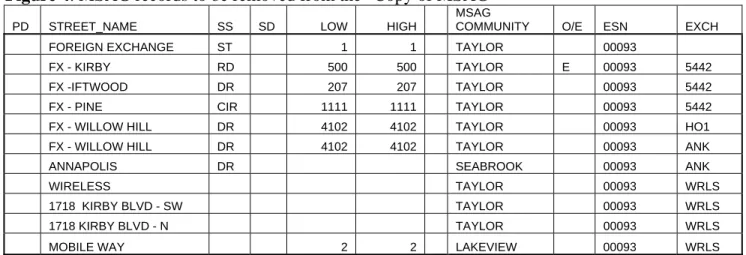
MSAG records entered to allow validation of FX, wireless or VoIP records not in the GIS should be deleted from the “Copy of MSAG”. MSAG records that do not have a MSAG Community Name and / or a Postal Community name (if present in the MSAG), should be corrected to include the proper Community names completely spelled out. Figure 4 illustrates some of these types of MSAG records that need to be removed from the Copy of MSAG prior to comparing this information against the GIS street centerline data.
Figure 4. MSAG records to be removed from the “Copy of MSAG”
PD STREET_NAME SS SD LOW HIGH MSAG
COMMUNITY O/E ESN EXCH FOREIGN EXCHANGE ST 1 1 TAYLOR 00093 FX - KIRBY RD 500 500 TAYLOR E 00093 5442 FX -IFTWOOD DR 207 207 TAYLOR 00093 5442 FX - PINE CIR 1111 1111 TAYLOR 00093 5442 FX - WILLOW HILL DR 4102 4102 TAYLOR 00093 HO1 FX - WILLOW HILL DR 4102 4102 TAYLOR 00093 ANK ANNAPOLIS DR SEABROOK 00093 ANK WIRELESS TAYLOR 00093 WRLS 1718 KIRBY BLVD - SW TAYLOR 00093 WRLS 1718 KIRBY BLVD - N TAYLOR 00093 WRLS MOBILE WAY 2 2 LAKEVIEW 00093 WRLS
Version 1.1, September 8, 2009 Page 13 of 37
It is strongly recommended that the information in the Copy of MSAG be sent to the addressing entities for their review. The entities may have streets not shown on the MSAG or may have either renamed or extended a street and failed to forward proper notification or documentation.
Correcting the Initial MSAG Records
• Any changes that need to be made will have to be sent to the proper agencies to be corrected.
• Make note of any MSAG errors, but do not change anything in this MSAG copy (Copy of MSAG).
• Make a copy of the “Copy of MSAG” and name it “MSAG Changes”.
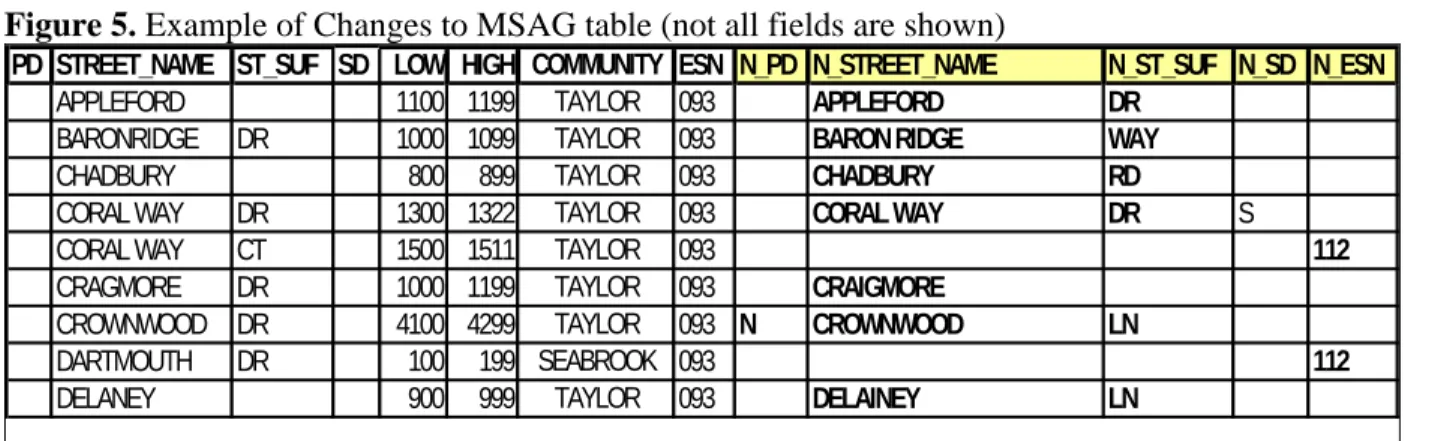
• Open the “MSAG Changes” and add columns for New Prefix Direction, New Street Name, New Street Suffix, and New Street Suffix Direction, or other fields needing correction, similar to the example below. These fields will store the information that needs to be changed in the MSAG.
• Review each MSAG record for Prefix Directional, Street Name, Street Type, Post-Directional, and Community Name standardization.
• Review to make sure the proper information is in the correct field.
Again, in the First Pass we are only changing street names and ESN’s. A very similar process will be used when we compare the MSAG and GIS data for MSAG Community, Postal Community, and Low and High address ranges later.
Note: Corrections to the MSAG data in your DBMS may differ from this process.
Figure 5. Example of Changes to MSAG table (not all fields are shown)
PD STREET_NAME ST_SUF SD LOW HIGH COMMUNITY ESN N_PD N_STREET_NAME N_ST_SUF N_SD N_ESN
APPLEFORD 1100 1199 TAYLOR 093 APPLEFORD DR
BARONRIDGE DR 1000 1099 TAYLOR 093 BARON RIDGE WAY
CHADBURY 800 899 TAYLOR 093 CHADBURY RD
CORAL WAY DR 1300 1322 TAYLOR 093 CORAL WAY DR S
CORAL WAY CT 1500 1511 TAYLOR 093 112
CRAGMORE DR 1000 1199 TAYLOR 093 CRAIGMORE
CROWNWOOD DR 4100 4299 TAYLOR 093 N CROWNWOOD LN
DARTMOUTH DR 100 199 SEABROOK 093 112
DELANEY 900 999 TAYLOR 093 DELAINEY LN
The 9-1-1 Authority should provide corrected and standardized information back to the respective agency for updating. The “MSAG Changes” document will be used to track and send changes to the DBMS provider for updates and will contain corrections to the discrepancies for this process. Submission of changes must be completed using agreed upon formats or interfaces.
3.1.2GIS Data Standardization and Quality Control
Most of the information in this section for GIS centerline data is covered inNENA GIS Data
Collection and Maintenance Standards NENA 02-014, Issue 1, July 17, 2007. This document should be referred to for recommended audits, quality control, quality assurance, and related information. Parts of that document have been expanded on for the focus of this discussion.
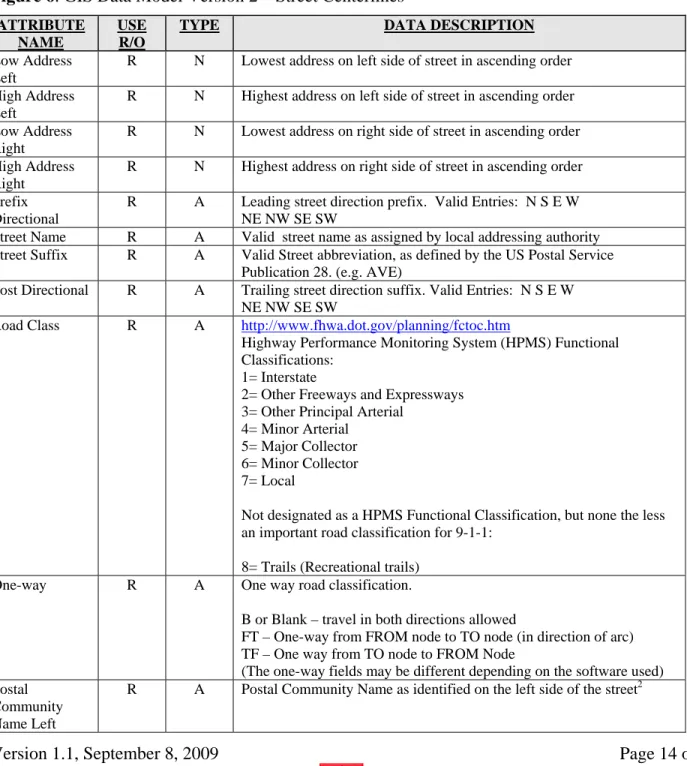
Version 1.1, September 8, 2009 Page 14 of 37 The representation of a roadway in a GIS system is often referred to as a street centerline or an addresses centerline, which represents the center of the road, not the right-of-way or the edge of the property line. The attribute fields within the centerline data include high and low address ranges along each segment of the road. The high and low addresses are further broken down into left and right side address, so each centerline segment will have a left-side low address, a right-side low address, a left-side high address and a right-side high address. Actual address ranges should be used.
Figure 6. GIS Data Model Version 2 – Street Centerlines
ATTRIBUTE NAME
USE R/O
TYPE DATA DESCRIPTION
Low Address Left
R N Lowest address on left side of street in ascending order
High Address Left
R N Highest address on left side of street in ascending order
Low Address Right
R N Lowest address on right side of street in ascending order
High Address Right
R N Highest address on right side of street in ascending order
Prefix Directional
R A Leading street direction prefix. Valid Entries: N S E W NE NW SE SW
Street Name R A Valid street name as assigned by local addressing authority Street Suffix R A Valid Street abbreviation, as defined by the US Postal Service
Publication 28. (e.g. AVE)
Post Directional R A Trailing street direction suffix. Valid Entries: N S E W NE NW SE SW
Road Class R A http://www.fhwa.dot.gov/planning/fctoc.htm
Highway Performance Monitoring System (HPMS) Functional Classifications:
1= Interstate
2= Other Freeways and Expressways 3= Other Principal Arterial
4= Minor Arterial 5= Major Collector 6= Minor Collector 7= Local
Not designated as a HPMS Functional Classification, but none the less an important road classification for 9-1-1:
8= Trails (Recreational trails)
One-way R A One way road classification.
B or Blank – travel in both directions allowed
FT – One-way from FROM node to TO node (in direction of arc) TF – One way from TO node to FROM Node
(The one-way fields may be different depending on the software used) Postal
Community Name Left
Version 1.1, September 8, 2009 Page 15 of 37
Postal Community Name Right
R A Postal Community Name as identified on the right side of the street2
Postal Code/Zip Code Left
R AN Postal or Zip code as identified on the Left side of the street. Format: ANANAN or NNNNN
Postal Code/Zip Code Right
R AN Postal or Zip code as identified on the Right side of the street. Format: ANANAN or NNNNN
MSAG Community Name Left
R A Valid service community name as identified by the MSAG on the left side of the street
MSAG Community Name Right
R A Valid service community name as identified by the MSAG on the right side of the street
ESN Left O A 3-5 digit Emergency Service Number associated with street segment ESN Right O A 3-5 digit Emergency Service Number associated with street segment
Segment ID R N Unique Road Segment ID number
County Name Left
R AN County Name on the Left side of the street as given in FIPS 6-4 1
County Name Right
R AN County Name on the Right side of the street as given in FIPS 6-4 1
County Code Left
R A County Code on the Left side of the street as given in FIPS 6-4 1
County Code Right
R A County Code on the Right side of the street as given in FIPS 6-4 1
Source of Data R A Agency that last updated the record
Date Updated R N Date of last update Format: CCYY-MM-DD
Each street centerline segment should contain the low and high address values for the addresses assigned along that road centerline segment. In areas where there are no addresses assigned along a segment, a potential or probable range must be assigned.
If other applications using the GIS street centerline data require continuous addressing (e.g. 100 – 199 for one segment then 200-299 for the next with no “gaps” the in address ranges) it is strongly recommended that the NENA GIS Data Model fields for addressing be used to be reflect the actual address ranges of each street segment (e.g. 137 – 168 for one segment then 206 – 259 for the next segment) and another set of address fields be added to the GIS centerline data to accommodate any need for continuous address ranges. The use of actual address ranges is used to better reflect the address locations during geo-coding.
Some of the “Mapped ALI” and / or Computer Aided Dispatch (CAD) systems will only load street centerline data that is has continuous address ranges, that is, without any gaps in the address values in the attribute fields. The use of actual address range values or potential address range values is dependent on how other applications or entities will be using the street centerline data. Other systems may allow only continuous, potential, address ranges. Check with the vendors of the different systems to understand their limitations.
Version 1.1, September 8, 2009 Page 16 of 37 Below is an example of the GIS street centerline data carrying both the actual address ranges in the first four columns shown and the potential address ranges in the next four columns. This allows the data set to use the actual address ranges for better geocoding of the location of addresses and the flexibility to use the potential address ranges with other applications that require continuous addressing.
Figure 7. Using actual and potential address ranges in same GIS street centerline database
Low Address Right Low Address Left High Address Right High Address
Left LR_PA LL_PA HR_PA HL_PA Prefix Direction al Street Name Street Suffix Post Direction al ESN Right ESN Left 12512 12513 12586 12587 12500 12501 12598 12599 BAY AREA BLVD 069 070 12622 12623 12670 12671 12600 12601 12698 12699 BAY AREA BLVD 069 070 1802 1803 1872 1873 1899 1801 1898 1899 CALYPSO COVE CT 079 079 602 603 618 619 600 601 698 699 CORAL WAY CT 093 093 408 409 427 428 400 401 498 499 CORAL WAY DR 093 093
In Figure 8, 100 to 199 is the potential address range on the street segment, with the actual house location and addresses shown.
Figure 8. Potential address ranges along street segment
In Figure 9, where potential addressing is being used, an address is geocoded to the street centerline in the GIS data as a point, which is placed along the street segment to approximate the location of the address. In the case of potential addressing the address locations of 101, 102, 111, 112, 121, and 122 would all be displayed near the beginning address of 100 as indicated by the stars in the
diagram. From 100 To 199 101 102 111 112 122 121
Version 1.1, September 8, 2009 Page 17 of 37
Figure 9. Geocoded addresses (shown as stars) along street segment having potential address ranges
It is strongly recommended that actual addressing be used in the GIS street centerline. Using actual address ranges for the GIS street centerlines will improve the location accuracy of the geocoding process, and in Figure 9 the location of the geocoded point would be a closer approximation of the actual location of the structure. Close cooperation, coordination, and communication with the local addressing authority and the Postal Service will minimize the errors in the GIS street centerline data. The nuances of the local addressing system and available resources must be taken into consideration. This document takes the approach that the GIS street centerline data should meet the following criteria:
• Is spatially accurate
• Attributes are accurate and complete and standardized (address ranges, ESN’s, Communities, spelling, abbreviations)
• Meets or exceeds all related NENA Standards
• Contains the necessary attributes to be used by multiple applications and users
• Maintained on a continual basis
• Contains all the valid addressing information present in the MSAG after corrections to both datasets and MSAG records are made
• Matches the corrected MSAG to a 98 percent or higher rate.
Some recommended quality checks for attributes in the GIS street centerline data set include:
• All street names are present in the street centerline attributes
• Street names conform to the legal names as assigned by the addressing authority. (Some addressing authorities do not follow standard practices for street naming, and the legal street name may conflict with standardized naming conventions, but the 9-1-1 databases must be standardized to ensure synchronization and conformance in the NG 9-1-1 environment, e.g. Northeast J. L. Higg Pky should be standardized to NE J L Higg Pkwy and all punctuations should be removed.
• Incorrect, incomplete, missing, or inconsistent road names are corrected.
From 100 To 199 101 102 111 112 122 121
Version 1.1, September 8, 2009 Page 18 of 37
• Street Prefixes and Suffixes are properly abbreviated when they exist, according to NENA Standards
• All MSAG Communities are populated with the correct information, are fully spelled out, and are consistent
• All Postal Communities are populated with the correct information, are fully spelled out, and are consistent
• Lower address ranges are lower than the high address ranges
• Left and Right addressing is consistently either odd or even addresses
• No attribute information missing such as ESZ, MSAG Community, etc…
• No overlapping address ranges exist
• All line segments should be flowing (oriented) in the direction of increasing address ranges
• Wireline ESN’s are all present and consistently coded in the GIS centerline data
• County ID’s exist (FIPS-Code: 5 digit - 2 numbers for state, 3 for county)
• PSAP-ID’s are all present
(http://www.fcc.gov/pshs/services/911services/enhanced911/psapregistry.html
Topology Elements
A topologically correct street centerline allows the systems to verify addresses and assign those addresses to specific agencies, cities, ESZ areas, districts, beats, units, etc. It is also vital for defining intersections, common place names, vehicle routing, premise and hazard data. To maintain proper topology the addressed centerline data and related area boundary layers must adhere to the following minimum topology requirements:
• Each centerline segment must share an exact begin or end node with another centerline segment.
• If segments intersect without begin or end nodes, (i.e. overpasses or underpasses) a street intersection is not established.
• For routing purposes and intersection lookup purposes, each intersection must be split.
• Centerline segments must be split (broken) at all true (grade-level) intersections.
• Line (road) segments shall be split at intersections and ESZ boundaries. Road segments can be split at city and country boundaries as well.
• Consider splitting at railroad tracks and streams for intersection searches.
• The centerline segments should be drawn in the direction of increasing addresses, which is not necessarily the same as the direction of travel.
Note: The above processes, and more, are described in detail in NENA 02-014.
3.2 Synchronization Process Overview
MSAG and GIS data synchronization should take place in different phases. Phase One will compare the GIS street centerline data to the MSAG. Phase Two will reverse the comparison process by comparing the MSAG to the GIS street centerline data. The process of creating and comparing these
Version 1.1, September 8, 2009 Page 19 of 37 data sets is described in Section 2.2.1. An introduction to the concepts of this process is provided in this section.
Phase One – GIS street centerline compared to MSAG
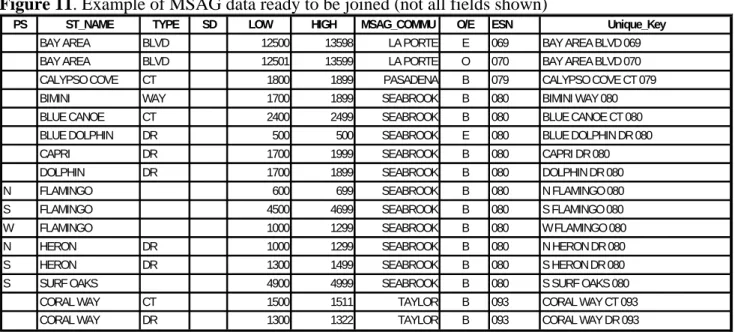
In Phase One analysis, the MSAG data is the control dataset, and the GIS data is joined with the MSAG, to determine what records in the MSAG match the GIS street centerline data. The join process will also show what records in the MSAG are not in the GIS street centerline data. The join process requires a composite Unique Key in the MSAG and GIS data. The explanation and
development process for the composite Unique Key are discussed in section 2.2.1.
An assumption cannot be made as to which discrepancies are correct or invalid. This process simply shows the discrepancies. A thorough investigation by local personnel will be required to determine if the MSAG, GIS, or both, require correction.
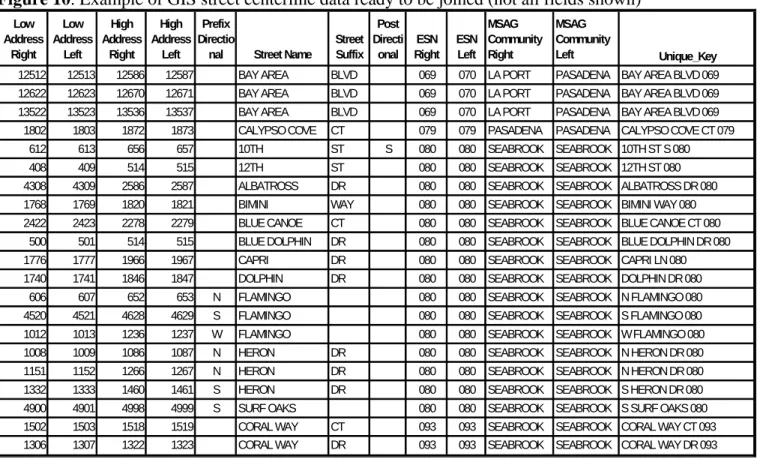
Figure 10. Example of GIS street centerline data ready to be joined (not all fields shown)
Low Address Right Low Address Left High Address Right High Address Left Prefix Directio
nal Street Name
Street Suffix Post Directi onal ESN Right ESN Left MSAG Community Right MSAG Community Left Unique_Key 12512 12513 12586 12587 BAY AREA BLVD 069 070 LA PORT PASADENA BAY AREA BLVD 069 12622 12623 12670 12671 BAY AREA BLVD 069 070 LA PORT PASADENA BAY AREA BLVD 069 13522 13523 13536 13537 BAY AREA BLVD 069 070 LA PORT PASADENA BAY AREA BLVD 069
1802 1803 1872 1873 CALYPSO COVE CT 079 079 PASADENA PASADENA CALYPSO COVE CT 079
612 613 656 657 10TH ST S 080 080 SEABROOK SEABROOK 10TH ST S 080
408 409 514 515 12TH ST 080 080 SEABROOK SEABROOK 12TH ST 080
4308 4309 2586 2587 ALBATROSS DR 080 080 SEABROOK SEABROOK ALBATROSS DR 080 1768 1769 1820 1821 BIMINI WAY 080 080 SEABROOK SEABROOK BIMINI WAY 080 2422 2423 2278 2279 BLUE CANOE CT 080 080 SEABROOK SEABROOK BLUE CANOE CT 080
500 501 514 515 BLUE DOLPHIN DR 080 080 SEABROOK SEABROOK BLUE DOLPHIN DR 080 1776 1777 1966 1967 CAPRI DR 080 080 SEABROOK SEABROOK CAPRI LN 080 1740 1741 1846 1847 DOLPHIN DR 080 080 SEABROOK SEABROOK DOLPHIN DR 080
606 607 652 653 N FLAMINGO 080 080 SEABROOK SEABROOK N FLAMINGO 080
4520 4521 4628 4629 S FLAMINGO 080 080 SEABROOK SEABROOK S FLAMINGO 080 1012 1013 1236 1237 W FLAMINGO 080 080 SEABROOK SEABROOK W FLAMINGO 080 1008 1009 1086 1087 N HERON DR 080 080 SEABROOK SEABROOK N HERON DR 080 1151 1152 1266 1267 N HERON DR 080 080 SEABROOK SEABROOK N HERON DR 080 1332 1333 1460 1461 S HERON DR 080 080 SEABROOK SEABROOK S HERON DR 080 4900 4901 4998 4999 S SURF OAKS 080 080 SEABROOK SEABROOK S SURF OAKS 080 1502 1503 1518 1519 CORAL WAY CT 093 093 SEABROOK SEABROOK CORAL WAY CT 093 1306 1307 1322 1323 CORAL WAY DR 093 093 SEABROOK SEABROOK CORAL WAY DR 093
Version 1.1, September 8, 2009 Page 20 of 37
Figure 11. Example of MSAG data ready to be joined (not all fields shown)
PS ST_NAME TYPE SD LOW HIGH MSAG_COMMU O/E ESN Unique_Key
BAY AREA BLVD 12500 13598 LA PORTE E 069 BAY AREA BLVD 069
BAY AREA BLVD 12501 13599 LA PORTE O 070 BAY AREA BLVD 070
CALYPSO COVE CT 1800 1899 PASADENA B 079 CALYPSO COVE CT 079
BIMINI WAY 1700 1899 SEABROOK B 080 BIMINI WAY 080
BLUE CANOE CT 2400 2499 SEABROOK B 080 BLUE CANOE CT 080
BLUE DOLPHIN DR 500 500 SEABROOK E 080 BLUE DOLPHIN DR 080
CAPRI DR 1700 1999 SEABROOK B 080 CAPRI DR 080
DOLPHIN DR 1700 1899 SEABROOK B 080 DOLPHIN DR 080
N FLAMINGO 600 699 SEABROOK B 080 N FLAMINGO 080
S FLAMINGO 4500 4699 SEABROOK B 080 S FLAMINGO 080
W FLAMINGO 1000 1299 SEABROOK B 080 W FLAMINGO 080
N HERON DR 1000 1299 SEABROOK B 080 N HERON DR 080
S HERON DR 1300 1499 SEABROOK B 080 S HERON DR 080
S SURF OAKS 4900 4999 SEABROOK B 080 S SURF OAKS 080
CORAL WAY CT 1500 1511 TAYLOR B 093 CORAL WAY CT 093
CORAL WAY DR 1300 1322 TAYLOR B 093 CORAL WAY DR 093
In Figure 12, note that Bay Area Blvd in ESN 070 is in the MSAG but did not join to the GIS street centerline data because the Unique Key in the GIS data was built using ESN Right (069). When the left and right ESN’s differ, care must be taken to ensure the MSAG and GIS data are correct. In this case the GIS Street centerline data does contain Bay Area Blvd with the left and right ESN’s being correctly attributed.
Figure 12. Example of resulting GIS street centerline joined to the MSAG (not all fields shown)
MSAG_COMMU O/E ESN Unique_Key
Prefix Direction al Street Name Street Suffix Post Directi onal ESN
Right ESN Left
LA PORTE E 069 BAY AREA BLVD 069 BAY AREA BLVD 069 070
LA PORTE O 070 BAY AREA BLVD 070
PASADENA B 079 CALYPSO COVE CT 079 CALYPSO COVE CT 079 079
SEABROOK B 080 BIMINI WAY 080 BIMINI WAY 080 080
SEABROOK B 080 BLUE CANOE CT 080 BLUE CANOE CT 080 080
SEABROOK E 080 BLUE DOLPHIN DR 080 BLUE DOLPHIN DR 080 080
SEABROOK B 080 CAPRI DR 080
SEABROOK B 080 DOLPHIN DR 080 DOLPHIN DR 080 080
SEABROOK B 080 N FLAMINGO 080 N FLAMINGO 080 080
SEABROOK B 080 S FLAMINGO 080 S FLAMINGO 080 080
SEABROOK B 080 W FLAMINGO 080 W FLAMINGO 080 080
SEABROOK B 080 N HERON DR 080 N HERON DR 080 080
SEABROOK B 080 S HERON DR 080 S HERON DR 080 080
SEABROOK B 080 S SURF OAKS 080 S SURF OAKS 080 080
TAYLOR B 093 CORAL WAY CT 093 CORAL WAY CT 093 093
TAYLOR B 093 CORAL WAY DR 093 CORAL WAY DR 093 093
In the MSAG Capri Dr in ESN 080 did not join to any records in the GIS street centerline data. In the GIS data the street is Capri Ln in ESN 080. Since the street suffixes differ, the join process did not match the records.
Version 1.1, September 8, 2009 Page 21 of 37 The process of finding and correcting these discrepancies is described in Section 2.2.1.
Phase Two – MSAG compared to GIS street centerline
In the Phase Two analysis the GIS street centerline data is the control and the MSAG is joined with the GIS data to determine what records in the GIS data match the MSAG. The join process will also show records that exist in the GIS data that are not in the MSAG. The join process in Phase Two also requires a composite Unique Key as discussed in Section 2.2.1.
As stated above, investigation by local personnel is needed to determine if the GIS data, MSAG, or both require correction. For example, if there is a street with address ranges in the map that is not in the MSAG, then local personnel will need to determine if the GIS street centerline data is accurate, and whether or not the street officially does exist. If it is determined that the street actually exists, then the MSAG should be edited to accommodate the street name and address ranges.
Comparing the GIS data to the MSAG data will show the discrepancies between the MSAG and the GIS street centerline data, such as the street names or ESN’s in the MSAG that do not match those in the GIS street centerline data.
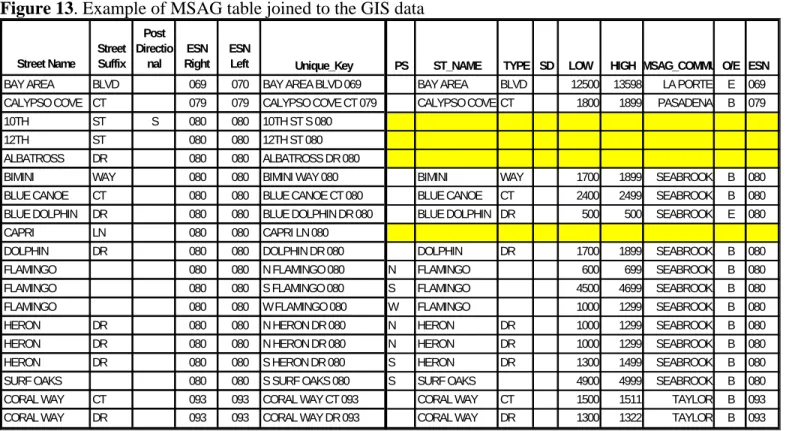
Figure 13. Example of MSAG table joined to the GIS data
Street Name Street Suffix Post Directio nal ESN Right ESN
Left Unique_Key PS ST_NAME TYPE SD LOW HIGH MSAG_COMMU O/E ESN BAY AREA BLVD 069 070 BAY AREA BLVD 069 BAY AREA BLVD 12500 13598 LA PORTE E 069 CALYPSO COVE CT 079 079 CALYPSO COVE CT 079 CALYPSO COVE CT 1800 1899 PASADENA B 079
10TH ST S 080 080 10TH ST S 080
12TH ST 080 080 12TH ST 080
ALBATROSS DR 080 080 ALBATROSS DR 080
BIMINI WAY 080 080 BIMINI WAY 080 BIMINI WAY 1700 1899 SEABROOK B 080
BLUE CANOE CT 080 080 BLUE CANOE CT 080 BLUE CANOE CT 2400 2499 SEABROOK B 080 BLUE DOLPHIN DR 080 080 BLUE DOLPHIN DR 080 BLUE DOLPHIN DR 500 500 SEABROOK E 080
CAPRI LN 080 080 CAPRI LN 080
DOLPHIN DR 080 080 DOLPHIN DR 080 DOLPHIN DR 1700 1899 SEABROOK B 080
FLAMINGO 080 080 N FLAMINGO 080 N FLAMINGO 600 699 SEABROOK B 080
FLAMINGO 080 080 S FLAMINGO 080 S FLAMINGO 4500 4699 SEABROOK B 080
FLAMINGO 080 080 W FLAMINGO 080 W FLAMINGO 1000 1299 SEABROOK B 080
HERON DR 080 080 N HERON DR 080 N HERON DR 1000 1299 SEABROOK B 080
HERON DR 080 080 N HERON DR 080 N HERON DR 1000 1299 SEABROOK B 080
HERON DR 080 080 S HERON DR 080 S HERON DR 1300 1499 SEABROOK B 080
SURF OAKS 080 080 S SURF OAKS 080 S SURF OAKS 4900 4999 SEABROOK B 080
CORAL WAY CT 093 093 CORAL WAY CT 093 CORAL WAY CT 1500 1511 TAYLOR B 093
CORAL WAY DR 093 093 CORAL WAY DR 093 CORAL WAY DR 1300 1322 TAYLOR B 093
When the MSAG data is joined to the GIS street centerline data the streets in the MSAG data that are not in the GIS data, and those that are not an exact match, can be easily identified. In Figure 13 the GIS data contains a 10th St S, a 12th St, an Albatross Dr, and the previously discussed Capri Ln
Version 1.1, September 8, 2009 Page 22 of 37 which are not in the MSAG data. The process of finding and correcting these discrepancies is
described in Section 2.2.1 below.
3.2.1Synchronization of GIS Street Centerline data to the MSAG
In order to synchronize the two data sets the first step is to do a comparison of the data. A common database technique found in all of today’s GIS software packages and relational database
management systems called a “join” will be used to compare the GIS street centerline data to the MSAG. A join combines records from two tables into a new table. The following examples use a special type of join, often referred to as an “inner join” or a “table join”, which requires each record in the two tables to have a matching record in order for the join to occur. The matching record in this case is on a unique composite key of several of the attributes in each of the two tables.
Joining the MSAG records to the GIS street centerline data creates a database containing all the records in the GIS street centerline data and the records in the MSAG data that are an exact match of the unique key found in the GIS data as shown in Figure 13.
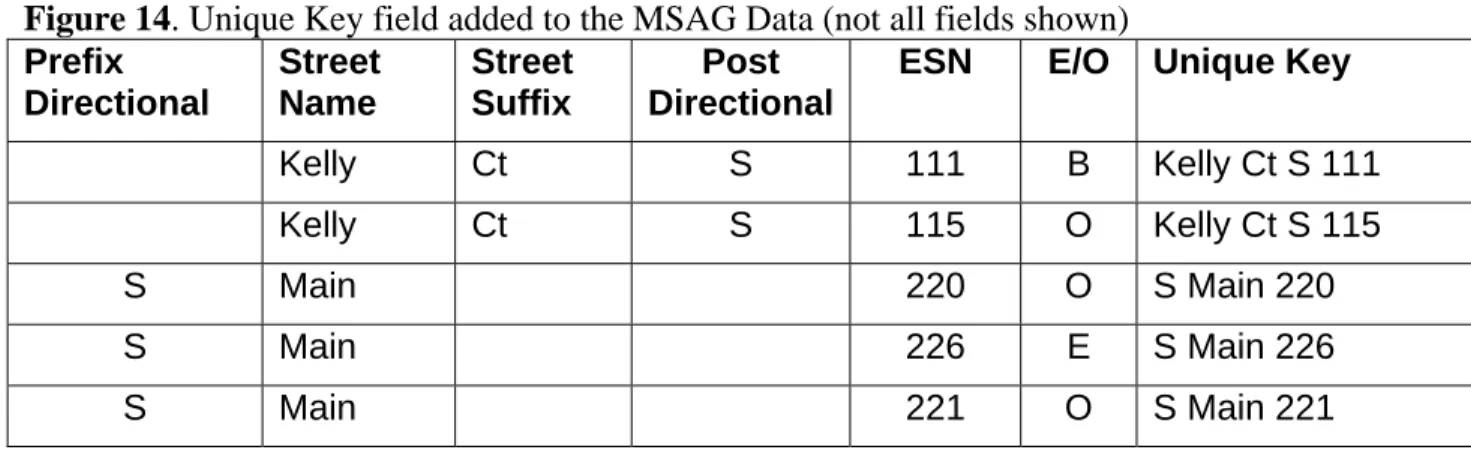
Figures 14 and 15 combine the Prefix Directional, Street Name, Street Suffix, Post Directional and the ESN of each record for both the MSAG and GIS data to create the unique composite key, or the unique key.
Conversely, if the GIS street centerline data was joined to the MSAG data, the resulting database would contain all of the records in the MSAG data and those records in the GIS data that were an exact match of the unique key found in the MSAG data as shown in Figure 12. These types of joins are known as a full outer join.
The use of the ESN in conjunction with the other attributes of the complete street name yields the most discrepancies. Other unique composite keys will be created by using the MSAG or Postal Community, in both the GIS and MSAG tables, in place of the ESN number used in these examples to further refine the synchronization process. Using the MSAG Community name and the Postal Community Name in place of the ESN will be discussed at the end of this section.
Figure 14. Unique Key field added to the MSAG Data (not all fields shown) Prefix Directional Street Name Street Suffix Post Directional
ESN E/O Unique Key
Kelly Ct S 111 B Kelly Ct S 111
Kelly Ct S 115 O Kelly Ct S 115
S Main 220 O S Main 220
S Main 226 E S Main 226
Version 1.1, September 8, 2009 Page 23 of 37
Figure 15. Unique Key added to the GIS Street Centerline Data (not all fields shown)
Prefix Directional Street Name Street Suffix Post Directional
ESN_L Unique Key
Kelly Ct S 111 Kelly Ct S 111
S Main 220 S Main 220
S Main 221 S Main 221
W Adams Ave 111 W Adams Ave 111
Notes on Joining the MSAG and GIS street centerline data:
• The GIS street centerlines contain a left and right ESN value. Care should be taken when the left and right ESN values differ as these may be streets that form the border of the ESN’s, Postal Communities and / or MSAG Communities.
• These streets can be identified in the MSAG data by having an Even (E) or Odd (O) parity value in the E/O column of the MSAG. If the streets are completely within an ESN in the MSAG data then this column should contain a B for Both, assuming the MSAG data is correct.
• MSAG records that contain an Even (E) or an Odd (O) only range also require special consideration as they may form the boundary between two or more ESN’s. These types of records should be carefully checked against the Left and Right ESN values in the GIS street centerline data.
• The GIS street centerline data and the MSAG data may store the ESN values differently. However, they must be the same length for the join process to work correctly. For example, the street name of SMITH ST with an ESN value of 00021 in the MSAG data, and a street name of SMITH ST with an ESN value of 021 in the GIS street centerline data will not allow the join process, since SMITH ST 00021 is not the same as SMITH ST 021.
• Many typical computer software applications for spreadsheets or databases allow the unique composite key in the MSAG to be created using the “concatenate” command, or similar function.
• It is recommended that both GIS and MSAG unique key fields be converted to uppercase in order for the Join process to work correctly, for example “Smith St” may not match “SMITH ST”.
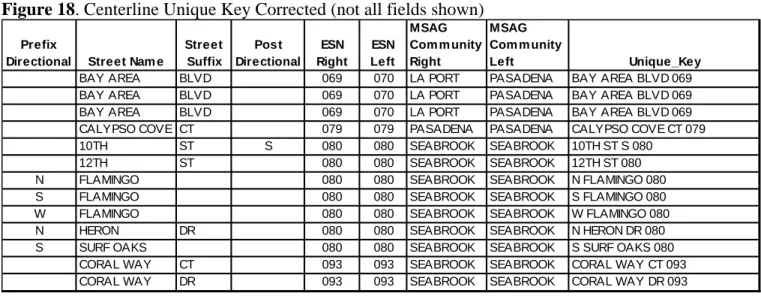
• All extra spaces need to be removed from the unique key, e.g. replacing two spaces with one space and removing leading and trailing spaces. In Figure 16 below there is an extra space before “Kelly” in the first Unique Key record and in the second Unique Key is an extra space between “Main” and “220”. These must be removed prior to joining the two data sets for the join to work properly.
Version 1.1, September 8, 2009 Page 24 of 37
Figure 16. Unique Key having extra spaces
Prefix Directional Street Name Street Suffix Post Directional
ESN_L Unique Key
KELLY CT S 111 _KELLY_CT_S_111
S MAIN 220 S_MAIN__220
All leading and trailing spaces must be removed from both the GIS street centerline data and the MSAG data unique key. When joining the MSAG and the GIS data together based on the unique key, the program may not recognize that “_Kelly” and “Kelly” are the same, since “_Kelly” has a space in front of the letter K. The same holds true for “S_Main __220” versus “S_Main_220”, where there are two spaces between Main and 220.
These types of issues are illustrated in Figure 17, the “Centerline Unique Key Uncorrected, and figure 18, “Centerline Unique Key Corrected”. Notice the leading, double, and trailing spaces in Figure 17, and the correction in Figure 18
Figure 17. Centerline Unique Key Uncorrected (not all fields shown) Prefix
Directional Street Name
Street Suffix Post Directional ESN Right ESN Left MSAG Community Right MSAG
Community Left Unique_Key
BAY AREA BLVD 069 070 LA PORT PASADENA BAY AREA BLVD 069
BAY AREA BLVD 069 070 LA PORT PASADENA BAY AREA BLVD 069
BAY AREA BLVD 069 070 LA PORT PASADENA BAY AREA BLVD 069
CALYPSO COVE CT 079 079 PASADENA PASADENA CALYPSO COVE CT 079
10TH ST S 080 080 SEABROOK SEABROOK 10TH ST S 080
12TH ST 080 080 SEABROOK SEABROOK 12TH ST 080
N FLAMINGO 080 080 SEABROOK SEABROOK N FLAMINGO 080
S FLAMINGO 080 080 SEABROOK SEABROOK S FLAMINGO 080
W FLAMINGO 080 080 SEABROOK SEABROOK W FLAMINGO 080
N HERON DR 080 080 SEABROOK SEABROOK N HERON DR 080
S SURF OAKS 080 080 SEABROOK SEABROOK S SURF OAKS 080
CORAL WAY CT 093 093 SEABROOK SEABROOK CORAL WAY CT 093
Version 1.1, September 8, 2009 Page 25 of 37
Figure 18. Centerline Unique Key Corrected (not all fields shown) Prefix
Directional Street Nam e
Street Suffix Post Directional ESN Right ESN Left MSAG Com m unity Right MSAG Com m unity Left Unique_Key
BAY AREA BLVD 069 070 LA PORT PASADENA BAY AREA BLVD 069
BAY AREA BLVD 069 070 LA PORT PASADENA BAY AREA BLVD 069
BAY AREA BLVD 069 070 LA PORT PASADENA BAY AREA BLVD 069
CALYPSO COVE CT 079 079 PASADENA PASADENA CALYPSO COVE CT 079
10TH ST S 080 080 SEABROOK SEABROOK 10TH ST S 080
12TH ST 080 080 SEABROOK SEABROOK 12TH ST 080
N FLAMINGO 080 080 SEABROOK SEABROOK N FLAMINGO 080
S FLAMINGO 080 080 SEABROOK SEABROOK S FLAMINGO 080
W FLAMINGO 080 080 SEABROOK SEABROOK W FLAMINGO 080
N HERON DR 080 080 SEABROOK SEABROOK N HERON DR 080
S SURF OAKS 080 080 SEABROOK SEABROOK S SURF OAKS 080
CORAL WAY CT 093 093 SEABROOK SEABROOK CORAL WAY CT 093
CORAL WAY DR 093 093 SEABROOK SEABROOK CORAL WAY DR 093
Figure 19. GIS Street Centerline Joined to MSAG data MSAG.Unique_Key
Prefix
Directional Street Name
Street Suffix
Post Directional
ESN
Right ESN Left Centerline Unique_Key
BAY AREA BLVD 069 BAY AREA BLVD 069 070 BAY AREA BLVD 069
BAY AREA BLVD 070
CALYPSO COVE CT 079 CALYPSO COVE CT 079 079 CALYPSO COVE CT 079
BIMINI WAY 080 BIMINI WAY 080 080 BIMINI WAY 080
BLUE CANOE CT 080 BLUE CANOE CT 080 080 BLUE CANOE CT 080
BLUE DOLPHIN DR 080 BLUE DOLPHIN DR 080 080 BLUE DOLPHIN DR 080
CAPRI DR 080
DOLPHIN DR 080 DOLPHIN DR 080 080 DOLPHIN DR 080
N FLAMINGO 080 N FLAMINGO 080 080 N FLAMINGO 080
S FLAMINGO 080 S FLAMINGO 080 080 S FLAMINGO 080
W FLAMINGO 080 W FLAMINGO 080 080 W FLAMINGO 080
N HERON DR 080 N HERON DR 080 080 N HERON DR 080
S HERON DR 080 S HERON DR 080 080 S HERON DR 080
S SURF OAKS 080 S SURF OAKS 080 080 S SURF OAKS 080
CORAL WAY CT 093 CORAL WAY CT 093 093 CORAL WAY CT 093
Version 1.1, September 8, 2009 Page 26 of 37
Figure 20. MSAG Joined to GIS Street Centerline
Centerline Unique_Key PS ST_NAME TYPE SD LOW HIGH
MSAG
COMMUNITY O/E ESN
BAY AREA BLVD 069 BAY AREA BLVD 12500 13598 LA PORTE E 069
CALYPSO COVE CT 079 CALYPSO COVE CT 1800 1899 PASADENA B 079
10TH ST S 080 12TH ST 080 ALBATROSS DR 080
BIMINI WAY 080 BIMINI WAY 1700 1899 SEABROOK B 080
BLUE CANOE CT 080 BLUE CANOE CT 2400 2499 SEABROOK B 080
BLUE DOLPHIN DR 080 BLUE DOLPHIN DR 500 500 SEABROOK E 080
CAPRI LN 080
DOLPHIN DR 080 DOLPHIN DR 1700 1899 SEABROOK B 080
N FLAMINGO 080 N FLAMINGO 600 699 SEABROOK B 080
S FLAMINGO 080 S FLAMINGO 4500 4699 SEABROOK B 080
W FLAMINGO 080 W FLAMINGO 1000 1299 SEABROOK B 080
N HERON DR 080 N HERON DR 1000 1299 SEABROOK B 080
N HERON DR 080 N HERON DR 1000 1299 SEABROOK B 080
S HERON DR 080 S HERON DR 1300 1499 SEABROOK B 080
S SURF OAKS 080 S SURF OAKS 4900 4999 SEABROOK B 080
CORAL WAY CT 093 CORAL WAY CT 1500 1511 TAYLOR B 093
CORAL WAY DR 093 CORAL WAY DR 1300 1322 TAYLOR B 093
The highlighted records in Figures 19 and 20 are the discrepancies between the MSAG and GIS data after both joins are performed. In Figure 19 the MSAG contains “Bay Area Blvd” in ESN 070 that is not in the joined street centerline data. There is also a discrepancy with the joined GIS data
containing “Capri Dr” in ESN 080.
GIS street centerline data that contains different Left and Right side ESN’s also requires special attention. In cases where the left and right ESN’s differ in the GIS street centerline, the MSAG must be carefully consulted to ensure both datasets match.
In the case of “Bay Area Blvd” in Figure 19, the GIS data does contain a “Bay Area Blvd” that has a left side ESN of 069 and a right side ESN of 070, so the GIS data and MSAG data do agree with each other, but the ESN field used in creating the unique key only contained the ESN value of 069. The border streets and the records in the MSAG that have a different ESN on the odd side and even side require careful attention to determine if the GIS street centerline data and the MSAG data are in agreement.
Figure 19 shows “Capri Dr” in ESN 080, and Figure 20 shows “Capri Ln”. This discrepancy must be carefully researched to determine the reason it does not match in both data sets.
Note: Different software will show the records that do not join to the other table as either blank or as a NULL value.
Other join types are possible and may not include the unmatched records from either one or both original tables; care should be taken when dealing with different software vendors as the
Version 1.1, September 8, 2009 Page 27 of 37 Joining the GIS centerline data to the MSAG data, and then joining the MSAG data to the GIS centerline data will allow a determination to be made as to where the discrepancies exist. In the First Pass the ESN and street naming discrepancies will be identified.
Reasons why the two data sets do not properly join include, but are not limited to the following:
Figure 21. Common discrepancies found in the join process
Problem Parent Data Joined Data
Street Type missing JONES RD JONES
ESN’s differ 00023 23
Street misspelled JONES RD JONEES RD
Post Directional transposed JONES RD N JONES RD N Suffix Directional transposed JONES RD N JONES RD N
Community Names Differ BURLINGTON BURL
One Word vs. Two Word names BLUEBONNET DR BLUE BONNET DR Incorrect Standardization N LAKE DR NORTH LAKE DR
Other Common Discrepancies:
• Street Names, Street Types, Pre and Post Direction
• Community Names with inconsistent spelling or with abbreviations in MSAG
• There will be streets segments in the GIS data that may not be in the MSAG such as unaddressed private roads, ramps, unaddressed connector streets, and proposed streets
• Improper ESN assignment
All MSAG records should be found in the GIS data, with the following exceptions: MSAG records for FX records, Test records, and VoIP and Wireless Shell records.
Synchronization between the MSAG and GIS must also apply to address ranges. The validation process for address ranges can be complex as the standard for applying ranges can vary between the MSAG and GIS data. As an example, the MSAG low to high ranges for a city street may be 100- 399. The corresponding GIS street centerline data actual data ranges may be broken out by block ranges such as 110-159, 208-267, and 332-375. If the MSAG entry includes the low to high ranges for the corresponding street segments, the entry is considered validated.
Version 1.1, September 8, 2009 Page 28 of 37
Figure 22. Valid MSAG and GIS Street Centerline Ranges MSAG Data
PD Name Type Low High ESN
SMITH ST 100 399 00127
MAIN 1 199 00067
GIS Street Centerline Data
PD NAME Type LF_ADD RT_ADD ESN
SMITH ST 110 159 00127
SMITH ST 208 267 00127
SMITH ST 332 375 00127
Note: ALI databases must be verified to make sure that no addresses exist above the last address range of 375, shown in the GIS data. If there are ALI records, or other resources indicate addresses (permits, utility connections, tax records, etc. see NENA 02-013) above or below the address ranges in the GIS, then the GIS must be adjusted to accommodate these additional addresses.
Figure 23. Valid MSAG and GIS Street Centerline Address Ranges
MSAG Data
PD Name Type Low High ESN
MAIN 1 199 00067
GIS Street Centerline Data
PD NAME Type LF_ADD RT_ADD ESN
MAIN 1 73 00067
MAIN 110 168 00067
MAIN 192 197 00067
There are two levels of address range synchronization: Street Level and Block Level. The following examples explain the difference between the two levels, or types.
Street Level Synchronization
The example in Figure 24 below shows street level synchronization. The MSAG entry includes the low to high address range for Main Street. The GIS street centerline data has address range gaps between the low and high addresses, and is acceptable for “Street Level Synchronization”. This example does not qualify for block level synchronization because the MSAG entry includes addresses that are not in the GIS street centerline data.
Version 1.1, September 8, 2009 Page 29 of 37
Figure 24. Example of Street Level Synchronization MSAG Entry
MAIN ST 100 333
GIS Street Centerline Ranges
MAIN ST 100 121
MAIN ST 200 232
MAIN ST 300 333
Block Level Synchronization
Block level synchronization has individual MSAG entries that account for the corresponding address ranges in the GIS street centerline data. This level of synchronization is possible when the GIS street centerline data contains actual address ranges, and you MSAG contain individual range entries.
Figure 25. Example of Block Level Synchronization MSAG Entry
MAIN ST 100 121
MAIN ST 200 232
MAIN ST 300 333
GIS Street Centerline Data Ranges
MAIN ST 100 121
MAIN ST 200 232
MAIN ST 300 333
Block level synchronization means the MSAG data and the GIS street centerline data are in
complete agreement. However block level synchronization may not be achieved based on available resources and funding.
Although Street Level Synchronization is acceptable there may still be discrepancies in the GIS street centerline data. If the resources are not available to have a Block Level Synchronization, then it is recommended that the ALI data be geocoded against the GIS street centerline data, which is discussed in Section 2.2.2.
Comparing the MSAG address ranges to the GIS Street Centerline can be accomplished by manual methods as described in this document, third party software, custom coding using tools available in the GIS software, Structure Query Language (SQL) statements, or generating reports based on the summary of the minimum and maximum address range of each unique street segment in each ESN which can be accomplished with most GIS software.
Version 1.1, September 8, 2009 Page 30 of 37
Postal Community Code Validation
The process of using ESN in the Unique Key field can be repeated using the Postal Community, in place of the ESN, to validate the Postal Community.
Figure 26. GIS Street Centerline Data with Postal Communities Prefix
Directional
Street Name Street Suffix Post Directional Postal Community Right Postal Community Left Unique_Key
BAY AREA BLVD LA PORTE PASADENA BAY AREA BLVD LA PORTE
CALYPSO COVE CT PASADENA PASADENA CALYPSO COVE CT PASADENA
BIMINI WAY LA PORTE PASADENA BIMINI WAY LA PORTE
BLUE CANOE CT SEABROOK SEABROOK BLUE CANOE CT SEABROOK
BLUE DOLPHIN DR SEABROOK SEABROOK BLUE DOLPHIN DR SEABROOK
SEABROOK SEABROOK SEABROOK
DOLPHIN DR SEABROOK SEABROOK DOLPHIN DR SEABROOK
N FLAMINGO SEABROOK SEABROOK N FLAMINGO SEABROOK
S FLAMINGO SEABROOK SEABROOK S FLAMINGO SEABROOK
W FLAMINGO SEABROOK SEABROOK W FLAMINGO SEABROOK
N HERON DR SEABROOK SEABROOK N HERON DR SEABROOK
S HERON DR SEABROOK SEABROOK S HERON DR SEABROOK
S SURF OAKS TAYLOR SEABROOK S SURF OAKS TAYLOR
CORAL WAY CT TAYLOR TAYLOR CORAL WAY CT TAYLOR
CORAL WAY DR TAYLOR TAYLOR CORAL WAY DR TAYLOR
Figure 27. MSAG Data with Postal Communities
PS ST_NAME TYPE SD LOW HIGH POSTAL
COMMUNITY
O/E ESN Unique_Key
BAY AREA BLVD 12500 13598 LA PORTE E 069 BAY AREA BLVD LA PORTE
BAY AREA BLVD 12501 13599 PASADENA O 070 BAY AREA BLVD PASADENA
CALYPSO COVE CT 1800 1899 PASADENA B 079 CALYPSO COVE CT PASADENA
BIMINI WAY 1700 1899 SEABROOK B 080 BIMINI WAY SEABROOK
BLUE CANOE CT 2400 2499 PASADENA B 080 BLUE CANOE CT PASADENA
BLUE DOLPHIN DR 500 500 SEABROOK E 080 BLUE DOLPHIN DR SEABROOK
CAPRI DR 1700 1999 SEABROOK B 080 CAPRI DR SEABROOK
DOLPHIN DR 1700 1899 PASADENA B 080 DOLPHIN DR PASADENA
N FLAMINGO 600 699 SEABROOK B 080 N FLAMINGO SEABROOK
S FLAMINGO 4500 4699 SEABROOK B 080 S FLAMINGO SEABROOK
W FLAMINGO 1000 1299 SEABROOK B 080 W FLAMINGO SEABROOK
N HERON DR 1000 1299 SEABROOK B 080 N HERON DR SEABROOK
S HERON DR 1300 1499 SEABROOK B 080 S HERON DR SEABROOK
S SURF OAKS 4900 4999 SEABROOK B 080 S SURF OAKS SEABROOK
CORAL WAY CT 1500 1511 TAYLOR B 093 CORAL WAY CT TAYLOR
CORAL WAY DR 1300 1322 TAYLOR B 093 CORAL WAY DR TAYLOR
MSAG Community Code validation
The above process of using ESN in the Unique Key field can be repeated using the MSAG Community, in place of the ESN, to validate the MSAG Community.
Version 1.1, September 8, 2009 Page 31 of 37
Figure 28. Example of GIS Street Centerline Data with MSAG Communities
Prefix
Directional Street Name
Street Suffix Post Directional ESN Right ESN Left MSAG Community Right MSAG Community Left Unique_Key
BAY AREA BLVD 069 070 LA PORT PASADENA BAY AREA BLVD LA PORTE BAY AREA BLVD 069 070 LA PORT PASADENA BAY AREA BLVD LA PORTE BAY AREA BLVD 069 070 LA PORT PASADENA BAY AREA BLVD LA PORTE CALYPSO COVE CT 079 079 PASADENA PASADENA CALYPSO COVE CT PASADENA 10TH ST S 080 080 SEABROOK SEABROOK 10TH ST S SEABROOK 12TH ST 080 080 SEABROOK SEABROOK 12TH ST SEABROOK N FLAMINGO 080 080 SEABROOK SEABROOK N FLAMINGO SEABROOK S FLAMINGO 080 080 SEABROOK SEABROOK S FLAMINGO SEABROOK W FLAMINGO 080 080 SEABROOK SEABROOK W FLAMINGO SEABROOK N HERON DR 080 080 SEABROOK SEABROOK N HERON DR SEABROOK S SURF OAKS 080 080 SEABROOK SEABROOK S SURF OAKS SEABROOK
CORAL WAY CT 093 093 SEABROOK SEABROOK CORAL WAY CT SEABROOK CORAL WAY DR 093 093 SEABROOK SEABROOK CORAL WAY DR SEABROOK
Figure 29. MSAG Data with MSAG Communities
PS ST_NAME TYPE SD LOW HIGH MSAG_COMMU O/E ESN Unique_Key
BAY AREA BLVD 12500 13598 LA PORTE E 069 BAY AREA BLVD LA PORTE
BAY AREA BLVD 12501 13599 LA PORTE O 070 BAY AREA BLVD LA PORTE
CALYPSO COVE CT 1800 1899 PASADENA B 079 CALYPSO COVE CT PASADENA
BIMINI WAY 1700 1899 SEABROOK B 080 BIMINI WAY SEABROOK
BLUE CANOE CT 2400 2499 SEABROOK B 080 BLUE CANOE CT SEABROOK
BLUE DOLPHIN DR 500 500 SEABROOK E 080 BLUE DOLPHIN DR SEABROOK
CAPRI DR 1700 1999 SEABROOK B 080 CAPRI DR SEABROOK
DOLPHIN DR 1700 1899 SEABROOK B 080 DOLPHIN DR SEABROOK
N FLAMINGO 600 699 SEABROOK B 080 N FLAMINGO SEABROOK
S FLAMINGO 4500 4699 SEABROOK B 080 S FLAMINGO SEABROOK
W FLAMINGO 1000 1299 SEABROOK B 080 W FLAMINGO SEABROOK
N HERON DR 1000 1299 SEABROOK B 080 N HERON DR SEABROOK
3.2.2ALI database to GIS Street Centerline Data
The ALI database can be geocoded against the GIS street centerline data (and address points where used), as another quality assurance measure. This can be used as a confirmation that all ALI information will be properly located in the GIS street centerline data. The ALI will not contain all address in an area; therefore, the ALI cannot be considered the sole source for addresses.
Typically if the MSAG and GIS street centerline databases have been synchronized, then all ALI records should geocode correctly to the GIS street centerline data. Comparing the ALI database to GIS street centerline data will find any remaining discrepancies between the ALI and GIS street centerline data.
Comparing the ALI database to GIS street centerline data is not an easy task, but can be
accomplished by geocoding the ALI database to the GIS street centerline data. Geocoding is the process of assigning a geographic coordinate location by comparing tabular address information to geographic reference information.