HMAA Online for Providers
Reference Manual
Introduction... 3
! Disclaimer ... 3
Contact Information... 4
Web and Contact Information... 4
! Disclaimer ... 4 Getting Started... 5 System Requirements ... 5 System Requirements ... 5 User Responsibility ... 5 Logging In ... 6
Changing Your Password ... 7
Password Requirements... 8
Eligibility and Plan Information ... 9
Options ... 10
Coverage Information... 11
! Disclaimers ... 12
HMAA Website ... 13
HMAA Contact Information ... 14
Privacy and Security Statement ... 14
Forms... 14
Claim Information ... 15
Claim Details ... 16
Provider Payment Report (PPR) ... 18
Letters... 18
! Disclaimers ... 18
Logoff ... 18
H M A A O N L I N E F O R P R O V I D E R S R E F E R E N C E M A N U A L
Introduction
HMAA Online for Providers enables you to view eligibility information, claims, schedule of benefits
information and accumulators.
MAA is pleased to make available to our providers a service that enables you to view eligibility and claim information online. This manual describes the procedures for access to and use of the system options and functions available on our HMAA Online for Providers Website. Providers have the ability to access real-time, member information including eligibility verification, plan summary information, and claims history and status. Other options available are:
• Provider password maintenance and on-demand printing of claim forms.
• Access to HMAA’s contact information for inquiries and questions, assistance with system use, and site recommendations and comments.
• Access to the HMAA’s established policies and procedures regarding the collection, privacy, and security of the information provided via the site, and the terms and conditions of site use.
!
Disclaimer
The information provided by HMAA Online for Providers is not a guarantee of benefits or eligibility, and is subject to change since members’ or groups’ coverage may change or terminate retroactively.
Please note that the screen displays provided here are intended as examples only.
Chapter
1
H
I C O N K E Y Important information ! Disclaimer ReminderContact Information
You can login at any time, including non-business hours, to view member information. During normal business hours, if you are unable to access the information you are looking for, you may contact Provider Services or our Customer Service Center.
Web and Contact Information
HMAA Online for Providers: https://www.hmaaonline.com/
Contact Provider Services for assistance with:
• Access to HMAA Online for Providers
• HMAA Online Passwords
• HMAA Online User Reference Manual
On Oahu: (808) 591-0088, ext. 304
Toll-Free: (800) 621-6998, ext. 304
E-mail: [email protected]
Contact Customer Service for assistance with:
• Member and dependent eligibility
• Plan benefits and deductibles
• Claims status and claim payments
On Oahu: (808) 941-4622
Toll-Free: (888) 941-4622
E-mail: [email protected]
!
Disclaimer
Claims accessed through HMAA Online should not be utilized to determine plan maximums. Providers are only able to access claim information on members filed under their Taxpayer Identification Number. Information related to claims for the same member that have been submitted under a different Provider Taxpayer Identification Number will not be available.
For benefit determinations, please call HMAA’s Customer Service Center at 941-4622 or toll-free at (888) 941-4622.
H M A A O N L I N E F O R P R O V I D E R S R E F E R E N C E M A N U A L
Getting Started
To access HMAA Online for Providers, you will need your Tax Identification Number (TIN) and your login password. If you do not have a login password, please request one through Provider Services (see phone numbers above).
System Requirements
The minimum system requirements for HMAA Online for Providers are as follows:
System Requirements
• Computer with a 56.6 KBPS , a DSL or Cable Modem connection (for DSL or Cable the user of a software or hardware fire wall is required)
• Internet access
• 128 MB RAM or more
• Pentium III 500 MHz or higher
• Windows 2000 or XP operating system
• Internet Explorer 6.0 or higher, or Netscape 4.7 or higher
• Virus scanning software (such as McAfee’s VirusScan or Symantec’s Norton Virusscan
• Adobe Acrobat Reader software (can be downloaded for free from the following Website. Version 6.0 is recommended):
http://www.adobe.com/products/acrobat/readstep2.html
User Responsibility
HMAA Online for Providers is a secure Website. Providers must register to use the Website and will
be given a secure password. Your TIN and login password must be protected and used only by the practice to which it was assigned. It is your responsibility to maintain and protect your TIN and password, and to contact HMAA’s Provider Services if you forget or lose your password.
What you need Insured ID Login Password Internet Access
Logging In
Once you access the Internet, type https://www.hmaaonline.com/ into your Internet browser’s address bar and hit [Enter]. You will be directed to the HMAA Online Home Page(see Figure 1.1). You will see three choices on the home page:
1. PROVIDER
2. MEMBER/DEPENDENT 3. PLAN ADMINISTRATOR
FIGURE 1.1:HMAA Online Home Page. Click on PROVIDER to access your plan and claim information.
H M A A O N L I N E F O R P R O V I D E R S R E F E R E N C E M A N U A L
Choose the first option, PROVIDER. This will direct you to the Provider Login page (see Figure 1.2).
FIGURE 1.2:HMAA Online for Providers Provider Login Page. Enter your TIN and Password.
Enter the following information:
FIELD DESCRIPTION
Provider ID Provider Identification Number. Normally the billing provider’s TIN. Password Password assigned to this Provider. Note: This entry displays encrypted.
After you complete these entries, read the Website Terms and Conditions. To acknowledge that you have read, understand, and agree to these conditions, click on the [I Accept] button. The Select Insured screen displays.
Changing Your Password
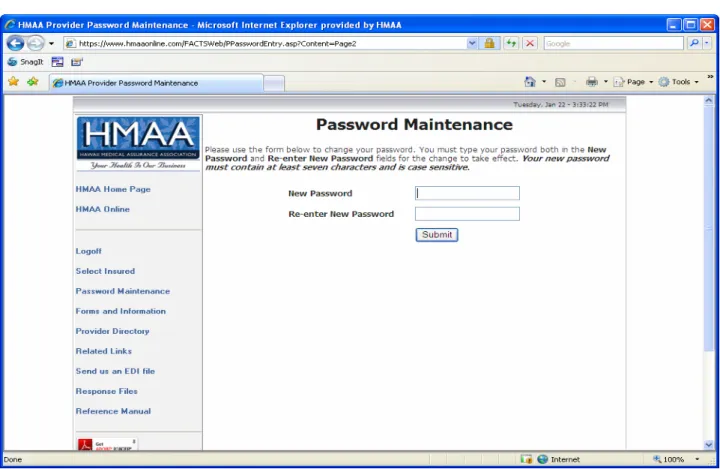
The first time you login to HMAA Online for Providers, you will be prompted to change your password (see Figure 1.3). You will also be required by the website to change your password every 180 days, but it is recommended that you change your password every month. See Password Requirements below for more information.
FIGURE 1.3:HMAA Online for Providers Password Maintenance Page. Change your password on this screen.
Enter your new password in the New Password field, then re-enter it in the Re-Enter New Password field. Your password must be at least seven characters long and is case-sensitive. Click [Submit] to update your password.
Password Requirements
Your new password must be at least seven (7) characters. If you enter a password that does not meet this requirement, you will be prompted to enter a different password. Your password is also case-sensitive.
Password Tips:
1) Change your password frequently. Monthly is recommended.
2) Use a password that includes non-alphabetic characters, such as numerals or punctuation marks.
3) Use a password that is easy for you to remember, so you don't have to write it down. 4) Do not use the names of any family members, friends, or pets.
H M A A O N L I N E F O R P R O V I D E R S R E F E R E N C E M A N U A L
Eligibility and Plan Information
Check patient’s plan eligibility and plan benefits.nce you are logged into HMAA Online for Providers (and have changed your password upon your initial login), you are ready to access your patient’s eligibility, plan, and claim information. You will be on the Select Insured page (see Figure 2.1), where you will enter your patient’s Insured ID. Click on the [Submit] button and you will be directed to the Select Family Member screen (see Figure 2.2). If you don’t have the patient’s Insured ID, you may enter the subscriber’s social security number and choose the SSN option under the ID Type drop down box.
FIGURE 2.1:HMAA Online for Providers Select Insured Page. Enter the Insured ID or SSN of the patient you wish to view.
Chapter
2
O
I C O N K E Y Important information ! Disclaimer ReminderFIGURE 2.2:HMAA Online for Providers Select Family Member Page. Select the family member you wish to view.
Options
From the Select Family Member Page, you can access almost all of the information available on
HMAA Online for Providers except for claims. Your options on this page are as follows:
• To view Insured’s or dependent’s Coverage Information, click on [Select] under the Select
Member heading.
• To change your password, click on Password Maintenance in the sidebar (see How to Change
Your Password in Chapter 1 for more information).
• For HMAA Contact Information, click on Contact Us on the bottom of the page.
• To read our Privacy and Security Statement, click on Privacy and Security on the bottom of the page.
• To access HMAA’s Website, click on the HMAA banner at the top of the page.
• To access HMAA Forms such as a HCFA 1500, UB-92, or the Online Registration form, click on Forms.
H M A A O N L I N E F O R P R O V I D E R S R E F E R E N C E M A N U A L
Coverage Information
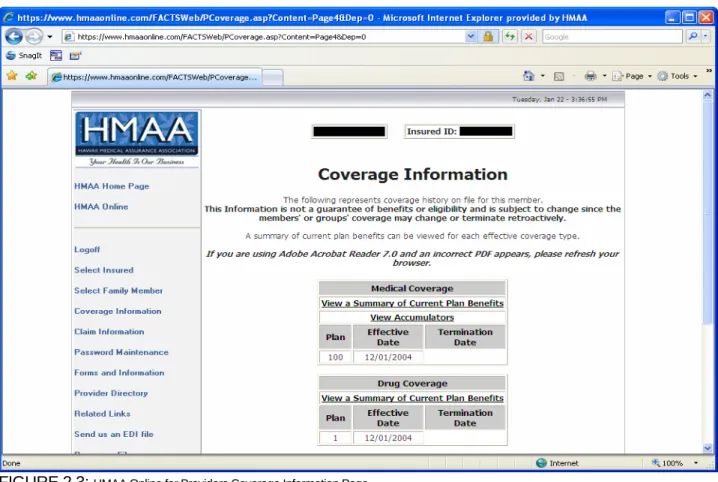
When you have selected a member to view, you will be brought to the Coverage Information screen
(see Figure 2.3). You can access any part of HMAA Online for Providers from this page. Your options on this page are as follows:
• View a Summary of Current Plan Benefits for any coverage your patient may have such as Medical, Dental, Vision or Drug (NOTE: If you are using Adobe Acrobat Reader 7.0 and an incorrect PDF appears, please refresh your browser.)
• View Accumulators (Deductible, Stop-Loss, Lifetime Maximum) for Medical or Dental (NOTE: If your patient has Single Coverage, you may see accumulators relating to Family Coverage. Please disregard the Family information as it is not applicable.)
• View plan numbers and Effective and Termination Dates for your patient’s current or previous coverage.
• View ClaimInformation(see Chapter 3 for more information).
• To return to the Select Family Member screen, click on Select Family Member in the sidebar.
• To log out of HMAA Online for Providers, click on Logoff in the sidebar.
To view a patient’s plan benefits, click on View a Summary of Current Plan Benefits from the Medical, Dental, Vision or Drug Coverage sections1. When you select one of the
links, a PDF2 will open that contains your patient’s Schedule of Benefits or SPD
(Summary Plan Description). You may print these or view them on the screen (see Figure 2.4).
!
Disclaimers
The information provided by HMAA Online for Providers is not a guarantee of benefits or eligibility, and is subject to change since members’ or groups’ coverage may change or terminate retroactively.
Depending on your patient’s coverage, you may be able to view their Schedule of Benefits or SPD.
If you are using Adobe Acrobat Reader 7.0 and an incorrect PDF appears,
please refresh your browser.
FIGURE 2.4:HMAA Online for Providers Sample Medical Plan Schedule of Benefits.
HMAA Online for Providers enables you to view your patient’s accumulators for
their Medical and Dental plans (see Figure 2.5). For Medical coverage, you can see how much your patient has remaining on his/her deductible, individual and family stop-loss, and individual and family lifetime maximums. For Dental coverage, you can see how much your patient has remaining on his/her individual and family annual maximums.
View Plan Benefits Medical Dental Vision Prescription View Accumulators Medical Dental
H M A A O N L I N E F O R P R O V I D E R S R E F E R E N C E M A N U A L
FIGURE 2.5:HMAA Online for Providers Medical Accumulator Review Page.
Your patient’s coverage Effective and Termination dates, if applicable, appear under each coverage type. You may see more than one row of dates if your patient had any plan or coverage changes. If you have any questions or concerns about these dates, please contact our Customer Service Center (see Page 3).
To view the coverage information for one of your patient’s dependents, click on Coverage Information in the sidebar to return to the Select Family Member page, and choose the dependent you wish to view.
HMAA Website
From HMAA Online for Providers, click on the HMAA banner at the top of the page to navigate to our Website, www.HMAA.com. Here you will have access to a wealth of information available to the general public.
You may want to view our Online Provider Directory, which is updated regularly with changes, additions and deletions to our network. You can also link to the Website and directory of our Mainland provider network, Private Healthcare Systems, Inc. (PHCS), to search for providers on the Mainland.
HMAA Contact Information
To view our office hours, Customer Service hours, location information, mailing address and telephone numbers, click on Contact Us on the bottom of the page.
Privacy and Security Statement
To read our General Policy, Security, Privacy, E-mail, and Consent Statements, click on Privacy and Security on the bottom of the page. If you have any questions regarding these statements, please contact our Customer Service Center.
Forms and Information
To download forms, click on Forms in the sidebar. You will be able to download the following types of forms:
• Claim Forms
• Request/Notification Forms
• Online Registration Form
• HMAA Provider Network Forms
H M A A O N L I N E F O R P R O V I D E R S R E F E R E N C E M A N U A L
Claim Information
View paid and in-process claims.MAA Online for Providers enables you to view your claims for HMAA members. When
you access specific claims, you may also be able to view, download or print a copy of your PPR (Provider Payment Report). To access your claims, click on Claim Information in the
sidebar. This will bring you to the Claim Information page (see Figure 3.1).
FIGURE 3.1:HMAA Online for Providers Claim Information Page. Select which claim you would like to view.
Chapter
3
H
I C O N K E Y Important information ! Disclaimer ReminderClaim Information
On the Claim Information page, you will see a list of claims associated with the member or dependent you selected on the Select Family Member page. As long as a claim has been submitted and we have started processing the claim, the claim will appear in this list. The list will include a Claim Number, Service From and Service Through Dates, the Provider of Services and Total Charges. To select the claim you wish to view, click on the link in the Claim field. This will bring you to the Claim Details
page.
Claim Details
The Claim Details page displays detailed information about the selected claim. The detailed information includes the following (see Figure 3.2):
• Check #
• Payee
• Total amount paid
• Date the amount was paid
• Payment amount for each line item on the claim
• Dates of service
• Amount billed by provider
• Ineligible amount codes
• Descriptions of ineligible amounts and codes
• Negotiated discount with provider
• Deductible
• Explanation of Benefits (EOB)
• Any letters that have been sent regarding the claim
Claim Details See paid and in-process claims Track OOP Costs View EOBs
H M A A O N L I N E F O R P R O V I D E R S R E F E R E N C E M A N U A L
Provider Payment Report (PPR)
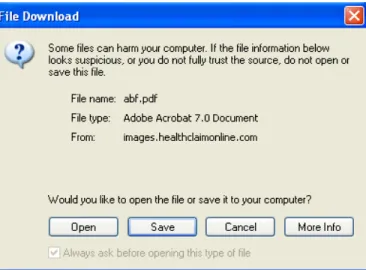
From the Claim Details page, you can access your PPR or any letters that have been mailed regarding the selected claim. To view a PPR, click on Click here for a PDF image of the Provider Payment Report. You will be prompted by a window asking whether you wish to Open or Save the PDF image
(see Figure 3.3). If you choose [Save], you will be prompted by your operating system to choose a location in which to save the PDF. If you choose [Open], the PDF will open in a new window.
FIGURE 3.3:PDF File Download Message. Choose Open or Save.
Letters
To access letters from the Claim Details page, click on the [Show Letter] button. Letters do not appear as PDF images, so you will not need to Open or Save the information. The letter will appear in your Web browser in the same screen, not in a new screen. To navigate back to the Claim Information page, use the [Back] button on your browser, or click on Claim Information in the sidebar.
!
Disclaimers
If you do not see the claim information you are looking for, we may not yet have received the claim. If at any time you cannot find a claim or need assistance, please contact our Customer Service Center.
Logoff
You may log out of HMAA Online for Providers at any time. To do so, click on Logoff in the sidebar. You will be directed to close your browser.
H M A A O N L I N E F O R P R O V I D E R S R E F E R E N C E M A N U A L
Summary
We hope this manual helps you navigate through the HMAA Online for Providers Website.
If at any time you have questions regarding HMAA Online for Providers, please feel free to contact our Provider Services Department at:
Phone: (808) 591-0088, ext. 304 Toll-Free: (800) 621-6998, ext. 304 E-mail: [email protected]
If you have any questions regarding Member or Dependent eligibility, Plan Benefits or Claims status, please contact our Customer Service Center at:
Phone: (808) 941-4622 Toll-Free: (888) 941-4622