Overview
Web Project Review Team
When should they get involved
Look and Feel Standards
Web Review (Pre-Launch Checklist)
Usability
Office of Enterprise Security and Web
Security
Web Project Review Team
John Thompson – e-Michigan Webmaster
Internet Policies and Compliance Michigan.gov Brand Manager
Display Standards Usability Guidelines
Rock Rakowski – OES Agency Liaison Manager
Security Requirements and Procedures Security and Privacy Policies
Assigns OES staff for Web Design Security Review
Jerry Morey – Tech. Services, Planning and
When should the Web Project Review Team get involved?
Specific Milestones in the Project Plan that the Web Project Review Team have be involved:
At start of the project - Before Design and Build
Ongoing participation during the build and testing phases Pre-Launch Checklists
Web Application Development Project Review
Final security review
Completion of application Final server hardening
Resolution of other outstanding issue if any
The E-Michigan Web Development team is
available to Project Managers and Development Teams
Information Architecture Standards
Applications (built outside Vignette) must
employ a consistent Information architecture
that mimics the style already used by the
parent agency Web site.
Site Design should follow the Michigan.Gov
Standards to achieve a consistent brand
identity.
Parent agency site on Michigan.gov
Look and Feel Standards
Utilize Vignette content management application
Speed DeliveryLower Costs
Increase Adoption by Users
Current Look and Feel Standards
Available on the DIT TechTalk Web sitehttp://www.michigan.gov/documents/Look_and_Feel _Standards_2003v2_72379_7.0.pdf
The Look and Feel Standards apply to all
applications regardless of the technology platform
These guidelines apply to all sites designed to
eMichigan Web Review (Pre-Launch Checklist)
10 items of a eMichigan web review:
Banner Header Sub Header Policy Footer
Relative font styles Color Blindness Table width
Link Check
ADA (Section 508) compliance Browser Compatibility
Banner Header Art
All banner header art is produced exclusively by the e-Michigan Web Development Team. Contact Anne Nolan of e-Michigan Web Development, to receive final art. Banner header art must never be cropped or altered in any way. Banners headers must include an image map link area for application home page and Michigan.gov portal.
Sub Header Requirements
In ALL cases, a gray, sub header top navigation area
appears directly below the banner header.
It should appear on all pages along with the banner
header and footer links.
The sub header also includes three required links:
A link to Michigan.gov Home
A link to the application’s home page
A contact link to give users a access to contact information regarding the application or specific site information such as contact email, mail or fax information.
Policy Footer
All site designs must incorporate these core
policy components that need to appear in the
footer of the application:
Accessibility Linking
Copyright
Security – addressed by OES Privacy – addressed by OES
Relative font styles example:
Use relative font units rather than absolute units
Below are examples of font size selection capabilities as seen in both IE and NS browser platforms – use of relative font sizes embedded within the HTML satisfies one of the state’s ADA requirements.
Michigan:"Greatness through Challenge"
<font style=”font-weight: bold” face='arial, helvetica, sans-serif' color='# 003366' size='+1' style='font-weight:bold'>
Relative Font Sizing Example
Browser text changes to Largest
Font Styles
Avoid using font styles that are not business
appropriate for State of Michigan on-line
services.
Recommended font styles are:
arial, helvetica, sans-serif
These are some examples of font styles that
should not be used:
comic sans
Calligraphy
Scripts
B rushes
Block
Color Blind Viewing and Testing
www.vischeck.com www.michigan.gov/treasury
This is how the red text looks to a person with a
red/green color deficit. Red text used to indicate
something important.
Deuteranope Simulation Original Image
Application Screen Resolution
The 800 x 600 pixel monitor resolution (High
Color 16bit minimum) is the state’s application
build standard.
All applications must conform to this minimum
display standard and should not require screen
resolutions higher than 800 x 600.
Table widths
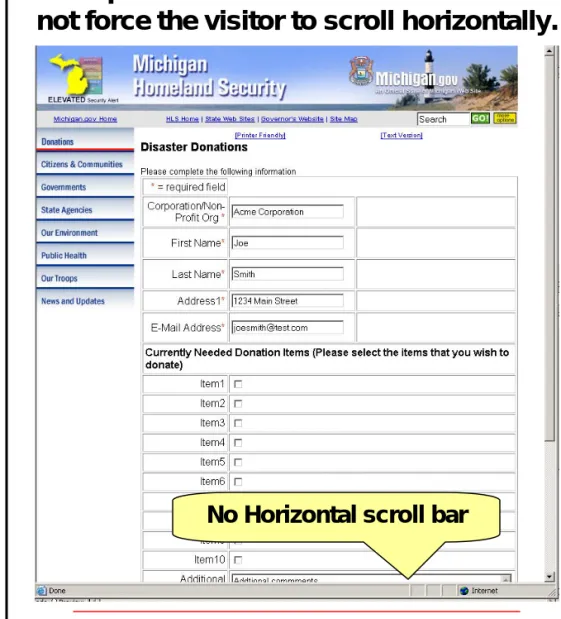
Table widths should not exceed the width of the screen, causing the user to scroll horizontally.
Example of a table width that table that does not force the visitor to scroll horizontally. Example of a table width that force
the visitor to scroll horizontally.
Horizontal scroll bar
ADA compliances and Michigan
Accessibility and ADA Compliance
The State of Michigan has adopted compliance with
Federal laws and policies relating to Section 508 of the Rehabilitation Act: Electronic and Information Technology Accessibility Standards (Section 508)
Michigan ADA Compliance rules and Section 508 Automated ADA Compliance Tools
HiSoftware AccVerify will:
– Check for Section 508 compliance
– Check for broken links
– Offer corrective solutions
Testing your application for ADA compliance JAWS and Linx Readers
Links to 3rd Party Sites
Vendor logos and links to commercial sites with
the intent to promote sales is not supported.
Web sites not under the explicit control of the
State of Michigan are required to open in a new
and separate browser window.
As a rule, 3 conditions support the need to link
to outside sites:
1. Other Governmental Units & Educational Institutions 2. Private Organizations (if these organizations offer
services that complement the information or services offered by Michigan)
Branding of 3rd party applications
3
rdparty applications
may have areas that
are configurable to
accommodate the
Michigan.gov brand.
Contact e-Michigan
Webmaster, John
Thompson, to
obtain specially
configured branding
elements.
Michigan.gov Domain URLs
The Michigan.gov standard puts in place
redirected URLs from the Michigan.gov
domain.
These URLs are intended to make it easier
for applications to be advertised and
marketed, through official state government
press releases, point of sale, radio, print, and
TV advertising.
Domain names should be short,
easy-to-read, type and remember
Examples include:
www.michigan.gov/westnilevirus www.michigan.gov/e-license
Usability Issues
This Web site presents severe usability issues:
•No identification of web application and state agency •No instructions for use of site
•No contact information for assistance with site
The Usability Guidelines will help users successfully navigate complex government processes on-line. Found on DIT TechTalk http://www.michigan.gov/documents/Usability_guidelines_2003v1_72381_7.pdf
Web Application Security
ES and Web Application Security
The Secure Michigan Initiative
In order to establish a current baseline, a rapid enterprise-wide risk assessment was conducted. This assessment was based upon the guidance and principles from the:
National Institute of Standards (NIST) Security
Handbook
International Standards Organization (ISO) 17799
Security standards
Federal Information Systems Controls Audit Manual
from the General Accounting Office (GAO).
This rapid risk assessment covered all areas of IT security for the State of Michigan.
OES and Web Application Security
Application/Servers Security
Checklist
Help ensure nothing has fallen through the cracks prior to web application being launched.
Should be completed and signed approximately 2-4 weeks before the application is launched.
Not intended as security guidelines to be followed as web application is being developed.
Security Policy Compliance
Enterprise Security Policy in DIT
Responsible for all data security, recovery polices and security methodologies for the State.
Critical that Web sites and applications comply with security rules and standards monitored by Enterprise Security.
Provide reasonable protection of sensitive information. Prevent corruption of data.
Block unknown or unauthorized access to our systems and information.
Ensure the integrity of information that is transmitted
between users of e-government applications and the State.
OES should be involved in the design process as early as possible, so that network security and privacy issues can be addressed.
Office of Enterprise Security Rock Rakowski
(517) 373-8059
Comprehensive Security Review
A comprehensive security review is required
whenever a new web application is launched or
whenever a significant change is made to an
existing web application.
It should be reviewed again once each year.
Security reviews may also be conducted at the
discretion of the management of the Office of
Enterprise Security.
Anonymous Access
What is Anonymous Access?
All information published on the internet by the State of Michigan is public and subject to FOIA (Freedom of Information Act) rules.
As such, a citizen cannot be denied access to a
public, online application simply for security reasons. Therefore, citizens must be informed through the
home page, that access to encrypted information
within the application is secure and requires them to either have the necessary security credentials or to obtain them directly through the site using on-line self-registration, e-mail or US mail correspondence.
Internet Policies - Privacy
Privacy Policy applies to:
Form transactions that require sensitive information such as name, address, email or phone number.
Critical identification such as social security number, drivers license number, credit card number, banking ID, account numbers or Date of Birth.
Collection and storage of email addresses for contact at a later time.
E-mail addresses should be properly safeguarded against unlawful use or distribution to third
128 Bit Encryption (IE 6.0)
Using High Level Security and 128
bit Encryption
Home page(s) of an application that requires IE 6.0 must be viewable in IE 5.X and Netscape 5.X to
accommodate the greatest number of users at the state’s minimum standard.
In the opening page, clearly identify the browser version required to transact secure state business. Provide and maintain links to specific commercial software sites (such as IE download sites and Adobe Acrobat sites) that allow installation of specific
browser versions needed to maintain application security.
Privacy Policy
Development Teams should consider the
following general criteria when designing
sites:
Information Collected Automatically
Information Voluntarily Submitted
Cookies
OES and Web Application Security
State of Michigan Security-related
Policies
Currently, 28 policies have been written that provide the basis for recommendations by OES for security of web applications, networks, wireless communications.
Five of the most relevant policies are included here:
1410.17 Network Security Policy
1350.11 Security Operational Guidelines for Servers 1350.13 Confidentiality and Privacy Protection
1310.02 Information Processing Security 1460.00 Acceptable Use Policy
Planned Outcome for Web Site Review
Continuous Planning for Security
Architecture, Web Accessibility, and
Usability throughout the Web Site/
Application Project
Our Goal: Facilitate use of look and feel
standards and security best practices
The Business is the Driver
Provide Service to the customer
No Surprises at Implementation
Announcement of New Online Service
Upon approval of final web review by OES
and e-Michigan Web Development:
Contact Kurt Weiss, providing him with key
information about the new web application,
suitable for a press release.
Contact the agency’s Vignette site
administrator to add the new web application’s
link to the agency’s online services web page.
John Thompson will contact the governor’s
office to communicate planned launch for the
new online service.
Document location
The documents covered in this presentation
Need a Web Review – Call John!
To Schedule a Web Review, contact John Thompson, e-Michigan Webmaster