■ Remote Authentication Dial-In User Service (RADIUS)
■ Terminal Access Controller Access Control System Plus (TACACS+)
■ Advanced Encryption Standard (AES)
■ EAP, PEAP, TKIP, TLS
■ Data Encryption Standard (DES)
■ Triple DES (3DES)
■ IP Security (IPSec)
■ Internet Key Exchange (IKE)
■ Certificate Enrollment Protocol (CEP)
■ Point-to-Point Tunneling Protocol (PPTP)
■ Layer 2 Tunneling Protocol (L2TP) You can find a list of all of the exam topics in the introduction to this book. For the latest updates on exam topics, visit Cisco.com.
C
H
A
P
T
E
R
4
Security Protocols
This chapter covers some of today’s most widely used technologies that enable network administrators to ensure that sensitive data is secure from unauthorized sources.
Standards such as IP Security (IPSec) and encryption standards are covered, as are all the fundamental foundation topics you need to understand to master the topics covered in the CCIE Security written exam.
The chapter ends with a discussion of some of the security features used in wireless networking to improve security. Protocols such as Extensible Authentication Protocol (EAP), Protected Extensible Authentication Protocol (PEAP), Temporal Key Integrity Protocol (TKIP), Message Integrity Check (MIC), and Transport Layer Security (TLS) are discussed, all of which are newly defined protocols used to help secure vulnerable wireless networks.
This chapter covers the following topics:
■ Security protocol topics—Sections are included for authentication, authorization, and accounting (AAA), RADIUS, and TACACS+.
■ Encryption Technology Overview—Covers encrypting IP using standard encryption such as 3DES, AES, and IPSec. The mechanism used to authenticate encryption tunnels is also covered.
■ Certificate Enrollment Protocol—Describes the Cisco-defined certificate management protocol, CEP, and how a device communicates with a Certificate Authority (CA).
■ EAP, PEAP, and TKIP—Shows common new mechanisms used in the fight to keep intruders and hackers away from wireless networks.
“Do I Know This Already?” Quiz
The purpose of this assessment quiz is to help you determine how to spend your limited study time.
If you can answer most or all of these questions, you might want to skim the “Foundation Topics” section and return to it later, as necessary. Review the “Foundation Summary” section and answer the questions at the end of the chapter to ensure that you have a strong grasp of the material covered.
If you already intend to read the entire chapter, you do not necessarily need to answer these questions now. If you find these assessment questions difficult, read through the entire
“Foundation Topics” section and review it until you feel comfortable with your ability to answer all of these questions and the “Q & A” questions at the end of the chapter.
Answers to these questions can be found in Appendix A, “Answers to Quiz Questions.” 1. What are the three components of AAA? (Choose the three best answers.)
a. Accounting b. Authorization
c. Adapting d. Authentication
2. What Cisco IOS command must be issued to start AAA on a Cisco router? a. aaa old-model
b. aaa model c. aaa new model d. aaa new-model e. aaa new_model
3. What mathematical algorithm initiates an encrypted session between two routers by exchanging public keys over an insecure medium such as the Internet?
a. Routing algorithm b. Diffie-Hellman algorithm
c. The switching engine
d. The stac compression algorithm
4. Can you configure RADIUS and TACACS+ to be used on the same router? a. No.
b. Yes, provided you have the same lists names applied to the same interfaces. c. Yes, provided you have the different lists names applied to the same interfaces. d. Yes, provided you have the different list names applied to different interfaces.
“Do I Know This Already?” Quiz 223
5. How do you remotely launch ACS to a Windows 2000 device? (The remote IP address is 10.1.1.1 and the client is Internet Explorer.)
a. Type launch. b. Type 10.1.1.1.
c. Type 10.1.1.1:2002. d. Type 10.1.1.1:8080.
6. What RADIUS attribute is used by vendors and not predefined by RFC 2138? a. 1 b. 2 c. 3 d. 4 e. 13 f. 26 g. 333 h. 33
7. RADIUS can support which of the following protocols? a. PPP
b. OSPF c. AppleTalk d. IPX e. NLSP
8. When a RADIUS server identifies the wrong password entered by the remote user, what packet type is sent?
a. ACCEPT-USER b. REJECT-USERS c. REJECT-DENY d. REJECT-ACCEPT e. REJECT-ERROR f. ACCESS-REJECT
9. Identify the false statement about RADIUS.
a. RADIUS is a defined standard in RFC 2138/2139. b. RADIUS runs over TCP port 1812.
c. RADIUS runs over UDP port 1812.
10. What is the RADIUS key for the following configuration? If this configuration is not valid, why isn’t it? (Assume that this configuration is pasted into Notepad and not on an active router.) a a a aaaaaaaaa aauaauuutttthhehheneennnttttiiiiccaccataatttiiiioonoon nn lllloogoogigginiin nn uusuusesse-ee---rrrraadaadddiiiiuusuus ss ggggrrorrooouupuup pp rrrraadaadiddiiiuuuuss ss llllooooccaccalaalll a a a aaaaaaaaa aauaauuutttthhehheneennnttittiicicaccataatittiiioooonn nn pppppppppp pp uuuusssseereer-rr---rrarraaaddiddiuiiuuussss iifiifff----nnenneeeeeeeddddeedeed dd ggggrrorrooouupuup pp rrrraadaadiddiiiuuuussss a a a aaaaaaaaa aauaauuutthtthhhooroorrriiiizzazzataatittiiioooonn nn eeeexxxxeeeecc cc ddddeeeeffaffauaauuulllltttt ggggrrorrooouupuup pp rrrraadaadiddiiiuuuussss a a a aaaaaaaaa aauaauuutttthhohhoroorrriiiizzzzaataatittiiioooonnnn nnenneeettttwwowworoorkrrk kk ddeddeeeffffaauaauluullltttt ggrggrorroououuupppp rrrraadaadddiiuiiusuusss r r r raaaaddddiiuiiusuus-ss---sssseereerrrvvevveerer rr 3333....33.33.3..333....3333 r r r raadaadddiiuiiusuusss----ssessereerrrvvevveeerr rr kkekkeeyeyyy IIlIIllloooovvevveeemmmmyyMyyMuMMumuummm
a. The RADIUS key is IlovemyMum, and it is a valid configuration. b. The RADIUS key is Ilovemymum, and it is a valid configuration.
c. This configuration will not work because the command aaa new-model is missing.
d. The RADIUS key is 3.3.3.3, and it is a valid configuration. 11. What is the RADIUS key for the following configuration?
a a a aaaaaaaaa nnenneeewwww--m--mommoooddddeeeellll a a a aaaaaaaaa aauaauuutttthhehheneennnttttiiiiccaccataatttiiiioonoon nn lllloogoogigginiin nn uusuusesse-ee---rrrraadaadddiiiiuusuus ss ggggrrorrooouupuup pp rrrraadaadiddiiiuuuuss ss llllooooccaccalaalll a a a aaaaaaaaa aauaauuutttthhehheneennnttittiicicaccataatittiiioooonn nn pppppppppp pp uuuusssseereer-rr---rrarraaaddiddiuiiuuussss iifiifff----nnenneeeeeeeddddeedeed dd ggggrrorrooouupuup pp rrrraadaadiddiiiuuuussss a a a aaaaaaaaa aauaauuutthtthhhooroorrriiiizzazzataatittiiioooonn nn eeeexxxxeeeecc cc ddddeeeeffaffauaauuulllltttt ggggrrorrooouupuup pp rrrraadaadiddiiiuuuussss a a a aaaaaaaaa aauaauuutttthhohhoroorrriiiizzzzaataatittiiioooonnnn nnenneeettttwwowworoorkrrk kk ddeddeeeffffaauaauluullltttt ggrggrorroououuupppp rrrraadaadddiiuiiusuusss r r r raaaaddddiiuiiusuus-ss---sssseereerrrvvevveerer rr 3333....33.33.3..333....3333 r r r raadaadddiiuiiusuusss----ssessereerrrvvevveeerr rr kkekkeeyeyyy IIlIIllloooovvevveeemmmmyyMyyMuMMumuummm
a. The RADIUS key is IlovemyMum. b. The RADIUS key is Ilovemymum.
c. No RADIUS key exists. d. The RADIUS key is 3.3.3.3.
12. What versions of TACACS does Cisco IOS support? (Select the best three answers.) a. TACACS+
b. TACACS
c. Extended TACACS d. Extended TACACS+
13. TACACS+ is transported over which TCP port number? a. 520
b. 23 c. 21 d. 20 e. 49
“Do I Know This Already?” Quiz 225
14. What is the predefined RADIUS server key for the following configuration? r r r raaaaddddiiuiiusuusss--s--ssseereerrrvvvveeeerr rr hhhhoooosssstt tt 33.33...33.33.3..333....3333 r r r raaaaddddiiuiiusuusss--s--ssseereervrrvvveeeerr rr kkkkeeeeyyyy CCCCCCCCIIEIIEsEEsrssrorrooocckcckkk a. 3.3.3.3
b. Not enough data c. CCIESROCK d. CCIEsRock e. CCIEsrock
15. What does the following command accomplish? t
t t
taaaaccccaacaacsccsss__s__ssseereerrrvvvveeeerr rr hhhhoooosssstt tt 33.33...33.33.3..333....3333
a. Defines the remote TACACS+ server as 3.3.3.3 b. Defines the remote RADIUS server as 3.3.3.3
c. Nothing, because it is not a valid IOS command d. Configures a Radius server 3.3.3.3
e. An Invalid IOS command
16. Which of the following protocols does TACACS+ support? a. PPP
b. AppleTalk c. NetBIOS d. All of these
17. Which of the following key lengths are not supported by AES? a. 64
b. 128 c. 192 d. 256 e. 512
18. What is the number of bits used with a standard DES encryption key? a. 56 bits
b. 32 bits; same as IP address c. 128 bits
d. 256 bits e. 65,535 bits
19. What is the number of bits used with a 3DES encryption key? a. 56 bits
b. 32 bits; same as IP address c. 128 bits
d. 256 bits e. 65,535 bits
f. 168 bits
20. In IPSec, what encapsulation protocol encrypts only the data and not the IP header? a. ESP
b. AH c. MD5 d. HASH
21. In IPSec, what encapsulation protocol encrypts the entire IP packet? a. ESH
b. ESP c. AH d. MD5 e. HASH
22. Which of the following is AH’s IP number? a. 23 b. 21 c. 50 d. 51 e. 500 f. 444
23. Which of the following is ESP’s IP number? a. 23 b. 21 c. 50 d. 51 e. 500 f. 444
“Do I Know This Already?” Quiz 227
24. Which of the following is not part of IKE phase I negotiations? a. Authenticating IPSec peers
b. Exchanging keys
c. Establishing IKE security d. Negotiating SA parameters
25. Which of the following is not part of IKE phase II? a. Negotiating IPSec SA parameters
b. Periodically updating IPSec SAs
c. Occasionally updating SAs (at most, once a day) d. Establishing IPSec security parameters
26. Which is the fastest mode in IPSec? a. Main mode
b. Fast mode c. Aggressive mode d. Quick mode
27. Certificate Enrollment Protocol (CEP) runs over what TCP port number? (Choose the best two answers.) a. Same as HTTP b. Port 80 c. Port 50 d. Port 51 e. Port 333 f. Port 444
28. Which of the following are new features aimed at increasing wireless security? (Choose the best four answers.)
a. TKIP b. AES c. EAP d. PEAP e. MIC f. 802.1D g. ESP h. AH
Foundation Topics
Authentication, Authorization, and Accounting
Authentication, authorization, and accounting (AAA, pronounced triple A) provides security to Cisco IOS routers and network devices beyond the simple user authentication available on IOS devices.
AAA provides a method to identify which users are logged into a router and each user’s authority level. AAA also provides the capability to monitor user activity and provide accounting
information.
In today’s IP networks, access to network data is available in a variety of methods, including the following:
■ PSTN dialup modems
■ ISDN dialup
■ Internet access through virtual private networks (VPNs) The AAA model is defined as follows:
■ Authentication—Who are you?
■ Authorization—What resources are you permitted to use?
■ Accounting—What resources were accessed, at what time, by whom, and what commands were issued?
The three phases ensure that legitimate users are permitted access. A remote user must be authenticated before being permitted access to network resources.
Authentication allows the user to submit a username and password and permits challenges and responses. After the user is authenticated, authorization defines what services or resources in the network users are permitted access to. The operations permitted here can include IOS-privileged EXEC commands. For example, a user might type commands but be permitted to use only certain show and debug commands for which the user is authorized.
Accounting allows the network administrator to log and view what was actually performed (for example, if a Cisco router was reloaded or the configuration was changed). Accounting ensures
Authentication, Authorization, and Accounting 229
that an audit will enable network administrators to view what was performed and at what time it was performed. Accounting keeps track of the information needed to audit and report network resource usage. This typically includes the username, the start and stop time of login, and the commands typed by the user.
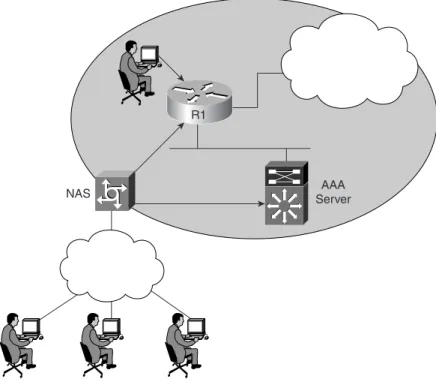
Figure 4-1 displays a typical secure network scenario. Figure 4-1 Secure Network Access
The users could be dialup users running async (in this case, PSTN) or using ISDN with Point-to-Point Protocol (PPP). The network access server (NAS) ensures that only authenticated users have access to the secure network; it maintains resources and accounting information.
Authorization tells which resources, or host devices, are authorized to be accessed (such as FTP servers). The NAS implements the AAA protocols and also collects data regarding what network resources were accessed. The NAS can also ensure that devices in the secured network require authentication. For example, the users in Figure 4-1 who are accessing Router R1 require a valid username/password pairing to enter any IOS commands.
NOTE To start AAA on a Cisco router, issue the following IOS command:
aaa new-model
R1
The following sections further define what authentication, authorization, and accounting are by discussing a common Cisco IOS router example.
Authentication
Authentication allows administrators to identify who can connect to a router by including the user’s username and password. Normally, when a user connects to a router remotely by Telnet, the user must supply only a password, and the administrator has no way of knowing the user’s username. You can, however, configure local usernames and passwords on a Cisco IOS router, but this does not scale well and it is not very secure. Configuring a small set of routers with individual usernames and passwords (IOS syntax username username password password) is fine, but doing so for large networks would be a difficult exercise to manage. Centrally locating the usernames and passwords is a better solution because only a few devices need to be updated and maintained. Also, users are not logged, and their configuration changes are not monitored without further configuration changes made on each individual router.
Example 4-1 displays a sample code snippet of a remote user accessing a AAA-configured Cisco router by Telnet.
As you can see in Example 4-1, the user must enter a valid username and password to gain access to the router. Typically, a database containing the valid usernames resides locally on the router or on a remote security server.
Authorization
Authorization comes into play after authentication. Authorization allows administrators to control the level of access users have after they successfully gain access to the router. Cisco IOS allows certain access levels (called privilege levels) that control which IOS commands the user can issue. For example, a user with a privilege level of 0 cannot issue many IOS commands. There are five commands at privilege level 0: disable, enable, exit, help, and logout. A user with a privilege level of 15 can perform all valid IOS commands. The local database or remote security server can grant the required privilege levels.
Remote security servers, such as RADIUS and TACACS+, authorize users for specific rights by associating attribute-value (AV) pairs, which define those rights with the appropriate user. AAA Example 4-1 Username/Password Pair Entry
Sydney>ttetteeellllnnenneeett tt SSaSSaaannnn----FFrFFrarraaannnn
Trying san-fran (10.99.1.1)... Open User Access Verification Username: ddddrrrreeweewwwrrorrooocccckkkkssss
Password: xxxxxxxxxxxxxxxxxxxxxxxxxxxxxxxx San-Fran>
Authentication, Authorization, and Accounting 231
authorization assembles a set of attributes that describes what the user is authorized to perform. These attributes are compared with the information contained in a database for a given user, and the result is returned to AAA to determine the user’s actual permissions and restrictions.
The higher the privilege, the more capabilities a user has with the IOS command set.
Accounting
Accounting occurs after authentication and authorization have been completed. Accounting allows administrators to collect information about users. Specifically, administrators can track which user logged into which router, which IOS commands a user issued, and how many bytes were transferred during a user’s session. For example, accounting enables administrators to monitor which routers have had their configurations changed. Accounting information can be collected by a remote security server.
To display local account information on a Cisco router collecting accounting information, issue the show accounting IOS command. Example 4-2 displays sample output when the command is issued on Router R1. (Note that for Cisco IOS 12.2T and higher, the command has changed to show aaa user all.)
NOTE You can display the user’s privilege level on a Cisco router with the show privilege command. The following code displays the privilege level when the enable password has already been entered:
R1#show privilege
Current privilege level is 15
Example 4-2 show accounting Command
R1#ssshshhhoowoow ww aaaaccccccoccooouunuunnnttittiiinnnngggg
Active Accounted actions on Interface Serial0:1, User jdoe Priv 1 Task ID 15, Network Accounting record, 00:00:18 Elapsed
task_id=15 timezone=PDT service=ppp mlp-links-max=4 mlp-links-current=4 protocol=ip addr=119.0.0.2 mlp-sess-id=1
Overall Accounting Traffic
Starts Stops Updates Active Drops Exec 0 0 0 0 0 Network 8 4 0 4 0 Connect 0 0 0 0 0 Command 0 0 0 0 0 Rsrc-mgmt 1 0 0 1 0 System 0 0 0 0 0 User creates:21, frees:9, Acctinfo mallocs:15, frees:6 Users freed with accounting unaccounted for:0
Table 4-1 describes the fields contained in Example 4-2.
Rather than maintain a separate database with usernames, passwords, and privilege levels, you can use external security servers to run external security protocols—namely RADIUS and TACACS. These security server protocols stop unauthorized access to your network. The following sections review these two security protocols.
Security Server Protocols
In many circumstances, AAA uses security protocols to administer its security functions. If your router or access server is acting as an NAS, AAA is the means through which you establish communication between your NAS and your RADIUS, TACACS+, or Kerberos security server.
Remote Authentication Dial-In User Service
RADIUS is a client/server-based system that secures a Cisco network against intruders. Implemented in Cisco IOS, RADIUS sends authentication requests to a RADIUS server. RADIUS was created by Livingston Enterprises and is now defined in RFCs 2865/2866 (RFCs 2138/2139 are now obsolete).
A RADIUS server is a device that has the RADIUS daemon or application installed. RADIUS must be used with AAA to enable the authentication, authorization, and accounting of remote users when using Cisco IOS routers.
When a RADIUS server authenticates a user, the following events occur: 1. The user is prompted for and enters a username and password.
2. The username and encrypted password are sent over the network to the RADIUS server. These events are sent via the packet format known as Access-Request.
Table 4-1 show accounting Fields
Field Description
User The user’s ID
Priv The user’s privilege level (0–15)
Task ID Each accounting session’s unique identifier Accounting Record Type of accounting session
Remote Authentication Dial-In User Service 233
3. The user receives one of the following responses from the RADIUS server: ACCESS-ACCEPT—The user is authenticated.
ACCESS-REJECT—The user is not authenticated and is prompted to re-enter the username and password, or access is denied. The RADIUS server sends this response when the user enters an invalid username/password pairing.
ACCESS-CHALLENGE—A challenge is issued by the RADIUS server. The challenge collects additional data from the user.
CHANGE PASSWORD—The RADIUS server issues a request asking the user to select a new password.
An ACCESS-ACCEPT or ACCESS-REJECT response may contain additional information for services that the user can access, including Telnet, rlogin, or local-area transport (LAT) connections, and PPP, Serial Line Internet Protocol (SLIP), or EXEC services.
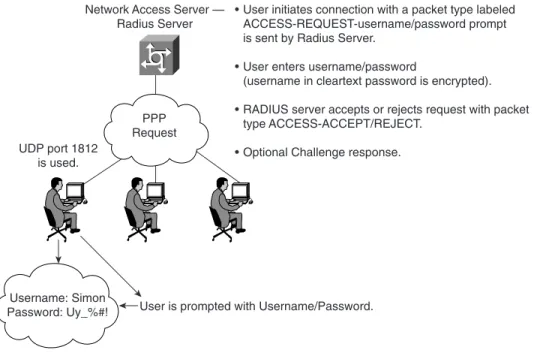
RADIUS is commonly used when PPP is used. Figure 4-2 displays a typical PPP connection request to a RADIUS server.
Figure 4-2 RADIUS Sequence Example
The RADIUS server accepts or rejects a username and password pair. In some instances, a user might be asked to enter more information (this is called a challenge response). For example, if a user’s password has expired, a RADIUS server prompts the user for a new password.
PPP Request
Username: Simon Password: Uy_%#!
Network Access Server — Radius Server
UDP port 1812 is used.
User is prompted with Username/Password.
• User initiates connection with a packet type labeled ACCESS-REQUEST-username/password prompt is sent by Radius Server.
• User enters username/password
(username in cleartext password is encrypted). • RADIUS server accepts or rejects request with packet
type ACCESS-ACCEPT/REJECT. • Optional Challenge response.
Transactions between the client (end user) and the RADIUS server are authenticated through a shared secret. The username is sent as clear text. RADIUS supports both Password Authentication Protocol (PAP) and Challenge Handshake Authentication Protocol (CHAP). PAP and CHAP are security protocols that allow users to gain access to remote devices with PPP. A RADIUS server will never send the user’s password over the network in any circumstance. If the username/ password pairing is entered incorrectly, the RADIUS server sends an ACCESS-REJECT response. The end user must re-enter the pairings or the connection will be rejected. Note that PAP sends the end user’s password in the clear to the NAS, but from the NAS to the RADIUS server (the NAS and the RADIUS communicate using the shared secret), the end user’s password is encrypted. RADIUS supports a number of predefined attributes that can be exchanged between client and server, such as the client’s IP address. RADIUS attributes carry specific details about authen-tication.
RFC 2138 defines a number of attributes. The following list provides details for the most common attributes:
■ Attribute type 1—Username (defines usernames, such as numeric, simple ASCII characters, or a Simple Mail Transfer Protocol [SMTP] address).
■ Attribute type 2—User Password (defines the password, which is encrypted using Message Digest 5 [MD5]).
■ Attribute type 3—CHAP Password (used only in access-request packets).
■ Attribute type 4—NAS IP Address (defines the NAS’s IP address; used only in access-request packets).
■ Attribute type 5—NAS Port (this is not the User Datagram Protocol [UDP] port number; it indicates the NAS’s physical port number, ranging from 0 to 65,535).
■ Attribute type 6—Service-Type of service requested or type of service to be provided. Now supported in Cisco IOS. See (requires CCO login) http://www.cisco.com/en/US/partner/ products/sw/iosswrel/ps1839/products_feature_guide09186a0080110bed.html#1024276.
■ Attribute type 7—Framed-Protocol defines required framing; for example, PPP is defined when this attribute is set to 1 and SLIP is set to 2.
■ Attribute type 8—Framed-IP-Address defines the IP address to be used by the remote user.
■ Attribute type 9—Framed-IP-Netmask defines the subnet mask to be used by the remote user.
Remote Authentication Dial-In User Service 235
■ Attribute type 13—Framed-Compression.
■ Attribute type 19—Callback-Number.
■ Attribute type 26—Vendor-Specific. Cisco (vendor-ID 9) uses one defined option: vendor type 1 named cisco-avpair; this attribute transmits TACACS+ A/V pairs.
■ Attribute type 61—NAS-Port-Type
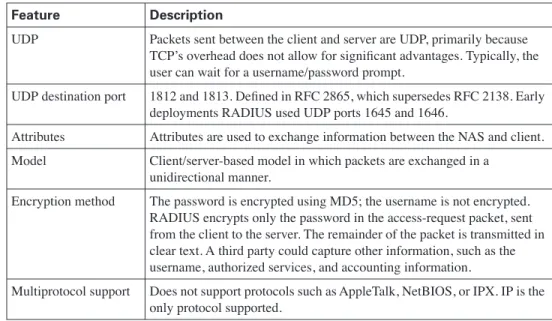
Table 4-2 summarizes the RADIUS protocol’s main features.
Now, examine the RADIUS configuration tasks required on a Cisco router.
IETF Attribute 26 (Vendor-Specific) encapsulates vendor-specific attributes, thereby allowing vendors to support their own extended attributes. Attribute 26 contains the following three elements:
■ Type
■ Length
■ String (also known as data)
Table 4-2 Summary of RADIUS Protocol Features
Feature Description
UDP Packets sent between the client and server are UDP, primarily because TCP’s overhead does not allow for significant advantages. Typically, the user can wait for a username/password prompt.
UDP destination port 1812 and 1813. Defined in RFC 2865, which supersedes RFC 2138. Early deployments RADIUS used UDP ports 1645 and 1646.
Attributes Attributes are used to exchange information between the NAS and client. Model Client/server-based model in which packets are exchanged in a
unidirectional manner.
Encryption method The password is encrypted using MD5; the username is not encrypted. RADIUS encrypts only the password in the access-request packet, sent from the client to the server. The remainder of the packet is transmitted in clear text. A third party could capture other information, such as the username, authorized services, and accounting information.
Multiprotocol support Does not support protocols such as AppleTalk, NetBIOS, or IPX. IP is the only protocol supported.
RADIUS Configuration Task List
A RADIUS server is usually software that runs on a variety of platforms, including Microsoft Windows 2000 Server and various UNIX hosts. RADIUS can authenticate router users and even validate IP routes.
To configure RADIUS on your Cisco router or NAS, perform the following tasks:
Step 1 Enable AAA with the aaa new-model global configuration command. AAA must be configured if you plan to use RADIUS.
Step 2 Use the aaa authentication global configuration command to define method lists for RADIUS authentication.
Step 3 Use line and interface commands to enable the defined method lists to be used. Step 4 Define the RADIUS server and secret key with the following IOS commands:
r r r
raaaaddiddiiiuuuussss--s--sesseeerrvrrvevvereerrr ip-address
radius-server key secret-key
Examples are the best method to show the enormous IOS command set that is available for use when configuring RADIUS support with AAA.
Example 4-3 configures a Cisco IOS router with AAA and RADIUS support. NOTE There are two optional RADIUS commands:
Use the aaa authorization global command to authorize specific user functions. Use the aaa accounting command to enable accounting for RADIUS connections.
Example 4-3 AAA and RADIUS IOS Configuration
aaa aaaaaaaaa nnneneweewww--m--mmmooooddddeeeellll aaa aaaaaaaaa aaauautuuttthhehheeennnnttttiiiiccaccataatittiiioonoonnn llollogoogiggiiinn nn uuuussesse-ee-r--rrraaaaddddiiiiuusuusss ggggrrorrooouuuupp pp rrarraaaddiddiiiuuuuss ss llolloooccaccaaallll aaa aaaaaaaaa aaaauutuuttthhehheneennnttittiicicaccaaattittiiioooonn nn pppppppppp pp uuuusssseereer-rr---rrarraaaddddiiuiiuuuss ss iifiifff----nnenneeeeedeedddeedeedd d ggggrrorrouoouuupp pp rrarraaaddiddiuiiuuussss aaa aaaaaaaaa aaaauutuuthtthohhooorrrriiiizzazzataatttiioiiooonn nn eeeexxexxeeecc cc ddddeeeeffffaauaauuulltllttt ggggrrorrouoouuupp pp rrrraadaadddiiuiiuuussss aaa aaaaaaaaa aaaauutuuttthhohhooorrrriiziizzzaataatttiioiiooonnnn nnenneteetttwwowwooorrkrrk kk ddeddeeeffaffauaauulullltttt ggggrrorroououuupppp rrarradaadiddiiiuuuussss r r r raaaaddddiiuiiuuuss-ss---ssesseeerrrrvvevveerer rr 33.33...33.33.3..333..3..333 r r r raaaaddddiiuiiuuuss-ss-s--sesseeerrrrvvevveeerr rr kkekkeeeyyyy ccccccicciiiee2ee202200000005555 ! ! ! ! EEEEnnsnnssusuruurrree ee yyyyoouoouuu aaaappppppppllllyy yy tthtthhhee ee nnnnaamaamemmedeeddd aaaacccccccceeeessssssss lllliiiisstssttt oooonn nn tttthhhheeee VVVVTTYTTYYY lllliiniinenneee l l l liiininnnee ee vvtvvtyttyyy 0000 4444 a a a aaaaaaaaa aaaauutuuthtthhheeeenntnntittiiiccaccaaattttiiiioooonn nn llolloooggggiiiinnnn
Remote Authentication Dial-In User Service 237
The command lines in this RADIUS authentication and authorization configuration are defined as follows:
■ The aaa authentication login use-radius group radius local command configures the router to use RADIUS for authentication at the login prompt. If RADIUS returns an error, the user is authenticated using the local database. In this example, use-radius is the name of the method list, which specifies RADIUS and then local authentication. If the RADIUS server returns the ACCESS-REJECT response, the user is denied access and the router will not check its local database.
■ The aaa authentication ppp user-radius if-needed group radius command configures the Cisco IOS software to use RADIUS authentication for lines using PPP with CHAP or PAP, if the user is not already authorized. If the EXEC facility has authenticated the user, RADIUS authentication is not performed. In this example, user-radius is the name of the method list defining RADIUS as the if-needed authentication method.
■ The aaa authorization exec default group radius command sets the RADIUS information used for EXEC authorization, autocommands, and access lists.
■ The aaa authorization network default group radius command sets RADIUS for network authorization, address assignment, and access lists.
■ The radius-server commands define the NAS.
■ The radius-server key commands define the shared secret text string between the NAS and the RADIUS server host.
Example 4-4 displays an example in which AAA is enabled on a Cisco IOS router. Example 4-4 AAA and RADIUS Example
HHH Hoooossssttttnnnnaamaammmee ee RRRR1111 uuu ussesseeerrrrnnnnaamaamemme ee ssssiiiimmmmoonoonnn ppppaaaasssssswsswowwooorrdrrddd SSiSSimiimommoononinniiississiiissssAAgAAgggrrerreeeaaaattttddddrrurruuummmmmmemmeReeRRR aaa aaaaaaaaa nnneneweewww--m--mmmooooddddeeeellll aaa aaaaaaaaa aaaauutuuthtthehheeennntntttiiiiccaccaaattittiiioooonn nn pppppppppp pp ddddiiaiiaaallilliiinnsnnsss ggggrrrroouoouuupp pp rrarraaaddddiiuiiuuuss ss llolloooccccaalaalll aaa aaaaaaaaa aaaauutuuttthhohhooorrrriiziizzzaataatittioiiooonnnn nnnneeteetwttwowwooorrrrkkkk ddeddeeeffaffauaauuulllltt tt ggggrrorrouoouuupppp rrarraaaddiddiiiuuuuss ss llolloooccaccaaallll aaa aaaaaaaaa aaacacccccccoouoouuunnnnttttiiiinngnng gg nnnneeeettwttwwwooroorkrrk kk ddddeefeefffaauaauluultllttt sstsstttaaraartrrt-tt---sstsstttoooopp pp ggrggrrroouoouuupppp rrarradaadddiiiiuuuussss aaa aaaaaaaaa aaaauutuuttthhehheeenntnntittiiiccaccataatittiiioooonn nn llolloooggigginiinnn ssssiimiimommonoonnn lllloocoocaccaaallll a a a aaaaaaaaa aaaauutuuttthhohhooorrirriziizzzaataatittioiiooonnnn eexeexexxeeecc cc ddeddeeeffffaauaauluultllttt lllloocoocaccaaallll r r r raaaaddddiiuiiuuuss-ss-s--sesseeerrrrvvevveeerr rr hhohhooosssstt tt 33.33...33.33.3..333....3333 r r r raaaaddddiiuiiuuuss-ss-s--ssseeeerrvrrvevveeerr rr kkekkeeeyyyy CCCCCCICCIEIIEsEEsssrrorrocooccckkkk l l l liiininnnee ee vvtvvtyttyyy 0000 4444 l l l looogogggiiniin nn aaaauuuutthtthhheeneennnttittiiiccccaaaattittioiiooonn nn rrarraaaddddiiuiiusuus-ss---llollogoogggiiiinnnn
The Example 4-4 line configurations are defined as follows:
■ The radius-server host command defines the RADIUS server host’s IP address.
■ The radius-server key command defines the shared secret text string between the NAS and the RADIUS server host.
■ The aaa authentication ppp dialins group radius local command defines the authentication method list, dialins, which specifies that RADIUS authentication and then (if the RADIUS server does not respond) local authentication will be used on serial lines using PPP.
■ The aaa authorization network default group radius local command sets RADIUS for network authorization, address assignment, and access lists.
■ The aaa accounting network default start-stop group radius command tracks PPP usage. This command is used for all network services. It can be PPP, but also SLIP or ARAP.
■ The aaa authentication login simon local command defines the method list, simon, for local authentication.
■ The aaa authentication login simon command applies the simon method list for login authentication.
Terminal Access Controller Access Control System Plus
Cisco IOS supports three versions of TACACS—TACACS, extended TACACS, and TACACS+. All three methods authenticate users and deny access to users who do not have a valid username/ password pairing. TACACS+ is Cisco proprietary, whereas RADIUS is an open standard originally created by Livingston Enterprises.
NOTE A method list simply defines the authentication methods to be used, in sequence, to authenticate a user. Method lists enable you to designate one or more security protocols to be used for authentication, ensuring a backup system for authentication in case the initial method fails. Cisco IOS software uses the first method listed to authenticate users; if that method does not respond, the Cisco IOS software selects the next authentication method listed. This process continues until there is successful communication with a listed authentication method or the authentication method list is exhausted, in which case authentication fails.
TIP Cisco.com provides a long list of configuration examples. To view more detailed configurations, visit the following web address and follow the link to Security Management: http://www.cisco.com/pcgi-bin/Support/browse/index.pl?i=Products&f=753&viewall=true
Terminal Access Controller Access Control System Plus 239
Cisco has also developed Cisco Secure Access Control Server (ACS), a flexible family of security servers that supports both RADIUS and TACACS+. You can even run debugging commands on the Cisco Secure ACS software. In UNIX, you can modify files, such as syslog.conf and csu.cfg, to change the output to your screen. For more details on how to debug on a UNIX server, see http://www.cisco.com/warp/public/480/cssample2x.html#debug.
TACACS+ has the following features:
■ TCP packets (port 49) ensure that data is sent reliably across the IP network.
■ Supports AAA architectures and, in fact, separates each of the three AAA mechanisms.
■ The data between the NAS and server is encrypted.
■ Supports both PAP/CHAP and multiprotocols such as IPX and X.25.
■ Access control lists (ACL) can be defined on a per-user basis. (RADIUS can also define ACLs on a per-user basis.)
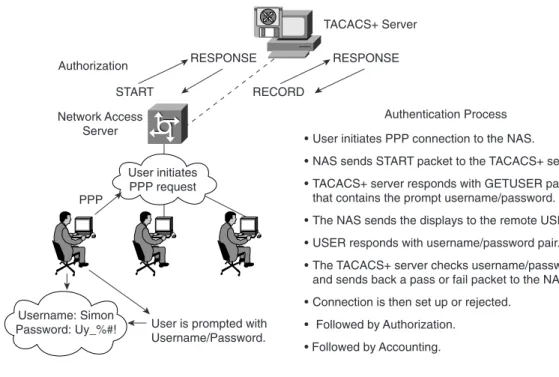
Figure 4-3 displays a typical TACACS+ connection request (authentication). Figure 4-3 TACACS+ Authentication Example Sequence
User initiates PPP request Username: Simon Password: Uy_%#! Network Access Server PPP
User is prompted with Username/Password.
• User initiates PPP connection to the NAS. • NAS sends START packet to the TACACS+ server. • TACACS+ server responds with GETUSER packets
that contains the prompt username/password. • The NAS sends the displays to the remote USER. • USER responds with username/password pair. • The TACACS+ server checks username/password
and sends back a pass or fail packet to the NAS. • Connection is then set up or rejected.
• Followed by Authorization. • Followed by Accounting. Authentication Process RESPONSE TACACS+ Server Authorization START RESPONSE RECORD
When a TACACS+ server authenticates a remote user, the following events occur:
1. When the connection is established, the NAS contacts the TACACS+ daemon to obtain a username prompt, which is then displayed to the user. The user enters a username and the NAS and communicates to the TACACS+ server to obtain a password prompt. The NAS displays the password prompt to the user, the user enters a password, and the password is sent to the TACACS+ daemon.
2. The NAS eventually receives one of the following responses from the TACACS+ daemon:
■ ACCEPT—The user is authenticated and service can begin. If the NAS is configured to require authorization, authorization begins at this time.
■ REJECT—The user has failed to authenticate. The user may be denied further access or may be prompted to retry the login sequence, depending on the TACACS+ daemon.
■ ERROR—An error occurred at some time during authentication. This can be either at the daemon or in the network connection between the daemon and the NAS. If an ERROR response is received, the NAS typically tries to use an alternative method for authenticating the user.
■ CONTINUE—The user is prompted for additional authentication information.
3. A PAP login is similar to an ASCII login, except that the username and password arrive at the NAS in a PAP protocol packet instead of being typed in by the user, so the user is not prompted. PPP CHAP logins are also similar, in principle.
4. Following authentication, the user is required to undergo an additional authorization phase, if authorization has been enabled on the NAS. Users must first successfully complete
TACACS+ authentication before proceeding to TACACS+ authorization.
5. If TACACS+ authorization is required, the TACACS+ daemon is again contacted and it returns an ACCEPT or REJECT authorization response. If an ACCEPT response is returned, the response contains data in the form of attributes used to direct the EXEC or NETWORK session for that user, determining services that the user can access.
Services include the following:
■ Telnet, rlogin, PPP, SLIP, or EXEC services
■ Connection parameters, including the host or client IP address, ACL, and user timeouts The TACACS+ authorization process is defined as the packet flow between the NAS and the TACACS+ server. The packets exchanged between the NAS and server contain AV pairs. The NAS sends Start packets and the TACACS+ server responds with Response packets. The server can permit, deny, or modify commands requested by the end user. The data (that contains the full list of all username/password pairs) is stored on a local file defining what commands are permitted by the end user, for example.
Terminal Access Controller Access Control System Plus 241
TACACS+ accounting provides an audit record of what commands were completed. The NAS sends a record of any commands, and the TACACS+ server sends a response acknowledging the accounting record.
Table 4-3 summarizes the main features of TACACS+.
Now, examine the TACACS+ configuration tasks required when enabling TACACS+ on a Cisco IOS router.
TACACS+ Configuration Task List
To configure your router to support TACACS+, you must perform the following tasks:
Step 1 Use the aaa new-model global configuration command to enable AAA, which must be configured if you plan to use TACACS+. For more information about using the aaa new-model command, refer to http://www.cisco.com/univercd/cc/td/doc/ product/software/ios121/121cgcr/secur_c/scprt1/scdaaa.htm.
Step 2 Use the tacacs-server host command to specify the IP address of one or more TACACS+ daemons:
tacacs-server host hostname [single-connection] [port integer] [timeout integer] [key string]
Table 4-3 Summary of TACACS+ Protocol Feature
TCP Packets sent between client and server are TCP. TCP destination port Port 49.
Attributes Packet types are defined in TACACS+ frame format as follows: Authentication 0x01
Authorization 0x02 Accounting 0x03
Seq_no The sequence number of the current packet flow for the current session. The Seq_no starts with 1, and each subsequent packet increments by one. The client sends only odd numbers. The TACACS+ server sends only even numbers.
Encryption method The entire packet is encrypted. Data is encrypted using MD5 and a secret key that matches both on the NAS (for example, a Cisco IOS router) and the TACACS+ server.
Multiprotocol support Multiprotocol Support indicates the following are fully supported in non IP networks, multiprotocols such as AppleTalk, NetBIOS, or IPX, along with IP.
Step 3 Use the tacacs-server key command to specify an encryption key to encrypt all exchanges between the NAS and the TACACS+ daemon. This same key must also be configured on the TACACS+ daemon. The actual command is as follows:
tacacs-server key key
The key should match the one used on the TACACS+ daemon.
Step 4 Use the aaa authentication global configuration command to define method lists that use TACACS+ for authentication.
Step 5 Use line and interface commands to apply the defined method lists to various interfaces.
Step 6 To enable authorization, use the aaa authorization global command to configure authorization for the NAS. Unlike authentication, which can be configured per line or per interface, authorization is configured globally for the entire NAS.
Step 7 To enable accounting for TACACS+ connections, use the aaa accounting command. Optional commands include the following:
• Configuring AAA server groups (Optional)
• Configuring AAA server group selection based on Dialed Number Identification Service (DNIS) (Optional)
• Specifying TACACS+ authentication (Required) • Specifying TACACS+ authorization (Optional) • Specifying TACACS+ accounting (Optional)
Example 4-5 displays a sample configuration of a Cisco router with TACACS+ authentication for PPP.
The configuration lines in Example 4-5 are defined as follows:
■ The aaa new-model command enables the AAA security services.
■ The aaa authentication command defines a method list, CCIE, to be used on serial interfaces running PPP. The keyword group tacacs+ means that authentication is done through TACACS+. If TACACS+ returns an ERROR during authentication, the keyword local indicates that authentication will be attempted using the local database on the NAS. Note that the local database is not used if a REJECT response is received from the security server. Example 4-5 TACACS+ Authentication for PPP Example
aaa aaaaaaaaa nnneneweewww--m--mmmooooddddeeeellll aaa aaaaaaaaa aaaauutuuthtthehheeennnnttttiiciicaccaaattittiiioonoonnn pppppppppp pp CCCCCCCCIIIIEE EE ggrggrorrooouuuupppp ttttaacaacccaaaaccccssss++ ++ llolloooccaccaaallll ttt taaaaccccaaaaccccss-ss-s--sesseeerrvrrvvveeeerr rr hhohhooosssstttt 110110.00.1..111..2..222....3333 ttt taaaaccccaacaacccss-ss---ssesseeerrrrvvvveereer rr kkekkeyeey yy ccccccicciieieseesssaaraarrreeeeccoccoooooloolll iii innnntttteeeerrfrrfaffaaaccecce ee sssseeeerrirriaiialaalll 0000 pppppppppp pp aauaauuutthtthehheneenntntttiiciiccacataatttiioiionoonnn cccchhahhaaapppp ppappapaappp CCCCCCCCIIIIEEEE
Terminal Access Controller Access Control System Plus 243
■ The tacacs-server host command identifies the TACACS+ daemon as having an IP address of 10.1.2.3. The tacacs-server key command defines the shared encryption key as cciesarecool.
■ The interface command selects the line, and the ppp authentication command applies the CCIE method list to this line.
Example 4-6 shows how to configure TACACS+ as the security protocol for PPP authentication using the default method list; it also shows how to configure network authorization through TACACS+.
The lines in the preceding sample configuration are defined as follows:
■ The aaa new-model command enables the AAA security services.
■ The aaa authentication command defines a method list, default, to be used on serial interfaces running PPP. The keyword default means that PPP authentication is applied by default to all interfaces. The if-needed keyword means that if the user has already authenticated by going through the ASCII login procedure, PPP authentication is not necessary and can be skipped. If authentication is needed, the keyword group tacacs+ means that authentication is done through TACACS+. If TACACS+ returns an ERROR during authentication, the keyword local indicates that authentication will be attempted using the local database on the NAS.
■ The aaa authorization command configures network authorization via TACACS+.
■ The tacacs-server host command identifies the TACACS+ daemon as having an IP address of 3.3.3.3.
■ The tacacs-server key command defines the shared encryption key as simoniscool.
■ The interface command selects the line, and the ppp authentication command applies the default method list to this line.
The source interface used by TACACS+ or RADIUS can be defined when required as follows:
i i i ipp pp ttttaacaacccaaaaccsccsss ssssoouoouuurrrrccecceee--i--iniintnnttteereerrrffffaacaacccee subinterface-nameee i i i ipp pp rrrraadaadddiiiiuusuusss ssssoouoouuurrrrccecceee--i--iniintnnttteereerrrffffaacaacccee subinterface-nameee Example 4-6 Authorization and TACACS+ Example
aaa aaaaaaaaa nnneneweewww--m--mmmooooddddeeeellll aaa aaaaaaaa a aaaauutuuttthhehheneennnttttiiciicaccaaattittioiiooonnnn pppppppppp pp ddeddeeeffffaauaauuulltllttt iiiiffff--n--nnneeeeeeeeddeddedeeddd ggrggrorrooouupuup pp ttattaaaccaccaaaccsccs+ss+++ lllloocoocccaalaalll aaa aaaaaaaaa aaaauutuuthtthohhooorrririiizzzzaataatttiioiiooonnnn nnenneteetttwwowwooorrkrrkkk ddeddeeeffaffauaauuulllltttt ggggrrorrooouupuuppp ttattacaacaccaaaccsccsss++++ ttt taaaaccccaacaacccss-ss-s--sesseeerrrrvvvveeeerr rr hhohhooosssstttt 33.33...33.33.3..333....3333 ttt taacaacccaaaaccsccs-ss---ssesseeerrrrvvevveeerr rr kkekkeeeyyyy ssissimiimmmoonooninniiissssccoccooooooollll iii innnntttteeeerrfrrfaffaaaccecce ee sssseeeerrirriaiialaalll 0000 ppp ppppppppp aauaautuuttthhehheeennnnttittiiiccaccataatittiiioooonnnn ddeddefeefaffaaauuuulllltttt
The source-interface commands force the security protocol to use a specific interface as the source IP address. For example, it may be a loopback address (remember, it is always active, unlike a physical interface, which may fail or be down) for redundancy purposes in case of a physical interface failure.
Example 4-7 displays a sample configuration where accounting is also enabled.
The lines in the Example 4-7 configuration are defined as follows:
■ The aaa new-model command enables the AAA security services.
■ The aaa authentication command defines a method list, default, to be used on serial interfaces running PPP. The keyword default means that PPP authentication is applied by default to all interfaces. The if-needed keyword means that if the user has already authenticated through the ASCII login procedure, PPP authentication is not necessary. If authentication is needed, the keyword group tacacs+ means that authentication is done through TACACS+. If TACACS+ returns an ERROR during authentication, the keyword local indicates that authentication will be attempted using the local database on the NAS.
■ The aaa accounting command configures network accounting through TACACS+. In this example, accounting records stop-only, meaning that the session that just terminated will be sent to the TACACS+ daemon whenever a network connection terminates.
■ The interface command selects the line, and the ppp authentication command applies the default method list to this line.
Example 4-7 Accounting Example
aaa aaaaaaaaa nnneneweewww--m--mmmooooddddeeeellll aaa aaaaaaaa a aaaauutuuttthhehheneennnttttiiciicaccaaattittioiiooonnnn pppppppppp pp ddeddeeeffffaauaauuulltllttt iiiiffff--n--nnneeeeeeeeddeddedeeddd ggrggrorrooouupuup pp ttattaaaccaccaaaccsccs+ss+++ lllloocoocccaalaalll aaa aaaaaaaaa aaacacccccccoouoouuunnnnttttiiiinngnng gg nnnneeeettwttwwwooroorkrrk kk ddddeefeefffaauaauluultlltt t ssssttttoopoop-pp-o--ooonnlnnlllyyyy ggrggrorrooouupuuppp ttattacaacaccaaaccsccsss++++ ttt taaaaccccaacaacccss-ss-s--sesseeerrrrvvvveeeerr rr hhohhooosssstttt 33.33...33.33.3..333....3333 ttt taaaaccccaacaacccss-ss---ssesseeerrrrvvvveereer rr kkekkeyeey yy aaaanndnnddrdrerreeewwiwwiiissssccoccoooooloolll iii innnntttteeeerrfrrfaffaaaccecce ee sssseeeerrirriaiialaalll 0000 ppp ppppppppp aauaautuuttthhehheeennnnttittiiiccaccataatittiiioooonnnn ddeddefeefaffaaauuuulllltttt
NOTE You can define a group of TACACS+ servers by defining the servers with the IOS commands tacacs-server host ip-address-of-server and tacacs-server key secret-key. For example, to define six servers, you would use the following IOS configuration:
tacacs-server host 1.1.1.1 tacacs-server host 2.2.2.2 tacacs-server host 3.3.3.3 tacacs-server host 4.4.4.4 tacacs-server host 5.5.5.5 tacacs-server host 6.6.6.6 tacacs-server key ccie
If the first server does not respond within a timeout period (the default is 5 seconds), the next server is queried, and so forth.
Terminal Access Controller Access Control System Plus 245
TACACS+ Versus RADIUS
Table 4-4 compares the main differences between TACACS+ and RADIUS.
The AAA configuration options are numerous, and those presented in this guide are only a small subset of a larger set that you can view online at Cisco.com. Visit the following URL for more quality examples of how AAA, along with RADIUS or TACACS, can be implemented on Cisco IOS routers:
http://www.cisco.com/pcgi-bin/Support/browse/index.pl?i=Technologies&f=774 The IOS debug command set for RADIUS and TACACS is extensive. Presented here are some common RADIUS and TACACS debug outputs found in real networks.
Table 4-4 TACACS+/RADIUS Comparison
RADIUS TACACS+
Packet delivery UDP. TCP. Packet encryption Encrypts only the password in the
access-request packet from the client to the server.
Encrypts the entire body of the packet but leaves a standard TCP header.
AAA support Combines authentication and authorization.
Uses the AAA architecture, separating authentication, authorization, and accounting. Multiprotocol
support
None. Supports other protocols, such as AppleTalk, NetBIOS, and IPX. Router management Can pass a privilege level down to
the router, which can then be used locally for command authorization.
Enables network administrators to control which commands can be executed on a router.
Responses Uses single-challenge response. Combines authentication and authorization.
Uses multiple-challenge response for each of the AAA processes. Uses the AAA architecture and separates each process.
NOTE You can configure both RADIUS and TACACS+ concurrently on a Cisco router provided that you have defined different list names and applied the list to different interfaces.
NOTE You can download and install a trial copy of Cisco Secure ACS for Windows NT/2000 or UNIX. This comes with a built-in RADIUS and TACACS+ server. You also need a Cisco router with Cisco IOS 12.X with one working Ethernet port. This will reinforce your understanding of the AAA concept. For more information, visit the Cisco Secure Software Center at Cisco.com.
Example 4-8 displays a sample output from the debug aaa authentication command for a RADIUS login attempt that failed. The information indicates that TACACS is the authentication method used.
Example 4-9 displays a sample output from the debug radius command that shows a successful login attempt (note that newer versions of IOS code may display some differences), as indicated by an Access-Accept message.
Example 4-10 displays a sample output from the debug radius command that shows an unsuccessful login attempt, as indicated by an Access-Reject message.
Encryption Technology Overview
When prominent Internet sites, such as http://www.cnn.com, are exposed to security threats, the news reaches all parts of the globe. Ensuring that data crossing any IP network is secure and not vulnerable to threats is one of today’s most challenging tasks in the IP storage arena (so much so that Cisco released an entirely new CCIE for the storage networking certification track).
Example 4-8 debug aaa authentication Command
R1# ddeddebeebbbuuguuggg aaaaaaaaaa aa aauaauuutthtthhheeeenntnntttiiciicaccaaattttiiiioonoonnn
14:02:55: AAA/AUTHEN (164826761): Method=RADIUS 14:02:55: AAA/AUTHEN (164826761): status = GETPASS 14:03:01: AAA/AUTHEN/CONT (164826761): continue_login 14:03:01: AAA/AUTHEN (164826761): status = GETPASS 14:03:04: AAA/AUTHEN (164826761): status = FAIL
Example 4-9 debug radius Command
R1# ddeddebeebbbuuguuggg rrarraaaddiddiiiuusuusss
13:59:02: Radius: IPC Send 0.0.0.0:1645, Access-Request, id 0xB, len 56 13:59:02: Attribute 4 6 AC150E5A
13:59:02: Attribute 5 6 0000000A 13:59:02: Attribute 1 6 62696C6C 13:59:02: Attribute 2 18 0531FEA3
13:59:04: Radius: Received from 131.108.1.1:1645, Access-Accept, id 0xB, len 26 13:59:04: Attribute 6 6 00000001
Example 4-10 debug radius Command
R1# ddeddebeebbbuuguuggg rrarraaaddiddiiiuusuusss
13:57:56: Radius: IPC Send 0.0.0.0:1645, Access-Request, id 0xA, len 57 13:57:56: Attribute 4 6 AC150E5A
13:57:56: Attribute 5 6 0000000A 13:57:56: Attribute 1 7 62696C6C 13:57:56: Attribute 2 18 49C28F6C
Encryption Technology Overview 247
Major problems for network administrators include the following:
■ Packet snooping (eavesdropping)—When intruders capture and decode traffic, obtaining usernames, passwords, and sensitive data such as salary increases for the year.
■ Theft of data—When intruders use sniffers, for example, to capture data over the network and steal that information for later use.
■ Impersonation—When an intruder assumes the role of a legitimate device but, in fact, is not legitimate. The intruder efficiently assumes the role of an authorized user.
The solution to these and numerous other problems is to provide encryption technology to the IP community and enable network administrators to ensure that data is not vulnerable to any form of attack or intrusion. This ensures that data is confidential, authenticated, and has not lost any integrity during the routing of packets through an IP network.
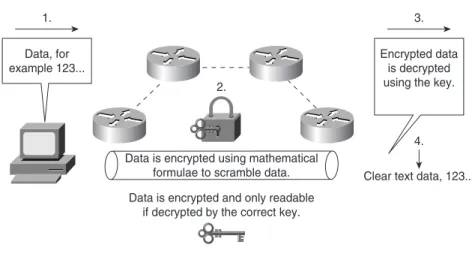
Encryption (user data that is encrypted will require decryption also) is defined as the process by which plain data is converted into ciphered data (a system in which plain-text data is arbitrarily substituted according to a predefined algorithm known as cipertext) so that only the intended recipient(s) can observe the data. Encryption ensures data privacy, integrity, and authentication. Figure 4-4 displays the basic methodologies behind data encryption.
Figure 4-4 Encryption Methodologies
Figure 4-4 demonstrates the basic principles of data encryption, including the following: 1. User data is forwarded over the network.
Data is encrypted using mathematical formulae to scramble data. Data is encrypted and only readable
if decrypted by the correct key. Data, for example 123... 1. 2. Encrypted data is decrypted using the key.
Clear text data, 123... 3.
2. Data (clear text) is modified according to a key. The key is a sequence of digits that decrypts and encrypts messages. Each device has three keys:
■ A private key used to sign messages that is kept secret and never shared.
■ A public key that is shared (used by others to verify a signature).
■ A shared secret key that is used to encrypt data using a symmetric encryption algorithm, such as DES. Typically, however, a device has two keys, a symmetric key and an asym-metric key. The symasym-metric key is a shared secret that is used to both encrypt and decrypt the data. The asymmetric key is broken into two parts, a private key and a public key. 3. A mathematical formula is applied to scramble the data. In Figure 4-4, the mathematical
formula is applied during Step 2.
4. The data flows throughout the network and can be decrypted only if the correct key and algorithm are applied.
Encryption can take place at the application layer, the network layer, or the data link layer. Be aware of the following encryption technologies for the CCIE Security written exam:
■ Data Encryption Standard (DES)
■ Triple DES (3DES)
■ Advanced Encryption Standard (AES)
■ IP Security (IPSec)
Cisco IOS routers support the following industry standards to accomplish network layer encryption: ■ DES/3DES ■ AES ■ MD5 ■ Diffie-Hellman exchange ■ IPSec
DES and 3DES
DES is one of the most widely used encryption methods. DES turns clear-text data into cipher text with an encryption algorithm. The receiving station will decrypt the data from cipher text into clear text. The shared secret key is used to derive the session key, which is then used to encrypt and decrypt the traffic.
Encryption Technology Overview 249
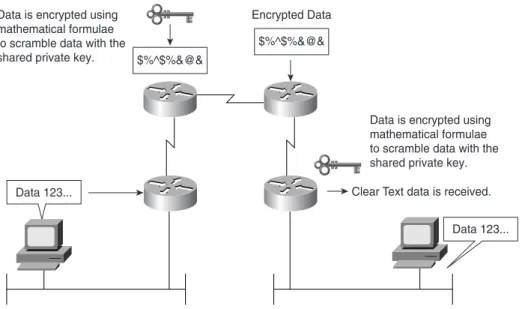
Figure 4-5 demonstrates DES encryption. Figure 4-5 DES Encryption Methodologies
Figure 4-5 demonstrates the PC’s clear-text generation. The data is sent to the Cisco IOS router, where it is encrypted with a shared key (remember, the shared secret key is used to derive the session key, which is then used to encrypt and decrypt the traffic) and sent over the IP network in unreadable format until the receiving router decrypts the message and forwards it in clear-text form. DES is a block cipher algorithm, which means that DES performs operations on fixed-length data streams. DES uses a 56-bit key to encrypt 64-bit datagrams.
DES is a published, U.S. government–standardized encryption method; however, it is no longer a U.S. government–approved encryption algorithm.
3DES is the DES algorithm that performs three times (3 x 3 x encryption and 3 x decryption) sequentially (although there are some variations as well). Three keys are used to encrypt data, resulting in a 168-bit encryption key.
3DES is an improved encryption algorithm standard and is summarized as follows: 1. The sending device encrypts the data with the first 56-bit key.
2. The sending device decrypts the data with the second key, also 56 bits in length. 3. The sending device encrypts for a final time with another 56-bit key.
Data 123...
Data 123... $%^$%&@&
Data is encrypted using mathematical formulae to scramble data with the shared private key.
Data is encrypted using mathematical formulae to scramble data with the shared private key. Clear Text data is received. $%^$%&@&
4. The receiving device decrypts the data with the first key. 5. The receiving device then encrypts the data with the second key. 6. Finally, the receiving device decrypts the data with the third key.
A typical hacker uses a Pentium III computer workstation and takes approximately 22 hours to break a DES key. In the case of 3DES, the documented key-breaking times are approximately 10 billion years when 1 million PC III computers are used. Encryption ensures that information theft is difficult.
Encryption can be used to enable secure connections over the LAN, WAN, and World Wide Web. The end goal of DES/3DES is to ensure that data is confidential by keeping data secure and hidden. The data must have integrity to ensure that it has not been modified in any form, and be authenticated by ensuring that the source or destination is indeed the proper host device. Another encryption standard in common use today is widely regarded as the new industry standard, namely AES.
Advanced Encryption Standard
AES, developed by Joan Daemen and Vincent Rijmen, is a new encryption standard and is considered a replacement for DES. The U.S. government made AES a standard in May 2002, and
TIP It is possible to increase the number of bits in the key, but brute-force cracking of a 1024-bit key is not feasible using current or reasonably foreseeable technology. Even if, based on future innovations, this becomes a weak key length, the value of the data it protects will have very likely diminished to zero. In the event that you have need for more protection, you can increase the key size. However, you should be aware that this will take a processing toll on every secure transaction.
NOTE Unbeknownst to the author of the previous tip, a mathematician named D. J. Bernstein delivered a paper entitled “How To Find Small Factors Of Integers” (http://cr.yp.to/
papers.html#nfscircuit) earlier in the year. At the Financial Cryptography conference held in late March, 2002, it was discovered that, using his formulas, 512-bit keys can be broken in less than 10 minutes using Pentium IV–based computers and that an array of them (cost estimate, $1 billion) could break a 1024-bit key in the same time. That price tag is well within the reach of the world’s major security agencies; an NSA satellite’s price tag is double that, and it has several of them.
The lessons here are two-fold. First, if your data is attractive enough to those able to afford those rapidly declining but still very large price tags, go for the biggest key your software supports. Second, authors who write tips like the previous one do so at great risk.
Encryption Technology Overview 251
the National Institute of Standards and Technology (NIST) has adopted AES. AES provides key lengths for 128, 192, and 256 bits.
AES supports Cipher Blocks Chaining (CBC), which circumvents one of the problems with block algorithms in that two equal plain-text blocks will generate the same two equal ciphertext blocks. With CBC, the key is applied to Plain(1) to get Cipher(1). Then, Cipher(1) is used as the key against Plain(2) to get Cipher(2), which is used as the key against Plain(3) to get Cipher(3), continuing on until the end.
AES is designed to be more secure than DES through the following enhancements:
■ A larger key size.
■ Ensures that the only known approach to decrypt a message is for an intruder to try every possible key.
■ Has a variable key length; the algorithm can specify a 128-bit key (the default), a 192-bit key, or a 256-bit key.
For more details on Cisco IOS support for AES, visit http://cisco.com/en/US/products/sw/ iosswrel/ps1839/products_feature_guide09186a0080110bb6.html.
Message Digest 5 and Secure Hash Algorithm
Several hashing algorithms are available. The two discussed here are MD5 and SHA. There is a slight, unknown difference between SHA and SHA-1. NSA released SHA and then later discovered a flaw (undisclosed). NSA fixed it, and called the new version SHA-1. In this guide, SHA refers to SHA-1 also.
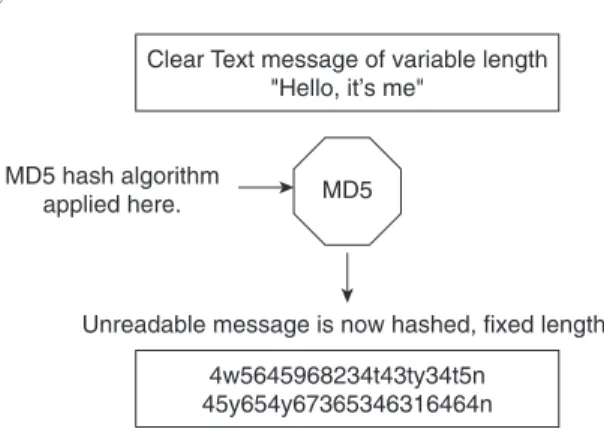
Message hashing is an encryption technique that ensures that a message or data has not been tampered with or modified. MD5 message hashing is supported on Cisco IOS routers. A variable-length message is taken, the MD5 algorithm is performed (for example, the enable secret password command), and a final fixed-length hashed output message called a message digest is produced. MD5 is defined in RFC 1321.
NOTE AES is supported in Cisco IOS 12.2.13(T) and later. To enable AES, your router must support IPSec. AES cannot encrypt IPSec and IKE traffic if an acceleration card is present. This restriction will be lifted in a future release of Cisco IOS.
Figure 4-6 displays the MD5 message operation. Figure 4-6 MD5 Operation
Figure 4-6 displays the simple clear-text message, “Hello, it’s me,” which can be of any variable length. This message is sent to the MD5 process, where the clear-text message is hashed and a fixed-length, unreadable message is produced. The data can include routing updates or username/ password pairings, for example. MD5 produces a 128-bit hash output.
SHA is the newer, more secure version of MD5, and Hash-based Message Authentication (HMAC) provides further security with the inclusion of a key exchange. SHA produces a 160-bit hash output, making it even more difficult to decipher. SHA follows the same principles as MD5 and is considered more CPU-intensive.
For more details on Cisco IOS encryption capabilities, visit the following website:
http://www.cisco.com/en/US/products/sw/iosswrel/products_ios_cisco_ios_software _releases.html
Diffie-Hellman
The Diffie-Hellman protocol allows two parties to establish a shared secret over insecure channels, such as the Internet. This protocol allows a secure shared key interchange over the public network, such as the World Wide Web, before any secure session and data transfer is initiated. Diffie-Hellman ensures that, by exchanging just the public portions of the key, both devices can generate a session and ensure that data is encrypted and decrypted by valid sources only. Only public keys (clear text) are exchanged over the public network. Using each device’s public key and running the key through the Diffie-Hellmann algorithm generates a common session key. Only public keys will ever be exchanged.
Clear Text message of variable length "Hello, it’s me"
MD5 MD5 hash algorithm
applied here.
Unreadable message is now hashed, fixed length. 4w5645968234t43ty34t5n
Encryption Technology Overview 253
Figure 4-7 displays the Diffie-Hellman exchange between Cisco routers, R1 and R2. Figure 4-7 Diffie-Hellman Key Exchange
The Diffie-Hellman key exchange takes place over a public domain. With the private key kept secret, it is very difficult for an outside intruder to generate the same key, and the private key is never exchanged over the public domain, making the process very secure.
The shared prime numbers (mathematically, a prime number is any positive integer greater than 1 and divisible without a remainder only by 1 and itself) have a special relationship that makes agreeing on a shared secret possible. An analogy would be to have two milkshake blenders making a chocolate milkshake, but with one blender supplied with apples and the other with oranges. The Diffie-Hellman algorithm is the secret ingredient that, when mixed in with both blenders, produces the chocolate milkshake. Remember, it really is a superb algorithm.
NOTE RSA is another public key cryptographic algorithm (named after its inventors, Rivest, Shamir, and Adleman) with a variable key length. RSA’s main weakness is that it is significantly slow to compute compared to popular secret-key algorithms, such as DES or 3DES. The Cisco IKE implementation uses a Diffie-Hellman exchange to get the secret keys. This exchange can be authenticated with RSA (or preshared keys). With the Diffie-Hellman exchange, the DES key never crosses the network, which is not the case with the RSA encryption and signing techniques. RSA is public domain like DES/3DES, and to apply RSA, you must be licensed from RSA Data Security. RSA is also approved by the U.S. government. An RSA signature is defined as the host (for example, PC or routers) public and private key, which is bound with a digital certificate. With RSA, only the public key is ever transmitted—the private key is never shared.
R1 Private Key and Public Key
R1 Private Key and Public Key
2. Random Integer generated.
+ prime number "A"
2. Random Integer generated.
+ prime number "B" 1. Public keys are exchanged
in clear text.
3.Each router uses the random integer to generate a private key.
4. R1 and R2 then combine with the known prime number A and B
to generate a public key.
Shared Secret 1
2
3
IP Security
IPSec provides security services at the IP layer by enabling a system to select required security protocols, determine the algorithm(s) to use for the service(s), and put in place any cryptographic keys required to provide the requested services.
–RFC 2401, “Security Architecture for the Internet Protocol”
IPSec is a defined encryption standard that encrypts the upper layers of the OSI model by adding a new predefined set of headers. IPSec is not just an encryption standard; IPSec provides a variety of other services, as discussed in this section. A number of RFCs defined IPSec.
IPSec is a mandatory requirement for IP version 6 (IPv6 is not covered in the examination). IPSec ensures that the network layer of the OSI model is secured. In TCP/IP’s case, this would be the IP network layer. The two IPSec frame formats available, Authentication Header (AH) and
Encapsulating Security Payload (ESP), both have protocol numbers assigned to them. They are shimmed in between IP and transport. (The protocol number says to give the datagram to AH or ESP, each of which has a next protocol number that eventually delivers the datagram to TCP or UDP or whatever else might be at the higher layer, such as OSPF.) Therefore, IPSec ensures that the data and headers above the network layer are secured.
IPSec can be configured in two protection modes, which are commonly referred to as security associations (SA). These modes provide security to a given IP connection. The modes are as follows (you have to use IPSec in tunnel mode if you want to obscure the network layer):
■ Transport mode—Protects payload of the original IP datagram; typically used for end-to-end sessions
■ Tunnel mode—Protects the entire IP datagram by encapsulating the entire IP datagram in a new IP datagram
An SA is required for inbound and outbound connections. In other words, IPSec is unidirectional. IKE, discussed in this chapter, allows for bidirectional SAs.
Figure 4-8 displays the extension to the current IP packet frame format for both transport and tunnel modes.
The Encapsulating Security Payload (labeled IPSec header in Figure 4-8) can be of [the] form:
■ ESP
■ AH