Easy as NAS solution guide
Second edition—featuring HP ProLiant
Storage Servers
Overview
Digital information is a critical component of business today. It grows in
volume every day, and needs to be efficiently managed, securely stored,
and constantly available. Yet it’s not just large enterprises that face these
pressures. Many smaller businesses are now seeking better ways to look
after their growing data and are investigating the advantages of
storage-specific solutions.
Network-attached storage (NAS) provides a flexible, intelligent,
simple-to-manage solution for file and print and application-storage
consolidation. It’s the perfect technology for customers who want to
deploy dedicated storage servers in their existing infrastructure,
because it leverages familiar server and operating system concepts.
How can this guide help?
Implementing a new server/storage concept for your IT components
may seem like a daunting prospect but, with this guide, HP makes
it easy. We’ll provide a basic introduction to what NAS technology
is all about, explore its more advanced capabilities, and help you
choose the right solution, based on HP ProLiant Storage Servers,
for your specific business needs.
3
HP ProLiant Storage Servers leverage standardEthernet-based networks to provide consolidated network-attached storage (NAS) for file and print serving, as well as iSCSI-based application data hosting.
As a preloaded and preconfigured solution, HP ProLiant Storage Servers can be deployed straight out of the box for “plug and play“ connectivity, and they are fully tested to help ensure functionality, performance, and compatibility. For dedicated file serving—with the option of also using them for network printing—the servers combine simplified Web interface management with an enhanced Microsoft®
operating system designed specifically for storage. They are also ideal companions for your standard application servers when consolidating your application data storage.
Are storage servers an option for
new file server deployments?
In short, yes. If you need to deploy new servers in your environment, choosing a storage server can be of immediate benefit to your organization, especially if you have any of the following requirements:
1. You need to deploy a shared storage solution quickly and easily.
2. You want to consolidate the number of file and print servers you are using in order to improve capacity utilization and performance usage.
3. You have to reduce the time and personnel required to manage and protect your data.
4. You are looking at disk-based data-protection solutions as an interim step or alternative to tape backups. 5. You run clients with a variety of operating systems
(Microsoft Windows, Apple Macintosh OS, Linux®)
and want a storage solution that can integrate with them all.
Introducing network-attached
storage
4
The building blocks
of an NAS solution
HP ProLiant Storage Servers combine integrated standard features with optional solution components to make up an overall NAS solution that easily adapts to your specific needs.
Standard components of NAS
The following four features power all HP NAS solutions:
The operating system
All HP ProLiant Storage Servers come preinstalled with Microsoft Windows Storage Server 2003, a special edition of the Microsoft Windows Server operating system, which is fine-tuned for increased storage performance and light-touch management.
Management
Following successful deployment comes efficient management. HP ProLiant Storage Servers are easily managed from any standard Web browser and offer additional remote options with terminal services and Integrated Lights-Out. Furthermore, they include tools for setting directory quotas* and reporting, as well as content filtering, which restricts users from storing undesired file types on a share.
Universal connectivity
Preinstalled file protocols enable access from Windows, NetWare, Linux, UNIX®, and Apple Macintosh clients-plus
native support for WebDAV, HTTP and FTP. No hidden software licenses are required for protocol support, and no Microsoft Client Access licenses (CALs) are needed.
Shadow copy snapshotting
With the shadow copy function, administrators can create scheduled data snapshots of shared folders. This allows clients to restore accidentally deleted or overwritten files by themselves, simply by looking up the “previous versions” tab in their Windows Explorer properties. Restoring from tape is no longer needed.
*Note: The built-in quota management feature is only usable for non-clustered configurations.
Figure 1. NAS software architecture
Quota management Shadow copy (snapshot)
Heterogeneous protocol Windows Storage Server
Repli cati o n iS C SI t a rg et C lu ster in g Multipathing Bac ku p An tiv irus
GUI and management
Part of the standard software image Optional components to solution Support of standard third-party software
5
HP NAS solutions offer a variety of ways to extend thelevel of availability and protection for your data:
Data replication
With HP OpenView Storage Mirroring software, you can replicate data from one HP ProLiant Storage Server to another via a standard IP network. (It can also be run on any Windows-based server, including those connected to a SAN.)
After initial replication, the software can synchronize the data based only on changes that are made to it, reducing network traffic and verifying that the data blocks on each device are kept up to date. This operation can be scheduled at a convenient time and can even be configured for decreased utilization of your network bandwidth. Storage mirroring can replicate data in one-to-one, one-to-many, or even many-to-many configurations, and it can also work as a simple failover mechanism between file servers.
Backup and recovery
As a member of the Microsoft Windows Server family, HP ProLiant Storage Servers are supported by most of the leading backup software vendors* and can easily be incorporated into any existing LAN- or SAN-based data-protection environment—or even attached directly to a tape drive.
Enhanced integration is achieved with HP OpenView Data Protector and HP StorageWorks tapes and tape libraries.
Disk-Based Backup for your HP ProLiant Storage Servers
Protect the valuable file data within your NAS infrastructure and enable your end-users to restore their own files without requiring assistance from IT by adding an HP ProLiant Data Protection Storage Server to your data protection strategy.
The HP ProLiant Data Protection Storage Server family is a special collection of pre-bundled and pre-configured NAS appliances that use Microsoft System Center Data Protection Manager 2006 (DPM) to provide rapid and reliable recovery, near continuous data protection, and operational simplicity for disk-based backup of Windows file servers. HP Data Protection Storage Servers can take hourly snapshots of the file data on your NAS device, backup the information to disk, and then enable users to restore from those point-in-time backups.
Disk-based backup is a fast and cost effective method to recover data lost to user error or equipment corruption. The HP ProLiant Data Protection Storage Server family powered by DPM offers an easy to deploy non-disruptive disk based backup solution that provides immediate business value by reducing the time between backups and allowing end-users to restore their own files.
Antivirus
HP NAS solutions are also supported by the industry’s leading antivirus software vendors*—and can be incorporated easily into these antivirus products, without having to add further antivirus tools to your IT environment. Simply run your existing antivirus software on the HP ProLiant Storage Server and benefit from central protection against trojan horses, worms, and viruses. The software is designed to scan the NAS device for potential threats and help eliminate them before your client systems are infected.
Application data storage and high-availability solutions
Discover the benefits of iSCSI-based application data hosting, clustering, and SAN-based replication later in this guide.
*An extensive list of the third-party software supported by HP ProLiant Storage Servers can be found at: www.hp.com/go/storageservers
Optional NAS solution
components
6
HP ProLiant Storage Servers are built on open industrystandards and offer the outstanding integration of ProLiant server, StorageWorks, and Microsoft Windows technology.
Standard 1: HP ProLiant technology
HP has built its NAS solutions on the renowned HP ProLiant platform, which offers industry-leading server technology such as:
• Integrated Lights-Out (iLO) management • HP Systems Insight Manager control • HP Smart Array technology
Standard 2: HP StorageWorks technology
HP ProLiant Storage Servers integrate seamlessly with HP StorageWorks and HP Modular Smart Array (MSA) technology, providing you with:
• Simple, integrated storage management
• An instant upgrade path for your existing ProLiant servers with DAS-to-SAN (DtS) migration*—providing improved investment protection and risk-free migration to the MSA family
• Scalable storage capacity with the attachment of MSA disk enclosures (SCSI and SATA)
• Easy entry to an NAS/SAN fusion solution by
integrating HP StorageWorks MSA, EVA, or XP arrays to your storage server
Standard 3: Microsoft Windows Storage Server 2003
HP NAS solutions are preloaded and preconfigured with the Microsoft Windows Storage Server 2003 operating system, which gives you a solution that is:
• Ready to deploy straight from the box and fully tested to verify functionality, performance, and compatibility • Built on a leading operating system platform for
outstanding integration with existing Windows environments
• Able to leverage the existing knowledge of your Windows administrators
*Read more about DAS-to-SAN migration in the My First SAN solution guide. Get your copy today at: www.hp.com/sbso/serverstorage/
Integrating leading server
and storage technologies
7
Increasing security of your
NAS solution
In addition to the antivirus capabilities of HP ProLiant Storage Servers outlined on page 5, the following technologies and features can help enable the highest level of security for your business and your data:
Network security and authentication
HP NAS solutions make it easy to authenticate your network users, services, and devices, thanks to the centralized, enhanced network management of Active Directory Services (ADS)—an integrated feature of Microsoft Windows Storage Server 2003.
Auditing
Almost any task that’s performed on your NAS server— logon, logoff, security modification, password changes, user creation, etc.—can be audited and logged, allowing administrators to track any suspicious activities.
Operating system patches
To verify that your systems have the most efficient level of protection at all times, critical security patches can be installed as soon as they are released by Microsoft— without separate qualification by HP. HP also recommends using the Automatic Update features within the operating system.
Access management
HP NAS solutions enable you to grant authenticated users and groups access to file and share levels with ease via the Access Control Lists in Microsoft Windows Storage Server 2003. This also includes a locking mechanism that allows safe concurrent access from all supported file-sharing protocols.
8
HP ProLiant Storage Servers do not only represent afile-serving solution for Microsoft Windows environments, they also allow for consolidation of heterogeneous environments featuring both Windows and UNIX. With built-in support for NFSv2 and NFSv3 UNIX file-server protocols, HP ProLiant Storage Servers help provide your NFS clients access UNIX file systems in exactly the same way as a normal UNIX server—enabling you to migrate from your existing NFS file server to a new HP NAS solution with ease.
Storage servers also leverage their own underlying storage management features to provide NFS file-server services. This allows you to:
• Issue quotas on volume and on directory levels • Restore previous versions of volumes, folders, or
individual files easily via snapshots
• Verify that failover of NFS shares within a clustered NAS environment willbe transparent to the connected clients, just like for CIFS shares
• Handle all NFS-related management tasks easily through the NAS Web-based user interface—reducing the need for administrators to have extensive NFS skills • Share files concurrently through NFS and other protocol
environments; system security and locking mechanisms facilitate access to files without the risk of data corruption
Manage your UNIX
user accounts simply
Users accessing an HP ProLiant Storage Server can be defined locally on the NAS server itself, or by using ADS (Active Directory Services) or Windows NT®domains. To
integrate with NFS environments, any of these accounts can simply be mapped to UNIX user accounts, either with an NIS environment or with simple password files. For customers looking to fully integrate and manage all UNIX and Windows users from a single Active Directory, Microsoft offers an Active Directory–integrated NIS server as part of Microsoft Services for UNIX.
Integration in your existing
UNIX environment
Why upgrade from
Windows NT 4.0?
By upgrading to Microsoft Windows Storage Server 2003, your dedicated file and print services can become enhanced for speed, reliability, and interoperability. Advantages over Microsoft Windows NT 4.0 include: •Higher levels of file-serving performance—over 100%
faster than Windows NT 4.0
•Greater reliability and scalability—you can now create clusters of up to 8 nodes
•Improved quota management—available at the folder level to allow for restrictions on how much data a particular folder can hold
•Enhanced file system recovery performance—file system checks have been reduced by as much as 400% compared to Windows NT 4.0
Why migrate from
NetWare or UNIX?
If you run multiple file servers and multiple operating systems, migrating to a single solution running Windows Storage Server 2003 can give you the benefits of a consolidated environment:
•Reduced cost and simplified management—from a single, powerful storage solution
•Easy administration—information for your entire infrastructure is held centrally on Active Directory •Streamlined management—your disparate IT
departments no longer have to manage user data with different operating systems
•Easy IT ownership—you can reduce the number of vendors you use for disk purchases and storage management
How to migrate easily
With HP NAS, you can choose from a series of easy-to-use tools to simplify your migration:
•Quest Consolidator—HP partners with Quest Software for easy migration of larger file server installations •HP OpenView Storage Mirroring—in addition to usual
data replication, this tool also makes your migration to NAS easy
•Microsoft File Migration Utility—a free-of-charge tool that simplifies the transfer of your data to the new Windows platform
For more information on migration support and tools, visit: www.microsoft.com/windowsserver2003/ upgrading/nt4/tooldocs/msfsc.mspx
10
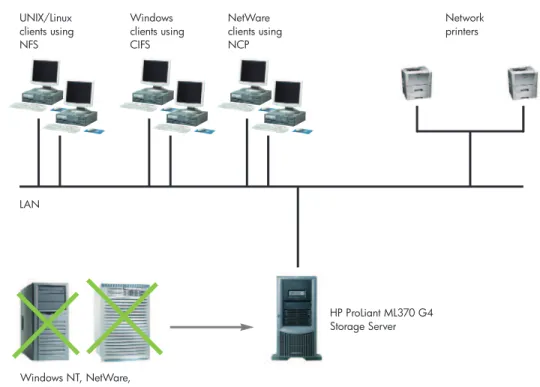
Typical NAS solutions with
HP ProLiant Storage Servers
The following are examples of how you can use NAS solutions based on HP ProLiant Storage Servers to solve your specific business challenges or issues:
• Upgrade from your current file server platform (e.g., Windows NT®4.0) to a next-generation
storage server with HP NAS.
• Migrate other file server platforms (e.g., UNIX and NetWare) and consolidate them on a single storage server.
• HP NAS technology is perfect for serving clients in heterogeneous environments (Windows, UNIX, NetWare, Apple Macintosh, Web staging, etc.) from one single platform.
• Migration of clients from one platform to another is simple (see previous page).
• Storage servers can also be used as print servers, giving you a true file and print solution.
• Consolidating on storage servers can give you increased storage performance combined with light-touch management.
UNIX/Linux clients using NFS
Windows clients using CIFS
NetWare clients using NCP
HP ProLiant ML370 G4 Storage Server
Windows NT, NetWare, or UNIX
Network printers
LAN
11
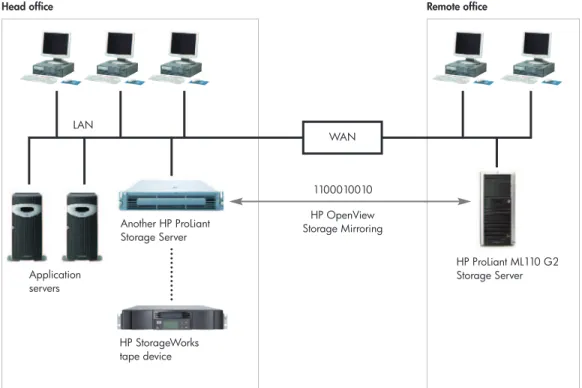
• Thanks to simple remote manageability, HP ProLiantStorage Servers can easily be used to deploy file serving at remote sites.
• You can replicate data between a central office and branch office locations with HP OpenView Storage Mirroring software, thereby benefiting from both centralized server administration and tape backup.
• File servers at your distributed locations no longer require onsite management and will receive increased service from your central site.
LAN
Application servers
HP StorageWorks tape device
WAN
1100010010 HP OpenView Storage Mirroring
HP ProLiant ML110 G2 Storage Server
Head office Remote office
Figure 3. Remote replication and backup consolidation (e.g., in branch offices)
Another HP ProLiant Storage Server
12
Consolidation of file data has always been the domainof NAS, while consolidation of block-level application data has usually required investment in a separate Fibre Channel SAN. However, with the HP ProLiant Storage Server iSCSI Feature Pack*, you can now host application data on your storage server without investing in a SAN infrastructure.
This new, low-cost storage technology uses industry-standard hardware and software on existing Ethernet infrastructures—making it ideal for smaller environments that require simpler manageability, easy scalability, and centralized backup, but that have fewer requirements for performance or availability.
It may also be used in larger environments, such as on a storage server deployed as a NAS/SAN gateway. Here it would act as a bridge between the iSCSI/Ethernet network and the standard Fibre Channel SAN.
Simplified management for application data hosting
The iSCSI Feature Pack has been tested and qualified as a storage system for the most popular appliacations in small environments: Microsoft Exchange, Microsoft SQL, and Oracle Database. Plus, for simplified management, the embedded HP ProLiant Application Storage Manager** tool can reduce process steps, setup training needs, and knowledge requirements to configure and monitor Exchange and SQL data by providing excellent implementation through automation. With additional support for generic iSCSI volumes and file shares, HP ASM is the single point of management for iSCSI-enabled Storage Servers.
* The HP iSCSI Feature Pack Standalone Edition is supported on all standalone tower and rack HP ProLiant Storage Servers. The HP iSCSI Feature Pack Gateway Edition is also supported on HP ProLiant DL380 G4 or DL585 Storage Server NAS/SAN gateways, which can be configured in a highly available cluster mode.
** Application Storage Manager is only included in the iSCSI Feature Pack for standalone servers.
Consolidating file and application
storage with HP NAS and iSCSI
Feature Pack
13
Typical NAS solutions with
the iSCSI Feature Pack
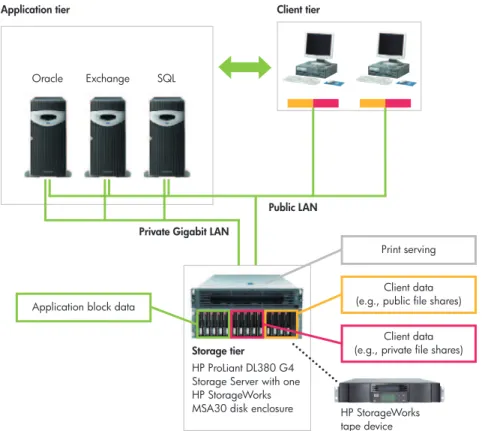
• Use HP ProLiant Storage Servers with the iSCSI Feature Pack for true storage consolidation in small environments.
• Store the data of your application server on a storage server (which can also be deployed as a file and print server).
• No need to invest in a Fibre Channel infrastructure; this storage solution is based on standard Ethernet infrastructure technologies.
• Application data and storage data are separated into different tiers to provide improved performance for each.
• In this scenario, three application servers (which could be clustered) are connected via a private Ethernet network to the storage server, which is also serving files to end-user clients.
Figure 4. Unified application data storage and file serving with iSCSI Feature Pack Application tier
Storage tier
Public LAN Private Gigabit LAN
Application block data
Client data (e.g., public file shares)
Client data (e.g., private file shares)
Print serving Exchange
Oracle SQL
Client tier
HP StorageWorks tape device HP ProLiant DL380 G4
Storage Server with one HP StorageWorks MSA30 disk enclosure
14
For added functionality, the iSCSI Feature Packcan be expanded with these additional features:
iSCSI Snapshots
Snapshot functionality safeguards against accidental deletions, file corruptions, and virus attacks by creating point-in-time copies of the data on your storage server. Delta changes are replicated with 100% integrity, and the resulting space-efficient snapshots can be accessed instantly via the Microsoft Volume Shadow Copy Service (VSS) interface.
iSCSI Direct Backup
Direct backup functionality allows administrators to perform backups directly from a storage server to a tape drive without involving the application server. This reduces load on the application server and also on network traffic.
iSCSI Clustering
Upgrading the iSCSI Feature Pack (Gateway Edition only) with clustering services enhances the availability of your storage server. It uses the Microsoft Cluster Services feature to activate two-node iSCSI target capability, and it help eliminates single points of failure by adding redundant features such as dual network connections and dual I/O channels.
iSCSI Replication
Replicates application host's iSCSI disks, over IP, to a Disaster Recovery site to guard against site failure. The iSCSI Storage Server in the Disaster Recovery site tracks multiple versions of the ‘replica” identified by time and each replica can be mounted for R/W access in the case of a failure at the primary site.
Benefits of iSCSI Feature Pack
• Allows you to consolidate multiple servers with direct-attached storage (DAS) to a single storage server platform, delivering storage consolidation based on a standard server concept
• Offers simple manageability, easy scalability, and centralized backup
• Protects and enhances your investments and skills in Ethernet technology
• Provides an easy and familiar management interface, integrated with the Web-based interface of Microsoft Windows Storage Server 2003
Advanced features of
iSCSI Feature Pack
15
In this next section of the solution guide, we consider themore advanced capabilities of NAS and how these can help larger organizations solve their growing storage challenges.
Creating an integrated storage
environment with NAS/SAN fusion
Businesses that require mission-critical levels of performance, scalability, and availability can naturally choose a storage area network (SAN) as their primary storage concept. However, by integrating NAS into the SAN environment as well, you can benefit from the advantages of both storage concepts:
• NAS solutions combine enhanced storage performance with light-touch management, providing network file storage that can be accessed directly by all users over the corporate network.
• SAN solutions provide highest availability of larger storage capacities, combined with integrated management and better efficiency. The storage is traditionally accessed by application servers.
With HP NAS/SAN fusion technology, you can enhance your existing investment in SAN technology by combining it with the added benefits of NAS. Alternatively, an entry-level solution is provided by the iSCSI Feature Pack (see page 12), which enables you to achieve SAN capabilities on a standard Ethernet infrastructure.
Exploring advanced
NAS capabilities
Type of data Shared files
PCs and workstations Through NAS
appliance
Fibre Channel Block data (databases)
Application servers
Direct access
Simplified Ethernet LAN
Cabling used
Consumer
Disk access
Management
NAS iSCSI NAS SAN
16
On page 4 of this guide, we looked at the integratedfeatures of HP NAS solutions designed to enhance the availability of your data. However, when you combine NAS with SAN, there are even more options to verify your data is up and available.
Clustering
To enhance the performance and redundancy of just a single system, both the HP ProLiant DL380 G4 Storage Server (SAN model) and HP ProLiant DL585 Storage Server can be joined in a cluster of up to eight systems. This shared storage arrangement is achieved via HP NAS/SAN fusion technology. Working in parallel, the clustered systems give you additional performance. They also monitor each other so that, if one fails, its workload is instantly picked up by another cluster node.
SAN-based data replication
Data replication keeps an up-to-date copy of your critical data in a separate location, online and ready to be used at any time, enabling fast disk-based disaster recovery. As we have seen earlier in the guide, solutions based around HP OpenView Storage Mirroring allow you to achieve cost-effective data replication.
However, the highest availability and performance requirements are usually met by replicating data between two arrays, such as HP StorageWorks EVA or XP arrays, using HP StorageWorks Continuous Access software. You can achieve SAN-based data replication on your HP ProLiant Storage Servers by integrating them into a NAS/SAN fusion solution.
System recovery
Effective recovery from disaster requires a quick and simple system-recovery procedure. All HP NAS servers are shipped with an instant-recovery CD, which quickly recovers your system back to factory status. And with automated system recovery (ASR) you can go even further. By backing up your server system disk—including configuration data such as server name, IP address, and user mapping—it enables you to restore a full previous configuration following system disaster.
Achieving even higher
availability
17
Integrated server monitoring
HP NAS solutions provide excellent integration with your existing system-monitoring tools. This is especially true if you run HP Systems Insight Manager, because all the required agents are preinstalled and become activated instantly after setup. Your NAS server can then be monitored by the Systems Insight Manager console just like any other ProLiant server.
HP Systems Insight Manager provides easy-to-use, centralized monitoring of your server environment— including system components such as the network interface, memory, processors and disks. When integrated with HP OpenView, it allows comprehensive service-level-based management of your enterprise. Please note that not all storage servers are supported. For details on what is supported and for more information, please visit: www.hp.com/go/hpsim.
Integrated server management
In addition to server configuration, integrating NAS into Systems Insight Manager allows you to analyze your system and initiate management tasks remotely with tools such as a Web-based user interface, Terminal Services, command line, Microsoft Management Console (MMC), and Integrated Lights-Out (iLO) management. HP iLO technology allows you to cold boot or troubleshoot your NAS server before the operating system is even running.
Integrated SAN monitoring
and management
NAS/SAN fusion environments—based on HP StorageWorks MSA1000 or MSA1500 arrays— leverage HP Smart Array technology and offer full monitoring and management integration with HP Systems Insight Manager. This enables both your NAS server and SAN storage to be managed in one single tool. Larger SAN environments, especially those with EVA and XP storage arrays, utilize specialized storage management tools for enhanced monitoring capabilities. For example, HP OpenView Storage Area Manager (SAM) can monitor the entire storage infrastructure, from logical volumes, HBAs, and the fabric infrastructure to the storage hardware within the array.
18
Typical NAS solutions with
NAS/SAN fusion
Just as application servers can store their data in a SAN, a storage server can be set up as a gateway for clients to leverage the advantages of a SAN: pooled storage capacity, central management, high availability, and integrated backup and recovery procedures.
This unique fusion helps eliminate storage islands and reduces overall management complexity and costs. The example here shows a Microsoft Exchange server (green line) sharing the same storage source as its clients, which use it as client data share (yellow line) or personal drive (blue line).
Figure 6. Integrate storage servers into a SAN with NAS/SAN fusion
Application server with Microsoft Exchange 2003
HP ProLiant DL585 Storage Server (may be clustered)
HP StorageWorks disk array LAN
Workstation clients
Outlook PST file archive Exchange database
Client file shares
19
HP ProLiant ML350 G4/ML370 G4/DL380 G4 Storage Servers
2U rack or 5U tower model 1–2 Intel Xeon™processors
Up to 1.2 TB/1.8 TB storage using 4/6 internal SCSI disk drives, or up to 1 TB storage using 4 internal SATA disk drives (ML350 G4 only), expandable for external SCSI and SATA storage
1 GB to 2 GB (max. 4 GB) memory 3 PCI slots (4 PCI plus 2 PCI-X for ML models) for redundant NIC Dual-port NIC
Hardware RAID
ML370 and DL380 offer redundant power and cooling
iLO-based management, HP Systems Insight Manager support, D+S migration support
HP ProLiant ML110 G2/DL100 G2 Storage Servers
1U rack/desktop or 5U tower model 1 Intel®Celeron®/Pentium®4 processor
320 GB, 640 GB, or 1 TB storage using 4 x SATA disk drives
256 MB to 1 GB (max. 4 GB) memory 2 PCI slots (plus 3 PCI-X slots for ML110) for redundant NIC
Dual-port NIC
Hardware RAID (read cache only) Non redundant power and cooling ML110 offers Series 100 Lights Out management, DL100 G2 offers IPMI 2.0 management
Gateways for NAS/SAN fusion Remote office Departmental Enterprise
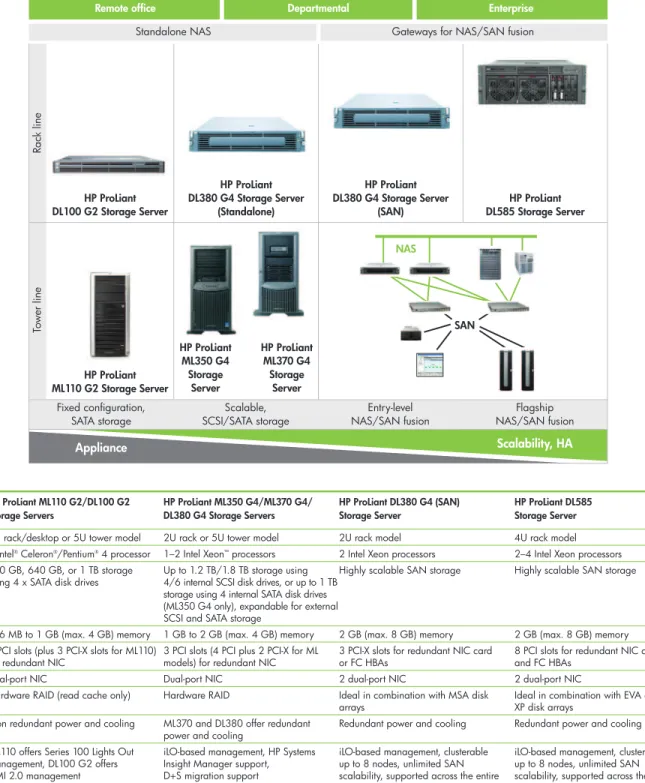
The HP product portfolio
With a full portfolio of HP ProLiant Storage Servers, you can choose the level of performance and scalability you need to meet your specific business requirements.
HP ProLiant DL380 G4 (SAN) Storage Server
2U rack model 2 Intel Xeon processors Highly scalable SAN storage
2 GB (max. 8 GB) memory 3 PCI-X slots for redundant NIC card or FC HBAs
2 dual-port NIC
Ideal in combination with MSA disk arrays
Redundant power and cooling iLO-based management, clusterable up to 8 nodes, unlimited SAN scalability, supported across the entire line of HP disk arrays, HP Systems Insight Manager support
HP ProLiant DL585 Storage Server
4U rack model 2–4 Intel Xeon processors Highly scalable SAN storage
2 GB (max. 8 GB) memory 8 PCI slots for redundant NIC cards and FC HBAs
2 dual-port NIC
Ideal in combination with EVA and XP disk arrays
Redundant power and cooling iLO-based management, clusterable up to 8 nodes, unlimited SAN scalability, supported across the entire line of HP disk arrays, HP Systems Insight Manager support
Standalone NAS Ra ck line To w er line Appliance HP ProLiant DL380 G4 Storage Server
(Standalone)
HP ProLiant DL380 G4 Storage Server
(SAN)
HP ProLiant DL585 Storage Server HP ProLiant
DL100 G2 Storage Server
HP ProLiant ML110 G2 Storage Server
HP ProLiant ML350 G4 Storage Server HP ProLiant ML370 G4 Storage Server Scalability, HA Scalable, SCSI/SATA storage Entry-level NAS/SAN fusion Flagship NAS/SAN fusion NAS SAN Fixed configuration, SATA storage
20
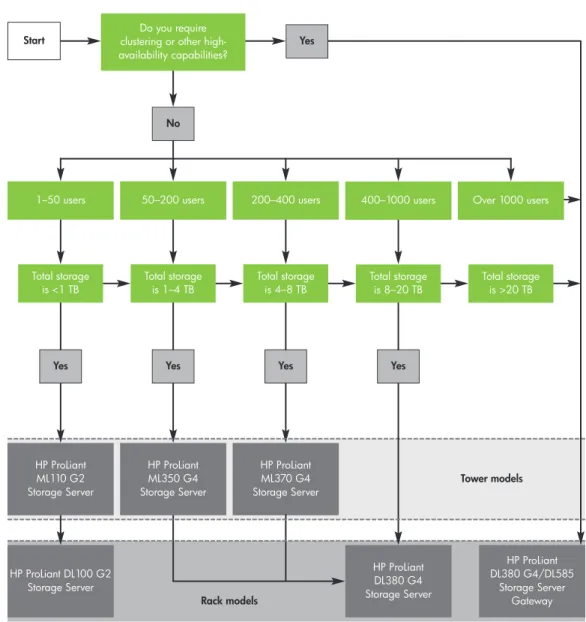
50–200 users Over 1000 users
No
Yes Yes Yes
Do you require clustering or other high-availability capabilities?
1–50 users 200–400 users 400–1000 users
Total storage is >20 TB Total storage
is <1 TB
HP ProLiant DL100 G2 Storage Server
HP ProLiant ML370 G4 Storage Server
Total storage is 4–8 TB
HP ProLiant DL380 G4 Storage Server
HP ProLiant DL380 G4/DL585
Storage Server Gateway
Tower models
Rack models
Total storage is 1–4 TB
Total storage is 8–20 TB
Yes
HP ProLiant ML350 G4 Storage Server
Yes Start
HP ProLiant ML110 G2 Storage Server
Which HP NAS solution is right for you?
This decision tree considers only file serving. For configurations that include additional software (i.e., iSCSI Feature Pack, antivirus, backup and recovery software), please refer to www.hp.com/go/storageservers. Technically, you may configure a solution that exceeds the configuration limits shown here. However, the purpose of this decision tree is to show you the best rational distinction between each storage server model. The disk capacities listed here are raw data capacities that do not take into account any RAID overheads.
21
1. What total system throughput do you require? Also, how many concurrent connections (users) are required?
The average data throughput for file servers in production environments today is between eight and 12 MB/sec. Please refer to the HP Storage Server web site for the specific system throughputs of each HP ProLiant Storage Server. To achieve higher overall data throughput, you can scale across multiple servers via DFS or by distributing shares across clusters consisting of up to eight nodes. For more information please visit
www.hp.com/go/storageservers.
2. Do you require optimal network performance from your NAS system?
TOE (TCP/IP offload engine) cards enhance performance by offloading network processing from the system CPU to the TOE card CPU. It’s like having a dedicated processor to handle network traffic, freeing up system processors for other tasks. TOE cards can, in some cases, boost performance by up to 30%, depending on current load.
3. Do you have requirements for high availability of your NAS configurations?
Both the HP ProLiant DL380 G4 Storage Server (SAN model) and HP ProLiant DL585 Storage Server provide high-availability capabilities through clustering. They also provide substantial flexibility via their available PCI slot connections—three on the HP ProLiant DL380 G4 and eight on the HP ProLiant DL585 Storage Server. Optional redundant paths to both the network and the back-end storage subsystem can help increase availability, in addition to the use of clustering at the system level. Furthermore, data replication software—e.g., HP OpenView Storage Mirroring and HP StorageWorks Continuous Access—in combination with clustering can also improve availability.
4. Do you require antivirus and/or quota management software on your NAS server?
If you require additional management layers in your NAS solution, additional processors may be required in your configuration. The HP ProLiant ML300 Storage Server series and the HP ProLiant DL380 G4 and HP ProLiant DL585 Storage Servers all provide multiprocessor capabilities, with the HP ProLiant DL585 Storage Server providing up to four CPUs. Whichever NAS solution you choose, TOE cards can provide even more processing power to achieve better performance.
Further considerations for
22
Specific configuration examples
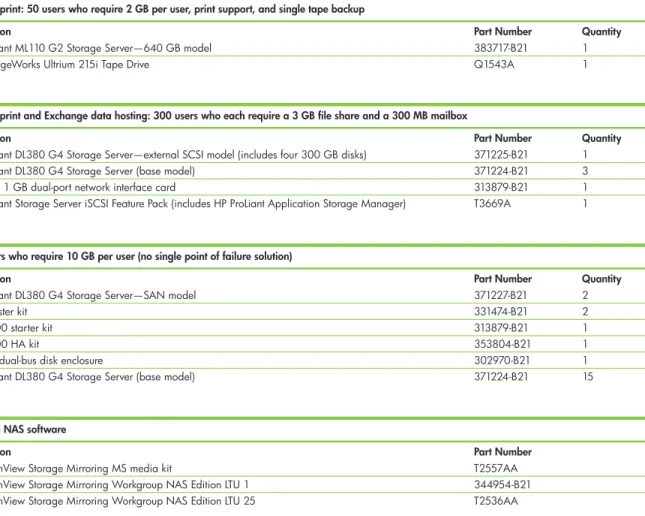
These configurations demonstrate the types of systems and flexibility available from HP. Below is a sample bill of materials—including hardware and software—recommended for customers ordering their first NAS solution. The standard warranty for each configuration can be enhanced with the optional Care Pack Services listed on the following page.
Note:All configurations here are using RAID 5 volumes for user data. 72 GB and 146 GB drive variants are also available. Solutions from HP typically require rack-mounting hardware not outlined in this guide. All Storage Mirroring licenses require a media kit; one license per server node required. LTU = license to use. File and print: 50 users who require 2 GB per user, print support, and single tape backup
Description Part Number Quantity
HP ProLiant ML110 G2 Storage Server—640 GB model 383717-B21 1 HP StorageWorks Ultrium 215i Tape Drive Q1543A 1
File and print and Exchange data hosting: 300 users who each require a 3 GB file share and a 300 MB mailbox
Description Part Number Quantity
HP ProLiant DL380 G4 Storage Server—external SCSI model (includes four 300 GB disks) 371225-B21 1 HP ProLiant DL380 G4 Storage Server (base model) 371224-B21 3 NC6170 1 GB dual-port network interface card 313879-B21 1 HP ProLiant Storage Server iSCSI Feature Pack (includes HP ProLiant Application Storage Manager) T3669A 1
Optional NAS software
Description Part Number
HP OpenView Storage Mirroring MS media kit T2557AA HP OpenView Storage Mirroring Workgroup NAS Edition LTU 1 344954-B21 HP OpenView Storage Mirroring Workgroup NAS Edition LTU 25 T2536AA
500 users who require 10 GB per user (no single point of failure solution)
Description Part Number Quantity
HP ProLiant DL380 G4 Storage Server—SAN model 371227-B21 2
NAS cluster kit 331474-B21 2
MSA1000 starter kit 313879-B21 1
MSA1000 HA kit 353804-B21 1
MSA30 dual-bus disk enclosure 302970-B21 1 HP ProLiant DL380 G4 Storage Server (base model) 371224-B21 15
23
HP Services
HP offers a full range of prepackaged or customized services to complement our NAS solutions. These cover the entire project lifecycle and are delivered by qualified and certified HP professionals or designated channel partners.
Availability
Our proactive and reactive availability service
components deliver the right balance of availability and cost-efficient maintenance. Choose from basic onsite hardware and software maintenance, up to highest-level availability with our Critical Services portfolio.
Design and integration
We’ll help you create a NAS infrastructure that meets your current and future needs and help you choose the most suitable architecture—NAS, SAN, or both. HP deployment services can integrate your solution quickly and efficiently.
Data migration
HP can also provide stress-free migration of data from existing storage systems—such as mission-critical HP-UX, Windows 2000, Windows NT, Sun legacy, and EMC systems—to your new NAS solution.
Performance services
HP performance services—including assessment, tuning, measuring, and monitoring—help you enhance IT performance and efficiency for increased return on your investments.
Customized business solutions
HP offers a whole range of services to help enable your IT infrastructure remains scalable and responsive and is supporting your business properly.
HP Care Pack Services
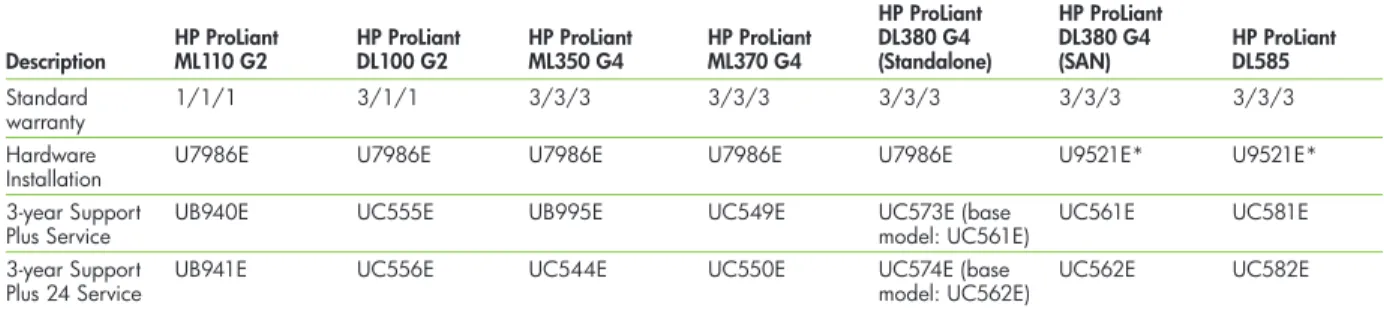
Extend and expand your standard product warranty with easy-to-buy, easy-to-use support packages that help you make the most of your storage investments. See Table 2 for the Care Pack Services HP recommends for ProLiant Storage Servers.
For full details, contact your HP sales representative or visit: www.hp.com/hps/carepack
Table 2. Care Pack Services1for HP ProLiant Storage Servers
HP ProLiant HP ProLiant
HP ProLiant HP ProLiant HP ProLiant HP ProLiant DL380 G4 DL380 G4 HP ProLiant
Description ML110 G2 DL100 G2 ML350 G4 ML370 G4 (Standalone) (SAN) DL585
Standard 1/1/1 3/1/1 3/3/3 3/3/3 3/3/3 3/3/3 3/3/3 warranty
Hardware U7986E U7986E U7986E U7986E U7986E U9521E* U9521E* Installation
3-year Support UB940E UC555E UB995E UC549E UC573E (base UC561E UC581E
Plus Service model: UC561E)
3-year Support UB941E UC556E UC544E UC550E UC574E (base UC562E UC582E
Plus 24 Service model: UC562E)
Support Plus provides single-source hardware and software services during standard business hours, Monday through Friday. Support Plus 24 provides the same support 24 hours a day, 7 days a week. For more information, please visit: www.hp.com/hps/carepack
*Hardware Installation and Startup Service
1 The HP Care Pack product number listed represents an “E” version of the packaged service. A box version of the HP Care Pack may be available for those
countries that can not support electronic fulfillment. The HP Care Pack product number would be the same with the exception of the last character. The boxed version product number would end in an “A” as opposed to an “E”, example: U2893E would become U2893A.
24
Q: What is the advantage of an HP ProLiant Storage Server over a general-purpose file and print server? A:An HP ProLiant Storage Server is the ideal device for storage-focused server deployment. As a ready-to-go solution, it simplifies implementation and offers a great file-serving performance and the ease of use for ongoing management, even in a remote setup or a multi-platform environment.
In addition, with the iSCSI Feature Pack, it offers a new cost-effective possibility to store application data on a consolidated storage server platform— removing the need to invest in a separate Fibre Channel storage infrastructure.
Q: How can I back up the data on my NAS system? A:The HP strategy for NAS backup is designed around
“customer choice.” Being treated like any other Windows Server 2003 system, HP ProLiant Storage Servers can integrate into your existing backup strategy. A complete and up-to-date list of supported backup and other third-party software can be found at: www.hp.com/go/storageservers
The supported backup software can either be installed directly onto the storage server for direct data backup, or the relevant Windows agents can be installed and managed remotely. This includes the cell manager of HP OpenView Storage Data Protector, which can also be run on a storage server.
In addition, HP supports either direct SCSI-attached tape devices or network-/SAN-attached tape devices. SAN-attached is recommended for multiple NAS devices and HP NAS/SAN fusion products. A SAN-attached backup matrix can be found at:
www.hp.com/go/ebs
Q: How can I protect the data on my NAS server from viruses?
A:Again, the HP strategy for antivirus is “customer choice”, and storage servers should be treated like any other Windows Server 2003 device. For a complete list of supported antivirus programs and other third-party software, please visit:
www.hp.com/go/storageservers Q: What is snapshotting technology?
A:Snapshotting technology allows data to be duplicated with reduced usage of disk space. The file index information of a particular volume is duplicated and presented as another volume to the NAS system. This duplicated volume then holds a point-in-time copy of the original volume. Any subsequent changes to the original volume can then cause disk space to be used. This is because the original file is copied to the snapshot volume before it is modified. For example, a 100 GB volume that has 10% changes per day would require a 10 GB snapshot volume.
Frequently asked questions
25
Q: How can I increase the performance of my HP NAS system?
A:Ideally, you would identify the bottleneck in the system and address this area. HP ProLiant Storage Servers can accommodate additional memory and an additional processor, depending on the model. Also, adjusting RAID sets and adding higher-performance HP hard disk drives for heavily impacted volumes can significantly increase performance. Network performance can also impact NAS performance. Try to segment NAS traffic and/or add additional network controllers to the storage server, as required. You can also improve performance by using TCP/IP offload engine (TOE) network cards from Alacritech, which manage network protocol handling and thereby reduce the CPU cycles on the system processors.
Note:We recommend that you check the upgrade options and TOE support specific to your selected storage server model.
Q: Please explain the protocols supported in more detail. A:Common Internet File System (CIFS) is the protocol
used by Microsoft to share files between Windows-based systems. Network File System (NFS) is the protocol used by Linux and UNIX systems to communicate. NetWare Core Protocol (NCP) and AppleTalk are for NetWare clients and Apple Macintosh systems, respectively. All of these protocols allow machines to mount a disk partition on a remote machine as if it were on a local hard drive.
Q: How can I scale up my storage server?
A:HP ProLiant DL100 G2 and HP ProLiant ML110 G2 Storage Servers are designed for fixed capacity, but they can be upgraded with additional memory. All other storage servers can be upgraded with additional CPUs and memory for additional performance, and they can be scaled easily by attaching external HP StorageWorks MSA20 and HP StorageWorks MSA30 disk enclosures. Furthermore, the HP ProLiant DL380 G4 and HP ProLiant DL585 Storage Server SAN gateways offer the full flexibility and scalability of a SAN.
26
CIFS, NFS, NCP, MAC, WebDAV, HTTP, and FTP—Protocols that allow machines to send information to one another over a network; for more information, see the Q&A section of this guide
Clustering—The ability to group multiple NAS systems and have them appear to the end user as one logical NAS file server; a server in a cluster is called a node; i.e., four storage servers = a four-node cluster
Content filtering—Allows administrators to restrict the types of files that are shared across the server, such as mp3 files
DAS (direct-attached storage)—Deployment of dedicated storage devices for each server; disadvantages include inefficient storage use and allocation, as well as multivendor storage and management interfaces
Data replication—The ability to replicate data to another system/site via either a LAN or SAN connect
DFS (distributed file system)—System administrators using this protocol can make it easy for users to access and manage files that are physically distributed across a network; files appear to users as if they reside in one place on the network
DtS (DAS-to-SAN technology)—An exclusive HP feature that provides quick and easy data migration from direct-attached server storage to network storage such as HP StorageWorks MSA arrays or HP ProLiant Storage Servers
Fibre Channel—The topology and transport protocol used to send block-level data information between server and storage
Heterogeneous connect—Allowing clients or servers with differing operating systems to connect to the NAS or SAN infrastructure at the same time
iLO (Integrated Lights-Out) management—Selected HP ProLiant Storage Servers offer embedded lights-out technology, which enables users to perform a full range of management tasks without physically being in front of the server; find out more at www.hp.com/servers/ilo iSCSI (Internet small computer system interface)—An IP-based storage networking standard that carries SCSI commands over an IP network and facilitates data transfer over intranets, LANs, WANs, and the Internet for flexible storage management
NIS (Network Information System)—A network naming and administration system for smaller networks that allows users at any host to access files or applications on any other host in the network with a single user identification and password
Quota management—Restricts how much data can be stored on a volume or file share, preventing disk space from reaching zero
Snapshot—The ability to duplicate data within a server, NAS device, or RAID array and promote it as a copy of data while utilizing less disk space
Meijer Inc—the Michigan-based retail-chain
giant—used to operate with more than 150 file
servers spread out over its multiple company
locations. Supporting and upgrading these
distributed systems was extremely costly and
ineffective, so it decided to consolidate on an
HP NAS/SAN fusion solution, including two HP
NAS devices for enhanced file and print serving.
For more information
Find out more about HP ProLiant Storage Servers and solutions at:
To learn more, visit www.hp.com/go/storageservers
© 2005 Hewlett-Packard Development Company, L.P. The information contained herein is subject to change without notice. The only warranties for HP products and services are set forth in the express warranty statements accompanying such products and services. Nothing herein should be construed as constituting an additional warranty. HP shall not be liable for technical or editorial errors or omissions contained herein.
Intel, Celeron, Pentium, and Xeon are trademarks or registered trademarks of Intel Corporation or its subsidiaries in the United States and other countries. Linux is a U.S. registered trademark of Linus Torvalds. Microsoft, Windows, and Windows NT are U.S. registered trademarks of Microsoft Corporation. Oracle is a registered U.S. trademark of Oracle Corporation, Redwood City, California. UNIX is a registered trademark of The Open Group. 5983-0748EN rev.1, 08/2005